
Chapter 6 InterVLAN Routing Switched Networks PresentationID 2008




- Slides: 33
Chapter 6: Inter-VLAN Routing Switched Networks Presentation_ID © 2008 Cisco Systems, Inc. All rights reserved. Cisco Confidential 1
Chapter 6 6. 1 Inter-VLAN Routing Configuration 6. 2 Troubleshooting Inter-VLAN Routing 6. 3 Layer 3 Switching 6. 4 Summary
Chapter 6: Objectives § Options for enabling inter-VLAN routing § Legacy inter-VLAN routing § Router-on-a-stick inter-VLAN routing § Troubleshoot inter-VLAN configuration issues § Troubleshoot IP addressing issues in inter-VLAN-routed environment § Inter-VLAN routing using Layer 3 switching § Troubleshoot inter-VLAN routing in a Layer 3 -switched environment
6. 1 Inter-VLAN Routing Configuration Presentation_ID © 2008 Cisco Systems, Inc. All rights reserved. Cisco Confidential 4
Převzato z x 0020 x Začátek
Basic Configuration of VLANS, Switchports and Inter. VLAN Routing https: //www. youtube. com/watch? v=ojh 8_BDc. Xy. I
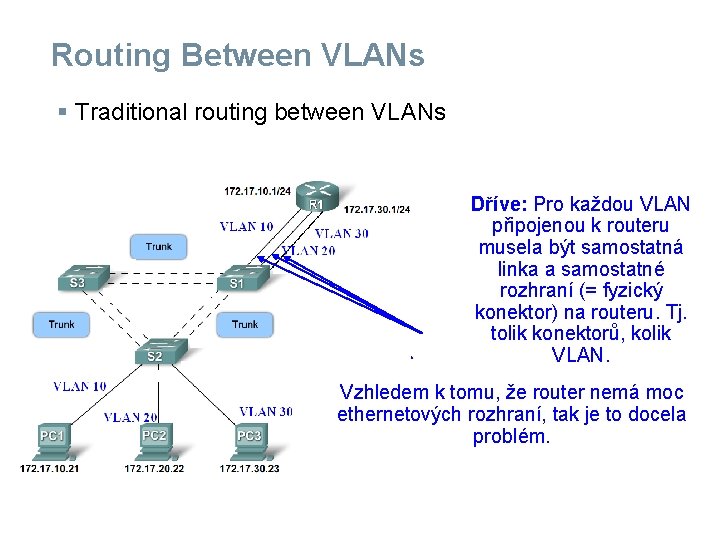
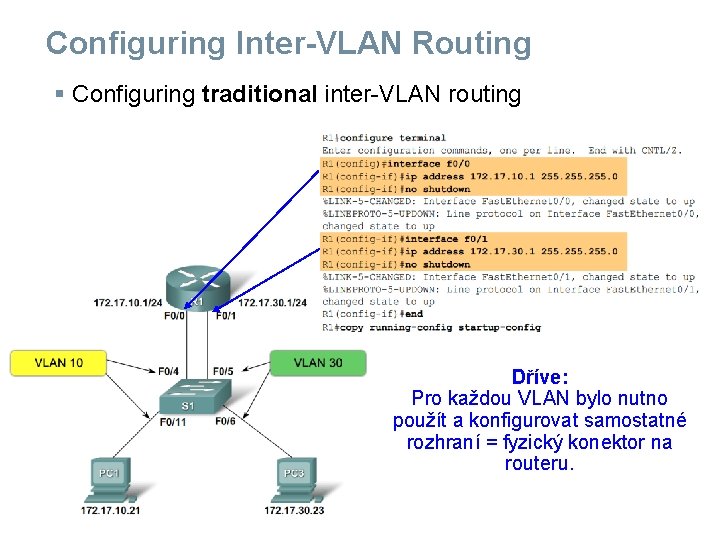
Routing Between VLANs § Traditional routing between VLANs Dříve: Pro každou VLAN připojenou k routeru musela být samostatná linka a samostatné rozhraní (= fyzický konektor) na routeru. Tj. tolik konektorů, kolik VLAN. Vzhledem k tomu, že router nemá moc ethernetových rozhraní, tak je to docela problém.
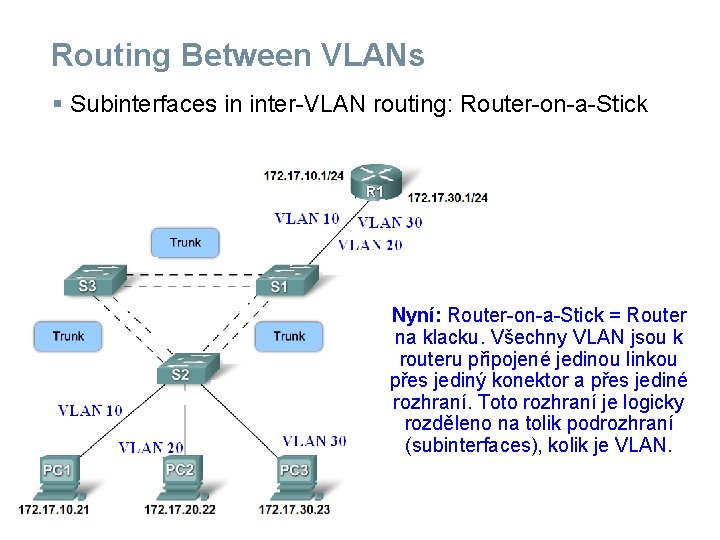
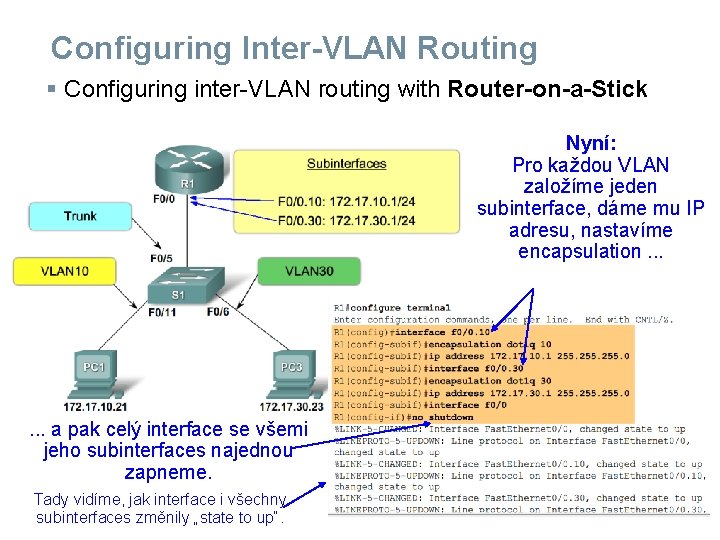
Routing Between VLANs § Subinterfaces in inter-VLAN routing: Router-on-a-Stick Nyní: Router-on-a-Stick = Router na klacku. Všechny VLAN jsou k routeru připojené jedinou linkou přes jediný konektor a přes jediné rozhraní. Toto rozhraní je logicky rozděleno na tolik podrozhraní (subinterfaces), kolik je VLAN.
Configuring Inter-VLAN Routing § Configuring traditional inter-VLAN routing Dříve: Pro každou VLAN bylo nutno použít a konfigurovat samostatné rozhraní = fyzický konektor na routeru.
Configuring Inter-VLAN Routing § Configuring inter-VLAN routing with Router-on-a-Stick Nyní: Pro každou VLAN založíme jeden subinterface, dáme mu IP adresu, nastavíme encapsulation. . . a pak celý interface se všemi jeho subinterfaces najednou zapneme. Tady vidíme, jak interface i všechny subinterfaces změnily „state to up“.
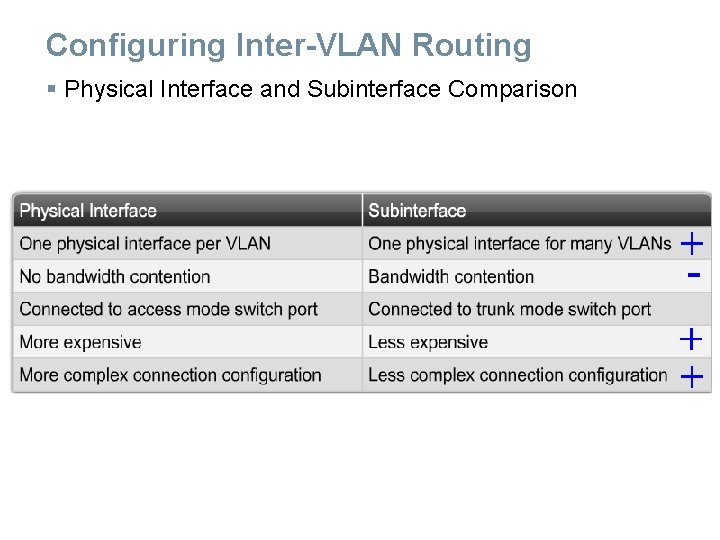
Configuring Inter-VLAN Routing § Physical Interface and Subinterface Comparison
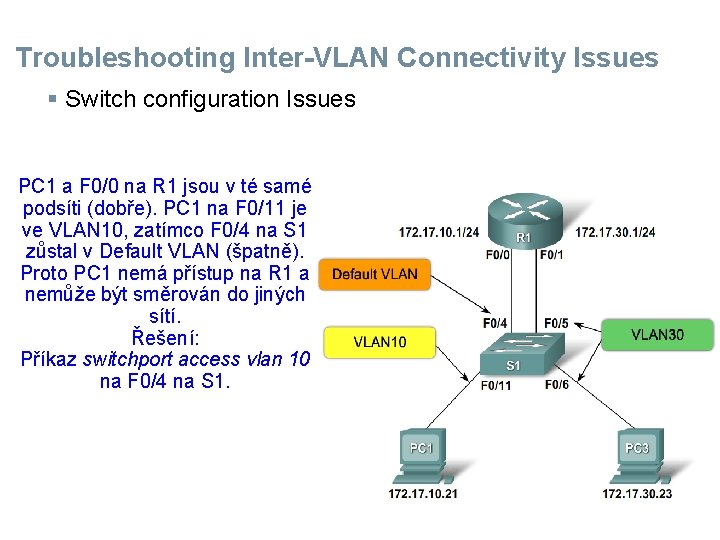
Troubleshooting Inter-VLAN Connectivity Issues § Switch configuration Issues PC 1 a F 0/0 na R 1 jsou v té samé podsíti (dobře). PC 1 na F 0/11 je ve VLAN 10, zatímco F 0/4 na S 1 zůstal v Default VLAN (špatně). Proto PC 1 nemá přístup na R 1 a nemůže být směrován do jiných sítí. Řešení: Příkaz switchport access vlan 10 na F 0/4 na S 1.
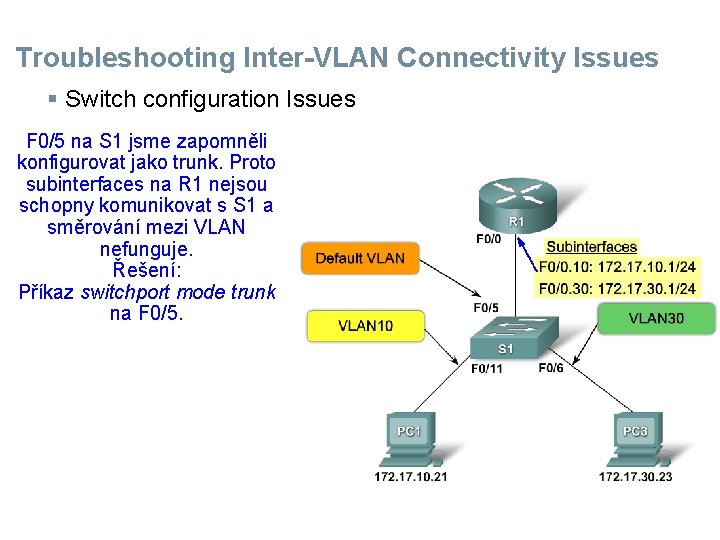
Troubleshooting Inter-VLAN Connectivity Issues § Switch configuration Issues F 0/5 na S 1 jsme zapomněli konfigurovat jako trunk. Proto subinterfaces na R 1 nejsou schopny komunikovat s S 1 a směrování mezi VLAN nefunguje. Řešení: Příkaz switchport mode trunk na F 0/5.
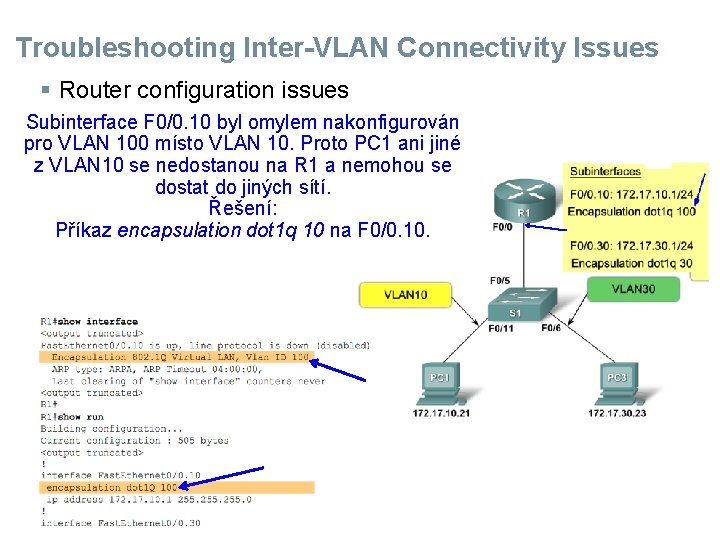
Troubleshooting Inter-VLAN Connectivity Issues § Router configuration issues Subinterface F 0/0. 10 byl omylem nakonfigurován pro VLAN 100 místo VLAN 10. Proto PC 1 ani jiné z VLAN 10 se nedostanou na R 1 a nemohou se dostat do jiných sítí. Řešení: Příkaz encapsulation dot 1 q 10 na F 0/0. 10.
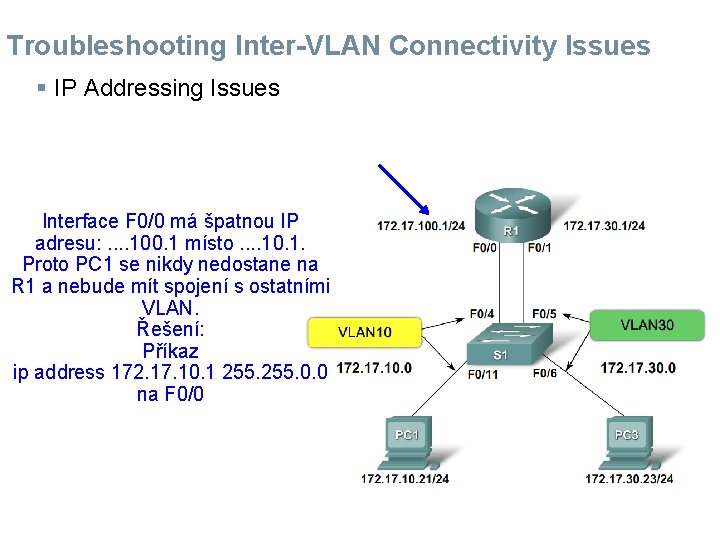
Troubleshooting Inter-VLAN Connectivity Issues § IP Addressing Issues Interface F 0/0 má špatnou IP adresu: . . 100. 1 místo. . 10. 1. Proto PC 1 se nikdy nedostane na R 1 a nebude mít spojení s ostatními VLAN. Řešení: Příkaz ip address 172. 17. 10. 1 255. 0. 0 na F 0/0
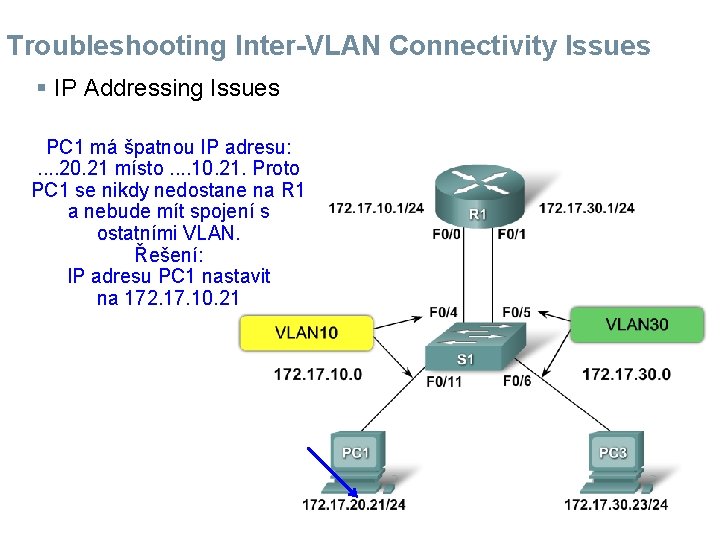
Troubleshooting Inter-VLAN Connectivity Issues § IP Addressing Issues PC 1 má špatnou IP adresu: . . 20. 21 místo. . 10. 21. Proto PC 1 se nikdy nedostane na R 1 a nebude mít spojení s ostatními VLAN. Řešení: IP adresu PC 1 nastavit na 172. 17. 10. 21
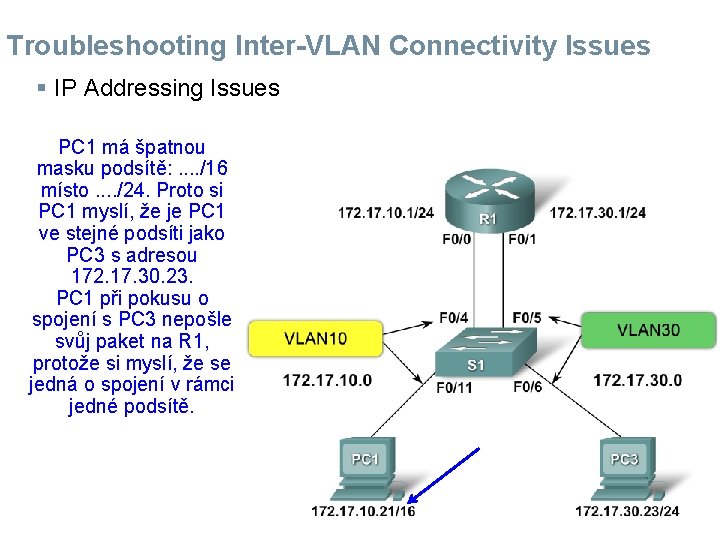
Troubleshooting Inter-VLAN Connectivity Issues § IP Addressing Issues PC 1 má špatnou masku podsítě: . . /16 místo. . /24. Proto si PC 1 myslí, že je PC 1 ve stejné podsíti jako PC 3 s adresou 172. 17. 30. 23. PC 1 při pokusu o spojení s PC 3 nepošle svůj paket na R 1, protože si myslí, že se jedná o spojení v rámci jedné podsítě.
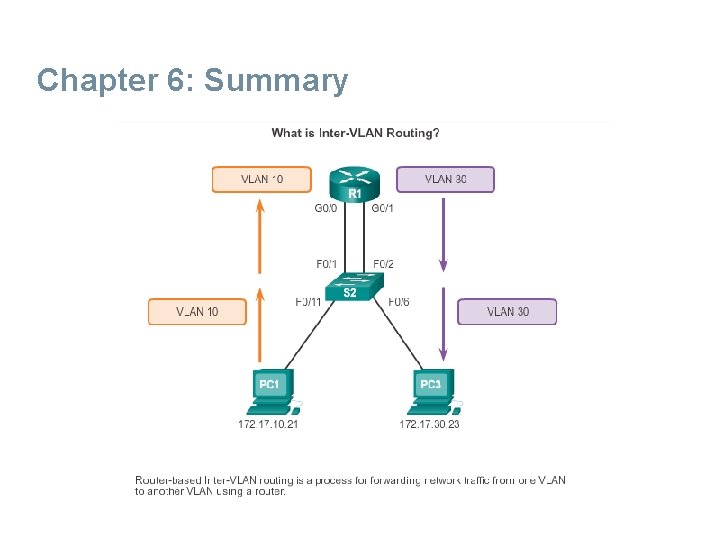
Summary § Inter-VLAN routing = routing information between VLANs. Requires a router or a layer 3 switch. § Traditional inter-VLAN routing Requires multiple router interfaces that are each connected to separate VLANs § Router on a stick Uses router sub interfaces connected to a layer 2 switch Each Subinterface must be configured with: • IP address • Associated VLAN number
Summary § Configuration of inter VLAN routing – Configure switch ports connected to router with correct VLAN – Configure each router subinterface with the correct IP address & VLAN ID
Až sem nastudujte na písemku podle e-mailu ze dne 3. prosince 2018.
Převzato z x 0020 x Konec
6. 3 Layer 3 Switching Presentation_ID © 2008 Cisco Systems, Inc. All rights reserved. Cisco Confidential 22
Layer 3 Switching Operation and Configuration Introduction to Layer 3 Switching § Layer 3 switches usually have packet-switching throughputs in the millions of packets per second (pps). § All Catalyst multilayer switches support the following types of Layer 3 interfaces: • Routed port • Switch virtual interface (SVI) § High-performance switches, such as the Catalyst 6500 and Catalyst 4500, are able to perform most of the router’s functions. § Several models of Catalyst switches require enhanced software for specific routing protocol features.
Layer 3 Switching Operation and Configuration Inter-VLAN Routing with Switch Virtual Interfaces § Today’s routing has become faster and cheaper and can be performed at hardware speed. § Routing can be transferred to core and distribution devices with little to no impact on network performance. § Many users are in separate VLANs, and each VLAN is usually a separate subnet. This implies that each distribution switch must have IP addresses matching each access switch VLAN. § Layer 3 (routed) ports are normally implemented between the distribution and the core layer. This model is less dependent on spanning tree, because there are no loops in the Layer 2 portion of the topology.
Layer 3 Switching Operation and Configuration Inter-VLAN Routing with SVIs (Cont. ) § By default, an SVI is created for the default VLAN (VLAN 1). This allows for remote switch administration. § Any additional SVIs must be created by the administrator. § SVIs are created the first time the VLAN interface configuration mode is entered for a particular VLAN SVI. § Enter the interface vlan 10 command to create an SVI named VLAN 10. § The VLAN number used corresponds to the VLAN tag associated with data frames on an 802. 1 Q encapsulated trunk. § When the SVI is created, ensure that the specific VLAN is present in the VLAN database.
Layer 3 Switching Operation and Configuration Inter-VLAN Routing with SVIs (Cont. ) § SVIs advantages include: • Much faster than router-on-a-stick, because everything is hardware-switched and routed. • No need for external links from the switch to the router for routing. • Not limited to one link. Layer 2 Ether. Channels can be used between the switches to get more bandwidth. • Latency is much lower, because it does not need to leave the switch.
Layer 3 Switching Operation and Configuration Inter-VLAN Routing with Routed Ports § A routed port is a physical port that acts similarly to an interface on a router. § Routed ports are not associated with any VLANs. § Layer 2 protocols, such as STP, do not function on a routed interface. § Routed ports on a Cisco IOS switch do not support subinterfaces. § To configure routed ports, use the no switchport interface configuration mode command. § Note: Routed ports are not supported on Catalyst 2960 Series switches.
Layer 3 Switching Operation and Configuration Configuring Static Routes on a Catalyst 2960 § The Cisco Switch Database Manager (SDM) provides multiple templates for the Cisco Catalyst 2960 switch. § The SDM lanbase-routing template can be enabled to allow the switch to route between VLANs and to support static routing. § Use the show sdm prefer command to verify which template is in use. § The SDM template can be changed in global configuration mode with the sdm prefer command.
Troubleshooting Layer 3 Switch Configuration Issues To troubleshoot Layer 3 switching issues, verify the following for accuracy: § VLANs • VLANs must be defined across all the switches. • VLANs must be enabled on the trunk ports. • Ports must be in the right VLANs. § SVIs • SVIs must have the correct IP address or subnet mask. • SVIs must be up. • SVIs must match with the VLAN number.
Troubleshooting Layer 3 Switching Configuration Issues (Cont. ) To troubleshoot Layer 3 switching issues, verify the following for accuracy: § Routing • Routing must be enabled. • Each interface or network should be added to the routing protocol. § Hosts • Hosts must have the correct IP address or subnet mask. • Hosts must have a default gateway associated with an SVI or routed port.
Chapter 6: Summary This chapter described and explained the following concepts: § Inter-VLAN routing, the process of routing traffic between different VLANs, using either a dedicated router or a multilayer switch § Legacy, router-on-a-stick, and multilayer switch inter-VLAN routing § Layer 3 switching, SVIs, and routed ports § Troubleshooting inter-VLAN routing with a router or a Layer 3 switch § Common errors involving VLAN, trunk, Layer 3 interface, and IP address configurations
Chapter 6: Summary
Presentation_ID © 2008 Cisco Systems, Inc. All rights reserved. Cisco Confidential 33