
Chapter 6 Direct Manipulation and Virtual Environment Copyright
- Slides: 22
Chapter 6 Direct Manipulation and Virtual Environment Copyright © 2005, Pearson Education, Inc.
Examples of Direct-Manipulation Systems Command line vs. display editors and word processors • Training times with display editors are much less than (older) line editors • Line editors are generally more flexible and powerful • The advances of WYSIWYG word processors: – Display a full page of text – Display of the document in the form that it will appear when the final printing is done – Show cursor action – Control cursor motion through physically obvious and intuitively natural means – Use of labeled icon for actions – Display of the results of an action immediately – Provide rapid response and display – Offer easily reversible actions Copyright © 2005, Pearson Education, Inc.
Examples of Direct-Manipulation Systems (cont. ) Technologies that derive from the word processor: • Integration • Desktop publication software • Slide-presentation software • Hypermedia environments • Improved macro facilities • Spell checker and thesaurus • Grammar checkers Copyright © 2005, Pearson Education, Inc.
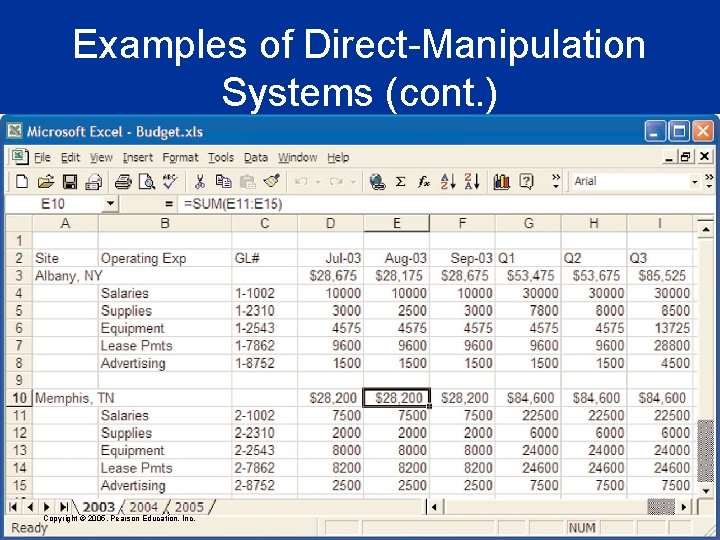
Examples of Direct-Manipulation Systems (cont. ) The Visi. Calc spreadsheet and its descendants • Visi. Calc users delighted in watching the program propagate changes across the screen. • In some cases, spatial representations provide a better model of reality • Successful spatial data-management systems depend on choosing appropriate: – Icons – Graphical representations – Natural and comprehensible data layouts Copyright © 2005, Pearson Education, Inc.
Examples of Direct-Manipulation Systems (cont. ) Copyright © 2005, Pearson Education, Inc.
Examples of Direct-Manipulation Systems (cont. ) Video games • From PONG to Nintendo Game. Cube, Sony Play. Station 2, and Microsoft Xbox • Field of action is visual and compelling • Commands are physical actions whose results are immediately shown on the screen • No syntax to remember (usually) • Many older games continuously display a score • Direct manipulation in Sim. City • Myst well received • DOOM/Quake, Halo (etc, shooters in general) very popular Copyright © 2005, Pearson Education, Inc.
Examples of Direct-Manipulation Systems (cont. ) Computer-aided design • • • Computer-aided design (CAD) use direct manipulation Manipulate the object of interest Generate alternatives easily Explain the impact Problem solving by analogy to the real-world Office automation • • Xerox Star was a pioneer with sophisticated formatting Apple Lisa System Rapid and continuous graphical interaction Microsoft Windows is a descendant Copyright © 2005, Pearson Education, Inc.
Discussion of Direct Manipulation Problems with direct manipulation • Spatial or visual representations can be too spread out • High-level flowcharts and database-schema can become confusing • Designs may force valuable information off of the screen • Users must learn the graphical representations • The visual representation may be misleading • Typing commands with the keyboard may be faster Copyright © 2005, Pearson Education, Inc.
Discussion of Direct Manipulation (cont. ) The OAI Model explanation of direct manipulation • Portrait of direct manipulation: – – – Continuous representation of the objects and actions of interest Physical actions, such as presses of labeled buttons, instead of complex syntax Rapid incremental reversible operations whose effect on the object of interest is immediately visible Copyright © 2005, Pearson Education, Inc.
Discussion of Direct Manipulation (cont. ) The OAI Model explanation of direct manipulation (cont. ) • Beneficial attributes: – Novices learn quickly – Experts work rapidly (ideally) – Intermittent users can retain concepts – Error messages are less needed – Users see if their actions are furthering their goals – Users experience less anxiety – Users gain confidence and mastery Copyright © 2005, Pearson Education, Inc.
Interface-Building Tools Visual Thinking and Icons • The visual nature of computers can sometimes challenge the first generation of ‘hackers’ – • WIMP: Windows, Icons, Mouse, Pulldown An icon is an image, picture, or symbol representing a concept Icon-specific guidelines • – – – – Represent the object or action in a familiar manner Limit the number of different icons Make icons stand out from the background Ensure a selected icon is visible from unselected icons Design the movement animation Add detailed information Explore combinations of icons to create new objects or actions Copyright © 2005, Pearson Education, Inc.
Interface-Building Tools (cont. ) Five levels of icon design: – Lexical qualities. Machine-generated marks—pixel shape, color brightness, blinking – Syntactics. Appearance and movement—lines, patterns, modular parts, size, shape – Semantics. Objects represented—concrete versus abstract, part versus whole – Pragmatics. Overall legibility, utility, identifiability, memorability, pleasingness – Dynamics. Receptivity to clicks—highlighting, dragging, combining Copyright © 2005, Pearson Education, Inc.
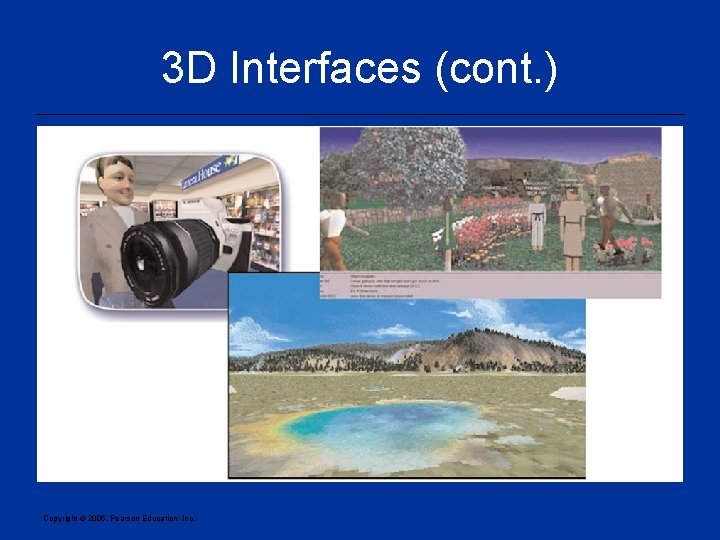
3 D Interfaces • “Pure” 3 D interfaces have strong utility in some contexts, e. g. , medical, product design. In other situations, more constrained interaction may actually be preferable to simplify interactions. • “Enhanced” interfaces, better than reality, can help reduce the limitations of the real-world, e. g. , providing simultaneous views. • Avatars in multiplayer 3 -D worlds, • e. g. , Active. Worlds, Alphaworld, Ever. Quest, City of Heroes • First person games (shooters, etc) Copyright © 2005, Pearson Education, Inc.
3 D Interfaces (cont. ) Copyright © 2005, Pearson Education, Inc.
3 D Interfaces (cont. ) Features for effective 3 D – – – – – Use occlusion, shadows, perspective, and other 3 D techniques carefully. Minimize the number of navigation steps for users to accomplish their tasks. Keep text readable. Avoid unnecessary visual clutter, distraction, contrast shifts, and reflections. Simplify user movement. Prevent errors. Simplify object movement Organize groups of items in aligned structures to allow rapid visual search. Enable users to construct visual groups to support spatial recall. Copyright © 2005, Pearson Education, Inc.
3 D Interfaces (cont. ) Guidelines for inclusion of enhanced 3 D features: – Provide overviews so users can see the big picture – Allow teleportation – Offer X-ray vision so users can see into or beyond objects. – Provide history keeping – Permit rich user actions on objects – Enable remote collaboration – Give users control over explanatory text and let users select for details on demand. – Offer tools to select, mark, and measure. Copyright © 2005, Pearson Education, Inc.
3 D Interfaces (cont. ) Guidelines for inclusion of enhanced 3 D features (cont. ): – Implement dynamic queries to rapidly filter out unneeded items. – Support semantic zooming and movement – Enable landmarks to show themselves even at a distance – Allow multiple coordinated views – Develop novel 3 D icons to represent concepts that are more recognizable and memorable. Copyright © 2005, Pearson Education, Inc.
Teleoperation • Physical operation is remote • Two “parents”: direct manipulation in personal computers and process control in complex environments • Complicating factors in the architecture of remote environments: – Time delays • transmission delays • operation delays – Incomplete feedback – Feedback from multiple sources – Unanticipated interferences Copyright © 2005, Pearson Education, Inc.
Virtual and Augmented Reality • Virtual reality breaks the physical limitations of space and allow users to act as though they were somewhere else • Augmented reality shows the real world with an overlay of additional overlay • Situational awareness shows information about the real world that surrounds you by tracking your movements in a computer model • Augmented reality is an important variant – Enables users to see the real world with an overlay of additional interaction. Copyright © 2005, Pearson Education, Inc.
Virtual Realities • Early virtual realities have been around for years as MUDs (Multi User Dungeons) • An attempted commercial VR was Alpha. World, with simple avatars – Provide a virtual “meeting place” for business transactions – Ambitious but unsuccessful… • Too “real world”, didn’t augment enough (e. g. travel times) Copyright © 2005, Pearson Education, Inc.
Virtual and Augmented Reality • VR is now extremely popular in the on-line gaming community – Early multi-player “shooters” like Doom – MMORPGs of today • Everquest, Dark Age of Camelot, City of Heroes • Billions of dollars go into maintaining these “virtual worlds”, with servers running 24/7 Copyright © 2005, Pearson Education, Inc.
Virtual and Augmented Reality (cont. ) • Successful virtual environments may depend on the smooth integration of: – – – – Visual display Head position sensing Hand-position sensing Force feedback Sound input and output Other sensations Cooperative and competitive virtual reality Copyright © 2005, Pearson Education, Inc.