
CHAPTER 6 Codes for Positioning and Milling Prepared





- Slides: 36
CHAPTER 6 Codes for Positioning and Milling Prepared by: Ahmad Fairuz Bin Mansor Universiti Malaysia Perlis (Uni. MAP) 2017
Course Outcome 2 (CO 2) Ability to prepare G and M code programs and documentation for the manufacturing steps required to produce machined parts on CNC machine tools.
Essential Questions • What are some of the limitations of the most common prep codes? • Why is rapid traverse used? • What types of programming are used to create arcs? • What are the limitations of circular interpolations?
Essential Questions (cont’d. ) • How do incremental and absolute units affect axis return? • Understand the limitations of circular interpolation.
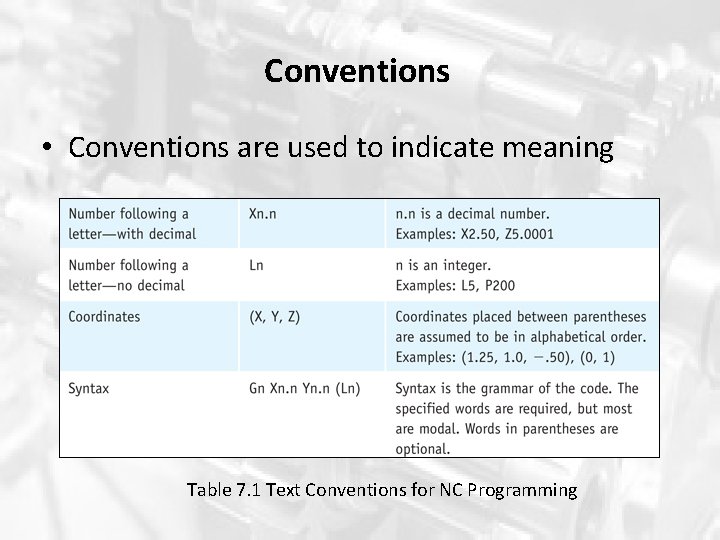
Conventions • Conventions are used to indicate meaning Table 7. 1 Text Conventions for NC Programming
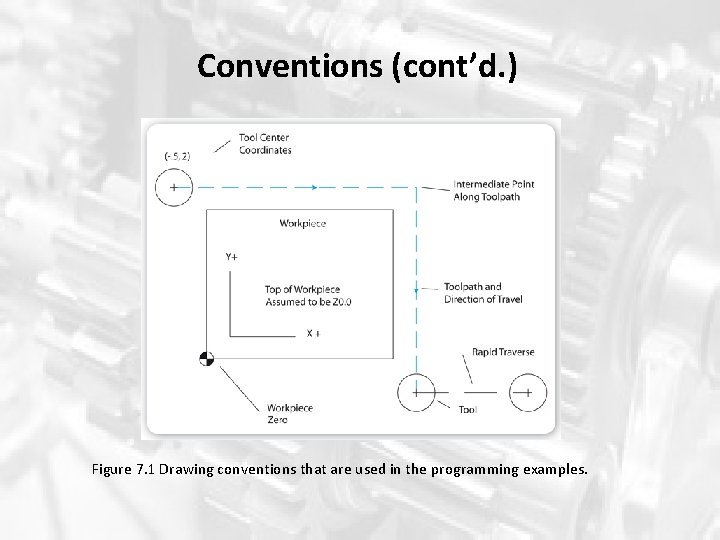
Conventions (cont’d. ) Figure 7. 1 Drawing conventions that are used in the programming examples.
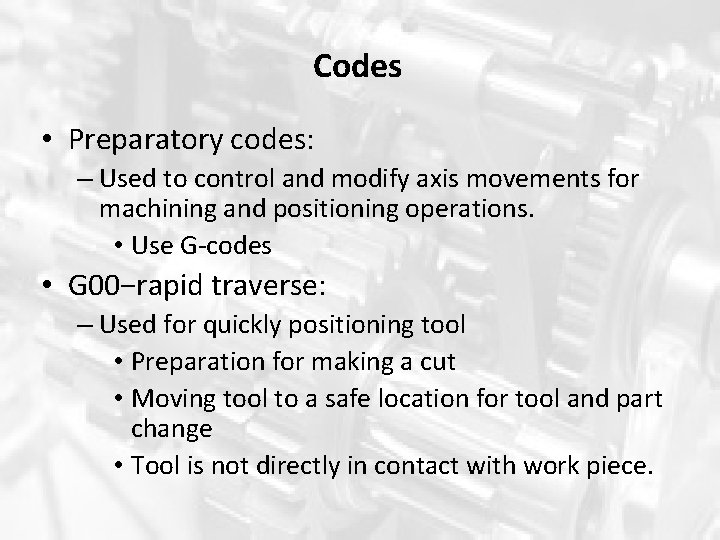
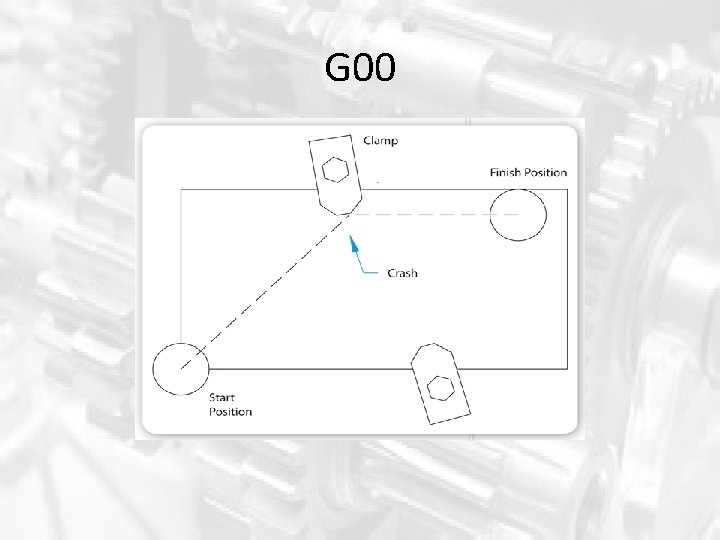
Codes • Preparatory codes: – Used to control and modify axis movements for machining and positioning operations. • Use G-codes • G 00−rapid traverse: – Used for quickly positioning tool • Preparation for making a cut • Moving tool to a safe location for tool and part change • Tool is not directly in contact with work piece.
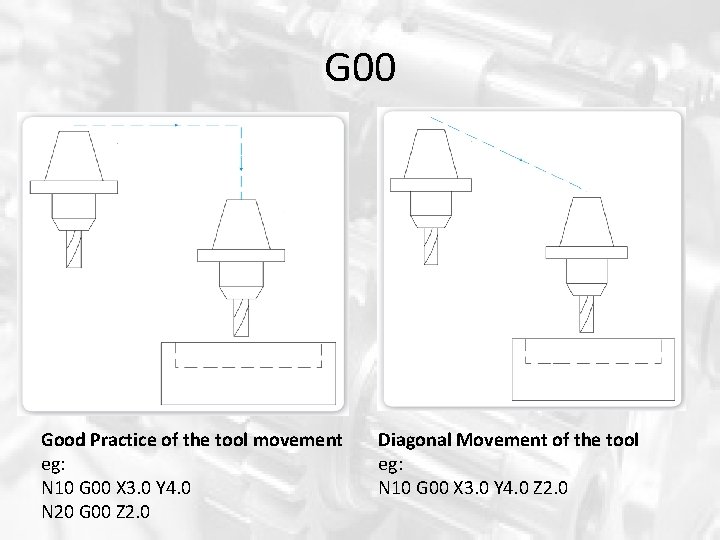
G 00 Good Practice of the tool movement eg: N 10 G 00 X 3. 0 Y 4. 0 N 20 G 00 Z 2. 0 Diagonal Movement of the tool eg: N 10 G 00 X 3. 0 Y 4. 0 Z 2. 0
G 00
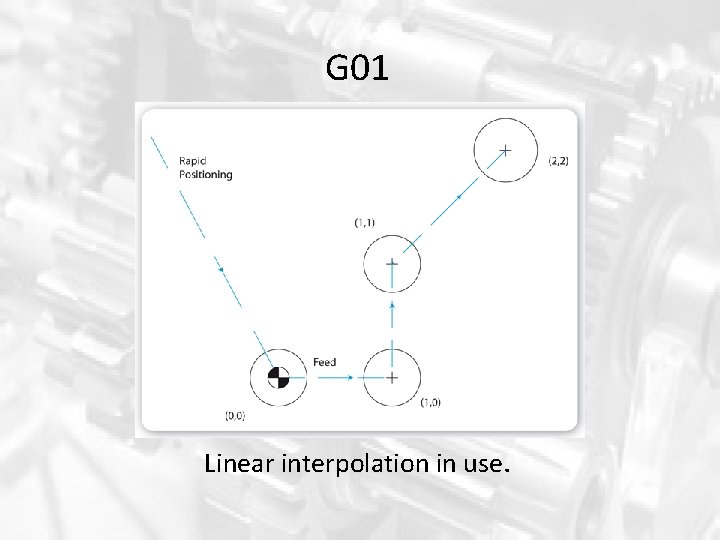
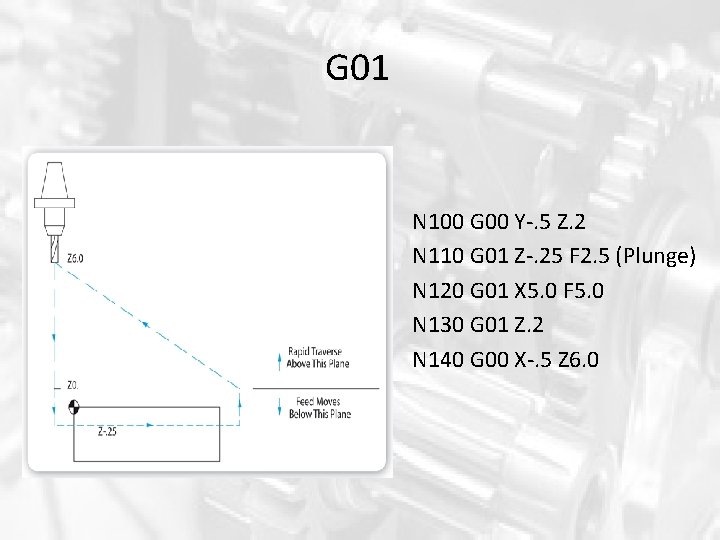
G 01 • G 01: linear interpolation – Tool will travel through all points that make up a straight line to specified Cartesian coordinates in the block. – Use for straight cut or plunge cut. – The feed word controls the feed rate. (F) – Syntax: G 01 Xn. n Yn. n Zn. n
G 01 Linear interpolation in use.
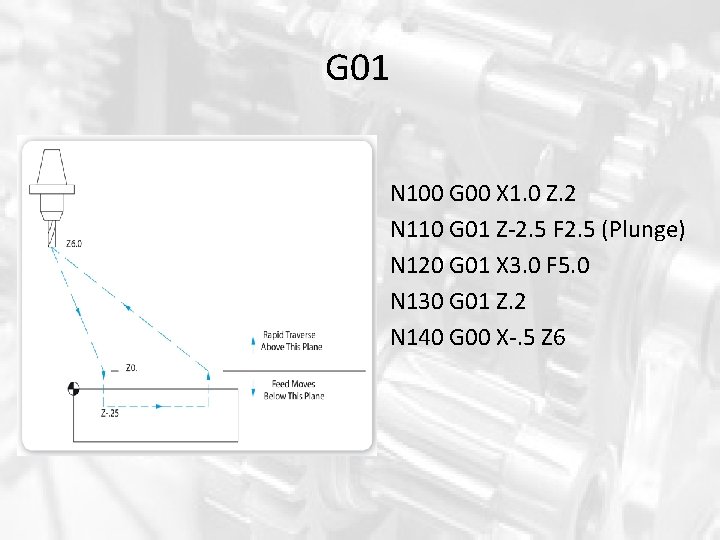
G 01 N 100 G 00 X 1. 0 Z. 2 N 110 G 01 Z-2. 5 F 2. 5 (Plunge) N 120 G 01 X 3. 0 F 5. 0 N 130 G 01 Z. 2 N 140 G 00 X-. 5 Z 6
G 01 N 100 G 00 Y-. 5 Z. 2 N 110 G 01 Z-. 25 F 2. 5 (Plunge) N 120 G 01 X 5. 0 F 5. 0 N 130 G 01 Z. 2 N 140 G 00 X-. 5 Z 6. 0
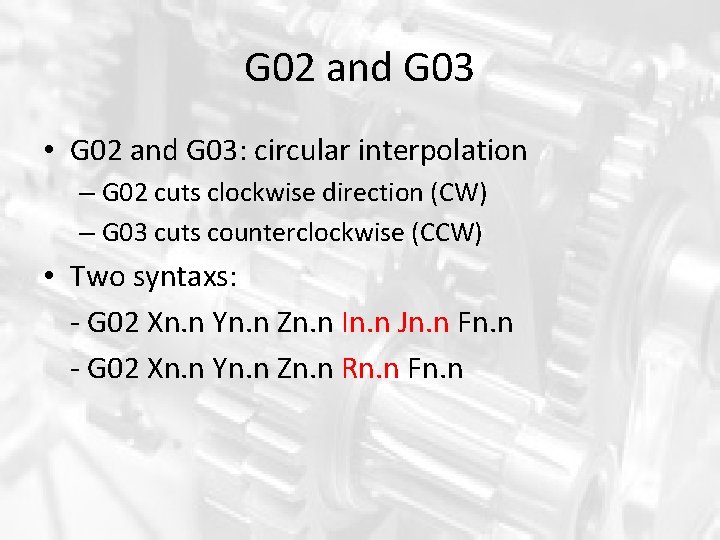
G 02 and G 03 • G 02 and G 03: circular interpolation – G 02 cuts clockwise direction (CW) – G 03 cuts counterclockwise (CCW) • Two syntaxs: - G 02 Xn. n Yn. n Zn. n In. n Jn. n Fn. n - G 02 Xn. n Yn. n Zn. n Rn. n Fn. n
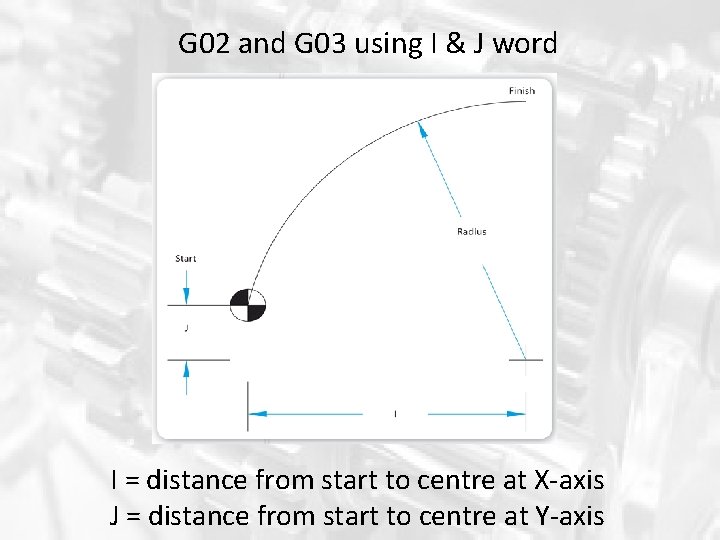
G 02 and G 03 using I & J word I = distance from start to centre at X-axis J = distance from start to centre at Y-axis
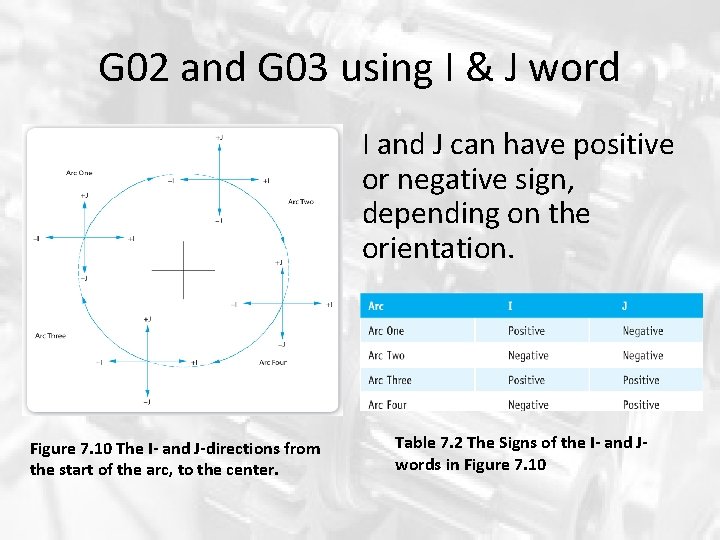
G 02 and G 03 using I & J word I and J can have positive or negative sign, depending on the orientation. Figure 7. 10 The I- and J-directions from the start of the arc, to the center. Table 7. 2 The Signs of the I- and Jwords in Figure 7. 10
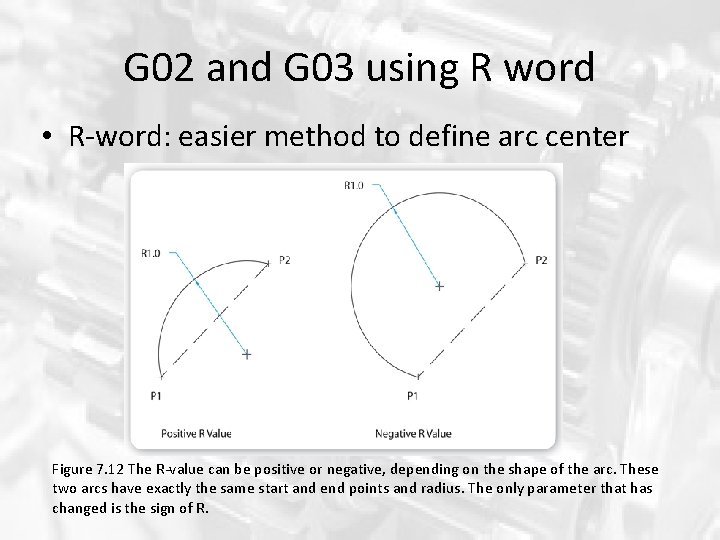
G 02 and G 03 using R word • R-word: easier method to define arc center Figure 7. 12 The R-value can be positive or negative, depending on the shape of the arc. These two arcs have exactly the same start and end points and radius. The only parameter that has changed is the sign of R.
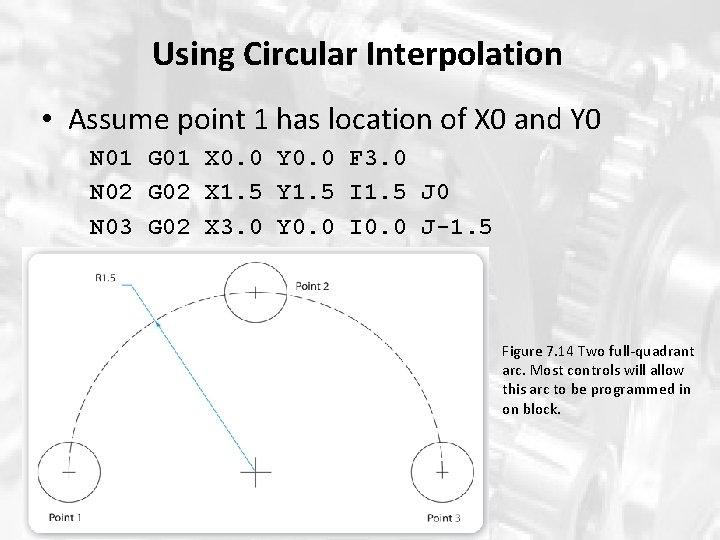
Using Circular Interpolation • Assume point 1 has location of X 0 and Y 0 N 01 G 01 X 0. 0 Y 0. 0 F 3. 0 N 02 G 02 X 1. 5 Y 1. 5 I 1. 5 J 0 N 03 G 02 X 3. 0 Y 0. 0 I 0. 0 J-1. 5 Figure 7. 14 Two full-quadrant arc. Most controls will allow this arc to be programmed in on block.
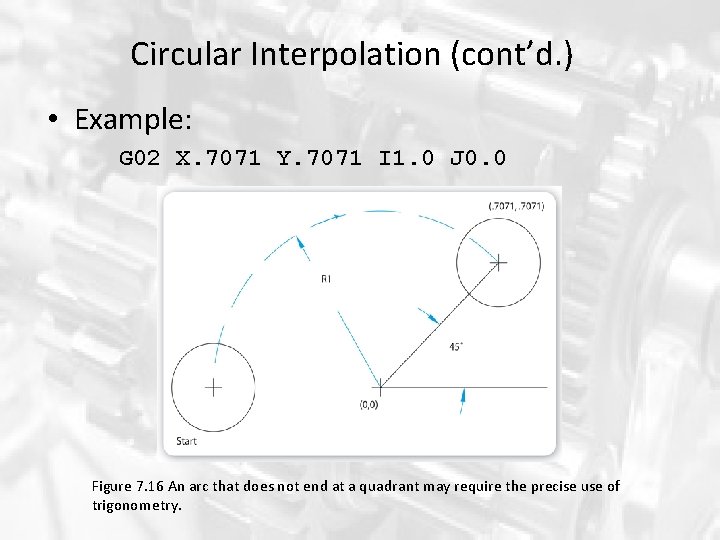
Circular Interpolation (cont’d. ) • Example: G 02 X. 7071 Y. 7071 I 1. 0 J 0. 0 Figure 7. 16 An arc that does not end at a quadrant may require the precise use of trigonometry.
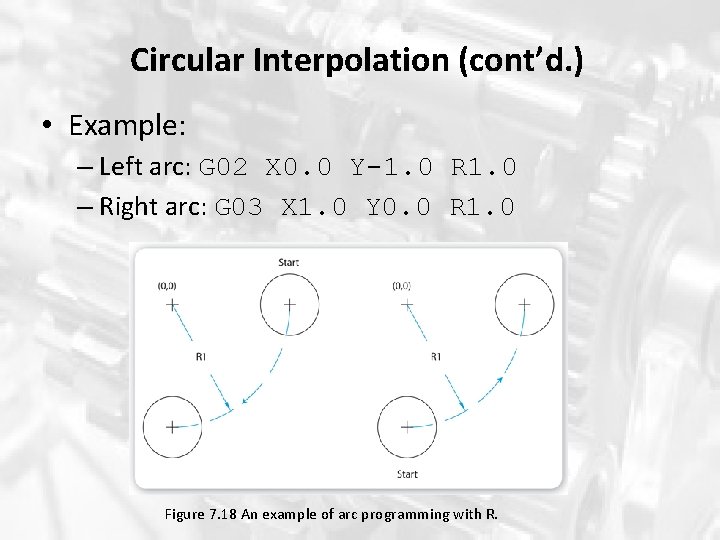
Circular Interpolation (cont’d. ) • Example: – Left arc: G 02 X 0. 0 Y-1. 0 R 1. 0 – Right arc: G 03 X 1. 0 Y 0. 0 R 1. 0 Figure 7. 18 An example of arc programming with R.
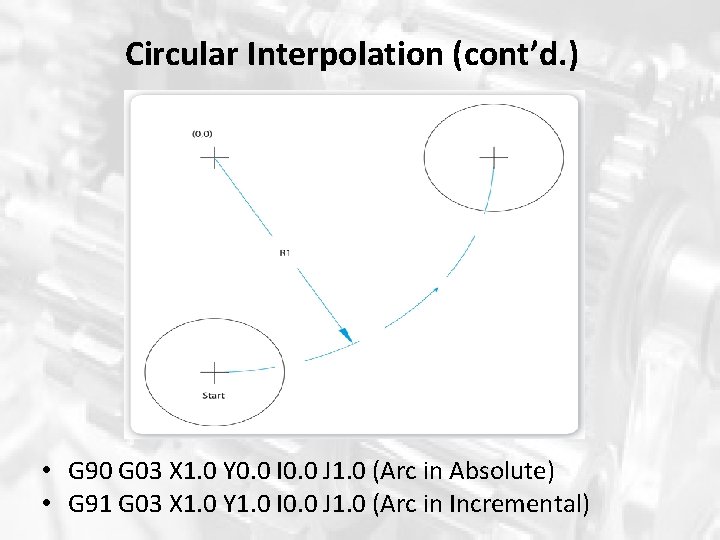
Circular Interpolation (cont’d. ) • You may need to use incremental positioning (G 91) with circular interpolation. – Arc end point will be the incremental distance from the start of arc to arc end point • No changes will need to be made for the center position. It specified exactly same as the absolute positioning (G 90).
Circular Interpolation (cont’d. ) • G 90 G 03 X 1. 0 Y 0. 0 I 0. 0 J 1. 0 (Arc in Absolute) • G 91 G 03 X 1. 0 Y 1. 0 I 0. 0 J 1. 0 (Arc in Incremental)
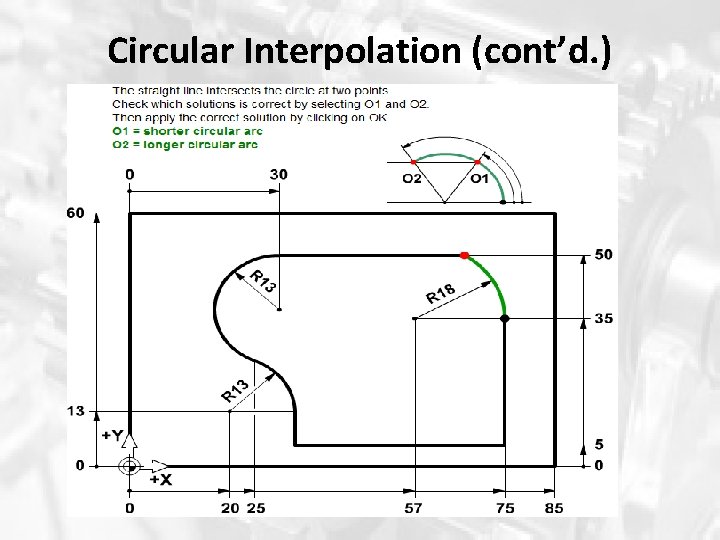
Circular Interpolation (cont’d. ) • Variant G 02/G 03 • Use address O to specify the angle for smaller or larger. • When only one end points either X or Y is known. • O 1 = shorter angle arc, O 2= longer angle arc • Eg: G 03 Y 50 I-18 J 0 O 1
Circular Interpolation (cont’d. )
Circular Interpolation (cont’d. ) • Address IA and JA • Default is increamental coordinate when using I and J • Can be change to absolute coordinate when using IA and JA. The coordinate of center of the arc is defined from the origin. • Eg: G 02 X 10 Y 10 IA 7 JA 7
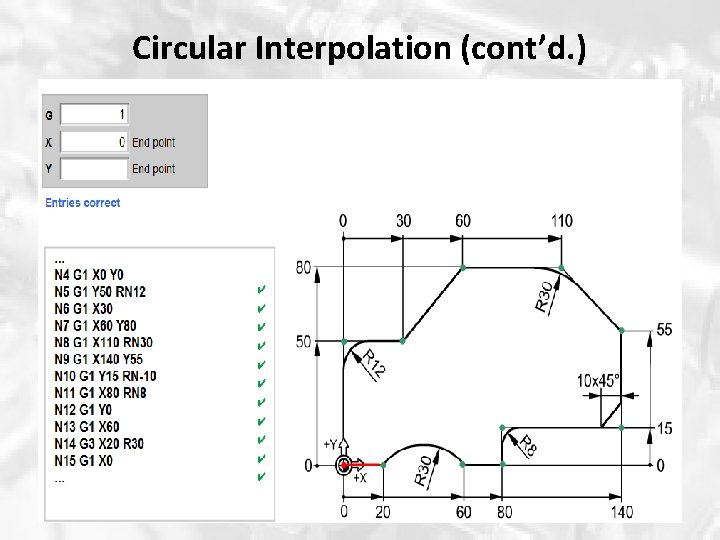
Circular Interpolation (cont’d. ) • RN+/- address • Are used at the edge of the geometry such as at the edges of rectangular shape. • RN+ used for fillet/rounding, RN- used for chamfer/bevel. • Not use G 02 or G 03 but only G 01. • For chamfer, the angle will be constant at 45 deg. • Eg: G 01 X 10 Y 10 RN 5 G 01 x 10 Y 20 RN-10
Circular Interpolation (cont’d. )
Circular Interpolation (cont’d. ) • Limitations of circular interpolation: – Complex – The rate of movement is not steady – Ability of a motion control system to produce high -quality circular interpolation is difficult. – Every motion control system will have error. • Sources are numerous
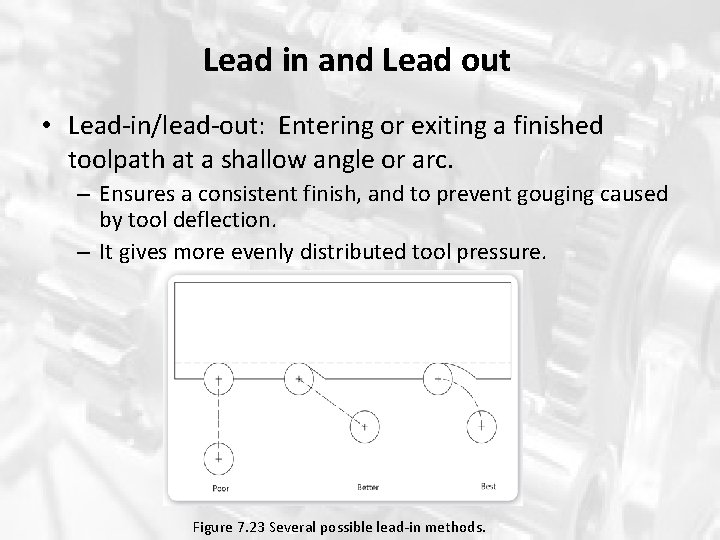
Lead in and Lead out • Lead-in/lead-out: Entering or exiting a finished toolpath at a shallow angle or arc. – Ensures a consistent finish, and to prevent gouging caused by tool deflection. – It gives more evenly distributed tool pressure. Figure 7. 23 Several possible lead-in methods.
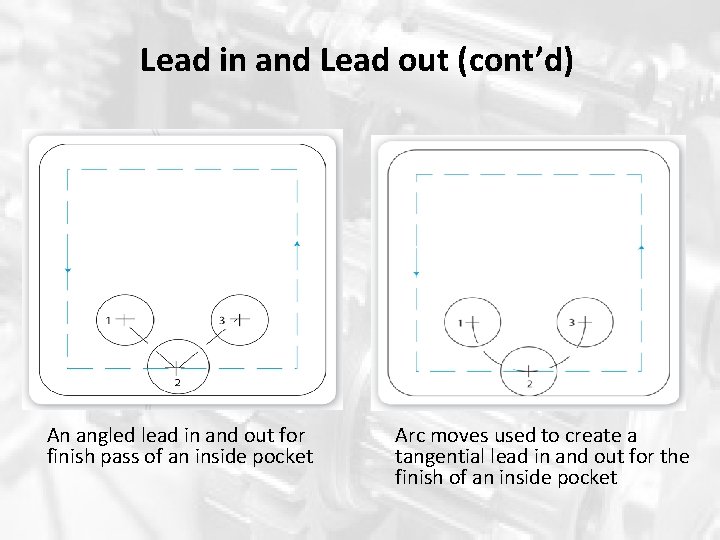
Lead in and Lead out (cont’d) An angled lead in and out for finish pass of an inside pocket Arc moves used to create a tangential lead in and out for the finish of an inside pocket
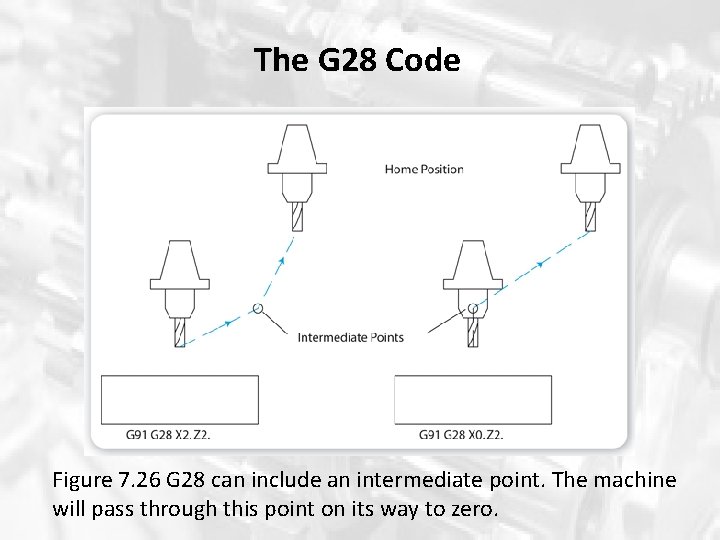
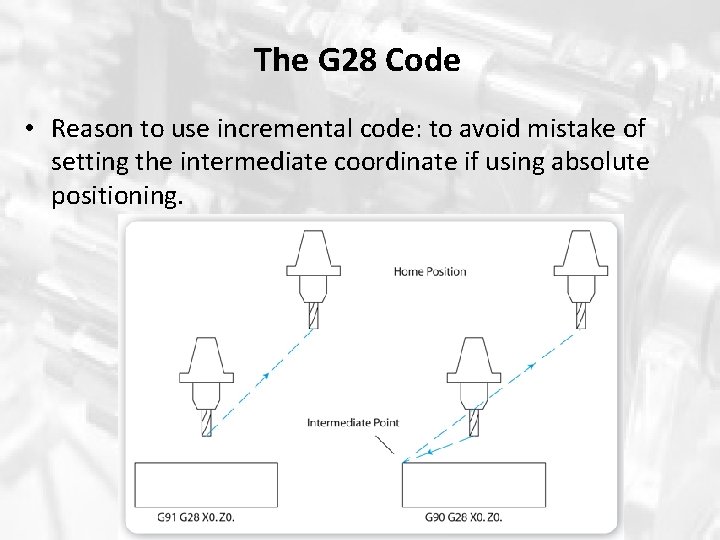
The G 28 Code • Instructs machine to automatically return to its home position – Machine will move at rapid traverse to home position on specified axes – A typical example: G 91 G 28 X 0. 0 Y 0. 0 Z 0. 0 – Might use G 91 G 28 Y 0. 0 Z 0. 0 in order to change workpiece. – Can also specify the intermediate point to avoid collision with any obstruction: Eg: G 91 G 28 X 2 Z 2 as shown in Figure 7. 26.
The G 28 Code Figure 7. 26 G 28 can include an intermediate point. The machine will pass through this point on its way to zero.
The G 28 Code • Reason to use incremental code: to avoid mistake of setting the intermediate coordinate if using absolute positioning.
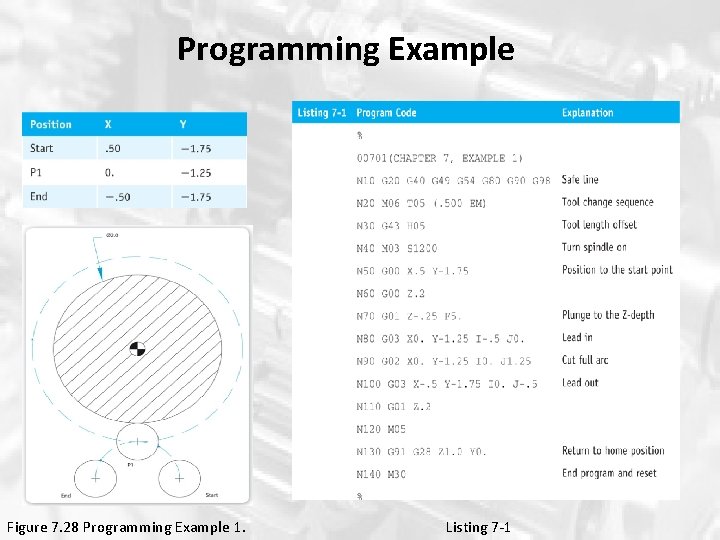
Programming Example Figure 7. 28 Programming Example 1. Listing 7 -1
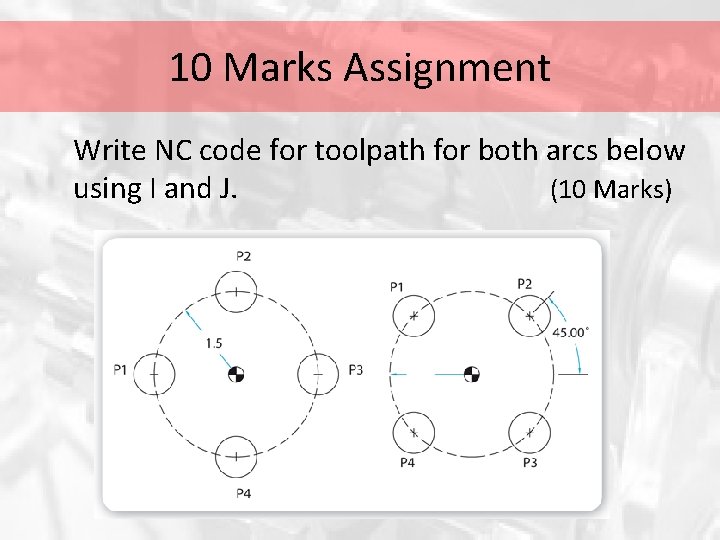
10 Marks Assignment Write NC code for toolpath for both arcs below using I and J. (10 Marks)
The End Q&A