
Chapter 6 Cascading Style Sheets CSS Outline 6



- Slides: 38
Chapter 6 - Cascading Style Sheets™ (CSS) Outline 6. 1 6. 2 6. 3 6. 4 6. 5 6. 7 6. 8 6. 9 6. 10 6. 11 6. 12 Introduction Inline Styles Embedded Style Sheets Conflicting Styles Linking External Style Sheets Positioning Elements Backgrounds Element Dimensions Text Flow and the Box Model User Style Sheets Internet and World Wide Web Resources 2001 Prentice Hall, Inc. All rights reserved. 1
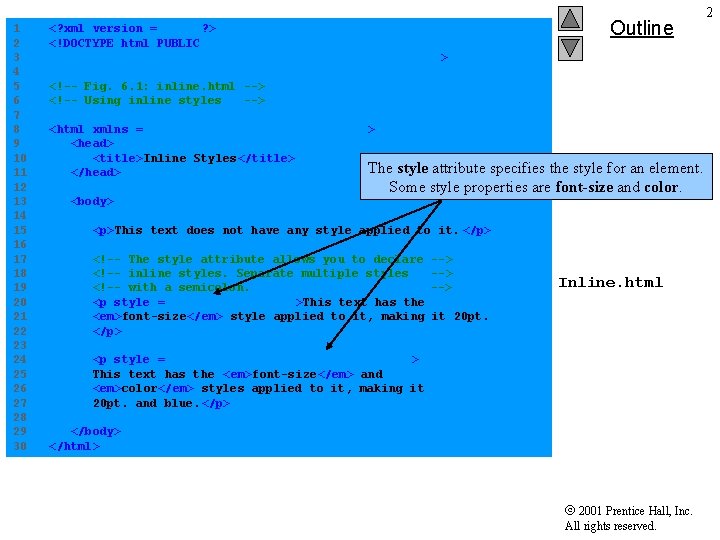
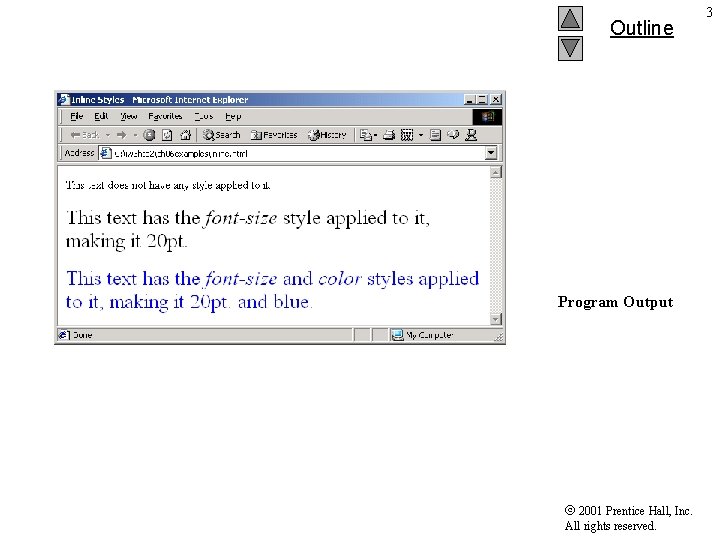
1 2 3 4 5 6 7 8 9 10 11 12 13 14 15 16 17 18 19 20 21 22 23 24 25 26 27 28 29 30 <? xml version = "1. 0"? > <!DOCTYPE html PUBLIC "-//W 3 C//DTD XHTML 1. 0 Strict//EN" "http: //www. w 3. org/TR/xhtml 1/DTD/xhtml 1 -strict. dtd"> Outline <!-- Fig. 6. 1: inline. html --> <!-- Using inline styles --> <html xmlns = "http: //www. w 3. org/1999/ xhtml"> <head> <title>Inline Styles</title> The </head> <body> style attribute specifies the style for an element. Some style properties are font-size and color. <p>This text does not have any style applied to it. </p> <!-- The style attribute allows you to declare <!-- inline styles. Separate multiple styles <!-- with a semicolon. <p style = "font-size: 20 pt">This text has the <em>font-size</em> style applied to it, making </p> --> --> Inline. html it 20 pt. <p style = "font-size: 20 pt; color: #0000 ff" > This text has the <em>font-size</em> and <em>color</em> styles applied to it, making it 20 pt. and blue. </p> </body> </html> 2001 Prentice Hall, Inc. All rights reserved. 2
Outline Program Output 2001 Prentice Hall, Inc. All rights reserved. 3
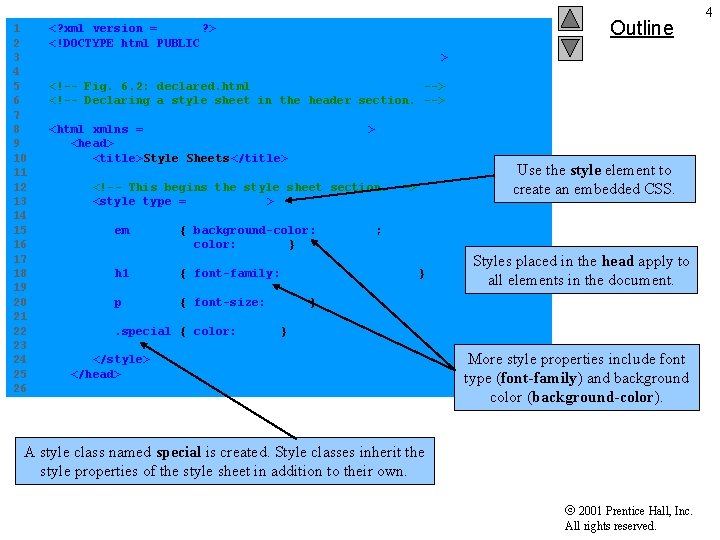
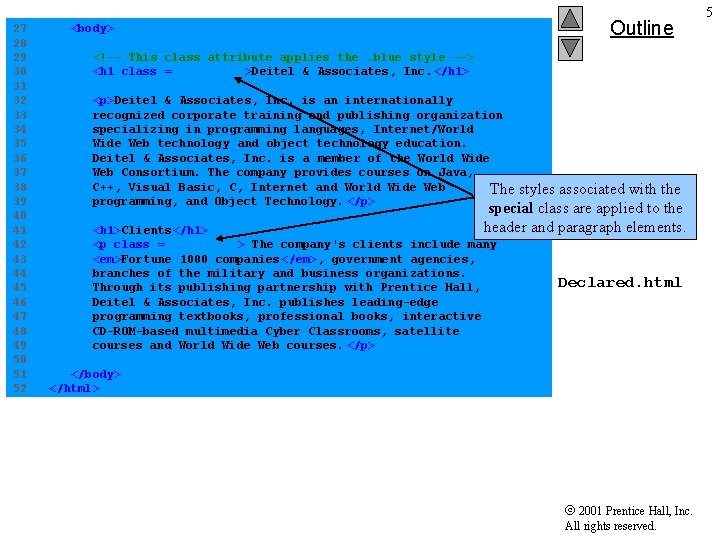
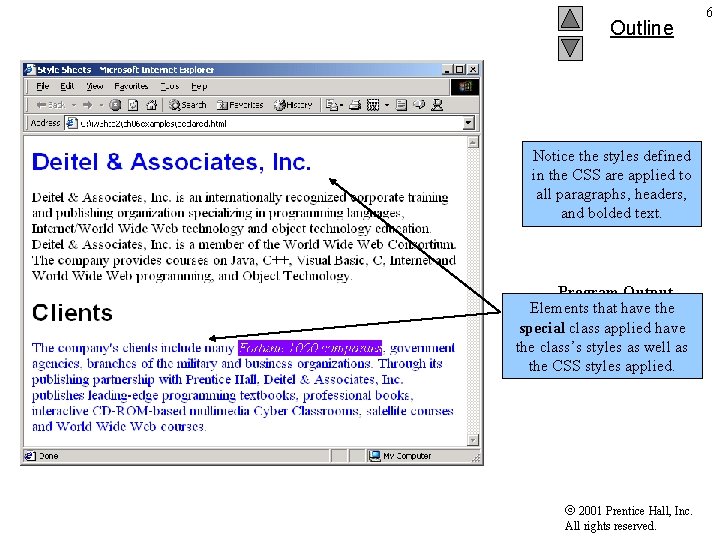
1 2 3 4 5 6 7 8 9 10 11 12 13 14 15 16 17 18 19 20 21 22 23 24 25 26 <? xml version = "1. 0"? > <!DOCTYPE html PUBLIC "-//W 3 C//DTD XHTML 1. 0 Strict//EN" "http: //www. w 3. org/TR/xhtml 1/DTD/xhtml 1 -strict. dtd"> Outline <!-- Fig. 6. 2: declared. html --> <!-- Declaring a style sheet in the header section. --> <html xmlns = "http: //www. w 3. org/1999/ xhtml"> <head> <title>Style Sheets</title> <!-- This begins the style sheet section. --> <style type = "text/css"> em { background-color: #8000 ff; color: white } h 1 { font-family: arial, sans-serif } p { font-size: 14 pt } Use the style element to create an embedded CSS. Styles placed in the head apply to all elements. Declared. html in the document. . special { color: blue } </style> </head> More style properties include font type (font-family) and background color (background-color). A style class named special is created. Style classes inherit the style properties of the style sheet in addition to their own. 2001 Prentice Hall, Inc. All rights reserved. 4
27 28 29 30 31 32 33 34 35 36 37 38 39 40 41 42 43 44 45 46 47 48 49 50 51 52 Outline <body> <!-- This class attribute applies the. blue style --> <h 1 class = "special">Deitel & Associates, Inc. </h 1> <p>Deitel & Associates, Inc. is an internationally recognized corporate training and publishing organization specializing in programming languages, Internet/World Wide Web technology and object technology education. Deitel & Associates, Inc. is a member of the World Wide Web Consortium. The company provides courses on Java, C++, Visual Basic, C, Internet and World Wide Web The programming, and Object Technology. </p> styles associated with the special class are applied to the header and paragraph elements. <h 1>Clients</h 1> <p class = "special"> The company's clients include many <em>Fortune 1000 companies</em>, government agencies, branches of the military and business organizations. Through its publishing partnership with Prentice Hall, Deitel & Associates, Inc. publishes leading-edge programming textbooks, professional books, interactive CD-ROM-based multimedia Cyber Classrooms, satellite courses and World Wide Web courses. </p> Declared. html </body> </html> 2001 Prentice Hall, Inc. All rights reserved. 5
Outline Notice the styles defined in the CSS are applied to all paragraphs, headers, and bolded text. Program Output Elements that have the special class applied have the class’s styles as well as the CSS styles applied. 2001 Prentice Hall, Inc. All rights reserved. 6
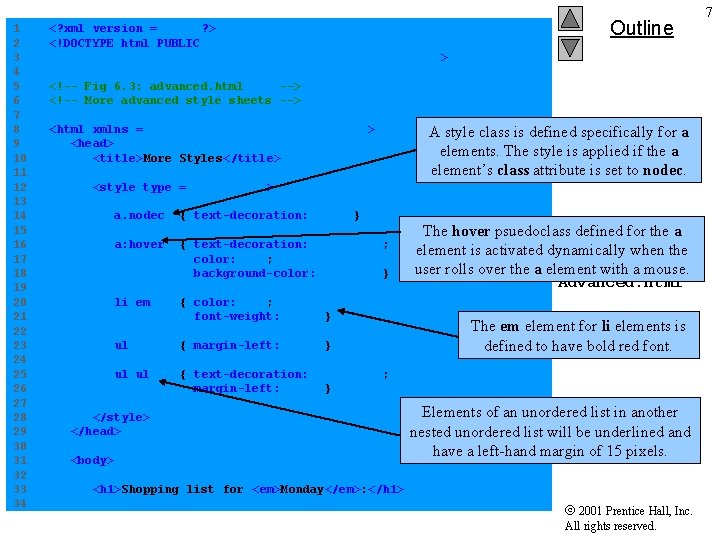
1 2 3 4 5 6 7 8 9 10 11 12 13 14 15 16 17 18 19 20 21 22 23 24 25 26 27 28 29 30 31 32 33 34 <? xml version = "1. 0"? > <!DOCTYPE html PUBLIC "-//W 3 C//DTD XHTML 1. 0 Strict//EN" "http: //www. w 3. org/TR/xhtml 1/DTD/xhtml 1 -strict. dtd"> Outline <!-- Fig 6. 3: advanced. html --> <!-- More advanced style sheets --> <html xmlns = "http: //www. w 3. org/1999/ xhtml"> <head> <title>More Styles</title> A style class is defined specifically for a elements. The style is applied if the a element’s class attribute is set to nodec. <style type = "text/css"> a. nodec { text-decoration: none } a: hover { text-decoration: underline; color: red; background-color: #ccffcc } li em { color: red; font-weight: bold } ul { margin-left: 75 px } ul ul { text-decoration: underline; margin-left: 15 px } </style> </head> <body> The hover psuedoclass defined for the a element is activated dynamically when the user rolls over the a element with a mouse. Advanced. html The em element for li elements is defined to have bold red font. Elements of an unordered list in another nested unordered list will be underlined and have a left-hand margin of 15 pixels. <h 1>Shopping list for <em>Monday</em>: </h 1> 2001 Prentice Hall, Inc. All rights reserved. 7
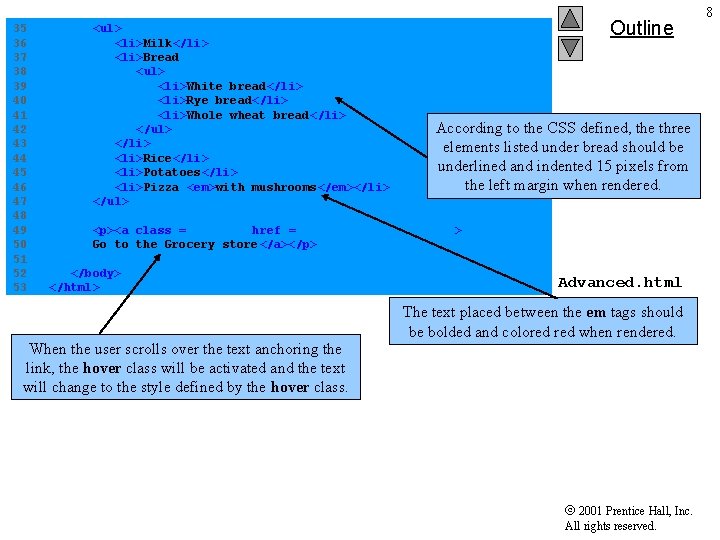
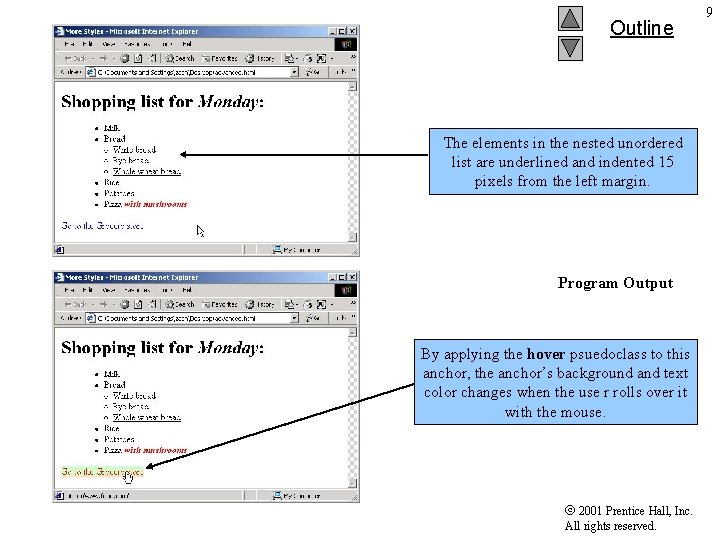
35 36 37 38 39 40 41 42 43 44 45 46 47 48 49 50 51 52 53 <ul> <li>Milk</li> <li>Bread <ul> <li>White bread</li> <li>Rye bread</li> <li>Whole wheat bread</li> </ul> </li> <li>Rice</li> <li>Potatoes</li> <li>Pizza <em>with mushrooms</em></li> </ul> Outline According to the CSS defined, the three elements listed under bread should be underlined and indented 15 pixels from the left margin when rendered. <p><a class = "nodec" href = "http: //www. food. com"> Go to the Grocery store</a></p> </body> </html> When the user scrolls over the text anchoring the link, the hover class will be activated and the text will change to the style defined by the hover class. Advanced. html The text placed between the em tags should be bolded and colored when rendered. 2001 Prentice Hall, Inc. All rights reserved. 8
Outline The elements in the nested unordered list are underlined and indented 15 pixels from the left margin. Program Output By applying the hover psuedoclass to this anchor, the anchor’s background and text color changes when the use r rolls over it with the mouse. 2001 Prentice Hall, Inc. All rights reserved. 9
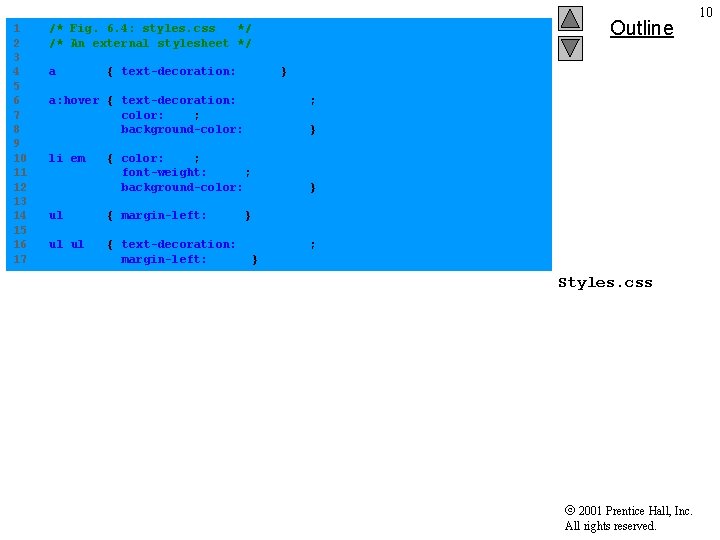
1 2 3 4 5 6 7 8 9 10 11 12 13 14 15 16 17 /* Fig. 6. 4: styles. css */ /* An external stylesheet */ a Outline { text-decoration: none } a: hover { text-decoration: underline; color: red; background-color: #ccffcc } li em { color: red; font-weight: bold; background-color: #ffffff } ul { margin-left: 2 cm } ul ul { text-decoration: underline; margin-left: . 5 cm } Styles. css 2001 Prentice Hall, Inc. All rights reserved. 10
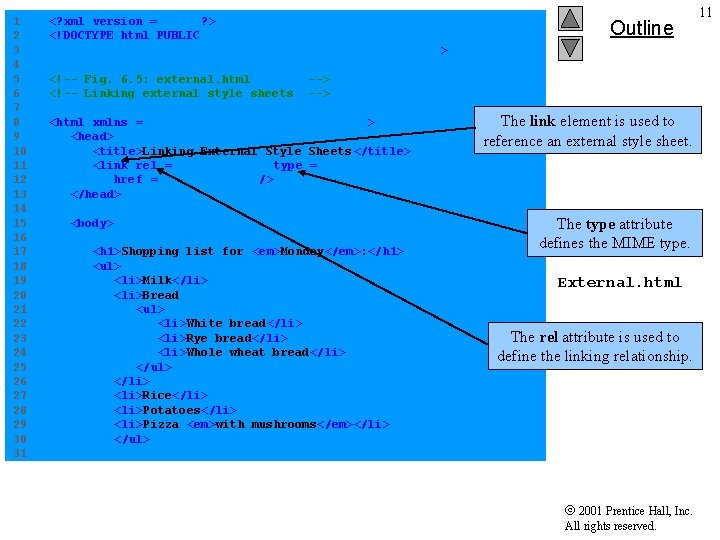
1 2 3 4 5 6 7 8 9 10 11 12 13 14 15 16 17 18 19 20 21 22 23 24 25 26 27 28 29 30 31 <? xml version = "1. 0"? > <!DOCTYPE html PUBLIC "-//W 3 C//DTD XHTML 1. 0 Strict//EN" "http: //www. w 3. org/TR/xhtml 1/DTD/xhtml 1 -strict. dtd"> <!-- Fig. 6. 5: external. html <!-- Linking external style sheets Outline --> <html xmlns = "http: //www. w 3. org/1999/ xhtml"> <head> <title>Linking External Style Sheets </title> <link rel = "stylesheet" type = "text/css" href = "styles. css" /> </head> <body> <h 1>Shopping list for <em>Monday</em>: </h 1> <ul> <li>Milk</li> <li>Bread <ul> <li>White bread</li> <li>Rye bread</li> <li>Whole wheat bread</li> </ul> </li> <li>Rice</li> <li>Potatoes</li> <li>Pizza <em>with mushrooms</em></li> </ul> The link element is used to reference an external style sheet. The type attribute defines the MIME type. External. html The rel attribute is used to define the linking relationship. 2001 Prentice Hall, Inc. All rights reserved. 11
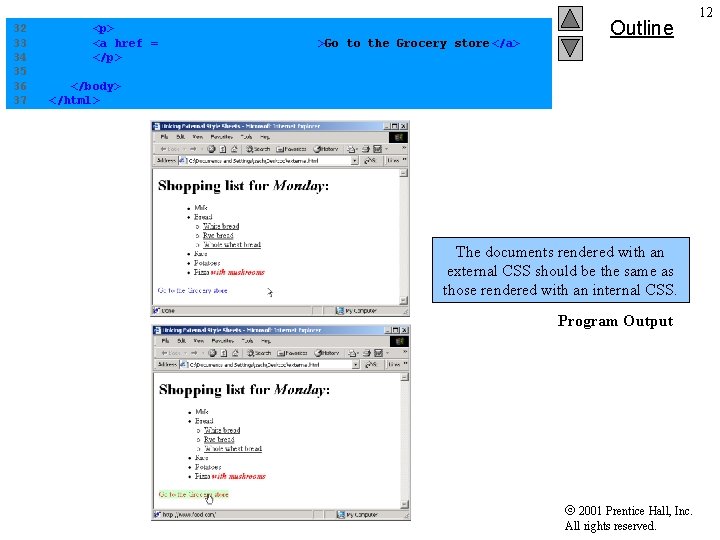
32 33 34 35 36 37 <p> <a href = "http: //www. food. com">Go to the Grocery store</a> </p> Outline </body> </html> External. html The documents rendered with an external CSS should be the same as those rendered with an internal CSS. Program Output 2001 Prentice Hall, Inc. All rights reserved. 12
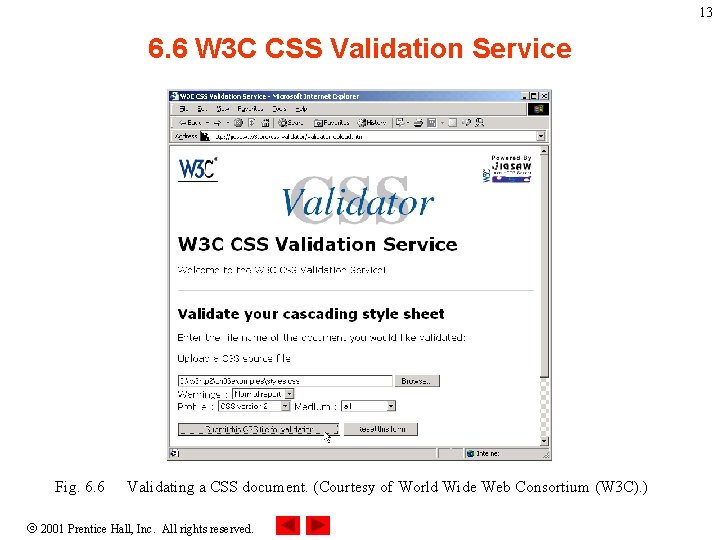
13 6. 6 W 3 C CSS Validation Service Fig. 6. 6 Validating a CSS document. (Courtesy of World Wide Web Consortium (W 3 C). ) 2001 Prentice Hall, Inc. All rights reserved.
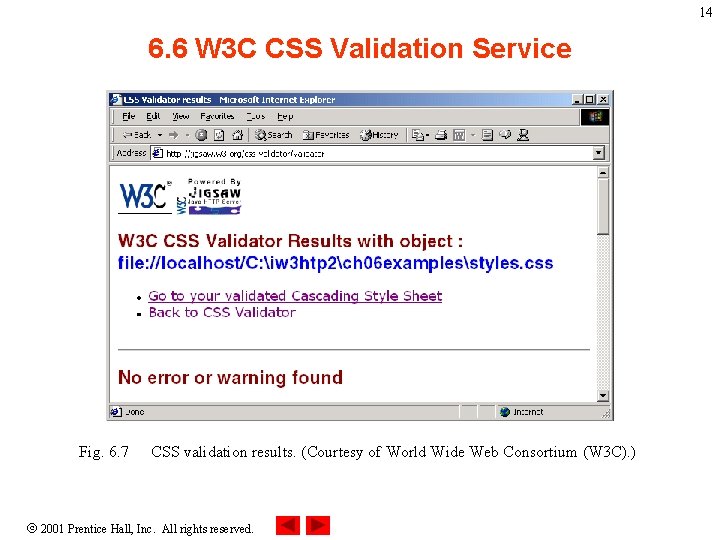
14 6. 6 W 3 C CSS Validation Service Fig. 6. 7 CSS validation results. (Courtesy of World Wide Web Consortium (W 3 C). ) 2001 Prentice Hall, Inc. All rights reserved.
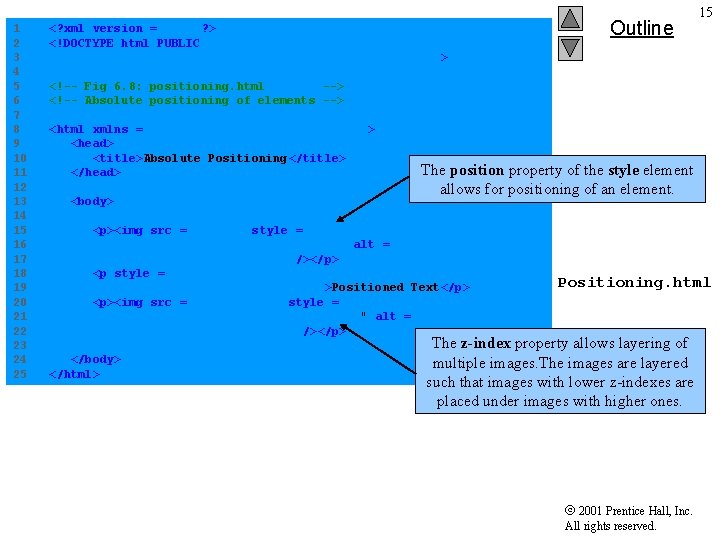
1 2 3 4 5 6 7 8 9 10 11 12 13 14 15 16 17 18 19 20 21 22 23 24 25 <? xml version = "1. 0"? > <!DOCTYPE html PUBLIC "-//W 3 C//DTD XHTML 1. 0 Strict//EN" "http: //www. w 3. org/TR/xhtml 1/DTD/xhtml 1 -strict. dtd"> Outline 15 <!-- Fig 6. 8: positioning. html --> <!-- Absolute positioning of elements --> <html xmlns = "http: //www. w 3. org/1999/ xhtml"> <head> <title>Absolute Positioning</title> </head> <body> The position property of the style element allows for positioning of an element. <p><img src = "i. gif" style = "position: absolute; top: 0 px; left: 0 px; z-index: 1" alt = "First positioned image" /></p> <p style = "position: absolute; top: 50 px; left: 50 px; z-index: 3; font-size: 20 pt; " >Positioned Text</p> <p><img src = "circle. gif" style = "position: absolute; top: 25 px; left: 100 px; z-index: 2 " alt = "Second positioned image" /></p> </body> </html> Positioning. html The z-index property allows layering of multiple images. The images are layered such that images with lower z-indexes are placed under images with higher ones. 2001 Prentice Hall, Inc. All rights reserved.
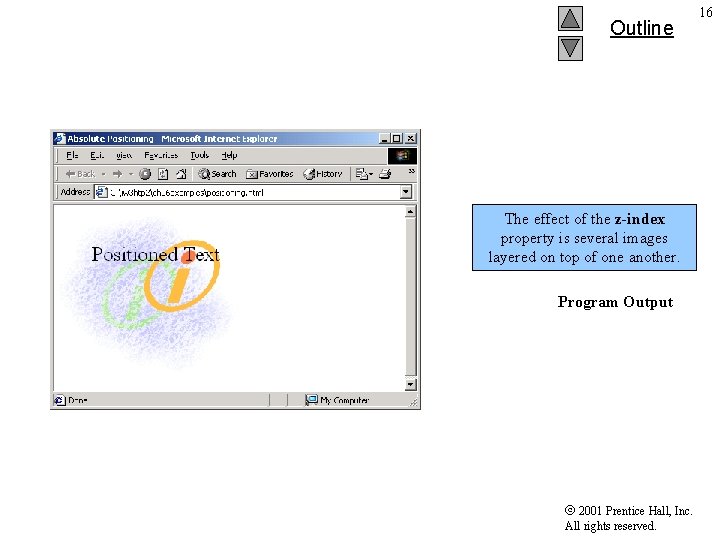
Outline The effect of the z-index property is several images layered on top of one another. Program Output 2001 Prentice Hall, Inc. All rights reserved. 16
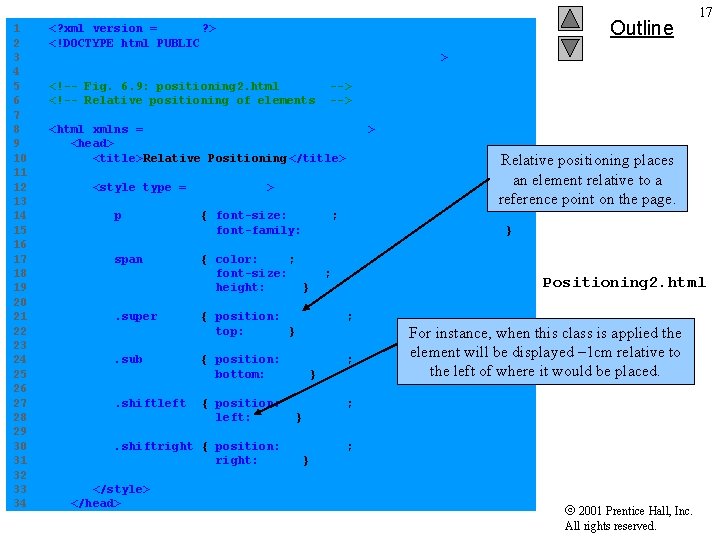
1 2 3 4 5 6 7 8 9 10 11 12 13 14 15 16 17 18 19 20 21 22 23 24 25 26 27 28 29 30 31 32 33 34 Outline <? xml version = "1. 0"? > <!DOCTYPE html PUBLIC "-//W 3 C//DTD XHTML 1. 0 Strict//EN" "http: //www. w 3. org/TR/xhtml 1/DTD/xhtml 1 -strict. dtd"> <!-- Fig. 6. 9: positioning 2. html <!-- Relative positioning of elements --> <html xmlns = "http: //www. w 3. org/1999/ xhtml"> <head> <title>Relative Positioning</title> <style type = "text/css"> Relative positioning places an element relative to a reference point on the page. p { font-size: 1. 3 em; font-family: verdana, arial, sans-serif } span { color: red; font-size: . 6 em; height: 1 em } . super { position: relative; top: -1 ex } . sub { position: relative; bottom: -1 ex } . shiftleft { position: relative; left: -1 ex } Positioning 2. html For instance, when this class is applied the element will be displayed – 1 cm relative to the left of where it would be placed. . shiftright { position: relative; right: -1 ex } </style> </head> 17 2001 Prentice Hall, Inc. All rights reserved.
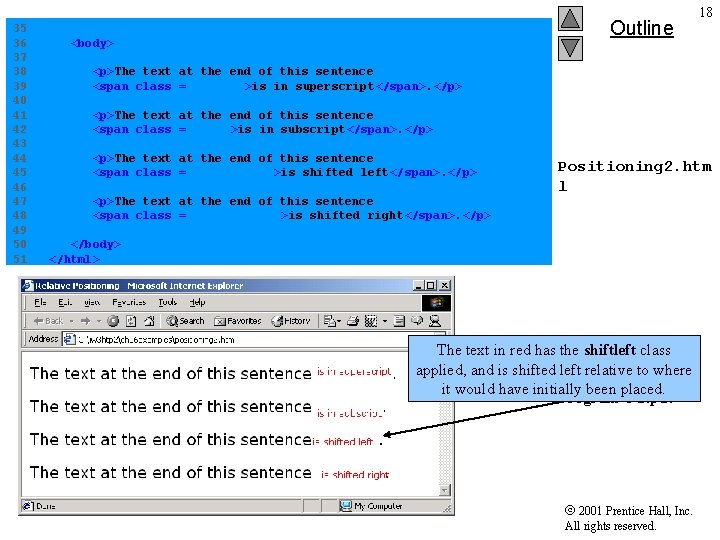
35 36 37 38 39 40 41 42 43 44 45 46 47 48 49 50 51 Outline <body> 18 <p>The text at the end of this sentence <span class = "super">is in superscript</span>. </p> <p>The text at the end of this sentence <span class = "sub">is in subscript</span>. </p> <p>The text at the end of this sentence <span class = "shiftleft">is shifted left</span>. </p> <p>The text at the end of this sentence <span class = "shiftright">is shifted right</span>. </p> Positioning 2. htm l </body> </html> The text in red has the shiftleft class applied, and is shifted left relative to where it would have initially been placed. Program Output 2001 Prentice Hall, Inc. All rights reserved.
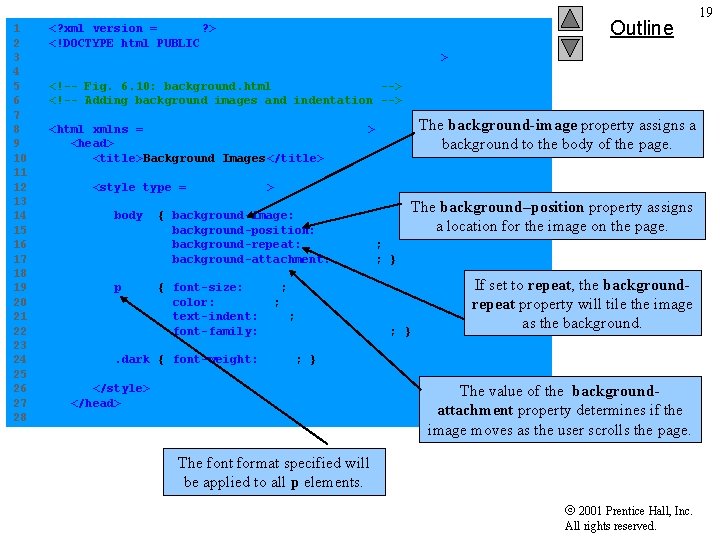
1 2 3 4 5 6 7 8 9 10 11 12 13 14 15 16 17 18 19 20 21 22 23 24 25 26 27 28 <? xml version = "1. 0"? > <!DOCTYPE html PUBLIC "-//W 3 C//DTD XHTML 1. 0 Strict//EN" "http: //www. w 3. org/TR/xhtml 1/DTD/xhtml 1 -strict. dtd"> Outline 19 <!-- Fig. 6. 10: background. html --> <!-- Adding background images and indentation --> The background-image property assigns a background to the body of the page. <html xmlns = "http: //www. w 3. org/1999/ xhtml"> <head> <title>Background Images</title> <style type = "text/css"> The background–position property assigns a location for the image on the page. body { background-image: url(logo. gif); background-position: bottom right; background-repeat: no-repeat; background-attachment: fixed; } p { font-size: 18 pt; color: #aa 5588; text-indent: 1 em; font-family: arial, sans-serif; } Background. html If set to repeat, the backgroundrepeat property will tile the image as the background. . dark { font-weight: bold; } The value of the backgroundattachment property determines if the image moves as the user scrolls the page. </style> </head> The font format specified will be applied to all p elements. 2001 Prentice Hall, Inc. All rights reserved.
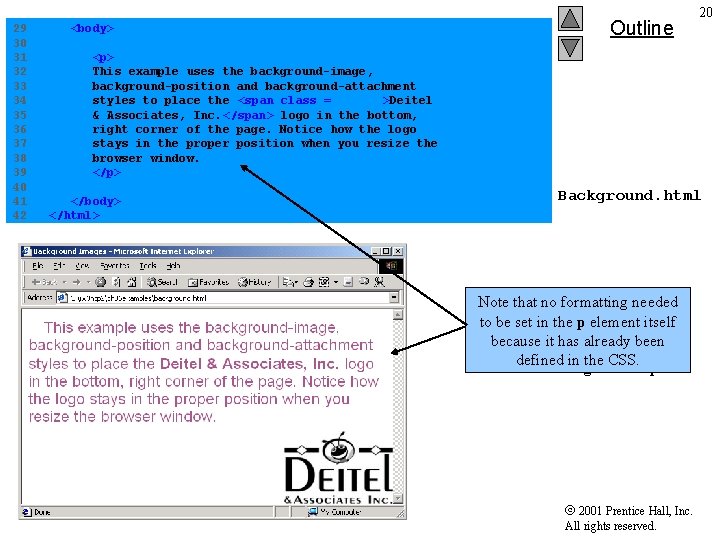
29 30 31 32 33 34 35 36 37 38 39 40 41 42 <body> Outline 20 <p> This example uses the background-image, background-position and background-attachment styles to place the <span class = "dark">Deitel & Associates, Inc. </span> logo in the bottom, right corner of the page. Notice how the logo stays in the proper position when you resize the browser window. </p> </body> </html> Background. html Note that no formatting needed to be set in the p element itself because it has already been defined in the CSS. Program Output 2001 Prentice Hall, Inc. All rights reserved.
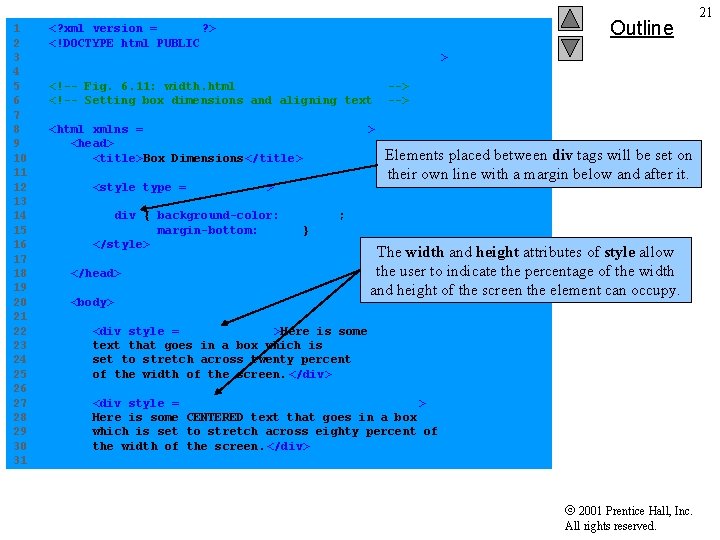
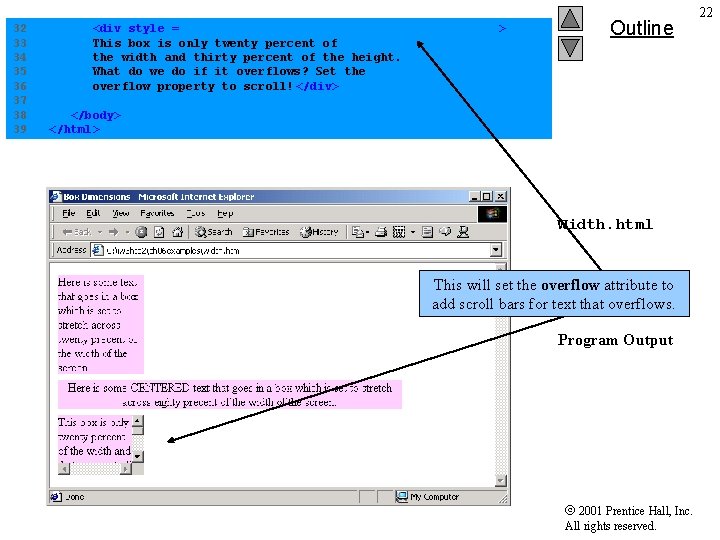
1 2 3 4 5 6 7 8 9 10 11 12 13 14 15 16 17 18 19 20 21 22 23 24 25 26 27 28 29 30 31 <? xml version = "1. 0"? > <!DOCTYPE html PUBLIC "-//W 3 C//DTD XHTML 1. 0 Strict//EN" "http: //www. w 3. org/TR/xhtml 1/DTD/xhtml 1 -strict. dtd"> <!-- Fig. 6. 11: width. html <!-- Setting box dimensions and aligning text <html xmlns = "http: //www. w 3. org/1999/ xhtml"> <head> <title>Box Dimensions</title> <style type = "text/css"> div { background-color: #ffccff; margin-bottom: . 5 em } </style> </head> <body> Outline --> Elements placed between div tags will be set on their own line with a margin below and after it. The width and height attributes of style allow the user to indicate the percentage of the width Width. html and height of the screen the element can occupy. <div style = "width: 20%">Here is some text that goes in a box which is set to stretch across twenty percent of the width of the screen. </div> <div style = Here is some which is set the width of "width: 80%; text-align: center" > CENTERED text that goes in a box to stretch across eighty percent of the screen. </div> 2001 Prentice Hall, Inc. All rights reserved. 21
32 33 34 35 36 37 38 39 <div style = "width: 20%; height: 30%; overflow: scroll" > This box is only twenty percent of the width and thirty percent of the height. What do we do if it overflows? Set the overflow property to scroll! </div> Outline </body> </html> Width. html This will set the overflow attribute to add scroll bars for text that overflows. Program Output 2001 Prentice Hall, Inc. All rights reserved. 22
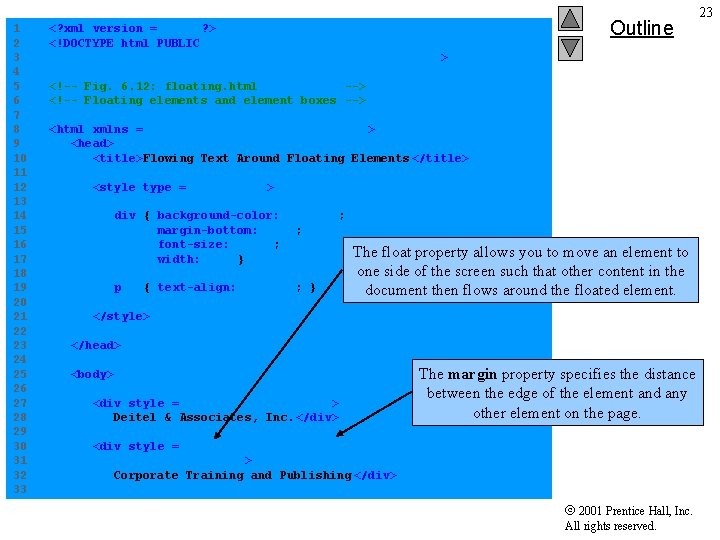
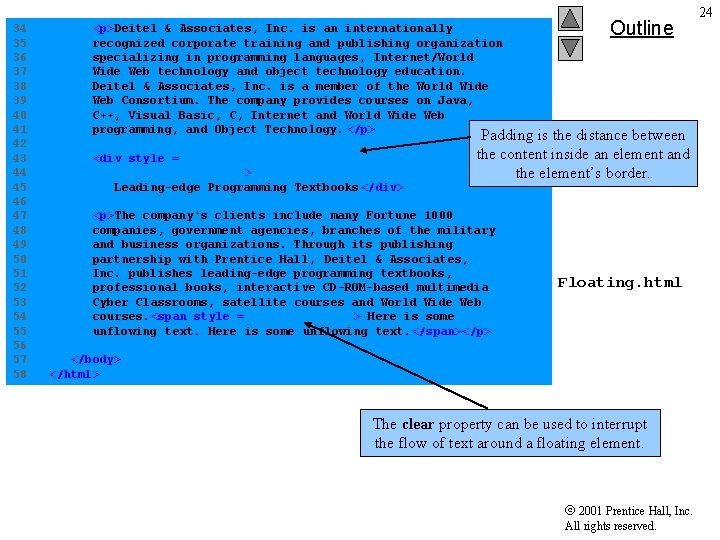
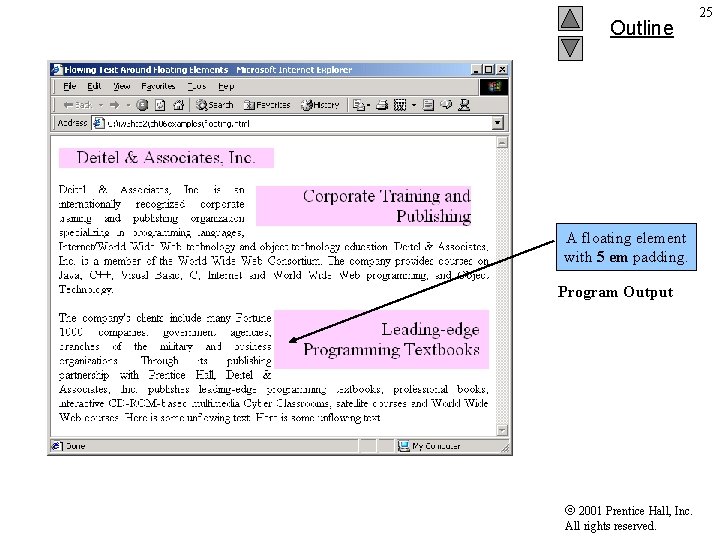
1 2 3 4 5 6 7 8 9 10 11 12 13 14 15 16 17 18 19 20 21 22 23 24 25 26 27 28 29 30 31 32 33 <? xml version = "1. 0"? > <!DOCTYPE html PUBLIC "-//W 3 C//DTD XHTML 1. 0 Strict//EN" "http: //www. w 3. org/TR/xhtml 1/DTD/xhtml 1 -strict. dtd"> Outline <!-- Fig. 6. 12: floating. html --> <!-- Floating elements and element boxes --> <html xmlns = "http: //www. w 3. org/1999/ xhtml"> <head> <title>Flowing Text Around Floating Elements </title> <style type = "text/css"> div { background-color: #ffccff; margin-bottom: . 5 em; font-size: 1. 5 em; width: 50% } p { text-align: justify; } The float property allows you to move an element to one side of the screen such that other content in the Floating. html document then flows around the floated element. </style> </head> <body> <div style = "text-align: center"> Deitel & Associates, Inc. </div> The margin property specifies the distance between the edge of the element and any other element on the page. <div style = "float: right; margin: . 5 em; text-align: right"> Corporate Training and Publishing </div> 2001 Prentice Hall, Inc. All rights reserved. 23
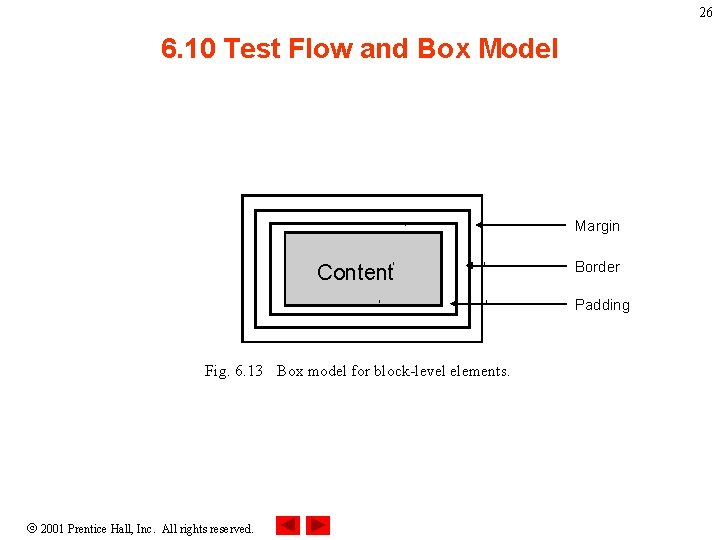
34 35 36 37 38 39 40 41 42 43 44 45 46 47 48 49 50 51 52 53 54 55 56 57 58 <p>Deitel & Associates, Inc. is an internationally recognized corporate training and publishing organization specializing in programming languages, Internet/World Wide Web technology and object technology education. Deitel & Associates, Inc. is a member of the World Wide Web Consortium. The company provides courses on Java, C++, Visual Basic, C, Internet and World Wide Web programming, and Object Technology. </p> <div style = "float: right; padding: . 5 em; text-align: right" > Leading-edge Programming Textbooks </div> Outline Padding is the distance between the content inside an element and the element’s border. <p>The company's clients include many Fortune 1000 companies, government agencies, branches of the military and business organizations. Through its publishing partnership with Prentice Hall, Deitel & Associates, Inc. publishes leading-edge programming textbooks, professional books, interactive CD-ROM-based multimedia Cyber Classrooms, satellite courses and World Wide Web courses. <span style = "clear: right"> Here is some unflowing text. </span></p> Floating. html </body> </html> The clear property can be used to interrupt the flow of text around a floating element. 2001 Prentice Hall, Inc. All rights reserved. 24
Outline A floating element with 5 em padding. Program Output 2001 Prentice Hall, Inc. All rights reserved. 25
26 6. 10 Test Flow and Box Model Margin Content Border Padding Fig. 6. 13 Box model for block-level elements. 2001 Prentice Hall, Inc. All rights reserved.
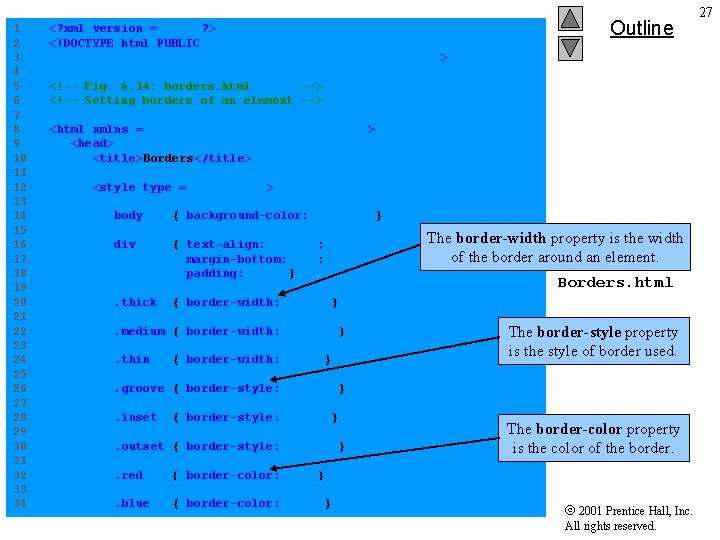
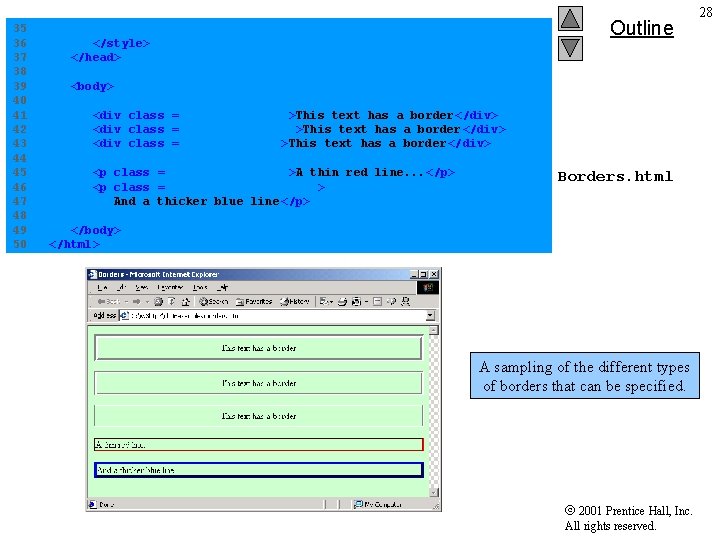
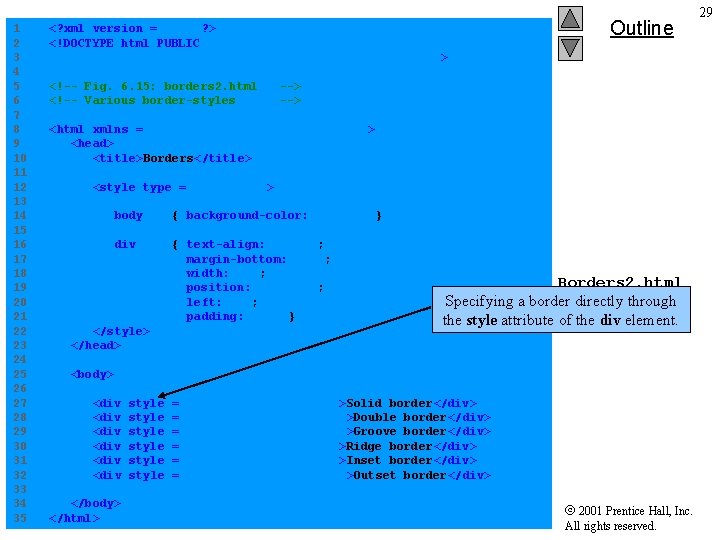
1 2 3 4 5 6 7 8 9 10 11 12 13 14 15 16 17 18 19 20 21 22 23 24 25 26 27 28 29 30 31 32 33 34 <? xml version = "1. 0"? > <!DOCTYPE html PUBLIC "-//W 3 C//DTD XHTML 1. 0 Strict//EN" "http: //www. w 3. org/TR/xhtml 1/DTD/xhtml 1 -strict. dtd"> Outline <!-- Fig. 6. 14: borders. html --> <!-- Setting borders of an element --> <html xmlns = "http: //www. w 3. org/1999/ xhtml"> <head> <title>Borders</title> <style type = "text/css"> body { background-color: #ccffcc } div { text-align: center; margin-bottom: 1 em; padding: . 5 em } . thick Borders. html { border-width: thick } . medium { border-width: medium }. thin The border-width property is the width of the border around an element. { border-width: thin } The border-style property is the style of border used. . groove { border-style: groove }. inset { border-style: inset } . outset { border-style: outset }. red { border-color: red } . blue { border-color: blue } The border-color property is the color of the border. 2001 Prentice Hall, Inc. All rights reserved. 27
35 36 37 38 39 40 41 42 43 44 45 46 47 48 49 50 Outline </style> </head> <body> <div class = "thick groove">This text has a border</div> <div class = "medium groove">This text has a border</div> <div class = "thin groove">This text has a border</div> <p class = "thin red inset">A thin red line. . . </p> <p class = "medium blue outset"> And a thicker blue line </p> Borders. html </body> </html> A sampling of the different types of borders that can be Output specified. Program 2001 Prentice Hall, Inc. All rights reserved. 28
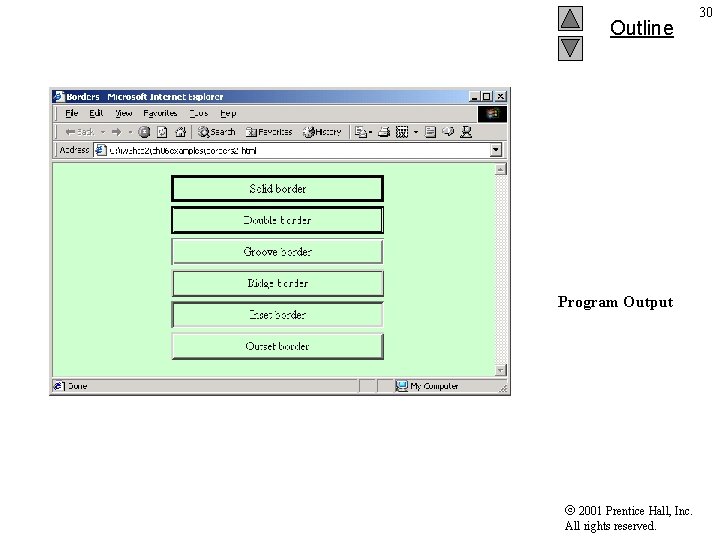
1 2 3 4 5 6 7 8 9 10 11 12 13 14 15 16 17 18 19 20 21 22 23 24 25 26 27 28 29 30 31 32 33 34 35 <? xml version = "1. 0"? > <!DOCTYPE html PUBLIC "-//W 3 C//DTD XHTML 1. 0 Strict//EN" "http: //www. w 3. org/TR/xhtml 1/DTD/xhtml 1 -strict. dtd"> <!-- Fig. 6. 15: borders 2. html <!-- Various border-styles Outline --> <html xmlns = "http: //www. w 3. org/1999/ xhtml"> <head> <title>Borders</title> <style type = "text/css"> body { background-color: #ccffcc } div { text-align: center; margin-bottom: . 3 em; width: 50%; position: relative; left: 25%; padding: . 3 em } </style> </head> Borders 2. html Specifying a border directly through the style attribute of the div element. <body> <div <div </body> </html> style style = = = "border-style: "border-style: solid">Solid border</div> double">Double border</div> groove">Groove border</div> ridge">Ridge border</div> inset">Inset border</div> outset">Outset border</div> 2001 Prentice Hall, Inc. All rights reserved. 29
Outline Program Output 2001 Prentice Hall, Inc. All rights reserved. 30
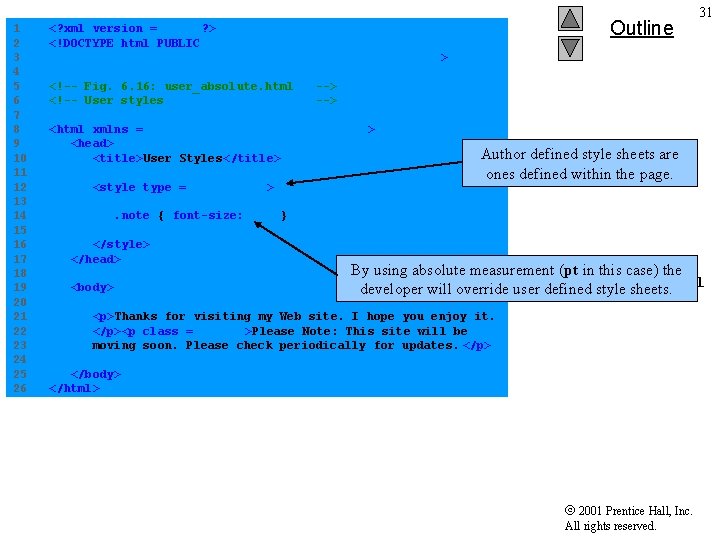
1 2 3 4 5 6 7 8 9 10 11 12 13 14 15 16 17 18 19 20 21 22 23 24 25 26 Outline <? xml version = "1. 0"? > <!DOCTYPE html PUBLIC "-//W 3 C//DTD XHTML 1. 0 Strict//EN" "http: //www. w 3. org/TR/xhtml 1/DTD/xhtml 1 -strict. dtd"> <!-- Fig. 6. 16: user_absolute. html <!-- User styles --> <html xmlns = "http: //www. w 3. org/1999/ xhtml"> <head> <title>User Styles</title> <style type = "text/css"> 31 Author defined style sheets are ones defined within the page. . note { font-size: 9 pt } </style> </head> <body> By using absolute measurement (pt in this case) the User_absolute. html developer will override user defined style sheets. <p>Thanks for visiting my Web site. I hope you enjoy it. </p><p class = "note">Please Note: This site will be moving soon. Please check periodically for updates. </p> </body> </html> 2001 Prentice Hall, Inc. All rights reserved.
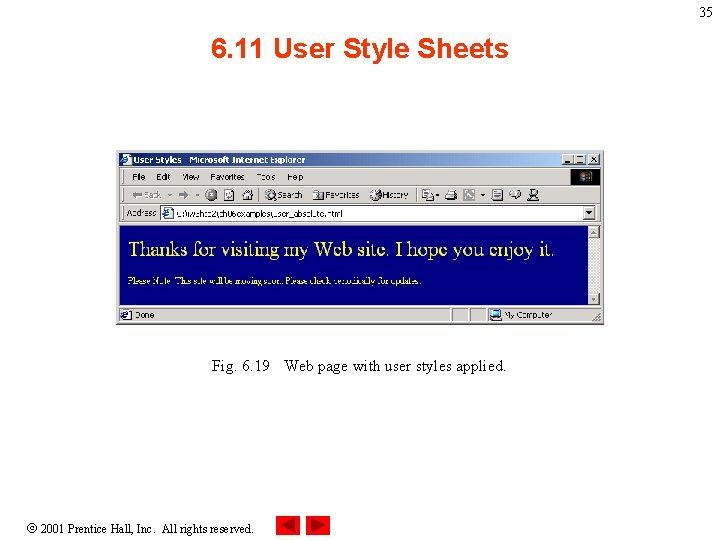
Outline Program Output Developer defined class applied to this p element decrease the font size of the text. Styles set by the author have higher precedence over the styles set by user style sheets. 2001 Prentice Hall, Inc. All rights reserved. 32
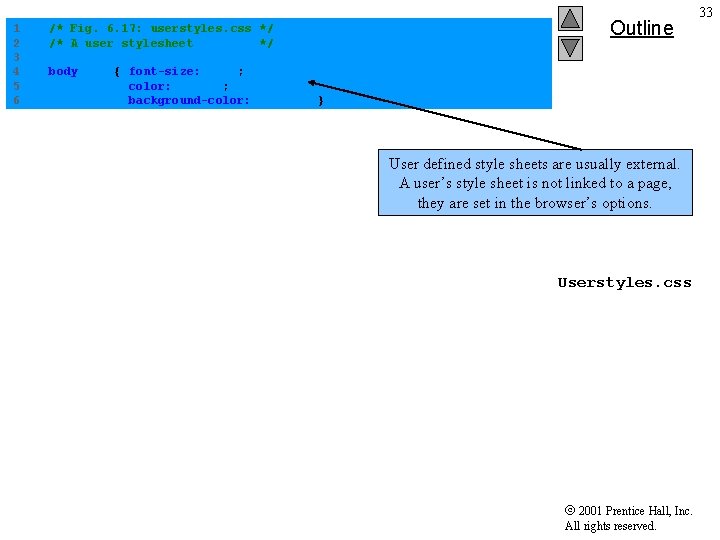
1 2 3 4 5 6 /* Fig. 6. 17: userstyles. css */ /* A user stylesheet */ body Outline { font-size: 20 pt; color: yellow; background-color: #000080 } User defined style sheets are usually external. A user’s style sheet is not linked to a page, they are set in the browser’s options. Userstyles. css 2001 Prentice Hall, Inc. All rights reserved. 33
34 6. 11 User Style Sheets Setting the user’s style sheet in IE. Fig. 6. 18 Adding a user style sheet in Internet Explorer 5. 5. 2001 Prentice Hall, Inc. All rights reserved.
35 6. 11 User Style Sheets Fig. 6. 19 Web page with user styles applied. 2001 Prentice Hall, Inc. All rights reserved.
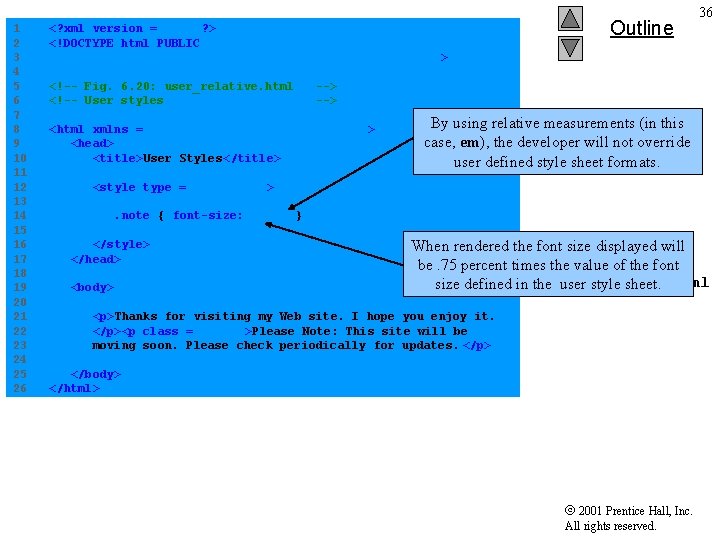
1 2 3 4 5 6 7 8 9 10 11 12 13 14 15 16 17 18 19 20 21 22 23 24 25 26 <? xml version = "1. 0"? > <!DOCTYPE html PUBLIC "-//W 3 C//DTD XHTML 1. 0 Strict//EN" "http: //www. w 3. org/TR/xhtml 1/DTD/xhtml 1 -strict. dtd"> <!-- Fig. 6. 20: user_relative. html <!-- User styles Outline 36 --> <html xmlns = "http: //www. w 3. org/1999/ xhtml"> <head> <title>User Styles</title> By using relative measurements (in this case, em), the developer will not override user defined style sheet formats. <style type = "text/css">. note { font-size: . 75 em } </style> </head> <body> When rendered the font size displayed will be. 75 percent times the value of the font User_relative. html size defined in the user style sheet. <p>Thanks for visiting my Web site. I hope you enjoy it. </p><p class = "note">Please Note: This site will be moving soon. Please check periodically for updates. </p> </body> </html> 2001 Prentice Hall, Inc. All rights reserved.
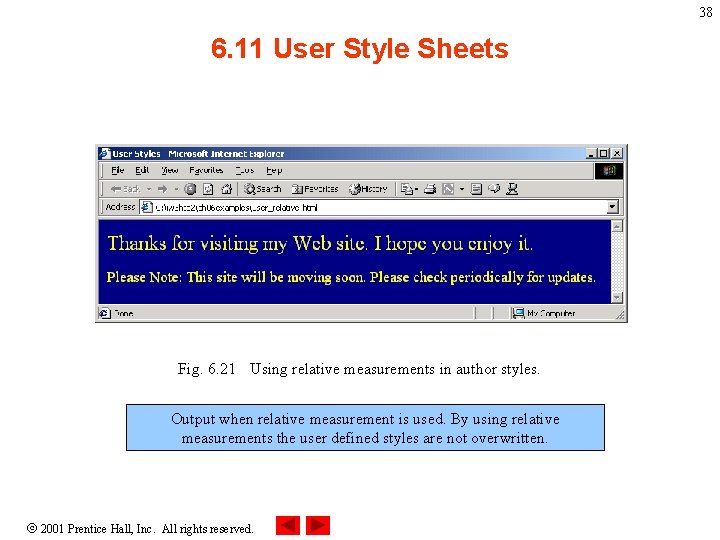
Outline Program Output before relative measurement is used to define the font in the document. 2001 Prentice Hall, Inc. All rights reserved. 37
38 6. 11 User Style Sheets Fig. 6. 21 Using relative measurements in author styles. Output when relative measurement is used. By using relative measurements the user defined styles are not overwritten. 2001 Prentice Hall, Inc. All rights reserved.