
Chapter 6 Arrays Liang Introduction to Java Programming
![Declaring Array Variables F datatype[] array. Ref. Var; Example: double[] my. List; F datatype](https://slidetodoc.com/presentation_image_h2/507be2fb413499cf79dbfe571e04c2eb/image-5.jpg "Declaring Array Variables F datatype[] array. Ref. Var; Example: double[] my. List; F datatype")
![Creating Arrays array. Ref. Var = new datatype[array. Size]; Example: my. List = new](https://slidetodoc.com/presentation_image_h2/507be2fb413499cf79dbfe571e04c2eb/image-6.jpg "Creating Arrays array. Ref. Var = new datatype[array. Size]; Example: my. List = new")
![Declaring and Creating in One Step F datatype[] array. Ref. Var = new datatype[array.](https://slidetodoc.com/presentation_image_h2/507be2fb413499cf79dbfe571e04c2eb/image-7.jpg "Declaring and Creating in One Step F datatype[] array. Ref. Var = new datatype[array.")
![Array Initializers F Declaring, creating, initializing in one step: double[] my. List = {1.](https://slidetodoc.com/presentation_image_h2/507be2fb413499cf79dbfe571e04c2eb/image-12.jpg "Array Initializers F Declaring, creating, initializing in one step: double[] my. List = {1.")
![animation Trace Program with Arrays After this line is executed, value[1] is 1 public](https://slidetodoc.com/presentation_image_h2/507be2fb413499cf79dbfe571e04c2eb/image-17.jpg "animation Trace Program with Arrays After this line is executed, value[1] is 1 public")
![animation Trace Program with Arrays After this line is executed, values[2] is 3 (2](https://slidetodoc.com/presentation_image_h2/507be2fb413499cf79dbfe571e04c2eb/image-20.jpg "animation Trace Program with Arrays After this line is executed, values[2] is 3 (2")
![animation Trace Program with Arrays After this line, values[3] becomes 6 (3 + 3)](https://slidetodoc.com/presentation_image_h2/507be2fb413499cf79dbfe571e04c2eb/image-23.jpg "animation Trace Program with Arrays After this line, values[3] becomes 6 (3 + 3)")
![animation Trace Program with Arrays After this, values[4] becomes 10 (4 + 6) public](https://slidetodoc.com/presentation_image_h2/507be2fb413499cf79dbfe571e04c2eb/image-26.jpg "animation Trace Program with Arrays After this, values[4] becomes 10 (4 + 6) public")
![animation Trace Program with Arrays After this line, values[0] is 11 (1 + 10)](https://slidetodoc.com/presentation_image_h2/507be2fb413499cf79dbfe571e04c2eb/image-29.jpg "animation Trace Program with Arrays After this line, values[0] is 11 (1 + 10)")
![Finding the largest element double max = my. List[0]; for (int i = 1;](https://slidetodoc.com/presentation_image_h2/507be2fb413499cf79dbfe571e04c2eb/image-35.jpg "Finding the largest element double max = my. List[0]; for (int i = 1;")
![Copying Arrays int[] source. Array = {2, 3, 1, 5, 10}; int[] target. Array](https://slidetodoc.com/presentation_image_h2/507be2fb413499cf79dbfe571e04c2eb/image-37.jpg "Copying Arrays int[] source. Array = {2, 3, 1, 5, 10}; int[] target. Array")
![Passing Arrays to Methods public static void print. Array(int[] array) { for (int i](https://slidetodoc.com/presentation_image_h2/507be2fb413499cf79dbfe571e04c2eb/image-39.jpg "Passing Arrays to Methods public static void print. Array(int[] array) { for (int i")
![Declare/Create Two-dimensional Arrays // Declare array ref var data. Type[][] ref. Var; // Create](https://slidetodoc.com/presentation_image_h2/507be2fb413499cf79dbfe571e04c2eb/image-40.jpg "Declare/Create Two-dimensional Arrays // Declare array ref var data. Type[][] ref. Var; // Create")
![Declaring Variables of Twodimensional Arrays and Creating Two-dimensional Arrays int[][] matrix = new int[10];](https://slidetodoc.com/presentation_image_h2/507be2fb413499cf79dbfe571e04c2eb/image-41.jpg "Declaring Variables of Twodimensional Arrays and Creating Two-dimensional Arrays int[][] matrix = new int[10];")
![Two-dimensional Array Illustration matrix. length? 5 array. length? 4 matrix[0]. length? 5 array[0]. length?](https://slidetodoc.com/presentation_image_h2/507be2fb413499cf79dbfe571e04c2eb/image-42.jpg "Two-dimensional Array Illustration matrix. length? 5 array. length? 4 matrix[0]. length? 5 array[0]. length?")
![Lengths of Two-dimensional Arrays int[][] x = new int[3][4]; Liang, Introduction to Java Programming,](https://slidetodoc.com/presentation_image_h2/507be2fb413499cf79dbfe571e04c2eb/image-44.jpg "Lengths of Two-dimensional Arrays int[][] x = new int[3][4]; Liang, Introduction to Java Programming,")
![Lengths of Two-dimensional Arrays, cont. int[][] array = { {1, 2, 3}, {4, 5,](https://slidetodoc.com/presentation_image_h2/507be2fb413499cf79dbfe571e04c2eb/image-45.jpg "Lengths of Two-dimensional Arrays, cont. int[][] array = { {1, 2, 3}, {4, 5,")
- Slides: 45
Chapter 6 Arrays Liang, Introduction to Java Programming, Ninth Edition, (c) 2013 Pearson Education, Inc. All rights reserved. 1
Objectives F F F F F To describe why arrays are necessary in programming (§ 6. 1). To declare array reference variables and create arrays (§§ 6. 2. 1– 6. 2. 2). To initialize obtain array size using array. Ref. Var. length and know default the values in an array (§ 6. 2. 3). To access array elements using indexed variables (§ 6. 2. 4). To declare, create, and initialize an array using an array initializer (§ 6. 2. 5). To program common array operations (displaying arrays, summing all elements, finding the minimum and maximum elements, random shuffling, and shifting elements) (§ 6. 2. 6). To simplify programming using the for-each loops (§ 6. 2. 7). To copy contents from one array to another (§ 6. 5). To develop and invoke methods with array arguments and return values (§§ 6. 6 – 6. 78). Liang, Introduction to Java Programming, Ninth Edition, (c) 2013 Pearson Education, Inc. All rights reserved. 2
Opening Problem Read one hundred numbers, compute their average, and find out how many numbers are above the average. Liang, Introduction to Java Programming, Ninth Edition, (c) 2013 Pearson Education, Inc. All rights reserved. 3
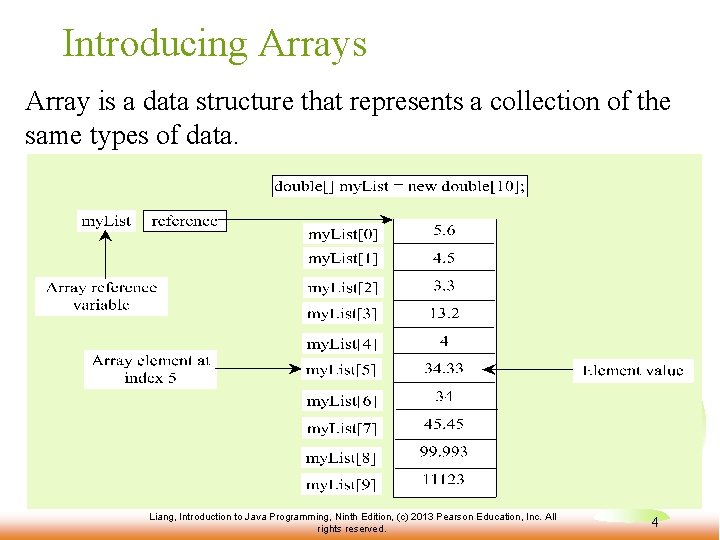
Introducing Arrays Array is a data structure that represents a collection of the same types of data. Liang, Introduction to Java Programming, Ninth Edition, (c) 2013 Pearson Education, Inc. All rights reserved. 4
Declaring Array Variables F datatype[] array. Ref. Var; Example: double[] my. List; F datatype array. Ref. Var[]; // This style is allowed, but not preferred Example: double my. List[]; Liang, Introduction to Java Programming, Ninth Edition, (c) 2013 Pearson Education, Inc. All rights reserved. 5
Creating Arrays array. Ref. Var = new datatype[array. Size]; Example: my. List = new double[10]; references the first element in the array. my. List[9] references the last element in the array. my. List[0] Liang, Introduction to Java Programming, Ninth Edition, (c) 2013 Pearson Education, Inc. All rights reserved. 6
Declaring and Creating in One Step F datatype[] array. Ref. Var = new datatype[array. Size]; double[] my. List = new double[10]; F datatype array. Ref. Var[] = new datatype[array. Size]; double my. List[] = new double[10]; Liang, Introduction to Java Programming, Ninth Edition, (c) 2013 Pearson Education, Inc. All rights reserved. 7
The Length of an Array Once an array is created, its size is fixed. It cannot be changed. You can find its size using array. Ref. Var. length For example, my. List. length returns 10 Liang, Introduction to Java Programming, Ninth Edition, (c) 2013 Pearson Education, Inc. All rights reserved. 8
Default Values When an array is created, its elements are assigned the default value of 0 for the numeric primitive data types, 'u 0000' for char types, and false for boolean types. Liang, Introduction to Java Programming, Ninth Edition, (c) 2013 Pearson Education, Inc. All rights reserved. 9
Indexed Variables The array elements are accessed through the index. The array indices are 0 -based, i. e. , it starts from 0 to array. Ref. Var. length-1. In the example in Figure 6. 1, my. List holds ten double values and the indices are from 0 to 9. Each element in the array is represented using the following syntax, known as an indexed variable: array. Ref. Var[index]; Liang, Introduction to Java Programming, Ninth Edition, (c) 2013 Pearson Education, Inc. All rights reserved. 10
Using Indexed Variables After an array is created, an indexed variable can be used in the same way as a regular variable. For example, the following code adds the value in my. List[0] and my. List[1] to my. List[2] = my. List[0] + my. List[1]; Liang, Introduction to Java Programming, Ninth Edition, (c) 2013 Pearson Education, Inc. All rights reserved. 11
Array Initializers F Declaring, creating, initializing in one step: double[] my. List = {1. 9, 2. 9, 3. 4, 3. 5}; This shorthand notation is equivalent to the following statements: double[] my. List = new double[4]; my. List[0] = 1. 9; my. List[1] = 2. 9; my. List[2] = 3. 4; my. List[3] = 3. 5; Liang, Introduction to Java Programming, Ninth Edition, (c) 2013 Pearson Education, Inc. All rights reserved. 12
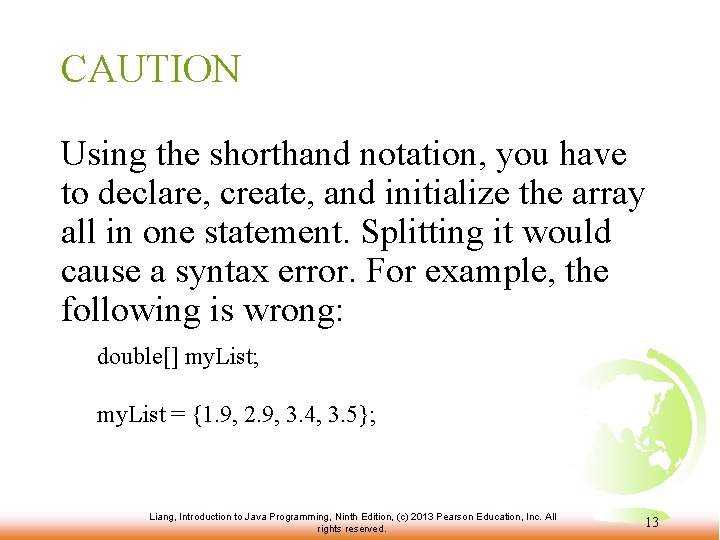
CAUTION Using the shorthand notation, you have to declare, create, and initialize the array all in one statement. Splitting it would cause a syntax error. For example, the following is wrong: double[] my. List; my. List = {1. 9, 2. 9, 3. 4, 3. 5}; Liang, Introduction to Java Programming, Ninth Edition, (c) 2013 Pearson Education, Inc. All rights reserved. 13
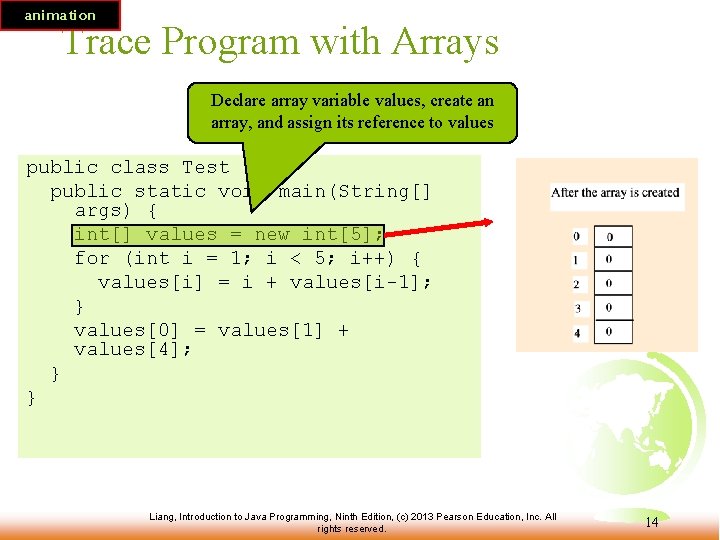
animation Trace Program with Arrays Declare array variable values, create an array, and assign its reference to values public class Test { public static void main(String[] args) { int[] values = new int[5]; for (int i = 1; i < 5; i++) { values[i] = i + values[i-1]; } values[0] = values[1] + values[4]; } } Liang, Introduction to Java Programming, Ninth Edition, (c) 2013 Pearson Education, Inc. All rights reserved. 14
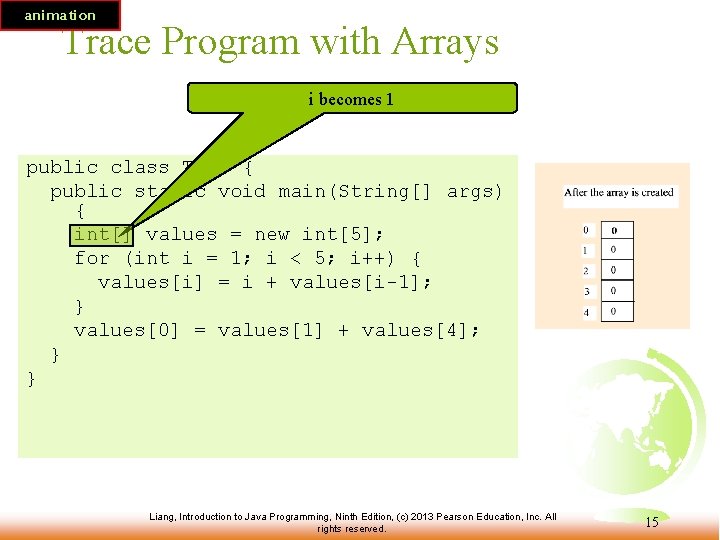
animation Trace Program with Arrays i becomes 1 public class Test { public static void main(String[] args) { int[] values = new int[5]; for (int i = 1; i < 5; i++) { values[i] = i + values[i-1]; } values[0] = values[1] + values[4]; } } Liang, Introduction to Java Programming, Ninth Edition, (c) 2013 Pearson Education, Inc. All rights reserved. 15
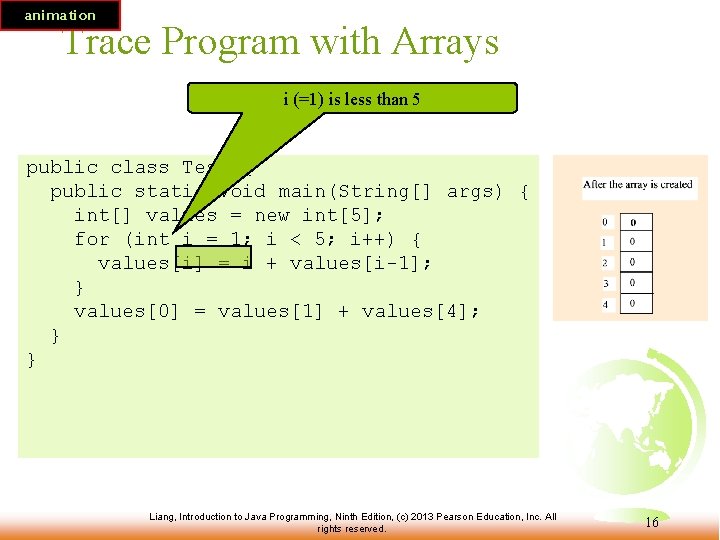
animation Trace Program with Arrays i (=1) is less than 5 public class Test { public static void main(String[] args) { int[] values = new int[5]; for (int i = 1; i < 5; i++) { values[i] = i + values[i-1]; } values[0] = values[1] + values[4]; } } Liang, Introduction to Java Programming, Ninth Edition, (c) 2013 Pearson Education, Inc. All rights reserved. 16
animation Trace Program with Arrays After this line is executed, value[1] is 1 public class Test { public static void main(String[] args) { int[] values = new int[5]; for (int i = 1; i < 5; i++) { values[i] = i + values[i-1]; } values[0] = values[1] + values[4]; } } Liang, Introduction to Java Programming, Ninth Edition, (c) 2013 Pearson Education, Inc. All rights reserved. 17
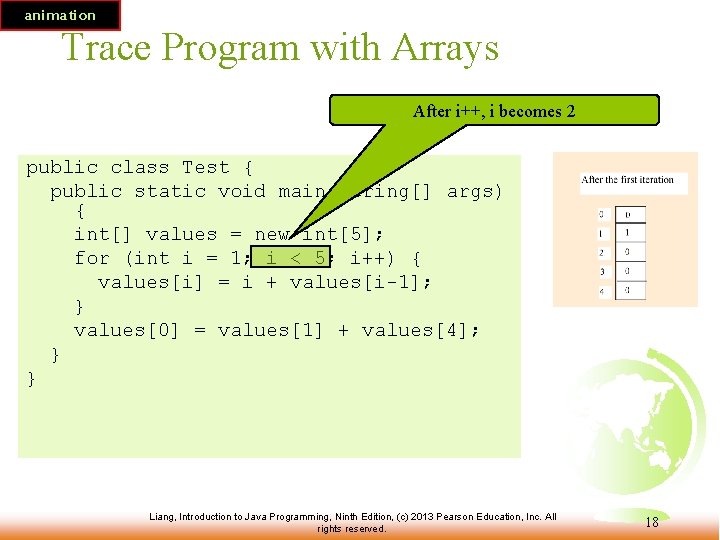
animation Trace Program with Arrays After i++, i becomes 2 public class Test { public static void main(String[] args) { int[] values = new int[5]; for (int i = 1; i < 5; i++) { values[i] = i + values[i-1]; } values[0] = values[1] + values[4]; } } Liang, Introduction to Java Programming, Ninth Edition, (c) 2013 Pearson Education, Inc. All rights reserved. 18
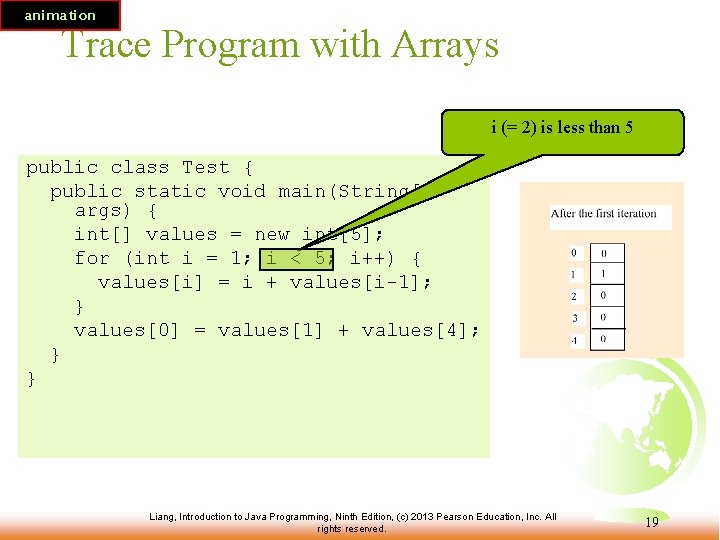
animation Trace Program with Arrays i (= 2) is less than 5 public class Test { public static void main(String[] args) { int[] values = new int[5]; for (int i = 1; i < 5; i++) { values[i] = i + values[i-1]; } values[0] = values[1] + values[4]; } } Liang, Introduction to Java Programming, Ninth Edition, (c) 2013 Pearson Education, Inc. All rights reserved. 19
animation Trace Program with Arrays After this line is executed, values[2] is 3 (2 + 1) public class Test { public static void main(String[] args) { int[] values = new int[5]; for (int i = 1; i < 5; i++) { values[i] = i + values[i-1]; } values[0] = values[1] + values[4]; } } Liang, Introduction to Java Programming, Ninth Edition, (c) 2013 Pearson Education, Inc. All rights reserved. 20
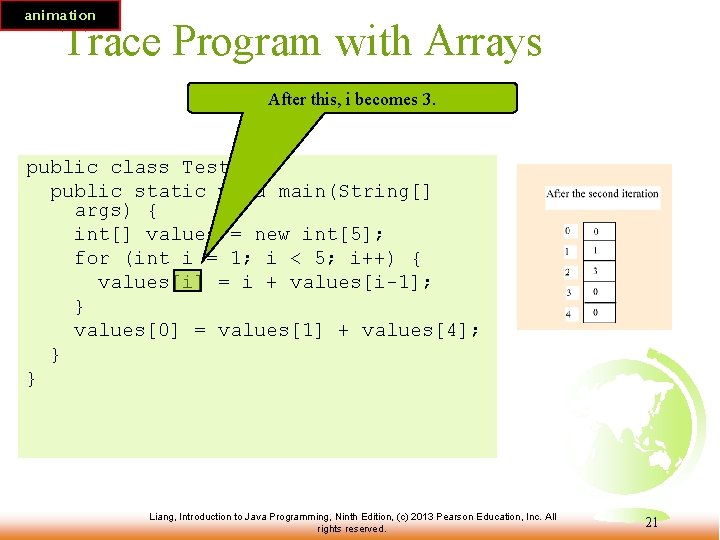
animation Trace Program with Arrays After this, i becomes 3. public class Test { public static void main(String[] args) { int[] values = new int[5]; for (int i = 1; i < 5; i++) { values[i] = i + values[i-1]; } values[0] = values[1] + values[4]; } } Liang, Introduction to Java Programming, Ninth Edition, (c) 2013 Pearson Education, Inc. All rights reserved. 21
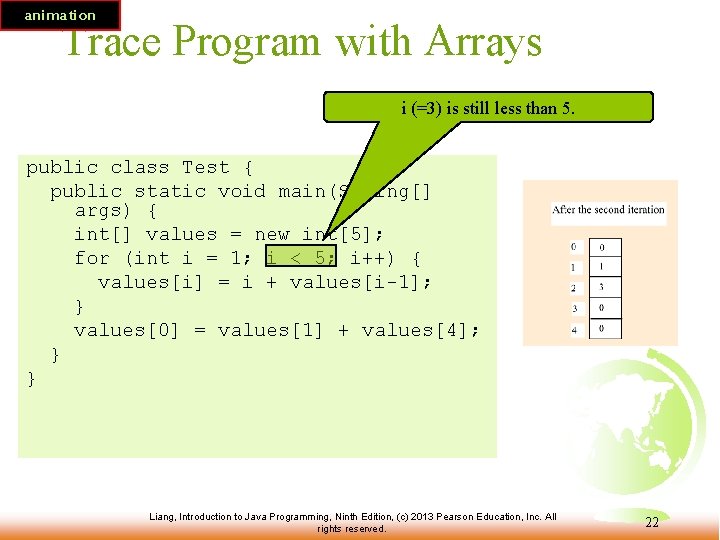
animation Trace Program with Arrays i (=3) is still less than 5. public class Test { public static void main(String[] args) { int[] values = new int[5]; for (int i = 1; i < 5; i++) { values[i] = i + values[i-1]; } values[0] = values[1] + values[4]; } } Liang, Introduction to Java Programming, Ninth Edition, (c) 2013 Pearson Education, Inc. All rights reserved. 22
animation Trace Program with Arrays After this line, values[3] becomes 6 (3 + 3) public class Test { public static void main(String[] args) { int[] values = new int[5]; for (int i = 1; i < 5; i++) { values[i] = i + values[i-1]; } values[0] = values[1] + values[4]; } } Liang, Introduction to Java Programming, Ninth Edition, (c) 2013 Pearson Education, Inc. All rights reserved. 23
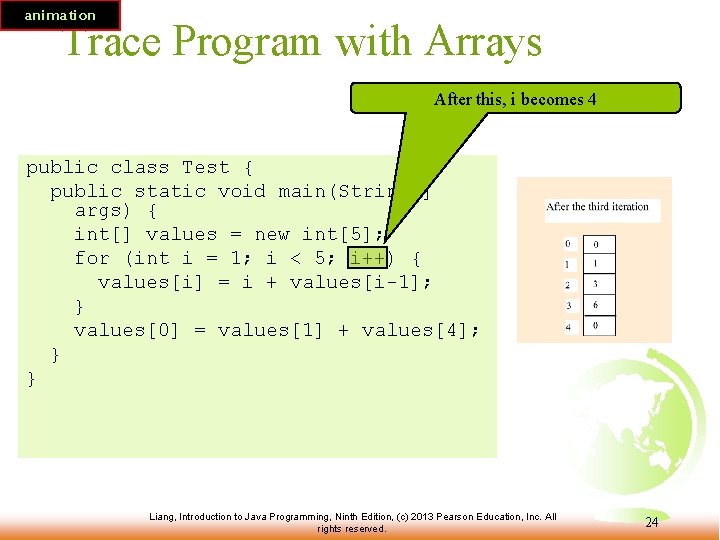
animation Trace Program with Arrays After this, i becomes 4 public class Test { public static void main(String[] args) { int[] values = new int[5]; for (int i = 1; i < 5; i++) { values[i] = i + values[i-1]; } values[0] = values[1] + values[4]; } } Liang, Introduction to Java Programming, Ninth Edition, (c) 2013 Pearson Education, Inc. All rights reserved. 24
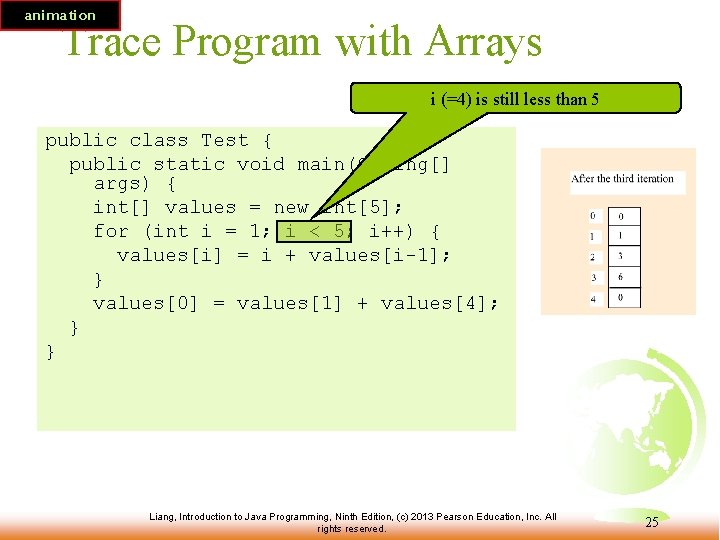
animation Trace Program with Arrays i (=4) is still less than 5 public class Test { public static void main(String[] args) { int[] values = new int[5]; for (int i = 1; i < 5; i++) { values[i] = i + values[i-1]; } values[0] = values[1] + values[4]; } } Liang, Introduction to Java Programming, Ninth Edition, (c) 2013 Pearson Education, Inc. All rights reserved. 25
animation Trace Program with Arrays After this, values[4] becomes 10 (4 + 6) public class Test { public static void main(String[] args) { int[] values = new int[5]; for (int i = 1; i < 5; i++) { values[i] = i + values[i-1]; } values[0] = values[1] + values[4]; } } Liang, Introduction to Java Programming, Ninth Edition, (c) 2013 Pearson Education, Inc. All rights reserved. 26
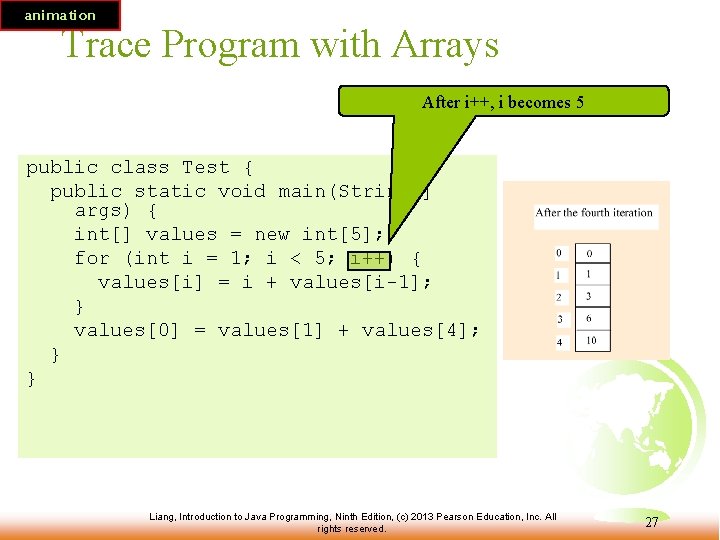
animation Trace Program with Arrays After i++, i becomes 5 public class Test { public static void main(String[] args) { int[] values = new int[5]; for (int i = 1; i < 5; i++) { values[i] = i + values[i-1]; } values[0] = values[1] + values[4]; } } Liang, Introduction to Java Programming, Ninth Edition, (c) 2013 Pearson Education, Inc. All rights reserved. 27
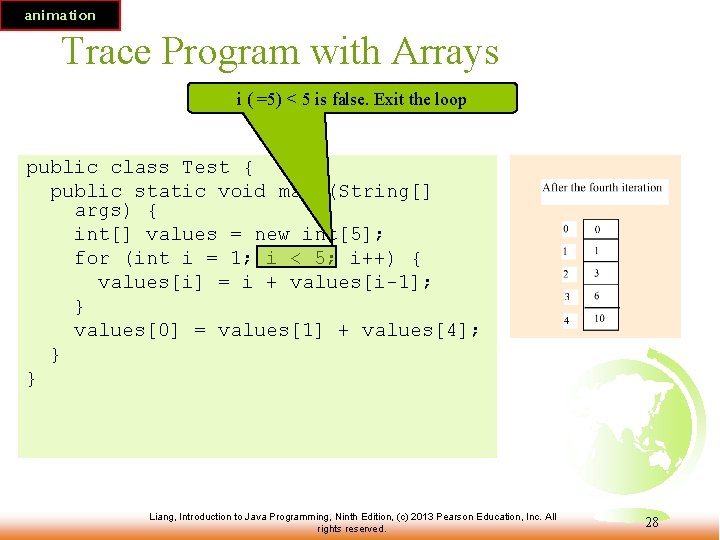
animation Trace Program with Arrays i ( =5) < 5 is false. Exit the loop public class Test { public static void main(String[] args) { int[] values = new int[5]; for (int i = 1; i < 5; i++) { values[i] = i + values[i-1]; } values[0] = values[1] + values[4]; } } Liang, Introduction to Java Programming, Ninth Edition, (c) 2013 Pearson Education, Inc. All rights reserved. 28
animation Trace Program with Arrays After this line, values[0] is 11 (1 + 10) public class Test { public static void main(String[] args) { int[] values = new int[5]; for (int i = 1; i < 5; i++) { values[i] = i + values[i-1]; } values[0] = values[1] + values[4]; } } Liang, Introduction to Java Programming, Ninth Edition, (c) 2013 Pearson Education, Inc. All rights reserved. 29
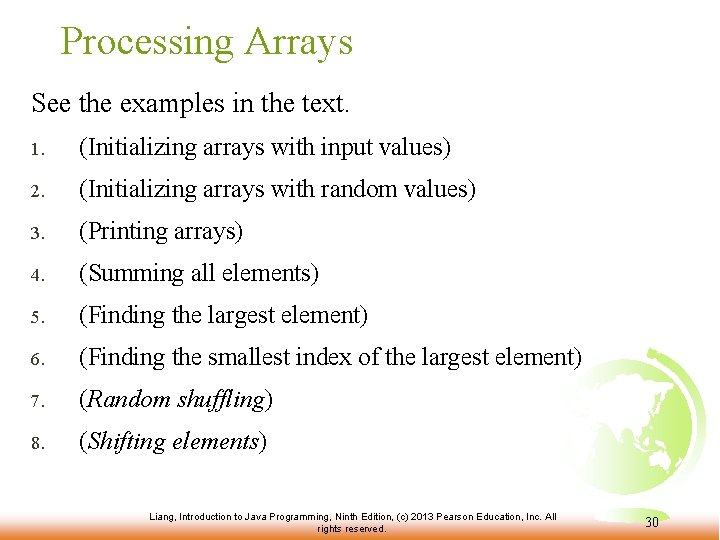
Processing Arrays See the examples in the text. 1. (Initializing arrays with input values) 2. (Initializing arrays with random values) 3. (Printing arrays) 4. (Summing all elements) 5. (Finding the largest element) 6. (Finding the smallest index of the largest element) 7. (Random shuffling) 8. (Shifting elements) Liang, Introduction to Java Programming, Ninth Edition, (c) 2013 Pearson Education, Inc. All rights reserved. 30
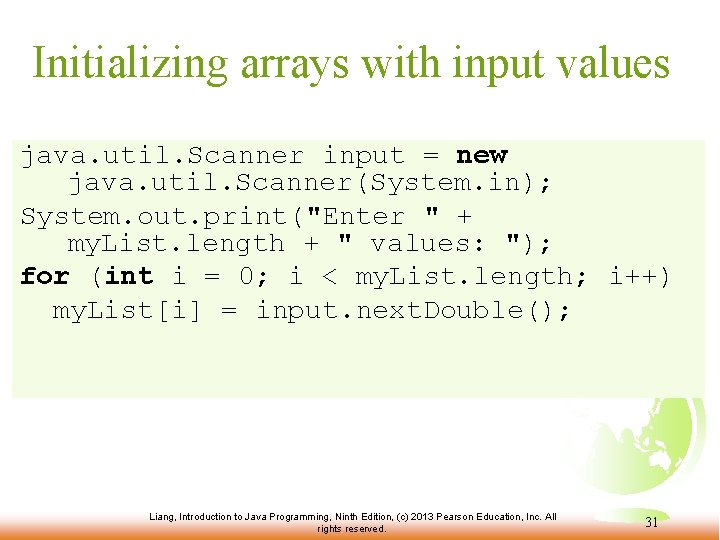
Initializing arrays with input values java. util. Scanner input = new java. util. Scanner(System. in); System. out. print("Enter " + my. List. length + " values: "); for (int i = 0; i < my. List. length; i++) my. List[i] = input. next. Double(); Liang, Introduction to Java Programming, Ninth Edition, (c) 2013 Pearson Education, Inc. All rights reserved. 31
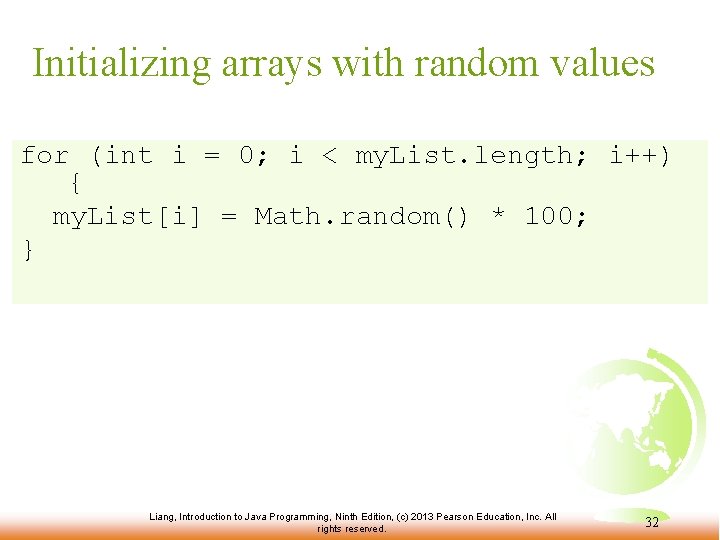
Initializing arrays with random values for (int i = 0; i < my. List. length; i++) { my. List[i] = Math. random() * 100; } Liang, Introduction to Java Programming, Ninth Edition, (c) 2013 Pearson Education, Inc. All rights reserved. 32
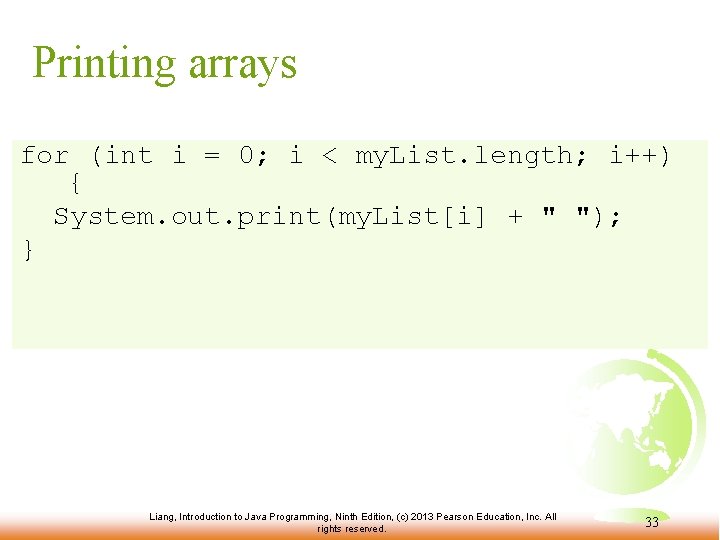
Printing arrays for (int i = 0; i < my. List. length; i++) { System. out. print(my. List[i] + " "); } Liang, Introduction to Java Programming, Ninth Edition, (c) 2013 Pearson Education, Inc. All rights reserved. 33
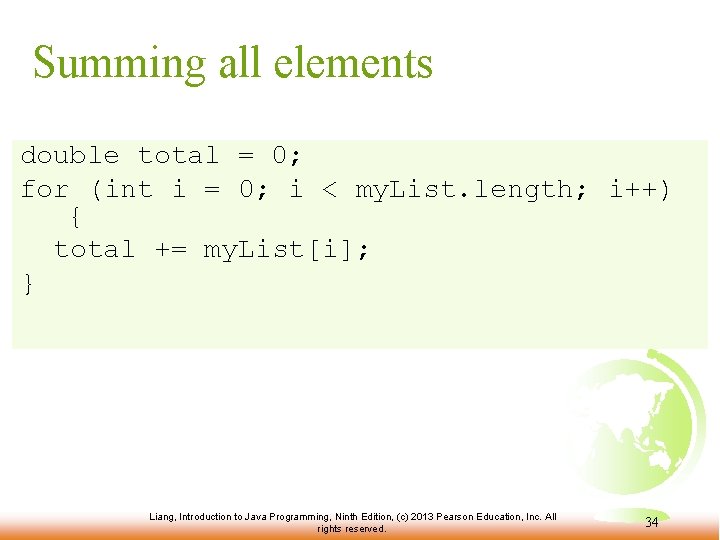
Summing all elements double total = 0; for (int i = 0; i < my. List. length; i++) { total += my. List[i]; } Liang, Introduction to Java Programming, Ninth Edition, (c) 2013 Pearson Education, Inc. All rights reserved. 34
Finding the largest element double max = my. List[0]; for (int i = 1; i < my. List. length; i++) { if (my. List[i] > max) max = my. List[i]; } Liang, Introduction to Java Programming, Ninth Edition, (c) 2013 Pearson Education, Inc. All rights reserved. 35
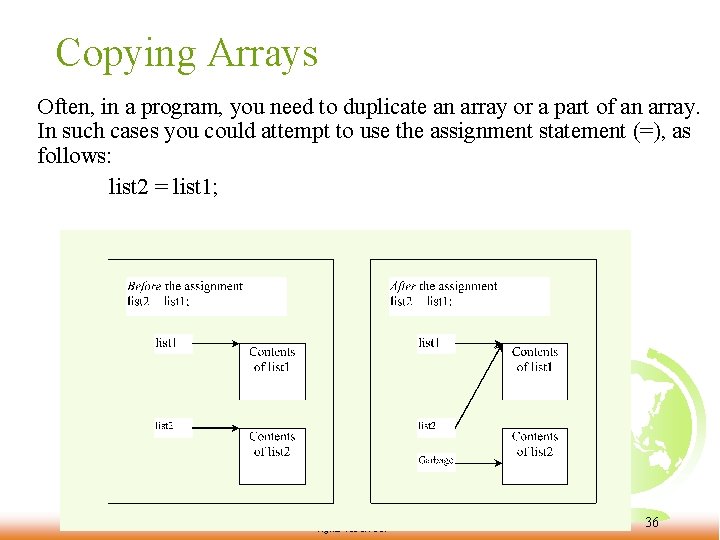
Copying Arrays Often, in a program, you need to duplicate an array or a part of an array. In such cases you could attempt to use the assignment statement (=), as follows: list 2 = list 1; Liang, Introduction to Java Programming, Ninth Edition, (c) 2013 Pearson Education, Inc. All rights reserved. 36
Copying Arrays int[] source. Array = {2, 3, 1, 5, 10}; int[] target. Array = new int[source. Array. length]; for (int i = 0; i < source. Arrays. length; i++) target. Array[i] = source. Array[i]; Liang, Introduction to Java Programming, Ninth Edition, (c) 2013 Pearson Education, Inc. All rights reserved. 37
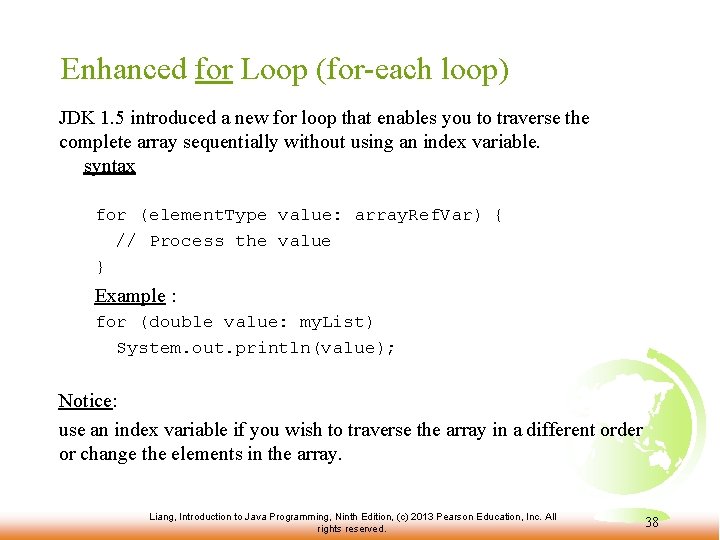
Enhanced for Loop (for-each loop) JDK 1. 5 introduced a new for loop that enables you to traverse the complete array sequentially without using an index variable. syntax for (element. Type value: array. Ref. Var) { // Process the value } Example : for (double value: my. List) System. out. println(value); Notice: use an index variable if you wish to traverse the array in a different order or change the elements in the array. Liang, Introduction to Java Programming, Ninth Edition, (c) 2013 Pearson Education, Inc. All rights reserved. 38
Passing Arrays to Methods public static void print. Array(int[] array) { for (int i = 0; i < array. length; i++) { System. out. print(array[i] + " "); } } Invoke the method int[] list = {3, 1, 2, 6, 4, 2}; print. Array(list); Liang, Introduction to Java Programming, Ninth Edition, (c) 2013 Pearson Education, Inc. All rights reserved. 39
Declare/Create Two-dimensional Arrays // Declare array ref var data. Type[][] ref. Var; // Create array and assign its reference to variable ref. Var = new data. Type[10]; // Combine declaration and creation in one statement data. Type[][] ref. Var = new data. Type[10]; // Alternative syntax data. Type ref. Var[][] = new data. Type[10]; Liang, Introduction to Java Programming, Ninth Edition, (c) 2013 Pearson Education, Inc. All rights reserved. 40
Declaring Variables of Twodimensional Arrays and Creating Two-dimensional Arrays int[][] matrix = new int[10]; or int matrix[][] = new int[10]; matrix[0][0] = 3; for (int i = 0; i < matrix. length; i++) for (int j = 0; j < matrix[i]. length; j++) matrix[i][j] = (int)(Math. random() * 1000); double[][] x; Liang, Introduction to Java Programming, Ninth Edition, (c) 2013 Pearson Education, Inc. All rights reserved. 41
Two-dimensional Array Illustration matrix. length? 5 array. length? 4 matrix[0]. length? 5 array[0]. length? 3 Liang, Introduction to Java Programming, Ninth Edition, (c) 2013 Pearson Education, Inc. All rights reserved. 42
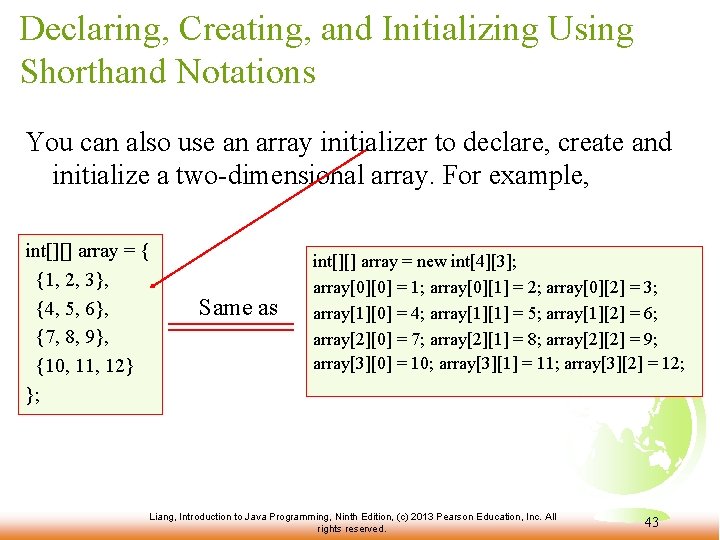
Declaring, Creating, and Initializing Using Shorthand Notations You can also use an array initializer to declare, create and initialize a two-dimensional array. For example, int[][] array = { {1, 2, 3}, {4, 5, 6}, {7, 8, 9}, {10, 11, 12} }; Same as int[][] array = new int[4][3]; array[0][0] = 1; array[0][1] = 2; array[0][2] = 3; array[1][0] = 4; array[1][1] = 5; array[1][2] = 6; array[2][0] = 7; array[2][1] = 8; array[2][2] = 9; array[3][0] = 10; array[3][1] = 11; array[3][2] = 12; Liang, Introduction to Java Programming, Ninth Edition, (c) 2013 Pearson Education, Inc. All rights reserved. 43
Lengths of Two-dimensional Arrays int[][] x = new int[3][4]; Liang, Introduction to Java Programming, Ninth Edition, (c) 2013 Pearson Education, Inc. All rights reserved. 44
Lengths of Two-dimensional Arrays, cont. int[][] array = { {1, 2, 3}, {4, 5, 6}, {7, 8, 9}, {10, 11, 12} }; array[4]. length array[0]. length array[1]. length array[2]. length array[3]. length Array. Index. Out. Of. Bounds. Exception Liang, Introduction to Java Programming, Ninth Edition, (c) 2013 Pearson Education, Inc. All rights reserved. 45