
Chapter 6 1 4 Web File Management Computer
Chapter 6: 1: 4: Web File Management, Computer, Virusand E-Commerce Chapter Pages, Internet, Web Sites, Protection, Web, and E-Mail and Backup Basics 1
Chapter 6 Preview After this chapter, you should be able to: – Describe the roles that HTML, XHTML, HTTP, URLs, browsers, and Web servers play in bringing Web pages to your desktop – Explain why cookies are useful in an environment that is based on a stateless protocol, and provide some concrete examples of their use – Identify some Web page design tools and discuss their advantages and disadvantages – Describe how HTML tags, cascading style sheets, links, buttons, hot spots, frames, forms, and tables are used in the design and creation of Web pages – Identify the elements that typically form a Web page Chapter 6: Web Pages, Web Sites, and E-Commerce 2
Chapter 6 Preview – Explain how to test and post Web pages – Describe how DHTML, XML, and XSL technologies work to enhance Web pages – List some advantages and disadvantages of using Java. Script, VBScript, Java applets, and Active. X controls – Discuss why e-commerce has become so popular with consumers and merchants – List some threats to the security of credit card numbers and other sensitive data during e-commerce transactions – Describe how the following e-commerce technologies work: shopping carts, SSL, one-time use credit cards, electronic wallets, and person-to-person payment systems Chapter 6: Web Pages, Web Sites, and E-Commerce 3
Chapter 6 Outline • Section A – Web Technology • Section B – Basic Web Page Authoring • Section C – Web Page Extensions, Scripts, and Programs • Section D – E-Commerce Chapter 6: Web Pages, Web Sites, and E-Commerce 4
Chapter 6 Web Pages, Web Sites, and E-Commerce Section A: Web Technology Computer Concepts 8 th Edition Parsons/Oja
The Web, The Net, and Hypertext: What’s the difference between the Web and the Internet? • The Internet is a communications network • The Internet carries text, graphics, and audio data that forms Web pages • The Web is an interlinked collection of information that flows over the Internet Chapter 6: Web Pages, Web Sites, and E-Commerce Page 284 6

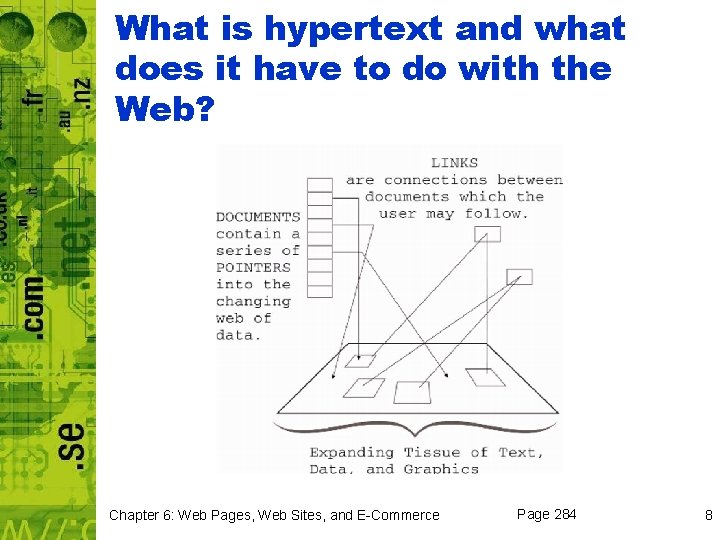
What is hypertext and what does it have to do with the Web? • Two of the most important elements of the Web – Hypertext Transfer Protocol (HTTP) – Hypertext Markup Language (HTML) • Hypertext – text linked together in nonlinear form • Hypertext link – clickable text that lets you access related documents Chapter 6: Web Pages, Web Sites, and E-Commerce Page 284 7
What is hypertext and what does it have to do with the Web? Chapter 6: Web Pages, Web Sites, and E-Commerce Page 284 8

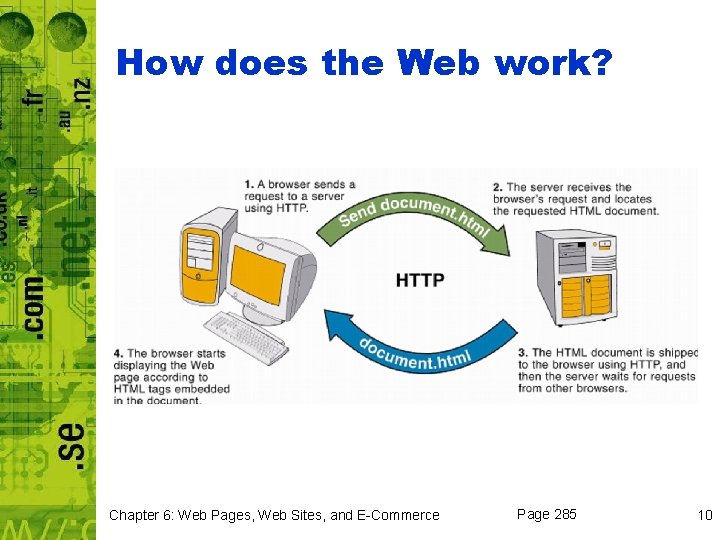
How does the Web work? • Web pages are written in HTML • HTML document – plain text, or ASCII, document with embedded HTML tags • HTTP communications protocol is used by Web browser when requesting specific pages Chapter 6: Web Pages, Web Sites, and E-Commerce Page 285 9
How does the Web work? Chapter 6: Web Pages, Web Sites, and E-Commerce Page 285 10
HTML and XHTML: What is HTML? • HTML (Hypertext Markup Language)– is a set of specifications for creating documents – Tags specify how the document should appear – World Wide Web Consortium (W 3 C) – organization that reviews and revises HTML standard • XHTML is the follow-up version to HTML 4 Chapter 6: Web Pages, Web Sites, and E-Commerce Page 286 11
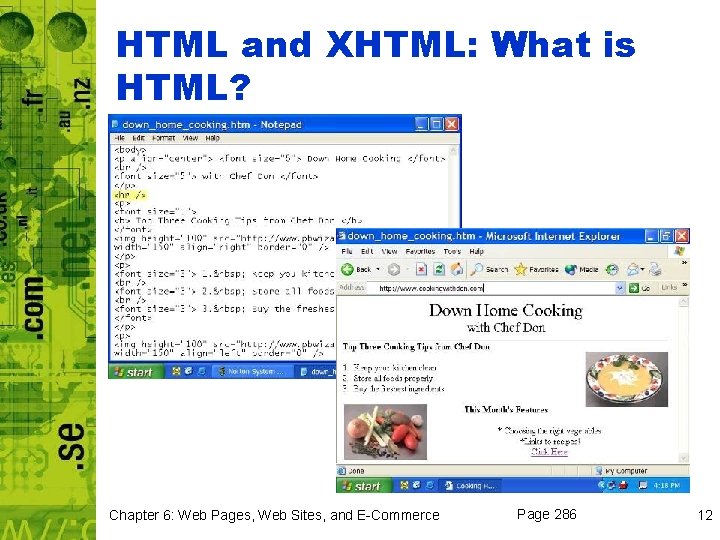
HTML and XHTML: What is HTML? Chapter 6: Web Pages, Web Sites, and E-Commerce Page 286 12
So HTML documents look a lot different than Web pages, right? • HTML document is like a screenplay • Web browser is like a director • Web page exists only for the duration of the performance Chapter 6: Web Pages, Web Sites, and E-Commerce Page 288 13
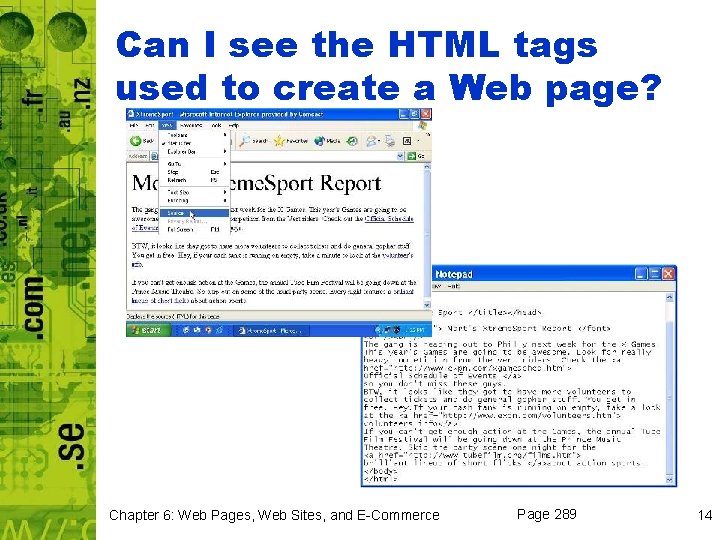
Can I see the HTML tags used to create a Web page? Chapter 6: Web Pages, Web Sites, and E-Commerce Page 289 14
What are the most commonly used HTML tags? • • Formatting tags Link tags Media tags Operational tags Chapter 6: Web Pages, Web Sites, and E-Commerce Page 289 15
Web Browsers: Why do I need a web browser to access the Web? • Browser plays two roles: – Uses HTTP to send messages to a Web Server – Interprets the HTML tags from the Web server in order to display the requested Web page Chapter 6: Web Pages, Web Sites, and E-Commerce Page 289 16
What are some of today’s most popular browsers? • • Netscape Internet Explorer Opera Mozilla Firefox Chapter 6: Web Pages, Web Sites, and E-Commerce Page 290 17
Should I upgrade my browser when new versions become available? • It is a good idea to upgrade when a new version comes out – Contains up-to-date functionality – Some Web pages depend on new HTML features supported by newer versions of a browser – Upgrades are generally free Chapter 6: Web Pages, Web Sites, and E-Commerce Page 290 18
Helper Applications, Plug-Ins, Players: Why do I have to download software to view some Web pages? • The native file formats for early browsers typically were limited to documents in HTML format and graphics files in GIF and JPEG formats • Files that are not handled by the browser sometimes require you to download helper application, plug-in, or player in order to handle the files Chapter 6: Web Pages, Web Sites, and E-Commerce Page 291 19
What is a helper application? • A program that extends a browser’s ability to work with file formats – Updates your system so browser can automatically open helper application that works with a specific file format – Used by browser to open non-HTML file format Chapter 6: Web Pages, Web Sites, and E-Commerce Page 291 20
Is a plug-in the same as a helper application? • Plug-in – type of helper application that can be activated by the EMBED tag inserted in an HTML document • Player – any helper application or plugin that helps a browser display a particular file format Chapter 6: Web Pages, Web Sites, and E-Commerce Page 291 21
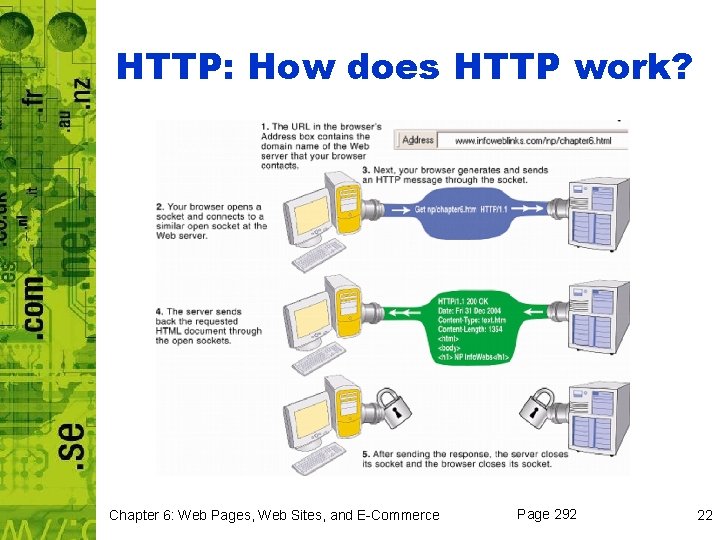
HTTP: How does HTTP work? Chapter 6: Web Pages, Web Sites, and E-Commerce Page 292 22
Does a browser have to request each Web page element separately? • Yes • HTTP is classified as a stateless protocol – One request and response per session – Assembly of one page requires one request per element on the page Chapter 6: Web Pages, Web Sites, and E-Commerce Page 293 23
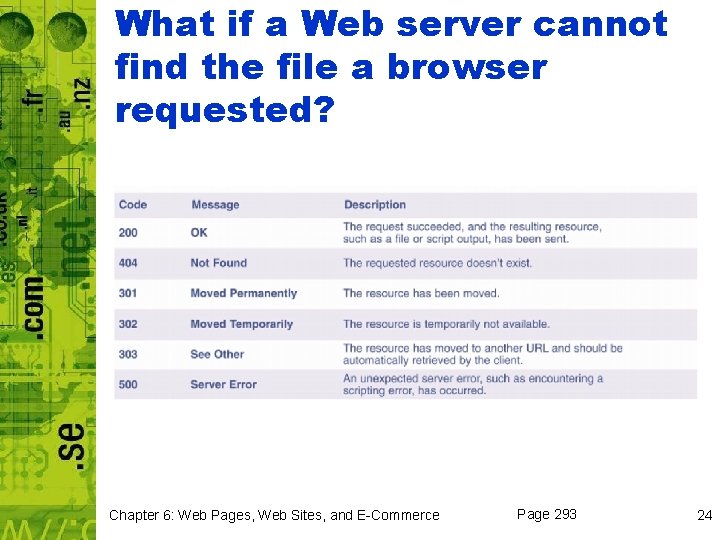
What if a Web server cannot find the file a browser requested? Chapter 6: Web Pages, Web Sites, and E-Commerce Page 293 24
Web Servers: How does a Web server understand HTTP requests? • Web server is configured to include HTTP software – Always running when server is “up” and ready to fulfill requests – One port is dedicated to “listening” for HTTP requests • Traditionally port 80 Chapter 6: Web Pages, Web Sites, and E-Commerce Page 293 25
Is a Web server the same as a Web site? • Not necessarily – server can house many sites or just one, and one site may cover several servers – www. hotmail. com – housed on several identically configured file servers Chapter 6: Web Pages, Web Sites, and E-Commerce Page 294 26
Cookies: What is a “cookie”? • A small chunk of data generated by a Web server and stored in a text file on your computer • Web sites use cookies to: – Track your path through a site – Provide information that allows the Web site to present you with ad banners – Retain any personal information that you type into a Web page form Chapter 6: Web Pages, Web Sites, and E-Commerce Page 295 27
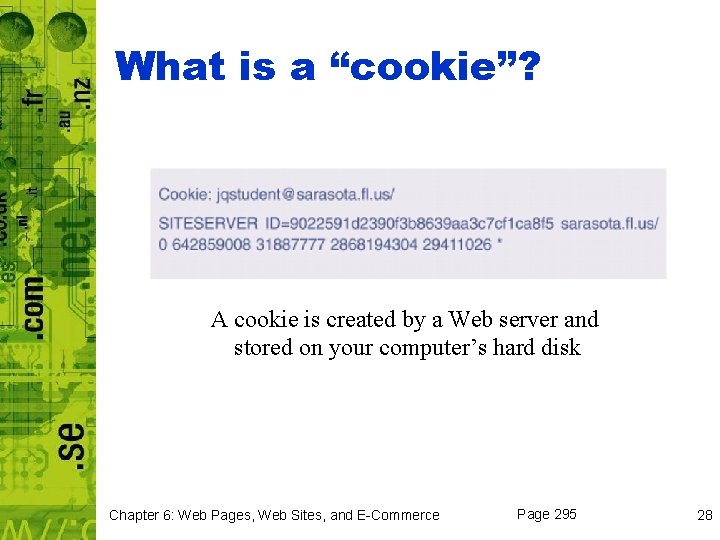
What is a “cookie”? A cookie is created by a Web server and stored on your computer’s hard disk Chapter 6: Web Pages, Web Sites, and E-Commerce Page 295 28
Are cookies safe and private? • Cookies are a relatively safe technology – Data, not computer program – Can only be accessed by site that created it – Contain only information you disclose while using the site – Uses a randomly generated number instead of your name Chapter 6: Web Pages, Web Sites, and E-Commerce Page 295 29
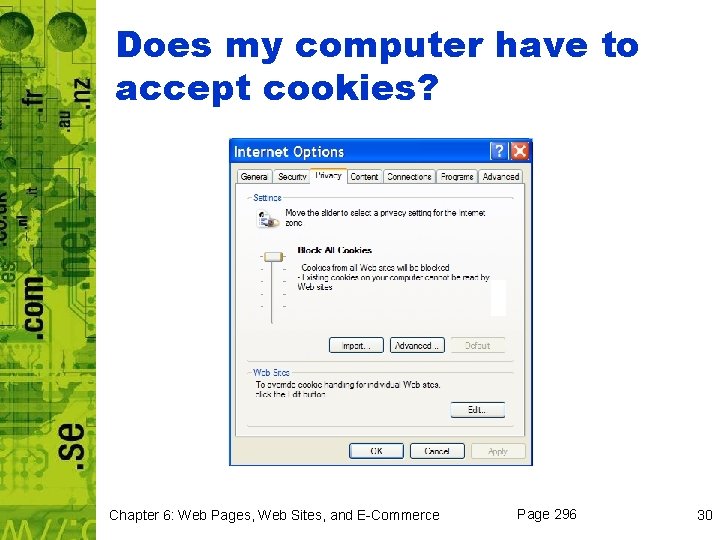
Does my computer have to accept cookies? Chapter 6: Web Pages, Web Sites, and E-Commerce Page 296 30
How long do cookies stay on my computer? • A Web programmer can program a cookie to “time out” • You can delete the cookies – Netscape uses Cookies. txt or Magiccookie – IE stores each in a separate file Chapter 6: Web Pages, Web Sites, and E-Commerce Page 296 31
Chapter 6 Web Pages, Web Sites, and E-Commerce Section B: Basic Web Page Authoring Computer Concepts 8 th Edition Parsons/Oja
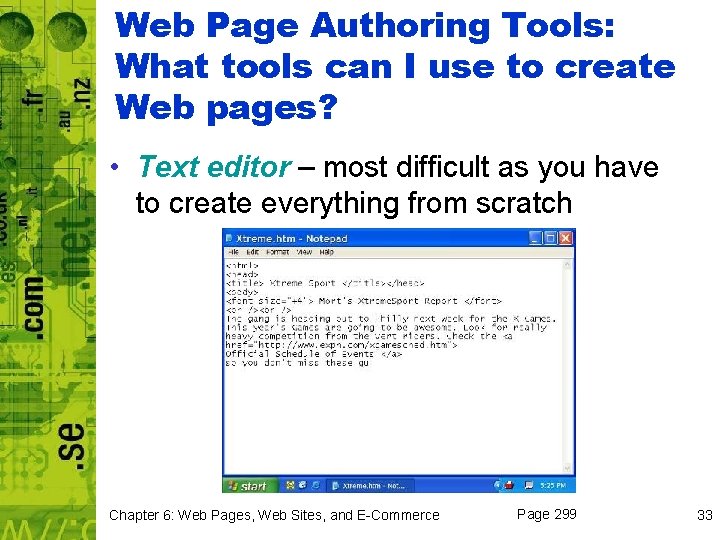
Web Page Authoring Tools: What tools can I use to create Web pages? • Text editor – most difficult as you have to create everything from scratch Chapter 6: Web Pages, Web Sites, and E-Commerce Page 299 33
What is an HTML conversion tool? • Conversion option available in many software applications – Microsoft Word • File menu’s Save As Web Page • Online Web authoring tools – Provided by some ISPs – Type, select, drag, and drop elements onto Web page Chapter 6: Web Pages, Web Sites, and E-Commerce Page 300 34
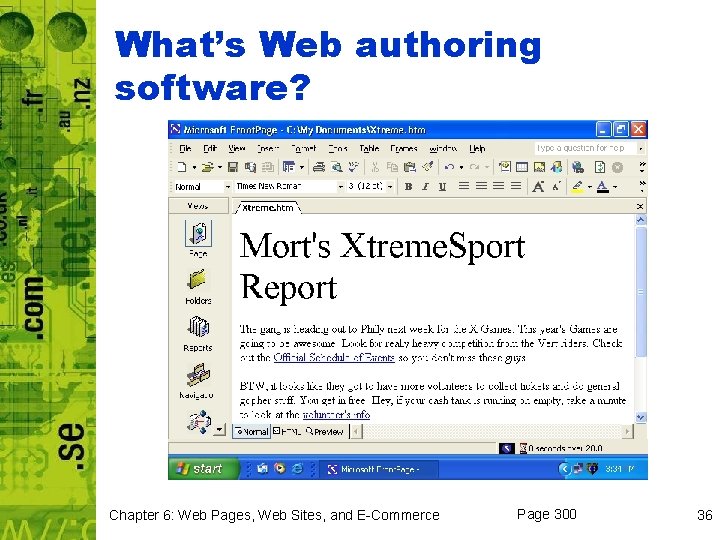
What’s Web authoring software? • Web authoring software – provides tools for creating web pages – Microsoft Front. Page – Macromedia Dreamweaver Chapter 6: Web Pages, Web Sites, and E-Commerce Page 300 35
What’s Web authoring software? Chapter 6: Web Pages, Web Sites, and E-Commerce Page 300 36
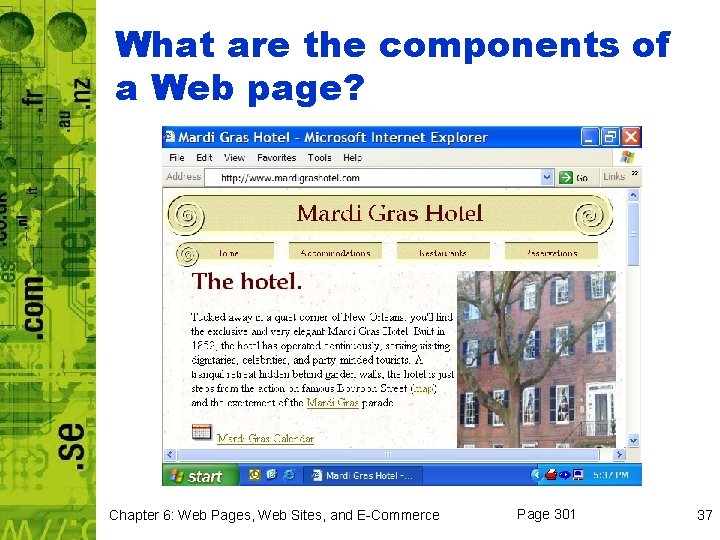
What are the components of a Web page? Chapter 6: Web Pages, Web Sites, and E-Commerce Page 301 37
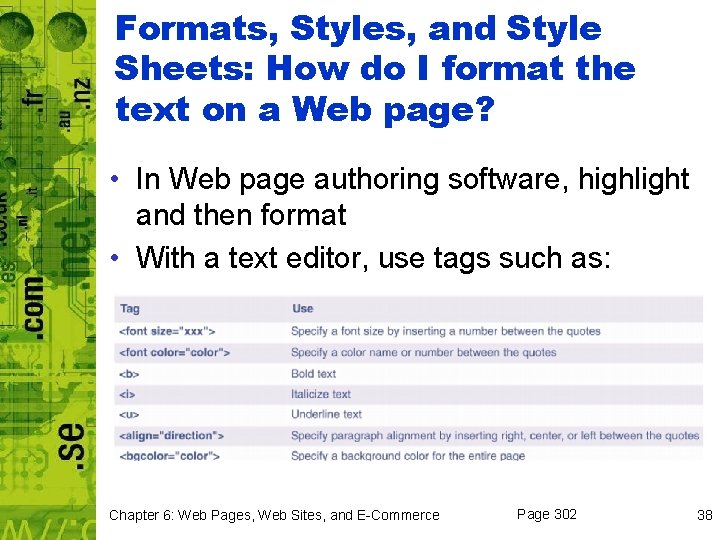
Formats, Styles, and Style Sheets: How do I format the text on a Web page? • In Web page authoring software, highlight and then format • With a text editor, use tags such as: Chapter 6: Web Pages, Web Sites, and E-Commerce Page 302 38
What is a style? • A style is the same as in the world of word processing – Bold, italic, green, and Arial • Don’t get carried away, choose base font for paragraphs; consistent style for headers Chapter 6: Web Pages, Web Sites, and E-Commerce Page 302 39
What is a style sheet? • Cascading style sheet (CSS) – acts as a template that can control the layout and design of Web pages – Internal – placed near the beginning of html document (<style> tag within <head> section) – External style sheet – contains formatting specifications for a group of Web pages; a separate file contains the styles Chapter 6: Web Pages, Web Sites, and E-Commerce Page 302 40
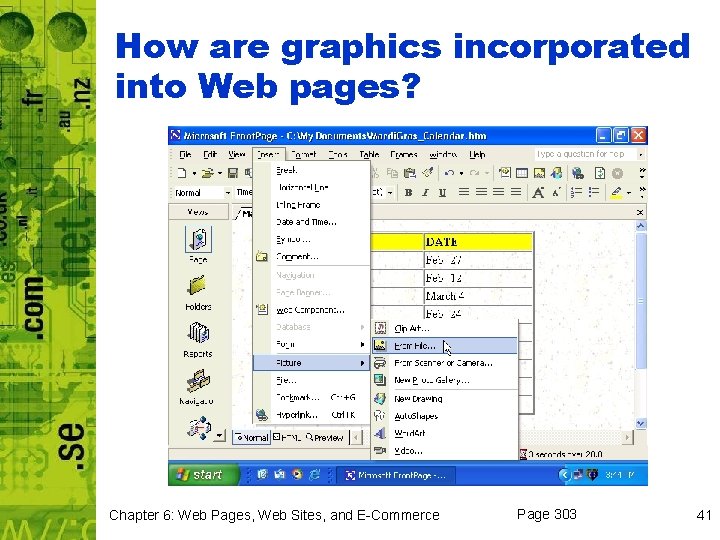
How are graphics incorporated into Web pages? Chapter 6: Web Pages, Web Sites, and E-Commerce Page 303 41
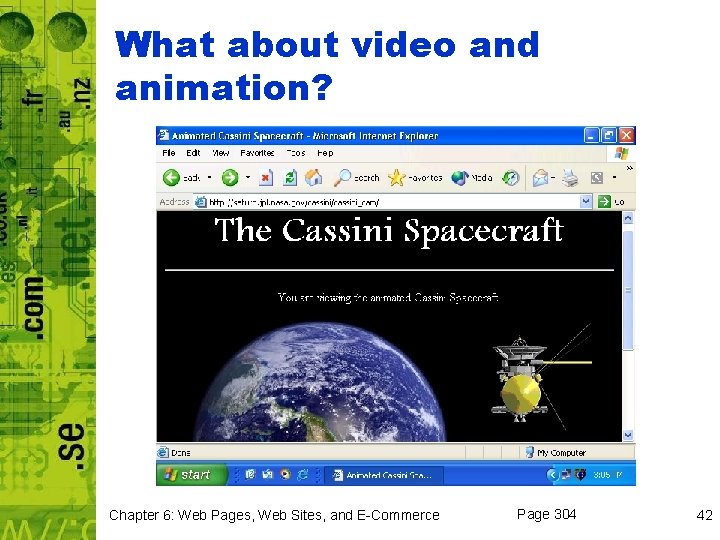
What about video and animation? Chapter 6: Web Pages, Web Sites, and E-Commerce Page 304 42
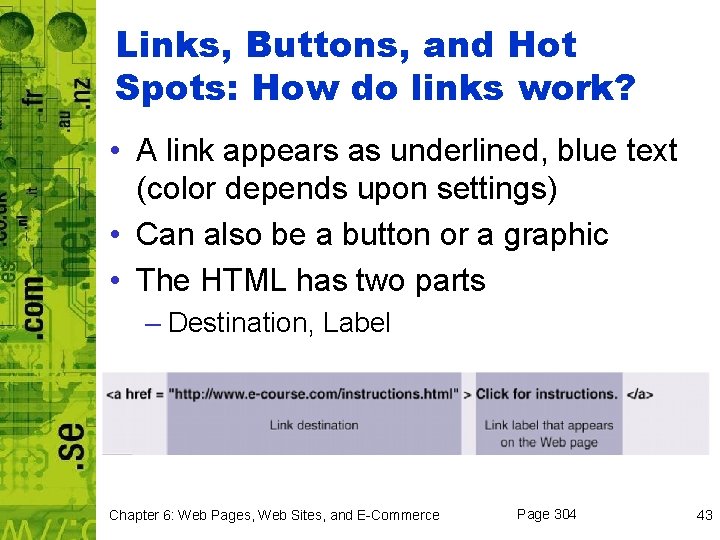
Links, Buttons, and Hot Spots: How do links work? • A link appears as underlined, blue text (color depends upon settings) • Can also be a button or a graphic • The HTML has two parts – Destination, Label Chapter 6: Web Pages, Web Sites, and E-Commerce Page 304 43
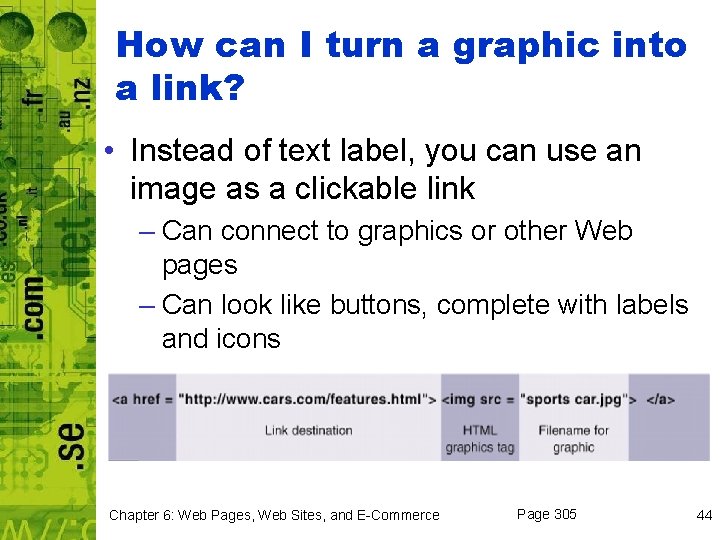
How can I turn a graphic into a link? • Instead of text label, you can use an image as a clickable link – Can connect to graphics or other Web pages – Can look like buttons, complete with labels and icons Chapter 6: Web Pages, Web Sites, and E-Commerce Page 305 44
What kinds of links can I add to a page? • Internal link – links to other pages on same site • External link – links to pages outside of the site • Intrapage link – jumps to a location within same page • Mailto link – automatically opens preaddressed e-mail form that can be filled in and sent Chapter 6: Web Pages, Web Sites, and E-Commerce Page 305 45
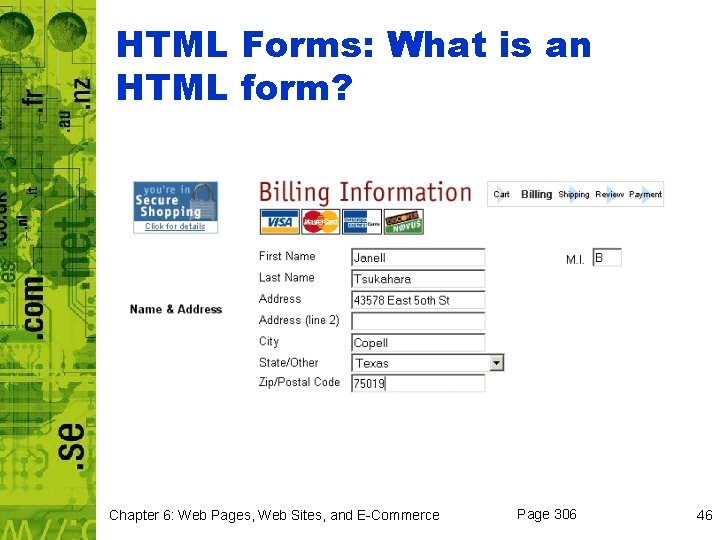
HTML Forms: What is an HTML form? Chapter 6: Web Pages, Web Sites, and E-Commerce Page 306 46
What happens to the data that’s entered into a form? • Your information is stored in memory on your computer • When you click a Submit button, information is gathered and submitted via a specially designated program on an HTTP server Chapter 6: Web Pages, Web Sites, and E-Commerce Page 306 47
What happens to my data after it arrives at a server? • CGI (Common Gateway Interface) – set of specifications or standards for how servers can handle a variety of HTTP requests • ASP (Active Server Pages) – server-side technology developed by Microsoft that offers an alternative to CGI – Runs on server and deals with data submitted – Can be written in any scripting language • CGI and ASP specify how the server should deal with the data Chapter 6: Web Pages, Web Sites, and E-Commerce Page 306 48
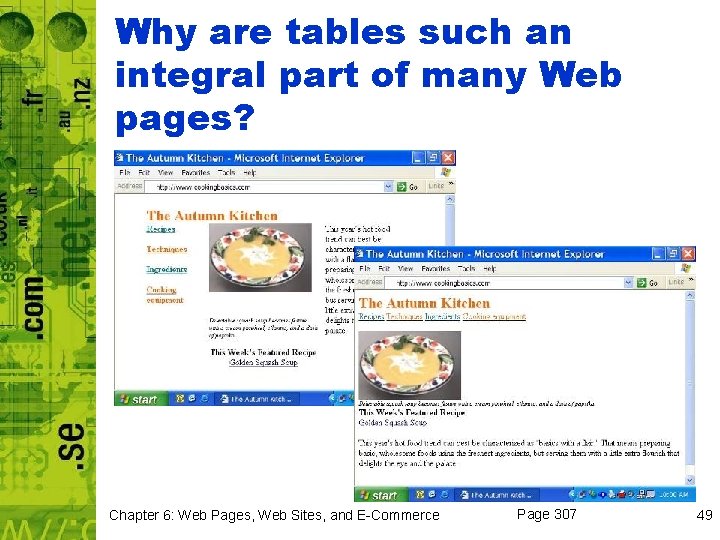
Why are tables such an integral part of many Web pages? Chapter 6: Web Pages, Web Sites, and E-Commerce Page 307 49
How flexible are tables? • Easy to use when created with Web authoring software • Text editors are more complicated when creating tables – To view table, must preview page using your browser Chapter 6: Web Pages, Web Sites, and E-Commerce Page 307 50
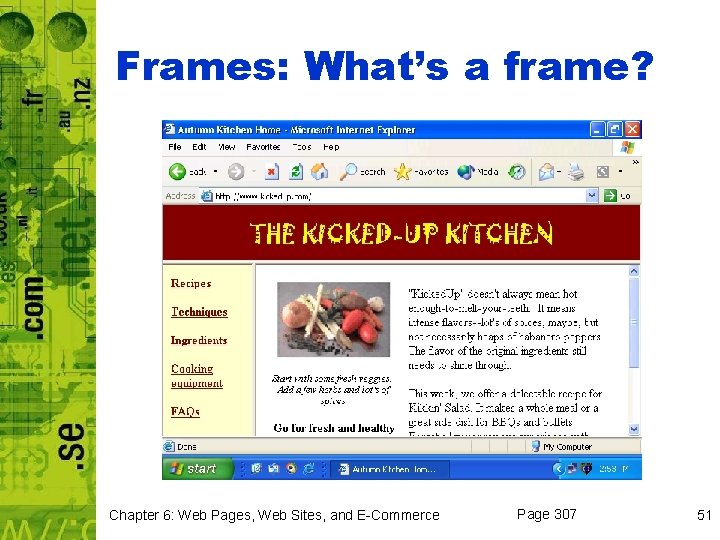
Frames: What’s a frame? Chapter 6: Web Pages, Web Sites, and E-Commerce Page 307 51
Testing and Posting Web Pages • • Test each page locally Transfer pages to a Web server Test all pages and links Update your site to keep it current Chapter 6: Web Pages, Web Sites, and E-Commerce Page 308 52
Chapter 6 Web Pages, Web Sites, and E-Commerce Section C: Web Page Extensions, Scripts, and Programs Computer Concepts 8 th Edition Parsons/Oja
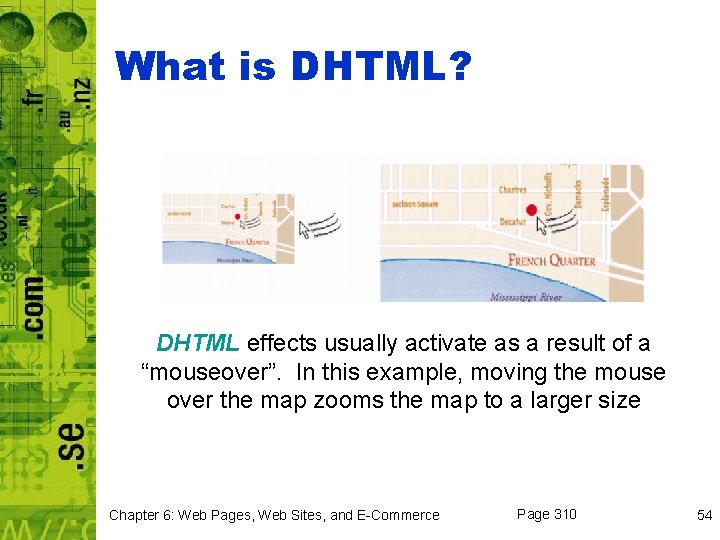
What is DHTML? DHTML effects usually activate as a result of a “mouseover”. In this example, moving the mouse over the map zooms the map to a larger size Chapter 6: Web Pages, Web Sites, and E-Commerce Page 310 54
Is DHTML a replacement for HTML? • No • DHTML is just a term that is used to describe a method for using HTML in combination with a few other technologies Chapter 6: Web Pages, Web Sites, and E-Commerce Page 311 55
XML and XSL: What is XML? • XML (e. Xtensible Markup Language) – method for putting structured data into a text file – Uses tags and attributes – Defines fields of data – <part number>, <price>, <weight> Chapter 6: Web Pages, Web Sites, and E-Commerce Page 311 56
What is XSL? • XSL (e. Xtensible Stylesheet Language) – creates customized tags that control the display of the data that’s contained in an XML document Chapter 6: Web Pages, Web Sites, and E-Commerce Page 311 57
Java. Script and VBScript: Is it possible to add programs to a Web page? • Yes, to perform complicated tasks and respond to user actions • Script – allows designers to embed simple program instructions (scripting statements) Chapter 6: Web Pages, Web Sites, and E-Commerce Page 312 58
How would a Web page author use a scripting language? • Scripting languages allow pages to become more interactive – Allows e-commerce sites to verify credit card information – Makes interactive pages like loan payment calculators Chapter 6: Web Pages, Web Sites, and E-Commerce Page 312 59
What are the most popular scripting languages? • Java. Script • VBScript • Alternatives – Perl. Script – Python – REXX – Awk Chapter 6: Web Pages, Web Sites, and E-Commerce Page 312 60
How do scripts work? • Client-side scripts – consist of scripting statements embedded in HTML document – Execute in browser on client • Server-side scripts – consist of statements that are executed on server – Typically accept data submitted by a form Chapter 6: Web Pages, Web Sites, and E-Commerce Page 312 61
What’s a Scripting Error? • Occurs when a browser or server cannot execute one or more statements in a script – Syntax errors – Script command not supported Chapter 6: Web Pages, Web Sites, and E-Commerce Page 312 62
Java Applets: What’s a Java applet? • Java is a high-level programming language developed by Sun Microsystems • Small Java applications are called Java applets – Input forms, rotating images, interactive animation Chapter 6: Web Pages, Web Sites, and E-Commerce Page 313 63
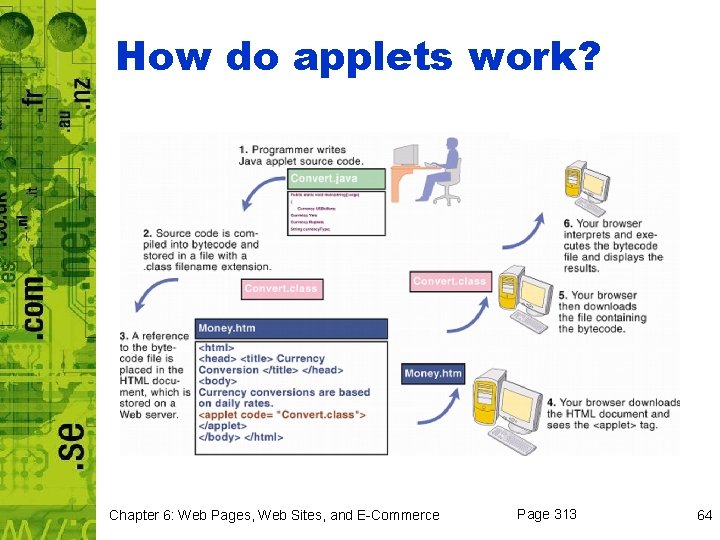
How do applets work? Chapter 6: Web Pages, Web Sites, and E-Commerce Page 313 64
Active. X controls: What is an Active. X control? • Compiled computer program that can be referenced from within an HTML document – Can be used on client-side or server-side Chapter 6: Web Pages, Web Sites, and E-Commerce Page 315 65
What is a digital certificate? • Digital certificate – electronic attachment to a file that verifies the identity of its source • Certificate authority – company that supplies digital certificates Chapter 6: Web Pages, Web Sites, and E-Commerce Page 316 66
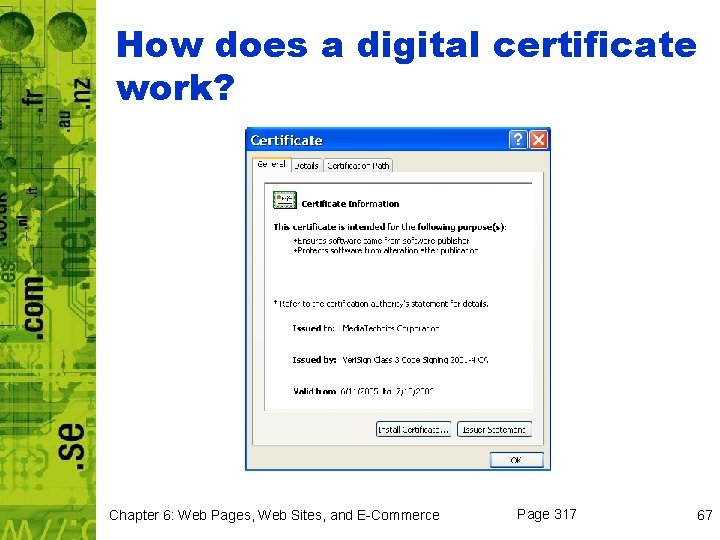
How does a digital certificate work? Chapter 6: Web Pages, Web Sites, and E-Commerce Page 317 67
Chapter 6 Web Pages, Web Sites, and E-Commerce Section D: E-Commerce Computer Concepts 8 th Edition Parsons/Oja
E-Commerce Basics: What is e-commerce? • E-commerce describes financial transactions that are conducted electronically over a computer network – Includes physical products, digital products, and services – Digital products such as News, music, video, databases, software, and all types of knowledgebased items – Peddle services, such as arranging trips, online medical consultation, and remote education – Carried out by computer or require human agents Chapter 6: Web Pages, Web Sites, and E-Commerce Page 319 69
Who is the typical e-commerce customer? • Demographics not yet stabilized – In 1995, 30 -something white male – Now, females and teens have entered the online shopping fray in droves – B 2 C (business-to-consumer) e-commerce – typical e-commerce activities that the typical Web surfer enjoys – C 2 C (consumer-to-consumer) – includes online auctions and rummage sales Chapter 6: Web Pages, Web Sites, and E-Commerce Page 319 70
Who is the typical e-commerce customer? • B 2 B (business-to-business) ecommerce – involves one enterprise buying goods and services from another enterprise • B 2 G (business-to-government) ecommerce – aims to help businesses sell to governments Chapter 6: Web Pages, Web Sites, and E-Commerce Page 319 71
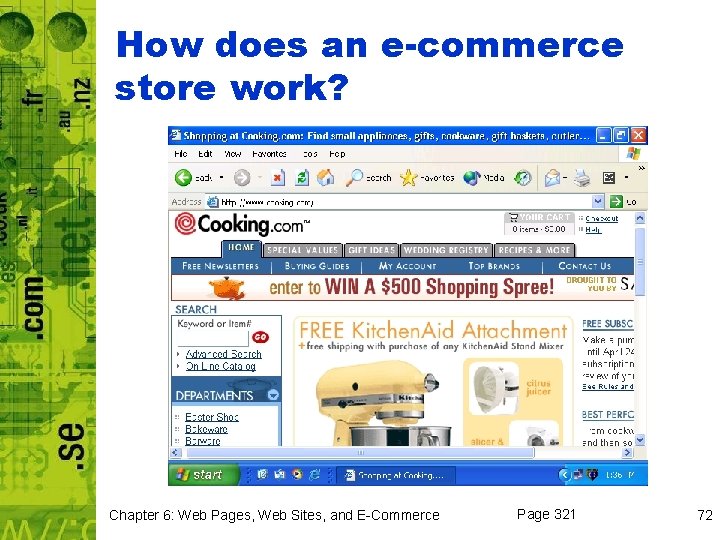
How does an e-commerce store work? Chapter 6: Web Pages, Web Sites, and E-Commerce Page 321 72
Shopping Carts: What’s an online shopping cart? • Cyberspace version of the good old metal cart that you wheel around a store and fill up with merchandise Chapter 6: Web Pages, Web Sites, and E-Commerce Page 322 73
How do shopping carts work? • Shopper browses Web site, and then adds products using a “Buy” or “Add to Cart” button • Uses cookies to store information about your activities on Web site Chapter 6: Web Pages, Web Sites, and E-Commerce Page 322 74
Transaction Privacy and Security: How does ecommerce affect my privacy? • Spyware is often used to gather information secretly and relay it to advertisers or other interested parties • Ad-serving cookies track your activities at any site containing banner ads from the third party (who supplied the cookie) Chapter 6: Web Pages, Web Sites, and E-Commerce Page 323 75
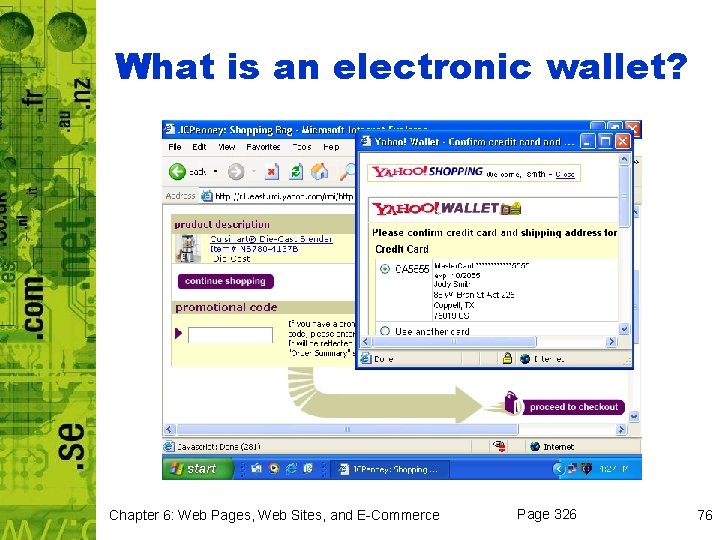
What is an electronic wallet? Chapter 6: Web Pages, Web Sites, and E-Commerce Page 326 76
How does a person-to-person payment work? • Customer opens an account • Some services require you to deposit some money into your account • Customer receives user ID and password • Money can be sent to anyone who has an e-mail account Chapter 6: Web Pages, Web Sites, and E-Commerce Page 327 77
Conclusion You should now be able to: – Describe the roles that HTML, XHTML, HTTP, URLs, browsers, and Web servers play in bringing Web pages to your desktop – Explain why cookies are useful in an environment that is based on a stateless protocol, and provide some concrete examples of their use – Identify some Web page design tools and discuss their advantages and disadvantages – Describe how HTML tags, cascading style sheets, links, buttons, hot spots, frames, forms, and tables are used in the design and creation of Web pages – Identify the elements that typically form a Web page Chapter 6: Web Pages, Web Sites, and E-Commerce 78
Conclusion – Explain how to test and post Web pages – Describe how DHTML, XML, and XSL technologies work to enhance Web pages – List some advantages and disadvantages of using Java. Script, VBScript, Java applets, and Active. X controls – Discuss why e-commerce has become so popular with consumers and merchants – List some threats to the security of credit card numbers and other sensitive data during e-commerce transactions – Describe how the following e-commerce technologies work: shopping carts, SSL, one-time use credit cards, electronic wallets, and person-to-person payment systems Chapter 6: Web Pages, Web Sites, and E-Commerce 79
- Slides: 79