
Chapter 5 Process Scheduling Chapter 5 Process Scheduling
- Slides: 32
Chapter 5: Process Scheduling
Chapter 5: Process Scheduling • • Basic Concepts Scheduling Criteria Scheduling Algorithms Thread Scheduling
Objectives • To introduce CPU scheduling, which is the basis for multiprogrammed operating systems • To describe various CPU-scheduling algorithms • To discuss evaluation criteria for selecting a CPU-scheduling algorithm for a particular system • To examine the scheduling algorithms of several operating systems
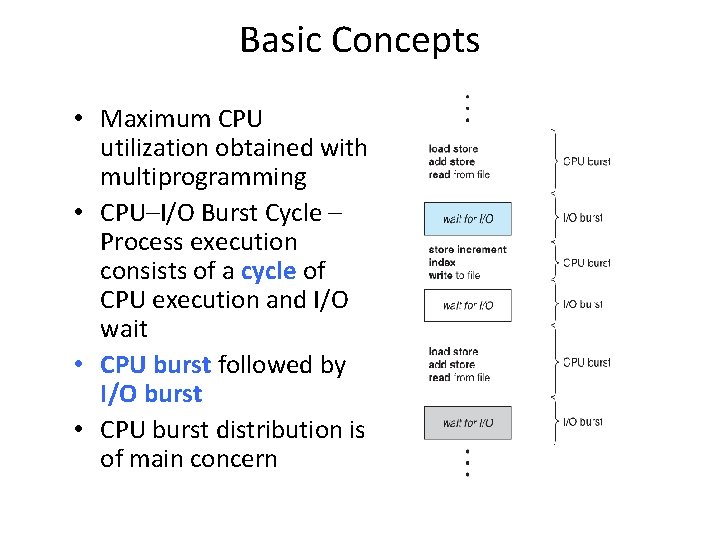
Basic Concepts • Maximum CPU utilization obtained with multiprogramming • CPU–I/O Burst Cycle – Process execution consists of a cycle of CPU execution and I/O wait • CPU burst followed by I/O burst • CPU burst distribution is of main concern
CPU Scheduler n Short-term scheduler selects from among the processes in ready queue, and allocates the CPU to one of them l Queue may be ordered in various ways n CPU scheduling decisions may take place when a process: 1. 2. 3. 4. Switches from running to waiting state Switches from running to ready state Switches from waiting to ready Terminates n Scheduling under 1 and 4 is nonpreemptive n All other scheduling is preemptive l Consider access to shared data l Consider preemption while in kernel mode l Consider interrupts occurring during crucial OS activities
Dispatcher • Dispatcher module gives control of the CPU to the process selected by the short-term scheduler; this involves: – switching context – switching to user mode – jumping to the proper location in the user program to restart that program • Dispatch latency – time it takes for the dispatcher to stop one process and start another running
Scheduling Criteria • CPU utilization – keep the CPU as busy as possible • Throughput – # of processes that complete their execution per time unit • Turnaround time – amount of time to execute a particular process • Waiting time – amount of time a process has been waiting in the ready queue • Response time – amount of time it takes from when a request was submitted until the first response is produced, not output (for time-sharing environment)
Scheduling Algorithm Optimization Criteria • • • Max CPU utilization Max throughput Min turnaround time Min waiting time Min response time
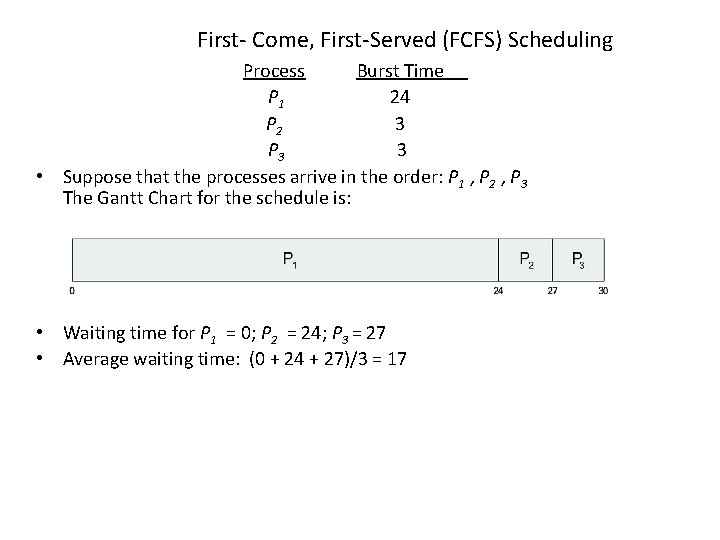
First- Come, First-Served (FCFS) Scheduling Process Burst Time P 1 24 P 2 3 P 3 3 • Suppose that the processes arrive in the order: P 1 , P 2 , P 3 The Gantt Chart for the schedule is: • Waiting time for P 1 = 0; P 2 = 24; P 3 = 27 • Average waiting time: (0 + 24 + 27)/3 = 17
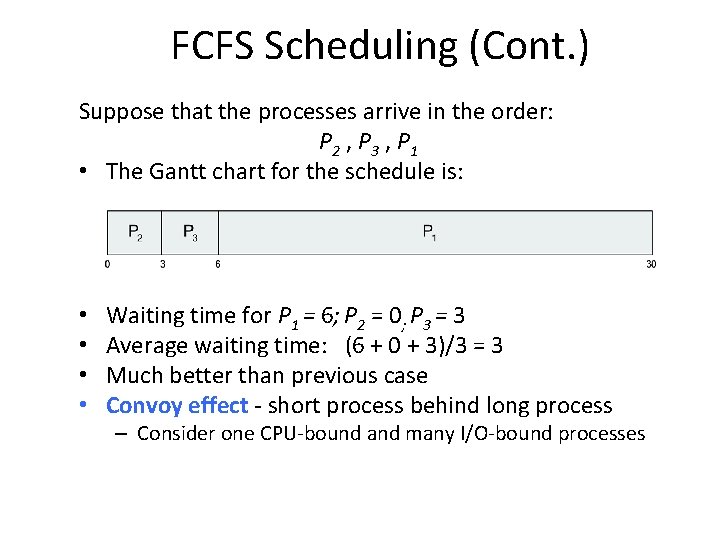
FCFS Scheduling (Cont. ) Suppose that the processes arrive in the order: P 2 , P 3 , P 1 • The Gantt chart for the schedule is: • • Waiting time for P 1 = 6; P 2 = 0; P 3 = 3 Average waiting time: (6 + 0 + 3)/3 = 3 Much better than previous case Convoy effect - short process behind long process – Consider one CPU-bound and many I/O-bound processes
Shortest-Job-First (SJF) Scheduling • Associate with each process the length of its next CPU burst – Use these lengths to schedule the process with the shortest time • SJF is optimal – gives minimum average waiting time for a given set of processes – The difficulty is knowing the length of the next CPU request – Could ask the user
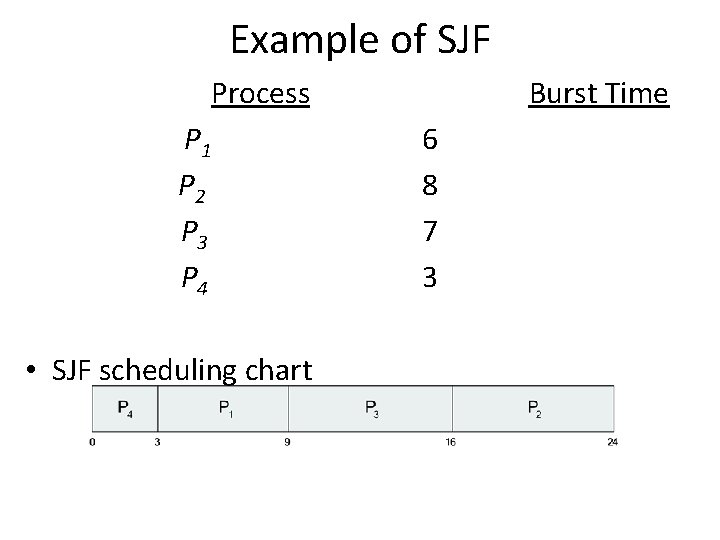
Example of SJF Process. Arrival Time P 1 0. 0 6 P 2 2. 0 8 P 3 4. 0 7 P 4 5. 0 3 • SJF scheduling chart Burst Time
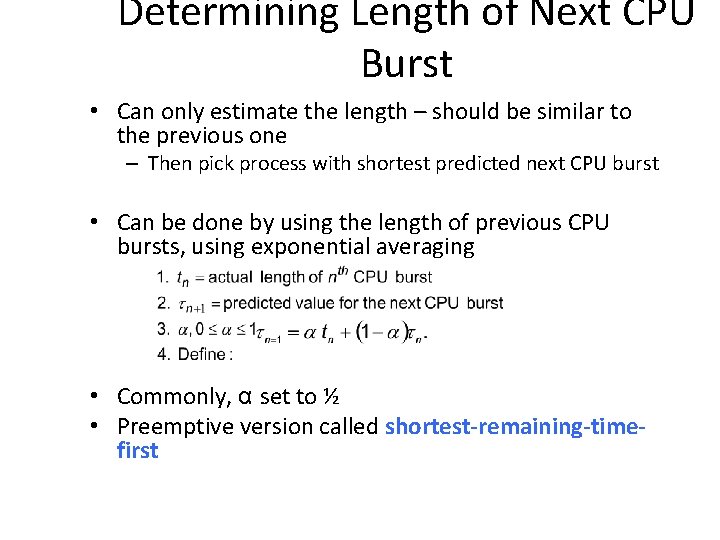
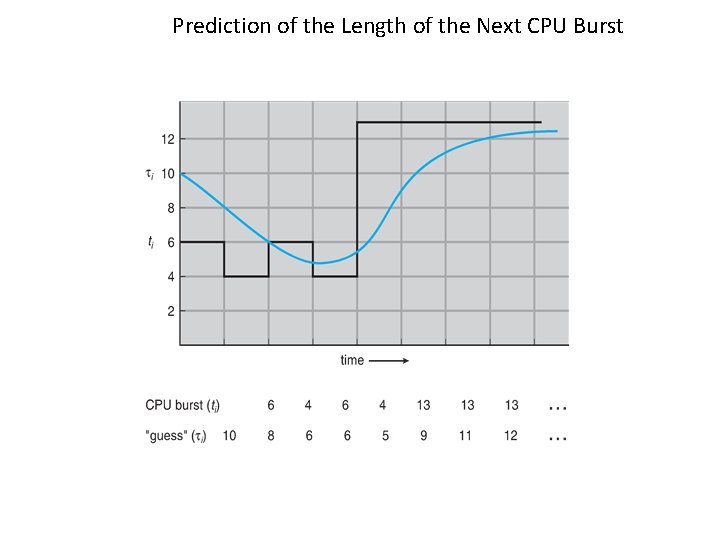
Determining Length of Next CPU Burst • Can only estimate the length – should be similar to the previous one – Then pick process with shortest predicted next CPU burst • Can be done by using the length of previous CPU bursts, using exponential averaging • Commonly, α set to ½ • Preemptive version called shortest-remaining-timefirst
Prediction of the Length of the Next CPU Burst
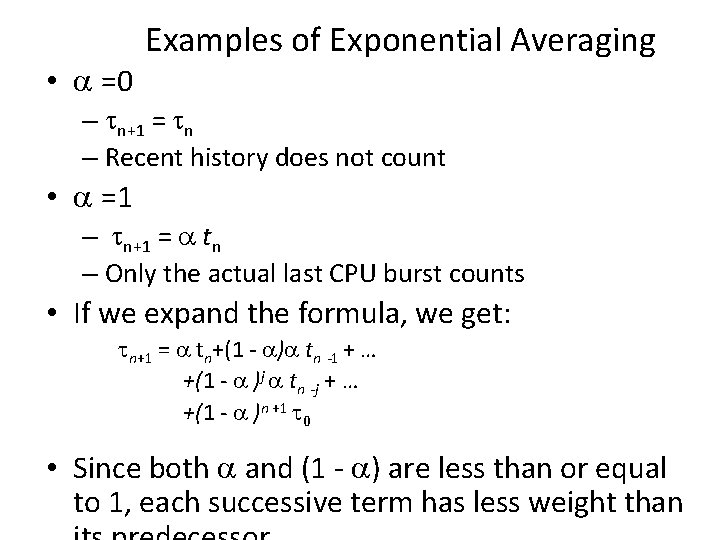
• =0 Examples of Exponential Averaging – n+1 = n – Recent history does not count • =1 – n+1 = tn – Only the actual last CPU burst counts • If we expand the formula, we get: n+1 = tn+(1 - ) tn -1 + … +(1 - )j tn -j + … +(1 - )n +1 0 • Since both and (1 - ) are less than or equal to 1, each successive term has less weight than
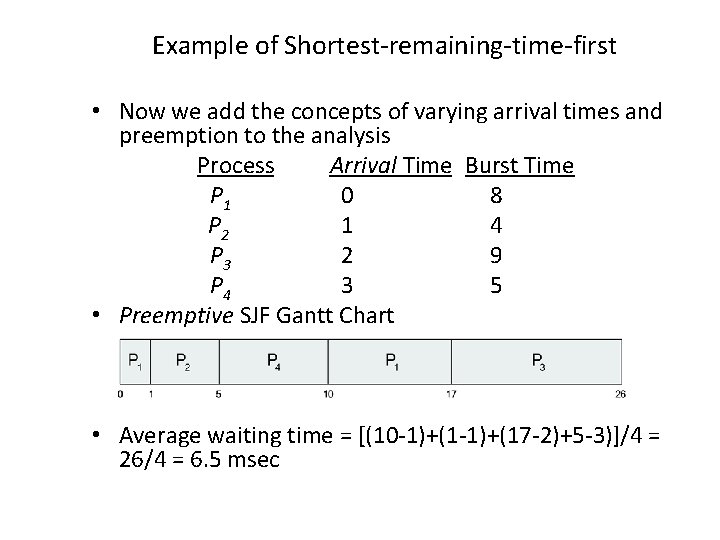
Example of Shortest-remaining-time-first • Now we add the concepts of varying arrival times and preemption to the analysis Process. Aarri Arrival Time. TBurst Time P 1 0 8 P 2 1 4 P 3 2 9 P 4 3 5 • Preemptive SJF Gantt Chart • Average waiting time = [(10 -1)+(17 -2)+5 -3)]/4 = 26/4 = 6. 5 msec
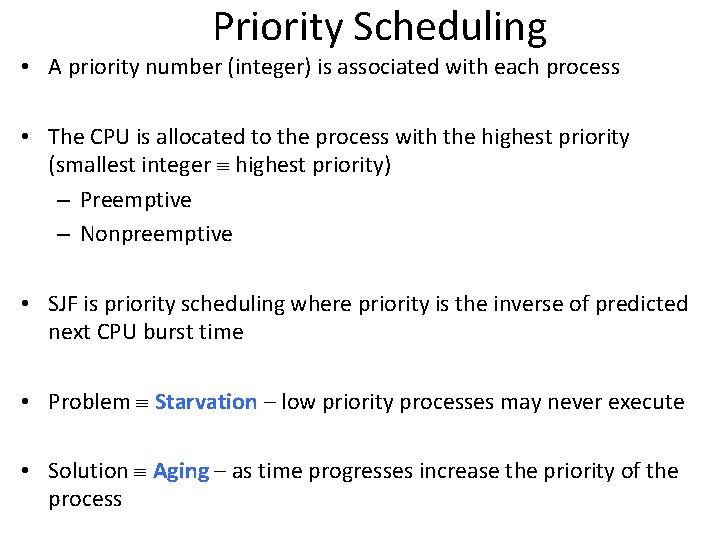
Priority Scheduling • A priority number (integer) is associated with each process • The CPU is allocated to the process with the highest priority (smallest integer highest priority) – Preemptive – Nonpreemptive • SJF is priority scheduling where priority is the inverse of predicted next CPU burst time • Problem Starvation – low priority processes may never execute • Solution Aging – as time progresses increase the priority of the process
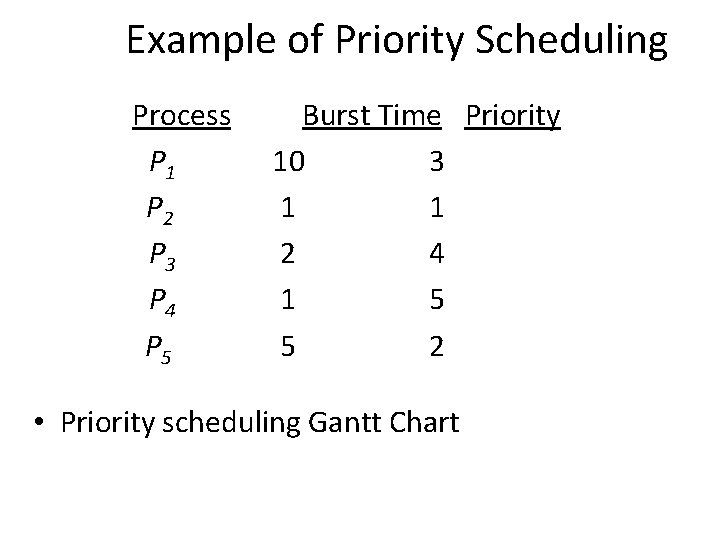
Example of Priority Scheduling Process. Aarri Burst Time. T Priority P 1 10 3 P 2 1 1 P 3 2 4 P 4 1 5 P 5 5 2 • Priority scheduling Gantt Chart
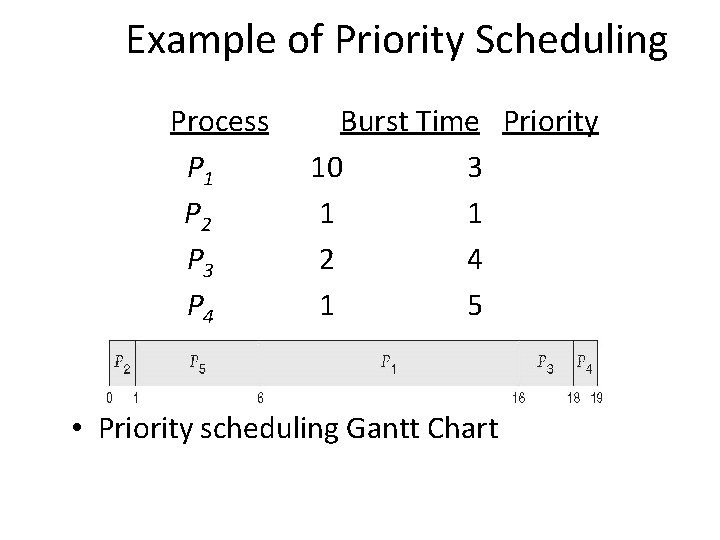
Example of Priority Scheduling Process. Aarri Burst Time. T Priority P 1 10 3 P 2 1 1 P 3 2 4 P 4 1 5 P 5 5 2 • Priority scheduling Gantt Chart
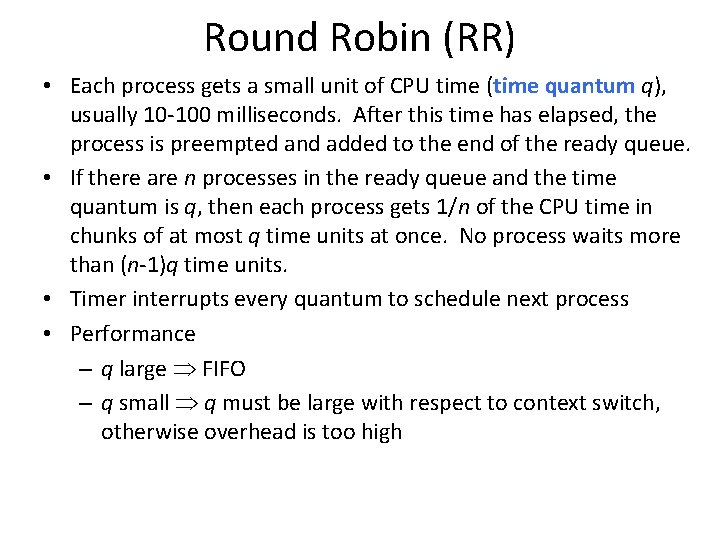
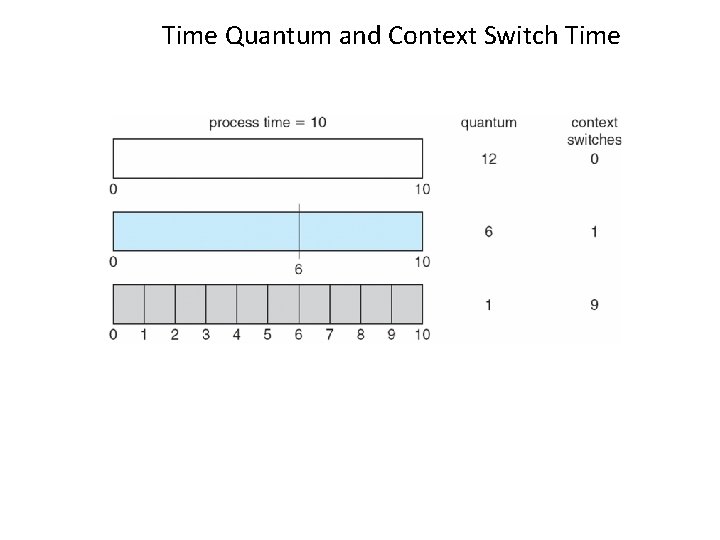
Round Robin (RR) • Each process gets a small unit of CPU time (time quantum q), usually 10 -100 milliseconds. After this time has elapsed, the process is preempted and added to the end of the ready queue. • If there are n processes in the ready queue and the time quantum is q, then each process gets 1/n of the CPU time in chunks of at most q time units at once. No process waits more than (n-1)q time units. • Timer interrupts every quantum to schedule next process • Performance – q large FIFO – q small q must be large with respect to context switch, otherwise overhead is too high
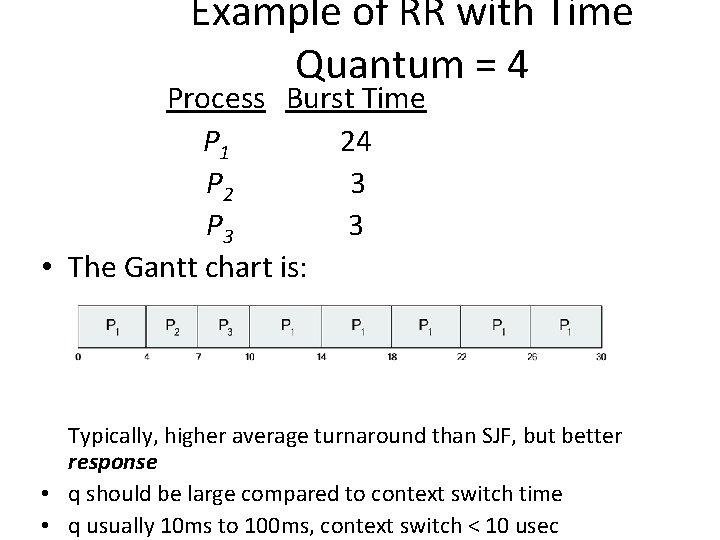
Example of RR with Time Quantum = 4 Process Burst Time P 1 24 P 2 3 P 3 3 • The Gantt chart is: Typically, higher average turnaround than SJF, but better response • q should be large compared to context switch time • q usually 10 ms to 100 ms, context switch < 10 usec
Time Quantum and Context Switch Time
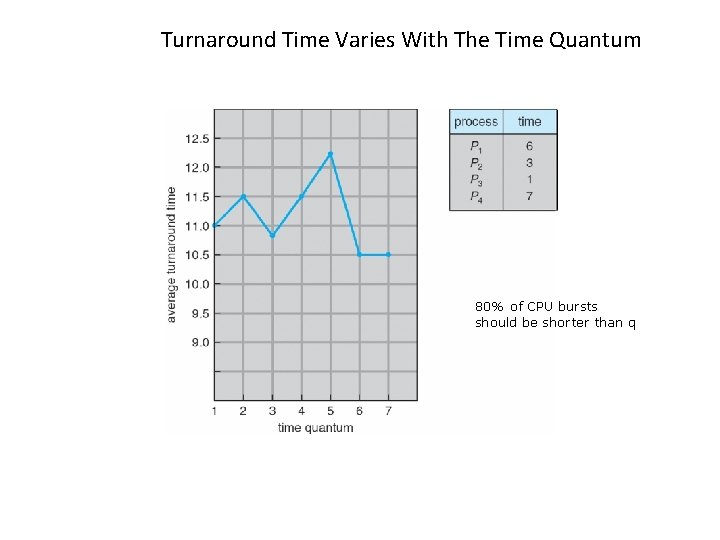
Turnaround Time Varies With The Time Quantum 80% of CPU bursts should be shorter than q
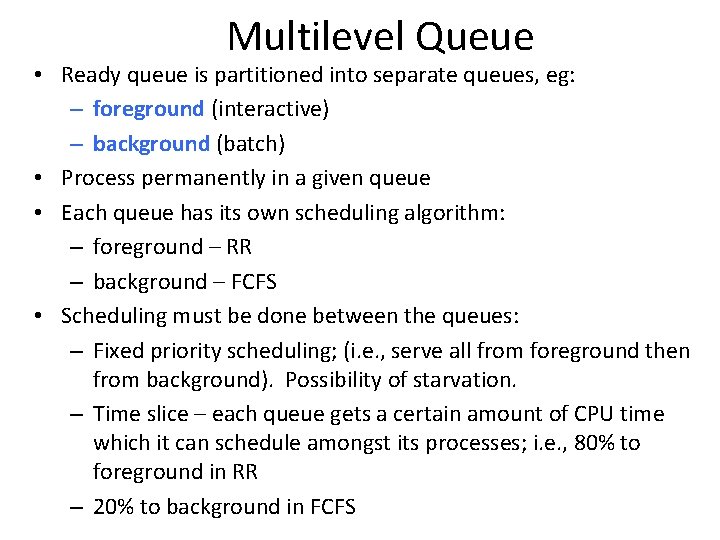
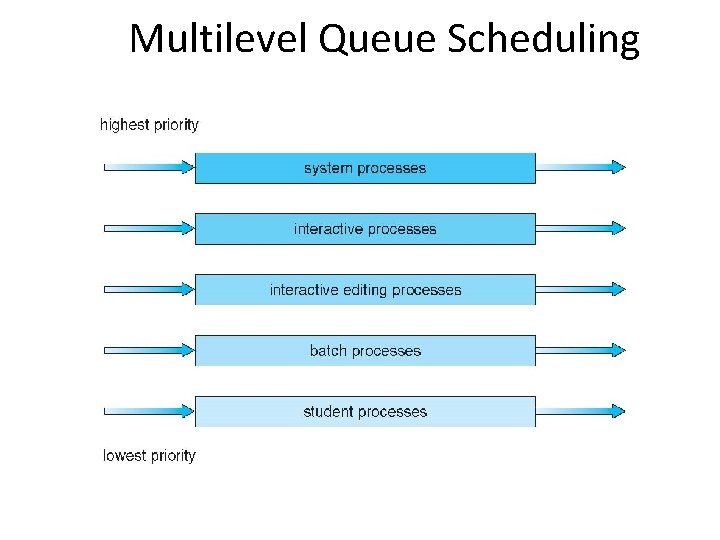
Multilevel Queue • Ready queue is partitioned into separate queues, eg: – foreground (interactive) – background (batch) • Process permanently in a given queue • Each queue has its own scheduling algorithm: – foreground – RR – background – FCFS • Scheduling must be done between the queues: – Fixed priority scheduling; (i. e. , serve all from foreground then from background). Possibility of starvation. – Time slice – each queue gets a certain amount of CPU time which it can schedule amongst its processes; i. e. , 80% to foreground in RR – 20% to background in FCFS
Multilevel Queue Scheduling
Multilevel Feedback Queue • A process can move between the various queues; aging can be implemented this way • Multilevel-feedback-queue scheduler defined by the following parameters: – number of queues – scheduling algorithms for each queue – method used to determine when to upgrade a process – method used to determine when to demote a process – method used to determine which queue a process will enter when that process needs service
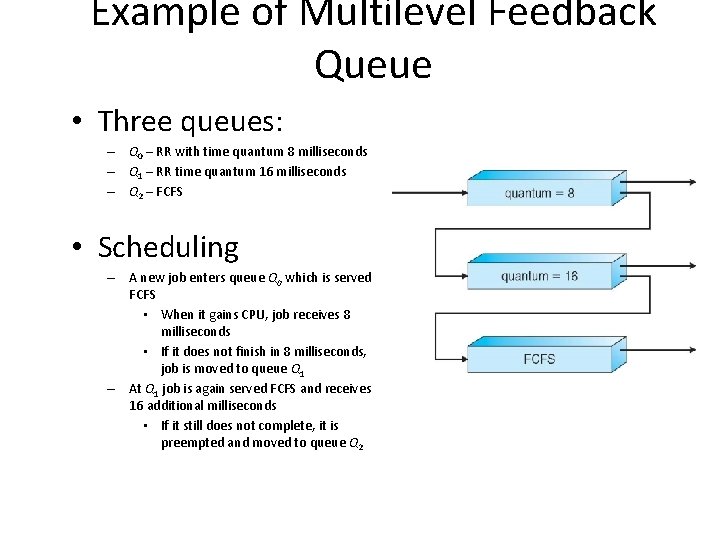
Example of Multilevel Feedback Queue • Three queues: – Q 0 – RR with time quantum 8 milliseconds – Q 1 – RR time quantum 16 milliseconds – Q 2 – FCFS • Scheduling – A new job enters queue Q 0 which is served FCFS • When it gains CPU, job receives 8 milliseconds • If it does not finish in 8 milliseconds, job is moved to queue Q 1 – At Q 1 job is again served FCFS and receives 16 additional milliseconds • If it still does not complete, it is preempted and moved to queue Q 2
Thread Scheduling • Distinction between user-level and kernel-level threads • When threads supported, threads scheduled, not processes • Many-to-one and many-to-many models, thread library schedules user-level threads to run on LWP – Known as process-contention scope (PCS) since scheduling competition is within the process – Typically done via priority set by programmer • Kernel thread scheduled onto available CPU is systemcontention scope (SCS) – competition among all threads in system
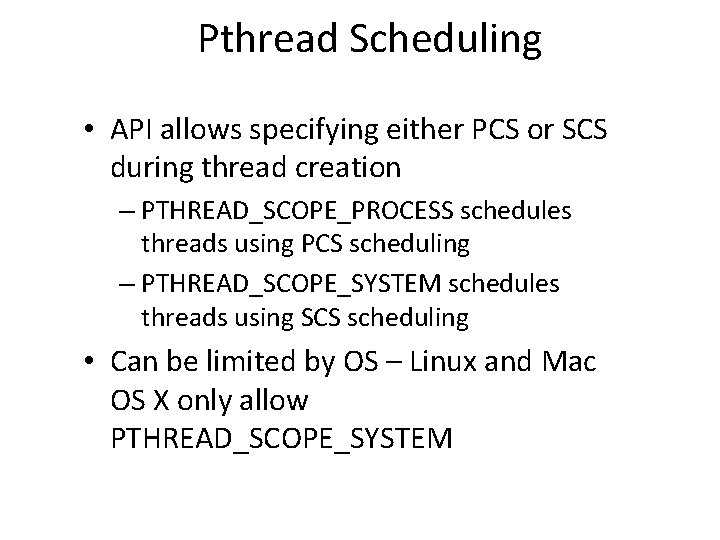
Pthread Scheduling • API allows specifying either PCS or SCS during thread creation – PTHREAD_SCOPE_PROCESS schedules threads using PCS scheduling – PTHREAD_SCOPE_SYSTEM schedules threads using SCS scheduling • Can be limited by OS – Linux and Mac OS X only allow PTHREAD_SCOPE_SYSTEM
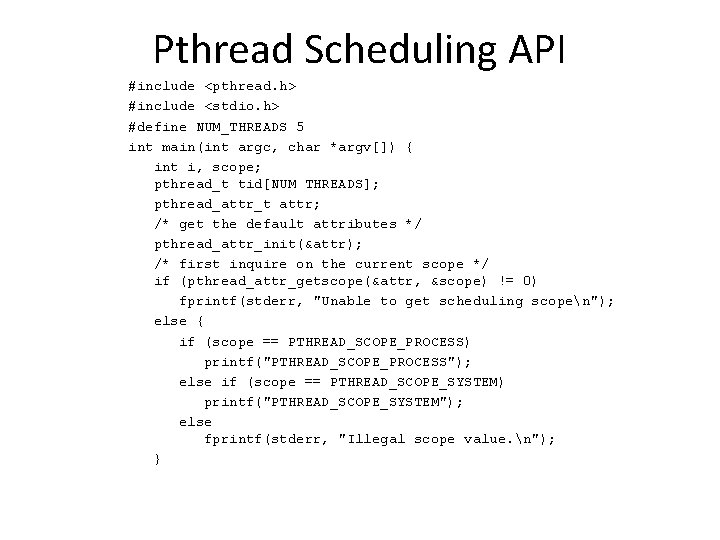
Pthread Scheduling API #include <pthread. h> #include <stdio. h> #define NUM_THREADS 5 int main(int argc, char *argv[]) { int i, scope; pthread_t tid[NUM THREADS]; pthread_attr_t attr; /* get the default attributes */ pthread_attr_init(&attr); /* first inquire on the current scope */ if (pthread_attr_getscope(&attr, &scope) != 0) fprintf(stderr, "Unable to get scheduling scopen"); else { if (scope == PTHREAD_SCOPE_PROCESS) printf("PTHREAD_SCOPE_PROCESS"); else if (scope == PTHREAD_SCOPE_SYSTEM) printf("PTHREAD_SCOPE_SYSTEM"); else fprintf(stderr, "Illegal scope value. n"); }
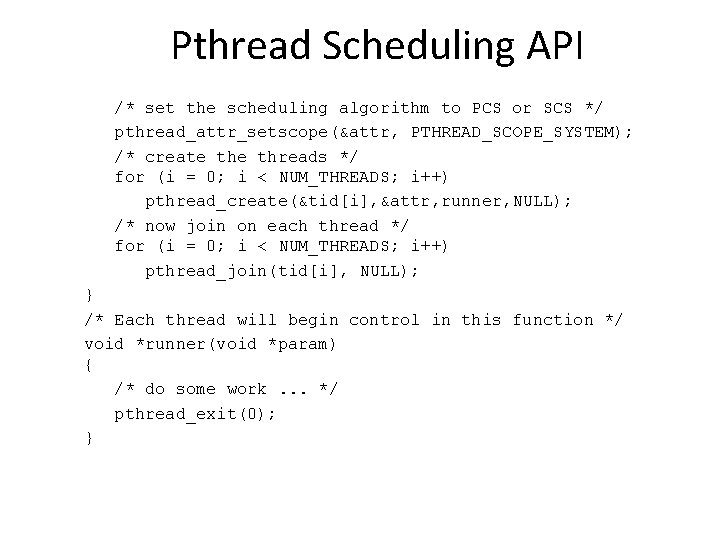
Pthread Scheduling API /* set the scheduling algorithm to PCS or SCS */ pthread_attr_setscope(&attr, PTHREAD_SCOPE_SYSTEM); /* create threads */ for (i = 0; i < NUM_THREADS; i++) pthread_create(&tid[i], &attr, runner, NULL); /* now join on each thread */ for (i = 0; i < NUM_THREADS; i++) pthread_join(tid[i], NULL); } /* Each thread will begin control in this function */ void *runner(void *param) { /* do some work. . . */ pthread_exit(0); }
End of Chapter 6