
Chapter 5 InterVLAN Routing CCNP SWITCH Implementing Cisco




- Slides: 47
Chapter 5: Inter-VLAN Routing CCNP SWITCH: Implementing Cisco IP Switched Networks SWITCH v 7. 1 Chapter 5 © 2007 – 2016, Cisco Systems, Inc. All rights reserved. Cisco Public 1
Chapter 5 Objectives § Given an enterprise network, design, implement, and verify inter-VLAN routing using an external router or a multilayer switch, using either switch virtual interfaces or routed interfaces § Understand Layer 3 Ether. Channel and its configuration § Understand DHCP operation and its implementation and verification in a given enterprise network Chapter 5 © 2007 – 2016, Cisco Systems, Inc. All rights reserved. Cisco Public 2
Describing Inter. VLAN Routing Chapter 5 © 2007 – 2016, Cisco Systems, Inc. All rights reserved. Cisco Public 3
Describing Inter-VLAN Routing § § § Introduction to inter-VLAN routing Inter-VLAN routing using an external router Inter-VLAN routing with switch virtual interfaces Routing with routed ports Configuring inter-VLAN routing using SVI and routed ports Troubleshooting inter-VLAN routing Chapter 5 © 2007 – 2016, Cisco Systems, Inc. All rights reserved. Cisco Public 4
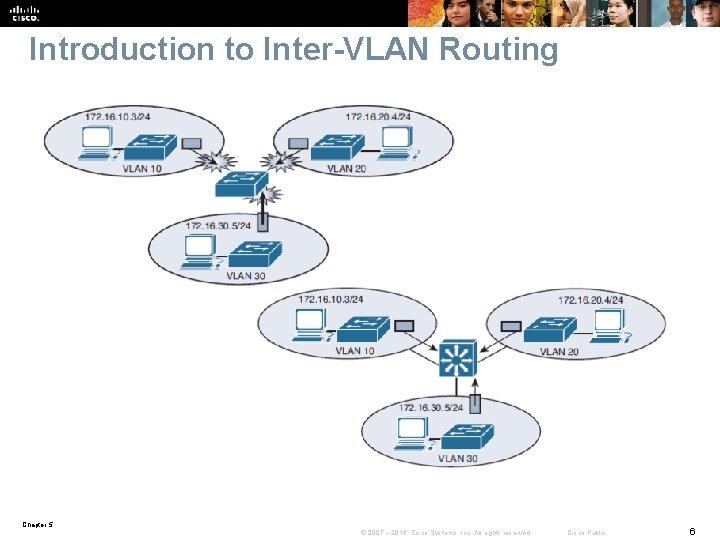
Introduction to Inter-VLAN Routing § Because VLANs isolate traffic to a defined broadcast domain and subnet, network devices in different VLANs cannot communicate with each other natively. § The devices in each VLAN can communicate to the network devices in another VLAN only through a Layer 3 routing device § The following devices can provide inter-VLAN routing: • Any Layer 3 multilayer Catalyst switch • Any external router with an interface that supports trunking (router-ona-stick) • Any external router or group of routers with a separate interface in each VLAN Chapter 5 © 2007 – 2016, Cisco Systems, Inc. All rights reserved. Cisco Public 5
Introduction to Inter-VLAN Routing Chapter 5 © 2007 – 2016, Cisco Systems, Inc. All rights reserved. Cisco Public 6
Router vs MLS for IVR § Router-on-a-stick is simple to implement because routers are usually available in every network, but most enterprise networks use multilayer switches to achieve high packet processing rates using hardware switching. § Layer 3 switches usually have packet-switching throughputs in the millions of packets per second (pps), whereas traditional general-purpose routers provide packet switching in the range of 100, 000 pps to more than 1 million pps. All the Catalyst multilayer switches support three different types of Layer 3 interfaces: • Routed port: A pure Layer 3 interface similar to a routed port on a Cisco IOS router. • Switch virtual interface (SVI): A virtual VLAN interface for inter-VLAN routing. In other words, switch virtual interfaces (SVIs) are the virtual routed VLAN interfaces. • Bridge virtual interface (BVI): A Layer 3 virtual bridging interface. Chapter 5 © 2007 – 2016, Cisco Systems, Inc. All rights reserved. Cisco Public 7
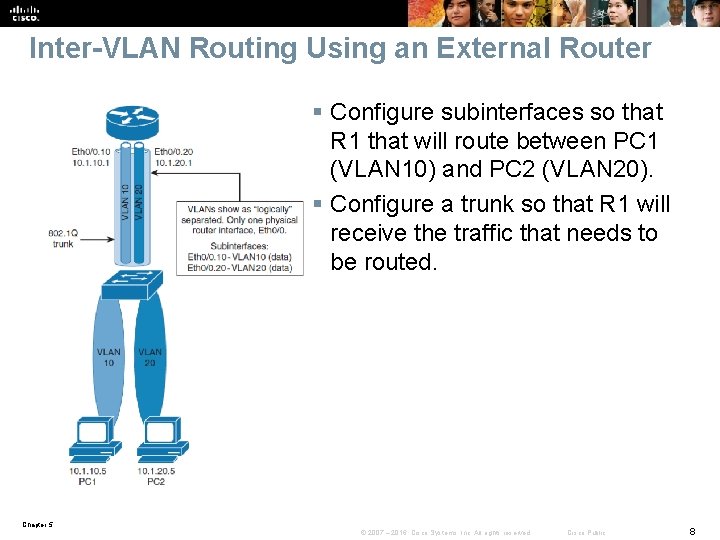
Inter-VLAN Routing Using an External Router § Configure subinterfaces so that R 1 that will route between PC 1 (VLAN 10) and PC 2 (VLAN 20). § Configure a trunk so that R 1 will receive the traffic that needs to be routed. Chapter 5 © 2007 – 2016, Cisco Systems, Inc. All rights reserved. Cisco Public 8
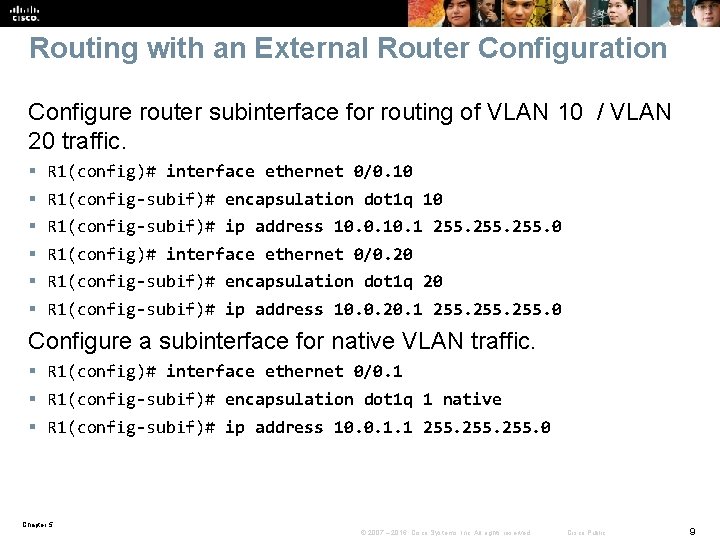
Routing with an External Router Configuration Configure router subinterface for routing of VLAN 10 / VLAN 20 traffic. § § § R 1(config)# interface ethernet 0/0. 10 R 1(config-subif)# encapsulation dot 1 q 10 R 1(config-subif)# ip address 10. 0. 1 255. 0 R 1(config)# interface ethernet 0/0. 20 R 1(config-subif)# encapsulation dot 1 q 20 R 1(config-subif)# ip address 10. 0. 20. 1 255. 0 Configure a subinterface for native VLAN traffic. § R 1(config)# interface ethernet 0/0. 1 § R 1(config-subif)# encapsulation dot 1 q 1 native § R 1(config-subif)# ip address 10. 0. 1. 1 255. 0 Chapter 5 © 2007 – 2016, Cisco Systems, Inc. All rights reserved. Cisco Public 9
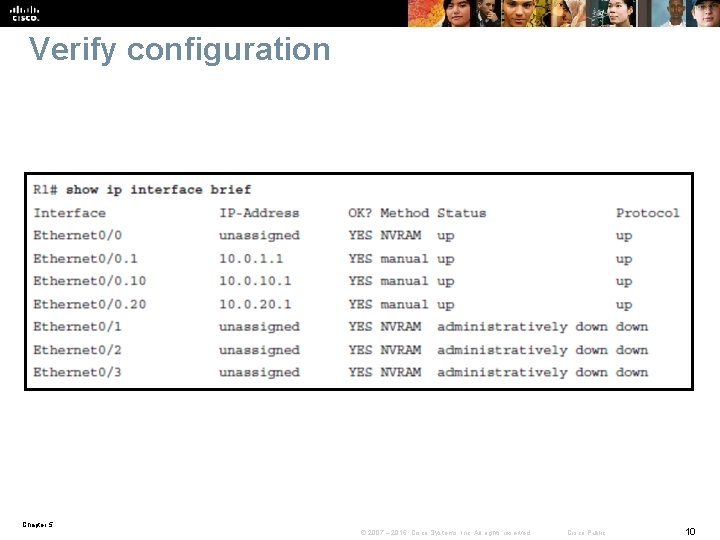
Verify configuration Chapter 5 © 2007 – 2016, Cisco Systems, Inc. All rights reserved. Cisco Public 10
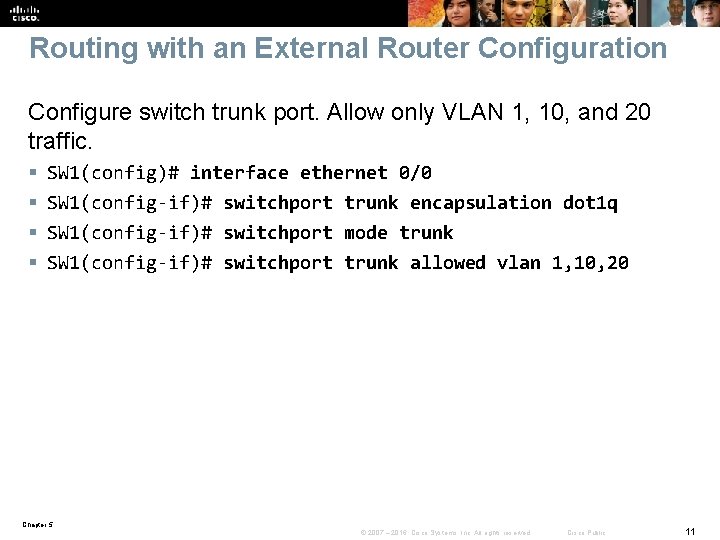
Routing with an External Router Configuration Configure switch trunk port. Allow only VLAN 1, 10, and 20 traffic. § § SW 1(config)# interface ethernet 0/0 SW 1(config-if)# switchport trunk encapsulation dot 1 q SW 1(config-if)# switchport mode trunk SW 1(config-if)# switchport trunk allowed vlan 1, 10, 20 Chapter 5 © 2007 – 2016, Cisco Systems, Inc. All rights reserved. Cisco Public 11
External Routers: Advantages Disadvantages The following are advantages of external router usage: § An external router works with any switch because Layer 3 services are not required on the switch. Many switches do not contain Layer 3 forwarding capability, especially switches that are used at the access layer of a hierarchical network. § The implementation is simple. Only one switch port and one router interface require configuration. § If the network design includes only Layer 2 switches, the design and also the process for troubleshooting traffic flow become very simple because there is only one place in the network where VLANs interconnect. Chapter 5 © 2007 – 2016, Cisco Systems, Inc. All rights reserved. Cisco Public 12
External Routers: Advantages Disadvantages The following are disadvantages of external router usage: § The router is a single point of failure. § A single traffic path may become congested. With a routeron-a-stick model, the trunk link is limited by the speed of the router interface being shared across all trunked VLANs § Latency may be introduced as frames leave and reenter the switch chassis multiple times and as the router makes software-based routing decisions. Chapter 5 © 2007 – 2016, Cisco Systems, Inc. All rights reserved. Cisco Public 13
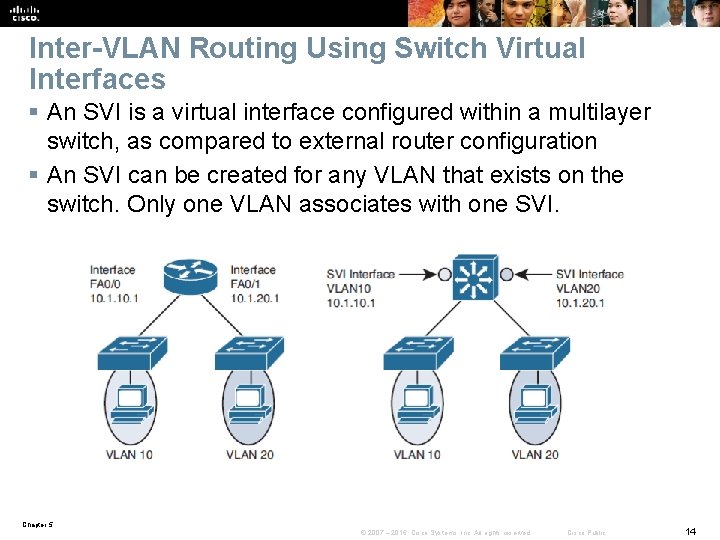
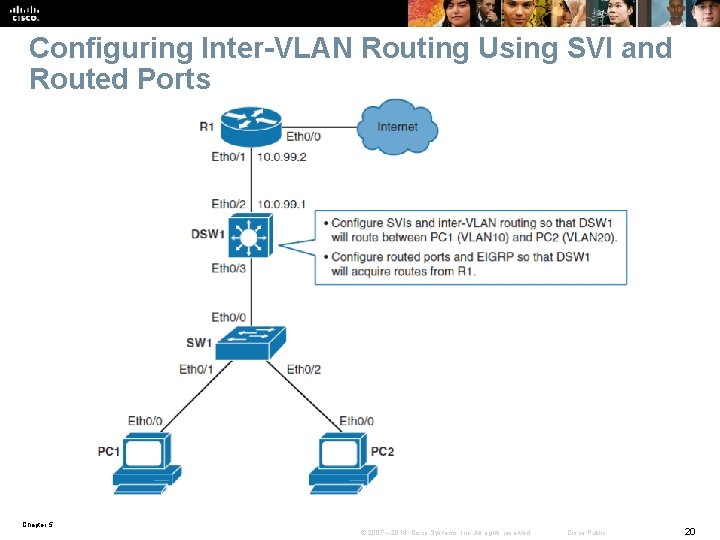
Inter-VLAN Routing Using Switch Virtual Interfaces § An SVI is a virtual interface configured within a multilayer switch, as compared to external router configuration § An SVI can be created for any VLAN that exists on the switch. Only one VLAN associates with one SVI. Chapter 5 © 2007 – 2016, Cisco Systems, Inc. All rights reserved. Cisco Public 14
Switch Virtual Interfaces § An SVI is “virtual” in that there is no physical port dedicated to the interface, yet it can perform the same functions for the VLAN as a router interface would § Can be configured in much the same way as a router interface (IP address, inbound/outbound access control lists [ACLs], and so on). § The SVI for the VLAN provides Layer 3 processing for packets to or from all switch ports associated with that VLAN. § By default, an SVI is created for the default VLAN (VLAN 1) to permit remote switch administration. § Additional SVIs must be explicitly created and the number used corresponds to the VLAN tag associated. Chapter 5 © 2007 – 2016, Cisco Systems, Inc. All rights reserved. Cisco Public 15
Reasons to configure SVI § To provide a gateway for a VLAN so that traffic can be routed into or out of that VLAN § To provide fallback bridging if it is required for nonroutable protocols § To provide Layer 3 IP connectivity to the switch § To support routing protocol and bridging configurations Chapter 5 © 2007 – 2016, Cisco Systems, Inc. All rights reserved. Cisco Public 16
SVI: Advantages and Disadvantages The following are some of the advantages of SVI: § It is much faster than router-on-a-stick because everything is hardware switched and routed. § No need for external links from the switch to the router for routing. § Not limited to one link. Layer 2 Ether. Channels can be used between the switches to get more bandwidth. § Latency is much lower because it does not need to leave the switch. The following are some of the disadvantages: § It needs a Layer 3 switch to perform inter-VLAN routing, which is more expensive Chapter 5 © 2007 – 2016, Cisco Systems, Inc. All rights reserved. Cisco Public 17
Routing with Routed Ports § A routed port is a physical port that acts similarly to a port on a traditional router with Layer 3 addresses configured. § Unlike an access port, a routed port is not associated with a particular VLAN. A routed port behaves like a regular router interface. § Also, because Layer 2 functionality has been removed, Layer 2 protocols. § Link Aggregation Control Protocol (LACP), which can be used to build either Layer 2 or Layer 3 Ether. Channel bundles, would still function at Layer 3. § Routed ports are used for point-to-point links § Routed interfaces do not support subinterfaces as with Cisco IOS routers. § To configure routed ports, make sure to configure the respective interface as a Layer 3 interface using the no switchport interface command Chapter 5 © 2007 – 2016, Cisco Systems, Inc. All rights reserved. Cisco Public 18
Routed Ports: Advantages Following are some of the advantages of routed ports: § A multilayer switch can have SVI and routed ports in a single switch. How is this an advantage of a routed port? § Multilayer switches forward either Layer 2 or Layer 3 traffic in hardware, so it helps to do routing faster. Chapter 5 © 2007 – 2016, Cisco Systems, Inc. All rights reserved. Cisco Public 19
Configuring Inter-VLAN Routing Using SVI and Routed Ports Chapter 5 © 2007 – 2016, Cisco Systems, Inc. All rights reserved. Cisco Public 20
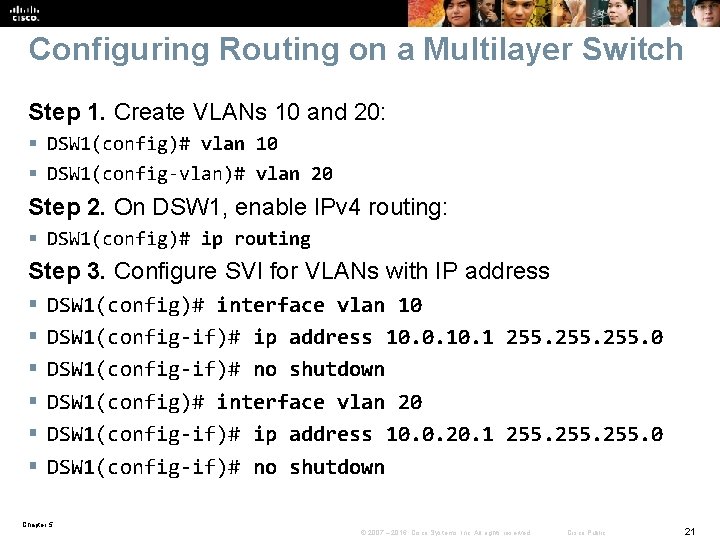
Configuring Routing on a Multilayer Switch Step 1. Create VLANs 10 and 20: § DSW 1(config)# vlan 10 § DSW 1(config-vlan)# vlan 20 Step 2. On DSW 1, enable IPv 4 routing: § DSW 1(config)# ip routing Step 3. Configure SVI for VLANs with IP address § § § DSW 1(config)# interface vlan 10 DSW 1(config-if)# ip address 10. 0. 1 255. 0 DSW 1(config-if)# no shutdown DSW 1(config)# interface vlan 20 DSW 1(config-if)# ip address 10. 0. 20. 1 255. 0 DSW 1(config-if)# no shutdown Chapter 5 © 2007 – 2016, Cisco Systems, Inc. All rights reserved. Cisco Public 21
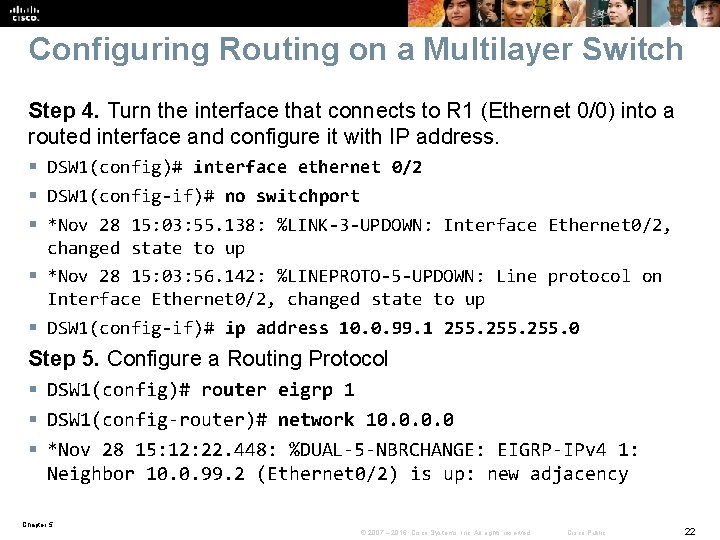
Configuring Routing on a Multilayer Switch Step 4. Turn the interface that connects to R 1 (Ethernet 0/0) into a routed interface and configure it with IP address. § DSW 1(config)# interface ethernet 0/2 § DSW 1(config-if)# no switchport § *Nov 28 15: 03: 55. 138: %LINK-3 -UPDOWN: Interface Ethernet 0/2, changed state to up § *Nov 28 15: 03: 56. 142: %LINEPROTO-5 -UPDOWN: Line protocol on Interface Ethernet 0/2, changed state to up § DSW 1(config-if)# ip address 10. 0. 99. 1 255. 0 Step 5. Configure a Routing Protocol § DSW 1(config)# router eigrp 1 § DSW 1(config-router)# network 10. 0 § *Nov 28 15: 12: 22. 448: %DUAL-5 -NBRCHANGE: EIGRP-IPv 4 1: Neighbor 10. 0. 99. 2 (Ethernet 0/2) is up: new adjacency Chapter 5 © 2007 – 2016, Cisco Systems, Inc. All rights reserved. Cisco Public 22
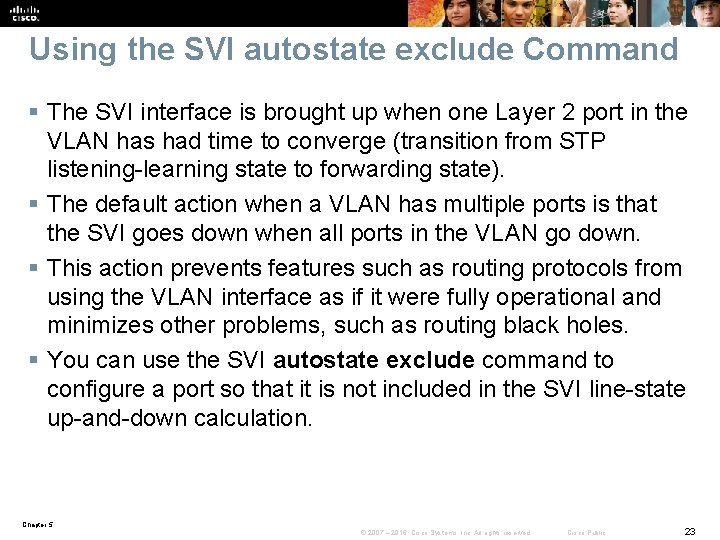
Using the SVI autostate exclude Command § The SVI interface is brought up when one Layer 2 port in the VLAN has had time to converge (transition from STP listening-learning state to forwarding state). § The default action when a VLAN has multiple ports is that the SVI goes down when all ports in the VLAN go down. § This action prevents features such as routing protocols from using the VLAN interface as if it were fully operational and minimizes other problems, such as routing black holes. § You can use the SVI autostate exclude command to configure a port so that it is not included in the SVI line-state up-and-down calculation. Chapter 5 © 2007 – 2016, Cisco Systems, Inc. All rights reserved. Cisco Public 23
Configuring autostate exclude § Switch(config)# interface slot/number § Switch(config-if)# switchport autostate exclude § This disables the SVI autostate and makes the SVI interface permanently active. Chapter 5 © 2007 – 2016, Cisco Systems, Inc. All rights reserved. Cisco Public 24
SVI Configuration Checklist § Identify which VLANs require a Layer 3 gateway. § Create a VLAN on a multilayer switch if it does not already exist. § Create an SVI interface for each VLAN. § Configure the SVI interface with an IP address. § Enable the SVI interface. § Enable IP routing on the multilayer switch. § Determine whether a dynamic routing protocol is needed. § Configure a dynamic routing protocol if needed. § Identify any switch ports that require autostate exclude. § Configure autostate exclude on identified switch ports. Chapter 5 © 2007 – 2016, Cisco Systems, Inc. All rights reserved. Cisco Public 25
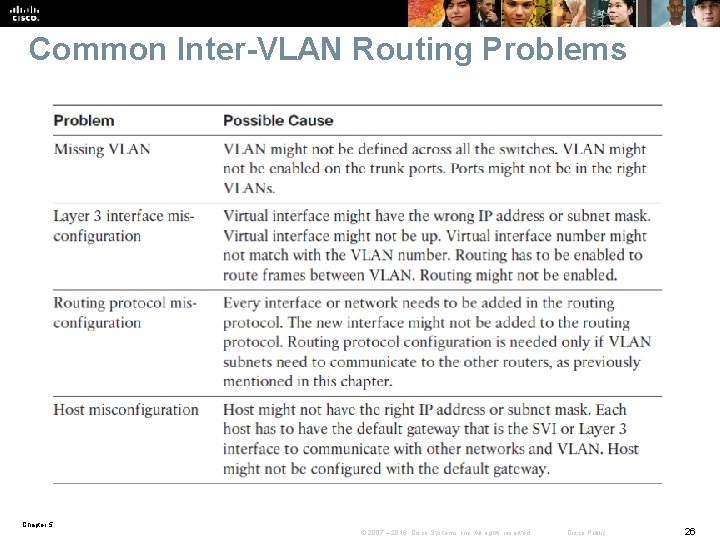
Common Inter-VLAN Routing Problems Chapter 5 © 2007 – 2016, Cisco Systems, Inc. All rights reserved. Cisco Public 26
Troubleshooting Inter-VLAN Problems § § Correct VLANs on all switches and trunks. Correct routes. Correct primary and secondary root bridges. Correct IP address and subnet masks. Chapter 5 © 2007 – 2016, Cisco Systems, Inc. All rights reserved. Cisco Public 27
Layer 2 Versus Layer 3 Ether. Channel Chapter 5 © 2007 – 2016, Cisco Systems, Inc. All rights reserved. Cisco Public 28
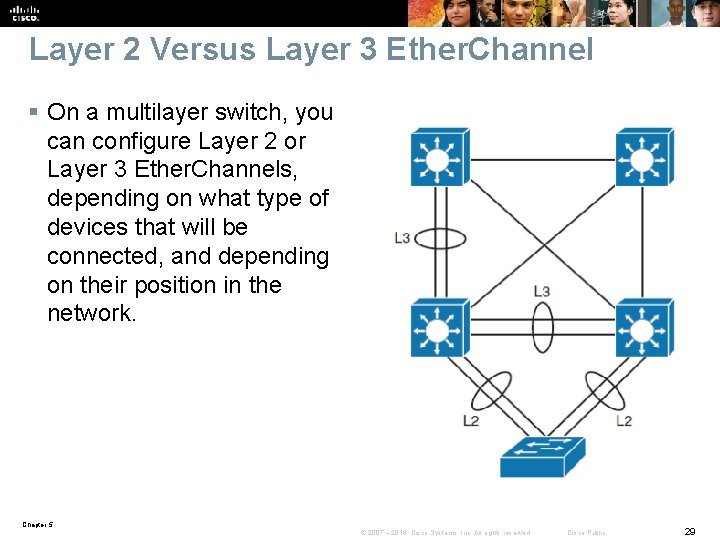
Layer 2 Versus Layer 3 Ether. Channel § On a multilayer switch, you can configure Layer 2 or Layer 3 Ether. Channels, depending on what type of devices that will be connected, and depending on their position in the network. Chapter 5 © 2007 – 2016, Cisco Systems, Inc. All rights reserved. Cisco Public 29
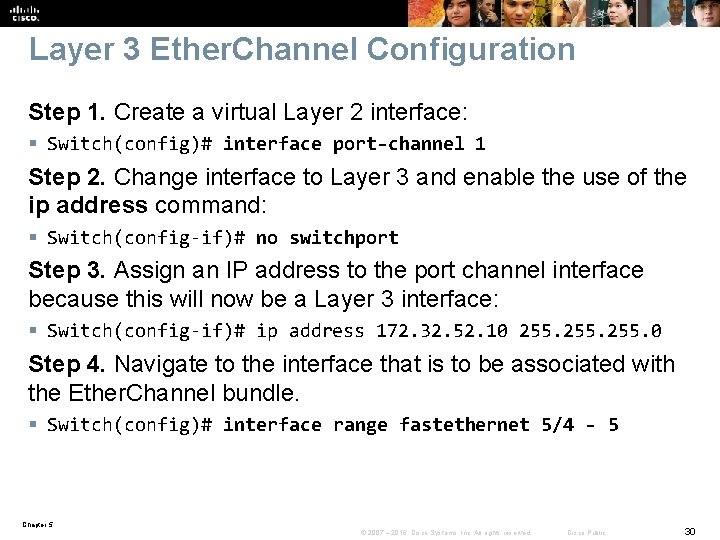
Layer 3 Ether. Channel Configuration Step 1. Create a virtual Layer 2 interface: § Switch(config)# interface port-channel 1 Step 2. Change interface to Layer 3 and enable the use of the ip address command: § Switch(config-if)# no switchport Step 3. Assign an IP address to the port channel interface because this will now be a Layer 3 interface: § Switch(config-if)# ip address 172. 32. 52. 10 255. 0 Step 4. Navigate to the interface that is to be associated with the Ether. Channel bundle. § Switch(config)# interface range fastethernet 5/4 - 5 Chapter 5 © 2007 – 2016, Cisco Systems, Inc. All rights reserved. Cisco Public 30
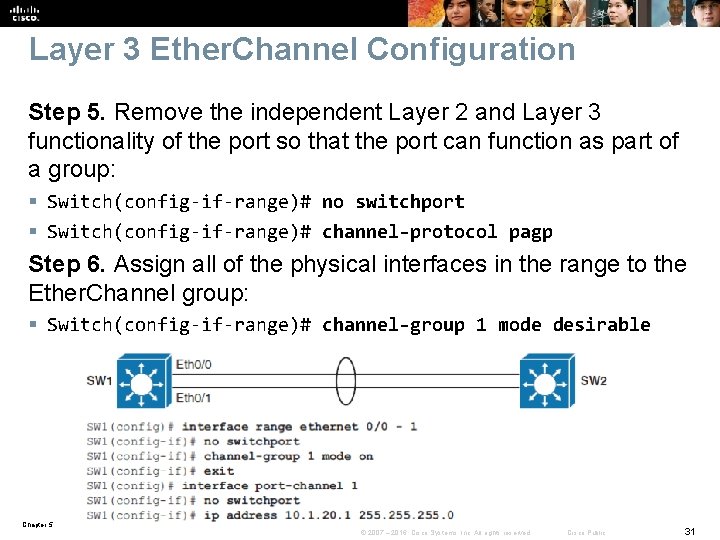
Layer 3 Ether. Channel Configuration Step 5. Remove the independent Layer 2 and Layer 3 functionality of the port so that the port can function as part of a group: § Switch(config-if-range)# no switchport § Switch(config-if-range)# channel-protocol pagp Step 6. Assign all of the physical interfaces in the range to the Ether. Channel group: § Switch(config-if-range)# channel-group 1 mode desirable Chapter 5 © 2007 – 2016, Cisco Systems, Inc. All rights reserved. Cisco Public 31
L 3 Ether. Channel Configuration Guidelines The following are the guidelines for configuration for Ether. Channel: § Speed and duplex: Configure all interfaces in an Ether. Channel to operate at the same speed and in the same duplex mode. § Interface mode: Because the port channel interface is a routed port, the no switchport the same command must also be applied to the physical ports § Verifying the Ether. Channel configuration: After Ether. Channel is configured, use the following commands to verify and troubleshoot Ether. Channel: § show interface port-channel-group-number § show ether. Channel channel-group-number summary § show spanning-tree vlan-number detail Chapter 5 © 2007 – 2016, Cisco Systems, Inc. All rights reserved. Cisco Public 32
Implementing DHCP Chapter 5 © 2007 – 2016, Cisco Systems, Inc. All rights reserved. Cisco Public 33
Implementing DHCP § § § Explain the idea behind DHCP Configure a DHCP server Configure manual DHCP bindings Configure a DHCP relay Configure DHCP options Chapter 5 © 2007 – 2016, Cisco Systems, Inc. All rights reserved. Cisco Public 34
DHCP Overview § DHCP provides configuration parameters to Internet hosts. DHCP consists of two components: a protocol for delivering host-specific configuration parameters from a DHCP server to a host, and a mechanism for allocating network addresses to hosts. § DHCP is built on a client/server model in which designated DHCP server hosts allocate network addresses and deliver configuration parameters to dynamically configured hosts. § Clients in access VLANs need DHCP services, and not only external servers but also routers can be used for DHCP services. Chapter 5 © 2007 – 2016, Cisco Systems, Inc. All rights reserved. Cisco Public 35
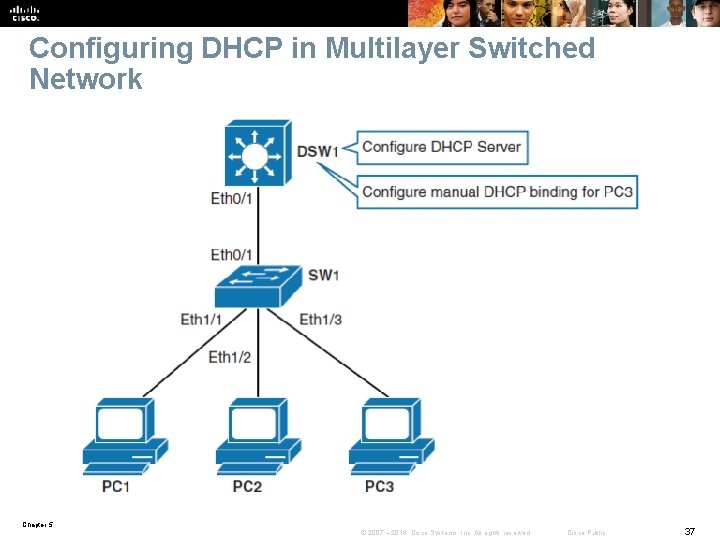
DHCP on MLS § Cisco multilayer switches running Cisco IOS Software include DHCP server and relay agent software. § Distribution multilayer switches often act as Layer 3 gateways for clients connecting to the access switches on various VLANs. § Therefore, the DHCP service can be provided directly by the distribution switches. § Alternatively, DHCP services can be concentrated in an external, dedicated DHCP server. § In that case, distribution switches need to redirect the incoming clients’ DHCP requests to the external DHCP server. Chapter 5 © 2007 – 2016, Cisco Systems, Inc. All rights reserved. Cisco Public 36
Configuring DHCP in Multilayer Switched Network Chapter 5 © 2007 – 2016, Cisco Systems, Inc. All rights reserved. Cisco Public 37
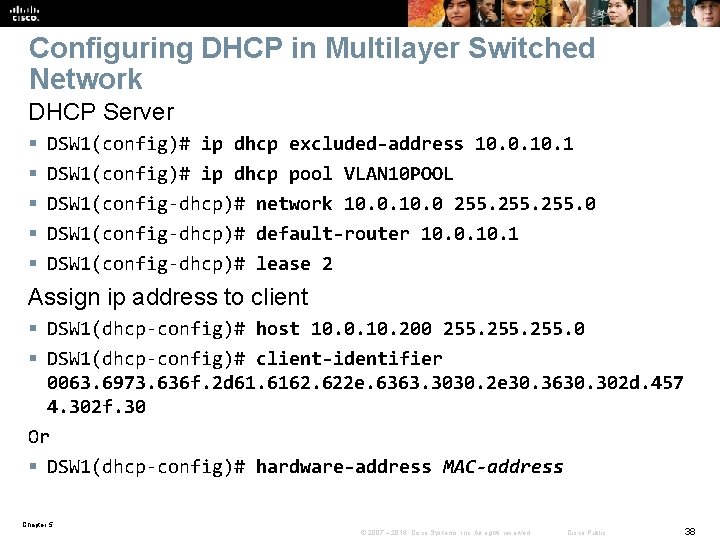
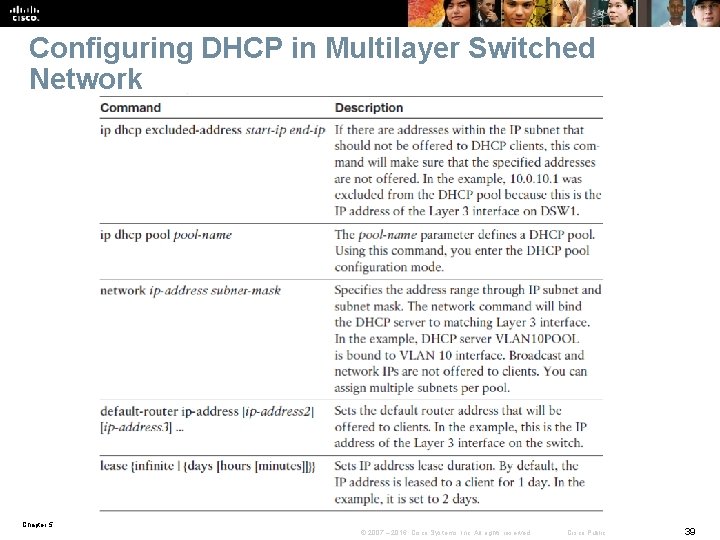
Configuring DHCP in Multilayer Switched Network DHCP Server § § § DSW 1(config)# ip dhcp excluded-address 10. 0. 1 DSW 1(config)# ip dhcp pool VLAN 10 POOL DSW 1(config-dhcp)# network 10. 0 255. 0 DSW 1(config-dhcp)# default-router 10. 0. 1 DSW 1(config-dhcp)# lease 2 Assign ip address to client § DSW 1(dhcp-config)# host 10. 0. 10. 200 255. 0 § DSW 1(dhcp-config)# client-identifier 0063. 6973. 636 f. 2 d 61. 6162. 622 e. 6363. 3030. 2 e 30. 3630. 302 d. 457 4. 302 f. 30 Or § DSW 1(dhcp-config)# hardware-address MAC-address Chapter 5 © 2007 – 2016, Cisco Systems, Inc. All rights reserved. Cisco Public 38
Configuring DHCP in Multilayer Switched Network Chapter 5 © 2007 – 2016, Cisco Systems, Inc. All rights reserved. Cisco Public 39
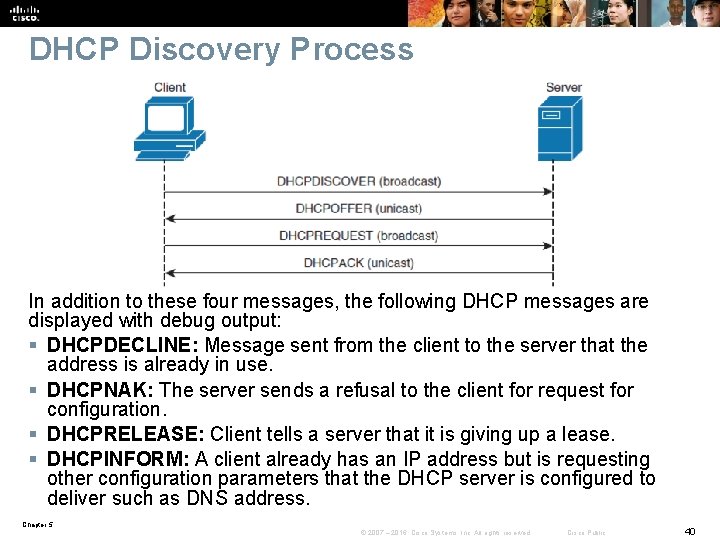
DHCP Discovery Process In addition to these four messages, the following DHCP messages are displayed with debug output: § DHCPDECLINE: Message sent from the client to the server that the address is already in use. § DHCPNAK: The server sends a refusal to the client for request for configuration. § DHCPRELEASE: Client tells a server that it is giving up a lease. § DHCPINFORM: A client already has an IP address but is requesting other configuration parameters that the DHCP server is configured to deliver such as DNS address. Chapter 5 © 2007 – 2016, Cisco Systems, Inc. All rights reserved. Cisco Public 40
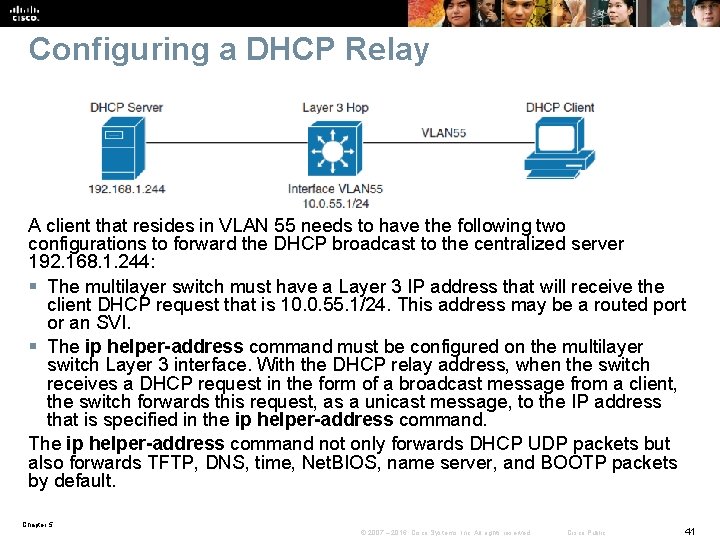
Configuring a DHCP Relay A client that resides in VLAN 55 needs to have the following two configurations to forward the DHCP broadcast to the centralized server 192. 168. 1. 244: § The multilayer switch must have a Layer 3 IP address that will receive the client DHCP request that is 10. 0. 55. 1/24. This address may be a routed port or an SVI. § The ip helper-address command must be configured on the multilayer switch Layer 3 interface. With the DHCP relay address, when the switch receives a DHCP request in the form of a broadcast message from a client, the switch forwards this request, as a unicast message, to the IP address that is specified in the ip helper-address command. The ip helper-address command not only forwards DHCP UDP packets but also forwards TFTP, DNS, time, Net. BIOS, name server, and BOOTP packets by default. Chapter 5 © 2007 – 2016, Cisco Systems, Inc. All rights reserved. Cisco Public 41
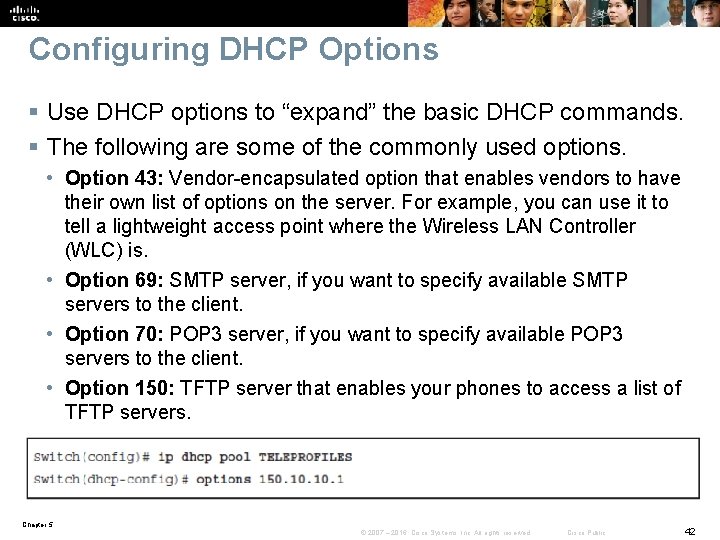
Configuring DHCP Options § Use DHCP options to “expand” the basic DHCP commands. § The following are some of the commonly used options. • Option 43: Vendor-encapsulated option that enables vendors to have their own list of options on the server. For example, you can use it to tell a lightweight access point where the Wireless LAN Controller (WLC) is. • Option 69: SMTP server, if you want to specify available SMTP servers to the client. • Option 70: POP 3 server, if you want to specify available POP 3 servers to the client. • Option 150: TFTP server that enables your phones to access a list of TFTP servers. Chapter 5 © 2007 – 2016, Cisco Systems, Inc. All rights reserved. Cisco Public 42
Chapter 5 Summary § Inter-VLAN routing provides communication between the devices in different VLANs. Recall that a VLAN is a single broadcast domain, and the devices within a VLAN cannot communicate beyond VLAN boundaries unless through a Layer 3 device. Multilayer switches support two types of Layer 3 interfaces: routed ports and SVIs (VLAN interfaces). § Routed ports are point-to-point connections such as those that interconnect the building distribution submodules and the campus backbone submodules when using Layer 3 in the distribution layer. § SVIs are VLAN interfaces that route traffic between VLANs and VLAN group ports. In multilayer switched networks with Layer 3 in the distribution layer and Layer 2 in the access layer, SVIs can route traffic from VLANs on the access layer switches. Chapter 5 © 2007 – 2016, Cisco Systems, Inc. All rights reserved. Cisco Public 43
Chapter 5 Summary § Using router-on-a-stick is an alternative and legacy method of implementing inter- VLAN routing for low-throughput and latency-tolerant applications. § On multilayer switches, Layer 3 links can be aggregated using Layer 3 Ether. Channels. § When a Layer 3 interface is configured, routing can be enabled. § DHCP server function can be configured on the Cisco switches and routers. § If the network uses a centralized DHCP server, a DHCP relay agent feature can be configured on the switches by using the ip helper-address command. Chapter 5 © 2007 – 2016, Cisco Systems, Inc. All rights reserved. Cisco Public 44
Chapter 5 Labs § CCNPv 7. 1 SWITCH Lab 5. 1 IVL-ROUTING § CCNPv 7. 1 SWITCH Lab 5. 2 DHCP 4/6 Chapter 5 © 2007 – 2016, Cisco Systems, Inc. All rights reserved. Cisco Public 45
Chapter 5 © 2007 – 2016, Cisco Systems, Inc. All rights reserved. Cisco Public 46
Acknowledgment • Some of the images and texts are from Implementing Cisco IP Switched Networks (SWITCH) Foundation Learning Guide: (CCNP SWITCH 300 -115) by Richard Froom and Erum Frahim (1587206641) • Copyright © 2015 – 2016 Cisco Systems, Inc. • Special Thanks to Bruno Silva Chapter 5 © 2007 – 2016, Cisco Systems, Inc. All rights reserved. Cisco Public 47