
Chapter 5 Configuring Catalyst Switch Operations v v
- Slides: 49
Chapter 5 Configuring Catalyst Switch Operations v v Basic Layer 2 Switching and Bridging Functions Redundant Topology Overview Spanning-Tree Protocol Overview Configuring a Catalyst Switch 1
v Basic Layer 2 Switching and Bridging Functions § Layer 2 switching 과 bridging 작용 과 모드를 이해한다. § LAN switch 와 MAC address table을 어떻게 사용하는지를 안다. 2
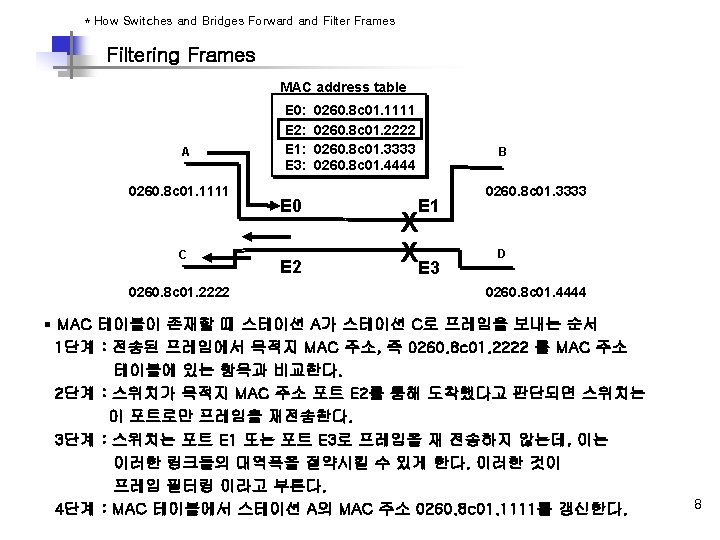
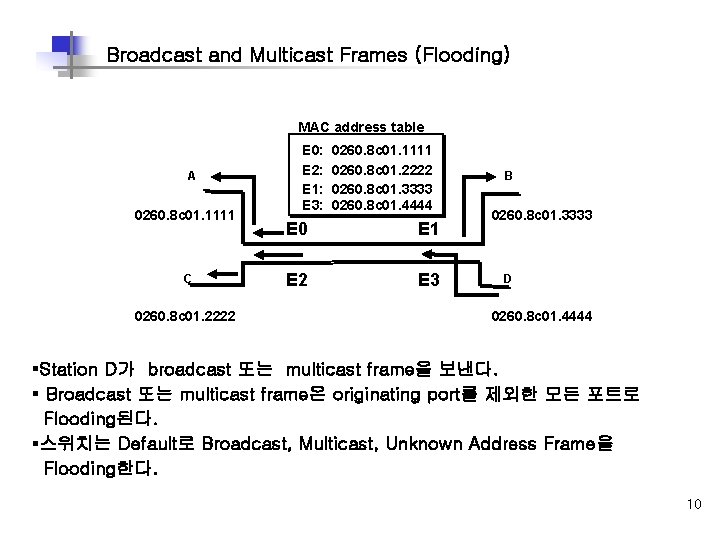
Broadcast and Multicast Frames (Flooding) MAC address table A 0260. 8 c 01. 1111 C 0260. 8 c 01. 2222 E 0: E 2: E 1: E 3: 0260. 8 c 01. 1111 0260. 8 c 01. 2222 0260. 8 c 01. 3333 0260. 8 c 01. 4444 E 0 E 1 E 2 E 3 B 0260. 8 c 01. 3333 D 0260. 8 c 01. 4444 §Station D가 broadcast 또는 multicast frame을 보낸다. § Broadcast 또는 multicast frame은 originating port를 제외한 모든 포트로 Flooding된다. §스위치는 Default로 Broadcast, Multicast, Unknown Address Frame을 Flooding한다. 10
v Redundant Topology Overview § Redundant Switch와 bridge topologies를 이해한다. § L 2 Switch의 여러 문제점들을 이해한다. § L 2 Switch의 루프 방지에 대해 이해한다. 11
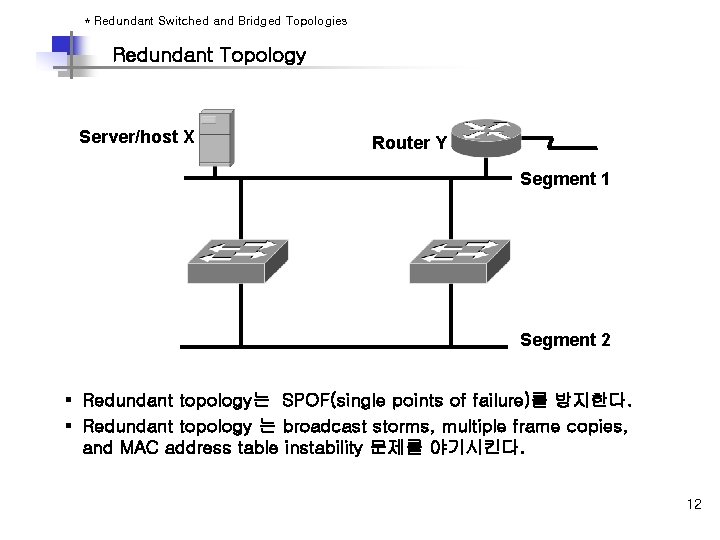
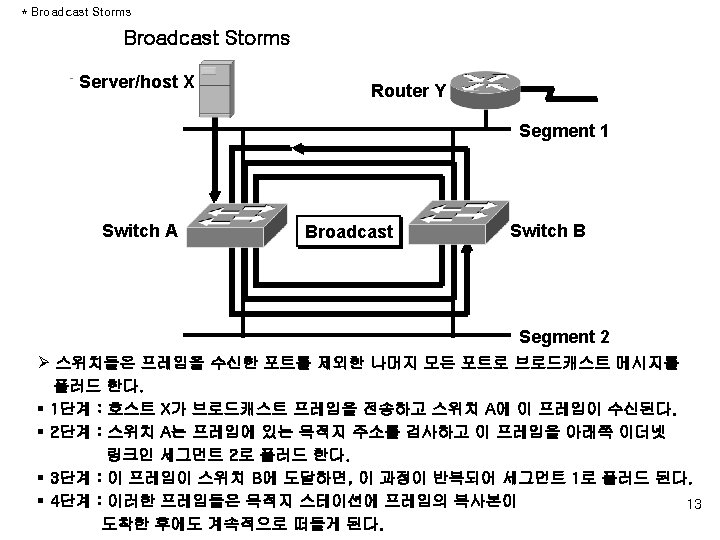
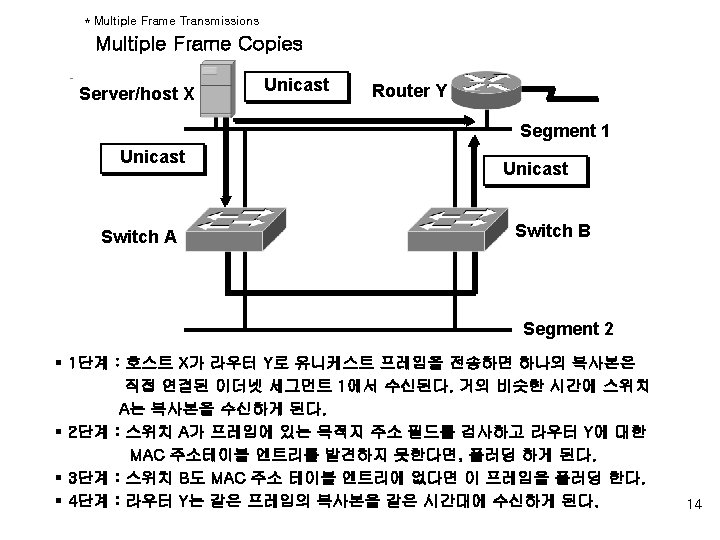
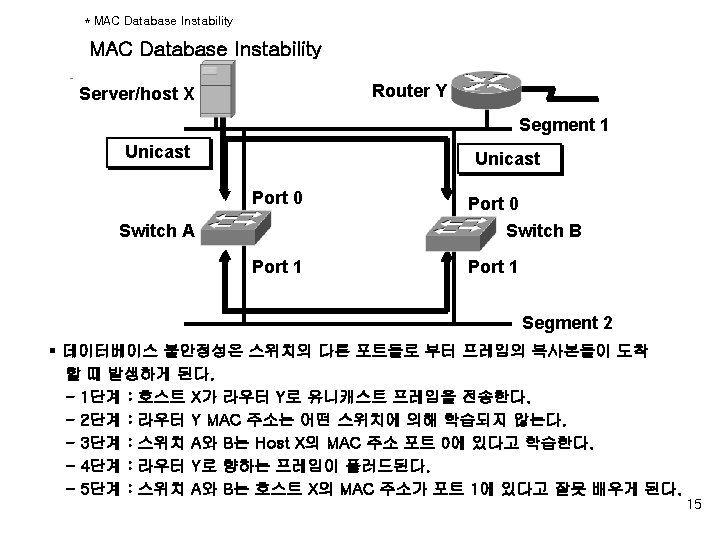
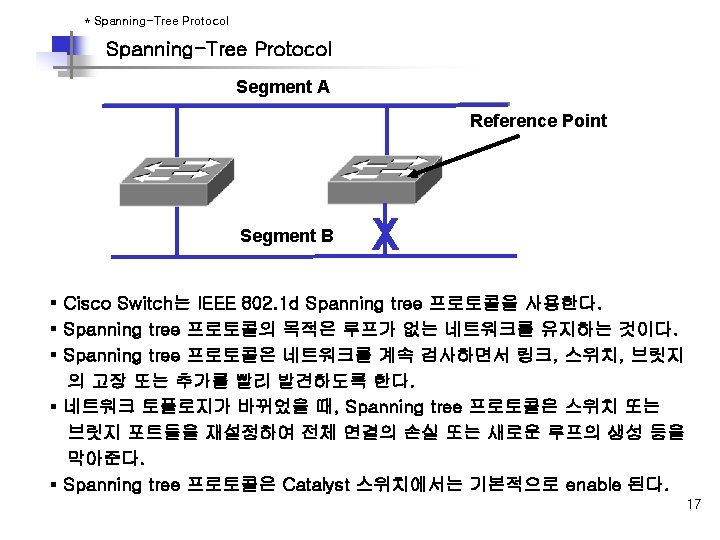
* Redundant Switched and Bridged Topologies Redundant Topology Server/host X Router Y Segment 1 Segment 2 § Redundant topology는 SPOF(single points of failure)를 방지한다. § Redundant topology 는 broadcast storms, multiple frame copies, and MAC address table instability 문제를 야기시킨다. 12
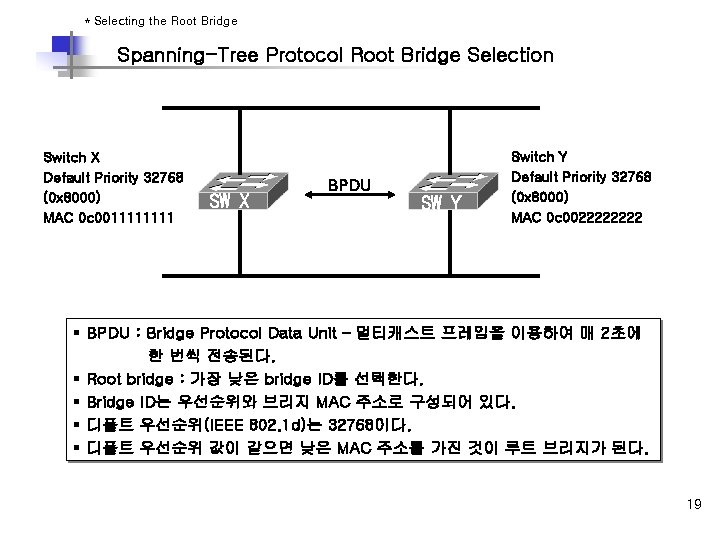
* Selecting the Root Bridge Spanning-Tree Protocol Root Bridge Selection Switch X Default Priority 32768 (0 x 8000) MAC 0 c 001111 SW X BPDU SW Y Switch Y Default Priority 32768 (0 x 8000) MAC 0 c 002222 § BPDU : Bridge Protocol Data Unit – 멀티캐스트 프레임을 이용하여 매 2초에 한 번씩 전송된다. § Root bridge : 가장 낮은 bridge ID를 선택한다. § Bridge ID는 우선순위와 브리지 MAC 주소로 구성되어 있다. § 디폴트 우선순위(IEEE 802. 1 d)는 32768이다. § 디폴트 우선순위 값이 같으면 낮은 MAC 주소를 가진 것이 루트 브리지가 된다. 19
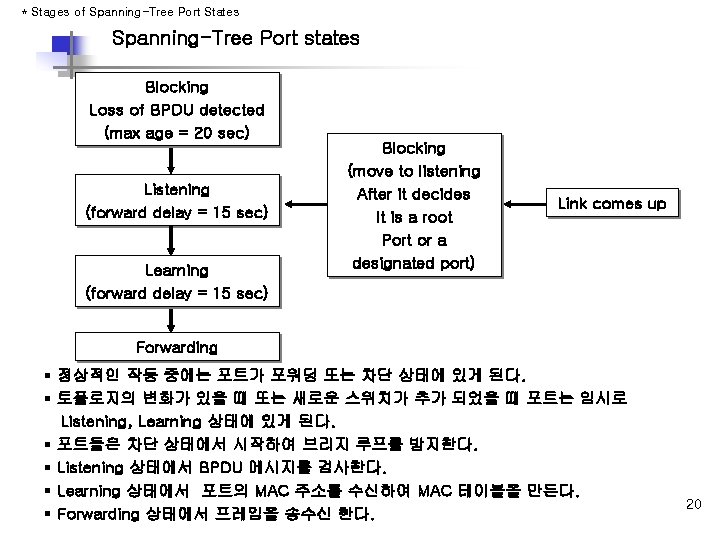
* Stages of Spanning-Tree Port States Spanning-Tree Port states Blocking Loss of BPDU detected (max age = 20 sec) Listening (forward delay = 15 sec) Learning (forward delay = 15 sec) Blocking (move to listening After it decides It is a root Port or a designated port) Link comes up Forwarding § 정상적인 작동 중에는 포트가 포워딩 또는 차단 상태에 있게 된다. § 토폴로지의 변화가 있을 때 또는 새로운 스위치가 추가 되었을 때 포트는 임시로 Listening, Learning 상태에 있게 된다. § 포트들은 차단 상태에서 시작하여 브리지 루프를 방지한다. § Listening 상태에서 BPDU 메시지를 검사한다. § Learning 상태에서 포트의 MAC 주소를 수신하여 MAC 테이블을 만든다. § Forwarding 상태에서 프레임을 송수신 한다. 20
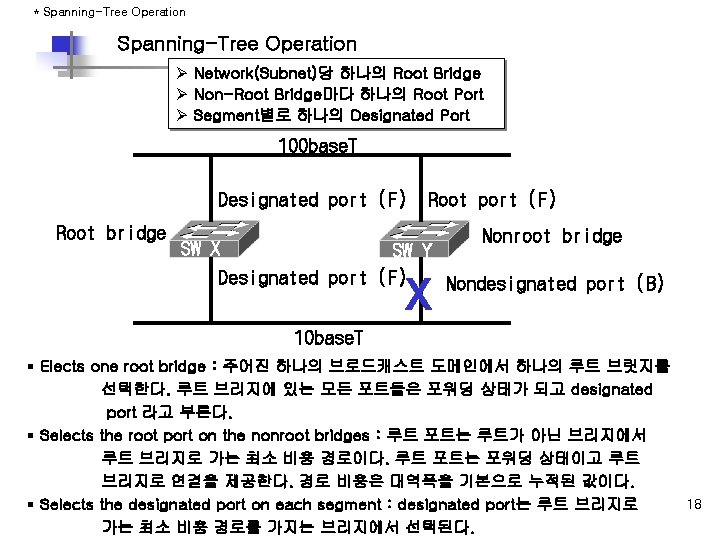
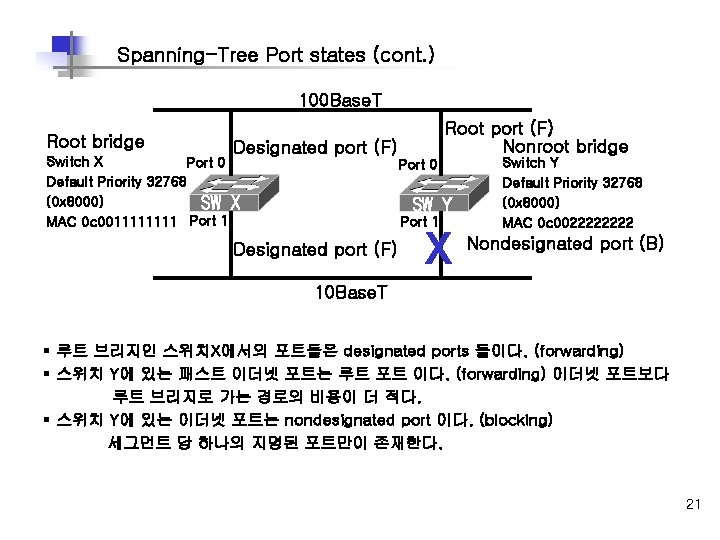
Spanning-Tree Port states (cont. ) 100 Base. T Root bridge Root port (F) Nonroot bridge Designated port (F) Switch X Port 0 Default Priority 32768 (0 x 8000) SW X MAC 0 c 001111 Port 0 SW Y Port 1 Designated port (F) Switch Y Default Priority 32768 (0 x 8000) MAC 0 c 002222 X Nondesignated port (B) 10 Base. T § 루트 브리지인 스위치X에서의 포트들은 designated ports 들이다. (forwarding) § 스위치 Y에 있는 패스트 이더넷 포트는 루트 포트 이다. (forwarding) 이더넷 포트보다 루트 브리지로 가는 경로의 비용이 더 적다. § 스위치 Y에 있는 이더넷 포트는 nondesignated port 이다. (blocking) 세그먼트 당 하나의 지명된 포트만이 존재한다. 21
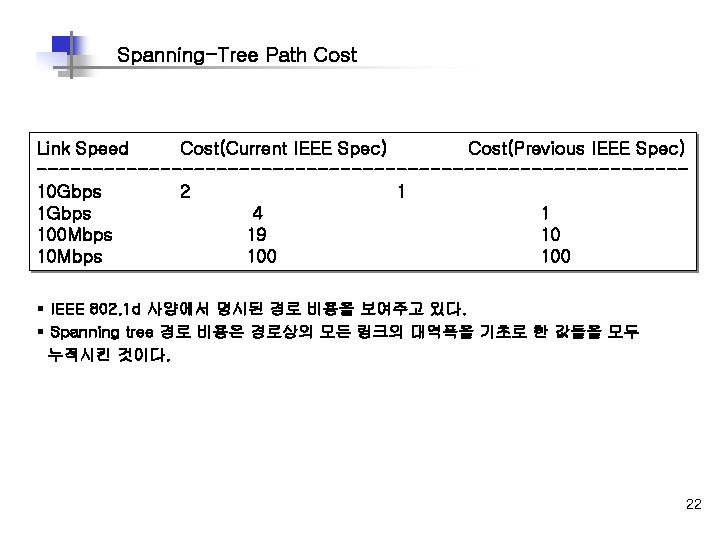
Spanning-Tree Path Cost Link Speed Cost(Current IEEE Spec) Cost(Previous IEEE Spec) -----------------------------10 Gbps 2 1 1 Gbps 4 1 100 Mbps 19 10 10 Mbps 100 § IEEE 802. 1 d 사양에서 명시된 경로 비용을 보여주고 있다. § Spanning tree 경로 비용은 경로상의 모든 링크의 대역폭을 기초로 한 값들을 모두 누적시킨 것이다. 22
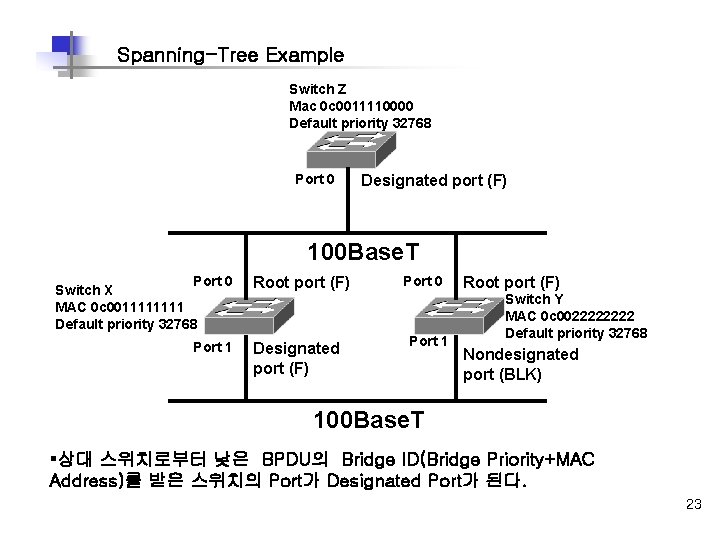
Spanning-Tree Example Switch Z Mac 0 c 0011110000 Default priority 32768 Port 0 Designated port (F) 100 Base. T Port 0 Switch X MAC 0 c 001111 Default priority 32768 Port 1 Root port (F) Designated port (F) Port 0 Port 1 Root port (F) Switch Y MAC 0 c 002222 Default priority 32768 Nondesignated port (BLK) 100 Base. T §상대 스위치로부터 낮은 BPDU의 Bridge ID(Bridge Priority+MAC Address)를 받은 스위치의 Port가 Designated Port가 된다. 23
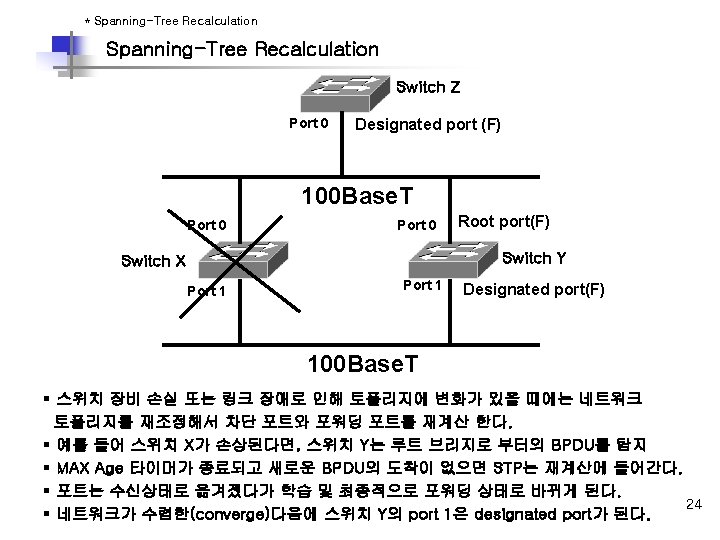
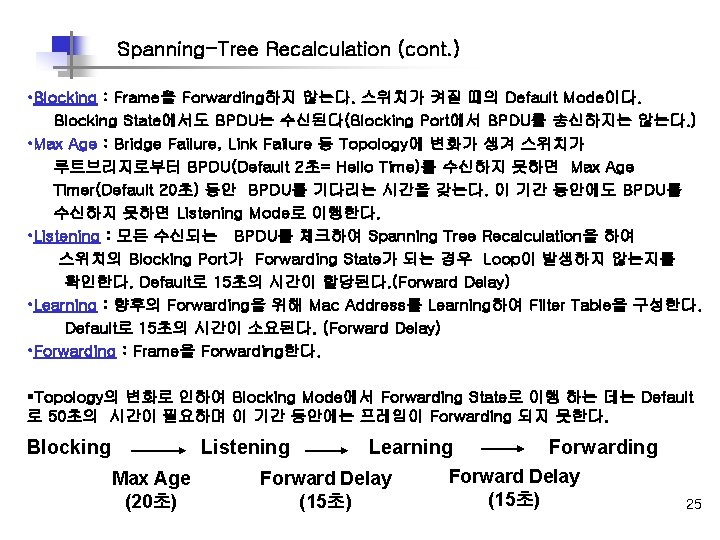
Spanning-Tree Recalculation (cont. ) • Blocking : Frame을 Forwarding하지 않는다. 스위치가 켜질 때의 Default Mode이다. Blocking State에서도 BPDU는 수신된다(Blocking Port에서 BPDU를 송신하지는 않는다. ) • Max Age : Bridge Failure, Link Failure 등 Topology에 변화가 생겨 스위치가 루트브리지로부터 BPDU(Default 2초= Hello Time)를 수신하지 못하면 Max Age Timer(Default 20초) 동안 BPDU를 기다리는 시간을 갖는다. 이 기간 동안에도 BPDU를 수신하지 못하면 Listening Mode로 이행한다. • Listening : 모든 수신되는 BPDU를 체크하여 Spanning Tree Recalculation을 하여 스위치의 Blocking Port가 Forwarding State가 되는 경우 Loop이 발생하지 않는지를 확인한다. Default로 15초의 시간이 할당된다. (Forward Delay) • Learning : 향후의 Forwarding을 위해 Mac Address를 Learning하여 Filter Table을 구성한다. Default로 15초의 시간이 소요된다. (Forward Delay) • Forwarding : Frame을 Forwarding한다. §Topology의 변화로 인하여 Blocking Mode에서 Forwarding State로 이행 하는 데는 Default 로 50초의 시간이 필요하며 이 기간 동안에는 프레임이 Forwarding 되지 못한다. Blocking Listening Max Age (20초) Learning Forward Delay (15초) Forwarding Forward Delay (15초) 25
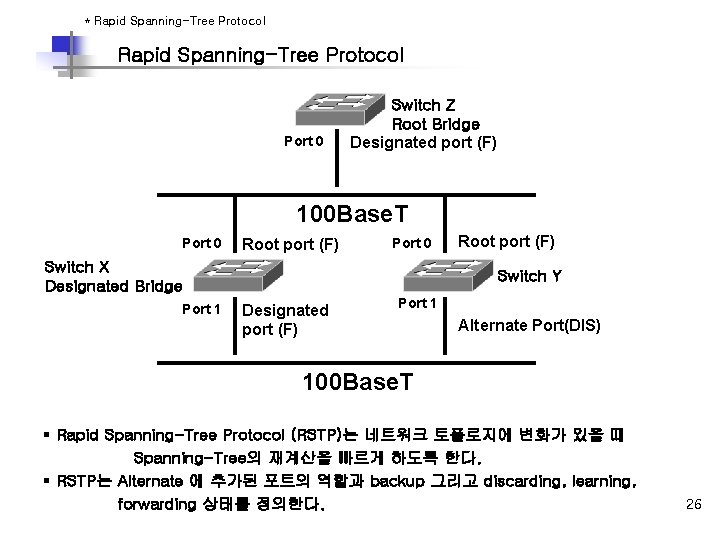
* Rapid Spanning-Tree Protocol Port 0 Switch Z Root Bridge Designated port (F) 100 Base. T Port 0 Root port (F) Port 0 Switch X Designated Bridge Port 1 Root port (F) Switch Y Designated port (F) Port 1 Alternate Port(DIS) 100 Base. T § Rapid Spanning-Tree Protocol (RSTP)는 네트워크 토폴로지에 변화가 있을 때 Spanning-Tree의 재계산을 빠르게 하도록 한다. § RSTP는 Alternate 에 추가된 포트의 역할과 backup 그리고 discarding, learning, forwarding 상태를 정의한다. 26
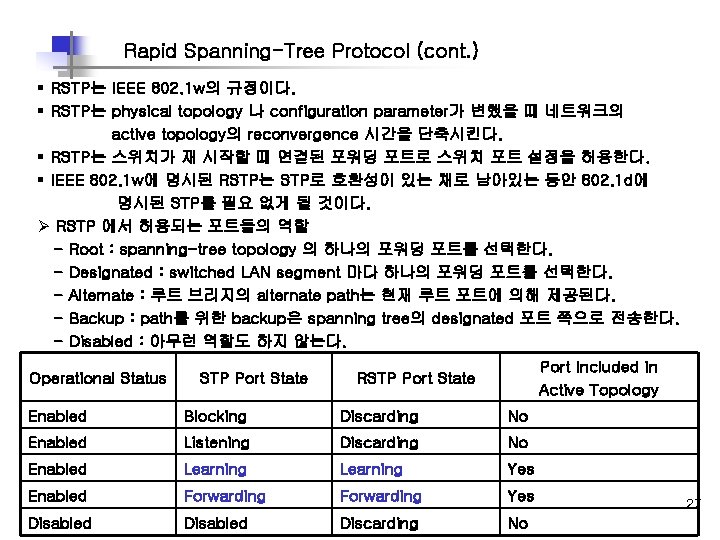
Rapid Spanning-Tree Protocol (cont. ) § RSTP는 IEEE 802. 1 w의 규정이다. § RSTP는 physical topology 나 configuration parameter가 변했을 때 네트워크의 active topology의 reconvergence 시간을 단축시킨다. § RSTP는 스위치가 재 시작할 때 연결된 포워딩 포트로 스위치 포트 설정을 허용한다. § IEEE 802. 1 w에 명시된 RSTP는 STP로 호환성이 있는 채로 남아있는 동안 802. 1 d에 명시된 STP를 필요 없게 될 것이다. Ø RSTP 에서 허용되는 포트들의 역할 - Root : spanning-tree topology 의 하나의 포워딩 포트를 선택한다. - Designated : switched LAN segment 마다 하나의 포워딩 포트를 선택한다. - Alternate : 루트 브리지의 alternate path는 현재 루트 포트에 의해 제공된다. - Backup : path를 위한 backup은 spanning tree의 designated 포트 쪽으로 전송한다. - Disabled : 아무런 역할도 하지 않는다. Operational Status STP Port State Port Included in Active Topology RSTP Port State Enabled Blocking Discarding No Enabled Listening Discarding No Enabled Learning Yes Enabled Forwarding Yes Disabled Discarding No 27
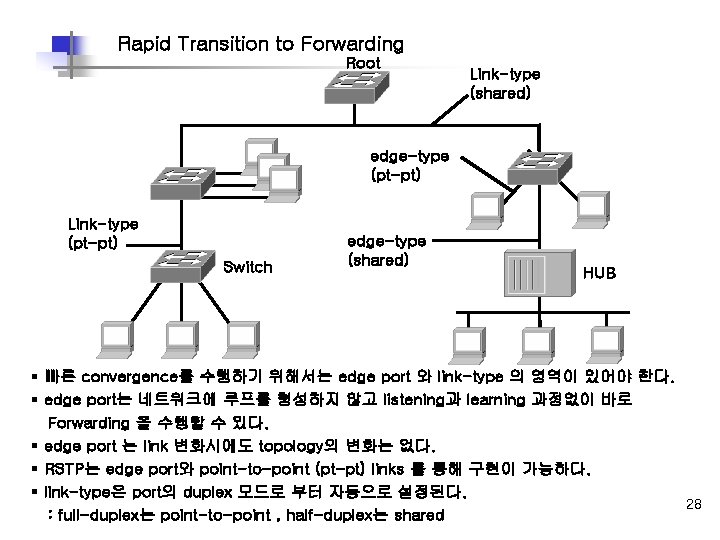
Rapid Transition to Forwarding Root Link-type (shared) edge-type (pt-pt) Link-type (pt-pt) Switch edge-type (shared) HUB § 빠른 convergence를 수행하기 위해서는 edge port 와 link-type 의 영역이 있어야 한다. § edge port는 네트워크에 루프를 형성하지 않고 listening과 learning 과정없이 바로 Forwarding 을 수행할 수 있다. § edge port 는 link 변화시에도 topology의 변화는 없다. § RSTP는 edge port와 point-to-point (pt-pt) links 를 통해 구현이 가능하다. § link-type은 port의 duplex 모드로 부터 자동으로 설정된다. 28 : full-duplex는 point-to-point , half-duplex는 shared
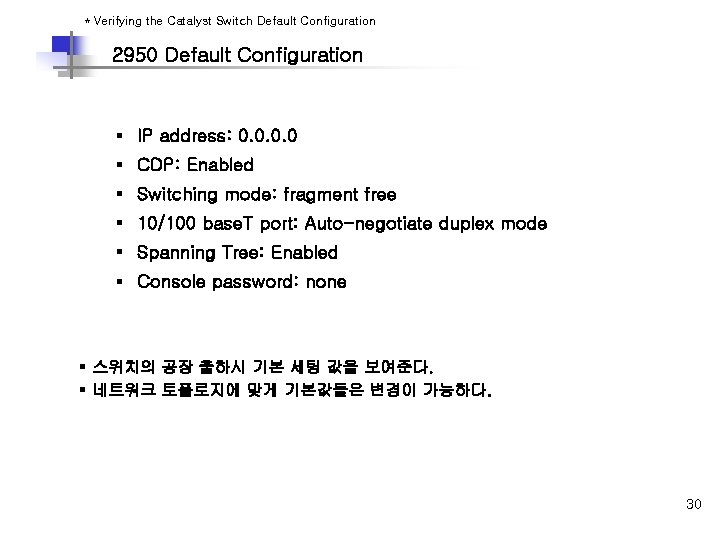
* Verifying the Catalyst Switch Default Configuration 2950 Default Configuration § IP address: 0. 0 § CDP: Enabled § Switching mode: fragment free § 10/100 base. T port: Auto-negotiate duplex mode § Spanning Tree: Enabled § Console password: none § 스위치의 공장 출하시 기본 세팅 값을 보여준다. § 네트워크 토폴로지에 맞게 기본값들은 변경이 가능하다. 30
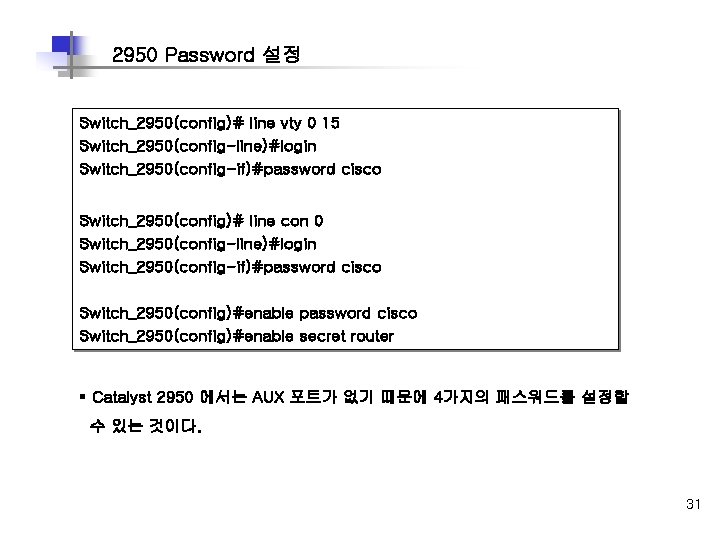
2950 Password 설정 Switch_2950(config)# line vty 0 15 Switch_2950(config-line)#login Switch_2950(config-if)#password cisco Switch_2950(config)# line con 0 Switch_2950(config-line)#login Switch_2950(config-if)#password cisco Switch_2950(config)#enable secret router § Catalyst 2950 에서는 AUX 포트가 없기 때문에 4가지의 패스워드를 설정할 수 있는 것이다. 31
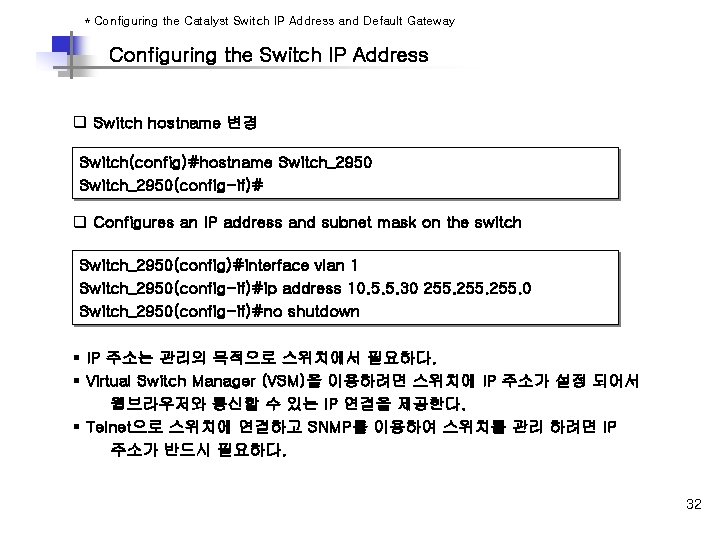
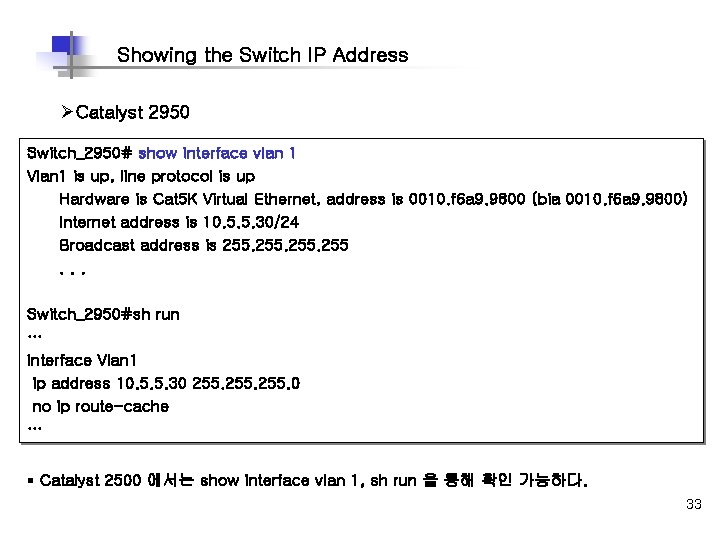
* Configuring the Catalyst Switch IP Address and Default Gateway Configuring the Switch IP Address q Switch hostname 변경 Switch(config)#hostname Switch_2950(config-if)# q Configures an IP address and subnet mask on the switch Switch_2950(config)#interface vlan 1 Switch_2950(config-if)#ip address 10. 5. 5. 30 255. 0 Switch_2950(config-if)#no shutdown § IP 주소는 관리의 목적으로 스위치에서 필요하다. § Virtual Switch Manager (VSM)을 이용하려면 스위치에 IP 주소가 설정 되어서 웹브라우저와 통신할 수 있는 IP 연결을 제공한다. § Telnet으로 스위치에 연결하고 SNMP를 이용하여 스위치를 관리 하려면 IP 주소가 반드시 필요하다. 32
Showing the Switch IP Address ØCatalyst 2950 Switch_2950# show interface vlan 1 Vlan 1 is up, line protocol is up Hardware is Cat 5 K Virtual Ethernet, address is 0010. f 6 a 9. 9800 (bia 0010. f 6 a 9. 9800) Internet address is 10. 5. 5. 30/24 Broadcast address is 255. . . Switch_2950#sh run … interface Vlan 1 ip address 10. 5. 5. 30 255. 0 no ip route-cache … § Catalyst 2500 에서는 show interface vlan 1, sh run 을 통해 확인 가능하다. 33
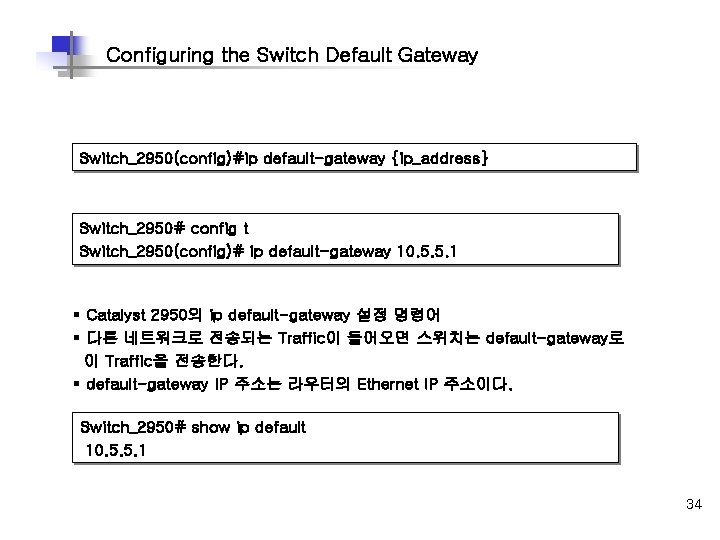
Configuring the Switch Default Gateway Switch_2950(config)#ip default-gateway {ip_address} Switch_2950# config t Switch_2950(config)# ip default-gateway 10. 5. 5. 1 § Catalyst 2950의 ip default-gateway 설정 명령어 § 다른 네트워크로 전송되는 Traffic이 들어오면 스위치는 default-gateway로 이 Traffic을 전송한다. § default-gateway IP 주소는 라우터의 Ethernet IP 주소이다. Switch_2950# show ip default 10. 5. 5. 1 34
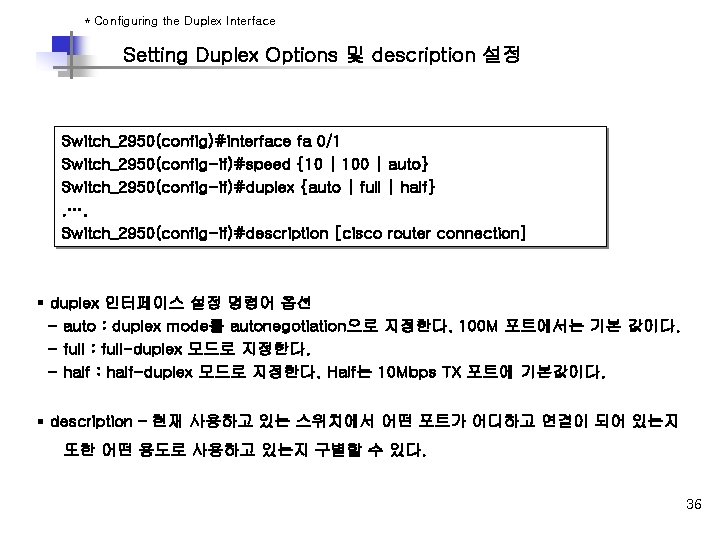
* Configuring the Duplex Interface Setting Duplex Options 및 description 설정 Switch_2950(config)#interface fa 0/1 Switch_2950(config-if)#speed {10 | 100 | auto} Switch_2950(config-if)#duplex {auto | full | half}. …. Switch_2950(config-if)#description [cisco router connection] § duplex 인터페이스 설정 명령어 옵션 - auto : duplex mode를 autonegotiation으로 지정한다. 100 M 포트에서는 기본 값이다. - full : full-duplex 모드로 지정한다. - half : half-duplex 모드로 지정한다. Half는 10 Mbps TX 포트에 기본값이다. § description – 현재 사용하고 있는 스위치에서 어떤 포트가 어디하고 연결이 되어 있는지 또한 어떤 용도로 사용하고 있는지 구별할 수 있다. 36
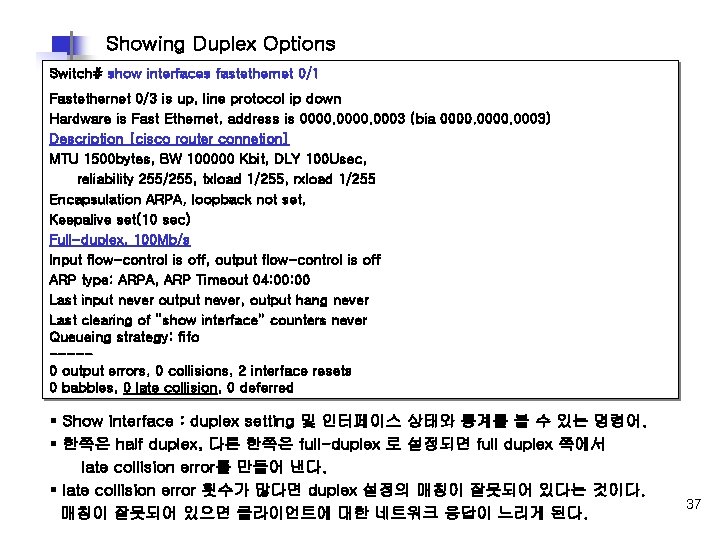
Showing Duplex Options Switch# show interfaces fastethernet 0/1 Fastethernet 0/3 is up, line protocol ip down Hardware is Fast Ethernet, address is 0000. 0003 (bia 0000. 0003) Description [cisco router connetion] MTU 1500 bytes, BW 100000 Kbit, DLY 100 Usec, reliability 255/255, txload 1/255, rxload 1/255 Encapsulation ARPA, loopback not set, Keepalive set(10 sec) Full-duplex, 100 Mb/s Input flow-control is off, output flow-control is off ARP type: ARPA, ARP Timeout 04: 00 Last input never output never, output hang never Last clearing of “show interface” counters never Queueing strategy: fifo ----0 output errors, 0 collisions, 2 interface resets 0 babbles, 0 late collision, 0 deferred § Show interface : duplex setting 및 인터페이스 상태와 통계를 볼 수 있는 명령어. § 한쪽은 half duplex, 다른 한쪽은 full-duplex 로 설정되면 full duplex 쪽에서 late collision error를 만들어 낸다. § late collision error 횟수가 많다면 duplex 설정의 매칭이 잘못되어 있다는 것이다. 매칭이 잘못되어 있으면 클라이언트에 대한 네트워크 응답이 느리게 된다. 37
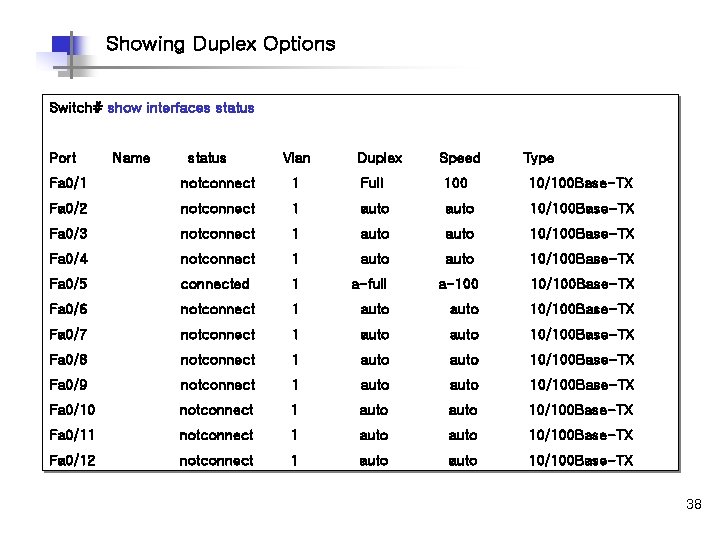
Showing Duplex Options Switch# show interfaces status Port Name status Vlan Duplex Speed Type Fa 0/1 notconnect 1 Full 100 10/100 Base-TX Fa 0/2 notconnect 1 auto 10/100 Base-TX Fa 0/3 notconnect 1 auto 10/100 Base-TX Fa 0/4 notconnect 1 auto 10/100 Base-TX Fa 0/5 connected 1 a-full a-100 10/100 Base-TX Fa 0/6 notconnect 1 auto 10/100 Base-TX Fa 0/7 notconnect 1 auto 10/100 Base-TX Fa 0/8 notconnect 1 auto 10/100 Base-TX Fa 0/9 notconnect 1 auto 10/100 Base-TX Fa 0/10 notconnect 1 auto 10/100 Base-TX Fa 0/11 notconnect 1 auto 10/100 Base-TX Fa 0/12 notconnect 1 auto 10/100 Base-TX 38
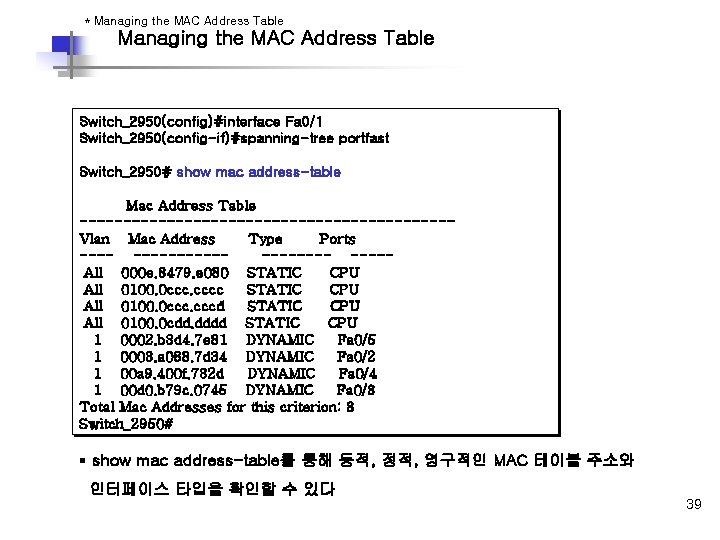
* Managing the MAC Address Table Switch_2950(config)#interface Fa 0/1 ØCatalyst 2950 Switch_2950(config-if)#spanning-tree portfast Switch_2950# show mac address-table Mac Address Table ---------------------Vlan Mac Address Type Ports -----------All 000 e. 8479. e 080 STATIC CPU All 0100. 0 ccc. cccc STATIC CPU All 0100. 0 ccc. cccd STATIC CPU All 0100. 0 cdd. dddd STATIC CPU 1 0002. b 3 d 4. 7 e 81 DYNAMIC Fa 0/5 1 0003. a 088. 7 d 34 DYNAMIC Fa 0/2 1 00 a 9. 400 f. 732 d DYNAMIC Fa 0/4 1 00 d 0. b 79 c. 0745 DYNAMIC Fa 0/3 Total Mac Addresses for this criterion: 8 Switch_2950# § show mac address-table를 통해 동적, 정적, 영구적인 MAC 테이블 주소와 인터페이스 타입을 확인할 수 있다 39
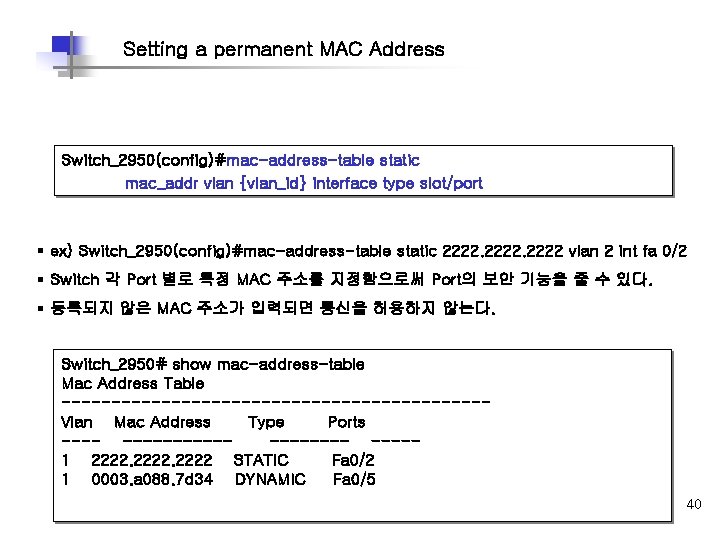
Setting a permanent MAC Address Switch_2950(config)#mac-address-table static mac_addr vlan {vlan_id} interface type slot/port § ex) Switch_2950(config)#mac-address-table static 2222 vlan 2 int fa 0/2 § Switch 각 Port 별로 특정 MAC 주소를 지정함으로써 Port의 보안 기능을 줄 수 있다. § 등록되지 않은 MAC 주소가 입력되면 통신을 허용하지 않는다. Switch_2950# show mac-address-table Mac Address Table ---------------------Vlan Mac Address Type Ports -----------1 2222 STATIC Fa 0/2 1 0003. a 088. 7 d 34 DYNAMIC Fa 0/5 40
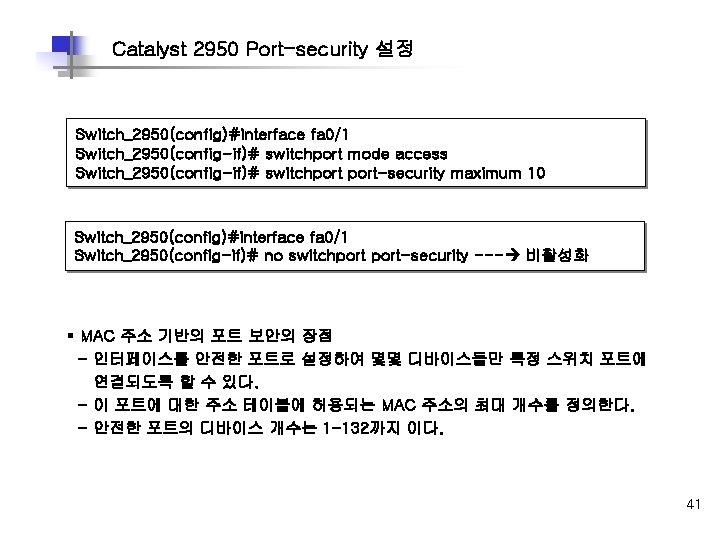
Catalyst 2950 Port-security 설정 Switch_2950(config)#interface fa 0/1 Switch_2950(config-if)# switchport mode access Switch_2950(config-if)# switchport-security maximum 10 Switch_2950(config)#interface fa 0/1 Switch_2950(config-if)# no switchport-security --- 비활성화 § MAC 주소 기반의 포트 보안의 장점 - 인터페이스를 안전한 포트로 설정하여 몇몇 디바이스들만 특정 스위치 포트에 연결되도록 할 수 있다. - 이 포트에 대한 주소 테이블에 허용되는 MAC 주소의 최대 개수를 정의한다. - 안전한 포트의 디바이스 개수는 1 -132까지 이다. 41
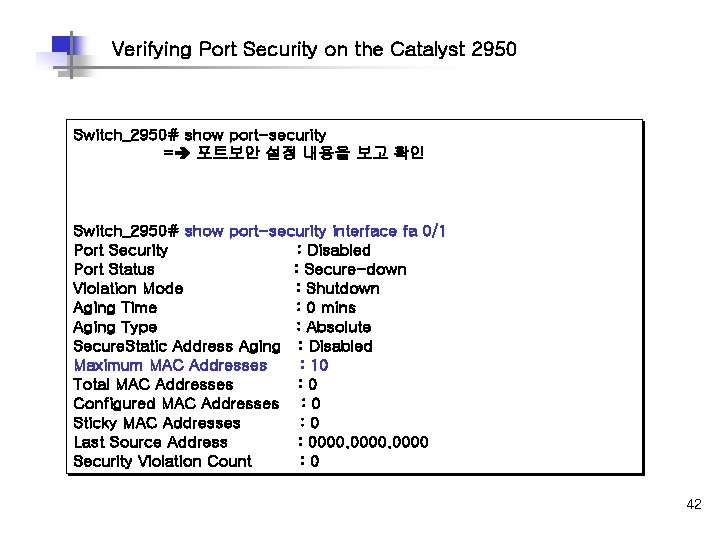
Verifying Port Security on the Catalyst 2950 Switch_2950# show port-security = 포트보안 설정 내용을 보고 확인 Switch_2950# show port-security interface fa 0/1 Port Security : Disabled Port Status : Secure-down Violation Mode : Shutdown Aging Time : 0 mins Aging Type : Absolute Secure. Static Address Aging : Disabled Maximum MAC Addresses : 10 Total MAC Addresses : 0 Configured MAC Addresses : 0 Sticky MAC Addresses : 0 Last Source Address : 0000 Security Violation Count : 0 42
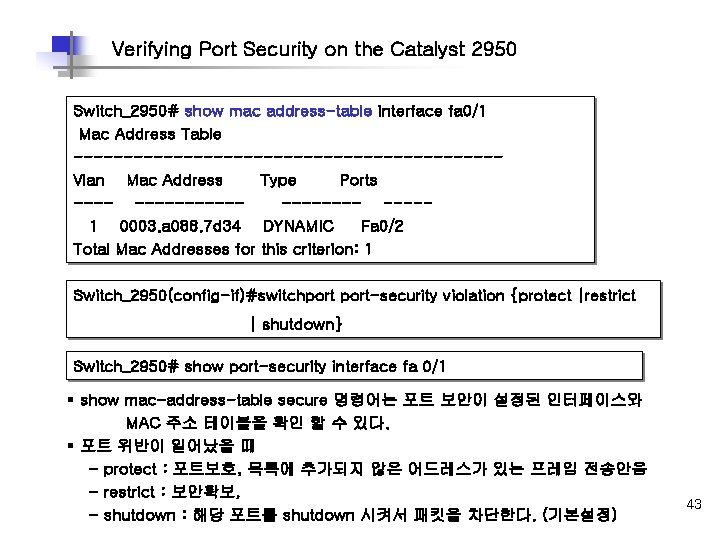
Verifying Port Security on the Catalyst 2950 Switch_2950# show mac address-table interface fa 0/1 Mac Address Table ---------------------Vlan Mac Address Type Ports -----------1 0003. a 088. 7 d 34 DYNAMIC Fa 0/2 Total Mac Addresses for this criterion: 1 Switch_2950(config-if)#switchport-security violation {protect |restrict | shutdown} Switch_2950# show port-security interface fa 0/1 § show mac-address-table secure 명령어는 포트 보안이 설정된 인터페이스와 MAC 주소 테이블을 확인 할 수 있다. § 포트 위반이 일어났을 때 - protect : 포트보호, 목록에 추가되지 않은 어드레스가 있는 프레임 전송안음 - restrict : 보안확보, - shutdown : 해당 포트를 shutdown 시켜서 패킷을 차단한다. (기본설정) 43
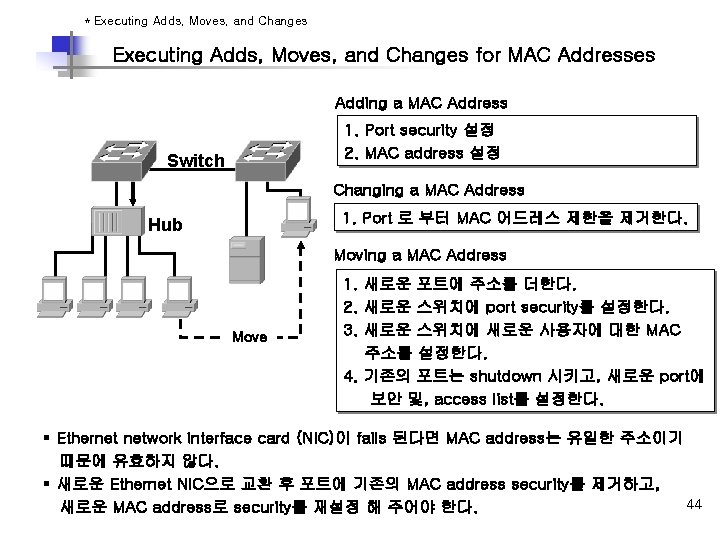
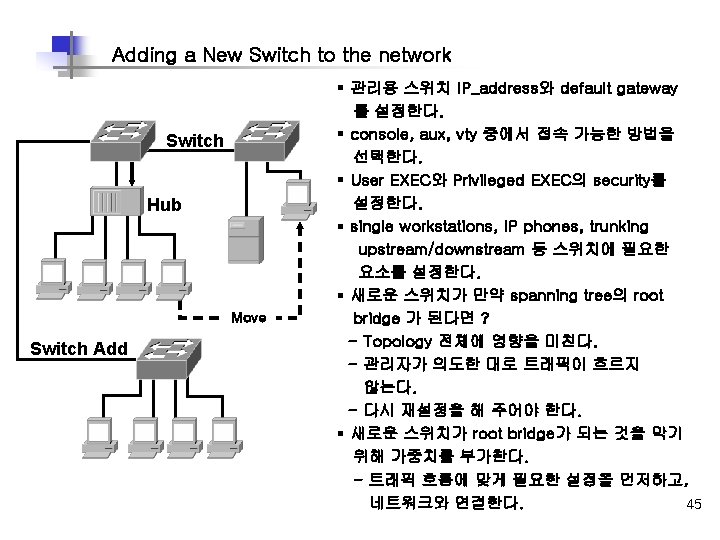
* Executing Adds, Moves, and Changes for MAC Addresses Adding a MAC Address 1. Port security 설정 2. MAC address 설정 Switch Changing a MAC Address 1. Port 로 부터 MAC 어드레스 제한을 제거한다. Hub Moving a MAC Address Move 1. 새로운 포트에 주소를 더한다. 2. 새로운 스위치에 port security를 설정한다. 3. 새로운 스위치에 새로운 사용자에 대한 MAC 주소를 설정한다. 4. 기존의 포트는 shutdown 시키고, 새로운 port에 보안 및, access list를 설정한다. § Ethernet network interface card (NIC)이 fails 된다면 MAC address는 유일한 주소이기 때문에 유효하지 않다. § 새로운 Ethernet NIC으로 교환 후 포트에 기존의 MAC address security를 제거하고, 44 새로운 MAC address로 security를 재설정 해 주어야 한다.
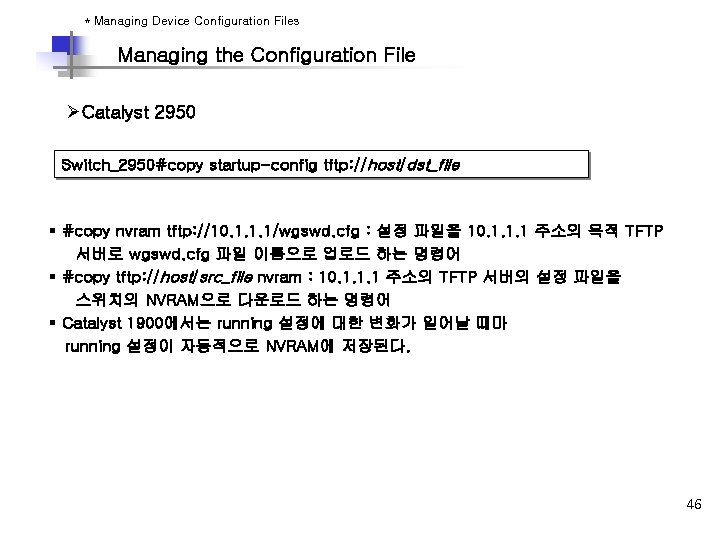
* Managing Device Configuration Files Managing the Configuration File ØCatalyst 2950 Switch_2950#copy startup-config tftp: //host/dst_file § #copy nvram tftp: //10. 1. 1. 1/wgswd. cfg : 설정 파일을 10. 1. 1. 1 주소의 목적 TFTP 서버로 wgswd. cfg 파일 이름으로 업로드 하는 명령어 § #copy tftp: //host/src_file nvram : 10. 1. 1. 1 주소의 TFTP 서버의 설정 파일을 스위치의 NVRAM으로 다운로드 하는 명령어 § Catalyst 1900에서는 running 설정에 대한 변화가 일어날 때마 running 설정이 자동적으로 NVRAM에 저장된다. 46
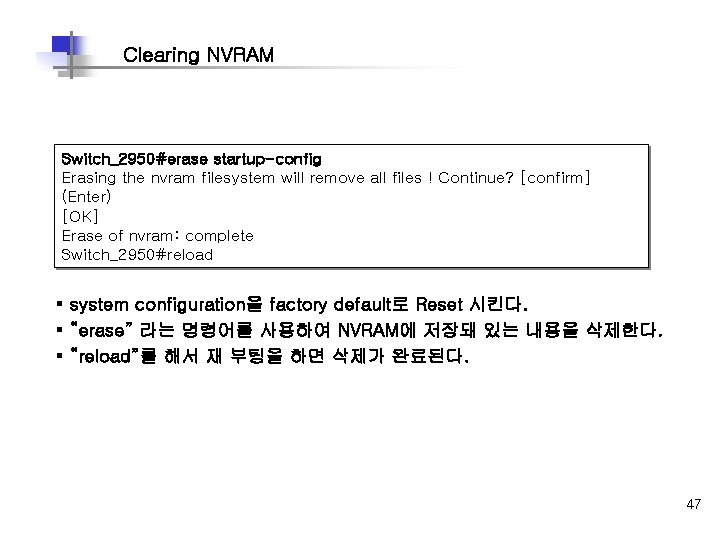
Clearing NVRAM Switch_2950#erase startup-config Erasing the nvram filesystem will remove all files ! Continue? [confirm] (Enter) [OK] Erase of nvram: complete Switch_2950#reload § system configuration을 factory default로 Reset 시킨다. § “erase” 라는 명령어를 사용하여 NVRAM에 저장돼 있는 내용을 삭제한다. § “reload”를 해서 재 부팅을 하면 삭제가 완료된다. 47
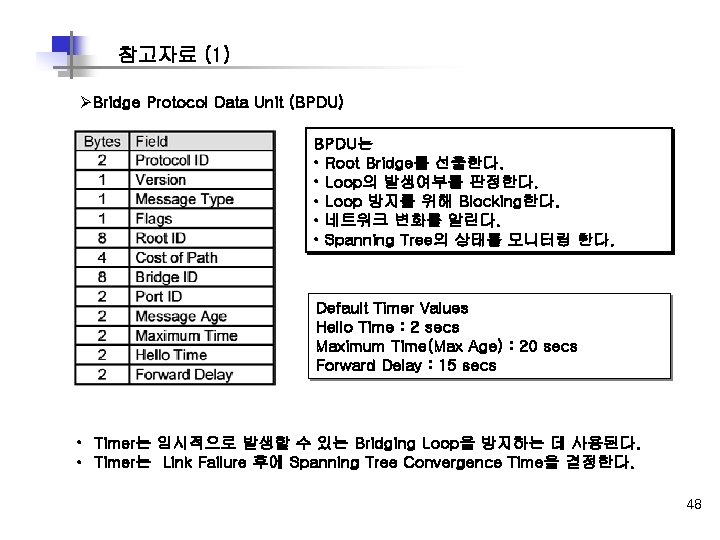
참고자료 (1) ØBridge Protocol Data Unit (BPDU) BPDU는 • Root Bridge를 선출한다. • Loop의 발생여부를 판정한다. • Loop 방지를 위해 Blocking한다. • 네트워크 변화를 알린다. • Spanning Tree의 상태를 모니터링 한다. Default Timer Values Hello Time : 2 secs Maximum Time(Max Age) : 20 secs Forward Delay : 15 secs • Timer는 임시적으로 발생할 수 있는 Bridging Loop을 방지하는 데 사용된다. • Timer는 Link Failure 후에 Spanning Tree Convergence Time을 결정한다. 48
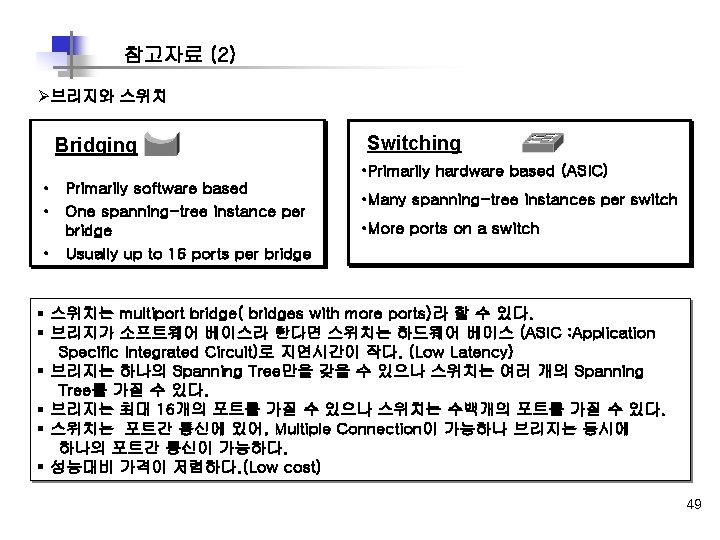
참고자료 (2) Ø브리지와 스위치 Bridging Switching • Primarily hardware based (ASIC) • Primarily software based • One spanning-tree instance per bridge • Usually up to 16 ports per bridge • Many spanning-tree instances per switch • More ports on a switch § 스위치는 multiport bridge( bridges with more ports)라 할 수 있다. § 브리지가 소프트웨어 베이스라 한다면 스위치는 하드웨어 베이스 (ASIC : Application Specific Integrated Circuit)로 지연시간이 작다. (Low Latency) § 브리지는 하나의 Spanning Tree만을 갖을 수 있으나 스위치는 여러 개의 Spanning Tree를 가질 수 있다. § 브리지는 최대 16개의 포트를 가질 수 있으나 스위치는 수백개의 포트를 가질 수 있다. § 스위치는 포트간 통신에 있어, Multiple Connection이 가능하나 브리지는 동시에 하나의 포트간 통신이 가능하다. § 성능대비 가격이 저렴하다. (Low cost) 49