
Chapter 5 Computer Organization BrooksCole 2003 OBJECTIVES After
Chapter 5 Computer Organization ©Brooks/Cole, 2003

OBJECTIVES After reading this chapter, the reader should be able to: Distinguish between the three components of a computer hardware. List the functionality of each component. Understand memory addressing and calculate the number of bytes for a specified purpose. Distinguish between different types of memories. Understand how each input/output device works. Continued on the next slide ©Brooks/Cole, 2003

OBJECTIVES (continued) Understand the systems used to connect different components together. Understand the addressing system for input/output devices. Understand the program execution and machine cycles. Distinguish between programmed I/O, interruptdriven I/O and direct memory access (DMA). Understand the two major architectures used to define the instruction sets of a computer: CISC and RISC.
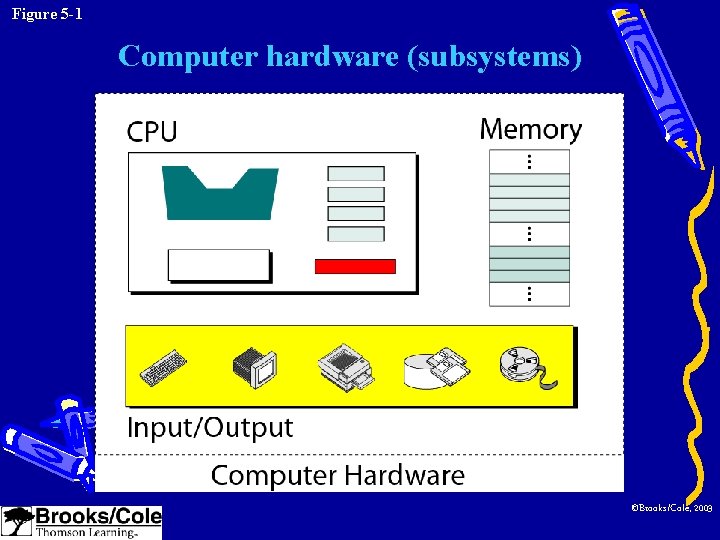
Figure 5 -1 Computer hardware (subsystems) ©Brooks/Cole, 2003

5. 1 CENTRAL PROCESSING UNIT (CPU) ©Brooks/Cole, 2003

Figure 5 -2 CPU ©Brooks/Cole, 2003
Central Processing Unit --Arithmetic logic unit • Performs arithmetic and logical operations • Arithmetic operation – Unary: increment (+1) and decrement (-1) – Binary: add, subtract, multiply, and divide • Logical operation – Unary: NOT – Binary: AND, OR, XOR ©Brooks/Cole, 2003
Central Processing Unit --Registers (暫存器) • Registers are fast storage locations that hold data temporarily. • Data registers – Input data and output data • Instruction registers • Program counter ©Brooks/Cole, 2003
Central Processing Unit --Control unit • The control unit is like the part of the human brain that controls the operation of each part of the body. • Controlling is achieved through wires (金屬線) that can be on (hot) or off (cold). ©Brooks/Cole, 2003
5. 2 MAIN MEMORY ©Brooks/Cole, 2003
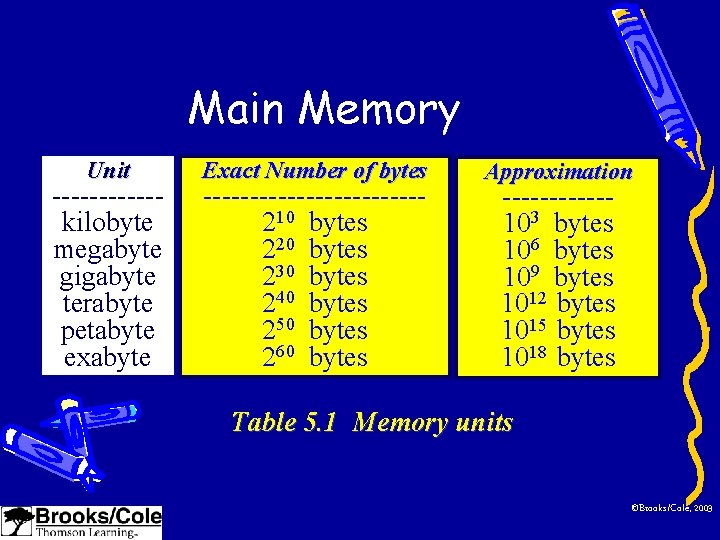
Main Memory Unit ------kilobyte megabyte gigabyte terabyte petabyte exabyte Exact Number of bytes ------------210 bytes 220 bytes 230 bytes 240 bytes 250 bytes 260 bytes Approximation ------103 bytes 106 bytes 109 bytes 1012 bytes 1015 bytes 1018 bytes Table 5. 1 Memory units ©Brooks/Cole, 2003

Figure 5 -3 Main memory • Address space: – the total number of uniquely identifiable locations in memory ©Brooks/Cole, 2003
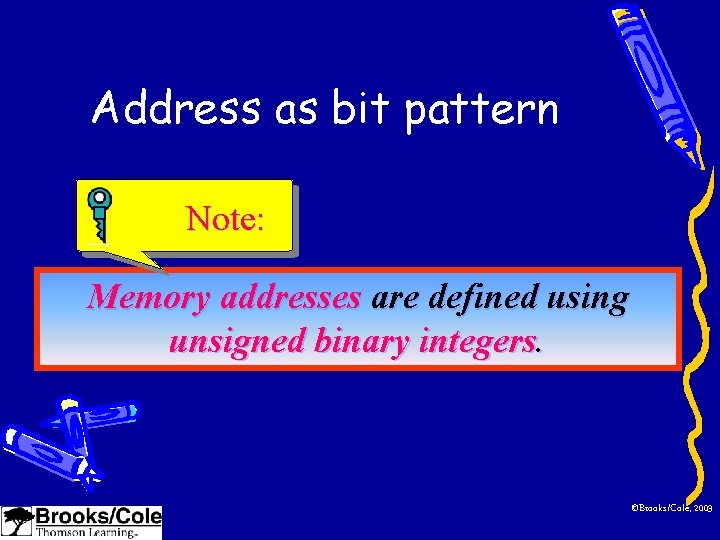
Address as bit pattern Note: Memory addresses are defined using unsigned binary integers. ©Brooks/Cole, 2003
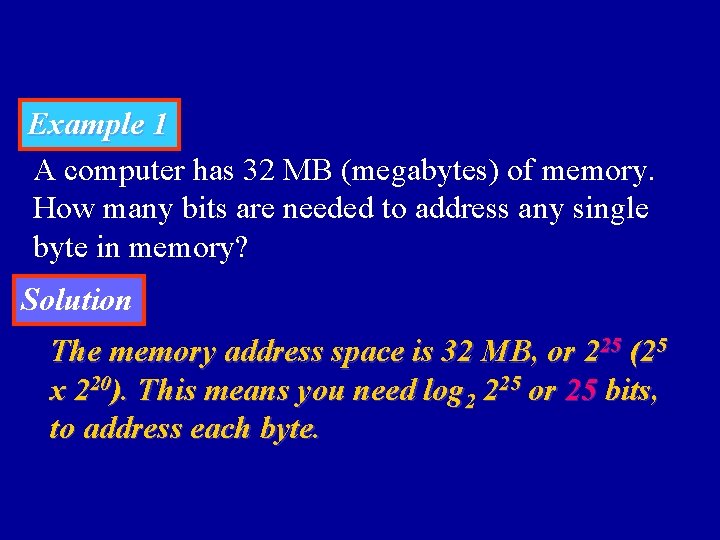
Example 1 A computer has 32 MB (megabytes) of memory. How many bits are needed to address any single byte in memory? Solution The memory address space is 32 MB, or 225 (25 x 220). This means you need log 2 225 or 25 bits, to address each byte.
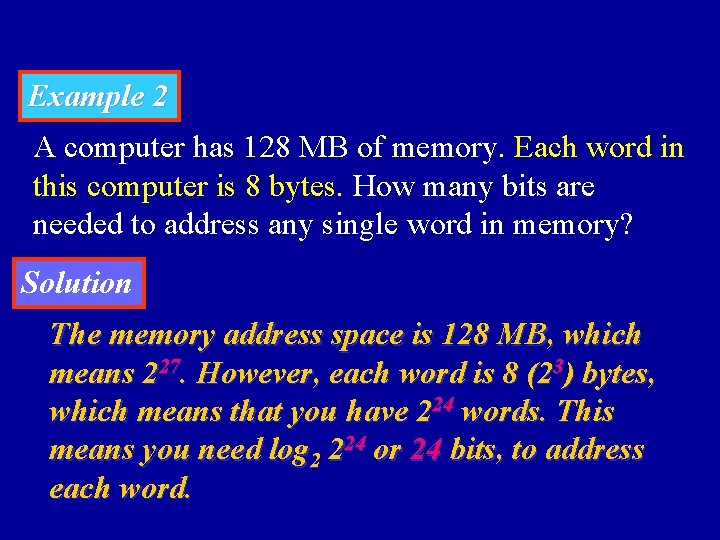
Example 2 A computer has 128 MB of memory. Each word in this computer is 8 bytes. How many bits are needed to address any single word in memory? Solution The memory address space is 128 MB, which means 227. However, each word is 8 (23) bytes, which means that you have 224 words. This means you need log 2 224 or 24 bits, to address each word.
Memory types-- RAM • RAM: random access memory – SRAM: static RAM • flip-flop gats (正反器) • No need to be refreshed • Catch memory – DRAM: dynamic RAM • capacitors (電容) • Need to be refreshed periodically • Main memory ©Brooks/Cole, 2003
Memory types– ROM • ROM: read-only memory – PROM: programmable ROM • Only written once – EPROM: erasable PROM • Use ultraviolet light (紫外光) to erase data – EEPROM: electronically EPROM • Can be erased using electronic impulses ©Brooks/Cole, 2003
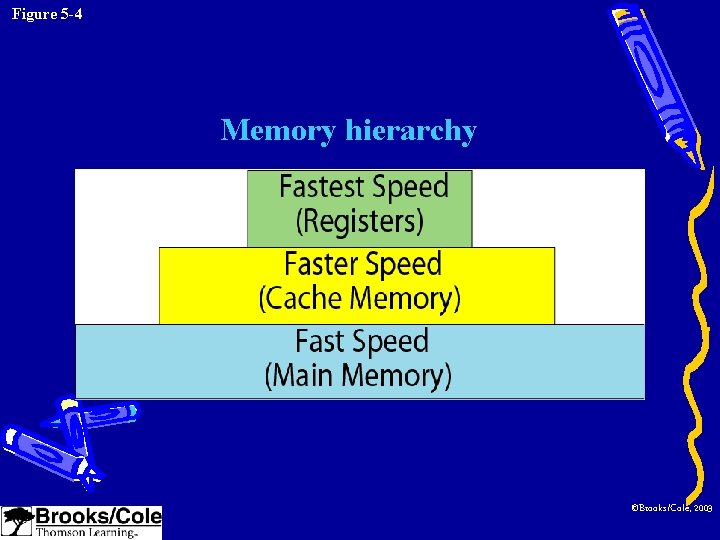
Figure 5 -4 Memory hierarchy ©Brooks/Cole, 2003
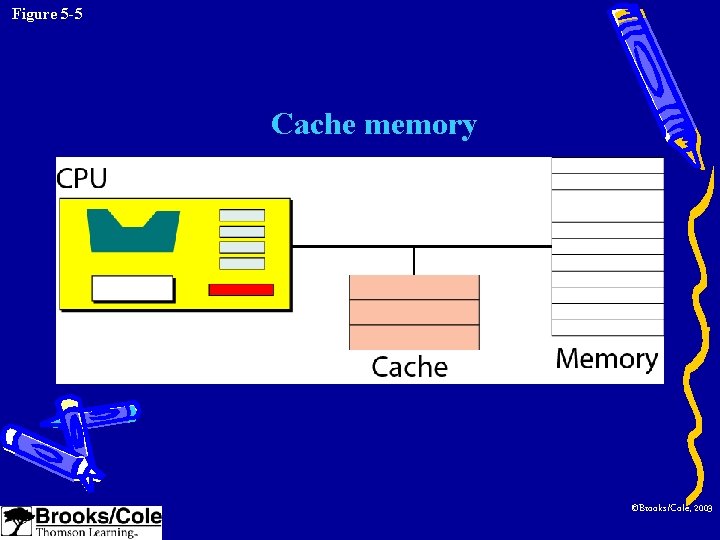
Figure 5 -5 Cache memory ©Brooks/Cole, 2003
Catch memory • Why is catch memory so efficient despite its small size? – The answer is 80 -20 rule. – Most computers spend 80 percent of the time accessing only 20 percent of the data. ©Brooks/Cole, 2003
5. 3 INPUT / OUTPUT ©Brooks/Cole, 2003
Input/Output devices • Nonstorage devices – Keyboard and monitor – Printer • Storage devices – Magnetic (磁性的) storage devices – Optical (光學的) storage devices ©Brooks/Cole, 2003
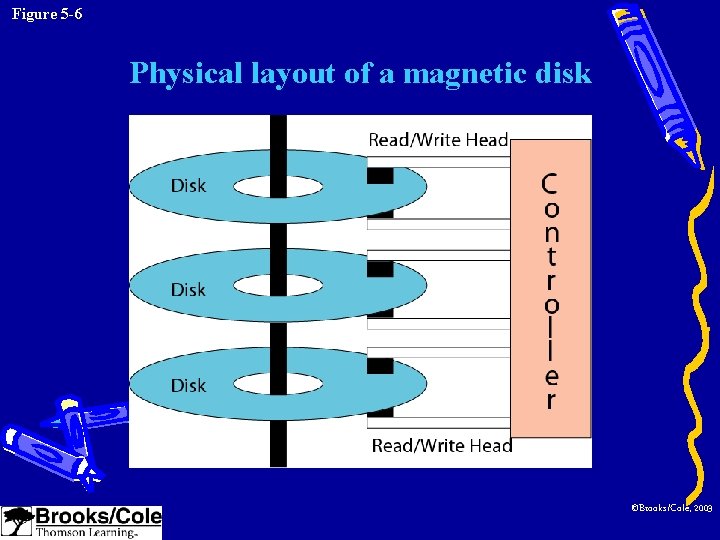
Figure 5 -6 Physical layout of a magnetic disk ©Brooks/Cole, 2003
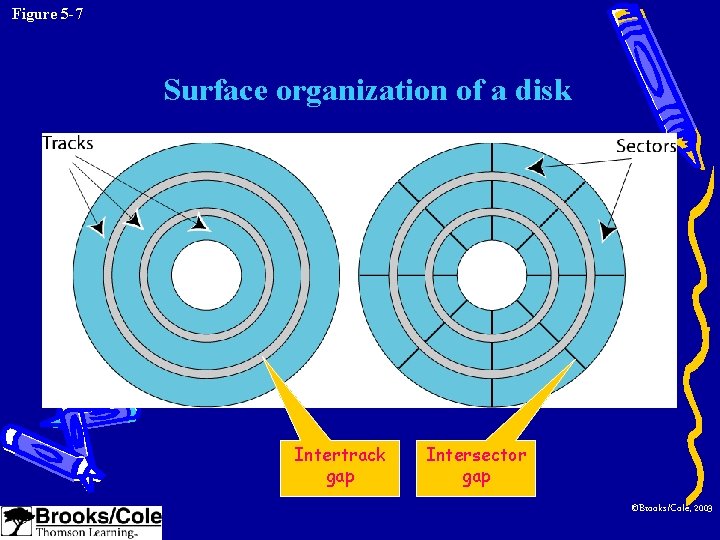
Figure 5 -7 Surface organization of a disk Intertrack gap Intersector gap ©Brooks/Cole, 2003
Magnetic Disk • Surface organization – Tracks and sectors • Data access – Random access, one sector a time • Performance – Rotational speed, seek time, and transfer time ©Brooks/Cole, 2003
Definitions • Rotational speed – How fast the disk is spinning (旋轉) • Seek time – The time to move the read/write head to the desired track • Transfer time – The time to move data from the disk to the CPU/memory ©Brooks/Cole, 2003
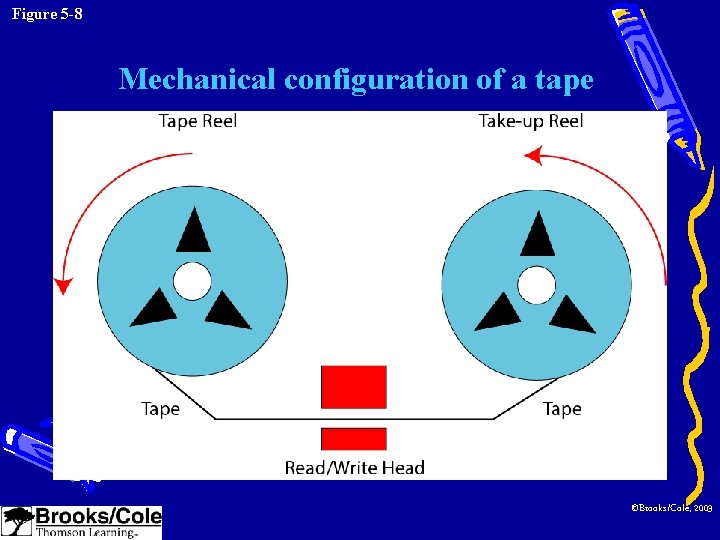
Figure 5 -8 Mechanical configuration of a tape ©Brooks/Cole, 2003
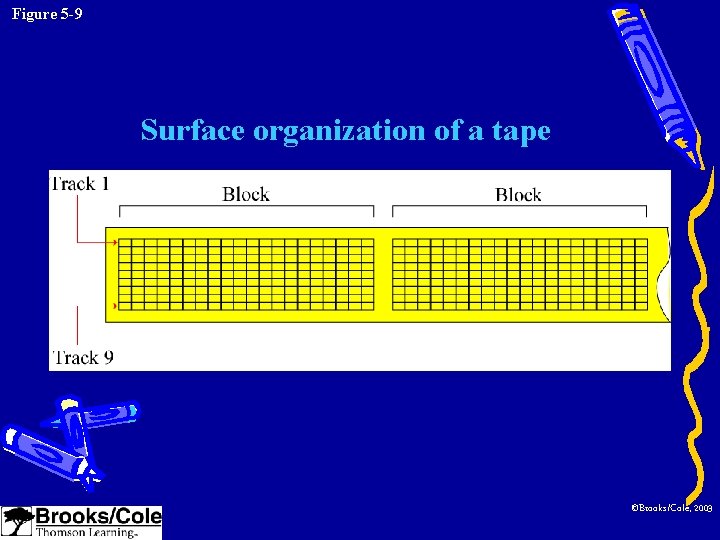
Figure 5 -9 Surface organization of a tape ©Brooks/Cole, 2003
Magnetic Tape • Surface organization – Nine tracks (8 bits for information and 1 bit for error detection) • Data access – Sequential access • Performance – Slower than a magnetic disk ©Brooks/Cole, 2003
Optical storage devices • CD-ROM: compact disc (薄圓片) ROM – Capacity: 650 MB • CD-R: compact disc recordable • CD-RW: compact disc rewritable • DVD: digital versatile (多種的)disc – Capacity: 4. 7 GB – 17 GB ©Brooks/Cole, 2003
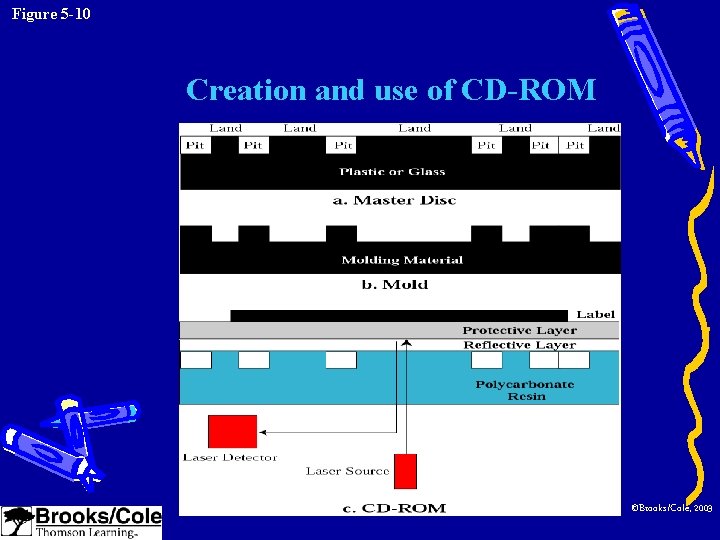
Figure 5 -10 Creation and use of CD-ROM ©Brooks/Cole, 2003
CD-ROM--Creation • The steps to create a CD (650 MB) – Create a master disc • Using a high-power infrared (紅外線) laser • Pits (holes, 0) and lands (no holes, 1) – Make a mold (模子) – Create a CD • Injected (注入) molten (溶解的) polycarbonate resin (樹脂) into the mold • Add a reflective layer (aluminum鋁) and a protective layer (lacquer漆) ©Brooks/Cole, 2003
CD-ROM--Reading • Using low-power laser beam (光束) to read – The laser beam is reflected by the aluminum surface when passing through a land. – It is reflected twice when it encounters a pit, once by the pit boundary and once by the aluminum boundary. more light land, less light pit ©Brooks/Cole, 2003
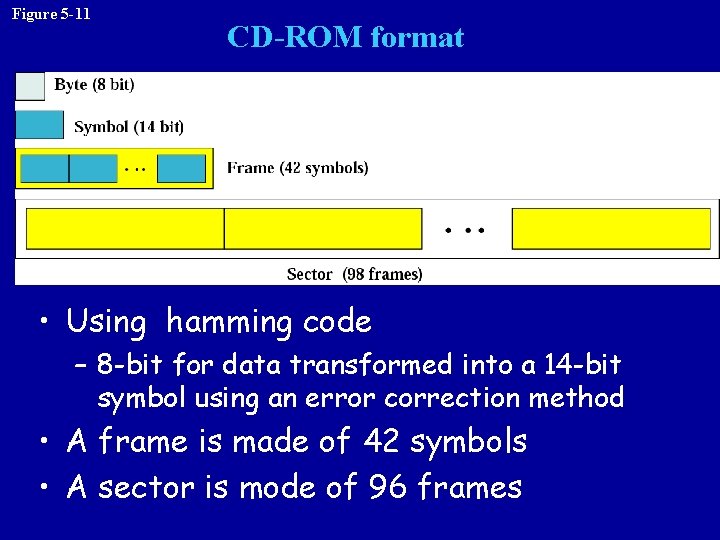
Figure 5 -11 CD-ROM format • Using hamming code – 8 -bit for data transformed into a 14 -bit symbol using an error correction method • A frame is made of 42 symbols • A sector is mode of 96 frames
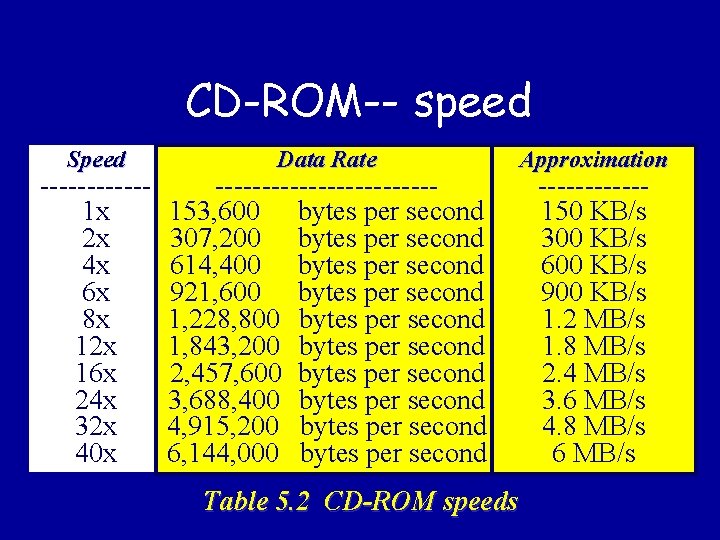
CD-ROM-- speed Speed ------1 x 2 x 4 x 6 x 8 x 12 x 16 x 24 x 32 x 40 x Data Rate ------------153, 600 bytes per second 307, 200 bytes per second 614, 400 bytes per second 921, 600 bytes per second 1, 228, 800 bytes per second 1, 843, 200 bytes per second 2, 457, 600 bytes per second 3, 688, 400 bytes per second 4, 915, 200 bytes per second 6, 144, 000 bytes per second Table 5. 2 CD-ROM speeds Approximation ------150 KB/s 300 KB/s 600 KB/s 900 KB/s 1. 2 MB/s 1. 8 MB/s 2. 4 MB/s 3. 6 MB/s 4. 8 MB/s 6 MB/s
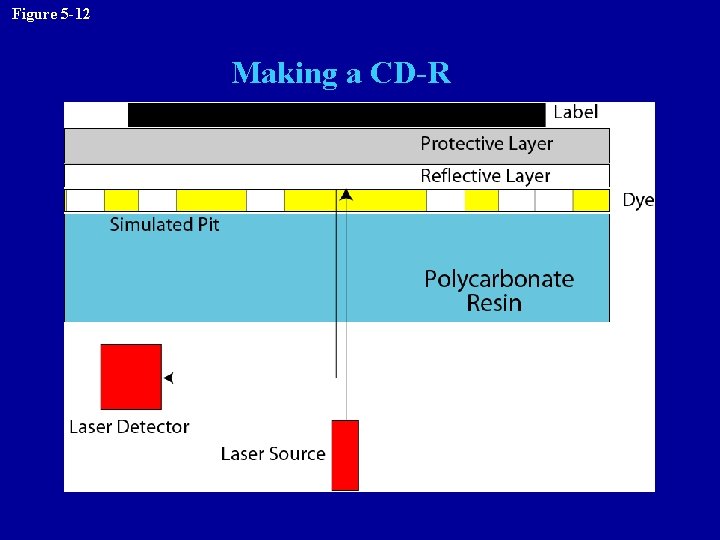
Figure 5 -12 Making a CD-R
CD-R • Write once, read many (WORM) • Creation – – No master disc or mold Reflective layer gold No physical pits simulated pits Using a high-power laser beam • Dark spot in the dye (染料) to simulate a pit ©Brooks/Cole, 2003
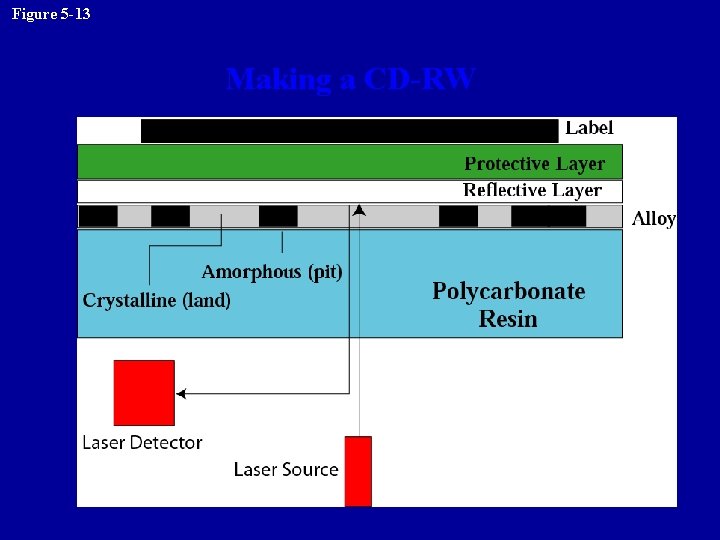
Figure 5 -13 Making a CD-RW
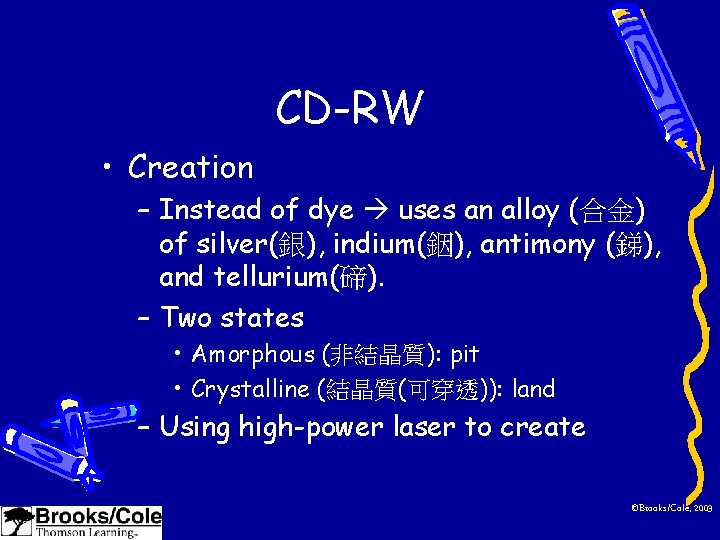
CD-RW • Creation – Instead of dye uses an alloy (合金) of silver(銀), indium(銦), antimony (銻), and tellurium(碲). – Two states • Amorphous (非結晶質): pit • Crystalline (結晶質(可穿透)): land – Using high-power laser to create ©Brooks/Cole, 2003
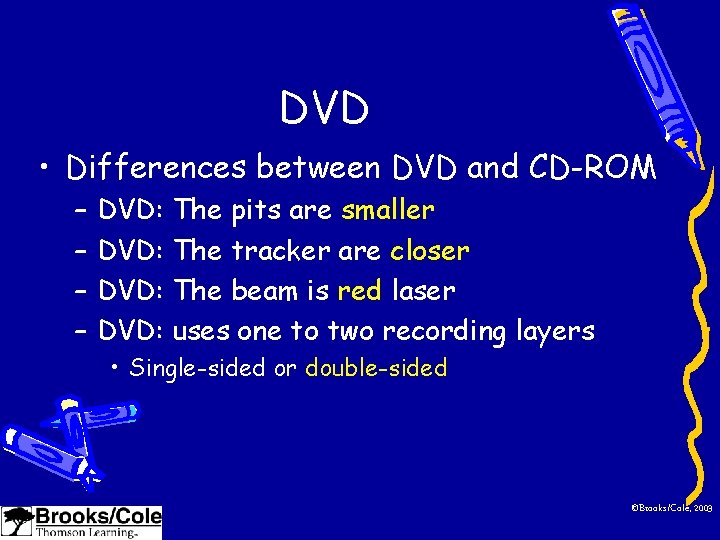
DVD • Differences between DVD and CD-ROM – – DVD: The pits are smaller DVD: The tracker are closer DVD: The beam is red laser DVD: uses one to two recording layers • Single-sided or double-sided ©Brooks/Cole, 2003
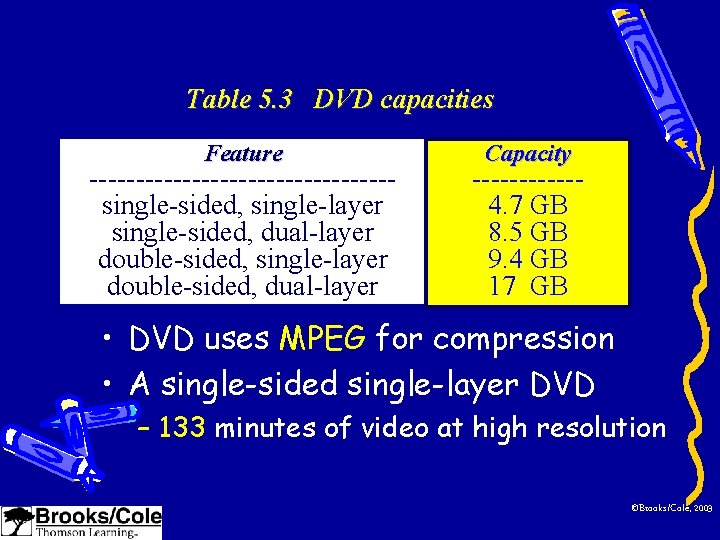
Table 5. 3 DVD capacities Feature ----------------single-sided, single-layer single-sided, dual-layer double-sided, single-layer double-sided, dual-layer Capacity ------4. 7 GB 8. 5 GB 9. 4 GB 17 GB • DVD uses MPEG for compression • A single-sided single-layer DVD – 133 minutes of video at high resolution ©Brooks/Cole, 2003
5. 4 SUBSYSTEM INTERCONNECTION ©Brooks/Cole, 2003
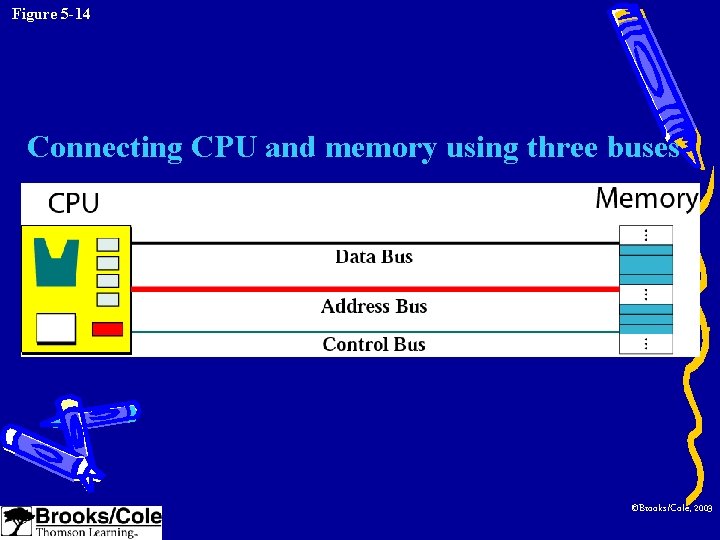
Figure 5 -14 Connecting CPU and memory using three buses ©Brooks/Cole, 2003
Buses • Data bus: – The number of wires depends on the size of the word • Address bus: – The number of wires depends on the address space of memory • Control bus: – The number of wires depends on the total number of control commands a computer needs ©Brooks/Cole, 2003
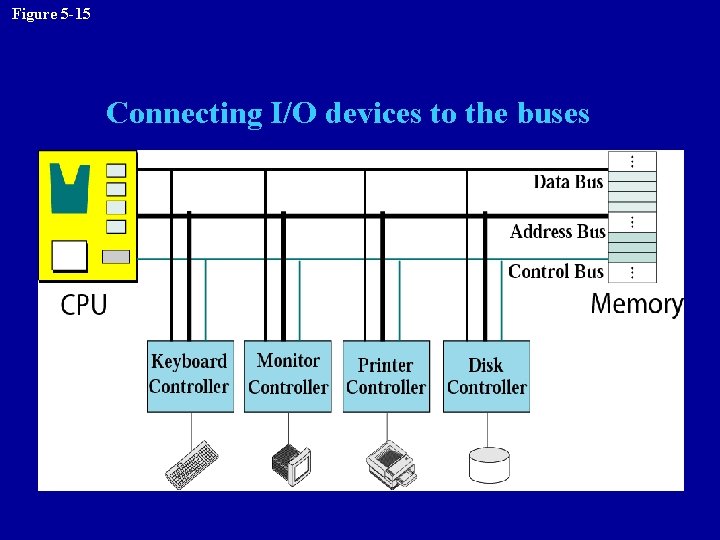
Figure 5 -15 Connecting I/O devices to the buses
Controllers • A controller can be a serial or parallel device. – SCSI: small computer system interface • Parallel interface – Fire. Wire: IEEE standard • A high-speed serial interface (50 MB/sec) – USB: universal serial bys • A serial controller (1. 5 MB/sec – 500 MB/sec (USB 2. 0)) ©Brooks/Cole, 2003
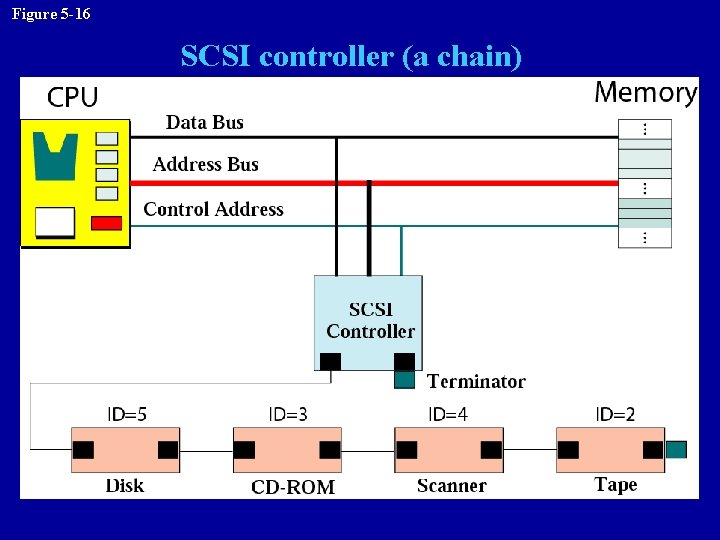
Figure 5 -16 SCSI controller (a chain)
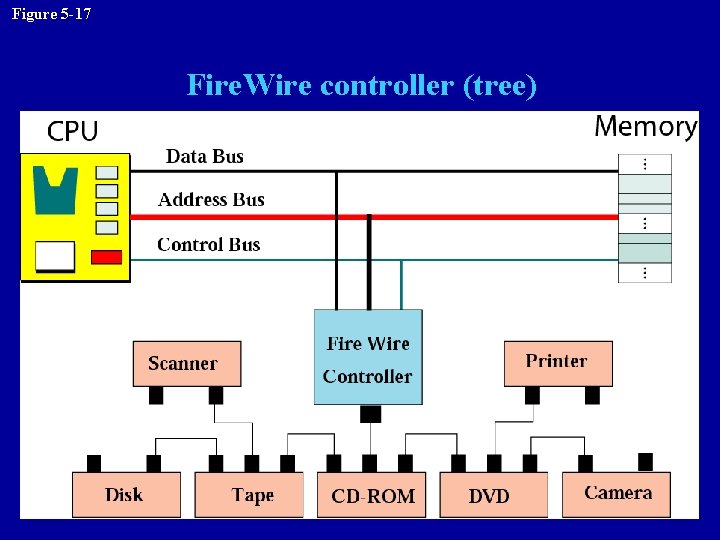
Figure 5 -17 Fire. Wire controller (tree)
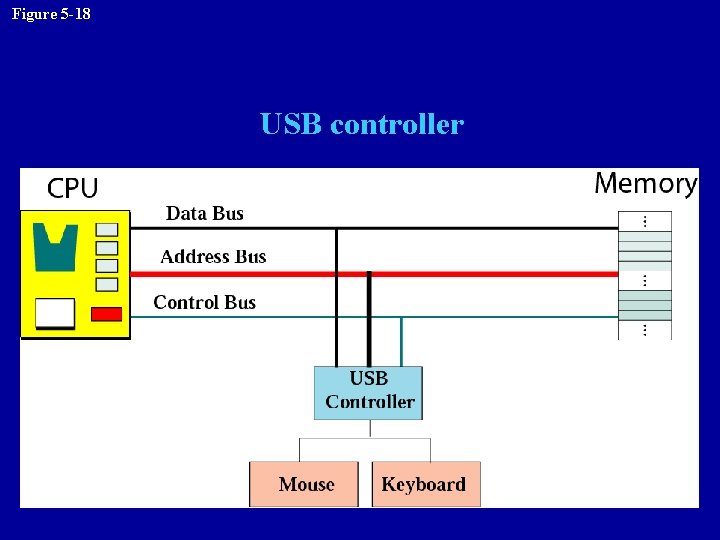
Figure 5 -18 USB controller
Addressing I/O devices • Isolated I/O – Each input/output device has its own address. • Memory-mapped I/O – CPU treats each register in the input/output controller as a word in memory ©Brooks/Cole, 2003
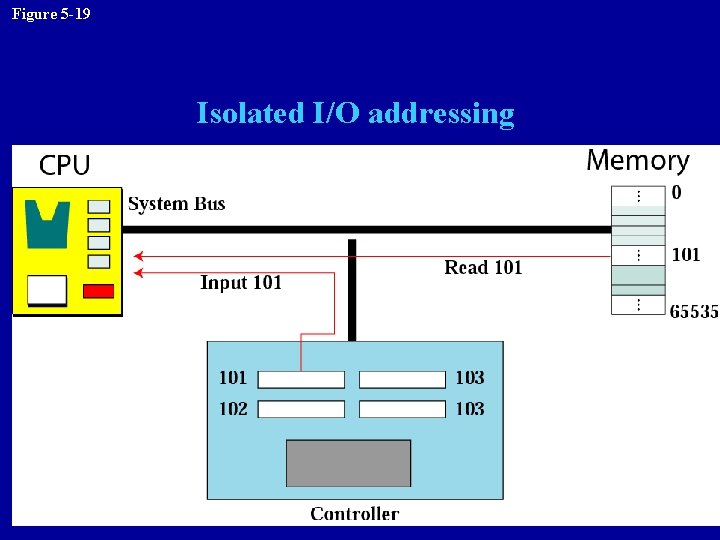
Figure 5 -19 Isolated I/O addressing
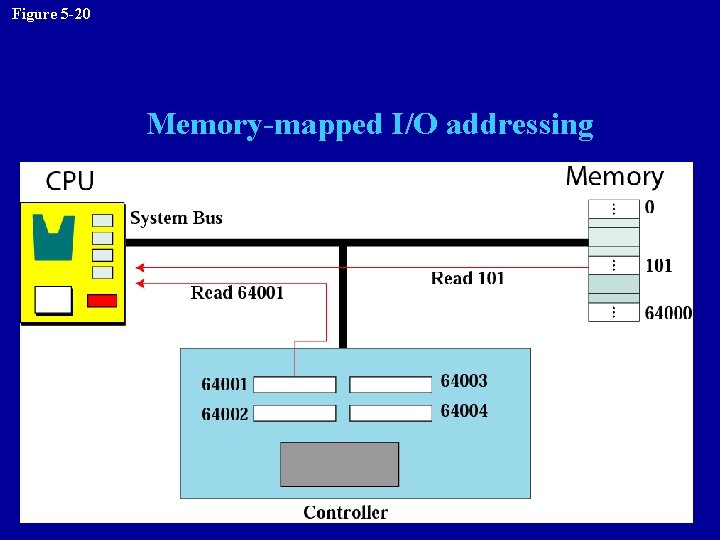
Figure 5 -20 Memory-mapped I/O addressing
5. 5 PROGRAM EXECUTION ©Brooks/Cole, 2003
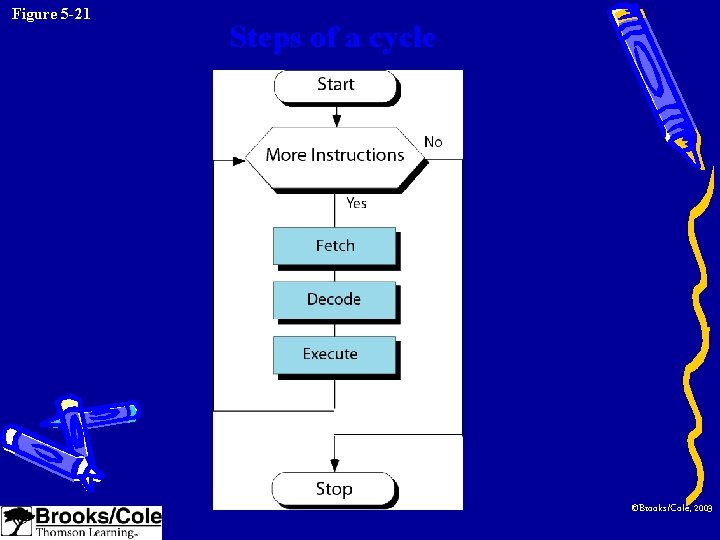
Figure 5 -21 Steps of a cycle ©Brooks/Cole, 2003
Machine cycle • Fetch: – To copy the next instruction into the instruction register in the CPU • Decode – Decode the instruction • Execute – Execute the instruction ©Brooks/Cole, 2003
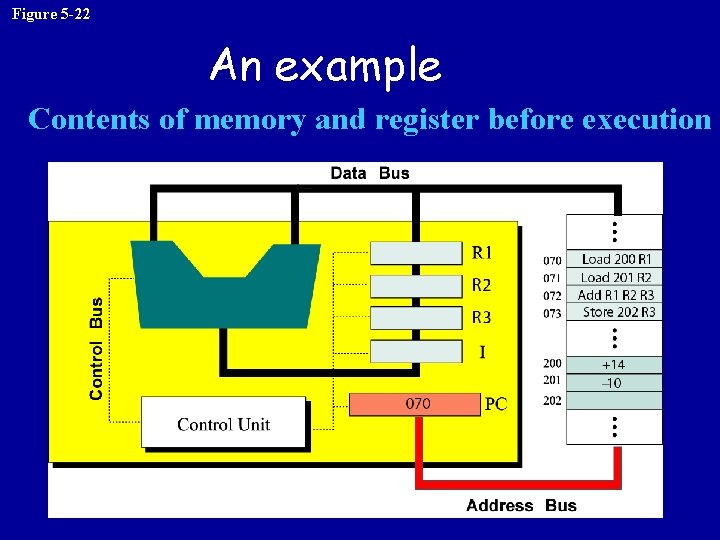
Figure 5 -22 An example Contents of memory and register before execution
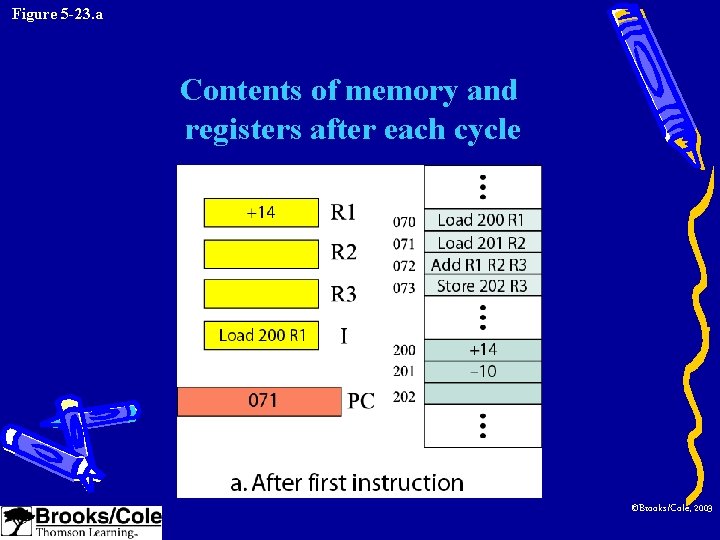
Figure 5 -23. a Contents of memory and registers after each cycle ©Brooks/Cole, 2003
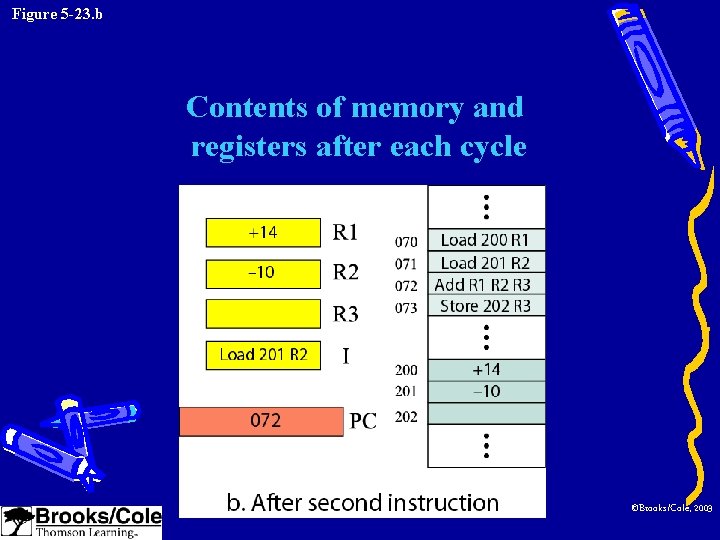
Figure 5 -23. b Contents of memory and registers after each cycle ©Brooks/Cole, 2003
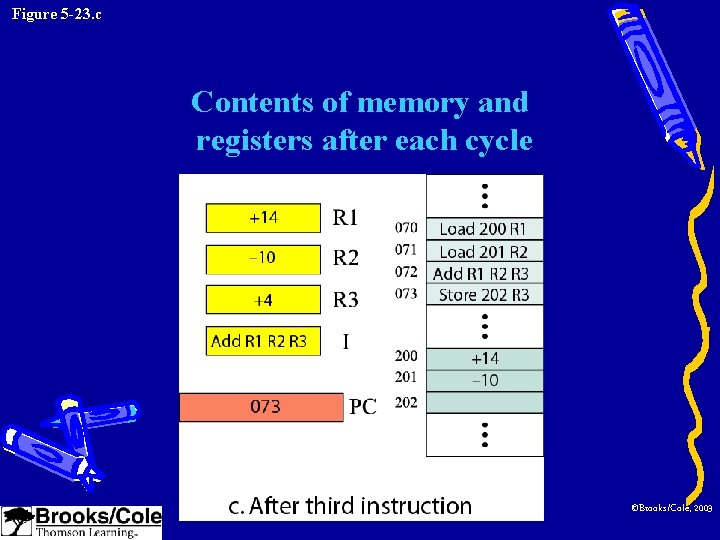
Figure 5 -23. c Contents of memory and registers after each cycle ©Brooks/Cole, 2003
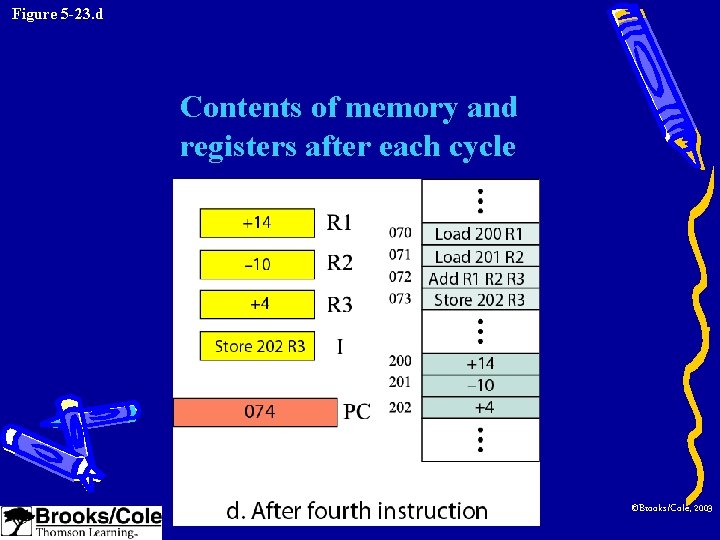
Figure 5 -23. d Contents of memory and registers after each cycle ©Brooks/Cole, 2003
Input/Output operation • Programmed I/O – CPU waits for the I/O device • Interrupt-driven I/O – The device interrupts the CPU when it is ready • Direct memory access (DMA) – Use to transfer a large block of data – CPU is idle for only a short time ©Brooks/Cole, 2003
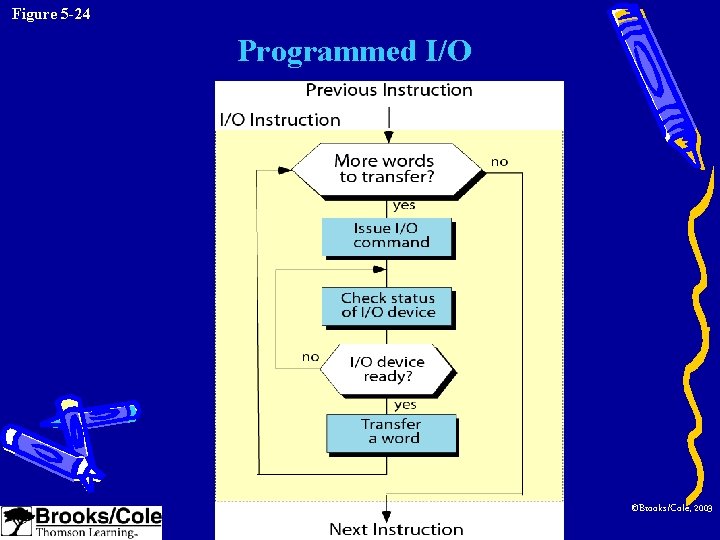
Figure 5 -24 Programmed I/O ©Brooks/Cole, 2003
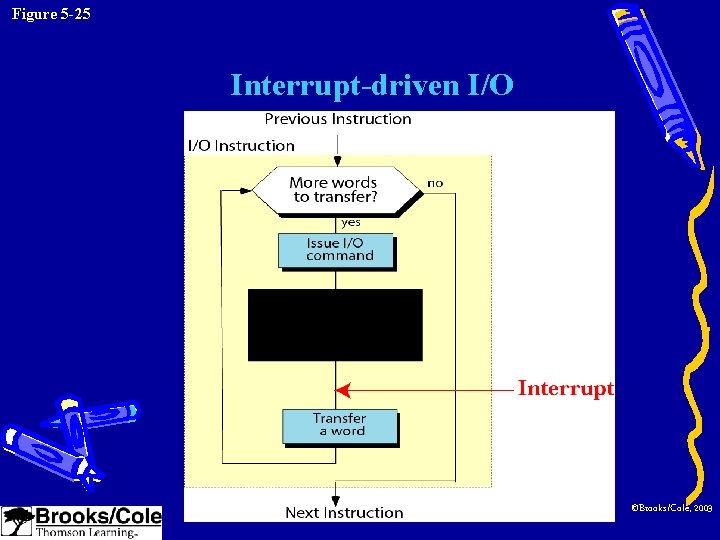
Figure 5 -25 Interrupt-driven I/O ©Brooks/Cole, 2003
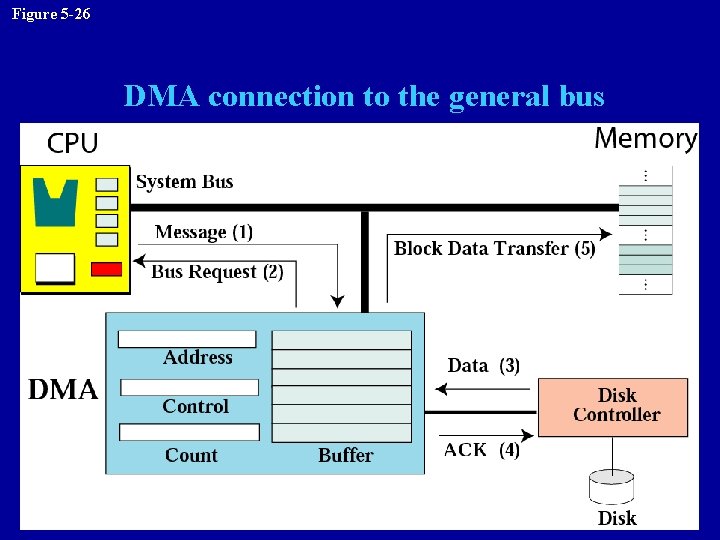
Figure 5 -26 DMA connection to the general bus
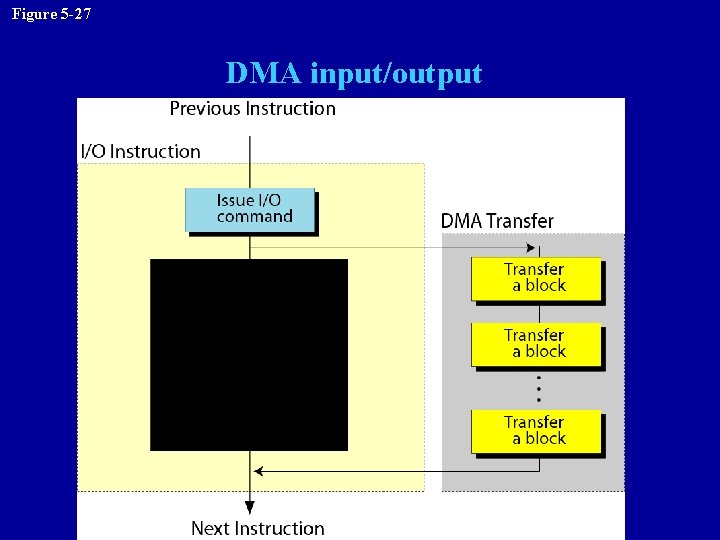
Figure 5 -27 DMA input/output
5. 6 TWO DIFFERENT ARCHITECTURES ©Brooks/Cole, 2003
Architectures • CISC: complex instruction set computer – Have a large set of instructions, including the complex ones – Micro-operation, micro-memory, microprogramming (p. 92) – i. e. Intel Pentium • RISC: reduced instruction set computer – Have a small set of instructions that do a minimum number of simple operations – i. e. Apple Power. PC
Key terms • • • • Address bus Address space Arithmetic logic unit (ALU) Arithmetic operation Bit pattern Bus Cache memory Central processing unit (CPU) CD-ROM CD-RW CISC Control bus Control unit • • • • Data bus Data register DVD Direct memory access DRAM EEPROM Execute Fetch Fire. Wire Frame I/O controller I/O subsystem Instruction register Interrupt-driven I/O
• • • • • Isolated I/O Keyboard Land Logical operation Machine cycle Magnetic disk Magnetic tape Main memory Memory-mapped I/O Monitor Nonstorage device Optical storage device Pit Printer Program counter PROM Programmed I/O • Random access memory (RAM) • Read-only memory (ROM) • Read/write head • RISC • Register • Rotational speed • Sector • Seek time • SCSI • Static RAM (SRAM) • Storage device • Track • Transfer time • USB • Write once, read only (WORM)
- Slides: 69