
Chapter 5 Completing the Business Activity Statement 1
Chapter 5 Completing the Business Activity Statement 1
5. 1 Payment The amount a taxpayer is liable to pay for each tax period is calculated from the completed BAS document. • The amount payable is the amount the taxpayer owes the ATO. • The calculated amount will be shown at field 9 of the BAS. Carry Out Business Activity & Instalment Statement Tasks 2
5. 2 GST Reporting Periods The reporting of GST is divided broadly into three tax periods: • A monthly period. • A quarterly period. • An annual period. Carry Out Business Activity & Instalment Statement Tasks 3
GST Reporting Periods Monthly Reporting If the taxpayer’s annual turnover is more than $20 million, the monthly BAS must be lodged electronically no later than the 21 st day of the next month. Monthly tax periods are compulsory if: • The taxpayer’s annual turnover is over $20 million. • The taxpayer has a history of non-compliance with the ATO and/or the taxpayer will be carrying on a business in Australia for less than three months. Carry Out Business Activity & Instalment Statement Tasks 4
GST Reporting Periods Quarterly Reporting If the taxpayer’s annual turnover is below $20 million, the tax periods will normally be quarterly. Quarterly periods are: • 1 January to 31 March. • 1 April to 30 June. • 1 July to 30 September. • 1 October to 31 December. Carry Out Business Activity & Instalment Statement Tasks 5
GST Reporting Periods Annual Reporting To be eligible to report GST annually, although registered, the business or enterprise must: - have a projected GST turnover less than $75, 000 for businesses (and all other entities) or $150, 000 for non-profit organisations, - and the business must not have elected to pay GST by instalment amounts as advised by the ATO. Carry Out Business Activity & Instalment Statement Tasks 6
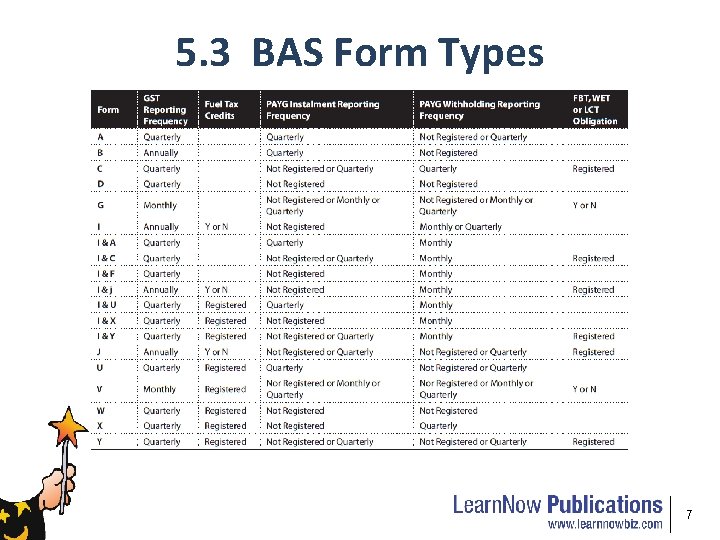
5. 3 BAS Form Types 7

Bas Form Y - Front 8
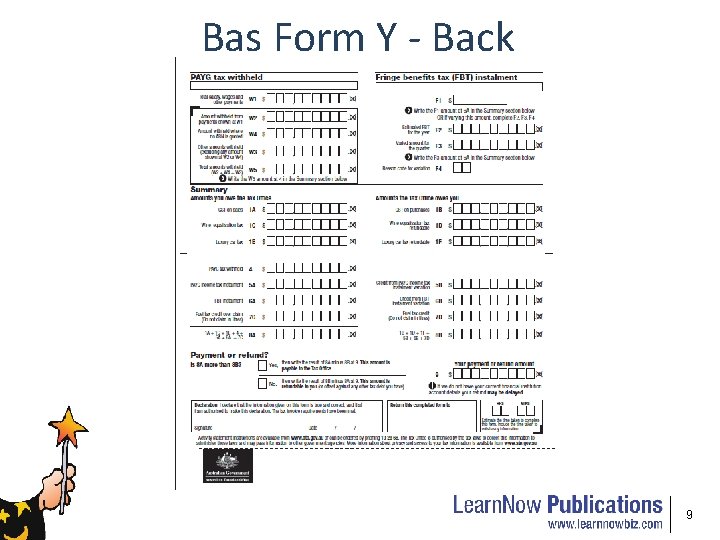
Bas Form Y - Back 9
5. 4 Completing the BAS The BAS is divided into different sections. The sections that may be included are: • Goods and Services Tax (GST). • PAYG Tax Withheld. • PAYG Tax Instalments. • Wine Equalisation Tax (WET). • Luxury Car Tax (LCT). • Fringe Benefits Tax (FBT). • Summary Section. • Payment or Refund. Carry Out Business Activity & Instalment Statement Tasks 10
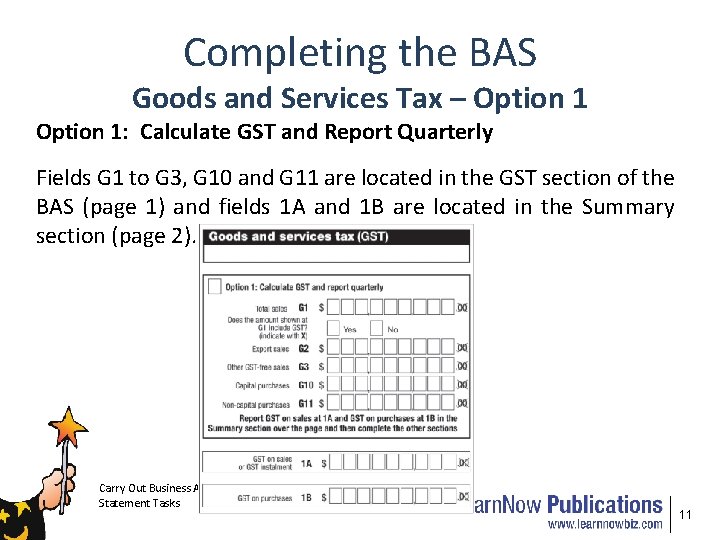
Completing the BAS Goods and Services Tax – Option 1: Calculate GST and Report Quarterly Fields G 1 to G 3, G 10 and G 11 are located in the GST section of the BAS (page 1) and fields 1 A and 1 B are located in the Summary section (page 2). Carry Out Business Activity & Instalment Statement Tasks 11
Completing the BAS Goods and Services Tax – Option 2: Calculate GST Quarterly and Report Annually Here the amount of GST payable or refundable is the difference between the actual GST payable on taxable supplies for the quarter (reported at item 1 A) and the actual GST collected in respect of creditable acquisitions for the quarter (reported at item 1 B). Taxpayers choosing this option are only required to report their total turnover for the quarter at item G 1. Taxpayers are required to report the actual amounts for items G 2, G 3, G 10 and G 11 on an annual GST information report. G 2 – Export sales. G 3 – Other GST-free sales. G 10 – Capital purchases. G 11 – Non-capital purchases. Carry Out Business Activity & Instalment Statement Tasks 12
Completing the BAS Goods and Services Tax – Option 3: Pay GST Instalment Amount Quarterly Q. Who can use option 3? A. A small business with a combined annual turnover of less than $2 million, or an enterprise (not a business) with a GST turnover of $2 million or less so long as they satisfy specific conditions relating to activity statement lodgement and are not in a net refund position. Carry Out Business Activity & Instalment Statement Tasks 13
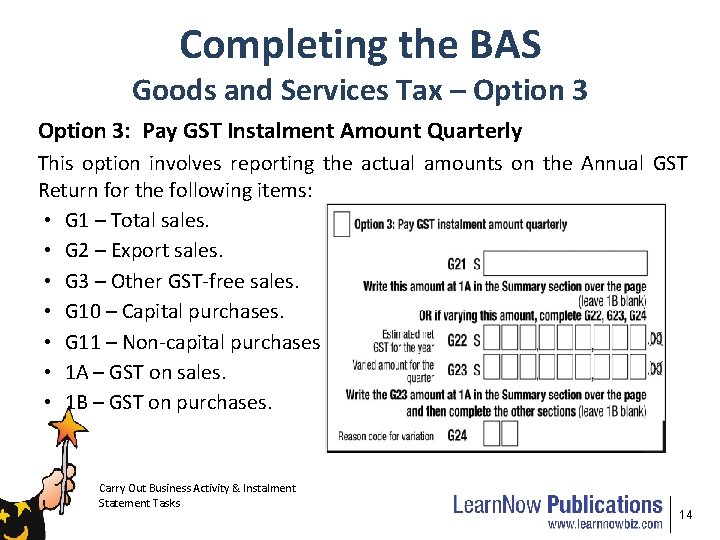
Completing the BAS Goods and Services Tax – Option 3: Pay GST Instalment Amount Quarterly This option involves reporting the actual amounts on the Annual GST Return for the following items: • G 1 – Total sales. • G 2 – Export sales. • G 3 – Other GST-free sales. • G 10 – Capital purchases. • G 11 – Non-capital purchases. • 1 A – GST on sales. • 1 B – GST on purchases. Carry Out Business Activity & Instalment Statement Tasks 14
Completing the BAS PAYG Tax Withheld • The amount the taxpayer withholds from payments to employees and other parties. W 1 - Total salary, wages and other payments. W 2 - Amount withheld from payments shown at W 1. W 4 - Amount withheld where no ABN is quoted. W 3 - Other amounts withheld (excluding amounts shown at W 2 or W 4). After fields W 1 to W 4 have been completed, the taxpayer adds W 2 + W 4 + W 3 these amounts and enters this amount at W 5, Total amounts withheld, on the BAS. The amount from W 5 is copied to field 4 of the Summary section of the BAS on page two. Carry Out Business Activity & Instalment Statement Tasks 15
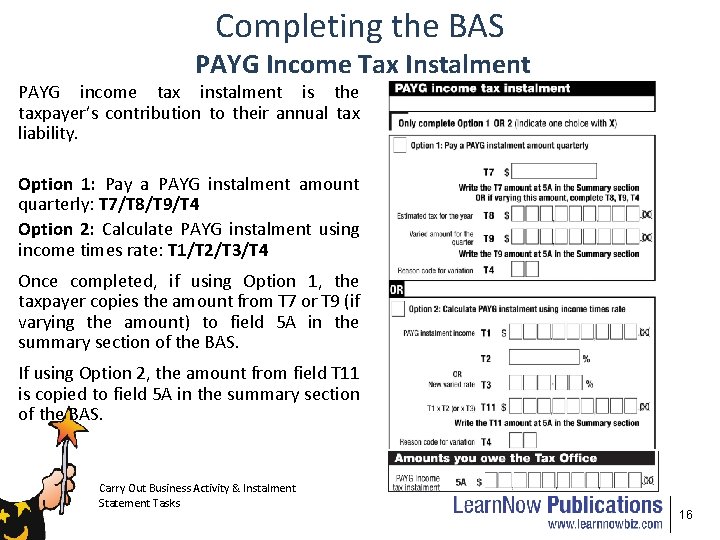
Completing the BAS PAYG Income Tax Instalment PAYG income tax instalment is the taxpayer’s contribution to their annual tax liability. Option 1: Pay a PAYG instalment amount quarterly: T 7/T 8/T 9/T 4 Option 2: Calculate PAYG instalment using income times rate: T 1/T 2/T 3/T 4 Once completed, if using Option 1, the taxpayer copies the amount from T 7 or T 9 (if varying the amount) to field 5 A in the summary section of the BAS. If using Option 2, the amount from field T 11 is copied to field 5 A in the summary section of the BAS. Carry Out Business Activity & Instalment Statement Tasks 16
Completing the BAS Credit from PAYG Income Tax Instalment Variation - 5 B If the instalment rate has been varied and the varied rate at T 3 is less than the rate pre-printed at T 2, the taxpayer may be entitled to a credit. Carry Out Business Activity & Instalment Statement Tasks 17
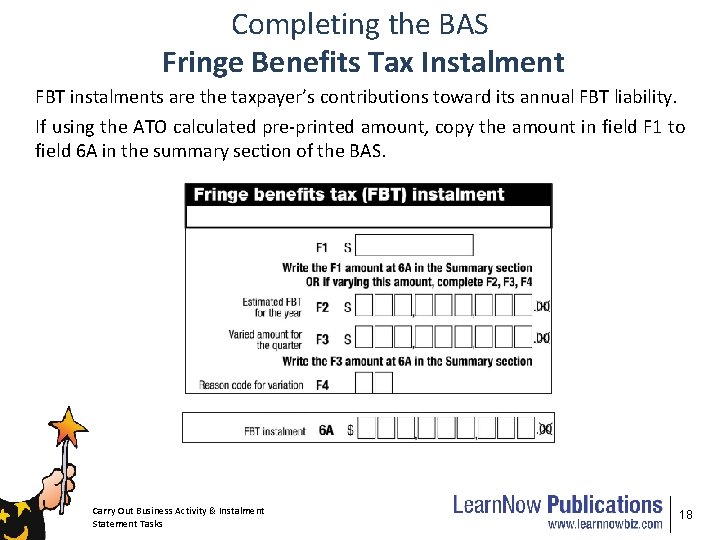
Completing the BAS Fringe Benefits Tax Instalment FBT instalments are the taxpayer’s contributions toward its annual FBT liability. If using the ATO calculated pre-printed amount, copy the amount in field F 1 to field 6 A in the summary section of the BAS. Carry Out Business Activity & Instalment Statement Tasks 18
Completing the BAS Summary Section The calculated amounts from the following sections are copied into the Summary section of the BAS: • Goods and Services Tax. • PAYG Tax Withheld. • PAYG Income Tax Instalment. • Fringe Benefits Tax Instalment. The Summary section is divided into two areas: • Amounts you owe the ATO. • Amounts the ATO owes you. Carry Out Business Activity & Instalment Statement Tasks 19
Completing the BAS Amounts You Owe the ATO This area contains tax collected, withholding, instalments and other taxes listed. The amounts are derived from the following: • 1 A (GST on Sales) is directly input into the Activity Statement if Option 1 (Calculate GST and report quarterly) or Option 2 (Calculate GST quarterly and report annually) are used. If Option 3 (Pay GST instalment amount quarterly) is used then copy field G 21 or field G 23 (if you choose to vary the amount) into 1 A. • 4 (PAYG tax withheld) is copied from field W 5 of the PAYG Tax withheld section of the Activity Statement. • 5 A (PAYG income tax instalment) is copied from field T 9 of the PAYG income tax instalment if Option 1 is used and T 11 if Option 2 (Calculate PAYG instalment using income times rate) is used. Carry Out Business Activity & Instalment Statement Tasks 20
Completing the BAS Amounts You Owe the ATO • 7 (Deferred company/fund instalment) is directly input. • 6 A (FBT instalment) is copied from field F 1 of the FBT Instalment section or from field F 3 if choosing to vary the instalment. • 1 C WET is directly input into the Activity Statement. • 1 E LCT is directly input into the Activity Statement. Once the above fields have been completed the total is calculated at field 8 A. Carry Out Business Activity & Instalment Statement Tasks 21
Completing the BAS Amounts the ATO Owes You This area contains tax paid, instalment credits and other taxes refundable. • 1 B (GST on purchases) is directly input into the Activity Statement if Option 1 (Calculate GST and report quarterly) or Option 2 (Calculate GST quarterly and report annually) are used. If Option 3 (Pay GST instalment amount quarterly) is used then leave field 1 B blank. • 5 B (Credit from PAYG income tax instalment variation) is copied from either T 9 or T 11 of the PAYG income tax instalment if: Option 1 (Pay a PAYG instalment amount quarterly) is used and the varied amount is a negative at T 9. Option 2 (Calculate PAYG instalment using income times rate) is used and the calculated amount is negative at T 11. Carry Out Business Activity & Instalment Statement Tasks 22
Completing the BAS Amounts the ATO Owes You • 6 B (Credit from FBT instalment variation) is copied from field F 3 if the amount calculated from the FBT variation gives a negative amount. This is called an FBT instalment credit. • 1 D (WET refundable) is directly input into the Activity Statement. • 1 F (LCT refundable) is directly input into the Activity Statement. Once the above fields have been completed the total is calculated at field 8 B. Carry Out Business Activity & Instalment Statement Tasks 23
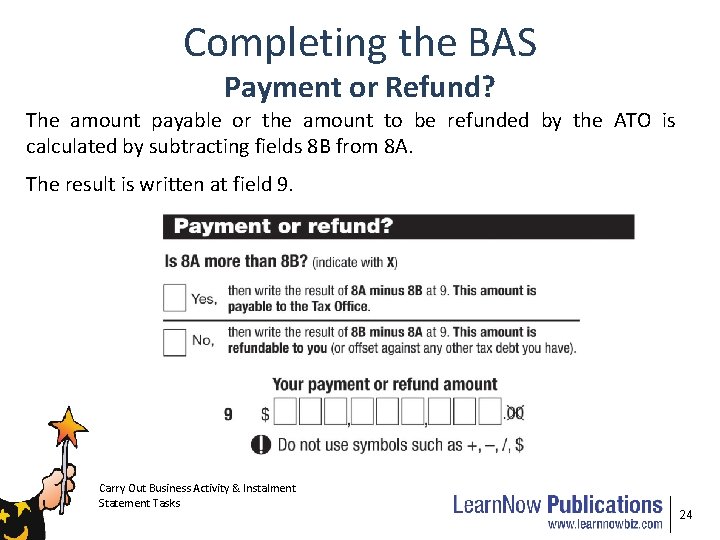
Completing the BAS Payment or Refund? The amount payable or the amount to be refunded by the ATO is calculated by subtracting fields 8 B from 8 A. The result is written at field 9. Carry Out Business Activity & Instalment Statement Tasks 24
- Slides: 24