
Chapter 5 Buffering Reading Angels Interactive Computer Graphics
Chapter 5 Buffering Reading: Angel’s Interactive Computer Graphics (6 th ed. ) Sections 7. 1, 7. 2, 7. 3: buffers CG(U), Chap. 5 Buffering 1 CGGM Lab. CS Dept. , NCTU, J. -H. Chuang
Outline • • • Buffers Accumulation buffer Stencil buffer Applications of buffers Composition techniques CG(U), Chap. 5 Buffering 2 CGGM Lab. CS Dept. , NCTU, J. -H. Chuang

Buffers • Buffers – Discrete, limited resolution both spatially and in depth – Bitplane (pixels) and pixel (bits for depth) • Frame buffer, Z-buffer • Accumulation buffer • Stencil buffer CG(U), Chap. 5 Buffering 3 CGGM Lab. CS Dept. , NCTU, J. -H. Chuang
Open. GL buffers • Open. GL supports – Frame buffer • Double buffers for animation and stereo imageing • Four buffers for stereoscopic animation – Depth buffer – Accumulation buffer • For a variety of operations for multi-pass rendering – Stencil buffer • For masking • Determine whether a buffer pixel should be written to the screen CG(U), Chap. 5 Buffering 4 CGGM Lab. CS Dept. , NCTU, J. -H. Chuang
Frame Buffer • Frame. Buffer. Op (op ) – Setup operation type for Render. Pixel(). – Op can be REPLACE, ADD, SUBSTRACT, and KEEP. • REPLACE: normal frame buffer operation • ADD, SUBSTRACT: add new value to frame buffer or substract new value from frame buffer. • KEEP: no change to frame buffer. CG(U), Chap. 5 Buffering 5 CGGM Lab. CS Dept. , NCTU, J. -H. Chuang
Depth Buffer • Depth. Buffer. Func (Func. Type ) – Setup function type for z. Test(), can be ALWAYS, NEVER, <, <=, >, >=, =, /= • Default Func. Type=“<“ for Z-Buffer Process • Depth. Buffer. Op (op ) – Setup operation type for Zbuffer. Op(), can be REPLACE or KEEP. • op=REPLACE for Z-Buffer process • op=KEEP no modification on Z-Buffer CG(U), Chap. 5 Buffering 6 CGGM Lab. CS Dept. , NCTU, J. -H. Chuang
Accumulation buffer -1 • Same resolution as the frame buffer, – but has greater depth resolution, – used to render successive images into one location while retaining numerical accuracy. • Don’t write directly into the accumulation buffer while rendering. – Typically, a series of images is written to frame buffers and these are accumulated, one at a time, into the accumulation buffer. – When the accumulation is finished, the result is copied back into a color buffer. CG(U), Chap. 5 Buffering 7 CGGM Lab. CS Dept. , NCTU, J. -H. Chuang
Accumulation buffer -2 • Support multi-pass rendering – – – Scene (rather line or polygon) antialiasing Multiple exposures Motion blur Depth of field Shadow Jittering CG(U), Chap. 5 Buffering 8 CGGM Lab. CS Dept. , NCTU, J. -H. Chuang
Accumulation buffer -3 • Same resolution as the frame buffer, but has greater numerical resolution. • Operations – Clear buffer: gl. Clear(GL_ACCUM_BUFFER_BIT) – Add or multiply values from frame buffer into the accumulation buffer: gl. Accum(GL_ACCUM, **) – Add or multiply values of the accumulation buffer – Copy the content of accumulation buffer to frame buffer. CG(U), Chap. 5 Buffering 9 CGGM Lab. CS Dept. , NCTU, J. -H. Chuang
Accumulation buffer -4 • gl. Accum(Glenum op, Glfloat value) – op: operations • GL_ACCUM – Reads each pixel from selected buffer, multiplies RGBA by value, and adds the result to A-B. • GL_LOAD: replace instead of adding • GL_ADD/GL_MULT – Add or multiply each value in AB by value, and return it to the AB. • GL_RETURN – Takes values from A-B, multiplies them by value, and place the result in color buffer enabled for writing. CG(U), Chap. 5 Buffering 10 CGGM Lab. CS Dept. , NCTU, J. -H. Chuang
Scene antialiasing using accumulation buffer • Steps – Clear the accumulation buffer and enable the front buffer for reading and writing. – Loop n times through code that draws image in a slightly different position (viewer). – Accumulates the data with gl. Accum(GL_ACCUM, 1. 0/n) – Finally call gl. Accum(GL_RETURN, 1. 0) CG(U), Chap. 5 Buffering 11 CGGM Lab. CS Dept. , NCTU, J. -H. Chuang
Motion blur using accumulation buffer • Similar to scene antialiasing, we jitter the images temporally. – Average a series of images using A-B. – Entire scene can be made successively dimmer by calling gl. Accum(GL_MULT, decay. Factor) as the scene is drawn into the A-b. – Transfer the complete scene from A-b to frame buffer by gl. Accum(GL_RETURN, 1. 0) CG(U), Chap. 5 Buffering 12 CGGM Lab. CS Dept. , NCTU, J. -H. Chuang
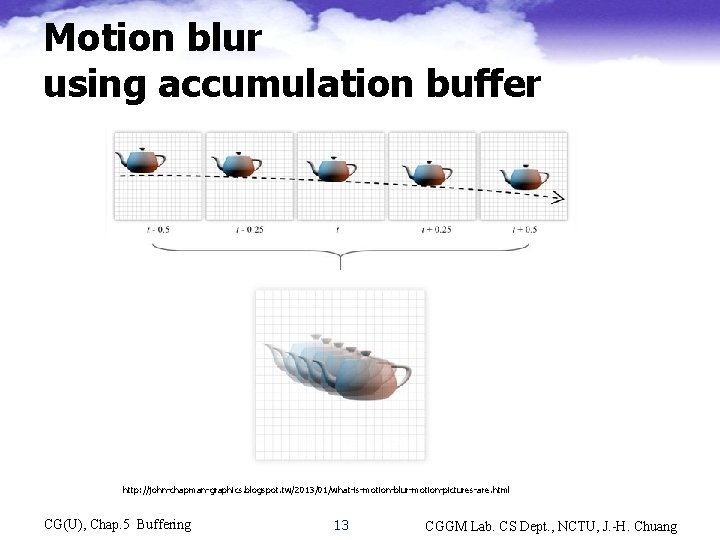
Motion blur using accumulation buffer http: //john-chapman-graphics. blogspot. tw/2013/01/what-is-motion-blur-motion-pictures-are. html CG(U), Chap. 5 Buffering 13 CGGM Lab. CS Dept. , NCTU, J. -H. Chuang
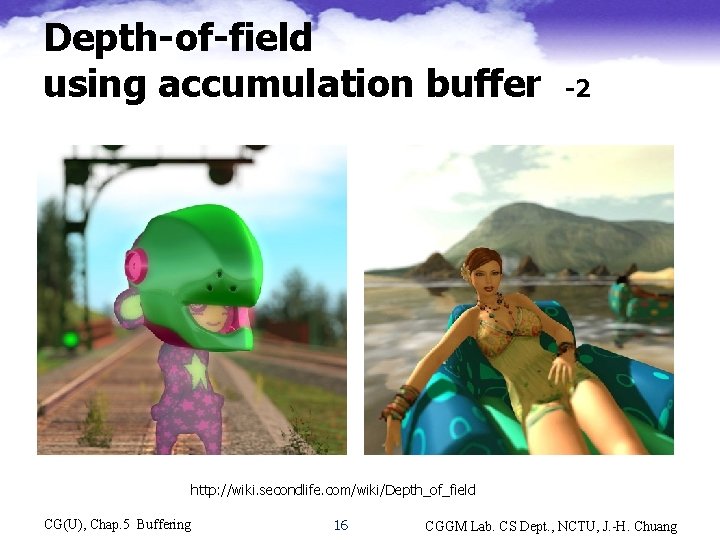
Depth-of-field using accumulation buffer -1 • Depth-of-field (focusing effect): – There is a range where objects are in focus – Objects outside of this range are blurry, the further outside the blurrier • Steps – Draw the scene repeatedly using calls with different argument values to gl. Frustum(). • Varying the view and keeping the point of focus fixed, objects will be rendered blurrier relative to their distance from the focal point – Average the results of all renderings using A-B CG(U), Chap. 5 Buffering 14 CGGM Lab. CS Dept. , NCTU, J. -H. Chuang
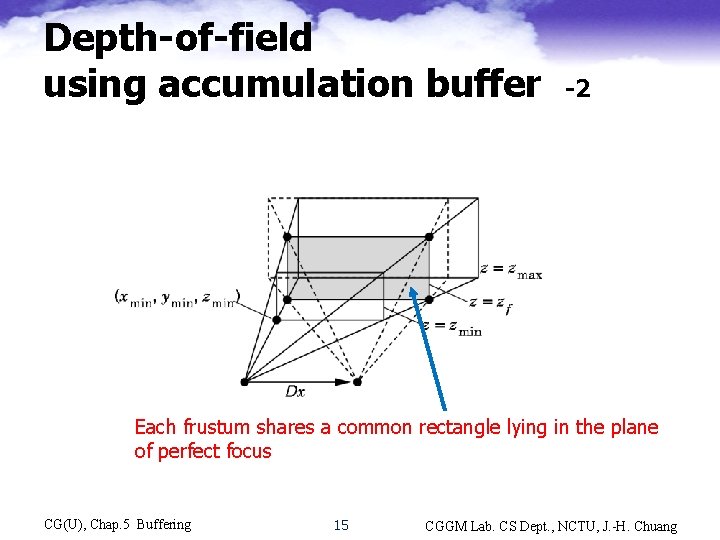
Depth-of-field using accumulation buffer -2 Each frustum shares a common rectangle lying in the plane of perfect focus CG(U), Chap. 5 Buffering 15 CGGM Lab. CS Dept. , NCTU, J. -H. Chuang
Depth-of-field using accumulation buffer -2 http: //wiki. secondlife. com/wiki/Depth_of_field CG(U), Chap. 5 Buffering 16 CGGM Lab. CS Dept. , NCTU, J. -H. Chuang
Stencil Buffer • An extra plane of bits in the frame buffer, used to enable or disable drawing on a perpixel basis • Stencil buffer stores only integer values within the range of 0 to 2 n-1, where n is the number of stencil bits • Can be used to mask off regions of frame buffer so that it is not displayed CG(U), Chap. 5 Buffering 17 CGGM Lab. CS Dept. , NCTU, J. -H. Chuang
Stencil Test • Stencil test compares a reference value with the stencil value stored at a pixel in the stencil buffer – Check for masking (per pixel based) • Depending on the result of stencil test, the stencil value is modified • The stencil buffer test is always executed before the Z-buffer test, so it can be used to affect only the visible parts of the rendered scene CG(U), Chap. 5 Buffering 18 CGGM Lab. CS Dept. , NCTU, J. -H. Chuang
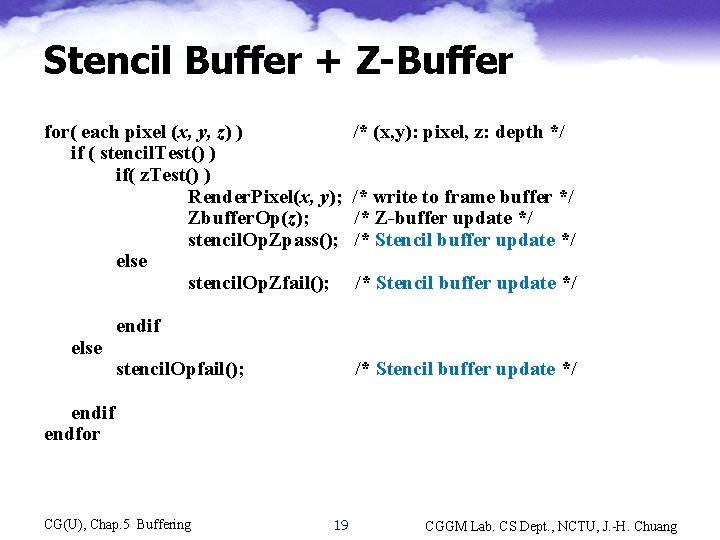
Stencil Buffer + Z-Buffer for( each pixel (x, y, z) ) if ( stencil. Test() ) if( z. Test() ) Render. Pixel(x, y); Zbuffer. Op(z); stencil. Op. Zpass(); else stencil. Op. Zfail(); else /* (x, y): pixel, z: depth */ /* write to frame buffer */ /* Z-buffer update */ /* Stencil buffer update */ endif stencil. Opfail(); /* Stencil buffer update */ endif endfor CG(U), Chap. 5 Buffering 19 CGGM Lab. CS Dept. , NCTU, J. -H. Chuang
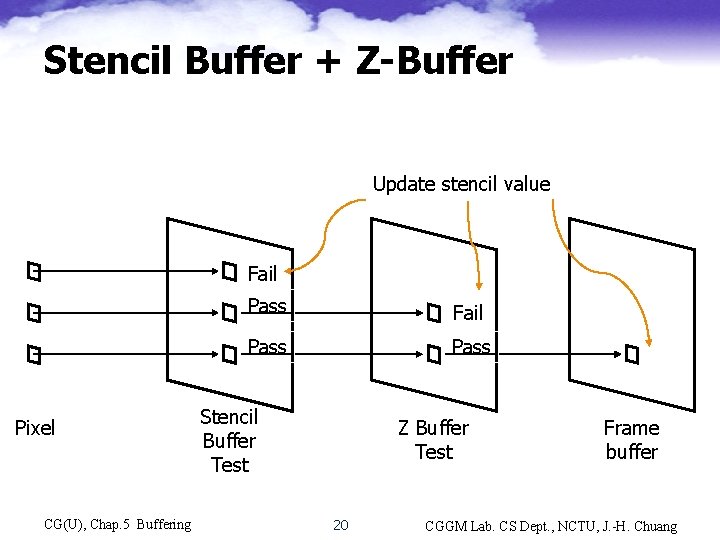
Stencil Buffer + Z-Buffer Update stencil value Fail Pixel CG(U), Chap. 5 Buffering Pass Fail Pass Stencil Buffer Test Z Buffer Test 20 Frame buffer CGGM Lab. CS Dept. , NCTU, J. -H. Chuang
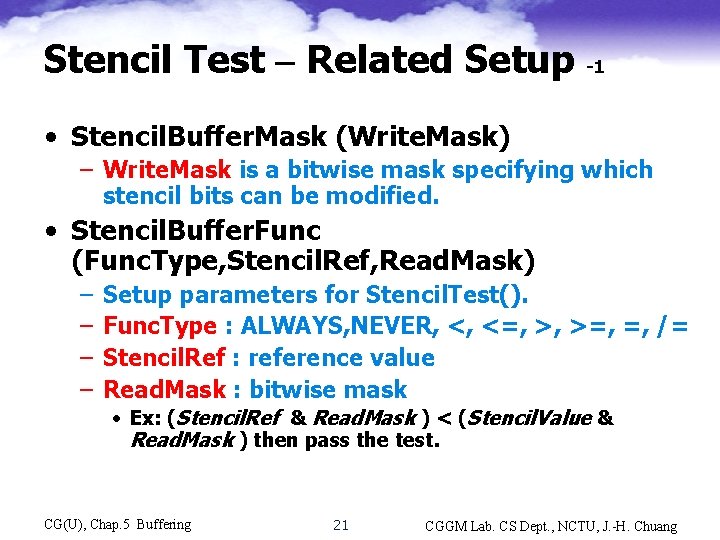
Stencil Test – Related Setup -1 • Stencil. Buffer. Mask (Write. Mask) – Write. Mask is a bitwise mask specifying which stencil bits can be modified. • Stencil. Buffer. Func (Func. Type, Stencil. Ref, Read. Mask) – – Setup parameters for Stencil. Test(). Func. Type : ALWAYS, NEVER, <, <=, >, >=, =, /= Stencil. Ref : reference value Read. Mask : bitwise mask • Ex: (Stencil. Ref & Read. Mask ) < (Stencil. Value & Read. Mask ) then pass the test. CG(U), Chap. 5 Buffering 21 CGGM Lab. CS Dept. , NCTU, J. -H. Chuang
Stencil Test – Related Setup -2 • Stencil. Buffer. Op (fail, Zpass) – Setup Stencil. Opfail(), Stencil. Op. Zpass() – Specify how the stencil value is modified when the Stencil. Test() passes or fails. – Can be KEEP, INCR, DECR, ZERO, REPLACE, INVERT • REPLACE: replace by the reference value. • INVERT: bitwise inverting. • Enable. Stencil. Buffer(), Disable. Stencil. Buffer(), Clear. Stencil. Buffer() CG(U), Chap. 5 Buffering 22 CGGM Lab. CS Dept. , NCTU, J. -H. Chuang
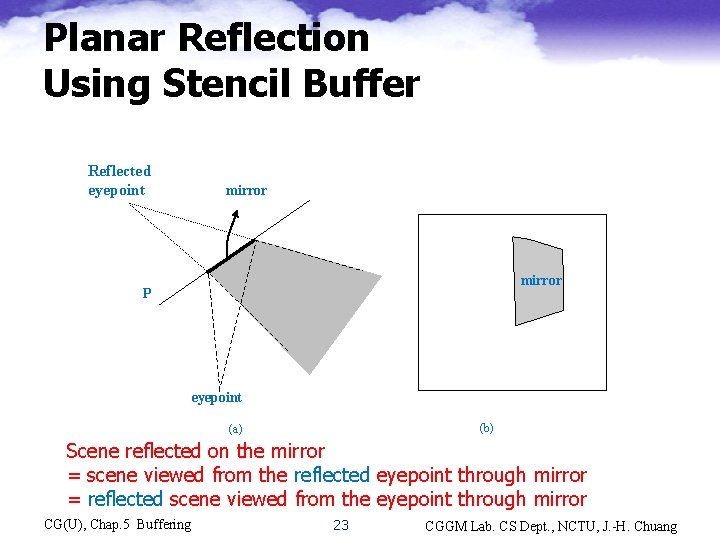
Planar Reflection Using Stencil Buffer Reflected eyepoint mirror P eyepoint (b) (a) Scene reflected on the mirror = scene viewed from the reflected eyepoint through mirror = reflected scene viewed from the eyepoint through mirror CG(U), Chap. 5 Buffering 23 CGGM Lab. CS Dept. , NCTU, J. -H. Chuang
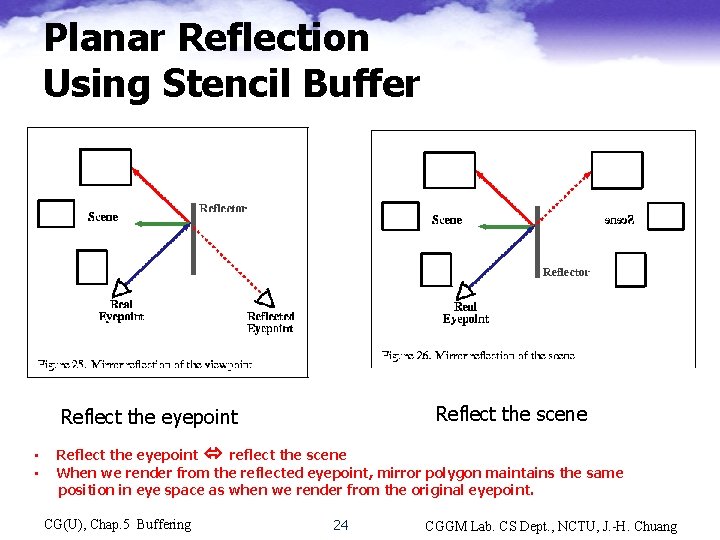
Planar Reflection Using Stencil Buffer Reflect the scene Reflect the eyepoint • • Reflect the eyepoint reflect the scene When we render from the reflected eyepoint, mirror polygon maintains the same position in eye space as when we render from the original eyepoint. CG(U), Chap. 5 Buffering 24 CGGM Lab. CS Dept. , NCTU, J. -H. Chuang
Planar Reflection Using Stencil Buffer • Simulate mirror reflection using multi-pass rendering with stencil buffer – Pass 1: draw the reflected scene • Reflect the viewing frustum • Draw the scene (result stored in frame buffer) – Pass 2: uses the original eye point • Configure stencil buffer operation such that a 1 is stored at pixel covered by a mirror polygon – Disable frame-buffer write and draw the mirror polygon – Set stencil value = 1 for pixels covered by the mirror polygon • Configure the stencil buffer test ( stencil-value = 1) and raw the scene – Render only for pixels with stencil value =1, i. e. , outside the mirror polygon CG(U), Chap. 5 Buffering 25 CGGM Lab. CS Dept. , NCTU, J. -H. Chuang
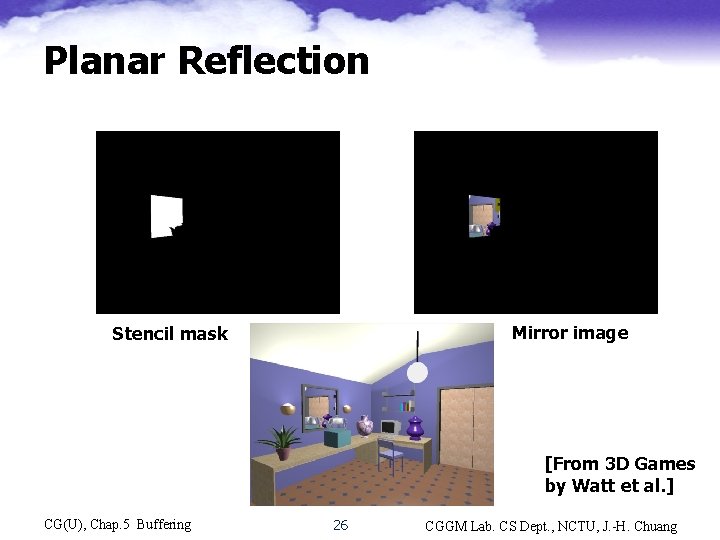
Planar Reflection Mirror image Stencil mask [From 3 D Games by Watt et al. ] CG(U), Chap. 5 Buffering 26 CGGM Lab. CS Dept. , NCTU, J. -H. Chuang
Multi-pass shadowing • Properties of shadowing • Classification based on light sources – Hard shadowing for point light source • Object space approaches – Projection shadow, Shadow volume • Pixel-based (image-space) approaches – Shadow map (Two-pass Z-buffer) » Includes projective shadowing – Soft shadowing for area light source • Object-space vs. Image-space approach CG(U), Chap. 5 Buffering 27 CGGM Lab. CS Dept. , NCTU, J. -H. Chuang
Multi-pass shadowing Properties -1 • Shadows are important – Consolidates spatial relationships between objects • Gives information on position of the light source – Provides information of occluder and receiver geometry – Provides important depth cues • Geometric shadow – Compute shape of shadow, but only estimate its intensity. Intensity inside a shadow can only be determined by indirect illumination, e. g. , radiosity. CG(U), Chap. 5 Buffering 28 CGGM Lab. CS Dept. , NCTU, J. -H. Chuang
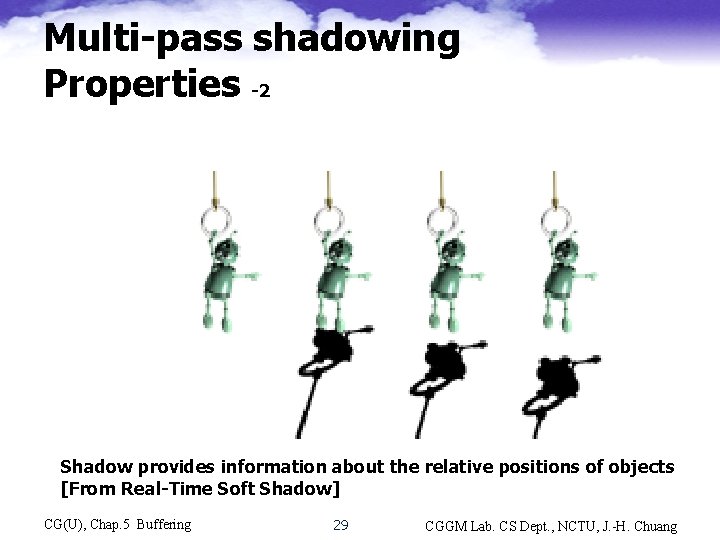
Multi-pass shadowing Properties -2 No shadow The sphere rests on the plane Shadow provides information about the relative positions of objects [From Real-Time Soft Shadow] CG(U), Chap. 5 Buffering 29 CGGM Lab. CS Dept. , NCTU, J. -H. Chuang
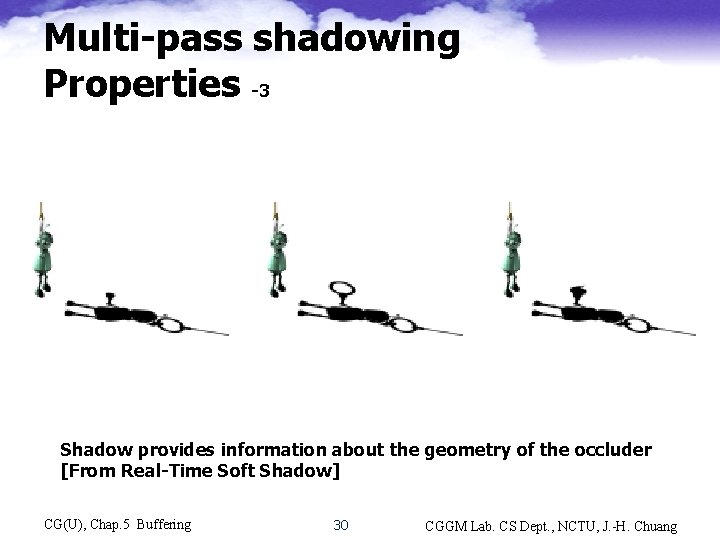
Multi-pass shadowing Properties -3 No shadow The sphere rests on the plane Shadow provides information about the geometry of the occluder [From Real-Time Soft Shadow] CG(U), Chap. 5 Buffering 30 CGGM Lab. CS Dept. , NCTU, J. -H. Chuang
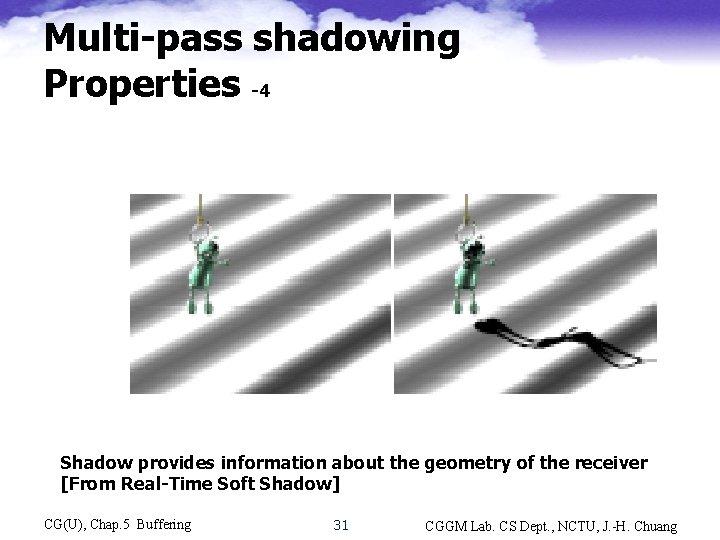
Multi-pass shadowing Properties -4 No shadow The sphere rests on the plane Shadow provides information about the geometry of the receiver [From Real-Time Soft Shadow] CG(U), Chap. 5 Buffering 31 CGGM Lab. CS Dept. , NCTU, J. -H. Chuang
Multi-pass shadowing Properties -5 • Hard shadow • For point light sources or light sources at very large distance • Can sometimes be misinterpreted as geometric features, such as a crease in a surface • Soft shadow • For area light source • Umbra: full shadow • Penumbra: partial shadow – The relative size of the umbra/penumbra depends on the size and the shape of the light source and its distance from the object. • Generally preferable CG(U), Chap. 5 Buffering 32 CGGM Lab. CS Dept. , NCTU, J. -H. Chuang
![Multi-pass shadowing Properties -6 [From Real-Time Soft Shadow] CG(U), Chap. 5 Buffering 33 CGGM](http://slidetodoc.com/presentation_image_h2/bdfbbc75a9fbbf67dafd82997350956f/image-33.jpg "Multi-pass shadowing Properties -6 [From Real-Time Soft Shadow] CG(U), Chap. 5 Buffering 33 CGGM")
Multi-pass shadowing Properties -6 [From Real-Time Soft Shadow] CG(U), Chap. 5 Buffering 33 CGGM Lab. CS Dept. , NCTU, J. -H. Chuang
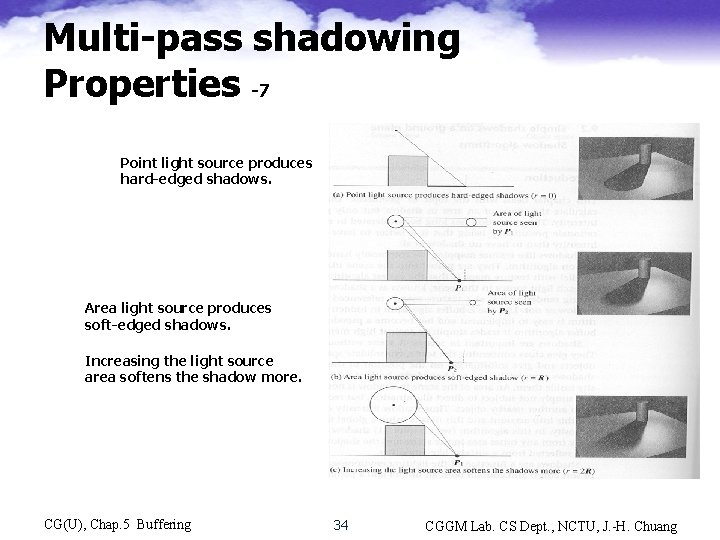
Multi-pass shadowing Properties -7 Point light source produces hard-edged shadows. Area light source produces soft-edged shadows. Increasing the light source area softens the shadow more. CG(U), Chap. 5 Buffering 34 CGGM Lab. CS Dept. , NCTU, J. -H. Chuang
Shadow techniques – Global illumination • Expensive – Light maps • Totally unsuited for dynamic lighting – Projected planar shadows • Well works only on flat surfaces – Shadow maps • Aliasing problems and precision problems – Stenciled shadow volumes • Determining accurate, water-tight shadow volume is hard work CG(U), Chap. 5 Buffering 35 CGGM Lab. CS Dept. , NCTU, J. -H. Chuang
Hard shadowing Shadow map • Proposed in 1978 by L. Williams • The simplest approach, easily integrated into a Z-buffer based renderer. • Image-space shadow determination – An image-precision operation • Cost for shadow test is constant for scenes of different complexity • Resolution vs. aliasing – Efficient – A well known software rendering technique CG(U), Chap. 5 Buffering 36 CGGM Lab. CS Dept. , NCTU, J. -H. Chuang
Shadow map Basic concept • Creating shadow map (view-independent) – A scene is rendered, viewing from the light source, and depth information stored in the shadow Z-buffer. • Render the scene using Z-buffer For each visible point (x, y, z) ), perform a shadow test (in light space) – Project (x, y, z) to (x’, y’, z’) (COP: light source) – If z’ > Shadow-Z(x’, y’) then (x, y, z) is in shadow and a “shadow” intensity is assigned to that pixel, otherwise the point is rendered as normal. CG(U), Chap. 5 Buffering 37 CGGM Lab. CS Dept. , NCTU, J. -H. Chuang
![Shadow map Basic concept [Cass Everitt] CG(U), Chap. 5 Buffering 38 CGGM Lab. CS](http://slidetodoc.com/presentation_image_h2/bdfbbc75a9fbbf67dafd82997350956f/image-38.jpg "Shadow map Basic concept [Cass Everitt] CG(U), Chap. 5 Buffering 38 CGGM Lab. CS")
Shadow map Basic concept [Cass Everitt] CG(U), Chap. 5 Buffering 38 CGGM Lab. CS Dept. , NCTU, J. -H. Chuang
![Shadow map Basic concept [Cass Everitt] CG(U), Chap. 5 Buffering 39 CGGM Lab. CS](http://slidetodoc.com/presentation_image_h2/bdfbbc75a9fbbf67dafd82997350956f/image-39.jpg "Shadow map Basic concept [Cass Everitt] CG(U), Chap. 5 Buffering 39 CGGM Lab. CS")
Shadow map Basic concept [Cass Everitt] CG(U), Chap. 5 Buffering 39 CGGM Lab. CS Dept. , NCTU, J. -H. Chuang
![Shadow map Example [Watt] CG(U), Chap. 5 Buffering 40 CGGM Lab. CS Dept. ,](http://slidetodoc.com/presentation_image_h2/bdfbbc75a9fbbf67dafd82997350956f/image-40.jpg "Shadow map Example [Watt] CG(U), Chap. 5 Buffering 40 CGGM Lab. CS Dept. ,")
Shadow map Example [Watt] CG(U), Chap. 5 Buffering 40 CGGM Lab. CS Dept. , NCTU, J. -H. Chuang
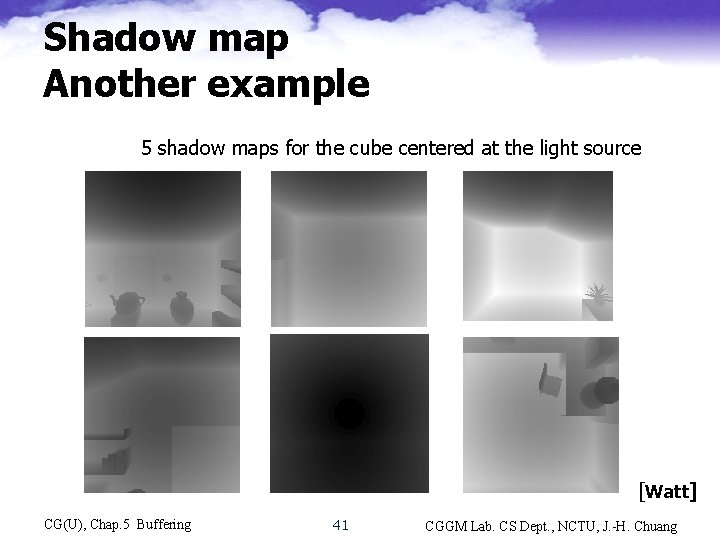
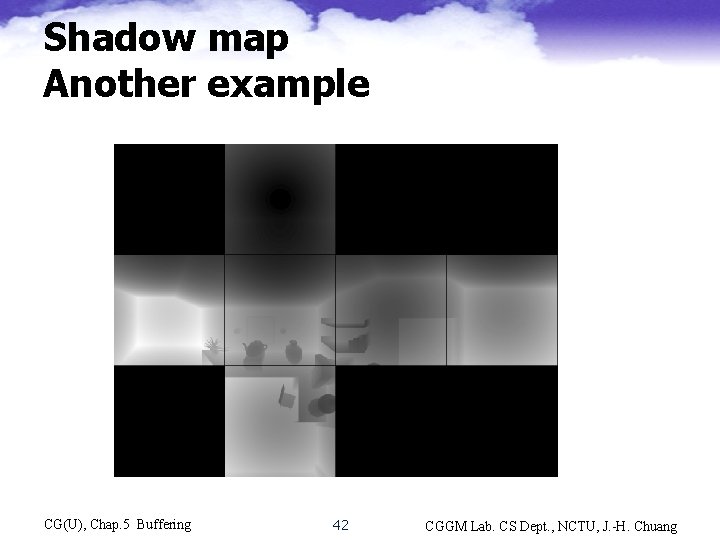
Shadow map Another example 5 shadow maps for the cube centered at the light source [Watt] CG(U), Chap. 5 Buffering 41 CGGM Lab. CS Dept. , NCTU, J. -H. Chuang
Shadow map Another example CG(U), Chap. 5 Buffering 42 CGGM Lab. CS Dept. , NCTU, J. -H. Chuang
Shadow map Aliasing problems • Advantages – General-purpose graphics hardware can be used • Disadvantages – Quality of the shadows depends on the map resolution and numerical precision of the shadow map – May have serious aliasing CG(U), Chap. 5 Buffering 43 CGGM Lab. CS Dept. , NCTU, J. -H. Chuang
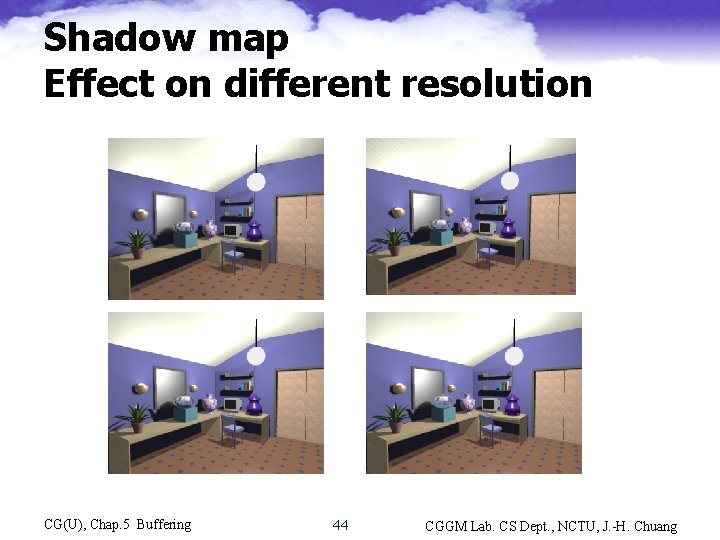
Shadow map Effect on different resolution Lower resolution Higher resolution CG(U), Chap. 5 Buffering 44 CGGM Lab. CS Dept. , NCTU, J. -H. Chuang
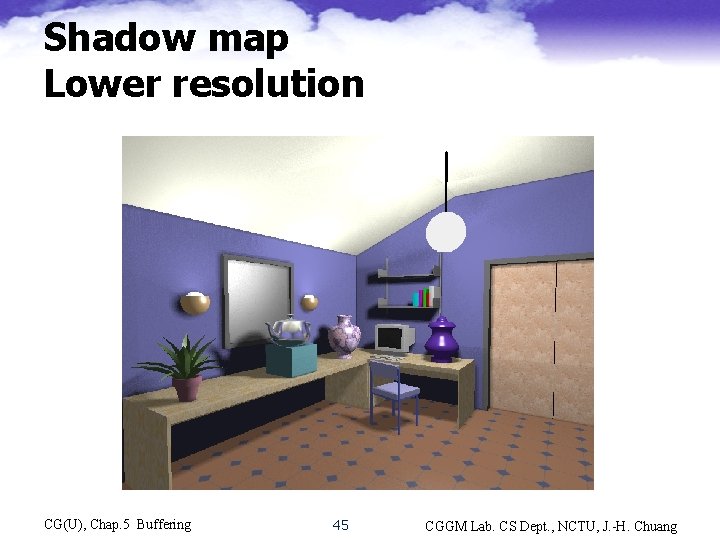
Shadow map Lower resolution CG(U), Chap. 5 Buffering 45 CGGM Lab. CS Dept. , NCTU, J. -H. Chuang
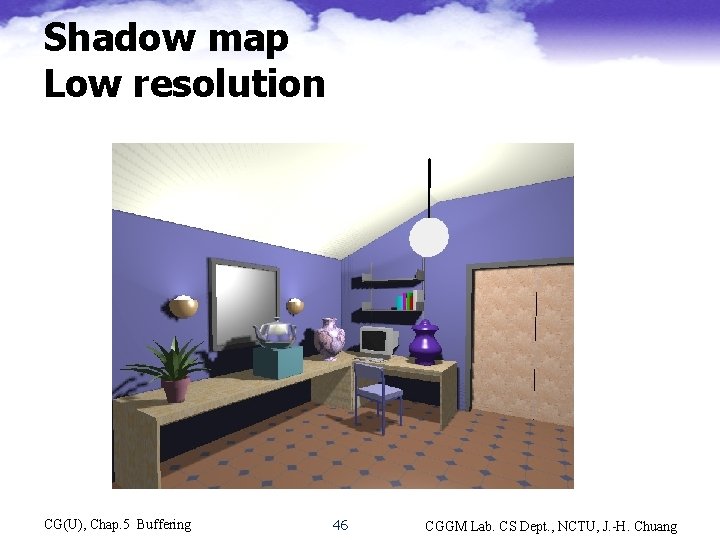
Shadow map Low resolution CG(U), Chap. 5 Buffering 46 CGGM Lab. CS Dept. , NCTU, J. -H. Chuang
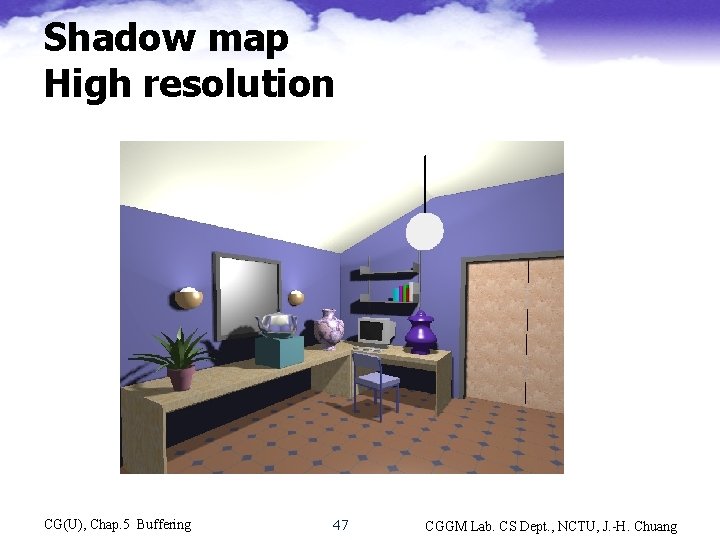
Shadow map High resolution CG(U), Chap. 5 Buffering 47 CGGM Lab. CS Dept. , NCTU, J. -H. Chuang
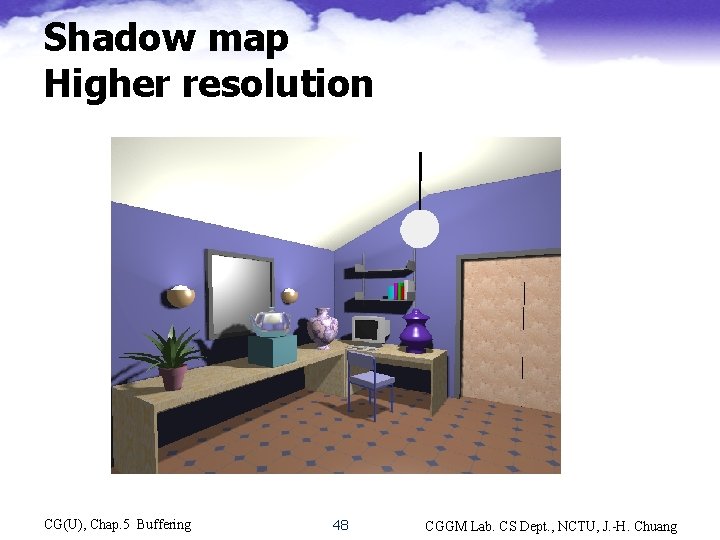
Shadow map Higher resolution CG(U), Chap. 5 Buffering 48 CGGM Lab. CS Dept. , NCTU, J. -H. Chuang
Shadow map Aliasing problems -1 – Shadow map is sampled during the comparison • Susceptible to aliasing problems, especially close to shadow edges – Post-perspective divide means non-linear depth distribution, and shadow map can be stored as a color channel, giving only 8 bits of precision (usually not enough) • Depth precision typically 16 -bit or 24 -bit • Precision problem -> self-shadowing aliasing • Hardware dedicated to supporting shadow mapping is available in Xbox and Ge. Force 3, and in SGI Reality. Engine and Infinite. Reality to boost the bit precision to 16 bits CG(U), Chap. 5 Buffering 49 CGGM Lab. CS Dept. , NCTU, J. -H. Chuang
Shadow map Aliasing problems -2 • Two aliasing artifacts due to point sampling – Straightforward point sampling in shadow Zbuffer creation (a uniform depth inside a pixel area) • Visible along shadow boundary – Point sampling in shadow Z-buffer accessing • Analogous to sampling problems in texture mapping, resulting in – A pre-image encloses a number of shadow Z-buffer pixels, i. e. , a pixel may be partly in shadow and partly not. Or, – A single shadow map texel can cover many screen pixels CG(U), Chap. 5 Buffering 50 CGGM Lab. CS Dept. , NCTU, J. -H. Chuang
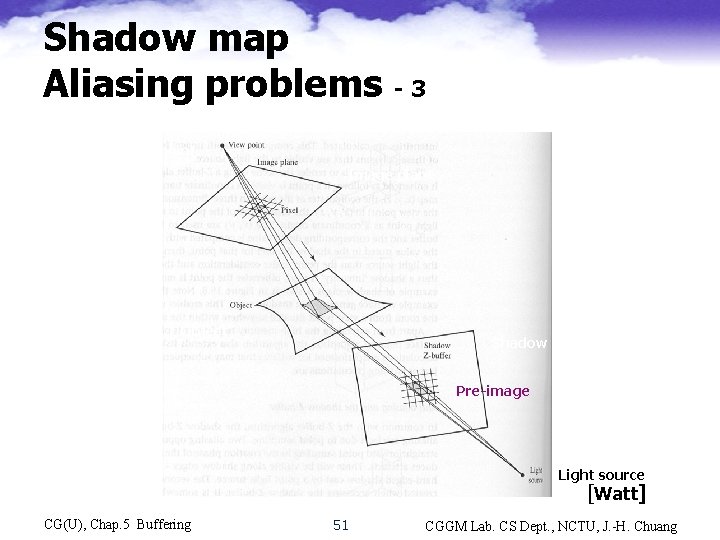
Shadow map Aliasing problems -3 View point Image plane Object Shadow Z-buffer Pre-image Light source [Watt] CG(U), Chap. 5 Buffering 51 CGGM Lab. CS Dept. , NCTU, J. -H. Chuang
Shadow map Anti-aliasing Percentage closer filtering • Region filtering cannot be used • Percentage closer filtering [Reeves 87] – Derive the quadrilateral of pre-image by calculating the projection of 4 pixel corners – Obtain a percentage of pixels whose z-value is less than the z-value of screen pixel – Reduce the intensity by that percentage – Results in an artificially soft shadow • But all have more or less the same-sized penumbrae. Better than none at all……. . CG(U), Chap. 5 Buffering 52 CGGM Lab. CS Dept. , NCTU, J. -H. Chuang
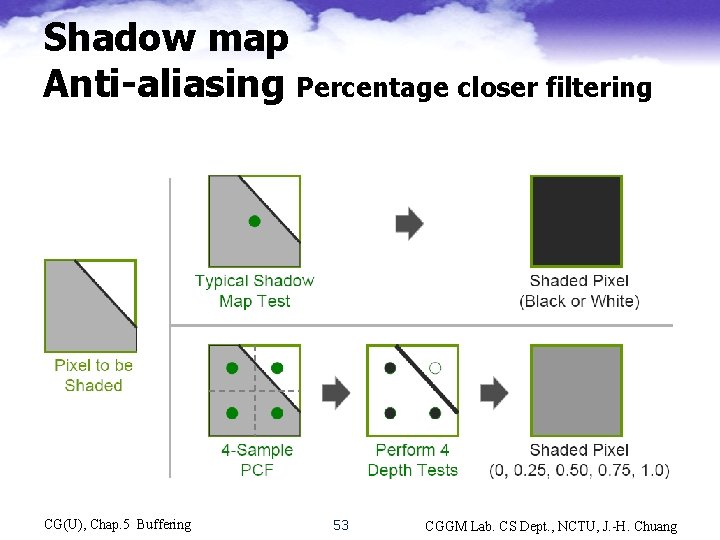
Shadow map Anti-aliasing Percentage closer filtering CG(U), Chap. 5 Buffering 53 CGGM Lab. CS Dept. , NCTU, J. -H. Chuang
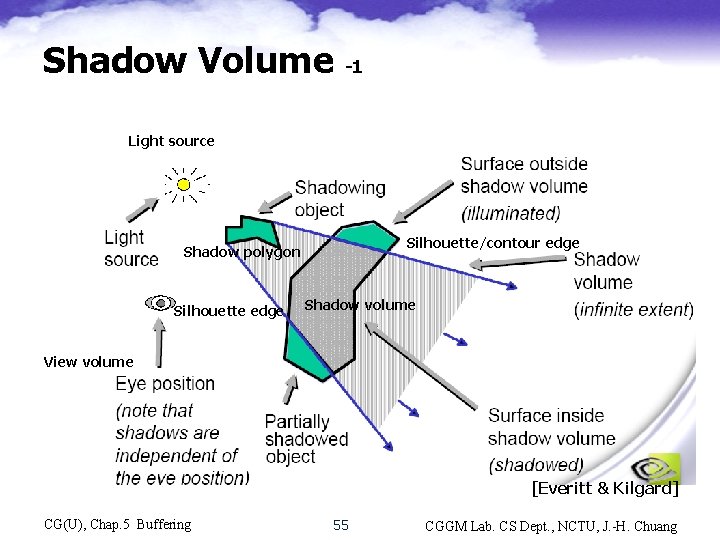
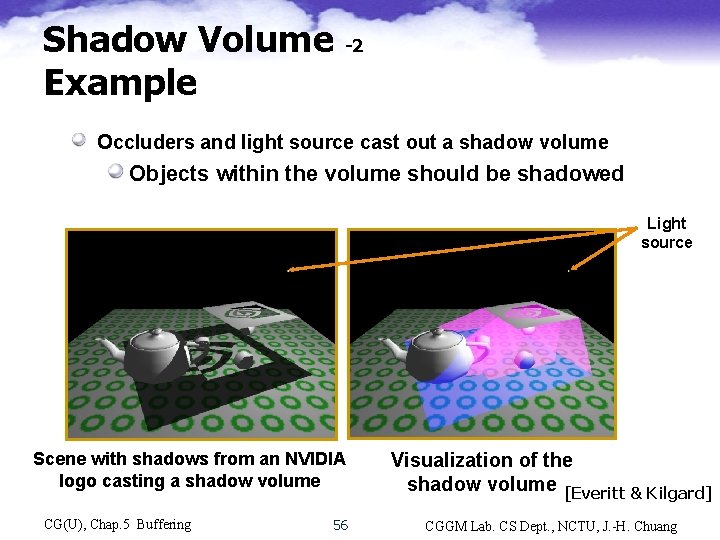
Hard shadowing Shadow Volume • Shadow volume – The invisible volume of space swept out by the shadow of an object. – Computed by first evaluating the contour (or silhouette edge) of the object, as seen from light source, then deriving a shadow polygon for each pair of the light source and edge. – Contour edges may not be processed as loops. CG(U), Chap. 5 Buffering 54 CGGM Lab. CS Dept. , NCTU, J. -H. Chuang
Shadow Volume -1 Light source Silhouette/contour edge Shadow polygon Silhouette edge Shadow volume View volume [Everitt & Kilgard] CG(U), Chap. 5 Buffering 55 CGGM Lab. CS Dept. , NCTU, J. -H. Chuang
Shadow Volume -2 Example Occluders and light source cast out a shadow volume Objects within the volume should be shadowed Light source Scene with shadows from an NVIDIA logo casting a shadow volume CG(U), Chap. 5 Buffering 56 Visualization of the shadow volume [Everitt & Kilgard] CGGM Lab. CS Dept. , NCTU, J. -H. Chuang
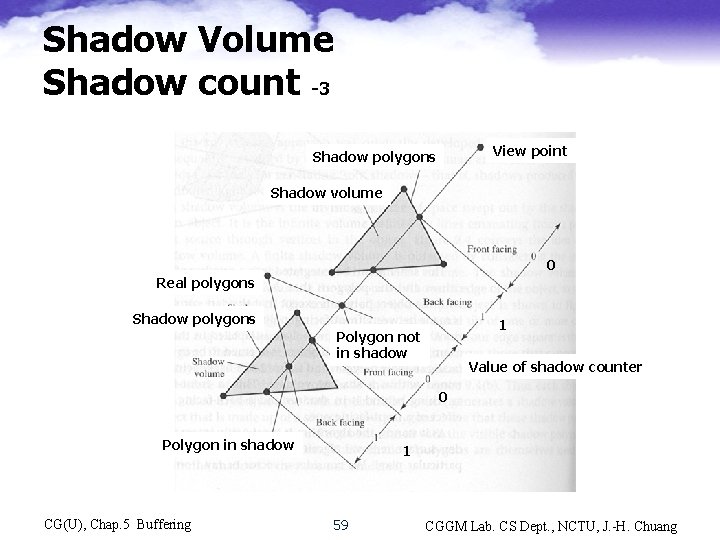
Shadow Volume Shadow count -1 • Shadow polygons are processed as object polygons except that they are invisible. • A point on an object is in shadow – if it is behind a front-facing shadow polygon and in front of a back-facing shadow polygon. • Consider a ray from view point to a point on an object, the point is in shadow if the ray intersects more frontfacing than back-facing shadow polygons. Need a shadow counter. CG(U), Chap. 5 Buffering 57 CGGM Lab. CS Dept. , NCTU, J. -H. Chuang
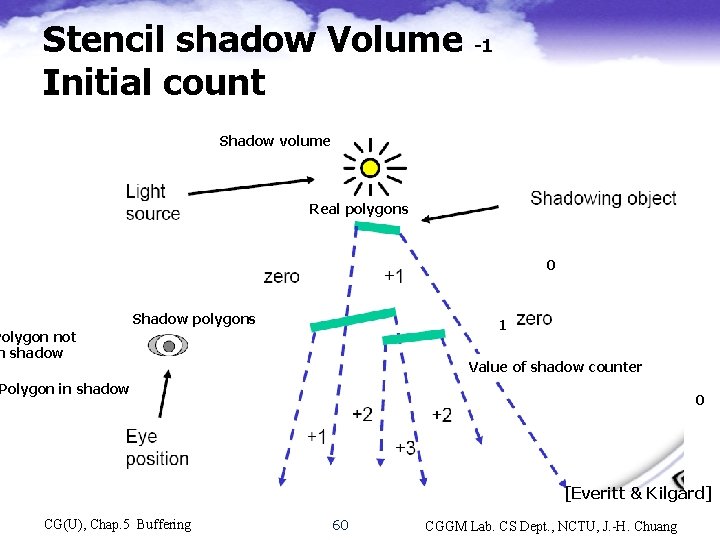
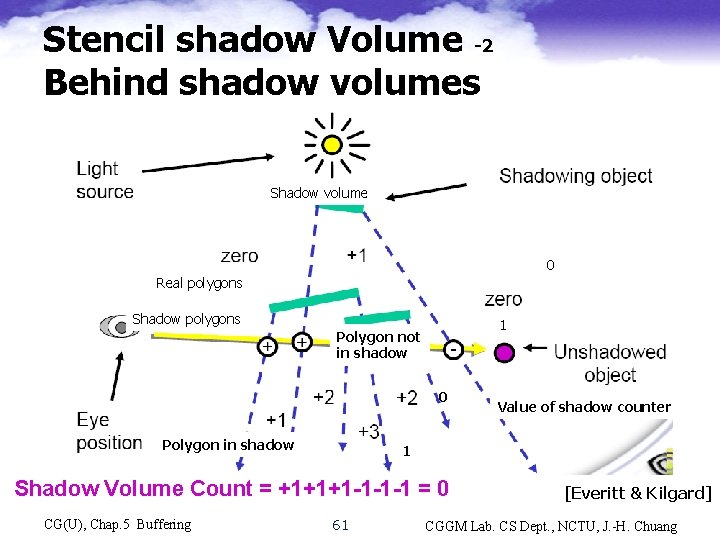
Shadow Volume Shadow count -2 • Value of shadow counter – Initialized to k if the view point is already in k shadows, 0 otherwise. – As descend the depth sorted list of polygons, the counter is incremented when passing a frontfacing shadow polygon and decremented when a back-facing polygon is passed. – The point is in shadow if the counter is positive at the point • Doing this geometrically is tedious and time -consuming. Can be done by using Stencil buffer [Heidmann ’ 91] CG(U), Chap. 5 Buffering 58 CGGM Lab. CS Dept. , NCTU, J. -H. Chuang
Shadow Volume Shadow count -3 View point Shadow polygons Shadow volume 0 Real polygons Shadow polygons 1 Polygon not in shadow Value of shadow counter 0 Polygon in shadow CG(U), Chap. 5 Buffering 1 59 CGGM Lab. CS Dept. , NCTU, J. -H. Chuang
Stencil shadow Volume Initial count -1 Shadow volume Shadow polygons Real polygons 0 Shadow polygons 1 Polygon not n shadow Value of shadow counter Polygon in shadow 0 [Everitt & Kilgard] CG(U), Chap. 5 Buffering 60 CGGM Lab. CS Dept. , NCTU, J. -H. Chuang
Stencil shadow Volume -2 Behind shadow volumes Shadow polygons Shadow volume 0 Real polygons Shadow polygons 1 Polygon not in shadow 0 Polygon in shadow 1 Shadow Volume Count = +1+1+1 -1 -1 -1 = 0 CG(U), Chap. 5 Buffering Value of shadow counter 61 [Everitt & Kilgard] CGGM Lab. CS Dept. , NCTU, J. -H. Chuang
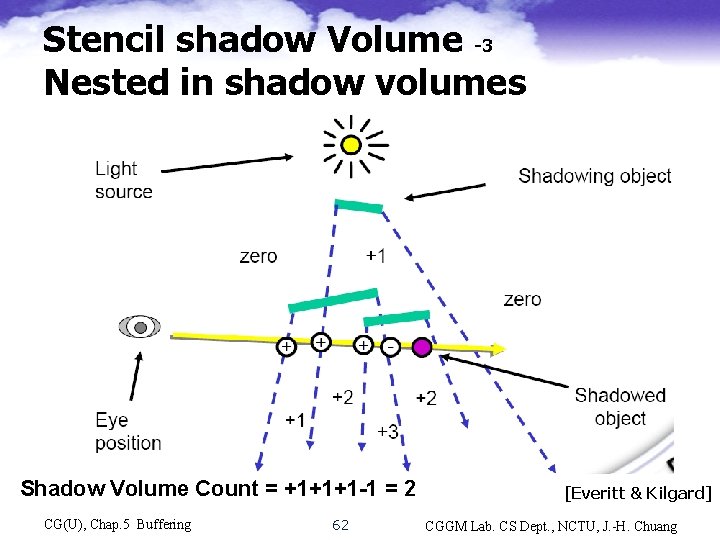
Stencil shadow Volume -3 Nested in shadow volumes Shadow polygons Shadow volume 0 Real polygons Shadow polygons 1 Polygon not in shadow Value of shadow counter 0 Polygon in shadow 1 Shadow Volume Count = +1+1+1 -1 = 2 CG(U), Chap. 5 Buffering 62 [Everitt & Kilgard] CGGM Lab. CS Dept. , NCTU, J. -H. Chuang
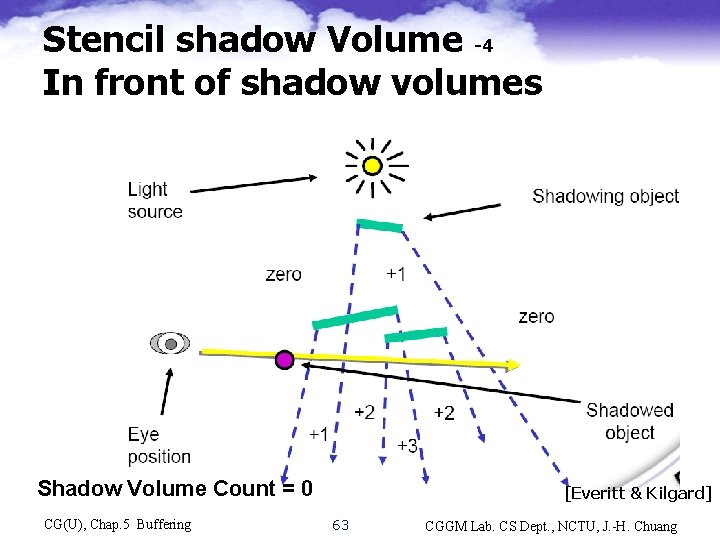
Stencil shadow Volume -4 In front of shadow volumes Shadow polygons Shadow volume 0 Real polygons Shadow polygons 1 Polygon not in shadow Value of shadow counter 0 Polygon in shadow 1 Shadow Volume Count = 0 CG(U), Chap. 5 Buffering [Everitt & Kilgard] 63 CGGM Lab. CS Dept. , NCTU, J. -H. Chuang
![Stencil shadow volume -5 Zpass algorithm [Everitt & Kilgard] • Render scene with ambient](http://slidetodoc.com/presentation_image_h2/bdfbbc75a9fbbf67dafd82997350956f/image-64.jpg "Stencil shadow volume -5 Zpass algorithm [Everitt & Kilgard] • Render scene with ambient")
Stencil shadow volume -5 Zpass algorithm [Everitt & Kilgard] • Render scene with ambient light to initialize depth buffer – Depth values indicate the closest visible fragments • Use a stencil enter/leave counting approach – Draw shadow volume twice using face culling • Render front faces and increment when depth test passes • Render back faces and decrement when depth test passes – Don’t update depth or color • Afterward, pixel’s stencil is non-zero if pixel in shadow, and zero if illuminated CG(U), Chap. 5 Buffering 64 CGGM Lab. CS Dept. , NCTU, J. -H. Chuang
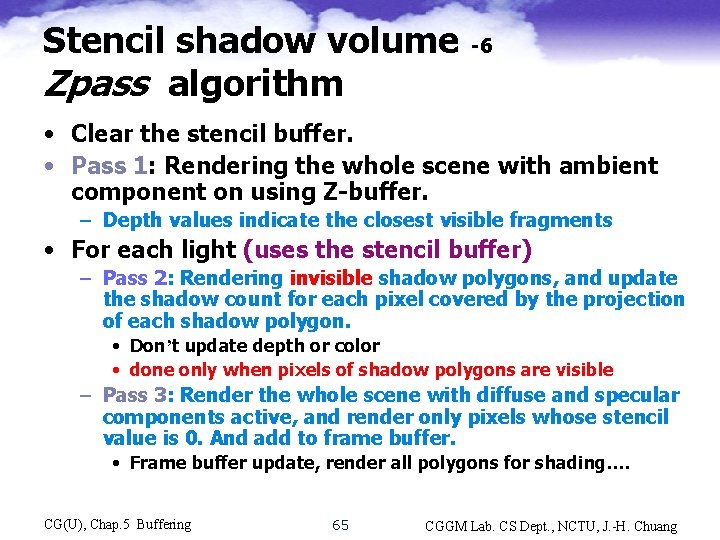
Stencil shadow volume Zpass algorithm -6 • Clear the stencil buffer. • Pass 1: Rendering the whole scene with ambient component on using Z-buffer. – Depth values indicate the closest visible fragments • For each light (uses the stencil buffer) – Pass 2: Rendering invisible shadow polygons, and update the shadow count for each pixel covered by the projection of each shadow polygon. • Don’t update depth or color • done only when pixels of shadow polygons are visible – Pass 3: Render the whole scene with diffuse and specular components active, and render only pixels whose stencil value is 0. And add to frame buffer. • Frame buffer update, render all polygons for shading…. CG(U), Chap. 5 Buffering 65 CGGM Lab. CS Dept. , NCTU, J. -H. Chuang
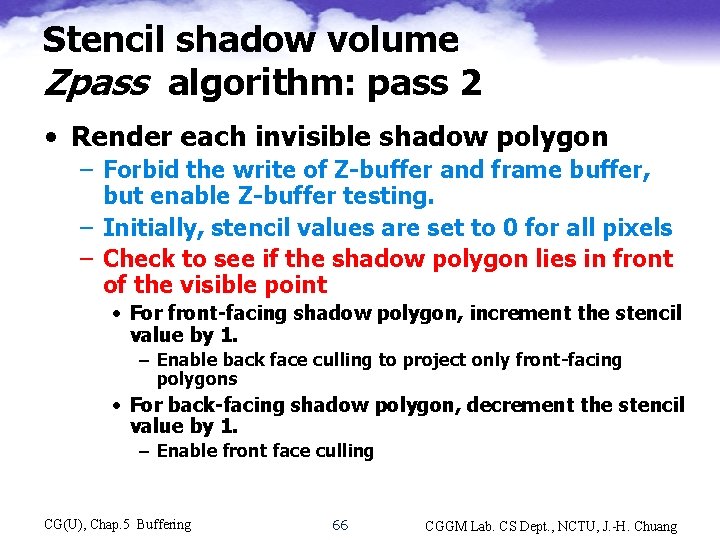
Stencil shadow volume Zpass algorithm: pass 2 • Render each invisible shadow polygon – Forbid the write of Z-buffer and frame buffer, but enable Z-buffer testing. – Initially, stencil values are set to 0 for all pixels – Check to see if the shadow polygon lies in front of the visible point • For front-facing shadow polygon, increment the stencil value by 1. – Enable back face culling to project only front-facing polygons • For back-facing shadow polygon, decrement the stencil value by 1. – Enable front face culling CG(U), Chap. 5 Buffering 66 CGGM Lab. CS Dept. , NCTU, J. -H. Chuang
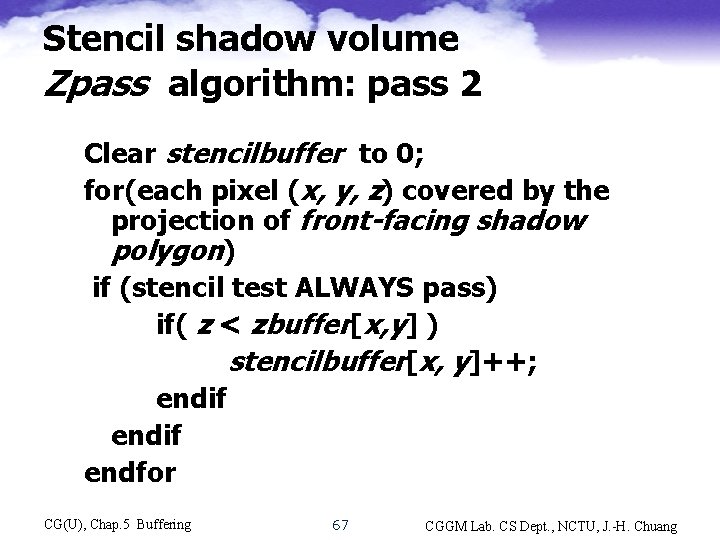
Stencil shadow volume Zpass algorithm: pass 2 Clear stencilbuffer to 0; for(each pixel (x, y, z) covered by the projection of front-facing shadow polygon) if (stencil test ALWAYS pass) if( z < zbuffer[x, y] ) stencilbuffer[x, y]++; endif endfor CG(U), Chap. 5 Buffering 67 CGGM Lab. CS Dept. , NCTU, J. -H. Chuang
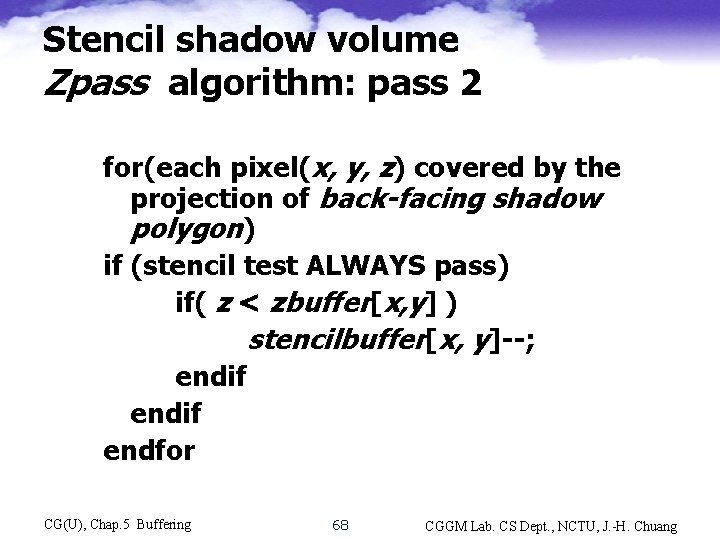
Stencil shadow volume Zpass algorithm: pass 2 for(each pixel(x, y, z) covered by the projection of back-facing shadow polygon) if (stencil test ALWAYS pass) if( z < zbuffer[x, y] ) stencilbuffer[x, y]--; endif endfor CG(U), Chap. 5 Buffering 68 CGGM Lab. CS Dept. , NCTU, J. -H. Chuang
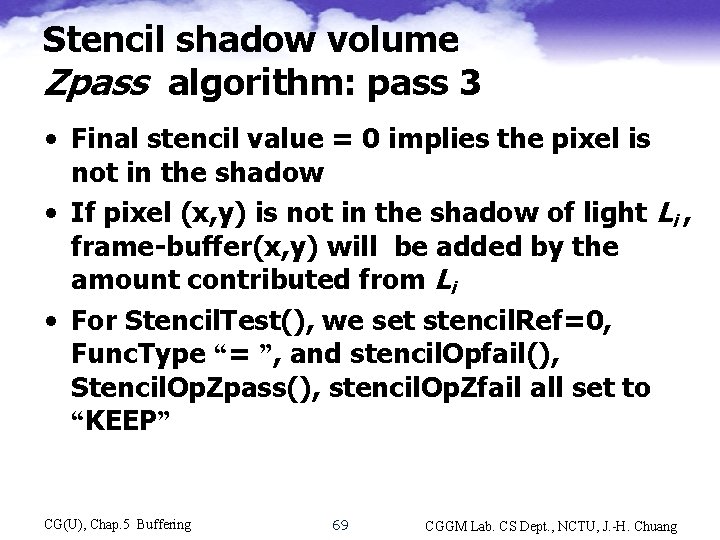
Stencil shadow volume Zpass algorithm: pass 3 • Final stencil value = 0 implies the pixel is not in the shadow • If pixel (x, y) is not in the shadow of light Li , frame-buffer(x, y) will be added by the amount contributed from Li • For Stencil. Test(), we set stencil. Ref=0, Func. Type “= ”, and stencil. Opfail(), Stencil. Op. Zpass(), stencil. Op. Zfail all set to “KEEP” CG(U), Chap. 5 Buffering 69 CGGM Lab. CS Dept. , NCTU, J. -H. Chuang
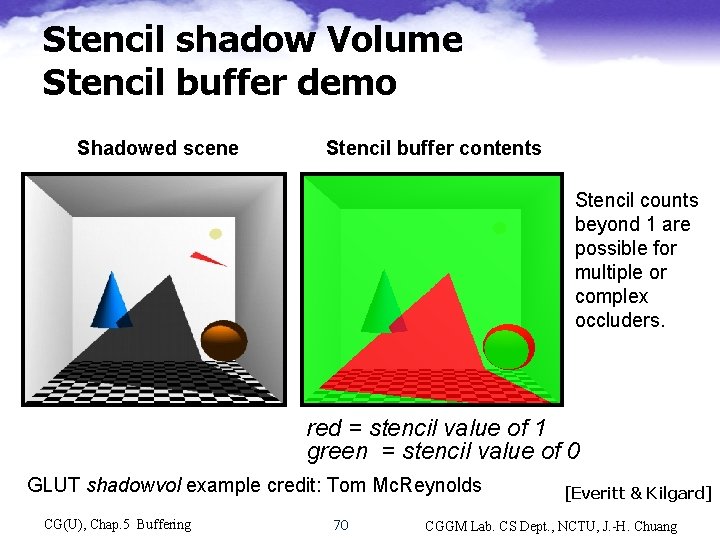
Stencil shadow Volume Stencil buffer demo Shadowed scene Stencil buffer contents Stencil counts beyond 1 are possible for multiple or complex occluders. red = stencil value of 1 green = stencil value of 0 GLUT shadowvol example credit: Tom Mc. Reynolds CG(U), Chap. 5 Buffering 70 [Everitt & Kilgard] CGGM Lab. CS Dept. , NCTU, J. -H. Chuang
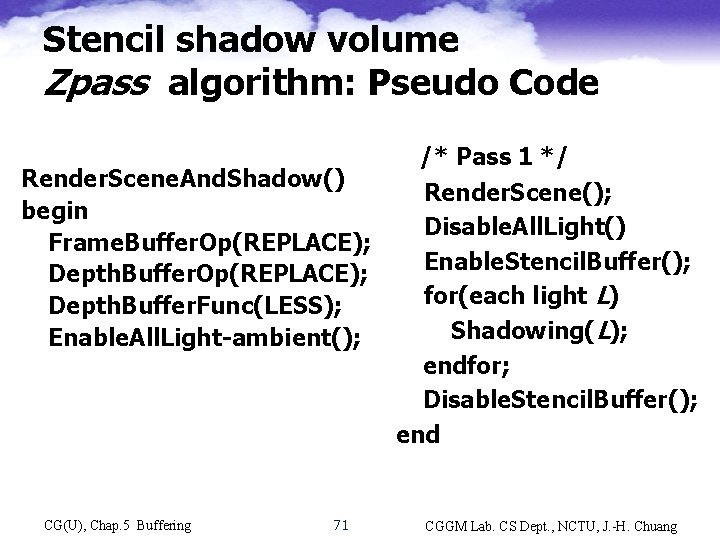
Stencil shadow volume Zpass algorithm: Pseudo Code /* Pass 1 */ Render. Scene. And. Shadow() Render. Scene(); begin Disable. All. Light() Frame. Buffer. Op(REPLACE); Enable. Stencil. Buffer(); Depth. Buffer. Op(REPLACE); for(each light L) Depth. Buffer. Func(LESS); Shadowing(L); Enable. All. Light-ambient(); endfor; Disable. Stencil. Buffer(); end CG(U), Chap. 5 Buffering 71 CGGM Lab. CS Dept. , NCTU, J. -H. Chuang
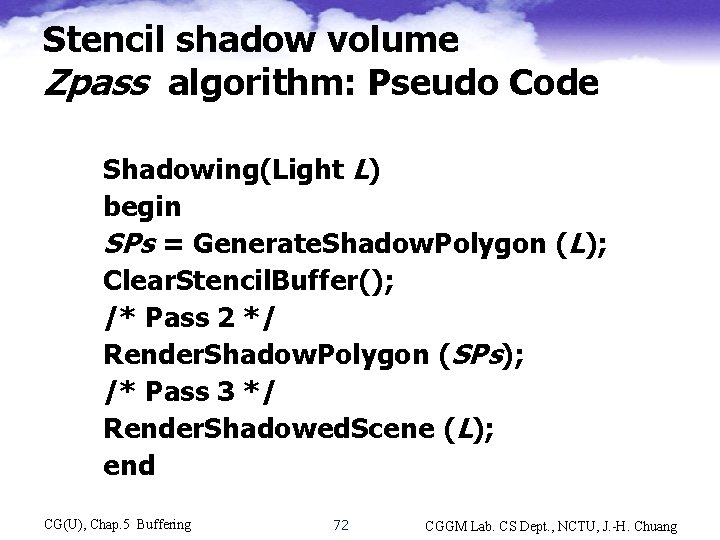
Stencil shadow volume Zpass algorithm: Pseudo Code Shadowing(Light L) begin SPs = Generate. Shadow. Polygon (L); Clear. Stencil. Buffer(); /* Pass 2 */ Render. Shadow. Polygon (SPs); /* Pass 3 */ Render. Shadowed. Scene (L); end CG(U), Chap. 5 Buffering 72 CGGM Lab. CS Dept. , NCTU, J. -H. Chuang
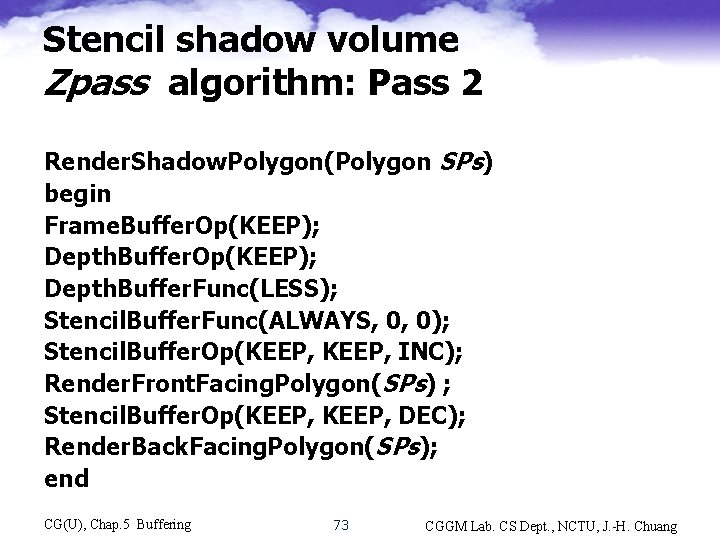
Stencil shadow volume Zpass algorithm: Pass 2 Render. Shadow. Polygon(Polygon SPs) begin Frame. Buffer. Op(KEEP); Depth. Buffer. Func(LESS); Stencil. Buffer. Func(ALWAYS, 0, 0); Stencil. Buffer. Op(KEEP, INC); Render. Front. Facing. Polygon(SPs) ; Stencil. Buffer. Op(KEEP, DEC); Render. Back. Facing. Polygon(SPs); end CG(U), Chap. 5 Buffering 73 CGGM Lab. CS Dept. , NCTU, J. -H. Chuang
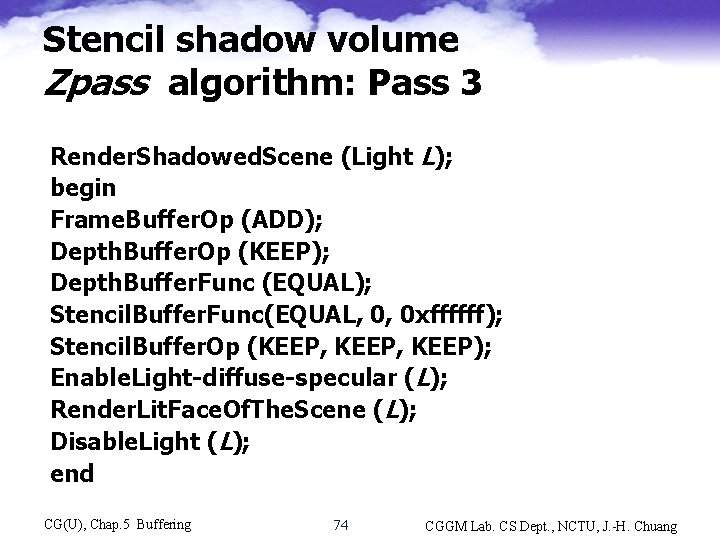
Stencil shadow volume Zpass algorithm: Pass 3 Render. Shadowed. Scene (Light L); begin Frame. Buffer. Op (ADD); Depth. Buffer. Op (KEEP); Depth. Buffer. Func (EQUAL); Stencil. Buffer. Func(EQUAL, 0, 0 xffffff); Stencil. Buffer. Op (KEEP, KEEP); Enable. Light-diffuse-specular (L); Render. Lit. Face. Of. The. Scene (L); Disable. Light (L); end CG(U), Chap. 5 Buffering 74 CGGM Lab. CS Dept. , NCTU, J. -H. Chuang
- Slides: 74