
Chapter 41 Telephone Techniques Copyright 2016 by Elsevier

Chapter 41 Telephone Techniques Copyright 2016 by Elsevier Inc. All rights reserved. 1
Lesson 41. 1 Objectives Describe the importance of effective telephone courtesy and a pleasing telephone personality for the medical assistant. Explain the use of multiline telephones, cell phones, smartphones, and pagers in the medical office. Differentiate between incoming telephone calls the medical assistant can handle and other incoming calls. Describe the correct procedure for screening incoming calls. Copyright 2016 by Elsevier Inc. All rights reserved. 2

Introduction to Telephone Techniques The telephone may be the first contact with the medical office Managing the telephone is one of the most important jobs in the medical office Copyright 2016 by Elsevier Inc. All rights reserved. 3
Telephone Courtesy The telephone should be answered promptly, within three rings The medical assistant (MA) identifies the office and himself or herself Copyright 2016 by Elsevier Inc. All rights reserved. 4
Telephone Courtesy Important to ask politely who is calling Always speak before putting someone on hold Avoid putting a physician on hold Check back at least every 30 seconds with a caller on hold Avoid doing something else while on the phone Other work Chewing gum or eating Copyright 2016 by Elsevier Inc. All rights reserved. 5
Telephone Personality Telephone voice gives nonverbal cues Interest, friendliness, concern, and understanding are communicated Boredom, anxiety, and lack of concern are also communicated MA should stay focused on the call and smile Copyright 2016 by Elsevier Inc. All rights reserved. 6
Telephone Personality Use the same volume as when speaking in person Avoid developing an artificial telephone voice, which often comes across as cold and unreal Enunciate clearly (speak clearly) Copyright 2016 by Elsevier Inc. All rights reserved. 7
Effective Telephone Communication The caller needs to have the MA’s complete attention Try to complete call without interruption Being organized facilitates handling calls Copyright 2016 by Elsevier Inc. All rights reserved. 8
Effective Telephone Communication Have information and materials available to handle the majority of phone calls Message slips Pens Appointment book or computer appointment screen List of frequently called numbers Desk clock, computer clock, or wrist watch to note time of messages Copyright 2016 by Elsevier Inc. All rights reserved. 9
Effective Telephone Communication Begin by identifying the practice and giving own name Ask for caller’s name if caller fails to identify self Use complete sentences and avoid being abrupt Important to use good posture when talking on the telephone Back supported Neck in neutral position Feet flat on the floor or supported on a footstool Copyright 2016 by Elsevier Inc. All rights reserved. 10
Effective Telephone Communication Use headset if answering telephone is a frequent duty Tucking receiver between head and shoulder places strain on shoulder muscles Headset allows for good body posture and leaves hands free Copyright 2016 by Elsevier Inc. All rights reserved. 11
Effective Telephone Communication Be clear with callers about when they can expect their calls to be returned Avoid cutting into a person’s replies—even if he or she rambles Let the caller know what the MA can and will do for follow-up Copyright 2016 by Elsevier Inc. All rights reserved. 12
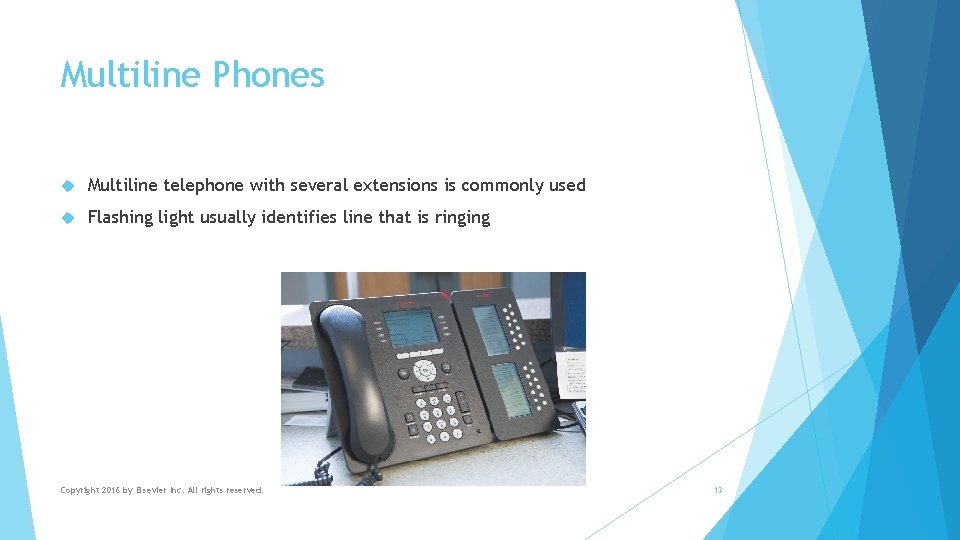
Multiline Phones Multiline telephone with several extensions is commonly used Flashing light usually identifies line that is ringing Copyright 2016 by Elsevier Inc. All rights reserved. 13
Multiline Phones Should handle second call and return to first as soon as possible Tell first caller he or she will be placed on hold Handle calls in order Calls are transferred if caller asks for another person or extension Caller is identified before transferring the call Helpful to keep names of callers on hold written down If hold light continues to flash, should check with caller every 30 seconds to be sure call goes through Copyright 2016 by Elsevier Inc. All rights reserved. 14
Multiline Phones Special Features Speed dialing: storage of frequently called numbers Call forwarding: send calls to another extension or telephone number Call park: place call on hold and retrieve from another number Caller ID: identifies caller’s telephone number Copyright 2016 by Elsevier Inc. All rights reserved. 15
Answering Machines and Voice Mail Answering service Used by most physician’s offices when office is closed Independent company answers telephones for a number of clients Some offices use an answering machine with message and instructions Copyright 2016 by Elsevier Inc. All rights reserved. 16
Answering Machines and Voice Mail Built into the telephone system Messages can be left in a number of “mailboxes” for different people May have mailboxes for each staff member Each voice mailbox has a separate extension In some systems can enter last name of person being called if extension is not known Offices with voice mail also rely on answering services for calls after hours Copyright 2016 by Elsevier Inc. All rights reserved. 17
Cell Phones and Smartphones Cell phone uses radio signals for telephone contact Smartphone has additional features Copyright 2016 by Elsevier Inc. All rights reserved. 18
Cell Phones and Smartphones Smartphone has additional features Internet connection Ability to send and receive e-mails In some cases, access to patient electronic medical records Physician cell phone numbers should not be given to patients Copyright 2016 by Elsevier Inc. All rights reserved. 19
Pagers Direct dial to pagers (beepers) Digital pagers: leave a number to return call Alphanumeric pagers: display a message in addition to telephone number Used when area has unreliable cell phone service or in larger institutions Simple pager can be used so that patients can leave the waiting room Copyright 2016 by Elsevier Inc. All rights reserved. 20
Centralized or Electronic Routing Electronic (voice mail) routing system directs call to appropriate part of office Saves expense of a staff person who would otherwise be answering the phone Electronic routing keeps patients from being put on hold Copyright 2016 by Elsevier Inc. All rights reserved. 21
Centralized or Electronic Routing Some patients find electronic routing confusing and frustrating Must listen to a number of options Person they need to speak to may not be available Person they need to speak to may not return call promptly Copyright 2016 by Elsevier Inc. All rights reserved. 22
Centralized or Electronic Routing Calls answered by the MA offer the human touch One person is responsible for routing calls Person gives a little more attention to individuals who might be confused by voice mail Copyright 2016 by Elsevier Inc. All rights reserved. 23
Performing Telephone Screening MA decides how important the call is Routine calls are handled in the order they come in Calls from physicians are put through at once Emergency calls are treated as urgent and receive top priority Calls from the physician’s relatives may be put through Copyright 2016 by Elsevier Inc. All rights reserved. 24
Performing Telephone Screening It is polite to obtain the caller’s name and ask to put the call on hold MA decides who should handle the call If caller asks for member of the office staff by name, call is transferred If caller has a question, MA decides best person to answer call Most physicians don’t take calls while seeing patients unless they have told staff to put a certain caller through or unless it is another physician Copyright 2016 by Elsevier Inc. All rights reserved. 25
Calls the Medical Assistant Usually Handles Requests to schedule appointments May schedule office appointments or outside laboratory or hospital appointments May schedule tests for patients Billing inquiries Refers to the patient account in the computer Gives caller the information requested May refer caller to billing specialist or office manager Copyright 2016 by Elsevier Inc. All rights reserved. 26
Calls the Medical Assistant Usually Handles Receiving diagnostic test and laboratory results Results may be sent by fax or computer If telephoned, MA takes information on blank laboratory slip Records patient’s name and date when tests were taken Pulls patient medical record after taking results and clips results to front Records all data accurately Copyright 2016 by Elsevier Inc. All rights reserved. 27
Calls the Medical Assistant Usually Handles Requests for information Gives directions to the office Explains office hours and office’s medical specialty Copyright 2016 by Elsevier Inc. All rights reserved. 28
Lesson 41. 2 Objectives Describe the correct procedure for taking messages and transcribing messages recorded on an answering machine or voicemail. Identify the correct steps to respond to a telephone call regarding an emergency or urgent medical problem. Describe how to deal with problem calls. Explain how the medical assistant should make outgoing telephone calls. Copyright 2016 by Elsevier Inc. All rights reserved. 29
Taking Messages on a Paper Message Form Best to use message pad that makes a copy If message form does not make a copy, MA keeps a telephone log Copyright 2016 by Elsevier Inc. All rights reserved. 30
Taking Messages on a Paper Message Form Do not write in a space intended for physician follow-up Include all information Date and time Name of physician or staff member being called Patient’s full name and date of birth Clear message that indicates what the caller wants Copyright 2016 by Elsevier Inc. All rights reserved. 31
Taking Messages on a Paper Message Form Include all information Additional information to clarify the message Medication allergies if patient is ill or requests medication Telephone number to return call and pharmacy telephone number if appropriate Initials of MA taking the message Use message form when transcribing messages from answering machine or voice mail Copyright 2016 by Elsevier Inc. All rights reserved. 32
Taking Messages on the Computer Phone message can be taken on standalone computer or EMR Messages can be forwarded to one or two recipients Patient’s medical record can be attached to the message. Copyright 2016 by Elsevier Inc. All rights reserved. 33
Patients Requesting Test Results Find out when and where the test was done Locate the medical record and be sure laboratory report and results are in the record Leave the message and the medical record for the physician Follow up as instructed by physician Call patient with results Schedule follow-up test or appointment Copyright 2016 by Elsevier Inc. All rights reserved. 34
Patients Reporting Satisfactory or Unsatisfactory Progress If patient reports satisfactory progress, take brief message If patient reports unsatisfactory progress, take a more complete message Place medical record with message for physician to review Copyright 2016 by Elsevier Inc. All rights reserved. 35
Requests for Medication and Prescription Refills MA gets patient’s name and date of birth Identifies medication, dosage, and number prescribed before Copyright 2016 by Elsevier Inc. All rights reserved. 36
Requests for Medication and Prescription Refills If patient calls, gets the pharmacy phone number and how often the patient takes the medication If the medication is an antibiotic or controlled substance, asks about symptoms that require a refill Copyright 2016 by Elsevier Inc. All rights reserved. 37
Requests for Medication and Prescription Refills Instruct the patient to check with the pharmacy the next day Physician follows up directly with the pharmacy or writes a message for the MA to call in If MA calls the pharmacy, should always document in the medical record Copyright 2016 by Elsevier Inc. All rights reserved. 38
Calls for Referrals or Requesting Laboratory or Diagnostic Tests Patient may call to say he or she needs a referral to see a specialist or to have laboratory work MA records the necessary information Checks with the physician to make sure referral is necessary Completes referral forms as completely as possible and obtains signature Copyright 2016 by Elsevier Inc. All rights reserved. 39
Calls for Referrals or Requesting Laboratory or Diagnostic Tests Patient may request a laboratory or diagnostic test MA obtains authorization from the physician Completes necessary laboratory slip for patient to pick up or enters information into computer Copyright 2016 by Elsevier Inc. All rights reserved. 40
Patients with Medical Questions Take a message for a physician or refer call to other staff member Office should have written guidelines to screen medical questions Copyright 2016 by Elsevier Inc. All rights reserved. 41
Calls from Other Physicians Put calls from physicians right through to the physician Give the name of the calling physician May need to transfer the call to another extension for privacy Copyright 2016 by Elsevier Inc. All rights reserved. 42
Calls from Salespeople are often seen by the office manager, who gives information to the physician Drug representative must call for an appointment with the physician These appointments usually made during lunch Physician must agree before such an appointment is made Copyright 2016 by Elsevier Inc. All rights reserved. 43
Urgent or Emergency Calls MA should remain calm and get the following information Caller’s name Caller’s phone number Identity of person who has the problem and relationship to caller Patient’s symptoms and current condition Brief history of symptoms or accident Any treatment that has already been given Copyright 2016 by Elsevier Inc. All rights reserved. 44
Urgent or Emergency Calls Follow office procedure after determining nature of urgent call using procedure manual If no licensed professional in the office, the MA must advise the caller If emergency is serious or life threatening, tell caller to call an ambulance (911) MA may make the call for the caller If a case of poisoning, instruct caller to call poison control center for your area If patient can walk, caller can be instructed to take the patient to the emergency department or call an ambulance Copyright 2016 by Elsevier Inc. All rights reserved. 45
Urgent or Emergency Calls If problem can be treated in office, gives patient an appointment If MA is unsure how urgent the problem is, contacts physician for instructions If in doubt, it is always safer for the MA to instruct the patient to call an ambulance Copyright 2016 by Elsevier Inc. All rights reserved. 46
The Caller Who Refuses to Give Information Usually an individual who wants to speak to the physician Explain that the caller’s name and telephone number are necessary to take a message Caller can write a letter to the physician and mark it personal Copyright 2016 by Elsevier Inc. All rights reserved. 47
Complaints Listen carefully Avoid getting angry Act professional and be patient Get as much information from the caller as possible Copyright 2016 by Elsevier Inc. All rights reserved. 48
Complaints Avoid hanging up on an angry caller Keep voice at normal speaking tone Instruct patient what follow-up to expect and when to expect it Copyright 2016 by Elsevier Inc. All rights reserved. 49
Patients with Special Problems Listen carefully and try as much as possible to understand Always obtain caller’s name and telephone number Speak slowly and clearly without shouting Use simple language Copyright 2016 by Elsevier Inc. All rights reserved. 50
Patients with Special Problems Ask if caller understands what you are saying Get translator if necessary If patient seems confused, ask if there is another person who can help Copyright 2016 by Elsevier Inc. All rights reserved. 51
Local Calls Privacy should be provided when making calls to patients Leave only office name and telephone number with request for patient to call back on answering machine If calling about bill, discuss only with patient If placing a call for a physician, make sure physician is ready to talk first Staff should not make or receive personal calls except for emergencies Copyright 2016 by Elsevier Inc. All rights reserved. 52
Appointment Reminders Reminder calls are usually made 24 to 48 hours prior to scheduled appointments Leave minimum information in a message to preserve patient privacy Automated reminder calls can be scheduled via computer program Patients hear a recorded message May be able to confirm or cancel the appointment Patient can call the office with any questions Copyright 2016 by Elsevier Inc. All rights reserved. 53
Long Distance Calls Can usually be dialed directly Directory assistance is 411 Should be aware of different time zones when making long distance calls Copyright 2016 by Elsevier Inc. All rights reserved. 54
Conference Calls Some phone systems allow conference calls among three parties MA may set up conference calls among more than three parties with a telephone carrier May need to notify all parties of call number and participant code in writing Can notify via e-mail Can notify by telephone with follow-up fax Copyright 2016 by Elsevier Inc. All rights reserved. 55
- Slides: 55