
Chapter 4 Networking and the Internet Computer Science
- Slides: 51
Chapter 4: Networking and the Internet Computer Science: An Overview Twelfth Edition by J. Glenn Brookshear Dennis Brylow Copyright © 2015 Pearson Education, Inc.
Chapter 4: Networking and the Internet • • • 4. 1 Network Fundamentals 4. 2 The Internet 4. 3 The World Wide Web 4. 4 Internet Protocols 4. 5 Security Copyright © 2015 Pearson Education, Inc. 4 -2
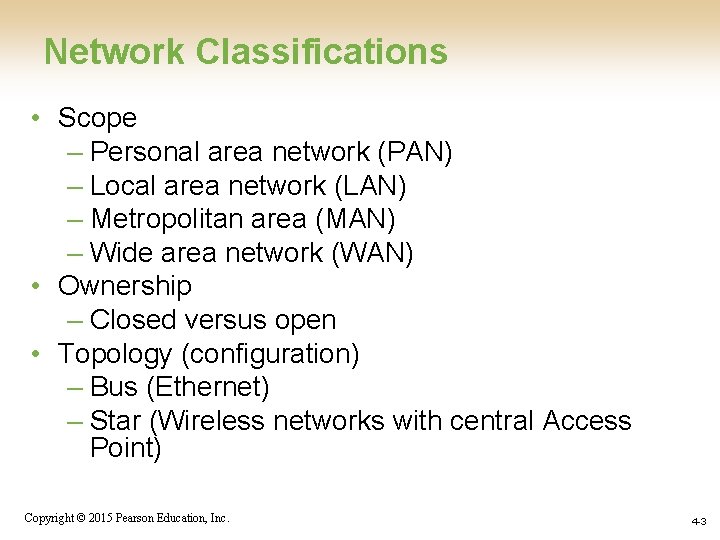
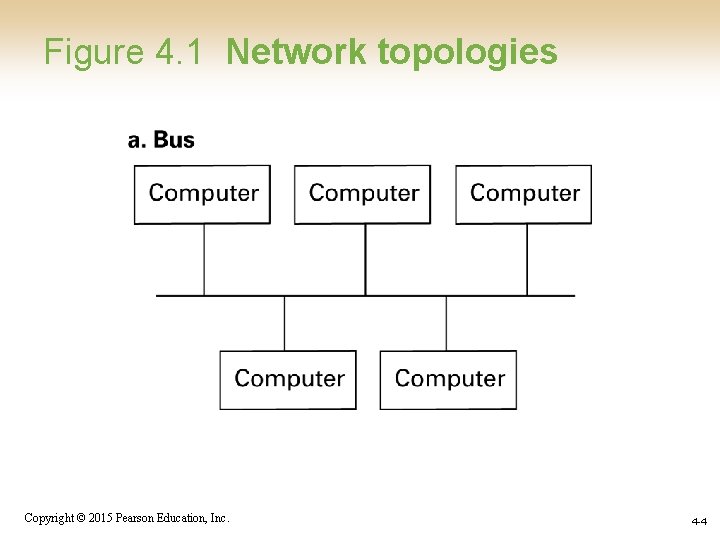
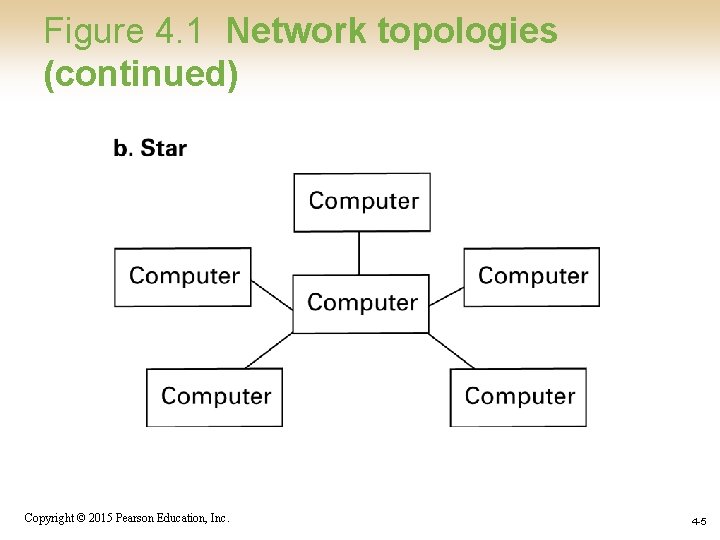
Network Classifications • Scope – Personal area network (PAN) – Local area network (LAN) – Metropolitan area (MAN) – Wide area network (WAN) • Ownership – Closed versus open • Topology (configuration) – Bus (Ethernet) – Star (Wireless networks with central Access Point) Copyright © 2015 Pearson Education, Inc. 4 -3
Figure 4. 1 Network topologies Copyright © 2015 Pearson Education, Inc. 4 -4
Figure 4. 1 Network topologies (continued) Copyright © 2015 Pearson Education, Inc. 4 -5
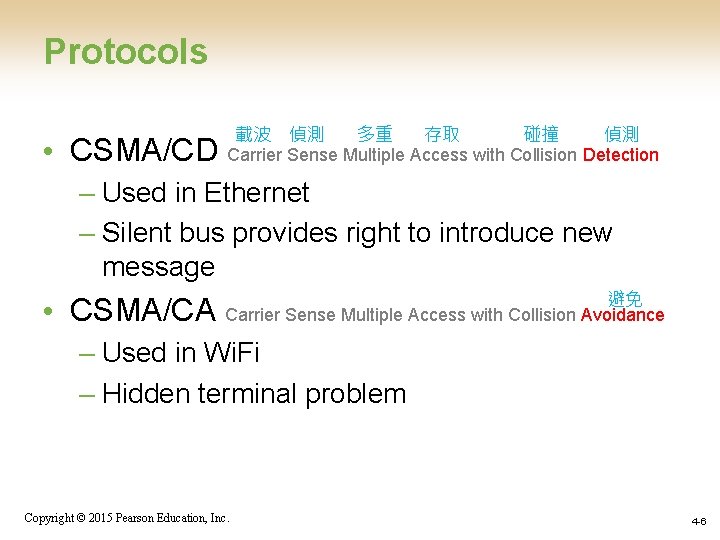
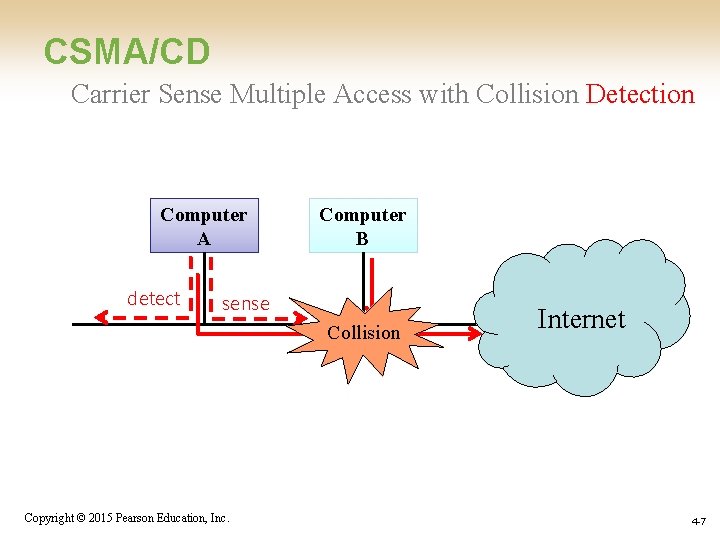
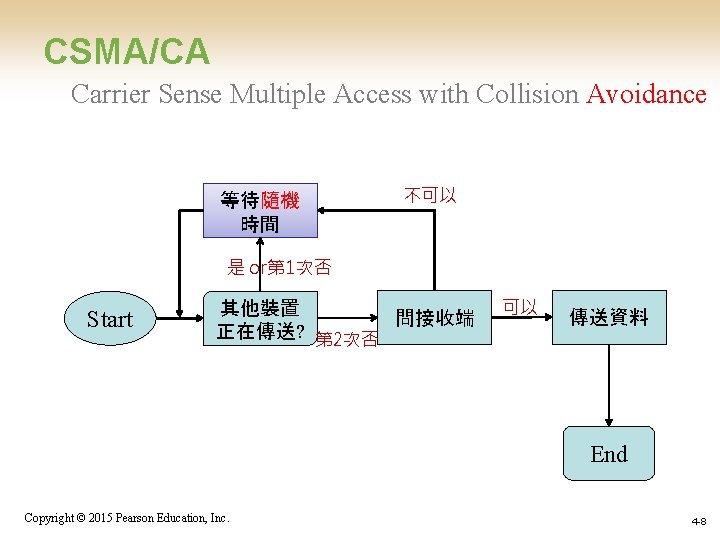
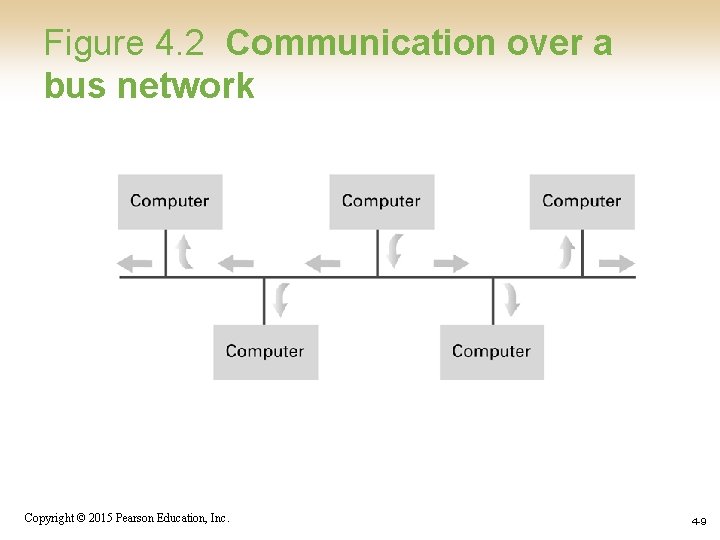
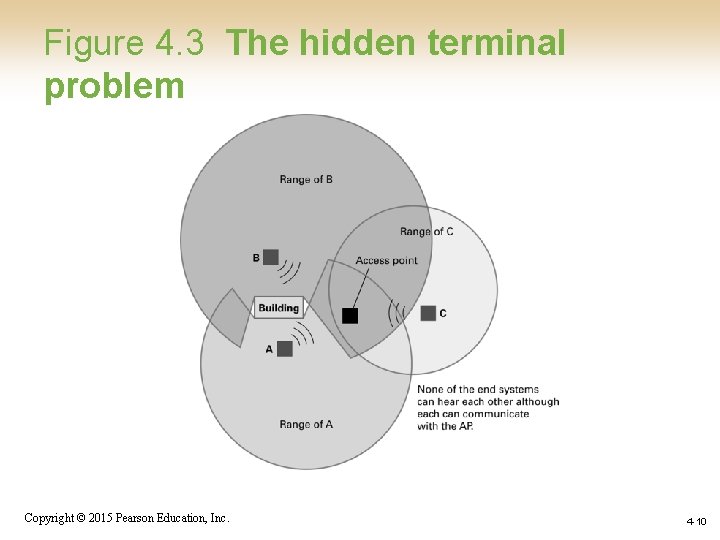
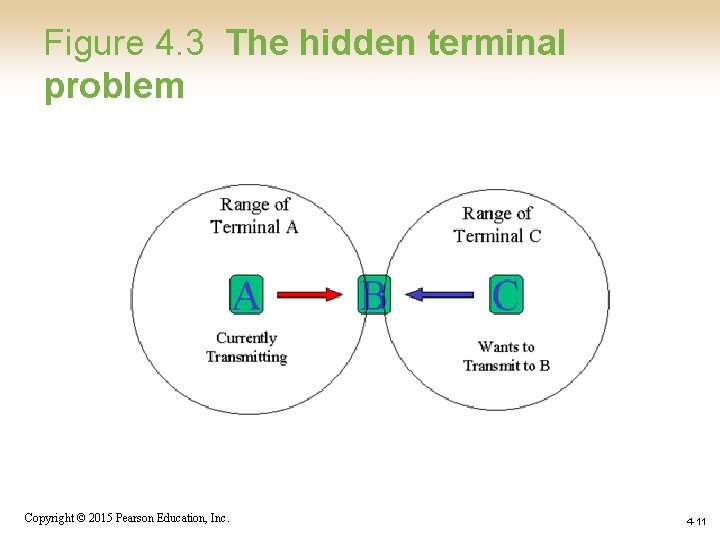
Protocols • CSMA/CD 載波 偵測 多重 存取 碰撞 偵測 Carrier Sense Multiple Access with Collision Detection – Used in Ethernet – Silent bus provides right to introduce new message • CSMA/CA 避免 Carrier Sense Multiple Access with Collision Avoidance – Used in Wi. Fi – Hidden terminal problem Copyright © 2015 Pearson Education, Inc. 4 -6
CSMA/CD Carrier Sense Multiple Access with Collision Detection Computer A detect Computer B sense Collision Copyright © 2015 Pearson Education, Inc. Internet 4 -7
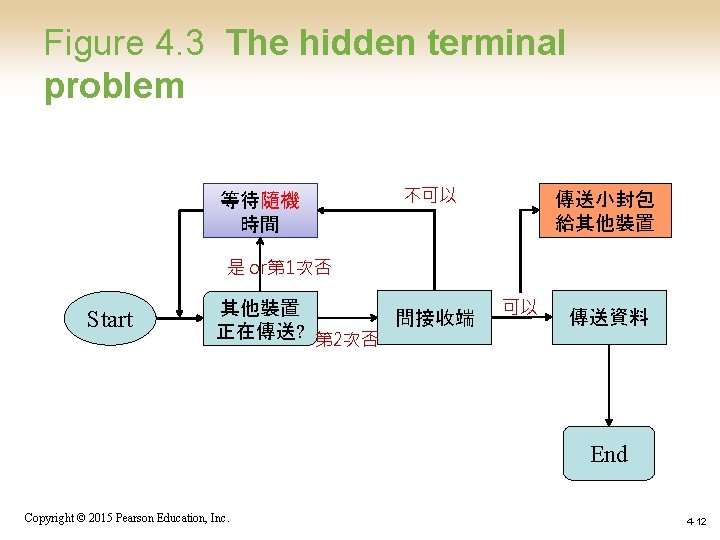
CSMA/CA Carrier Sense Multiple Access with Collision Avoidance 等待隨機 時間 不可以 是 or第 1次否 Start 其他裝置 問接收端 正在傳送? 第 2次否 可以 傳送資料 End Copyright © 2015 Pearson Education, Inc. 4 -8
Figure 4. 2 Communication over a bus network Copyright © 2015 Pearson Education, Inc. 4 -9
Figure 4. 3 The hidden terminal problem Copyright © 2015 Pearson Education, Inc. 4 -10
Figure 4. 3 The hidden terminal problem Copyright © 2015 Pearson Education, Inc. 4 -11
Figure 4. 3 The hidden terminal problem 等待隨機 時間 不可以 傳送小封包 給其他裝置 是 or第 1次否 Start 其他裝置 問接收端 正在傳送? 第 2次否 可以 傳送資料 End Copyright © 2015 Pearson Education, Inc. 4 -12
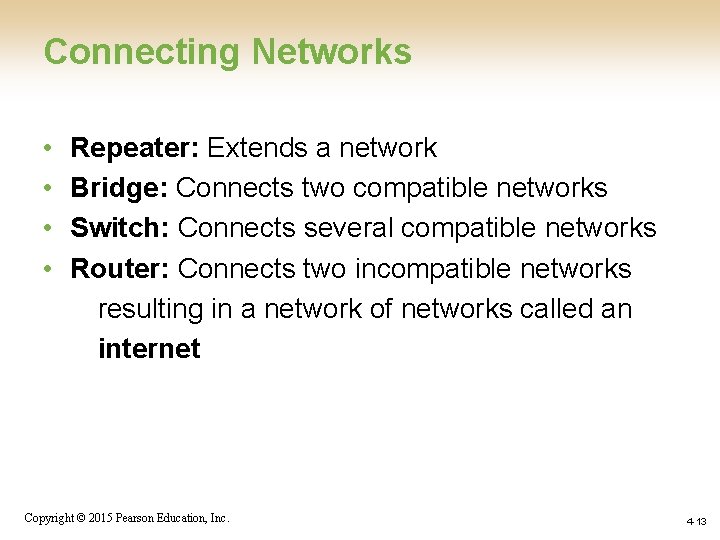
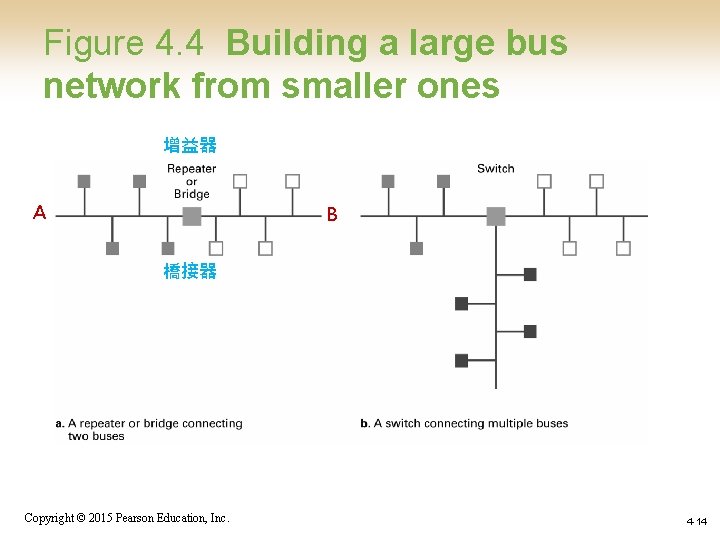
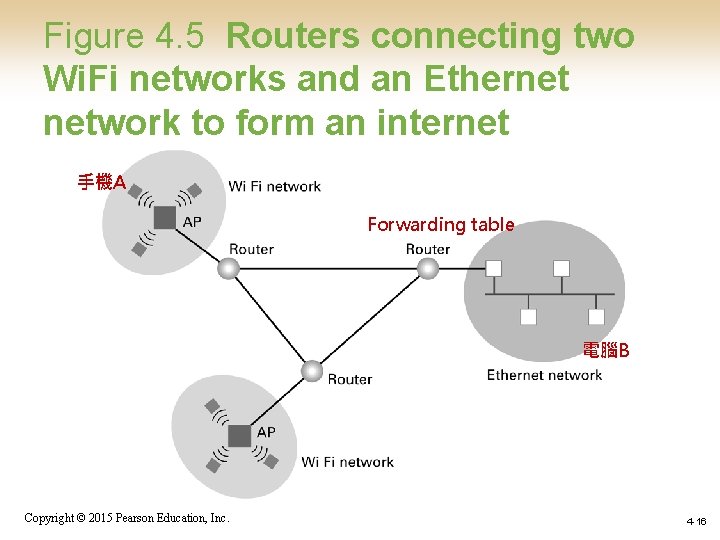
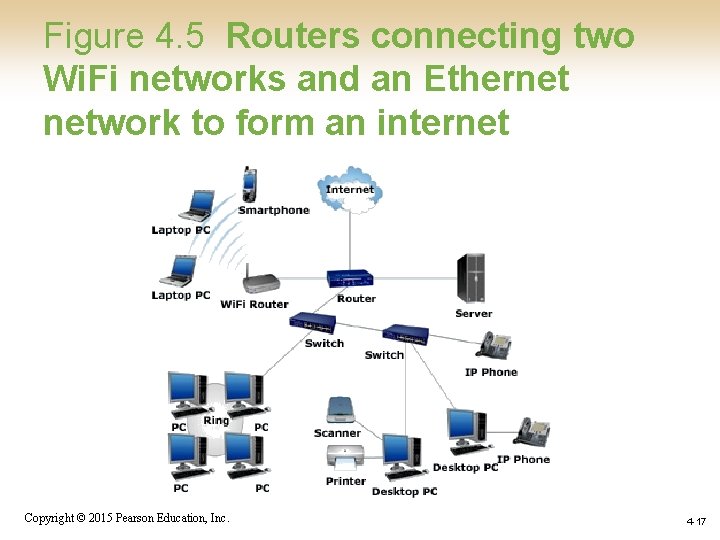
Connecting Networks • • Repeater: Extends a network Bridge: Connects two compatible networks Switch: Connects several compatible networks Router: Connects two incompatible networks resulting in a network of networks called an internet Copyright © 2015 Pearson Education, Inc. 4 -13
Figure 4. 4 Building a large bus network from smaller ones 增益器 A B 橋接器 Copyright © 2015 Pearson Education, Inc. 4 -14
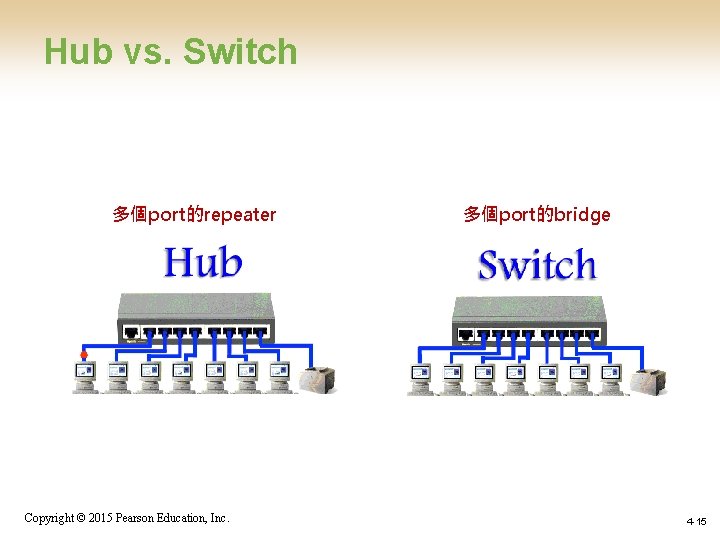
Hub vs. Switch 多個port的repeater Copyright © 2015 Pearson Education, Inc. 多個port的bridge 4 -15
Figure 4. 5 Routers connecting two Wi. Fi networks and an Ethernet network to form an internet 手機A Forwarding table 電腦B Copyright © 2015 Pearson Education, Inc. 4 -16
Figure 4. 5 Routers connecting two Wi. Fi networks and an Ethernet network to form an internet Copyright © 2015 Pearson Education, Inc. 4 -17
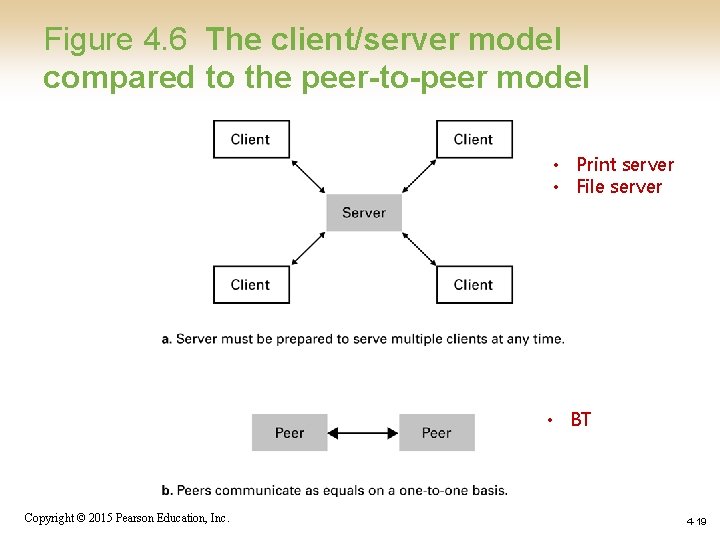
Inter-process Communication • Client-server – One server, many clients – Server must execute continuously – Client initiates communication • Peer-to-peer (P 2 P) – Two processes communicating as equals – Peer processes can be short-lived Copyright © 2015 Pearson Education, Inc. 4 -18
Figure 4. 6 The client/server model compared to the peer-to-peer model • Print server • File server • BT Copyright © 2015 Pearson Education, Inc. 4 -19
Distributed Systems 分散式系統 • Systems with parts that run on different computers – Cluster computing – Grid computing (中介軟體middleware) – Cloud computing • Amazon’s Elastic Compute Cloud • Google Drive • Gmail • Google Doc Copyright © 2015 Pearson Education, Inc. 4 -20
The Internet • The Internet: An internet that spans the world – Original goal was to develop a means of connecting networks that would not be disrupted by local disasters – Today a commercial undertaking that links a worldwide combination of PANs, LANs, MANs, and WANs involving millions of computers Copyright © 2015 Pearson Education, Inc. 4 -21
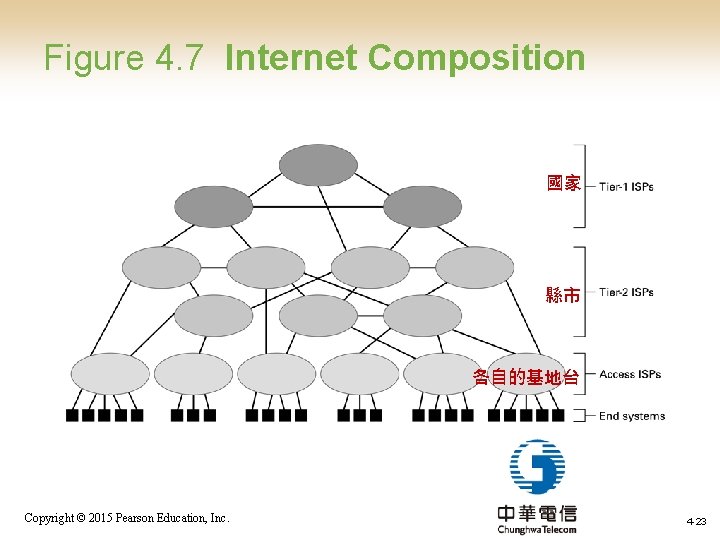
Internet Architecture • Internet Service Provider (ISP) – Tier-1 – Tier-2 • Access or tier-3 ISP: Provides connectivity to the Internet – Hot spot (wireless) – Telephone lines – Cable/Satellite systems DSL – Fiber optics Copyright © 2015 Pearson Education, Inc. 4 -22
Figure 4. 7 Internet Composition 國家 縣市 各自的基地台 Copyright © 2015 Pearson Education, Inc. 4 -23
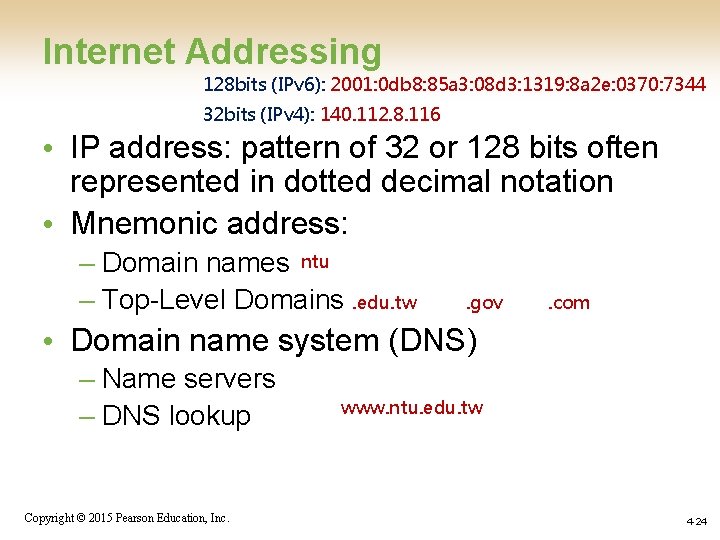
Internet Addressing 128 bits (IPv 6): 2001: 0 db 8: 85 a 3: 08 d 3: 1319: 8 a 2 e: 0370: 7344 32 bits (IPv 4): 140. 112. 8. 116 • IP address: pattern of 32 or 128 bits often represented in dotted decimal notation • Mnemonic address: – Domain names ntu – Top-Level Domains. edu. tw . gov . com • Domain name system (DNS) – Name servers – DNS lookup Copyright © 2015 Pearson Education, Inc. www. ntu. edu. tw 4 -24
Internet Corporation for Assigned Names & Numbers (ICANN) • Allocates IP addresses to ISPs who then assign those addresses within their regions. • Oversees the registration of domains and domain names. Copyright © 2015 Pearson Education, Inc. 4 -25
Early Internet Applications • • • Network News Transfer Protocol (NNTP) File Transfer Protocol (FTP) Telnet and SSH (Secure Shell) Hypertext Transfer Protocol (HTTP) Electronic Mail (email) – Domain mail server collects incoming mail and transmits outing mail – Mail server delivers collected incoming mail to clients via POP 3 or IMAP Copyright © 2015 Pearson Education, Inc. 4 -26
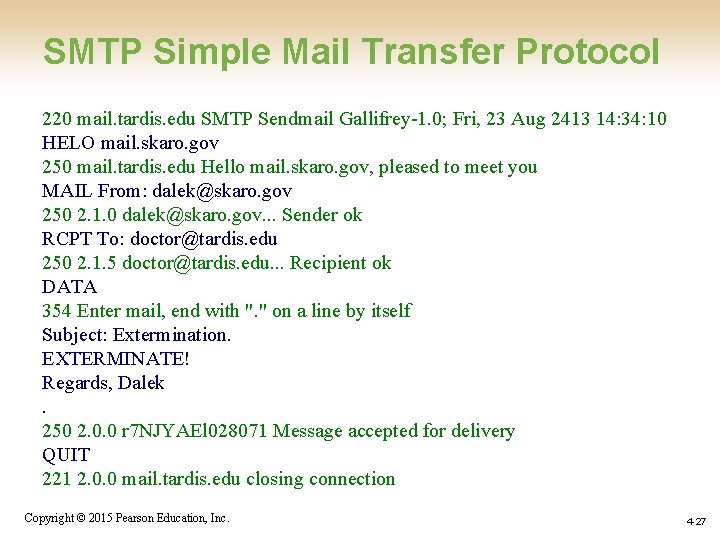
SMTP Simple Mail Transfer Protocol 220 mail. tardis. edu SMTP Sendmail Gallifrey-1. 0; Fri, 23 Aug 2413 14: 34: 10 HELO mail. skaro. gov 250 mail. tardis. edu Hello mail. skaro. gov, pleased to meet you MAIL From: dalek@skaro. gov 250 2. 1. 0 dalek@skaro. gov. . . Sender ok RCPT To: doctor@tardis. edu 250 2. 1. 5 doctor@tardis. edu. . . Recipient ok DATA 354 Enter mail, end with ". " on a line by itself Subject: Extermination. EXTERMINATE! Regards, Dalek. 250 2. 0. 0 r 7 NJYAEl 028071 Message accepted for delivery QUIT 221 2. 0. 0 mail. tardis. edu closing connection Copyright © 2015 Pearson Education, Inc. 4 -27
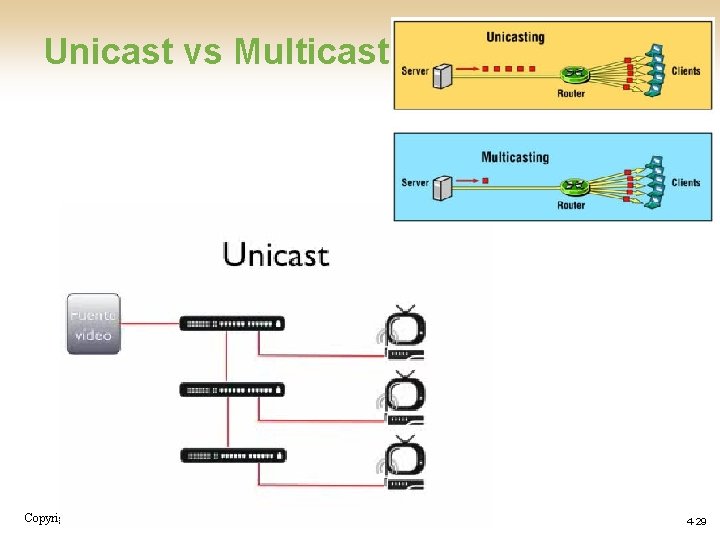
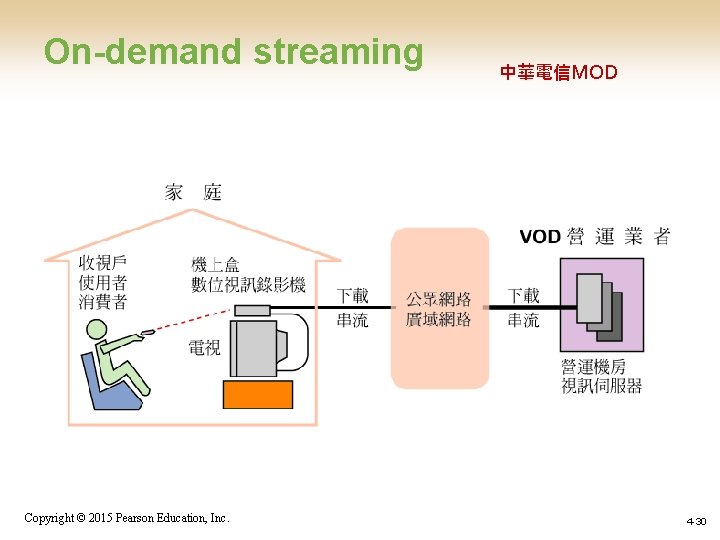
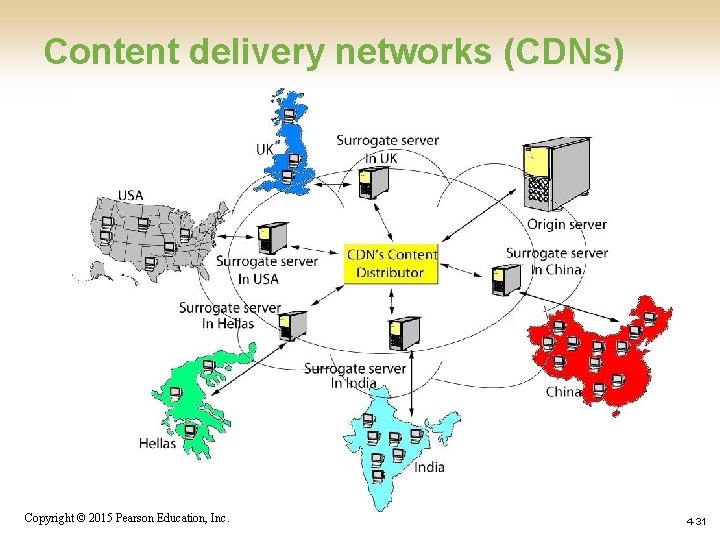
More Recent Applications Skype. Line. Hangouts • Voice Over IP (Vo. IP) • Internet Multimedia Streaming – N-unicast – Multicast – On-demand streaming – Content delivery networks (CDNs) Copyright © 2015 Pearson Education, Inc. 4 -28
Unicast vs Multicast Copyright © 2015 Pearson Education, Inc. 4 -29
On-demand streaming Copyright © 2015 Pearson Education, Inc. 中華電信MOD 4 -30
Content delivery networks (CDNs) Copyright © 2015 Pearson Education, Inc. 4 -31
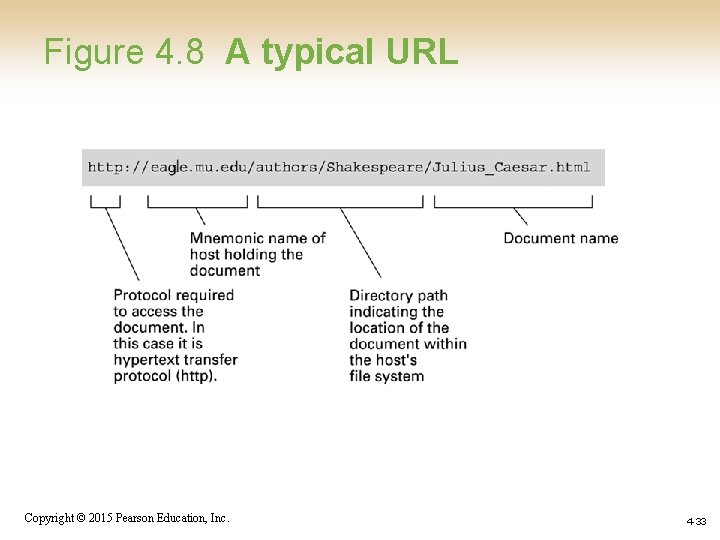
World Wide Web • Hypertext combines internet technology with concept of linked-documents – Embeds hyperlinks to other documents • Browsers present materials to the user • Webservers provide access to documents • Documents are identified by URLs and transferred using HTTP Copyright © 2015 Pearson Education, Inc. 4 -32
Figure 4. 8 A typical URL Copyright © 2015 Pearson Education, Inc. 4 -33
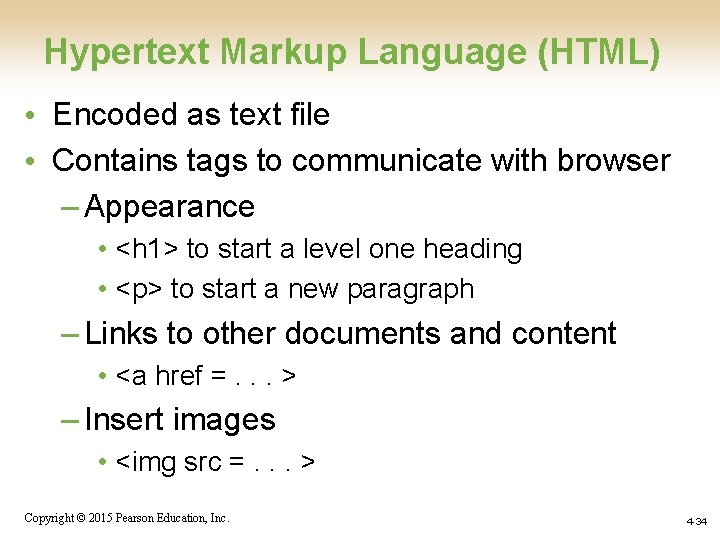
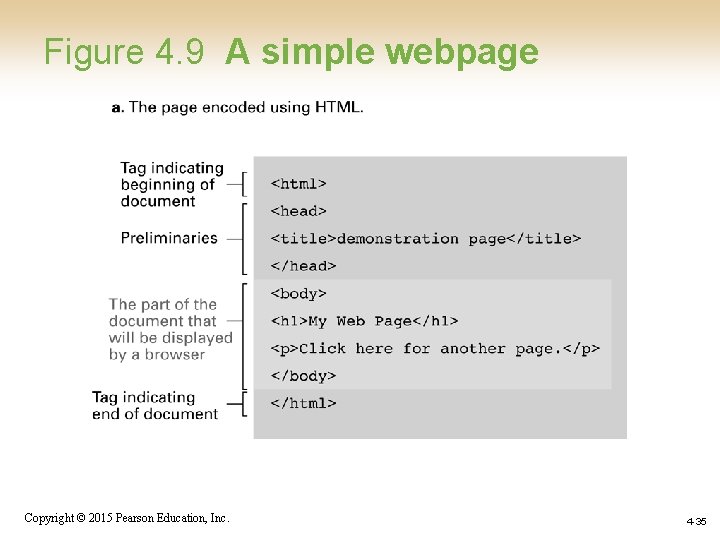
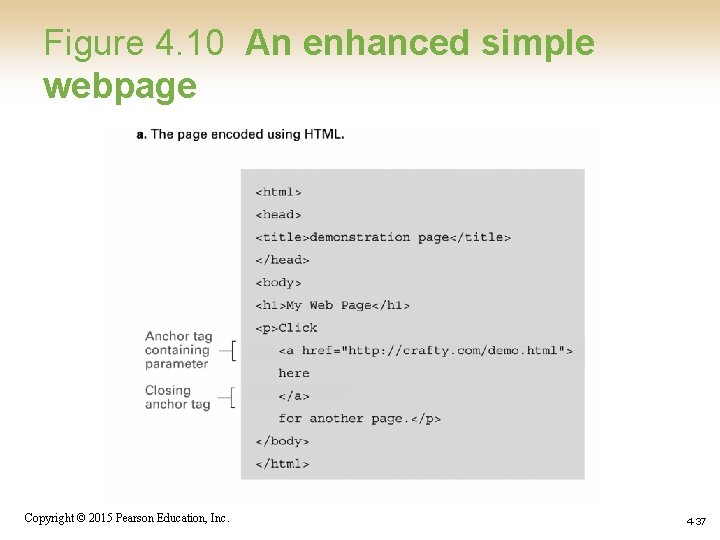
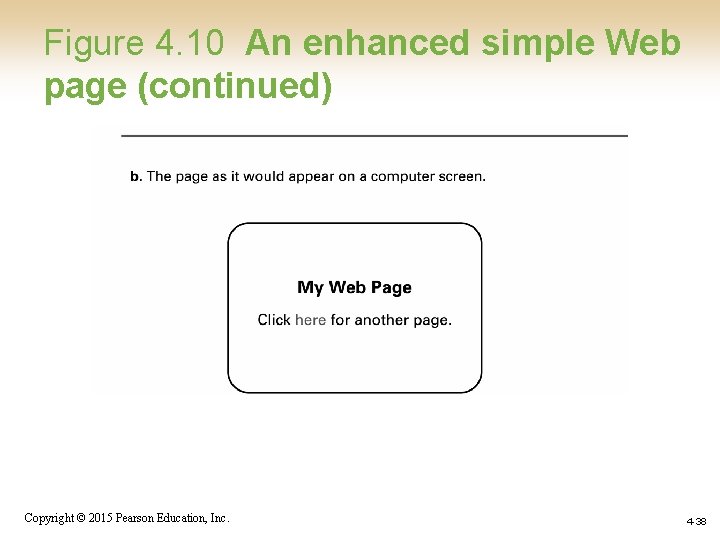
Hypertext Markup Language (HTML) • Encoded as text file • Contains tags to communicate with browser – Appearance • <h 1> to start a level one heading • <p> to start a new paragraph – Links to other documents and content • <a href =. . . > – Insert images • <img src =. . . > Copyright © 2015 Pearson Education, Inc. 4 -34
Figure 4. 9 A simple webpage Copyright © 2015 Pearson Education, Inc. 4 -35
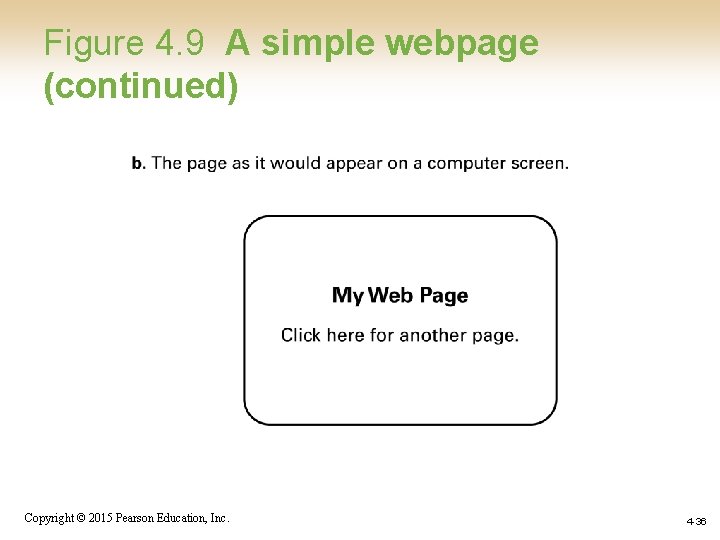
Figure 4. 9 A simple webpage (continued) Copyright © 2015 Pearson Education, Inc. 4 -36
Figure 4. 10 An enhanced simple webpage Copyright © 2015 Pearson Education, Inc. 4 -37
Figure 4. 10 An enhanced simple Web page (continued) Copyright © 2015 Pearson Education, Inc. 4 -38
Extensible Markup Language (XML) • XML: A language for constructing markup languages similar to HTML – A descendant of SGML – Opens door to a World Wide Semantic Web Copyright © 2015 Pearson Education, Inc. 4 -39
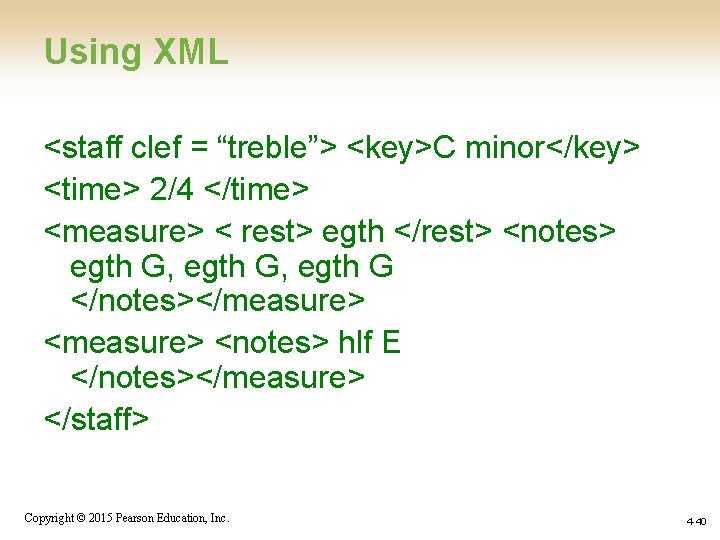
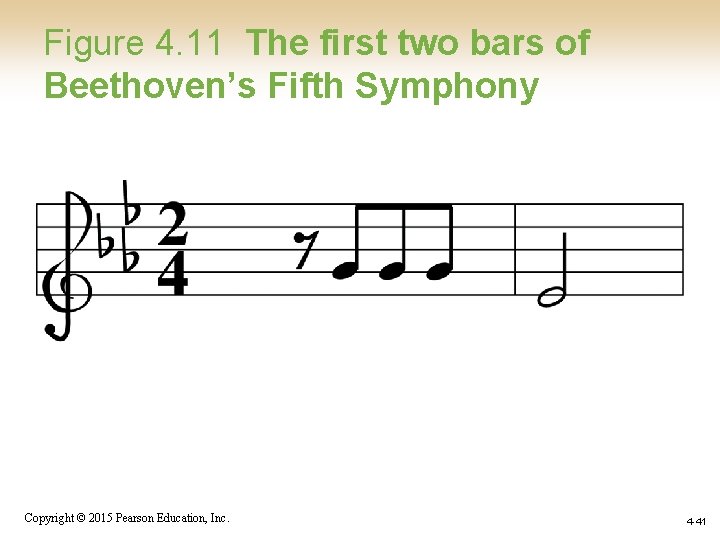
Using XML <staff clef = “treble”> <key>C minor</key> <time> 2/4 </time> <measure> < rest> egth </rest> <notes> egth G, egth G </notes></measure> <notes> hlf E </notes></measure> </staff> Copyright © 2015 Pearson Education, Inc. 4 -40
Figure 4. 11 The first two bars of Beethoven’s Fifth Symphony Copyright © 2015 Pearson Education, Inc. 4 -41
Client Side Versus Server Side • Client-side activities – Javascript – Macromedia Flash • Server-side activities – Common Gateway Interface (CGI) – Servlets – Java. Server Pages (JSP) / Active Server Pages (ASP) – PHP Copyright © 2015 Pearson Education, Inc. 4 -42
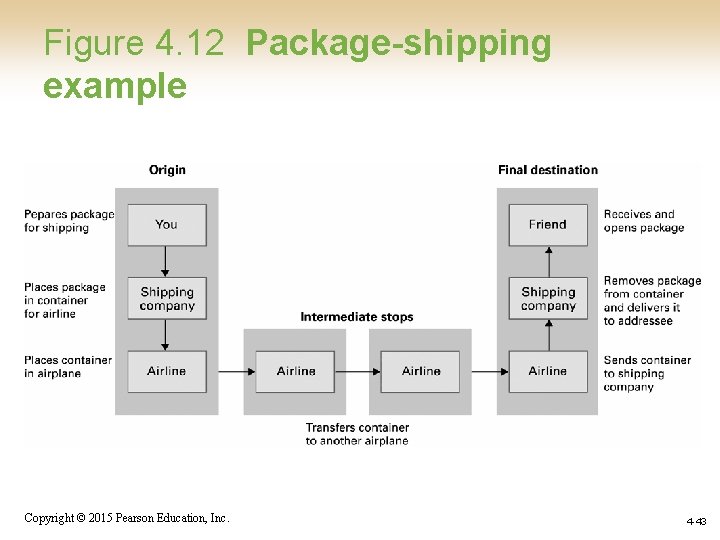
Figure 4. 12 Package-shipping example Copyright © 2015 Pearson Education, Inc. 4 -43
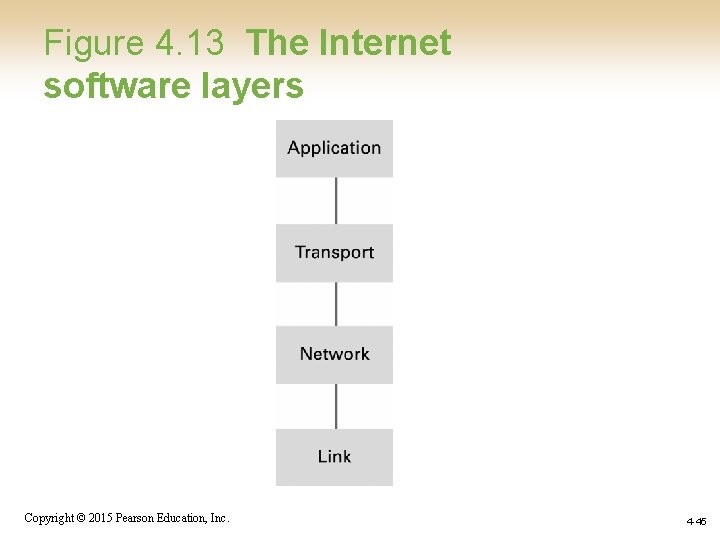
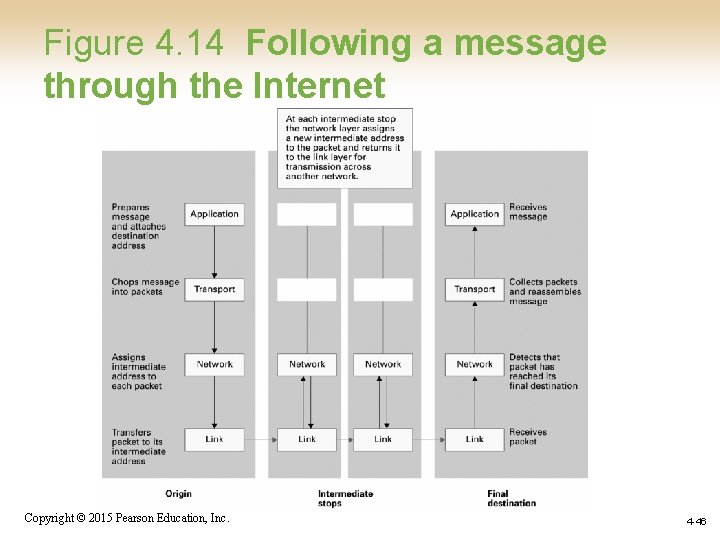
Internet Software Layers • Application: Constructs message with address • Transport: Chops message into packets • Network: Handles routing through the Internet • Link: Handles actual transmission of packets Copyright © 2015 Pearson Education, Inc. 4 -44
Figure 4. 13 The Internet software layers Copyright © 2015 Pearson Education, Inc. 4 -45
Figure 4. 14 Following a message through the Internet Copyright © 2015 Pearson Education, Inc. 4 -46
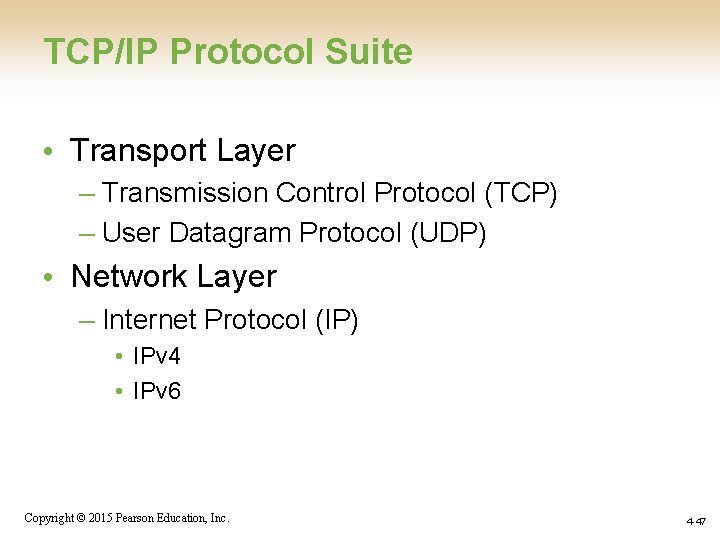
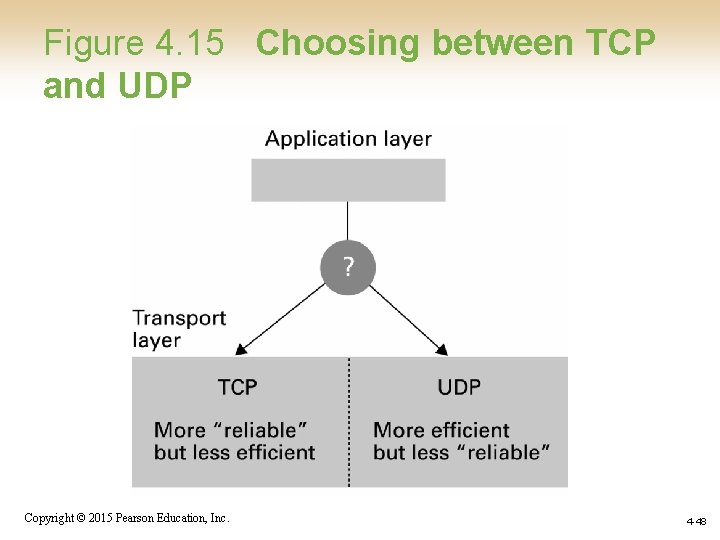
TCP/IP Protocol Suite • Transport Layer – Transmission Control Protocol (TCP) – User Datagram Protocol (UDP) • Network Layer – Internet Protocol (IP) • IPv 4 • IPv 6 Copyright © 2015 Pearson Education, Inc. 4 -47
Figure 4. 15 Choosing between TCP and UDP Copyright © 2015 Pearson Education, Inc. 4 -48
Security • Attacks – Malware (viruses, worms, Trojan horses, spyware, phishing software) – Denial of service (Do. S) – Spam • Protection – Firewalls – Spam filters – Proxy Servers – Antivirus software Copyright © 2015 Pearson Education, Inc. 4 -49
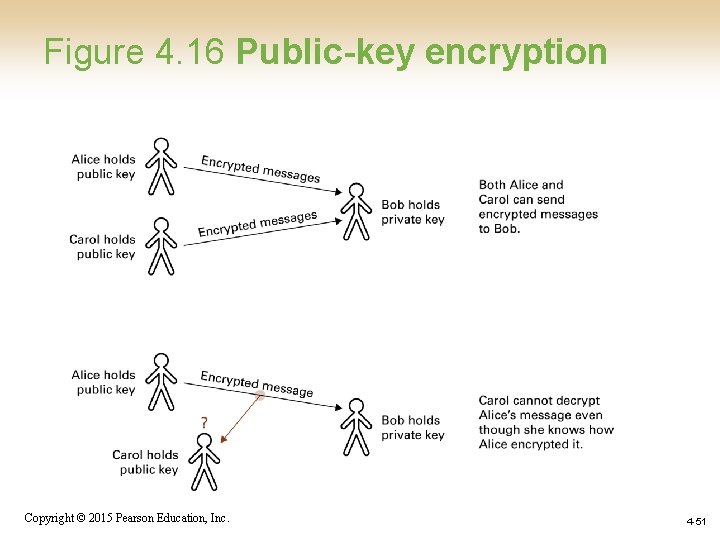
Encryption • HTTPS and SSL • Public-key Encryption – Public key: Used to encrypt messages – Private key: Used to decrypt messages • Certificates and Digital Signatures – Certificate authorities Copyright © 2015 Pearson Education, Inc. 4 -50
Figure 4. 16 Public-key encryption Copyright © 2015 Pearson Education, Inc. 4 -51