
Chapter 4 Memory Management 4 0 Memory Management
![Page size • Overhead= s*e/p + p/2 [size of page entries + frag] •](https://slidetodoc.com/presentation_image_h2/507b99541a9f977b181b126f7e1c1f47/image-87.jpg "Page size • Overhead= s*e/p + p/2 [size of page entries + frag] •")


- Slides: 134
Chapter 4 Memory Management
4. 0 Memory Management Basics • • • Don’t have infinite RAM Do have a memory hierarchy • Cache (fast) • Main(medium) • Disk(slow) Memory manager has the job of using this hierarchy to create an abstraction (illusion) of easily accessible memory
4. 0 Memory Management Basics What memory management do? Crude answer: Efficiently Manage memory • Keep track of which part of memory are in use • Allocate memory to process when they need it • Deallocate when they are done • Management of cache memory is basically done by hardware • Main memory management is the concern of this chapter • Secondary memory (basically hard drive) management is the issue of disk management
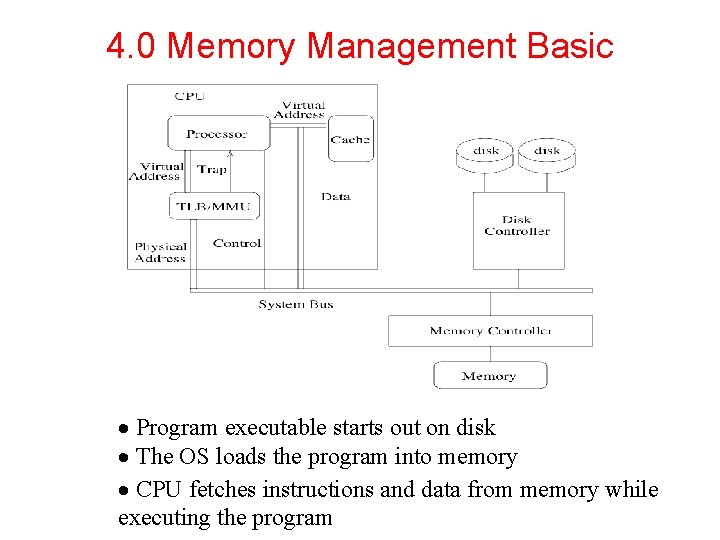
4. 0 Memory Management Basic · Program executable starts out on disk · The OS loads the program into memory · CPU fetches instructions and data from memory while executing the program
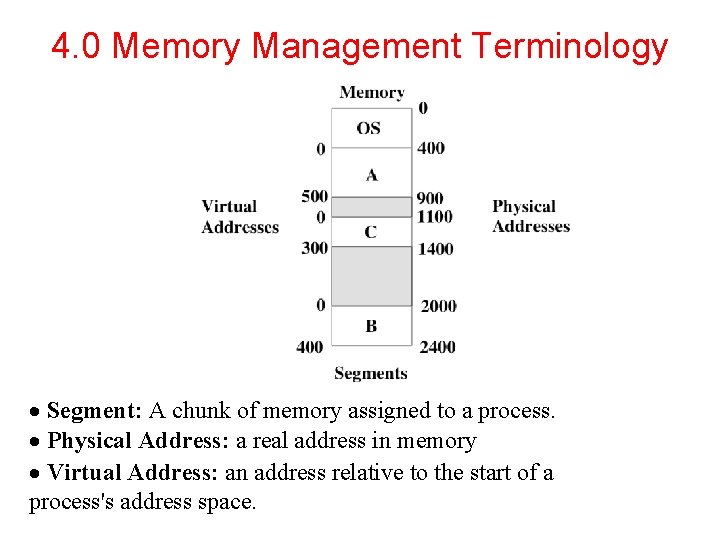
4. 0 Memory Management Terminology · Segment: A chunk of memory assigned to a process. · Physical Address: a real address in memory · Virtual Address: an address relative to the start of a process's address space.
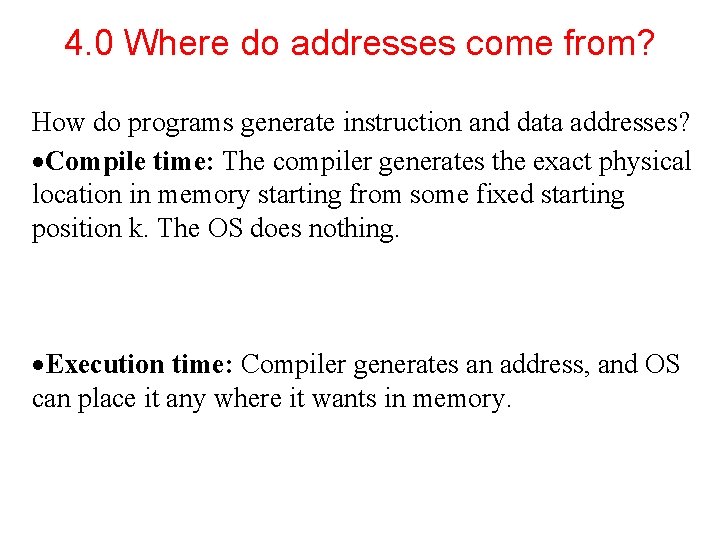
4. 0 Where do addresses come from? How do programs generate instruction and data addresses? ·Compile time: The compiler generates the exact physical location in memory starting from some fixed starting position k. The OS does nothing. ·Execution time: Compiler generates an address, and OS can place it any where it wants in memory.
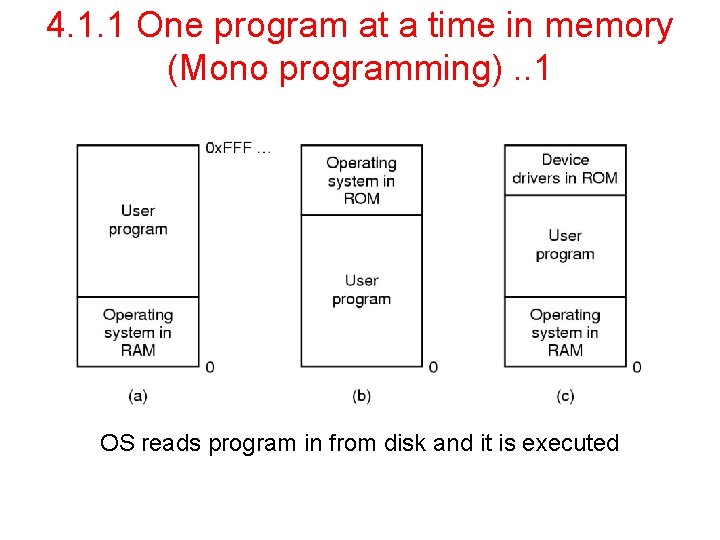
4. 1. 1 One program at a time in memory (Mono programming). . 1 OS reads program in from disk and it is executed
4. 1. 1 One program at a time in memory (Mono programming). . 2 • • Can only have one program in memory at a time. Bug in user program can trash the OS (a and c) Second on some embedded systems Third on MS-DOS (early PCs) -part in ROM called BIOS
4. 1. 2 Multiprogramming with fixed partition • • • Could swap new program into memory from disk and send old one out to disk Not really concurrent Next idea used in IBM 360 Fixed partition with out swapping Special Hardware for Memory management keep track for these fixed partition space Job placed in smallest partition enough to hold that job Fixed Partition Problem: Difficult to manage growing program
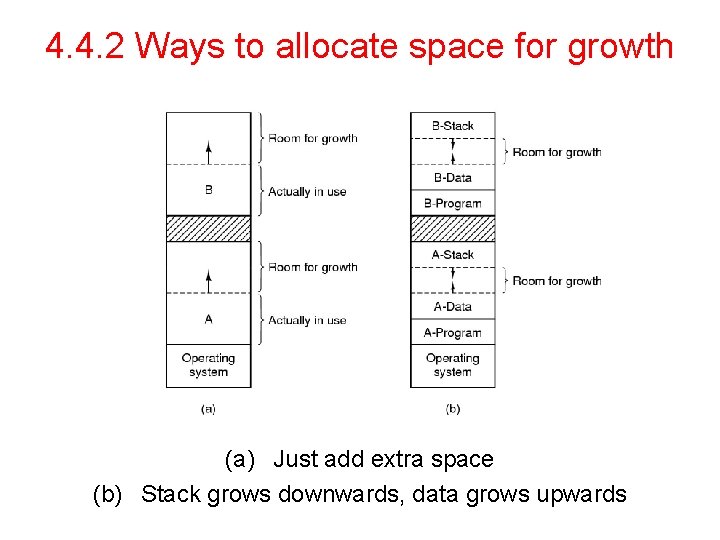
4. 4. 2 Ways to allocate space for growth (a) Just add extra space (b) Stack grows downwards, data grows upwards
4. 2 Swapping • Total amount of RAM need > RAM available • Idea to manage it : Swapping • Swapping: The mechanism in which process can be swapped temporarily out of main memory to a backing store, and then bought back into memory when needed • Idle processes are mostly swapped out • Basically Hard disk drive used • Time consuming part: Transfer time • Total time is directly proportional to amount of memory swapped
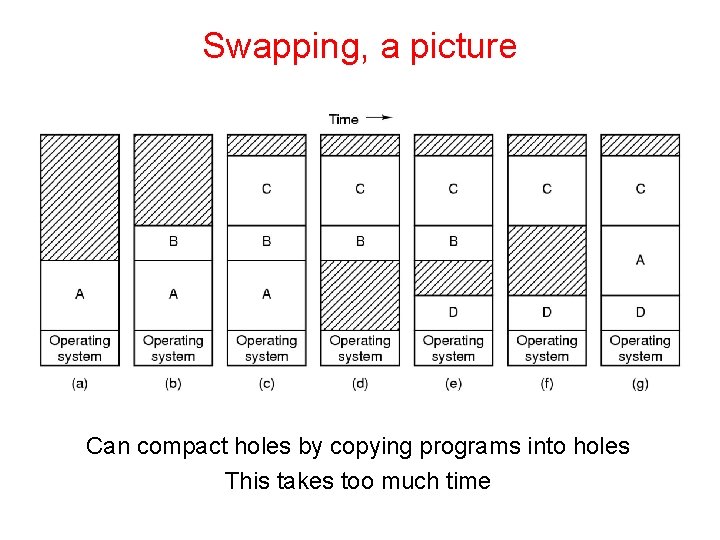
Swapping, a picture Can compact holes by copying programs into holes This takes too much time
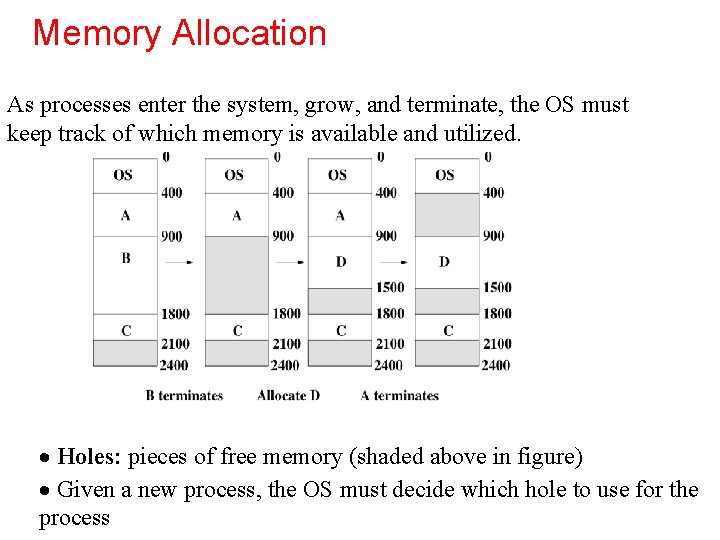
Memory Allocation As processes enter the system, grow, and terminate, the OS must keep track of which memory is available and utilized. · Holes: pieces of free memory (shaded above in figure) · Given a new process, the OS must decide which hole to use for the process
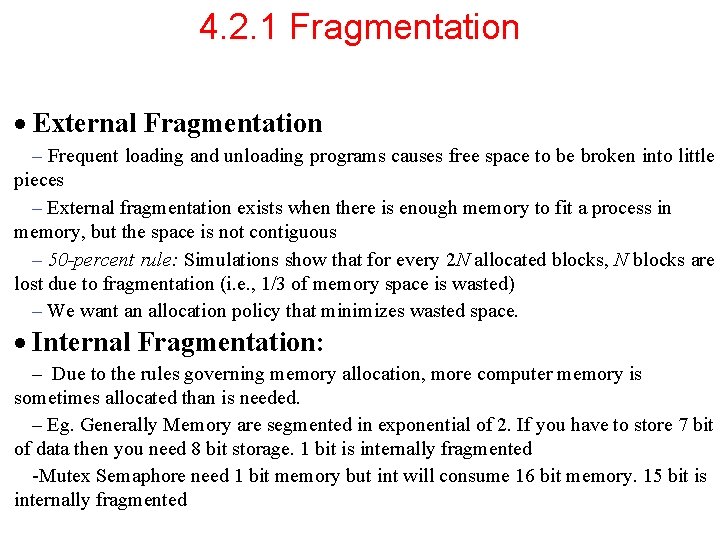
4. 2. 1 Fragmentation · External Fragmentation – Frequent loading and unloading programs causes free space to be broken into little pieces – External fragmentation exists when there is enough memory to fit a process in memory, but the space is not contiguous – 50 -percent rule: Simulations show that for every 2 N allocated blocks, N blocks are lost due to fragmentation (i. e. , 1/3 of memory space is wasted) – We want an allocation policy that minimizes wasted space. · Internal Fragmentation: – Due to the rules governing memory allocation, more computer memory is sometimes allocated than is needed. – Eg. Generally Memory are segmented in exponential of 2. If you have to store 7 bit of data then you need 8 bit storage. 1 bit is internally fragmented -Mutex Semaphore need 1 bit memory but int will consume 16 bit memory. 15 bit is internally fragmented
4. 2. 2 Managing Free Memory • Three techniques to keep track of free memory • Bitmaps • Linked lists • Buddy algorithm
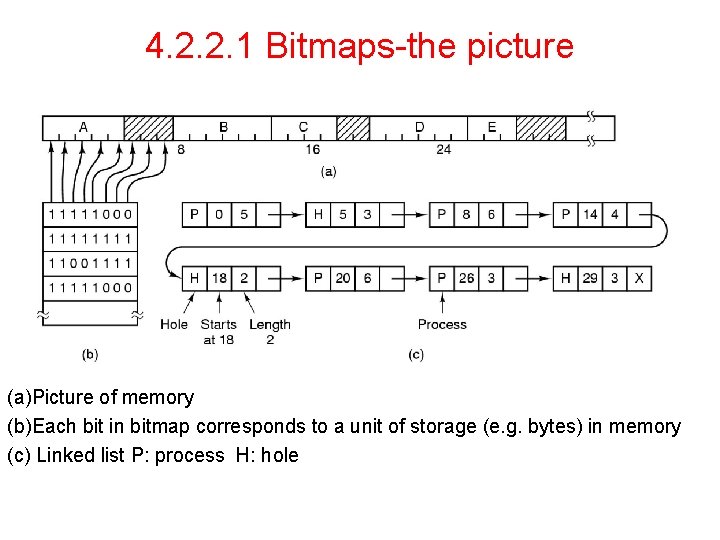
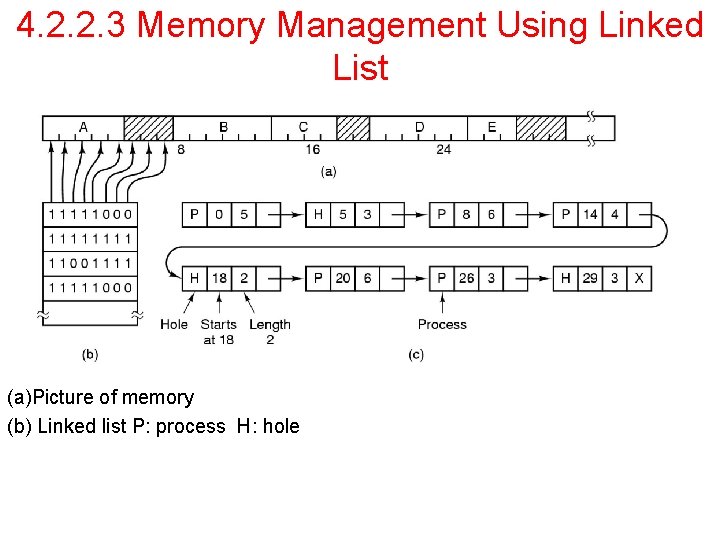
4. 2. 2. 1 Bitmaps-the picture (a)Picture of memory (b)Each bit in bitmap corresponds to a unit of storage (e. g. bytes) in memory (c) Linked list P: process H: hole
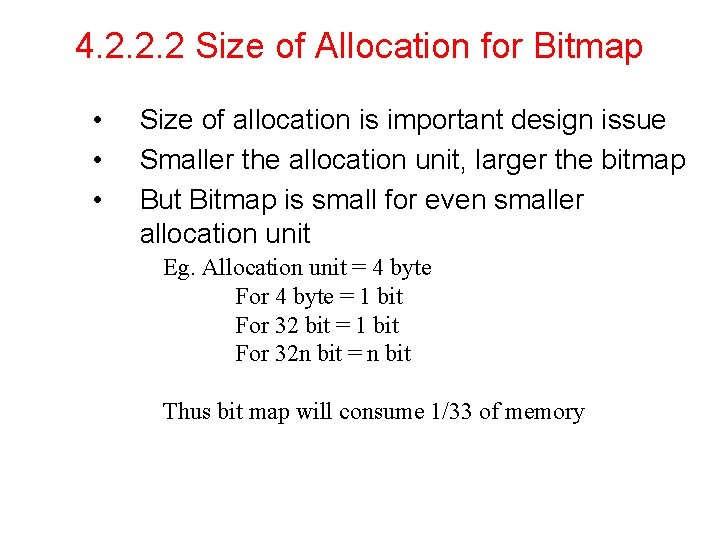
4. 2. 2. 2 Size of Allocation for Bitmap • • • Size of allocation is important design issue Smaller the allocation unit, larger the bitmap But Bitmap is small for even smaller allocation unit Eg. Allocation unit = 4 byte For 4 byte = 1 bit For 32 bit = 1 bit For 32 n bit = n bit Thus bit map will consume 1/33 of memory
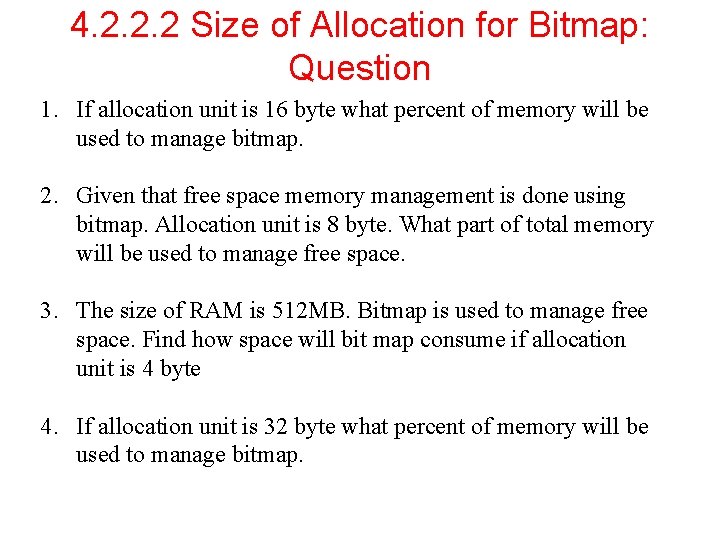
4. 2. 2. 2 Size of Allocation for Bitmap: Question 1. If allocation unit is 16 byte what percent of memory will be used to manage bitmap. 2. Given that free space memory management is done using bitmap. Allocation unit is 8 byte. What part of total memory will be used to manage free space. 3. The size of RAM is 512 MB. Bitmap is used to manage free space. Find how space will bit map consume if allocation unit is 4 byte 4. If allocation unit is 32 byte what percent of memory will be used to manage bitmap.
4. 2. 2. 2 Bitmaps • • The good-compact way to keep tract of memory The bad-need to search memory for k consecutive zeros to bring in a file k units long • Units can be bits or bytes or…….
4. 2. 2. 3 Memory Management Using Linked List (a)Picture of memory (b) Linked list P: process H: hole
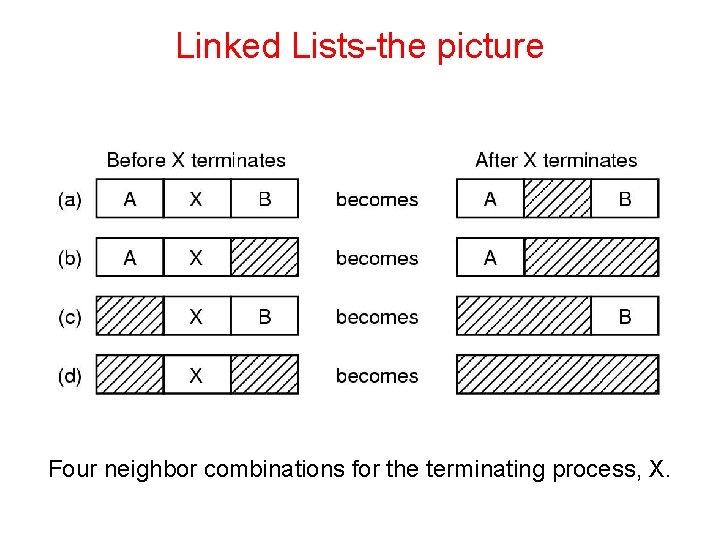
Linked Lists-the picture Four neighbor combinations for the terminating process, X.
Linked Lists • • Might want to use doubly linked lists to merge holes more easily Algorithms to fill in the holes in memory • First fit • Next fit • Best fit • Worst fit • Quick fit
4. 2. 2. 1. 1 First Fit • • Simple Memory manager scans along the list of segments until it finds a hole that is big enough to fit that process Hole is broken into two piece one for process and one for the unused memory Fast algorithm
4. 2. 2. 1. 2 Next Fit • • Minor variation of first fit Works similar to first fit but keeps track of where it is whenever it finds suitable hole Next time it will search from that place Slightly worse that first fit
4. 2. 2. 1. 3 Best Fit • • Well known widely used Searches entire list and takes the smallest hole that is adequate Rather than breaking big hole tries to find a hole that is close to the actual size needed Slow algorithm
4. 2. 2. 1. 3 Worst Fit • • Best fit may result many tiny small hole Worst fit be the idea Always take the largest available hole Not a very good idea either
4. 2. 2. 1. 5 Quick Fit • • • Maintain separate list for some common request Searching hole is extremely fast But other processes like making list, merging hole is expensive
The fits comparison • • • First fit-fast Next fit-starts search wherever it is • Slightly worse Best fit-smallest hole that fits • Slower, results in a bunch of small holes (i. e. worse algorithm) Worst fit-largest hole that fits • Not good (simulation results) Quick fit- keep list of common sizes • Quick, but expensive to find neighbors to merge with
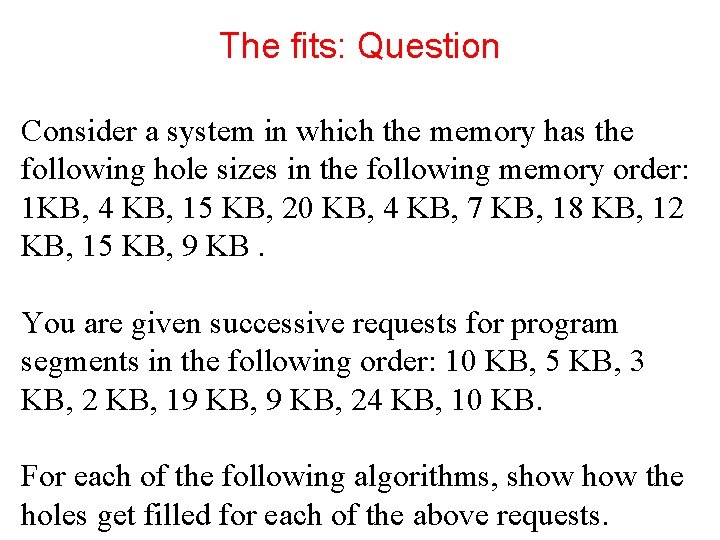
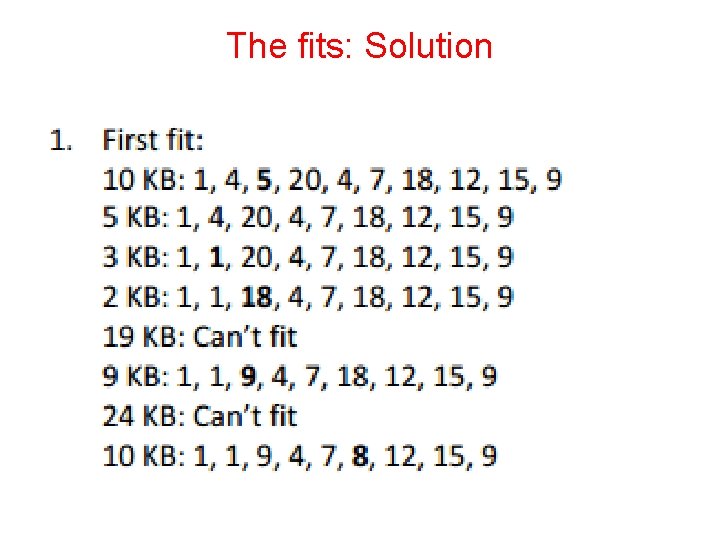
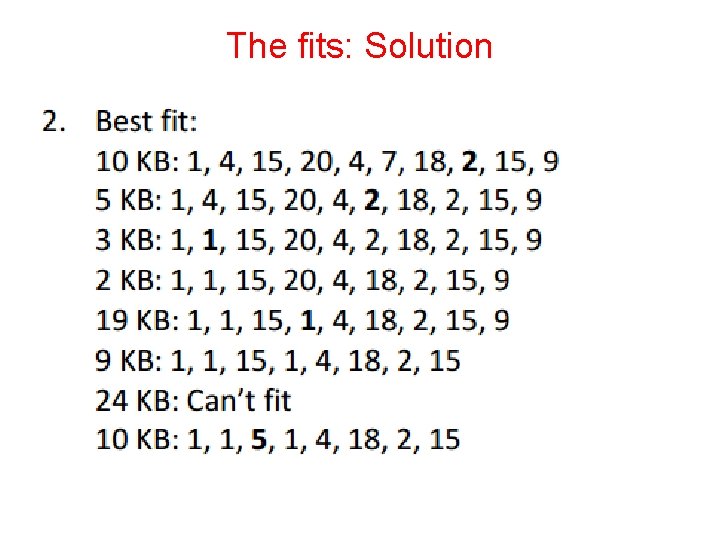
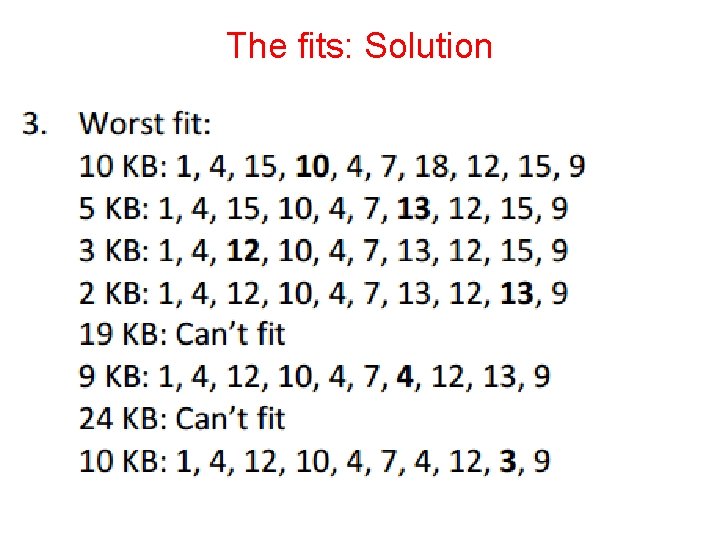
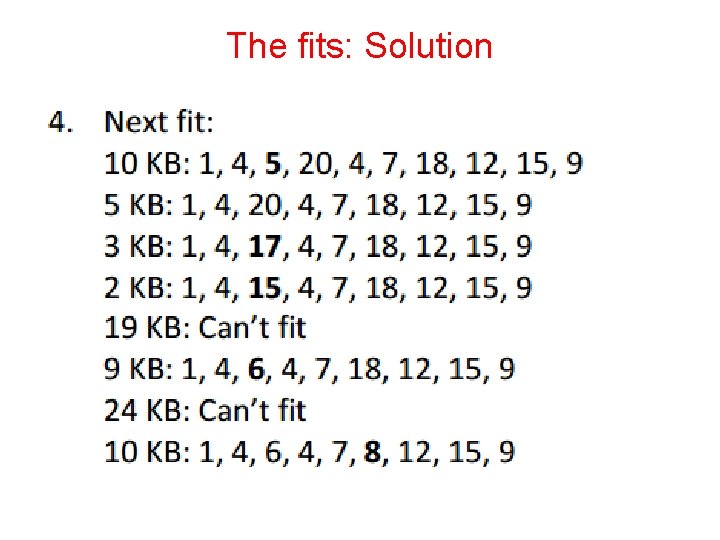
The fits: Question Consider a system in which the memory has the following hole sizes in the following memory order: 1 KB, 4 KB, 15 KB, 20 KB, 4 KB, 7 KB, 18 KB, 12 KB, 15 KB, 9 KB. You are given successive requests for program segments in the following order: 10 KB, 5 KB, 3 KB, 2 KB, 19 KB, 24 KB, 10 KB. For each of the following algorithms, show the holes get filled for each of the above requests.
The fits: Solution
The fits: Solution
The fits: Solution
The fits: Solution
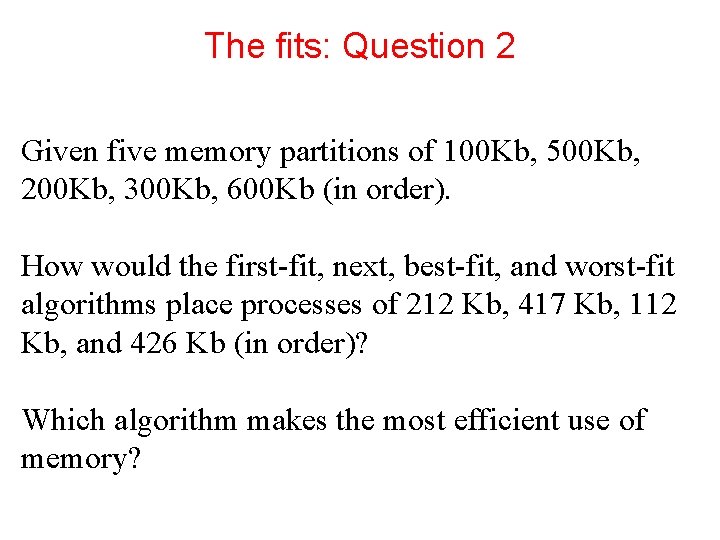
The fits: Question 2 Given five memory partitions of 100 Kb, 500 Kb, 200 Kb, 300 Kb, 600 Kb (in order). How would the first-fit, next, best-fit, and worst-fit algorithms place processes of 212 Kb, 417 Kb, 112 Kb, and 426 Kb (in order)? Which algorithm makes the most efficient use of memory?
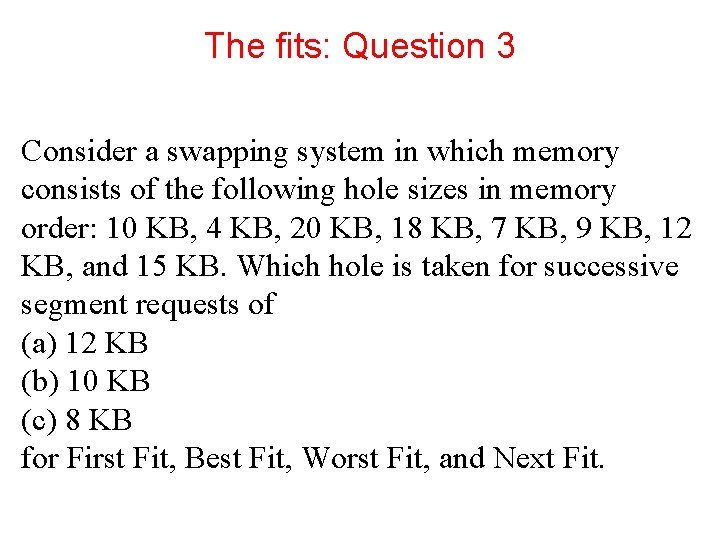
The fits: Question 3 Consider a swapping system in which memory consists of the following hole sizes in memory order: 10 KB, 4 KB, 20 KB, 18 KB, 7 KB, 9 KB, 12 KB, and 15 KB. Which hole is taken for successive segment requests of (a) 12 KB (b) 10 KB (c) 8 KB for First Fit, Best Fit, Worst Fit, and Next Fit.
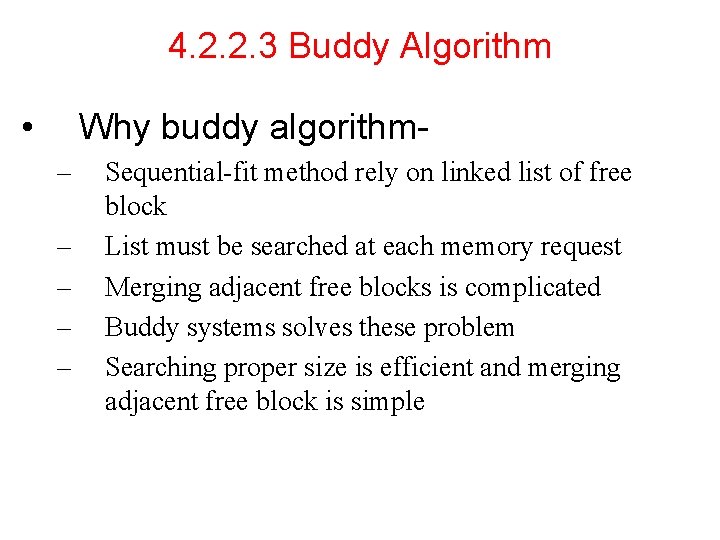
4. 2. 2. 3 Buddy Algorithm • Why buddy algorithm– – – Sequential-fit method rely on linked list of free block List must be searched at each memory request Merging adjacent free blocks is complicated Buddy systems solves these problem Searching proper size is efficient and merging adjacent free block is simple
4. 2. 2. 3 Buddy Algorithm • In a buddy system, memory blocks are available of size 2 k, L <= K <= U, where: 2 L = smallest block that is allocated. 2 U = largest size block that is allocated. Generally, 2 U is the size of the entire memory available for allocation. • Don’t care about internal fragmentation • At any time, the buddy system maintains a list of holes (unallocated blocks) of each size 2 i.
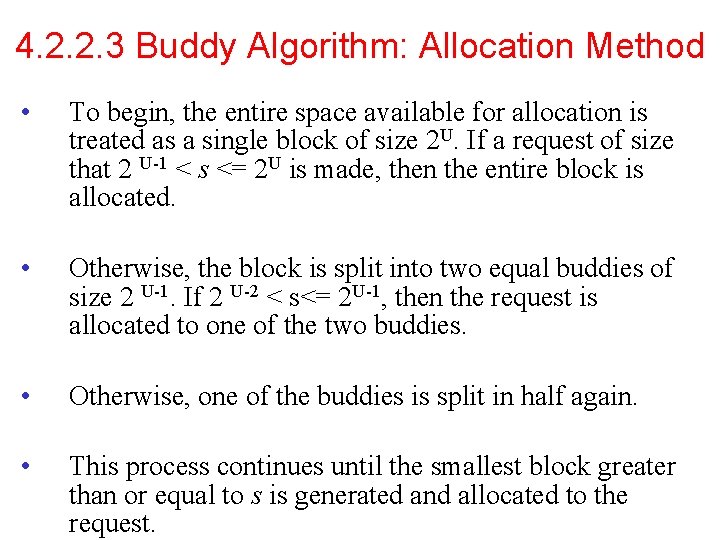
4. 2. 2. 3 Buddy Algorithm: Allocation Method • To begin, the entire space available for allocation is treated as a single block of size 2 U. If a request of size that 2 U-1 < s <= 2 U is made, then the entire block is allocated. • Otherwise, the block is split into two equal buddies of size 2 U-1. If 2 U-2 < s<= 2 U-1, then the request is allocated to one of the two buddies. • Otherwise, one of the buddies is split in half again. • This process continues until the smallest block greater than or equal to s is generated and allocated to the request.
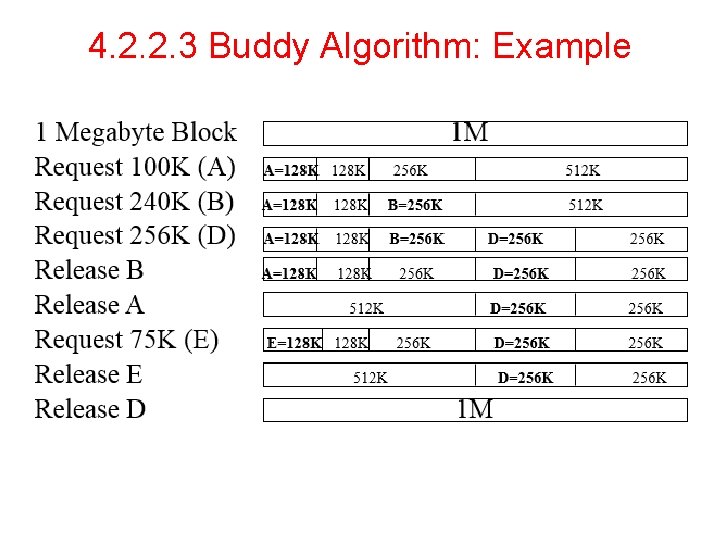
4. 2. 2. 3 Buddy Algorithm: Example
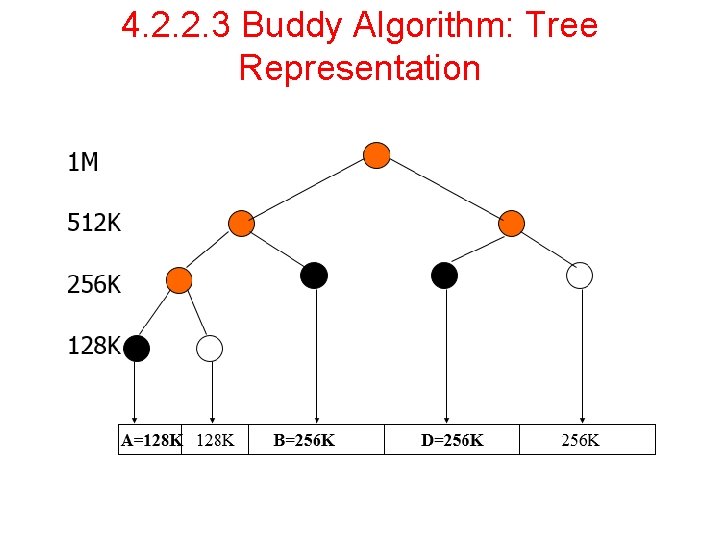
4. 2. 2. 3 Buddy Algorithm: Tree Representation
4. 2. 2. 3 Buddy Algorithm: Pros and Cons • Pros: – – – • Less external fragmentation Search for Right size is cheaper Merging adjacent free block is easy Cons – Internal Fragmentation
4. 2. 2. 3 Buddy Algorithm: Question 1. Consider a buddy system with 512 KB RAM. Request are A=63 KB, B=100 KB, C=60 KB, D= 130 KB. Show memory are allocated and deallocated 2. Consider a buddy system with 1 MB RAM. Processes are allocated and deallocated in following order – – – – Allocate A Allocate B Allocate C Deallocate B Deallocate C Allocate D Allocate E Deallocate A, D & E Size of A is 250, B is 198, C is 64, D is 500 and E is 318. Show momory are allocated and deallocated
4. 3 Virtual Memory-the history • • • Though memory size are increasing, software size increasing must faster. Trends of multimedia demands more memory Swapping NOT good solution – Swapping is too slow (100 Mbytes/sec disk transfer rate=>10 sec to swap out a 1 Gbyte program)
4. 3 Virtual Memory • • • Program’s address space is broken up into fixed size pages Pages are mapped to physical memory If instruction refers to a page in memory, fine Otherwise OS gets the page, reads it in, and re-starts the instruction While page is being read in, another process gets the CPU
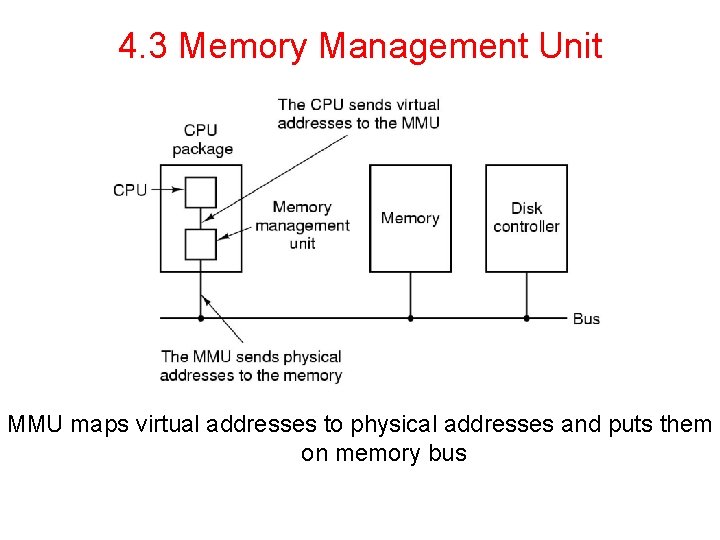
4. 3 Memory Management Unit • Memory Management Unit generates physical address from virtual address provided by the program
4. 3 Memory Management Unit MMU maps virtual addresses to physical addresses and puts them on memory bus
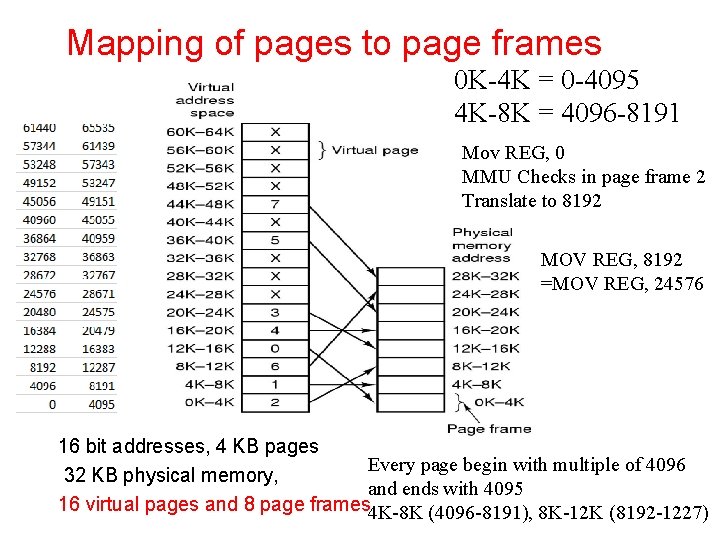
4. 3 Mapping of pages to page frames • • Virtual address space is divided into fixed size called pages Corresponding unit in physical memory called page frames Page and page frame size This example 4 KB ( in general 512 bytes to 64 KB) 64 KB of virtual address spaces = 16 virtual pages 32 KB of physical memory = 8 virtual pages Transfer between RAM and disk is in whole pages
Mapping of pages to page frames 0 K-4 K = 0 -4095 4 K-8 K = 4096 -8191 Mov REG, 0 MMU Checks in page frame 2 Translate to 8192 MOV REG, 8192 =MOV REG, 24576 16 bit addresses, 4 KB pages Every page begin with multiple of 4096 32 KB physical memory, and ends with 4095 16 virtual pages and 8 page frames 4 K-8 K (4096 -8191), 8 K-12 K (8192 -1227)
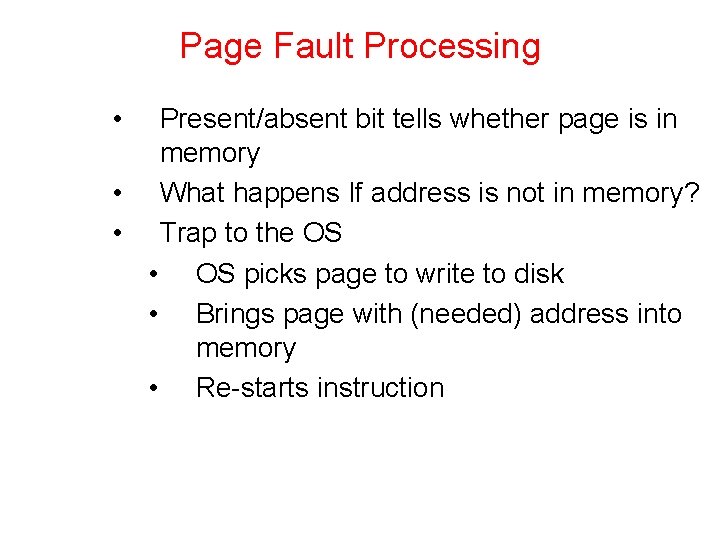
Page Fault Processing • Present/absent bit tells whether page is in memory • What happens If address is not in memory? • Trap to the OS • OS picks page to write to disk • Brings page with (needed) address into memory • Re-starts instruction
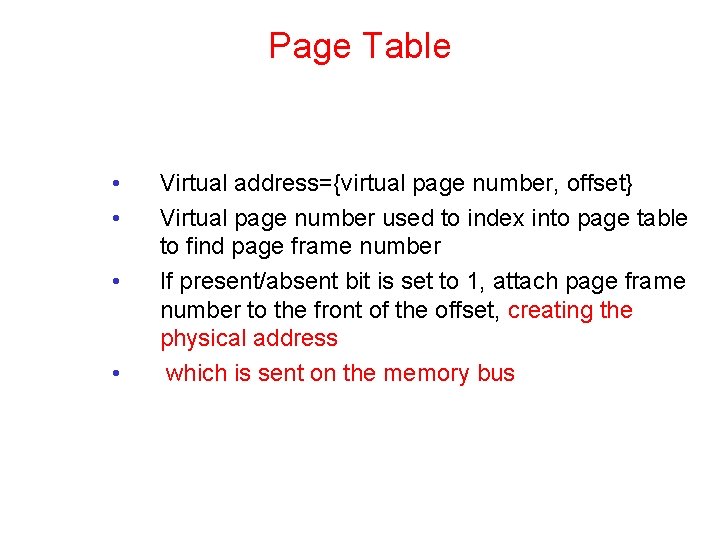
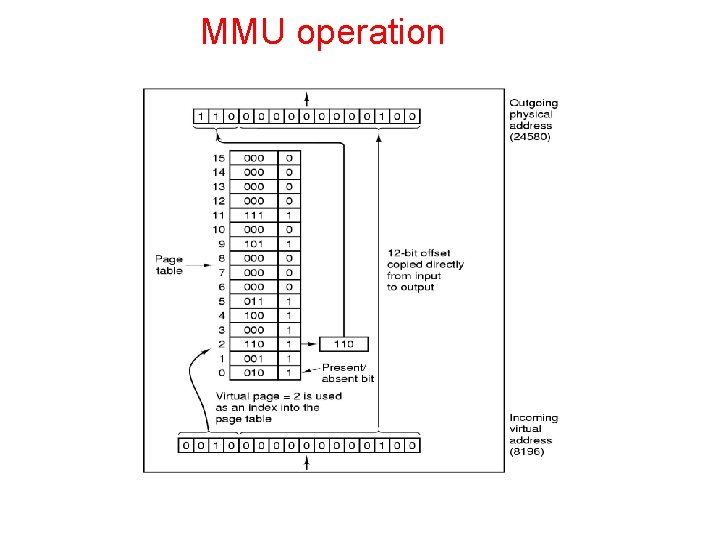
Page Table • • Virtual address={virtual page number, offset} Virtual page number used to index into page table to find page frame number If present/absent bit is set to 1, attach page frame number to the front of the offset, creating the physical address which is sent on the memory bus
MMU operation
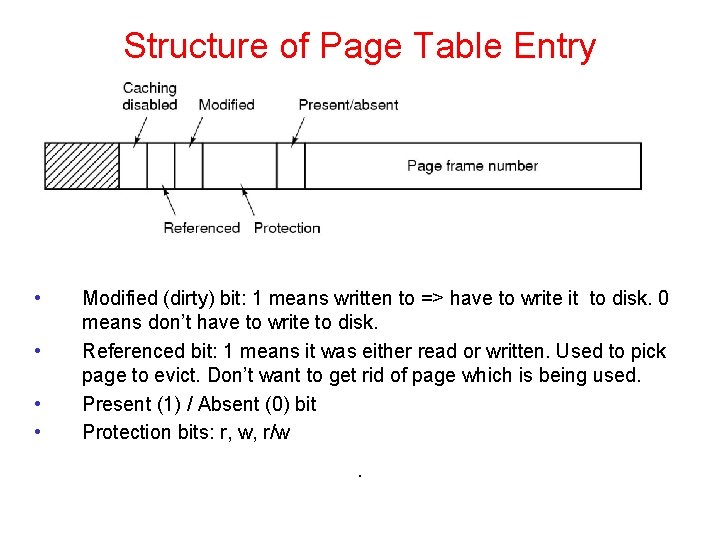
Structure of Page Table Entry • • Modified (dirty) bit: 1 means written to => have to write it to disk. 0 means don’t have to write to disk. Referenced bit: 1 means it was either read or written. Used to pick page to evict. Don’t want to get rid of page which is being used. Present (1) / Absent (0) bit Protection bits: r, w, r/w .
Problems for paging • • Virtual to physical mapping is done on every memory reference => mapping must be fast If the virtual address space is large, the page table will be large. 32 bit addresses now and 64 bits becoming more common
Speed up Address Translation • • Most programs access a small number of pages a great deal Add Translation Lookaside Buffer (TLB) to MMU • Stores frequently accessed frames
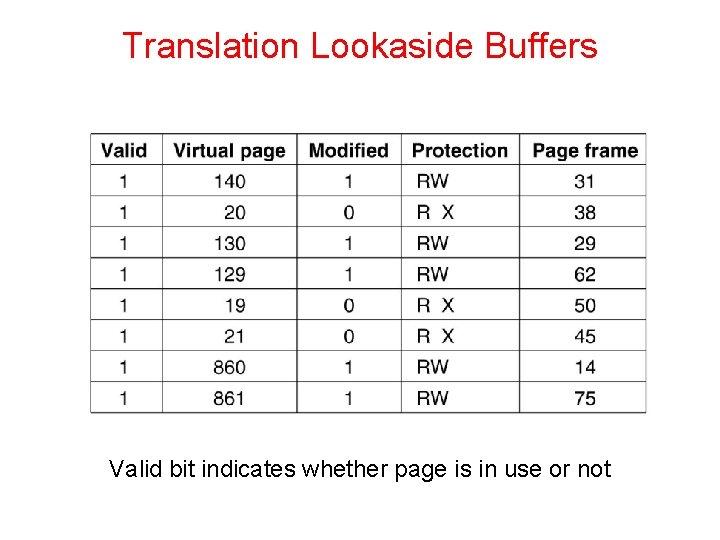
Translation Lookaside Buffers Valid bit indicates whether page is in use or not
Translation Lookaside Buffer(TLB) • • • If address is in MMU, avoid page table Uses parallel search to see if virtual page is in the TLB If not, does page table look up and evicts TLB entry, replacing it with page just looked up
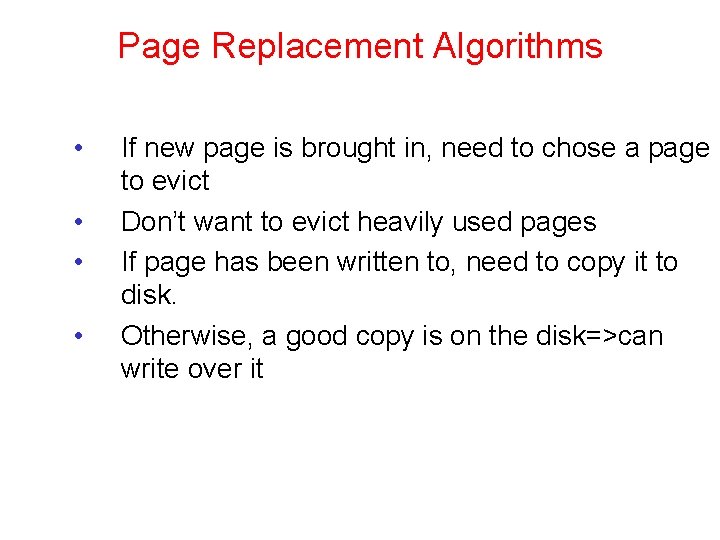
Page Replacement Algorithms • • If new page is brought in, need to chose a page to evict Don’t want to evict heavily used pages If page has been written to, need to copy it to disk. Otherwise, a good copy is on the disk=>can write over it
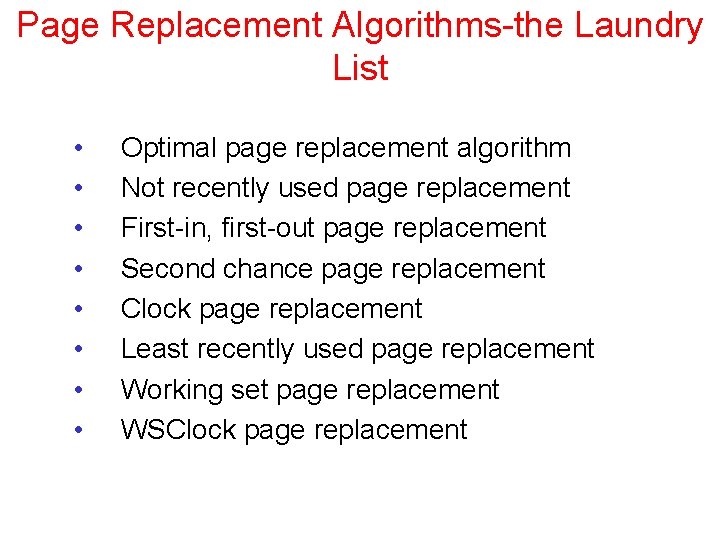
Page Replacement Algorithms-the Laundry List • • Optimal page replacement algorithm Not recently used page replacement First-in, first-out page replacement Second chance page replacement Clock page replacement Least recently used page replacement Working set page replacement WSClock page replacement
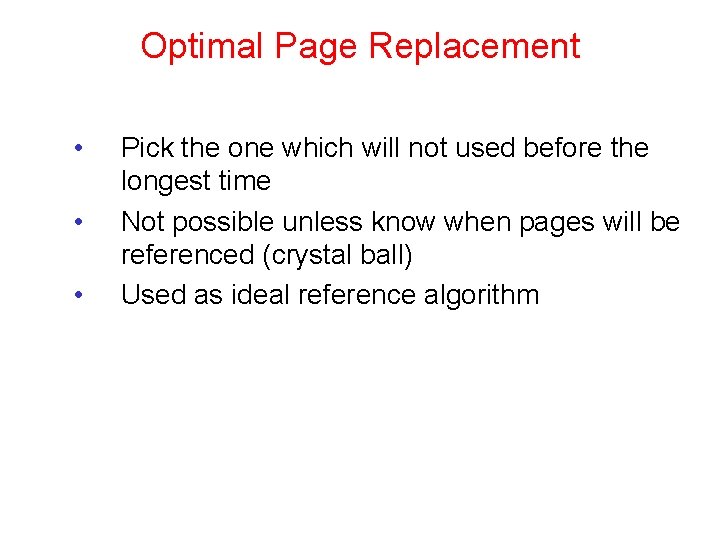
Optimal Page Replacement • • • Pick the one which will not used before the longest time Not possible unless know when pages will be referenced (crystal ball) Used as ideal reference algorithm
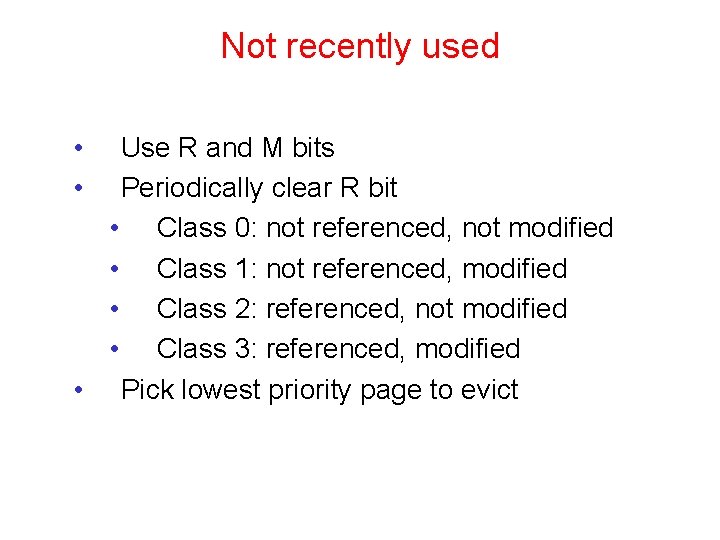
Not recently used • • Use R and M bits Periodically clear R bit • Class 0: not referenced, not modified • Class 1: not referenced, modified • Class 2: referenced, not modified • Class 3: referenced, modified • Pick lowest priority page to evict
FIFO • • Keep list ordered by time (latest to arrive at the end of the list) Evict the oldest, i. e. head of the line Easy to implement Oldest might be most heavily used! No knowledge of use is included in FIFO
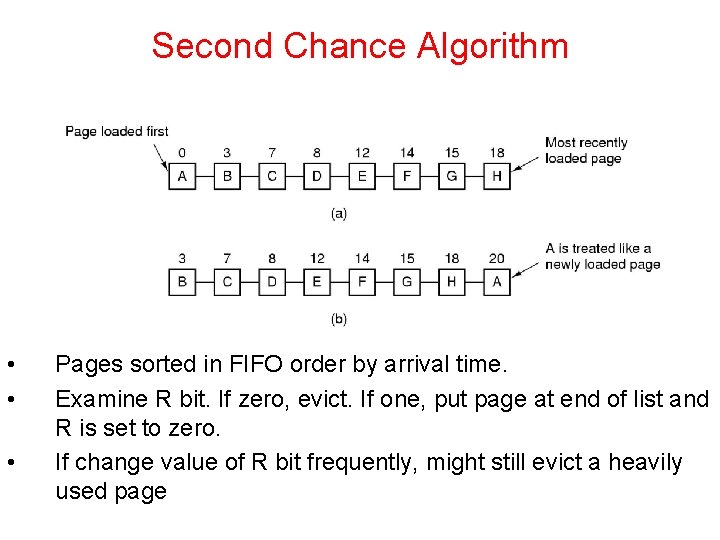
Second Chance Algorithm • • • Pages sorted in FIFO order by arrival time. Examine R bit. If zero, evict. If one, put page at end of list and R is set to zero. If change value of R bit frequently, might still evict a heavily used page
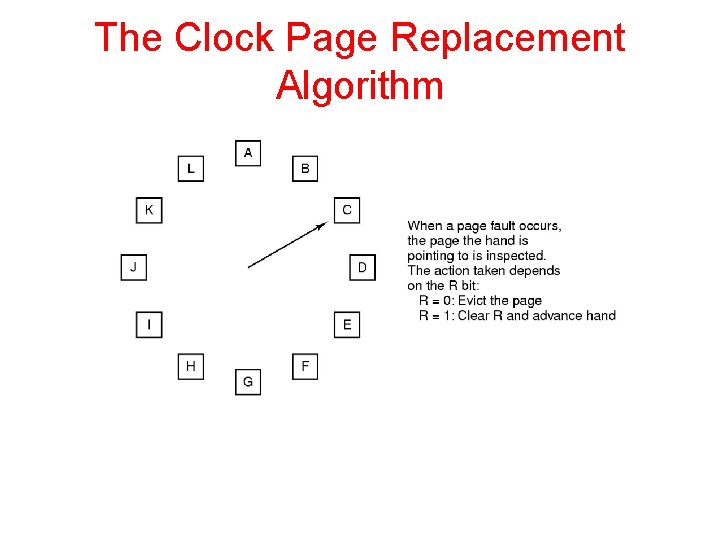
The Clock Page Replacement Algorithm
Clock • • • Doesn’t use age as a reason to evict page Faster-doesn’t manipulate a list Doesn’t distinguish between how long pages have not been referenced
LRU • • Approximate LRU by assuming that recent page usage approximates long term page usage Could associate counters with each page and examine them but this is expensive
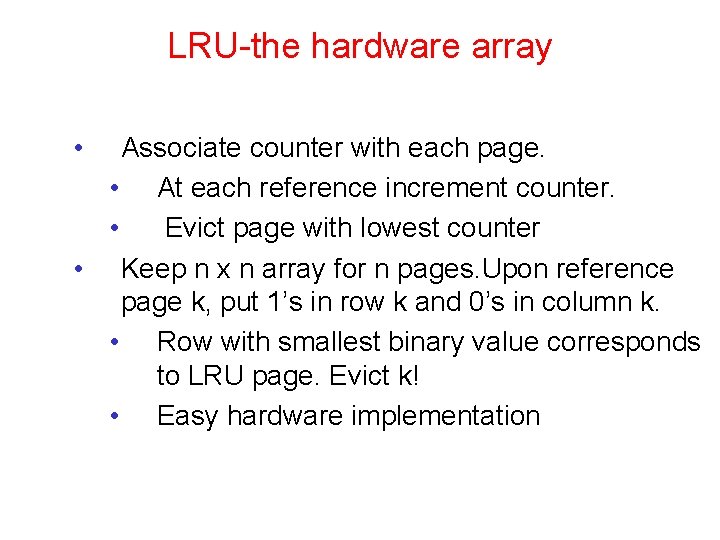
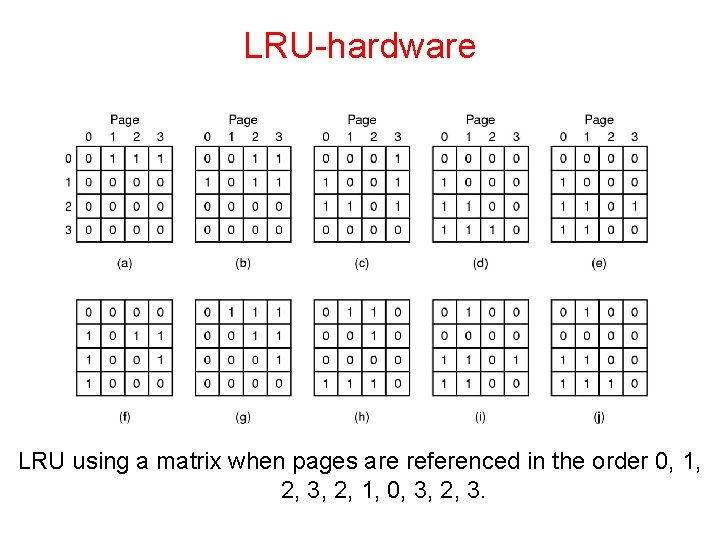
LRU-the hardware array • Associate counter with each page. • At each reference increment counter. • Evict page with lowest counter • Keep n x n array for n pages. Upon reference page k, put 1’s in row k and 0’s in column k. • Row with smallest binary value corresponds to LRU page. Evict k! • Easy hardware implementation
LRU-hardware LRU using a matrix when pages are referenced in the order 0, 1, 2, 3, 2, 1, 0, 3, 2, 3.
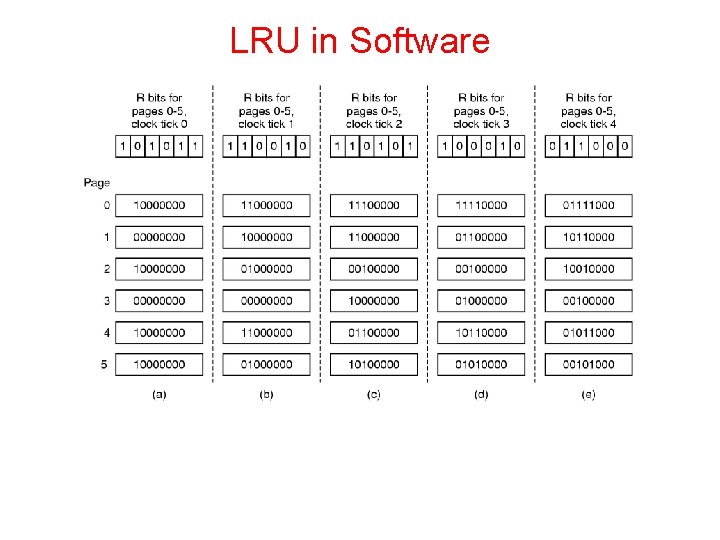
LRU-software • • Hardware uses space=> software implementation Make use of software counters
LRU in Software
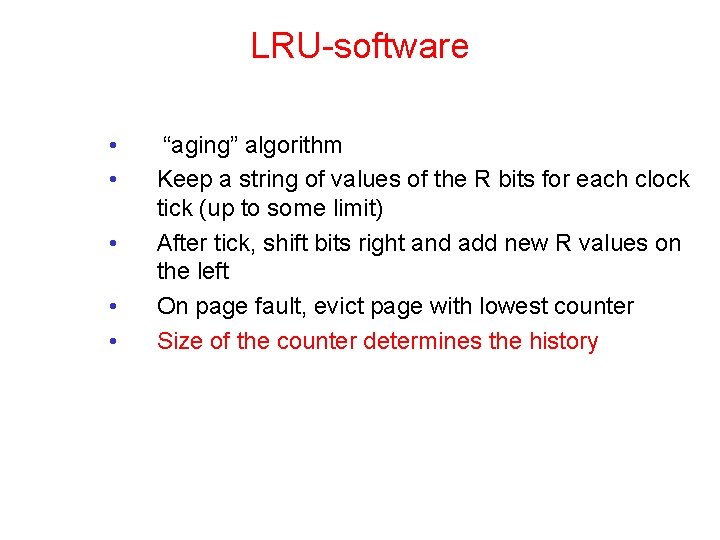
LRU-software • • • “aging” algorithm Keep a string of values of the R bits for each clock tick (up to some limit) After tick, shift bits right and add new R values on the left On page fault, evict page with lowest counter Size of the counter determines the history
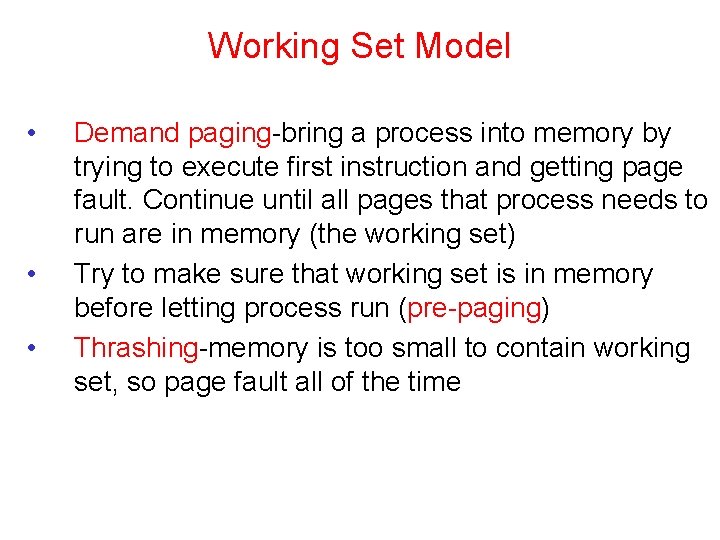
Working Set Model • • • Demand paging-bring a process into memory by trying to execute first instruction and getting page fault. Continue until all pages that process needs to run are in memory (the working set) Try to make sure that working set is in memory before letting process run (pre-paging) Thrashing-memory is too small to contain working set, so page fault all of the time
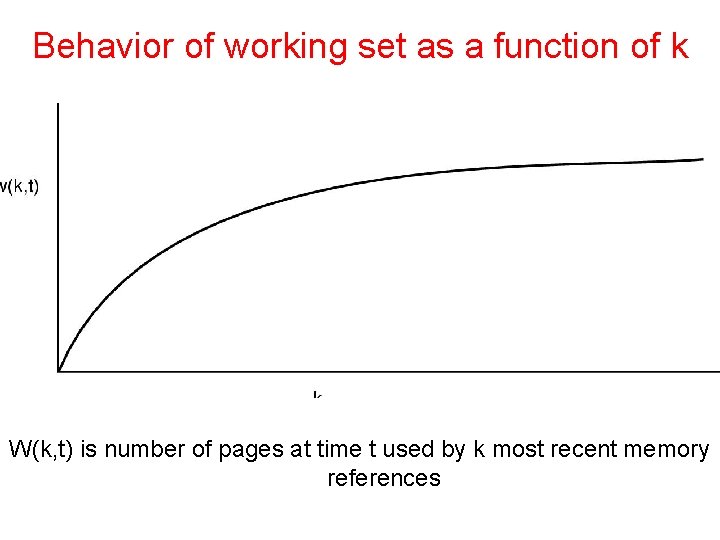
Behavior of working set as a function of k W(k, t) is number of pages at time t used by k most recent memory references
How to implement working set model • • • When fault occurs can evict page not in working set (if there is such a page) Need to pick k Could keep track of pages in memory at every memory reference. Each k references results in a working set. • Shift register implementation. Insert page number at each reference. • Expensive
Use virtual time instead of number of references (k) • Keep track of k last pages referenced during a period t of execution (CPU) time • Virtual time for a process is the amount of CPU time used since it started • Measure of how much work a process has done
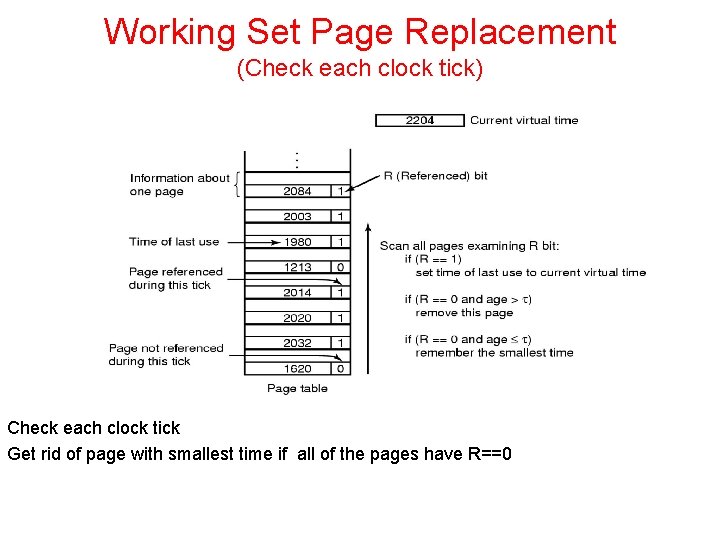
Working Set Page Replacement (Check each clock tick) Check each clock tick Get rid of page with smallest time if all of the pages have R==0
Weakness with WS algorithm • • Need to scan entire page table at each page fault to find a victim Use clock idea with working set algorithm
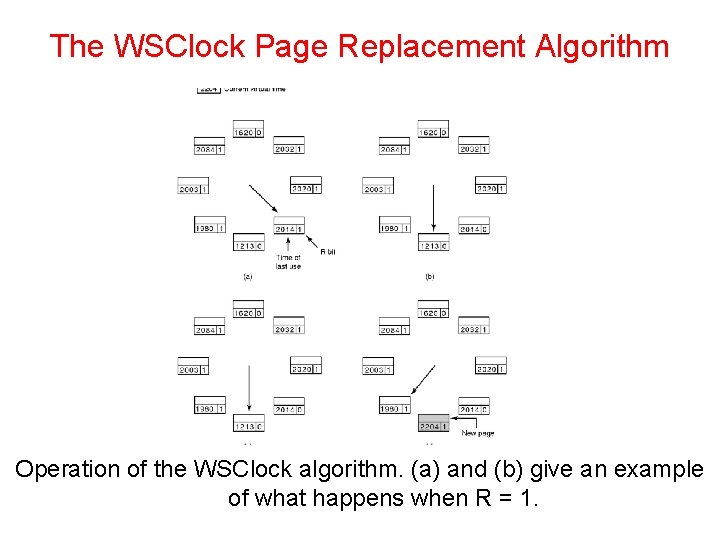
The WSClock Page Replacement Algorithm Operation of the WSClock algorithm. (a) and (b) give an example of what happens when R = 1.
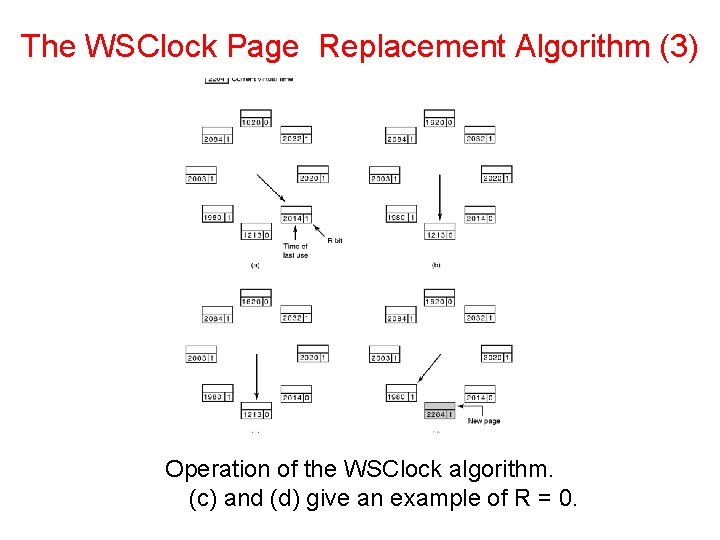
The WSClock Page Replacement Algorithm (3) Operation of the WSClock algorithm. (c) and (d) give an example of R = 0.
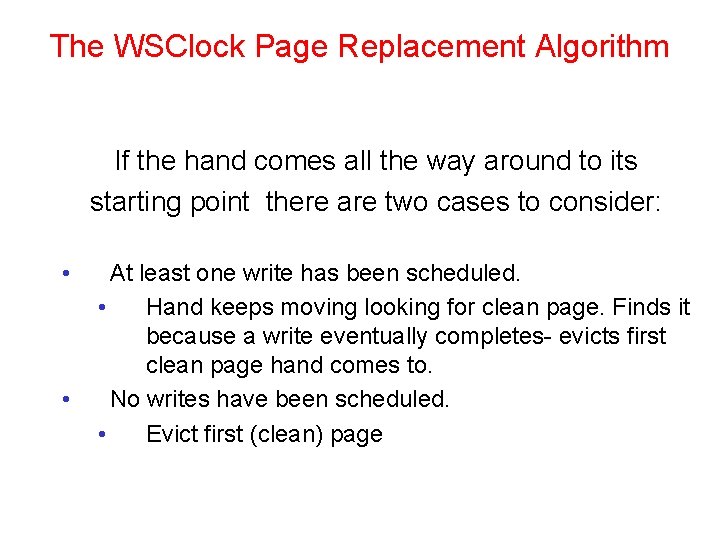
The WSClock Page Replacement Algorithm If the hand comes all the way around to its starting point there are two cases to consider: • • At least one write has been scheduled. • Hand keeps moving looking for clean page. Finds it because a write eventually completes- evicts first clean page hand comes to. No writes have been scheduled. • Evict first (clean) page
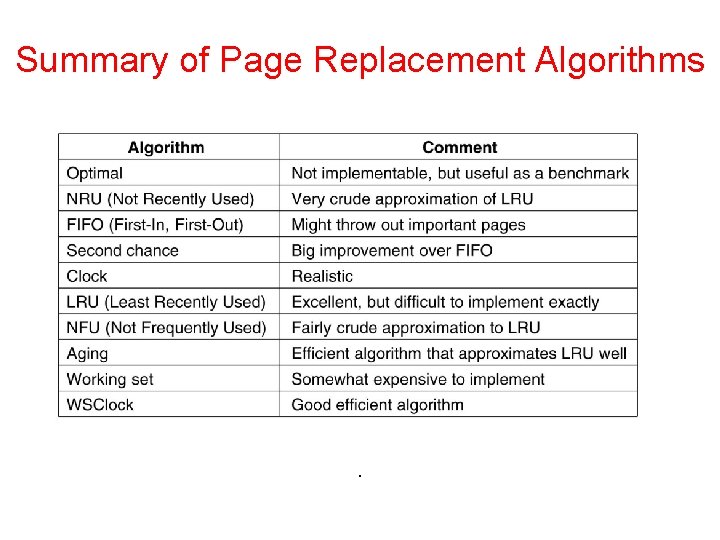
Summary of Page Replacement Algorithms .
Implementation Issues • Need to take into account a number of design issues in order to get a working algorithm
Global versus Local choice of page • • Global-take into account all of the processes Local-take into account just the process which faulted
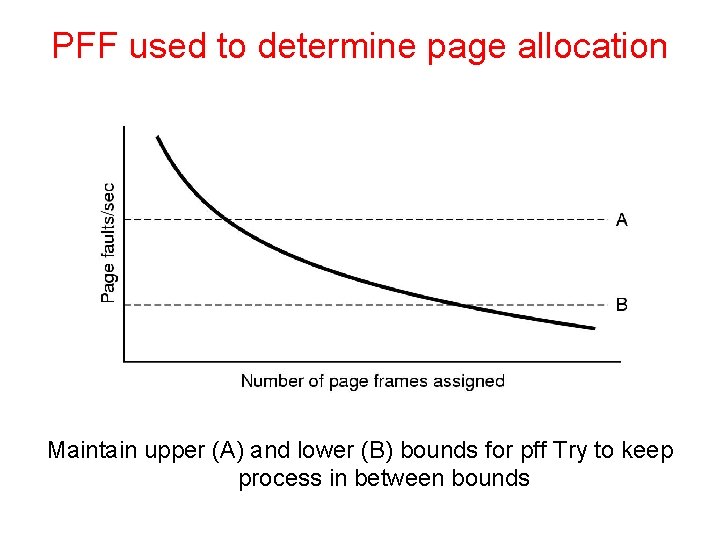
Global is better for the memory • • Working sets grow and shrink over time Processes have different sizes Assign number of pages to each process proportional to its size Start with allocation based on size and use page fault frequency (pff) to modify allocation size for each process
PFF used to determine page allocation Maintain upper (A) and lower (B) bounds for pff Try to keep process in between bounds
Local Versus Global • • • Can use combination of algorithms PFF is global component-determines page allocation Replacement algorithm Is local component-determines which page to kick out
Load Control • • Why? Can still thrash because of too much demand for memory. Solution-swap process(es) out. • Ie. When desperate, get rid of a process
Page size • Overhead= s*e/p + p/2 [size of page entries + frag] • p is page size, • s is process size, • e is size of the page entry (in page table) • Differentiate, set to zero => p = √(2 s*e) • s= 1 MB, e=8 bytes 4 KB is optimal • 1 KB is typical • 4 -8 KB common • OK, this is a rough approach
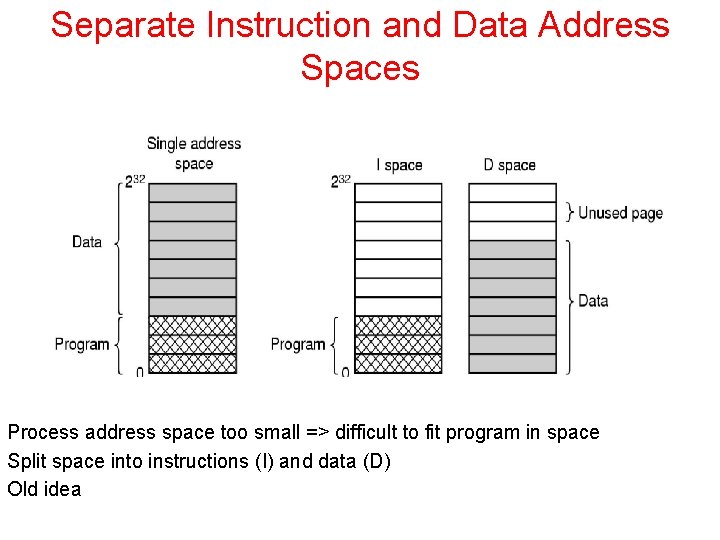
Separate Instruction and Data Address Spaces Process address space too small => difficult to fit program in space Split space into instructions (I) and data (D) Old idea
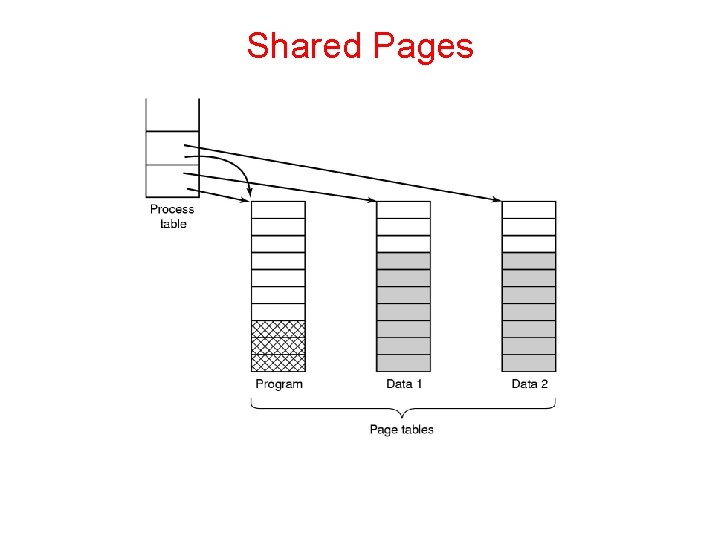
Shared Pages • • • Different users can run same program (with different data) at the same time. Better to share pages then to have 2 copies! Not all pages can be shared (data can’t be shared, text can be shared) If have D, I spaces can have process entry in process table point to I and D pages
Shared Pages
More page sharing • • Process can’t drop pages when it exits w/o being certain that they not still in use • Use special data structure to track shared pages Data sharing is painful (e. g. Unix fork, parent and child share text and data) because of page writes • (Copy on write) solution is to map data to read only pages. If write occurs, each process gets its own page.
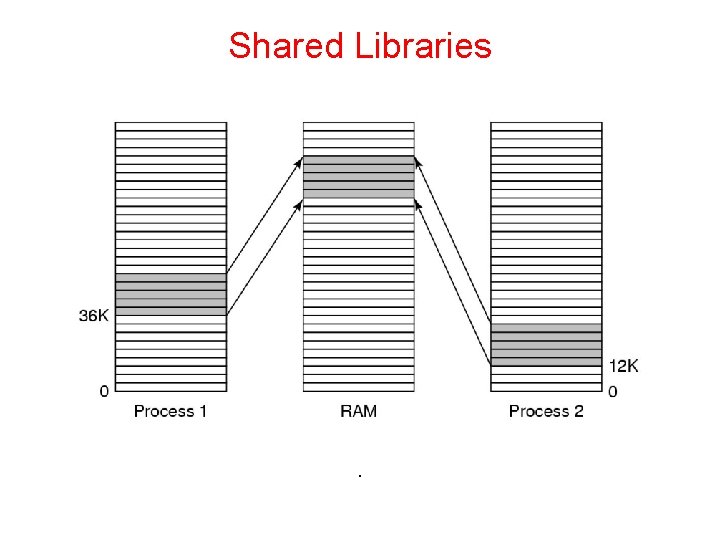
Shared Libraries • • • Large libraries (e. g. graphics) used by many process. Too expensive to bind to each process which wants to use them. Use shared libraries instead. Unix linking: ld*. o –lc –lm. Files (and no others) not present in. o are located in m or c libraries and included in binaries. Write object program to disk.
Shared Libraries • • Linker uses a stub routine to call which binds to called function AT RUN TIME. • Shared library is only loaded once (first time that a function in it is referenced). • It is paged in Need to use position independent code to avoid going to the wrong address (next slide). • Idea: Compiler does not produce absolute addresses when using shared libraries; only relative addresses.
Shared Libraries .
Memory Mapped Files • • Process issues system call to map a file onto a part of its virtual address space. Can be used to communicate via shared memory. Processes share same file. Use it to read and write.
Cleaning Policy • • • Use a daemon to locate pages to evict before you need them instead of looking for victims when you need them Daemon sleeps most of the time, periodically awakens If there are “too few” frames, kicks out frames Make sure that they are clean before claiming them
Virtual Memory Interface • Might want 2 programs to share physical memory • Easy way to implement shared memory message passing • Avoids memory copy approach to shared memory • Distributed shared memory-page fault handler locates page in different machine, which sends page to machine that needs it
Virtual Memory Interface • Might want 2 programs to share physical memory • Easy way to implement shared message passing • Avoids memory copies • Distributed shared memory-page fault handler locates page in different machine, which sends page to machine that needs it
Implementation • OS has lots of involvement in paging when process is: created, executes, page fault happens, terminates • Look at several specific issues/problems • Page fault handling • Instruction backup • Locking pages in memory • Backing store-where to put pages on disk
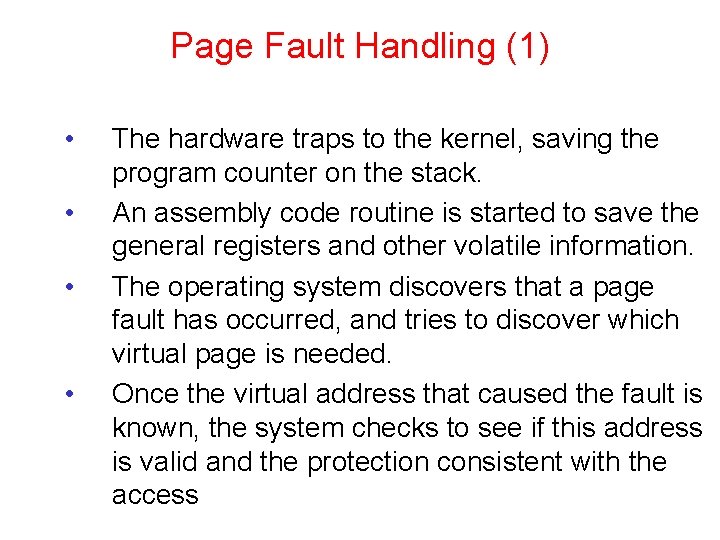
Page Fault Handling (1) • • The hardware traps to the kernel, saving the program counter on the stack. An assembly code routine is started to save the general registers and other volatile information. The operating system discovers that a page fault has occurred, and tries to discover which virtual page is needed. Once the virtual address that caused the fault is known, the system checks to see if this address is valid and the protection consistent with the access
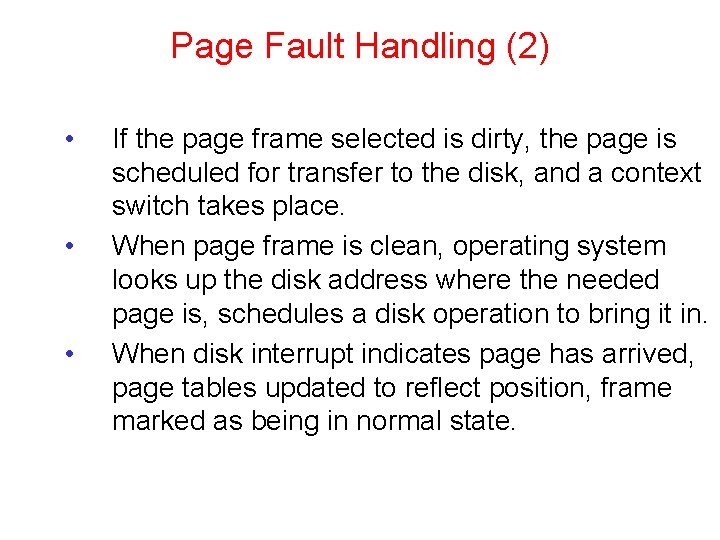
Page Fault Handling (2) • • • If the page frame selected is dirty, the page is scheduled for transfer to the disk, and a context switch takes place. When page frame is clean, operating system looks up the disk address where the needed page is, schedules a disk operation to bring it in. When disk interrupt indicates page has arrived, page tables updated to reflect position, frame marked as being in normal state.
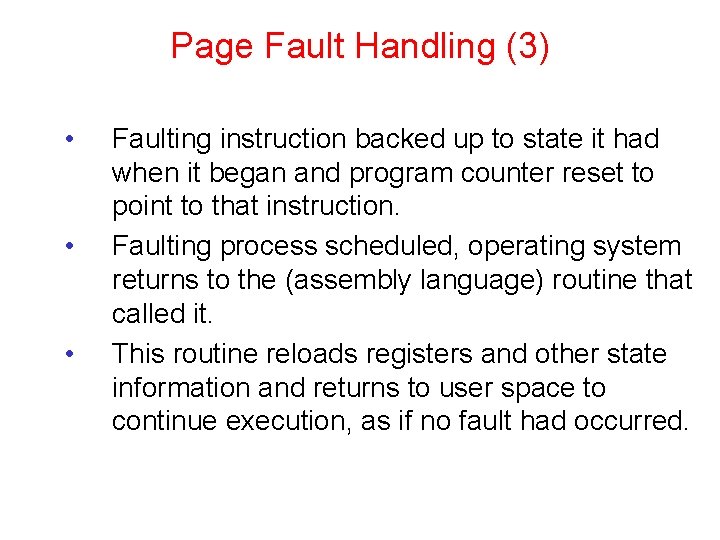
Page Fault Handling (3) • • • Faulting instruction backed up to state it had when it began and program counter reset to point to that instruction. Faulting process scheduled, operating system returns to the (assembly language) routine that called it. This routine reloads registers and other state information and returns to user space to continue execution, as if no fault had occurred.
Instruction Backup • • • Instruction causes fault => stopped part way through, traps to OS for fault handling, OS returns to instruction Must re-start instruction Easier said then done! For example
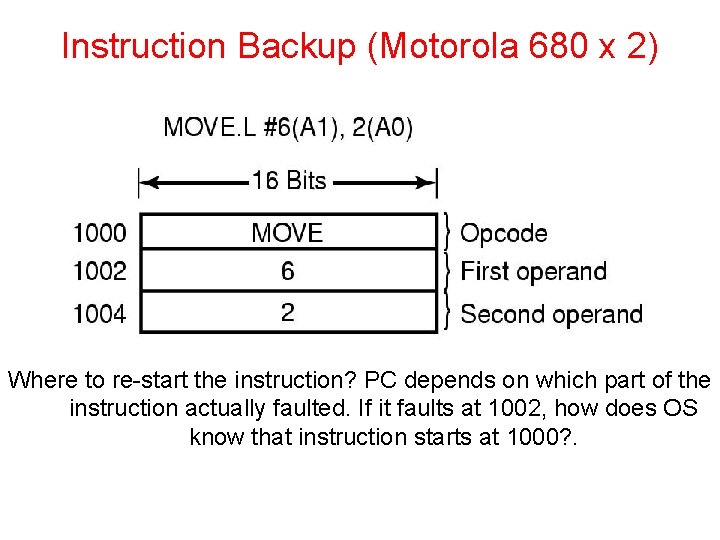
Instruction Backup (Motorola 680 x 2) Where to re-start the instruction? PC depends on which part of the instruction actually faulted. If it faults at 1002, how does OS know that instruction starts at 1000? .
Instruction Backup • • • Worse yet: Auto-incrementing loads registers either before or after instruction is executed. Do it before and needs to be un-done. Do it afterwards and must not do it. Hardware solution to instruction backup-copy current instruction to a register just before the instruction is executed Otherwise OS is deep in the swamp
Locking Pages in Memory • • Process does I/O call, waits for data Gets suspended while waiting, new process read in, new process page faults Global paging algorithm => incoming data writes over new page Solution: Lock pages engaged in I/O
Backing Store • Where is page put on disk when it is swapped out? Two approaches • Separate disk • Use separate partition on disk which has no file system on it
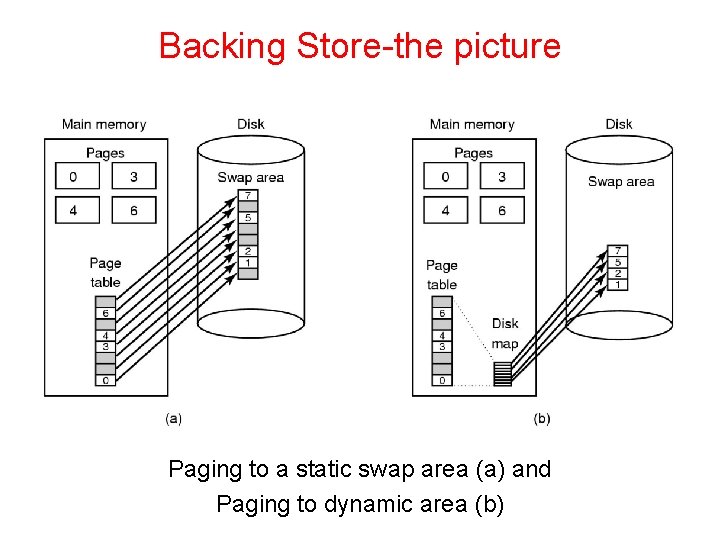
Backing Store • Static Partition-Allocate fixed partition to process when it starts up • Manage as list of free chunks. Assign big enough chunk to hold process • Starting address of partition kept in process table. Page offset in virtual address space corresponds to address on disk. • Can assign different areas for data, text , stack as data and stack can grow
Backing Store-Dynamic • • Dynamic approach-Don’t allocate disk space in advance. Swap pages in and out as needed. Need disk map in memory
Backing Store-the picture Paging to a static swap area (a) and Paging to dynamic area (b)
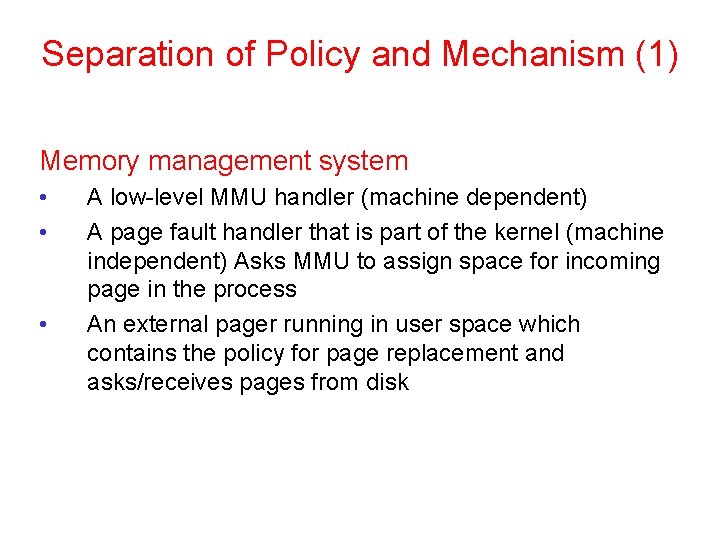
Separation of Policy and Mechanism (1) Memory management system • • • A low-level MMU handler (machine dependent) A page fault handler that is part of the kernel (machine independent) Asks MMU to assign space for incoming page in the process An external pager running in user space which contains the policy for page replacement and asks/receives pages from disk
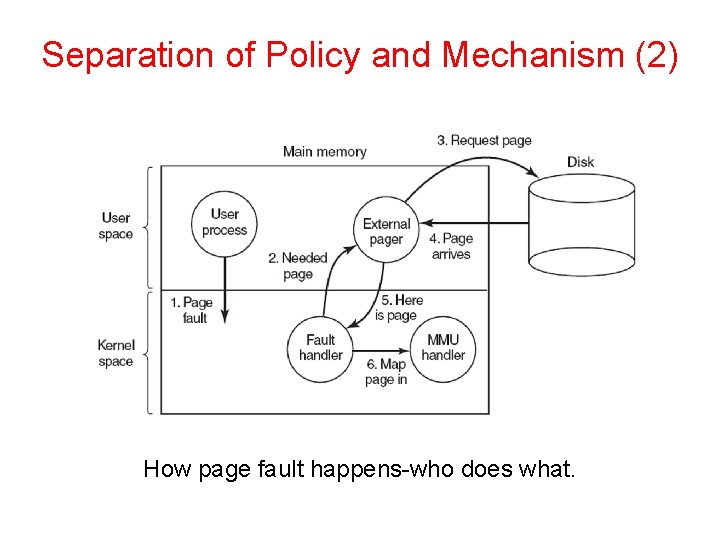
Separation of Policy and Mechanism (2) How page fault happens-who does what.
The good vs the bad • • The good: modular code => greater flexibility The bad: Cross the user/kernel interface several times in the course of a page fault
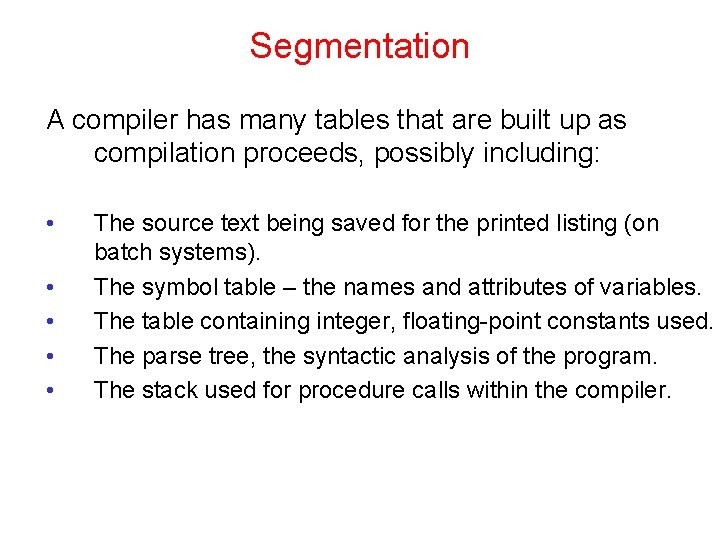
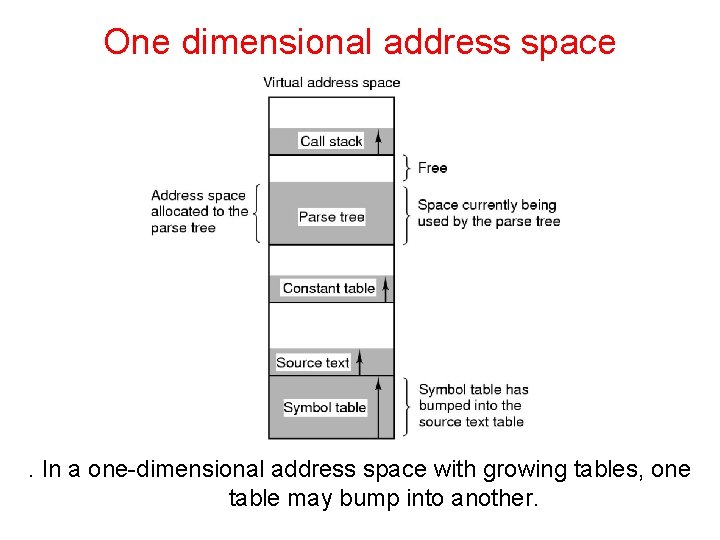
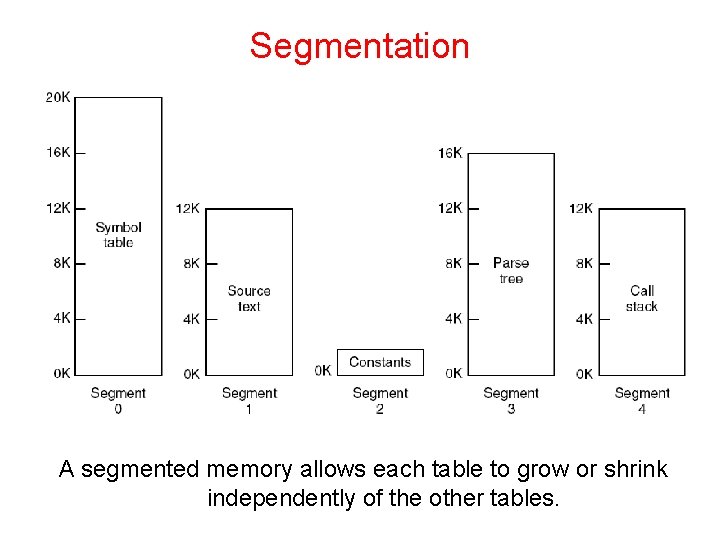
Segmentation A compiler has many tables that are built up as compilation proceeds, possibly including: • • • The source text being saved for the printed listing (on batch systems). The symbol table – the names and attributes of variables. The table containing integer, floating-point constants used. The parse tree, the syntactic analysis of the program. The stack used for procedure calls within the compiler.
One dimensional address space . In a one-dimensional address space with growing tables, one table may bump into another.
Segmentation A segmented memory allows each table to grow or shrink independently of the other tables.
Advantages of Segmentation • Simplifies handling of data structures which are growing and shrinking • Address space of segment n is of form (n, local address) where (n, 0) is starting address • Can compile segments separately from other segments • Can put library in a segment and share it • Can have different protections (r, w, x) for different segments
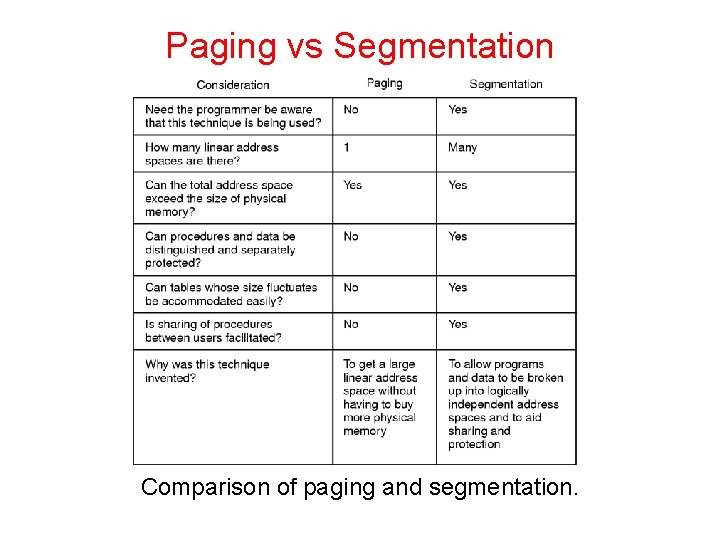
Paging vs Segmentation Comparison of paging and segmentation.
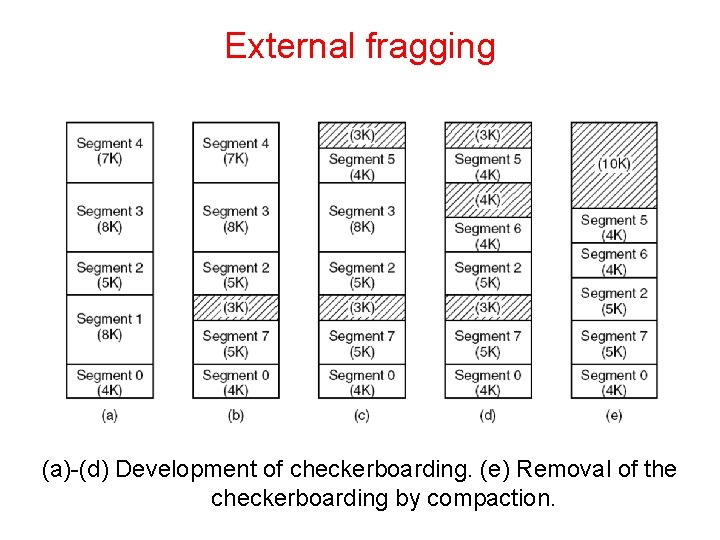
External fragging (a)-(d) Development of checkerboarding. (e) Removal of the checkerboarding by compaction.
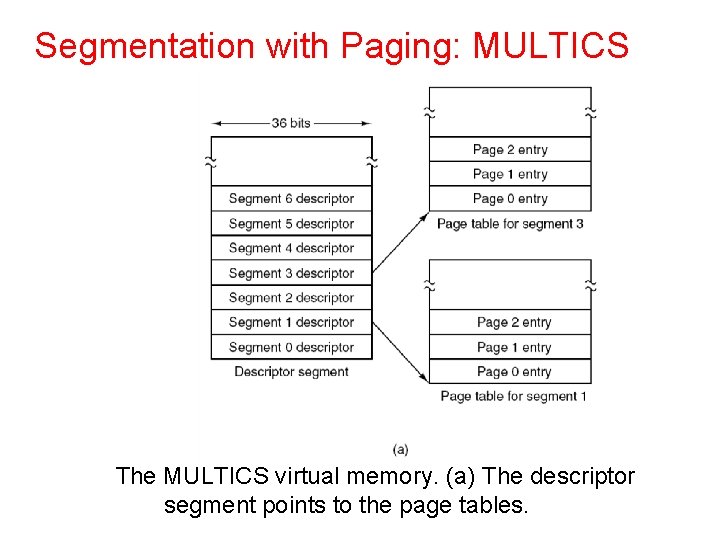
Segmentation with Paging • • • Examine two systems • Multics (the first) • The Pentium Honeywell 6000 2*18 segments, up to 65, 538 (36 bit) words per segment Each program has a segment table (paged itself) containing segment descriptors Segment descriptor points to page table
Segmentation with Paging: MULTICS The MULTICS virtual memory. (a) The descriptor segment points to the page tables.
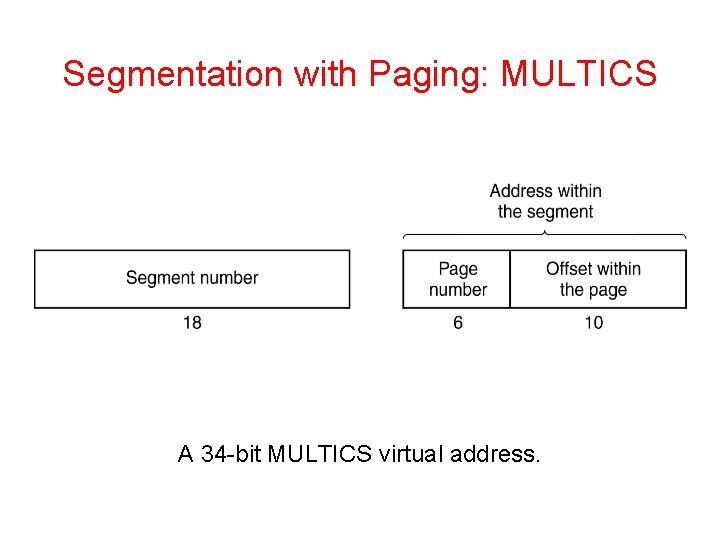
Segmentation with Paging • • • Segment descriptor says whether segment is in main memory or not If any part of segment is in memory, entire segment is considered to be in memory Virtual Address is (segment number, page number, offset within page)
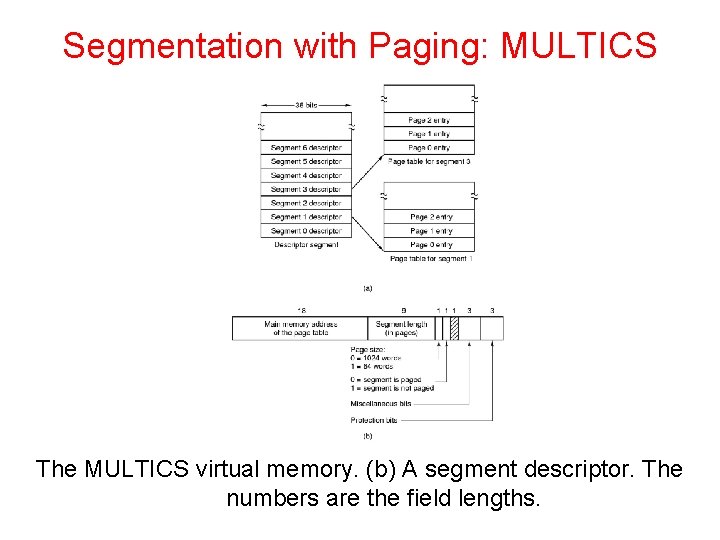
Segmentation with Paging: MULTICS The MULTICS virtual memory. (b) A segment descriptor. The numbers are the field lengths.
Segmentation with Paging: MULTICS A 34 -bit MULTICS virtual address.
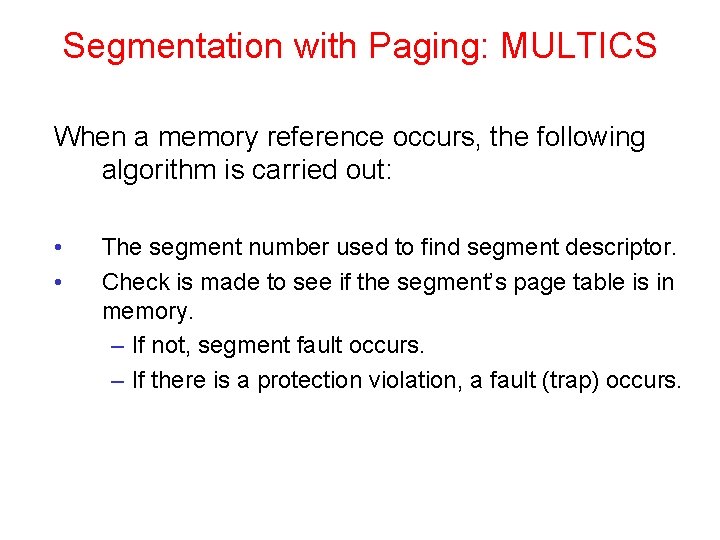
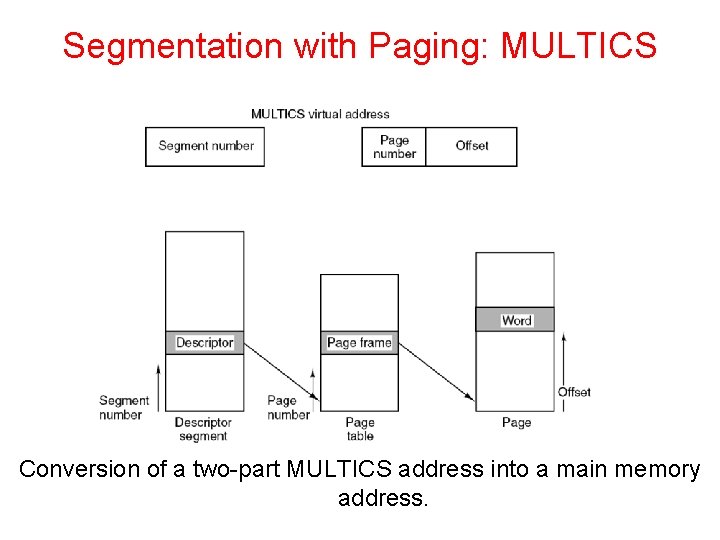
Segmentation with Paging: MULTICS When a memory reference occurs, the following algorithm is carried out: • • The segment number used to find segment descriptor. Check is made to see if the segment’s page table is in memory. – If not, segment fault occurs. – If there is a protection violation, a fault (trap) occurs.
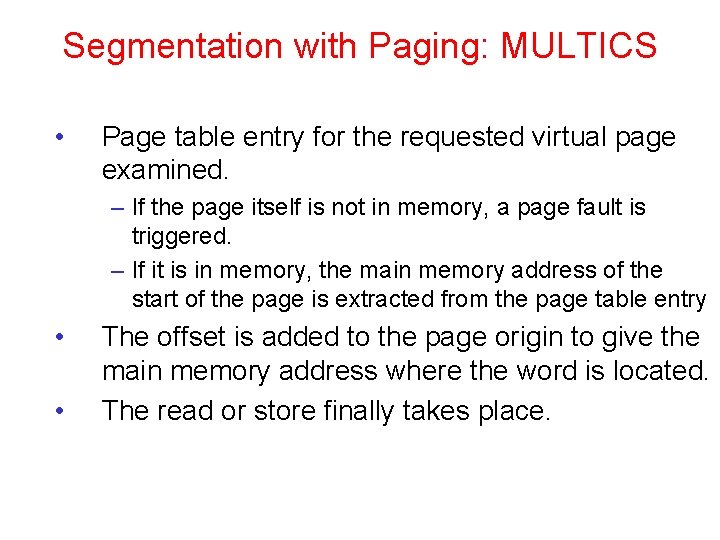
Segmentation with Paging: MULTICS • Page table entry for the requested virtual page examined. – If the page itself is not in memory, a page fault is triggered. – If it is in memory, the main memory address of the start of the page is extracted from the page table entry • • The offset is added to the page origin to give the main memory address where the word is located. The read or store finally takes place.
Segmentation with Paging: MULTICS Conversion of a two-part MULTICS address into a main memory address.
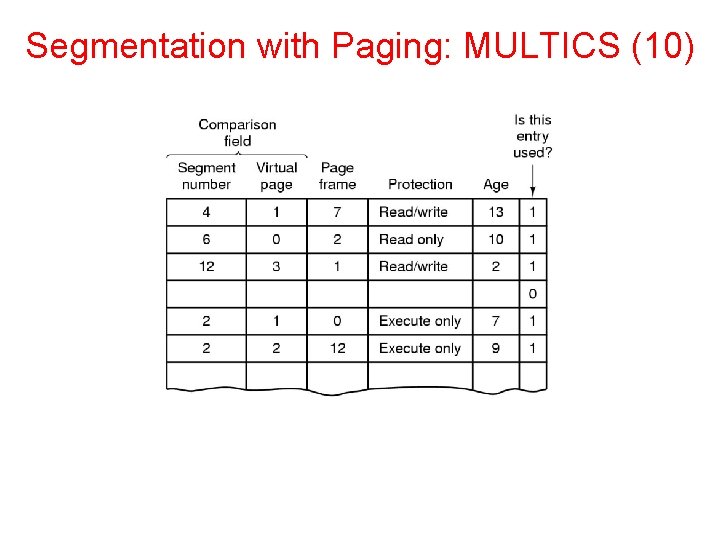
MULTICS TLB • • • Too many references with algorithm Use TLB (16 words) Keep addresses of the 16 most recently referenced pages in TLB Addressing hardware checks to see if address is in TLB If so, gets address directly from TLB If not, invoke algorithm (check descriptor…)
Segmentation with Paging: MULTICS (10)
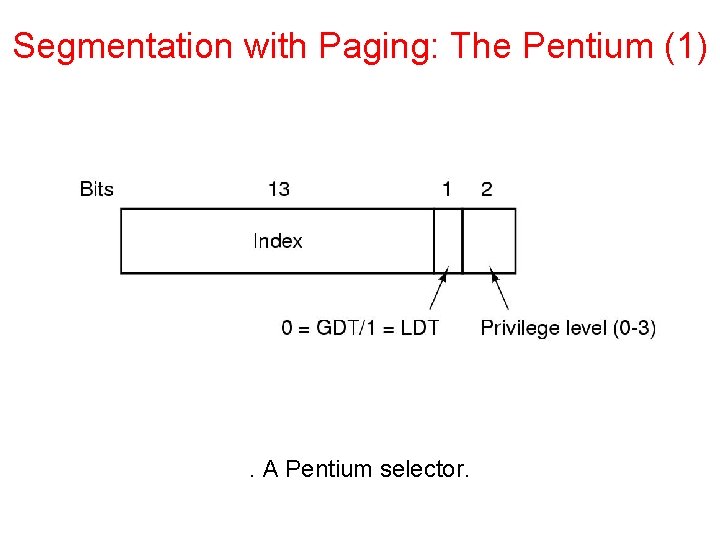
Segmentation with Paging: The Pentium (1) . A Pentium selector.
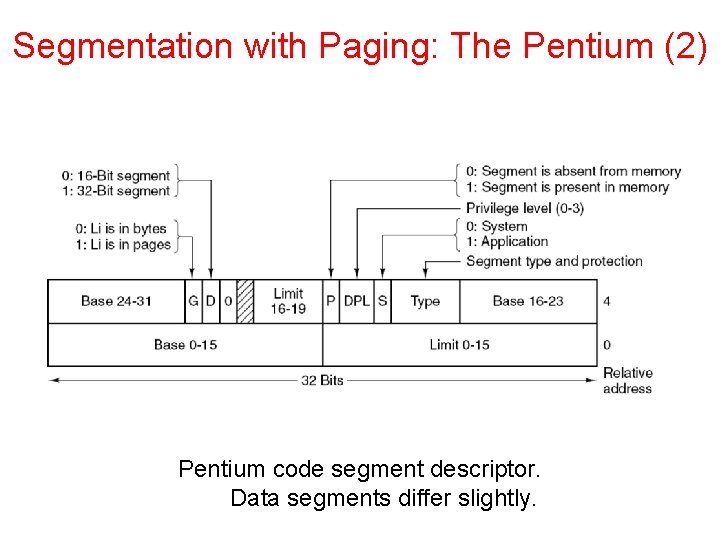
Segmentation with Paging: The Pentium (2) Pentium code segment descriptor. Data segments differ slightly.
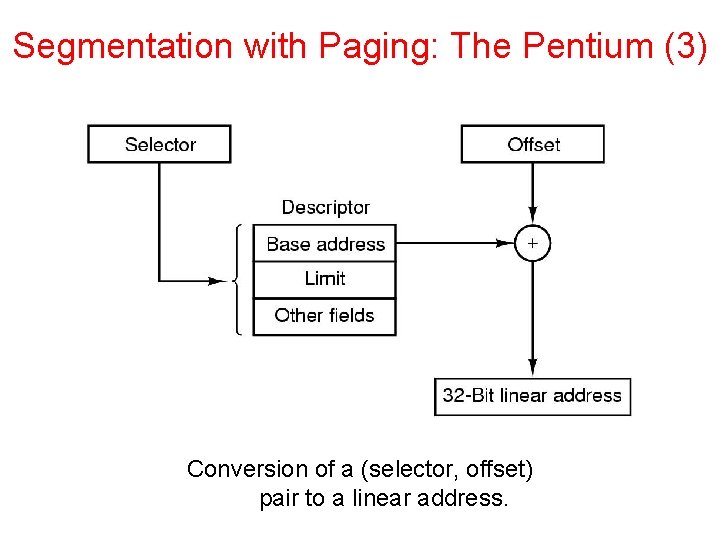
Segmentation with Paging: The Pentium (3) Conversion of a (selector, offset) pair to a linear address.
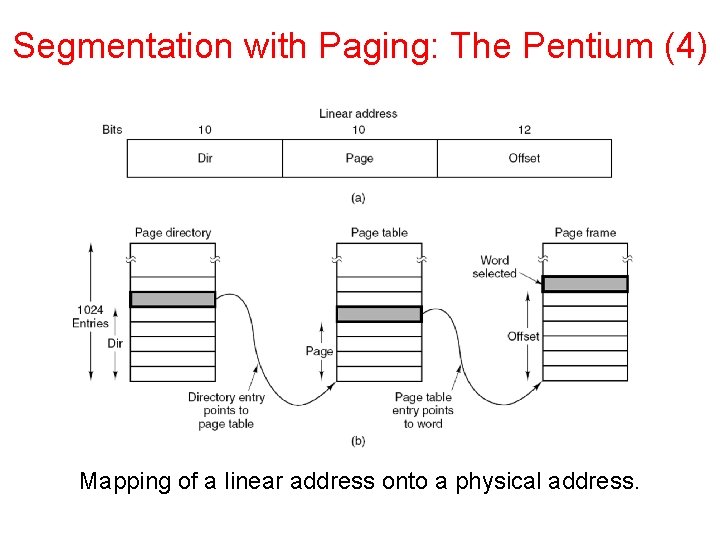
Segmentation with Paging: The Pentium (4) Mapping of a linear address onto a physical address.
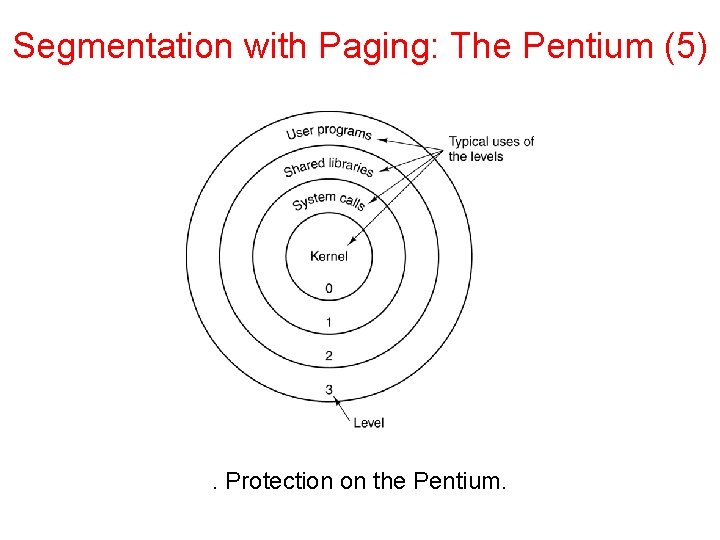
Segmentation with Paging: The Pentium (5) . Protection on the Pentium.