
Chapter 4 Maintaining and Troubleshooting Campus Switched Solutions
Chapter 4: Maintaining and Troubleshooting Campus Switched Solutions CCNP TSHOOT: Maintaining and Troubleshooting IP Networks TSHOOT v 6 Chapter 4 © 2007 – 2010, Cisco Systems, Inc. All rights reserved. Cisco Public 1

Topics § Troubleshooting VLANs • LAN Switching Process § Troubleshooting Spanning Tree • Etherchannel Operations § Troubleshooting Switched Virtual Interfaces and Inter-VLAN Routing § Troubleshooting First-Hop Redundancy Protocols 2 Chapter 4 © 2007 – 2010, Cisco Systems, Inc. All rights reserved. Cisco Public 2
Troubleshooting VLANs TSHOOT v 6 Chapter 4 © 2007 – 2010, Cisco Systems, Inc. All rights reserved. 3 Cisco Public 3
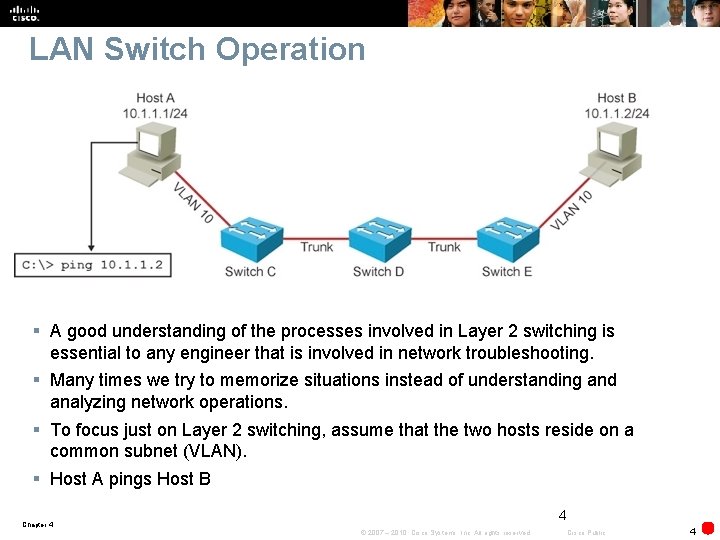
LAN Switch Operation § A good understanding of the processes involved in Layer 2 switching is essential to any engineer that is involved in network troubleshooting. § Many times we try to memorize situations instead of understanding and analyzing network operations. § To focus just on Layer 2 switching, assume that the two hosts reside on a common subnet (VLAN). § Host A pings Host B 4 Chapter 4 © 2007 – 2010, Cisco Systems, Inc. All rights reserved. Cisco Public 4
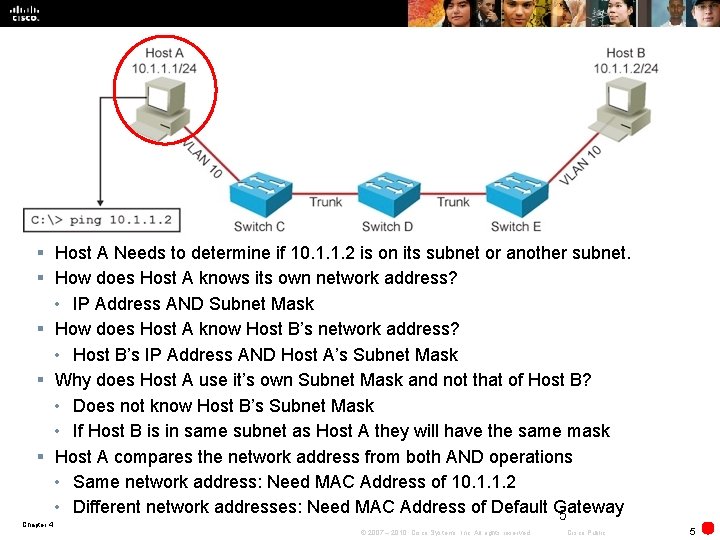
§ Host A Needs to determine if 10. 1. 1. 2 is on its subnet or another subnet. § How does Host A knows its own network address? • IP Address AND Subnet Mask § How does Host A know Host B’s network address? • Host B’s IP Address AND Host A’s Subnet Mask § Why does Host A use it’s own Subnet Mask and not that of Host B? • Does not know Host B’s Subnet Mask • If Host B is in same subnet as Host A they will have the same mask § Host A compares the network address from both AND operations • Same network address: Need MAC Address of 10. 1. 1. 2 • Different network addresses: Need MAC Address of Default Gateway 5 Chapter 4 © 2007 – 2010, Cisco Systems, Inc. All rights reserved. Cisco Public 5
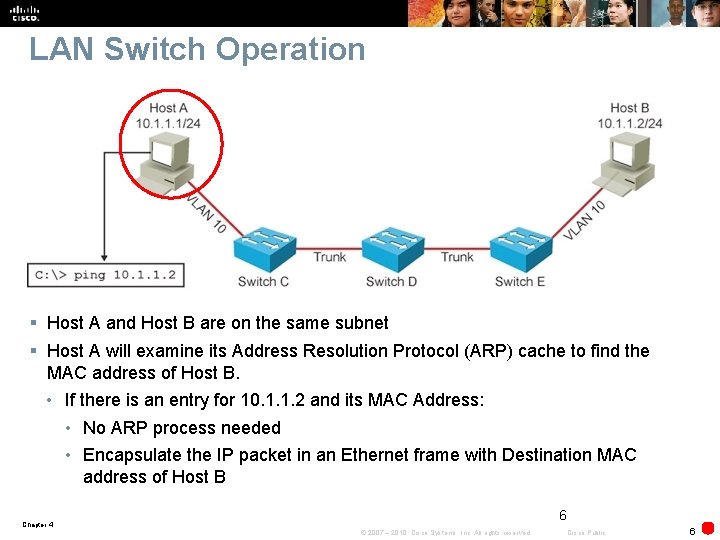
LAN Switch Operation § Host A and Host B are on the same subnet § Host A will examine its Address Resolution Protocol (ARP) cache to find the MAC address of Host B. • If there is an entry for 10. 1. 1. 2 and its MAC Address: • No ARP process needed • Encapsulate the IP packet in an Ethernet frame with Destination MAC address of Host B 6 Chapter 4 © 2007 – 2010, Cisco Systems, Inc. All rights reserved. Cisco Public 6
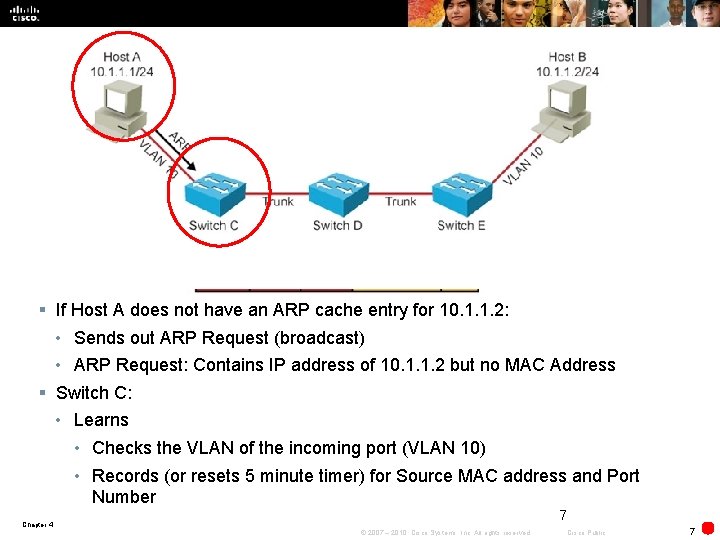
§ If Host A does not have an ARP cache entry for 10. 1. 1. 2: • Sends out ARP Request (broadcast) • ARP Request: Contains IP address of 10. 1. 1. 2 but no MAC Address § Switch C: • Learns • Checks the VLAN of the incoming port (VLAN 10) • Records (or resets 5 minute timer) for Source MAC address and Port Number 7 Chapter 4 © 2007 – 2010, Cisco Systems, Inc. All rights reserved. Cisco Public 7
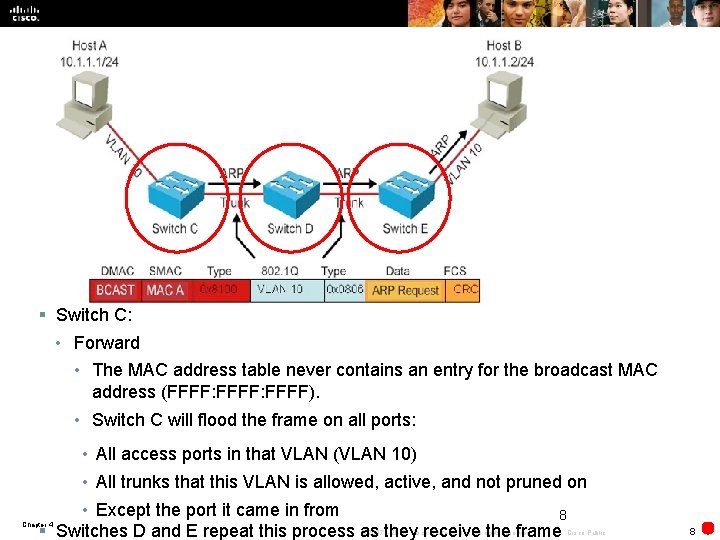
§ Switch C: • Forward • The MAC address table never contains an entry for the broadcast MAC address (FFFF: FFFF). • Switch C will flood the frame on all ports: • All access ports in that VLAN (VLAN 10) • All trunks that this VLAN is allowed, active, and not pruned on • Except the port it came in from 8 § Switches D and E repeat this process as they receive the frame Chapter 4 © 2007 – 2010, Cisco Systems, Inc. All rights reserved. Cisco Public 8
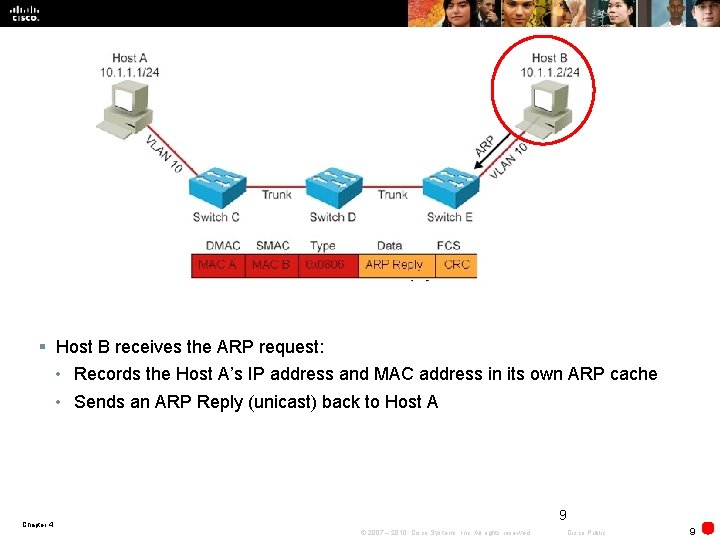
§ Host B receives the ARP request: • Records the Host A’s IP address and MAC address in its own ARP cache • Sends an ARP Reply (unicast) back to Host A 9 Chapter 4 © 2007 – 2010, Cisco Systems, Inc. All rights reserved. Cisco Public 9
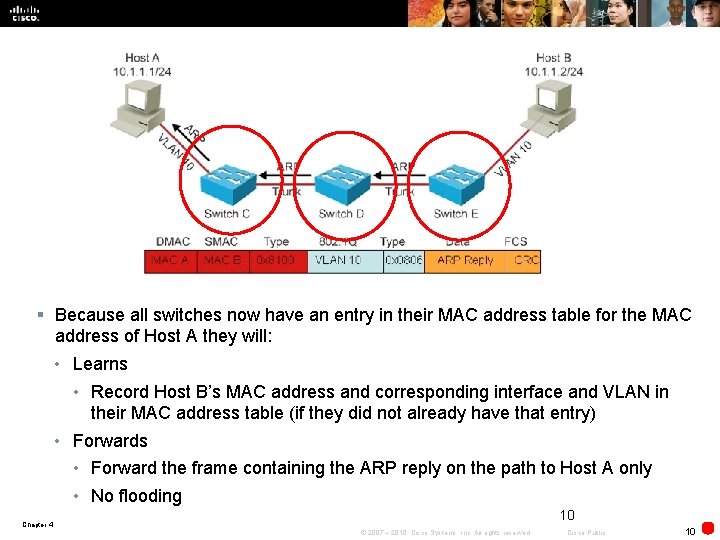
§ Because all switches now have an entry in their MAC address table for the MAC address of Host A they will: • Learns • Record Host B’s MAC address and corresponding interface and VLAN in their MAC address table (if they did not already have that entry) • Forwards • Forward the frame containing the ARP reply on the path to Host A only • No flooding 10 Chapter 4 © 2007 – 2010, Cisco Systems, Inc. All rights reserved. Cisco Public 10
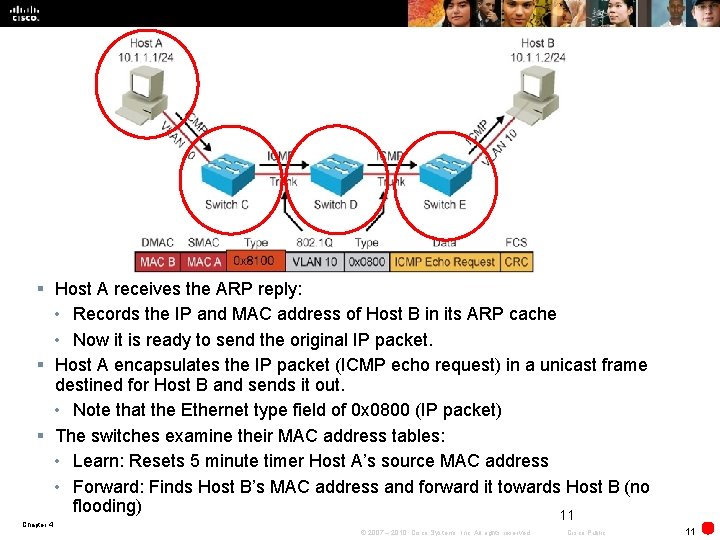
§ Host A receives the ARP reply: • Records the IP and MAC address of Host B in its ARP cache • Now it is ready to send the original IP packet. § Host A encapsulates the IP packet (ICMP echo request) in a unicast frame destined for Host B and sends it out. • Note that the Ethernet type field of 0 x 0800 (IP packet) § The switches examine their MAC address tables: • Learn: Resets 5 minute timer Host A’s source MAC address • Forward: Finds Host B’s MAC address and forward it towards Host B (no flooding) 11 Chapter 4 © 2007 – 2010, Cisco Systems, Inc. All rights reserved. Cisco Public 11
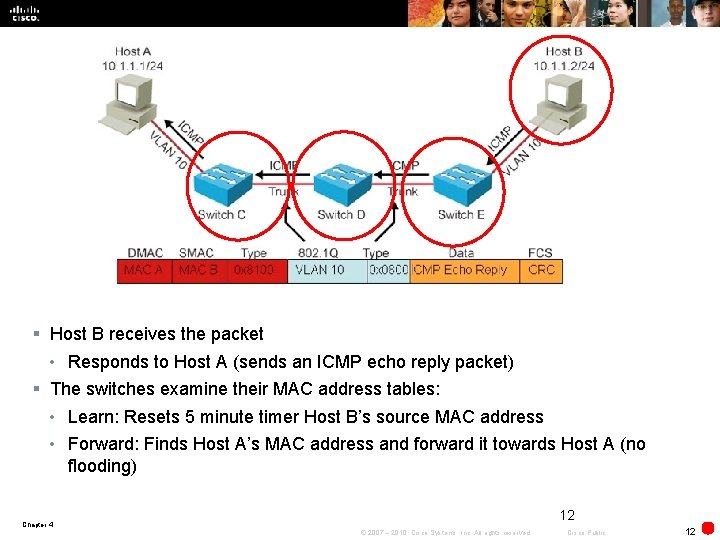
§ Host B receives the packet • Responds to Host A (sends an ICMP echo reply packet) § The switches examine their MAC address tables: • Learn: Resets 5 minute timer Host B’s source MAC address • Forward: Finds Host A’s MAC address and forward it towards Host A (no flooding) 12 Chapter 4 © 2007 – 2010, Cisco Systems, Inc. All rights reserved. Cisco Public 12
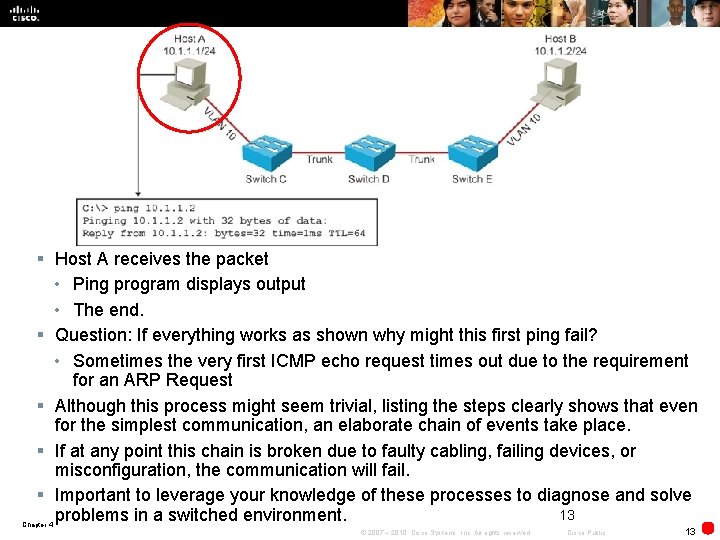
§ Host A receives the packet • Ping program displays output • The end. § Question: If everything works as shown why might this first ping fail? • Sometimes the very first ICMP echo request times out due to the requirement for an ARP Request § Although this process might seem trivial, listing the steps clearly shows that even for the simplest communication, an elaborate chain of events take place. § If at any point this chain is broken due to faulty cabling, failing devices, or misconfiguration, the communication will fail. § Important to leverage your knowledge of these processes to diagnose and solve 13 problems in a switched environment. Chapter 4 © 2007 – 2010, Cisco Systems, Inc. All rights reserved. Cisco Public 13
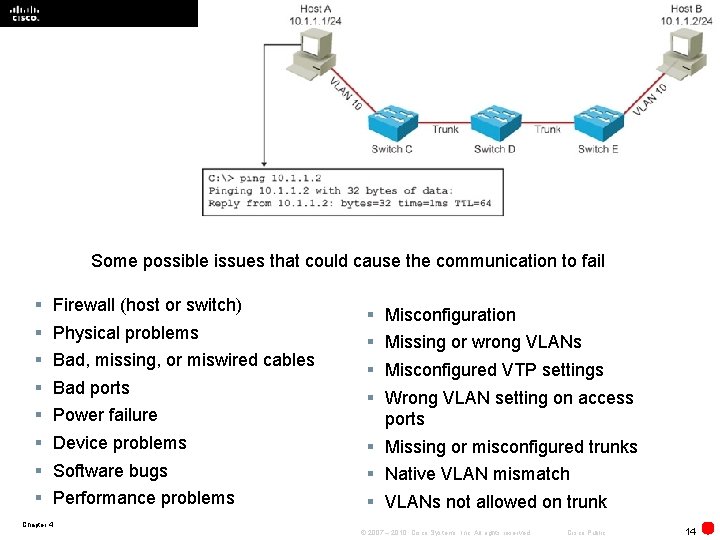
§ 14 Some possible issues that could cause the communication to fail § § § § Firewall (host or switch) Physical problems Bad, missing, or miswired cables Bad ports Power failure Device problems Software bugs Performance problems § § Misconfiguration Missing or wrong VLANs Misconfigured VTP settings Wrong VLAN setting on access ports § Missing or misconfigured trunks § Native VLAN mismatch § VLANs not allowed on trunk Chapter 4 © 2007 – 2010, Cisco Systems, Inc. All rights reserved. Cisco Public 14
Verifying Layer 2 Forwarding § A common method to troubleshoot Layer 2 switching problems is to follow the path of the frames through the switches. • Takes time and effort § Objective: To confirm that frames have passed through the switches and to verify how each switch made its forwarding decisions. • Find the point where the trail stops. • Possible to start at the endpoints. 15 Chapter 4 © 2007 – 2010, Cisco Systems, Inc. All rights reserved. Cisco Public 15
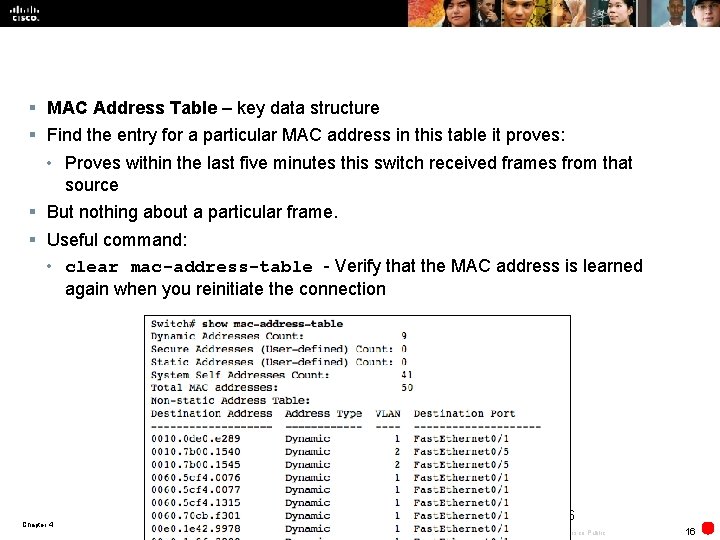
§ MAC Address Table – key data structure § Find the entry for a particular MAC address in this table it proves: • Proves within the last five minutes this switch received frames from that source § But nothing about a particular frame. § Useful command: • clear mac-address-table - Verify that the MAC address is learned again when you reinitiate the connection 16 Chapter 4 © 2007 – 2010, Cisco Systems, Inc. All rights reserved. Cisco Public 16
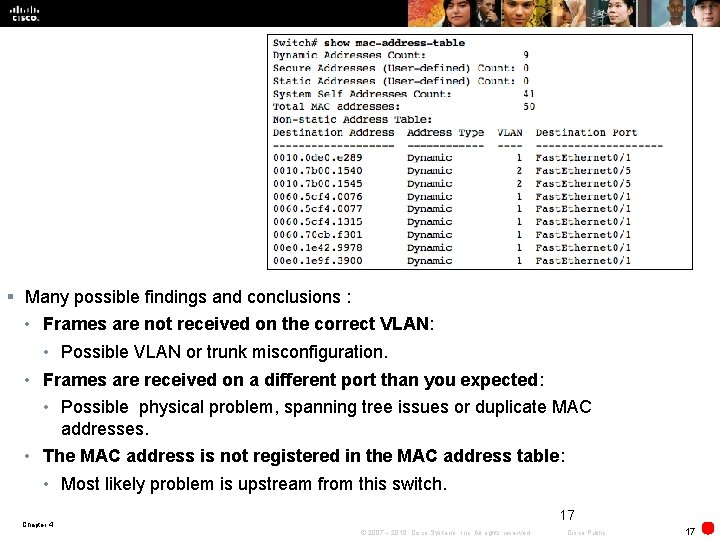
§ Many possible findings and conclusions : • Frames are not received on the correct VLAN: • Possible VLAN or trunk misconfiguration. • Frames are received on a different port than you expected: • Possible physical problem, spanning tree issues or duplicate MAC addresses. • The MAC address is not registered in the MAC address table: • Most likely problem is upstream from this switch. 17 Chapter 4 © 2007 – 2010, Cisco Systems, Inc. All rights reserved. Cisco Public 17
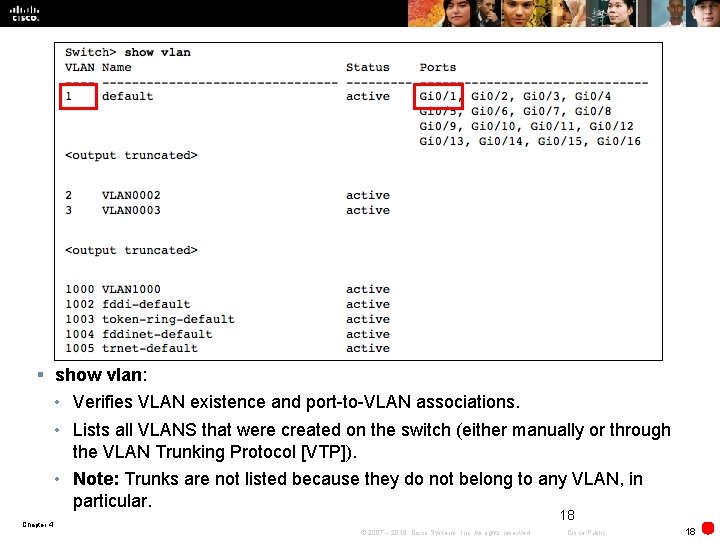
§ show vlan: • Verifies VLAN existence and port-to-VLAN associations. • Lists all VLANS that were created on the switch (either manually or through the VLAN Trunking Protocol [VTP]). • Note: Trunks are not listed because they do not belong to any VLAN, in particular. 18 Chapter 4 © 2007 – 2010, Cisco Systems, Inc. All rights reserved. Cisco Public 18
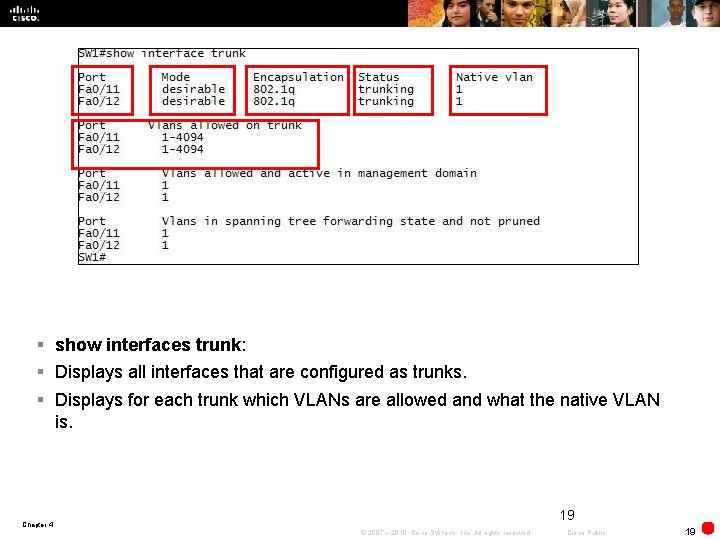
§ show interfaces trunk: § Displays all interfaces that are configured as trunks. § Displays for each trunk which VLANs are allowed and what the native VLAN is. 19 Chapter 4 © 2007 – 2010, Cisco Systems, Inc. All rights reserved. Cisco Public 19
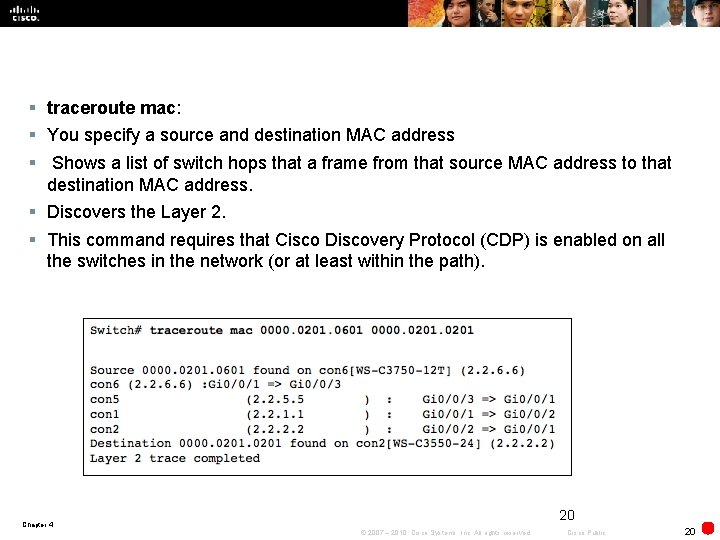
§ traceroute mac: § You specify a source and destination MAC address § Shows a list of switch hops that a frame from that source MAC address to that destination MAC address. § Discovers the Layer 2. § This command requires that Cisco Discovery Protocol (CDP) is enabled on all the switches in the network (or at least within the path). 20 Chapter 4 © 2007 – 2010, Cisco Systems, Inc. All rights reserved. Cisco Public 20
Troubleshooting Spanning Tree Chapter 4 © 2007 – 2010, Cisco Systems, Inc. All rights reserved. Cisco Public 21
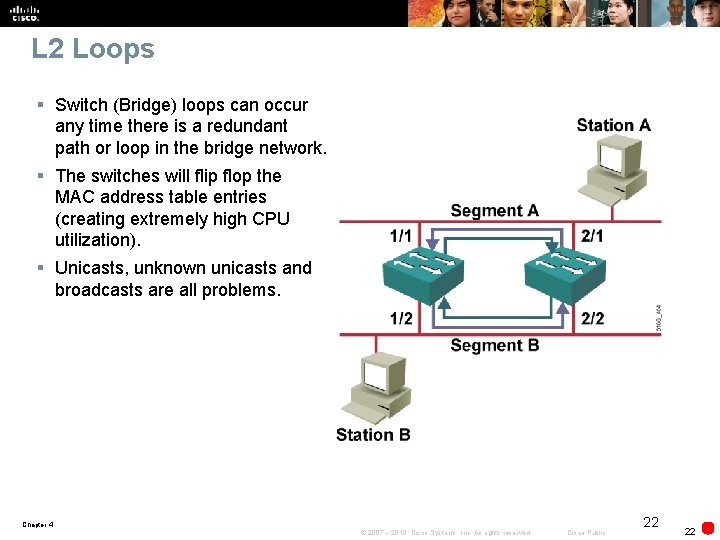
L 2 Loops § Switch (Bridge) loops can occur any time there is a redundant path or loop in the bridge network. § The switches will flip flop the MAC address table entries (creating extremely high CPU utilization). § Unicasts, unknown unicasts and broadcasts are all problems. Chapter 4 © 2007 – 2010, Cisco Systems, Inc. All rights reserved. Cisco Public 22 22
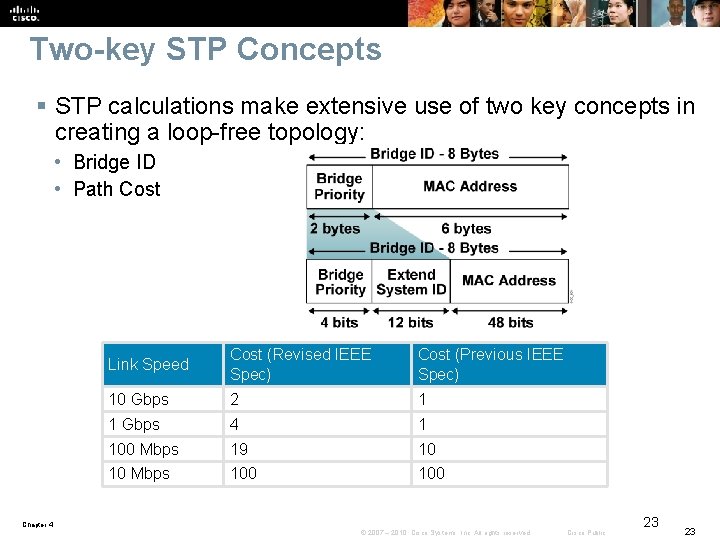
Two-key STP Concepts § STP calculations make extensive use of two key concepts in creating a loop-free topology: • Bridge ID • Path Cost Link Speed Cost (Revised IEEE Spec) Cost (Previous IEEE Spec) 10 Gbps 2 1 1 Gbps 4 1 100 Mbps 19 10 10 Mbps 100 Chapter 4 © 2007 – 2010, Cisco Systems, Inc. All rights reserved. Cisco Public 23 23
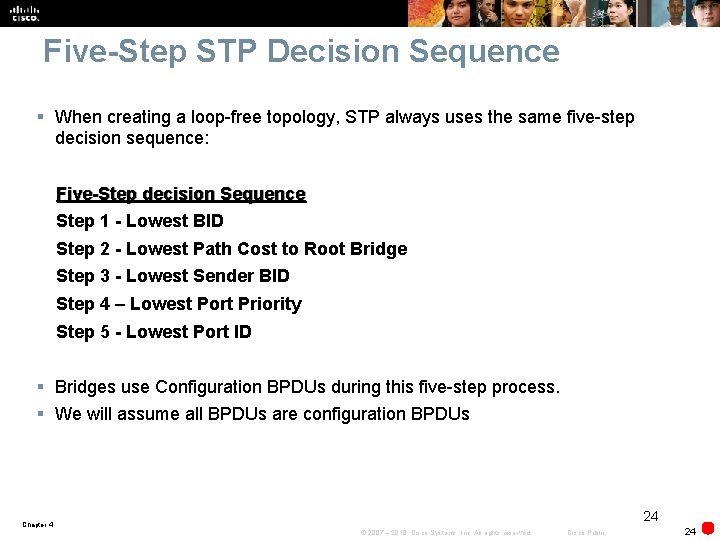
Five-Step STP Decision Sequence § When creating a loop-free topology, STP always uses the same five-step decision sequence: Five-Step decision Sequence Step 1 - Lowest BID Step 2 - Lowest Path Cost to Root Bridge Step 3 - Lowest Sender BID Step 4 – Lowest Port Priority Step 5 - Lowest Port ID § Bridges use Configuration BPDUs during this five-step process. § We will assume all BPDUs are configuration BPDUs 24 Chapter 4 © 2007 – 2010, Cisco Systems, Inc. All rights reserved. Cisco Public 24
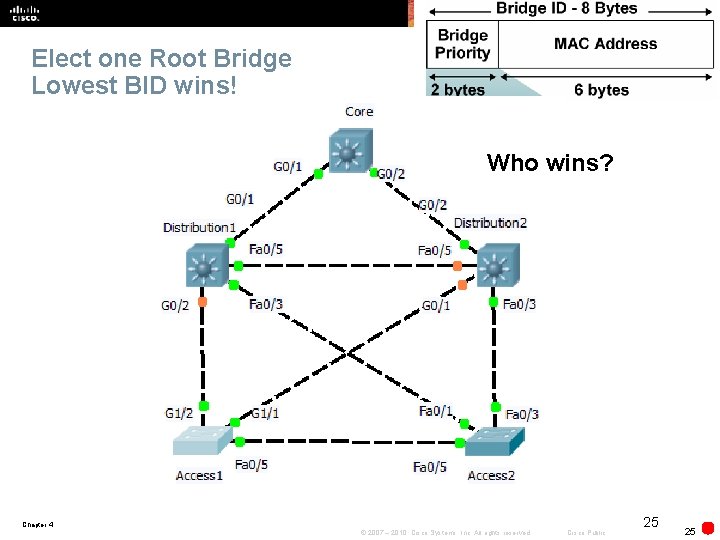
Elect one Root Bridge Lowest BID wins! Who wins? Chapter 4 © 2007 – 2010, Cisco Systems, Inc. All rights reserved. Cisco Public 25 25
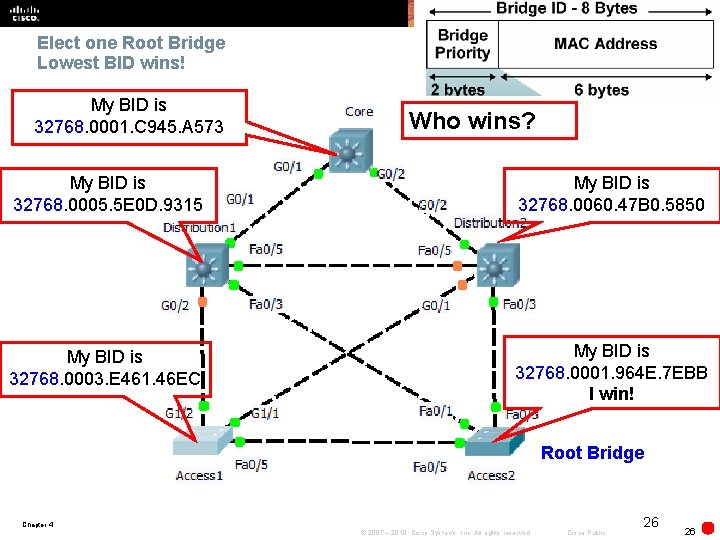
Elect one Root Bridge Lowest BID wins! My BID is 32768. 0001. C 945. A 573 Who wins? My BID is 32768. 0005. 5 E 0 D. 9315 My BID is 32768. 0060. 47 B 0. 5850 My BID is 32768. 0003. E 461. 46 EC My BID is 32768. 0001. 964 E. 7 EBB I win! Root Bridge Chapter 4 © 2007 – 2010, Cisco Systems, Inc. All rights reserved. Cisco Public 26 26
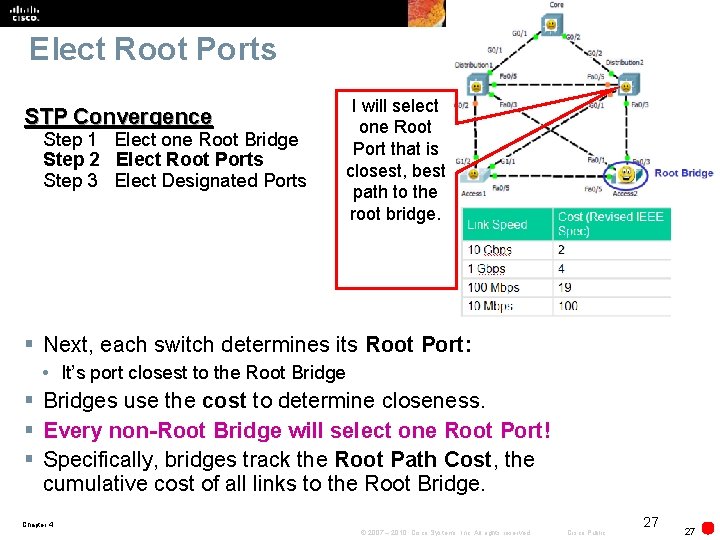
Elect Root Ports STP Convergence Step 1 Elect one Root Bridge Step 2 Elect Root Ports Step 3 Elect Designated Ports I will select one Root Port that is closest, best path to the root bridge. § Next, each switch determines its Root Port: • It’s port closest to the Root Bridge § Bridges use the cost to determine closeness. § Every non-Root Bridge will select one Root Port! § Specifically, bridges track the Root Path Cost, the cumulative cost of all links to the Root Bridge. Chapter 4 © 2007 – 2010, Cisco Systems, Inc. All rights reserved. Cisco Public 27 27
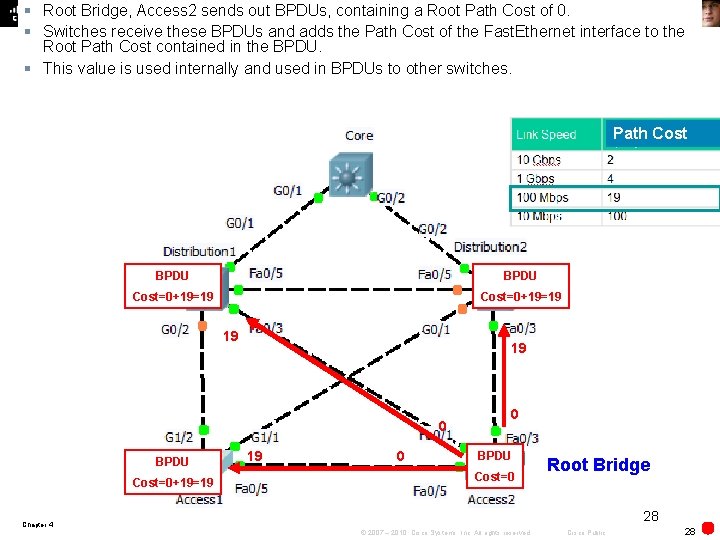
§ Root Bridge, Access 2 sends out BPDUs, containing a Root Path Cost of 0. § Switches receive these BPDUs and adds the Path Cost of the Fast. Ethernet interface to the Root Path Cost contained in the BPDU. § This value is used internally and used in BPDUs to other switches. Path Cost BPDU Cost=0+19=19 19 19 0 BPDU Cost=0+19=19 19 0 0 BPDU Cost=0 Root Bridge 28 Chapter 4 © 2007 – 2010, Cisco Systems, Inc. All rights reserved. Cisco Public 28
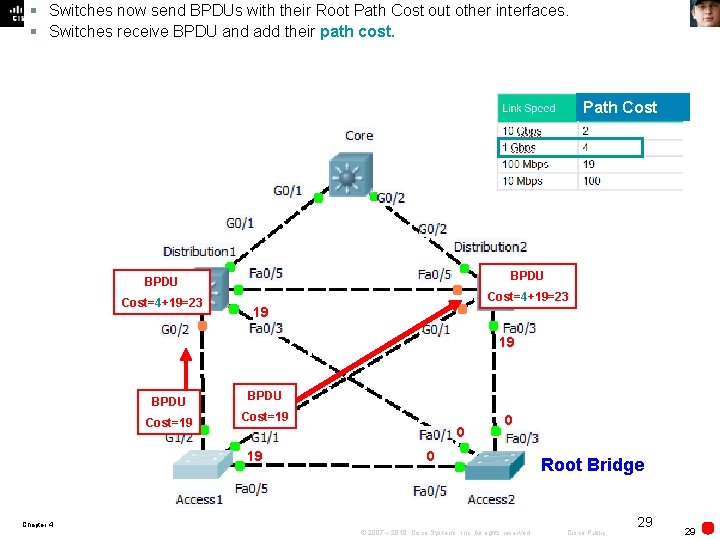
§ Switches now send BPDUs with their Root Path Cost out other interfaces. § Switches receive BPDU and add their path cost. Path Cost BPDU Cost=4+19=23 19 19 BPDU Cost=19 0 0 Root Bridge Chapter 4 © 2007 – 2010, Cisco Systems, Inc. All rights reserved. Cisco Public 29 29
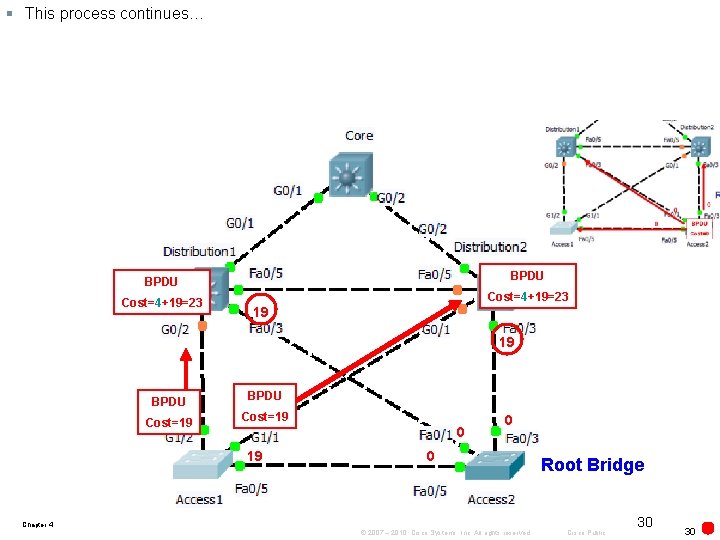
§ This process continues… BPDU Cost=4+19=23 19 19 BPDU Cost=19 0 0 Root Bridge Chapter 4 © 2007 – 2010, Cisco Systems, Inc. All rights reserved. Cisco Public 30 30
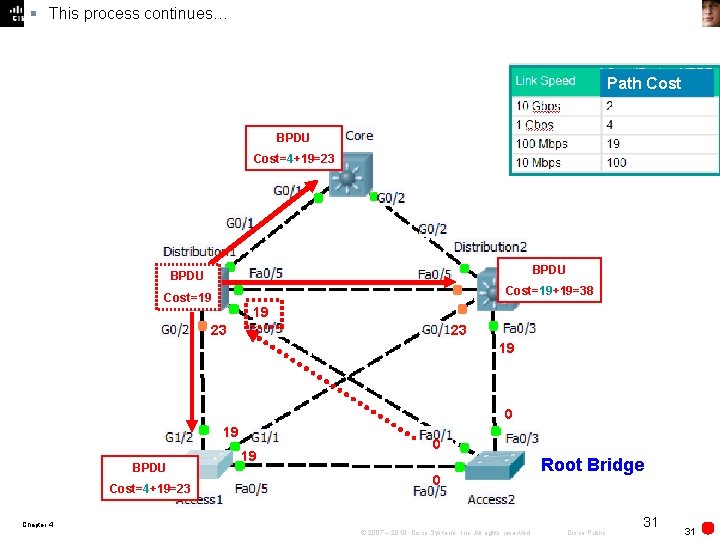
§ This process continues… Path Cost BPDU Cost=4+19=23 BPDU Cost=19+19=38 Cost=19 19 23 23 19 0 19 BPDU Cost=4+19=23 19 0 0 Root Bridge Chapter 4 © 2007 – 2010, Cisco Systems, Inc. All rights reserved. Cisco Public 31 31
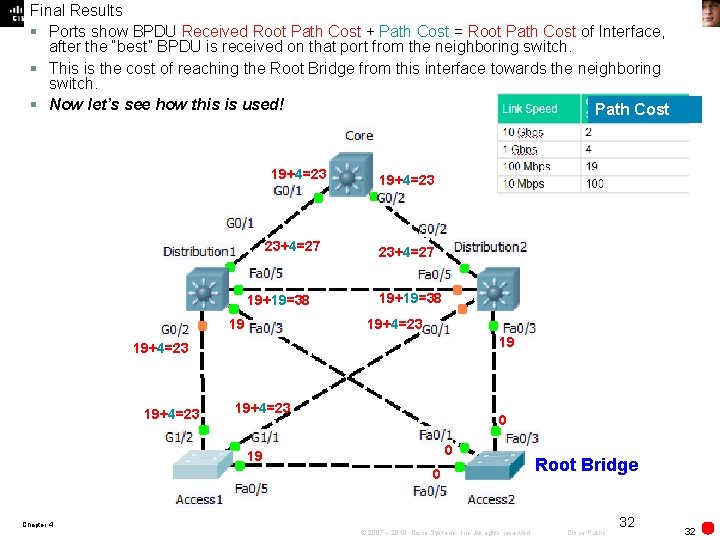
Final Results § Ports show BPDU Received Root Path Cost + Path Cost = Root Path Cost of Interface, after the “best” BPDU is received on that port from the neighboring switch. § This is the cost of reaching the Root Bridge from this interface towards the neighboring switch. § Now let’s see how this is used! Path Cost 19+4=23 23+4=27 19+19=38 19+4=23 19+4=23 0 0 19 0 Root Bridge Chapter 4 © 2007 – 2010, Cisco Systems, Inc. All rights reserved. Cisco Public 32 32
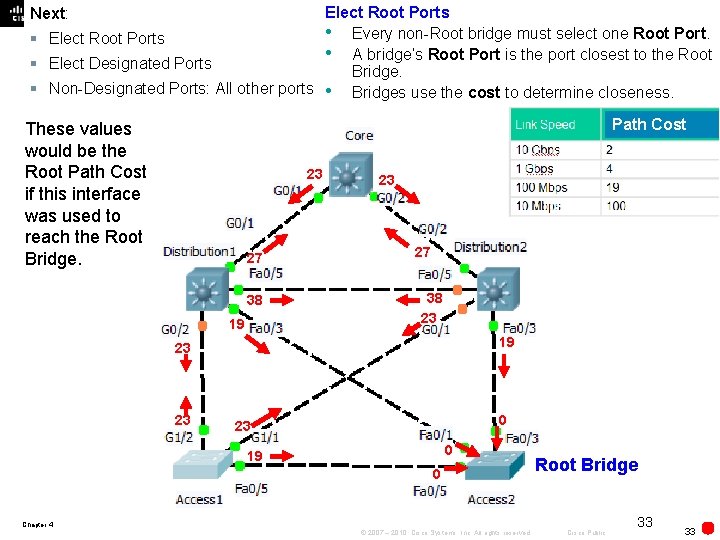
Elect Root Ports • Every non-Root bridge must select one Root Port. § Elect Root Ports • A bridge’s Root Port is the port closest to the Root § Elect Designated Ports Bridge. § Non-Designated Ports: All other ports • Bridges use the cost to determine closeness. Next: Path Cost These values would be the Root Path Cost if this interface was used to reach the Root Bridge. 23 27 38 19 23 27 38 23 19 23 23 0 19 0 Root Bridge Chapter 4 © 2007 – 2010, Cisco Systems, Inc. All rights reserved. Cisco Public 33 33
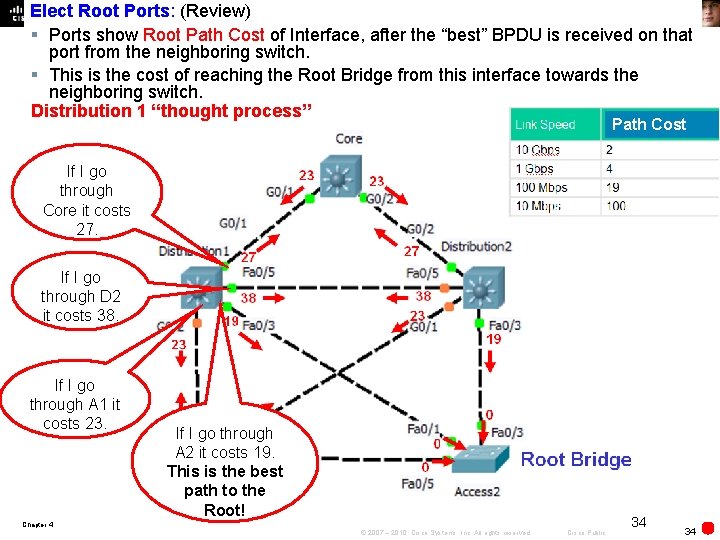
Elect Root Ports: (Review) § Ports show Root Path Cost of Interface, after the “best” BPDU is received on that port from the neighboring switch. § This is the cost of reaching the Root Bridge from this interface towards the neighboring switch. Distribution 1 “thought process” Path Cost If I go through Core it costs 27. If I go through D 2 it costs 38. If I go through A 1 it costs 23. If I go through A 2 it costs 19. This is the best path to the Root! Chapter 4 © 2007 – 2010, Cisco Systems, Inc. All rights reserved. Cisco Public 34 34
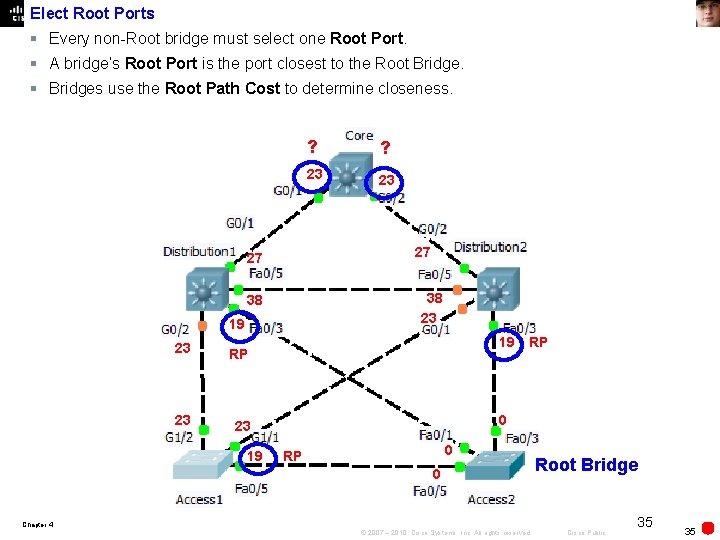
Elect Root Ports § Every non-Root bridge must select one Root Port. § A bridge’s Root Port is the port closest to the Root Bridge. § Bridges use the Root Path Cost to determine closeness. 19 23 23 38 RP ? 27 27 23 ? 19 RP 0 0 RP 0 Root Bridge Chapter 4 © 2007 – 2010, Cisco Systems, Inc. All rights reserved. Cisco Public 35 35
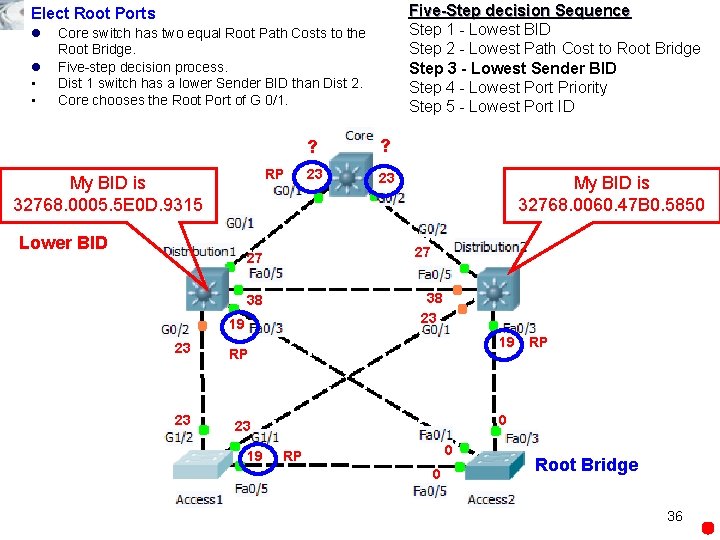
Five-Step decision Sequence Step 1 - Lowest BID Step 2 - Lowest Path Cost to Root Bridge Step 3 - Lowest Sender BID Step 4 - Lowest Port Priority Step 5 - Lowest Port ID Elect Root Ports l l • • Core switch has two equal Root Path Costs to the Root Bridge. Five-step decision process. Dist 1 switch has a lower Sender BID than Dist 2. Core chooses the Root Port of G 0/1. RP My BID is 32768. 0005. 5 E 0 D. 9315 Lower BID 19 23 23 My BID is 32768. 0060. 47 B 0. 5850 38 23 38 RP ? 27 27 23 ? 19 RP 0 0 RP 0 Root Bridge 36
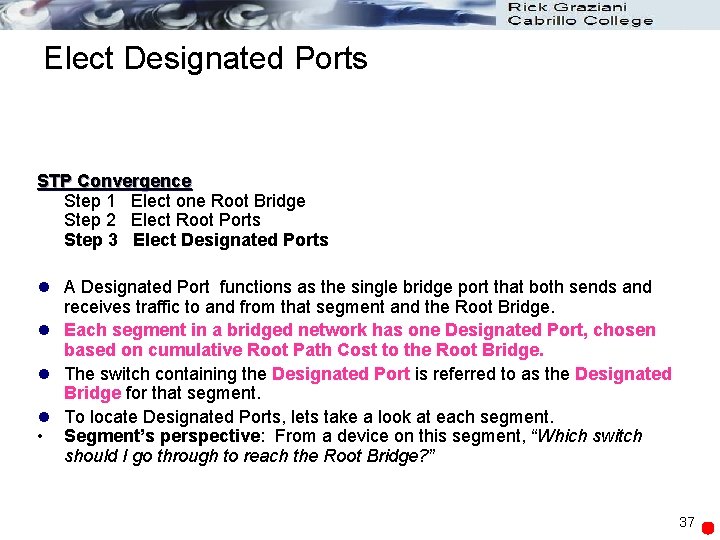
Elect Designated Ports STP Convergence Step 1 Elect one Root Bridge Step 2 Elect Root Ports Step 3 Elect Designated Ports l A Designated Port functions as the single bridge port that both sends and receives traffic to and from that segment and the Root Bridge. l Each segment in a bridged network has one Designated Port, chosen based on cumulative Root Path Cost to the Root Bridge. l The switch containing the Designated Port is referred to as the Designated Bridge for that segment. l To locate Designated Ports, lets take a look at each segment. • Segment’s perspective: From a device on this segment, “Which switch should I go through to reach the Root Bridge? ” 37
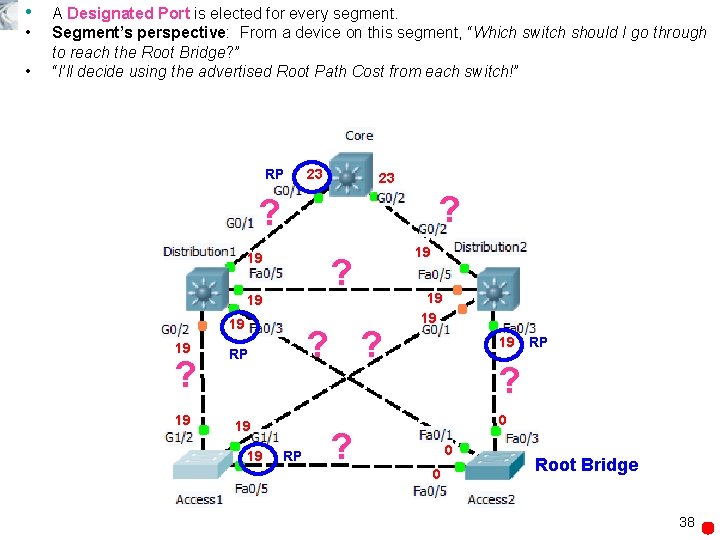
• • • A Designated Port is elected for every segment. Segment’s perspective: From a device on this segment, “Which switch should I go through to reach the Root Bridge? ” “I’ll decide using the advertised Root Path Cost from each switch!” RP 23 23 ? ? 19 ? 19 19 19 ? ? RP 19 19 RP ? 0 ? 0 0 Root Bridge 38
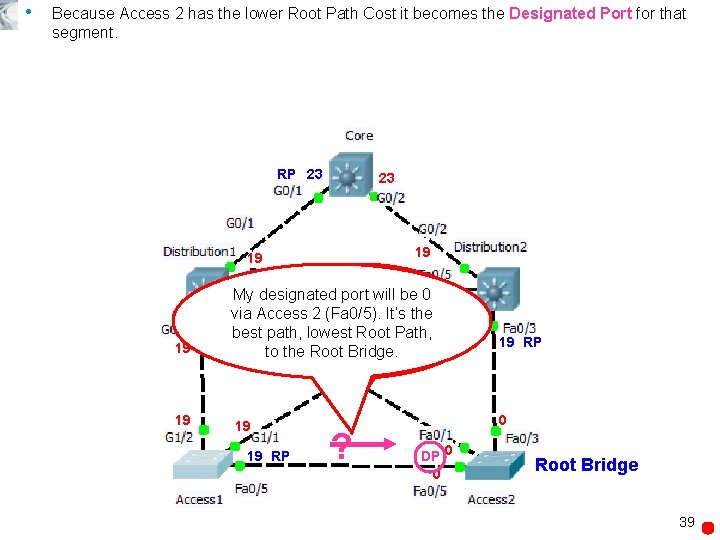
• Because Access 2 has the lower Root Path Cost it becomes the Designated Port for that segment. RP 23 23 19 19 My 19 designated What is my portbest will be path 019 via Access to the 2 Root (Fa 0/5). Bridge, It’s the 19 19 19 best path, via lowest Access. Root 1 or Path, 0 via Access Bridge. 2? RP to the Root 19 19 RP ? 19 RP 0 DP 0 0 Root Bridge 39
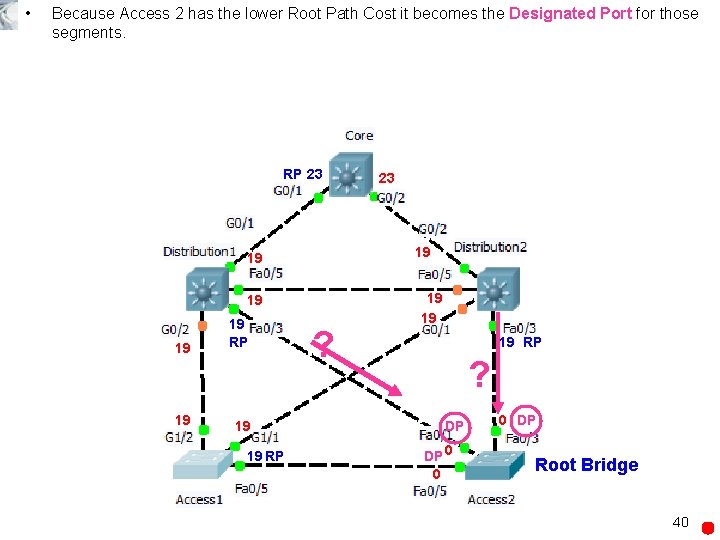
• Because Access 2 has the lower Root Path Cost it becomes the Designated Port for those segments. RP 23 19 19 19 RP 23 ? 19 19 19 RP ? DP DP 0 0 0 DP Root Bridge 40
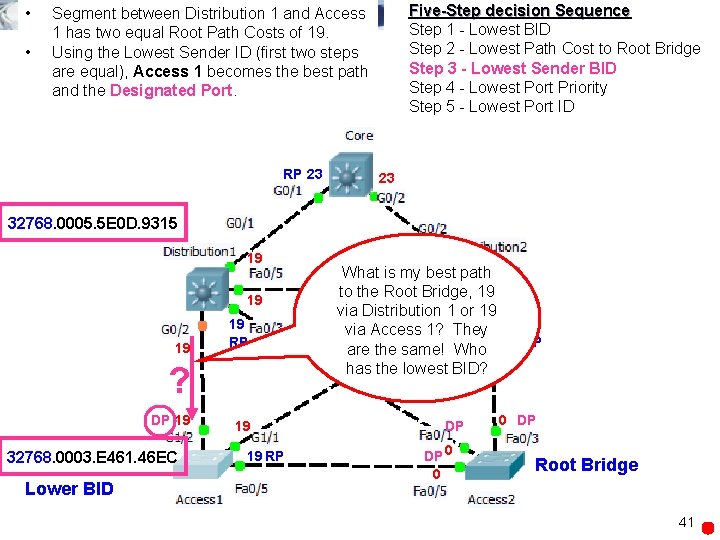
• • Five-Step decision Sequence Step 1 - Lowest BID Step 2 - Lowest Path Cost to Root Bridge Step 3 - Lowest Sender BID Step 4 - Lowest Port Priority Step 5 - Lowest Port ID Segment between Distribution 1 and Access 1 has two equal Root Path Costs of 19. Using the Lowest Sender ID (first two steps are equal), Access 1 becomes the best path and the Designated Port. RP 23 23 32768. 0005. 5 E 0 D. 9315 19 19 RP ? DP 19 32768. 0003. E 461. 46 EC Lower BID 19 19 RP 19 What is my best path to the Root Bridge, 19 19 via Distribution 1 or 19 19 via Access 1? They are the same! Who 19 RP has the lowest BID? DP DP 0 0 0 DP Root Bridge 41
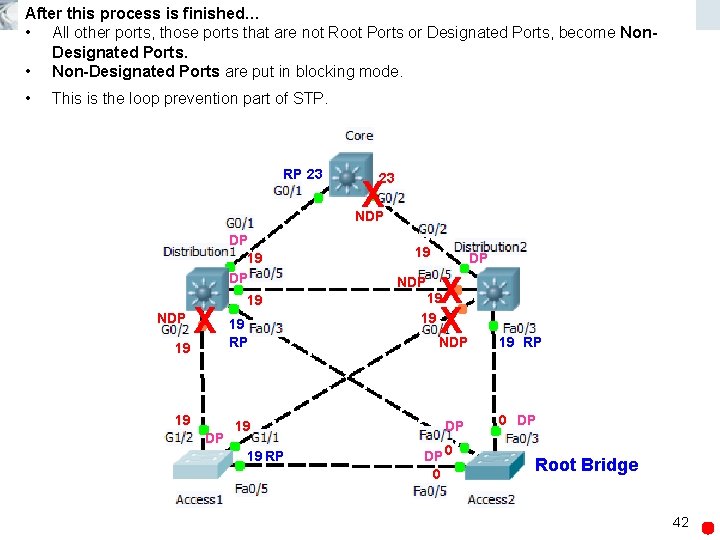
After this process is finished… • All other ports, those ports that are not Root Ports or Designated Ports, become Non. Designated Ports. • Non-Designated Ports are put in blocking mode. • This is the loop prevention part of STP. RP 23 23 X NDP DP 19 DP NDP X 19 19 19 RP 19 19 DP 19 RP 19 NDP DP X X 19 19 NDP 19 RP DP 0 DP DP 0 0 Root Bridge 42
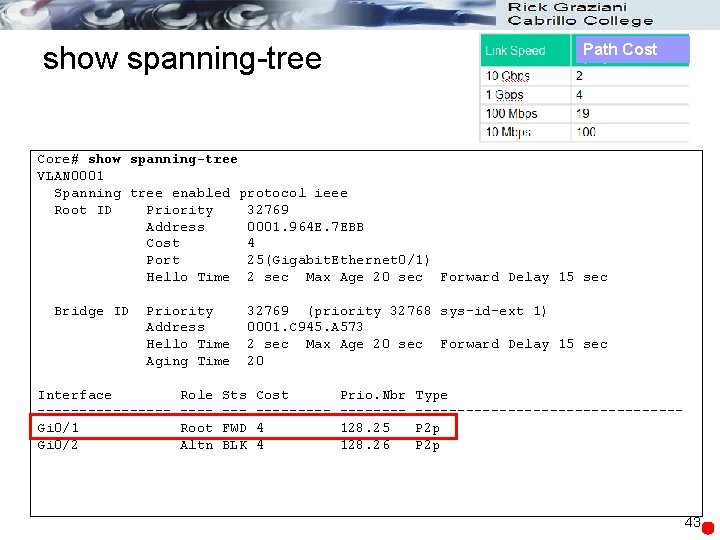
show spanning-tree Path Cost Core# show spanning-tree VLAN 0001 Spanning tree enabled protocol ieee Root ID Priority 32769 Address 0001. 964 E. 7 EBB Cost 4 Port 25(Gigabit. Ethernet 0/1) Hello Time 2 sec Max Age 20 sec Forward Delay 15 sec Bridge ID Priority Address Hello Time Aging Time Interface --------Gi 0/1 Gi 0/2 Role ---Root Altn Sts --FWD BLK 32769 (priority 32768 sys-id-ext 1) 0001. C 945. A 573 2 sec Max Age 20 sec Forward Delay 15 sec 20 Cost ----4 4 Prio. Nbr -------128. 25 128. 26 Type ----------------P 2 p 43
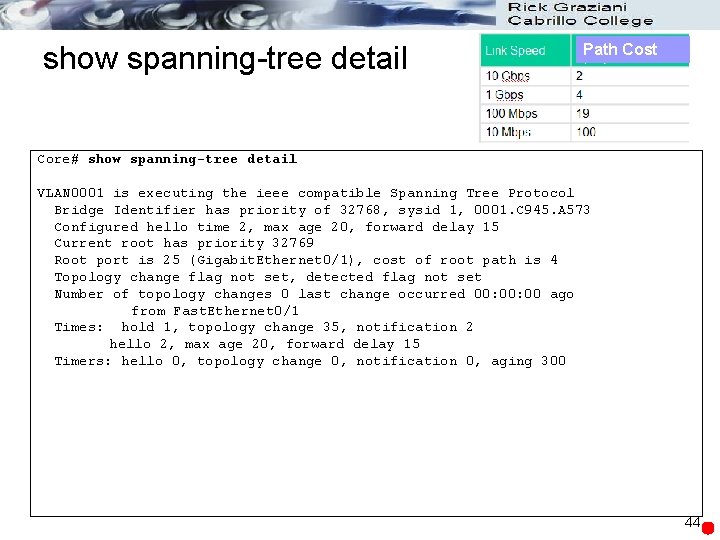
show spanning-tree detail Path Cost Core# show spanning-tree detail VLAN 0001 is executing the ieee compatible Spanning Tree Protocol Bridge Identifier has priority of 32768, sysid 1, 0001. C 945. A 573 Configured hello time 2, max age 20, forward delay 15 Current root has priority 32769 Root port is 25 (Gigabit. Ethernet 0/1), cost of root path is 4 Topology change flag not set, detected flag not set Number of topology changes 0 last change occurred 00: 00 ago from Fast. Ethernet 0/1 Times: hold 1, topology change 35, notification 2 hello 2, max age 20, forward delay 15 Timers: hello 0, topology change 0, notification 0, aging 300 44
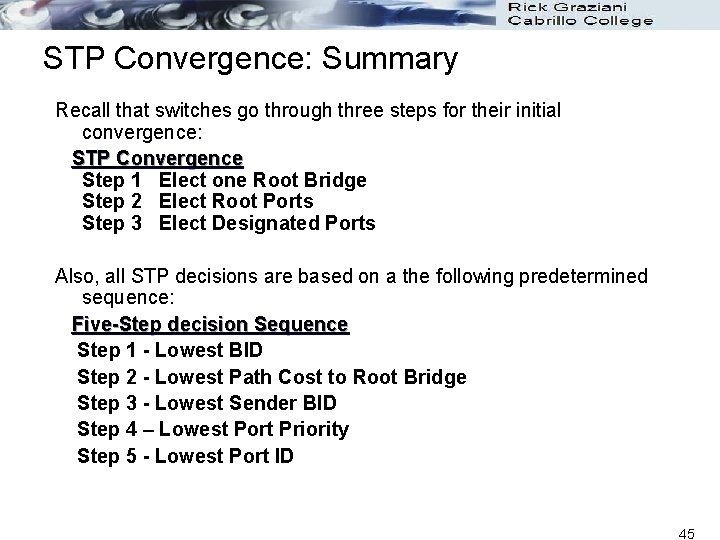
STP Convergence: Summary Recall that switches go through three steps for their initial convergence: STP Convergence Step 1 Elect one Root Bridge Step 2 Elect Root Ports Step 3 Elect Designated Ports Also, all STP decisions are based on a the following predetermined sequence: Five-Step decision Sequence Step 1 - Lowest BID Step 2 - Lowest Path Cost to Root Bridge Step 3 - Lowest Sender BID Step 4 – Lowest Port Priority Step 5 - Lowest Port ID 45
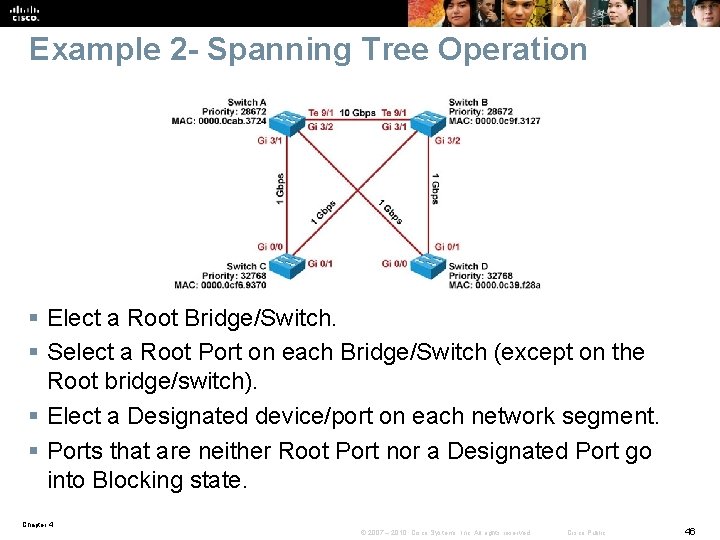
Example 2 - Spanning Tree Operation § Elect a Root Bridge/Switch. § Select a Root Port on each Bridge/Switch (except on the Root bridge/switch). § Elect a Designated device/port on each network segment. § Ports that are neither Root Port nor a Designated Port go into Blocking state. Chapter 4 © 2007 – 2010, Cisco Systems, Inc. All rights reserved. Cisco Public 46
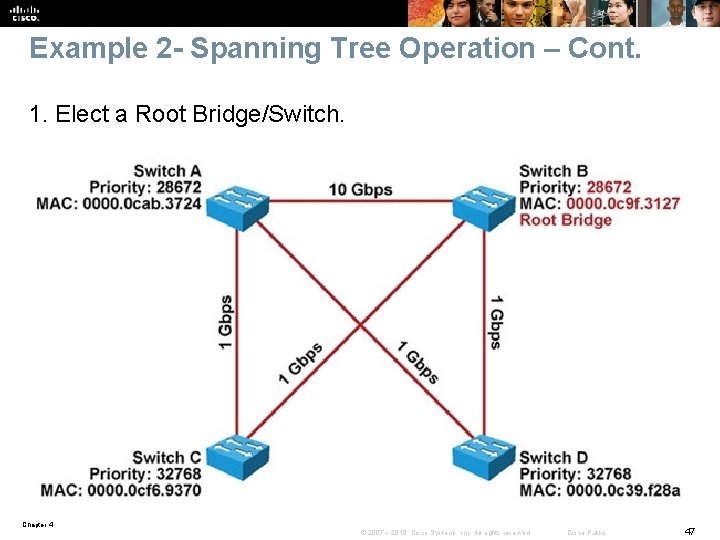
Example 2 - Spanning Tree Operation – Cont. 1. Elect a Root Bridge/Switch. Chapter 4 © 2007 – 2010, Cisco Systems, Inc. All rights reserved. Cisco Public 47
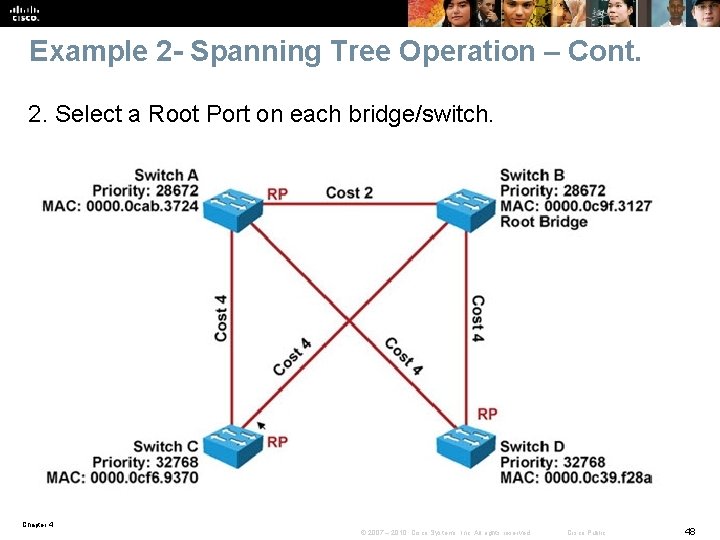
Example 2 - Spanning Tree Operation – Cont. 2. Select a Root Port on each bridge/switch. Chapter 4 © 2007 – 2010, Cisco Systems, Inc. All rights reserved. Cisco Public 48
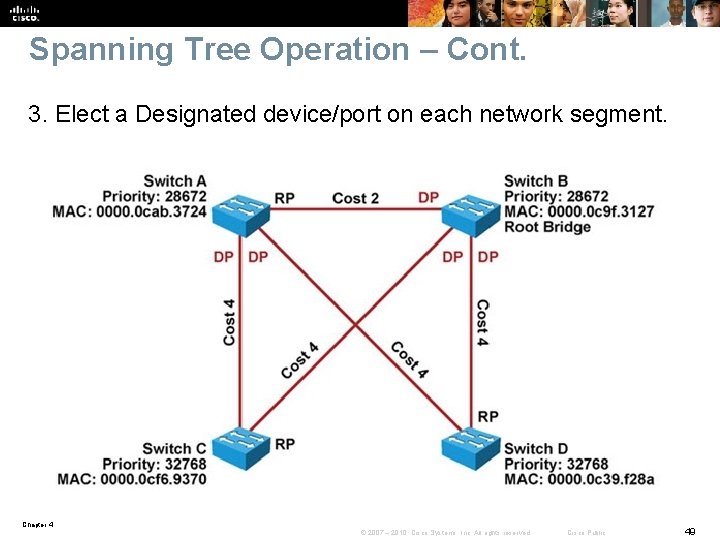
Spanning Tree Operation – Cont. 3. Elect a Designated device/port on each network segment. Chapter 4 © 2007 – 2010, Cisco Systems, Inc. All rights reserved. Cisco Public 49
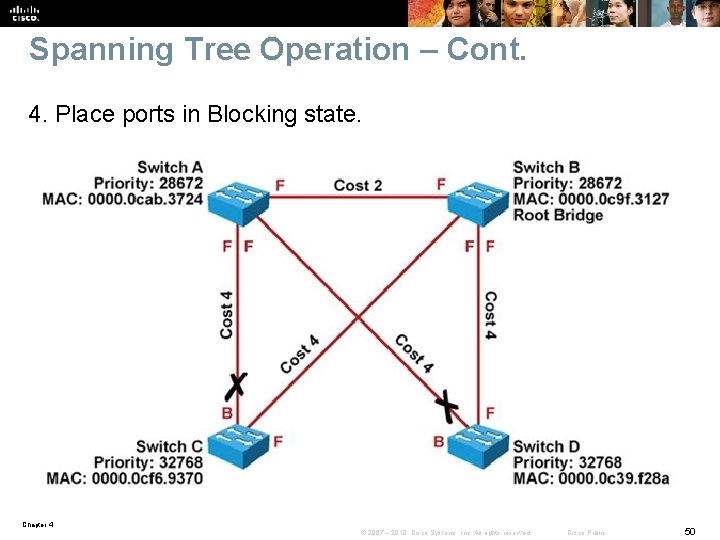
Spanning Tree Operation – Cont. 4. Place ports in Blocking state. Chapter 4 © 2007 – 2010, Cisco Systems, Inc. All rights reserved. Cisco Public 50
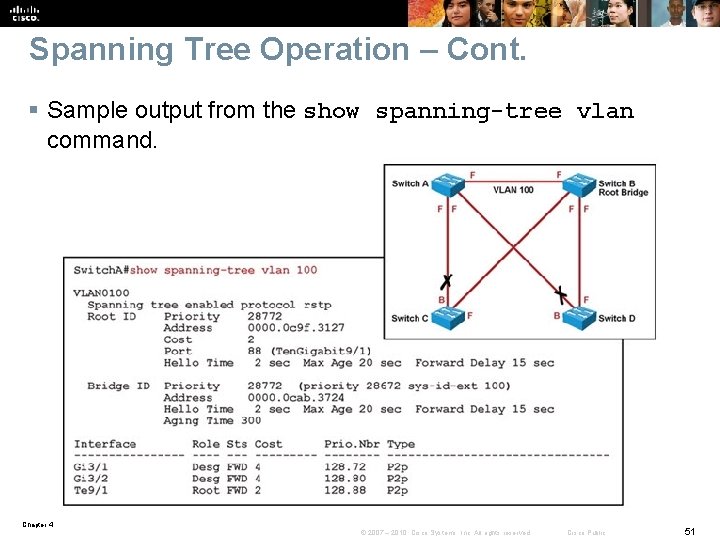
Spanning Tree Operation – Cont. § Sample output from the show spanning-tree vlan command. Chapter 4 © 2007 – 2010, Cisco Systems, Inc. All rights reserved. Cisco Public 51
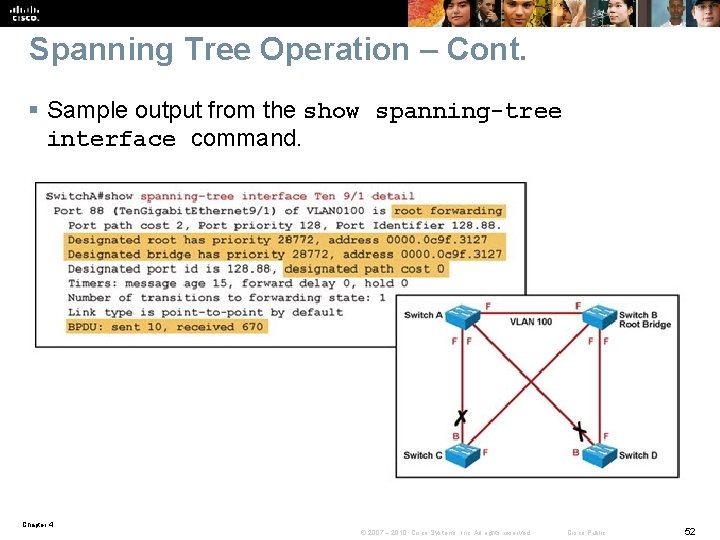
Spanning Tree Operation – Cont. § Sample output from the show spanning-tree interface command. Chapter 4 © 2007 – 2010, Cisco Systems, Inc. All rights reserved. Cisco Public 52
Spanning Tree Failures § STP is a reliable but not an absolutely failproof protocol. § If STP fails there are usually major negative consequences. § With Spanning Tree, there are two different types of failures. • Type 1 - STP may erroneously block certain ports that should have gone to the forwarding state. You may lose connectivity to certain parts of the network, but the rest of the network is unaffected. • Type 2 - STP erroneously moves one or more ports to the Forwarding state. The failure is more disruptive as bridging loops and broadcast storms can occur. Chapter 4 © 2007 – 2010, Cisco Systems, Inc. All rights reserved. Cisco Public 53
Spanning Tree Failures – Cont. § Type 2 failures can cause these symptoms. • The load on all links in the switched LAN will quickly start increasing. • Layer 3 switches and routers report control plane failures such as continual HSRP, OSPF and EIGRP state changes or that they are running at a very high CPU utilization load. • Switches will experience very frequent MAC address table changes. • With high link loads and CPU utilization devices typically become unreachable, making it difficult to diagnose the problem while it is in progress. § Eliminate topological loops and troubleshoot issues. • Physically disconnect links or shut down interfaces. • Diagnose potential problems. • A unidirectional link can cause STP problems. You may be able to identify and remove a faulty cable to correct the problem. Chapter 4 © 2007 – 2010, Cisco Systems, Inc. All rights reserved. Cisco Public 54
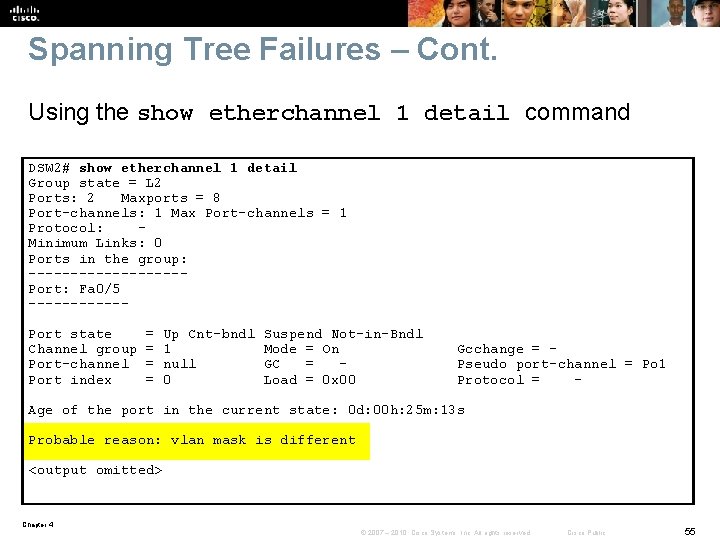
Spanning Tree Failures – Cont. Using the show etherchannel 1 detail command DSW 2# show etherchannel 1 detail Group state = L 2 Ports: 2 Maxports = 8 Port-channels: 1 Max Port-channels = 1 Protocol: Minimum Links: 0 Ports in the group: ---------Port: Fa 0/5 ------Port state Channel group Port-channel Port index = = Up Cnt-bndl 1 null 0 Suspend Not-in-Bndl Mode = On GC = Load = 0 x 00 Gcchange = Pseudo port-channel = Po 1 Protocol = - Age of the port in the current state: 0 d: 00 h: 25 m: 13 s Probable reason: vlan mask is different <output omitted> Chapter 4 © 2007 – 2010, Cisco Systems, Inc. All rights reserved. Cisco Public 55
Ether. Channel Operation § Ether. Channel bundles multiple physical Ethernet links (100 Mbps, 1 Gbps, 10 Gbps) into a single logical link. § Traffic is distributed across multiple physical links as one logical link. § This logical link is represented in Cisco IOS syntax as a “Port-channel” (Po) interface. § STP and routing protocols interact with this single portchannel interface. § Packets and frames are routed or switched to the portchannel interface. § A hashing mechanism determines which physical link will be used to transmit them. Chapter 4 © 2007 – 2010, Cisco Systems, Inc. All rights reserved. Cisco Public 56
Ether. Channel Problems Three common Ether. Channel problems: 1. Inconsistencies between the physical ports that are members of the channel 2. Inconsistencies between the ports on the opposite sides of the Ether. Channel link 3. Uneven distribution of traffic between Ether. Channel bundle members Chapter 4 © 2007 – 2010, Cisco Systems, Inc. All rights reserved. Cisco Public 57
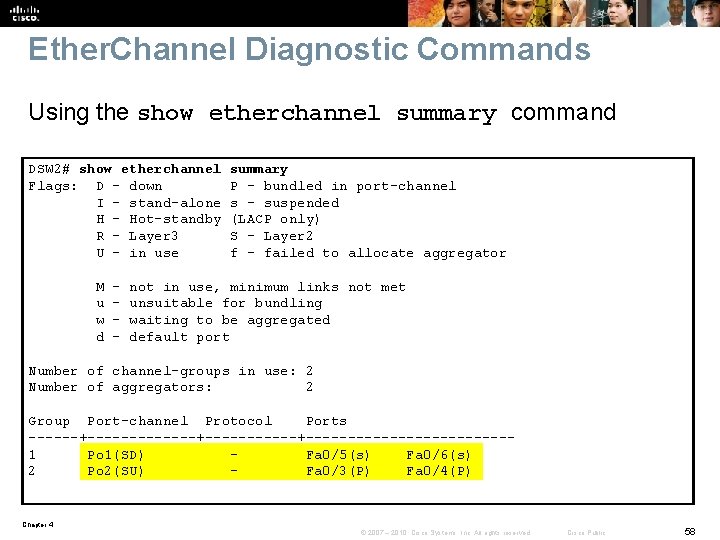
Ether. Channel Diagnostic Commands Using the show etherchannel summary command DSW 2# show etherchannel Flags: D - down I - stand-alone H - Hot-standby R - Layer 3 U - in use M u w d - summary P - bundled in port-channel s - suspended (LACP only) S - Layer 2 f - failed to allocate aggregator not in use, minimum links not met unsuitable for bundling waiting to be aggregated default port Number of channel-groups in use: 2 Number of aggregators: 2 Group Port-channel Protocol Ports ------+-----------+------------1 Po 1(SD) Fa 0/5(s) Fa 0/6(s) 2 Po 2(SU) Fa 0/3(P) Fa 0/4(P) Chapter 4 © 2007 – 2010, Cisco Systems, Inc. All rights reserved. Cisco Public 58
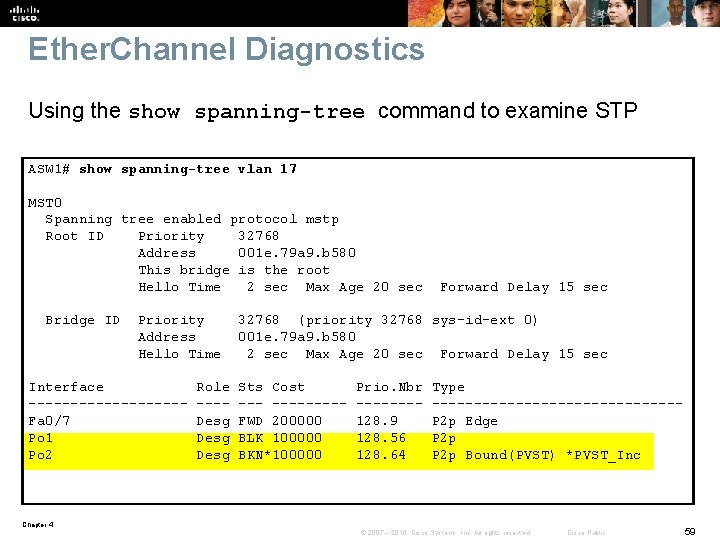
Ether. Channel Diagnostics Using the show spanning-tree command to examine STP ASW 1# show spanning-tree vlan 17 MST 0 Spanning tree enabled protocol mstp Root ID Priority 32768 Address 001 e. 79 a 9. b 580 This bridge is the root Hello Time 2 sec Max Age 20 sec Bridge ID Priority Address Hello Time Interface ---------Fa 0/7 Po 1 Po 2 Role ---Desg Forward Delay 15 sec 32768 (priority 32768 sys-id-ext 0) 001 e. 79 a 9. b 580 2 sec Max Age 20 sec Forward Delay 15 sec Sts Cost --------FWD 200000 BLK 100000 BKN*100000 Prio. Nbr -------128. 9 128. 56 128. 64 Type ---------------P 2 p Edge P 2 p Bound(PVST) *PVST_Inc Chapter 4 © 2007 – 2010, Cisco Systems, Inc. All rights reserved. Cisco Public 59
Troubleshooing First Hop Redundancy Protocols Chapter 4 © 2007 – 2010, Cisco Systems, Inc. All rights reserved. Cisco Public 60
First Hop Redundancy Protocols (FHRPs) § FHRP is an important element in building highly available networks. § Clients and servers normally point to a single default gateway and lose connectivity to other subnets if their gateway fails. § FHRPs provide redundant default gateway functionality that is transparent to the end hosts. § These protocols provide a virtual IP address and the corresponding virtual MAC address. § Examples of FHRPs include: • Hot Standby Router Protocol (HSRP) – Cisco • Virtual Router Redundancy Protocol (VRRP) – IETF standard • Gateway Load Balancing Protocol (GLBP) – Cisco § The mechanisms of these protocols revolve around these functions: • Electing a single router that controls the virtual IP address • Tracking availability of the active router • Determining if control of the virtual IP and MAC addresses should be handed over to another router Chapter 4 © 2007 – 2010, Cisco Systems, Inc. All rights reserved. Cisco Public 61
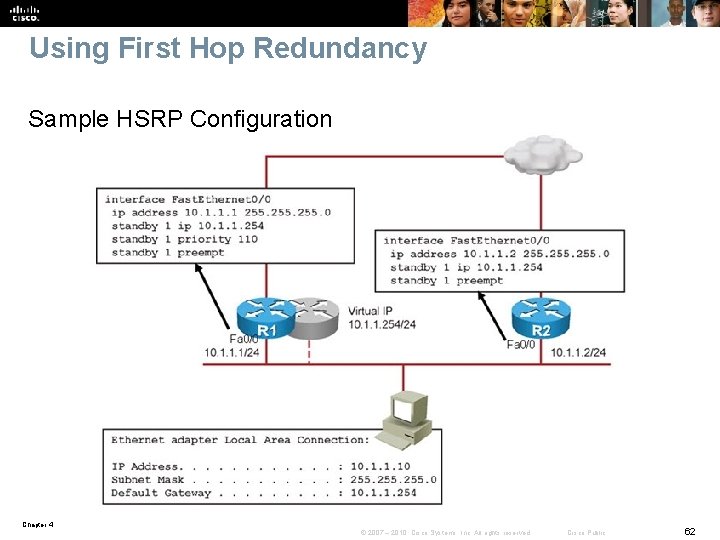
Using First Hop Redundancy Sample HSRP Configuration Chapter 4 © 2007 – 2010, Cisco Systems, Inc. All rights reserved. Cisco Public 62
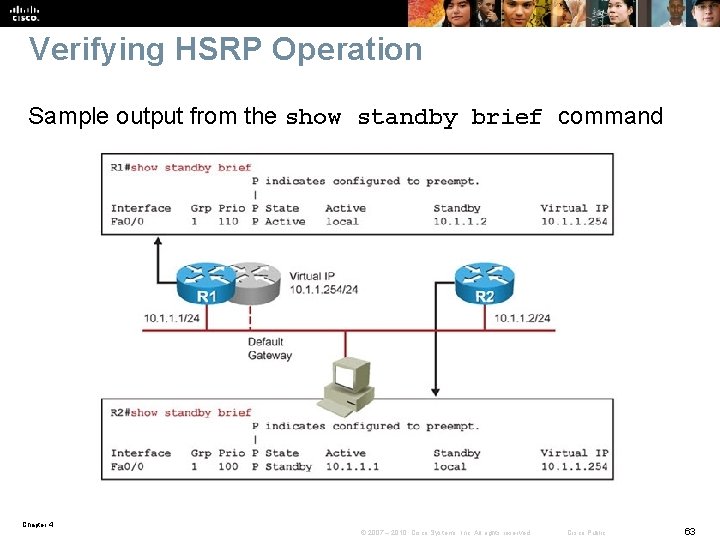
Verifying HSRP Operation Sample output from the show standby brief command Chapter 4 © 2007 – 2010, Cisco Systems, Inc. All rights reserved. Cisco Public 63
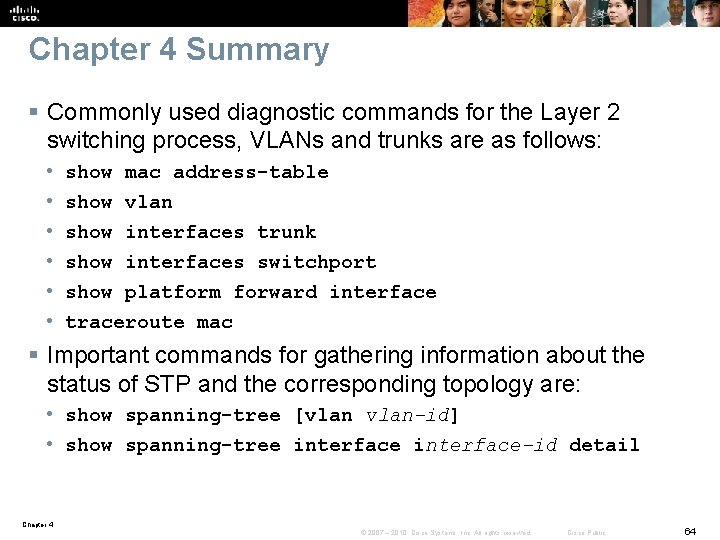
Chapter 4 Summary § Commonly used diagnostic commands for the Layer 2 switching process, VLANs and trunks are as follows: • • • show mac address-table show vlan show interfaces trunk show interfaces switchport show platform forward interface traceroute mac § Important commands for gathering information about the status of STP and the corresponding topology are: • show spanning-tree [vlan-id] • show spanning-tree interface-id detail Chapter 4 © 2007 – 2010, Cisco Systems, Inc. All rights reserved. Cisco Public 64
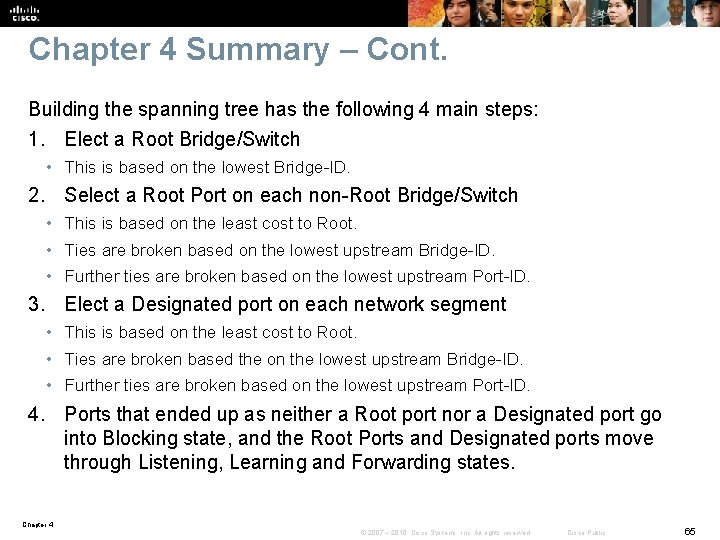
Chapter 4 Summary – Cont. Building the spanning tree has the following 4 main steps: 1. Elect a Root Bridge/Switch • This is based on the lowest Bridge-ID. 2. Select a Root Port on each non-Root Bridge/Switch • This is based on the least cost to Root. • Ties are broken based on the lowest upstream Bridge-ID. • Further ties are broken based on the lowest upstream Port-ID. 3. Elect a Designated port on each network segment • This is based on the least cost to Root. • Ties are broken based the on the lowest upstream Bridge-ID. • Further ties are broken based on the lowest upstream Port-ID. 4. Ports that ended up as neither a Root port nor a Designated port go into Blocking state, and the Root Ports and Designated ports move through Listening, Learning and Forwarding states. Chapter 4 © 2007 – 2010, Cisco Systems, Inc. All rights reserved. Cisco Public 65
Chapter 4 Summary – Cont. The consequences and corresponding symptoms of broadcast (or unknown MAC) storms are: § The load on all links in the switched LAN will quickly start increasing as more and more frames enter the loop. § If the Spanning Tree failure has caused more than one bridging loop to form, traffic will increase exponentially. § When control plane traffic starts entering the loop, the devices that are running these protocols will quickly start getting overloaded and their CPU will approach 100% utilization. § Switches will experience very frequent MAC address table changes. § Due to the combination of very high load on all links and the CPU running at maximum load on Layer 3 switches or routers, these devices typically become unreachable, making it nearly impossible to diagnose the problem while it is in progress. Chapter 4 © 2007 – 2010, Cisco Systems, Inc. All rights reserved. Cisco Public 66
Chapter 4 Summary – Cont. Three common Ether. Channel problems are: § Inconsistencies between the physical ports that are members of the channel (a %EC-5 -CANNOT_BUNDLE 2 log message is generated) § Inconsistencies between the ports on the opposite sides of the Ether. Channel link (The switch will generate a %SPANTREE-2 -CHNL_MISCFG message) § Uneven distribution of traffic between Ether. Channel bundle members Chapter 4 © 2007 – 2010, Cisco Systems, Inc. All rights reserved. Cisco Public 67
Chapter 4 Summary – Cont. Similarities between multilayer switches and routers include: § Both routers and multilayer switches use routing protocols or static routes to maintain information about the reachability and direction to network destinations (prefixes), and record this information in a routing table. § Both routers and multilayer switches perform the same functional packet switching actions: 1. Receive a frame, strip off the Layer 2 header. 2. Perform a Layer 3 lookup to determine the outbound interface and next hop. 3. Encapsulate the packet in a new Layer 2 frame and transmit the frame. Chapter 4 © 2007 – 2010, Cisco Systems, Inc. All rights reserved. Cisco Public 68
Chapter 4 Summary – Cont. § Differences between multilayer switches and routers include: § Routers connect heterogeneous networks and support a wide variety of media and interfaces. § Multilayer switches typically connect homogenous networks. Modern LAN switches are mostly Ethernet. § Multilayer switches utilize specialized hardware to achieve wire-speed Ethernet-to-Ethernet packet switching. § Low- to mid-range routers use multi-purpose hardware to perform the packet switching process. § On average, the packet switching throughput of routers is lower than the packet switching throughput of multilayer switches. § Routers usually support a wider range of features, mainly because switches need specialized hardware to be able to support certain data plane features or protocols. § On routers, you can often add features through a software update. Chapter 4 © 2007 – 2010, Cisco Systems, Inc. All rights reserved. Cisco Public 69
Chapter 4 Summary – Cont. § There are two main commands to check the CEF data structures: • show ip cef • show adjacency § To extract information about the forwarding behavior of switches from the TCAMs on some of the common Cisco Catalyst series switches you can use the following commands: • show platform • show mls cef Chapter 4 © 2007 – 2010, Cisco Systems, Inc. All rights reserved. Cisco Public 70
Chapter 4 Summary – Cont. A multilayer switch provides three different core functions in a single device: § Layer 2 switching within each VLAN § Routing and multilayer switching between the local VLANs and one or more routed interfaces Chapter 4 © 2007 – 2010, Cisco Systems, Inc. All rights reserved. Cisco Public 71
Chapter 4 Summary – Cont. The main differences between SVIs and router interfaces are as follows: § A routed port is not a Layer 2 port. This means that on a routed port typical Layer 2 protocols that are enabled by default, such as Spanning Tree Protocol and Dynamic Trunking Protocol (DTP), are not active. § There is a direct relationship between the status of a routed port and the availability of the corresponding directlyconnected subnet. When/if the port goes down, the corresponding connected route will immediately be removed from the routing table. § The status of an SVI is directly related to its associated VLAN, wheras a routed port is not associated with a VLAN. Chapter 4 © 2007 – 2010, Cisco Systems, Inc. All rights reserved. Cisco Public 72
Chapter 4 Summary – Cont. § Among first hop redundancy protocols, VRRP is the only standards based protocol, the only one that has the preempt option enabled by default, and also the only one that allows the virtual IP address to also be a real address assigned to one of the participating routers. § VRRP's default hello timer is 1 second as compared to HSRP and GLBP's 3 second default hello timer. § Among HSRP, VRRP, and GLBP, only GLBP makes use of multiple routers in the group to do simultaneous forwarding (load balancing). § With respect to debug, VRRP does not have the terse option, but HSRP and GLBP do. Chapter 4 © 2007 – 2010, Cisco Systems, Inc. All rights reserved. Cisco Public 73
Chapter 4 Labs § Lab 4 -1 Layer 2 Connectivity and Spanning Tree § Lab 4 -2 Layer 3 Switching and First-Hop Redundancy Chapter 4 © 2007 – 2010, Cisco Systems, Inc. All rights reserved. Cisco Public 74
Chapter 4 © 2007 – 2010, Cisco Systems, Inc. All rights reserved. Cisco Public 75
- Slides: 75