
Chapter 4 File Systems Introduction to File Systems
- Slides: 39
Chapter 4 - File Systems
Introduction to File Systems • File systems – From users point of view – Implementation point of view
Introduction… • File Naming – Files are an abstraction mechanism. • They provide a way to store information on the disk and read it back later. • This must be done in such a way as to shield the user from the details of how and where the information is stored, and how the disks actually work. – The exact rules for file naming vary somewhat from system to system
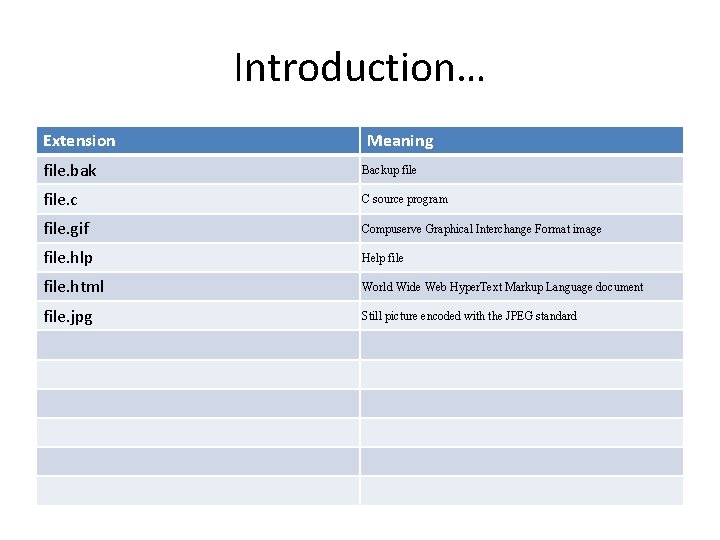
Introduction… Extension Meaning file. bak Backup file. c C source program file. gif Compuserve Graphical Interchange Format image file. hlp Help file. html World Wide Web Hyper. Text Markup Language document file. jpg Still picture encoded with the JPEG standard
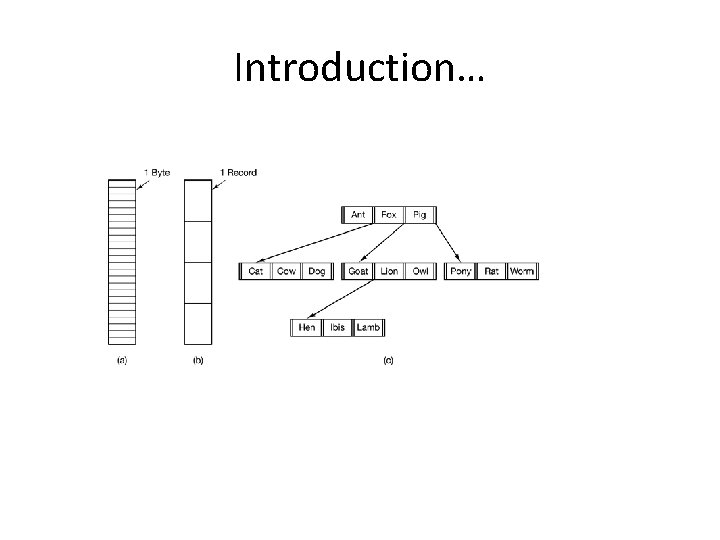
Introduction… • File Structure – Unstructured sequence of bytes – A file is a sequence of fixed length records – A file is a tree of records
Introduction…
Introduction… • File Types – Regular files – Character special files – Block special files • File Access – Sequential – Random • File Attributes: – all operating systems associate auxiliary information with each file
Introduction… • File Operations – – – Create Delete Open Close Read Write Append Seek Get attributes Set attributes Rename
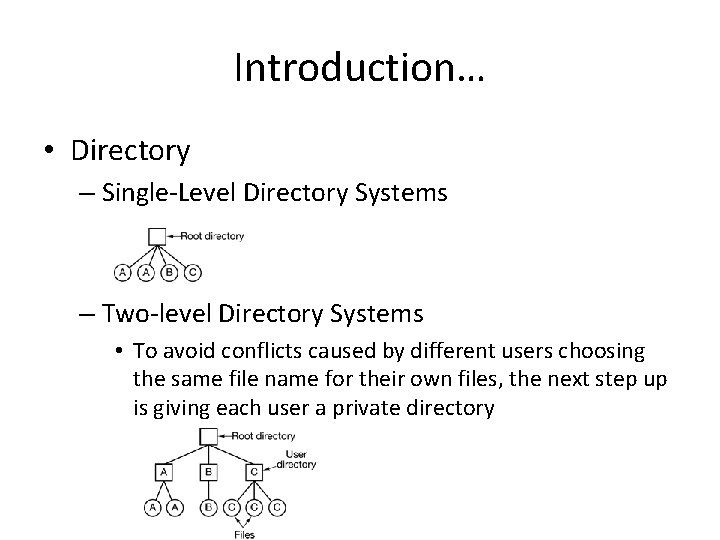
Introduction… • Directory – Single-Level Directory Systems – Two-level Directory Systems • To avoid conflicts caused by different users choosing the same file name for their own files, the next step up is giving each user a private directory
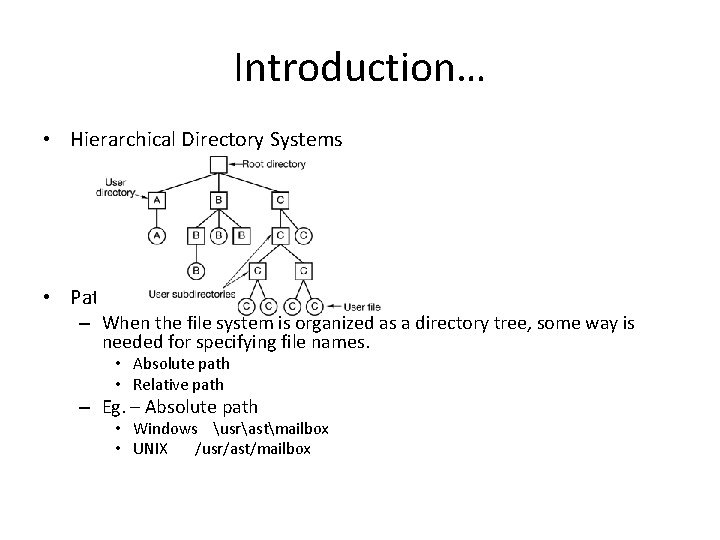
Introduction… • Hierarchical Directory Systems • Path Names – When the file system is organized as a directory tree, some way is needed for specifying file names. • Absolute path • Relative path – Eg. – Absolute path • Windows usrastmailbox • UNIX /usr/ast/mailbox
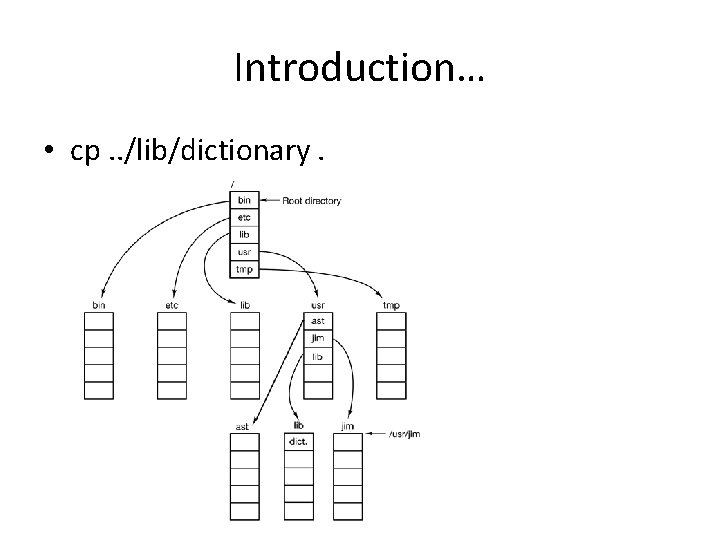
Introduction… • cp. . /lib/dictionary.
Introduction… • Directory operations – Create – Delete – Opendir – Closedir – Readdir – Rename – Link – Unlink
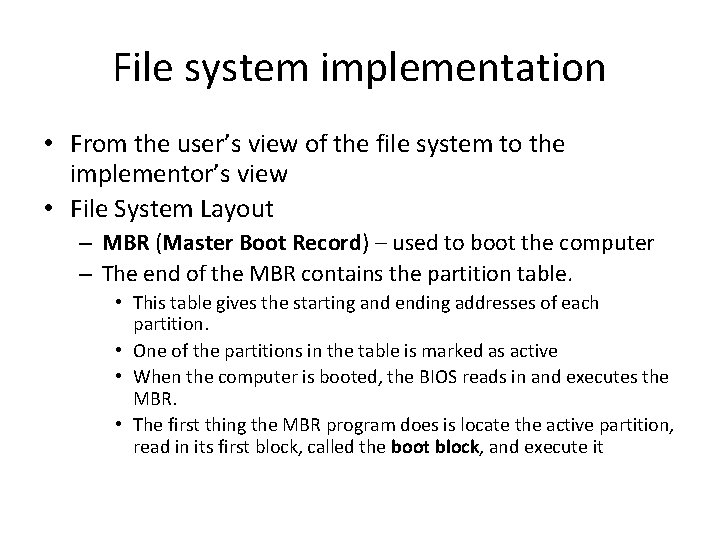
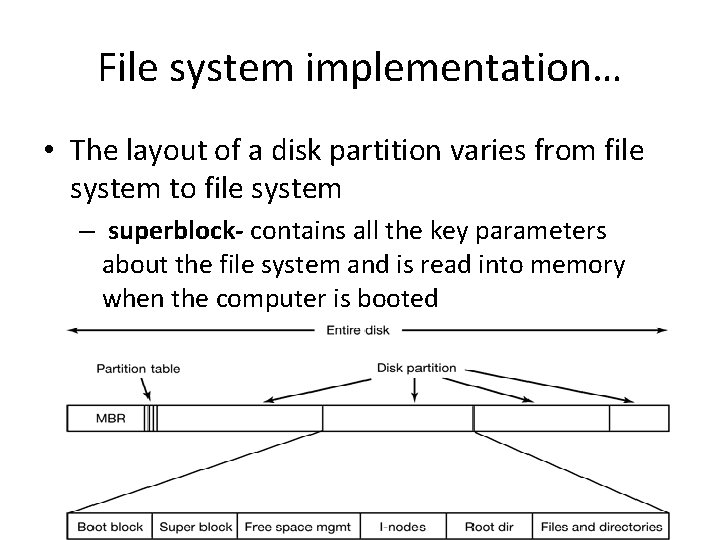
File system implementation • From the user’s view of the file system to the implementor’s view • File System Layout – MBR (Master Boot Record) – used to boot the computer – The end of the MBR contains the partition table. • This table gives the starting and ending addresses of each partition. • One of the partitions in the table is marked as active • When the computer is booted, the BIOS reads in and executes the MBR. • The first thing the MBR program does is locate the active partition, read in its first block, called the boot block, and execute it
File system implementation… • The layout of a disk partition varies from file system to file system – superblock- contains all the key parameters about the file system and is read into memory when the computer is booted
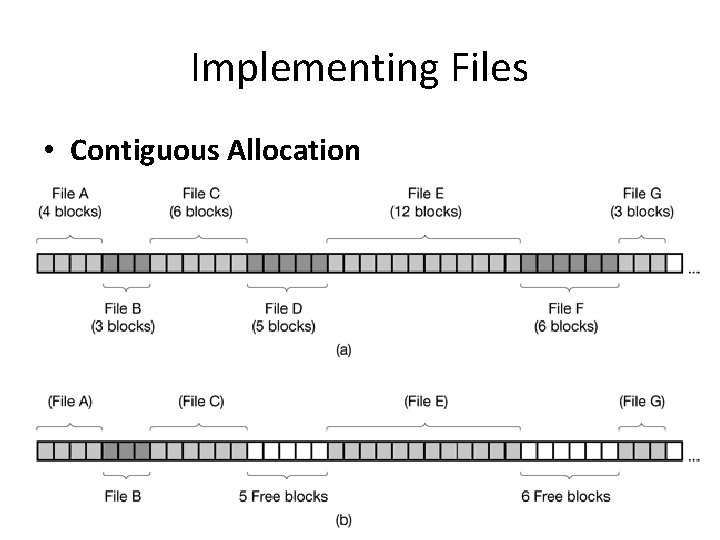
Implementing Files • Contiguous Allocation
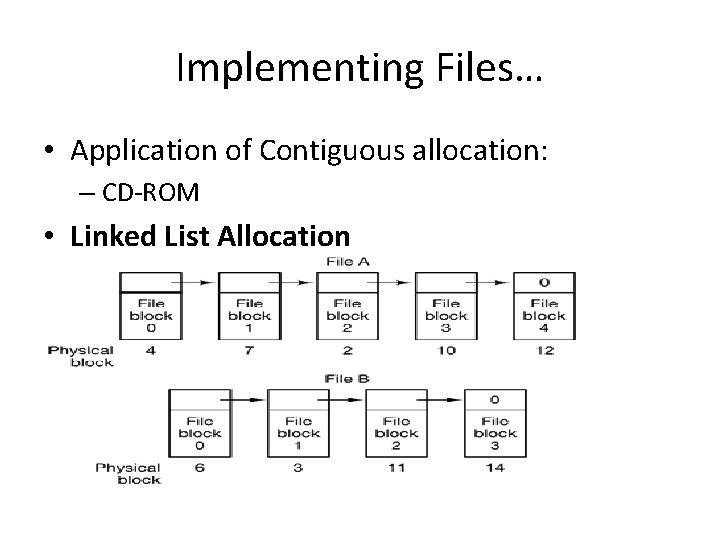
Implementing Files… • Application of Contiguous allocation: – CD-ROM • Linked List Allocation
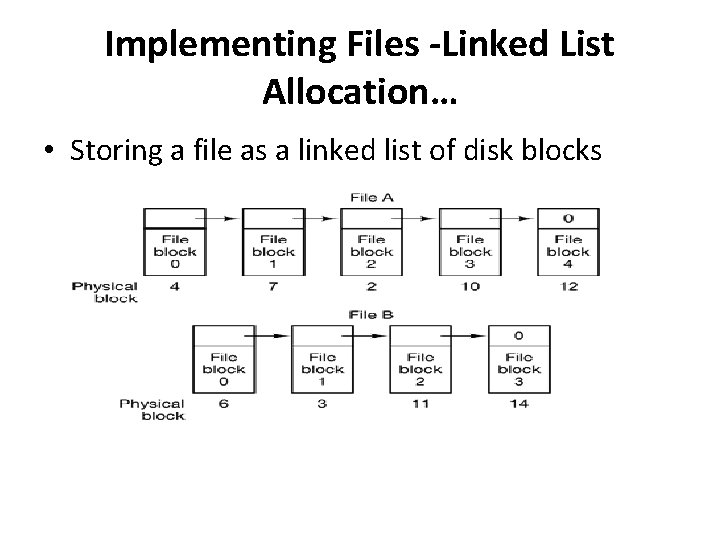
Implementing Files -Linked List Allocation • linked list of disk blocks • The first word of each block is used as a pointer to the next one. The rest of the block is for data • Unlike contiguous allocation, every disk block can be used in this method • No space is lost to disk fragmentation (except for internal fragmentation in the last block). • The disk address of the first block – The rest can be found starting there.
Implementing Files -Linked List Allocation… • Disadvantages: – On the other hand, although reading a file sequentially is straightforward, random access is extremely slow. – To get to block n, the operating system has to start at the beginning and read the n – 1 – Also, the amount of data storage in a block is no longer a power of two because the pointer takes up a few bytes.
Implementing Files -Linked List Allocation… • Storing a file as a linked list of disk blocks
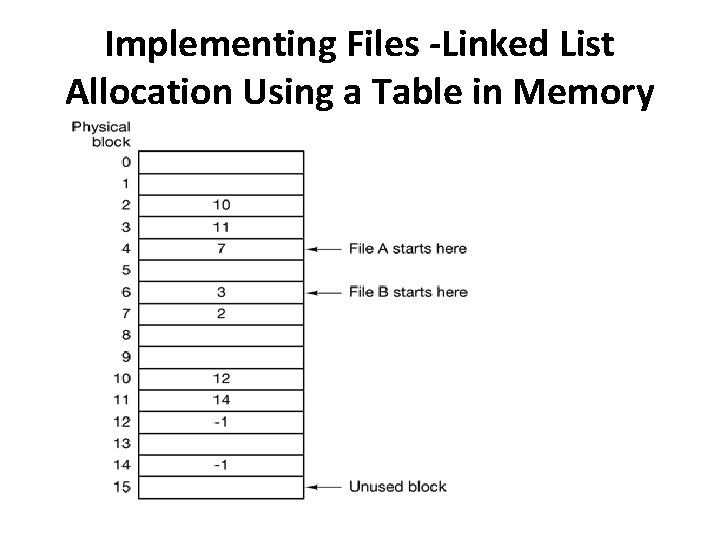
Implementing Files -Linked List Allocation Using a Table in Memory • Both disadvantages of the linked list allocation can be eliminated by taking the pointer word from each disk block and putting it in a table in memory.
Implementing Files -Linked List Allocation Using a Table in Memory
Implementing Files -Linked List Allocation… • Using this organization, – the entire block is available for data. – Furthermore, random access is much easier. – Although the chain must still be followed to find a given offset within the file, the chain is entirely in memory, so it can be followed without making any disk references. • The primary disadvantage of this method is that the entire table must be in memory all the time to make it work.
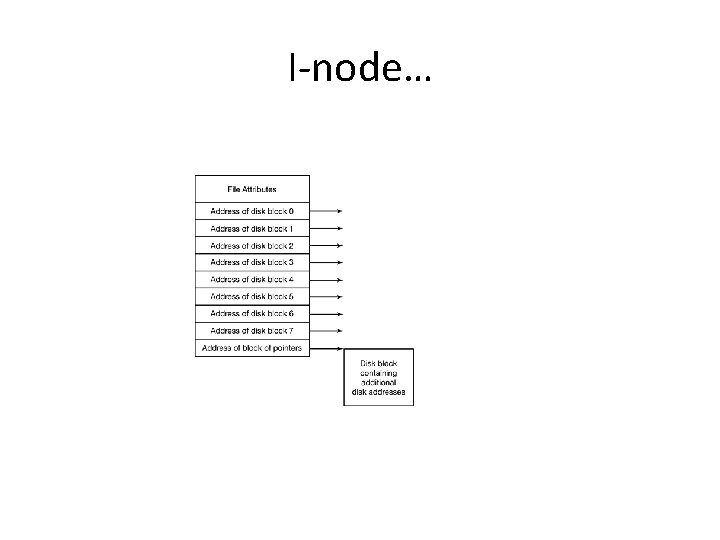
I-node • Indexed node – keeping track of which blocks belong to which file. – which lists the attributes and disk addresses of the files blocks – Given the i-node, it is then possible to find all the blocks of the file. – The big advantage of this scheme over linked files using an in-memory table is that the i-node need only be in memory when the corresponding file is open.
I-node…
Assignment • i-node • Directory Implementation- where are file attributes stored?
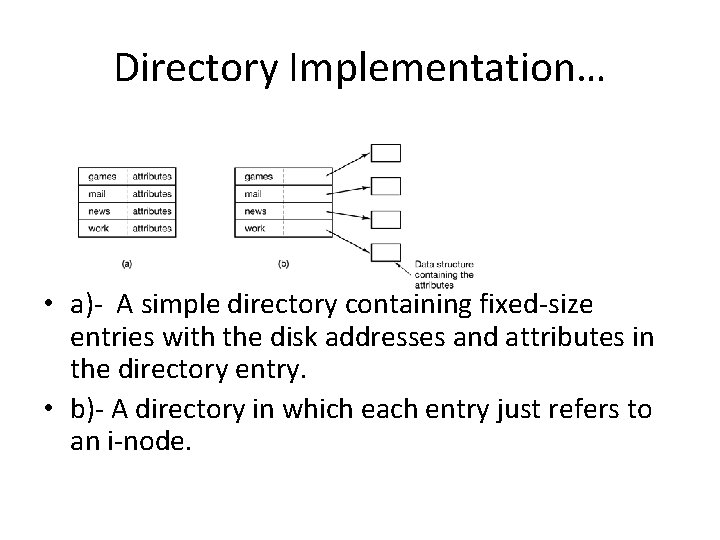
Directory Implementation • Before a file can be read, it must be opened. When a file is opened, the operating system uses the path name supplied by the user to locate the directory entry. • The directory entry provides the information needed to find the disk blocks. • Depending on the system, this information may be the disk address of the entire file (contiguous allocation), the number of the first block (both linked list schemes), or the number of the i-node. • In all cases, the main function of the directory system is to map the ASCII name of the file onto the information needed to locate the data.
Directory Implementation… • a)- A simple directory containing fixed-size entries with the disk addresses and attributes in the directory entry. • b)- A directory in which each entry just refers to an i-node.
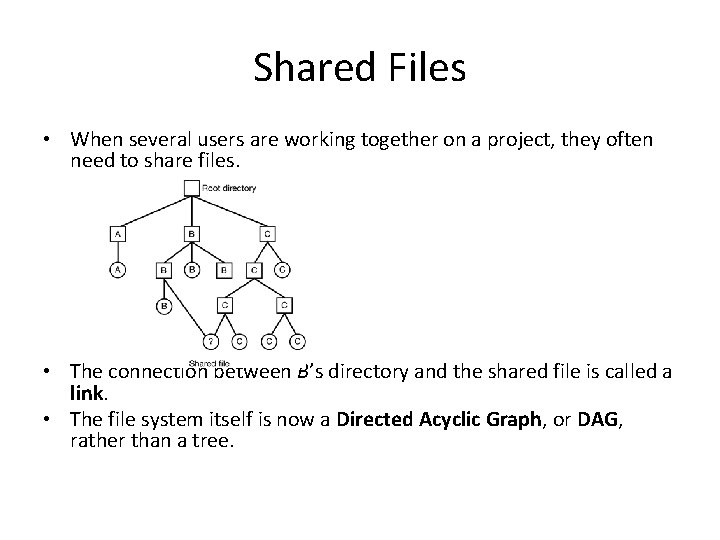
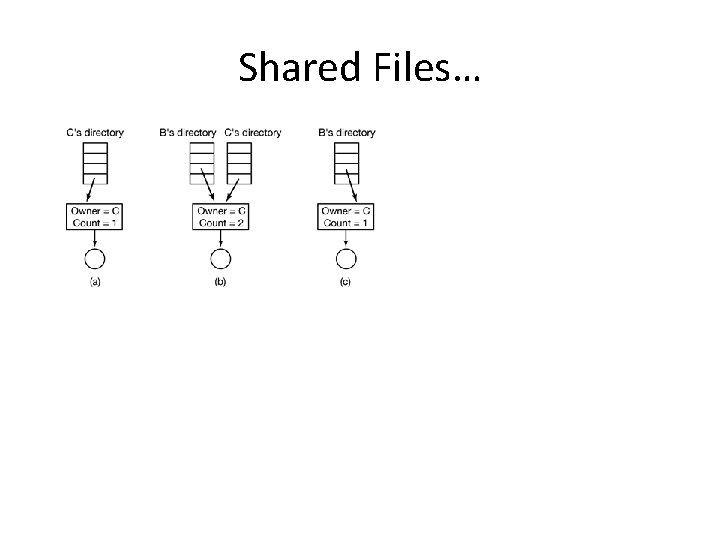
Shared Files • When several users are working together on a project, they often need to share files. • The connection between B’s directory and the shared file is called a link. • The file system itself is now a Directed Acyclic Graph, or DAG, rather than a tree.
Shared Files…
Disk Space Management • Files are normally stored on disk, so management of disk space is a major concern to file system designers. • Strategies – storing an n byte file: n consecutive bytes of disk space are allocated, – file is split up into a number of (not necessarily) contiguous blocks.
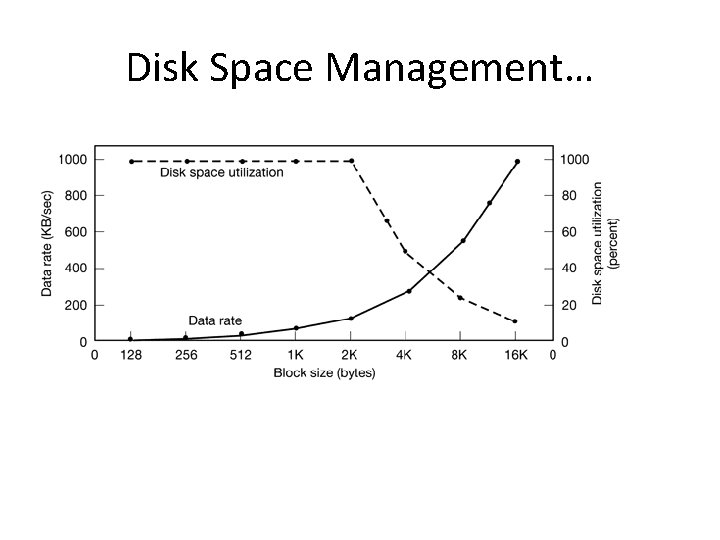
Disk Space Management… • Block Size – Once it has been decided to store files in fixed-size blocks, the question arises of how big the block should be. – Having a large allocation unit • Disk space wastage – Having a small allocation unit • each file will consist of many blocks – Reading each block normally requires a seek and a rotational delay, so reading a file consisting of many small blocks will be slow.
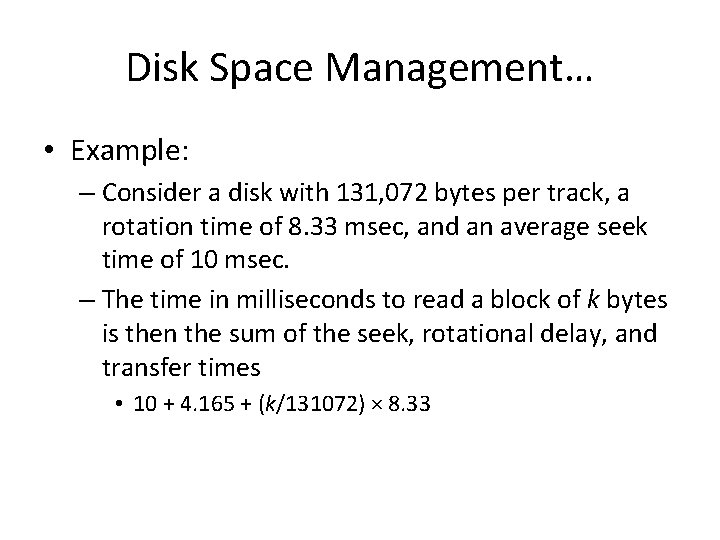
Disk Space Management… • Example: – Consider a disk with 131, 072 bytes per track, a rotation time of 8. 33 msec, and an average seek time of 10 msec. – The time in milliseconds to read a block of k bytes is then the sum of the seek, rotational delay, and transfer times • 10 + 4. 165 + (k/131072) × 8. 33
Disk Space Management…
Disk Space Management… • Assignment – How Windows and Linux Keep Track of Free Disk Blocks
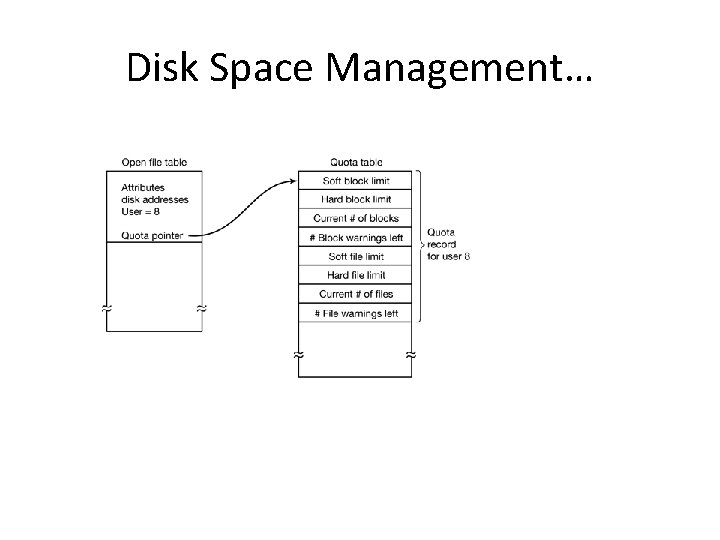
Disk Space Management… • Disk Quotas – To prevent people from hogging too much disk space, multiuser operating systems often provide a mechanism for enforcing disk quotas. – The idea is that the system administrator assigns each user a maximum allotment of files and blocks, and the operating system makes sure that the users do not exceed their quotas. A typical mechanism is described below.
Disk Space Management…
Disk Space Management… • File System Reliability – Destruction of a file system is often a far greater disaster than destruction of a computer. – Recovery mechanisms • Backups – Recover from disaster. – Recover from stupidity. – File System Consistency
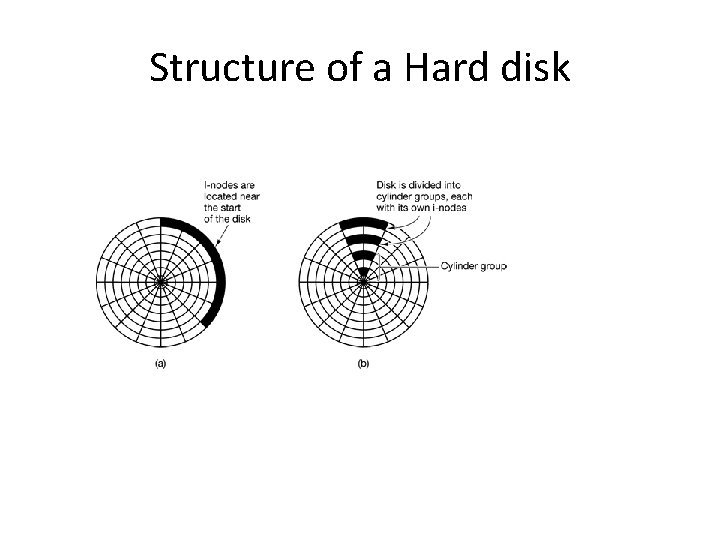
Disk Space Management… • File System Performance – Caching – write-through caches- write immediately to disk – Block Read Ahead • improving perceived file system performance is to try to get blocks into the cache before they are needed to increase the hit rate – Reducing Disk Arm Motion • to reduce the amount of disk arm motion by putting blocks that are likely to be accessed in sequence close to each other, preferably in the same cylinder.
Structure of a Hard disk