
Chapter 3 VLANs Routing Switching PresentationID 2008 Cisco

- Slides: 49
Chapter 3: VLANs Routing & Switching Presentation_ID © 2008 Cisco Systems, Inc. All rights reserved. Cisco Confidential 1
Chapter 3 3. 1 VLAN Segmentation 3. 2 VLAN Implementation 3. 3 VLAN Security and Design 3. 4 Summary Presentation_ID © 2008 Cisco Systems, Inc. All rights reserved. Cisco Confidential 2
Chapter 3: Objectives § Explain the purpose of VLANs in a switched network. § Analyze how a switch forwards frames based on VLAN configuration in a multi-switched environment. § Configure a switch port to be assigned to a VLAN based on requirements. § Configure a trunk port on a LAN switch. § Configure Dynamic Trunk Protocol (DTP). § Troubleshoot VLAN and trunk configurations in a switched network. § Configure security features to mitigate attacks in a VLAN-segmented environment. § Explain security best practices for a VLAN-segmented environment. Presentation_ID © 2008 Cisco Systems, Inc. All rights reserved. Cisco Confidential 3
3. 1 VLAN Segmentation Presentation_ID © 2008 Cisco Systems, Inc. All rights reserved. Cisco Confidential 4
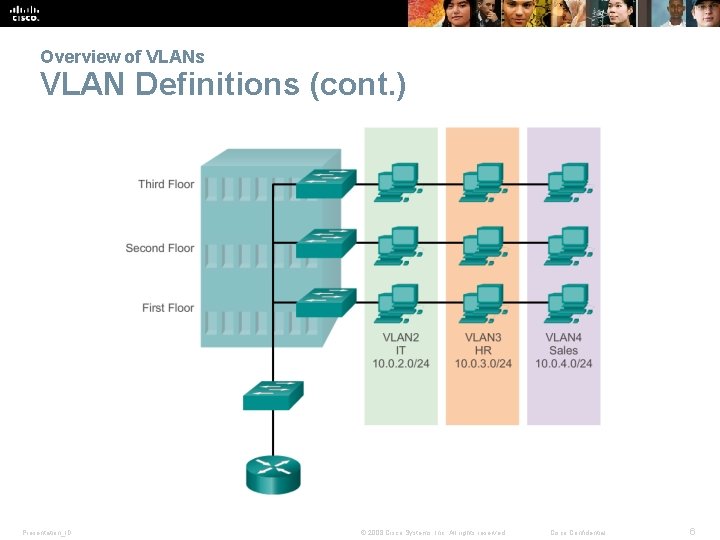
Overview of VLANs VLAN Definitions § A VLAN is a logical partition of a Layer 2 network. § Multiple partitions can be created, allowing for multiple VLANs to co-exist. § Each VLAN is a broadcast domain, usually with its own IP network. § VLANs are mutually isolated and packets can only pass between them via a router. § The partitioning of the Layer 2 network takes place inside a Layer 2 device, usually via a switch. § The hosts grouped within a VLAN are unaware of the VLAN’s existence. Presentation_ID © 2008 Cisco Systems, Inc. All rights reserved. Cisco Confidential 5
Overview of VLANs VLAN Definitions (cont. ) Presentation_ID © 2008 Cisco Systems, Inc. All rights reserved. Cisco Confidential 6
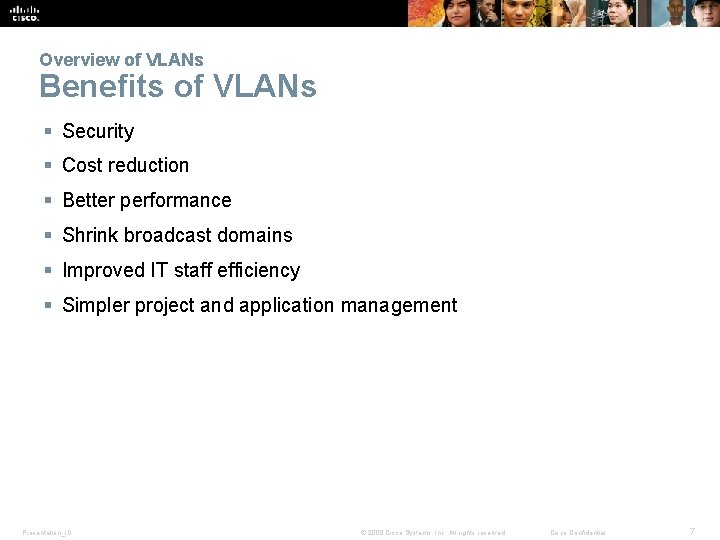
Overview of VLANs Benefits of VLANs § Security § Cost reduction § Better performance § Shrink broadcast domains § Improved IT staff efficiency § Simpler project and application management Presentation_ID © 2008 Cisco Systems, Inc. All rights reserved. Cisco Confidential 7
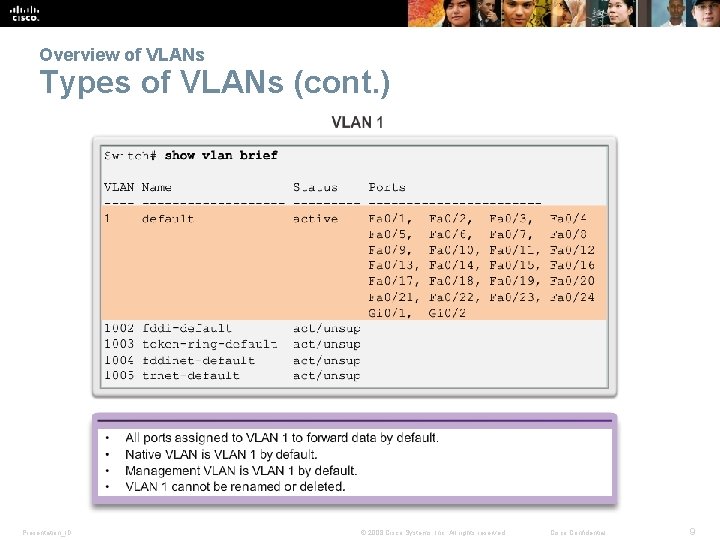
Overview of VLANs Types of VLANs § Data VLAN § Default VLAN § Native VLAN § Management VLAN Presentation_ID © 2008 Cisco Systems, Inc. All rights reserved. Cisco Confidential 8
Overview of VLANs Types of VLANs (cont. ) Presentation_ID © 2008 Cisco Systems, Inc. All rights reserved. Cisco Confidential 9
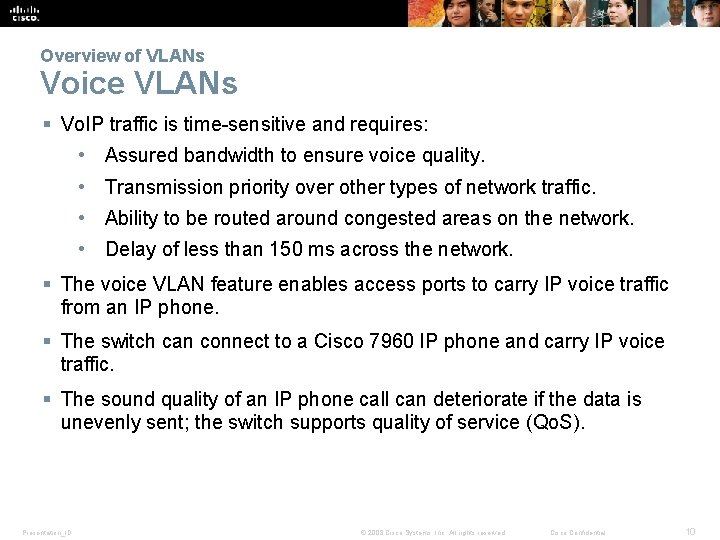
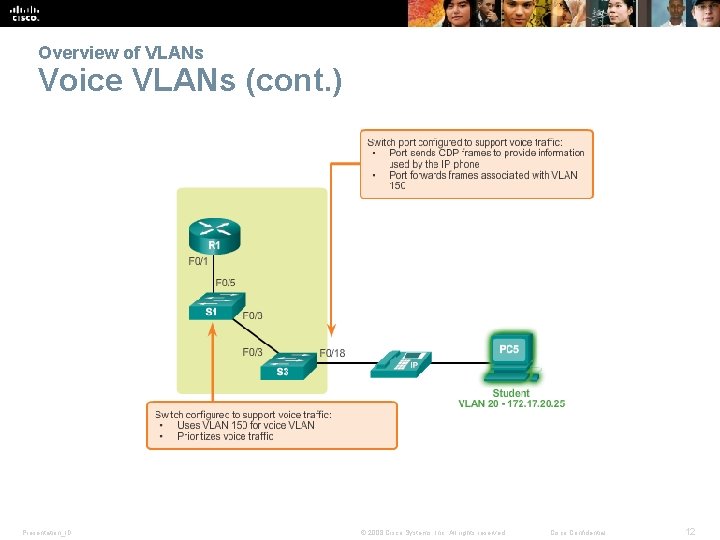
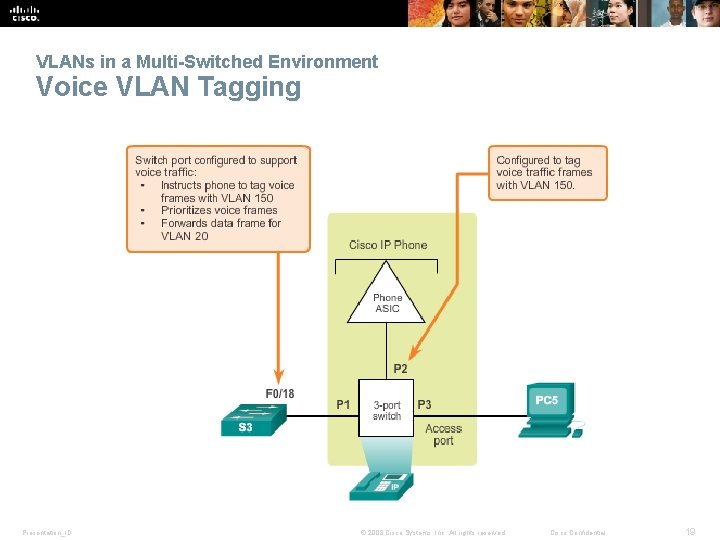
Overview of VLANs Voice VLANs § Vo. IP traffic is time-sensitive and requires: • Assured bandwidth to ensure voice quality. • Transmission priority over other types of network traffic. • Ability to be routed around congested areas on the network. • Delay of less than 150 ms across the network. § The voice VLAN feature enables access ports to carry IP voice traffic from an IP phone. § The switch can connect to a Cisco 7960 IP phone and carry IP voice traffic. § The sound quality of an IP phone call can deteriorate if the data is unevenly sent; the switch supports quality of service (Qo. S). Presentation_ID © 2008 Cisco Systems, Inc. All rights reserved. Cisco Confidential 10
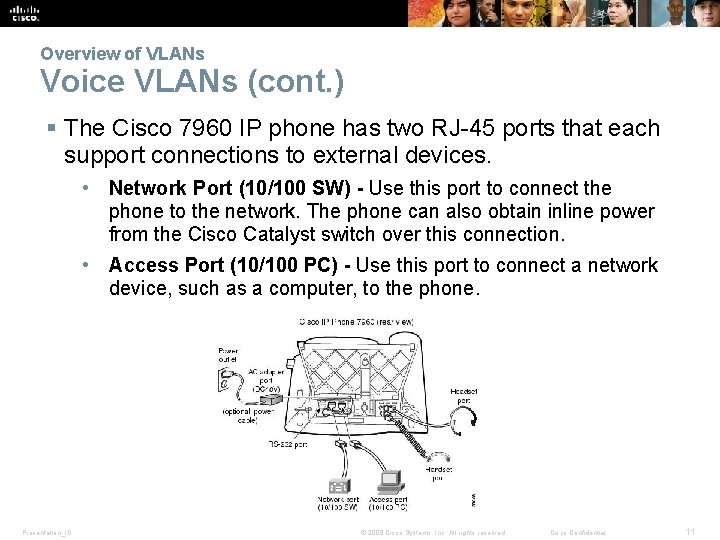
Overview of VLANs Voice VLANs (cont. ) § The Cisco 7960 IP phone has two RJ-45 ports that each support connections to external devices. • Network Port (10/100 SW) - Use this port to connect the phone to the network. The phone can also obtain inline power from the Cisco Catalyst switch over this connection. • Access Port (10/100 PC) - Use this port to connect a network device, such as a computer, to the phone. Presentation_ID © 2008 Cisco Systems, Inc. All rights reserved. Cisco Confidential 11
Overview of VLANs Voice VLANs (cont. ) Presentation_ID © 2008 Cisco Systems, Inc. All rights reserved. Cisco Confidential 12
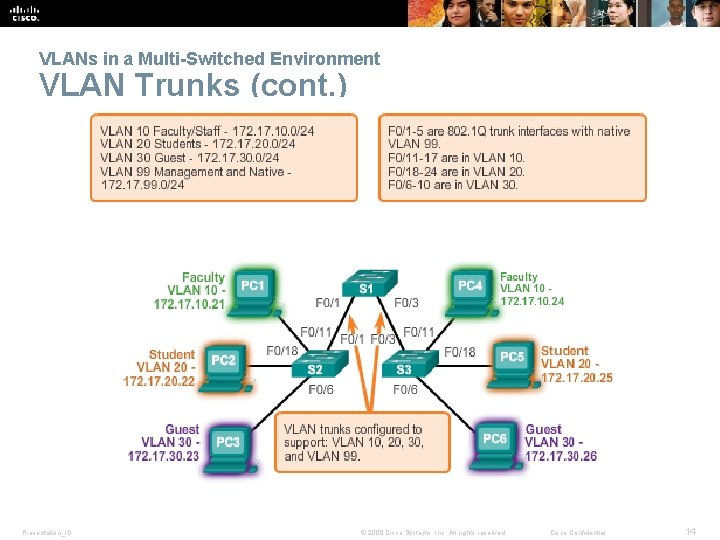
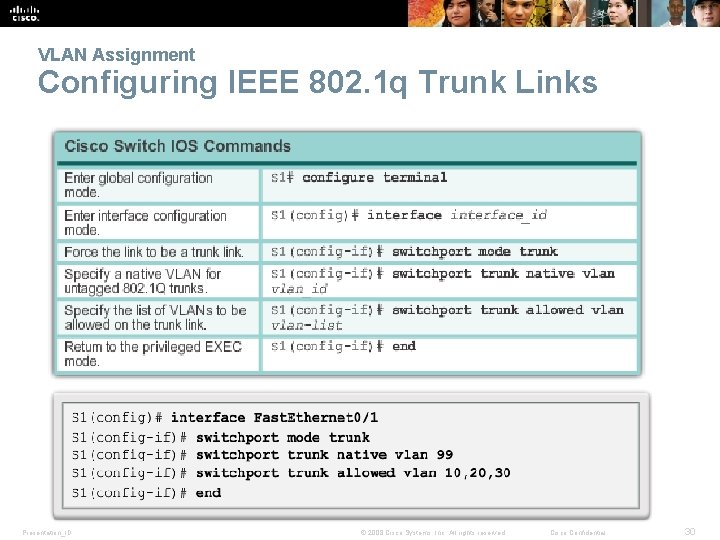
VLANs in a Multi-Switched Environment VLAN Trunks § A VLAN trunk carries more than one VLAN. § A VLAN trunk is usually established between switches so same. VLAN devices can communicate, even if physically connected to different switches. § A VLAN trunk is not associated to any VLANs; neither is the trunk ports used to establish the trunk link. § Cisco IOS supports IEEE 802. 1 q, a popular VLAN trunk protocol. Presentation_ID © 2008 Cisco Systems, Inc. All rights reserved. Cisco Confidential 13
VLANs in a Multi-Switched Environment VLAN Trunks (cont. ) Presentation_ID © 2008 Cisco Systems, Inc. All rights reserved. Cisco Confidential 14
VLANs in a Multi-Switched Environment Controlling Broadcast Domains with VLANs § VLANs can be used to limit the reach of broadcast frames. § A VLAN is a broadcast domain of its own. § A broadcast frame sent by a device in a specific VLAN is forwarded within that VLAN only. § VLANs help control the reach of broadcast frames and their impact in the network. § Unicast and multicast frames are forwarded within the originating VLAN. Presentation_ID © 2008 Cisco Systems, Inc. All rights reserved. Cisco Confidential 15
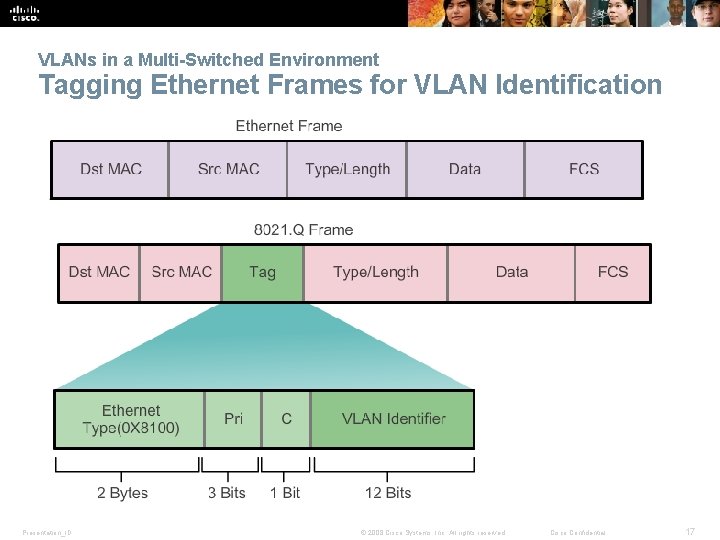
VLANs in a Multi-Switched Environment Tagging Ethernet Frames for VLAN Identification § Frame tagging is the process of adding a VLAN identification header to the frame. § It is used to properly transmit multiple VLAN frames through a trunk link. § Switches tag frames to identify the VLAN to that they belong. Different tagging protocols exist; IEEE 802. 1 Q is a vey popular example. § The protocol defines the structure of the tagging header added to the frame. § Switches add VLAN tags to the frames before placing them into trunk links and remove the tags before forwarding frames through nontrunk ports. § When properly tagged, the frames can transverse any number of switches via trunk links and still be forwarded within the correct VLAN at the destination. Presentation_ID © 2008 Cisco Systems, Inc. All rights reserved. Cisco Confidential 16
VLANs in a Multi-Switched Environment Tagging Ethernet Frames for VLAN Identification Presentation_ID © 2008 Cisco Systems, Inc. All rights reserved. Cisco Confidential 17
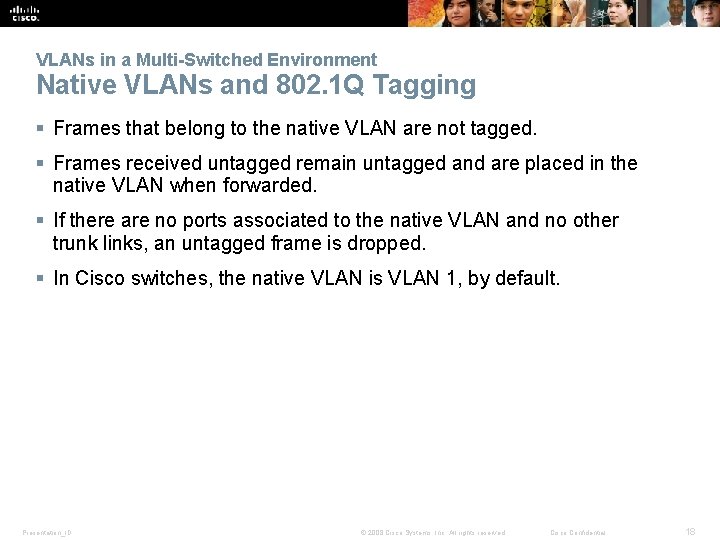
VLANs in a Multi-Switched Environment Native VLANs and 802. 1 Q Tagging § Frames that belong to the native VLAN are not tagged. § Frames received untagged remain untagged and are placed in the native VLAN when forwarded. § If there are no ports associated to the native VLAN and no other trunk links, an untagged frame is dropped. § In Cisco switches, the native VLAN is VLAN 1, by default. Presentation_ID © 2008 Cisco Systems, Inc. All rights reserved. Cisco Confidential 18
VLANs in a Multi-Switched Environment Voice VLAN Tagging Presentation_ID © 2008 Cisco Systems, Inc. All rights reserved. Cisco Confidential 19
3. 2 VLAN Implementations Presentation_ID © 2008 Cisco Systems, Inc. All rights reserved. Cisco Confidential 20
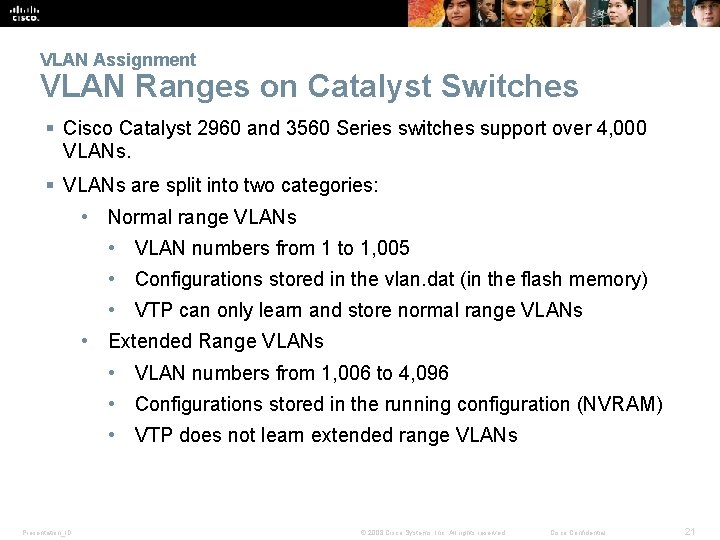
VLAN Assignment VLAN Ranges on Catalyst Switches § Cisco Catalyst 2960 and 3560 Series switches support over 4, 000 VLANs. § VLANs are split into two categories: • Normal range VLANs • VLAN numbers from 1 to 1, 005 • Configurations stored in the vlan. dat (in the flash memory) • VTP can only learn and store normal range VLANs • Extended Range VLANs • VLAN numbers from 1, 006 to 4, 096 • Configurations stored in the running configuration (NVRAM) • VTP does not learn extended range VLANs Presentation_ID © 2008 Cisco Systems, Inc. All rights reserved. Cisco Confidential 21
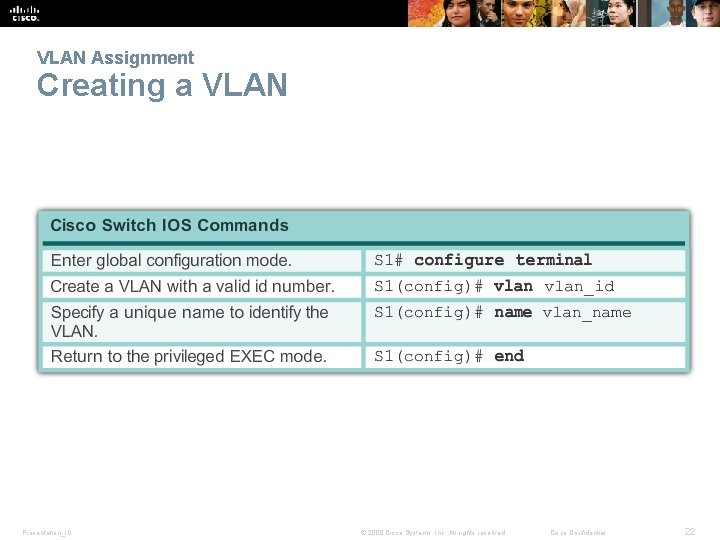
VLAN Assignment Creating a VLAN Presentation_ID © 2008 Cisco Systems, Inc. All rights reserved. Cisco Confidential 22
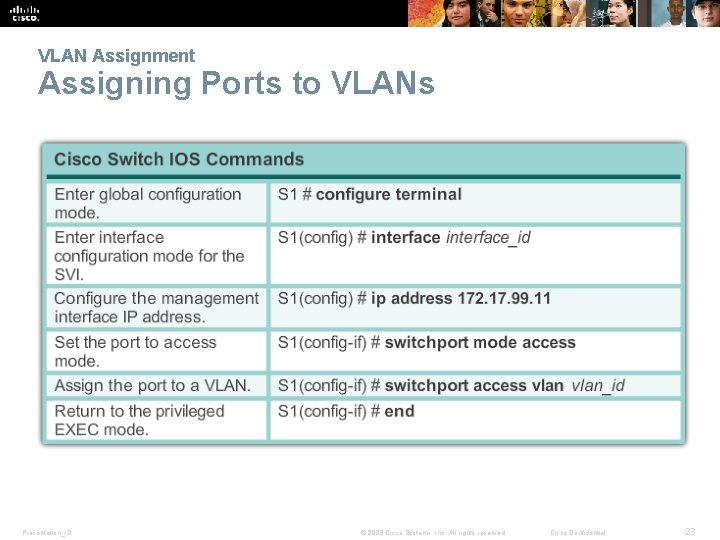
VLAN Assignment Assigning Ports to VLANs Presentation_ID © 2008 Cisco Systems, Inc. All rights reserved. Cisco Confidential 23
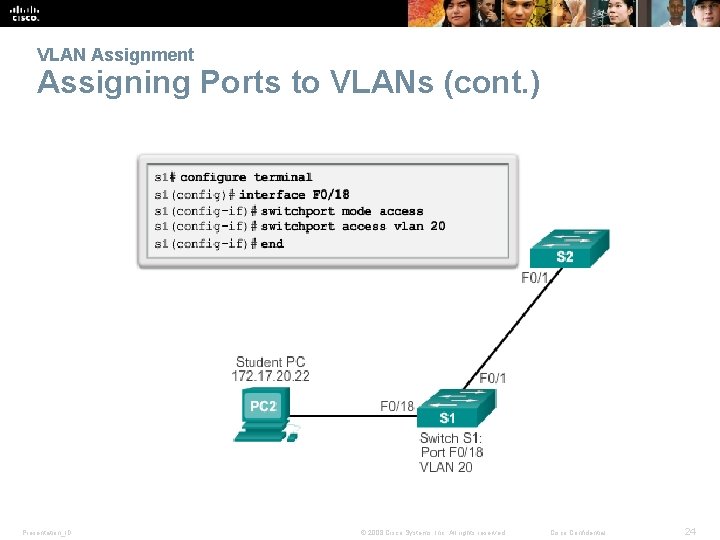
VLAN Assignment Assigning Ports to VLANs (cont. ) Presentation_ID © 2008 Cisco Systems, Inc. All rights reserved. Cisco Confidential 24
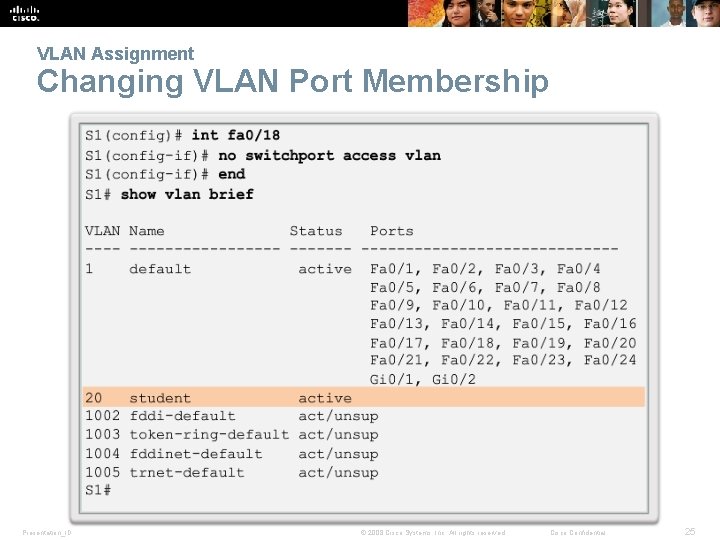
VLAN Assignment Changing VLAN Port Membership Presentation_ID © 2008 Cisco Systems, Inc. All rights reserved. Cisco Confidential 25
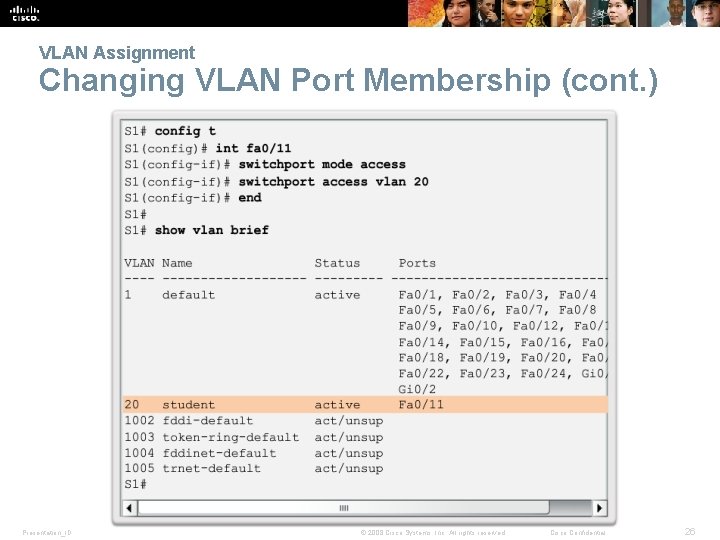
VLAN Assignment Changing VLAN Port Membership (cont. ) Presentation_ID © 2008 Cisco Systems, Inc. All rights reserved. Cisco Confidential 26
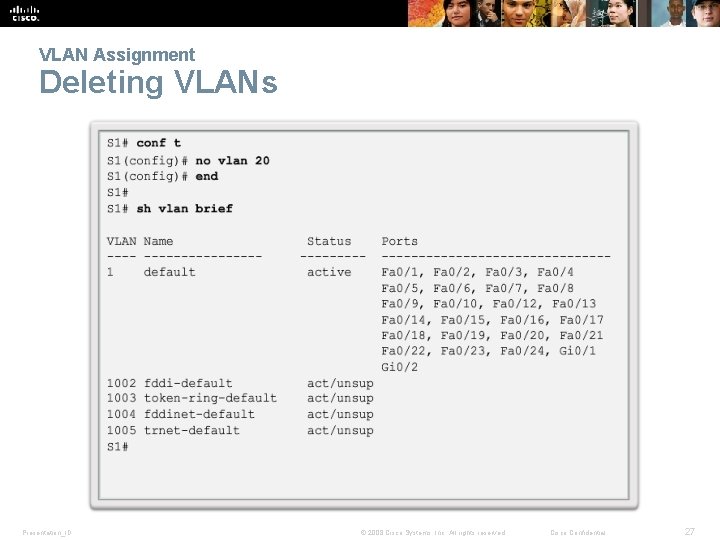
VLAN Assignment Deleting VLANs Presentation_ID © 2008 Cisco Systems, Inc. All rights reserved. Cisco Confidential 27
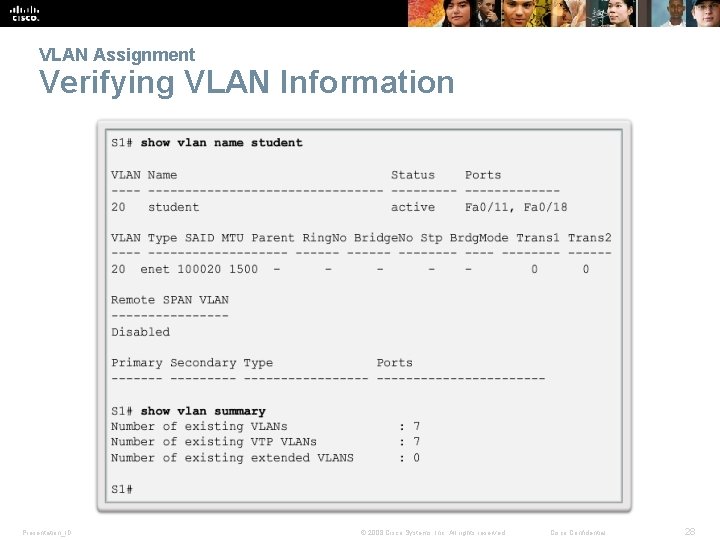
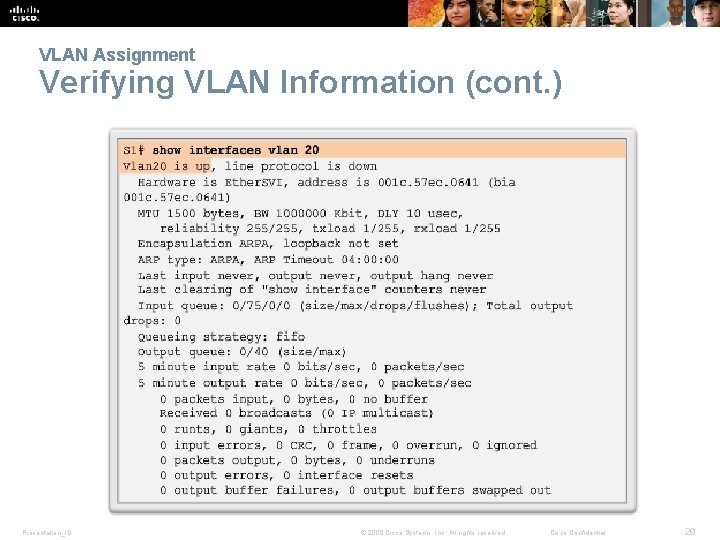
VLAN Assignment Verifying VLAN Information Presentation_ID © 2008 Cisco Systems, Inc. All rights reserved. Cisco Confidential 28
VLAN Assignment Verifying VLAN Information (cont. ) Presentation_ID © 2008 Cisco Systems, Inc. All rights reserved. Cisco Confidential 29
VLAN Assignment Configuring IEEE 802. 1 q Trunk Links Presentation_ID © 2008 Cisco Systems, Inc. All rights reserved. Cisco Confidential 30
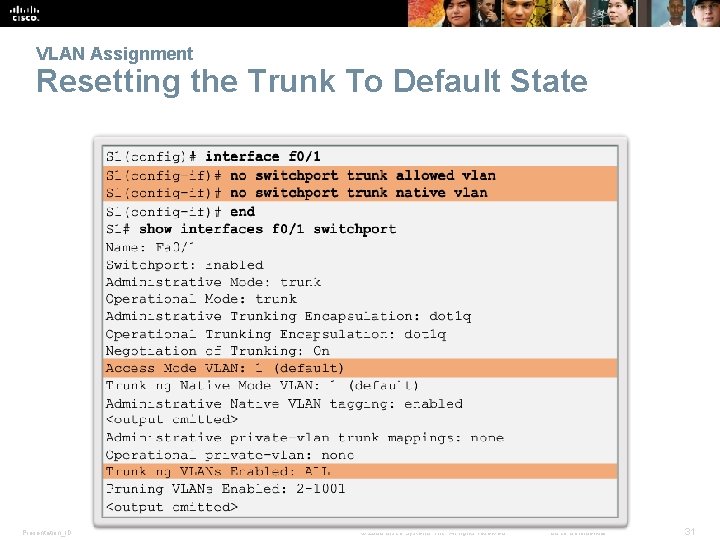
VLAN Assignment Resetting the Trunk To Default State Presentation_ID © 2008 Cisco Systems, Inc. All rights reserved. Cisco Confidential 31
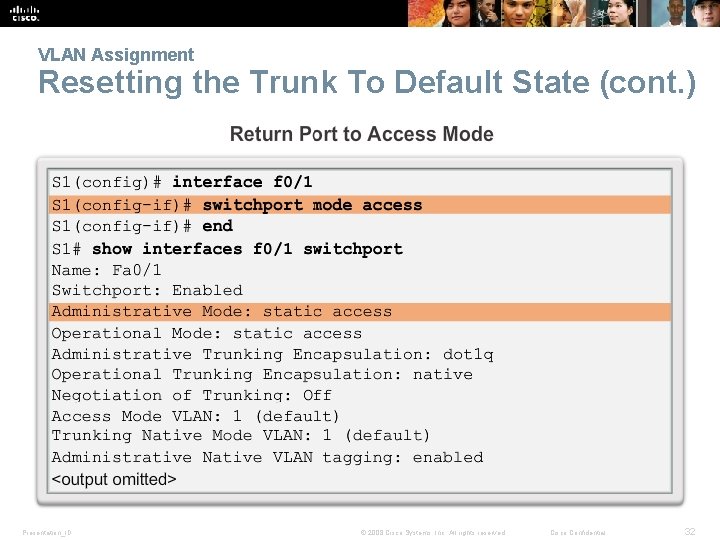
VLAN Assignment Resetting the Trunk To Default State (cont. ) Presentation_ID © 2008 Cisco Systems, Inc. All rights reserved. Cisco Confidential 32
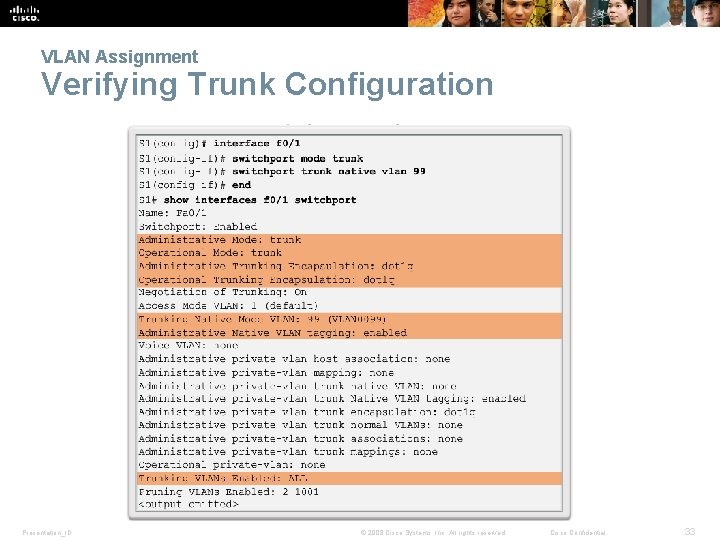
VLAN Assignment Verifying Trunk Configuration Presentation_ID © 2008 Cisco Systems, Inc. All rights reserved. Cisco Confidential 33
Dynamic Trunking Protocol Introduction to DTP § Switch ports can be manually configured to form trunks. § Switch ports can also be configured to negotiate and establish a trunk link with a connected peer. § The Dynamic Trunking Protocol (DTP) manages trunk negotiation. § DTP is a Cisco proprietary protocol and is enabled, by default, in Cisco Catalyst 2960 and 3560 switches. § If the port on the neighbor switch is configured in a trunk mode that supports DTP, it manages the negotiation. § The default DTP configuration for Cisco Catalyst 2960 and 3560 switches is dynamic auto. Presentation_ID © 2008 Cisco Systems, Inc. All rights reserved. Cisco Confidential 34
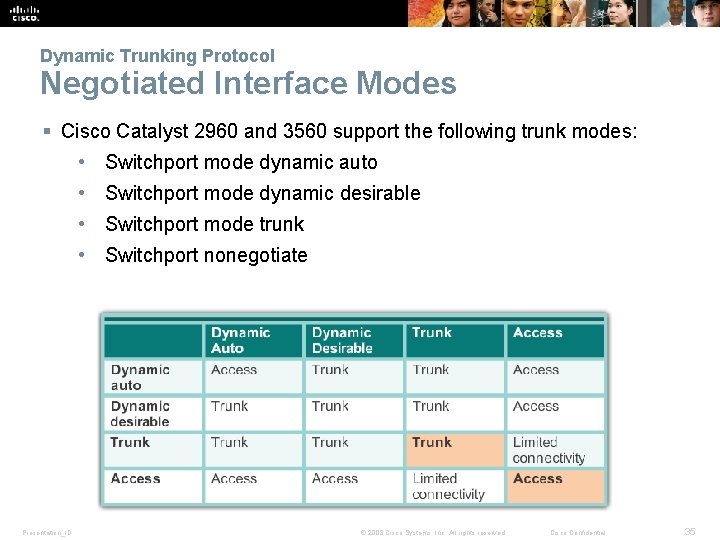
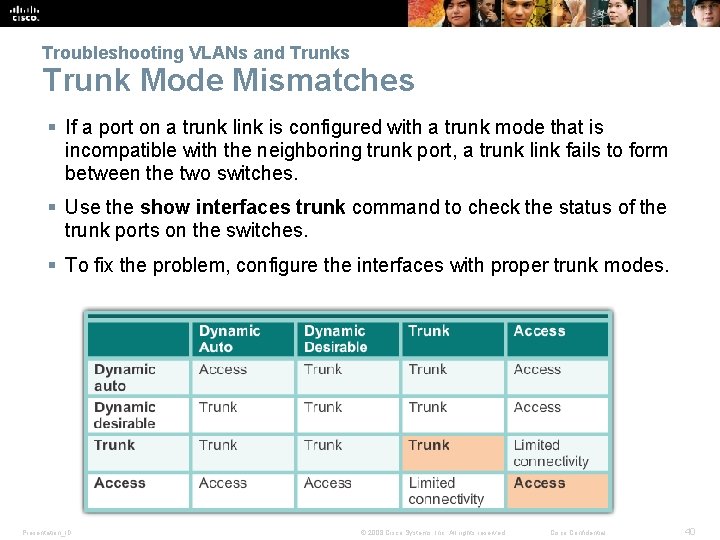
Dynamic Trunking Protocol Negotiated Interface Modes § Cisco Catalyst 2960 and 3560 support the following trunk modes: • Switchport mode dynamic auto • Switchport mode dynamic desirable • Switchport mode trunk • Switchport nonegotiate Presentation_ID © 2008 Cisco Systems, Inc. All rights reserved. Cisco Confidential 35
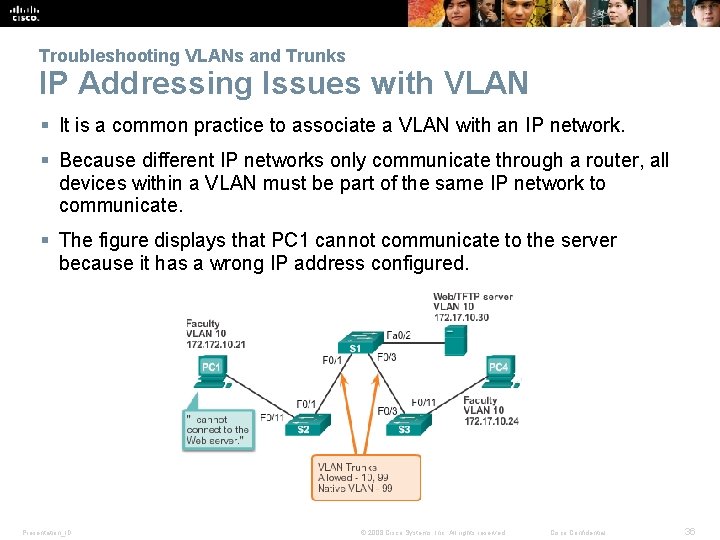
Troubleshooting VLANs and Trunks IP Addressing Issues with VLAN § It is a common practice to associate a VLAN with an IP network. § Because different IP networks only communicate through a router, all devices within a VLAN must be part of the same IP network to communicate. § The figure displays that PC 1 cannot communicate to the server because it has a wrong IP address configured. Presentation_ID © 2008 Cisco Systems, Inc. All rights reserved. Cisco Confidential 36
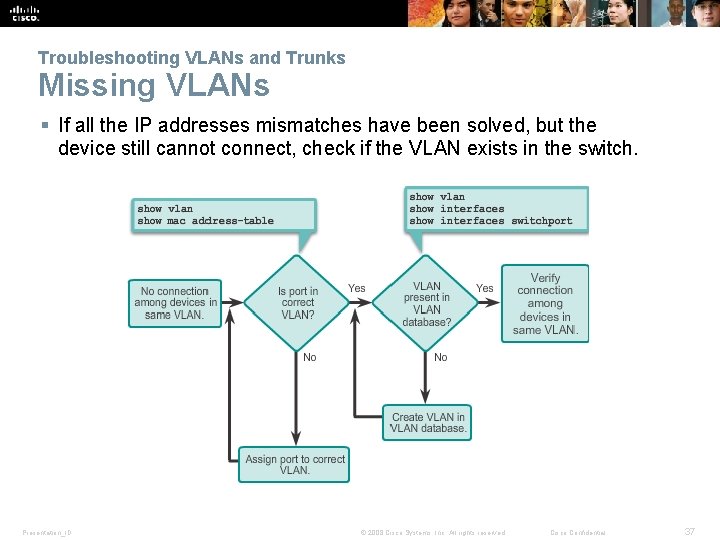
Troubleshooting VLANs and Trunks Missing VLANs § If all the IP addresses mismatches have been solved, but the device still cannot connect, check if the VLAN exists in the switch. Presentation_ID © 2008 Cisco Systems, Inc. All rights reserved. Cisco Confidential 37
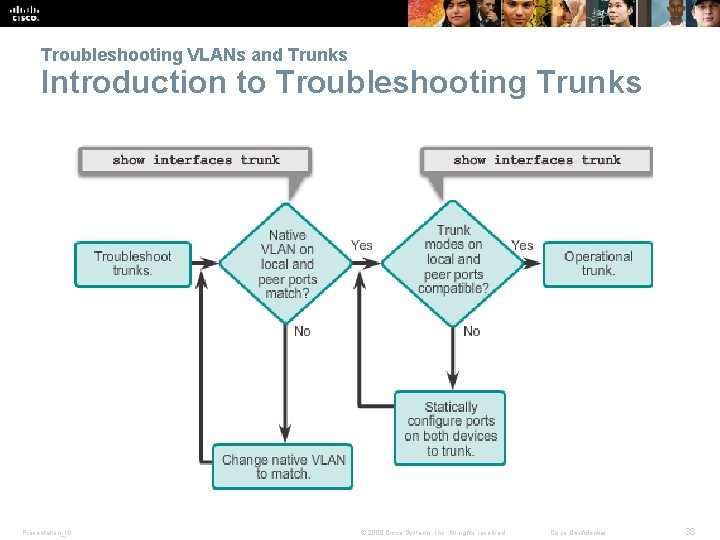
Troubleshooting VLANs and Trunks Introduction to Troubleshooting Trunks Presentation_ID © 2008 Cisco Systems, Inc. All rights reserved. Cisco Confidential 38
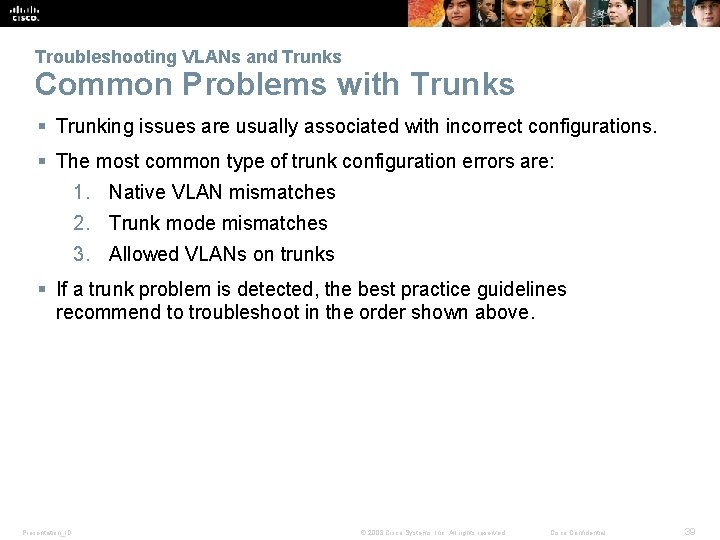
Troubleshooting VLANs and Trunks Common Problems with Trunks § Trunking issues are usually associated with incorrect configurations. § The most common type of trunk configuration errors are: 1. Native VLAN mismatches 2. Trunk mode mismatches 3. Allowed VLANs on trunks § If a trunk problem is detected, the best practice guidelines recommend to troubleshoot in the order shown above. Presentation_ID © 2008 Cisco Systems, Inc. All rights reserved. Cisco Confidential 39
Troubleshooting VLANs and Trunks Trunk Mode Mismatches § If a port on a trunk link is configured with a trunk mode that is incompatible with the neighboring trunk port, a trunk link fails to form between the two switches. § Use the show interfaces trunk command to check the status of the trunk ports on the switches. § To fix the problem, configure the interfaces with proper trunk modes. Presentation_ID © 2008 Cisco Systems, Inc. All rights reserved. Cisco Confidential 40
Troubleshooting VLANs and Trunks Incorrect VLAN List § VLANs must be allowed in the trunk before their frames can be transmitted across the link. § Use the switchport trunk allowed vlan command to specify which VLANs are allowed in a trunk link. § Use the show interfaces trunk command to ensure the correct VLANs are permitted in a trunk. Presentation_ID © 2008 Cisco Systems, Inc. All rights reserved. Cisco Confidential 41
3. 3 VLAN Security and Design Presentation_ID © 2008 Cisco Systems, Inc. All rights reserved. Cisco Confidential 42
Attacks on VLANs Switch Spoofing Attack § There a number of different types of VLAN attacks in modern switched networks; VLAN hopping is one example. § The default configuration of the switch port is dynamic auto. § By configuring a host to act as a switch and form a trunk, an attacker could gain access to any VLAN in the network. § Because the attacker is now able to access other VLANs, this is called a VLAN hopping attack. § To prevent a basic switch spoofing attack, turn off trunking on all ports, except the ones that specifically require trunking. Presentation_ID © 2008 Cisco Systems, Inc. All rights reserved. Cisco Confidential 43
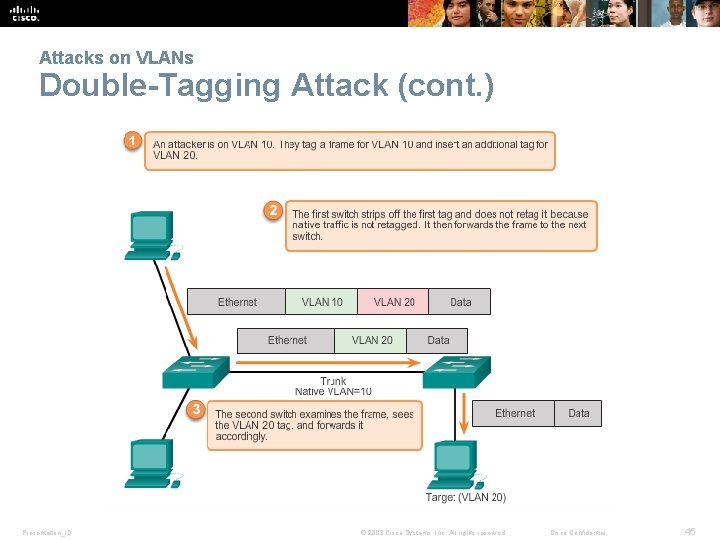
Attacks on VLANs Double-Tagging Attack § Double-tagging attack takes advantage of the way that hardware on most switches de-encapsulate 802. 1 Q tags. § Most switches perform only one level of 802. 1 Q de-encapsulation, allowing an attacker to embed a second, unauthorized attack header in the frame. § After removing the first and legit 802. 1 Q header, the switch forwards the frame to the VLAN specified in the unauthorized 802. 1 Q header. § The best approach to mitigating double-tagging attacks is to ensure that the native VLAN of the trunk ports is different from the VLAN of any user ports. Presentation_ID © 2008 Cisco Systems, Inc. All rights reserved. Cisco Confidential 44
Attacks on VLANs Double-Tagging Attack (cont. ) Presentation_ID © 2008 Cisco Systems, Inc. All rights reserved. Cisco Confidential 45
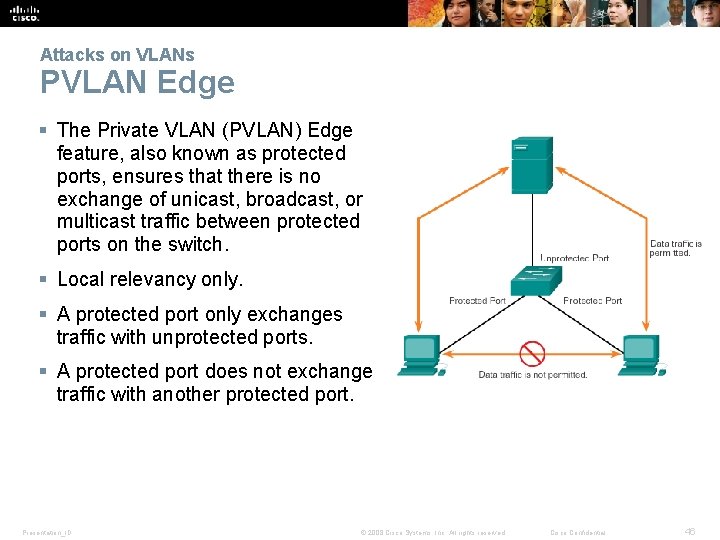
Attacks on VLANs PVLAN Edge § The Private VLAN (PVLAN) Edge feature, also known as protected ports, ensures that there is no exchange of unicast, broadcast, or multicast traffic between protected ports on the switch. § Local relevancy only. § A protected port only exchanges traffic with unprotected ports. § A protected port does not exchange traffic with another protected port. Presentation_ID © 2008 Cisco Systems, Inc. All rights reserved. Cisco Confidential 46
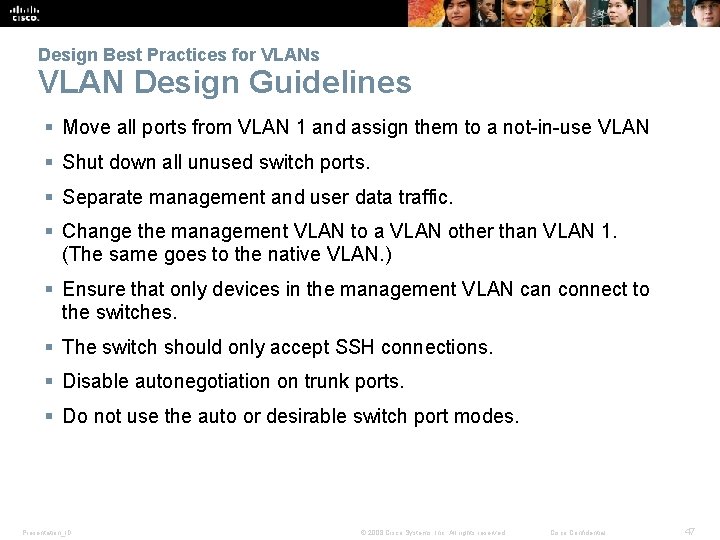
Design Best Practices for VLANs VLAN Design Guidelines § Move all ports from VLAN 1 and assign them to a not-in-use VLAN § Shut down all unused switch ports. § Separate management and user data traffic. § Change the management VLAN to a VLAN other than VLAN 1. (The same goes to the native VLAN. ) § Ensure that only devices in the management VLAN can connect to the switches. § The switch should only accept SSH connections. § Disable autonegotiation on trunk ports. § Do not use the auto or desirable switch port modes. Presentation_ID © 2008 Cisco Systems, Inc. All rights reserved. Cisco Confidential 47
Chapter 3: Summary This chapter: § Introduced VLANs and their types § Described the connection between VLANs and broadcast domains § Discussed IEEE 802. 1 Q frame tagging and how it enables differentiation between Ethernet frames associated with distinct VLANs as they traverse common trunk links. § Examined the configuration, verification, and troubleshooting of VLANs and trunks using the Cisco IOS CLI and explored basic security and design considerations. Presentation_ID © 2008 Cisco Systems, Inc. All rights reserved. Cisco Confidential 48
Presentation_ID © 2008 Cisco Systems, Inc. All rights reserved. Cisco Confidential 49