
Chapter 3 Selections Liang Introduction to Java Programming
- Slides: 26
Chapter 3 Selections Liang, Introduction to Java Programming, Tenth Edition, (c) 2015 Pearson Education, Inc. All rights reserved. 1
Motivations If you assigned a negative value for radius in Listing 2. 2, Compute. Area. With. Console. Input. java, the program would print an invalid result. If the radius is negative, you don't want the program to compute the area. How can you deal with this situation? Liang, Introduction to Java Programming, Tenth Edition, (c) 2015 Pearson Education, Inc. All rights reserved. 2
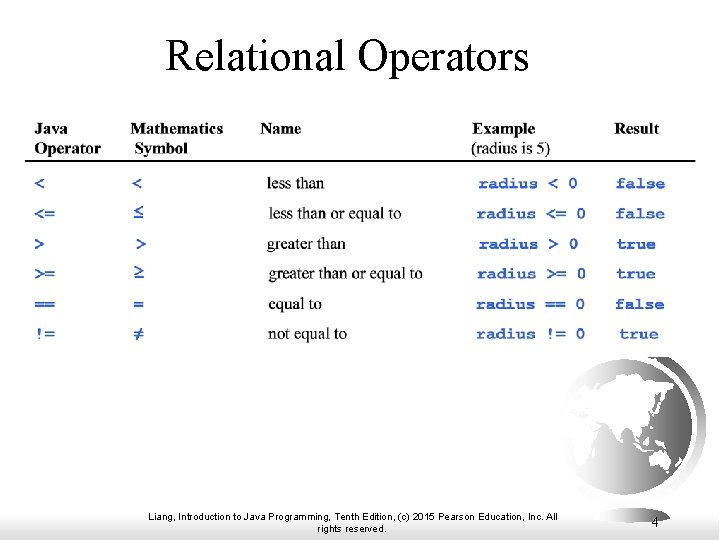
The boolean Type and Operators Often in a program you need to compare two values, such as whether i is greater than j. Java provides six comparison operators (also known as relational operators) that can be used to compare two values. The result of the comparison is a Boolean value: true or false. boolean b = (1 > 2); Liang, Introduction to Java Programming, Tenth Edition, (c) 2015 Pearson Education, Inc. All rights reserved. 3
Relational Operators Liang, Introduction to Java Programming, Tenth Edition, (c) 2015 Pearson Education, Inc. All rights reserved. 4
Problem: A Simple Math Learning Tool This example creates a program to let a first grader practice additions. The program randomly generates two single-digit integers number 1 and number 2 and displays a question such as “What is 7 + 9? ” to the student. After the student types the answer, the program displays a message to indicate whether the answer is true or false. IMPORTANT NOTE: If you cannot run the buttons, see www. cs. armstrong. edu/liang/javaslidenote. doc. Addition. Quiz Liang, Introduction to Java Programming, Tenth Edition, (c) 2015 Pearson Education, Inc. All rights reserved. Run 5
Additon. Quiz. java F Listing 3. 1 on page 79 Liang, Introduction to Java Programming, Tenth Edition, (c) 2015 Pearson Education, Inc. All rights reserved. 6
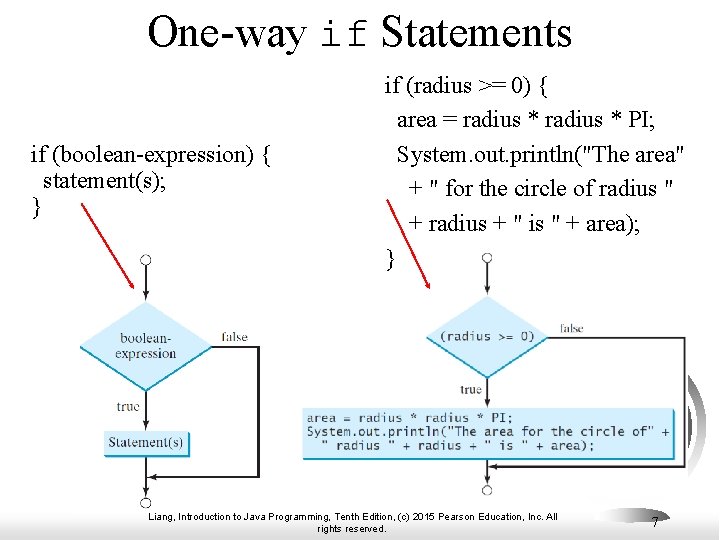
One-way if Statements if (boolean-expression) { statement(s); } if (radius >= 0) { area = radius * PI; System. out. println("The area" + " for the circle of radius " + radius + " is " + area); } Liang, Introduction to Java Programming, Tenth Edition, (c) 2015 Pearson Education, Inc. All rights reserved. 7
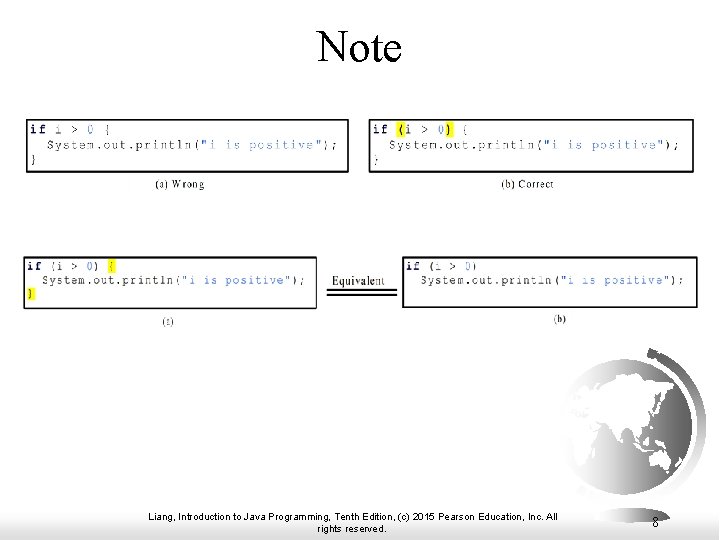
Note Liang, Introduction to Java Programming, Tenth Edition, (c) 2015 Pearson Education, Inc. All rights reserved. 8
Simple if Demo Write a program that prompts the user to enter an integer. If the number is a multiple of 5, print Hi. Five. If the number is divisible by 2, print Hi. Even. Simple. If. Demo Liang, Introduction to Java Programming, Tenth Edition, (c) 2015 Pearson Education, Inc. All rights reserved. Run 9
Simple. If. Demo. java F Listing 3. 2 on page 81 Liang, Introduction to Java Programming, Tenth Edition, (c) 2015 Pearson Education, Inc. All rights reserved. 10
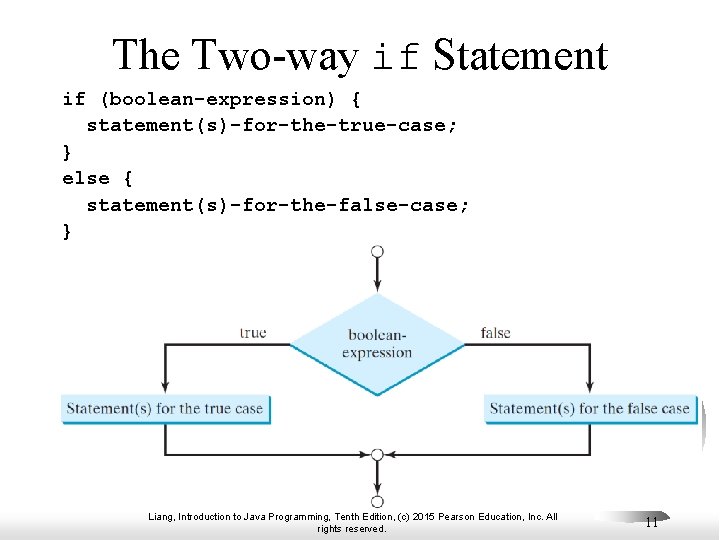
The Two-way if Statement if (boolean-expression) { statement(s)-for-the-true-case; } else { statement(s)-for-the-false-case; } Liang, Introduction to Java Programming, Tenth Edition, (c) 2015 Pearson Education, Inc. All rights reserved. 11
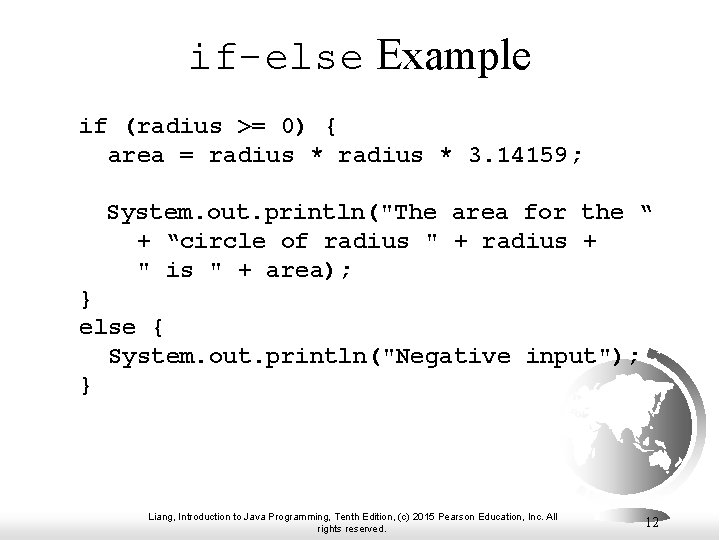
if-else Example if (radius >= 0) { area = radius * 3. 14159; System. out. println("The area for the “ + “circle of radius " + radius + " is " + area); } else { System. out. println("Negative input"); } Liang, Introduction to Java Programming, Tenth Edition, (c) 2015 Pearson Education, Inc. All rights reserved. 12
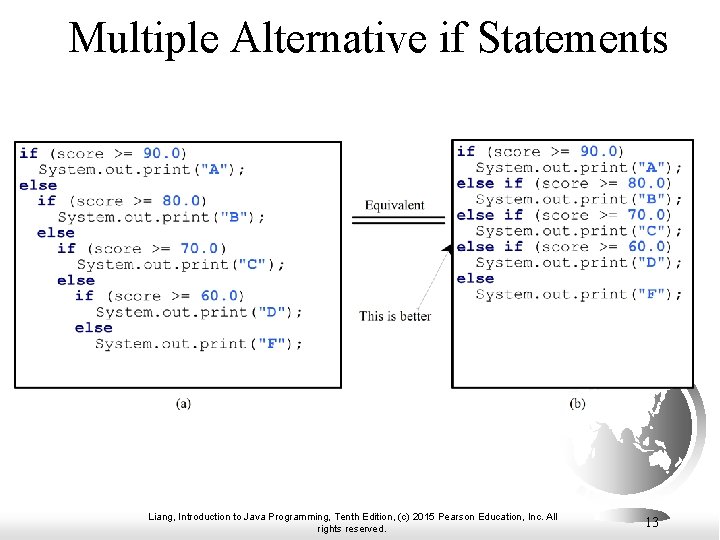
Multiple Alternative if Statements Liang, Introduction to Java Programming, Tenth Edition, (c) 2015 Pearson Education, Inc. All rights reserved. 13
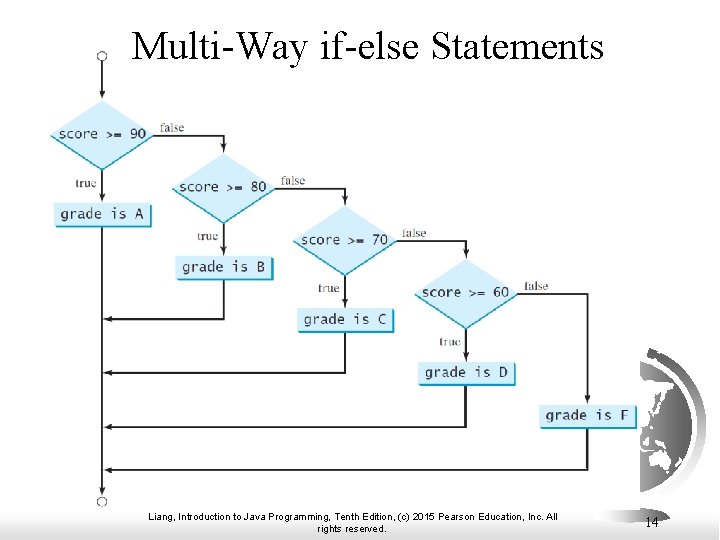
Multi-Way if-else Statements Liang, Introduction to Java Programming, Tenth Edition, (c) 2015 Pearson Education, Inc. All rights reserved. 14
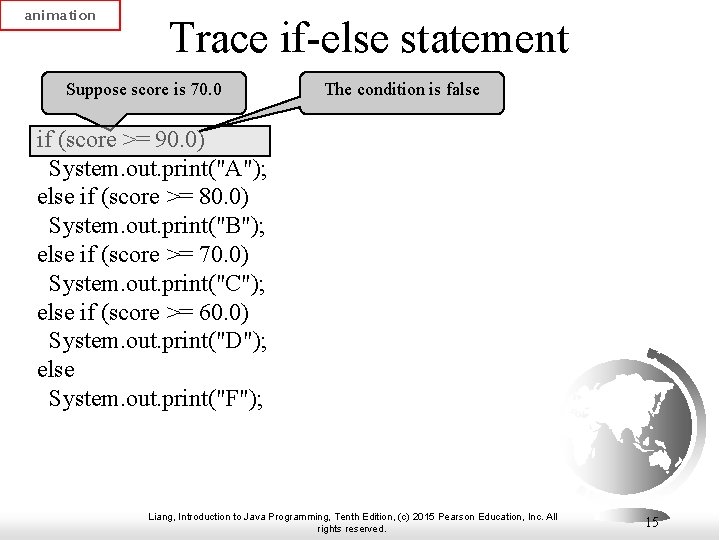
animation Trace if-else statement Suppose score is 70. 0 The condition is false if (score >= 90. 0) System. out. print("A"); else if (score >= 80. 0) System. out. print("B"); else if (score >= 70. 0) System. out. print("C"); else if (score >= 60. 0) System. out. print("D"); else System. out. print("F"); Liang, Introduction to Java Programming, Tenth Edition, (c) 2015 Pearson Education, Inc. All rights reserved. 15
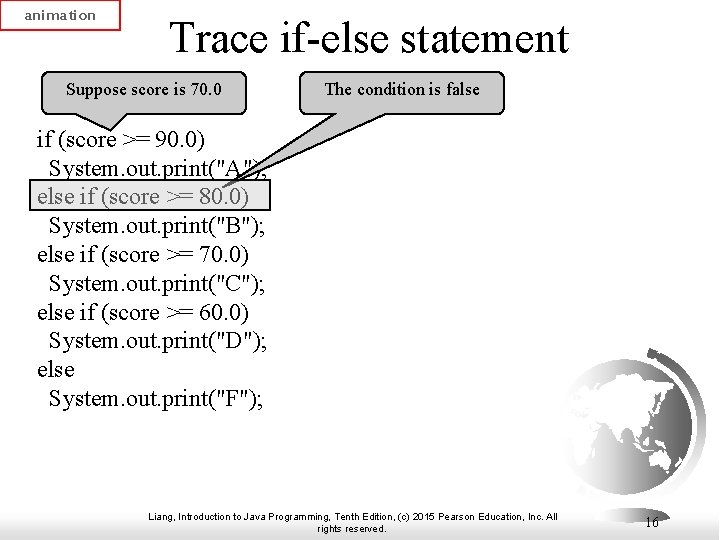
animation Trace if-else statement Suppose score is 70. 0 The condition is false if (score >= 90. 0) System. out. print("A"); else if (score >= 80. 0) System. out. print("B"); else if (score >= 70. 0) System. out. print("C"); else if (score >= 60. 0) System. out. print("D"); else System. out. print("F"); Liang, Introduction to Java Programming, Tenth Edition, (c) 2015 Pearson Education, Inc. All rights reserved. 16
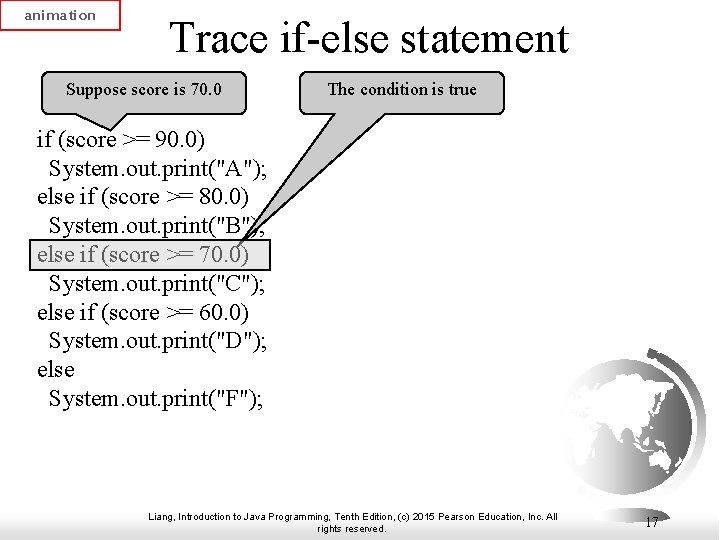
animation Trace if-else statement Suppose score is 70. 0 The condition is true if (score >= 90. 0) System. out. print("A"); else if (score >= 80. 0) System. out. print("B"); else if (score >= 70. 0) System. out. print("C"); else if (score >= 60. 0) System. out. print("D"); else System. out. print("F"); Liang, Introduction to Java Programming, Tenth Edition, (c) 2015 Pearson Education, Inc. All rights reserved. 17
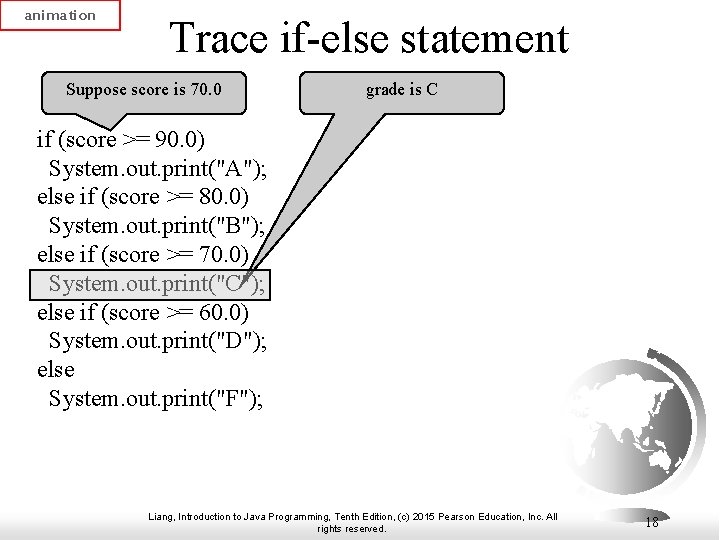
animation Trace if-else statement Suppose score is 70. 0 grade is C if (score >= 90. 0) System. out. print("A"); else if (score >= 80. 0) System. out. print("B"); else if (score >= 70. 0) System. out. print("C"); else if (score >= 60. 0) System. out. print("D"); else System. out. print("F"); Liang, Introduction to Java Programming, Tenth Edition, (c) 2015 Pearson Education, Inc. All rights reserved. 18
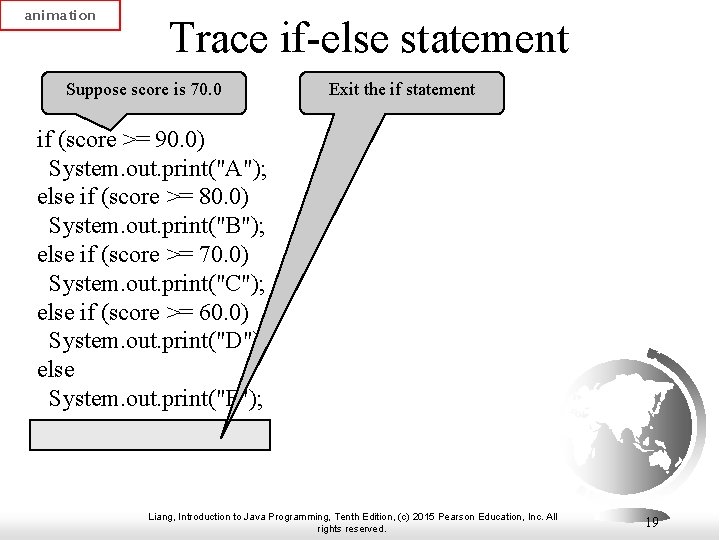
animation Trace if-else statement Suppose score is 70. 0 Exit the if statement if (score >= 90. 0) System. out. print("A"); else if (score >= 80. 0) System. out. print("B"); else if (score >= 70. 0) System. out. print("C"); else if (score >= 60. 0) System. out. print("D"); else System. out. print("F"); Liang, Introduction to Java Programming, Tenth Edition, (c) 2015 Pearson Education, Inc. All rights reserved. 19
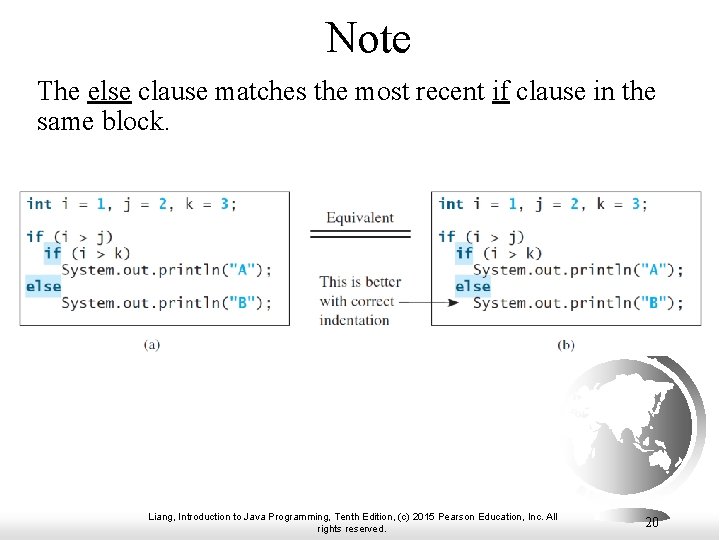
Note The else clause matches the most recent if clause in the same block. Liang, Introduction to Java Programming, Tenth Edition, (c) 2015 Pearson Education, Inc. All rights reserved. 20
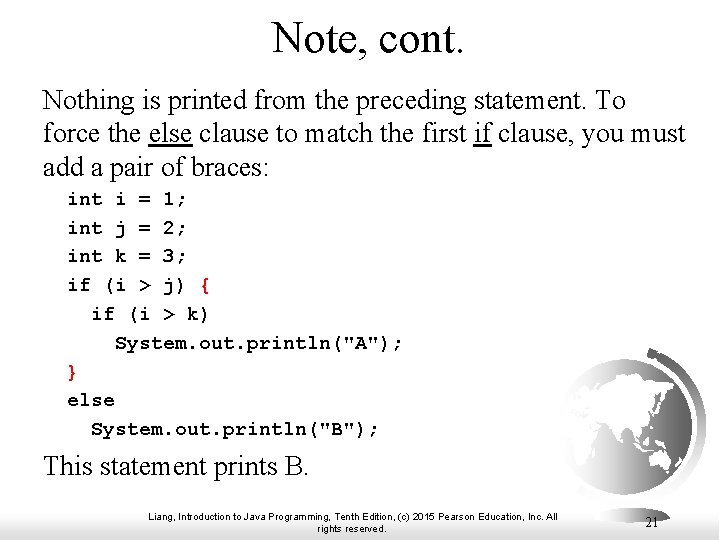
Note, cont. Nothing is printed from the preceding statement. To force the else clause to match the first if clause, you must add a pair of braces: int i = 1; int j = 2; int k = 3; if (i > j) { if (i > k) System. out. println("A"); } else System. out. println("B"); This statement prints B. Liang, Introduction to Java Programming, Tenth Edition, (c) 2015 Pearson Education, Inc. All rights reserved. 21
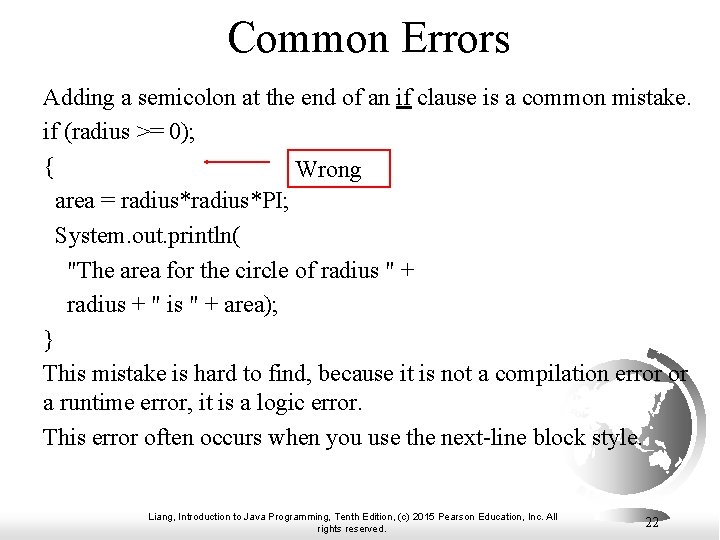
Common Errors Adding a semicolon at the end of an if clause is a common mistake. if (radius >= 0); { Wrong area = radius*PI; System. out. println( "The area for the circle of radius " + radius + " is " + area); } This mistake is hard to find, because it is not a compilation error or a runtime error, it is a logic error. This error often occurs when you use the next-line block style. Liang, Introduction to Java Programming, Tenth Edition, (c) 2015 Pearson Education, Inc. All rights reserved. 22
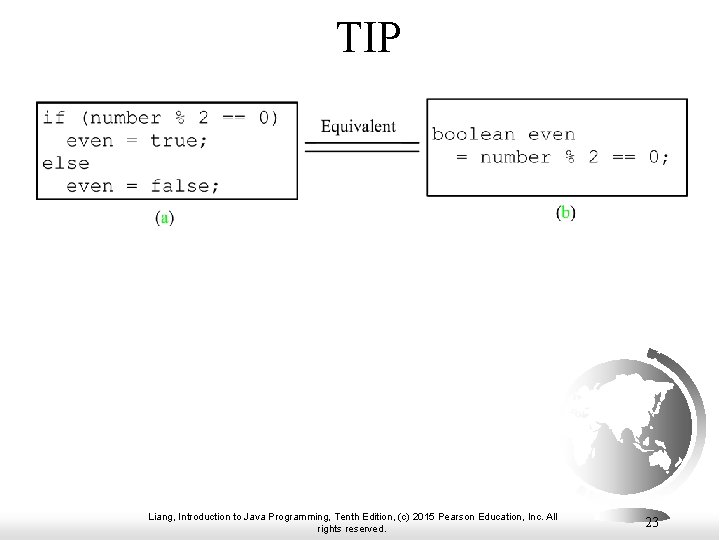
TIP Liang, Introduction to Java Programming, Tenth Edition, (c) 2015 Pearson Education, Inc. All rights reserved. 23
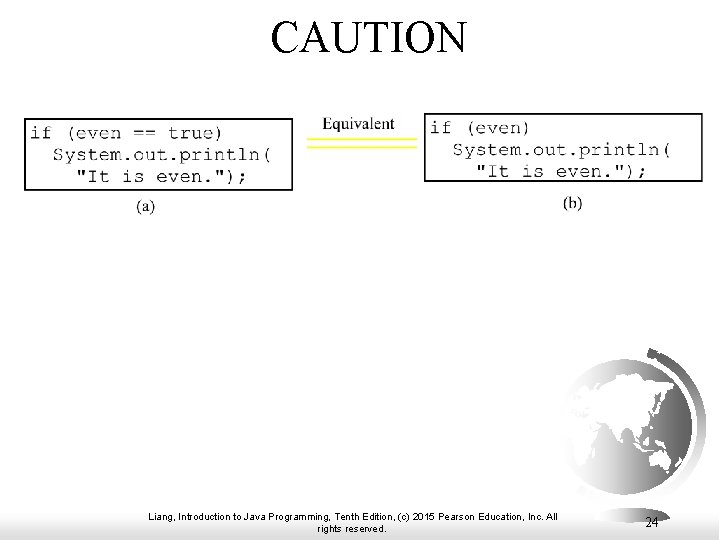
CAUTION Liang, Introduction to Java Programming, Tenth Edition, (c) 2015 Pearson Education, Inc. All rights reserved. 24
Problem: An Improved Math Learning Tool This example creates a program to teach a first grade child how to learn subtractions. The program randomly generates two singledigit integers number 1 and number 2 with number 1 >= number 2 and displays a question such as “What is 9 – 2? ” to the student. After the student types the answer, the program displays whether the answer is correct. Subtraction. Quiz Liang, Introduction to Java Programming, Tenth Edition, (c) 2015 Pearson Education, Inc. All rights reserved. Run 25
Subtraction. Quiz. java F Listing 3. 3 on pages 88 -89 Liang, Introduction to Java Programming, Tenth Edition, (c) 2015 Pearson Education, Inc. All rights reserved. 26