
Chapter 3 OperatingSystem Structures n System Components n


- Slides: 39
Chapter 3: Operating-System Structures n System Components n Operating System Services n System Calls n System Programs n System Structure n Virtual Machines n System Design and Implementation n System Generation Operating System Concepts
Common System Components n Process Management n Main Memory Management n File Management n I/O System Management n Secondary Management n Networking n Protection System n Command-Interpreter System Operating System Concepts
Process Management n A process is a program in execution. A process needs certain resources, including CPU time, memory, files, and I/O devices, to accomplish its task. n The operating system is responsible for the following activities in connection with process management. F Process creation and deletion. F Process suspension and resumption. F Mechanisms for: 4 process synchronization 4 process communication Operating System Concepts
Main-Memory Management n Memory is a large array of words or bytes, each with its own address. It is a repository of quickly accessible data shared by the CPU and I/O devices. n Main memory is a volatile storage device. It loses its contents in the case of system failure. n The operating system is responsible for the following activities in connections with memory management: F Keep track of which parts of memory are currently being used and by whom. F Decide which processes to load when memory space becomes available. F Allocate and deallocate memory space as needed. Operating System Concepts
File Management n A file is a collection of related information defined by its creator. Commonly, files represent programs (both source and object forms) and data. n The operating system is responsible for the following activities in connections with file management: F File creation and deletion. F File organization (directory creation and deletion). F Support of primitives for manipulating files and directories (read/write). F Mapping files onto secondary storage. Operating System Concepts
I/O System Management n The I/O system consists of: F A buffer-caching and spooling system F A general device-driver interface F Drivers for specific hardware devices Operating System Concepts
Secondary-Storage Management n Since main memory (primary storage) is volatile and too small to accommodate all data and programs permanently, the computer system must provide secondary storage to back up main memory. n Most modern computer systems use disks as the principle on-line storage medium, for both programs and data. n The operating system is responsible for the following activities in connection with disk management: F F Operating System Concepts Free space management Storage allocation Reliability (RAID) Disk scheduling
Networking (Distributed Systems) n A distributed system is a collection of processors that do not share memory or a clock. n Communication takes place using a protocol: F FTP: examine secondary storage (list files, read contents) and remotely alter it (add, delete files). F HTTP: like FTP but low-setup overhead, ideal for quick transfer of small content. F POP/IMAP: like FTP but partial contents of mailbox file are transferred and changed. POP has single mailbox file; IMAP supports folder-oriented organization. Operating System Concepts
Protection System n Protection refers to a mechanism for controlling access by programs, processes, or users to both system and user resources. n The protection mechanism must: F allow user to specify the controls to be imposed (e. g. user can set file access permissions). F provide a means of enforcement (e. g. ensure user is identified before an attempt is made to access a file). F distinguish between authorized and unauthorized usage. n Security: F security vs. protection: external vs. internal. F covers user authentication, logging/auditing trails, encrypted communications Operating System Concepts
Command-Interpreter System n Many commands are given to the operating system by control statement which deal with: F process creation and management F I/O handling F secondary-storage management F main-memory management F file-system access F protection F networking Operating System Concepts
Command-Interpreter System (Cont. ) n The program that reads and interprets control statements (typed text) is called variously: F command-line interpreter F shell (in UNIX: csh, tcsh, bash) Gets and executes the next command statement. n Statement can be built-in command (MS-DOS) or a regular program that calls system calls and formats result for user (UNIX). n Alternative is GUI: control defined via user actions (mouse or joystick clicks, touch screen). Most such systems still have command-line interpreter for administration (often a security loophole, e. g. voting machine tampering). Operating System Concepts
Operating System Services n Program execution – system capability to load a program into n n memory and to run it. I/O operations – since user programs cannot execute I/O operations directly, the operating system must provide some means to perform I/O. File-system manipulation – program capability to read, write, create, and delete files. Communications – exchange of information between processes executing either on the same computer or on different systems tied together by a network. Implemented via shared memory or message passing. Error detection – ensure correct computing by detecting errors in the CPU and memory hardware, in I/O devices, or in user programs. Operating System Concepts
Additional Operating System Functions Additional functions exist not for helping the user, but rather for ensuring efficient system operations: • • • Operating System Concepts Resource allocation – allocating resources to multiple users or multiple jobs running at the same time. Accounting – keep track of and record which users use how much and what kinds of computer resources for account billing or for accumulating usage statistics. Protection – ensuring that all access to system resources is controlled.
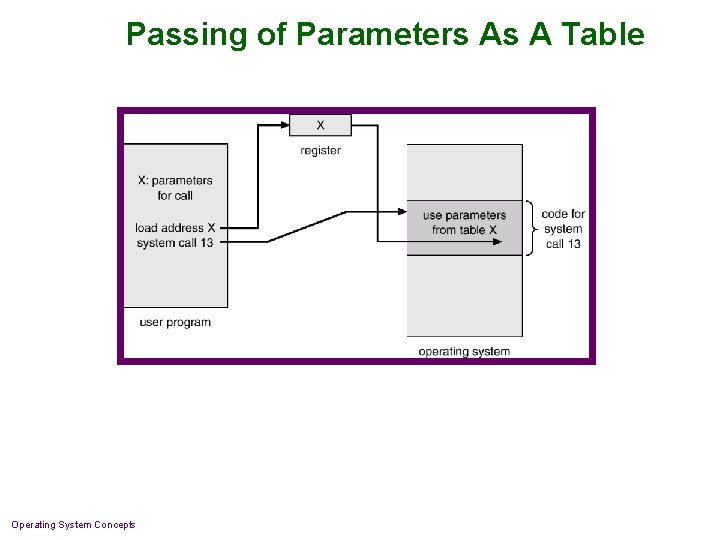
System Calls n System calls provide the interface between a running program and the operating system. F Generally available as assembly-language instructions. F Languages defined to replace assembly language for systems programming allow system calls to be made directly (e. g. , C, C++) n Three general methods are used to pass parameters between a running program and the operating system. F Pass parameters in registers. F Store the parameters in a table in memory, and the table address is passed as a parameter in a register. F Push (store) the parameters onto the stack by the program, and pop off the stack by operating system. Operating System Concepts
Passing of Parameters As A Table Operating System Concepts
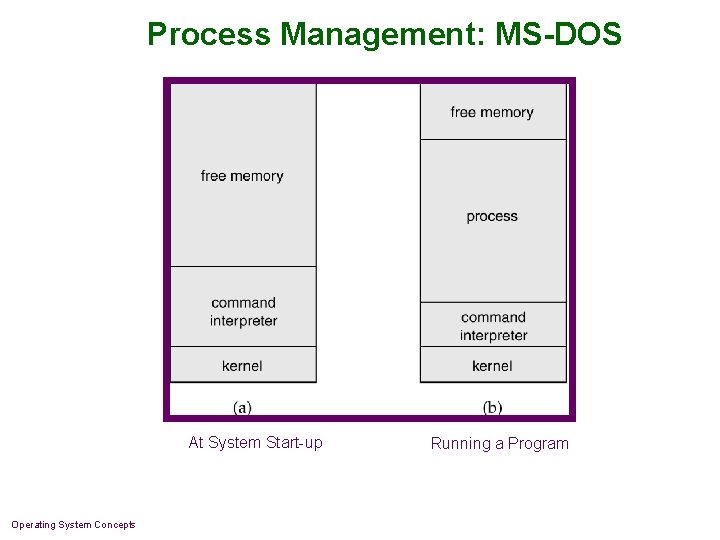
Process Management: MS-DOS At System Start-up Operating System Concepts Running a Program
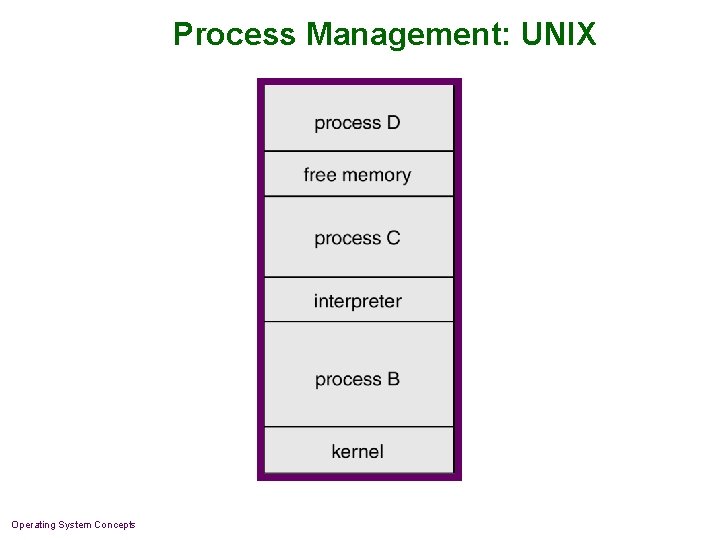
Process Management: UNIX Operating System Concepts
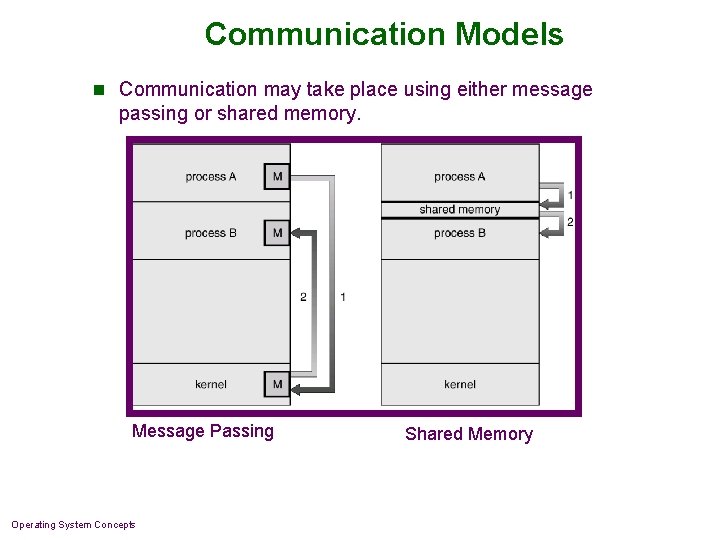
Communication Models n Communication may take place using either message passing or shared memory. Message Passing Operating System Concepts Shared Memory
System Programs n System programs provide a convenient environment for program development and execution. The can be divided into: F File manipulation: Unix ‘cp’ F Status information: Unix ‘ps’ F File modification: Unix ‘cat’ F Programming language support: Unix ‘cc’ F Program loading and execution: Windows ‘start’ F Communications: Windows ‘ipconfig’ F Application programs: Windows ‘ie’ n Most users’ view of the operating system is defined by system programs, not the actual system calls. Operating System Concepts
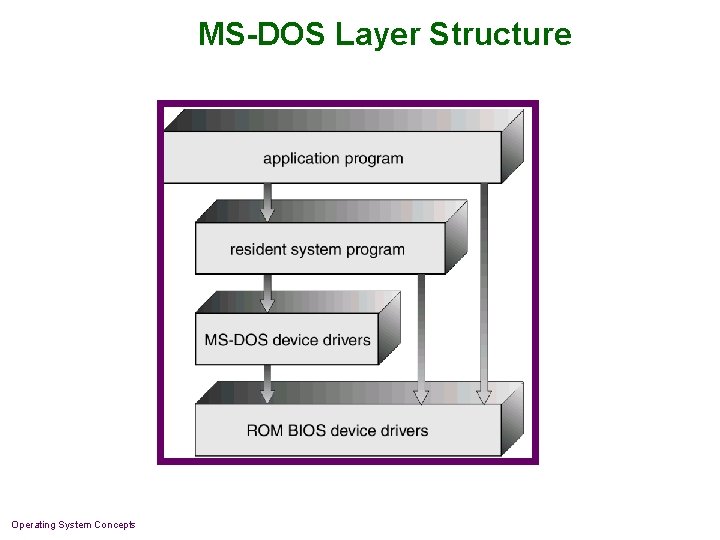
MS-DOS System Structure n MS-DOS – written to provide the most functionality in the least space F Not divided into modules F Although MS-DOS has some structure, its interfaces and levels of functionality are not well separated Operating System Concepts
MS-DOS Layer Structure Operating System Concepts
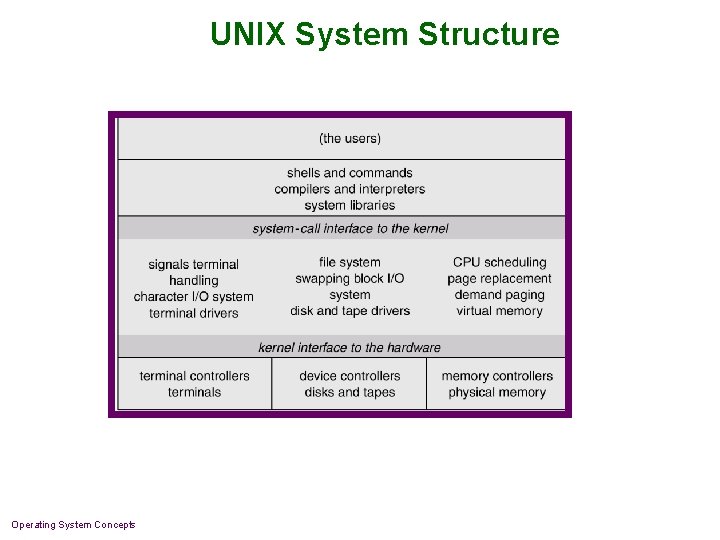
UNIX System Structure n UNIX – limited by hardware functionality, the original UNIX operating system had limited structuring. The UNIX OS consists of two separable parts. F Systems programs F The kernel 4 Consists of everything below the system-call interface and above the physical hardware 4 Provides the file system, CPU scheduling, memory management, and other operating-system functions; a large number of functions for one level. Operating System Concepts
UNIX System Structure Operating System Concepts
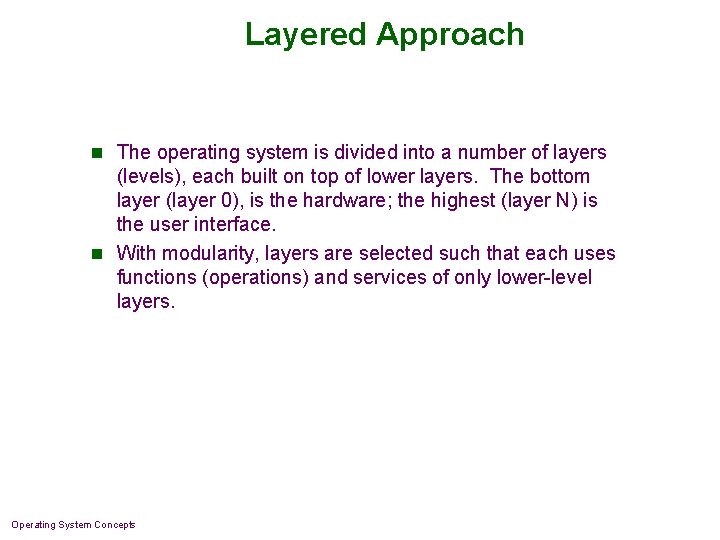
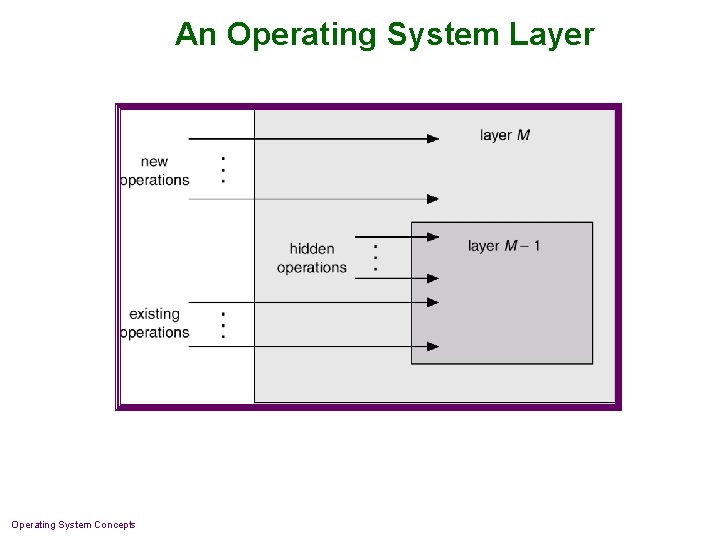
Layered Approach n The operating system is divided into a number of layers (levels), each built on top of lower layers. The bottom layer (layer 0), is the hardware; the highest (layer N) is the user interface. n With modularity, layers are selected such that each uses functions (operations) and services of only lower-level layers. Operating System Concepts
An Operating System Layer Operating System Concepts
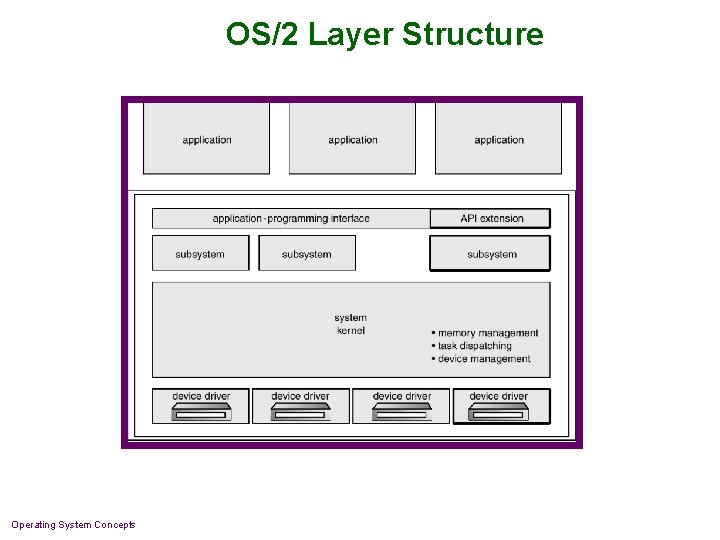
OS/2 Layer Structure Operating System Concepts
Microkernel System Structure n Moves as much from the kernel into “user” space. n Communication takes place between user modules using message passing. n Benefits: - easier to extend a microkernel via user-space extensions. - easier to port the operating system to new architectures (less code to port) - more reliable (less code is running in kernel mode) - more secure (less to protect) n Windows NT: Win 32, POSIX subsystem are user-level. Operating System Concepts
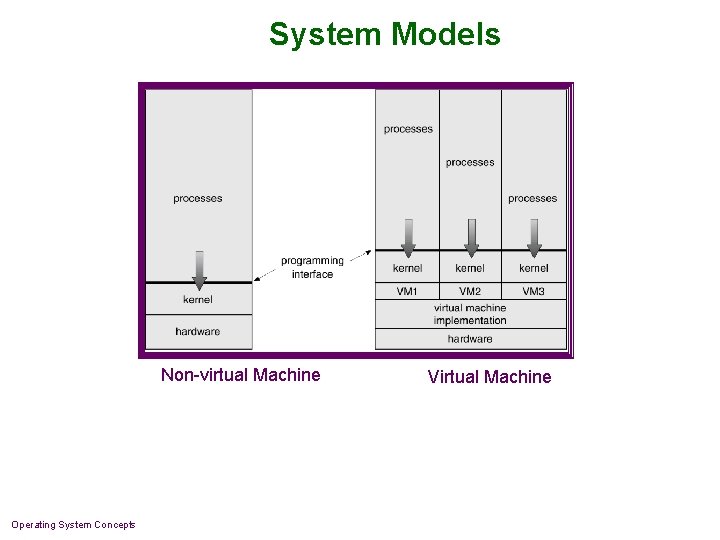
Virtual Machines n A virtual machine is a program that acts as a hardware simulator. Run N copies of this simulator, the one physical machine becomes N virtual machines. n Each machine can run: F a single process under a simple OS F all processes of a single user under a moderate OS F a complex time-sharing OS (e. g. for debugging) n “OS” has three parts: F hardware simulator, F resource (processor, memory) sharing between simulators, F OS running inside each simulator. Operating System Concepts
Virtual Machines (Cont. ) n The resources of the physical computer are shared to create the virtual machines. F CPU scheduling can create the appearance that users have their own processor. F Spooling and a file system can provide virtual card readers and virtual line printers. F A normal user time-sharing terminal serves as the virtual machine operator’s console. Operating System Concepts
System Models Non-virtual Machine Operating System Concepts Virtual Machine
Advantages of Virtual Machines n Complete protection of system resources since each virtual machine is isolated from all other virtual machines. n Ideal for operating-systems research and development. System development does not disrupt normal system operation. Operating System Concepts
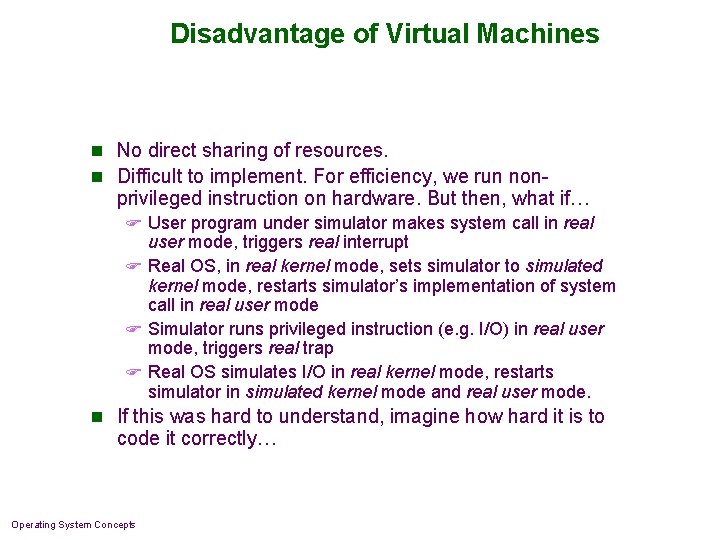
Disadvantage of Virtual Machines n No direct sharing of resources. n Difficult to implement. For efficiency, we run non- privileged instruction on hardware. But then, what if… F User program under simulator makes system call in real user mode, triggers real interrupt F Real OS, in real kernel mode, sets simulator to simulated kernel mode, restarts simulator’s implementation of system call in real user mode F Simulator runs privileged instruction (e. g. I/O) in real user mode, triggers real trap F Real OS simulates I/O in real kernel mode, restarts simulator in simulated kernel mode and real user mode. n If this was hard to understand, imagine how hard it is to code it correctly… Operating System Concepts
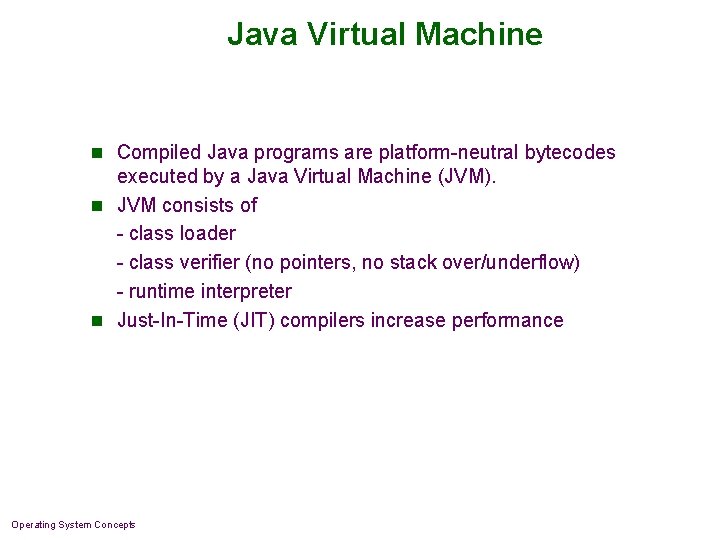
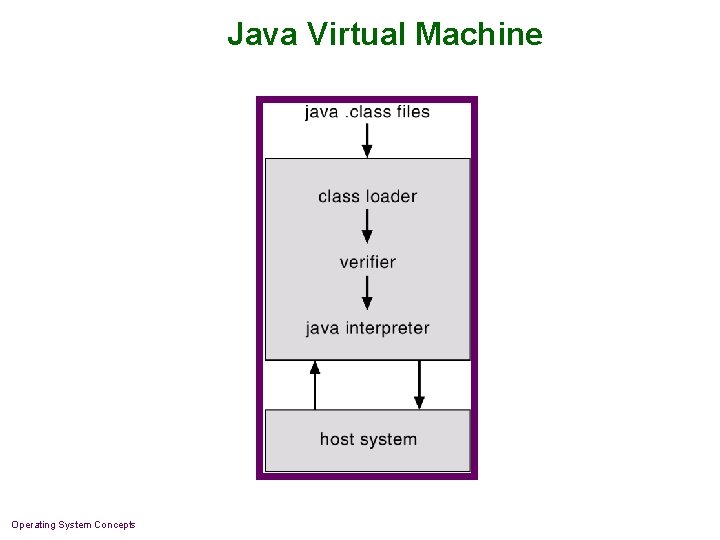
Java Virtual Machine n Compiled Java programs are platform-neutral bytecodes executed by a Java Virtual Machine (JVM). n JVM consists of - class loader - class verifier (no pointers, no stack over/underflow) - runtime interpreter n Just-In-Time (JIT) compilers increase performance Operating System Concepts
Java Virtual Machine Operating System Concepts
VMWare n Commercial product n Simulates a basic PC n Persistent state of machine stored in two real files: F NVRAM (non-volatile RAM) F Disk contents (1 file per 1 GB of simulated disk) n Simulated disk when simulator runs F Discard changes (disk loaded in memory) F Keep changes (real file was modified) F Choose to commit/revert: database-like journal kept on disk, can issue commit or abort n Different than Soft. Windows: simulates Win 32 API, not generic hardware allowing any OS. Operating System Concepts
System Design Goals n User goals – operating system should be convenient to use, easy to learn, reliable, safe, and fast. n System goals – operating system should be easy to design, implement, and maintain, as well as flexible, reliable, error-free, and efficient. Operating System Concepts
Mechanisms and Policies n Mechanisms determine how to do something, policies decide what will be done. n The separation of policy from mechanism is a very important principle, it allows maximum flexibility if policy decisions are to be changed later. Operating System Concepts
System Implementation n Traditionally written in assembly language, operating systems can now be written in higher-level languages. n Code written in a high-level language: F can be written faster. F is more compact. F is easier to understand debug. n An operating system is far easier to port (move to some other hardware) if it is written in a high-level language. Operating System Concepts
System Generation (SYSGEN) n Operating systems are designed to run on any of a class of machines; the system must be configured for each specific computer site. (Think Windows/Linux installer. ) n SYSGEN program obtains information concerning the specific configuration of the hardware system. n Booting – starting a computer by loading the kernel. n Bootstrap program – code stored in ROM that is able to locate the kernel, load it into memory, and start its execution. Operating System Concepts