
Chapter 3 Ethernet Bridges Switches ATM Switching Professor
Chapter 3 Ethernet Bridges & Switches, ATM Switching Professor Rick Han University of Colorado at Boulder rhan@cs. colorado. edu Prof. Rick Han, University of Colorado at Boulder
Announcements • Previous lecture online • Reminder: Programming assignment #1 is due Feb. 19 • Homework #2 will be available on the Web site on Thurs. Feb. 7 • Shifted Office Hours Today: 4: 30 -5: 30 pm • Reading in Chapter 3 • • • 3. 2: Ethernet bridges and switches 3. 1, 3. 3: ATM packet switching Skip 3. 4 • Next, Ethernet bridges, switches, and ATM Prof. Rick Han, University of Colorado at Boulder
Recap of Previous Lecture • Interconnecting Ethernet LANs • Ethernet Repeaters & Hubs – Physical Layer • • Amplify analog signal Problems: • Limited range • Amplify noise • Same collision domain • Can’t connect LANs with different bit rates • Ethernet Bridges – Layer 2 • • Forward Ethernet frames Construct a table for frame forwarding • When a frame arrives, put <src addr, src LAN> in table Prof. Rick Han, University of Colorado at Boulder
Recap of Previous Lecture (2) • Ethernet Bridges – Layer 2 • Frame forwarding rules: • Advantages • • If dest. and src on same LAN, don’t forward frame If dest. and src on diff. LAN, route frame to dest. LAN If dest. unknown, forward to all outgoing interfaces • • Can connect LANs with different bit rates Separate collision domains Indefinite range No noise amplification • • • Loops can develop, causing endless packet forwarding Packet multiplication effect Solution: spanning trees Problems: Prof. Rick Han, University of Colorado at Boulder
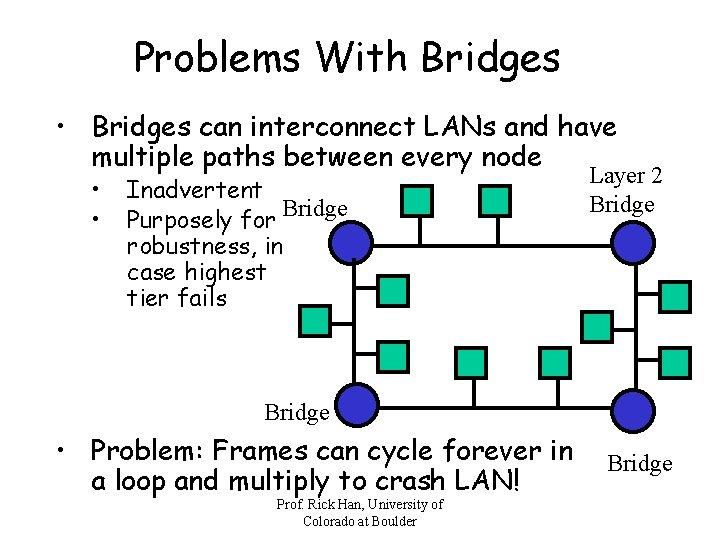
Problems With Bridges • Bridges can interconnect LANs and have multiple paths between every node • • Inadvertent Bridge Purposely for robustness, in case highest tier fails Layer 2 Bridge • Problem: Frames can cycle forever in a loop and multiply to crash LAN! Prof. Rick Han, University of Colorado at Boulder Bridge
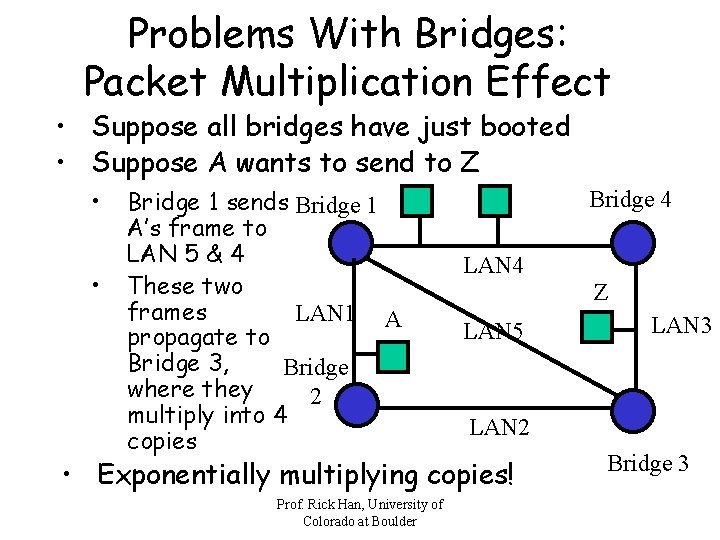
Problems With Bridges: Packet Multiplication Effect • Suppose all bridges have just booted • Suppose A wants to send to Z • • Bridge 1 sends Bridge 1 A’s frame to LAN 5 & 4 These two frames LAN 1 A propagate to Bridge 3, Bridge where they 2 multiply into 4 copies Bridge 4 LAN 4 Z LAN 5 LAN 2 • Exponentially multiplying copies! Prof. Rick Han, University of Colorado at Boulder LAN 3 Bridge 3
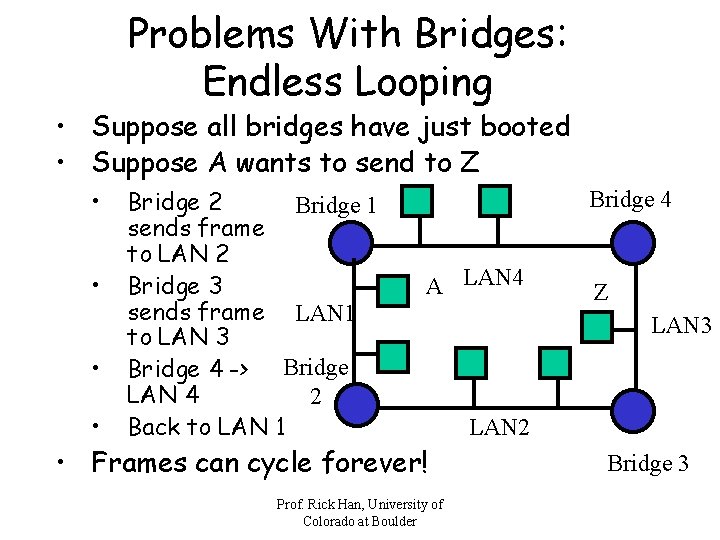
Problems With Bridges: Endless Looping • Suppose all bridges have just booted • Suppose A wants to send to Z • • Bridge 2 Bridge 1 sends frame to LAN 2 Bridge 3 sends frame LAN 1 to LAN 3 Bridge 4 -> Bridge LAN 4 2 Back to LAN 1 Bridge 4 A LAN 4 • Frames can cycle forever! Prof. Rick Han, University of Colorado at Boulder Z LAN 3 LAN 2 Bridge 3

Solution: Spanning Tree Algorithm • Invented by Radia Perlman, modified into 802. 1 d spanning tree standard • Bridges communicate with each other to set up a spanning tree that has no loops • • • Disconnect Bridge 1 some interfaces, though physical A LAN 4 link exists LAN 1 Some frames Bridge may take long 2 route though shorter direct LAN 2 route exists Some bridges. Prof. may Rick become Han, University orphans of Colorado at Boulder Bridge 4 Z LAN 3 Bridge 3
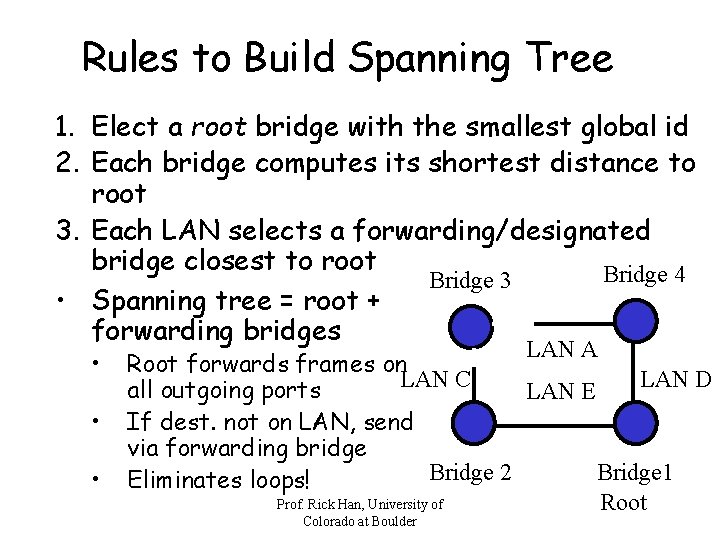
Rules to Build Spanning Tree 1. Elect a root bridge with the smallest global id 2. Each bridge computes its shortest distance to root 3. Each LAN selects a forwarding/designated bridge closest to root Bridge 4 Bridge 3 • Spanning tree = root + forwarding bridges • • • LAN A Root forwards frames on LAN C LAN D all outgoing ports LAN E If dest. not on LAN, send via forwarding bridge Bridge 2 Bridge 1 Eliminates loops! Prof. Rick Han, University of Root Colorado at Boulder
Control Messages to Build Spanning Tree • Each bridge creates a configuration message: • <bridge source id, distance to root, root bridge id> • <src=my id, dist. =0, root=my id> • Each bridge floods its initial configuration message on each of its ports/LANs: • Each bridge stores “best” config msg for each port/LAN • A config msg C 1 is better than stored config msg C 2 if: 1. Root id of C 1 < root id of C 2 2. Root id’s equal and distance of C 1 < distance of C 2 3. If root id’s and distances equal, C 1 is better than C 2 if transmitting bridge on C 1 is lower than C 2 Prof. Rick Han, University of Colorado at Boulder
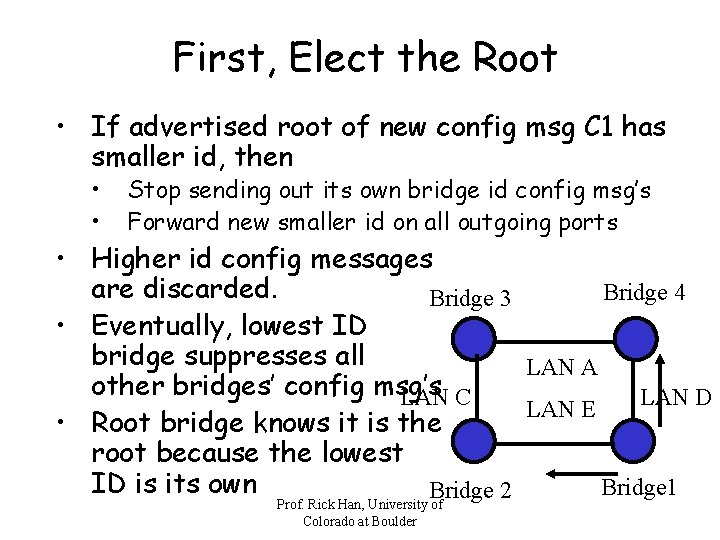
First, Elect the Root • If advertised root of new config msg C 1 has smaller id, then • • Stop sending out its own bridge id config msg’s Forward new smaller id on all outgoing ports • Higher id config messages are discarded. Bridge 4 Bridge 3 • Eventually, lowest ID bridge suppresses all LAN A other bridges’ config msg’s LAN C LAN D LAN E • Root bridge knows it is the root because the lowest ID is its own Bridge 1 Bridge 2 Prof. Rick Han, University of Colorado at Boulder
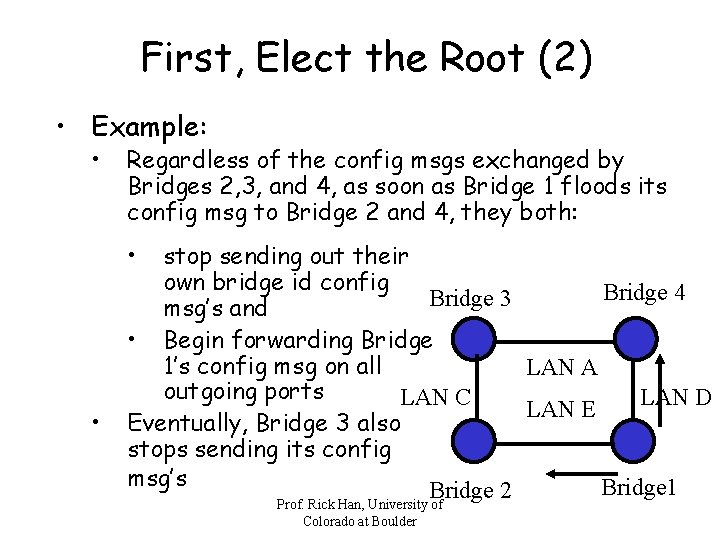
First, Elect the Root (2) • Example: • Regardless of the config msgs exchanged by Bridges 2, 3, and 4, as soon as Bridge 1 floods its config msg to Bridge 2 and 4, they both: • • stop sending out their own bridge id config Bridge 4 Bridge 3 msg’s and • Begin forwarding Bridge 1’s config msg on all LAN A outgoing ports LAN C LAN D LAN E Eventually, Bridge 3 also stops sending its config msg’s Bridge 1 Bridge 2 Prof. Rick Han, University of Colorado at Boulder
Next, Build Shortest-Path Forwarding Tree to Root • Conceptually, build shortest-path forwarding tree after electing the root • But, as the root’s config msg floods the network, notice that the shortest-path tree can simultaneously be calculated • Thus, piggyback on Bridge 1’s config msg flooding to set up the shortest path tree to root: • Each bridge increments by one the distance, as it receives Bridge 1’s config msg, and forwards config msg with Bridge 1 as root to all outgoing ports Prof. Rick Han, University of Colorado at Boulder
Next, Build Shortest-Path Forwarding Tree to Root (2) • When a bridge receives a config message from another bridge on same LAN with Bridge 1 as root, it stops sending config messages on that port/LAN if: • • • Other bridge is closer to root Other bridge is same distance from root, but has a lower ID Thus, a bridge de-selects itself as the designated forwarding bridge for that port/LAN Prof. Rick Han, University of Colorado at Boulder
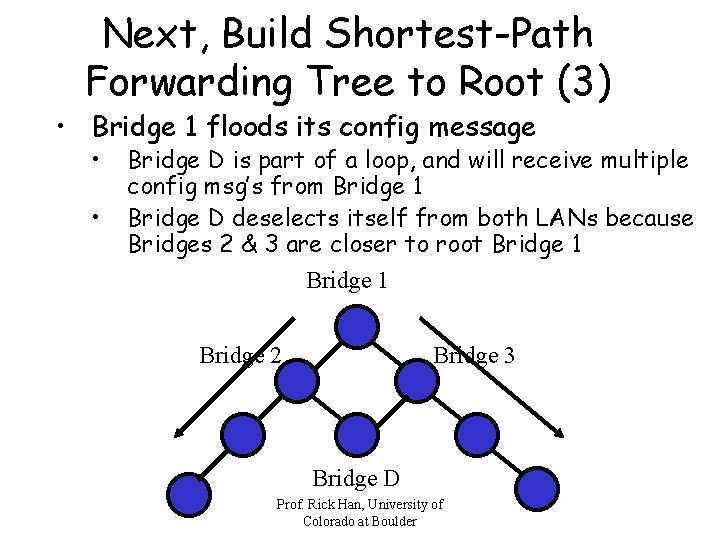
Next, Build Shortest-Path Forwarding Tree to Root (3) • Bridge 1 floods its config message • • Bridge D is part of a loop, and will receive multiple config msg’s from Bridge 1 Bridge D deselects itself from both LANs because Bridges 2 & 3 are closer to root Bridge 1 Bridge 2 Bridge 3 Bridge D Prof. Rick Han, University of Colorado at Boulder
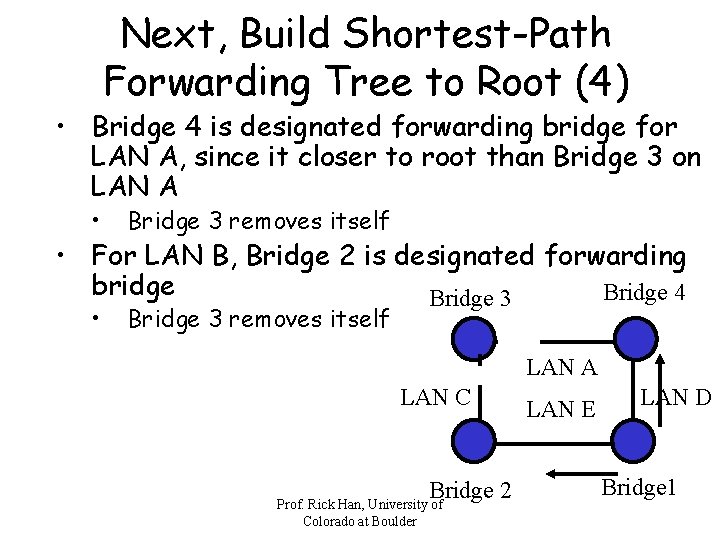
Next, Build Shortest-Path Forwarding Tree to Root (4) • Bridge 4 is designated forwarding bridge for LAN A, since it closer to root than Bridge 3 on LAN A • Bridge 3 removes itself • For LAN B, Bridge 2 is designated forwarding bridge Bridge 4 Bridge 3 LAN A LAN C Bridge 2 Prof. Rick Han, University of Colorado at Boulder LAN E LAN D Bridge 1
Topology Change • Root bridge periodically sends keep-alive messages • If this is not heard locally, then local bridges start the spanning-tree algorithm all over again • • Handles the case when root bridge failed Handles the case when intermediate bridge failed, and the network becomes a… • Partitioned network • Non-partitioned network Prof. Rick Han, University of Colorado at Boulder
Ethernet Switches • Essentially, the same as bridges, with support for many more interfaces: • • • Still forward frames based on destination address Still construct forwarding table based on source address Special routing fabric to speed frame routing from input interface to output interface Prof. Rick Han, University of Colorado at Boulder
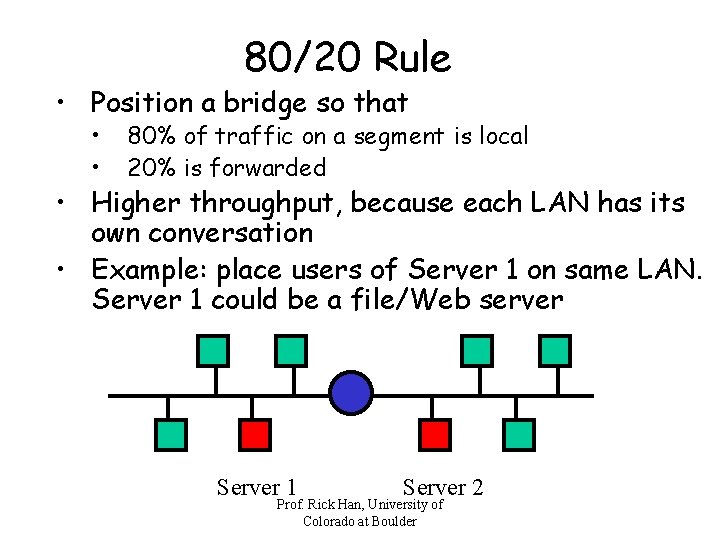
80/20 Rule • Position a bridge so that • • 80% of traffic on a segment is local 20% is forwarded • Higher throughput, because each LAN has its own conversation • Example: place users of Server 1 on same LAN. Server 1 could be a file/Web server Server 1 Server 2 Prof. Rick Han, University of Colorado at Boulder
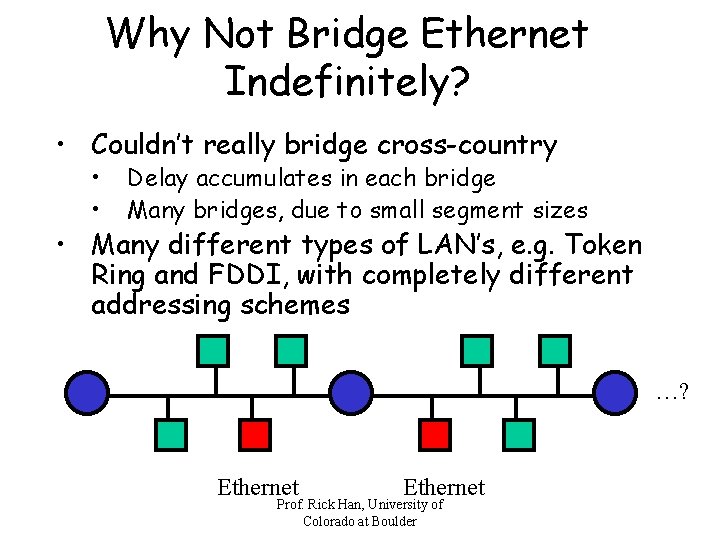
Why Not Bridge Ethernet Indefinitely? • Couldn’t really bridge cross-country • • Delay accumulates in each bridge Many bridges, due to small segment sizes • Many different types of LAN’s, e. g. Token Ring and FDDI, with completely different addressing schemes …? Ethernet Prof. Rick Han, University of Colorado at Boulder
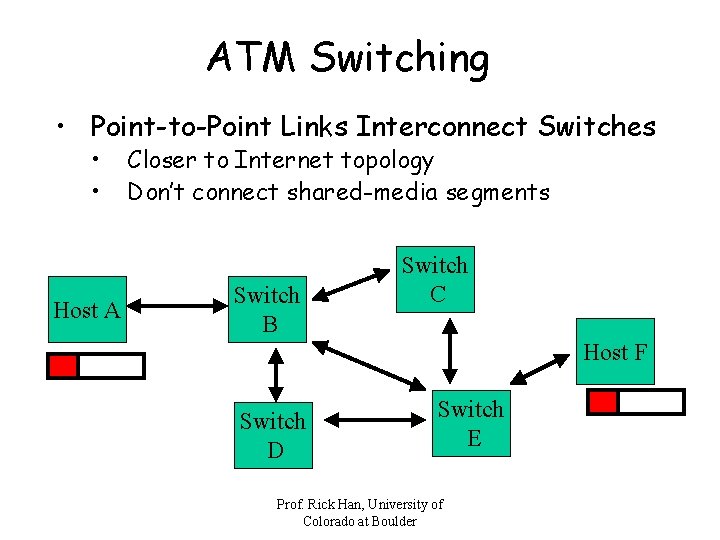
ATM Switching • Point-to-Point Links Interconnect Switches • • Host A Closer to Internet topology Don’t connect shared-media segments Switch B Switch C Host F Switch D Switch E Prof. Rick Han, University of Colorado at Boulder
ATM Switching (2) • Big difference with Internet routing: ATM uses virtual circuits to route packets • Packet switching, but with fixed-length cells • • • 48 bytes + 5 bytes header Why fixed-length cells? • Optimized hardware in switch can get higher throughput Why 48 bytes? • Europe and US couldn’t agree, one wanted 64 bytes and another 32 bytes, so they split the difference Prof. Rick Han, University of Colorado at Boulder
ATM Adaptation Layer 3/4 • Due to small packet sizes, need a layer above ATM to fragment and reassemble long packets • ATM Adaptation Layer (AAL) 3/4 • • ATM operates as a part of Internet backbone Since ATM is network layer protocol, then still need link layer – SONET, e. g. encapsulate IP over ATM over SONET • too much overhead! • IP packets can be encapsulated in ATM packets: IP over ATM Prof. Rick Han, University of Colorado at Boulder
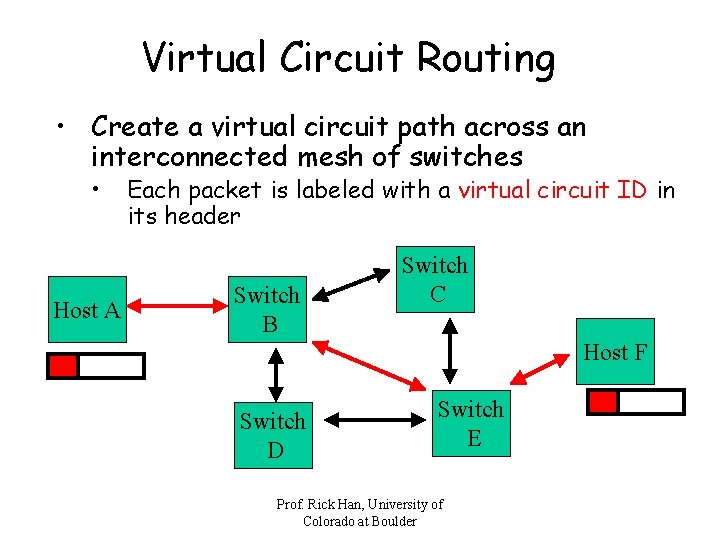
Virtual Circuit Routing • Create a virtual circuit path across an interconnected mesh of switches • Host A Each packet is labeled with a virtual circuit ID in its header Switch B Switch C Host F Switch D Switch E Prof. Rick Han, University of Colorado at Boulder
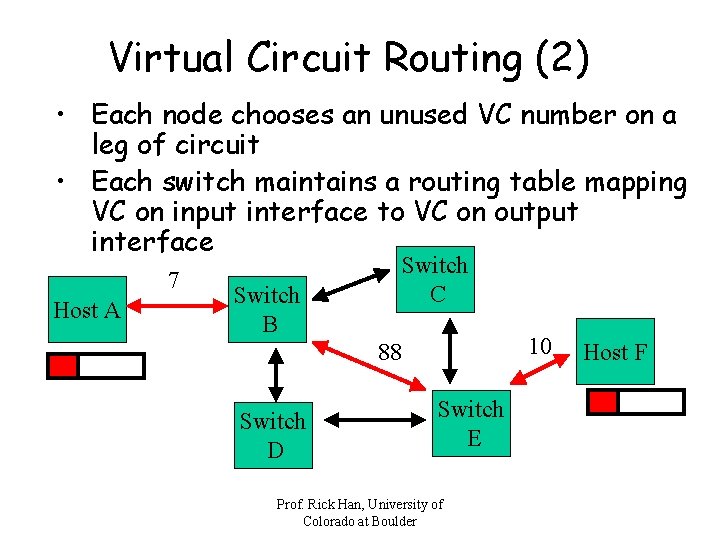
Virtual Circuit Routing (2) • Each node chooses an unused VC number on a leg of circuit • Each switch maintains a routing table mapping VC on input interface to VC on output interface 7 Host A Switch B Switch C 10 88 Switch D Switch E Prof. Rick Han, University of Colorado at Boulder Host F
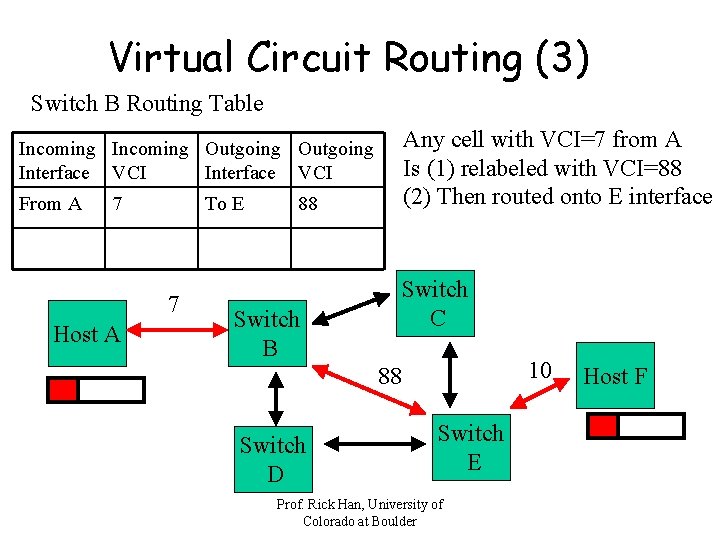
Virtual Circuit Routing (3) Switch B Routing Table Any cell with VCI=7 from A Is (1) relabeled with VCI=88 (2) Then routed onto E interface Incoming Outgoing Interface VCI From A 7 To E 7 Host A 88 Switch B Switch C 10 88 Switch D Switch E Prof. Rick Han, University of Colorado at Boulder Host F
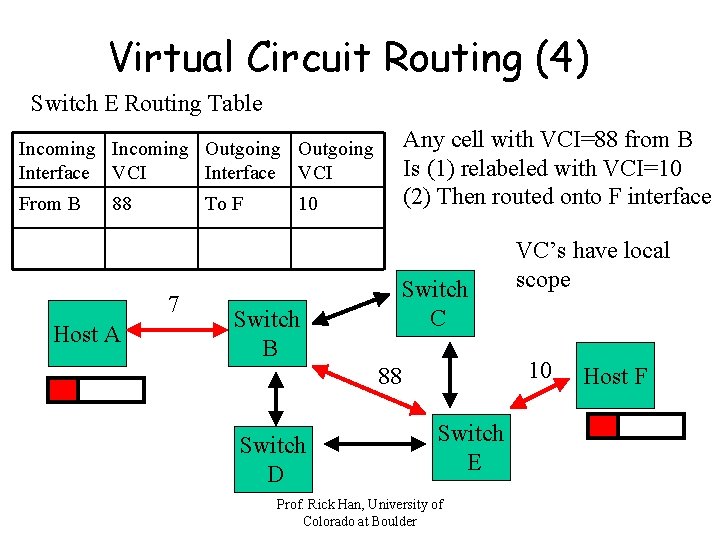
Virtual Circuit Routing (4) Switch E Routing Table Any cell with VCI=88 from B Is (1) relabeled with VCI=10 (2) Then routed onto F interface Incoming Outgoing Interface VCI From B 88 To F 7 Host A 10 Switch B Switch C 10 88 Switch D VC’s have local scope Switch E Prof. Rick Han, University of Colorado at Boulder Host F
Setting up VC Routing Tables • Permanent Virtual Circuits (PVC) are set up by a network administrator • Switched Virtual Circuits (SVC) are set up by sending control signals into the network • • Send setup message with dest. address Assume for now that switches can determine the best outgoing interface to forward a setup packet on when the setup packet arrives As setup message courses through network, each switch picks its incoming VCI (an unused #) When setup msg reaches destination, send acknowledgment back along same path, so each upstream switch knows VCI chosen by downstream Prof. Rick Han, University of switch Colorado at Boulder
- Slides: 28