
Chapter 3 DATABASE DESIGN AND DEVELOPMENT A VISUAL
Chapter 3 DATABASE DESIGN AND DEVELOPMENT: A VISUAL APPROACH Raymond Frost – John Day – Craig Van Slyke Chapter 3 Conceptual Design 1 Database Design and Development: A Visual Approach © 2006 Prentice Hall
Chapter 3 Skydiving Membership Data Step-by-Step Design Step 1: Tables - Only one table Step 2: Relationships - None, with one table Step 3: Fields - Data from problem statement Step 4: Keys - Email identifies each member Step 5: Data Types - Length and type of data Database Design and Development: A Visual Approach © 2006 Prentice Hall Exhibit 3 -1: Skydiving Membership Data Step-by-Step Design 2

Chapter 3 Skydiving Database Sample Data (Vertical Representation) Database Design and Development: A Visual Approach © 2006 Prentice Hall Exhibit 3 -2: Skydiving Database Sample Data (Vertical Representation) 3
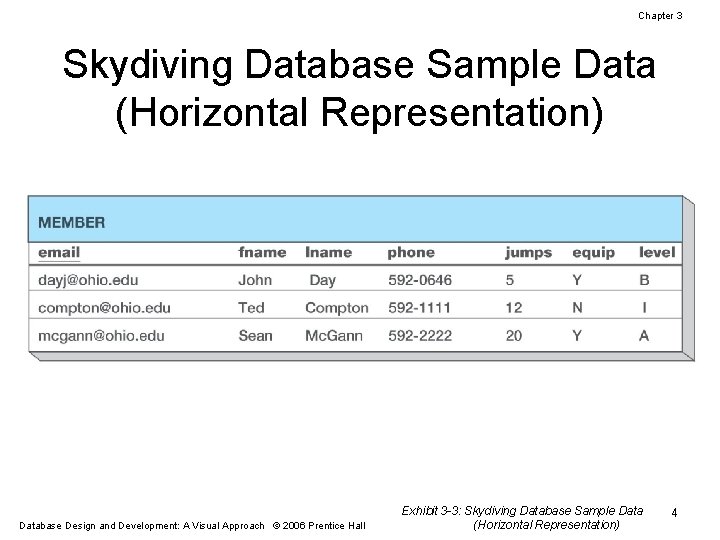
Chapter 3 Skydiving Database Sample Data (Horizontal Representation) Database Design and Development: A Visual Approach © 2006 Prentice Hall Exhibit 3 -3: Skydiving Database Sample Data (Horizontal Representation) 4

Chapter 3 Arcade Database Step-by-Step Design Step 1: Tables - Two entities: Members and Visits Step 2: Relationships - One member makes many visits - Each visit relates to one member Step 3: Fields - Data from problem statement Step 4: Keys - Email identifies each member - Session id identifies a visit - Primary key from parent (member) becomes foreign key in child (visit) Step 5: Data Types - Length and type of data Database Design and Development: A Visual Approach © 2006 Prentice Hall Exhibit 3 -4: Arcade Database Step-by-Step Design 5

Chapter 3 Arcade Database Sample Data (Vertical Representation) Database Design and Development: A Visual Approach © 2006 Prentice Hall Exhibit 3 -5: Arcade Database Sample Data (Vertical Representation) 6

Chapter 3 Arcade Database Sample Data (Horizontal Representation) Database Design and Development: A Visual Approach © 2006 Prentice Hall Exhibit 3 -6: Arcade Database Sample Data (Horizontal Representation) 7

Chapter 3 Enrollment Database Step-by-Step Design Step 1: Tables - Three main entities: Instructors, Students, and Courses Step 2: Relationships - See the next slide for details Step 3: Fields - Data from problem statement Step 4: Keys - Details on primary and foreign key creation to be covered after relationships Step 5: Data Types - Length and type of data Database Design and Development: A Visual Approach © 2006 Prentice Hall Exhibit 3 -7: Enrollment Database Step-by-Step Design 8

Chapter 3 Enrollment Database Relationships 2. 1 One instructor teaches multiple courses. 2. 2 A course can be taught by different instructors each time it is offered. 2. 3 Model the many-to-many with a new associative table: SECTION. 2. 4 Students actually enroll in sections; one student enrolls in multiple sections. 2. 5 Each section may also have multiple students enrolled. 2. 6 Model the many-to-many relationship with a new associative table: ENROLL. Exhibit 3 -8: Enrollment Database Relationships Database Design and Development: A Visual Approach © 2006 Prentice Hall 9

Chapter 3 Enrollment Database Primary and Foreign Keys 4. 1 Choose a PK for a parent – id for INSTRUCTOR. 4. 2 Reproduce the PK as a FK in the child – INSTRUCTOR$id for SECTION. 4. 3 Choose a PK for a parent – code for COURSE. 4. 4 Reproduce the PK as a FK in the child – COURSE$code in SECTION. 4. 5 Choose a PK for a parent – call_no for SECTION. 4. 6 Reproduce the PK as a FK in the child – SECTION$call_no in ENROLL. 4. 7 Choose a PK for a parent – id for STUDENT. 4. 8 Reproduce the PK as FK in the child – STUDENT$id in ENROLL. 4. 9 Choose a PK for the remaining associative table – STUDENT$id and SECTION$call_no for ENROLL. Database Design and Development: A Visual Approach © 2006 Prentice Hall Exhibit 3 -9: Enrollment Database Primary and Foreign Keys 10
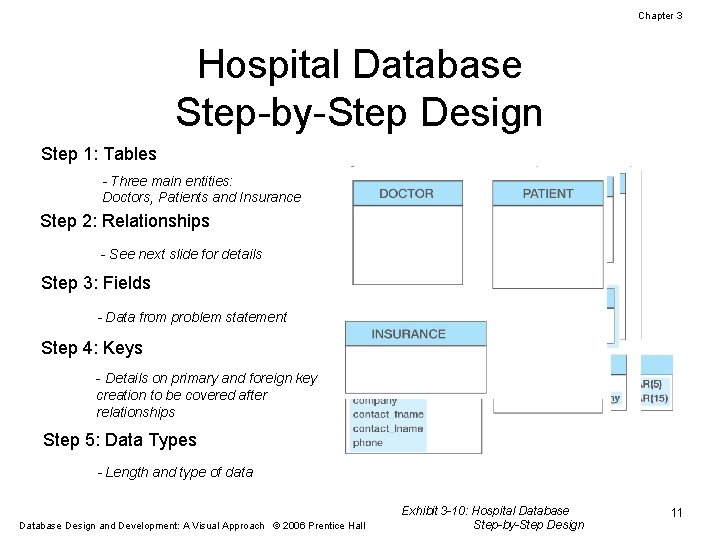
Chapter 3 Hospital Database Step-by-Step Design Step 1: Tables - Three main entities: Doctors, Patients and Insurance Step 2: Relationships - See next slide for details Step 3: Fields - Data from problem statement Step 4: Keys - Details on primary and foreign key creation to be covered after relationships Step 5: Data Types - Length and type of data Database Design and Development: A Visual Approach © 2006 Prentice Hall Exhibit 3 -10: Hospital Database Step-by-Step Design 11
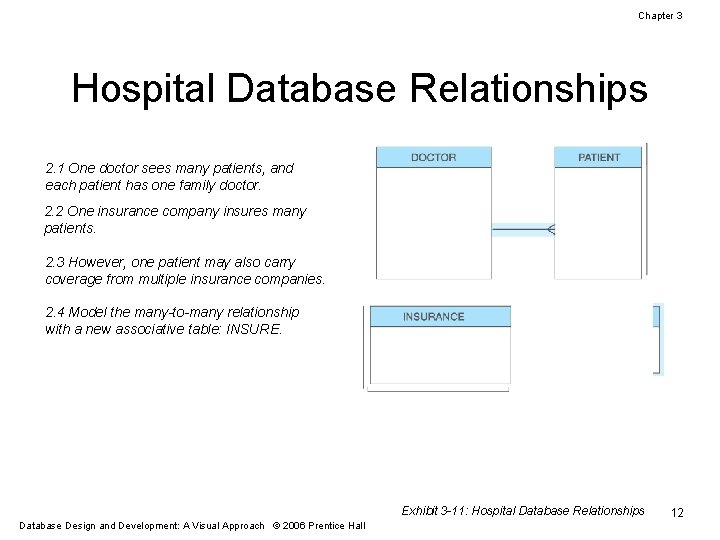
Chapter 3 Hospital Database Relationships 2. 1 One doctor sees many patients, and each patient has one family doctor. 2. 2 One insurance company insures many patients. 2. 3 However, one patient may also carry coverage from multiple insurance companies. 2. 4 Model the many-to-many relationship with a new associative table: INSURE. Exhibit 3 -11: Hospital Database Relationships Database Design and Development: A Visual Approach © 2006 Prentice Hall 12

Chapter 3 Hospital Database Primary and Foreign Keys 4. 1 Choose a PK for a parent – id for DOCTOR. 4. 2 Reproduce the PK as a FK in the child – DOCTOR$id in PATIENT. 4. 3 Choose a PK for a parent – id for PATIENT. 4. 4 Reproduce the PK as a FK in the child – PATIENT$id in INSURE. 4. 5 Choose a PK for a parent – company for INSURANCE. 4. 6 Reproduce the PK as a FK in the child – INSURANCE$company in INSURE. 4. 7 Choose a PK for the associative table – INSURANCE$company and PATIENT$id taken together. Exhibit 3 -12: Hospital Database Keys Database Design and Development: A Visual Approach © 2006 Prentice Hall 13
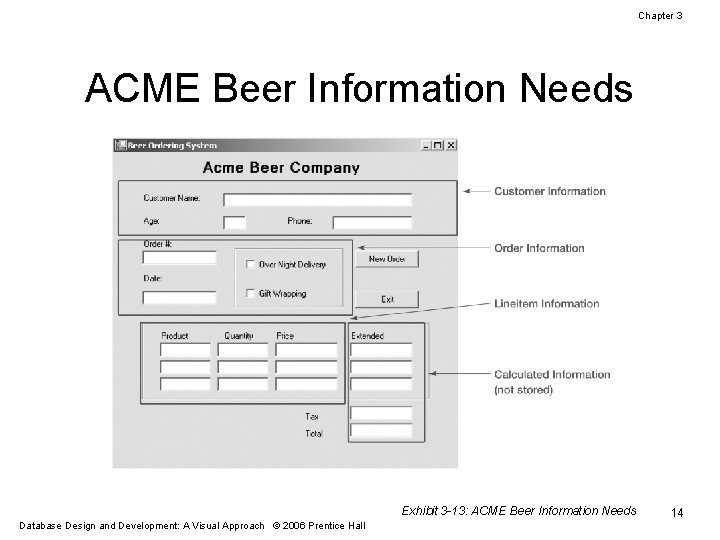
Chapter 3 ACME Beer Information Needs Exhibit 3 -13: ACME Beer Information Needs Database Design and Development: A Visual Approach © 2006 Prentice Hall 14
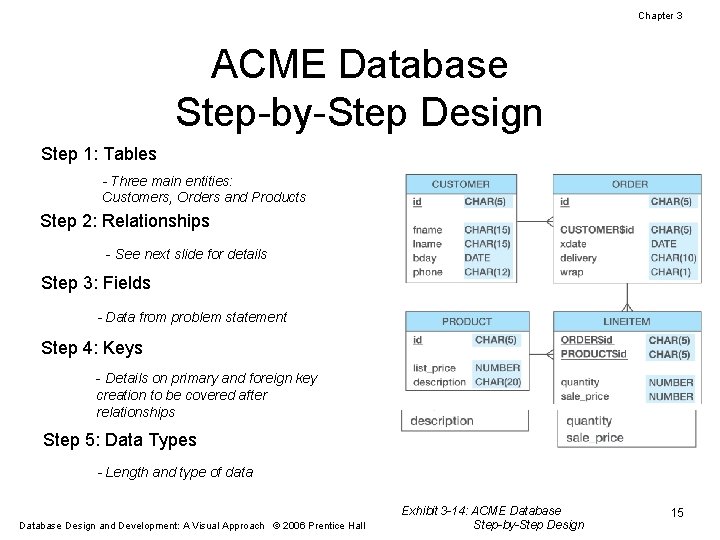
Chapter 3 ACME Database Step-by-Step Design Step 1: Tables - Three main entities: Customers, Orders and Products Step 2: Relationships - See next slide for details Step 3: Fields - Data from problem statement Step 4: Keys - Details on primary and foreign key creation to be covered after relationships Step 5: Data Types - Length and type of data Database Design and Development: A Visual Approach © 2006 Prentice Hall Exhibit 3 -14: ACME Database Step-by-Step Design 15
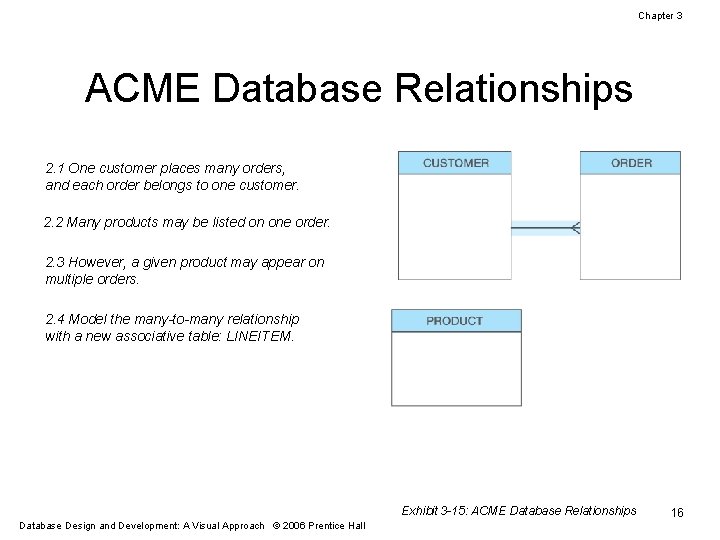
Chapter 3 ACME Database Relationships 2. 1 One customer places many orders, and each order belongs to one customer. 2. 2 Many products may be listed on one order. 2. 3 However, a given product may appear on multiple orders. 2. 4 Model the many-to-many relationship with a new associative table: LINEITEM. Exhibit 3 -15: ACME Database Relationships Database Design and Development: A Visual Approach © 2006 Prentice Hall 16
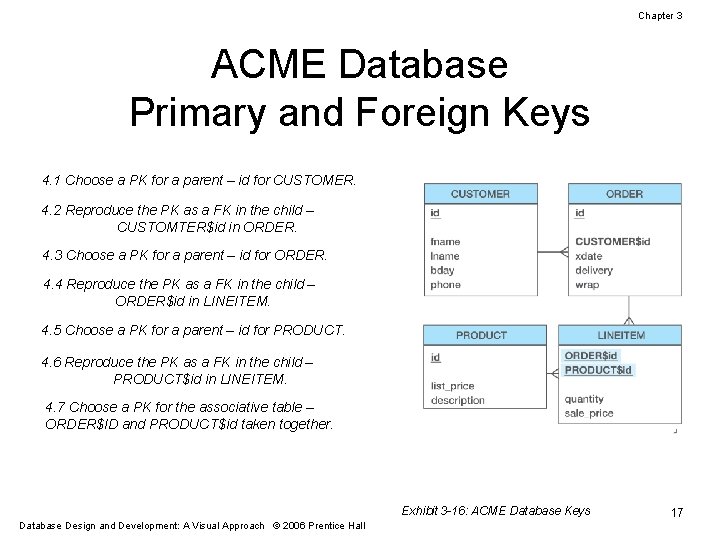
Chapter 3 ACME Database Primary and Foreign Keys 4. 1 Choose a PK for a parent – id for CUSTOMER. 4. 2 Reproduce the PK as a FK in the child – CUSTOMTER$id in ORDER. 4. 3 Choose a PK for a parent – id for ORDER. 4. 4 Reproduce the PK as a FK in the child – ORDER$id in LINEITEM. 4. 5 Choose a PK for a parent – id for PRODUCT. 4. 6 Reproduce the PK as a FK in the child – PRODUCT$id in LINEITEM. 4. 7 Choose a PK for the associative table – ORDER$ID and PRODUCT$id taken together. Exhibit 3 -16: ACME Database Keys Database Design and Development: A Visual Approach © 2006 Prentice Hall 17

Chapter 3 Amazon Database Product Detail Screen Source: © Amazon. com, Inc. All Rights Reserved Database Design and Development: A Visual Approach © 2006 Prentice Hall Exhibit 3 -17: Amazon Database Product Detail Screen 18
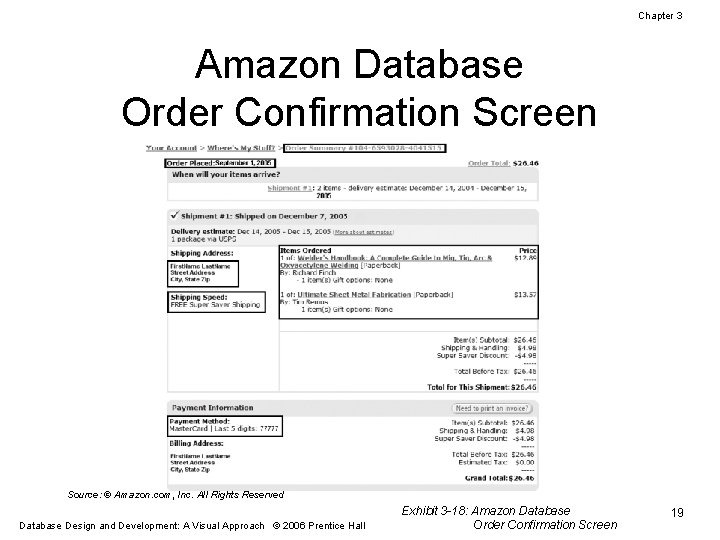
Chapter 3 Amazon Database Order Confirmation Screen Source: © Amazon. com, Inc. All Rights Reserved Database Design and Development: A Visual Approach © 2006 Prentice Hall Exhibit 3 -18: Amazon Database Order Confirmation Screen 19
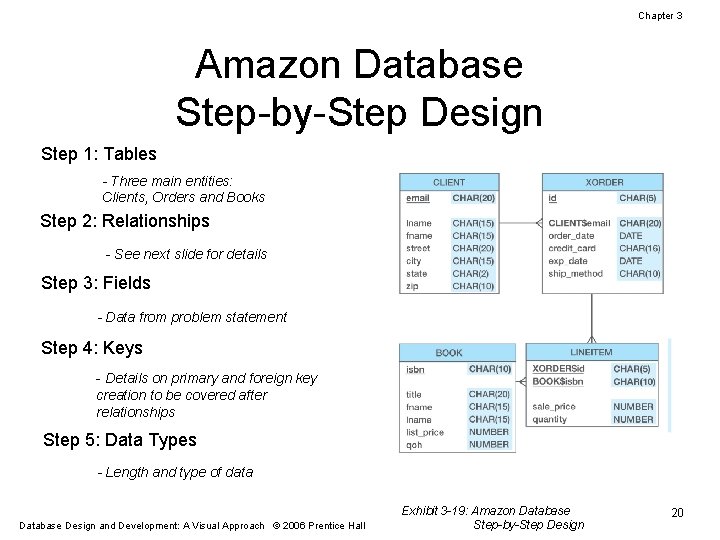
Chapter 3 Amazon Database Step-by-Step Design Step 1: Tables - Three main entities: Clients, Orders and Books Step 2: Relationships - See next slide for details Step 3: Fields - Data from problem statement Step 4: Keys - Details on primary and foreign key creation to be covered after relationships Step 5: Data Types - Length and type of data Database Design and Development: A Visual Approach © 2006 Prentice Hall Exhibit 3 -19: Amazon Database Step-by-Step Design 20

Chapter 3 Amazon Database Relationships 2. 1 One client places many orders, and each order belongs to one client. 2. 2 Many books may be listed on an order. 2. 3 However, a given book may appear on multiple orders. 2. 4 Model the many-to-many relationship with a new associative table: LINEITEM. Exhibit 3 -20: Amazon Database Relationships Database Design and Development: A Visual Approach © 2006 Prentice Hall 21
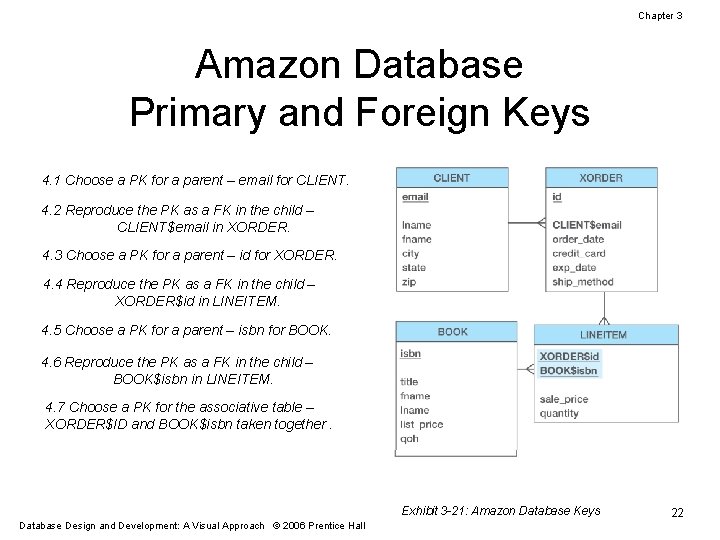
Chapter 3 Amazon Database Primary and Foreign Keys 4. 1 Choose a PK for a parent – email for CLIENT. 4. 2 Reproduce the PK as a FK in the child – CLIENT$email in XORDER. 4. 3 Choose a PK for a parent – id for XORDER. 4. 4 Reproduce the PK as a FK in the child – XORDER$id in LINEITEM. 4. 5 Choose a PK for a parent – isbn for BOOK. 4. 6 Reproduce the PK as a FK in the child – BOOK$isbn in LINEITEM. 4. 7 Choose a PK for the associative table – XORDER$ID and BOOK$isbn taken together. Exhibit 3 -21: Amazon Database Keys Database Design and Development: A Visual Approach © 2006 Prentice Hall 22
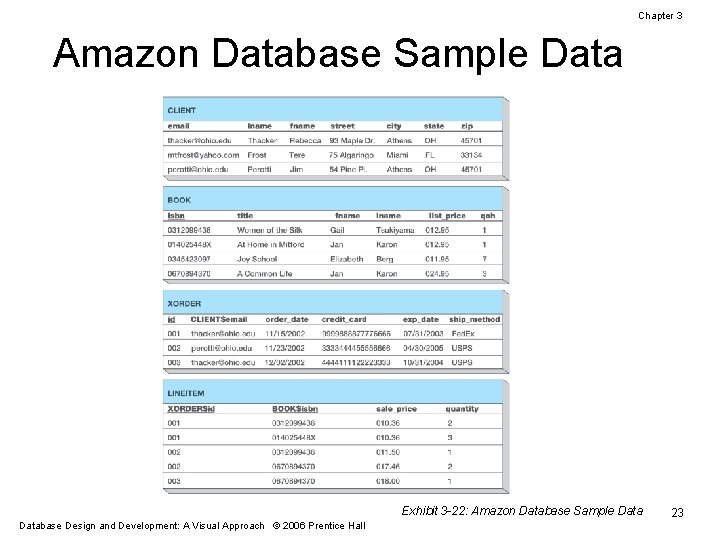
Chapter 3 Amazon Database Sample Data Exhibit 3 -22: Amazon Database Sample Database Design and Development: A Visual Approach © 2006 Prentice Hall 23

Chapter 3 Practice Exercise 1 Source: © Hollywood Management Company 2005. Exhibit 3 -23: Reel. com Overview of a Movie Database Design and Development: A Visual Approach © 2006 Prentice Hall 24

Chapter 3 Practice Exercise 1 Source: © Hollywood Management Company 2005. Exhibit 3 -24: Reel. com Anatomy of a Movie Database Design and Development: A Visual Approach © 2006 Prentice Hall 25

Chapter 3 Practice Exercise 5 Source: Used by Permission of J. Crew Database Design and Development: A Visual Approach © 2006 Prentice Hall Exhibit 3 -25: J. Crew Billing Information 26

Chapter 3 Practice Exercise 5 Source: Used by Permission of J. Crew Database Design and Development: A Visual Approach © 2006 Prentice Hall Exhibit 3 -26: J. Crew Product Information 27

Chapter 3 Practice Exercise 5 Source: Used by Permission of J. Crew Exhibit 3 -27: J. Crew Lineitem Information Database Design and Development: A Visual Approach © 2006 Prentice Hall 28

Chapter 3 Printable Slide Versions The following slides contain non-animated versions of the previous animated slides for handouts. 29 Database Design and Development: A Visual Approach © 2006 Prentice Hall

Chapter 3 Skydiving Membership Data Step-by-Step Design Step 1: Tables - Only one table Step 2: Relationships - None, with one table Step 3: Fields - Data from problem statement Step 4: Keys - Email identifies each member Step 5: Data Types - Length and type of data Database Design and Development: A Visual Approach © 2006 Prentice Hall Exhibit 3 -1: Skydiving Membership Data Step-by-Step Design 30

Chapter 3 Arcade Database Step-by-Step Design Step 1: Tables - Two entities: Members and Visits Step 2: Relationships - One member makes many visits - Each visit relates to one member Step 3: Fields - Data from problem statement Step 4: Keys - Email identifies each member - Session id identifies a visit - Primary key from parent (member) becomes foreign key in child (visit) Step 5: Data Types - Length and type of data Database Design and Development: A Visual Approach © 2006 Prentice Hall Exhibit 3 -4: Arcade Database Step-by-Step Design 31

Chapter 3 Enrollment Database Step-by-Step Design Step 1: Tables - Three main entities: Instructors, Students and Courses Step 2: Relationships - See next slide for details Step 3: Fields - Data from problem statement Step 4: Keys - Details on primary and foreign key creation to be covered later Step 5: Data Types - Length and type of data Database Design and Development: A Visual Approach © 2006 Prentice Hall Exhibit 3 -7: Enrollment Database Step-by-Step Design 32

Chapter 3 Enrollment Database Relationships 2. 1 One instructor teaches multiple courses. 2. 2 A course can be taught by different instructors each time it is offered. 2. 3 Model the many-to-many with a new associative table: SECTION. 2. 4 Students actually enroll in sections One student enrolls in multiple sections. 2. 5 Each section may also have multiple students enrolled. 2. 6 Model the many-to-many relationship With a new associative table: ENROLL. Exhibit 3 -8: Enrollment Database Relationships Database Design and Development: A Visual Approach © 2006 Prentice Hall 33
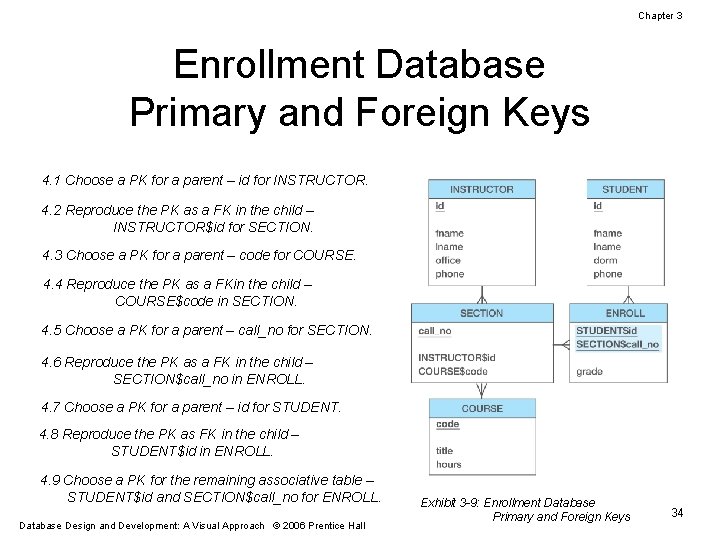
Chapter 3 Enrollment Database Primary and Foreign Keys 4. 1 Choose a PK for a parent – id for INSTRUCTOR. 4. 2 Reproduce the PK as a FK in the child – INSTRUCTOR$id for SECTION. 4. 3 Choose a PK for a parent – code for COURSE. 4. 4 Reproduce the PK as a FKin the child – COURSE$code in SECTION. 4. 5 Choose a PK for a parent – call_no for SECTION. 4. 6 Reproduce the PK as a FK in the child – SECTION$call_no in ENROLL. 4. 7 Choose a PK for a parent – id for STUDENT. 4. 8 Reproduce the PK as FK in the child – STUDENT$id in ENROLL. 4. 9 Choose a PK for the remaining associative table – STUDENT$id and SECTION$call_no for ENROLL. Database Design and Development: A Visual Approach © 2006 Prentice Hall Exhibit 3 -9: Enrollment Database Primary and Foreign Keys 34
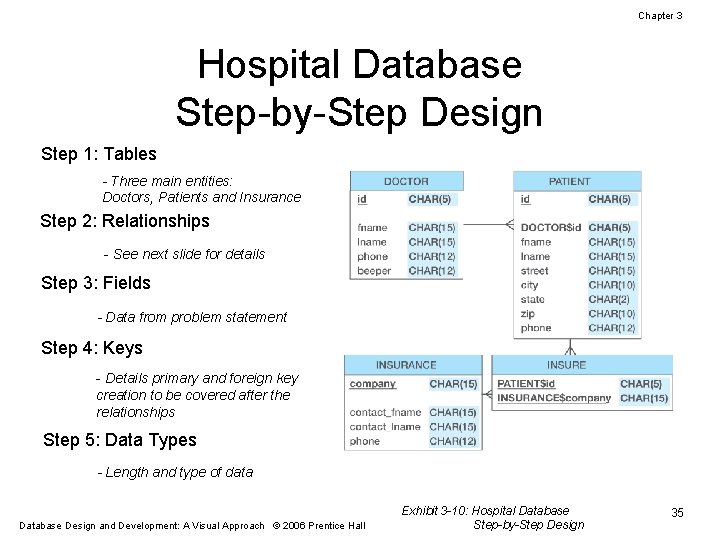
Chapter 3 Hospital Database Step-by-Step Design Step 1: Tables - Three main entities: Doctors, Patients and Insurance Step 2: Relationships - See next slide for details Step 3: Fields - Data from problem statement Step 4: Keys - Details primary and foreign key creation to be covered after the relationships Step 5: Data Types - Length and type of data Database Design and Development: A Visual Approach © 2006 Prentice Hall Exhibit 3 -10: Hospital Database Step-by-Step Design 35
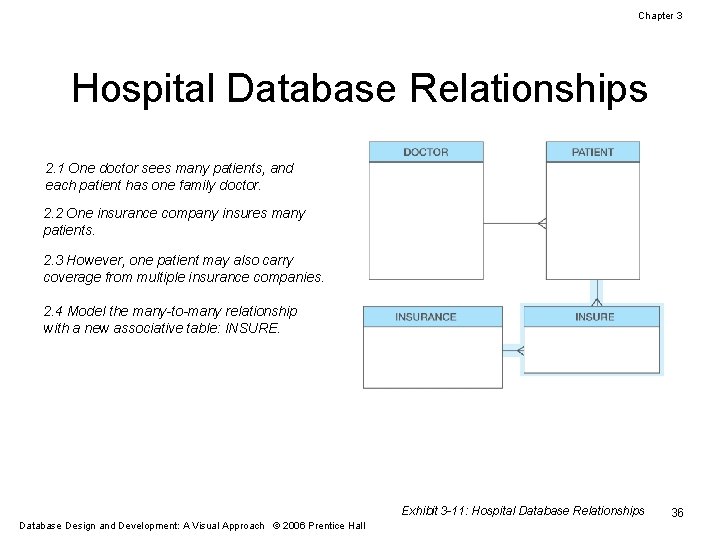
Chapter 3 Hospital Database Relationships 2. 1 One doctor sees many patients, and each patient has one family doctor. 2. 2 One insurance company insures many patients. 2. 3 However, one patient may also carry coverage from multiple insurance companies. 2. 4 Model the many-to-many relationship with a new associative table: INSURE. Exhibit 3 -11: Hospital Database Relationships Database Design and Development: A Visual Approach © 2006 Prentice Hall 36
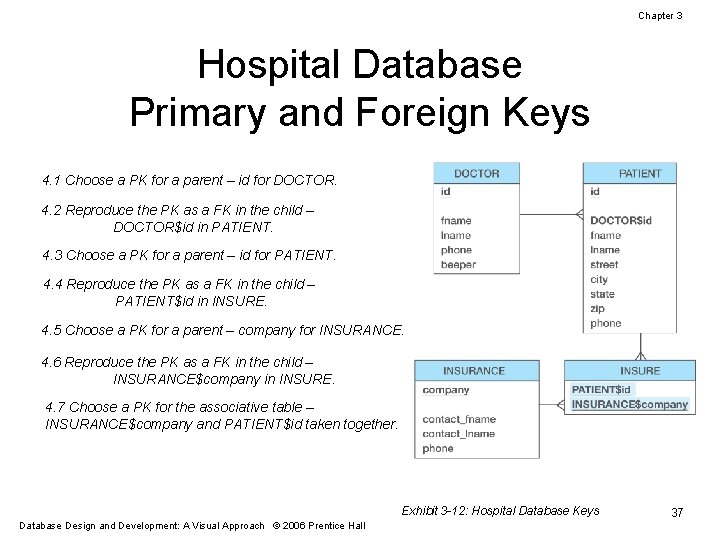
Chapter 3 Hospital Database Primary and Foreign Keys 4. 1 Choose a PK for a parent – id for DOCTOR. 4. 2 Reproduce the PK as a FK in the child – DOCTOR$id in PATIENT. 4. 3 Choose a PK for a parent – id for PATIENT. 4. 4 Reproduce the PK as a FK in the child – PATIENT$id in INSURE. 4. 5 Choose a PK for a parent – company for INSURANCE. 4. 6 Reproduce the PK as a FK in the child – INSURANCE$company in INSURE. 4. 7 Choose a PK for the associative table – INSURANCE$company and PATIENT$id taken together. Exhibit 3 -12: Hospital Database Keys Database Design and Development: A Visual Approach © 2006 Prentice Hall 37
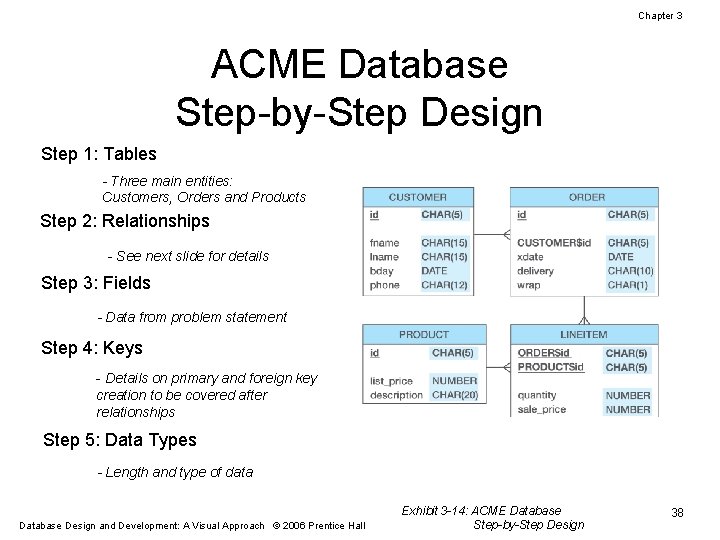
Chapter 3 ACME Database Step-by-Step Design Step 1: Tables - Three main entities: Customers, Orders and Products Step 2: Relationships - See next slide for details Step 3: Fields - Data from problem statement Step 4: Keys - Details on primary and foreign key creation to be covered after relationships Step 5: Data Types - Length and type of data Database Design and Development: A Visual Approach © 2006 Prentice Hall Exhibit 3 -14: ACME Database Step-by-Step Design 38
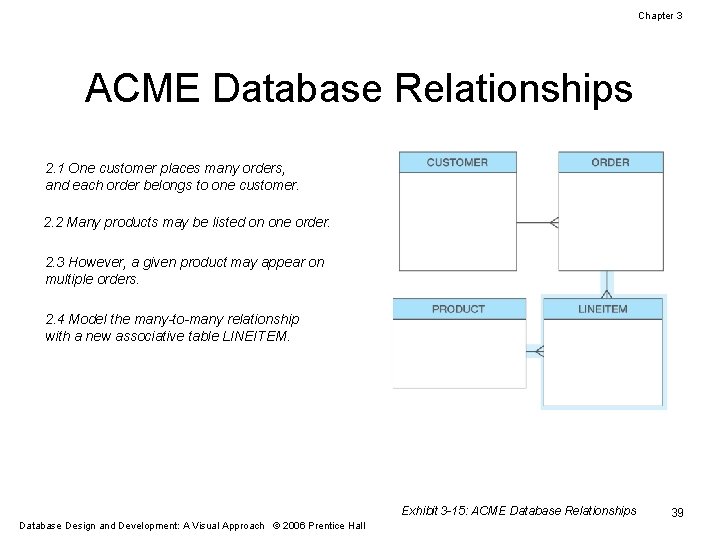
Chapter 3 ACME Database Relationships 2. 1 One customer places many orders, and each order belongs to one customer. 2. 2 Many products may be listed on one order. 2. 3 However, a given product may appear on multiple orders. 2. 4 Model the many-to-many relationship with a new associative table LINEITEM. Exhibit 3 -15: ACME Database Relationships Database Design and Development: A Visual Approach © 2006 Prentice Hall 39
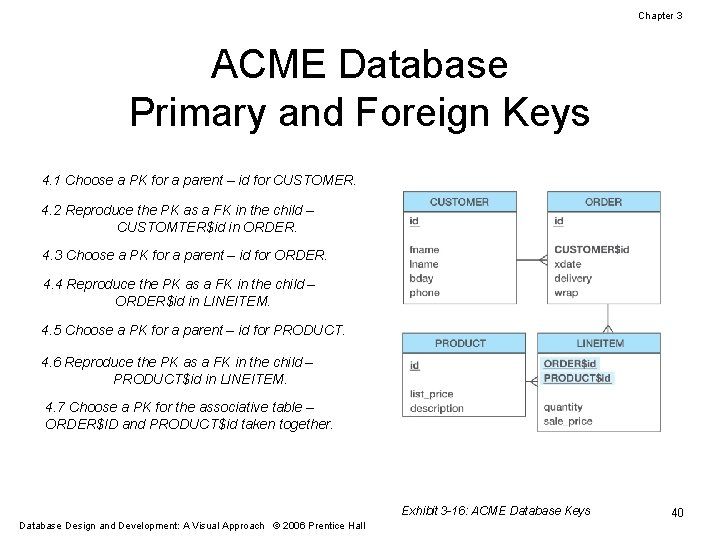
Chapter 3 ACME Database Primary and Foreign Keys 4. 1 Choose a PK for a parent – id for CUSTOMER. 4. 2 Reproduce the PK as a FK in the child – CUSTOMTER$id in ORDER. 4. 3 Choose a PK for a parent – id for ORDER. 4. 4 Reproduce the PK as a FK in the child – ORDER$id in LINEITEM. 4. 5 Choose a PK for a parent – id for PRODUCT. 4. 6 Reproduce the PK as a FK in the child – PRODUCT$id in LINEITEM. 4. 7 Choose a PK for the associative table – ORDER$ID and PRODUCT$id taken together. Exhibit 3 -16: ACME Database Keys Database Design and Development: A Visual Approach © 2006 Prentice Hall 40
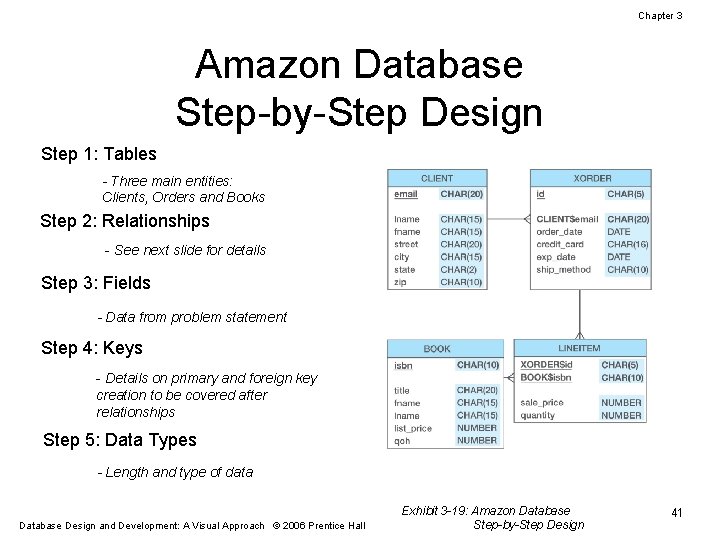
Chapter 3 Amazon Database Step-by-Step Design Step 1: Tables - Three main entities: Clients, Orders and Books Step 2: Relationships - See next slide for details Step 3: Fields - Data from problem statement Step 4: Keys - Details on primary and foreign key creation to be covered after relationships Step 5: Data Types - Length and type of data Database Design and Development: A Visual Approach © 2006 Prentice Hall Exhibit 3 -19: Amazon Database Step-by-Step Design 41
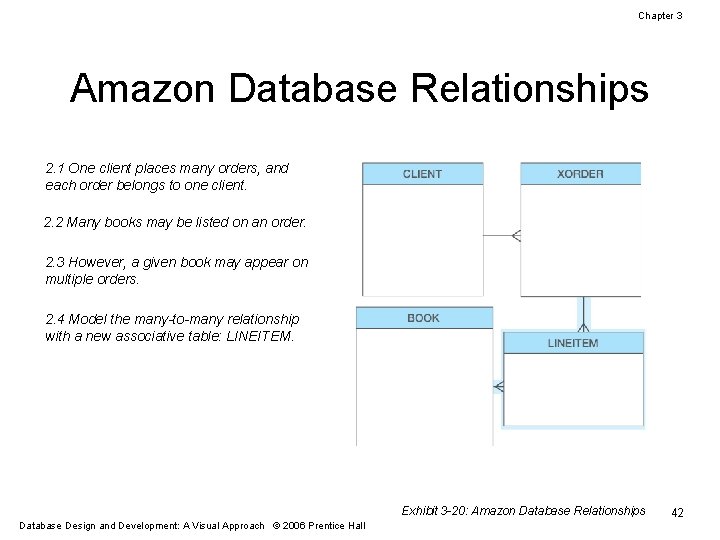
Chapter 3 Amazon Database Relationships 2. 1 One client places many orders, and each order belongs to one client. 2. 2 Many books may be listed on an order. 2. 3 However, a given book may appear on multiple orders. 2. 4 Model the many-to-many relationship with a new associative table: LINEITEM. Exhibit 3 -20: Amazon Database Relationships Database Design and Development: A Visual Approach © 2006 Prentice Hall 42
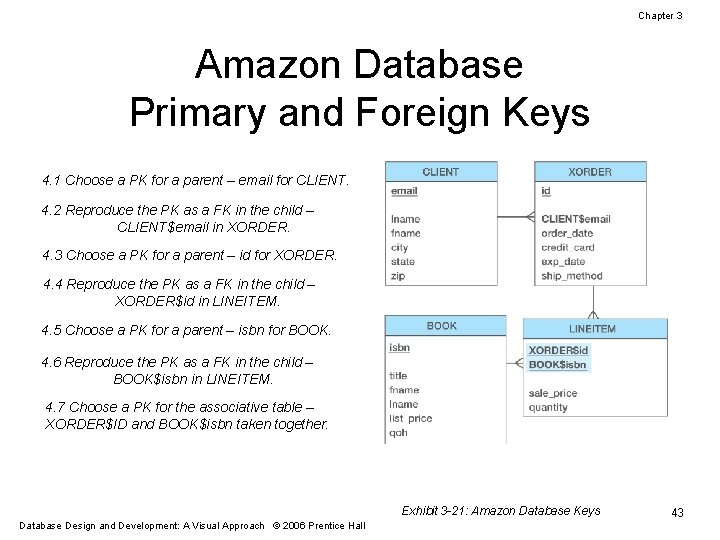
Chapter 3 Amazon Database Primary and Foreign Keys 4. 1 Choose a PK for a parent – email for CLIENT. 4. 2 Reproduce the PK as a FK in the child – CLIENT$email in XORDER. 4. 3 Choose a PK for a parent – id for XORDER. 4. 4 Reproduce the PK as a FK in the child – XORDER$id in LINEITEM. 4. 5 Choose a PK for a parent – isbn for BOOK. 4. 6 Reproduce the PK as a FK in the child – BOOK$isbn in LINEITEM. 4. 7 Choose a PK for the associative table – XORDER$ID and BOOK$isbn taken together. Exhibit 3 -21: Amazon Database Keys Database Design and Development: A Visual Approach © 2006 Prentice Hall 43
- Slides: 43