
Chapter 3 Collaboration Discovery and Communication Information Technology
Chapter 3 Collaboration, Discovery, and Communication Information Technology For Management 5 th Edition Turban, Leidner, Mc. Lean, Wetherbe John Wiley & Sons, Inc. 1
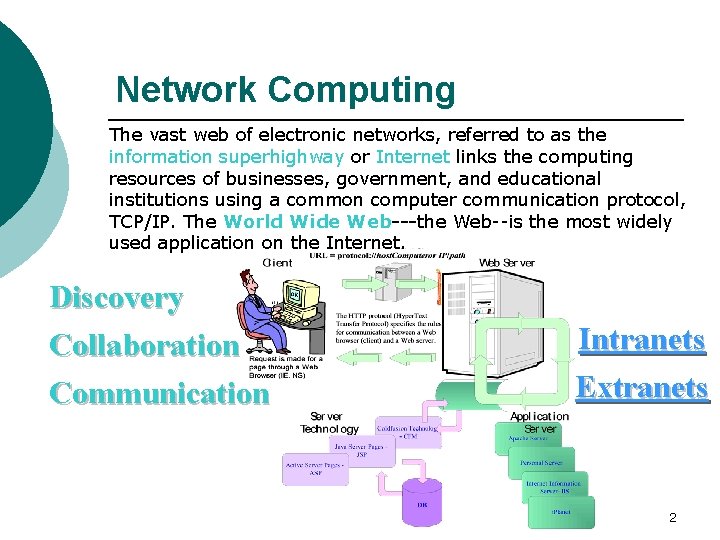
Network Computing The vast web of electronic networks, referred to as the information superhighway or Internet links the computing resources of businesses, government, and educational institutions using a common computer communication protocol, TCP/IP. The World Wide Web---the Web--is the most widely used application on the Internet. Discovery Collaboration Communication Intranets Extranets 2
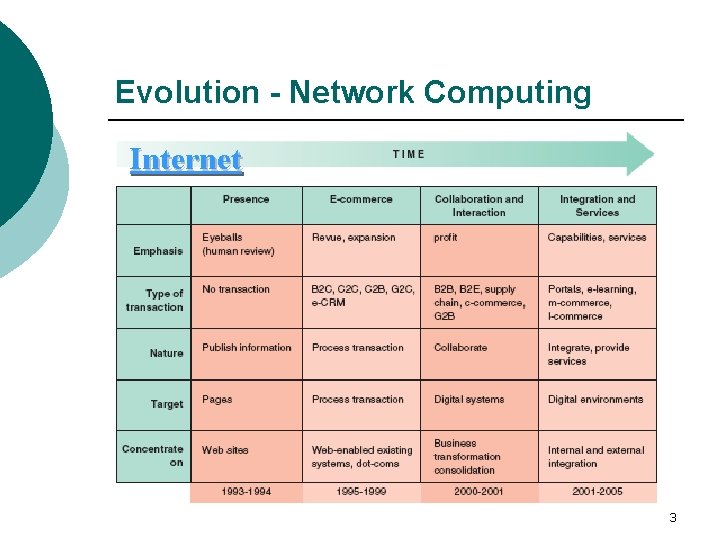
Evolution - Network Computing Internet 3
Internet Application Categories ¡ Discovery: Discovery involves browsing and information retrieval. Communication: The Internet provides fast and inexpensive ¡ Collaboration: Due to improved communication, electronic ¡ The Net is also used for: ¡ communication channels that range from messages posted on online bulletin boards to complex information exchanges among many organizations. collaboration between individuals and/or groups ranging from screen sharing and teleconferencing to group support systems. l l l Education Entertainment: People can access the content of newspapers, magazines, and books. Correspond with friends and family, play games, listen to music, view movies and other cultural events. Work: They can download documents, do research. 4
The Network Computing Infrastructure In addition to the Internet and the Web there are two other major infrastructures of network computing: the intranet and the extranet ¡ Intranet: a network designed to serve the internal informational needs of a company, using Internet concepts and tools. l Browsing and Search capabilities. l Support communication and collaboration. ¡ Extranet: An extranet is an infrastructure that allows secure communications (connects the intranets of different organizations) among business partners over the Internet. l Enables business-to-business (B 2 B) transactions l Provides an interface to exchange of business forms 5
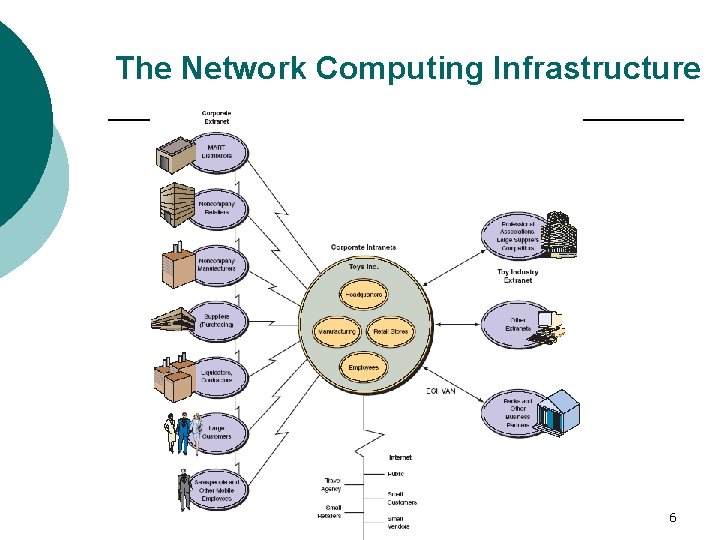
The Network Computing Infrastructure 6
Discovery - Internet Application Categories Through the discovery capability users can access information located in databases all over the world. It facilitates education, government services, entertainment, and commerce. Discovery is done by browsing and searching static or dynamic data sources on the Web. ¡ ¡ ¡ Internet Software Agents Internet-Based Web Mining Other Discovery Aids Toolbars Material in Foreign Languages Information and Corporate Portals 7
Discovery - Internet Software Agents Software agents are computer programs that carry out a set of routine computer tasks on behalf of the user and in so doing employ some sort of knowledge of the user’s goals ¡ Search engines, directories, software and intelligent agents ¡ Frequently Asked Questions (FAQ) Agents ¡ Search Engines and Intelligent Indexing Agents 8
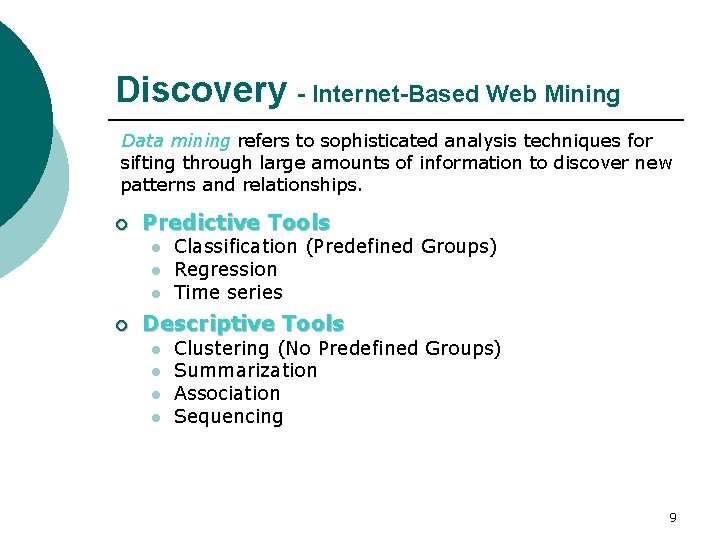
Discovery - Internet-Based Web Mining Data mining refers to sophisticated analysis techniques for sifting through large amounts of information to discover new patterns and relationships. ¡ Predictive Tools l l l ¡ Classification (Predefined Groups) Regression Time series Descriptive Tools l l Clustering (No Predefined Groups) Summarization Association Sequencing 9
Discovery - Other Discovery Aids Hundreds of other search engines and discovery aids are available ¡ webopedia. com - The only online dictionary ¡ whatis. com – The leading IT encyclopedia and ¡ gunther. smeal. psu. edu - Academic business ¡ Howstuffworks. com - The leading source for ¡ Findarticles. com - Search millions of articles and search engine you need for computer and Internet technology definitions. leaning center. literature digital library. clear, reliable explanations of how everything around us actually works. from leading academic, industry and general interest publications. 10
Discovery - Toolbars To get the most out of search engines, you may use add-on toolbars and special software. ¡ ¡ ¡ Google Toolbar (toolbar. google. com) Copernic Agent Basic (copernic. com) Kart. OO (kartoo. com) Yahoo Companion (companion. yahoo. com) Grokker (groxis. com) 11
Discovery - Information in Foreign Languages There is a huge amount of information on the Internet in languages that you may not know. Automatic translation of Web pages is an application offered by many vendors. However, not all automatic translations are equally good, so evaluation of these products is needed. ¡ ¡ ¡ World. Point Passport (worldpoint. com) Babel Fish Translation (world. altavista. com) Auto. Translate (offered in Netscape browser) trados. com translationzone. com 12
Discovery - Information & Corporate Portals A portal is a Web-based personalized gateway to information and knowledge in network computing. It attempts to address information overload by providing one screen from which we do all our work on the Web. Thus eliminating retrieval time spent on integrating disparate IT systems. ¡ Commercial (public) portals offer content for diverse communities and are the most popular portals on the Internet. Examples are: l l l ¡ yahoo. com lycos. com msn. com Publishing portals are intended for communities with specific interests. Examples are: l l techweb. com zdnet. com 13
Discovery - Information & Corporate Portals (cont’d) ¡ ¡ Personal portals target specific filtered information for individuals. Affinity portals support communities such as hobby groups or a political party Mobile portals are portals accessible from mobile devices. Voice portals are Web portals with audio interfaces, which enables them to be accessed by a standard or cell phone. l l l AOLby. Phone tellme. com bevocal. com 14
Discovery - Information & Corporate Portals (cont’d) Corporate portals provide single-point access to specific enterprise information and applications available on the Internet, intranets, and extranets to employees, business partners, and customers. They are also known as enterprise portals or enterprise information portals. ¡ ¡ Suppliers portals: Using corporate portals, suppliers can manage their own inventories online. Customers portals: Customers can use a customer-facing portal for viewing products and services and placing orders, which they can later self-track. Employees portals: Such portals are used for training, dissemination of news and information, and workplace discussion groups. Supervisors’ portals: These portals, sometimes called workforce portals, enable managers and supervisors to control the entire workforce management process– from budgeting to scheduling workforce. 15
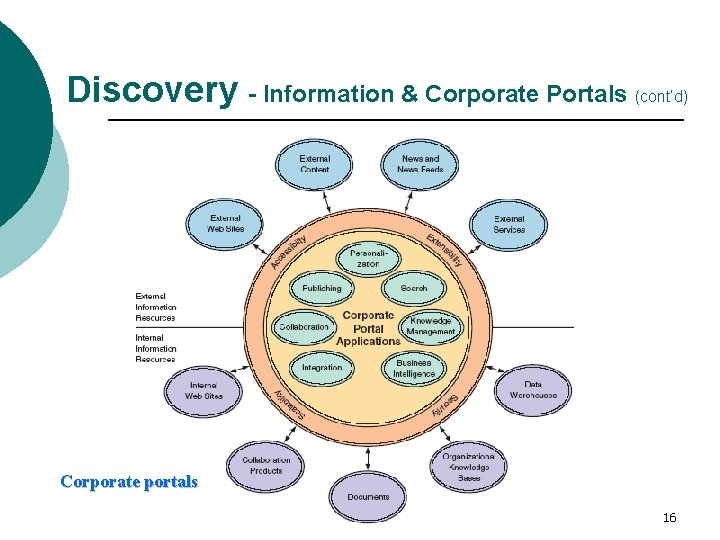
Discovery - Information & Corporate Portals (cont’d) Corporate portals 16
Communication - Internet Application Categories People exchange and share information by sending and receiving messages, documents, forms and files. This informationprocessing supports the organization and the transaction of business. Communications can involve one or several ITsupported media, such as text, voice, graphics, radio, pictures, and animation. Using different media increases the effectiveness of a message, expedites learning, and enhances problem solving. ¡ ¡ ¡ Electronic Mail Web-Based Call Centers Electronic Chat Rooms Voice Communication Weblogging (Blogging) 17
Communication Modes People-to-people ¡ People-to-machine ¡ People and machine-to-machine ¡ 18
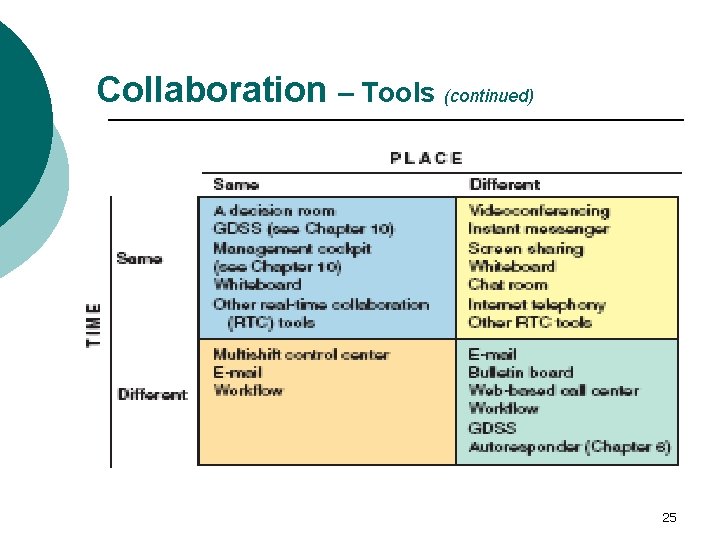
Communication- Time/Place Framework Same-time/same-place ¡ Same-time/different-place ¡ Different-time/same-place ¡ Different-time/different-place ¡ 19
Questions for Discussion ¡ ¡ ¡ Explain the advantages of electronic mail over regular mail. Explain the advantages of using Web-based e-mail over server-based e-mail. Discuss the role of Web-based call centers and their contribution to competitive advantage. 20
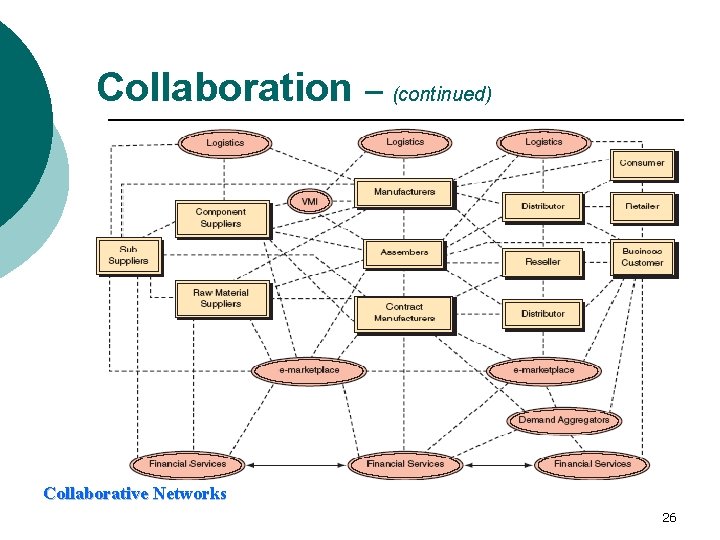
Collaboration - Internet Application Categories Collaboration refers to the mutual efforts of two or more individuals or groups to perform activities in order to accomplish certain tasks. These tasks range from designing products and documents, to teaching, to executing complementary subtasks, to working with customers, suppliers, and other business partners. In an effort to improve productivity and competitiveness collaboration can be supported electronically. ¡ Virtual collaboration (e-collaboration): the use of digital technologies that enable organizations or individuals to collaborative ¡ Collaborative commerce (c-commerce): collaboration among business partners l l l Supply chains Dealer/Partner Networks Product Networks 21
Collaboration – Tools (Workflows) ¡ Workflow Technologies: the movement of information through the sequence of steps that make up an organization’s work procedures or business processes. l l ¡ Workflow management is the automation of workflows from start to finish, including all exception conditions. Workflow systems are business process automation tools (software programs) that automate almost any information-processing task. Workflow applications: l l l Collaborative workflow: addresses project-oriented and collaborative types of processes. Production workflow: addresses mission-critical, transaction-oriented, high volume processes. Administrative workflow: is cross between collaborative and production workflows. 22
Collaboration – Tools (Groupware) Software products that support groups of people who share a common task or goal and who collaborate on its accomplishment. Groupware implies the use of networks to connect people, even if the people are in the same room. ¡ Electronic Meeting Systems attempt to improve face-toface meetings with their electronic counter-part. ¡ Electronic Teleconferencing (Teleconferencing) is the use of electronic communication that allows two or more people at different locations to have a simultaneous conference. l l Video Teleconferencing (videoconference), participants in one location can see participants at other locations. Data (data conferencing) can also be sent along with voice and video making it possible to work on documents together. Web Conferencing is Videoconferencing solely conducted on the Internet 23
Collaboration – Tools (Groupware) (continued) Real-time collaboration (RTC) Tools: help companies bridge time and space to make decisions and to collaborate on projects. RTC tools support synchronous communication of graphical and text-based information. ¡ Interactive Whiteboards work like the “physical world” whiteboards with markers and erasers, except instead of one person standing in front of a meeting room drawing on the whiteboard, all participants can join in. ¡ Screen Sharing software, allows group members to work on the same document, which is shown on the PC screen of each participant. ¡ Instant video, is a kind of real time chat room that allows you to see the person you are communicating with. 24
Collaboration – Tools (continued) 25
Collaboration – (continued) Collaborative Networks 26
E-Learning – Web-based Application Distance learning (DL) refers to situations where teachers and students do not meet face-to-face. It can be done in different ways. E-learning is only one form of distance learning. It provides a new set of tools that add value to traditional learning modes. It does not replace the classroom setting, but enhances it, taking advantage of new content and delivery technologies. ¡ Blackboard Inc. (blackboard. com) offers a complete suite of enterprise software products and services that power a total “e-education infrastructure” for schools, colleges, universities, and other education providers. ¡ Web. CT (webct. com) provides a similar set of tools, but with a different vision and strategy. It uses advanced pedagogical tools to help institutions of higher education make distance-learning courses possible. 27
Telecommuting – Web-based Application Telecommuting, or teleworking, refers to an arrangement whereby employees can work at home, at the customer’s premises, in special work places, or while traveling, usually using a computer linked to their place of employment. ¡ ¡ ¡ There are numerous non-compensatory benefits and advantages for employees, employers, and society. The most important being improved productivity. Some disadvantages for the employees are increased feelings of isolation, loss of fringe benefits, no workplace visibility, and lack of socialization. Disadvantages to employers are difficulties in supervising work, potential data security problems, training costs, and the high cost of equipping and maintaining telecommuters’ homes. 28
Questions for Discussion ¡ ¡ Does an employer have the right to look at your e-mail without your permission? Is someone’s desire to download pornographic images from a newsgroup protected by freedom of speech and privacy laws? 29
- Slides: 29