
Chapter 25 Beyond C C Operators Methods and
Chapter 25 - Beyond C & C++: Operators, Methods, and Arrays in Java Outline 25. 1 Introduction 25. 2 Primitive Data Types and Keywords 25. 3 Logical Operators 25. 4 Method Definitions 25. 5 Java API Packages 25. 6 Random Number Generation 25. 7 Example: A Game of Chance 25. 8 Methods of Class JApplet 25. 9 Declaring and Allocating Arrays 25. 10 Examples Using Arrays 25. 11 References and Reference Parameters 25. 12 Multiple-Subscripted Arrays 2000 Prentice Hall, Inc. All rights reserved.
25. 1 Introduction • In this chapter – Differences between C, C++, and Java – Java's logical operators and methods – Packages that comprise Applications Programming Interface (API) – Craps simulator – Random numbers in Java – Arrays in Java 2000 Prentice Hall, Inc. All rights reserved.
25. 2 Primitive Data Types and Keywords • Primitive data types – char, byte, short, int, long, float, double, boolean – Building blocks for more complicated types • All variables must have a type before being used • Strongly typed language – Primitive types portable, unlike C and C++ • In C/C++, write different versions of programs – Data types not guaranteed to be identical – ints may be 2 or 4 bytes, depending on system • WORA - Write once, run anywhere – Default values • boolean gets false, all other types are 0 2000 Prentice Hall, Inc. All rights reserved.
25. 2 Primitive Data Types and Keywords (II) 2000 Prentice Hall, Inc. All rights reserved.
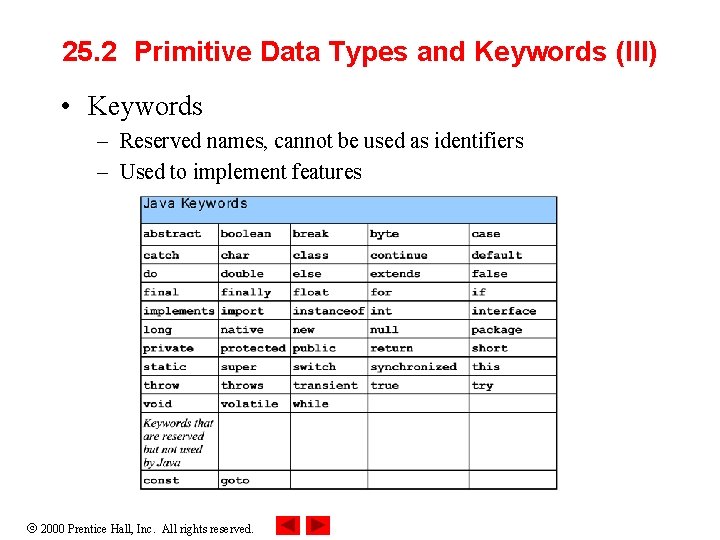
25. 2 Primitive Data Types and Keywords (III) • Keywords – Reserved names, cannot be used as identifiers – Used to implement features 2000 Prentice Hall, Inc. All rights reserved.
25. 3 Logical Operators • Logical operators – Form complex conditions and control structures – Logical AND (&&) • true if both conditions true – Logical OR (||) • true if either condition true • true if both conditions true (inclusive) • If left condition true, skips right condition – Boolean logical AND (&) , boolean logical inclusive OR (|) • Act like counterparts, but always evaluate both expressions • Useful if expression performs action: birthday == true | ++age >= 65 2000 Prentice Hall, Inc. All rights reserved.
25. 3 Logical Operators (II) • Logical Operators (continued) – Boolean logical exclusive OR (^) • true if exactly one condition true • false if both conditions true – Logical NOT (negation) • Unary operator (one operand) – All other logical operators binary (two operands) • Reverses condition • If true, returns false • If false, returns true • != - "does not equal" if (grade != sentinel. Value) 2000 Prentice Hall, Inc. All rights reserved.
25. 3 Logical Operators (III) • More GUI Classes (javax. swing) – JText. Area • Create an area where text can be displayed • Provide (rows, columns) to constructor to specify size JText. Area my. Area; //declares object type my. Area = new JText. Area( 17, 20 ); //initialize – my. Area. set. Text( my. String ); • Sets the text of my. Area to my. String – JScroll. Pane • Creates a window that can scroll JScroll. Pane my. Scroller = new JScroll. Pane ( my. Area ); • Declaration and initialization, allows my. Area have scrolling 2000 Prentice Hall, Inc. All rights reserved.
25. 3 Logical Operators (IV) • More GUI classes – show. Message. Dialog(null, my. Scroller, title. String, type); • Second argument indicates that my. Scroller (and attached my. Area) should be displayed in message dialog 2000 Prentice Hall, Inc. All rights reserved.
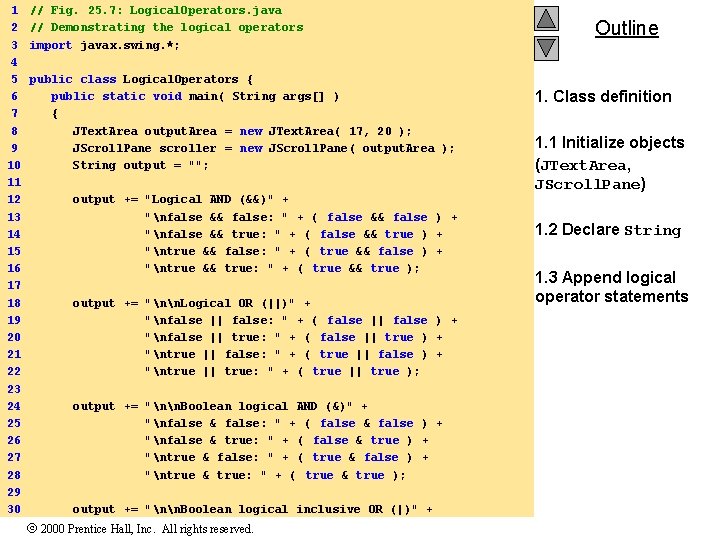
1 2 3 4 5 6 7 8 9 10 11 12 13 14 15 16 17 18 19 20 21 22 23 24 25 26 27 28 29 30 // Fig. 25. 7: Logical. Operators. java // Demonstrating the logical operators import javax. swing. *; public class Logical. Operators { public static void main( String args[] ) { JText. Area output. Area = new JText. Area( 17, 20 ); JScroll. Pane scroller = new JScroll. Pane( output. Area ); String output = ""; output += "Logical AND (&&)" + "nfalse && false: " + ( false && false ) + "nfalse && true: " + ( false && true ) + "ntrue && false: " + ( true && false ) + "ntrue && true: " + ( true && true ); output += "nn. Logical OR (||)" + "nfalse || false: " + ( false || false ) + "nfalse || true: " + ( false || true ) + "ntrue || false: " + ( true || false ) + "ntrue || true: " + ( true || true ); output += "nn. Boolean logical AND (&)" + "nfalse & false: " + ( false & false ) + "nfalse & true: " + ( false & true ) + "ntrue & false: " + ( true & false ) + "ntrue & true: " + ( true & true ); output += "nn. Boolean logical inclusive OR (|)" + 2000 Prentice Hall, Inc. All rights reserved. Outline 1. Class definition 1. 1 Initialize objects (JText. Area, JScroll. Pane) 1. 2 Declare String 1. 3 Append logical operator statements
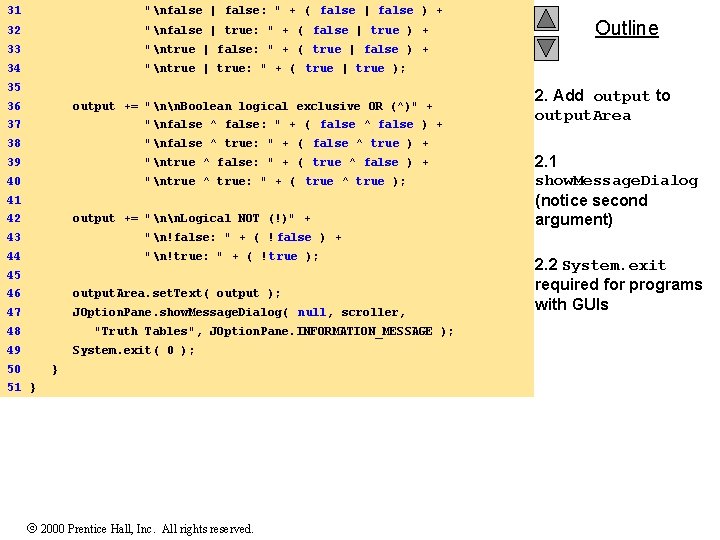
31 "nfalse | false: " + ( false | false ) + 32 "nfalse | true: " + ( false | true ) + 33 "ntrue | false: " + ( true | false ) + 34 "ntrue | true: " + ( true | true ); 35 36 output += "nn. Boolean logical exclusive OR (^)" + 37 "nfalse ^ false: " + ( false ^ false ) + 38 "nfalse ^ true: " + ( false ^ true ) + 39 "ntrue ^ false: " + ( true ^ false ) + 40 "ntrue ^ true: " + ( true ^ true ); 41 42 output += "nn. Logical NOT (!)" + 43 "n!false: " + ( ! false ) + 44 "n!true: " + ( ! true ); 45 46 output. Area. set. Text( output ); 47 JOption. Pane. show. Message. Dialog( null, scroller, 48 "Truth Tables", JOption. Pane. INFORMATION_MESSAGE ); 49 System. exit( 0 ); 50 } 51 } 2000 Prentice Hall, Inc. All rights reserved. Outline 2. Add output to output. Area 2. 1 show. Message. Dialog (notice second argument) 2. 2 System. exit required for programs with GUIs
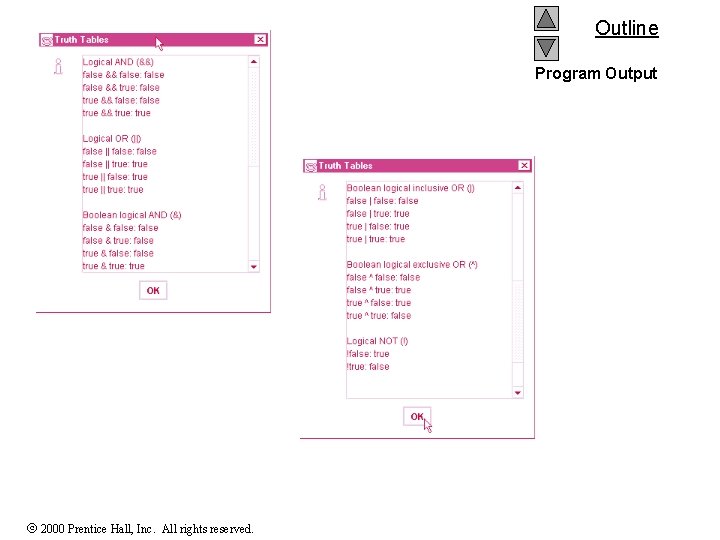
Outline Program Output 2000 Prentice Hall, Inc. All rights reserved.
25. 4 Method Definitions • Method definition format return-value-type method-name( parameter-list ) { declarations and statements } – Method-name: any valid identifier – Return-value-type: data type of the result • void - method returns nothing • Can return at most one value – Parameter-list: comma separated list, declares parameters • Method call must have proper number and type of parameters – Declarations and statements: method body (block) • Variables can be declared inside blocks (can be nested) • Method cannot be defined inside another function 2000 Prentice Hall, Inc. All rights reserved.
25. 4 Method Definitions (II) • Program control – When method call encountered • Control transferred from point of invocation to method – Returning control • If nothing returned: return; – Or until reaches right brace • If value returned: return expression; – Returns the value of expression – Example user-defined method: public int square( int y ) { return y * y } 2000 Prentice Hall, Inc. All rights reserved.
25. 4 Method Definitions (III) • Calling methods – Three ways • Method name and arguments – Can be used by methods of same class – square( 2 ); • Dot operator - used with objects – g. draw. Line( x 1, y 1, x 2, y 2 ); • Dot operator - used with static methods of classes – Integer. parse. Int( my. String ); – More Chapter 26 2000 Prentice Hall, Inc. All rights reserved.
25. 4 Method Definitions (IV) • More GUI components – Content Pane - on-screen display area • Attach GUI components to it to be displayed • Object of class Container (java. awt) – get. Content. Pane • Method inherited from JApplet • Returns reference to Content Pane Container c = get. Content. Pane(); – Container method add • Attaches GUI components to content pane, so they can be displayed • For now, only attach one component (occupies entire area) • Later, learn how to add and layout multiple components c. add( my. Text. Area ); 2000 Prentice Hall, Inc. All rights reserved.
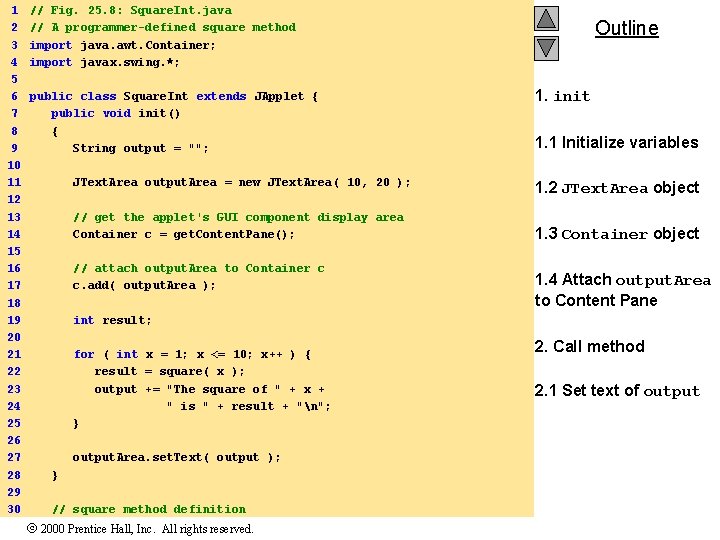
1 2 3 4 5 6 7 8 9 10 11 12 13 14 15 16 17 18 19 20 21 22 23 24 25 26 27 28 29 30 // Fig. 25. 8: Square. Int. java // A programmer-defined square method import java. awt. Container; import javax. swing. *; public class Square. Int extends JApplet { public void init() { String output = ""; JText. Area output. Area = new JText. Area( 10, 20 ); // get the applet's GUI component display area Container c = get. Content. Pane(); // attach output. Area to Container c c. add( output. Area ); Outline 1. init 1. 1 Initialize variables 1. 2 JText. Area object 1. 3 Container object 1. 4 Attach output. Area to Content Pane int result; for ( int x = 1; x <= 10; x++ ) { result = square( x ); output += "The square of " + x + " is " + result + "n"; } output. Area. set. Text( output ); } // square method definition 2000 Prentice Hall, Inc. All rights reserved. 2. Call method 2. 1 Set text of output
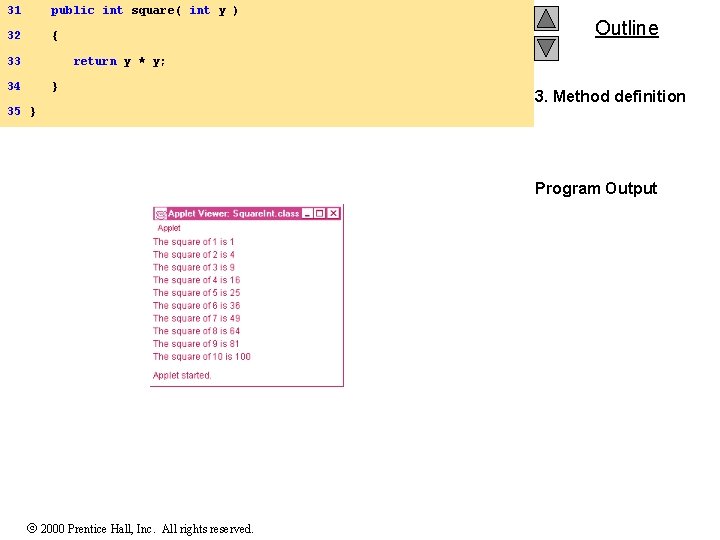
31 public int square( int y ) 32 { 33 Outline return y * y; 34 } 35 } 3. Method definition Program Output 2000 Prentice Hall, Inc. All rights reserved.
25. 5 Java API Packages • As we have seen – Java has predefined, grouped classes called packages – Together, all the packages are the Applications Programming Interface (API) – Fig 25. 10 has a list of the packages in the API • Import – Import statements specify location of classes – Large number of classes, avoid reinventing the wheel 2000 Prentice Hall, Inc. All rights reserved.
25. 6 Random Number Generation • Math. random() – Returns a random double, greater than or equal to 0. 0, less than 1. 0 • Scaling and shifting n = a + (int) ( Math. random() * b ) n = random number a = shifting value b = scaling value In C we used %, but in Java we can use * For a random number between 1 and 6, n = 1 + (int) ( Math. random() * 6 ) 2000 Prentice Hall, Inc. All rights reserved.
25. 7 Example: A Game of Chance • Redo "craps" simulator from Chapter 5 • Rules – Roll two dice • 7 or 11 on first throw, player wins • 2, 3, or 12 on first throw, player loses • 4, 5, 6, 8, 9, 10 - value becomes player's "point" – player must roll his point before rolling 7 to win 2000 Prentice Hall, Inc. All rights reserved.
25. 7 Example: A Game of Chance (II) • User input – Till now, used message dialog and input dialog • Tedious, only show one message/ get one input at a time – Now, we will use event handling for more complex GUI • extends keyword – Class inherits data and methods from another class – A class can also implement an interface • Keyword implements • Interface - specifies methods you must define in your class • Event handling – Event: user interaction (i. e. , user clicking a button) – Event handler: method called in response to an event 2000 Prentice Hall, Inc. All rights reserved.
25. 7 Example: A Game of Chance (III) • Interface Action. Listener – Requires that you define method action. Performed • action. Performed is the event handler • Class JText. Field – Can display or input a line of text • Class JButton – Displays a button which can perform an action if pushed – Method add. Action. Listener( this ); • Specifies this applet should listen for events from the JButton object – Each component must know which method will handle its events • Registering the event handler 2000 Prentice Hall, Inc. All rights reserved.
25. 7 Example: A Game of Chance (IV) • Class JButton (continued) – We registered this applet with our JButton • The applet "listens" for events from the – action. Performed is the event handler • Event-driven programming – User's interaction with GUI drives program • final – Declares a variable constant • Cannot be modified • Must be initialized at declaration • const int MYINT = 3; • Use all uppercase for final variables 2000 Prentice Hall, Inc. All rights reserved.
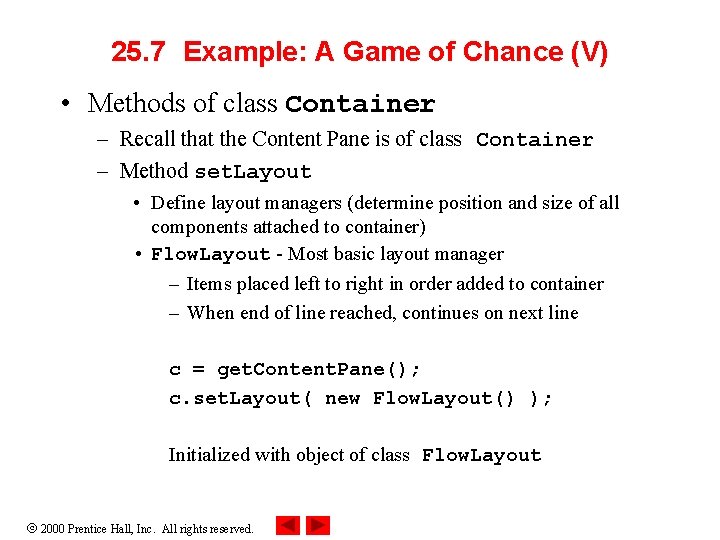
25. 7 Example: A Game of Chance (V) • Methods of class Container – Recall that the Content Pane is of class Container – Method set. Layout • Define layout managers (determine position and size of all components attached to container) • Flow. Layout - Most basic layout manager – Items placed left to right in order added to container – When end of line reached, continues on next line c = get. Content. Pane(); c. set. Layout( new Flow. Layout() ); Initialized with object of class Flow. Layout 2000 Prentice Hall, Inc. All rights reserved.
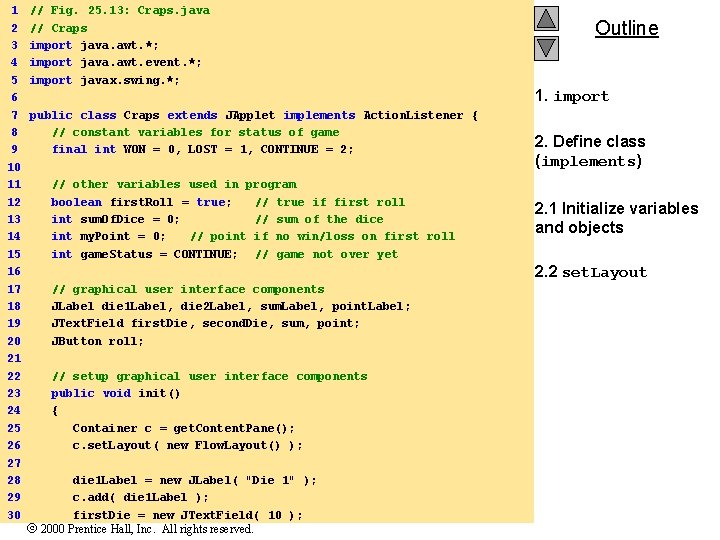
1 2 3 4 5 6 7 8 9 10 11 12 13 14 15 16 17 18 19 20 21 22 23 24 25 26 27 28 29 30 // Fig. 25. 13: Craps. java // Craps import java. awt. *; import java. awt. event. *; import javax. swing. *; public class Craps extends JApplet implements Action. Listener { // constant variables for status of game final int WON = 0, LOST = 1, CONTINUE = 2; // other variables used in program boolean first. Roll = true; // true if first roll int sum. Of. Dice = 0; // sum of the dice int my. Point = 0; // point if no win/loss on first roll int game. Status = CONTINUE; // game not over yet Outline 1. import 2. Define class (implements) 2. 1 Initialize variables and objects 2. 2 set. Layout // graphical user interface components JLabel die 1 Label, die 2 Label, sum. Label, point. Label; JText. Field first. Die, second. Die, sum, point; JButton roll; // setup graphical user interface components public void init() { Container c = get. Content. Pane(); c. set. Layout( new Flow. Layout() ); die 1 Label = new JLabel( "Die 1" ); c. add( die 1 Label ); first. Die = new JText. Field( 10 ); 2000 Prentice Hall, Inc. All rights reserved.
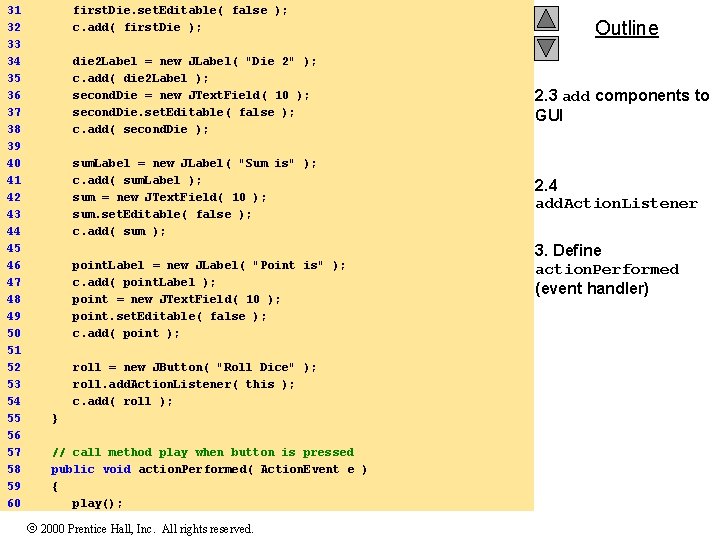
31 32 33 34 35 36 37 38 39 40 41 42 43 44 45 46 47 48 49 50 51 52 53 54 55 56 57 58 59 60 first. Die. set. Editable( false ); c. add( first. Die ); die 2 Label = new JLabel( "Die 2" ); c. add( die 2 Label ); second. Die = new JText. Field( 10 ); second. Die. set. Editable( false ); c. add( second. Die ); sum. Label = new JLabel( "Sum is" ); c. add( sum. Label ); sum = new JText. Field( 10 ); sum. set. Editable( false ); c. add( sum ); point. Label = new JLabel( "Point is" ); c. add( point. Label ); point = new JText. Field( 10 ); point. set. Editable( false ); c. add( point ); roll = new JButton( "Roll Dice" ); roll. add. Action. Listener( this ); c. add( roll ); } // call method play when button is pressed public void action. Performed( Action. Event e ) { play(); 2000 Prentice Hall, Inc. All rights reserved. Outline 2. 3 add components to GUI 2. 4 add. Action. Listener 3. Define action. Performed (event handler)
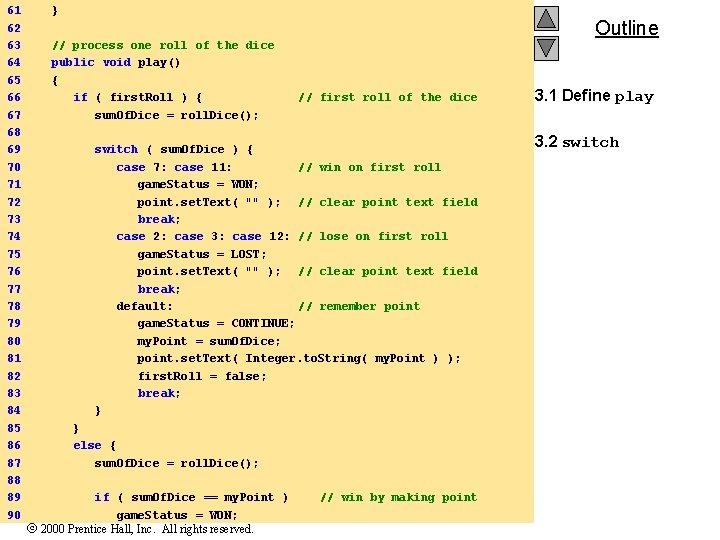
61 62 63 64 65 66 67 68 69 70 71 72 73 74 75 76 77 78 79 80 81 82 83 84 85 86 87 88 89 90 } // process one roll of the dice public void play() { if ( first. Roll ) { sum. Of. Dice = roll. Dice(); Outline // first roll of the dice switch ( sum. Of. Dice ) { case 7: case 11: // win on first roll game. Status = WON; point. set. Text( "" ); // clear point text field break; case 2: case 3: case 12: // lose on first roll game. Status = LOST; point. set. Text( "" ); // clear point text field break; default: // remember point game. Status = CONTINUE; my. Point = sum. Of. Dice; point. set. Text( Integer. to. String( my. Point ) ); first. Roll = false; break; } } else { sum. Of. Dice = roll. Dice(); if ( sum. Of. Dice == my. Point ) game. Status = WON; 2000 Prentice Hall, Inc. All rights reserved. // win by making point 3. 1 Define play 3. 2 switch
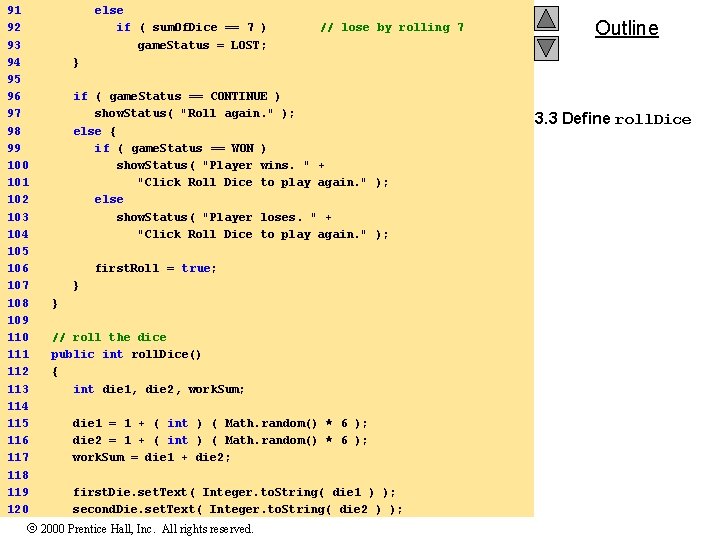
91 92 93 94 95 96 97 98 99 100 101 102 103 104 105 106 107 108 109 110 111 112 113 114 115 116 117 118 119 120 else if ( sum. Of. Dice == 7 ) game. Status = LOST; // lose by rolling 7 Outline } if ( game. Status == CONTINUE ) show. Status( "Roll again. " ); else { if ( game. Status == WON ) show. Status( "Player wins. " + "Click Roll Dice to play again. " ); else show. Status( "Player loses. " + "Click Roll Dice to play again. " ); first. Roll = true; } } // roll the dice public int roll. Dice() { int die 1, die 2, work. Sum; die 1 = 1 + ( int ) ( Math. random() * 6 ); die 2 = 1 + ( int ) ( Math. random() * 6 ); work. Sum = die 1 + die 2; first. Die. set. Text( Integer. to. String( die 1 ) ); second. Die. set. Text( Integer. to. String( die 2 ) ); 2000 Prentice Hall, Inc. All rights reserved. 3. 3 Define roll. Dice
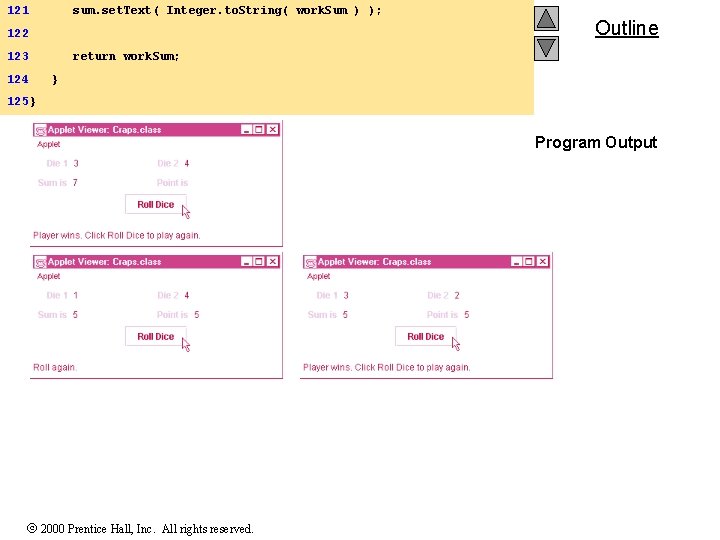
121 sum. set. Text( Integer. to. String( work. Sum ) ); 122 123 124 Outline return work. Sum; } 125 } Program Output 2000 Prentice Hall, Inc. All rights reserved.
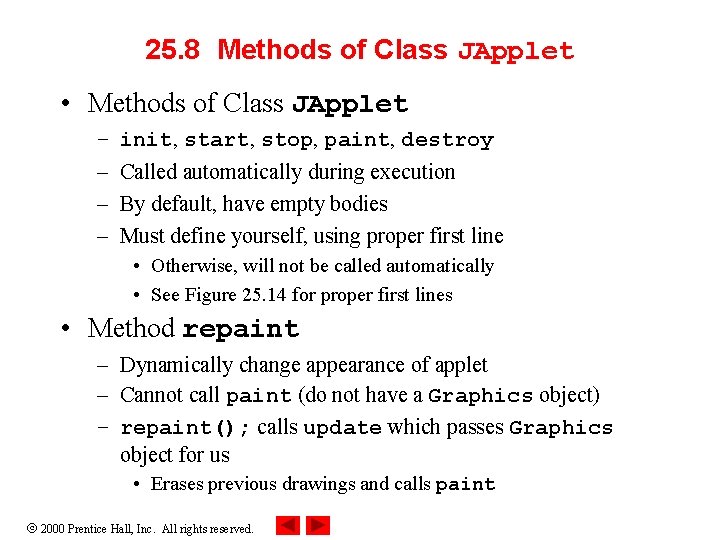
25. 8 Methods of Class JApplet • Methods of Class JApplet – – init, start, stop, paint, destroy Called automatically during execution By default, have empty bodies Must define yourself, using proper first line • Otherwise, will not be called automatically • See Figure 25. 14 for proper first lines • Method repaint – Dynamically change appearance of applet – Cannot call paint (do not have a Graphics object) – repaint(); calls update which passes Graphics object for us • Erases previous drawings and calls paint 2000 Prentice Hall, Inc. All rights reserved.
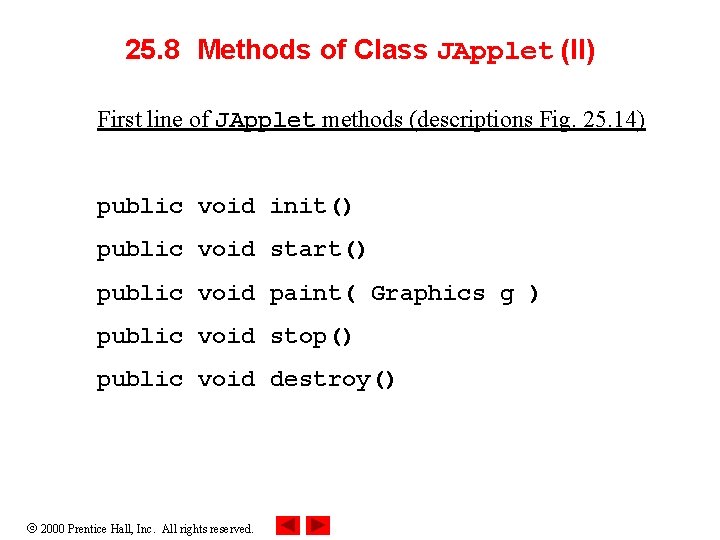
25. 8 Methods of Class JApplet (II) First line of JApplet methods (descriptions Fig. 25. 14) public void init() public void start() public void paint( Graphics g ) public void stop() public void destroy() 2000 Prentice Hall, Inc. All rights reserved.
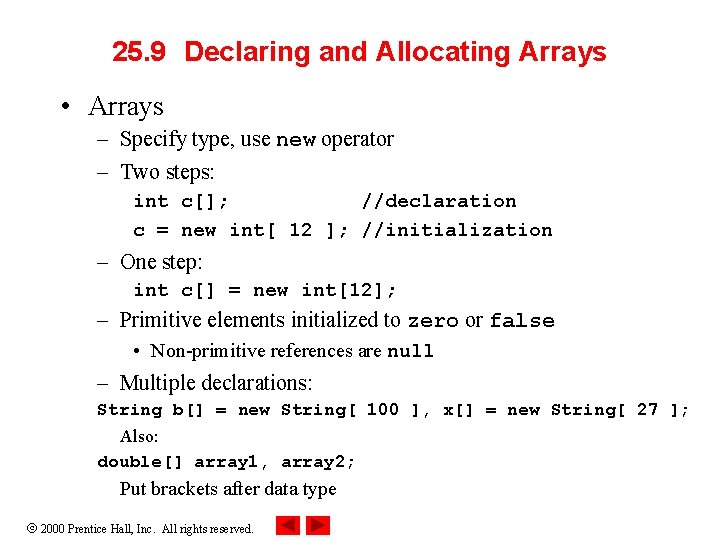
25. 9 Declaring and Allocating Arrays • Arrays – Specify type, use new operator – Two steps: int c[]; //declaration c = new int[ 12 ]; //initialization – One step: int c[] = new int[12]; – Primitive elements initialized to zero or false • Non-primitive references are null – Multiple declarations: String b[] = new String[ 100 ], x[] = new String[ 27 ]; Also: double[] array 1, array 2; Put brackets after data type 2000 Prentice Hall, Inc. All rights reserved.
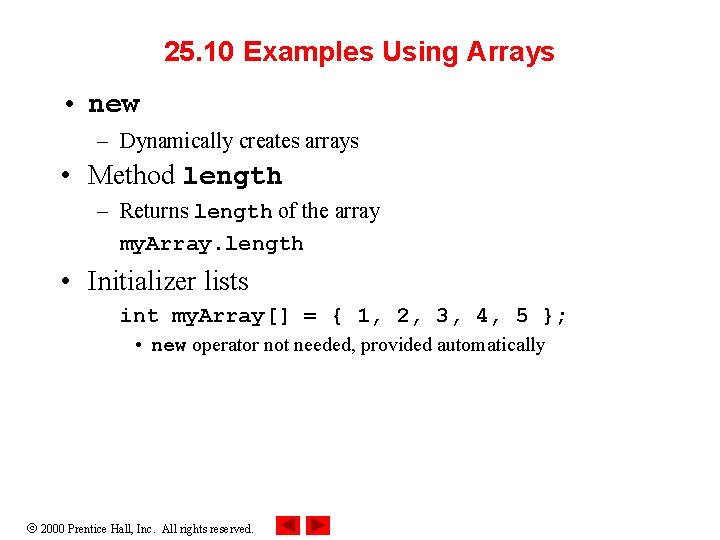
25. 10 Examples Using Arrays • new – Dynamically creates arrays • Method length – Returns length of the array my. Array. length • Initializer lists int my. Array[] = { 1, 2, 3, 4, 5 }; • new operator not needed, provided automatically 2000 Prentice Hall, Inc. All rights reserved.
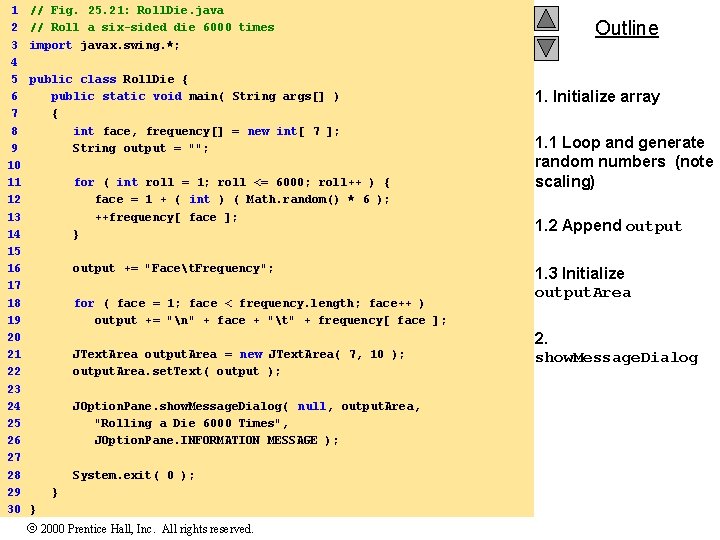
1 2 3 4 5 6 7 8 9 10 11 12 13 14 15 16 17 18 19 20 21 22 23 24 25 26 27 28 29 30 // Fig. 25. 21: Roll. Die. java // Roll a six-sided die 6000 times import javax. swing. *; public class Roll. Die { public static void main( String args[] ) { int face, frequency[] = new int[ 7 ]; String output = ""; for ( int roll = 1; roll <= 6000; roll++ ) { face = 1 + ( int ) ( Math. random() * 6 ); ++frequency[ face ]; } output += "Facet. Frequency"; for ( face = 1; face < frequency. length; face++ ) output += "n" + face + "t" + frequency[ face ]; JText. Area output. Area = new JText. Area( 7, 10 ); output. Area. set. Text( output ); JOption. Pane. show. Message. Dialog( null, output. Area, "Rolling a Die 6000 Times", JOption. Pane. INFORMATION_MESSAGE ); System. exit( 0 ); } } 2000 Prentice Hall, Inc. All rights reserved. Outline 1. Initialize array 1. 1 Loop and generate random numbers (note scaling) 1. 2 Append output 1. 3 Initialize output. Area 2. show. Message. Dialog
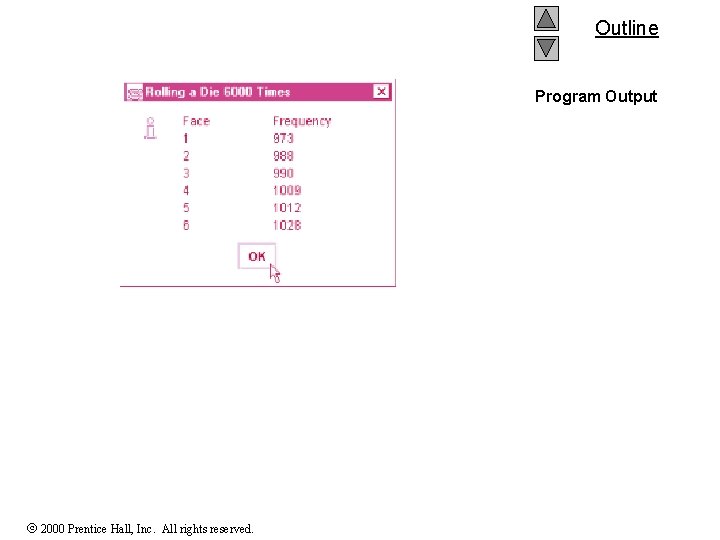
Outline Program Output 2000 Prentice Hall, Inc. All rights reserved.
25. 11 References and Reference Parameters • Passing arguments to methods – Call-by-value: pass copy of argument – Call-by-reference: pass original argument • Improve performance, weaken security • In Java, cannot choose how to pass arguments – Primitive data types passed call-by-value – References to objects passed call-by-reference • Original object can be changed in method – Arrays in Java treated as objects • Passed call-by-reference 2000 Prentice Hall, Inc. All rights reserved.
25. 12 Multiple-Subscripted Arrays • Multiple-Subscripted Arrays – Represent tables • Arranged by m rows and n columns (m by n array) • Can have more than two subscripts – Java does not support multiple subscripts directly • Create an array with arrays as its elements • Array of arrays • Declaration – Double brackets int b[][]; b = new int[ 3 ]; • Declares a 3 by 3 array 2000 Prentice Hall, Inc. All rights reserved.
![25. 12 Multiple-Subscripted Arrays (II) • Declaration (continued) – Initializer lists int b[][] =](http://slidetodoc.com/presentation_image_h2/7d06dfad0cdd22279806e41f4a202da6/image-39.jpg "25. 12 Multiple-Subscripted Arrays (II) • Declaration (continued) – Initializer lists int b[][] =")
25. 12 Multiple-Subscripted Arrays (II) • Declaration (continued) – Initializer lists int b[][] = { { 1, 2 }, { 3, 4 } }; 1 2 3 4 – Each row can have a different number of columns: int b[][]; b = new int[ 2 ][ ]; // allocate rows b[ 0 ] = new int[ 5 ]; // allocate columns for row 0 b[ 1 ] = new int[ 3 ]; // allocate columns for row 1 – Notice how b[ 0 ] is initialized as a new int array 2000 Prentice Hall, Inc. All rights reserved.
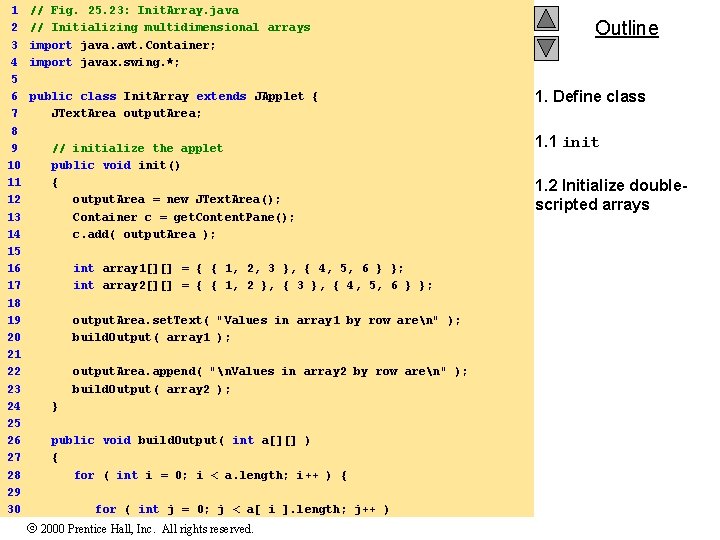
1 2 3 4 5 6 7 8 9 10 11 12 13 14 15 16 17 18 19 20 21 22 23 24 25 26 27 28 29 30 // Fig. 25. 23: Init. Array. java // Initializing multidimensional arrays import java. awt. Container; import javax. swing. *; public class Init. Array extends JApplet { JText. Area output. Area; // initialize the applet public void init() { output. Area = new JText. Area(); Container c = get. Content. Pane(); c. add( output. Area ); int array 1[][] = { { 1, 2, 3 }, { 4, 5, 6 } }; int array 2[][] = { { 1, 2 }, { 3 }, { 4, 5, 6 } }; output. Area. set. Text( "Values in array 1 by row aren" ); build. Output( array 1 ); output. Area. append( "n. Values in array 2 by row aren" ); build. Output( array 2 ); } public void build. Output( int a[][] ) { for ( int i = 0; i < a. length; i++ ) { for ( int j = 0; j < a[ i ]. length; j++ ) 2000 Prentice Hall, Inc. All rights reserved. Outline 1. Define class 1. 1 init 1. 2 Initialize doublescripted arrays
![31 output. Area. append( a[ i ][ j ] + " 32 33 "](http://slidetodoc.com/presentation_image_h2/7d06dfad0cdd22279806e41f4a202da6/image-41.jpg "31 output. Area. append( a[ i ][ j ] + \" 32 33 \"")
31 output. Area. append( a[ i ][ j ] + " 32 33 " ); Outline output. Area. append( "n" ); 34 } 35 } 36 } Program Output 2000 Prentice Hall, Inc. All rights reserved.
- Slides: 41