
Chapter 23 Introduction To Transport Layer Copyright The















- Slides: 72
Chapter 23 Introduction To Transport Layer Copyright © The Mc. Graw-Hill Companies, Inc. Permission required for reproduction or display.
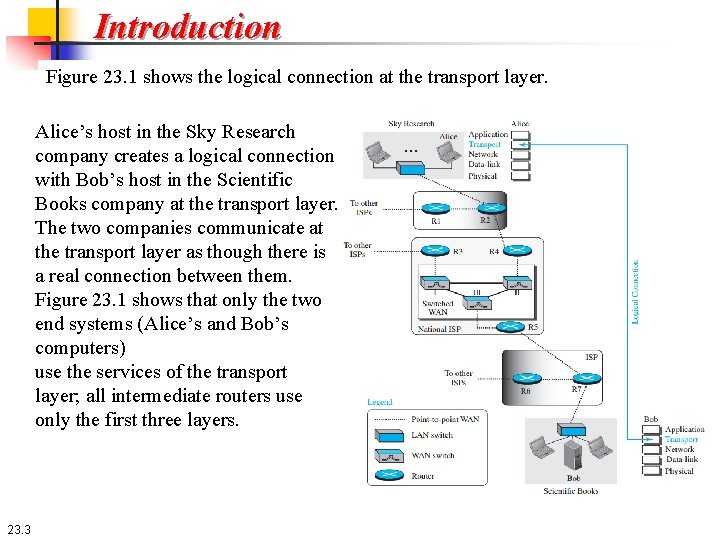
23 -1 INTRODUCTION The transport layer is located between the application layer and the network layer. It provides a process-to-process communication between two application layers, one at the local host and the other at the remote host. Communication is provided using a logical connection. Figure 23. 1 shows the idea behind this logical connection. 23. 2
Introduction Figure 23. 1 shows the logical connection at the transport layer. Alice’s host in the Sky Research company creates a logical connection with Bob’s host in the Scientific Books company at the transport layer. The two companies communicate at the transport layer as though there is a real connection between them. Figure 23. 1 shows that only the two end systems (Alice’s and Bob’s computers) use the services of the transport layer; all intermediate routers use only the first three layers. 23. 3
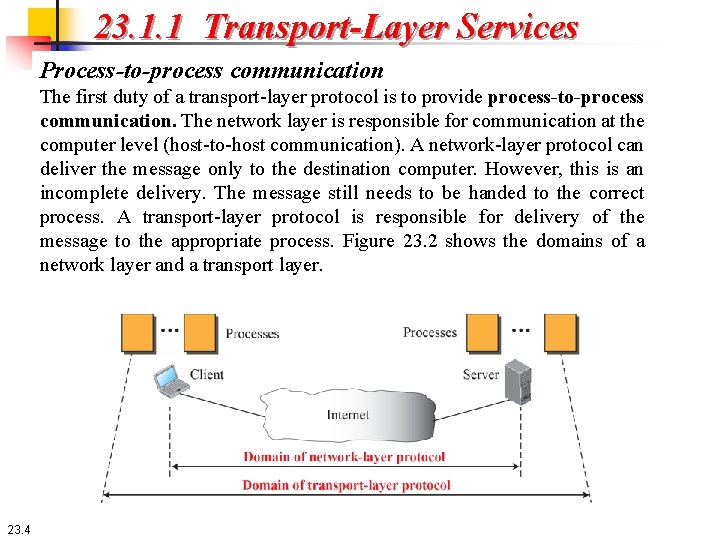
23. 1. 1 Transport-Layer Services Process-to-process communication The first duty of a transport-layer protocol is to provide process-to-process communication. The network layer is responsible for communication at the computer level (host-to-host communication). A network-layer protocol can deliver the message only to the destination computer. However, this is an incomplete delivery. The message still needs to be handed to the correct process. A transport-layer protocol is responsible for delivery of the message to the appropriate process. Figure 23. 2 shows the domains of a network layer and a transport layer. 23. 4
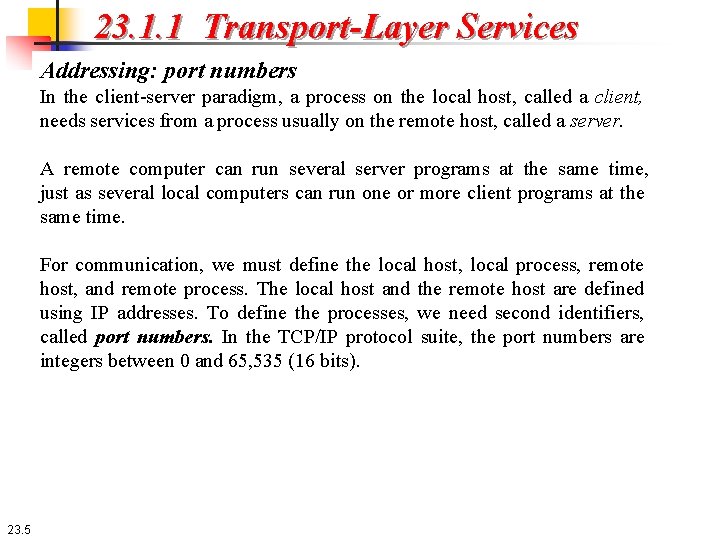
23. 1. 1 Transport-Layer Services Addressing: port numbers In the client-server paradigm, a process on the local host, called a client, needs services from a process usually on the remote host, called a server. A remote computer can run several server programs at the same time, just as several local computers can run one or more client programs at the same time. For communication, we must define the local host, local process, remote host, and remote process. The local host and the remote host are defined using IP addresses. To define the processes, we need second identifiers, called port numbers. In the TCP/IP protocol suite, the port numbers are integers between 0 and 65, 535 (16 bits). 23. 5
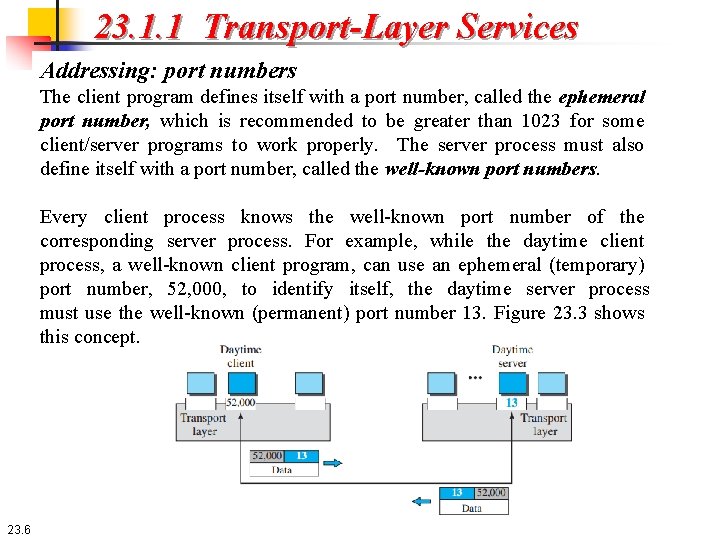
23. 1. 1 Transport-Layer Services Addressing: port numbers The client program defines itself with a port number, called the ephemeral port number, which is recommended to be greater than 1023 for some client/server programs to work properly. The server process must also define itself with a port number, called the well-known port numbers. Every client process knows the well-known port number of the corresponding server process. For example, while the daytime client process, a well-known client program, can use an ephemeral (temporary) port number, 52, 000, to identify itself, the daytime server process must use the well-known (permanent) port number 13. Figure 23. 3 shows this concept. 23. 6
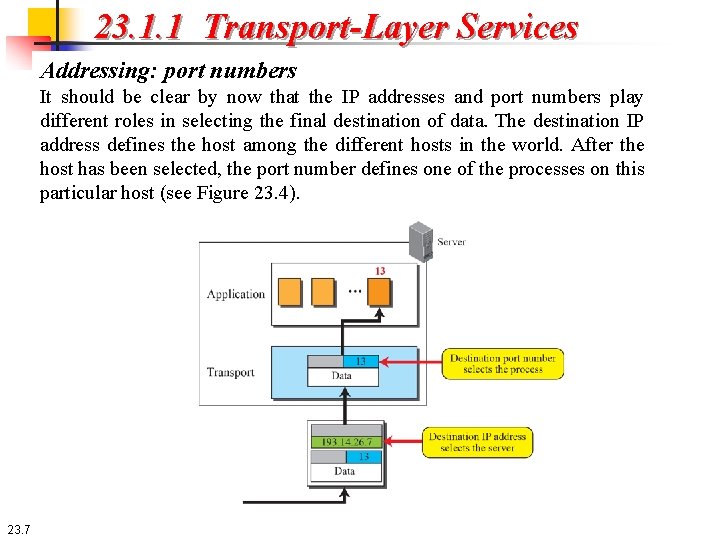
23. 1. 1 Transport-Layer Services Addressing: port numbers It should be clear by now that the IP addresses and port numbers play different roles in selecting the final destination of data. The destination IP address defines the host among the different hosts in the world. After the host has been selected, the port number defines one of the processes on this particular host (see Figure 23. 4). 23. 7
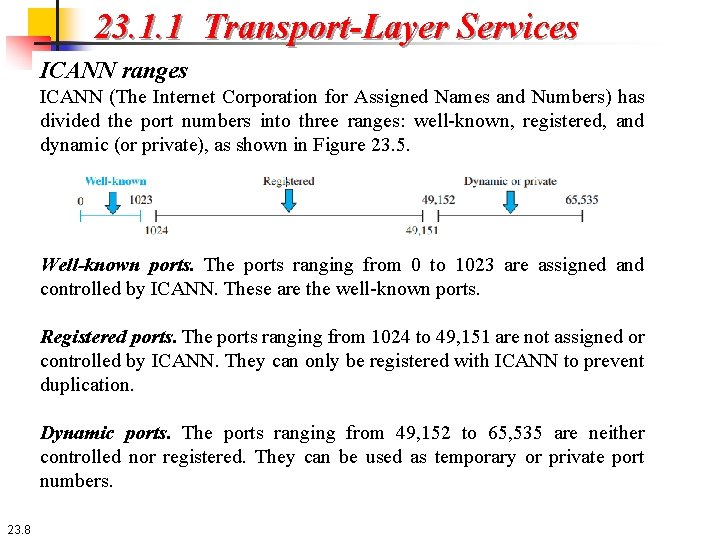
23. 1. 1 Transport-Layer Services ICANN ranges ICANN (The Internet Corporation for Assigned Names and Numbers) has divided the port numbers into three ranges: well-known, registered, and dynamic (or private), as shown in Figure 23. 5. Well-known ports. The ports ranging from 0 to 1023 are assigned and controlled by ICANN. These are the well-known ports. Registered ports. The ports ranging from 1024 to 49, 151 are not assigned or controlled by ICANN. They can only be registered with ICANN to prevent duplication. Dynamic ports. The ports ranging from 49, 152 to 65, 535 are neither controlled nor registered. They can be used as temporary or private port numbers. 23. 8
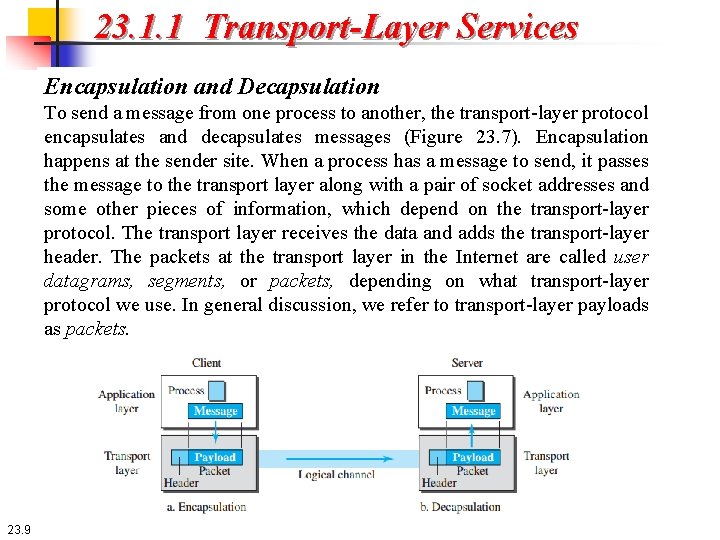
23. 1. 1 Transport-Layer Services Encapsulation and Decapsulation To send a message from one process to another, the transport-layer protocol encapsulates and decapsulates messages (Figure 23. 7). Encapsulation happens at the sender site. When a process has a message to send, it passes the message to the transport layer along with a pair of socket addresses and some other pieces of information, which depend on the transport-layer protocol. The transport layer receives the data and adds the transport-layer header. The packets at the transport layer in the Internet are called user datagrams, segments, or packets, depending on what transport-layer protocol we use. In general discussion, we refer to transport-layer payloads as packets. 23. 9
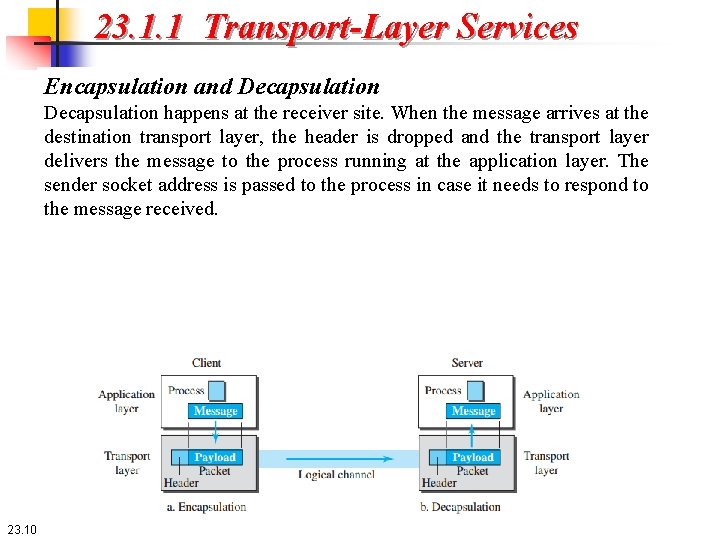
23. 1. 1 Transport-Layer Services Encapsulation and Decapsulation happens at the receiver site. When the message arrives at the destination transport layer, the header is dropped and the transport layer delivers the message to the process running at the application layer. The sender socket address is passed to the process in case it needs to respond to the message received. 23. 10
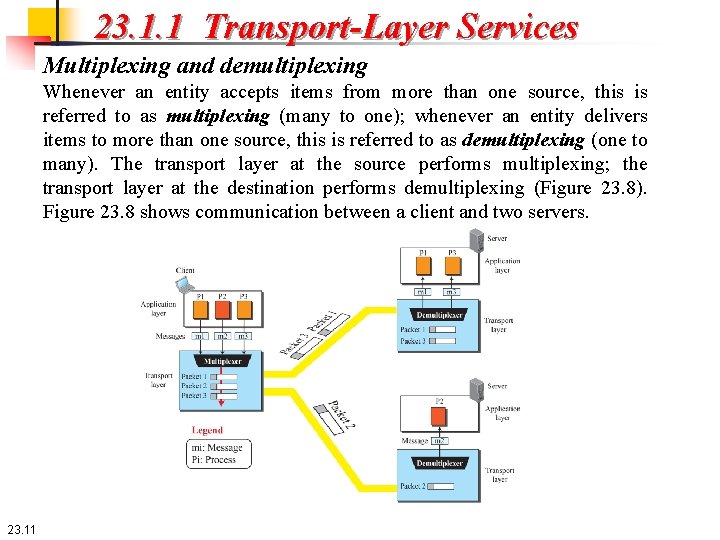
23. 1. 1 Transport-Layer Services Multiplexing and demultiplexing Whenever an entity accepts items from more than one source, this is referred to as multiplexing (many to one); whenever an entity delivers items to more than one source, this is referred to as demultiplexing (one to many). The transport layer at the source performs multiplexing; the transport layer at the destination performs demultiplexing (Figure 23. 8). Figure 23. 8 shows communication between a client and two servers. 23. 11
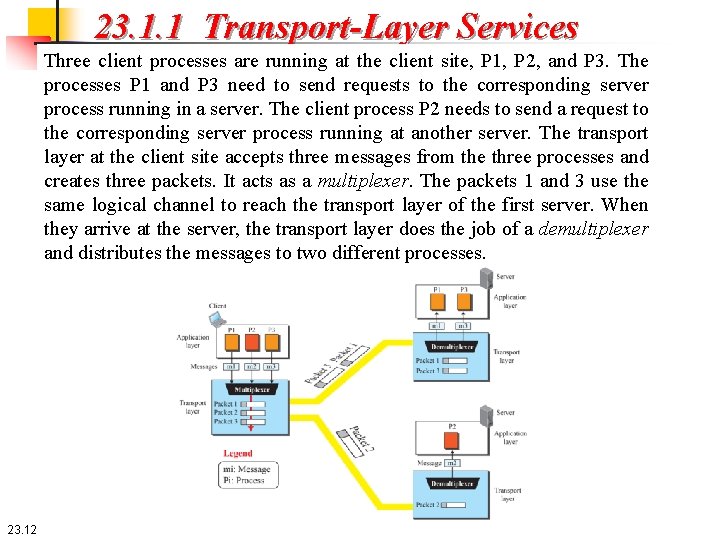
23. 1. 1 Transport-Layer Services Three client processes are running at the client site, P 1, P 2, and P 3. The processes P 1 and P 3 need to send requests to the corresponding server process running in a server. The client process P 2 needs to send a request to the corresponding server process running at another server. The transport layer at the client site accepts three messages from the three processes and creates three packets. It acts as a multiplexer. The packets 1 and 3 use the same logical channel to reach the transport layer of the first server. When they arrive at the server, the transport layer does the job of a demultiplexer and distributes the messages to two different processes. 23. 12
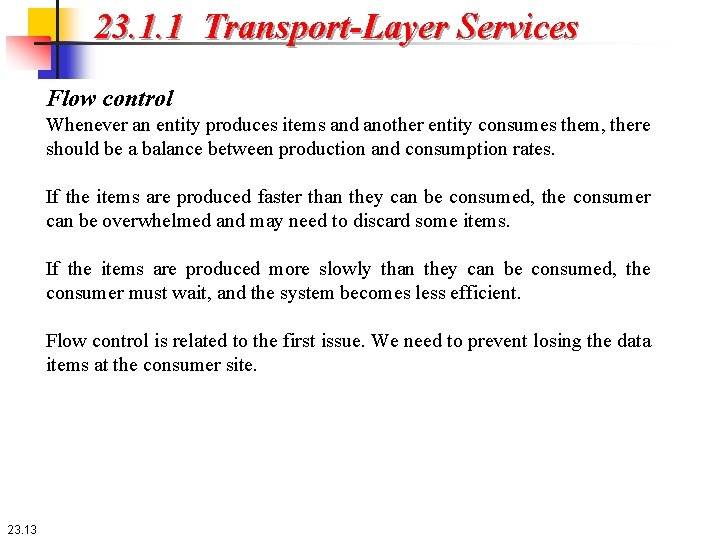
23. 1. 1 Transport-Layer Services Flow control Whenever an entity produces items and another entity consumes them, there should be a balance between production and consumption rates. If the items are produced faster than they can be consumed, the consumer can be overwhelmed and may need to discard some items. If the items are produced more slowly than they can be consumed, the consumer must wait, and the system becomes less efficient. Flow control is related to the first issue. We need to prevent losing the data items at the consumer site. 23. 13
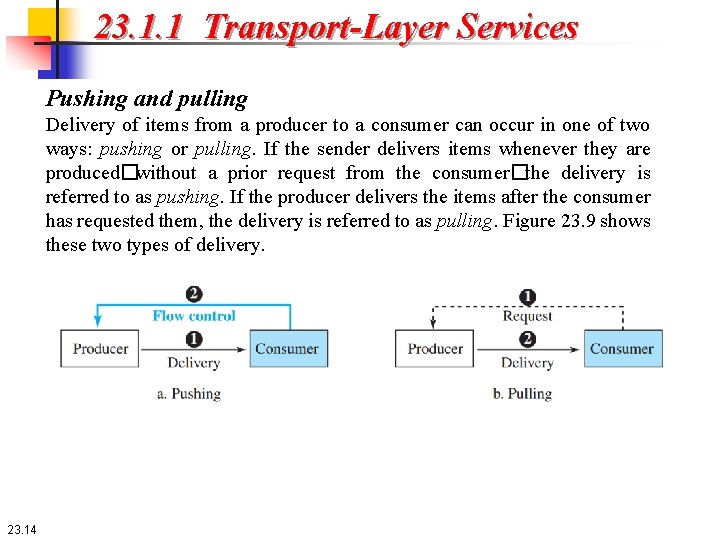
23. 1. 1 Transport-Layer Services Pushing and pulling Delivery of items from a producer to a consumer can occur in one of two ways: pushing or pulling. If the sender delivers items whenever they are produced�without a prior request from the consumer�the delivery is referred to as pushing. If the producer delivers the items after the consumer has requested them, the delivery is referred to as pulling. Figure 23. 9 shows these two types of delivery. 23. 14
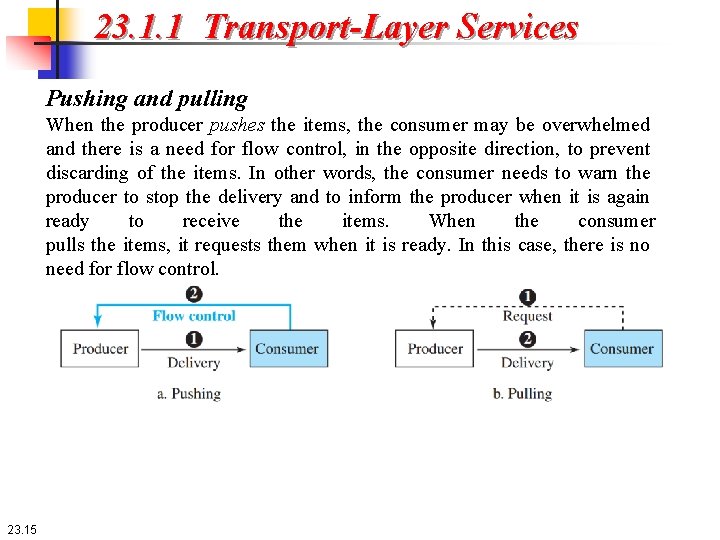
23. 1. 1 Transport-Layer Services Pushing and pulling When the producer pushes the items, the consumer may be overwhelmed and there is a need for flow control, in the opposite direction, to prevent discarding of the items. In other words, the consumer needs to warn the producer to stop the delivery and to inform the producer when it is again ready to receive the items. When the consumer pulls the items, it requests them when it is ready. In this case, there is no need for flow control. 23. 15
23. 1. 1 Transport-Layer Services Flow Control at Transport Layer In communication at the transport layer, we are dealing with four entities: sender process, sender transport layer, receiver transport layer, and receiver process. The sending process at the application layer is only a producer. It produces message chunks and pushes them to the transport layer. The sending transport layer has a double role: it is both a consumer and a producer. It consumes the messages pushed by the producer. It encapsulates the messages in packets and pushes them to the receiving transport layer. The receiving transport layer also has a double role: it is the consumer for the packets received from the sender and the producer that decapsulates the messages and delivers them to the application layer. The last delivery, however, is normally a pulling delivery; the transport layer waits until the application-layer process asks for messages. 23. 16
23. 1. 1 Transport-Layer Services Flow Control at Transport Layer Figure 23. 10 shows that we need at least two cases of flow control: from the sending transport layer to the sending application layer and from the receiving transport layer to the sending transport layer. 23. 17
23. 1. 1 Transport-Layer Services Buffers Although flow control can be implemented in several ways, one of the solutions is normally to use two buffers: one at the sending transport layer and the other at the receiving transport layer. A buffer is a set of memory locations that can hold packets at the sender and receiver. The flow control communication can occur by sending signals from the consumer to the producer. When the buffer of the sending transport layer is full, it informs the application layer to stop passing chunks of messages; when there are some vacancies, it informs the application layer that it can pass message chunks again. When the buffer of the receiving transport layer is full, it informs the sending transport layer to stop sending packets. When there are some vacancies, it informs the sending transport layer that it can send packets again. 23. 18
23. 1. 1 Transport-Layer Services Error control In the Internet, since the underlying network layer (IP) is unreliable, we need to make the transport layer reliable if the application requires reliability. Reliability can be achieved to add error control services to the transport layer. Error control at the transport layer is responsible for 1. Detecting and discarding corrupted packets. 2. Keeping track of lost and discarded packets and resending them. 3. Recognizing duplicate packets and discarding them. 4. Buffering out-of-order packets until the missing packets arrive. 23. 19
23. 1. 1 Transport-Layer Services Sequence numbers Error control requires that the sending transport layer knows which packet is to be resent and the receiving transport layer knows which packet is a duplicate, or which packet has arrived out of order. This can be done if the packets are numbered. We can add a field to the transport-layer packet to hold the sequence number of the packet. When a packet is corrupted or lost, the receiving transport layer can somehow inform the sending transport layer to resend that packet using the sequence number. The receiving transport layer can also detect duplicate packets if two received packets have the same sequence number. The out-of-order packets can be recognized by observing gaps in the sequence numbers. 23. 20
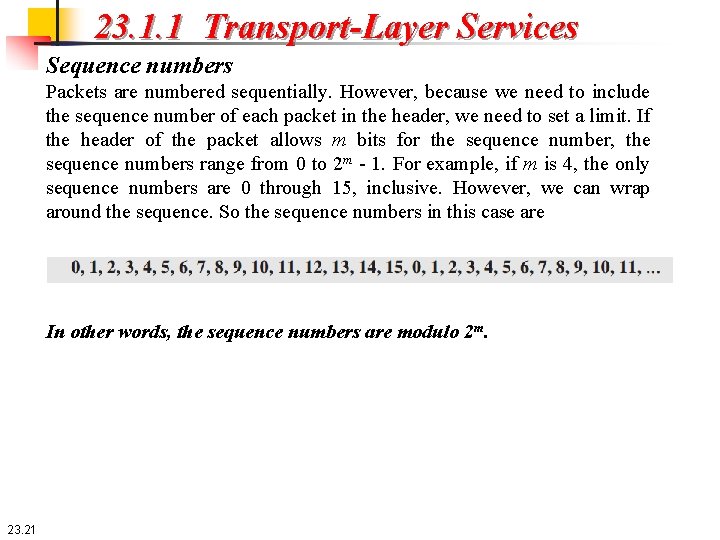
23. 1. 1 Transport-Layer Services Sequence numbers Packets are numbered sequentially. However, because we need to include the sequence number of each packet in the header, we need to set a limit. If the header of the packet allows m bits for the sequence number, the sequence numbers range from 0 to 2 m - 1. For example, if m is 4, the only sequence numbers are 0 through 15, inclusive. However, we can wrap around the sequence. So the sequence numbers in this case are In other words, the sequence numbers are modulo 2 m. 23. 21
23. 1. 1 Transport-Layer Services Sequence numbers The receiver side can send an acknowledgment (ACK) for each of a collection of packets that have arrived safe and sound. The receiver can simply discard the corrupted packets. The sender can detect lost packets if it uses a timer. When a packet is sent, the sender starts a timer. If an ACK does not arrive before the timer expires, the sender resends the packet. Duplicate packets can be silently discarded by the receiver. Out-of-order packets can be either discarded (to be treated as lost packets by the sender), or stored until the missing one arrives. 23. 22
23. 1. 1 Transport-Layer Services Combination of flow and error control These two requirements can be combined if we use two numbered buffers, one at the sender, one at the receiver. At the sender, when a packet is prepared to be sent, we use the number of the next free location, x, in the buffer as the sequence number of the packet. When the packet is sent, a copy is stored at memory location x, awaiting the acknowledgment from the other end. When an acknowledgment related to a sent packet arrives, the packet is purged and the memory location becomes free. At the receiver, when a packet with sequence number y arrives, it is stored at the memory location y until the application layer is ready to receive it. An acknowledgment can be sent to announce the arrival of packet y. 23. 23
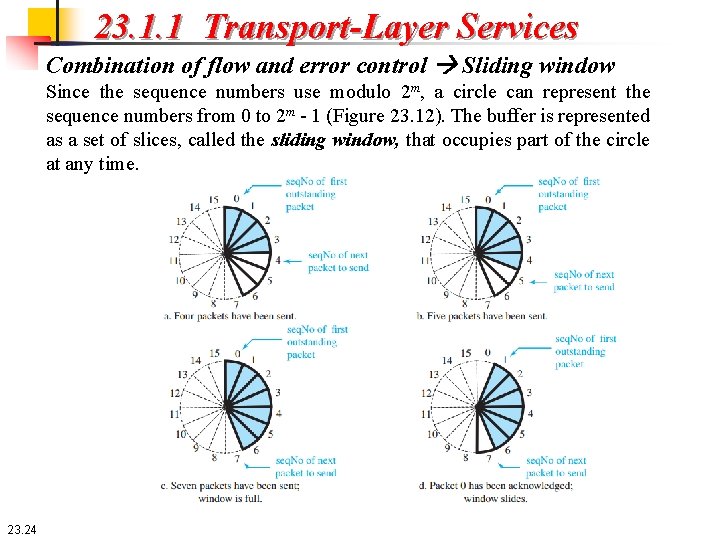
23. 1. 1 Transport-Layer Services Combination of flow and error control Sliding window Since the sequence numbers use modulo 2 m, a circle can represent the sequence numbers from 0 to 2 m - 1 (Figure 23. 12). The buffer is represented as a set of slices, called the sliding window, that occupies part of the circle at any time. 23. 24
23. 1. 1 Transport-Layer Services Combination of flow and error control Sliding window At the sender site, when a packet is sent, the corresponding slice is marked. When all the slices are marked, the buffer is full and no further messages can be accepted from the application layer. When an acknowledgment arrives, the corresponding slice is unmarked. If some consecutive slices from the beginning of the window are unmarked, the window slides over he range of the corresponding sequence numbers to allow more free slices at the end of the window. Figure 23. 12 shows the sliding window at the sender. The sequence numbers are in modulo 16 (m = 4) and the size of the window is 7. 23. 25
23. 1. 1 Transport-Layer Services Congestion Control An important issue in a packet-switched network, such as the Internet, is congestion. Congestion in a network may occur if the load on the network —the number of packets sent to the network—is greater than the capacity of the network—the number of packets a network can handle. Congestion control refers to the mechanisms and techniques that control the congestion and keep the load below the capacity. Congestion in a network or internetwork occurs because routers and switches have queues—buffers that hold the packets before and after processing. A router, for example, has an input queue and an output queue for each interface. If a router cannot process the packets at the same rate at which they arrive, the queues become overloaded and congestion occurs. Congestion at the transport layer is actually the result of congestion at the network layer, which manifests itself at the transport layer. 23. 26
23. 1. 2 Connectionless and Connection-Oriented Protocols A transport-layer protocol, like a network-layer protocol, can provide two types of services: connectionless and connectionoriented. The nature of these services at the transport layer, however, is different from the ones at the network layer. At the network layer, a connectionless service may mean different paths for different datagrams belonging to the same message. At the transport layer, we are not concerned about the physical paths of packets (we assume a logical connection between two transport layers). Connectionless service at the transport layer means independency between packets; connection-oriented means dependency. 23. 27
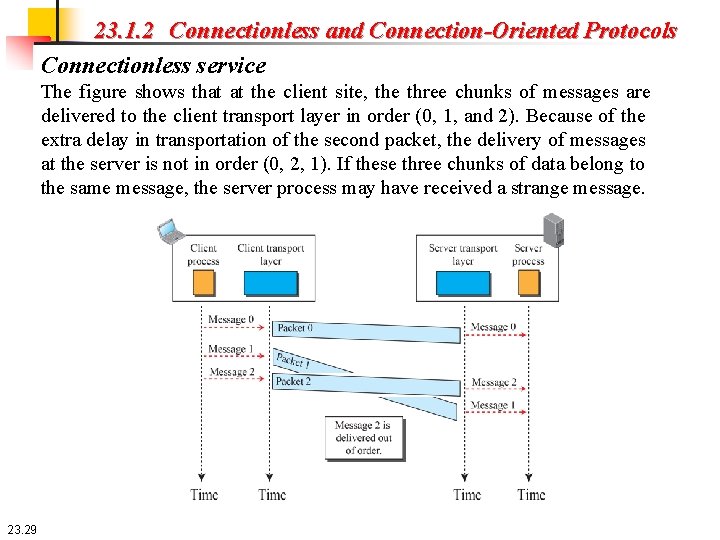
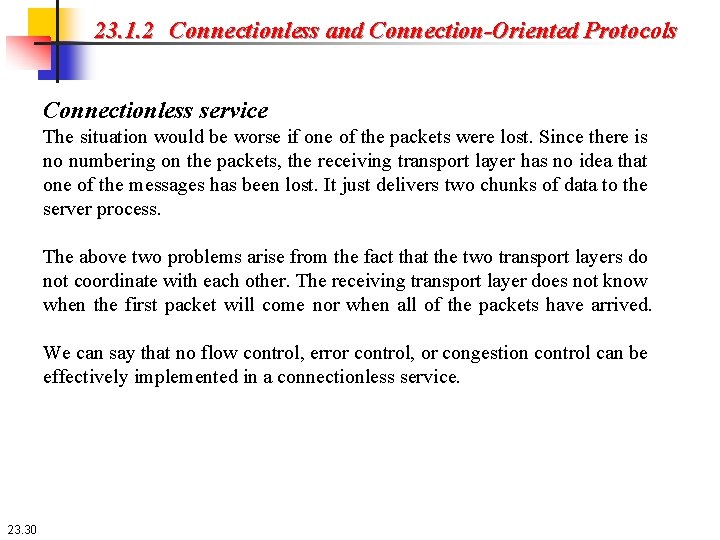
23. 1. 2 Connectionless and Connection-Oriented Protocols Connectionless service In a connectionless service, the source process (application program) needs to divide its message into chunks of data of the size acceptable by the transport layer and deliver them to the transport layer one by one. The transport layer treats each chunk as a single unit without any relation between the chunks. When a chunk arrives from the application layer, the transport layer encapsulates it in a packet and sends it. To show the independency of packets, assume that a client process has three chunks of messages to send to a server process. The chunks are handed over to the connectionless transport protocol in order. However, since there is no dependency between the packets at the transport layer, the packets may arrive out of order at the destination and will be delivered out of order to the server process (Figure 23. 14). 23. 28
23. 1. 2 Connectionless and Connection-Oriented Protocols Connectionless service The figure shows that at the client site, the three chunks of messages are delivered to the client transport layer in order (0, 1, and 2). Because of the extra delay in transportation of the second packet, the delivery of messages at the server is not in order (0, 2, 1). If these three chunks of data belong to the same message, the server process may have received a strange message. 23. 29
23. 1. 2 Connectionless and Connection-Oriented Protocols Connectionless service The situation would be worse if one of the packets were lost. Since there is no numbering on the packets, the receiving transport layer has no idea that one of the messages has been lost. It just delivers two chunks of data to the server process. The above two problems arise from the fact that the two transport layers do not coordinate with each other. The receiving transport layer does not know when the first packet will come nor when all of the packets have arrived. We can say that no flow control, error control, or congestion control can be effectively implemented in a connectionless service. 23. 30
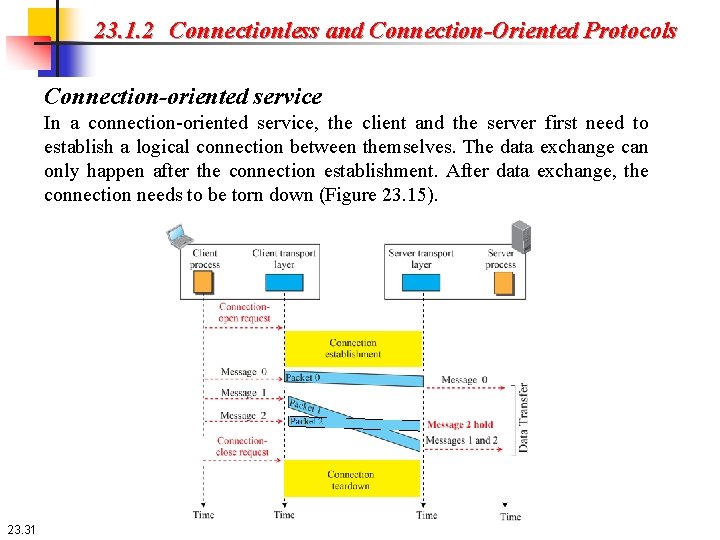
23. 1. 2 Connectionless and Connection-Oriented Protocols Connection-oriented service In a connection-oriented service, the client and the server first need to establish a logical connection between themselves. The data exchange can only happen after the connection establishment. After data exchange, the connection needs to be torn down (Figure 23. 15). 23. 31
23. 1. 2 Connectionless and Connection-Oriented Protocols Connection-oriented service The connection-oriented service at the transport layer is different from the same service at the network layer. In the network layer, connection-oriented service means a coordination between the two end hosts and all the routers in between. At the transport layer, connection-oriented service involves only the two hosts; the service is end to end. This means that we should be able to make a connection-oriented protocol at the transport layer over either a connectionless or connection-oriented protocol at the network layer. Figure 23. 15 shows the connection-establishment, data-transfer, and tear down phases in a connection-oriented service at the transport layer. We can implement flow control, error control, and congestion control in a connection-oriented protocol. 23. 32
23 -2 TRANSPORT-LAYER PROTOCOLS We can create a transport-layer protocol by combining a set of services described in the previous sections. To better understand the behavior of these protocols, we start with the simplest one and gradually add more complexity. The TCP/IP protocol uses a transport-layer protocol that is either a modification or a combination of some of these protocols. 23. 33
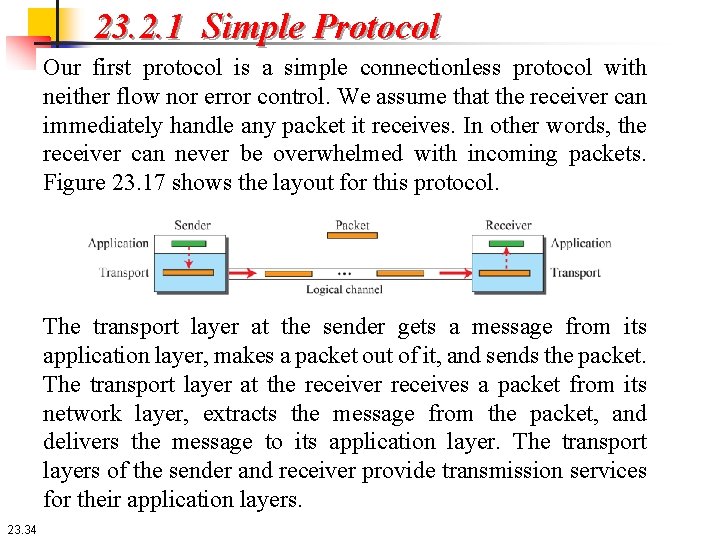
23. 2. 1 Simple Protocol Our first protocol is a simple connectionless protocol with neither flow nor error control. We assume that the receiver can immediately handle any packet it receives. In other words, the receiver can never be overwhelmed with incoming packets. Figure 23. 17 shows the layout for this protocol. The transport layer at the sender gets a message from its application layer, makes a packet out of it, and sends the packet. The transport layer at the receiver receives a packet from its network layer, extracts the message from the packet, and delivers the message to its application layer. The transport layers of the sender and receiver provide transmission services for their application layers. 23. 34
23. 2. 1 Simple Protocol Example 23. 3 Figure 23. 19 shows an example of communication using this protocol. It is very simple. The sender sends packets one after another without even thinking about the receiver. 23. 35
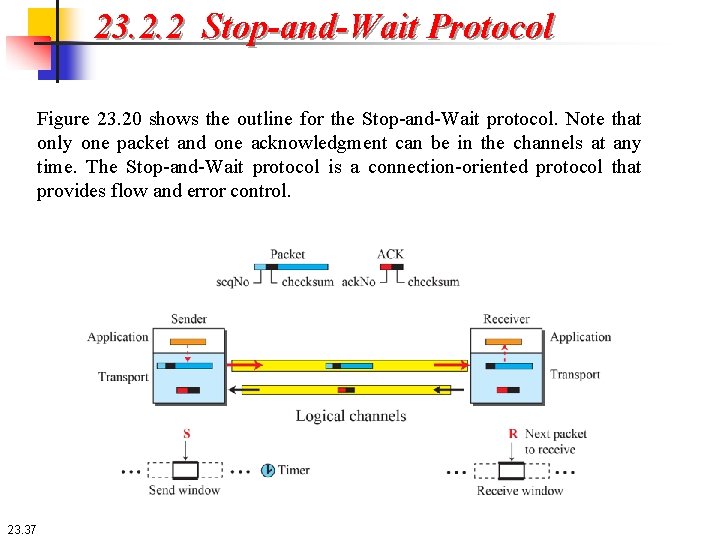
23. 2. 2 Stop-and-Wait Protocol Our second protocol is a connection-oriented protocol called the Stop-and. Wait protocol, which uses both flow and error control. Both the sender and the receiver use a sliding window of size 1. The sender sends one packet at a time and waits for an acknowledgment before sending the next one. To detect corrupted packets, we need to add a checksum to each data packet. When a packet arrives at the receiver site, it is checked. If its checksum is incorrect, the packet is corrupted and silently discarded. The silence of the receiver is a signal for the sender that a packet was either corrupted or lost. Every time the sender sends a packet, it starts a timer. If an acknowledgment arrives before the timer expires, the timer is stopped and the sender sends the next packet (if it has one to send). If the timer expires, the sender resends the previous packet, assuming that the packet was either lost or corrupted. This means that the sender needs to keep a copy of the packet until its acknowledgment arrives. 23. 36
23. 2. 2 Stop-and-Wait Protocol Figure 23. 20 shows the outline for the Stop-and-Wait protocol. Note that only one packet and one acknowledgment can be in the channels at any time. The Stop-and-Wait protocol is a connection-oriented protocol that provides flow and error control. 23. 37
23. 2. 2 Stop-and-Wait Protocol Sequence numbers To prevent duplicate packets, the protocol uses sequence numbers and acknowledgment numbers. Assume we have used x as a sequence number; we only need to use x + 1 after that. There is no need for x + 2. To show this, assume that the sender has sent the packet with sequence number x. Three things can happen. 1. The packet arrives safe and sound at the receiver site; the receiver sends an acknowledgment. The acknowledgment arrives at the sender site, causing the sender to send the next packet numbered x + 1. 2. The packet is corrupted or never arrives at the receiver site; the sender resends the packet (numbered x) after the time-out. The receiver returns an acknowledgment. 3. The packet arrives safe and sound at the receiver site; the receiver sends an acknowledgment, but the acknowledgment is corrupted or lost. The sender resends the packet (numbered x) after the time-out. Note that the packet here is a duplicate. The receiver can recognize this fact because it expects packet x + 1 but packet x was received. 23. 38
23. 2. 2 Stop-and-Wait Protocol Sequence numbers We can see that there is a need for sequence numbers x and x + 1 because the receiver needs to distinguish between case 1 and case 3. But there is no need for a packet to be numbered x + 2. In case 1, the packet can be numbered x again because packets x and x + 1 are acknowledged and there is no ambiguity at either site. In cases 2 and 3, the new packet is x + 1, not x + 2. If only x and x + 1 are needed, we can let x = 0 and x + 1 = 1. This means that the sequence is 0, 1, 0, and so on. This is referred to as modulo 2 arithmetic. 23. 39
23. 2. 2 Stop-and-Wait Protocol Acknowledgement numbers Since the sequence numbers must be suitable for both data packets and acknowledgments, we use this convention: The acknowledgment numbers always announce the sequence number of the next packet expected by the receiver. For example, if packet 0 has arrived safe and sound, the receiver sends an ACK with acknowledgment 1 (meaning packet 1 is expected next). If packet 1 has arrived safe and sound, the receiver sends an ACK with acknowledgment 0 (meaning packet 0 is expected). 23. 40
23. 2. 2 Stop-and-Wait Protocol Efficiency The Stop-and-Wait protocol is very inefficient if our channel is thick and long. By thick, we mean that our channel has a large bandwidth (high data rate); by long, we mean the round-trip delay is long. The product of these two is called the bandwidth-delay product. We can think of the channel as a pipe. The bandwidth-delay product then is the volume of the pipe in bits. The pipe is always there. It is not efficient if it is not used. The bandwidthdelay product is a measure of the number of bits a sender can transmit through the system while waiting for an acknowledgment from the receiver. 23. 41
23. 2. 2 Stop-and-Wait Protocol Efficiency Example 23. 5 Assume that, in a Stop-and-Wait system, the bandwidth of the line is 1 Mbps, and 1 bit takes 20 milliseconds to make a round trip. What is the bandwidth-delay product? If the system data packets are 1, 000 bits in length, what is the utilization percentage of the link? 23. 42
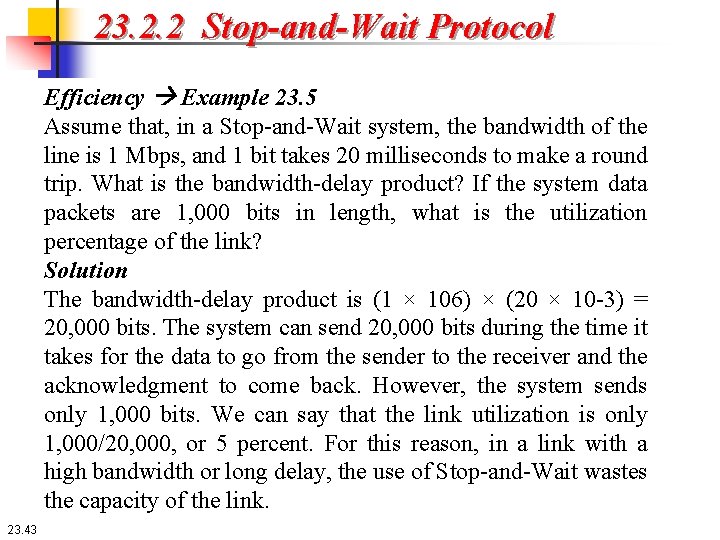
23. 2. 2 Stop-and-Wait Protocol Efficiency Example 23. 5 Assume that, in a Stop-and-Wait system, the bandwidth of the line is 1 Mbps, and 1 bit takes 20 milliseconds to make a round trip. What is the bandwidth-delay product? If the system data packets are 1, 000 bits in length, what is the utilization percentage of the link? Solution The bandwidth-delay product is (1 × 106) × (20 × 10 -3) = 20, 000 bits. The system can send 20, 000 bits during the time it takes for the data to go from the sender to the receiver and the acknowledgment to come back. However, the system sends only 1, 000 bits. We can say that the link utilization is only 1, 000/20, 000, or 5 percent. For this reason, in a link with a high bandwidth or long delay, the use of Stop-and-Wait wastes the capacity of the link. 23. 43
23. 2. 2 Stop-and-Wait Protocol Pipelining In networking and in other areas, a task is often begun before the previous task has ended. This is known as pipelining. There is no pipelining in the Stop-and-Wait protocol because a sender must wait for a packet to reach the destination and be acknowledged before the next packet can be sent. However, pipelining does apply to our next two protocols because several packets can be sent before a sender receives feedback about the previous packets. 23. 44
23. 2. 3 Go-Back-N Protocol (GBN) To improve the efficiency of transmission (to fill the pipe), multiple packets must be in transition while the sender is waiting for acknowledgment. In other words, we need to let more than one packet be outstanding to keep the channel busy while the sender is waiting for acknowledgment. In this section, we discuss one protocol, called Go-Back-N (GBN), that can achieve this goal. 23. 45
23. 2. 3 Go-Back-N Protocol (GBN) To improve the efficiency of transmission (to fill the pipe), multiple packets must be in transition while the sender is waiting for acknowledgment. In other words, we need to let more than one packet be outstanding to keep the channel busy while the sender is waiting for acknowledgment. In this section, we discuss one protocol, called Go-Back-N (GBN), that can achieve this goal. 23. 46
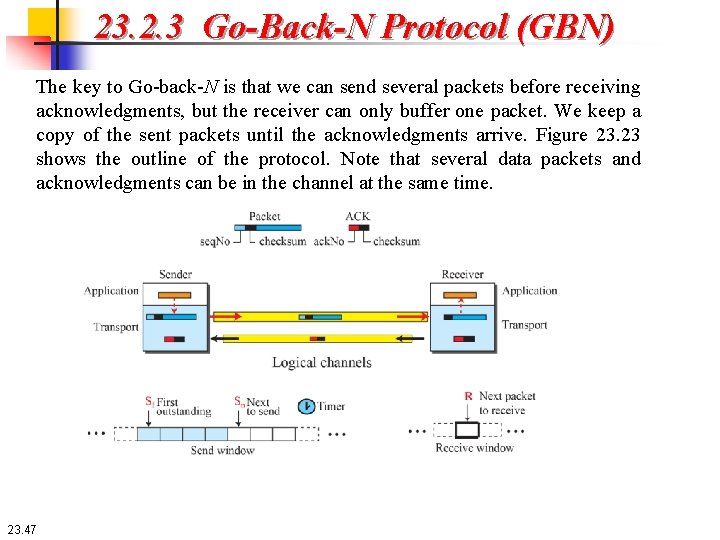
23. 2. 3 Go-Back-N Protocol (GBN) The key to Go-back-N is that we can send several packets before receiving acknowledgments, but the receiver can only buffer one packet. We keep a copy of the sent packets until the acknowledgments arrive. Figure 23. 23 shows the outline of the protocol. Note that several data packets and acknowledgments can be in the channel at the same time. 23. 47
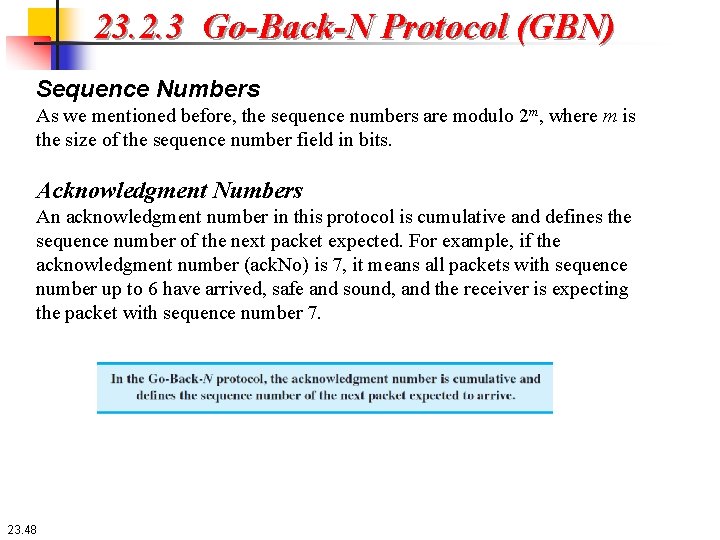
23. 2. 3 Go-Back-N Protocol (GBN) Sequence Numbers As we mentioned before, the sequence numbers are modulo 2 m, where m is the size of the sequence number field in bits. Acknowledgment Numbers An acknowledgment number in this protocol is cumulative and defines the sequence number of the next packet expected. For example, if the acknowledgment number (ack. No) is 7, it means all packets with sequence number up to 6 have arrived, safe and sound, and the receiver is expecting the packet with sequence number 7. 23. 48
23. 2. 3 Go-Back-N Protocol (GBN) Send window The maximum size of the window is 2 m − 1, for reasons that we discuss later. In this chapter, we let the size be fixed and set to the maximum value, but some protocols may have a variable window size. Figure 23. 24 shows a sliding window of size 7 (m = 3) for the Go-Back-N protocol. The send window at any time divides the possible sequence numbers into four regions. 23. 49
23. 2. 3 Go-Back-N Protocol (GBN) Send window The first region, left of the window, defines the sequence numbers belonging to packets that are already acknowledged. The sender does not worry about these packets and keeps no copies of them. The second region, colored, defines the range of sequence numbers belonging to the packets that have been sent, but have an unknown status. The sender needs to wait to find out if these packets have been received or were lost. We call these outstanding packets. The third range, white in the figure, defines the range of sequence numbers for packets that can be sent; however, the corresponding data have not yet been received from the application layer. Finally, the fourth region, right of the window, defines sequence numbers that cannot be used until the window slides. 23. 50
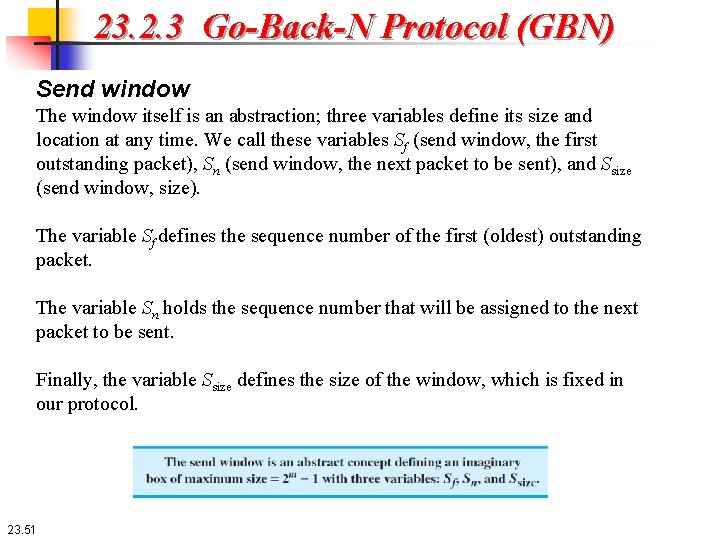
23. 2. 3 Go-Back-N Protocol (GBN) Send window The window itself is an abstraction; three variables define its size and location at any time. We call these variables Sf (send window, the first outstanding packet), Sn (send window, the next packet to be sent), and Ssize (send window, size). The variable Sf defines the sequence number of the first (oldest) outstanding packet. The variable Sn holds the sequence number that will be assigned to the next packet to be sent. Finally, the variable Ssize defines the size of the window, which is fixed in our protocol. 23. 51
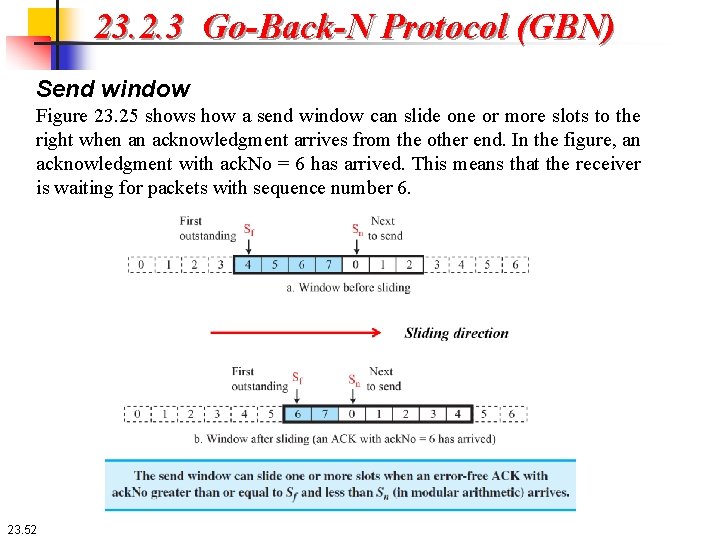
23. 2. 3 Go-Back-N Protocol (GBN) Send window Figure 23. 25 shows how a send window can slide one or more slots to the right when an acknowledgment arrives from the other end. In the figure, an acknowledgment with ack. No = 6 has arrived. This means that the receiver is waiting for packets with sequence number 6. 23. 52
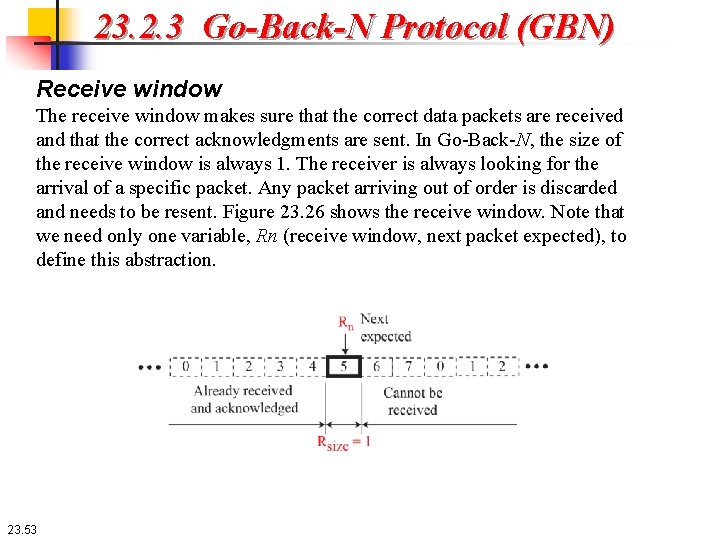
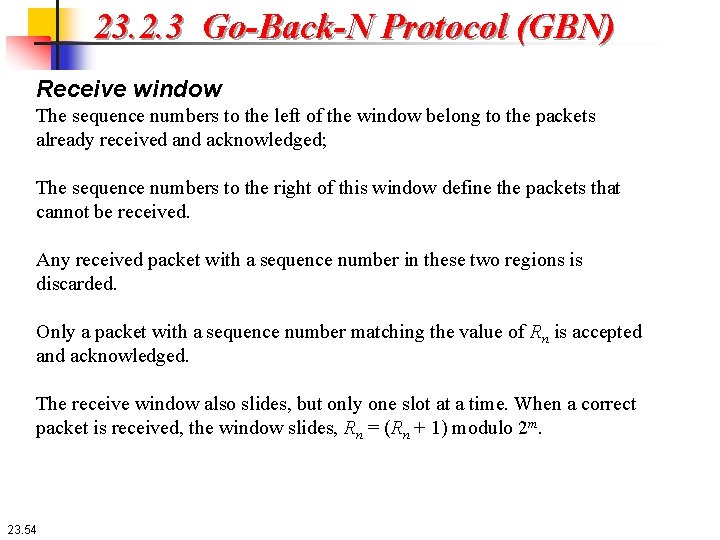
23. 2. 3 Go-Back-N Protocol (GBN) Receive window The receive window makes sure that the correct data packets are received and that the correct acknowledgments are sent. In Go-Back-N, the size of the receive window is always 1. The receiver is always looking for the arrival of a specific packet. Any packet arriving out of order is discarded and needs to be resent. Figure 23. 26 shows the receive window. Note that we need only one variable, Rn (receive window, next packet expected), to define this abstraction. 23. 53
23. 2. 3 Go-Back-N Protocol (GBN) Receive window The sequence numbers to the left of the window belong to the packets already received and acknowledged; The sequence numbers to the right of this window define the packets that cannot be received. Any received packet with a sequence number in these two regions is discarded. Only a packet with a sequence number matching the value of Rn is accepted and acknowledged. The receive window also slides, but only one slot at a time. When a correct packet is received, the window slides, Rn = (Rn + 1) modulo 2 m. 23. 54
23. 2. 3 Go-Back-N Protocol (GBN) Timers Although there can be a timer for each packet that is sent, in our protocol we use only one. The reason is that the timer for the first outstanding packet always expires first. We resend all outstanding packets when this timer expires. Resending packets When the timer expires, the sender resends all outstanding packets. For example, suppose the sender has already sent packet 6 (Sn = 7), but the only timer expires. If Sf = 3, this means that packets 3, 4, 5, and 6 have not been acknowledged; the sender goes back and resends packets 3, 4, 5, and 6. That is why the protocol is called Go-Back-N. On a time-out, the machine goes back N locations and resends all packets. 23. 55
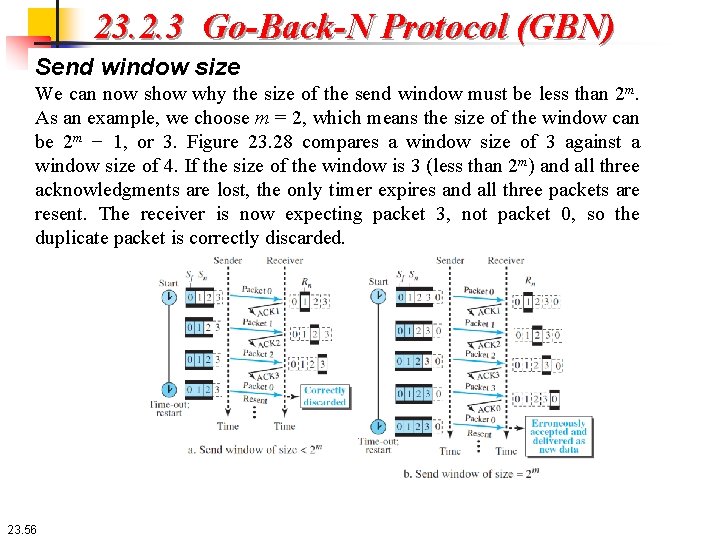
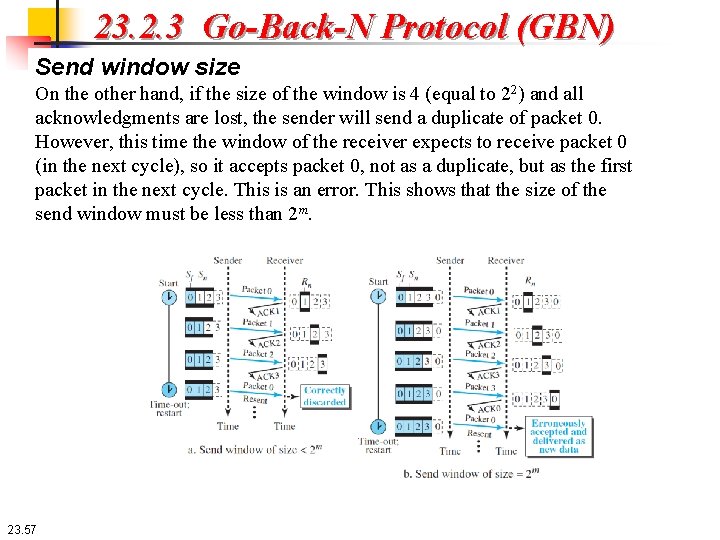
23. 2. 3 Go-Back-N Protocol (GBN) Send window size We can now show why the size of the send window must be less than 2 m. As an example, we choose m = 2, which means the size of the window can be 2 m − 1, or 3. Figure 23. 28 compares a window size of 3 against a window size of 4. If the size of the window is 3 (less than 2 m) and all three acknowledgments are lost, the only timer expires and all three packets are resent. The receiver is now expecting packet 3, not packet 0, so the duplicate packet is correctly discarded. 23. 56
23. 2. 3 Go-Back-N Protocol (GBN) Send window size On the other hand, if the size of the window is 4 (equal to 22) and all acknowledgments are lost, the sender will send a duplicate of packet 0. However, this time the window of the receiver expects to receive packet 0 (in the next cycle), so it accepts packet 0, not as a duplicate, but as the first packet in the next cycle. This is an error. This shows that the size of the send window must be less than 2 m. 23. 57
Example 23. 7 Figure 23. 29 shows an example of Go-Back-N. This is an example of a case where the forward channel is reliable, but the reverse is not. No data packets are lost, but some ACKs are delayed and one is lost. The example also shows how cumulative acknowledgments can help if acknowledgments are delayed or lost. 23. 58
Example 23. 7 After initialization, there are some sender events. Request events are triggered by message chunks from the application layer; arrival events are triggered by ACKs received from the network layer. There is no time-out event here because all outstanding packets are acknowledged before the timer expires. Note that although ACK 2 is lost, ACK 3 is cumulative and serves as both ACK 2 and ACK 3. There are four events at the receiver site. 23. 59
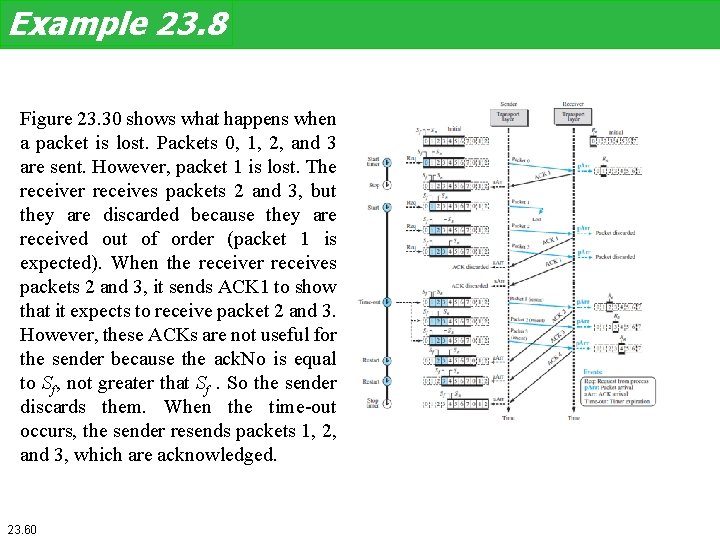
Example 23. 8 Figure 23. 30 shows what happens when a packet is lost. Packets 0, 1, 2, and 3 are sent. However, packet 1 is lost. The receiver receives packets 2 and 3, but they are discarded because they are received out of order (packet 1 is expected). When the receiver receives packets 2 and 3, it sends ACK 1 to show that it expects to receive packet 2 and 3. However, these ACKs are not useful for the sender because the ack. No is equal to Sf, not greater that Sf. So the sender discards them. When the time-out occurs, the sender resends packets 1, 2, and 3, which are acknowledged. 23. 60
23. 2. 4 Selective-Repeat Protocol The Go-Back-N protocol simplifies the process at the receiver. The receiver keeps track of only one variable, and there is no need to buffer out-of-order packets; they are simply discarded. However, this protocol is inefficient if the underlying network protocol loses a lot of packets. Each time a single packet is lost or corrupted, the sender resends all outstanding packets, even though some of these packets may have been received safe and sound but of order. If the network layer is losing many packets because of congestion in the network, the resending of all of these outstanding packets makes the congestion worse, and eventually more packets are lost. This has an avalanche effect that may result in the total collapse of the network. Another protocol, called the Selective-Repeat (SR) protocol, has been devised, which, as the name implies, resends only selective packets, those that are actually lost. 23. 61
23. 2. 4 Selective-Repeat Protocol Windows The Selective-Repeat protocol also uses two windows: a send window and a receive window. The send window maximum size can be 2 m-1. For example, if m = 4, the sequence numbers go from 0 to 15, but the maximum size of the window is just 8 (it is 15 in the Go-Back-N Protocol). We show the Selective-Repeat send window in Figure 23. 32 to emphasize the size. 23. 62
23. 2. 4 Selective-Repeat Protocol Windows The size of the receive window is the same as the size of the send window (maximum 2 m-1). The Selective-Repeat protocol allows as many packets as the size of the receive window to arrive out of order and be kept until there is a set of consecutive packets to be delivered to the application layer. Because the sizes of the send window and receive window are the same, all the packets in the send packet can arrive out of order and be stored until they can be delivered. We need, however, to emphasize that in a reliable protocol the receiver never delivers packets out of order to the application layer. 23. 63
23. 2. 4 Selective-Repeat Protocol Windows Figure 23. 33 shows the receive window in Selective-Repeat. Those slots inside the window that are shaded define packets that have arrived out of order and are waiting for the earlier transmitted packet to arrive before delivery to the application layer. 23. 64
23. 2. 4 Selective-Repeat Protocol Timer Theoretically, Selective-Repeat uses one timer for each outstanding packet. When a timer expires, only the corresponding packet is resent. In other words, GBN treats outstanding packets as a group; SR treats them individually. However, most transport-layer protocols that implement SR use only a single timer. For this reason, we use only one timer. Acknowledgements There is yet another difference between the two protocols. In GBN an ack. No is cumulative; it defines the sequence number of the next packet expected, confirming that all previous packets have been received safe and sound. The semantics of acknowledgment is different in SR. In SR, an ack. No defines the sequence number of a single packet that is received safe and sound; there is no feedback for any other. 23. 65
23. 2. 4 Selective-Repeat Protocol Example 23. 9 Assume a sender sends 6 packets: packets 0, 1, 2, 3, 4, and 5. The sender receives an ACK with ack. No = 3. What is the interpretation if the system is using GBN or SR? 23. 66
23. 2. 4 Selective-Repeat Protocol Example 23. 9 Assume a sender sends 6 packets: packets 0, 1, 2, 3, 4, and 5. The sender receives an ACK with ack. No = 3. What is the interpretation if the system is using GBN or SR? Solution If the system is using GBN, it means that packets 0, 1, and 2 have been received uncorrupted and the receiver is expecting packet 3. If the system is using SR, it means that packet 3 has been received uncorrupted; the ACK does not say anything about other packets. 23. 67
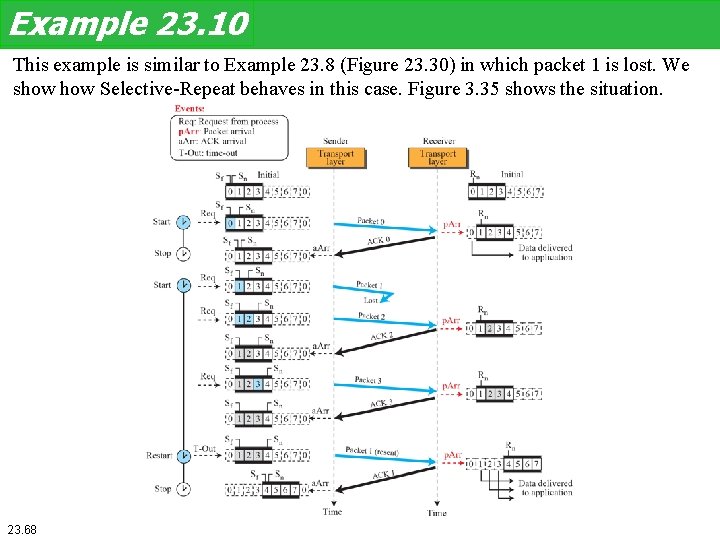
Example 23. 10 This example is similar to Example 23. 8 (Figure 23. 30) in which packet 1 is lost. We show Selective-Repeat behaves in this case. Figure 3. 35 shows the situation. 23. 68
Example 23. 10 At the sender, packet 0 is transmitted and acknowledged. Packet 1 is lost. Packets 2 and 3 arrive out of order and are acknowledged. When the timer times out, packet 1 (the only unacknowledged packet) is resent and is acknowledged. The send window then slides. At the receiver site we need to distinguish between the acceptance of a packet and its delivery to the application layer. At the second arrival, packet 2 arrives and is stored and marked (shaded slot), but it cannot be delivered because packet 1 is missing. At the next arrival, packet 3 arrives and is marked and stored, but still none of the packets can be delivered. Only at the last arrival, when finally a copy of packet 1 arrives, can packets 1, 2, and 3 be delivered to the application layer. There are two conditions for the delivery of packets to the application layer: First, a set of consecutive packets must have arrived. Second, the set starts from the beginning of the window. After the first arrival, there was only one packet and it started from the beginning of the window. After the last arrival, there are three packets and the first one starts from the beginning of the window. The key is that a reliable transport layer promises to deliver packets in order. 23. 69
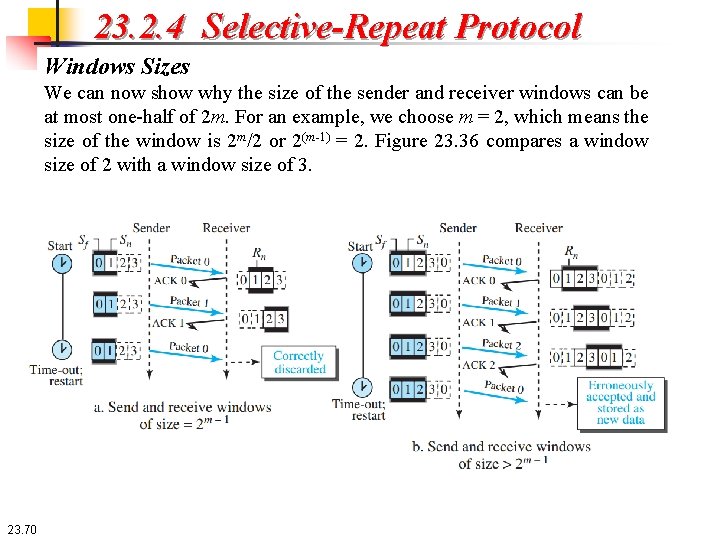
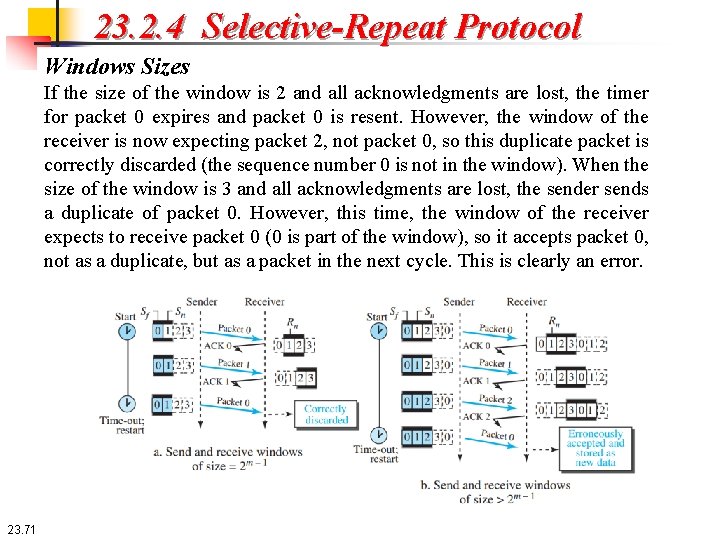
23. 2. 4 Selective-Repeat Protocol Windows Sizes We can now show why the size of the sender and receiver windows can be at most one-half of 2 m. For an example, we choose m = 2, which means the size of the window is 2 m/2 or 2(m-1) = 2. Figure 23. 36 compares a window size of 2 with a window size of 3. 23. 70
23. 2. 4 Selective-Repeat Protocol Windows Sizes If the size of the window is 2 and all acknowledgments are lost, the timer for packet 0 expires and packet 0 is resent. However, the window of the receiver is now expecting packet 2, not packet 0, so this duplicate packet is correctly discarded (the sequence number 0 is not in the window). When the size of the window is 3 and all acknowledgments are lost, the sender sends a duplicate of packet 0. However, this time, the window of the receiver expects to receive packet 0 (0 is part of the window), so it accepts packet 0, not as a duplicate, but as a packet in the next cycle. This is clearly an error. 23. 71
23. 2. 5 Piggbacking Windows Sizes The four protocols we discussed earlier in this section are all unidirectional: data packets flow in only one direction and acknowledgments travel in the other direction. In real life, data packets are normally flowing in both directions: from client to server and from server to client. This means that acknowledgments also need to flow in both directions. A technique called piggybacking is used to improve the efficiency of the bidirectional protocols. When a packet is carrying data from A to B, it can also carry acknowledgment feedback about arrived packets from B; when a packet is carrying data from B to A, it can also carry acknowledgment feedback about the arrived packets from A. 23. 72