
Chapter 20 Thinking Big Programming Functions Fluency with
Chapter 20: Thinking Big: Programming Functions Fluency with Information Technology Third Edition by Lawrence Snyder Copyright © 2008 Pearson Education, Inc. Publishing as Pearson Addison-Wesley
Anatomy of a Function • Functions are packages for algorithms • 3 parts – Name – Parameters – Definition • These parts are the function declaration 1 -2 Copyright © 2008 Pearson Education, Inc. Publishing as Pearson Addison-Wesley 2
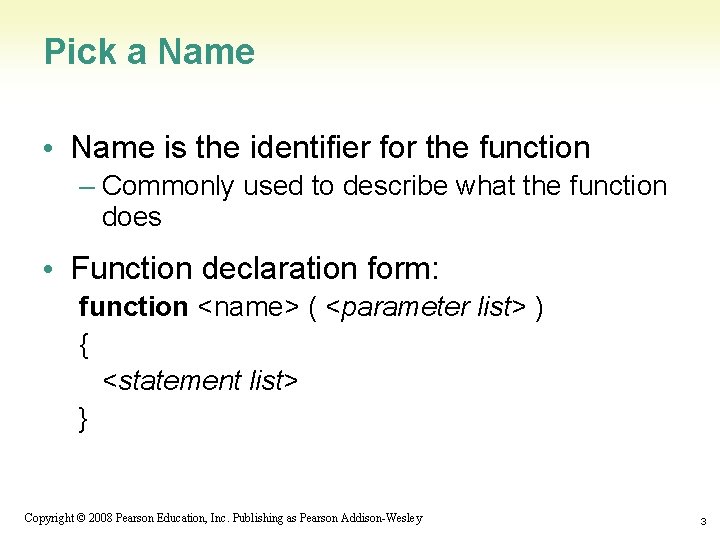
Pick a Name • Name is the identifier for the function – Commonly used to describe what the function does • Function declaration form: function <name> ( <parameter list> ) { <statement list> } 1 -3 Copyright © 2008 Pearson Education, Inc. Publishing as Pearson Addison-Wesley 3
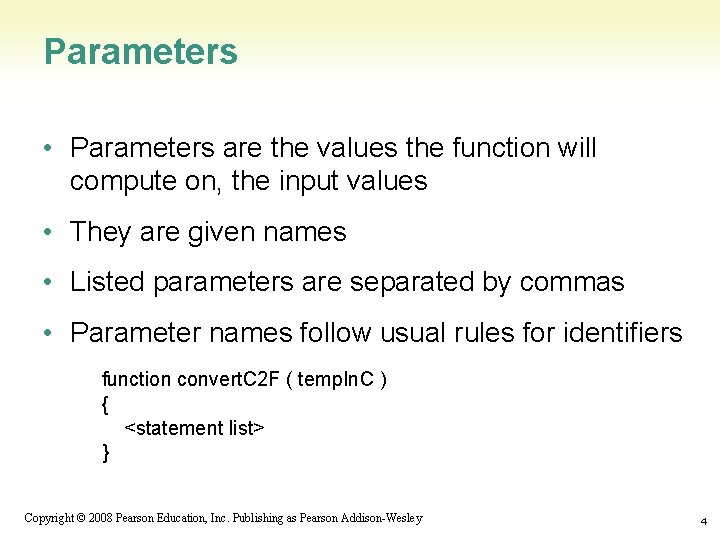
Parameters • Parameters are the values the function will compute on, the input values • They are given names • Listed parameters are separated by commas • Parameter names follow usual rules for identifiers function convert. C 2 F ( temp. In. C ) { <statement list> } 1 -4 Copyright © 2008 Pearson Education, Inc. Publishing as Pearson Addison-Wesley 4
Definition • Definition is the algorithm written in a programming language • To say what the answer/result is, Java. Script uses the statement: return <expression> function convert. C 2 F ( temp. In. C ) { return 9. 0 / 5. 0 * temp. In. C + 32; } • "Calling" a function is to run or execute it – Write the function’s name, put the input values (arguments) in the parentheses convert. C 2 F( 38 ) 1 -5 Copyright © 2008 Pearson Education, Inc. Publishing as Pearson Addison-Wesley 5
1 -6 Copyright © 2008 Pearson Education, Inc. Publishing as Pearson Addison-Wesley 6
Declaration versus Call • A function’s declaration is different from its call (use) • Functions are declared once • Functions can be called as many times as their answers are needed 1 -7 Copyright © 2008 Pearson Education, Inc. Publishing as Pearson Addison-Wesley 7
Forms and Functions • Construct a web page in which to run a function • Recall <form> and <input /> tags and event handlers in HTML – Event handlers usually implemented as functions • Using an input window, the value in that window can be used as an argument to a function 1 -8 Copyright © 2008 Pearson Education, Inc. Publishing as Pearson Addison-Wesley 8
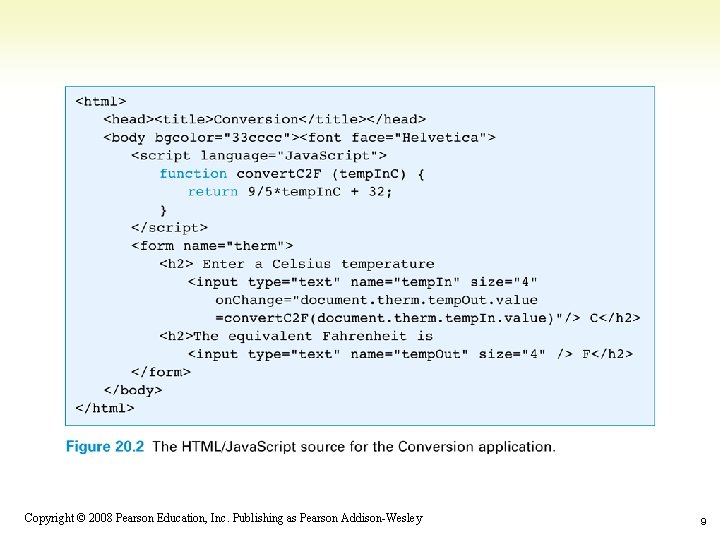
1 -9 Copyright © 2008 Pearson Education, Inc. Publishing as Pearson Addison-Wesley 9
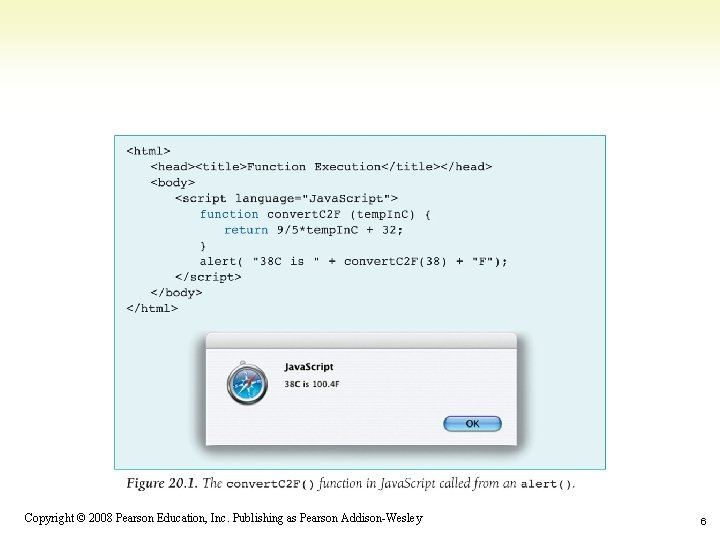
Calling to Customize a Page • Three ways to get the result of a function call to print on the monitor 1) Before the page is created For example, with the alert() call (Fig. 20. 1) 2) Interactively after the page is displayed For example, the Conversion application (Fig. 20. 2) 3) While the page is being loaded For example, document. write() built-in function • Calling functions while the browser is creating the page allows us to customize pages on-the-fly 1 -10 Copyright © 2008 Pearson Education, Inc. Publishing as Pearson Addison-Wesley 10
Calling to Customize a Page • How a browser builds a page: – Reads through HTML file, figuring out all tags and preparing to build page – Removes Java. Script tags and all text between them, and does whatever the Java. Script tells it to do • It could tell the browser to put some text back in the file, as in document. write() 1 -11 Copyright © 2008 Pearson Education, Inc. Publishing as Pearson Addison-Wesley 11
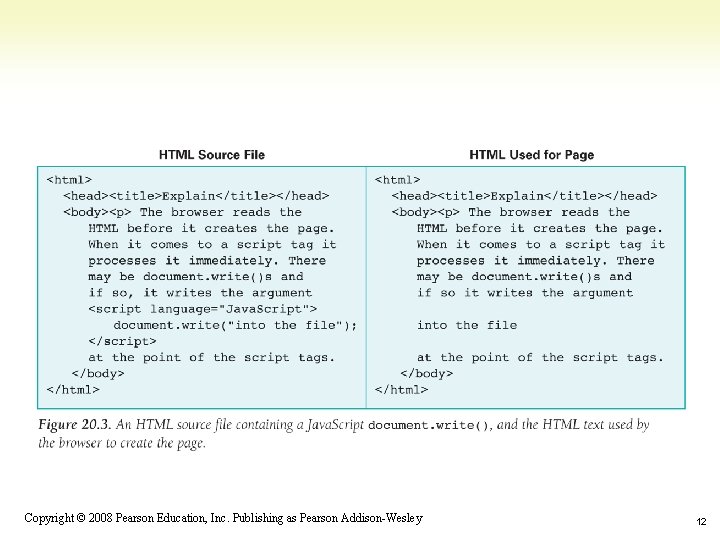
1 -12 Copyright © 2008 Pearson Education, Inc. Publishing as Pearson Addison-Wesley 12
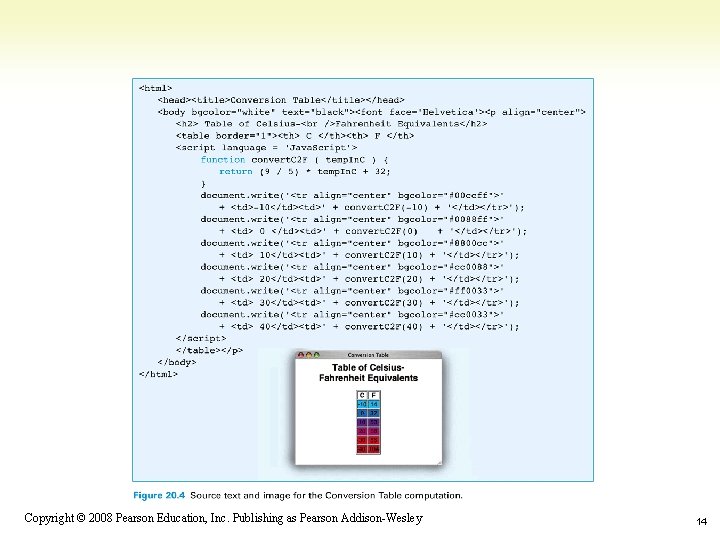
Calling to Customize a Page • Suppose we want a table of temperature conversions for a web page with a column for Celsius and a column for Fahrenheit • Put document. write() within the <script> </script> tags to create the rows of the table • Put Celsius values in first column cells, second column cells can call conversion function 1 -13 Copyright © 2008 Pearson Education, Inc. Publishing as Pearson Addison-Wesley 13
1 -14 Copyright © 2008 Pearson Education, Inc. Publishing as Pearson Addison-Wesley 14
Writing Functions, Using Functions • Flipping Electronic Coins – A coin flip is an unpredictable event whose two outcomes are “equally probable” – Computers can generate pseudo-random numbers • An algorithm that produces a sequence of numbers that passes the statistical tests for randomness • We can just call them random numbers 1 -15 Copyright © 2008 Pearson Education, Inc. Publishing as Pearson Addison-Wesley 15
Flipping Electronic Coins • Math. random() is Java. Script’s built-in function for generating random numbers – Each time it is called, it generates a random number between 0 (inclusive) and 1 (exclusive) • A function to flip electronic coins: function coin. Flip() { return Math. round( Math. random() ); } 1 -16 Copyright © 2008 Pearson Education, Inc. Publishing as Pearson Addison-Wesley 16
Flipping Electronic Coins (cont’d) • coin. Flip() returns with equal probability a 0 or a 1 • Next improvement is to return the text Heads or Tails rather than numbers function flip. Text() { if ( coin. Flip() == 0 ) return 'Tails'; else return 'Heads'; } 1 -17 Copyright © 2008 Pearson Education, Inc. Publishing as Pearson Addison-Wesley 17
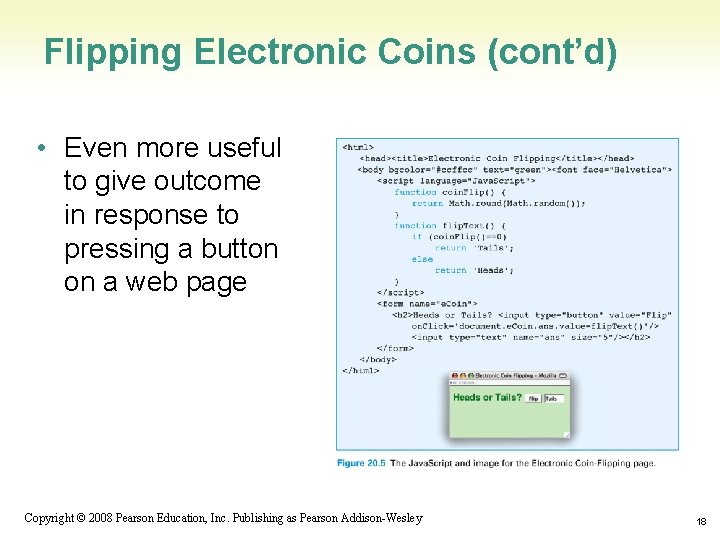
Flipping Electronic Coins (cont’d) • Even more useful to give outcome in response to pressing a button on a web page 1 -18 Copyright © 2008 Pearson Education, Inc. Publishing as Pearson Addison-Wesley 18
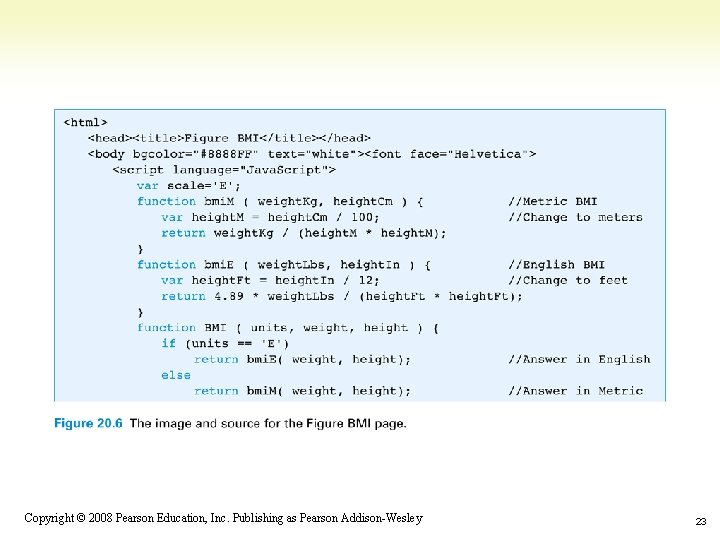
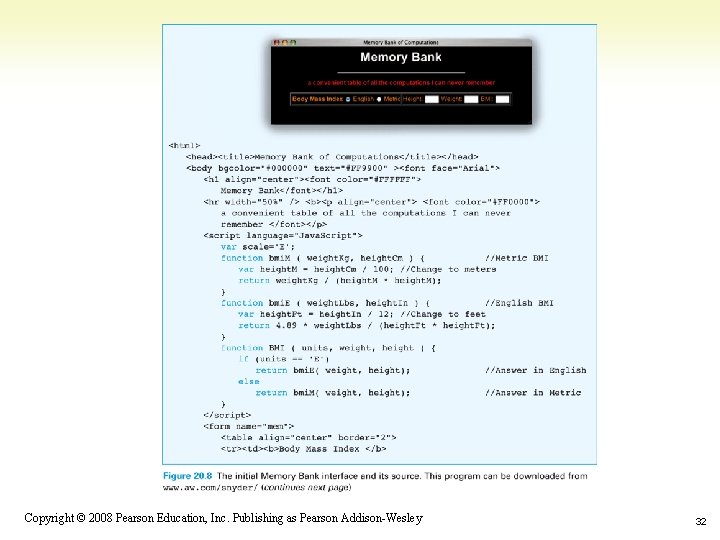
The Body Mass Index Computation • BMI is a standard measure of weight in proportion to height • Formula (in metric units): – Index = weight/height 2 Two parameters for this function, weight and height function bmi. M ( weight. Kg, height. Cm ) { // Compute BMI in metric var height. M = height. Cm/100; // Change cm to meters return weight. Kg / (height. M * height. M); } 1 -19 Copyright © 2008 Pearson Education, Inc. Publishing as Pearson Addison-Wesley 19
The Body Mass Index Computation (cont'd) • Formula (in English units): • Index = 4. 89 weight / height 2 • Function: function bmi. E ( weight. Lbs, height. In ) { // Compute BMI in English var height. Ft = height. In / 12; // Change inches to feet return 4. 89 * weight. Lbs / (height. Ft * height. Ft); } 1 -20 Copyright © 2008 Pearson Education, Inc. Publishing as Pearson Addison-Wesley 20
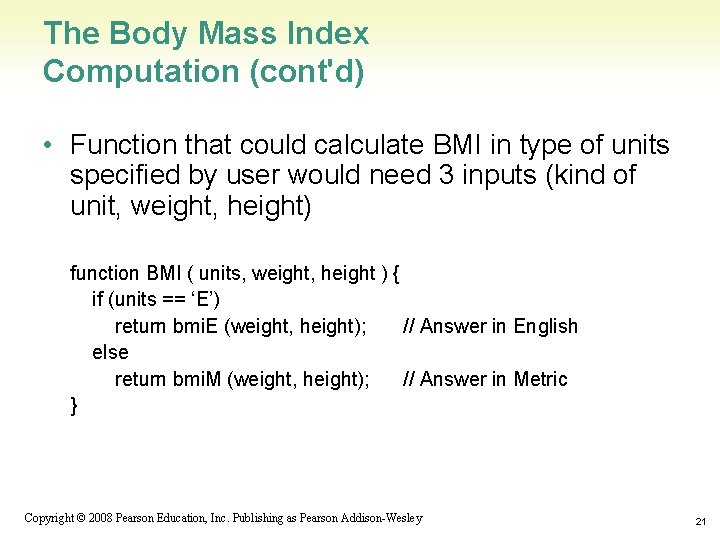
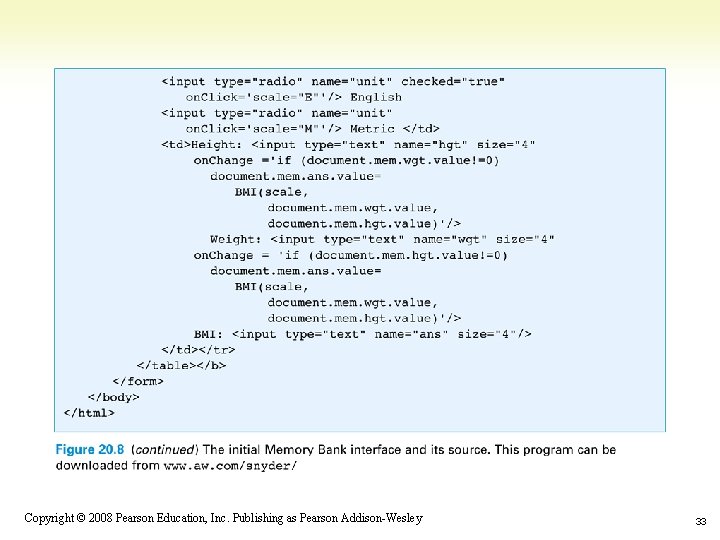
The Body Mass Index Computation (cont'd) • Function that could calculate BMI in type of units specified by user would need 3 inputs (kind of unit, weight, height) function BMI ( units, weight, height ) { if (units == ‘E’) return bmi. E (weight, height); // Answer in English else return bmi. M (weight, height); // Answer in Metric } 1 -21 Copyright © 2008 Pearson Education, Inc. Publishing as Pearson Addison-Wesley 21
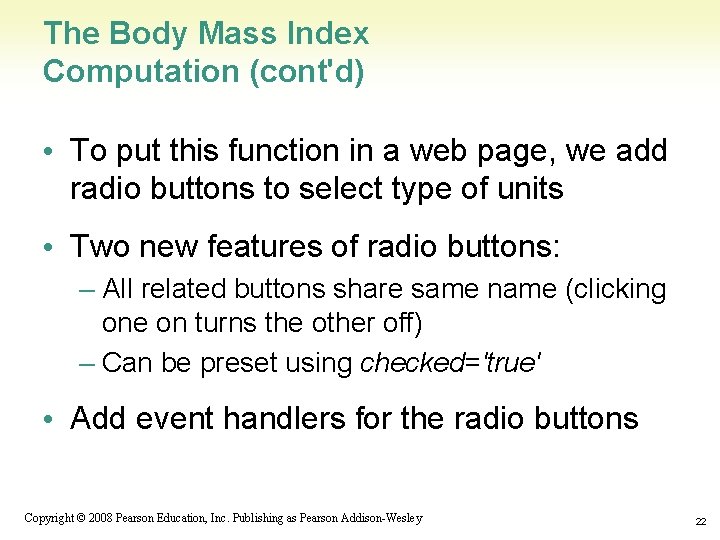
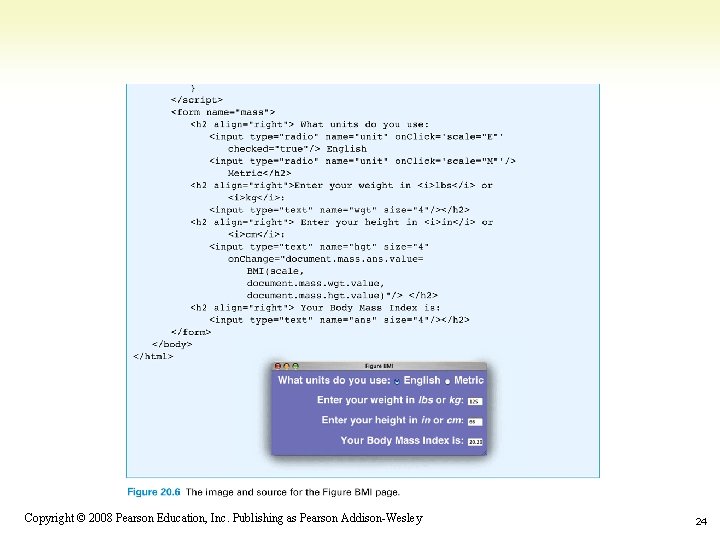
The Body Mass Index Computation (cont'd) • To put this function in a web page, we add radio buttons to select type of units • Two new features of radio buttons: – All related buttons share same name (clicking one on turns the other off) – Can be preset using checked='true' • Add event handlers for the radio buttons 1 -22 Copyright © 2008 Pearson Education, Inc. Publishing as Pearson Addison-Wesley 22
1 -23 Copyright © 2008 Pearson Education, Inc. Publishing as Pearson Addison-Wesley 23
1 -24 Copyright © 2008 Pearson Education, Inc. Publishing as Pearson Addison-Wesley 24
Scoping: When to Use Names • Scope of a name defines how “far” from its declarations it can be used • General rule for scoping: – Variable names declared in a function can be used only within that function (they are local to the function) • Parameters are considered local variables – Variable names declared outside any function can be used throughout the program (global to the function) 1 -25 Copyright © 2008 Pearson Education, Inc. Publishing as Pearson Addison-Wesley 25
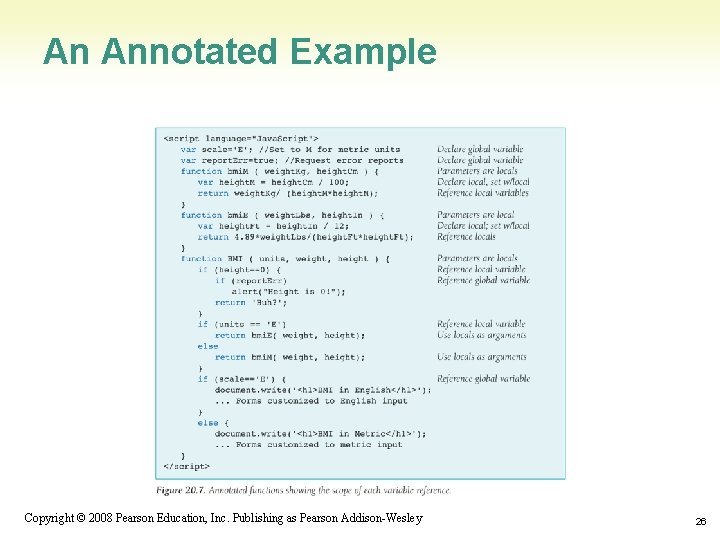
An Annotated Example 1 -26 Copyright © 2008 Pearson Education, Inc. Publishing as Pearson Addison-Wesley 26
Scoping • Local variables come into existence when a function begins, and when it ends, they vanish • Global variables are around all the time • If information must be saved from one function call to the next, it must be in a global variable 1 -27 Copyright © 2008 Pearson Education, Inc. Publishing as Pearson Addison-Wesley 27
Global/Local Scope Interaction • Where a global variable and a local variable have the same name: var y=0; … function tricky (x) { var y; y = x; … } 1 -28 Copyright © 2008 Pearson Education, Inc. Publishing as Pearson Addison-Wesley 28
Global/Local Scope Interaction (cont'd) • y is globally declared and can be referenced anywhere • y is also declared as a local variable in the tricky() function • They are two different variables • Which y is assigned the parameter x? – The local y, because it is declared in the function’s scope, making it the "closest" declaration and hiding the global y 1 -29 Copyright © 2008 Pearson Education, Inc. Publishing as Pearson Addison-Wesley 29
The Memory Bank Web Page • Create a web page for remembering useful computations and storing them in an interactive form • Practice programming with functions 1 -30 Copyright © 2008 Pearson Education, Inc. Publishing as Pearson Addison-Wesley 30
Plan the Memory Bank Web Page • Each table row presents a computation • Each text box except the last is an input to the computation • The last text box is for the output • Start with the row from the BMI computation page 1 -31 Copyright © 2008 Pearson Education, Inc. Publishing as Pearson Addison-Wesley 31
1 -32 Copyright © 2008 Pearson Education, Inc. Publishing as Pearson Addison-Wesley 32
1 -33 Copyright © 2008 Pearson Education, Inc. Publishing as Pearson Addison-Wesley 33
Random Additions • Add the row from the coin-flipping page • Program event handler to keep track of the number of heads and tails flipped • Use global variables so they keep their values across function calls 1 -34 Copyright © 2008 Pearson Education, Inc. Publishing as Pearson Addison-Wesley 34
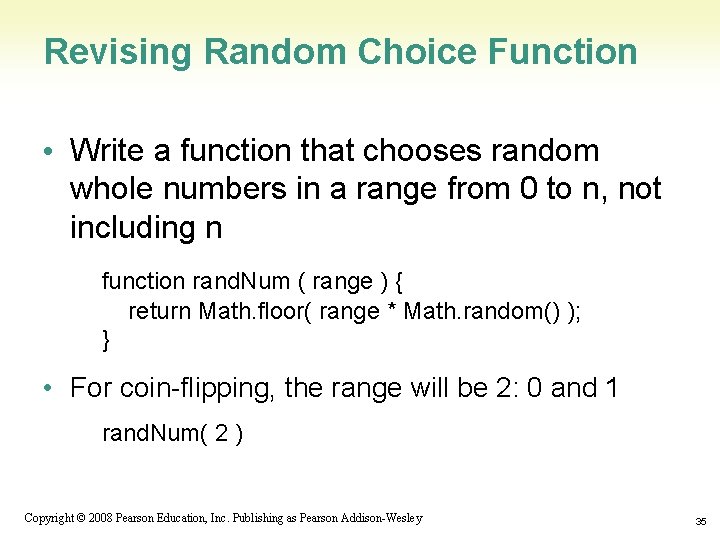
Revising Random Choice Function • Write a function that chooses random whole numbers in a range from 0 to n, not including n function rand. Num ( range ) { return Math. floor( range * Math. random() ); } • For coin-flipping, the range will be 2: 0 and 1 rand. Num( 2 ) 1 -35 Copyright © 2008 Pearson Education, Inc. Publishing as Pearson Addison-Wesley 35
The Coin-Flipping Row • Flip button and textboxes for current flip Outcome, Heads total, and Tails total • Use global variables to keep track of the number of heads and tails flipped – Increment appropriate variable with each flip • Update/display current flip outcome and total number of heads or total number of tails with each flip 1 -36 Copyright © 2008 Pearson Education, Inc. Publishing as Pearson Addison-Wesley 36
The "I’m Thinking of a Number" Row • Guessing game – choose a number from 1 to n • Use rand. Num() function, but shift the range by 1 – rand. Num(n)+1; • This table row is similar to coin-flipping row, but has a text box to set the upper end of the range – Declare global variable (top. End) to say what the limit of the range is – When the user clicks button, the rand. Num() function is called with top. End as the argument, and the result is incremented to shift its range. The result is displayed. 1 -37 Copyright © 2008 Pearson Education, Inc. Publishing as Pearson Addison-Wesley 37
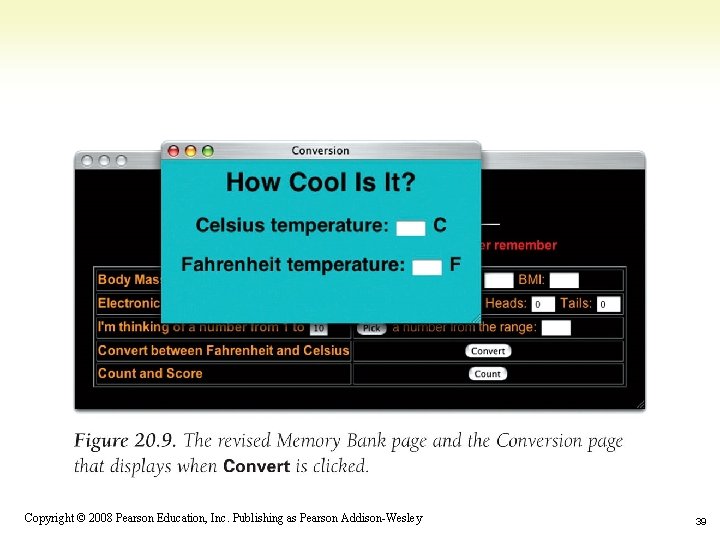
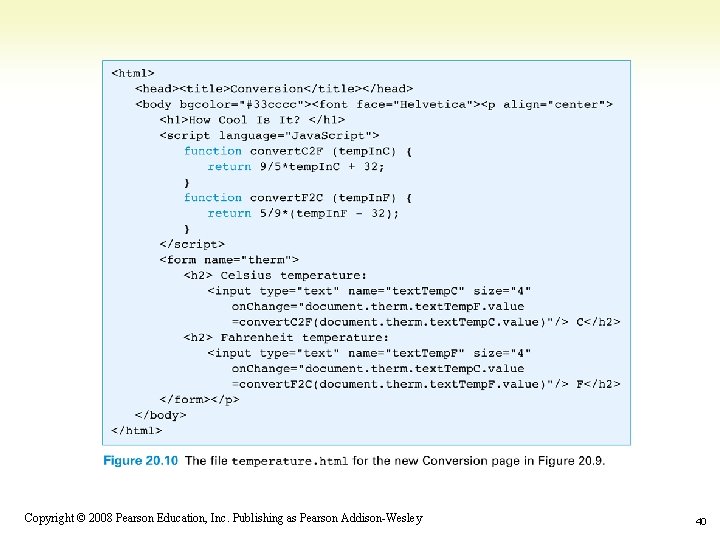
Improving the Memory Bank Web Page • Needs to be fancier and include more features • Program the memory bank to splash new pages onto the screen • Unlike a link, this allows both pages to display at the same time 1 -38 Copyright © 2008 Pearson Education, Inc. Publishing as Pearson Addison-Wesley 38
1 -39 Copyright © 2008 Pearson Education, Inc. Publishing as Pearson Addison-Wesley 39
1 -40 Copyright © 2008 Pearson Education, Inc. Publishing as Pearson Addison-Wesley 40
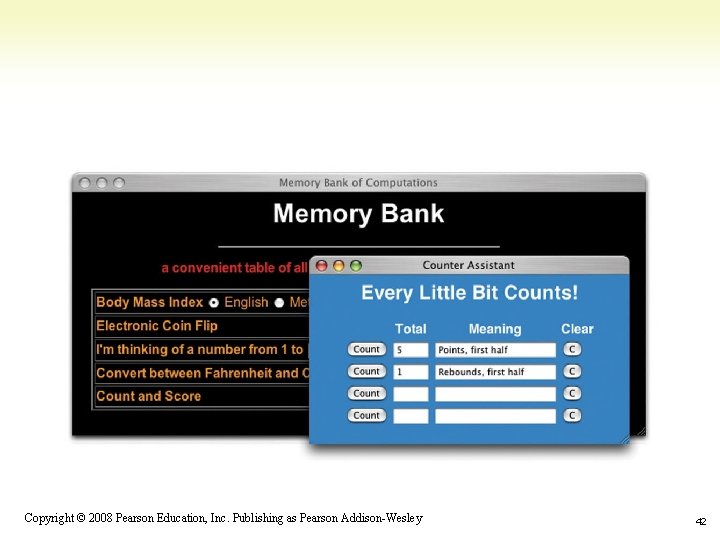
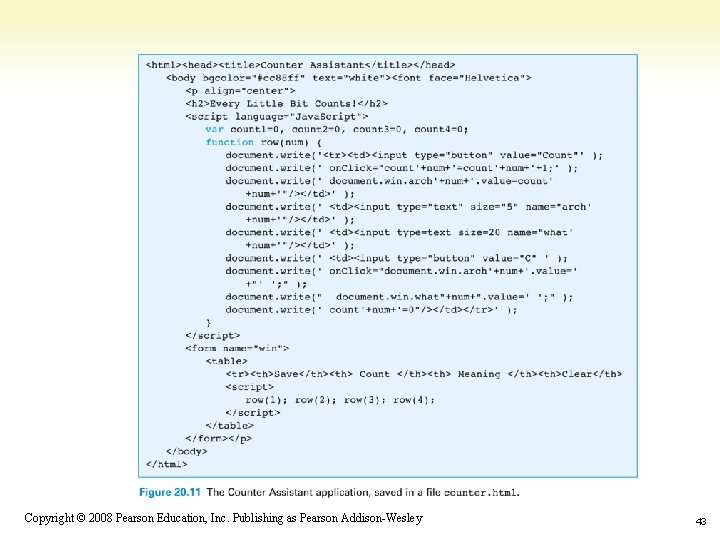
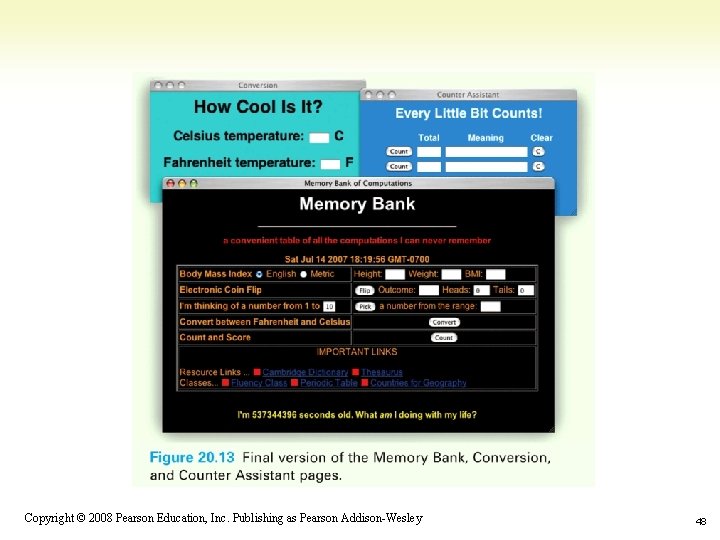
A Counting Page • To keep track of counts of things • Counter Assistant application: – Count button increments Total field – Meaning field can be filled in with any text to remind us what the counter is – C clears all the fields for that row 1 -41 Copyright © 2008 Pearson Education, Inc. Publishing as Pearson Addison-Wesley 41
1 -42 Copyright © 2008 Pearson Education, Inc. Publishing as Pearson Addison-Wesley 42
1 -43 Copyright © 2008 Pearson Education, Inc. Publishing as Pearson Addison-Wesley 43
Recap: Two Reasons to Write Functions • Packaging algorithms into functions • Reuse – Building blocks of future programming – Make them as general as possible • Complexity management – Help us keep our sanity while we're solving problems 1 -44 Copyright © 2008 Pearson Education, Inc. Publishing as Pearson Addison-Wesley 44
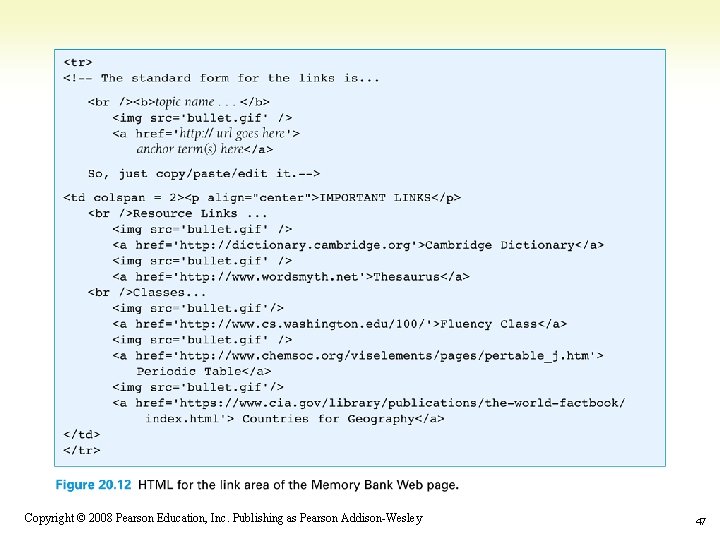
Add Final Touches to Memory Bank • Add a date – Java. Script Date(). to. String() • References the date object, which contains the current date and time in numeric form, and converts to a printable form • Add web links – Add any useful links (online dictionary, etc) in their own column or in a row at the bottom of the table 1 -45 Copyright © 2008 Pearson Education, Inc. Publishing as Pearson Addison-Wesley 45
Assess the Web Page Design • Table data which spans two columns using colspan=2 attribute in <td> tag • Links are grouped by topic • Red bullet is used to separate entries • Link area has a neat structure; adding new links is easy 1 -46 Copyright © 2008 Pearson Education, Inc. Publishing as Pearson Addison-Wesley 46
1 -47 Copyright © 2008 Pearson Education, Inc. Publishing as Pearson Addison-Wesley 47
1 -48 Copyright © 2008 Pearson Education, Inc. Publishing as Pearson Addison-Wesley 48
- Slides: 48