
Chapter 2 The Process of Design Introduction Design
- Slides: 29
Chapter 2 The Process of Design
Introduction • Design – Process of planned change – Logical problem-solving technique • Design goals – Achieve desired effects – Minimize undesired effects – Control risk
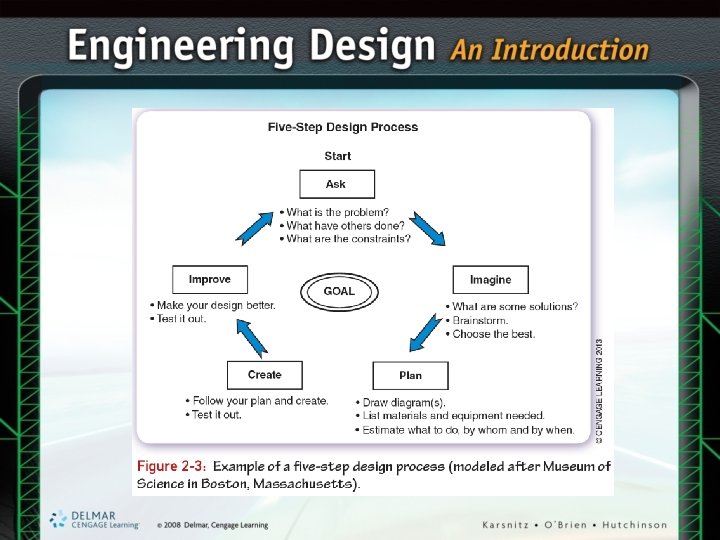
• • Polya’s Four Steps to Effective Problem Solving Understand the problem Make a plan Carry out the plan Look back on the plan – How could it have been better?
Planning • Design process is a plan • List, order, and prioritize items • Plans can vary from simple to complex – Design what you are going to wear today – Design a space station and place into orbit
Order • Design steps placed into a sequential process • Polya’s steps are carried out in same order every time • Nonsequential process – Designers jump backward and forward between steps: • To more effectively develop a solution
Iteration • Repetition • Goal: to improve • May repeat entire design process or subsets of the process steps • Iteration should lead to convergence – Shows project is getting close to its goals
Iteration (cont’d. ) • Design examples – Surgical robot – Seat for a commercial airliner
Managing a Project • All projects contain risk – Low risk challenge is easy to accomplish – High risk is difficult to accomplish • Keys to managing project risk – Identifying roadblocks – Work on what removes the most risk first
Design Process • 12 -step model • Figure 2 -7 (see text) shows recommended order for the steps – Some steps loop back to other steps
Defining the Problem • Identify and define the problem – Try to understand it as completely as possible – Understand the limitations of the problem • Example: FIRST robot competition – Choice to design an autonomous robot – Calculate potential scoring advantage – Determine if team has necessary expertise
Brainstorming • Each team member contributes ideas to generate solutions • Important to remain nonjudgmental of ideas • Encourage all ideas • Do not overanalyze ideas • Team leader (facilitator) runs the meeting
Researching and Generating Ideas • Find previously used concepts – Apply and modify to new situation • Reverse engineering • Sources of information – Library, Internet, previous project documents
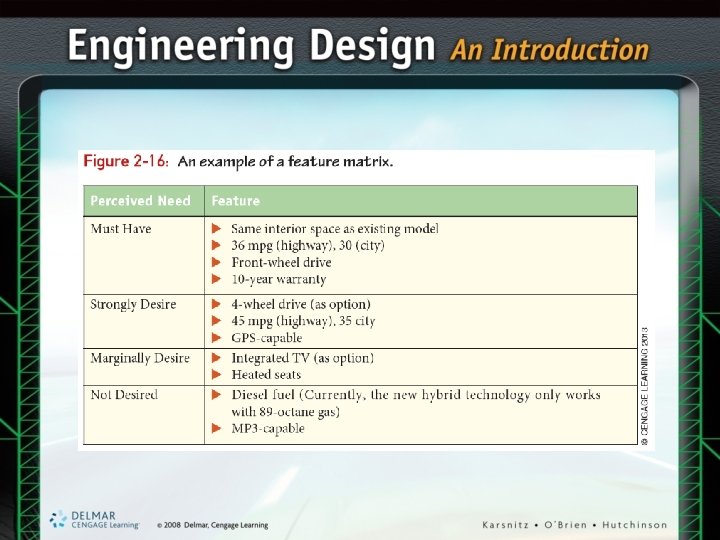
Researching and Generating Ideas (cont’d. ) • Separate needs into four categories – Must have – Strongly desired – Marginally desired – Not desired
Identifying Criteria and Specifying Constraints • • • Detail what you intend to do Identify imposed limitations Example: new SUV features Study information and make key decisions Write a design brief
Exploring Possibilities • Explore all possible solutions • Consider: – Technologies – Materials – Design – Fabrication processes • Work out alternative solutions
Exploring Possibilities (cont’d. ) • Engineering notebook – Used to record ideas, calculations, results – Serves as clear evidence of patentable ideas • Focus on the critical areas • Example: SUV design – How to achieve both 45 mpg and four-wheel drive criteria
Selecting an Approach • Down-select from the available options – Assess – Choose design path • Or more than one design path if resources allow • Strategies for choosing an approach – List good and bad attributes – Prepare a decision matrix • Scoring (weighting) system
Developing a Design Proposal • Prepare documents suitable for creating a prototype – Can include drawings, text, and other items – Must be clear and legible – Specify materials, dimensions, and processes • Example: FIRST robot – Need to select which type of aluminum to use
Making a Model or Prototype • Construct model or prototype – Model is less advanced than a prototype – Prototype closer to form, fit, function of final design • Example: FIRST robotics design team – Wooden model of the main robot frame – Helped determine how components will fit
Testing and Evaluating • Use the model to evaluate how design meets criteria • Choose test conditions • Determine what aspects to test • Prepare test plan • Gather test data • Summarize results
Refining the Design • Identify areas not meeting criteria • Redesign or “tweak” design to improve • Redesign step often included in the design schedule • Determine which steps in design process to repeat
Creating or Making • Fabrication of the design – May require specialized tools and materials • Mass production – Rapid fabrication of multiple copies of a product • Custom manufacturing – Much smaller quantities than mass production
Communicating Process and Results • Final design document can include: – Slide presentation – Technical reports – Detailed design drawings – Sketches – Charts, graphs, calculations
Communicating Process and Results (cont’d. ) • Additional design communication – Pertains to marketing, distribution, and sale of the product – Patents
Creativity and Innovation in the Design Process • Design takes substantial time and resources • Five of the 12 steps call for innovation – The rest keep the design team focused on the problem
Design Limitations • Clearly defining limitations – Accurately describes problems – Known as criteria, constraints, specifications, or requirements • Example: Robot competition entry fee and travel costs neglected