
Chapter 2 Section 2 5 Application Layer DNS
![dig www. ece. gatech. edu [ MX records not shown] ; <<>> Di. G](https://slidetodoc.com/presentation_image_h/2824341f50d0f6d9935d58c118baa24a/image-30.jpg "dig www. ece. gatech. edu [ MX records not shown] ; <<>> Di. G")
- Slides: 32
Chapter 2 (Section 2. 5) Application Layer - DNS Modified for GT ECE 6612 by Prof. John Copeland A note on the use of these ppt slides: We’re making these slides freely available to all (faculty, students, readers). They’re in Power. Point form so you can add, modify, and delete slides (including this one) and slide content to suit your needs. They obviously represent a lot of work on our part. In return for use, we only ask the following: q If you use these slides (e. g. , in a class) in substantially unaltered form, that you mention their source (after all, we’d like people to use our book!) q If you post any slides in substantially unaltered form on a www site, that you note that they are adapted from (or perhaps identical to) our slides, and note our copyright of this material. Thanks and enjoy! JFK/KWR All material copyright 1996 -2009 J. F Kurose and K. W. Ross, All Rights Reserved Computer Networking: A Top Down Approach Featuring the Internet, 5 rd edition. Jim Kurose, Keith Ross Addison-Wesley, July 2009. Textbook for ECE 3076. 2/25/13 06 a DNS. ppt 1
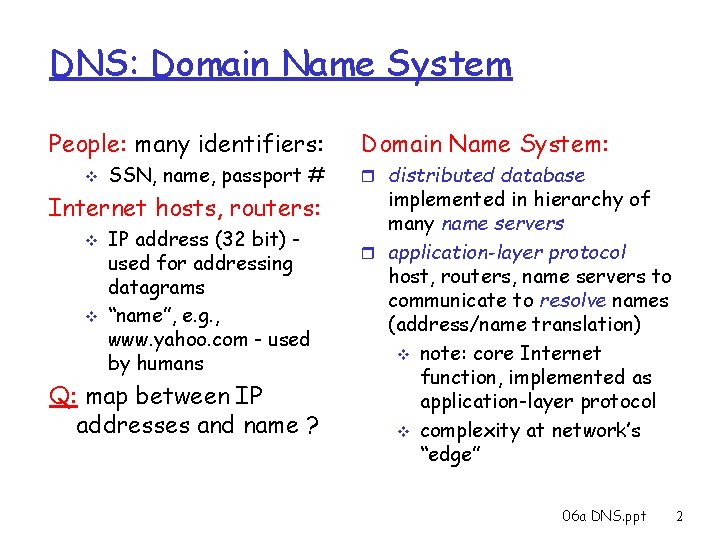
DNS: Domain Name System People: many identifiers: v SSN, name, passport # Internet hosts, routers: v v IP address (32 bit) used for addressing datagrams “name”, e. g. , www. yahoo. com - used by humans Q: map between IP addresses and name ? Domain Name System: r distributed database implemented in hierarchy of many name servers r application-layer protocol host, routers, name servers to communicate to resolve names (address/name translation) v note: core Internet function, implemented as application-layer protocol v complexity at network’s “edge” 06 a DNS. ppt 2
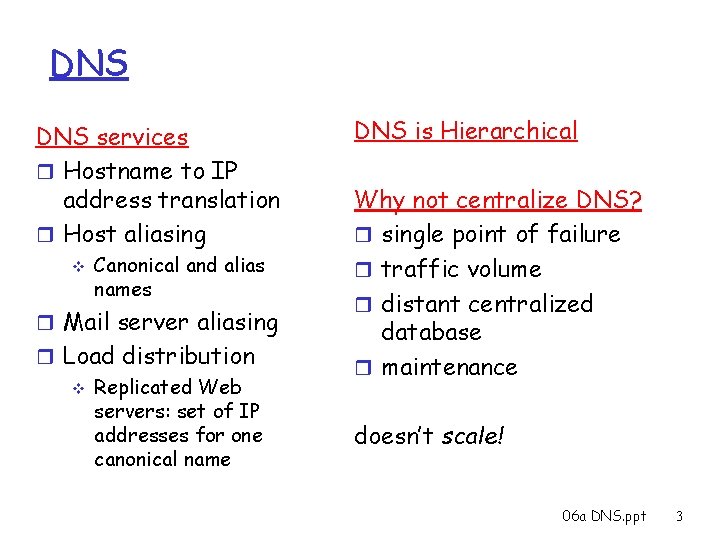
DNS services r Hostname to IP address translation r Host aliasing v Canonical and alias names r Mail server aliasing r Load distribution v Replicated Web servers: set of IP addresses for one canonical name DNS is Hierarchical Why not centralize DNS? r single point of failure r traffic volume r distant centralized database r maintenance doesn’t scale! 06 a DNS. ppt 3
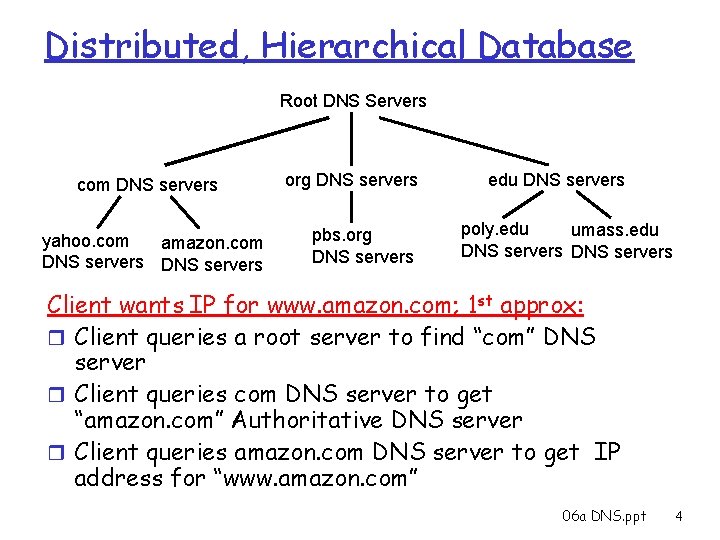
Distributed, Hierarchical Database Root DNS Servers com DNS servers yahoo. com amazon. com DNS servers org DNS servers pbs. org DNS servers edu DNS servers poly. edu umass. edu DNS servers Client wants IP for www. amazon. com; 1 st approx: r Client queries a root server to find “com” DNS server r Client queries com DNS server to get “amazon. com” Authoritative DNS server r Client queries amazon. com DNS server to get IP address for “www. amazon. com” 06 a DNS. ppt 4
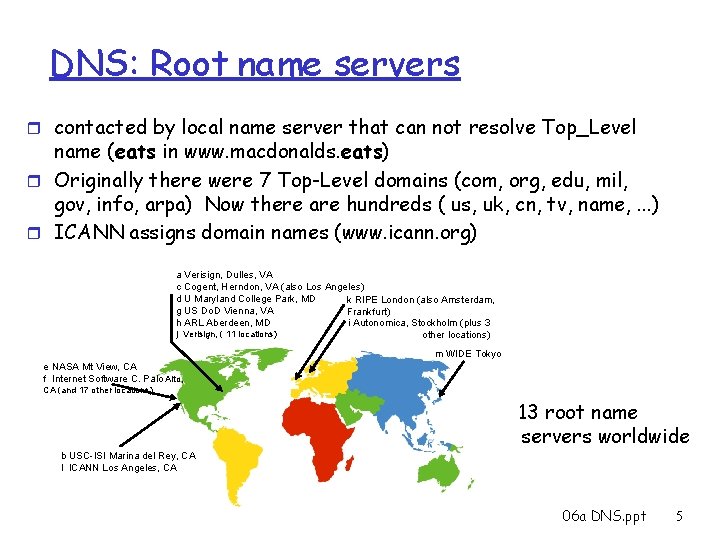
DNS: Root name servers r contacted by local name server that can not resolve Top_Level name (eats in www. macdonalds. eats) r Originally there were 7 Top-Level domains (com, org, edu, mil, gov, info, arpa) Now there are hundreds ( us, uk, cn, tv, name, . . . ) r ICANN assigns domain names (www. icann. org) a Verisign, Dulles, VA c Cogent, Herndon, VA (also Los Angeles) d U Maryland College Park, MD k RIPE London (also Amsterdam, g US Do. D Vienna, VA Frankfurt) i Autonomica, Stockholm (plus 3 h ARL Aberdeen, MD j Verisign, ( 11 locations) other locations) m WIDE Tokyo e NASA Mt View, CA f Internet Software C. Palo Alto, CA (and 17 other locations) 13 root name servers worldwide b USC-ISI Marina del Rey, CA l ICANN Los Angeles, CA 06 a DNS. ppt 5
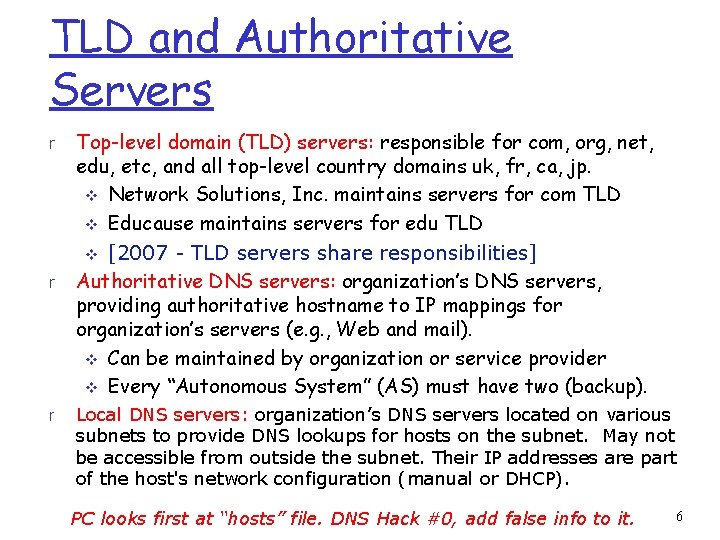
TLD and Authoritative Servers r r r Top-level domain (TLD) servers: responsible for com, org, net, edu, etc, and all top-level country domains uk, fr, ca, jp. v Network Solutions, Inc. maintains servers for com TLD v Educause maintains servers for edu TLD v [2007 - TLD servers share responsibilities] Authoritative DNS servers: organization’s DNS servers, providing authoritative hostname to IP mappings for organization’s servers (e. g. , Web and mail). v Can be maintained by organization or service provider v Every “Autonomous System” (AS) must have two (backup). Local DNS servers: organization’s DNS servers located on various subnets to provide DNS lookups for hosts on the subnet. May not be accessible from outside the subnet. Their IP addresses are part of the host's network configuration (manual or DHCP). PC looks first at “hosts” file. DNS Hack #0, add false info to it. 6
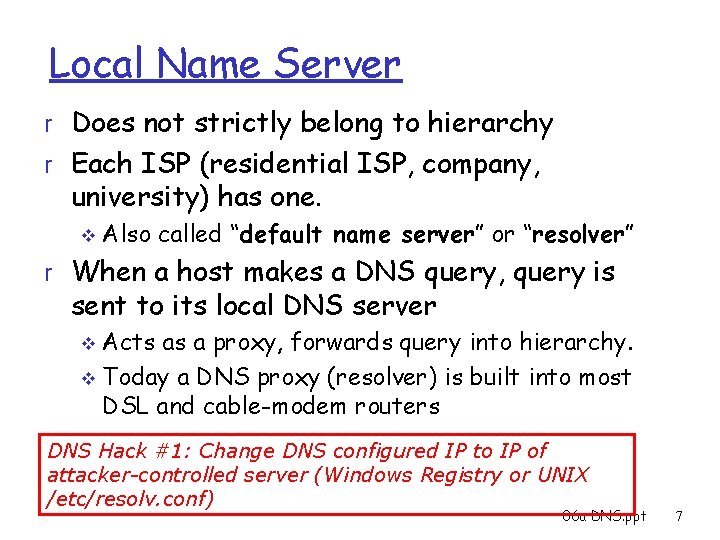
Local Name Server r Does not strictly belong to hierarchy r Each ISP (residential ISP, company, university) has one. v Also called “default name server” or “resolver” r When a host makes a DNS query, query is sent to its local DNS server Acts as a proxy, forwards query into hierarchy. v Today a DNS proxy (resolver) is built into most DSL and cable-modem routers v DNS Hack #1: Change DNS configured IP to IP of attacker-controlled server (Windows Registry or UNIX /etc/resolv. conf) 06 a DNS. ppt 7
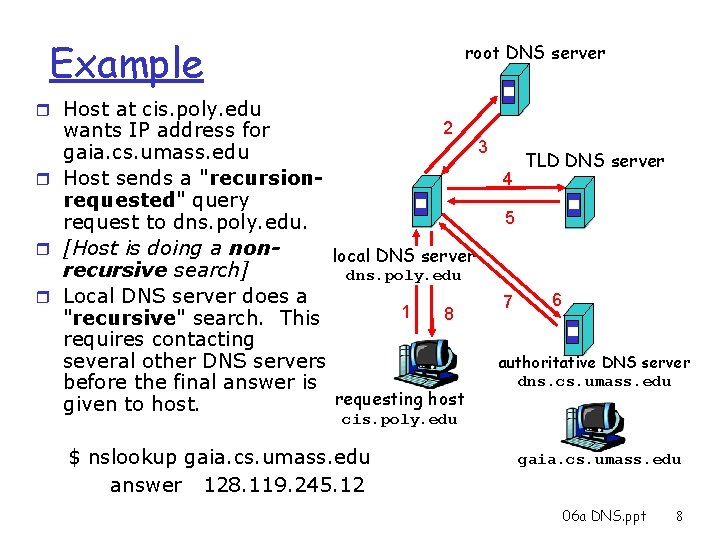
Example root DNS server r Host at cis. poly. edu 2 wants IP address for 3 gaia. cs. umass. edu TLD DNS server 4 r Host sends a "recursionrequested" query 5 request to dns. poly. edu. r [Host is doing a nonlocal DNS server recursive search] dns. poly. edu r Local DNS server does a 6 7 1 8 "recursive" search. This requires contacting authoritative DNS server several other DNS servers dns. cs. umass. edu before the final answer is requesting host given to host. cis. poly. edu $ nslookup gaia. cs. umass. edu answer 128. 119. 245. 12 gaia. cs. umass. edu 06 a DNS. ppt 8
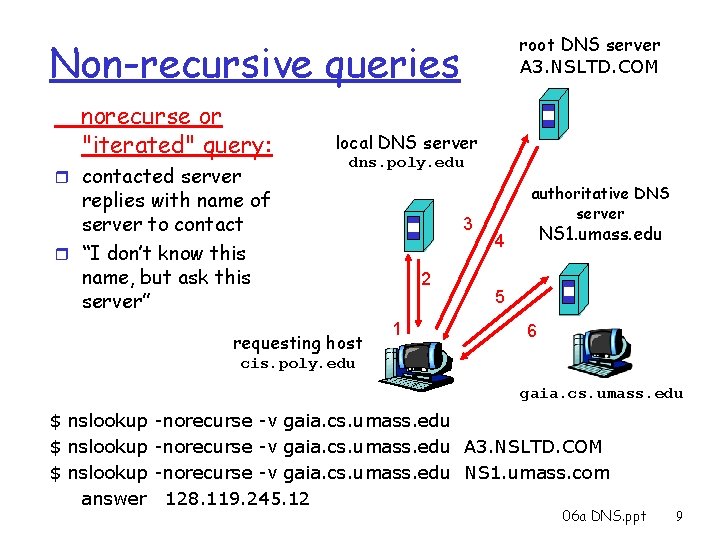
root DNS server A 3. NSLTD. COM Non-recursive queries norecurse or "iterated" query: r contacted server local DNS server dns. poly. edu replies with name of server to contact r “I don’t know this name, but ask this server” requesting host 3 2 1 authoritative DNS server NS 1. umass. edu 4 5 6 cis. poly. edu gaia. cs. umass. edu $ nslookup -norecurse -v gaia. cs. umass. edu A 3. NSLTD. COM $ nslookup -norecurse -v gaia. cs. umass. edu NS 1. umass. com answer 128. 119. 245. 12 06 a DNS. ppt 9
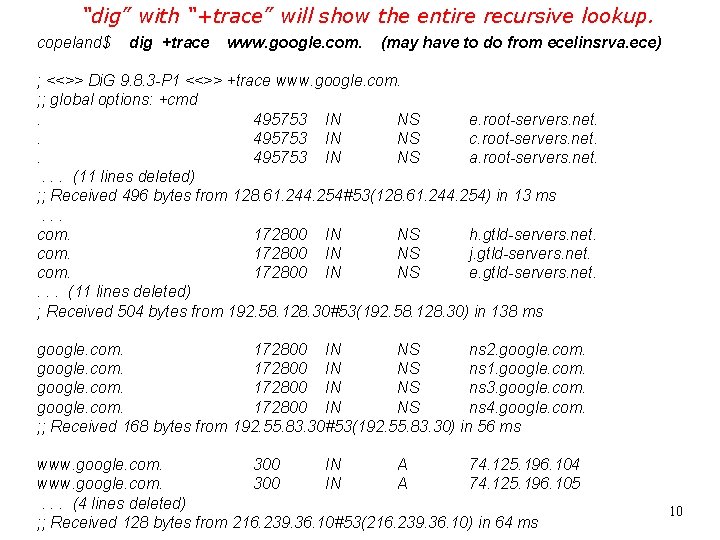
“dig” with “+trace” will show the entire recursive lookup. copeland$ dig +trace www. google. com. (may have to do from ecelinsrva. ece) ; <<>> Di. G 9. 8. 3 -P 1 <<>> +trace www. google. com. ; ; global options: +cmd. 495753 IN NS e. root-servers. net. . 495753 IN NS c. root-servers. net. . 495753 IN NS a. root-servers. net. . (11 lines deleted) ; ; Received 496 bytes from 128. 61. 244. 254#53(128. 61. 244. 254) in 13 ms. . . com. 172800 IN NS h. gtld-servers. net. com. 172800 IN NS j. gtld-servers. net. com. 172800 IN NS e. gtld-servers. net. . (11 lines deleted) ; Received 504 bytes from 192. 58. 128. 30#53(192. 58. 128. 30) in 138 ms google. com. 172800 IN NS ns 2. google. com. 172800 IN NS ns 1. google. com. 172800 IN NS ns 3. google. com. 172800 IN NS ns 4. google. com. ; ; Received 168 bytes from 192. 55. 83. 30#53(192. 55. 83. 30) in 56 ms www. google. com. 300 IN A 74. 125. 196. 104 www. google. com. 300 IN A 74. 125. 196. 105. . . (4 lines deleted) ; ; Received 128 bytes from 216. 239. 36. 10#53(216. 239. 36. 10) in 64 ms 10
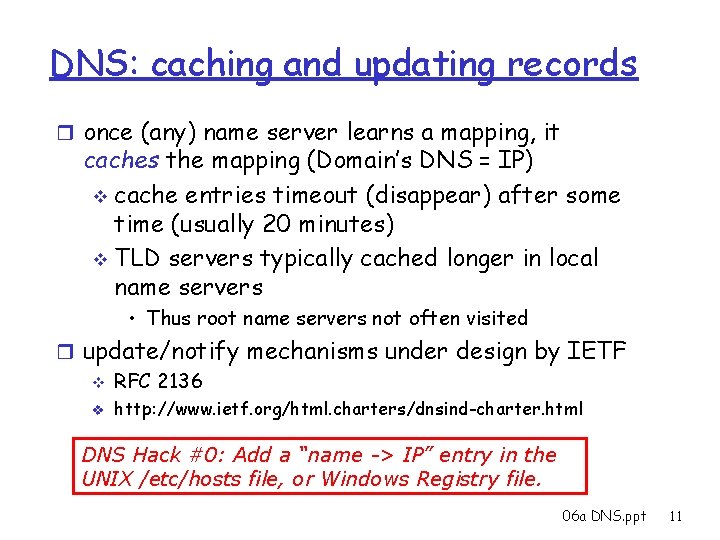
DNS: caching and updating records r once (any) name server learns a mapping, it caches the mapping (Domain’s DNS = IP) v cache entries timeout (disappear) after some time (usually 20 minutes) v TLD servers typically cached longer in local name servers • Thus root name servers not often visited r update/notify mechanisms under design by IETF v RFC 2136 v http: //www. ietf. org/html. charters/dnsind-charter. html DNS Hack #0: Add a “name -> IP” entry in the UNIX /etc/hosts file, or Windows Registry file. 06 a DNS. ppt 11
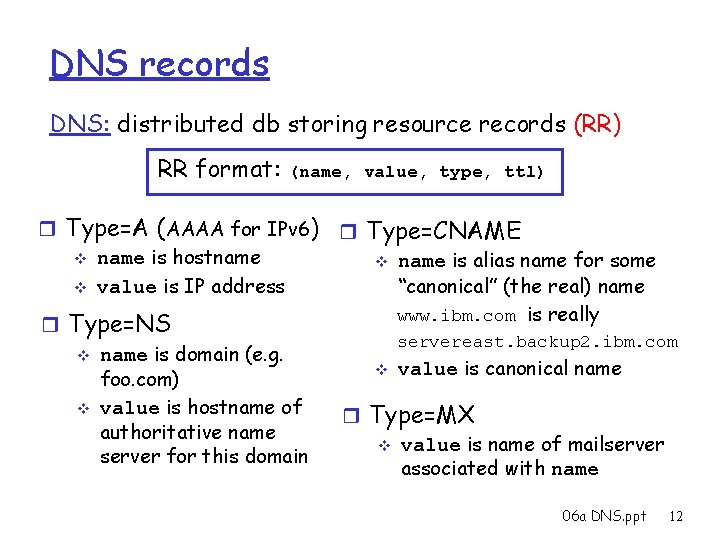
DNS records DNS: distributed db storing resource records (RR) RR format: (name, value, type, ttl) r Type=A (AAAA for IPv 6) r Type=CNAME v name is hostname v name is alias name for some “canonical” (the real) name v value is IP address www. ibm. com is really r Type=NS servereast. backup 2. ibm. com v name is domain (e. g. v value is canonical name foo. com) v value is hostname of r Type=MX authoritative name v value is name of mailserver for this domain associated with name 06 a DNS. ppt 12
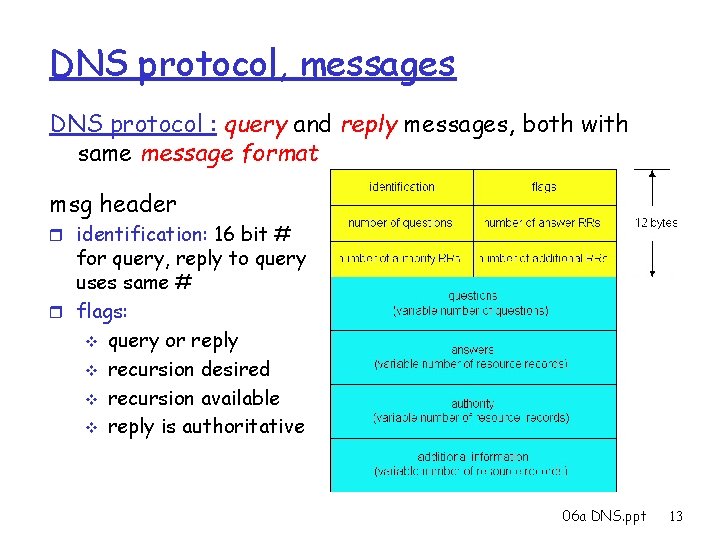
DNS protocol, messages DNS protocol : query and reply messages, both with same message format msg header r identification: 16 bit # for query, reply to query uses same # r flags: v query or reply v recursion desired v recursion available v reply is authoritative 06 a DNS. ppt 13
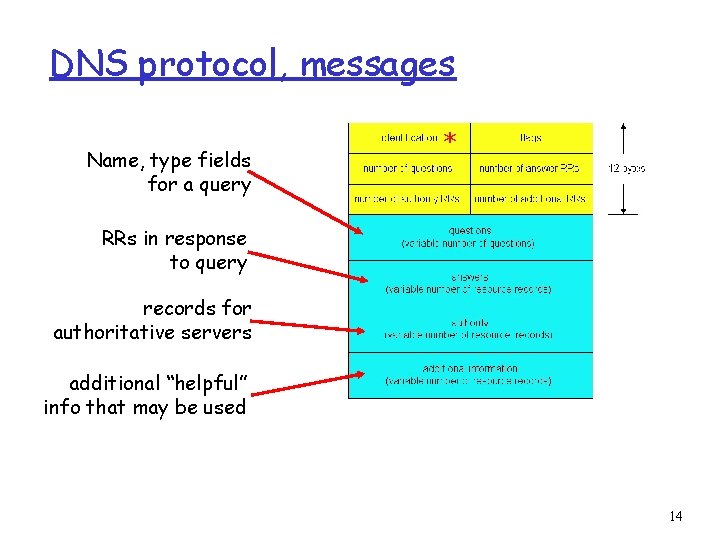
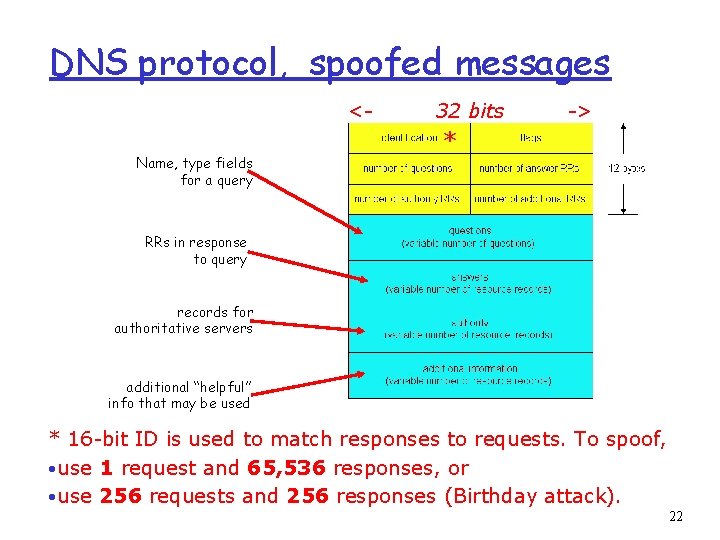
DNS protocol, messages Name, type fields for a query * RRs in response to query records for authoritative servers additional “helpful” info that may be used 14
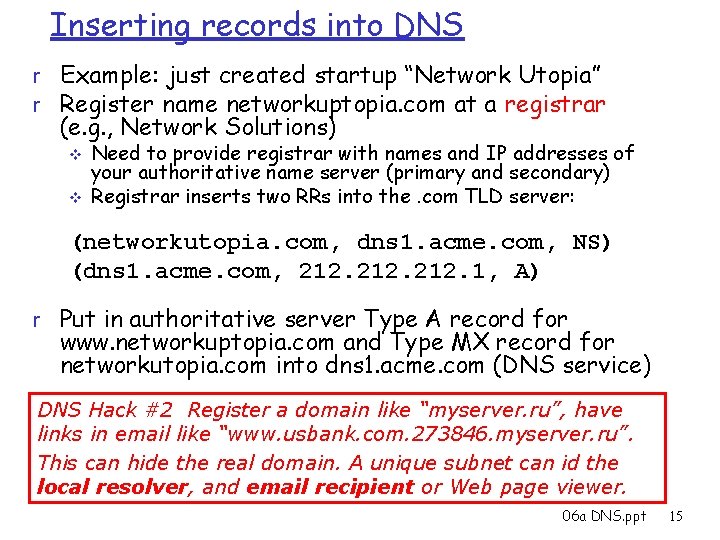
Inserting records into DNS r Example: just created startup “Network Utopia” r Register name networkuptopia. com at a registrar (e. g. , Network Solutions) v v Need to provide registrar with names and IP addresses of your authoritative name server (primary and secondary) Registrar inserts two RRs into the. com TLD server: (networkutopia. com, dns 1. acme. com, NS) (dns 1. acme. com, 212. 1, A) r Put in authoritative server Type A record for www. networkuptopia. com and Type MX record for networkutopia. com into dns 1. acme. com (DNS service) DNS Hack #2 Register a domain like “myserver. ru”, have links in email like “www. usbank. com. 273846. myserver. ru”. This can hide the real domain. A unique subnet can id the local resolver, and email recipient or Web page viewer. 06 a DNS. ppt 15
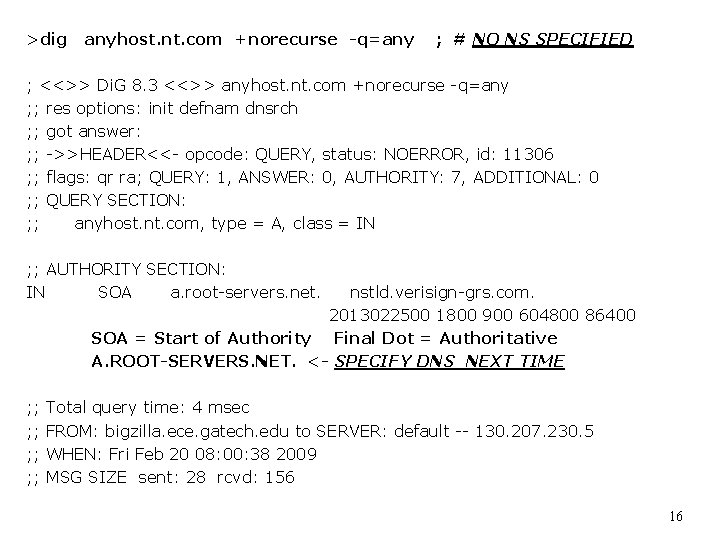
>dig anyhost. nt. com +norecurse -q=any ; # NO NS SPECIFIED ; <<>> Di. G 8. 3 <<>> anyhost. nt. com +norecurse -q=any ; ; res options: init defnam dnsrch ; ; got answer: ; ; ->>HEADER<<- opcode: QUERY, status: NOERROR, id: 11306 ; ; flags: qr ra; QUERY: 1, ANSWER: 0, AUTHORITY: 7, ADDITIONAL: 0 ; ; QUERY SECTION: ; ; anyhost. nt. com, type = A, class = IN ; ; AUTHORITY SECTION: IN SOA a. root-servers. net. nstld. verisign-grs. com. 2013022500 1800 900 604800 86400 SOA = Start of Authority Final Dot = Authoritative A. ROOT-SERVERS. NET. <- SPECIFY DNS NEXT TIME ; ; ; ; Total query time: 4 msec FROM: bigzilla. ece. gatech. edu to SERVER: default -- 130. 207. 230. 5 WHEN: Fri Feb 20 08: 00: 38 2009 MSG SIZE sent: 28 rcvd: 156 16
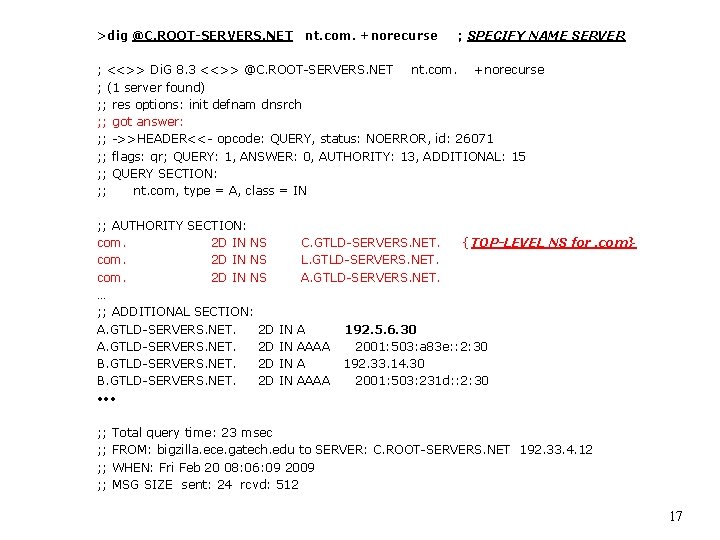
>dig @C. ROOT-SERVERS. NET nt. com. +norecurse ; SPECIFY NAME SERVER ; <<>> Di. G 8. 3 <<>> @C. ROOT-SERVERS. NET nt. com. +norecurse ; (1 server found) ; ; res options: init defnam dnsrch ; ; got answer: ; ; ->>HEADER<<- opcode: QUERY, status: NOERROR, id: 26071 ; ; flags: qr; QUERY: 1, ANSWER: 0, AUTHORITY: 13, ADDITIONAL: 15 ; ; QUERY SECTION: ; ; nt. com, type = A, class = IN ; ; AUTHORITY SECTION: com. 2 D IN NS … ; ; ADDITIONAL SECTION: A. GTLD-SERVERS. NET. 2 D B. GTLD-SERVERS. NET. 2 D • • • ; ; ; ; C. GTLD-SERVERS. NET. L. GTLD-SERVERS. NET. A. GTLD-SERVERS. NET. IN IN A AAAA { TOP-LEVEL NS for. com} 192. 5. 6. 30 2001: 503: a 83 e: : 2: 30 192. 33. 14. 30 2001: 503: 231 d: : 2: 30 Total query time: 23 msec FROM: bigzilla. ece. gatech. edu to SERVER: C. ROOT-SERVERS. NET 192. 33. 4. 12 WHEN: Fri Feb 20 08: 06: 09 2009 MSG SIZE sent: 24 rcvd: 512 17
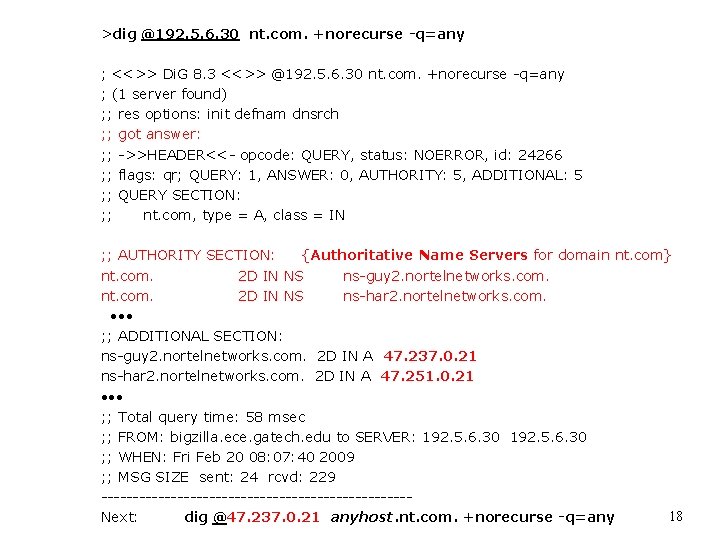
>dig @192. 5. 6. 30 nt. com. +norecurse -q=any ; <<>> Di. G 8. 3 <<>> @192. 5. 6. 30 nt. com. +norecurse -q=any ; (1 server found) ; ; res options: init defnam dnsrch ; ; got answer: ; ; ->>HEADER<<- opcode: QUERY, status: NOERROR, id: 24266 ; ; flags: qr; QUERY: 1, ANSWER: 0, AUTHORITY: 5, ADDITIONAL: 5 ; ; QUERY SECTION: ; ; nt. com, type = A, class = IN ; ; AUTHORITY SECTION: {Authoritative Name Servers for domain nt. com} nt. com. 2 D IN NS ns-guy 2. nortelnetworks. com. nt. com. 2 D IN NS ns-har 2. nortelnetworks. com. • • • ; ; ADDITIONAL SECTION: ns-guy 2. nortelnetworks. com. 2 D IN A 47. 237. 0. 21 ns-har 2. nortelnetworks. com. 2 D IN A 47. 251. 0. 21 • • • ; ; Total query time: 58 msec ; ; FROM: bigzilla. ece. gatech. edu to SERVER: 192. 5. 6. 30 ; ; WHEN: Fri Feb 20 08: 07: 40 2009 ; ; MSG SIZE sent: 24 rcvd: 229 ------------------------18 Next: dig @47. 237. 0. 21 anyhost. nt. com. +norecurse -q=any
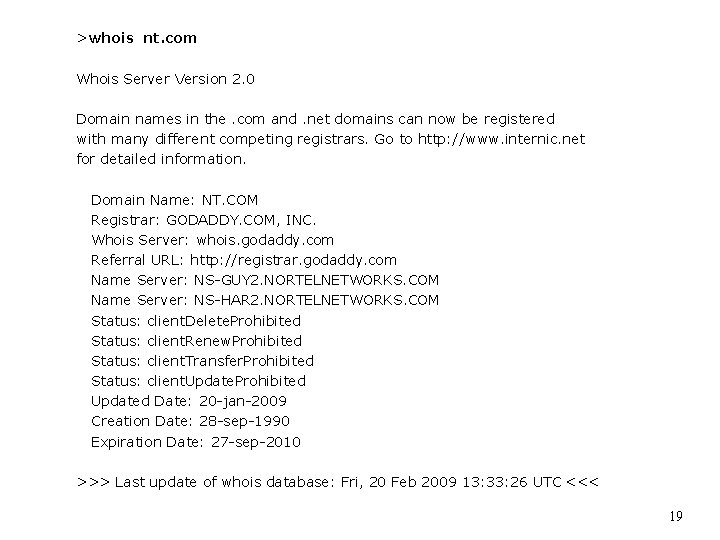
>whois nt. com Whois Server Version 2. 0 Domain names in the. com and. net domains can now be registered with many different competing registrars. Go to http: //www. internic. net for detailed information. Domain Name: NT. COM Registrar: GODADDY. COM, INC. Whois Server: whois. godaddy. com Referral URL: http: //registrar. godaddy. com Name Server: NS-GUY 2. NORTELNETWORKS. COM Name Server: NS-HAR 2. NORTELNETWORKS. COM Status: client. Delete. Prohibited Status: client. Renew. Prohibited Status: client. Transfer. Prohibited Status: client. Update. Prohibited Updated Date: 20 -jan-2009 Creation Date: 28 -sep-1990 Expiration Date: 27 -sep-2010 >>> Last update of whois database: Fri, 20 Feb 2009 13: 33: 26 UTC <<< 19
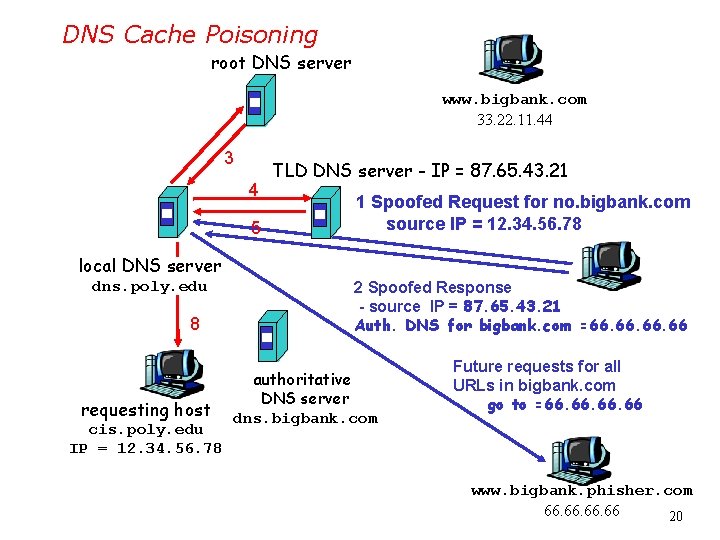
DNS Cache Poisoning root DNS server www. bigbank. com 33. 22. 11. 44 3 4 5 TLD DNS server - IP = 87. 65. 43. 21 1 Spoofed Request for no. bigbank. com source IP = 12. 34. 56. 78 local DNS server dns. poly. edu 8 requesting host cis. poly. edu IP = 12. 34. 56. 78 2 Spoofed Response - source IP = 87. 65. 43. 21 Auth. DNS for bigbank. com =66. 66. 66 authoritative DNS server dns. bigbank. com Future requests for all URLs in bigbank. com go to =66. 66. 66 www. bigbank. phisher. com 66. 66. 66 20
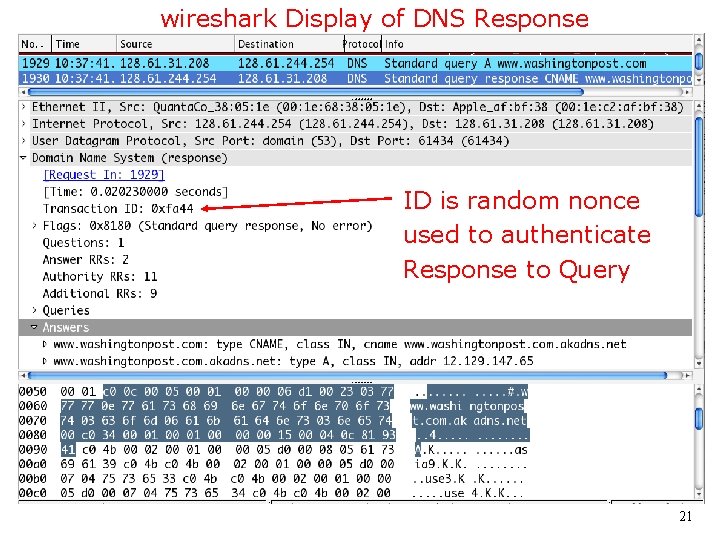
wireshark Display of DNS Response ID is random nonce used to authenticate Response to Query 21
DNS protocol, spoofed messages <Name, type fields for a query 32 bits -> * RRs in response to query records for authoritative servers additional “helpful” info that may be used * 16 -bit ID is used to match responses to requests. To spoof, • use 1 request and 65, 536 responses, or • use 256 requests and 256 responses (Birthday attack). 06 a DNS. ppt 22
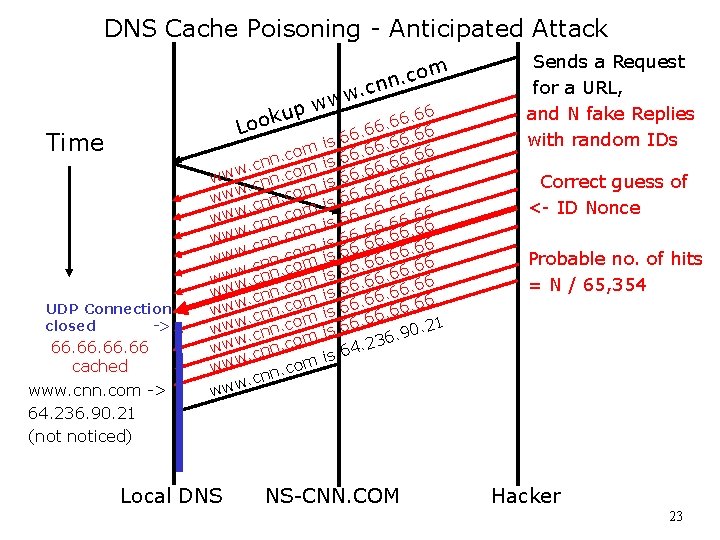
DNS Cache Poisoning - Anticipated Attack m o c. nn . c w w w p u. 66 k 6 o 6 L. 66 66. 6 Time UDP Connection closed -> 66. 66. 66 cached www. cnn. com -> 64. 236. 90. 21 (not noticed) om c. n. cn m www cnn. com w w. cn om ww. cnn. c m www. cnn. co www n. com. cn w w w Local DNS . 66 6 6 66. 66 6 66. 6. 66 6 6. 6. 66 66 6 66. 66 6 66. 6 0. 21 9. 6. 23 4 6 is is is NS-CNN. COM Sends a Request for a URL, and N fake Replies with random IDs Correct guess of <- ID Nonce Probable no. of hits = N / 65, 354 Hacker 23
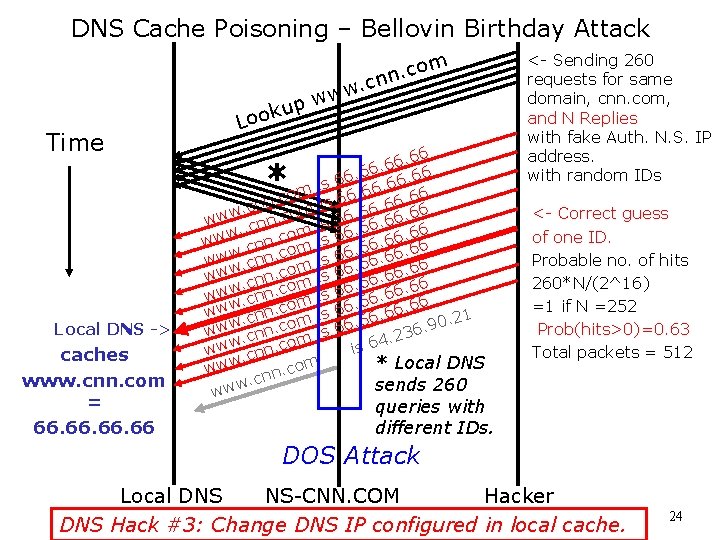
DNS Cache Poisoning – Bellovin Birthday Attack Time Local DNS -> caches www. cnn. com = 66. 66. 66 k Loo up om c. n cn. w ww 66. 6. 66 6 6 is 6. 6 6 m 6. o 6 c 6 n. 6. 6 s n i 6 c. . 6 6 m www. cnn. co is 66. 66. 6. . 6 m 66 www. cnn. com is 66 66. 6. o. 6 www. cnn. c m is 66. 66 66 www cnn. com is 66 66. 6. o 6 6. www. cnn. c m is 6. 66. 6 www. cnn. co is 66 6. 6 m 66. 6 0. 21 w o 9 c. w. 6 w. 23. cnn com is 4 w 6 w. is w cnn. w * Local DNS ww. com n n. c sends 260 www * <- Sending 260 requests for same domain, cnn. com, and N Replies with fake Auth. N. S. IP address. with random IDs <- Correct guess of one ID. Probable no. of hits 260*N/(2^16) =1 if N =252 Prob(hits>0)=0. 63 Total packets = 512 queries with different IDs. DOS Attack Local DNS NS-CNN. COM Hacker DNS Hack #3: Change DNS IP configured in local cache. 24
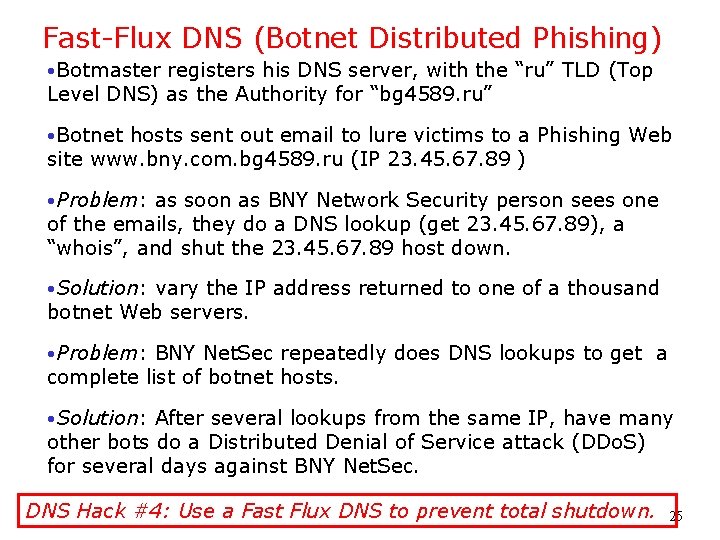
Fast-Flux DNS (Botnet Distributed Phishing) • Botmaster registers his DNS server, with the “ru” TLD (Top Level DNS) as the Authority for “bg 4589. ru” • Botnet hosts sent out email to lure victims to a Phishing Web site www. bny. com. bg 4589. ru (IP 23. 45. 67. 89 ) • Problem: as soon as BNY Network Security person sees one of the emails, they do a DNS lookup (get 23. 45. 67. 89), a “whois”, and shut the 23. 45. 67. 89 host down. • Solution: vary the IP address returned to one of a thousand botnet Web servers. • Problem: BNY Net. Sec repeatedly does DNS lookups to get a complete list of botnet hosts. • Solution: After several lookups from the same IP, have many other bots do a Distributed Denial of Service attack (DDo. S) for several days against BNY Net. Sec. DNS Hack #4: Use a Fast Flux DNS to prevent total shutdown. 25
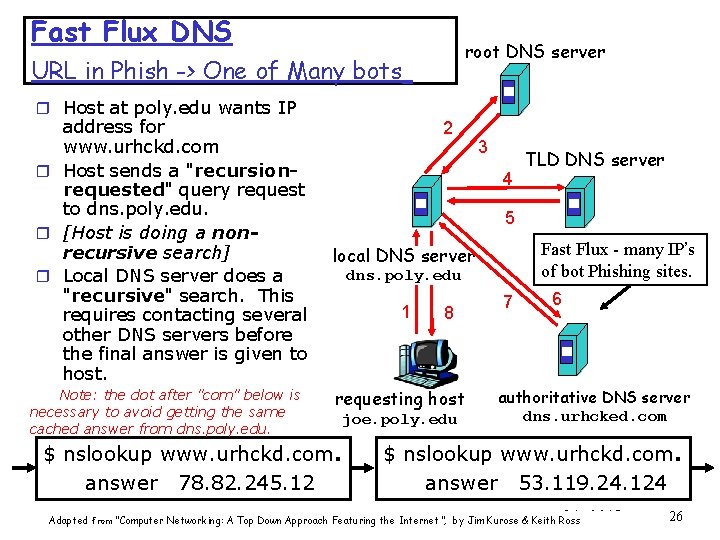
Fast Flux DNS root DNS server URL in Phish -> One of Many bots r Host at poly. edu wants IP address for www. urhckd. com r Host sends a "recursionrequested" query request to dns. poly. edu. r [Host is doing a nonrecursive search] r Local DNS server does a "recursive" search. This requires contacting several other DNS servers before the final answer is given to host. Note: the dot after "com" below is necessary to avoid getting the same cached answer from dns. poly. edu. 2 3 4 TLD DNS server 5 Fast Flux - many IP’s of bot Phishing sites. local DNS server dns. poly. edu 1 8 requesting host $ nslookup www. urhckd. com. answer 78. 82. 245. 12 joe. poly. edu 7 6 authoritative DNS server dns. urhcked. com $ nslookup www. urhckd. com. answer 53. 119. 24. 124 06 a Adapted from “Computer Networking: A Top Down Approach Featuring the Internet”, by Jim Kurose & Keith Ross DNS. ppt 26
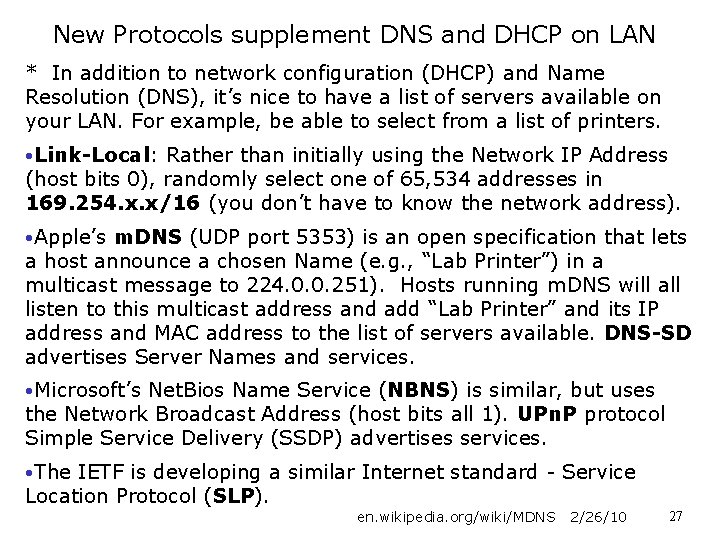
New Protocols supplement DNS and DHCP on LAN * In addition to network configuration (DHCP) and Name Resolution (DNS), it’s nice to have a list of servers available on your LAN. For example, be able to select from a list of printers. • Link-Local: Rather than initially using the Network IP Address (host bits 0), randomly select one of 65, 534 addresses in 169. 254. x. x/16 (you don’t have to know the network address). • Apple’s m. DNS (UDP port 5353) is an open specification that lets a host announce a chosen Name (e. g. , “Lab Printer”) in a multicast message to 224. 0. 0. 251). Hosts running m. DNS will all listen to this multicast address and add “Lab Printer” and its IP address and MAC address to the list of servers available. DNS-SD advertises Server Names and services. • Microsoft’s Net. Bios Name Service (NBNS) is similar, but uses the Network Broadcast Address (host bits all 1). UPn. P protocol Simple Service Delivery (SSDP) advertises services. • The IETF is developing a similar Internet standard - Service Location Protocol (SLP). en. wikipedia. org/wiki/MDNS 2/26/10 27
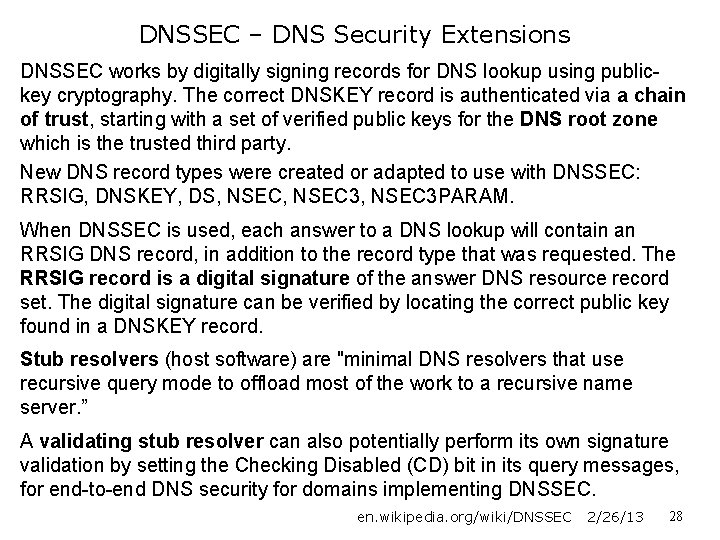
DNSSEC – DNS Security Extensions DNSSEC works by digitally signing records for DNS lookup using publickey cryptography. The correct DNSKEY record is authenticated via a chain of trust, starting with a set of verified public keys for the DNS root zone which is the trusted third party. New DNS record types were created or adapted to use with DNSSEC: RRSIG, DNSKEY, DS, NSEC 3, NSEC 3 PARAM. When DNSSEC is used, each answer to a DNS lookup will contain an RRSIG DNS record, in addition to the record type that was requested. The RRSIG record is a digital signature of the answer DNS resource record set. The digital signature can be verified by locating the correct public key found in a DNSKEY record. Stub resolvers (host software) are "minimal DNS resolvers that use recursive query mode to offload most of the work to a recursive name server. ” A validating stub resolver can also potentially perform its own signature validation by setting the Checking Disabled (CD) bit in its query messages, for end-to-end DNS security for domains implementing DNSSEC. en. wikipedia. org/wiki/DNSSEC 2/26/13 28
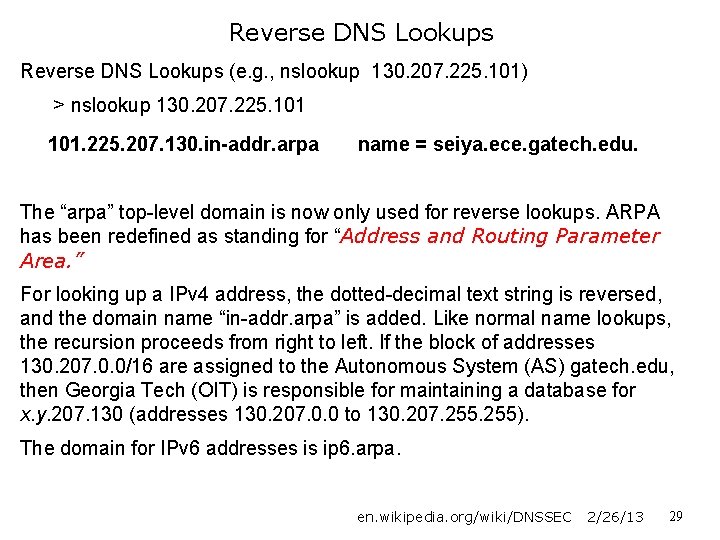
Reverse DNS Lookups (e. g. , nslookup 130. 207. 225. 101) > nslookup 130. 207. 225. 101. 225. 207. 130. in-addr. arpa name = seiya. ece. gatech. edu. The “arpa” top-level domain is now only used for reverse lookups. ARPA has been redefined as standing for “Address and Routing Parameter Area. ” For looking up a IPv 4 address, the dotted-decimal text string is reversed, and the domain name “in-addr. arpa” is added. Like normal name lookups, the recursion proceeds from right to left. If the block of addresses 130. 207. 0. 0/16 are assigned to the Autonomous System (AS) gatech. edu, then Georgia Tech (OIT) is responsible for maintaining a database for x. y. 207. 130 (addresses 130. 207. 0. 0 to 130. 207. 255). The domain for IPv 6 addresses is ip 6. arpa. en. wikipedia. org/wiki/DNSSEC 2/26/13 29
dig www. ece. gatech. edu [ MX records not shown] ; <<>> Di. G 9. 6 -ESV-R 4 -P 3 <<>> www. ece. gatech. edu ; ; global options: +cmd ; ; Got answer: ; ; ->>HEADER<<- opcode: QUERY, status: NOERROR, id: 56886 ; ; flags: qr aa rd ra; QUERY: 1, ANSWER: 1, AUTHORITY: 3, ADDITIONAL: 5 ; ; QUESTION SECTION: ; www. ece. gatech. edu. IN A ; ; ANSWER SECTION: www. ece. gatech. edu. 28800 IN A 130. 207. 225. 101 ; ; AUTHORITY SECTION: ece. gatech. edu. 28800 IN NS dns 1. gatech. edu. ece. gatech. edu. 28800 IN NS dns 3. gatech. edu. ; ; ADDITIONAL SECTION: dns 1. gatech. edu. 28800 IN A 128. 61. 244. 253 dns 1. gatech. edu. 28800 IN AAAA 2610: 148: 1 f 00: f 400: : 3 dns 3. gatech. edu. 28800 IN A 168. 24. 2. 35 ; ; Query time: 37 msec ; ; SERVER: 192. 168. 1. 1#53(192. 168. 1. 1) {note: mail handlers (MTAs) not shown. } ; ; WHEN: Mon Feb 25 12: 50: 39 2013 ; ; MSG SIZE rcvd: 213 30
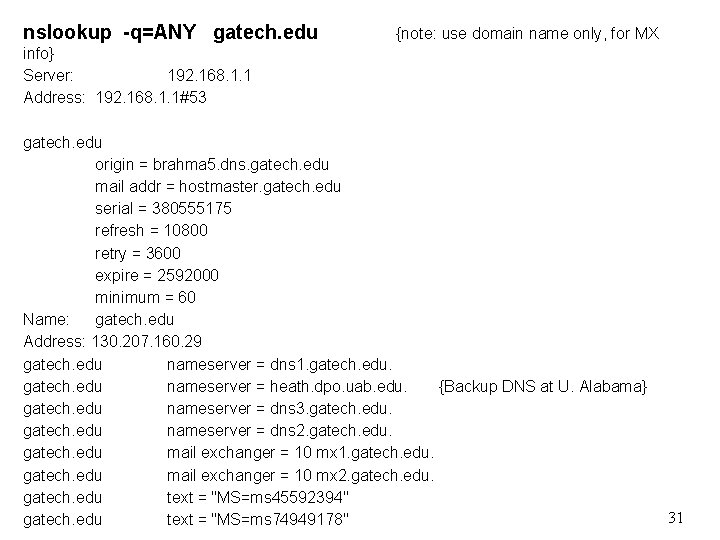
nslookup -q=ANY gatech. edu {note: use domain name only, for MX info} Server: 192. 168. 1. 1 Address: 192. 168. 1. 1#53 gatech. edu origin = brahma 5. dns. gatech. edu mail addr = hostmaster. gatech. edu serial = 380555175 refresh = 10800 retry = 3600 expire = 2592000 minimum = 60 Name: gatech. edu Address: 130. 207. 160. 29 gatech. edu nameserver = dns 1. gatech. edu nameserver = heath. dpo. uab. edu. {Backup DNS at U. Alabama} gatech. edu nameserver = dns 3. gatech. edu nameserver = dns 2. gatech. edu mail exchanger = 10 mx 1. gatech. edu mail exchanger = 10 mx 2. gatech. edu text = "MS=ms 45592394" gatech. edu text = "MS=ms 74949178" 31
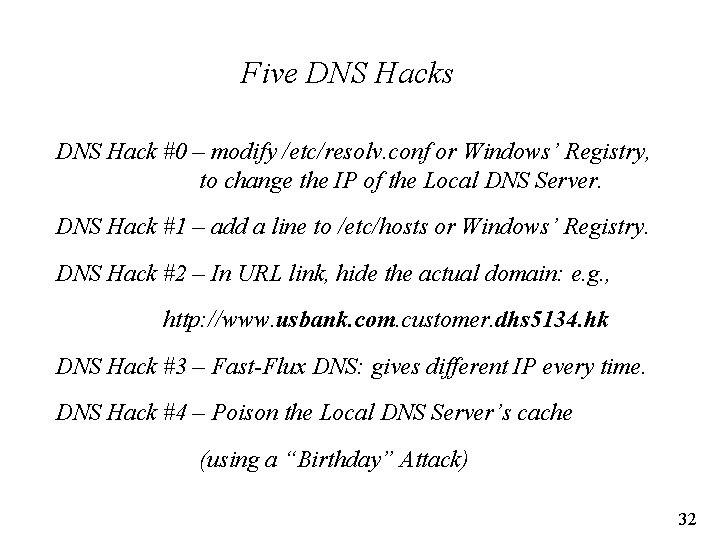
Five DNS Hacks DNS Hack #0 – modify /etc/resolv. conf or Windows’ Registry, to change the IP of the Local DNS Server. DNS Hack #1 – add a line to /etc/hosts or Windows’ Registry. DNS Hack #2 – In URL link, hide the actual domain: e. g. , http: //www. usbank. com. customer. dhs 5134. hk DNS Hack #3 – Fast-Flux DNS: gives different IP every time. DNS Hack #4 – Poison the Local DNS Server’s cache (using a “Birthday” Attack) 32