
Chapter 2 Network Topologies It is possible to
Chapter 2 Network Topologies --It is possible to connect the computer in many different ways in a LAN. Definition--Network topology is used to explain the manner in which a n/w is physically connected. --The geometric representation of such a relationship of links & nodes is known as topology of n/w. Selection Criteria for Topologies- --Each n/w topology has is own advantages & disadvantages, Hence selection of topology depends on the needs of the particular application. --Size of the n/w & no. of devices(nodes) being connected. --Ease of configuration & installing --The ease of adding a new device(user) in an existing n/w. --The ease of fault indication & correction. --No. of physical links required to be used for connecting devices. --Whether connecting devices such as repeaters, switches, hubs required or not. --Costs involved. --need of data security --Need of n/w administration. Visit to more Learning Resources
Types— 5 basic n/w topology as shown as 1) Bus topology 2) Ring topology 3) Star topology 4) Mesh topology 5) Tree topology 1) Bus Topology--It is used when a n/w under consideration is small, simple or temporary. --On a typical bus n/w a simple cable is used without additional electronics to amplify the signal or pass it along from computer to computer, Therefore bus is passive topology. --long cable called bus is used as backbone to all the nodes. The tap is connector that connects the node to the metallic core of the bus via a drop line. --When 1 computer sends a signal on the cable all the computer on the n/w receive the information. However only one with the address that matches with destination address stored in the message accepts the information while all others reject the message. --The speed is low because one computer can send a message at a time.
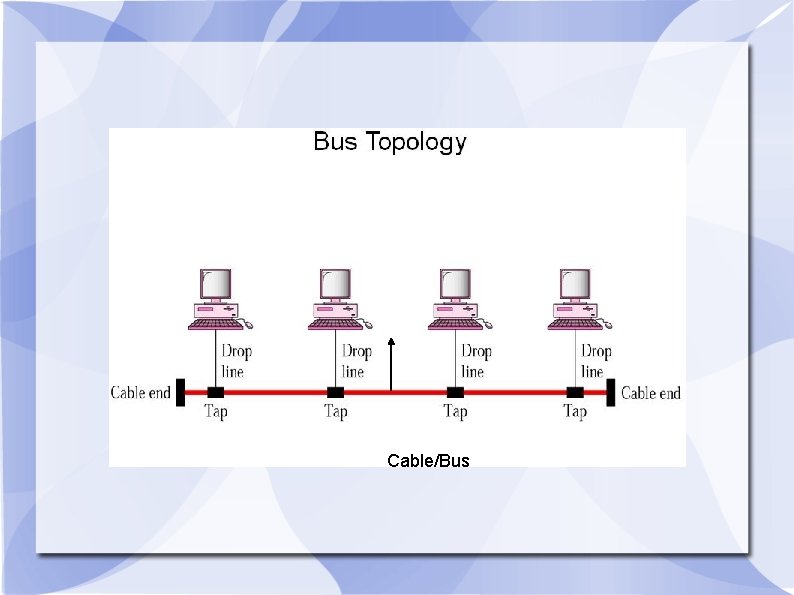
Cable/Bus
Advantages of Bus Topology 1) Is is easy to understand, install & use for small n/ws. 2) The cabling cost is less as it requires a small length of cable to connect the computers. 3) It is easy to expand by joining two cables with a BNC(Bayone-Neill. Concelman) connector. 4) In the expansion of bus topology repeaters can be used to boost the signal & increase the distance. Disadvantages of Bus Topology- 1) Heavy n/w traffic slows down the bus speed. In bus topology only one computer can transmit & other have to wait till their turn comes & there is no co-ordination between computers for reservation of trasmitting time slot. 2) A cable break or loose BNC connector will cause reflections & bring down the whole n/w causing all n/w activity to stop. 2) Ring Topology- In a ring topology, each computer is connected to the next computer with last one connected to the first. -- Rings are used in high performance n/ws. --Every computer is connected to the next computer in the ring & each retrasmits what it receives from the previous computer hence the ring is an active n/w. --The message flow aound the ring in one direction. There is no termination because their is no end to the ring. --Some ring n/w's do token passing. A short message called token is passed around the ring.
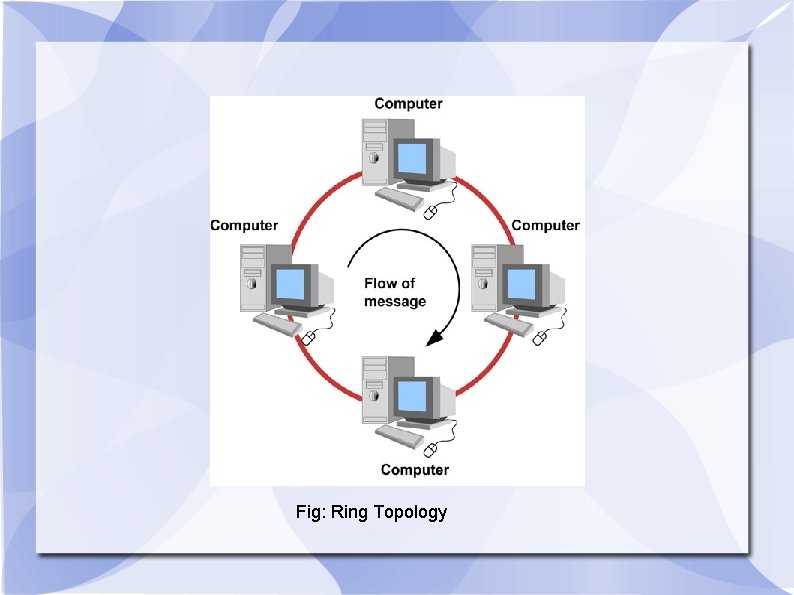
Fig: Ring Topology
--Each token is sent around the ring until it reaches its final destination. --Ring is flow of information is only in one direction, is not used if a large no. of nodes are connected. Advantages of Ring Topology- --Every computer gets an equal access. --Even when the load on the network increases, its performance is better than that of Bus topology. Disadvantages of Ring Topology- --Failure of one component on the ring can affect the whole n/w --Difficult to troubleshoot --Each packet of data must pass through all the computers between source and destination. This makes it slower than Star topology. --Adding or remove computer is difiicult. It disturb n/w

3) Star Topology--In star topology all computers are connected via cables to a central location where they are all connected by a device called Hub. --There is no direct connections among computers. --star are used in concentrated n/w where the endpoints are directly reachable from a central location, when n/w expansion is expected & when the greater reliability is needed. The telephone system uses star topology.
Advantage 1) It is easy to add new computers without disturbing rest n/w. 2) Easy to install maintain 3) Fault diagnosis is easy 4) If a computer or link fails it does not bring down the whole n/w. 5) Different types of cable can be used in n/w. Disadvantage 1)If central Hub is fails the whole n/w fails. 2)Many star n/w require a device at the central point to rebroadcast. 3)Cabling cost more.
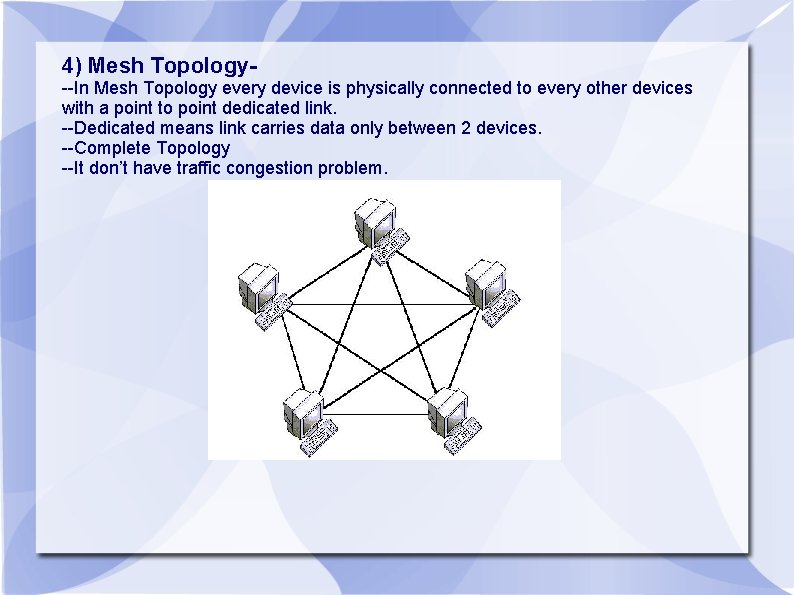
4) Mesh Topology--In Mesh Topology every device is physically connected to every other devices with a point to point dedicated link. --Dedicated means link carries data only between 2 devices. --Complete Topology --It don’t have traffic congestion problem.
Advantages 1) Robust because the failure of any one computer doesn’t bring down entire n/w. 2) Provides security & Privacy. 3) Point to Point links make fault diagnosis easy 4) Each connection carry data reliably. 5) MAC Address need not be used. Disadvantage 1) Since every computer connected to every computer installation & reconfiguration is difficult. 2) Cabling cost more. 3) Suitable for smaller n/w. 4) The h/w required to connect each link I/O & cable is expensive.
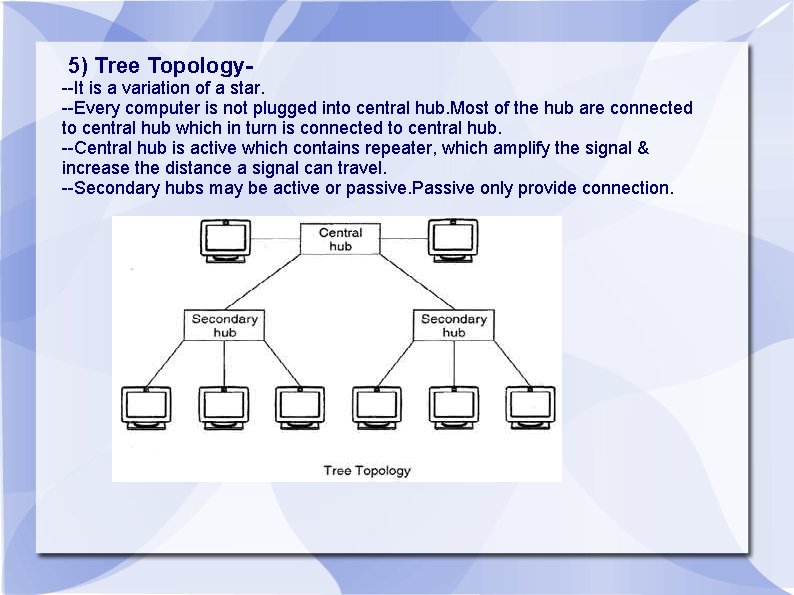
5) Tree Topology--It is a variation of a star. --Every computer is not plugged into central hub. Most of the hub are connected to central hub which in turn is connected to central hub. --Central hub is active which contains repeater, which amplify the signal & increase the distance a signal can travel. --Secondary hubs may be active or passive. Passive only provide connection.
Advantages. It allows the n/w to isolate & attach priorities to the communication. It can allow more devices to be attached to single hub. Disadvantage- If central hub fails the system breaks down. The cabling cost more.
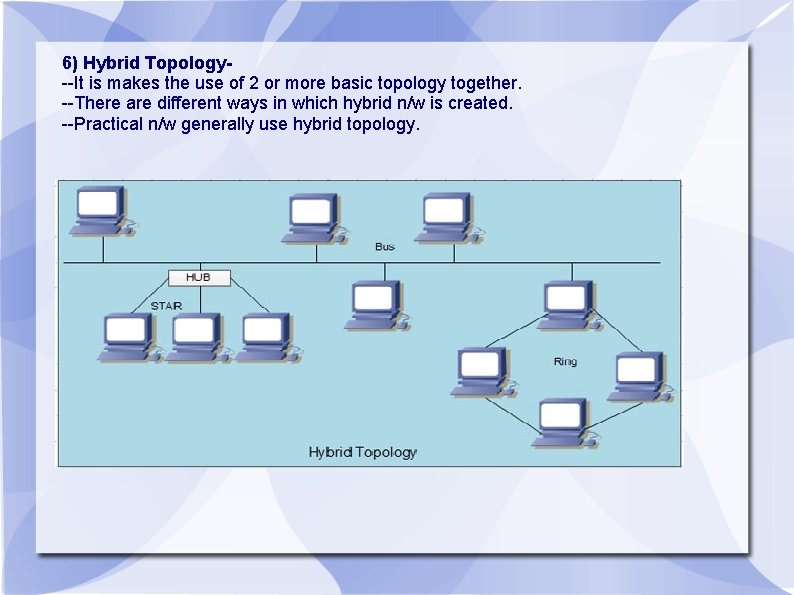
6) Hybrid Topology--It is makes the use of 2 or more basic topology together. --There are different ways in which hybrid n/w is created. --Practical n/w generally use hybrid topology.
Network Control Devices Need of N/w Control/ Connecting Devices--LAN Do not operate in an isolated manner, They either connected to one another or to the internet. --To connect LAN , Connecting devices are needed & various connecting devices are: 1) Hub 2) Switch 3) Bridge 4) Router 5) Repeater 6) Modem 7) Gateway
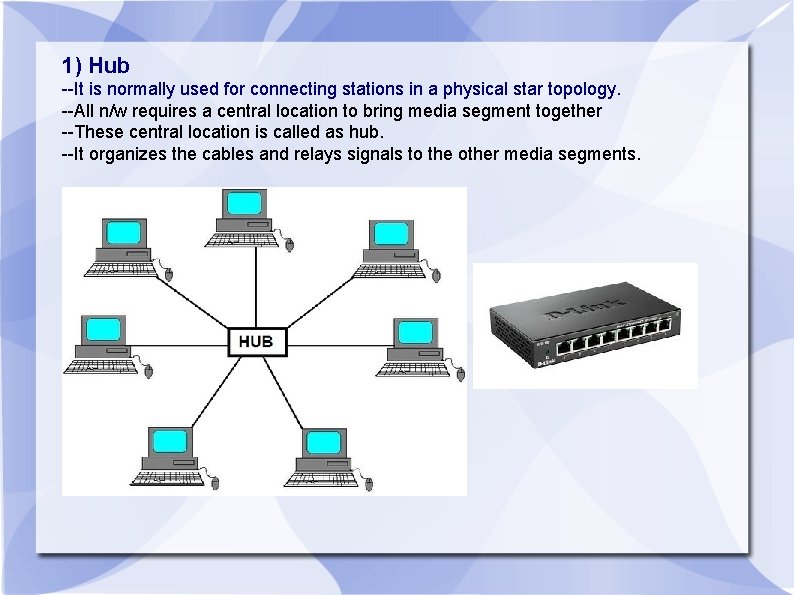
1) Hub --It is normally used for connecting stations in a physical star topology. --All n/w requires a central location to bring media segment together --These central location is called as hub. --It organizes the cables and relays signals to the other media segments.
Types of Hub are: 1) Passive Hub- it simply combines the signal of a n/w segment. Act as a connector. --It does not boost the signal infact absorbs some of the signal. With passive hub each computer receives the signal sent from all the other computers connected to hub. 2. active hub: - It regenerate and amplify the signal. By using active hub the distance between devices can be increased. They are also much expensive than passive hub.
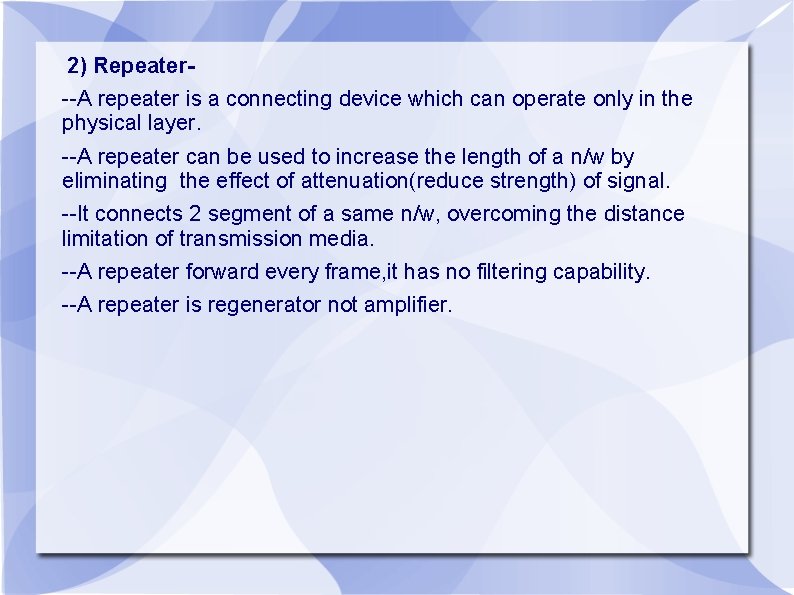
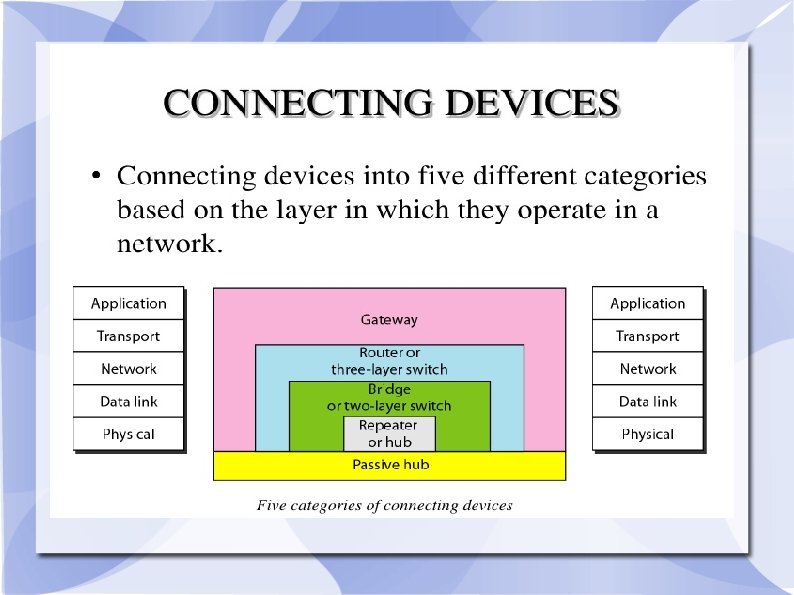
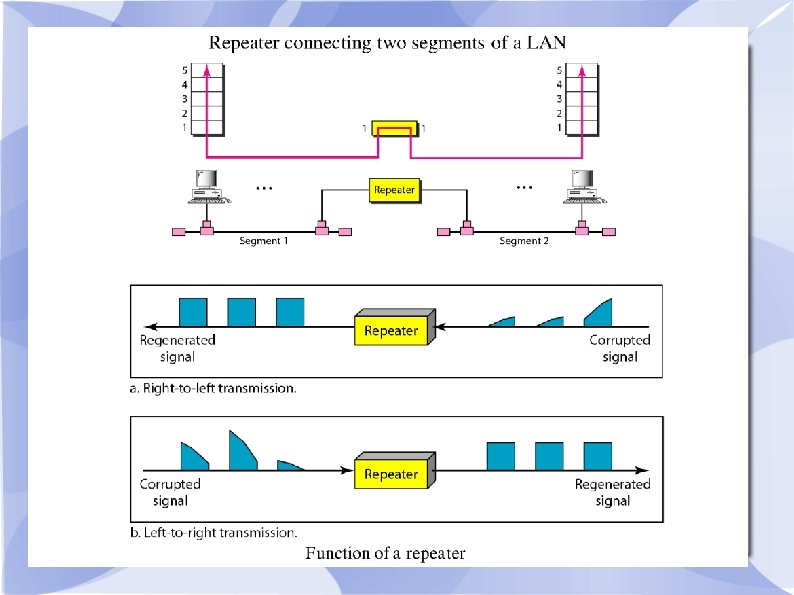
2) Repeater--A repeater is a connecting device which can operate only in the physical layer. --A repeater can be used to increase the length of a n/w by eliminating the effect of attenuation(reduce strength) of signal. --It connects 2 segment of a same n/w, overcoming the distance limitation of transmission media. --A repeater forward every frame, it has no filtering capability. --A repeater is regenerator not amplifier.
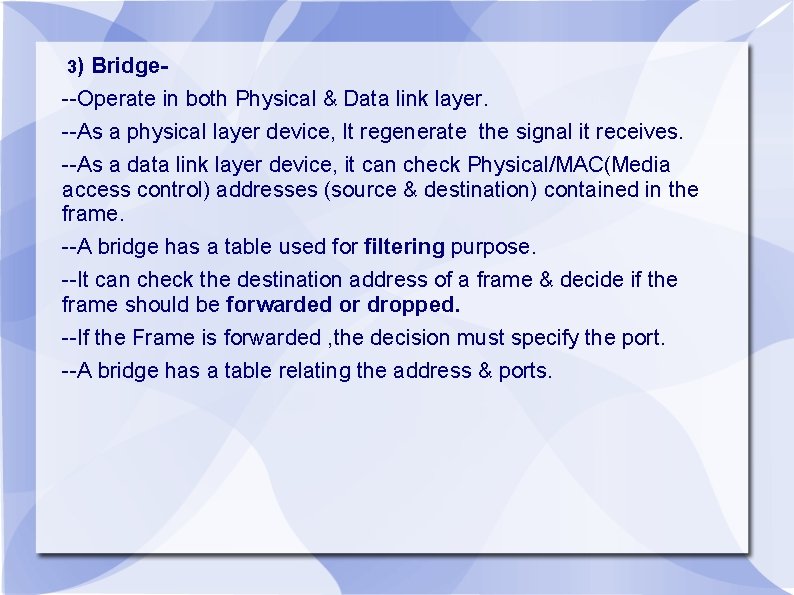
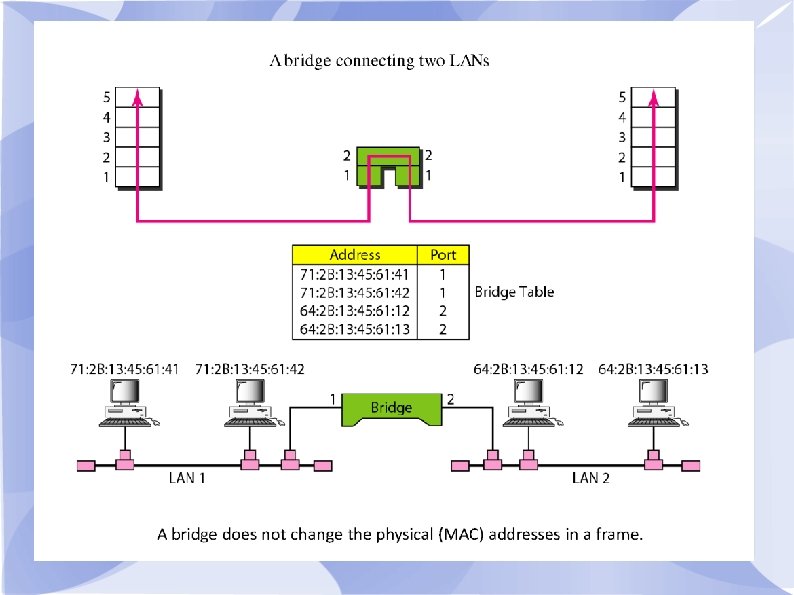
3) Bridge- --Operate in both Physical & Data link layer. --As a physical layer device, It regenerate the signal it receives. --As a data link layer device, it can check Physical/MAC(Media access control) addresses (source & destination) contained in the frame. --A bridge has a table used for filtering purpose. --It can check the destination address of a frame & decide if the frame should be forwarded or dropped. --If the Frame is forwarded , the decision must specify the port. --A bridge has a table relating the address & ports.
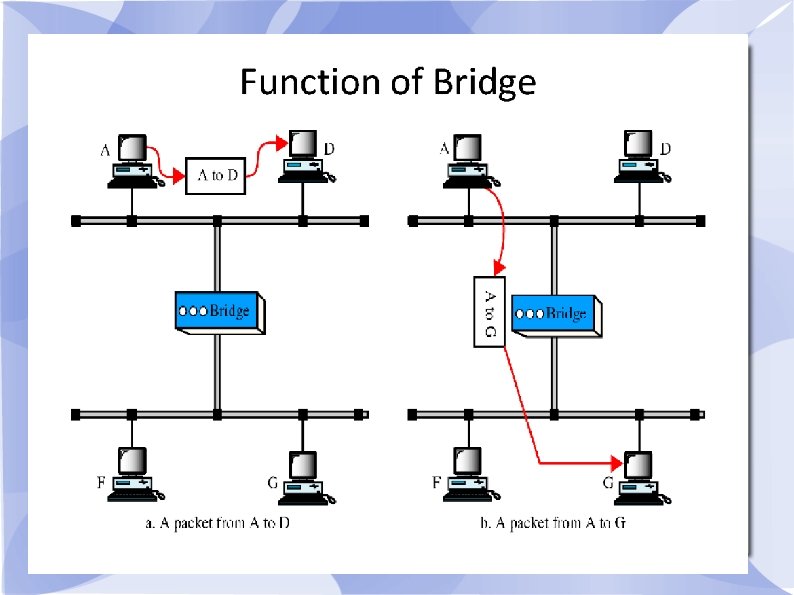
4) Switch --Switch is a intelligent device which reads desination address & stores packets in buffer & forward to destination address. --Switch may be 2 layer switch & 3 Layer switch. --2 Layer switch(Bridge) operate on Physical & Data link layer. --3 Layer switch(Router) operate on n/w layer also. --Bridge is an example of 2 layer switch. --Bridge with a few port can connect few LAN. --Bridge with a multiport may be able to allocate a unique port to each station, with each station with his own identity, It means no competiting traffic(no collision)
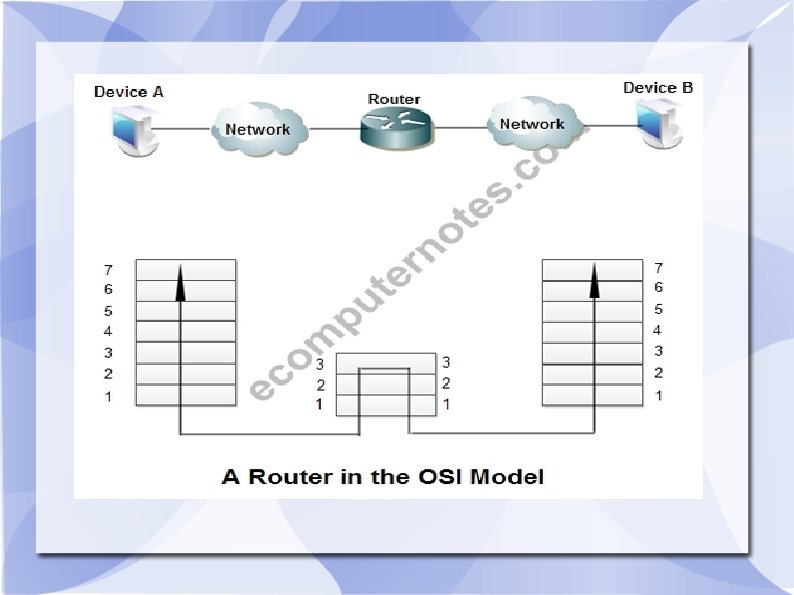
5) Router(3 layer Switch) --Routers are device that connect 2 or more n/w's --Routers operate on 3 layer i. e Physical, Data link & N/w layer --Router normally connects LAN & WAN & has a routing table that is used for making decisions about the route. --The routing table normally dynamic & updating using routing protocol. --Router use logical & physical addressing to connect 2 or more logically separate n/w’s. --A large n/w is organized into small n/w segments called subnet & these subnet are interconnected via routers. --Each of the subnet is given a logical address. This allow the n/w’s to be separate but still access each other & exchange data.
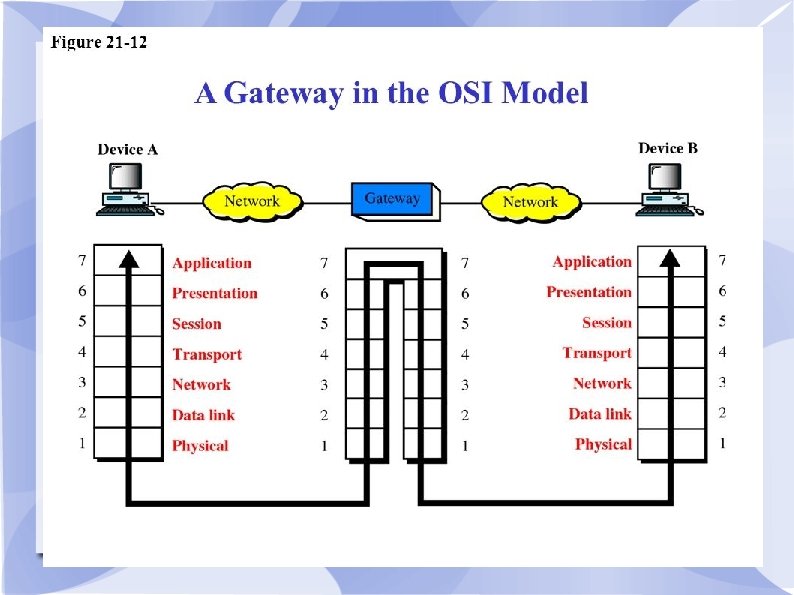
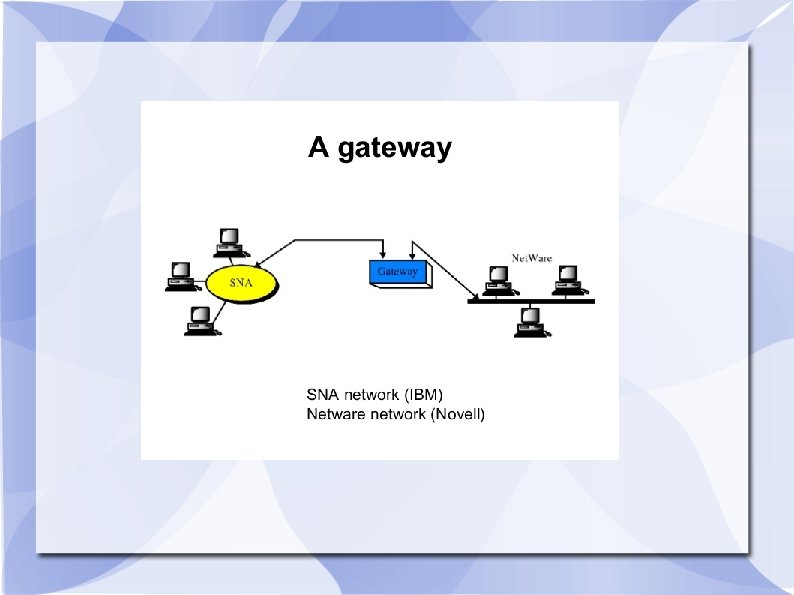
6)Gateway-- The Different n/w’s based on different protocol that are connected by using powerful, intelligent device called gateway. --Gateway can interpret & translate the different protocols that are used on 2 distinct n/w --gateway operate on all 7 layers of OSI model. --A gateway actually convert data so that it works with an application on a computer on the other side of the gateway. --Exa. Gateway can receive email message in one format & convert them into another format. --Gateway can connect systems with different communication protocols, languages & architecture Exa. IBM n/w’s using system n/w architecture(SNA) can be connected to Netware(Novell) n/w
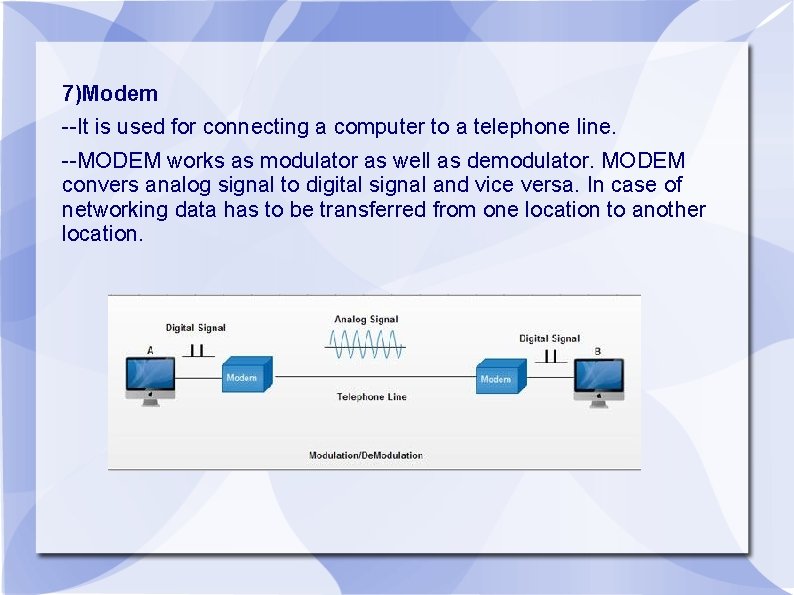
7)Modem --It is used for connecting a computer to a telephone line. --MODEM works as modulator as well as demodulator. MODEM convers analog signal to digital signal and vice versa. In case of networking data has to be transferred from one location to another location.
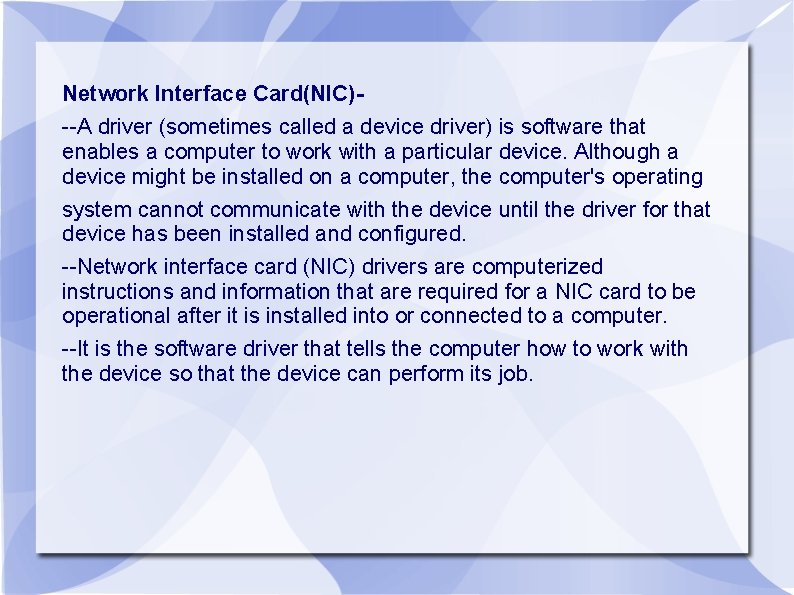
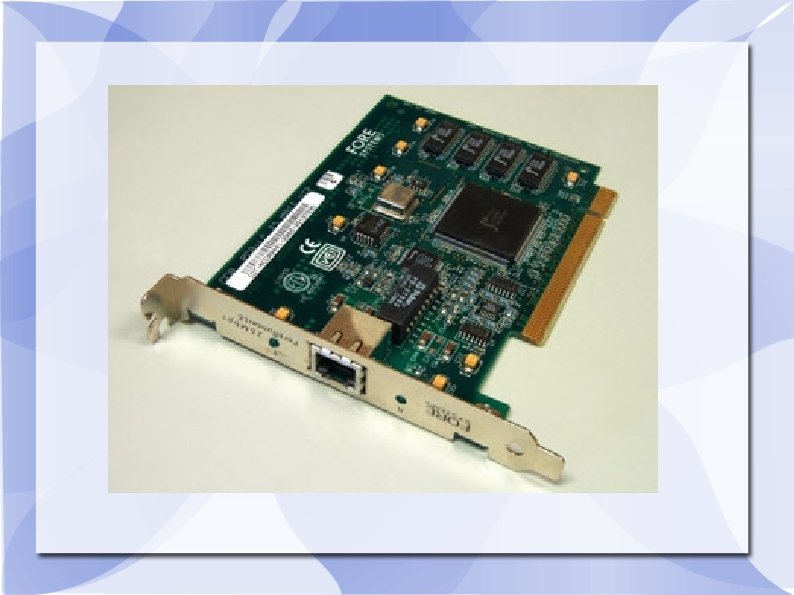
Network Interface Card(NIC)--A driver (sometimes called a device driver) is software that enables a computer to work with a particular device. Although a device might be installed on a computer, the computer's operating system cannot communicate with the device until the driver for that device has been installed and configured. --Network interface card (NIC) drivers are computerized instructions and information that are required for a NIC card to be operational after it is installed into or connected to a computer. --It is the software driver that tells the computer how to work with the device so that the device can perform its job.
Client Server Software. Telnet--TELNET is a protocol that allows you to connect to remote computers (called hosts) over a TCP/IP(Transmission Control Protocol) network (such as the Internet). --Using telnet client software on your computer, you can make a connection to a telnet server (i. e. , the remote host) 1. TELNET is a specialized service that lets you use one computer to access the contents of another computer a telnet host. 2. A telnet program creates a “Window” into the host so you can access files, issue commands and exchange data. 3. Telnet is widely used by libraries to allow visitors to look up information, find articles and so on 4. Telnet allows a user who login on any other computer on the network. 5. Telnet sends data in clear text.
Ftp(File Transfer Protocol)--FTP is a stranded mechanism provided by the Internet for copying a file from one host to the other. Some of the problem in transferring files from one system to the other is as follows: 1. Two systems may use different file name conventions. 2. Two systems may represent text data in different types. The directory structure of the two systems may be different. 3. FTP provides a simple solution to all these problems. 4. FTP established two connections between the client and server. One is for data transfer and the other is for the control information. 5. The fact that FTP separates control and data makes it very efficient. 6. The control connection uses simple rules of communication. Only one line of command or a line of response is transferred at a time. 7. But the data connection uses more complex rules due to the variety of data types being transferred.
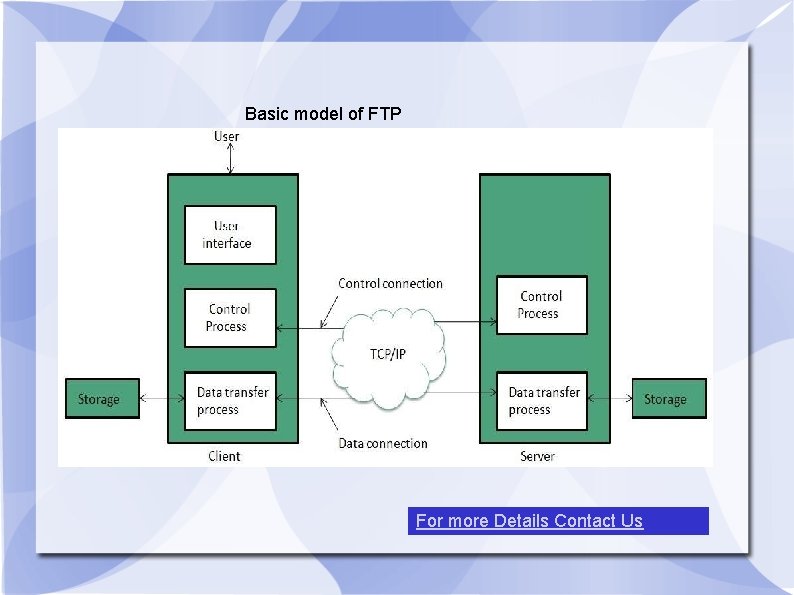
Basic model of FTP For more Details Contact Us
- Slides: 34