
Chapter 2 Memory CEG 2400 Embedded System Design
Chapter 2: Memory CEG 2400 – Embedded System Design CEG 2400 Ch 2. Memory V 6 a 1
Overview • 1) Memory in a computer system • 2) Different memory types • 3) Concepts of address, data and program running CEG 2400 Ch 2. Memory V 6 a 2
1) Memory in a computer system • A computer has – CPU (Central Processing Unit) – Memory – Input/output and peripheral devices – Glue logic circuits CEG 2400 Ch 2. Memory V 6 a 3
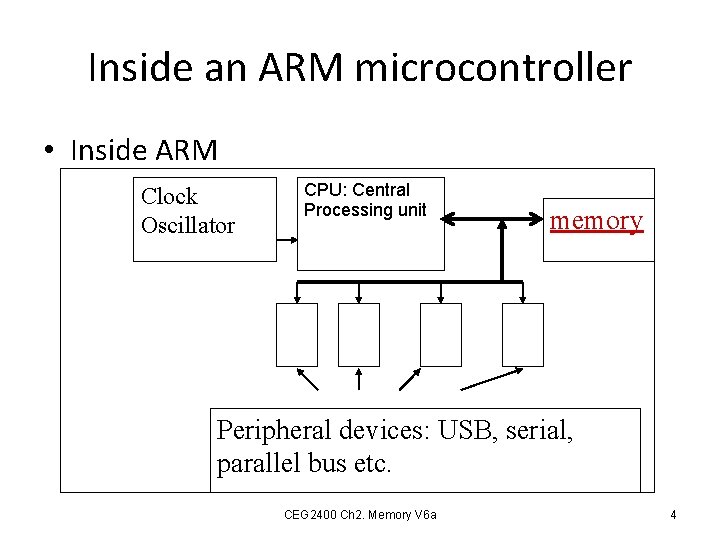
Inside an ARM microcontroller • Inside ARM Clock Oscillator CPU: Central Processing unit memory Peripheral devices: serial, parallel interfaces; real-time-clock etc. Peripheral devices: USB, serial, parallel bus etc. CEG 2400 Ch 2. Memory V 6 a 4

A computer with a micro-controller unit MCU: External interfacing Keyboard mouse Sensors: Light, Temperature Etc. Periphera l IO interface devices: such as USB bus, parallel bus, RS 232 etc. CPU: Central Processing unit memory actuators : such as Motors, Heaters, speakers Peripheral devices: USB ports, Graphic card, real-time-clock etc. CEG 2400 Ch 2. Memory V 6 a 5
CPU, MCU are microprocessors • CPU: Central Processing unit – Requires memory and input output system to become a computer (e. g. Pentium is a CPU). • MCU: micro-controller unit (or single chip computer) – Contains memory, input output systems, can work independently (e. g. Arm 7, 8051 are MCUs). – Used in embedded systems such as washing machines, mobile phones/pads. CEG 2400 Ch 2. Memory V 6 a 6
2) Different memory types Random access memory (RAM) Read only memory (ROM) CEG 2400 Ch 2. Memory V 6 a 7
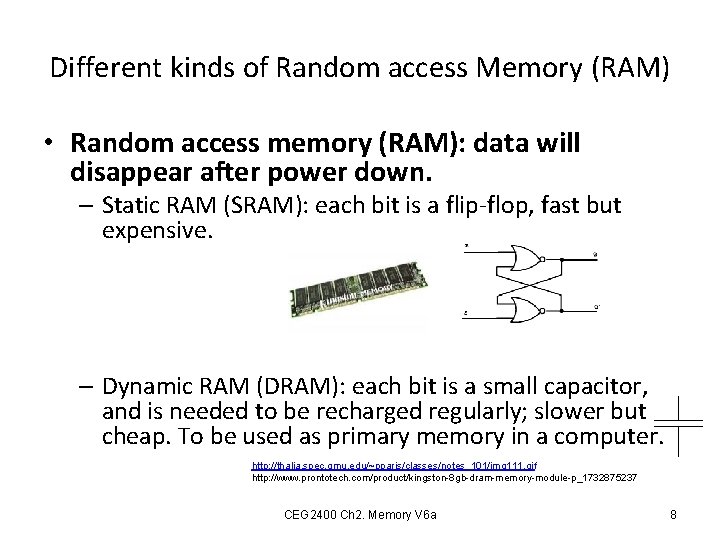
Different kinds of Random access Memory (RAM) • Random access memory (RAM): data will disappear after power down. – Static RAM (SRAM): each bit is a flip-flop, fast but expensive. – Dynamic RAM (DRAM): each bit is a small capacitor, and is needed to be recharged regularly; slower but cheap. To be used as primary memory in a computer. http: //thalia. spec. gmu. edu/~pparis/classes/notes_101/img 111. gif http: //www. prontotech. com/product/kingston-8 gb-dram-memory-module-p_1732875237 CEG 2400 Ch 2. Memory V 6 a 8
Different kinds of Read Only Memory (ROM) • Read only memory (ROM) – UV-EPROM – EEPROM – FLASH ROM CEG 2400 Ch 2. Memory V 6 a 9
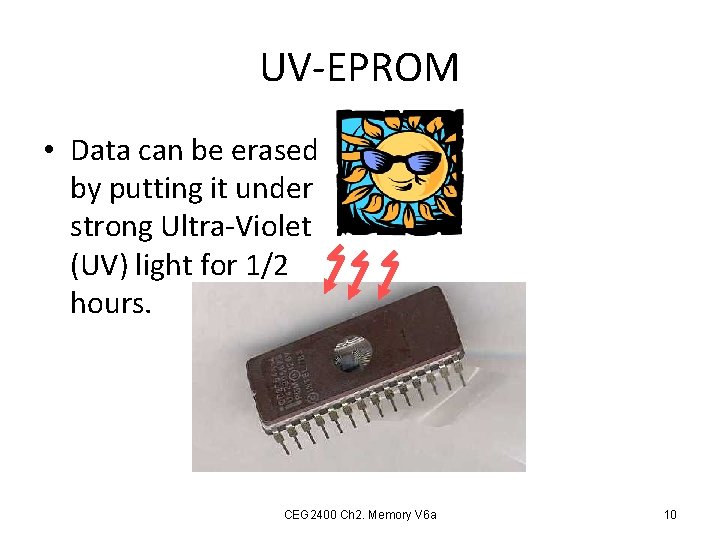
UV-EPROM • Data can be erased by putting it under strong Ultra-Violet (UV) light for 1/2 hours. CEG 2400 Ch 2. Memory V 6 a 10
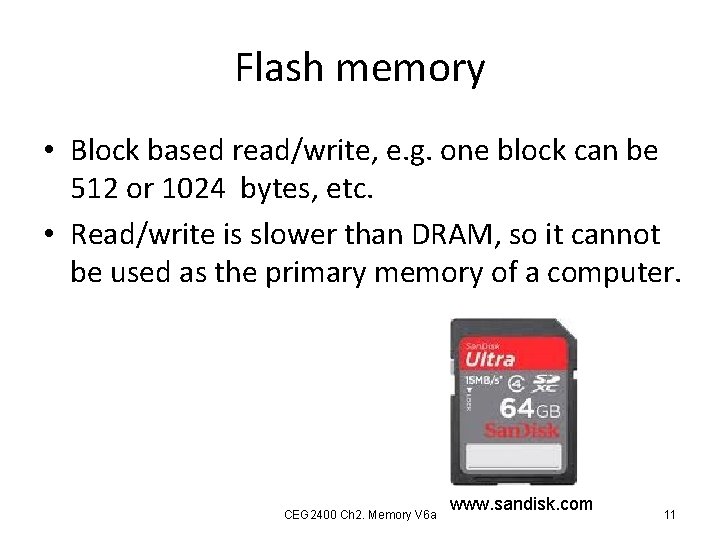
Flash memory • Block based read/write, e. g. one block can be 512 or 1024 bytes, etc. • Read/write is slower than DRAM, so it cannot be used as the primary memory of a computer. CEG 2400 Ch 2. Memory V 6 a www. sandisk. com 11
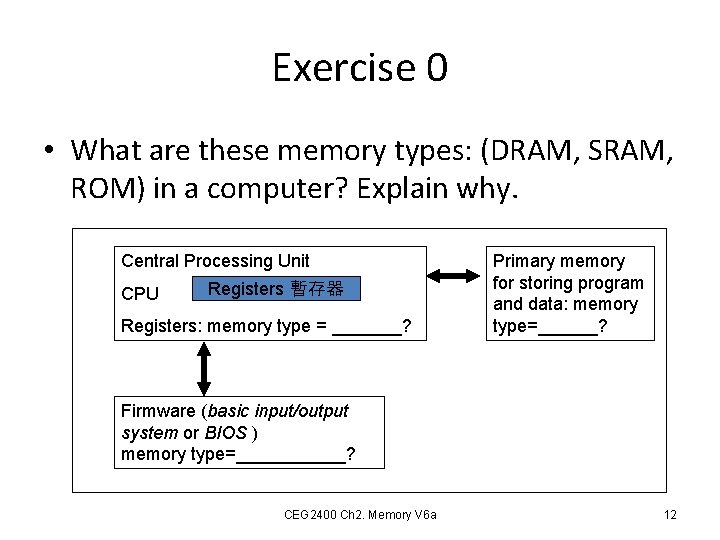
Exercise 0 • What are these memory types: (DRAM, SRAM, ROM) in a computer? Explain why. Central Processing Unit CPU Registers 暫存器 Registers: memory type = _______? Primary memory for storing program and data: memory type=______? Firmware (basic input/output system or BIOS ) memory type=______? CEG 2400 Ch 2. Memory V 6 a 12
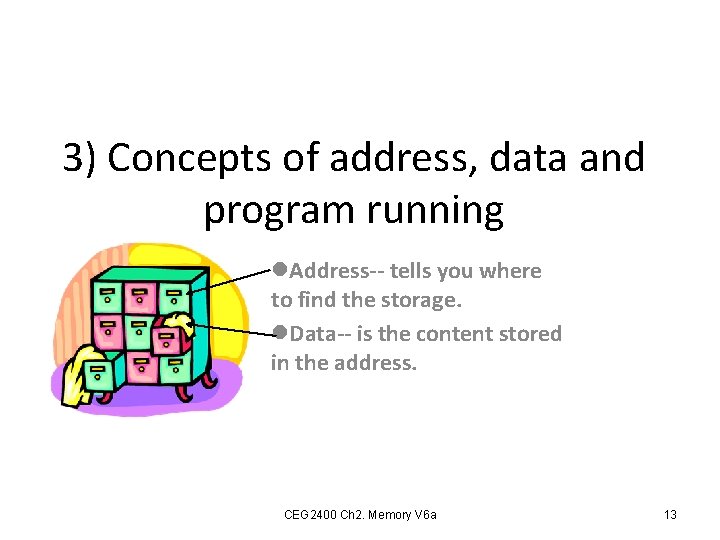
3) Concepts of address, data and program running l. Address-- tells you where to find the storage. l. Data-- is the content stored in the address. CEG 2400 Ch 2. Memory V 6 a 13
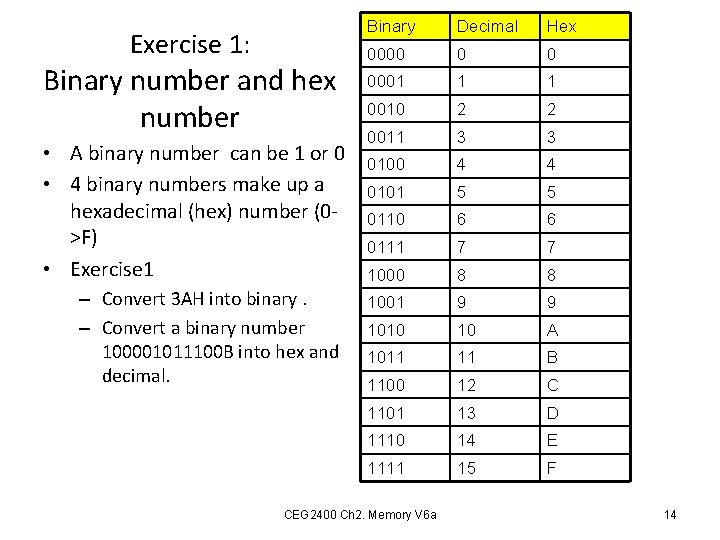
Exercise 1: Binary number and hex number • A binary number can be 1 or 0 • 4 binary numbers make up a hexadecimal (hex) number (0>F) • Exercise 1 – Convert 3 AH into binary. – Convert a binary number 100001011100 B into hex and decimal. Binary Decimal Hex 0000 0 0 0001 1 1 0010 2 2 0011 3 3 0100 4 4 0101 5 5 0110 6 6 0111 7 7 1000 8 8 1001 9 9 1010 10 A 1011 11 B 1100 12 C 1101 13 D 1110 14 E 1111 15 F CEG 2400 Ch 2. Memory V 6 a 14
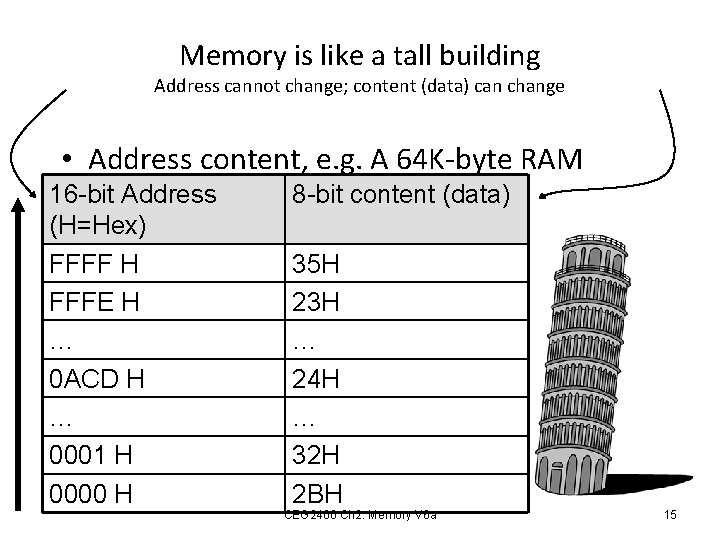
Memory is like a tall building Address cannot change; content (data) can change • Address content, e. g. A 64 K-byte RAM 16 -bit Address (H=Hex) FFFF H FFFE H … 0 ACD H … 0001 H 0000 H 8 -bit content (data) 35 H 23 H … 24 H … 32 H 2 BH CEG 2400 Ch 2. Memory V 6 a 15
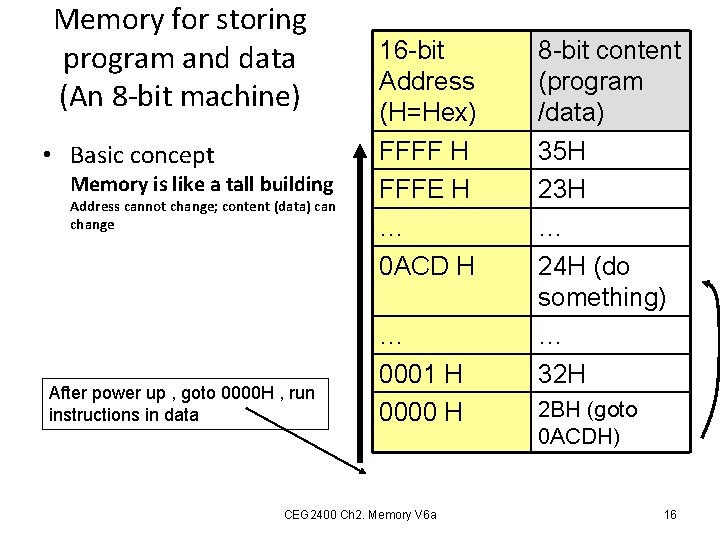
Memory for storing program and data (An 8 -bit machine) • Basic concept Memory is like a tall building Address cannot change; content (data) can change After power up , goto 0000 H , run instructions in data 16 -bit Address (H=Hex) FFFF H FFFE H … 0 ACD H … 0001 H 0000 H CEG 2400 Ch 2. Memory V 6 a 8 -bit content (program /data) 35 H 23 H … 24 H (do something) … 32 H 2 BH (goto 0 ACDH) 16
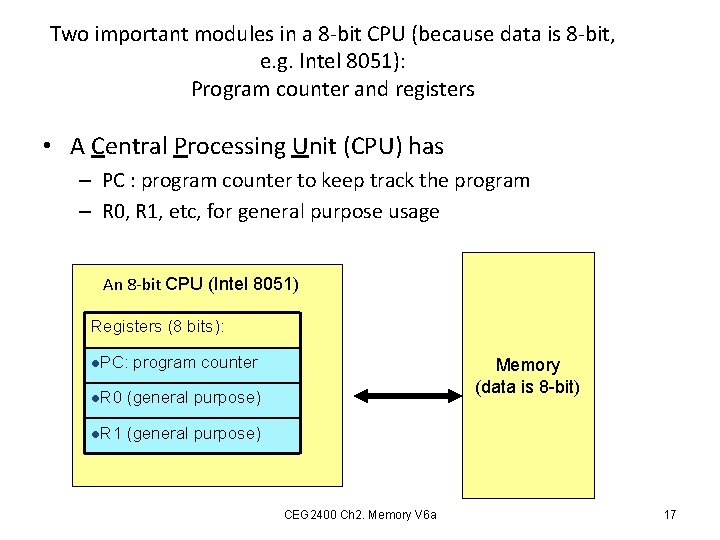
Two important modules in a 8 -bit CPU (because data is 8 -bit, e. g. Intel 8051): Program counter and registers • A Central Processing Unit (CPU) has – PC : program counter to keep track the program – R 0, R 1, etc, for general purpose usage An 8 -bit CPU (Intel 8051) Registers (8 bits): l. PC: program counter l. R 0 (general purpose) l. R 1 (general purpose) Memory (data is 8 -bit) CEG 2400 Ch 2. Memory V 6 a 17
Program counter (PC) • After CPU reset (power up) , PC=0000 H, so the first instruction is always at 0000 H. • After each instruction is run, – PC increments once, or – PC is set by the instruction it just executed. E. g. goto to a new address. CEG 2400 Ch 2. Memory V 6 a 18
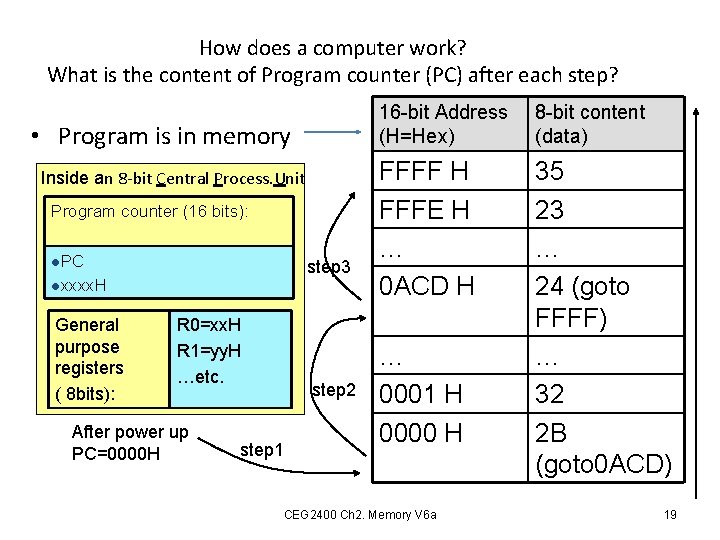
How does a computer work? What is the content of Program counter (PC) after each step? • Program is in memory Inside an 8 -bit Central Process. Unit Program counter (16 bits): l. PC step 3 lxxxx. H General purpose registers ( 8 bits): R 0=xx. H R 1=yy. H …etc. After power up PC=0000 H step 2 step 1 16 -bit Address (H=Hex) 8 -bit content (data) FFFF H FFFE H … 0 ACD H 35 23 … 24 (goto FFFF) … 32 2 B (goto 0 ACD) … 0001 H 0000 H CEG 2400 Ch 2. Memory V 6 a 19
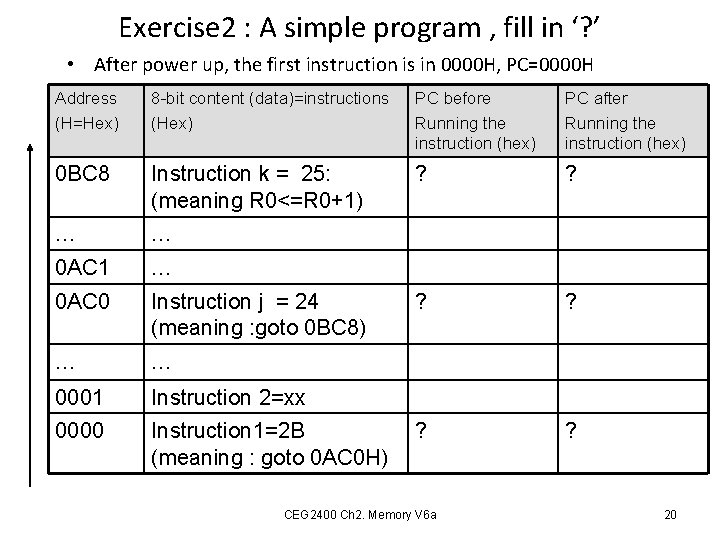
Exercise 2 : A simple program , fill in ‘? ’ • After power up, the first instruction is in 0000 H, PC=0000 H Address (H=Hex) 8 -bit content (data)=instructions (Hex) PC before Running the instruction (hex) PC after Running the instruction (hex) 0 BC 8 Instruction k = 25: (meaning R 0<=R 0+1) ? ? … … 0 AC 1 … 0 AC 0 Instruction j = 24 (meaning : goto 0 BC 8) ? ? … … 0001 Instruction 2=xx 0000 Instruction 1=2 B (meaning : goto 0 AC 0 H) ? ? CEG 2400 Ch 2. Memory V 6 a 20
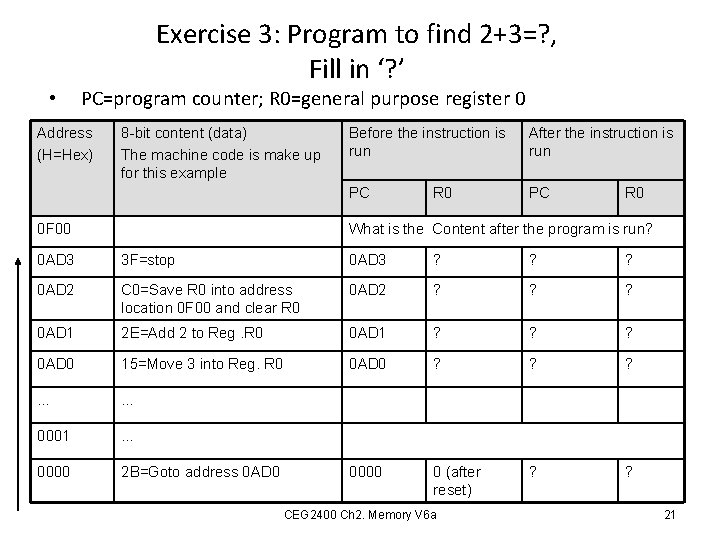
• Exercise 3: Program to find 2+3=? , Fill in ‘? ’ PC=program counter; R 0=general purpose register 0 Address (H=Hex) 8 -bit content (data) The machine code is make up for this example 0 F 00 Before the instruction is run After the instruction is run PC PC R 0 What is the Content after the program is run? 0 AD 3 3 F=stop 0 AD 3 ? ? ? 0 AD 2 C 0=Save R 0 into address location 0 F 00 and clear R 0 0 AD 2 ? ? ? 0 AD 1 2 E=Add 2 to Reg. R 0 0 AD 1 ? ? ? 0 AD 0 15=Move 3 into Reg. R 0 0 AD 0 ? ? ? … … 0001 … 0000 2 B=Goto address 0 AD 0 0000 0 (after reset) ? ? CEG 2400 Ch 2. Memory V 6 a 21
Memory in a 32 -bit machine Moving from 8 -bit to 32 -bit: The ARM processor example CEG 2400 Ch 2. Memory V 6 a 22
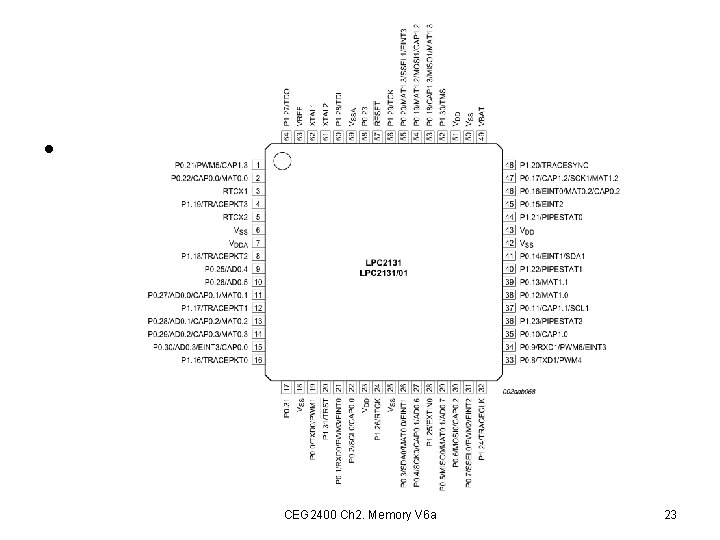
ARM chip • CEG 2400 Ch 2. Memory V 6 a 23
Memory • We will learn how to use memory in the ARM microcontroller. • We know that the data size is 8 -bit for all memory systems (in PC or mainframe alike). • So each location has 8 bits. – We can deal with them in n-bit groups called words (typically 8, 16, 32 or 64 bits) CEG 2400 Ch 2. Memory V 6 a 24
Address in a 32 -bit machine (e. g. ARM 7) • The address is 32 -bit. – So the address range is from 0000(hex) to FFFF(hex) totally 2^32=4 G locations. • The data is also 32 -bit. – So each data is xxxx (hex) • But the memory is arranged as 8 -bit for one location. So how to do it? • Solution: Arm 7 uses 4 address locations to access a 32 -bit (4 bytes) data. CEG 2400 Ch 2. Memory V 6 a 25
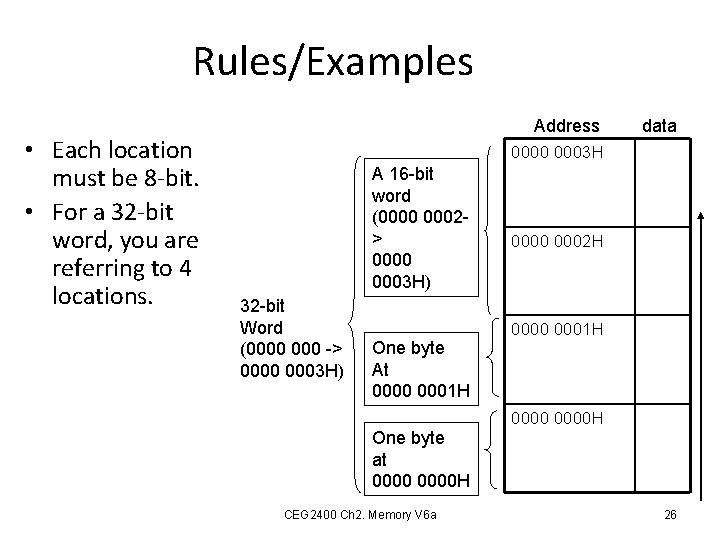
Rules/Examples • Each location must be 8 -bit. • For a 32 -bit word, you are referring to 4 locations. Address data 0000 0003 H A 16 -bit word (0000 0002> 0000 0003 H) 32 -bit Word (0000 -> 0000 0003 H) One byte At 0000 0001 H 0000 0002 H 0000 0001 H 0000 H One byte at 0000 H CEG 2400 Ch 2. Memory V 6 a 26
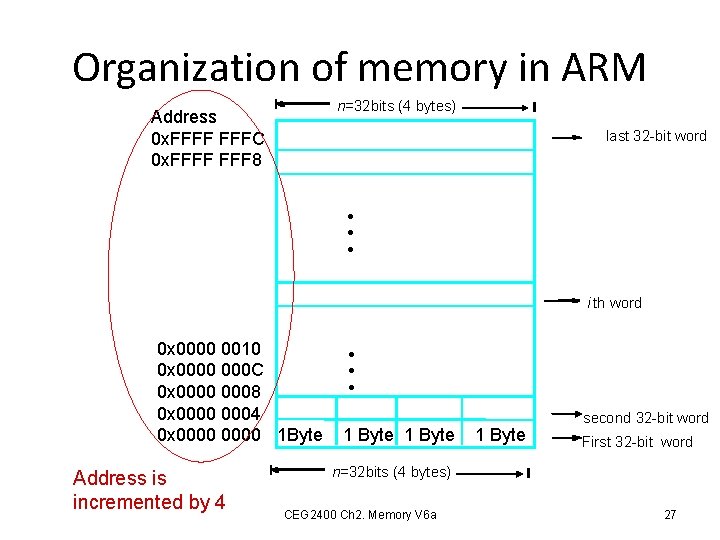
Organization of memory in ARM n=32 bits (4 bytes) Address 0 x. FFFF FFFC 0 x. FFFF 8 last 32 -bit word • • • i th word 0 x 0000 0010 0 x 0000 000 C 0 x 0000 0008 0 x 0000 0004 0 x 0000 1 Byte Address is incremented by 4 • • • 1 Byte second 32 -bit word First 32 -bit word n=32 bits (4 bytes) CEG 2400 Ch 2. Memory V 6 a 27
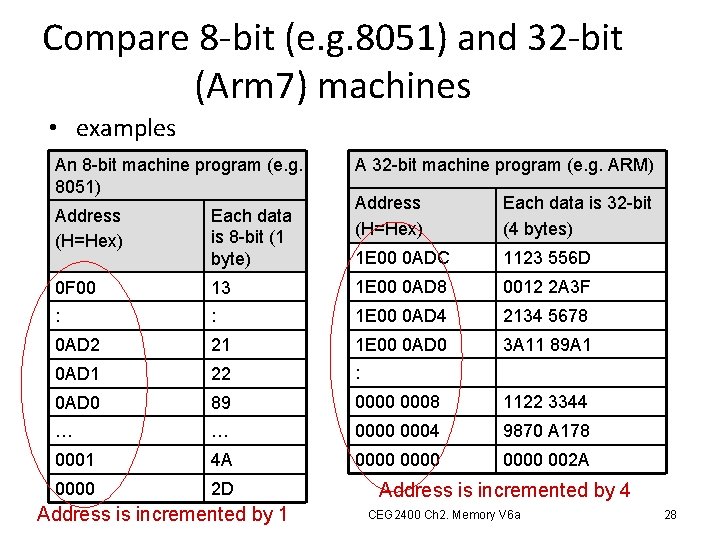
Compare 8 -bit (e. g. 8051) and 32 -bit (Arm 7) machines • examples An 8 -bit machine program (e. g. 8051) A 32 -bit machine program (e. g. ARM) Address (H=Hex) Each data is 32 -bit (4 bytes) 1 E 00 0 ADC 1123 556 D 13 1 E 00 0 AD 8 0012 2 A 3 F : : 1 E 00 0 AD 4 2134 5678 0 AD 2 21 1 E 00 0 AD 0 3 A 11 89 A 1 0 AD 1 22 : 0 AD 0 89 0000 0008 1122 3344 … … 0000 0004 9870 A 178 0001 4 A 0000 002 A 0000 2 D Address (H=Hex) Each data is 8 -bit (1 byte) 0 F 00 Address is incremented by 1 Address is incremented by 4 CEG 2400 Ch 2. Memory V 6 a 28
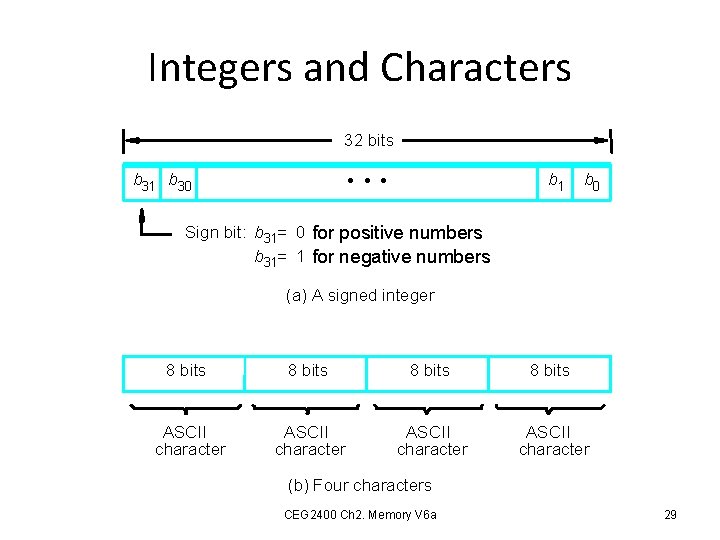
Integers and Characters 32 bits b 1 • • • b 31 b 30 b 0 Sign bit: b 31= 0 for positive numbers b 31= 1 for negative numbers (a) A signed integer 8 bits ASCII character (b) Four characters CEG 2400 Ch 2. Memory V 6 a 29
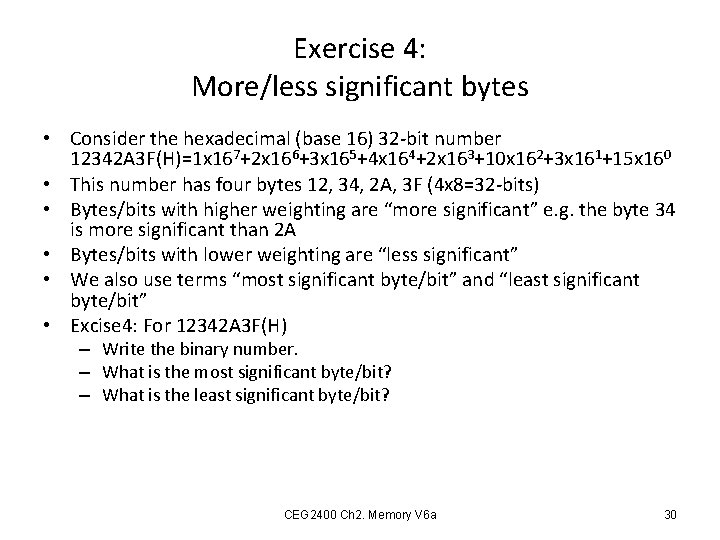
Exercise 4: More/less significant bytes • Consider the hexadecimal (base 16) 32 -bit number 12342 A 3 F(H)=1 x 167+2 x 166+3 x 165+4 x 164+2 x 163+10 x 162+3 x 161+15 x 160 • This number has four bytes 12, 34, 2 A, 3 F (4 x 8=32 -bits) • Bytes/bits with higher weighting are “more significant” e. g. the byte 34 is more significant than 2 A • Bytes/bits with lower weighting are “less significant” • We also use terms “most significant byte/bit” and “least significant byte/bit” • Excise 4: For 12342 A 3 F(H) – Write the binary number. – What is the most significant byte/bit? – What is the least significant byte/bit? CEG 2400 Ch 2. Memory V 6 a 30
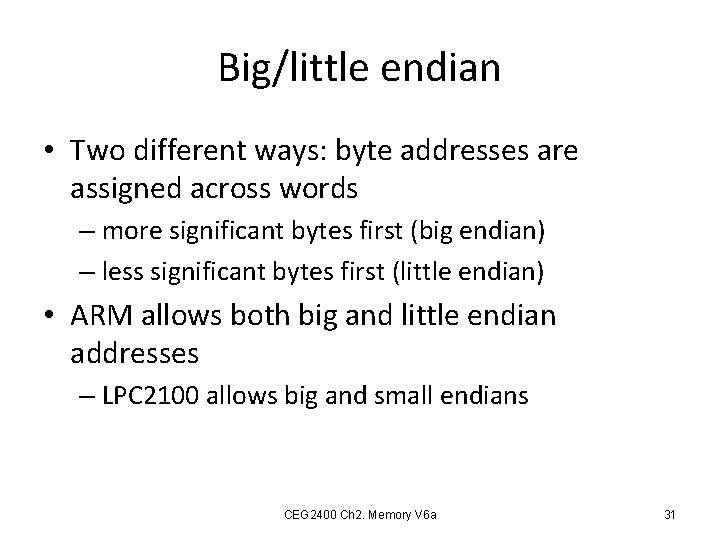
Big/little endian • Two different ways: byte addresses are assigned across words – more significant bytes first (big endian) – less significant bytes first (little endian) • ARM allows both big and little endian addresses – LPC 2100 allows big and small endians CEG 2400 Ch 2. Memory V 6 a 31
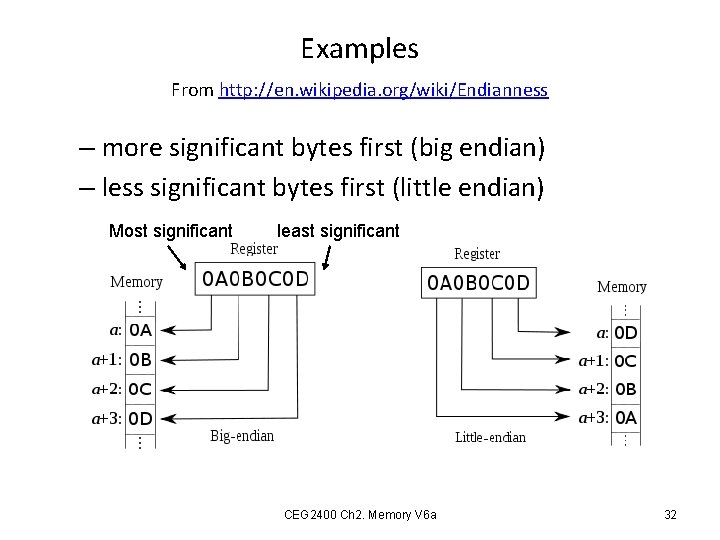
Examples From http: //en. wikipedia. org/wiki/Endianness – more significant bytes first (big endian) – less significant bytes first (little endian) Most significant least significant CEG 2400 Ch 2. Memory V 6 a 32
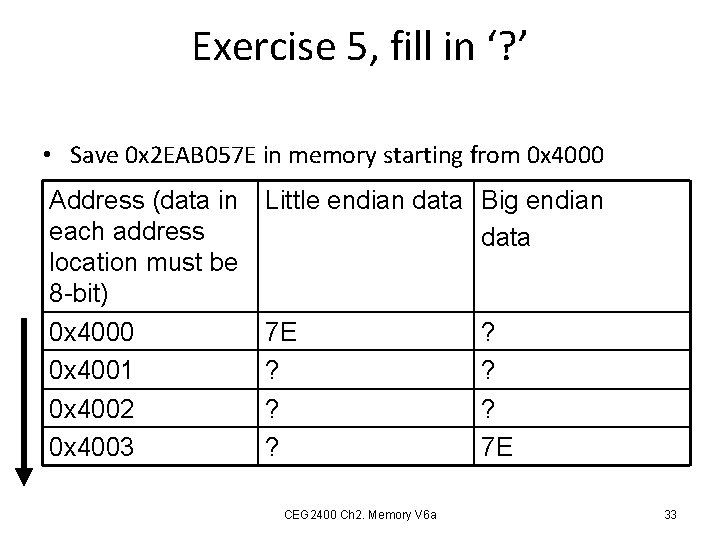
Exercise 5, fill in ‘? ’ • Save 0 x 2 EAB 057 E in memory starting from 0 x 4000 Address (data in each address location must be 8 -bit) 0 x 4000 0 x 4001 0 x 4002 0 x 4003 Little endian data Big endian data 7 E ? ? ? CEG 2400 Ch 2. Memory V 6 a ? ? ? 7 E 33
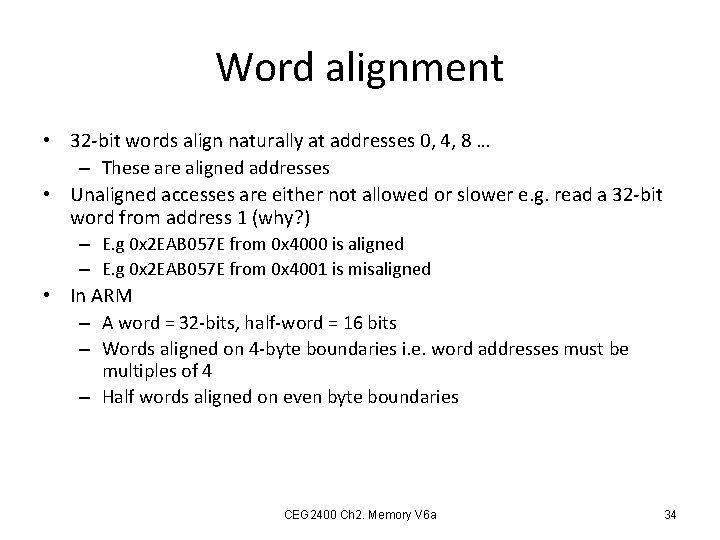
Word alignment • 32 -bit words align naturally at addresses 0, 4, 8 … – These are aligned addresses • Unaligned accesses are either not allowed or slower e. g. read a 32 -bit word from address 1 (why? ) – E. g 0 x 2 EAB 057 E from 0 x 4000 is aligned – E. g 0 x 2 EAB 057 E from 0 x 4001 is misaligned • In ARM – A word = 32 -bits, half-word = 16 bits – Words aligned on 4 -byte boundaries i. e. word addresses must be multiples of 4 – Half words aligned on even byte boundaries CEG 2400 Ch 2. Memory V 6 a 34
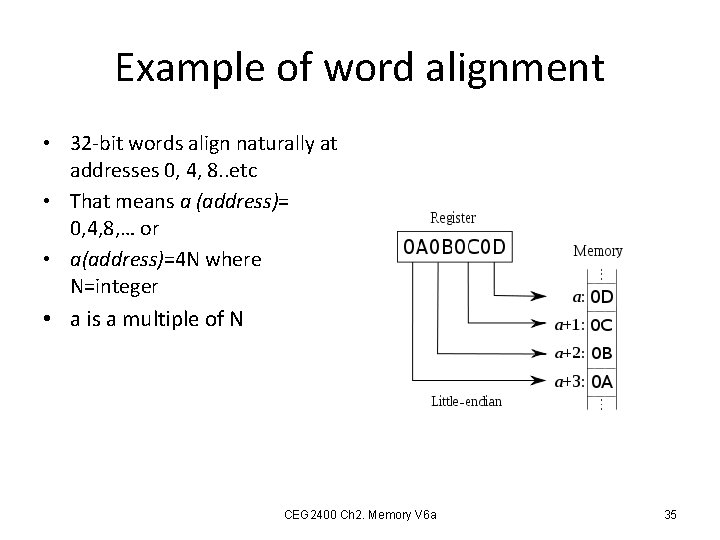
Example of word alignment • 32 -bit words align naturally at addresses 0, 4, 8. . etc • That means a (address)= 0, 4, 8, … or • a(address)=4 N where N=integer • a is a multiple of N CEG 2400 Ch 2. Memory V 6 a 35
End CEG 2400 Ch 2. Memory V 6 a 36
References/ reading exercise • http: //www. howstuffworks. com/computermemory. htm • ARM versus Intel: a successful stratagem for RISC or grist for CISC's tricks? – http: //www. edn. com/design/integrated-circuit-design/4369610/ARM-versus. Intel-a-successful-stratagem-for-RISC-or-grist-for-CISC-s-tricks- CEG 2400 Ch 2. Memory V 6 a 37
- Slides: 37