
Chapter 2 Application layer q 2 1 Web
Chapter 2: Application layer q 2. 1 Web, HTTP and HTML (We will continue…) q 2. 2 FTP q 2. 3 SMTP 9/22/2009 Lecture 7, MAT 279, Fall 2009 1
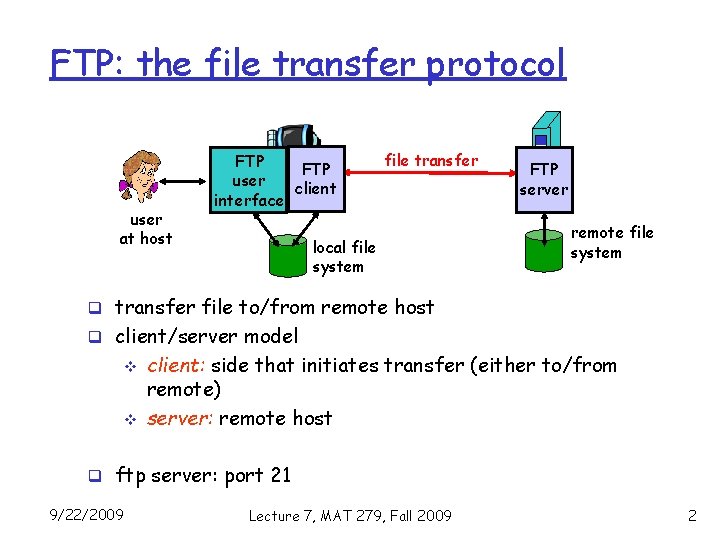
FTP: the file transfer protocol user at host FTP user client interface file transfer local file system FTP server remote file system q transfer file to/from remote host q client/server model v v client: side that initiates transfer (either to/from remote) server: remote host q ftp server: port 21 9/22/2009 Lecture 7, MAT 279, Fall 2009 2

FTP: separate control, data connections 1. 2. 3. 4. 5. TCP control connection port 21 FTP client contacts FTP server at port 21 client authorized over control TCP data connection FTP port 20 connection client server client browses remote directory by sending commands over control q Difference between connection. HTTP and FTP? when server receives file transfer command, server opens 2 nd TCP connection (for file) to client after transferring one file, server closes data connection. 9/22/2009 Lecture 7, MAT 279, Fall 2009 3
Chapter 2: Application layer q 2. 1 Web and HTTP q 2. 2 FTP q 2. 3 SMTP 9/22/2009 Lecture 7, MAT 279, Fall 2009 4

Electronic Mail outgoing message queue user mailbox user agent Three major components: q user agents mail server q mail servers q simple mail transfer SMTP protocol: SMTP User Agent q a. k. a. “mail reader” q composing, editing, reading mail messages q e. g. , Outlook, Mozilla Thunderbird q outgoing, incoming messages stored on server 9/22/2009 user agent SMTP mail server user agent Lecture 7, MAT 279, Fall 2009 5
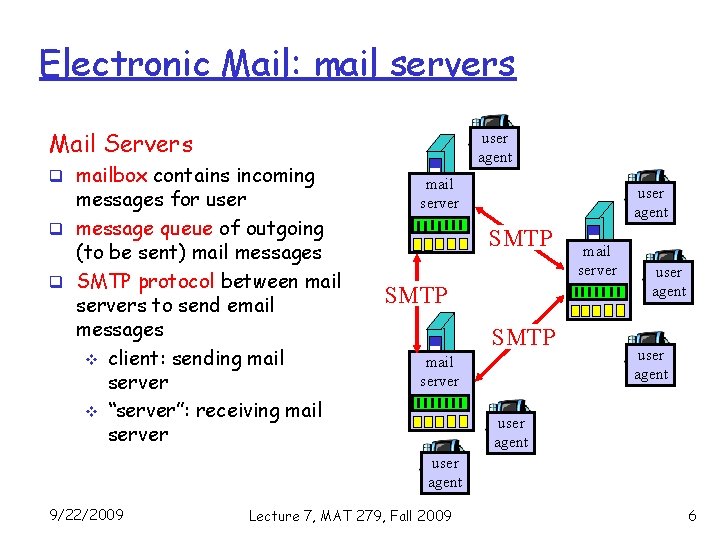
Electronic Mail: mail servers Mail Servers q mailbox contains incoming messages for user q message queue of outgoing (to be sent) mail messages q SMTP protocol between mail servers to send email messages v client: sending mail server v “server”: receiving mail server user agent SMTP mail server user agent 9/22/2009 Lecture 7, MAT 279, Fall 2009 6
![Electronic Mail: SMTP [RFC 2821] q uses TCP to reliably transfer email message from](http://slidetodoc.com/presentation_image_h2/4724ab386294b9105d64f63592d2c406/image-7.jpg "Electronic Mail: SMTP [RFC 2821] q uses TCP to reliably transfer email message from")
Electronic Mail: SMTP [RFC 2821] q uses TCP to reliably transfer email message from client to server, port 25 q direct transfer: sending server to receiving server q three phases of transfer v v v handshaking (greeting) transfer of messages closure 9/22/2009 Lecture 7, MAT 279, Fall 2009 7
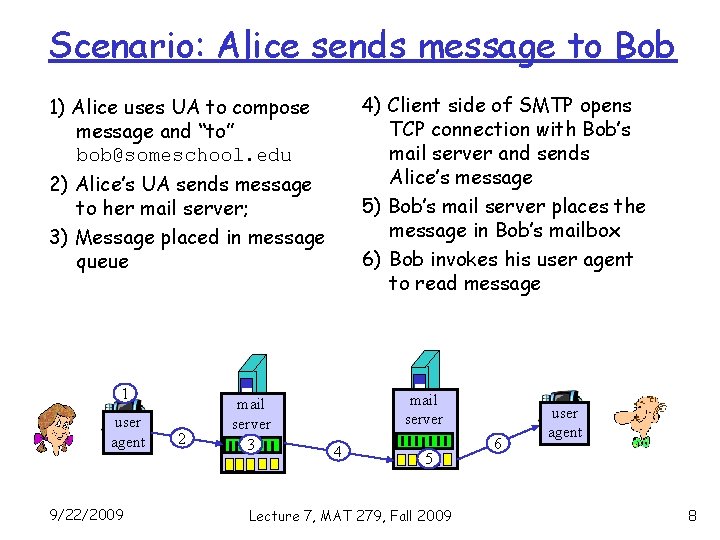
Scenario: Alice sends message to Bob 4) Client side of SMTP opens TCP connection with Bob’s mail server and sends Alice’s message 5) Bob’s mail server places the message in Bob’s mailbox 6) Bob invokes his user agent to read message 1) Alice uses UA to compose message and “to” bob@someschool. edu 2) Alice’s UA sends message to her mail server; 3) Message placed in message queue 1 user agent 9/22/2009 2 mail server 3 mail server 4 5 Lecture 7, MAT 279, Fall 2009 6 user agent 8
SMTP: comparison with HTTP Comparison with HTTP: q HTTP: pull q SMTP: push q SMTP uses persistent connections q HTTP: each object encapsulated in its own response msg q SMTP: multiple objects handled 9/22/2009 Lecture 7, MAT 279, Fall 2009 9
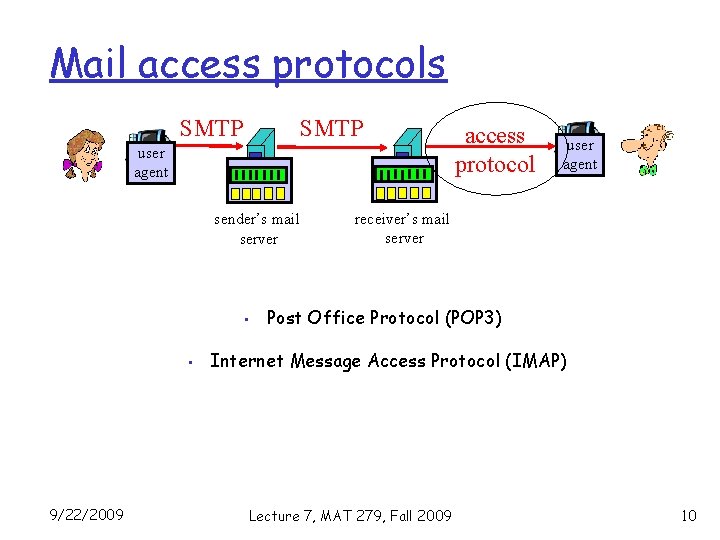
Mail access protocols SMTP user agent sender’s mail server • • 9/22/2009 access protocol user agent receiver’s mail server Post Office Protocol (POP 3) Internet Message Access Protocol (IMAP) Lecture 7, MAT 279, Fall 2009 10
POP 3 and IMAP: Comparison POP 3 q Uses “download and delete” mode. q Bob cannot re-read email if he changes client q POP 3 is stateless across sessions 9/22/2009 IMAP q Keep all messages in one place: the server q Allows user to organize messages in folders q IMAP keeps user state across sessions: v names of folders and mappings between message IDs and folder name Lecture 7, MAT 279, Fall 2009 11
Back to HTML (cont. ) 9/22/2009 Lecture 7, MAT 279, Fall 2009 12
What we have learned so far: q 2. 1 Basic HTML page development q 2. 2 Tags… (example? ) q 2. 3 Lists… (example? ) q 2. 4 Attributes… (example? ) q 2. 5 Single Tag… (example? ) So far, we have learned text handling. How about Image? Image handling in HTML 9/22/2009 Lecture 7, MAT 279, Fall 2009 13
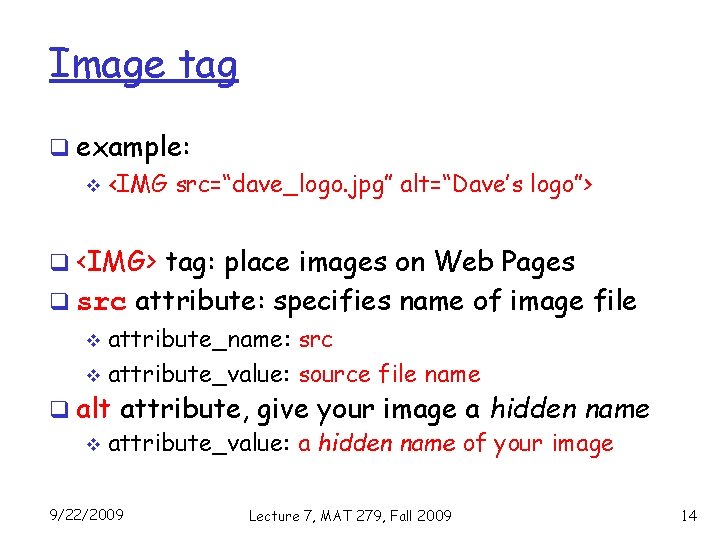
Image tag q example: v <IMG src=“dave_logo. jpg” alt=“Dave’s logo”> q <IMG> tag: place images on Web Pages q src attribute: specifies name of image file attribute_name: src v attribute_value: source file name v q alt attribute, give your image a hidden name v attribute_value: a hidden name of your image 9/22/2009 Lecture 7, MAT 279, Fall 2009 14
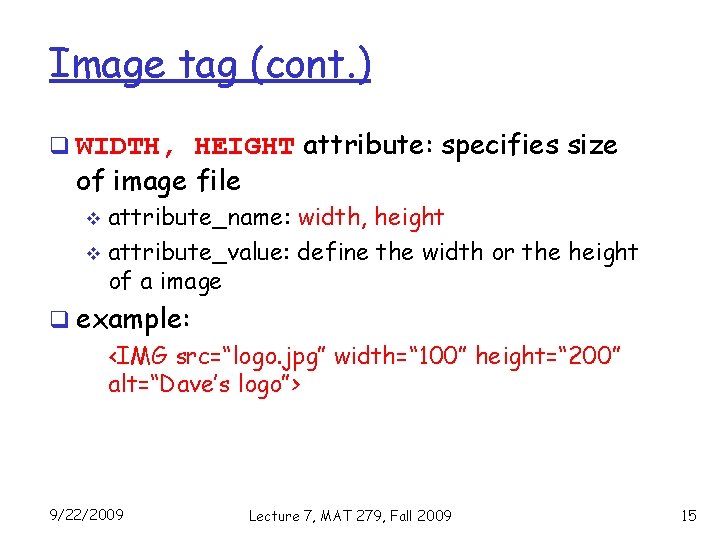
Image tag (cont. ) q WIDTH, HEIGHT attribute: specifies size of image file attribute_name: width, height v attribute_value: define the width or the height of a image v q example: <IMG src=“logo. jpg” width=“ 100” height=“ 200” alt=“Dave’s logo”> 9/22/2009 Lecture 7, MAT 279, Fall 2009 15
Image tag (cont. ) q place an image in center of a browser v <CENTER>, … </CENTER> tag v example <CENTER> <IMG src=“logo. jpg” width=“ 100” height=“ 200” alt=“Dave’s logo”> </CENTER> q Alternatively, <h 1 style=“text-align: center”> <IMG src=“logo. jpg” width=“ 100” height=“ 200” alt=“Dave’s logo”> </h 1> 9/22/2009 Lecture 7, MAT 279, Fall 2009 16
Remember: q use image files in. gif, . jpg, . png format q do NOT use. bmp, . tiff, . pict q use images with small size 9/22/2009 Lecture 7, MAT 279, Fall 2009 17
NOTE q When insert an image, make sure that the image file is located at the same disk directory as shown in your src attribute in <IMG> tag q Example v if <IMG src=“logo. jpg” …> is used in your html file, then the image file (logo. jpg) MUST be installed in the same disk and same file folder with your html file! 9/22/2009 Lecture 7, MAT 279, Fall 2009 18
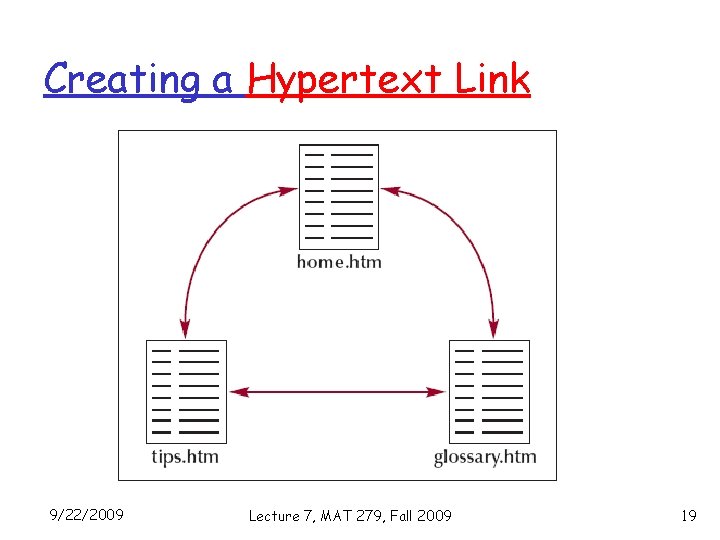
Creating a Hypertext Link 9/22/2009 Lecture 7, MAT 279, Fall 2009 19
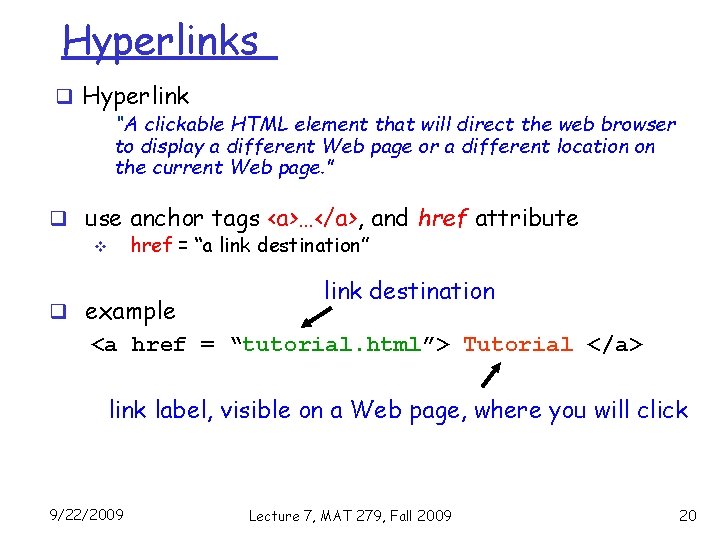
Hyperlinks q Hyperlink “A clickable HTML element that will direct the web browser to display a different Web page or a different location on the current Web page. ” q use anchor tags <a>…</a>, and href attribute v href = “a link destination” q example link destination <a href = “tutorial. html”> Tutorial </a> link label, visible on a Web page, where you will click 9/22/2009 Lecture 7, MAT 279, Fall 2009 20
Next Level: Developing a Web Site 9/22/2009 Lecture 7, MAT 279, Fall 2009 21
Web Site Structures q A well-designed structure ensures users v navigate the site v not get lost or miss important information q A storyboard is a diagram of a Web site’s structure shows all pages in a site v indicates how the pages are linked together v defines a structure works best for the type of information of the site v 9/22/2009 Lecture 7, MAT 279, Fall 2009 22
(1) Linear Structures q each page is linked with the page follows and the page precedes it in a chain q works best for Web pages with a clearly defined order q commonly, each page contains an additional link back to an opening page 9/22/2009 Lecture 7, MAT 279, Fall 2009 23
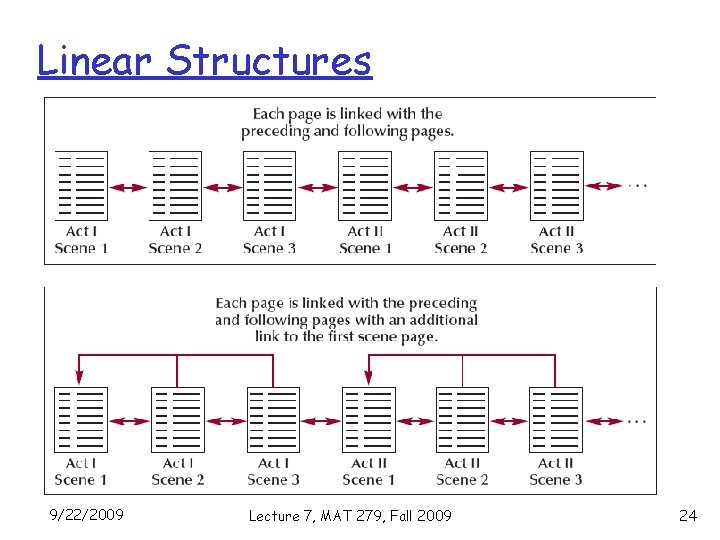
Linear Structures 9/22/2009 Lecture 7, MAT 279, Fall 2009 24
(2) Hierarchical Structures q pages are linked going from the home page down to more specific pages q users easily move from general to specific and back q a user can move quickly to a specific page without moving through each page in order 9/22/2009 Lecture 7, MAT 279, Fall 2009 25
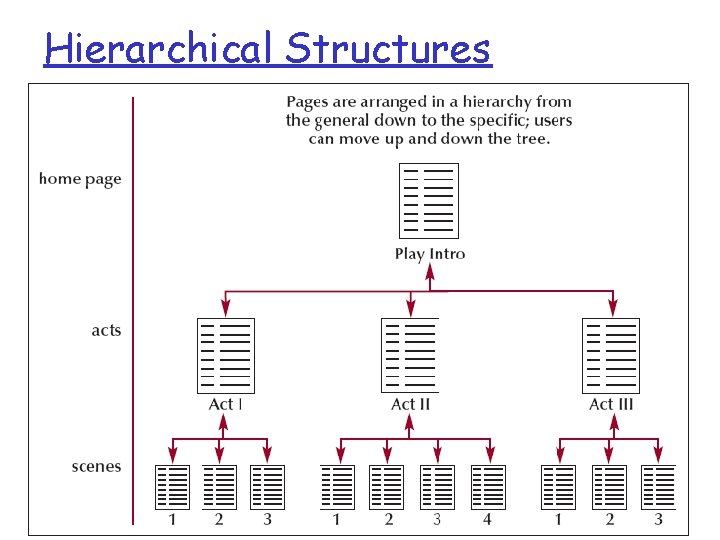
Hierarchical Structures 9/22/2009 Lecture 7, MAT 279, Fall 2009 26
(3) Mixed Structures q overall form hierarchical, allowing the user to move from general to specific q in the same time, links allow users to move through the site in a linear fashion 9/22/2009 Lecture 7, MAT 279, Fall 2009 27
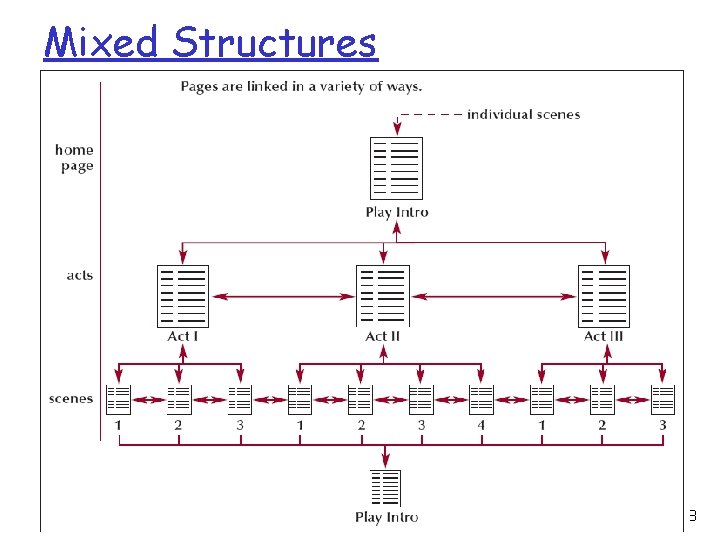
Mixed Structures 9/22/2009 Lecture 7, MAT 279, Fall 2009 28
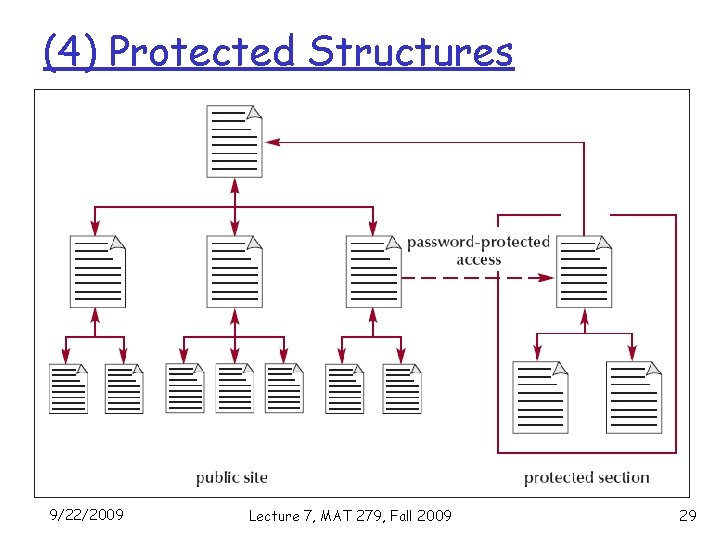
(4) Protected Structures 9/22/2009 Lecture 7, MAT 279, Fall 2009 29
Exercise? 9/22/2009 Lecture 7, MAT 279, Fall 2009 30
- Slides: 30