
Chapter 2 Application Layer Chapter goals r conceptual
![Electronic Mail: smtp [RFC 821] r uses tcp to reliably transfer email msg from](https://slidetodoc.com/presentation_image/20cab8fa6b66f378e1c6605b85c7c859/image-31.jpg "Electronic Mail: smtp [RFC 821] r uses tcp to reliably transfer email msg from")
- Slides: 40
Chapter 2: Application Layer Chapter goals: r conceptual + More chapter goals r specific protocols: implementation aspects of network application protocols m client server paradigm m service models r learn about protocols by examining popular r application-level protocols m m m http ftp smtp pop dns programming network applications m socket programming 2: Application Layer 1
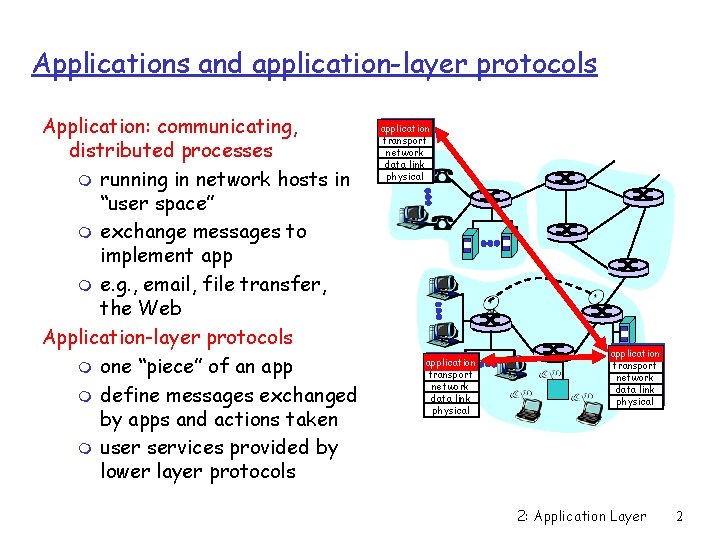
Applications and application-layer protocols Application: communicating, distributed processes m running in network hosts in “user space” m exchange messages to implement app m e. g. , email, file transfer, the Web Application-layer protocols m one “piece” of an app m define messages exchanged by apps and actions taken m user services provided by lower layer protocols application transport network data link physical 2: Application Layer 2
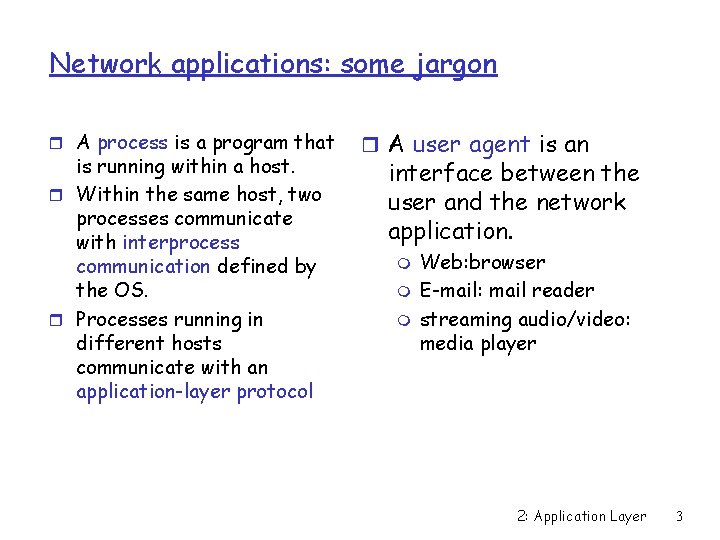
Network applications: some jargon r A process is a program that is running within a host. r Within the same host, two processes communicate with interprocess communication defined by the OS. r Processes running in different hosts communicate with an application-layer protocol r A user agent is an interface between the user and the network application. m m m Web: browser E-mail: mail reader streaming audio/video: media player 2: Application Layer 3
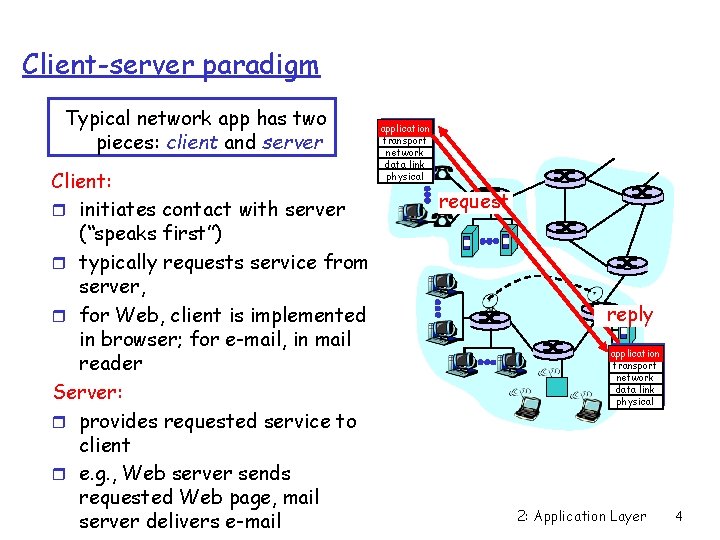
Client-server paradigm Typical network app has two pieces: client and server Client: r initiates contact with server (“speaks first”) r typically requests service from server, r for Web, client is implemented in browser; for e-mail, in mail reader Server: r provides requested service to client r e. g. , Web server sends requested Web page, mail server delivers e-mail application transport network data link physical request reply application transport network data link physical 2: Application Layer 4
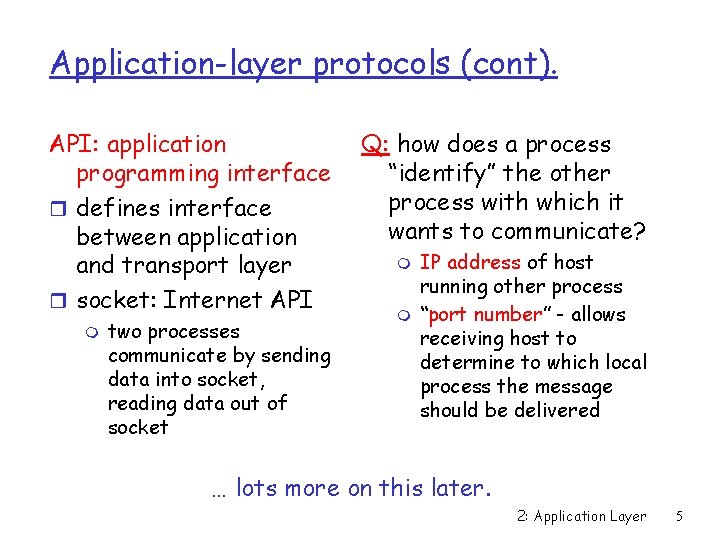
Application-layer protocols (cont). API: application programming interface r defines interface between application and transport layer r socket: Internet API m two processes communicate by sending data into socket, reading data out of socket Q: how does a process “identify” the other process with which it wants to communicate? m m IP address of host running other process “port number” - allows receiving host to determine to which local process the message should be delivered … lots more on this later. 2: Application Layer 5
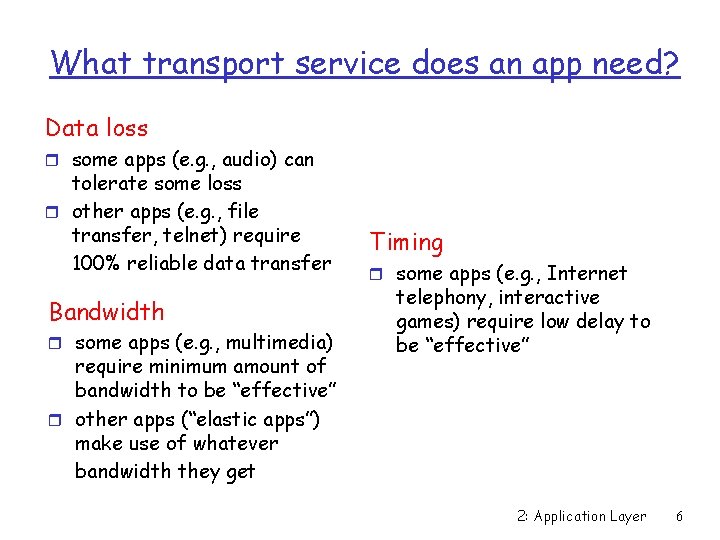
What transport service does an app need? Data loss r some apps (e. g. , audio) can tolerate some loss r other apps (e. g. , file transfer, telnet) require 100% reliable data transfer Bandwidth r some apps (e. g. , multimedia) require minimum amount of bandwidth to be “effective” r other apps (“elastic apps”) make use of whatever bandwidth they get Timing r some apps (e. g. , Internet telephony, interactive games) require low delay to be “effective” 2: Application Layer 6
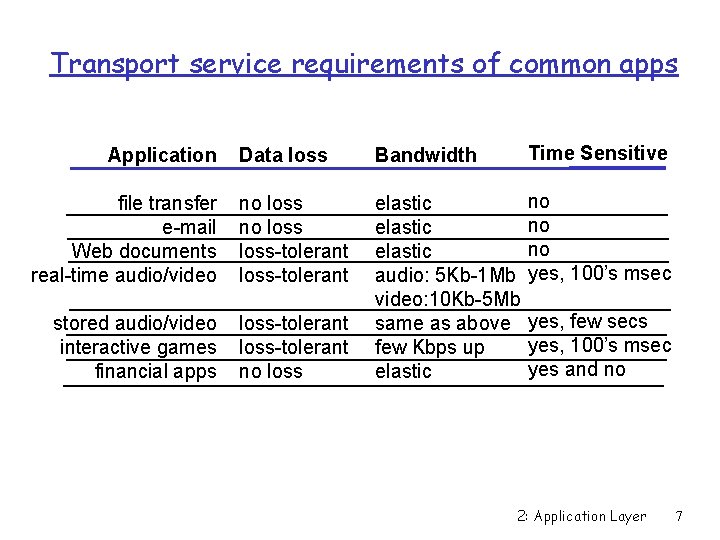
Transport service requirements of common apps Data loss Bandwidth Time Sensitive file transfer e-mail Web documents real-time audio/video no loss-tolerant no no no yes, 100’s msec stored audio/video interactive games financial apps loss-tolerant no loss elastic audio: 5 Kb-1 Mb video: 10 Kb-5 Mb same as above few Kbps up elastic Application yes, few secs yes, 100’s msec yes and no 2: Application Layer 7
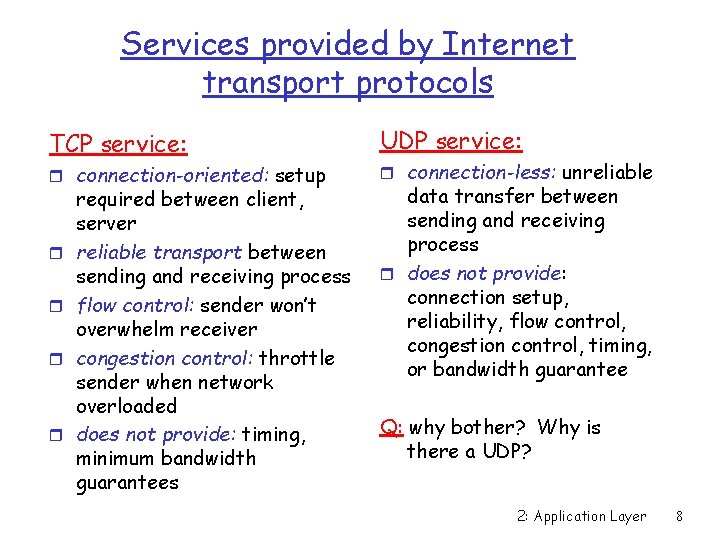
Services provided by Internet transport protocols TCP service: r connection-oriented: setup r r required between client, server reliable transport between sending and receiving process flow control: sender won’t overwhelm receiver congestion control: throttle sender when network overloaded does not provide: timing, minimum bandwidth guarantees UDP service: r connection-less: unreliable data transfer between sending and receiving process r does not provide: connection setup, reliability, flow control, congestion control, timing, or bandwidth guarantee Q: why bother? Why is there a UDP? 2: Application Layer 8
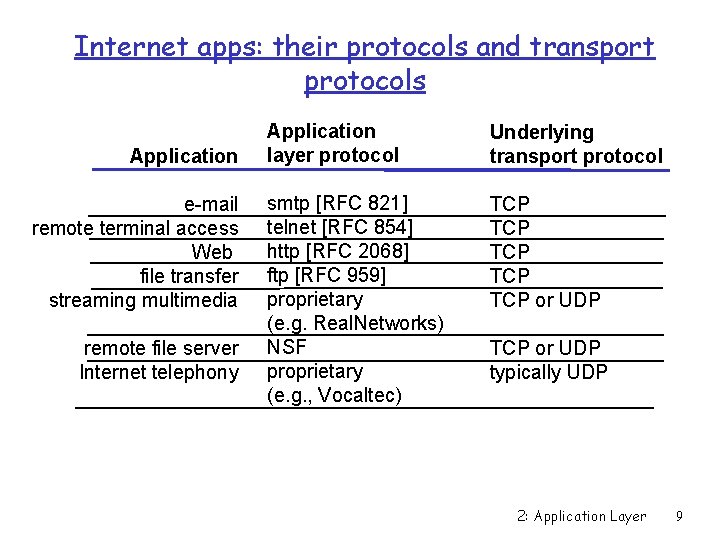
Internet apps: their protocols and transport protocols Application e-mail remote terminal access Web file transfer streaming multimedia remote file server Internet telephony Application layer protocol Underlying transport protocol smtp [RFC 821] telnet [RFC 854] http [RFC 2068] ftp [RFC 959] proprietary (e. g. Real. Networks) NSF proprietary (e. g. , Vocaltec) TCP TCP TCP or UDP typically UDP 2: Application Layer 9
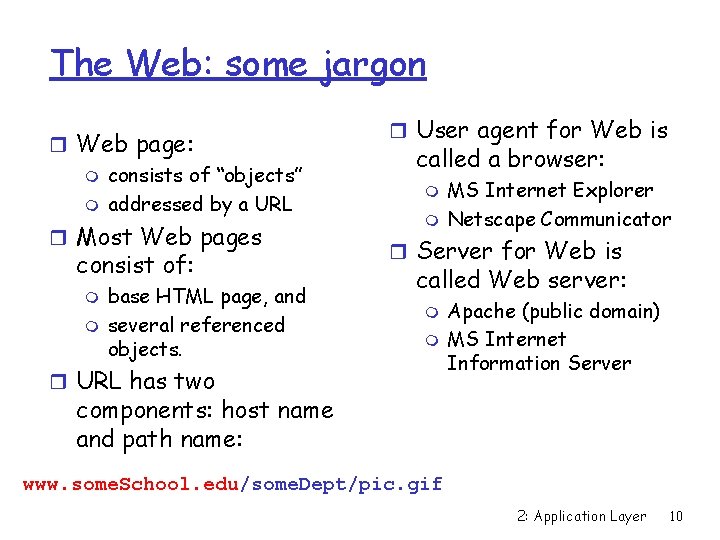
The Web: some jargon r Web page: m consists of “objects” m addressed by a URL r Most Web pages consist of: m m base HTML page, and several referenced objects. r User agent for Web is called a browser: m m MS Internet Explorer Netscape Communicator r Server for Web is called Web server: m m r URL has two Apache (public domain) MS Internet Information Server components: host name and path name: www. some. School. edu/some. Dept/pic. gif 2: Application Layer 10
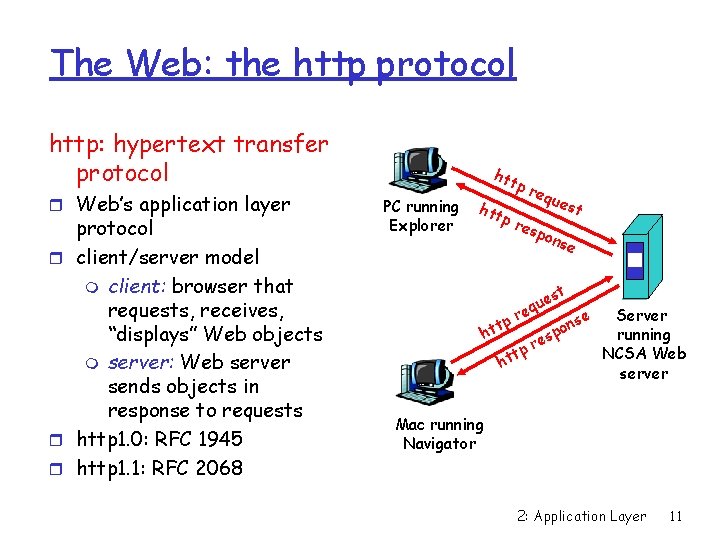
The Web: the http protocol http: hypertext transfer protocol r Web’s application layer protocol r client/server model m client: browser that requests, receives, “displays” Web objects m server: Web server sends objects in response to requests r http 1. 0: RFC 1945 r http 1. 1: RFC 2068 htt PC running Explorer htt pr equ pr esp est ons e t es u q re tp ht se n po s re Server running NCSA Web server Mac running Navigator 2: Application Layer 11
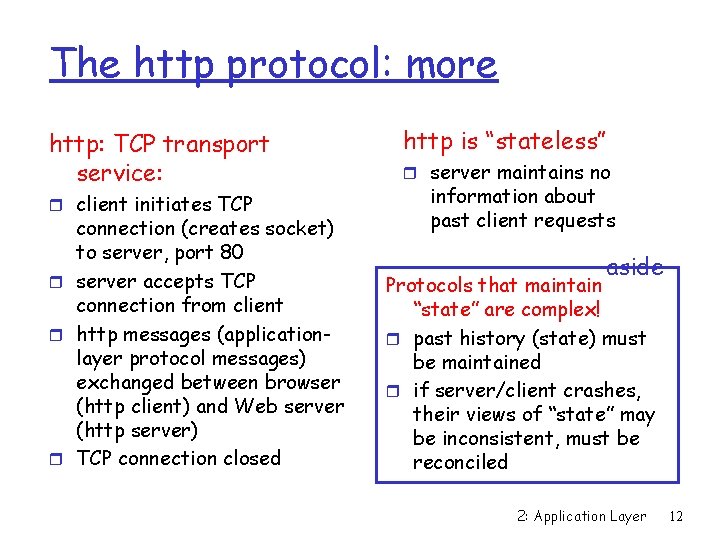
The http protocol: more http: TCP transport service: r client initiates TCP connection (creates socket) to server, port 80 r server accepts TCP connection from client r http messages (applicationlayer protocol messages) exchanged between browser (http client) and Web server (http server) r TCP connection closed http is “stateless” r server maintains no information about past client requests aside Protocols that maintain “state” are complex! r past history (state) must be maintained r if server/client crashes, their views of “state” may be inconsistent, must be reconciled 2: Application Layer 12
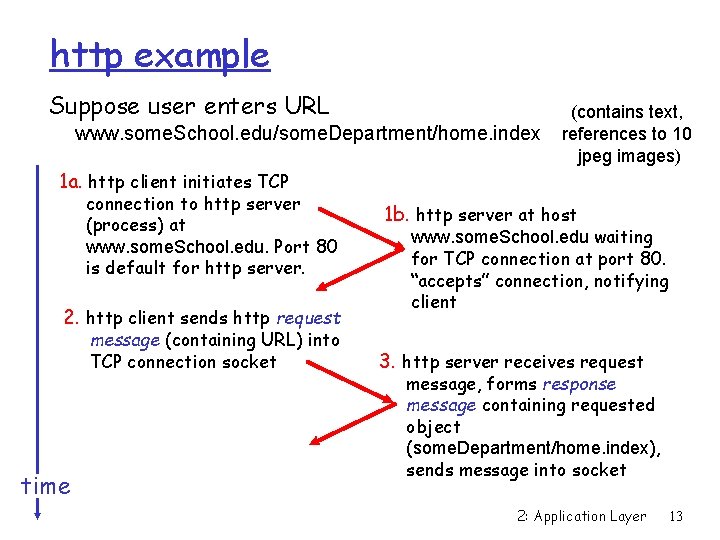
http example Suppose user enters URL www. some. School. edu/some. Department/home. index (contains text, references to 10 jpeg images) 1 a. http client initiates TCP connection to http server (process) at www. some. School. edu. Port 80 is default for http server. 2. http client sends http request message (containing URL) into TCP connection socket time 1 b. http server at host www. some. School. edu waiting for TCP connection at port 80. “accepts” connection, notifying client 3. http server receives request message, forms response message containing requested object (some. Department/home. index), sends message into socket 2: Application Layer 13
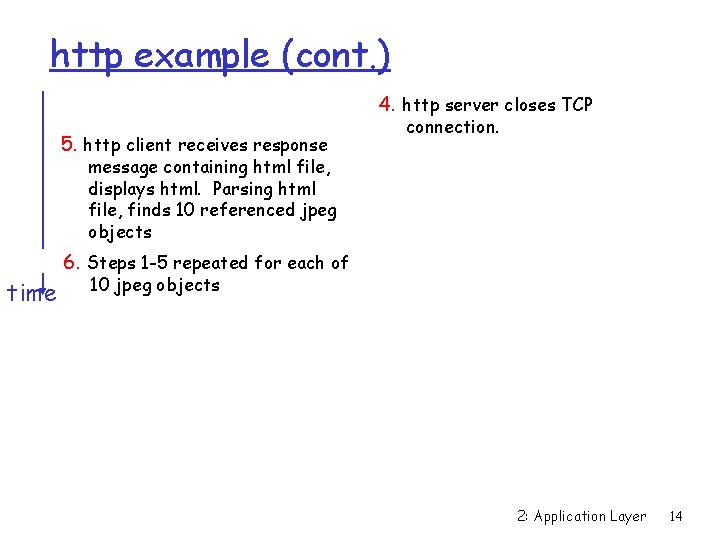
http example (cont. ) 4. http server closes TCP 5. http client receives response connection. message containing html file, displays html. Parsing html file, finds 10 referenced jpeg objects time 6. Steps 1 -5 repeated for each of 10 jpeg objects 2: Application Layer 14
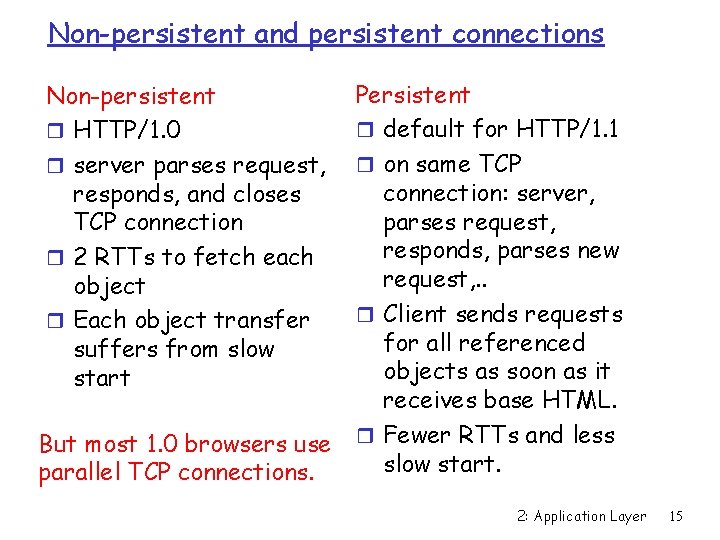
Non-persistent and persistent connections Non-persistent r HTTP/1. 0 r server parses request, responds, and closes TCP connection r 2 RTTs to fetch each object r Each object transfer suffers from slow start But most 1. 0 browsers use parallel TCP connections. Persistent r default for HTTP/1. 1 r on same TCP connection: server, parses request, responds, parses new request, . . r Client sends requests for all referenced objects as soon as it receives base HTML. r Fewer RTTs and less slow start. 2: Application Layer 15
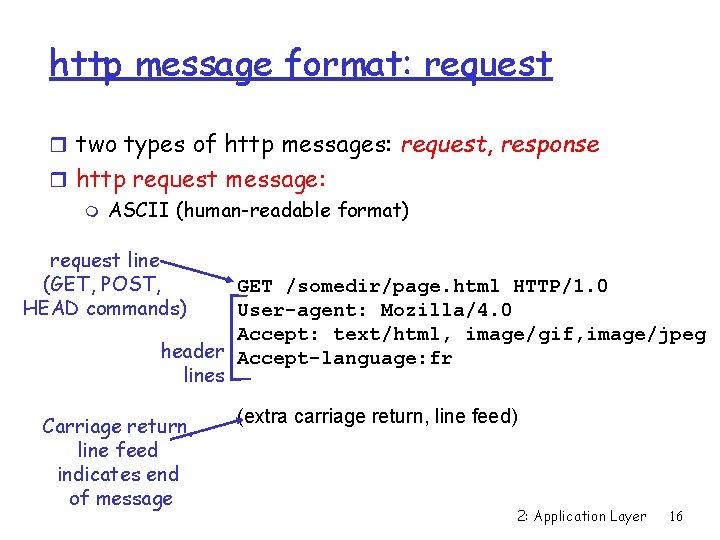
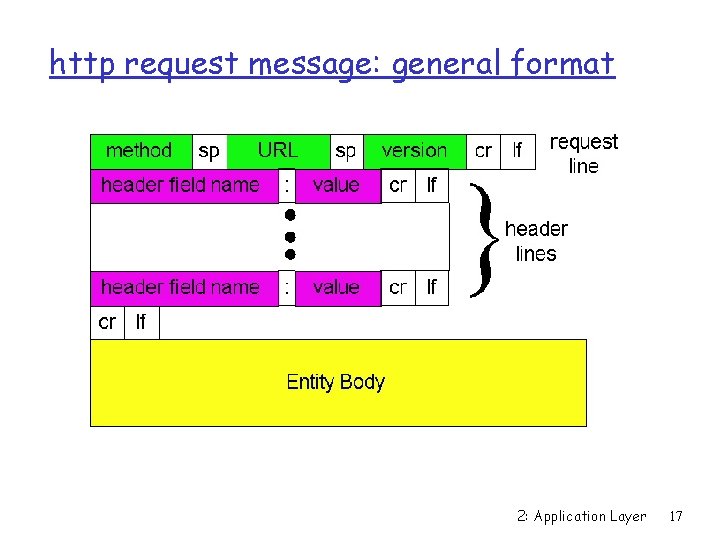
http message format: request r two types of http messages: request, response r http request message: m ASCII (human-readable format) request line (GET, POST, HEAD commands) GET /somedir/page. html HTTP/1. 0 User-agent: Mozilla/4. 0 Accept: text/html, image/gif, image/jpeg header Accept-language: fr lines Carriage return, line feed indicates end of message (extra carriage return, line feed) 2: Application Layer 16
http request message: general format 2: Application Layer 17
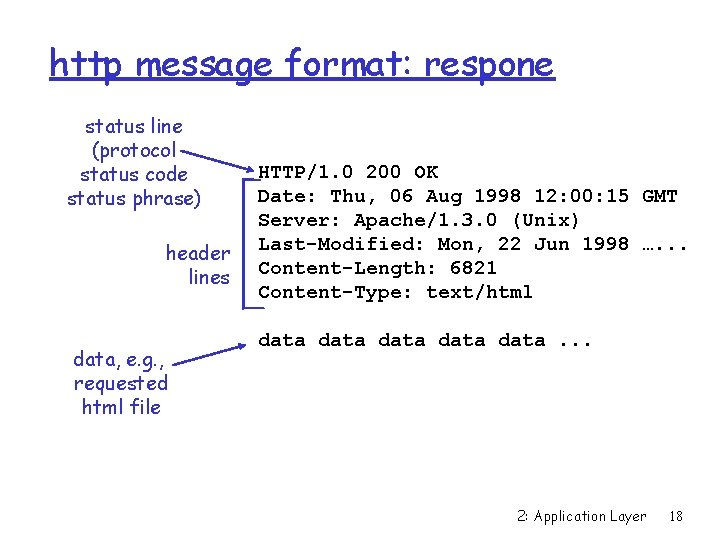
http message format: respone status line (protocol status code status phrase) header lines data, e. g. , requested html file HTTP/1. 0 200 OK Date: Thu, 06 Aug 1998 12: 00: 15 GMT Server: Apache/1. 3. 0 (Unix) Last-Modified: Mon, 22 Jun 1998 …. . . Content-Length: 6821 Content-Type: text/html data data. . . 2: Application Layer 18
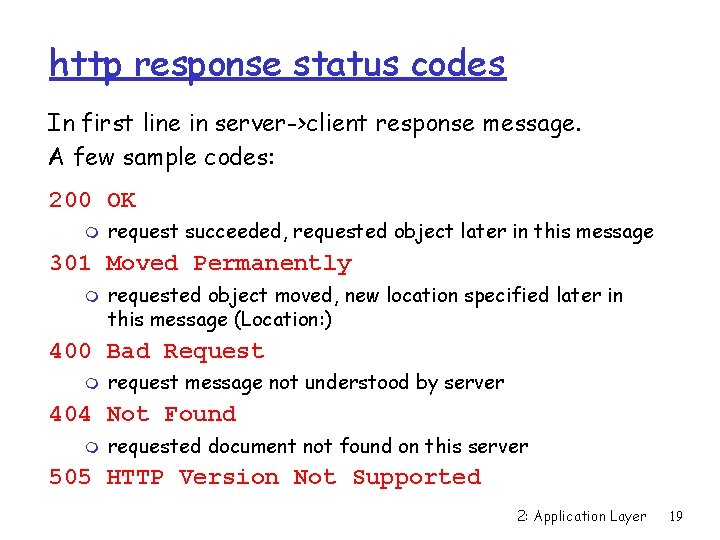
http response status codes In first line in server->client response message. A few sample codes: 200 OK m request succeeded, requested object later in this message 301 Moved Permanently m requested object moved, new location specified later in this message (Location: ) 400 Bad Request m request message not understood by server 404 Not Found m requested document not found on this server 505 HTTP Version Not Supported 2: Application Layer 19
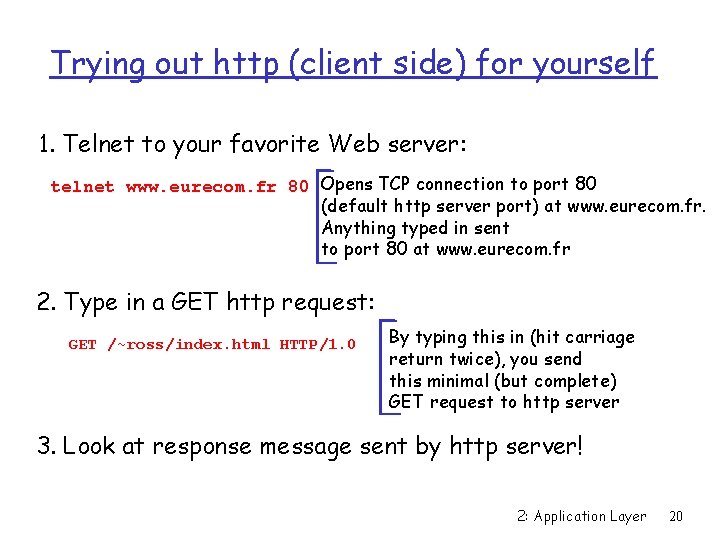
Trying out http (client side) for yourself 1. Telnet to your favorite Web server: telnet www. eurecom. fr 80 Opens TCP connection to port 80 (default http server port) at www. eurecom. fr. Anything typed in sent to port 80 at www. eurecom. fr 2. Type in a GET http request: GET /~ross/index. html HTTP/1. 0 By typing this in (hit carriage return twice), you send this minimal (but complete) GET request to http server 3. Look at response message sent by http server! 2: Application Layer 20
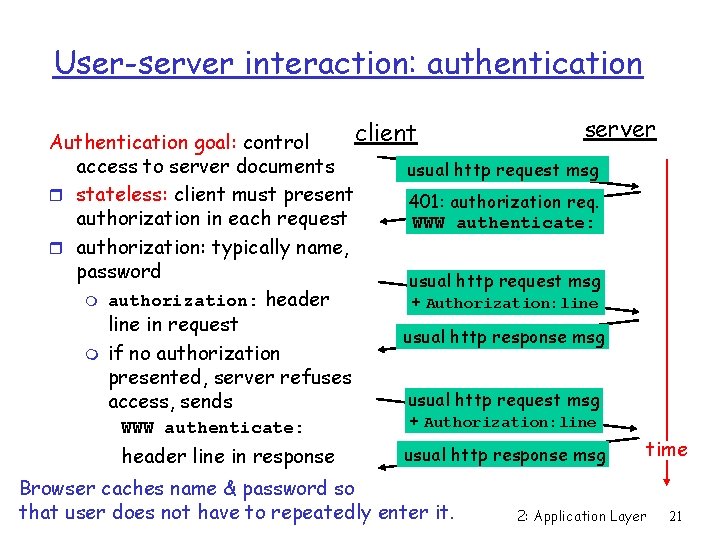
User-server interaction: authentication server client Authentication goal: control access to server documents usual http request msg r stateless: client must present 401: authorization req. authorization in each request WWW authenticate: r authorization: typically name, password usual http request msg m authorization: header + Authorization: line in request usual http response msg m if no authorization presented, server refuses usual http request msg access, sends WWW authenticate: header line in response + Authorization: line usual http response msg Browser caches name & password so that user does not have to repeatedly enter it. time 2: Application Layer 21
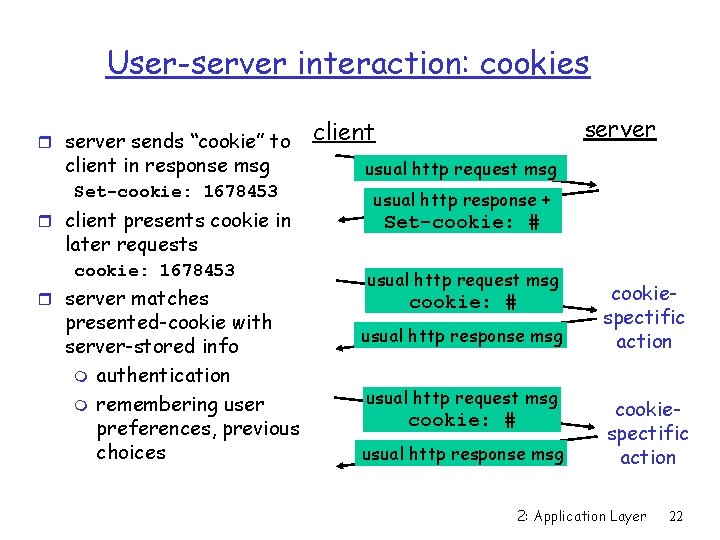
User-server interaction: cookies r server sends “cookie” to client in response msg Set-cookie: 1678453 r client presents cookie in later requests cookie: 1678453 r server matches presented-cookie with server-stored info m authentication m remembering user preferences, previous choices server client usual http request msg usual http response + Set-cookie: # usual http request msg cookie: # usual http response msg cookiespectific action 2: Application Layer 22
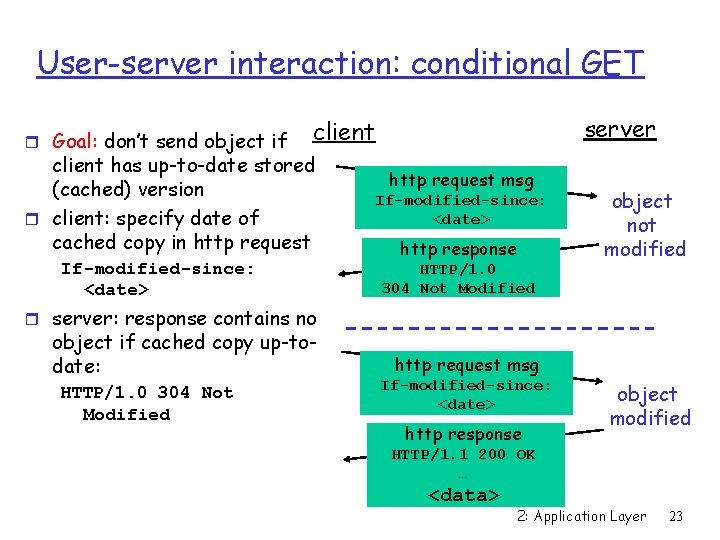
User-server interaction: conditional GET r Goal: don’t send object if server client has up-to-date stored (cached) version r client: specify date of cached copy in http request If-modified-since: <date> http request msg If-modified-since: <date> http response HTTP/1. 0 304 Not Modified object not modified r server: response contains no object if cached copy up-todate: HTTP/1. 0 304 Not Modified http request msg If-modified-since: <date> http response object modified HTTP/1. 1 200 OK … <data> 2: Application Layer 23
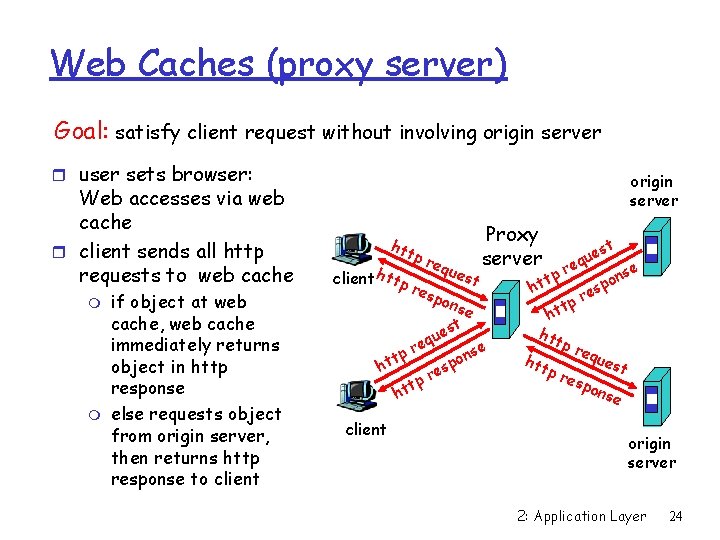
Web Caches (proxy server) Goal: satisfy client request without involving origin server r user sets browser: Web accesses via web cache r client sends all http requests to web cache m m if object at web cache, web cache immediately returns object in http response else requests object from origin server, then returns http response to client origin server htt client htt pr equ pr esp est Proxy server ons e t es u eq r nse tp o t p h es r tp ht client t es u eq r se p n t o p ht es r tp ht htt pr equ htt est pr esp ons e origin server 2: Application Layer 24
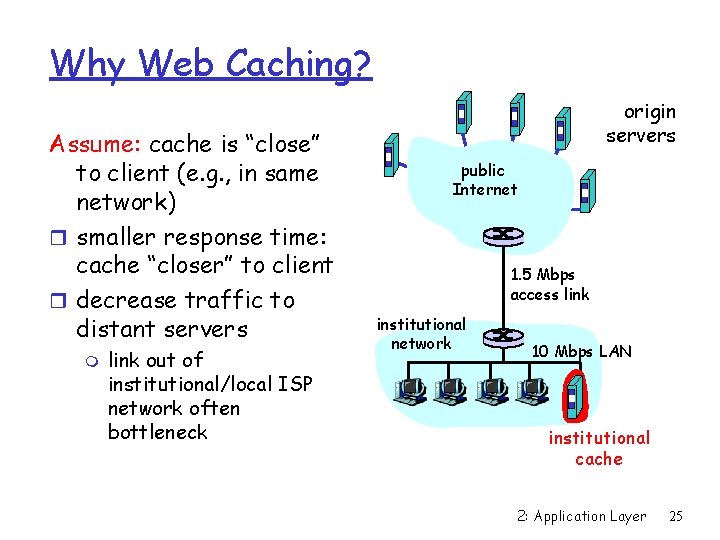
Why Web Caching? Assume: cache is “close” to client (e. g. , in same network) r smaller response time: cache “closer” to client r decrease traffic to distant servers m link out of institutional/local ISP network often bottleneck origin servers public Internet 1. 5 Mbps access link institutional network 10 Mbps LAN institutional cache 2: Application Layer 25
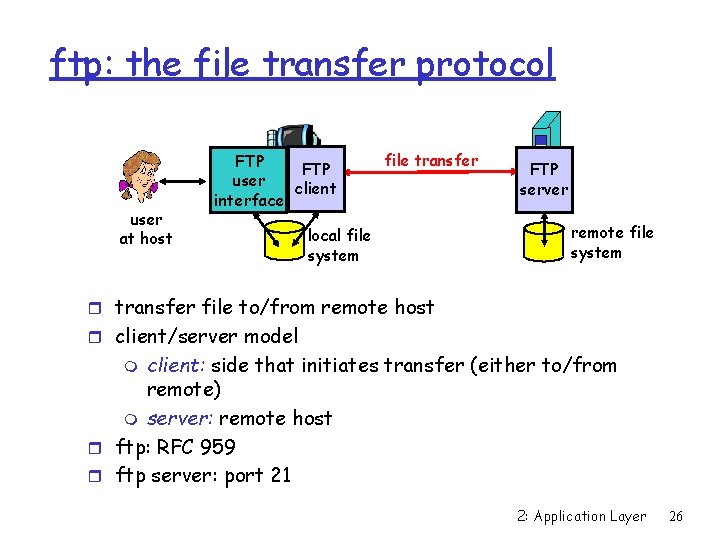
ftp: the file transfer protocol user at host FTP user client interface file transfer local file system FTP server remote file system r transfer file to/from remote host r client/server model client: side that initiates transfer (either to/from remote) m server: remote host r ftp: RFC 959 r ftp server: port 21 m 2: Application Layer 26
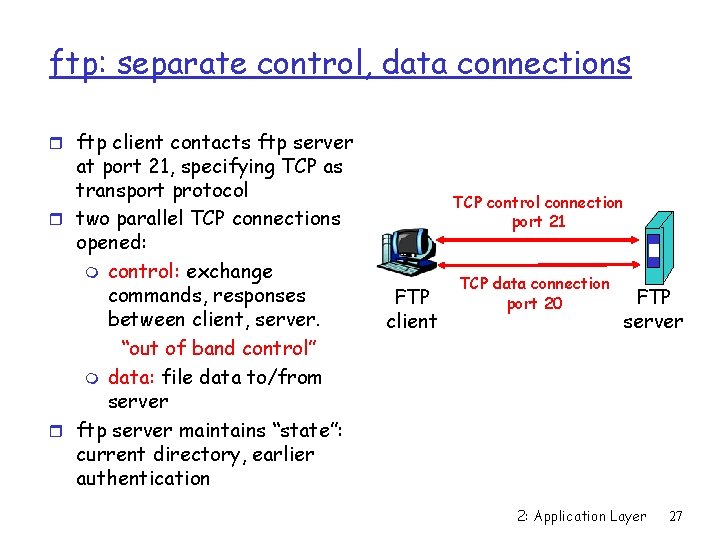
ftp: separate control, data connections r ftp client contacts ftp server at port 21, specifying TCP as transport protocol r two parallel TCP connections opened: m control: exchange commands, responses between client, server. “out of band control” m data: file data to/from server r ftp server maintains “state”: current directory, earlier authentication TCP control connection port 21 FTP client TCP data connection port 20 FTP server 2: Application Layer 27
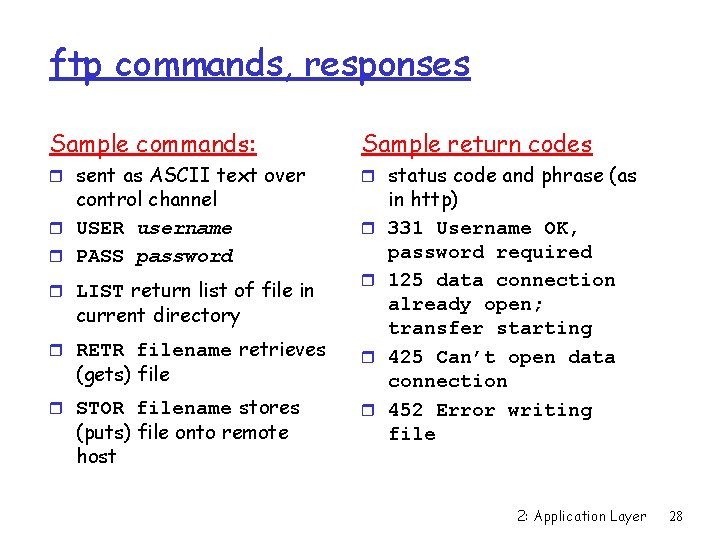
ftp commands, responses Sample commands: Sample return codes r sent as ASCII text over r status code and phrase (as control channel r USER username r PASS password r LIST return list of file in r r current directory r RETR filename retrieves r r STOR filename stores r (gets) file (puts) file onto remote host in http) 331 Username OK, password required 125 data connection already open; transfer starting 425 Can’t open data connection 452 Error writing file 2: Application Layer 28
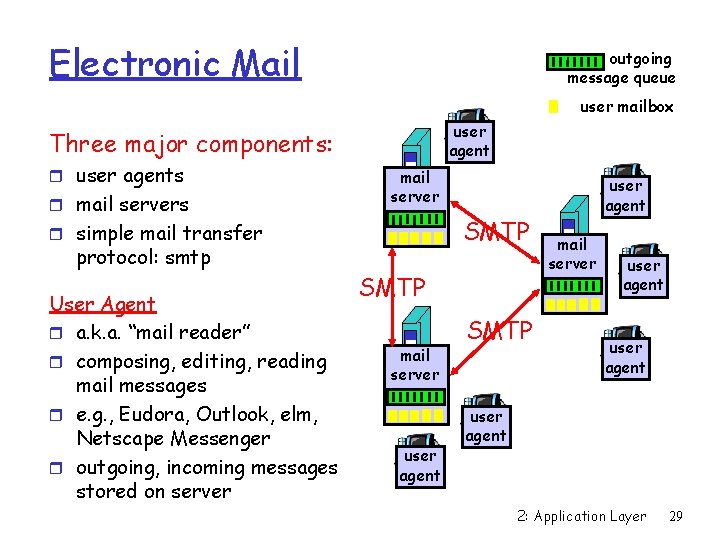
Electronic Mail outgoing message queue user mailbox user agent Three major components: r user agents r mail servers mail server SMTP r simple mail transfer protocol: smtp User Agent r a. k. a. “mail reader” r composing, editing, reading mail messages r e. g. , Eudora, Outlook, elm, Netscape Messenger r outgoing, incoming messages stored on server SMTP mail server user agent SMTP user agent mail server user agent 2: Application Layer 29
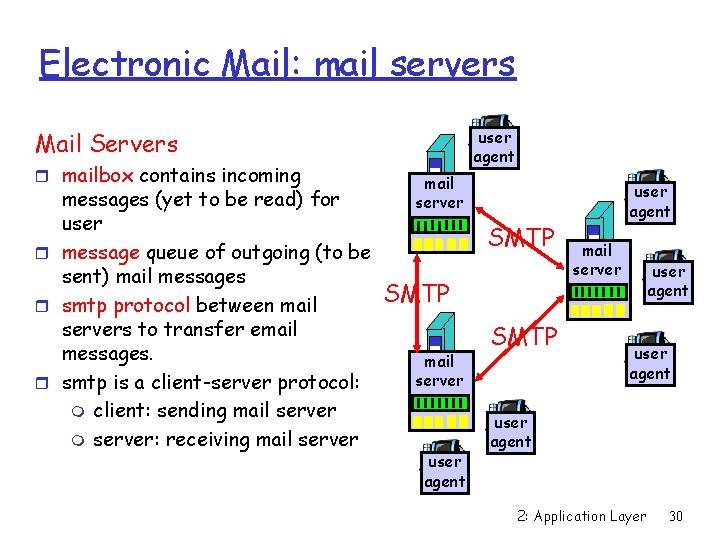
Electronic Mail: mail servers user agent Mail Servers r mailbox contains incoming messages (yet to be read) for user r message queue of outgoing (to be sent) mail messages r smtp protocol between mail servers to transfer email messages. r smtp is a client-server protocol: m client: sending mail server m server: receiving mail server SMTP mail server user agent SMTP user agent mail server user agent 2: Application Layer 30
Electronic Mail: smtp [RFC 821] r uses tcp to reliably transfer email msg from client to server, port 25 r direct transfer: sending server to receiving server r three phases of transfer m handshaking (greeting) m transfer of messages m closure r command/response interaction m commands: ASCII text m response: status code and phrase r messages must be in 7 -bit ASCII 2: Application Layer 31
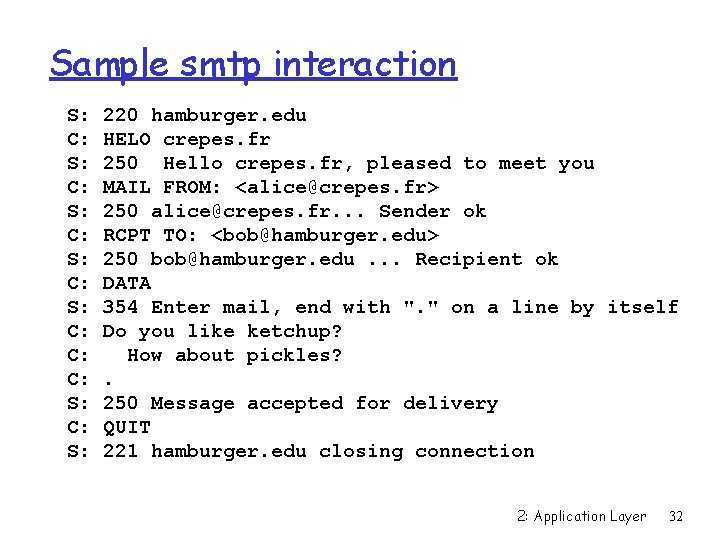
Sample smtp interaction S: C: S: C: C: C: S: 220 hamburger. edu HELO crepes. fr 250 Hello crepes. fr, pleased to meet you MAIL FROM: <alice@crepes. fr> 250 alice@crepes. fr. . . Sender ok RCPT TO: <bob@hamburger. edu> 250 bob@hamburger. edu. . . Recipient ok DATA 354 Enter mail, end with ". " on a line by itself Do you like ketchup? How about pickles? . 250 Message accepted for delivery QUIT 221 hamburger. edu closing connection 2: Application Layer 32
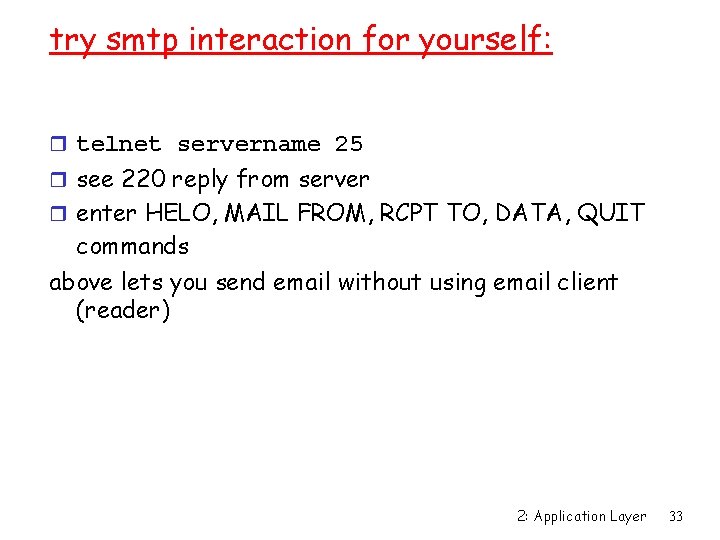
try smtp interaction for yourself: r telnet servername 25 r see 220 reply from server r enter HELO, MAIL FROM, RCPT TO, DATA, QUIT commands above lets you send email without using email client (reader) 2: Application Layer 33
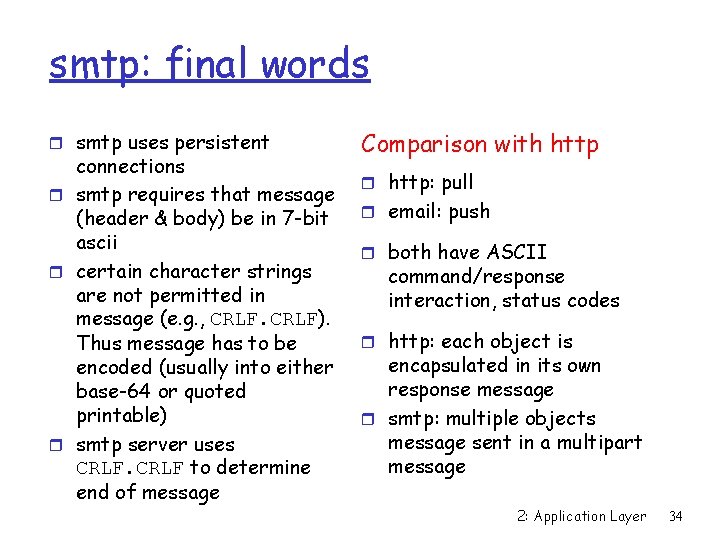
smtp: final words r smtp uses persistent connections r smtp requires that message (header & body) be in 7 -bit ascii r certain character strings are not permitted in message (e. g. , CRLF). Thus message has to be encoded (usually into either base-64 or quoted printable) r smtp server uses CRLF to determine end of message Comparison with http r http: pull r email: push r both have ASCII command/response interaction, status codes r http: each object is encapsulated in its own response message r smtp: multiple objects message sent in a multipart message 2: Application Layer 34
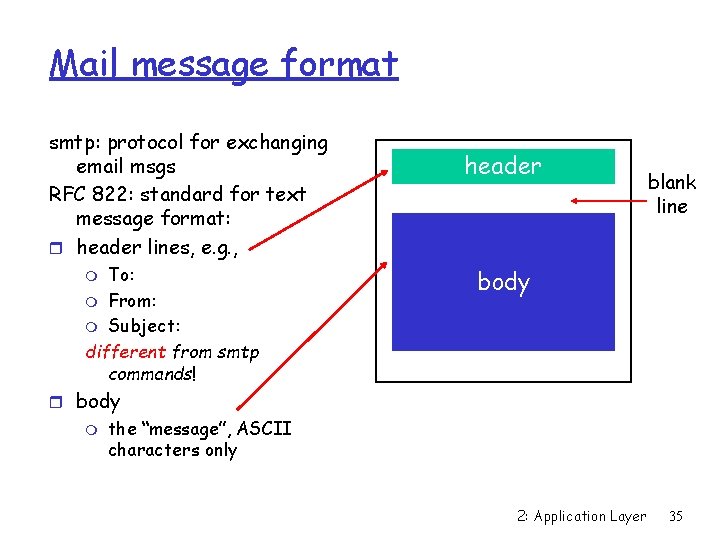
Mail message format smtp: protocol for exchanging email msgs RFC 822: standard for text message format: r header lines, e. g. , To: m From: m Subject: different from smtp commands! m header blank line body r body m the “message”, ASCII characters only 2: Application Layer 35
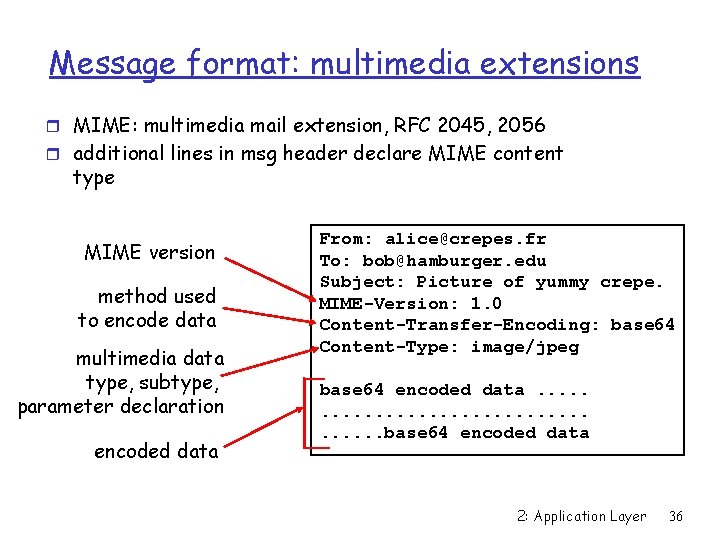
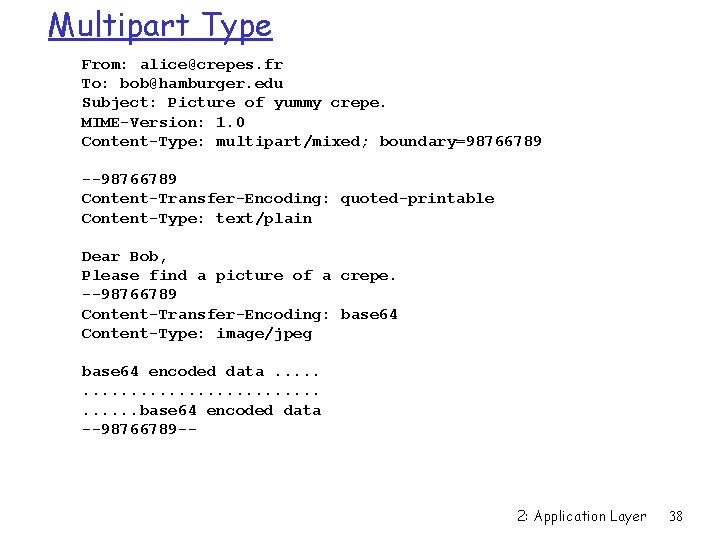
Message format: multimedia extensions r MIME: multimedia mail extension, RFC 2045, 2056 r additional lines in msg header declare MIME content type MIME version method used to encode data multimedia data type, subtype, parameter declaration encoded data From: alice@crepes. fr To: bob@hamburger. edu Subject: Picture of yummy crepe. MIME-Version: 1. 0 Content-Transfer-Encoding: base 64 Content-Type: image/jpeg base 64 encoded data. . . . . base 64 encoded data 2: Application Layer 36
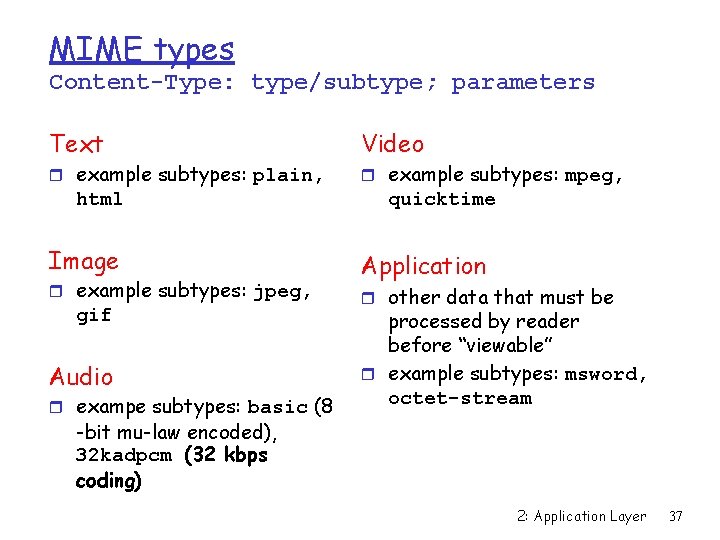
MIME types Content-Type: type/subtype; parameters Text r example subtypes: plain, html Image r example subtypes: jpeg, gif Audio r exampe subtypes: basic (8 Video r example subtypes: mpeg, quicktime Application r other data that must be processed by reader before “viewable” r example subtypes: msword, octet-stream -bit mu-law encoded), 32 kadpcm (32 kbps coding) 2: Application Layer 37
Multipart Type From: alice@crepes. fr To: bob@hamburger. edu Subject: Picture of yummy crepe. MIME-Version: 1. 0 Content-Type: multipart/mixed; boundary=98766789 --98766789 Content-Transfer-Encoding: quoted-printable Content-Type: text/plain Dear Bob, Please find a picture of a crepe. --98766789 Content-Transfer-Encoding: base 64 Content-Type: image/jpeg base 64 encoded data. . . . . base 64 encoded data --98766789 -- 2: Application Layer 38
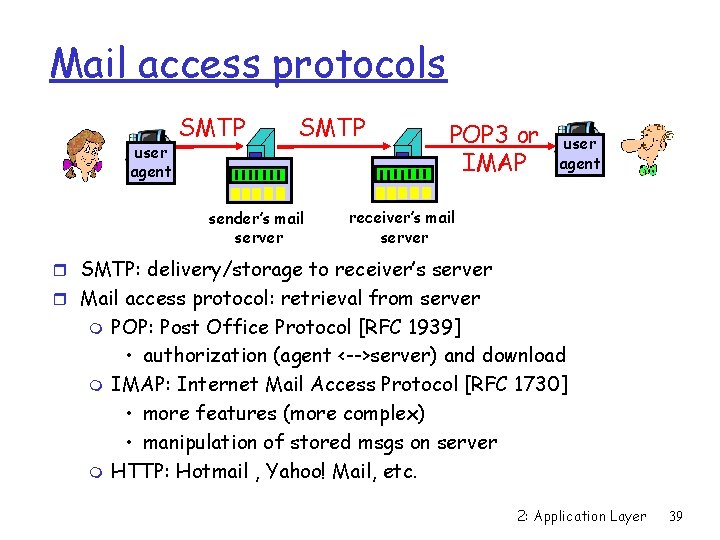
Mail access protocols user agent SMTP sender’s mail server POP 3 or IMAP user agent receiver’s mail server r SMTP: delivery/storage to receiver’s server r Mail access protocol: retrieval from server m m m POP: Post Office Protocol [RFC 1939] • authorization (agent <-->server) and download IMAP: Internet Mail Access Protocol [RFC 1730] • more features (more complex) • manipulation of stored msgs on server HTTP: Hotmail , Yahoo! Mail, etc. 2: Application Layer 39
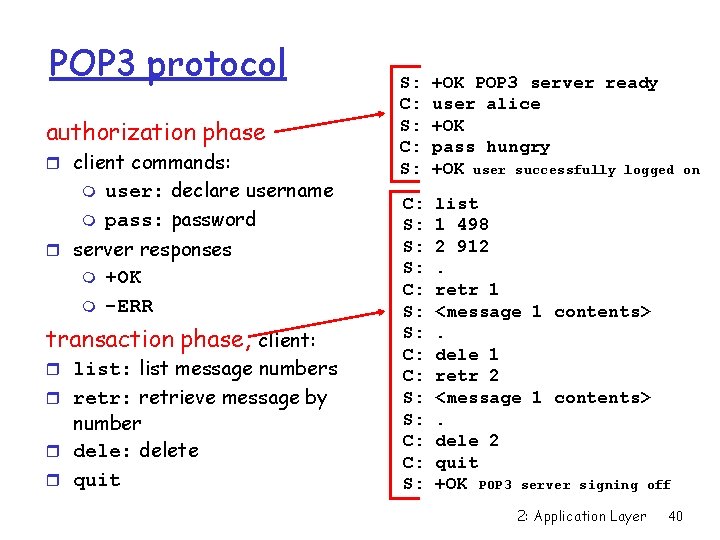
POP 3 protocol authorization phase r client commands: m m user: declare username pass: password r server responses m m +OK -ERR transaction phase, client: r list: list message numbers r retr: retrieve message by number r dele: delete r quit S: C: S: +OK POP 3 server ready user alice +OK pass hungry +OK user successfully logged C: S: S: S: C: C: S: list 1 498 2 912. retr 1 <message 1 contents>. dele 1 retr 2 <message 1 contents>. dele 2 quit +OK POP 3 server signing off 2: Application Layer 40 on