
Chapter 2 2 The Internet and the Web
Chapter 2 2 The Internet and the Web: Infrastructure for Electronic Commerce 1
Objectives u General 2 structure of the network of networks supporting the Internet and ecommerce u Protocols that move commerce across the Internet and send/receive e-mail u Internet utility programs to trace, locate, and verify the status of Internet host sites 2
Objectives u Popular 2 Internet applications, including e-mail, Telnet, and FTP u History and use of Web markup languages, including SGML, HTML, and XML u HTML tags and links u Web client and server architectures and the messages they send to each other 3
Objectives u Differences 2 and similarities between internets, intranets, and extranets u Options for connecting to the Internet, their cost and bandwidth tradeoffs 4
Technology Overview u Internet 2 is the most obvious technology needed to conduct e-commerce u Other technologies are also required Database software l Network switches and hubs l Encryption hardware and software l Multimedia support l u Potential for business volume to double in less than a year 5
Packet-Switched Networks u Local 2 and long distance telephone companies were early models in the 1950 s u Single paths were created to connect two parties together, called circuit switching 6
Packet-Switched Networks u The Internet uses Packet switching Files and messages are broken down into packets, which are electronically labeled with their origin and destination l The destination computer collects the packets and reassembles the data from the pieces in each packet l Each computer the packet encounters decides the best route towards its destination l 2 7
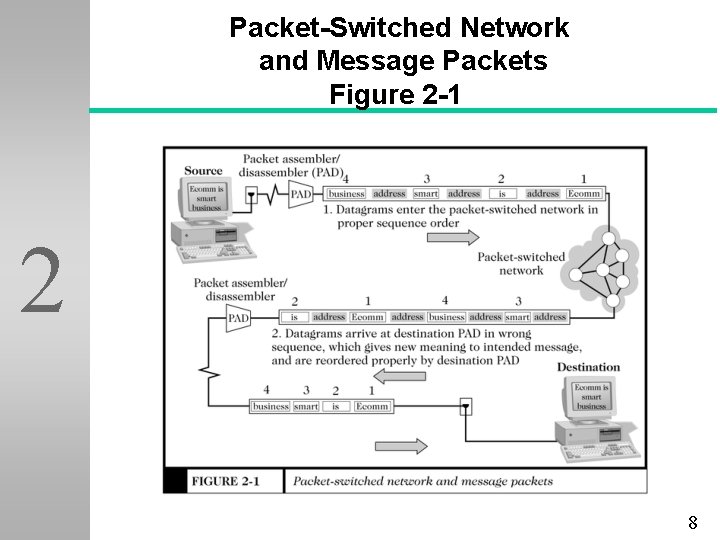
Packet-Switched Network and Message Packets Figure 2 -1 2 8
Open Architecture u Independent 2 networks should not require any internal changes in order to be connected to the network u Packets that do not arrive at their destination must be retransmitted u Router computers do not retain information about the packets u No global control exists over the network 9
The TCP/IP Internet Protocol u Set of protocols developed by Vincent Cerf and Robert Kahn 2 l Transmission Control Protocol (TCP) u Controls the assembly of a message into smaller packets before transmission, and reassembles them once received l Internet Protocol (IP) u Rules for routing packets from their source to their destination u Replaced NCP as used by ARPANET 10
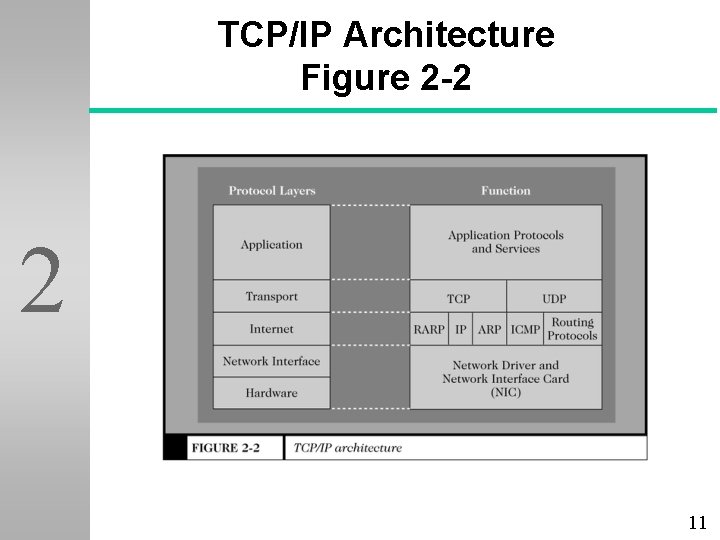
TCP/IP Architecture Figure 2 -2 2 11
IP Address and Domain Names u Appears 2 as a series of up to four separate numbers delineated by a period, often referred to as a “Dotted Quad” Each of the numbers range from 0 to 255 l First four numbers identify the network l Following numbers identify a node l Sample IP address: 126. 204. 89. 56 l 12
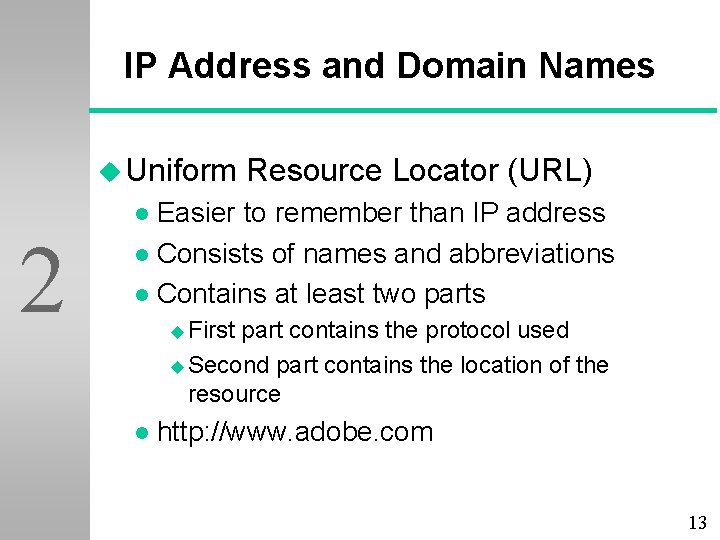
IP Address and Domain Names u Uniform Resource Locator (URL) Easier to remember than IP address l Consists of names and abbreviations l Contains at least two parts l 2 u First part contains the protocol used u Second part contains the location of the resource l http: //www. adobe. com 13
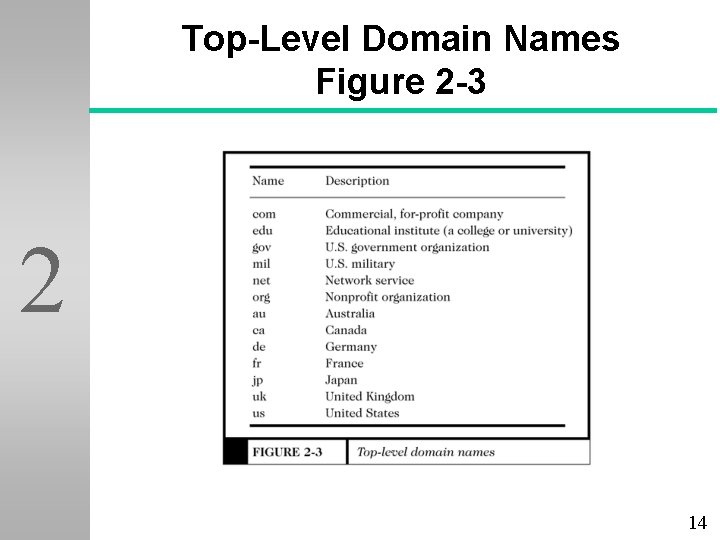
Top-Level Domain Names Figure 2 -3 2 14
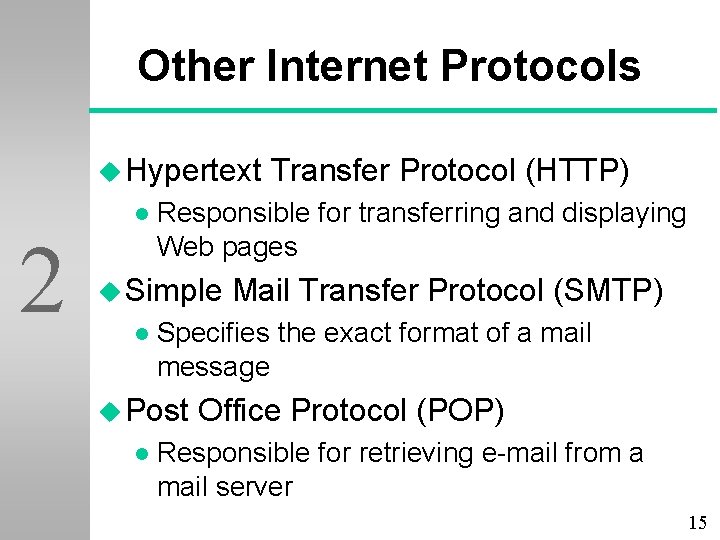
Other Internet Protocols u Hypertext l 2 Responsible for transferring and displaying Web pages u Simple l Mail Transfer Protocol (SMTP) Specifies the exact format of a mail message u Post l Transfer Protocol (HTTP) Office Protocol (POP) Responsible for retrieving e-mail from a mail server 15
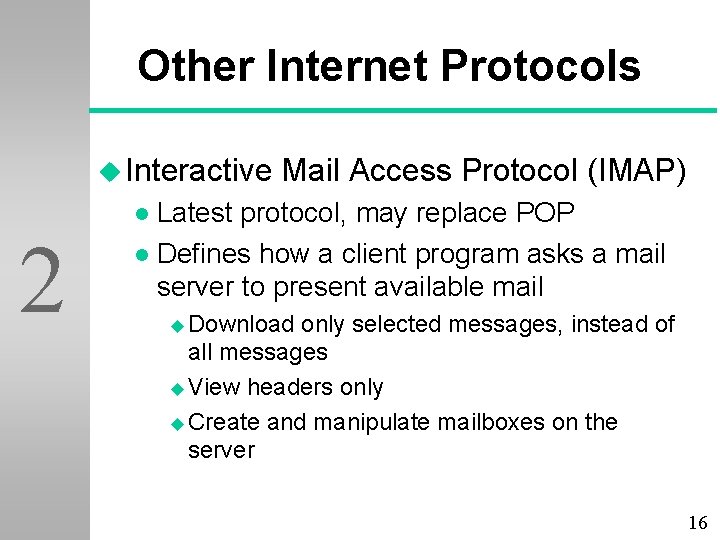
Other Internet Protocols u Interactive Mail Access Protocol (IMAP) Latest protocol, may replace POP l Defines how a client program asks a mail server to present available mail l 2 u Download only selected messages, instead of all messages u View headers only u Create and manipulate mailboxes on the server 16
Other Internet Protocols u File Transfer Protocol (FTP) Transfers files between TCP/IP-connected computers l Uses client/server model l Transfers both binary and ASCII text l Displays and manipulates remote and local computer file directories l 2 17
Internet Utility Programs u Finger 2 l Runs on UNIX computers and allows users to obtain limited information about other network users 18
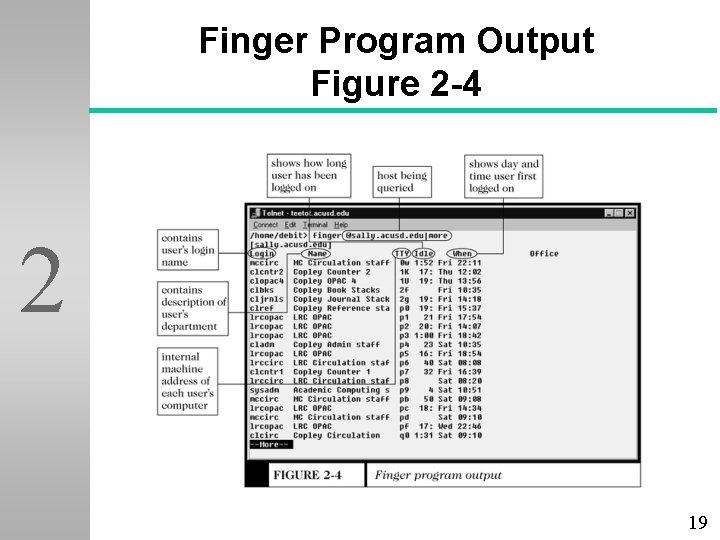
Finger Program Output Figure 2 -4 2 19
Internet Utility Programs u Packet Inter. Net Groper (Ping) Tests the connectivity between two Internet hosts l Determines if the host is active l 2 u Sends l a packet and waits for a reply Determines number of hosts (hops) between two specified hosts 20
Tracert and Other Route-Tracing Programs u TRACE 2 Rou. Te (Tracert) traces the round trip path between a user’s computer and another computer on the Internet u Incorporates a Graphical User Interface (GUI) for a visual representation of the route 21
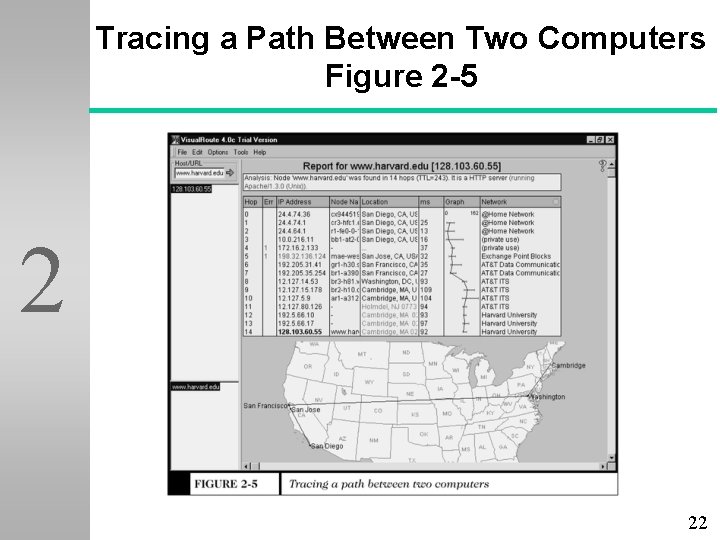
Tracing a Path Between Two Computers Figure 2 -5 2 22
Internet Applications: Electronic Mail u Began 2 in the 1970 s for use on the ARPANET u Most popular form of business communication u Can send documents, pictures, movies, worksheets, or other important pieces of information 23
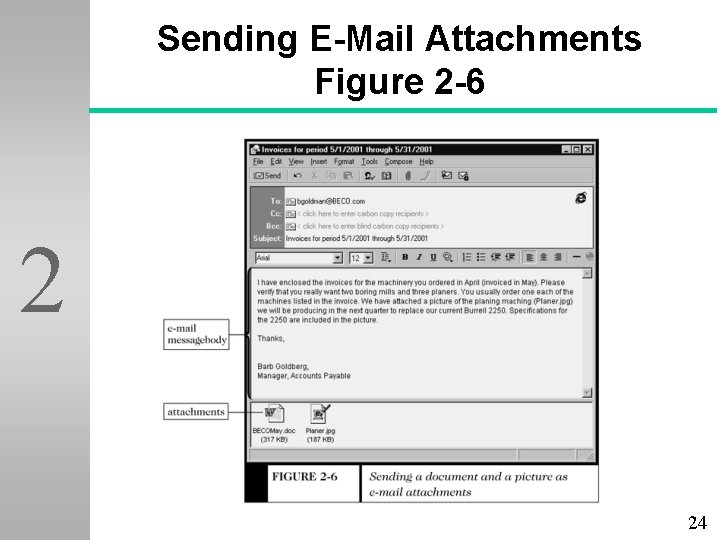
Sending E-Mail Attachments Figure 2 -6 2 24
Internet Applications: Telnet u Allows 2 users to log on to a remote computer that is attached to the Internet u Type commands to run on the remote host computer by using terminal emulation u Client software is available, and users can access Telnet through most Web browsers 25
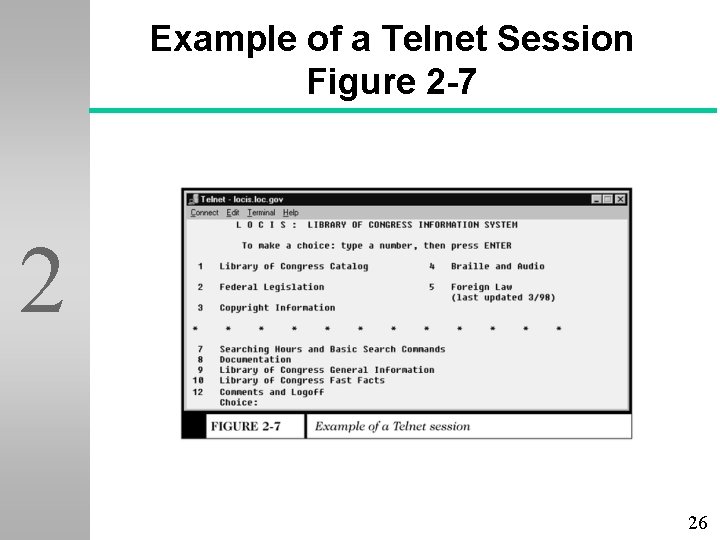
Example of a Telnet Session Figure 2 -7 2 26
Internet Applications: FTP u Fastest 2 way to deliver digital business information from one computer to another u Commonly used to download software packages and updates u Also used to upload files to the host computer for access from the Internet 27
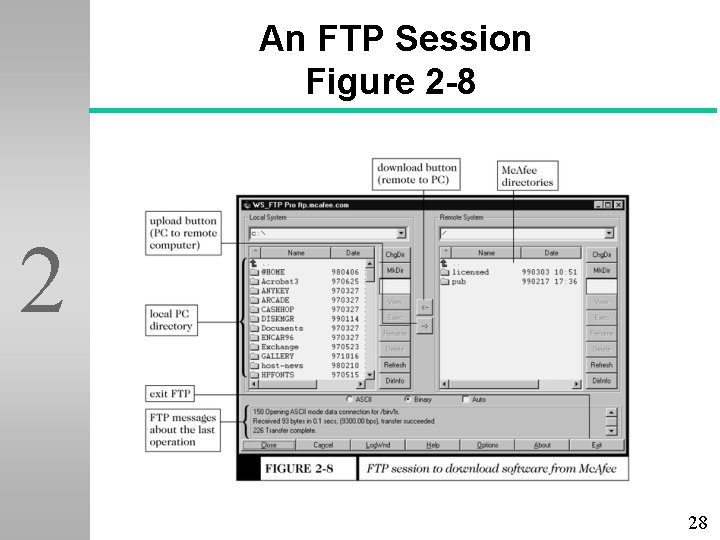
An FTP Session Figure 2 -8 2 28
Markup Languages and the Web u Standard Generalized Markup Language (SGML) 2 Regulated ISO standard since 1986 l Nonproprietary l Supports user-defined tags l Costly to set up l Expensive compared to HTML l Steep learning curve l 29
Markup Languages and the Web u Hypertext Markup Language Based on SGML l Easier to learn and support l Supports commonly used text markup features l 2 u Headings, title bars, bullets, lines, lists u Precise graphic positioning, tables, and frames l Standard language for Web pages 30
Markup Languages and the Web u Extensible Markup Language Descendant of SGML l Defines which data to display, instead of how a page is displayed l Describes a page’s actual content, unlike HTML l Data-tracking capability l 2 31
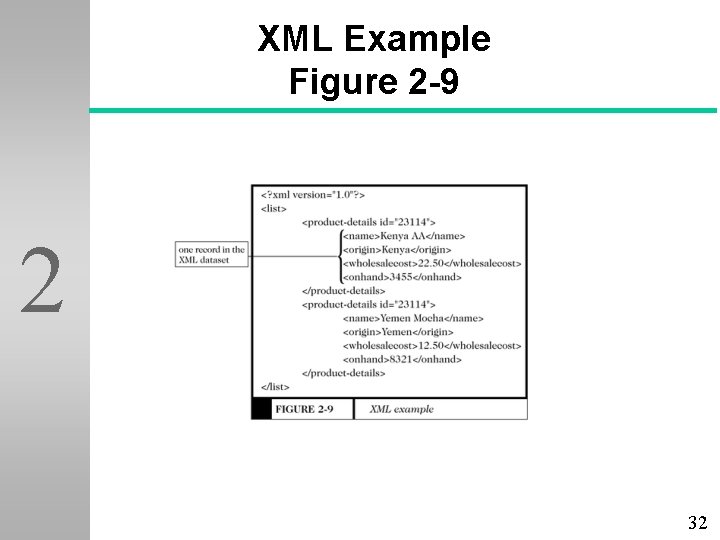
XML Example Figure 2 -9 2 32
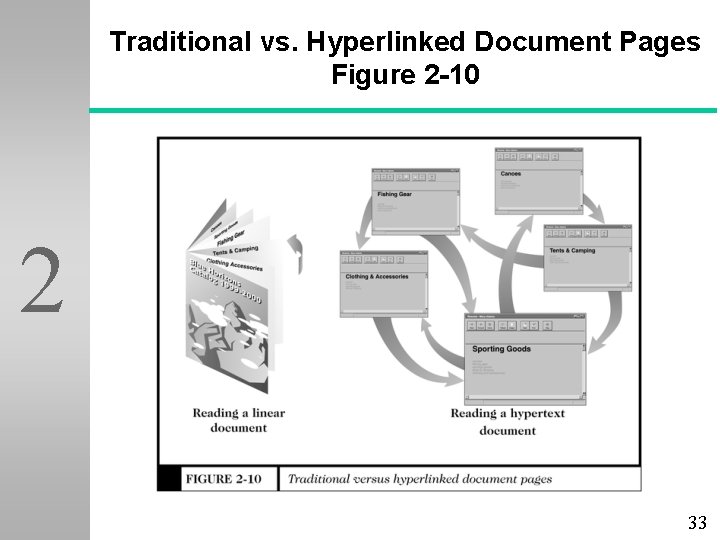
Traditional vs. Hyperlinked Document Pages Figure 2 -10 2 33
More about HTML u HTML l 2 tags <tagname properties>Displayed information affected by tag</tagname> u <B>best</B> - Bolds the word “best” u <P align=“right”> - Aligns text to the right u HTML code defines the formatting of the page, but a page may look different on two different browsers 34
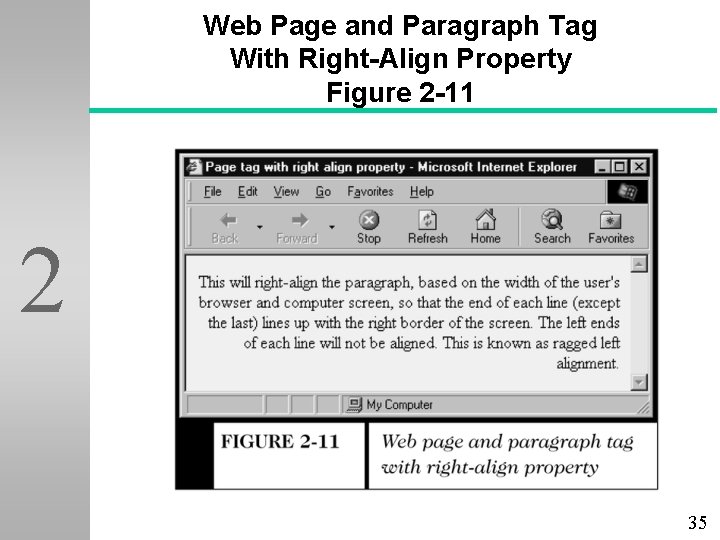
Web Page and Paragraph Tag With Right-Align Property Figure 2 -11 2 35
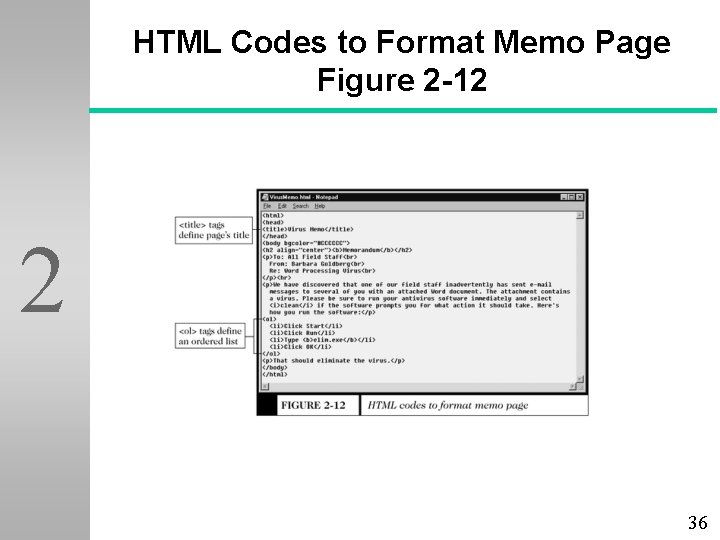
HTML Codes to Format Memo Page Figure 2 -12 2 36
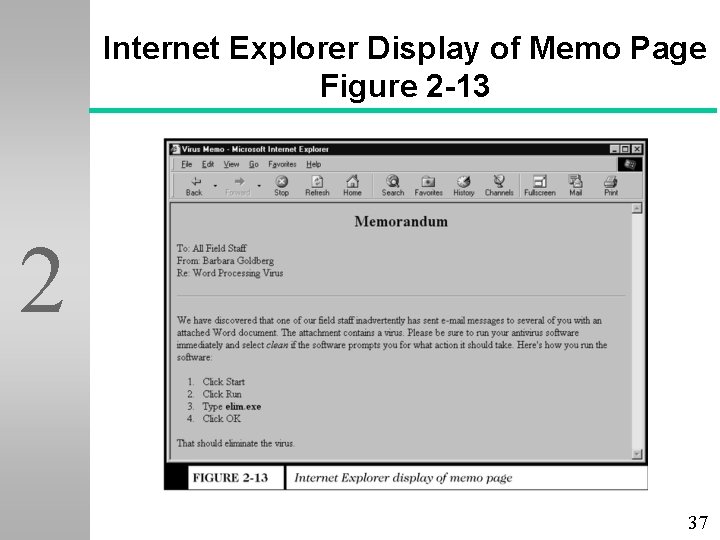
Internet Explorer Display of Memo Page Figure 2 -13 2 37
More about HTML u HTML l 2 Links Anchor tags used to link to text within the same document, or on a distant computer u <A HREF=“address”>Visible link text</A> u <A HREF=http: //www. purdue. edu>Purdue University</A> u <A HREF=“#references”>References are found here</A> l Text between the anchors appears as a hyperlink 38
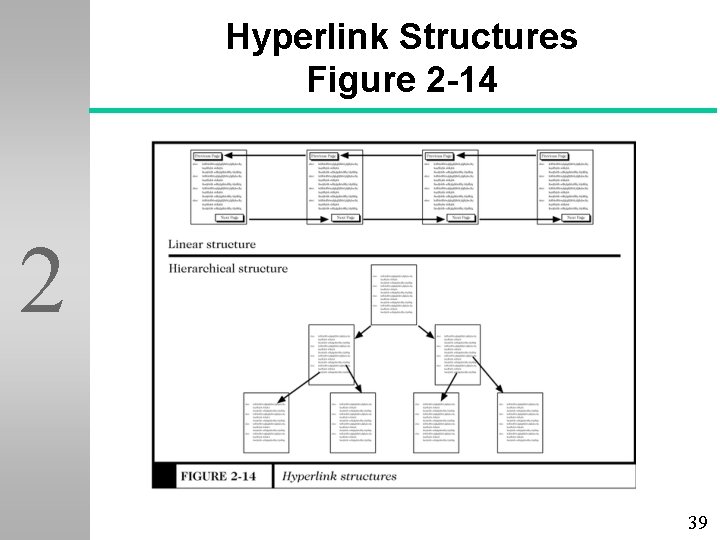
Hyperlink Structures Figure 2 -14 2 39
HTML Version History u Version 2 1. 0 appeared in the summer of 1991 u Version 2. 0 was released in September 1995 l Internet Explorer 2. 0 and Netscape Navigator 2. 0 appeared u Version l 3. 2 was released in 1997 Provided support for tables, complex numbers, and text flow around images 40
HTML Version History u Version 4. 0 was released in December 1997 2 Support for OBJECT tag and Cascading Style Sheets (CSS) l Internationalization for various languages l Accessibility features l 41
HTML Editors u Used to generate the HTML code Simple text editors offer limited flexibility l Any word processor can be used l Web site builders offer more control l 2 u Microsoft Front. Page u Dreamweaver 42
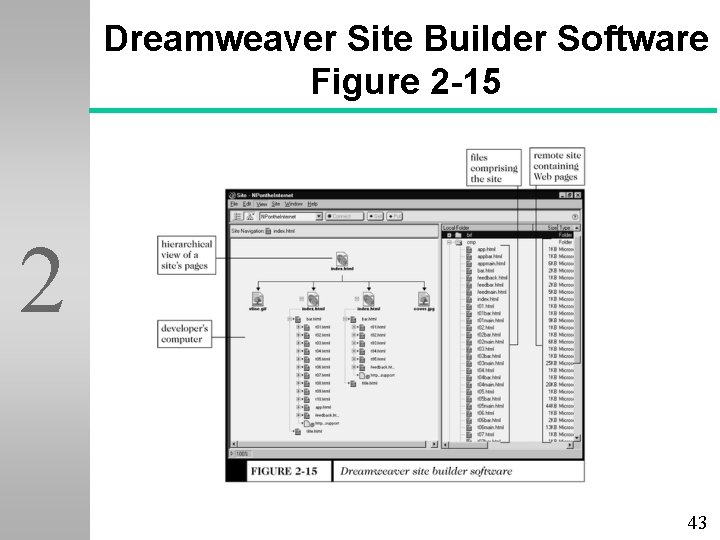
Dreamweaver Site Builder Software Figure 2 -15 2 43
Web Clients and Servers u Client 2 computers typically request services, including printing, information retrieval, and database access u Servers are responsible for processing the clients’ requests 44
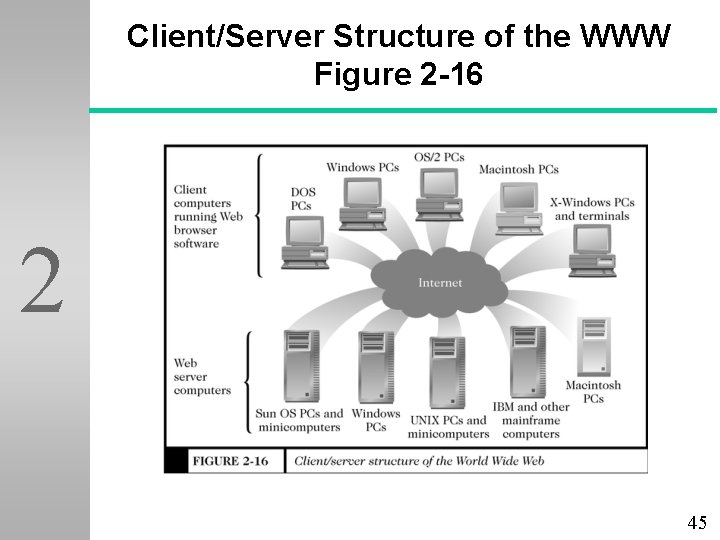
Client/Server Structure of the WWW Figure 2 -16 2 45
Web Client/Server Communication u Two-Tier l 2 Client/Server All communication takes place between the client on the Internet and the target server at the other end u Request message consists of: A request line l Optional request headers l An optional entity body l 46
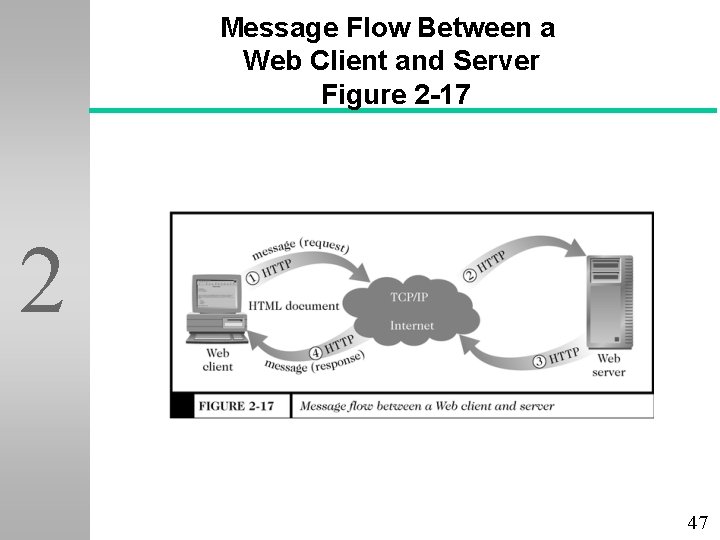
Message Flow Between a Web Client and Server Figure 2 -17 2 47
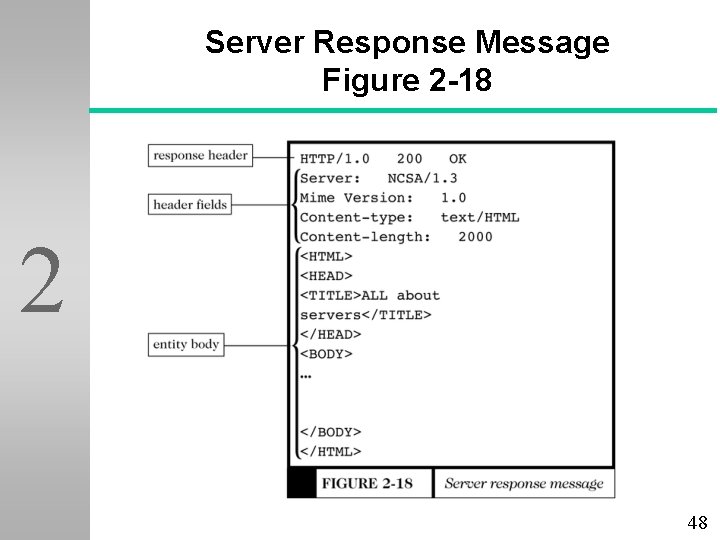
Server Response Message Figure 2 -18 2 48
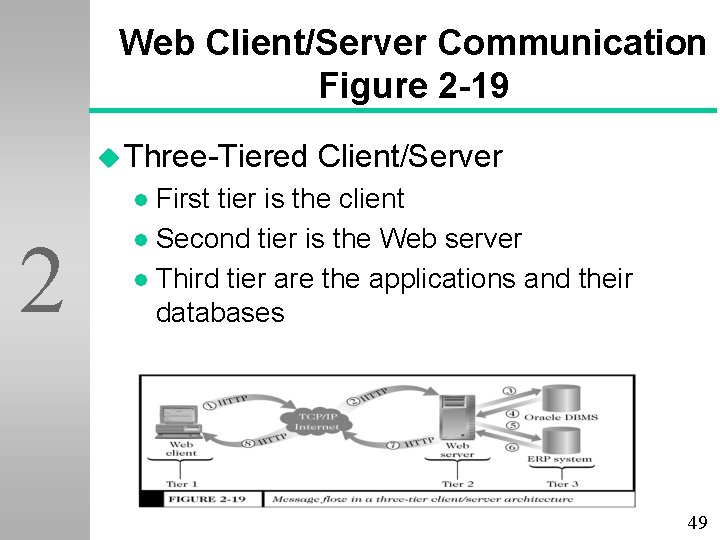
Web Client/Server Communication Figure 2 -19 u Three-Tiered Client/Server First tier is the client l Second tier is the Web server l Third tier are the applications and their databases l 2 (Figure 2 -19) 49
Internets, Intranets, and Extranets u Intranets Only selected individuals are allowed access l Low-cost way to distribute corporate information l Collect and group information for external dissemination l Infrastructure requirements are usually in place if PCs are on a LAN l 2 50
Internets, Intranets, and Extranets u Extranets Connect companies with suppliers or other business partners l Provide the infrastructure for the coordination of purchases, EDI, and communications l Use the Internet for communicating among themselves l 2 51
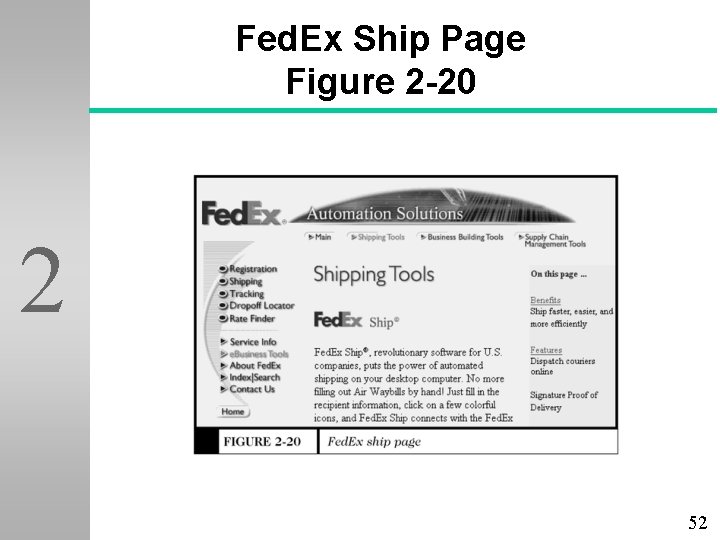
Fed. Ex Ship Page Figure 2 -20 2 52
Internets, Intranets, and Extranets u Public Network An extranet that allows the public to access its intranet l When two or more companies agree to link their intranets using a public network (such as the Internet) l 2 u Private l Network A leased-line connection that physically connects two intranets 53
Internets, Intranets, and Extranets u Virtual Private Network (VPN) Uses public networks and protocols to send sensitive data by using “tunneling” or “encapsulation” - private passageways through the Internet l Designed to save money and create a competitive advantage by alliances formed with cooperating companies l 2 54
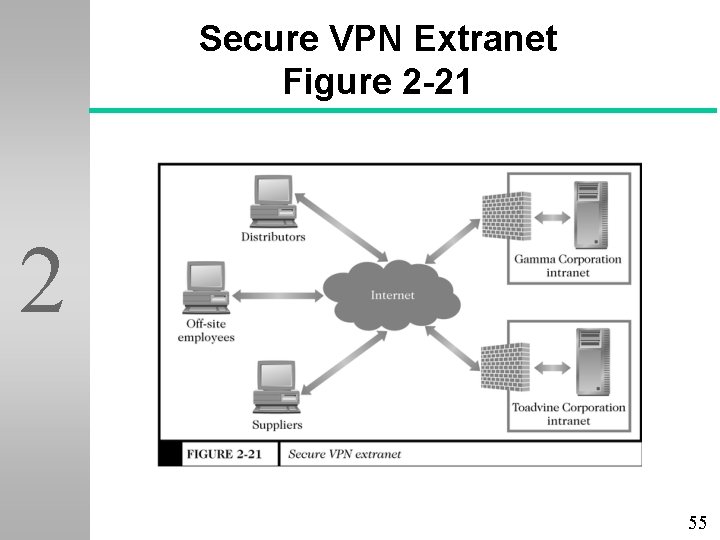
Secure VPN Extranet Figure 2 -21 2 55
Internet Connections Options and Tradeoffs u Internet Service Providers (ISPs) offer connection choices to their users 2 l Plain Old Telephone Service (POTS) u Existing telephone lines with modems u Bandwidth of 56 Kbps (56, 000 bits per second) l Integrated Services Digital Network (ISDN) u Bandwidths l up to 128 Kbps Asymmetric Digital Subscriber Line (ADSL) u Upload at 640 Kbps, download up to 9 Mbps 56
Cable Modems u Same 2 broadband coaxial cable that serves cable television u Upstream bandwidths of 300 -500 Kbps u Downstream bandwidths of 1. 5 Mbps u Current “sweet spot” (optimal price and performance) 57
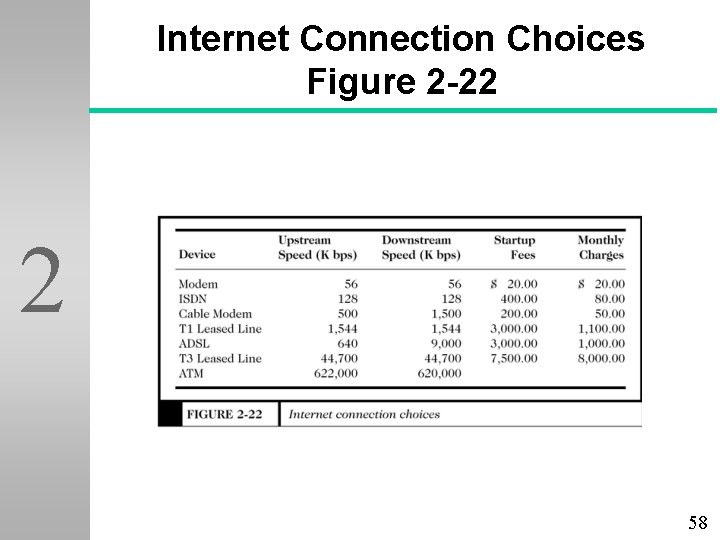
Internet Connection Choices Figure 2 -22 2 58
- Slides: 58