
Chapter 19 Domain Name System DNS TCPIP Protocol


- Slides: 53
Chapter 19 Domain Name System (DNS) TCP/IP Protocol Suite Copyright © The Mc. Graw-Hill Companies, Inc. Permission required for reproduction or display. 1
OBJECTIVES: q To describe the purpose of DNS. q To define the concept of domains and domain name space. q To describe the distribution of name spaces and define zones. q To discuss the use of DNS in the Internet and describe three categories of domains: generic, country, and reverse. q To discuss name-address resolution and show the two resolution methods: recursive and iterative. q To show the format of DNS message and how they can be compressed. q To discuss DDNS and DNSSEC. . TCP/IP Protocol Suite 2
Chapter Outline TCP/IP Protocol Suite 19. 1 19. 2 19. 3 19. 4 19. 5 19. 6 19. 7 19. 8 19. 9 19. 10 19. 11 Need for DNS Name Spaces DNS in the Internet Resolution DNS Messages Types of Records Compression Encapsulation Registrars DDNS Security of DNS 3
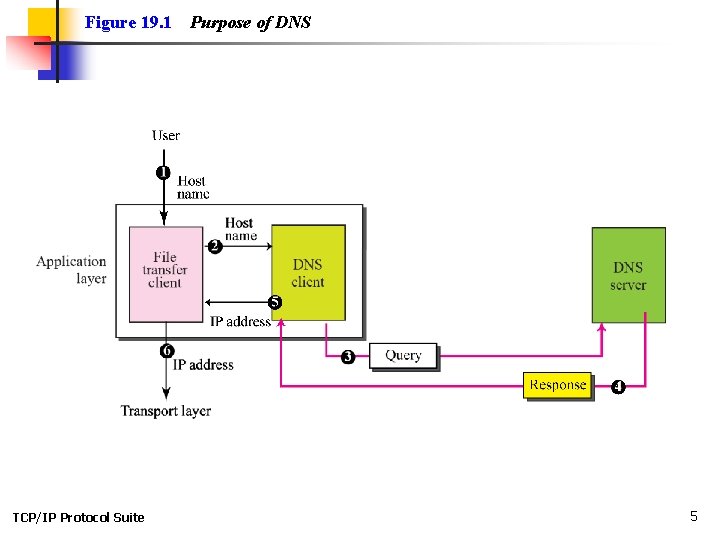
19 -1 NEED FOR DNS To identify an entity, TCP/IP protocols use the IP address, which uniquely identifies the connection of a host to the Internet. However, people prefer to use names instead of numeric addresses. Therefore, we need a system that can map a name to an address or an address to a name. TCP/IP Protocol Suite 4
Figure 19. 1 TCP/IP Protocol Suite Purpose of DNS 5
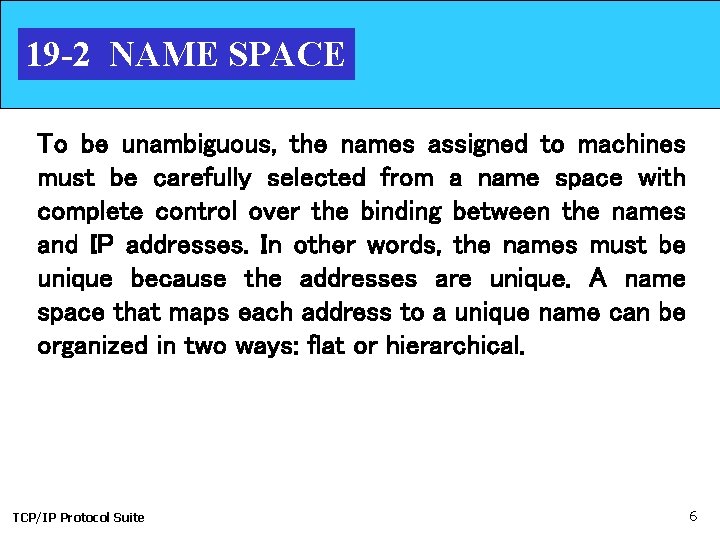
19 -2 NAME SPACE To be unambiguous, the names assigned to machines must be carefully selected from a name space with complete control over the binding between the names and IP addresses. In other words, the names must be unique because the addresses are unique. A name space that maps each address to a unique name can be organized in two ways: flat or hierarchical. TCP/IP Protocol Suite 6
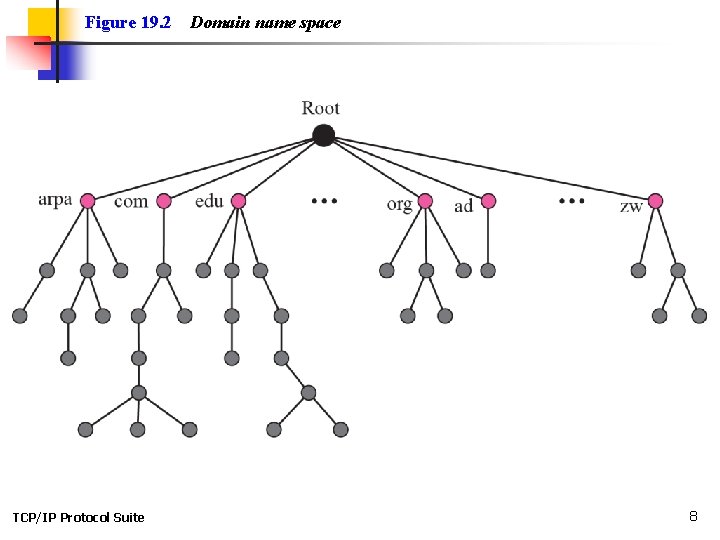
Topics Discussed in the Section ü Flat Name Space ü Hierarchical Name Space ü Domain ü Distribution of Name Space TCP/IP Protocol Suite 7
Figure 19. 2 TCP/IP Protocol Suite Domain name space 8
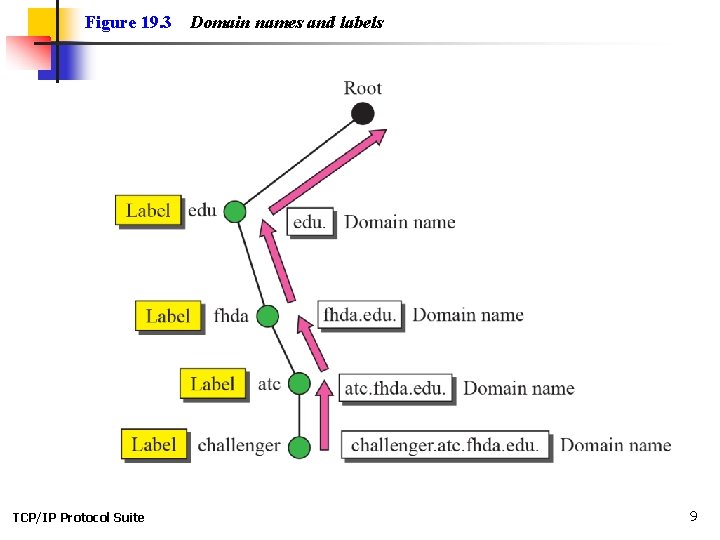
Figure 19. 3 TCP/IP Protocol Suite Domain names and labels 9
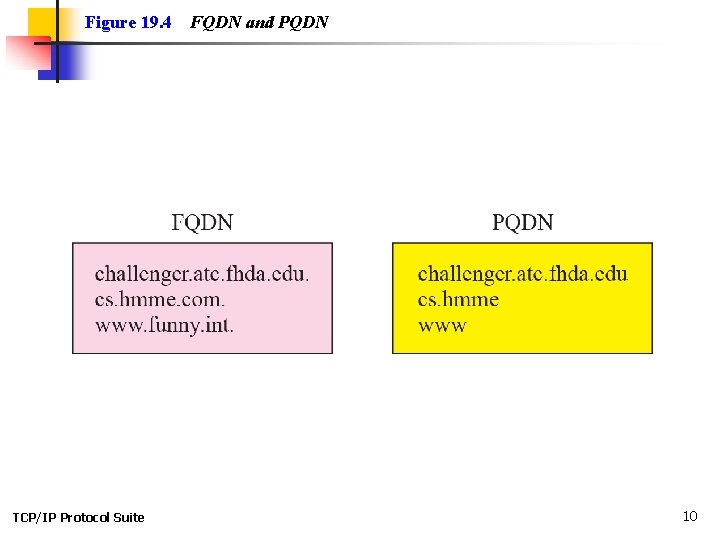
Figure 19. 4 TCP/IP Protocol Suite FQDN and PQDN 10
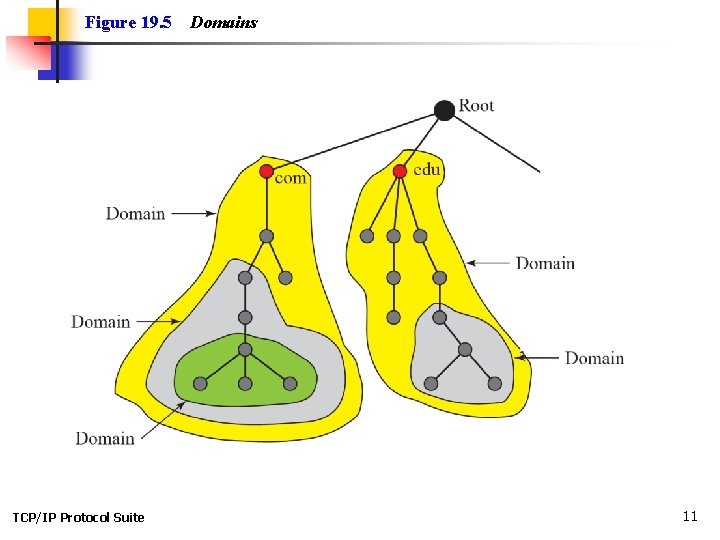
Figure 19. 5 TCP/IP Protocol Suite Domains 11
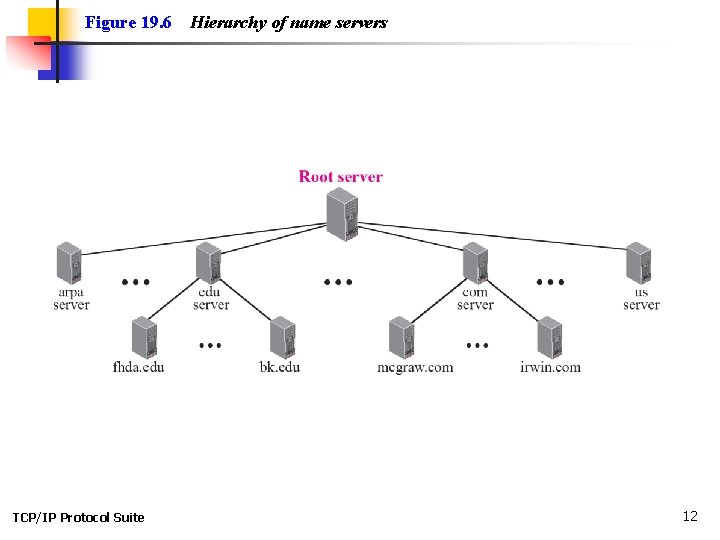
Figure 19. 6 TCP/IP Protocol Suite Hierarchy of name servers 12
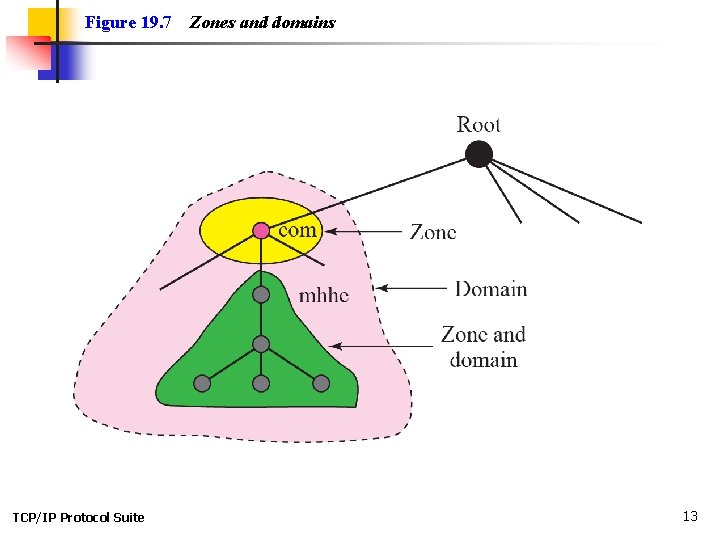
Figure 19. 7 TCP/IP Protocol Suite Zones and domains 13
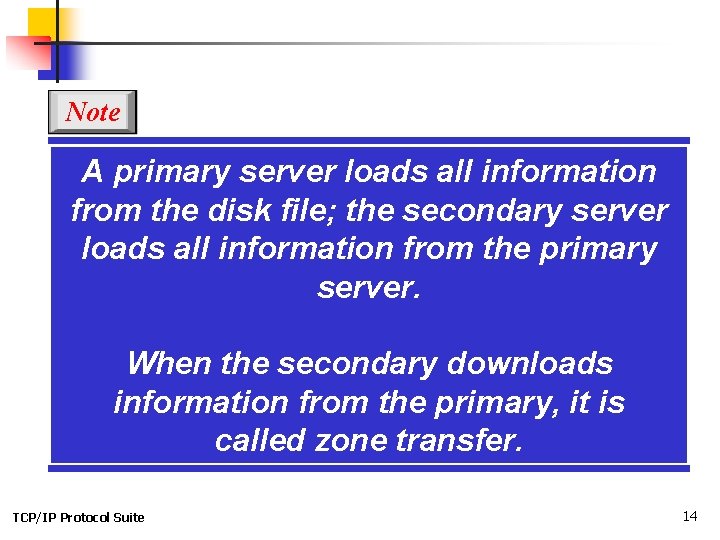
Note A primary server loads all information from the disk file; the secondary server loads all information from the primary server. When the secondary downloads information from the primary, it is called zone transfer. TCP/IP Protocol Suite 14
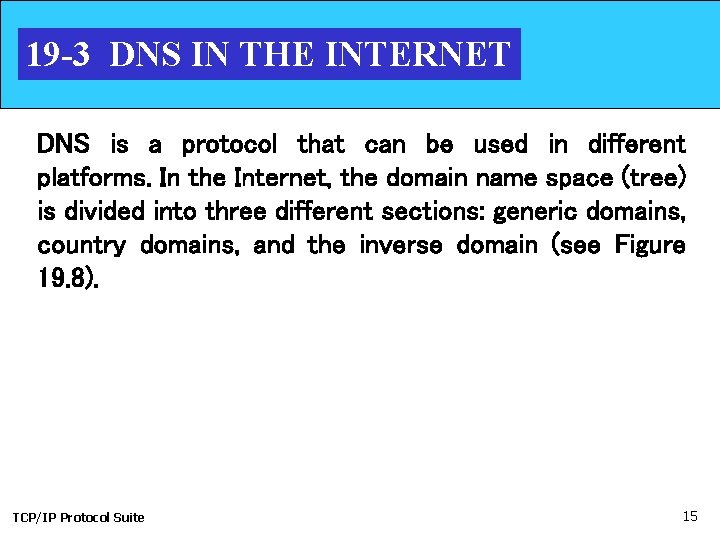
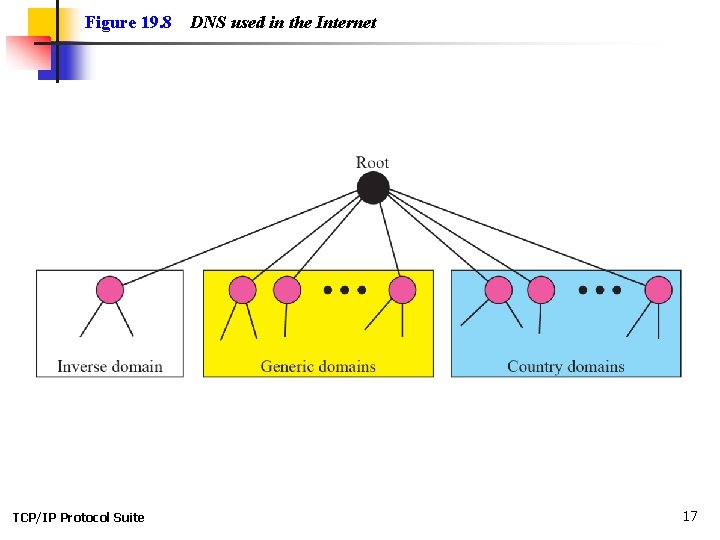
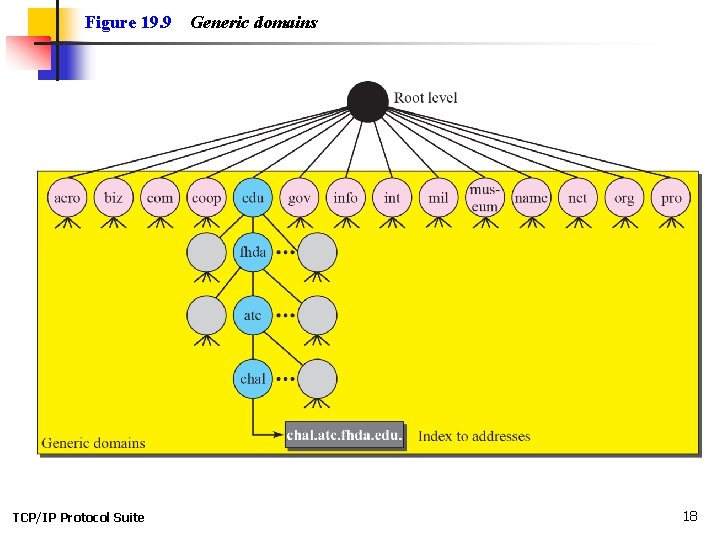
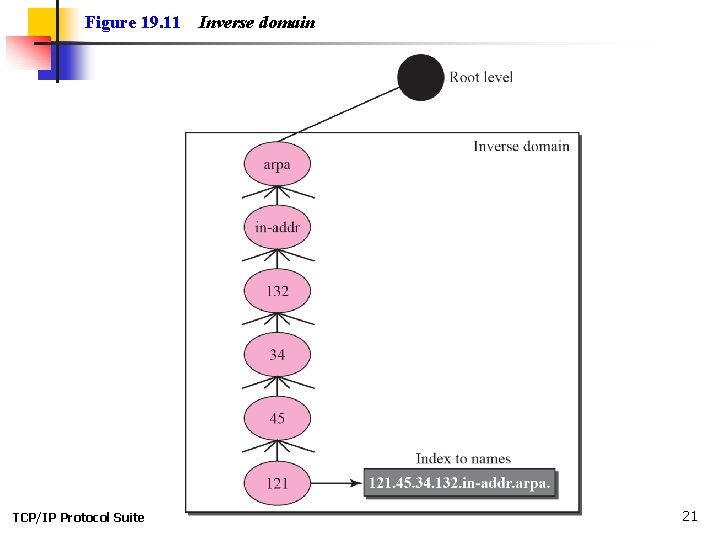
19 -3 DNS IN THE INTERNET DNS is a protocol that can be used in different platforms. In the Internet, the domain name space (tree) is divided into three different sections: generic domains, country domains, and the inverse domain (see Figure 19. 8). TCP/IP Protocol Suite 15
Topics Discussed in the Section ü Generic Domains ü Country Domains ü Inverse Domain ü Registrar TCP/IP Protocol Suite 16
Figure 19. 8 TCP/IP Protocol Suite DNS used in the Internet 17
Figure 19. 9 TCP/IP Protocol Suite Generic domains 18
TCP/IP Protocol Suite 19
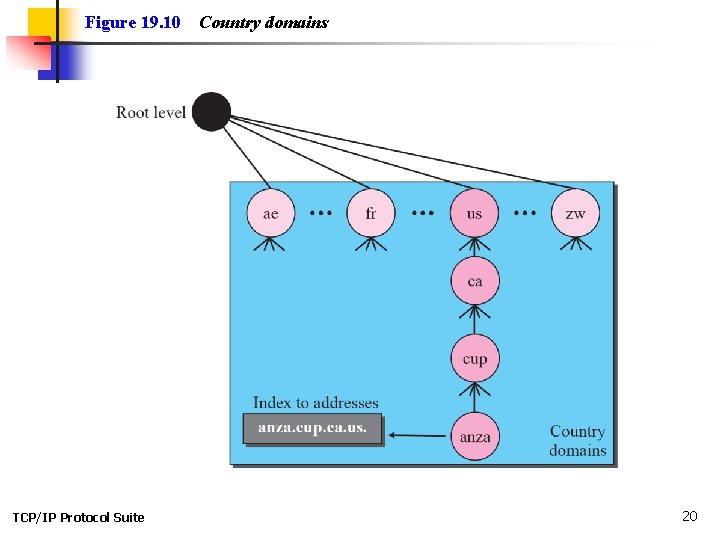
Figure 19. 10 TCP/IP Protocol Suite Country domains 20
Figure 19. 11 TCP/IP Protocol Suite Inverse domain 21
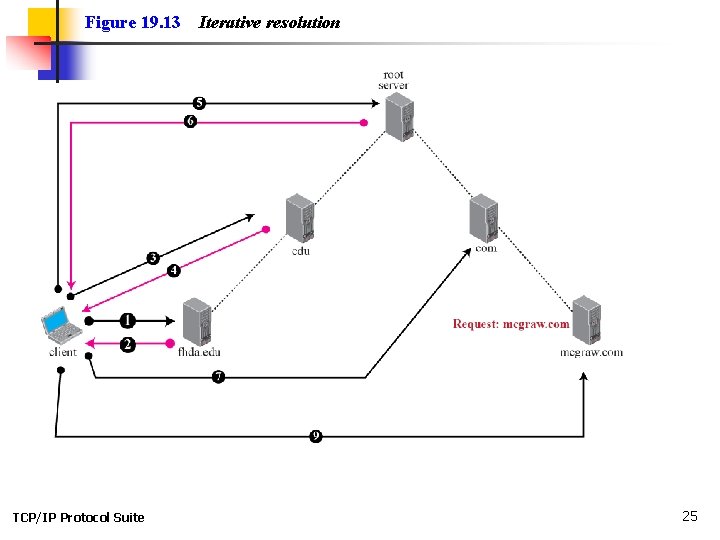
19 -4 RESOLUTION Mapping a name to an address or an address to a name is called name-address resolution. TCP/IP Protocol Suite 22
Topics Discussed in the Section ü Resolver ü Mapping Names to Addresses ü Mapping Addresses to Names ü Recursive Resolution ü Iterative Resolution ü Caching TCP/IP Protocol Suite 23
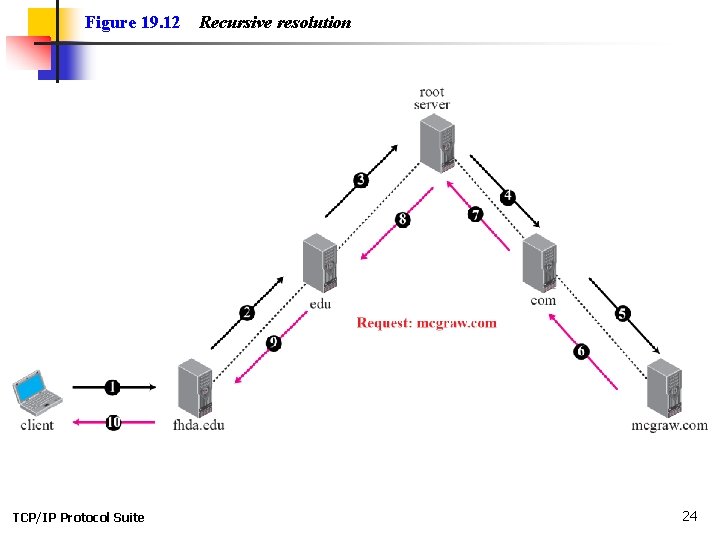
Figure 19. 12 TCP/IP Protocol Suite Recursive resolution 24
Figure 19. 13 TCP/IP Protocol Suite Iterative resolution 25
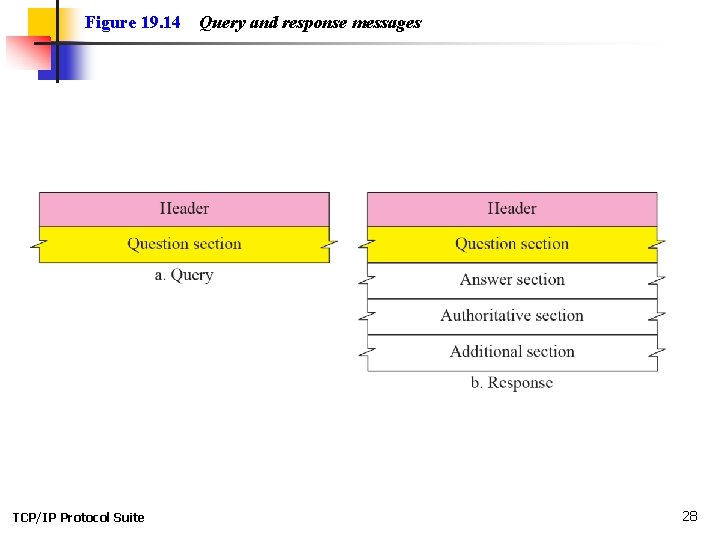
19 -5 DNS MESSAGES DNS has two types of messages: query and response. Both types have the same format. The query message consists of a header and question records; the response message consists of a header, question records, answer records, authoritative records, and additional records (see Figure 19. 14). TCP/IP Protocol Suite 26
Topics Discussed in the Section ü Header TCP/IP Protocol Suite 27
Figure 19. 14 TCP/IP Protocol Suite Query and response messages 28
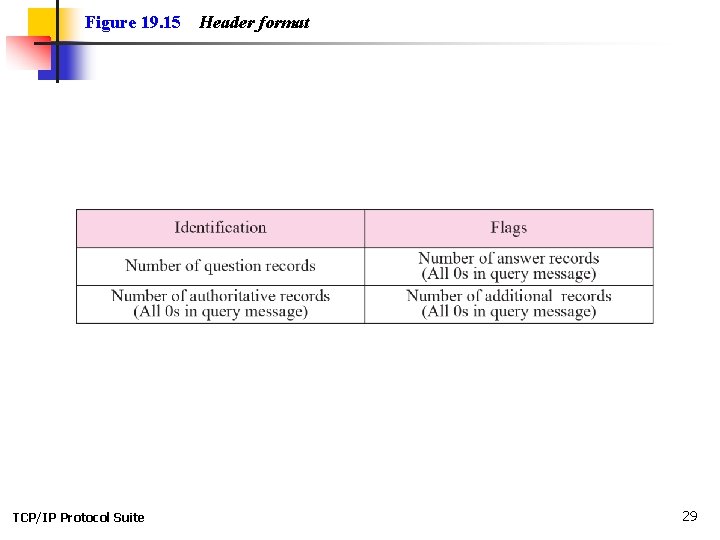
Figure 19. 15 TCP/IP Protocol Suite Header format 29
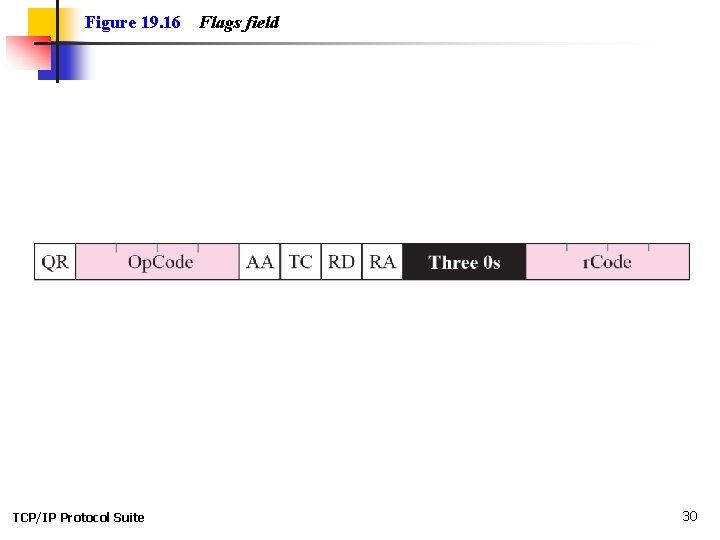
Figure 19. 16 TCP/IP Protocol Suite Flags field 30
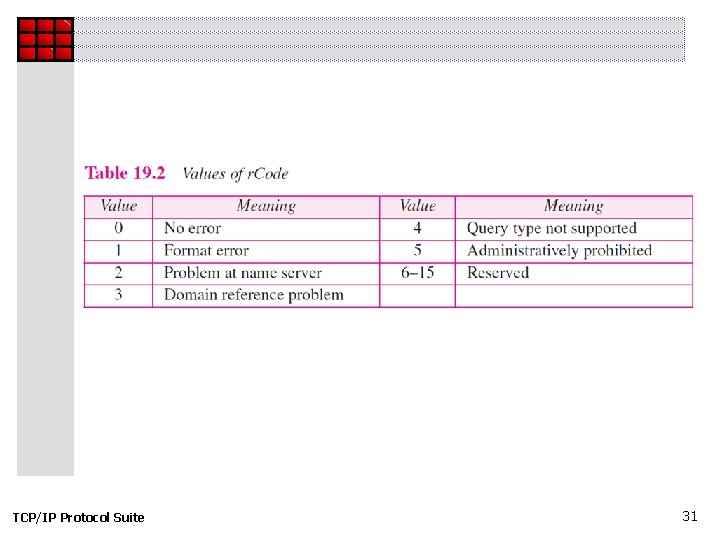
TCP/IP Protocol Suite 31
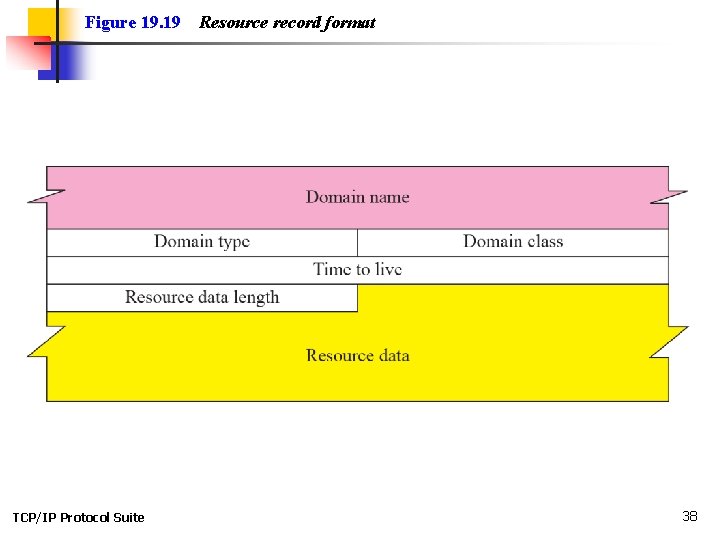
19 -6 TYPES OF RECORDS As we saw in the previous section, two types of records are used in DNS. The question records are used in the question section of the query and response messages. The resource records are used in the answer, authoritative, and additional information sections of the response message. TCP/IP Protocol Suite 32
Topics Discussed in the Section ü Question Record ü Resource Record TCP/IP Protocol Suite 33
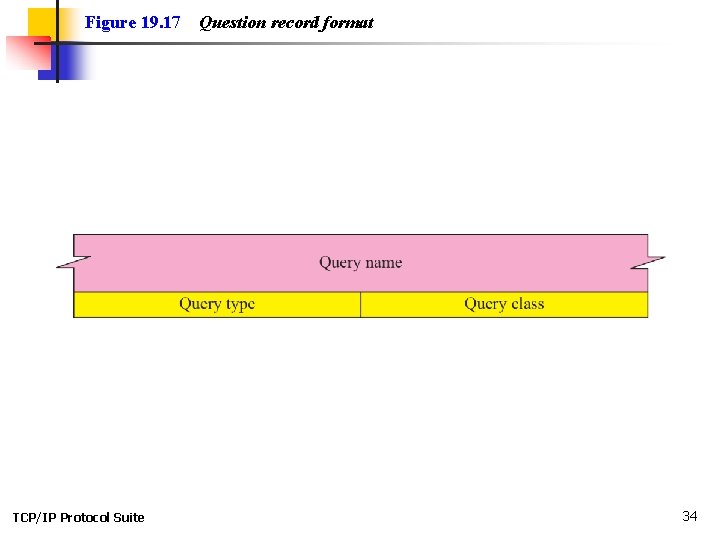
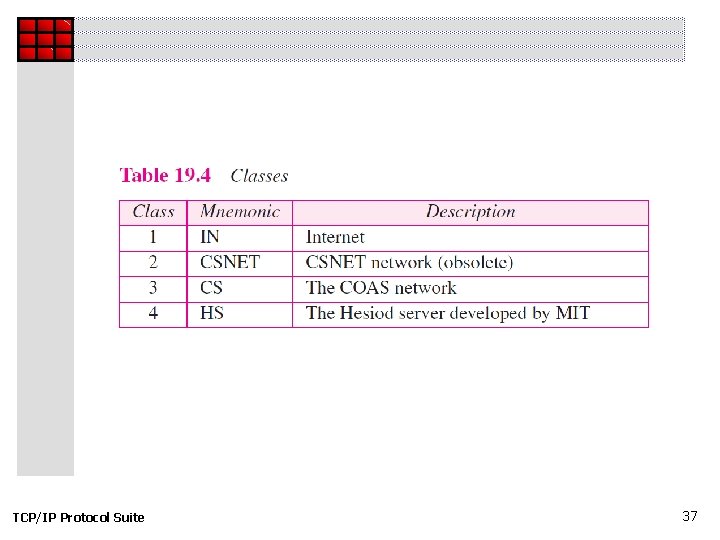
Figure 19. 17 TCP/IP Protocol Suite Question record format 34
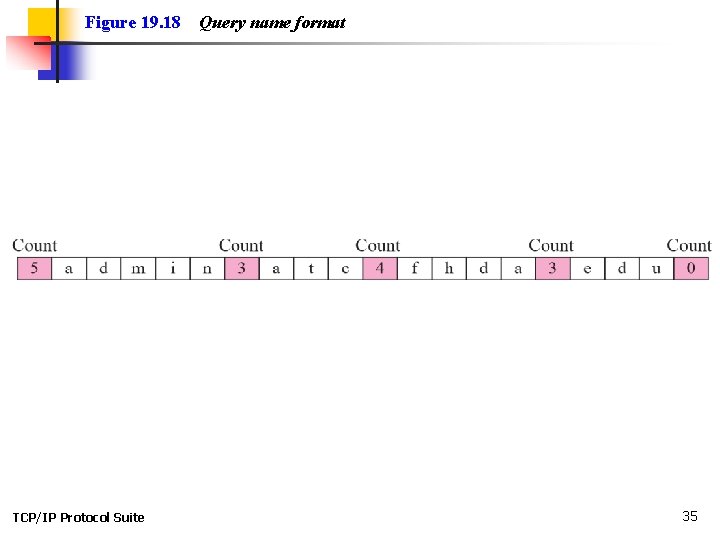
Figure 19. 18 TCP/IP Protocol Suite Query name format 35
TCP/IP Protocol Suite 36
TCP/IP Protocol Suite 37
Figure 19. 19 TCP/IP Protocol Suite Resource record format 38
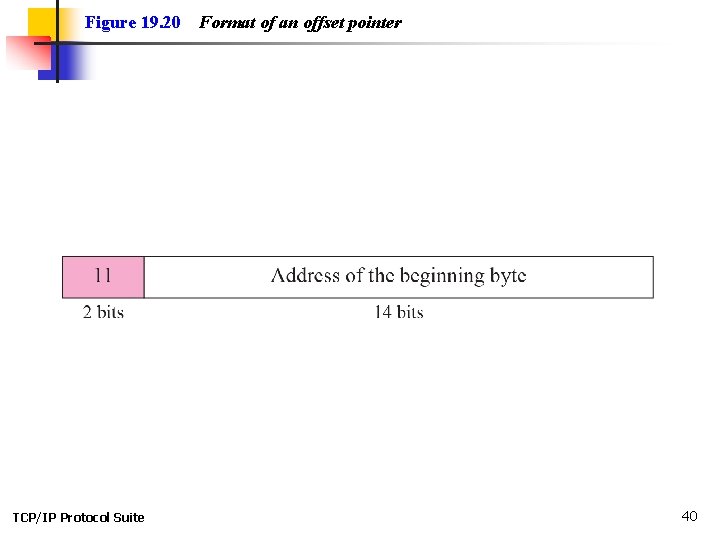
19 -7 COMPRESSION DNS requires that a domain name be replaced by an offset pointer if it is repeated. For example, in a resource record the domain name is usually a repetition of the domain name in the question record. For efficiency, DNS defines a 2 -byte offset pointer that points to a previous occurrence of the domain or part of it. The format of the field is shown in Figure 19. 20. TCP/IP Protocol Suite 39
Figure 19. 20 TCP/IP Protocol Suite Format of an offset pointer 40
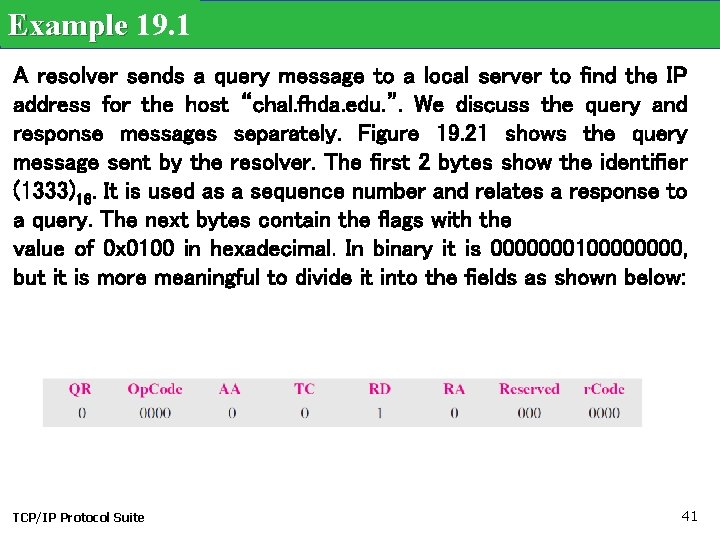
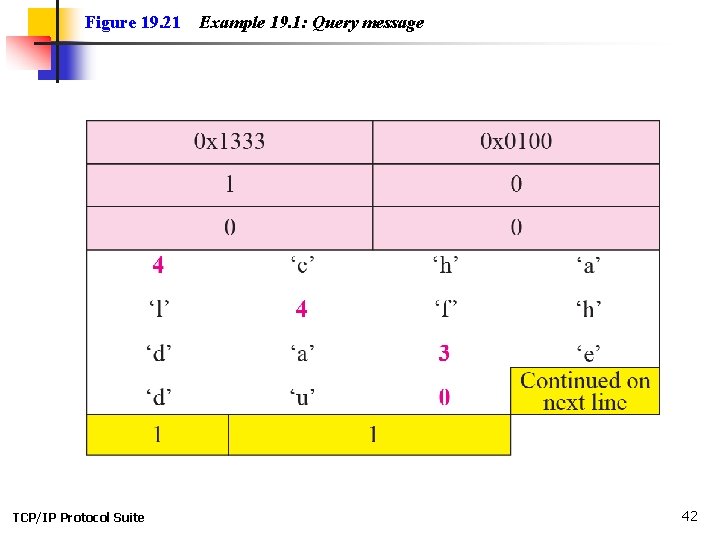
Example 19. 1 A resolver sends a query message to a local server to find the IP address for the host “chal. fhda. edu. ”. We discuss the query and response messages separately. Figure 19. 21 shows the query message sent by the resolver. The first 2 bytes show the identifier (1333)16. It is used as a sequence number and relates a response to a query. The next bytes contain the flags with the value of 0 x 0100 in hexadecimal. In binary it is 000000010000, but it is more meaningful to divide it into the fields as shown below: TCP/IP Protocol Suite 41
Figure 19. 21 TCP/IP Protocol Suite Example 19. 1: Query message 42
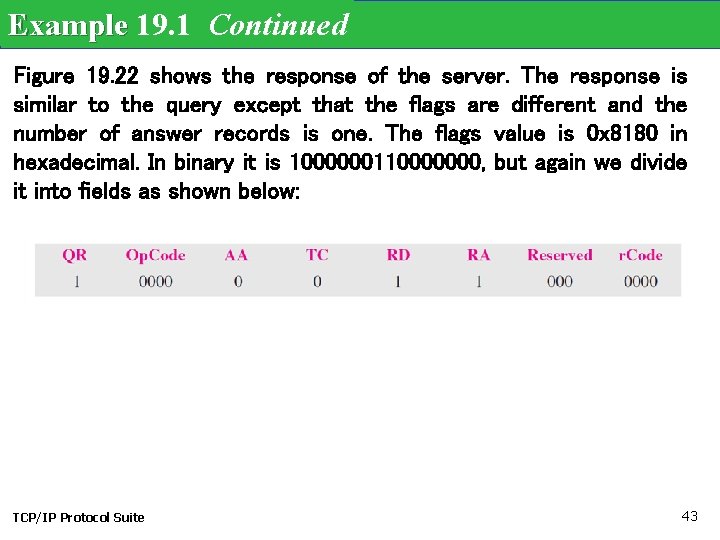
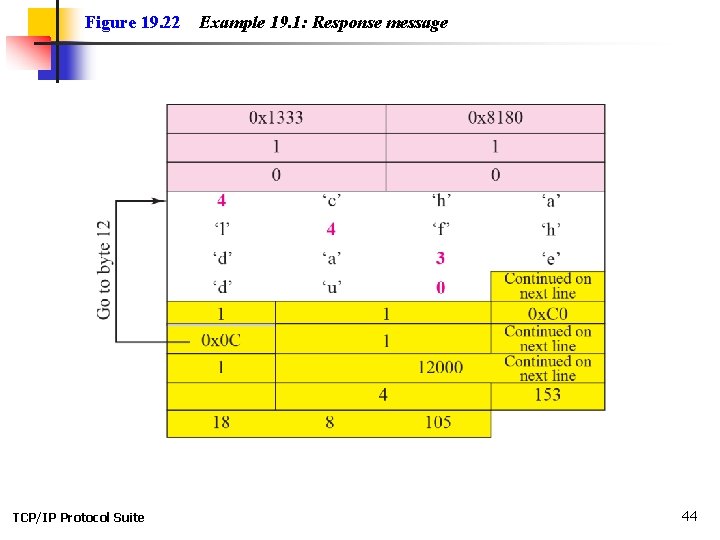
Example 19. 1 Continued Figure 19. 22 shows the response of the server. The response is similar to the query except that the flags are different and the number of answer records is one. The flags value is 0 x 8180 in hexadecimal. In binary it is 1000000110000000, but again we divide it into fields as shown below: TCP/IP Protocol Suite 43
Figure 19. 22 TCP/IP Protocol Suite Example 19. 1: Response message 44
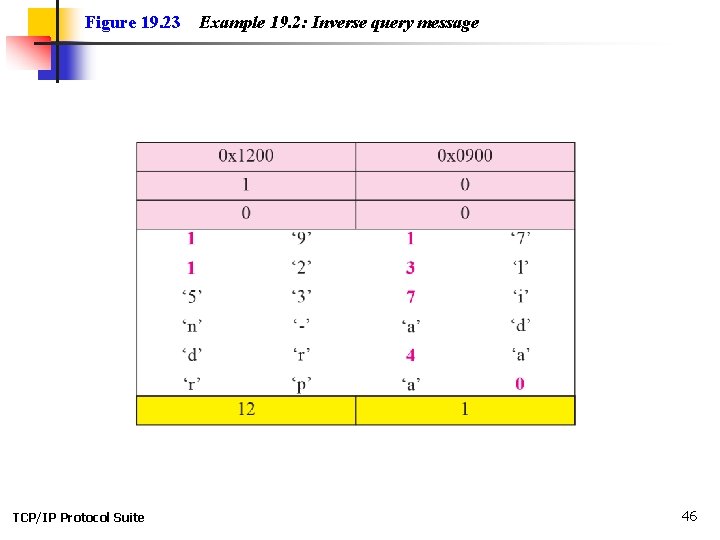
Example 19. 2 An FTP server has received a packet from an FTP client with IP address 153. 2. 7. 9. The FTP server wants to verify that the FTP client is an authorized client. The FTP server can consult a file containing the list of authorized clients. However, the file consists only of domain names. The FTP server has only the IP address of the requesting client, which was the source IP address in the received IP datagram. The FTP server asks the resolver (DNS client) to send an inverse query to a DNS server to ask for the name of the FTP client. We discuss the query and response messages separately. Figure 19. 23 shows the query message sent from the resolver to the server. TCP/IP Protocol Suite 45
Figure 19. 23 TCP/IP Protocol Suite Example 19. 2: Inverse query message 46
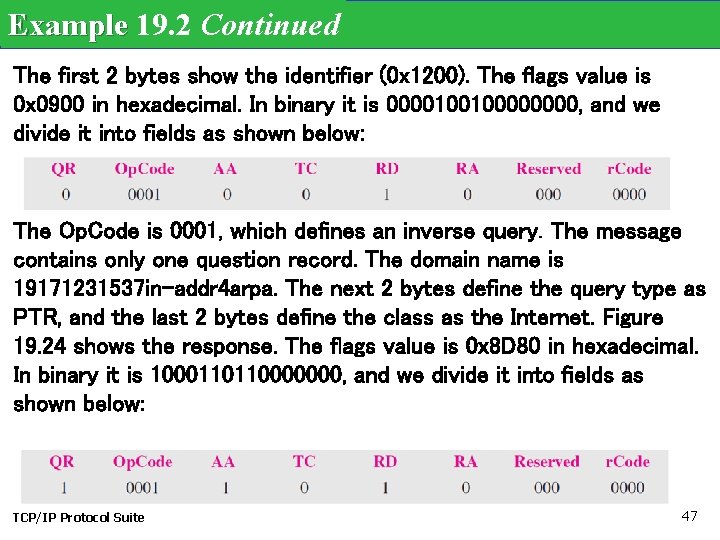
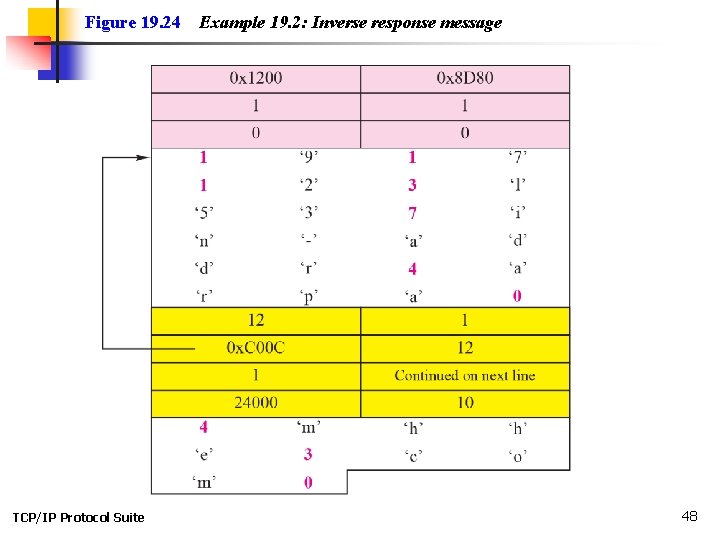
Example 19. 2 Continued The first 2 bytes show the identifier (0 x 1200). The flags value is 0 x 0900 in hexadecimal. In binary it is 000010010000, and we divide it into fields as shown below: The Op. Code is 0001, which defines an inverse query. The message contains only one question record. The domain name is 19171231537 in-addr 4 arpa. The next 2 bytes define the query type as PTR, and the last 2 bytes define the class as the Internet. Figure 19. 24 shows the response. The flags value is 0 x 8 D 80 in hexadecimal. In binary it is 1000110110000000, and we divide it into fields as shown below: TCP/IP Protocol Suite 47
Figure 19. 24 TCP/IP Protocol Suite Example 19. 2: Inverse response message 48
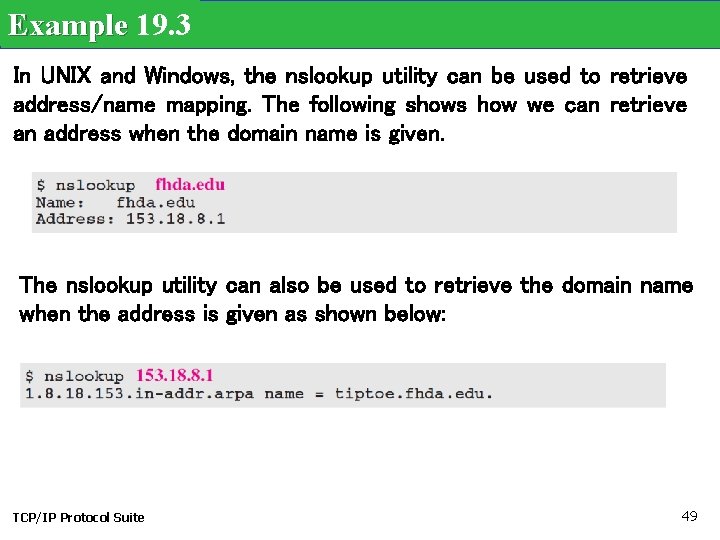
Example 19. 3 In UNIX and Windows, the nslookup utility can be used to retrieve address/name mapping. The following shows how we can retrieve an address when the domain name is given. The nslookup utility can also be used to retrieve the domain name when the address is given as shown below: TCP/IP Protocol Suite 49
19 -8 ENCAPSULATION DNS can use either UDP or TCP. In both cases the well -known port used by the server is port 53. UDP is used when the size of the response message is less than 512 bytes because most UDP packages have a 512 -byte packet size limit. If the size of the response message is more than 512 bytes, a TCP connection is used. In that case, one of two scenarios can occur: TCP/IP Protocol Suite 50
19 -9 REGISTRARS How are new domains added to DNS? This is done through a registrar, a commercial entity accredited by ICANN. A registrar first verifies that the requested domain name is unique and then enters it into the DNS database. A fee is charged. TCP/IP Protocol Suite 51
19 -10 DDNS When the DNS was designed, no one predicted that there would be so many address changes. In DNS, when there is a change, such as adding a new host, removing a host, or changing an IP address, the change must be made to the DNS master file. The DNS master file must be updated dynamically. The Dynamic Domain Name System (DDNS) therefore was devised to respond to this need. TCP/IP Protocol Suite 52
19 -11 SECURITY OF DNS is one of the most important systems in the Internet infrastructure; it provides crucial services to the Internet users. Applications such as Web access or e-mail are heavily dependent on the properation of DNS can be attacked in several Ways. To protect DNS, IETF has devised a technology named DNS Security (DNSSEC) that provides the message origin authentication and message integrity using a security service called digital signature (See Chapter 29). TCP/IP Protocol Suite 53