
Chapter 15 Connecting LANs Backbone Networks and Virtual
Chapter 15 Connecting LANs, Backbone Networks, and Virtual LANs Kyung Hee University 1
15 -1 CONNECTING DEVICES In this section, we divide connecting devices into five different categories based on the layer in which they operate in a network. Topics discussed in this section: Passive Hubs Active Hubs Bridges Two-Layer Switches Routers Three-Layer Switches Gateways Kyung Hee University 2
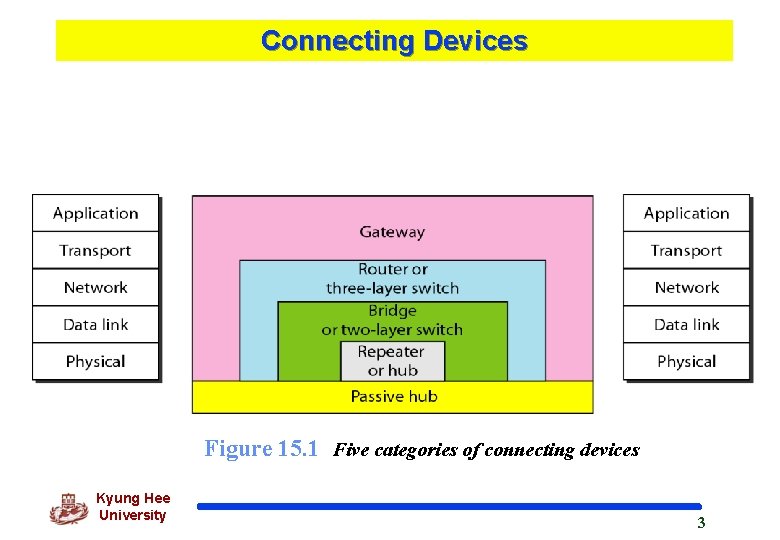
Connecting Devices Figure 15. 1 Five categories of connecting devices Kyung Hee University 3
Passive Hubs q. A passive hub is just a connector. q. It connects the wires coming from different branches. q. This type of a hub is part of the media; its location in the internet model is below the physical layer. Kyung Hee University 4
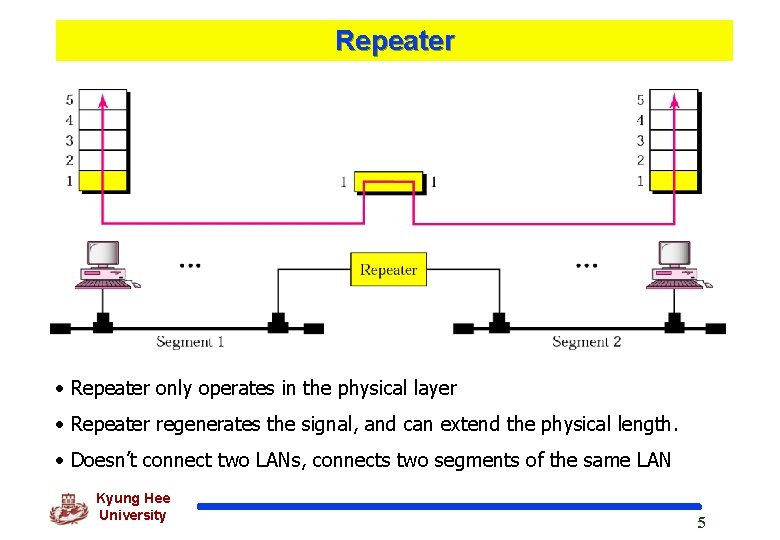
Repeater • Repeater only operates in the physical layer • Repeater regenerates the signal, and can extend the physical length. • Doesn’t connect two LANs, connects two segments of the same LAN Kyung Hee University 5
Repeater q A repeater connects segments of a LAN. q A repeater forwards every frame; it has no filtering capability q A repeater is a regenerator, not an amplifier. Kyung Hee University 6
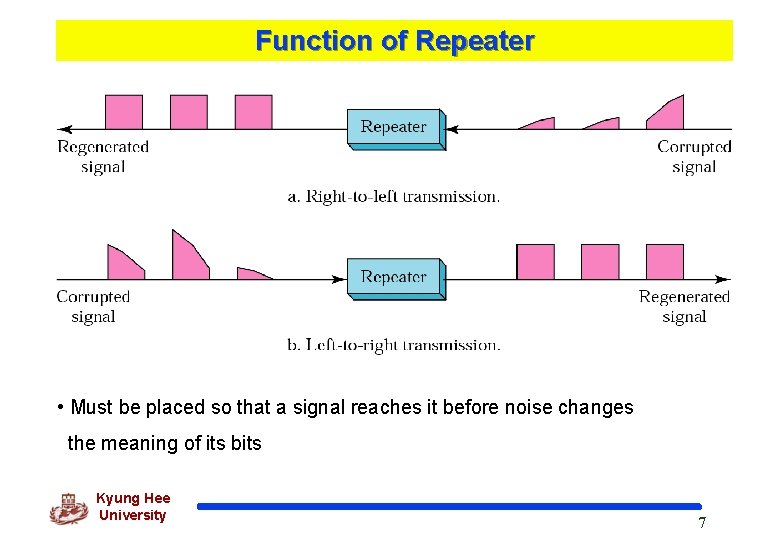
Function of Repeater • Must be placed so that a signal reaches it before noise changes the meaning of its bits Kyung Hee University 7
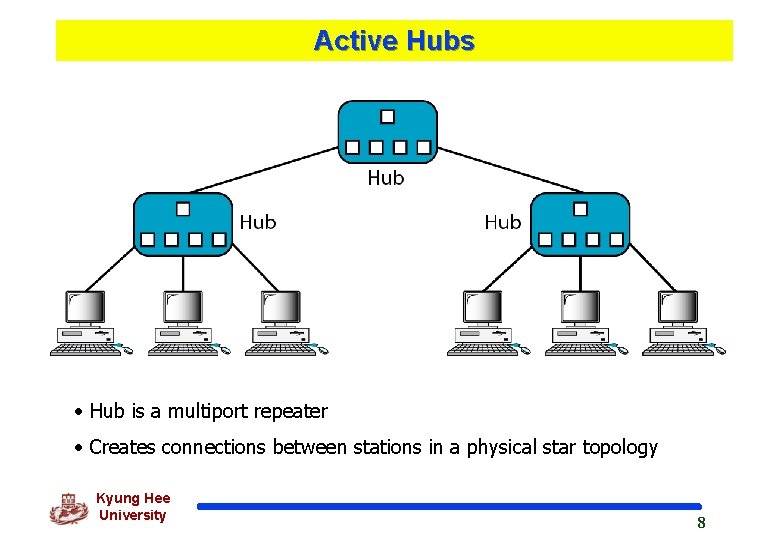
Active Hubs • Hub is a multiport repeater • Creates connections between stations in a physical star topology Kyung Hee University 8
Bridge q Bridge operates in both the physical and the data link layers q As a physical layer device, it regenerates the signal q As a data link layer device, it checks the physical (MAC) addresses q A bridge has a table used in filtering decisions. Kyung Hee University 9
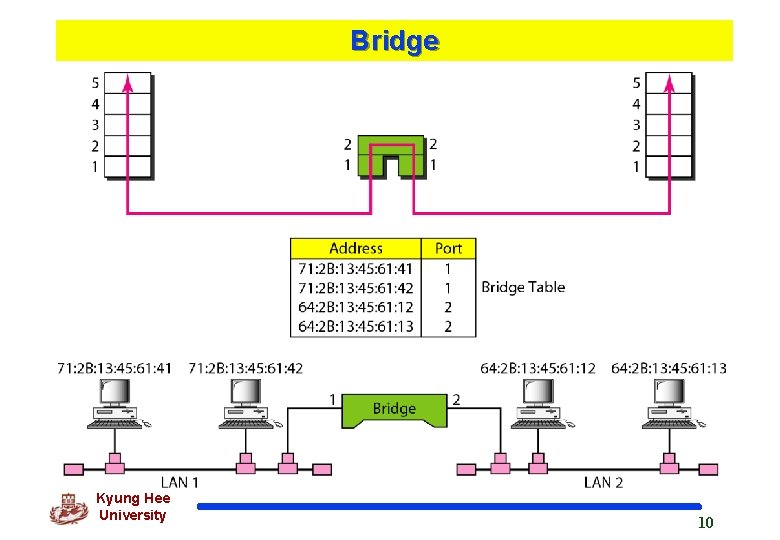
Bridge Kyung Hee University 10
Transparent - Bridge q A bridge does not change the physical (MAC) addresses in a frame. q Transparant Bridge v. Bridge in which stations are completely unaware of the bridge’s existence v System equipped with transparent bridges must meet three criteria (IEEE 802. 1 d): l l l Frames must be forwarded from one station to another Forwarding table is automatically made by learning from movements Loops must be prevented Kyung Hee University 11
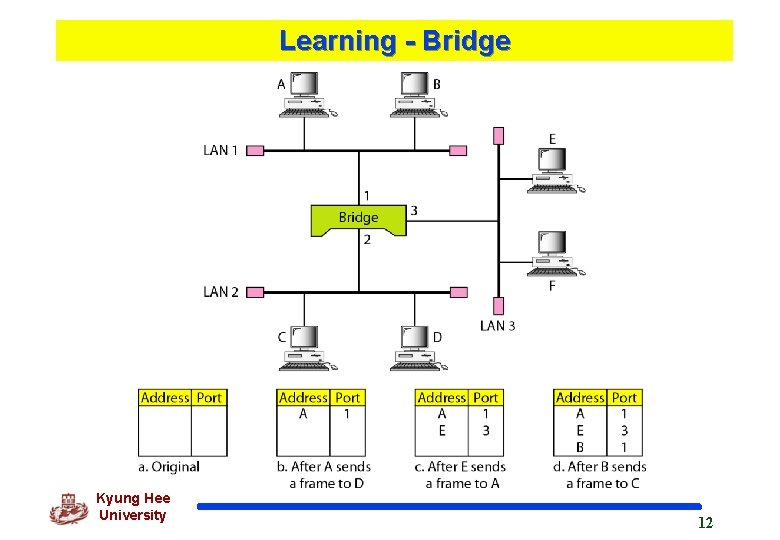
Learning - Bridge Kyung Hee University 12
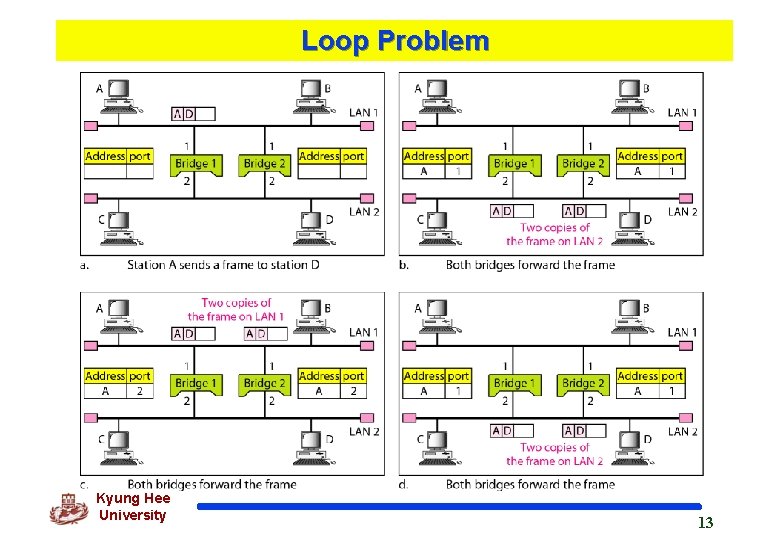
Loop Problem Kyung Hee University 13
Spanning Tree q. A spanning tree is a graph in which there is no loop. q. In a bridged LAN, this means creating a topology in which each LAN can be reached from any other LAN through one path only (no loop). Kyung Hee University 14
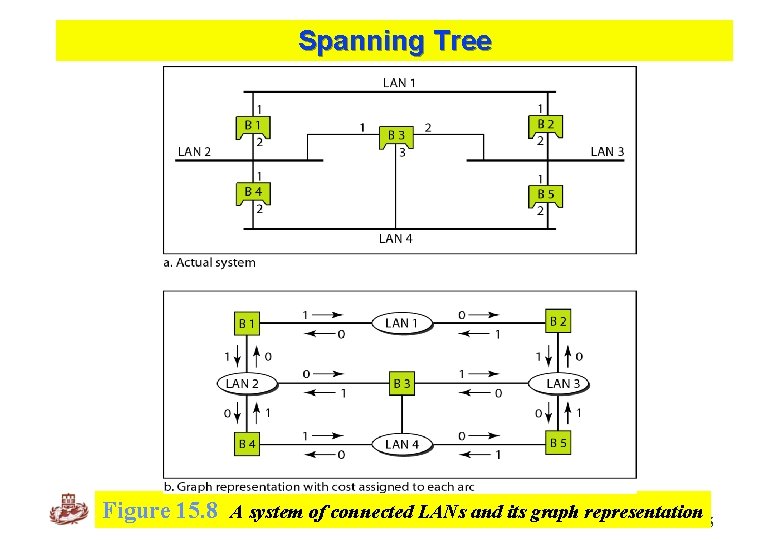
Spanning Tree Kyung Hee University Figure 15. 8 A system of connected LANs and its graph representation 15
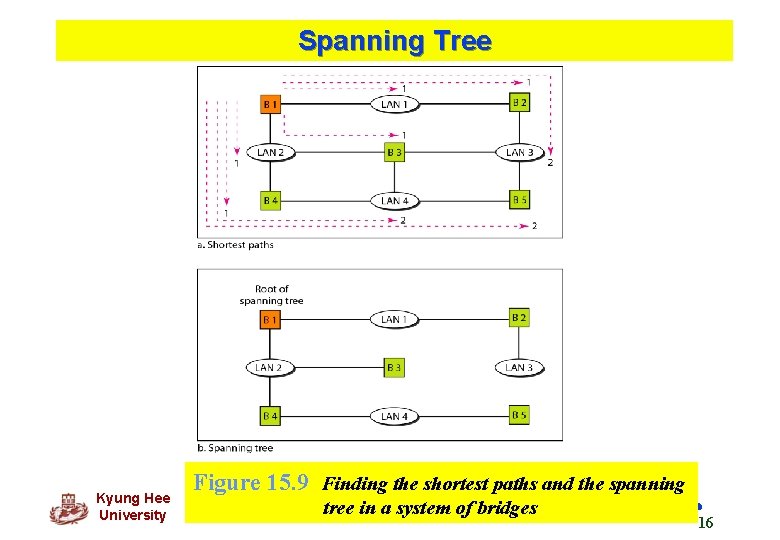
Spanning Tree Kyung Hee University Figure 15. 9 Finding the shortest paths and the spanning tree in a system of bridges 16
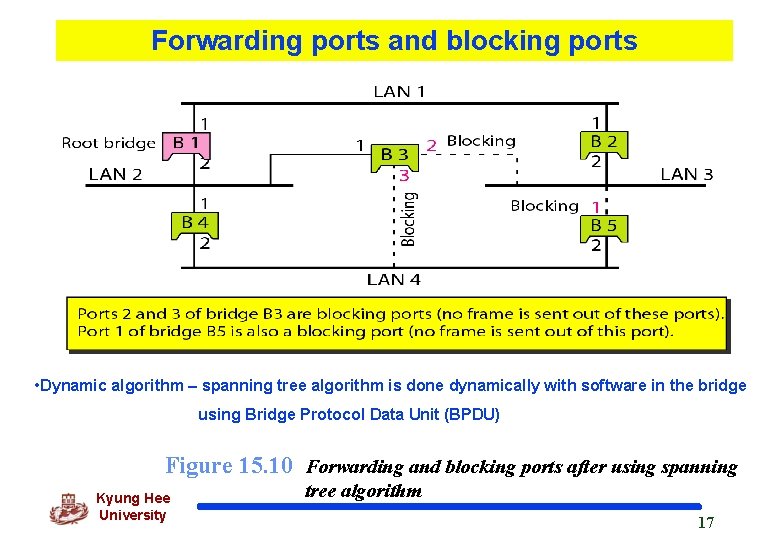
Forwarding ports and blocking ports • Dynamic algorithm – spanning tree algorithm is done dynamically with software in the bridge using Bridge Protocol Data Unit (BPDU) Figure 15. 10 Forwarding and blocking ports after using spanning Kyung Hee University tree algorithm 17
Bridges Connecting Different LANs q Bridge should be able to connect LANs using different protocols, issues to be considered: v Frame format – Ethernet vs. wireless frame v Max data size – frames too large must be fragmented into several frames, no protocol at the data link layer allows for fragmentation and reassembly of frames v Data rate – each LAN has its own data rate v Bit order – some send most significant bit first, some send least significant bit first v Security – wireless has security measures at the data link layer, Ethernet does not v Multimedia support – some support, some do not Kyung Hee University 18
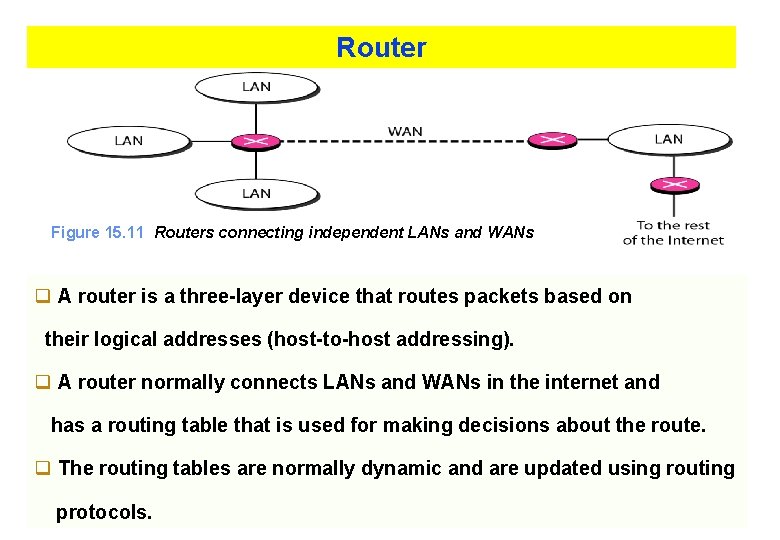
Router Figure 15. 11 Routers connecting independent LANs and WANs q A router is a three-layer device that routes packets based on their logical addresses (host-to-host addressing). q A router normally connects LANs and WANs in the internet and has a routing table that is used for making decisions about the route. q The routing tables are normally dynamic and are updated using routing Kyung Hee protocols. University 19
Gateway q. A gateway is a normally a computer that operates in all five layers of the internet or seven layers of OSI model. q. A gateway takes an application message, reads it, and interprets it. q. This means that it can be used as a connecting device between two internetworks that use different models. v. For example, a network designed to use the OSI model can be connected to another network using the internet model. Kyung Hee University 20
15 -2 BACKBONE NETWORKS A backbone network allows several LANs to be connected. In a backbone network, no station is directly connected to the backbone; the stations are part of a LAN, and the backbone connects the LANs. Topics discussed in this section: Bus Backbone Star Backbone Connecting Remote LANs Kyung Hee University 21
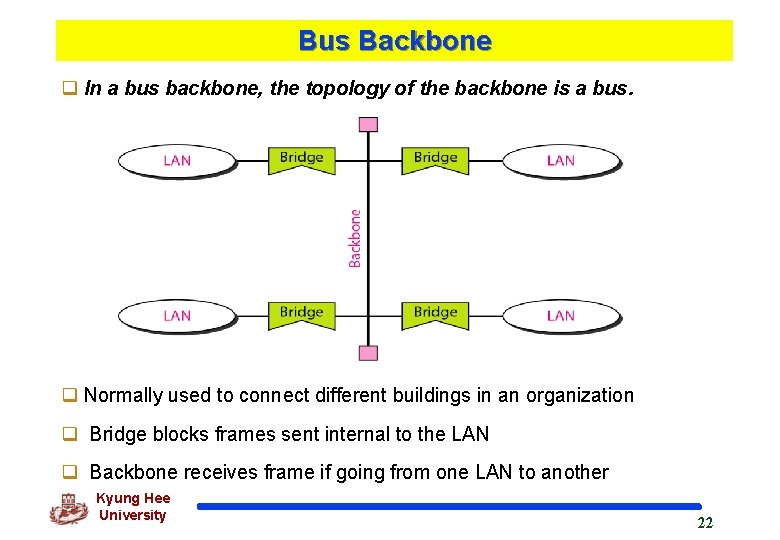
Bus Backbone q In a bus backbone, the topology of the backbone is a bus. q Normally used to connect different buildings in an organization q Bridge blocks frames sent internal to the LAN q Backbone receives frame if going from one LAN to another Kyung Hee University 22
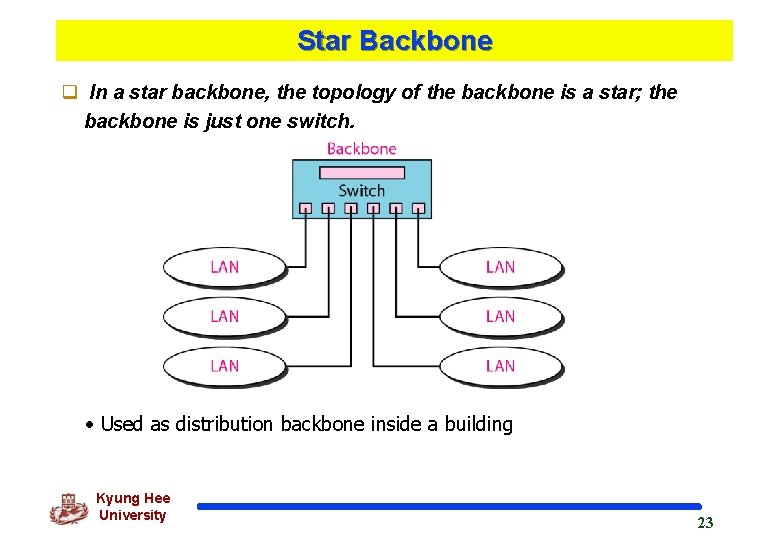
Star Backbone q In a star backbone, the topology of the backbone is a star; the backbone is just one switch. • Used as distribution backbone inside a building Kyung Hee University 23
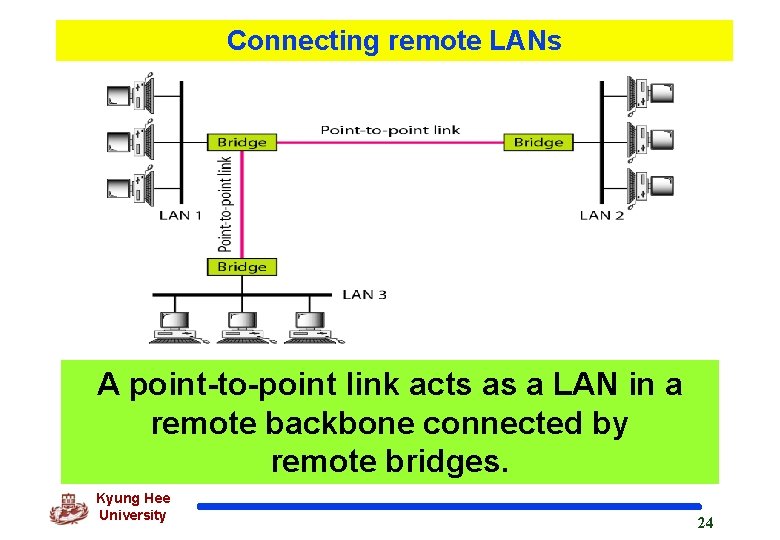
Connecting remote LANs A point-to-point link acts as a LAN in a remote backbone connected by remote bridges. Kyung Hee University 24
Connecting remote LANs q. A point-to-point link acts as a LAN in a remote backbone connected by remote bridges. Kyung Hee University 25
15 -3 VIRTUAL LANs We can roughly define a virtual local area network (VLAN) as a local area network configured by software, not by physical wiring. Topics discussed in this section: Membership Configuration Communication between Switches IEEE Standard Advantages Kyung Hee University 26
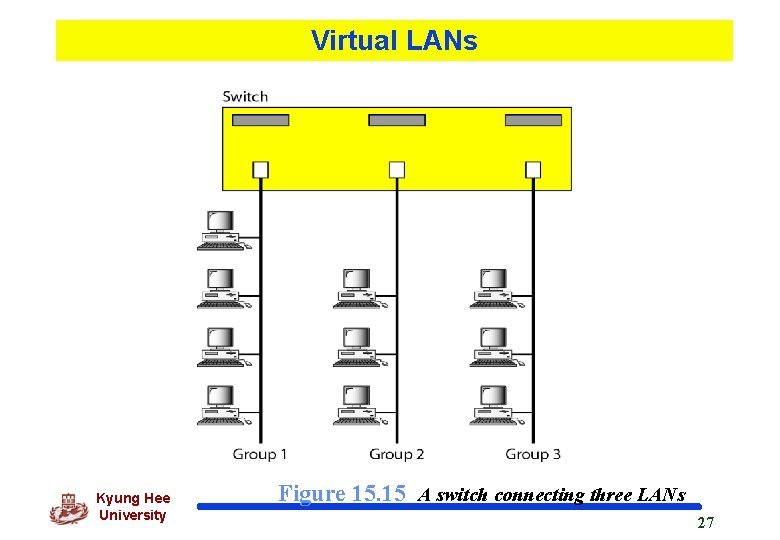
Virtual LANs Kyung Hee University Figure 15. 15 A switch connecting three LANs 27
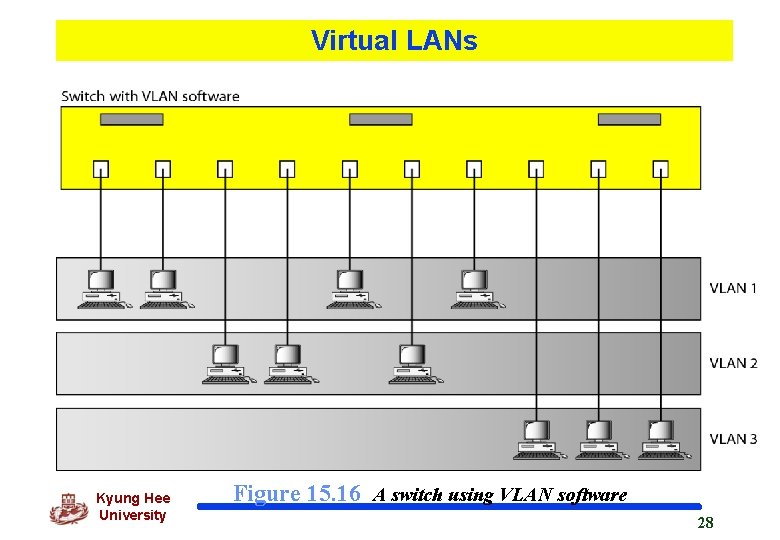
Virtual LANs Kyung Hee University Figure 15. 16 A switch using VLAN software 28
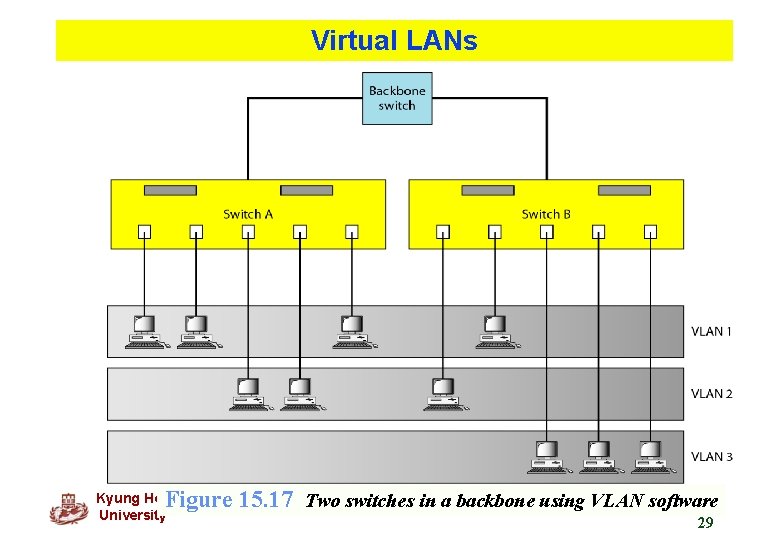
Virtual LANs Figure 15. 17 Two switches in a backbone using VLAN software Kyung Hee University 29
Questions ! Kyung Hee University 30
- Slides: 30