
Chapter 14 File Processing and Serialization Outline 14


- Slides: 39
Chapter 14 – File Processing and Serialization Outline 14. 1 14. 2 14. 3 14. 4 14. 5 14. 6 14. 7 14. 8 14. 9 14. 10 14. 11 14. 12 Introduction Data Hierarchy Files and Streams Creating a Sequential-Access File Reading Data from a Sequential-Access File Updating Sequential-Access Files Random-Access Files Simulating a Random-Access File: The shelve Module Writing Data to a shelve File Retrieving Data from a shelve File Example: A Transaction-Processing Program Object Serialization 2002 Prentice Hall. All rights reserved. 1
2 14. 1 Introduction • Files provide long-term retention of large amounts of data • Persistent data maintained in files • Files stored on secondary storage devices, such as magnetic disks, optical disks and tapes 2002 Prentice Hall. All rights reserved.
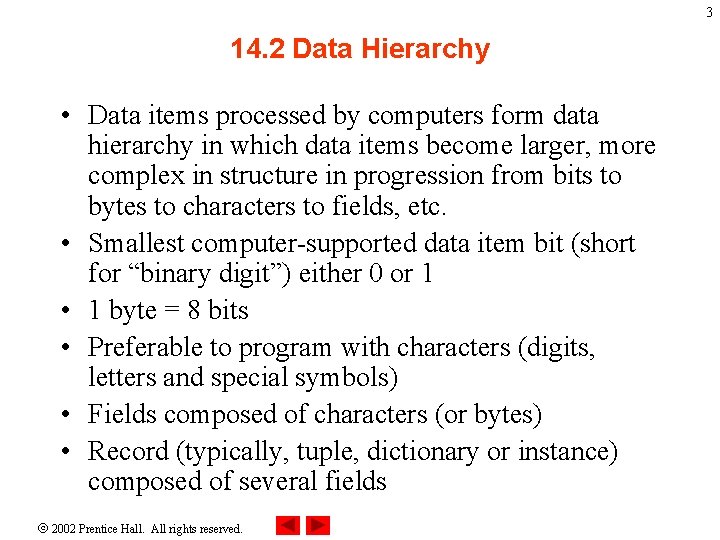
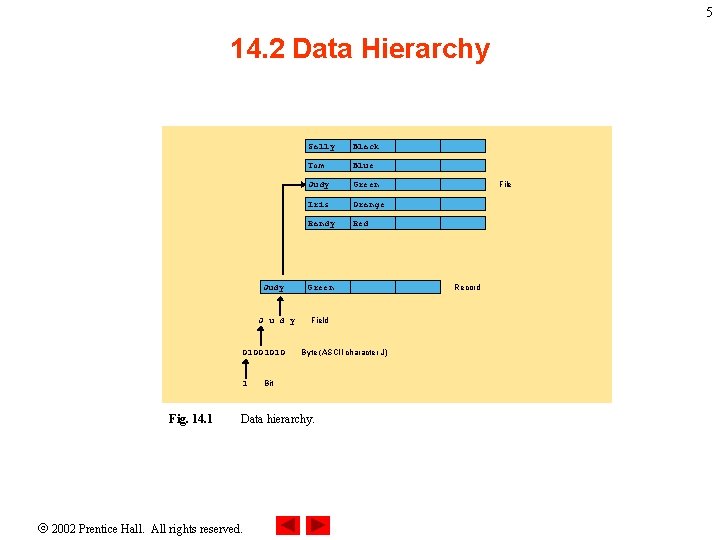
3 14. 2 Data Hierarchy • Data items processed by computers form data hierarchy in which data items become larger, more complex in structure in progression from bits to bytes to characters to fields, etc. • Smallest computer-supported data item bit (short for “binary digit”) either 0 or 1 • 1 byte = 8 bits • Preferable to program with characters (digits, letters and special symbols) • Fields composed of characters (or bytes) • Record (typically, tuple, dictionary or instance) composed of several fields 2002 Prentice Hall. All rights reserved.
4 14. 2 Data Hierarchy • File: group of related records • Record key distinguishes individual records 2002 Prentice Hall. All rights reserved.
5 14. 2 Data Hierarchy Judy J u d y 01001010 1 Fig. 14. 1 Sally Black Tom Blue Judy Green Iris Orange Randy Red Green Field Byte (ASCII character J) Bit Data hierarchy. 2002 Prentice Hall. All rights reserved. File Record
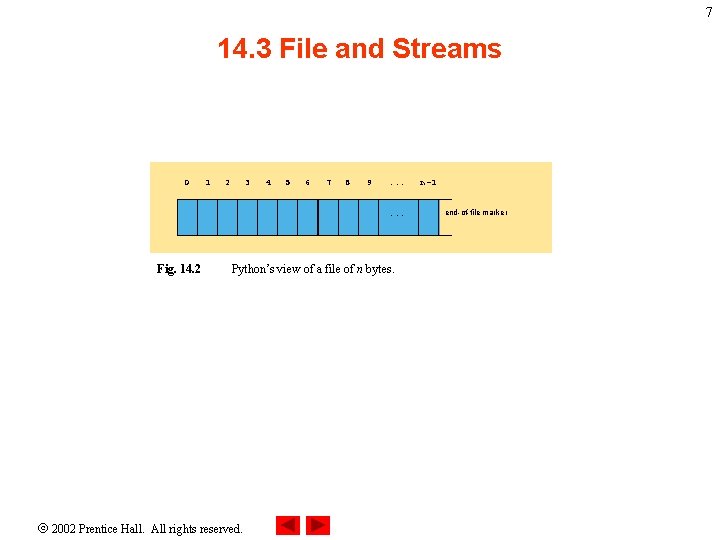
6 14. 3 Files and Streams • Python views files as sequential streams of bytes • Each file ends with an end-of-file marker or a specific byte number recorded in systemmaintained administrative data structure • Opening a file creates an object associated with a stream • Three file streams created when Python program executes – sys. stdin (standard input stream), sys. stdout (standard output stream) and sys. stderr (standard error stream) 2002 Prentice Hall. All rights reserved.
7 14. 3 File and Streams 0 1 2 3 4 5 6 7 8 9 . . . Fig. 14. 2 Python’s view of a file of n bytes. 2002 Prentice Hall. All rights reserved. n-1 end-of-file marker
8 14. 4 Creating a Sequential-Access File • Python imposes no file structure 2002 Prentice Hall. All rights reserved.
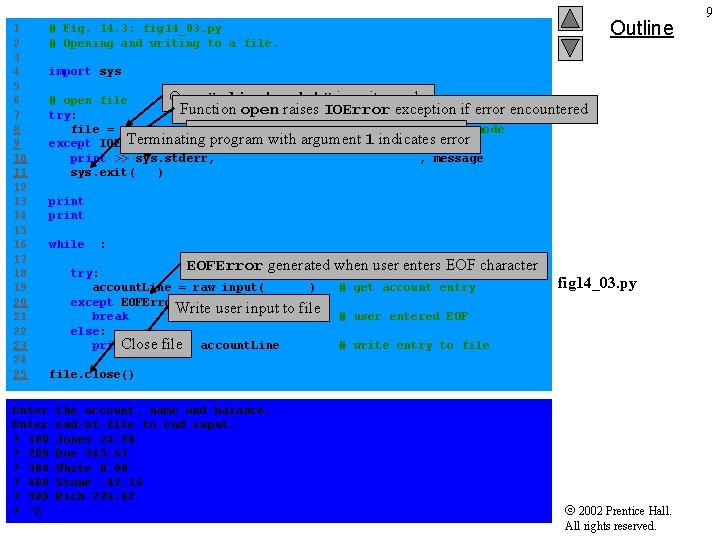
1 2 3 4 5 6 7 8 9 10 11 12 13 14 15 16 17 18 19 20 21 22 23 24 25 Enter ? 100 ? 200 ? 300 ? 400 ? 500 ? ^Z Outline # Fig. 14. 3: fig 14_03. py # Opening and writing to a file. import sys Open “clients. dat” in write mode # open file Function open raises IOError exception if error try: file = open( "clients. dat", "w" ) # open file in write mode Redirect error message to sys. stderr Terminating program with argument indicates error except IOError, message: # file 1 open failed print >> sys. stderr, "File could not be opened: " , message sys. exit( 1 ) encountered print "Enter the account, name and balance. " print "Enter end-of-file to end input. " while 1: EOFError generated when user enters EOF character try: account. Line = raw_input( "? " ) except EOFError: Write user input to file break else: print >> file, Close file account. Line # get account entry fig 14_03. py # user entered EOF # write entry to file. close() the account, name and balance. end-of-file to end input. Jones 24. 98 Doe 345. 67 White 0. 00 Stone -42. 16 Rich 224. 62 2002 Prentice Hall. All rights reserved. 9
10 14. 4 Creating a Sequential-Access File 2002 Prentice Hall. All rights reserved.
11 14. 4 Creating a Sequential-Access File 2002 Prentice Hall. All rights reserved.
12 14. 4 Creating a Sequential-Access File 2002 Prentice Hall. All rights reserved.
14. 5 Reading Data from a Sequential-Access File • Data in files can be retrieved for processing 2002 Prentice Hall. All rights reserved. 13
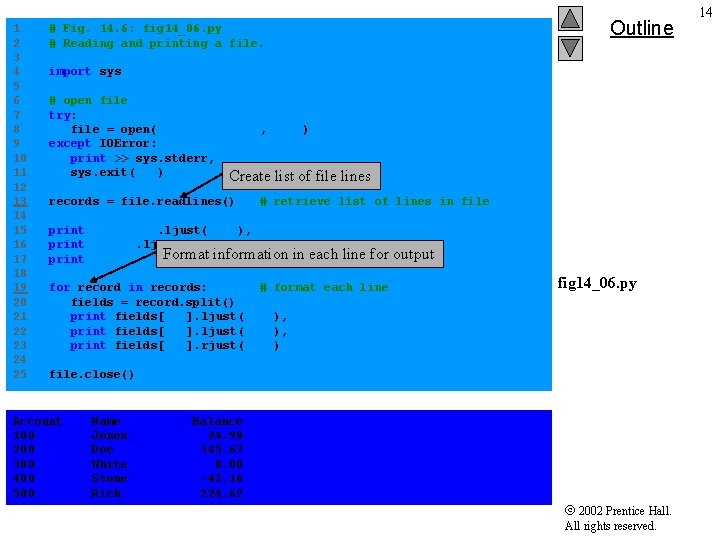
1 2 3 4 5 6 7 8 9 10 11 12 13 14 15 16 17 18 19 20 21 22 23 24 25 Outline # Fig. 14. 6: fig 14_06. py # Reading and printing a file. import sys # open file try: file = open( "clients. dat", "r" ) except IOError: print >> sys. stderr, "File could not be opened" sys. exit( 1 ) Create list of file lines records = file. readlines() # retrieve list of lines in file print "Account". ljust( 10 ), print "Name". ljust( 10 ), Format information print "Balance". rjust( 10 ) in each line for output for record in records: # format each line fields = record. split() print fields[ 0 ]. ljust( 10 ), print fields[ 1 ]. ljust( 10 ), print fields[ 2 ]. rjust( 10 ) fig 14_06. py file. close() Account 100 200 300 400 500 Name Jones Doe White Stone Rich Balance 24. 98 345. 67 0. 00 -42. 16 224. 62 2002 Prentice Hall. All rights reserved. 14
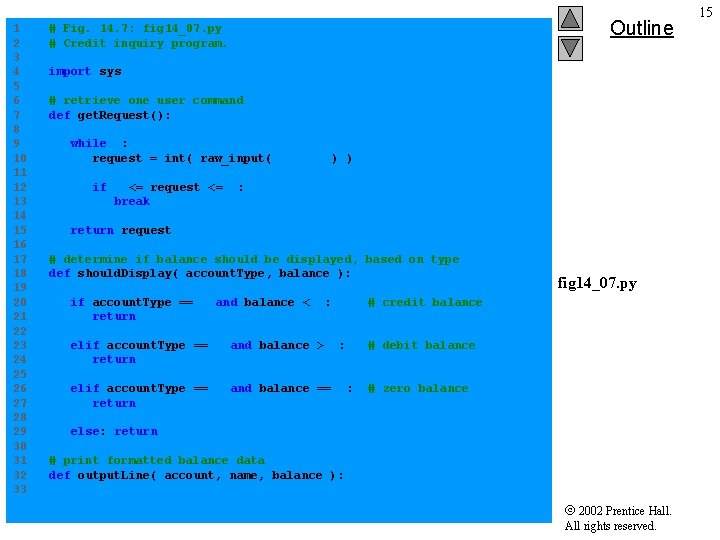
1 2 3 4 5 6 7 8 9 10 11 12 13 14 15 16 17 18 19 20 21 22 23 24 25 26 27 28 29 30 31 32 33 Outline # Fig. 14. 7: fig 14_07. py # Credit inquiry program. import sys # retrieve one user command def get. Request(): while 1: request = int( raw_input( "n? " ) ) if 1 <= request <= 4: break return request # determine if balance should be displayed, based on type def should. Display( account. Type, balance ): if account. Type == 2 and balance < 0: return 1 # credit balance elif account. Type == 3 and balance > 0: return 1 # debit balance elif account. Type == 1 and balance == 0: return 1 # zero balance fig 14_07. py else: return 0 # print formatted balance data def output. Line( account, name, balance ): 2002 Prentice Hall. All rights reserved. 15
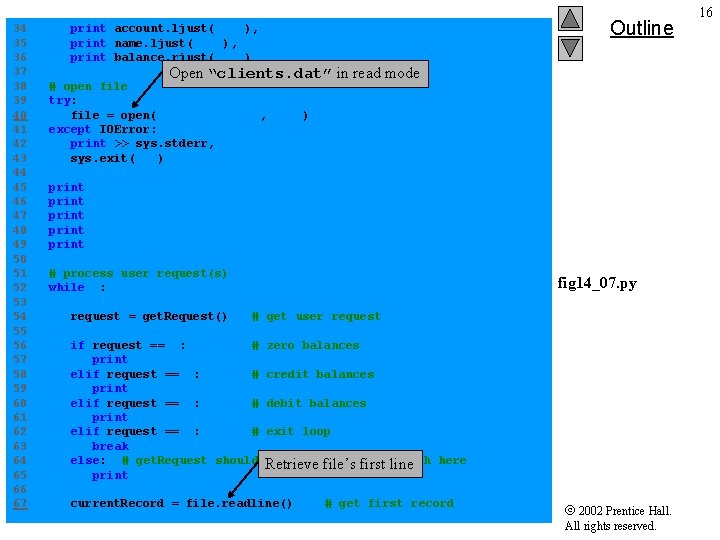
34 35 36 37 38 39 40 41 42 43 44 45 46 47 48 49 50 51 52 53 54 55 56 57 58 59 60 61 62 63 64 65 66 67 Outline print account. ljust( 10 ), print name. ljust( 10 ), print balance. rjust( 10 ) Open “clients. dat” in read mode # open file try: file = open( "clients. dat", "r" ) except IOError: print >> sys. stderr, "File could not be opened" sys. exit( 1 ) print print "Enter request" "1 - List accounts with zero balances" "2 - List accounts with credit balances" "3 - List accounts with debit balances" "4 - End of run" # process user request(s) while 1: request = get. Request() fig 14_07. py # get user request if request == 1: # zero balances print "n. Accounts with zero balances: " elif request == 2: # credit balances print "n. Accounts with credit balances: " elif request == 3: # debit balances print "n. Accounts with debit balances: " elif request == 4: # exit loop break else: # get. Request should Retrieve never let program reach here file’s first line print "n. Invalid request. " current. Record = file. readline() # get first record 2002 Prentice Hall. All rights reserved. 16
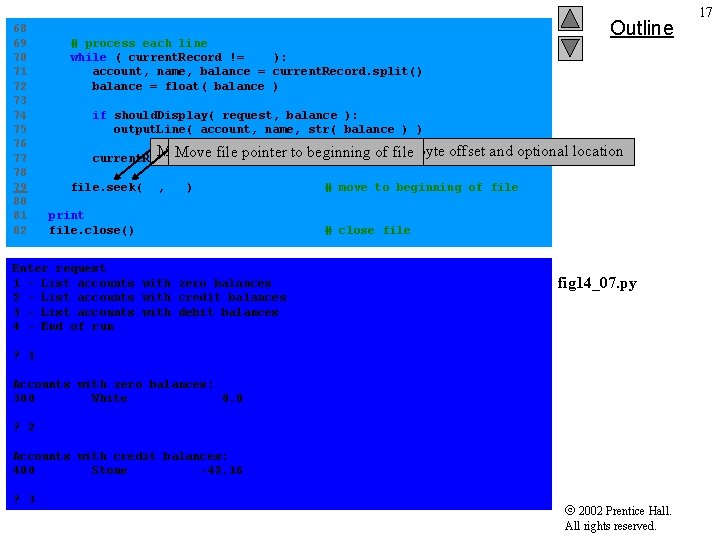
68 69 70 71 72 73 74 75 76 77 78 79 80 81 82 # process each line while ( current. Record != "" ): account, name, balance = current. Record. split() balance = float( balance ) Outline if should. Display( request, balance ): output. Line( account, name, str( balance ) ) Method seek receives two arguments - byte offset and optional location Move file pointer to beginning of file current. Record = file. readline() # get next record file. seek( 0, 0 ) print "n. End of run. " file. close() Enter request 1 - List accounts with zero balances 2 - List accounts with credit balances 3 - List accounts with debit balances 4 - End of run # move to beginning of file # close file fig 14_07. py ? 1 Accounts with zero balances: 300 White 0. 0 ? 2 Accounts with credit balances: 400 Stone -42. 16 ? 3 2002 Prentice Hall. All rights reserved. 17
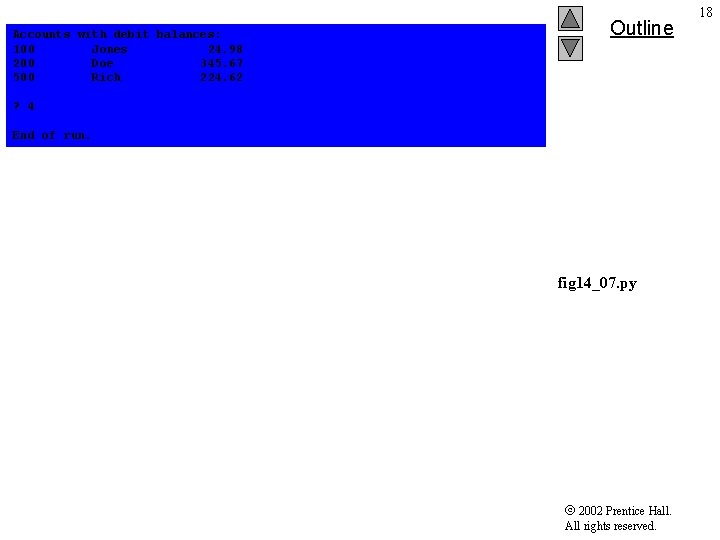
Accounts with debit balances: 100 Jones 24. 98 200 Doe 345. 67 500 Rich 224. 62 Outline ? 4 End of run. fig 14_07. py 2002 Prentice Hall. All rights reserved. 18
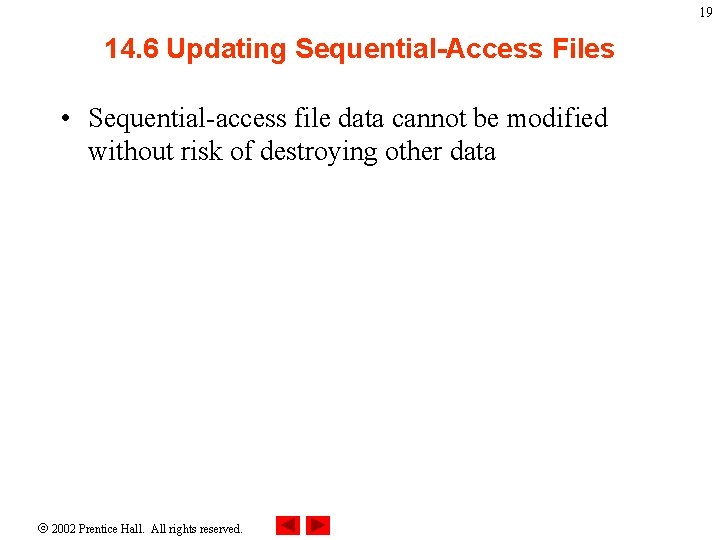
19 14. 6 Updating Sequential-Access Files • Sequential-access file data cannot be modified without risk of destroying other data 2002 Prentice Hall. All rights reserved.
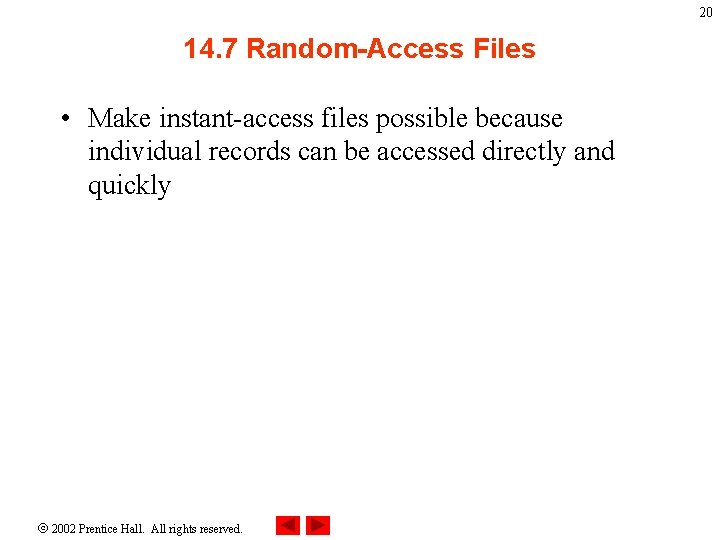
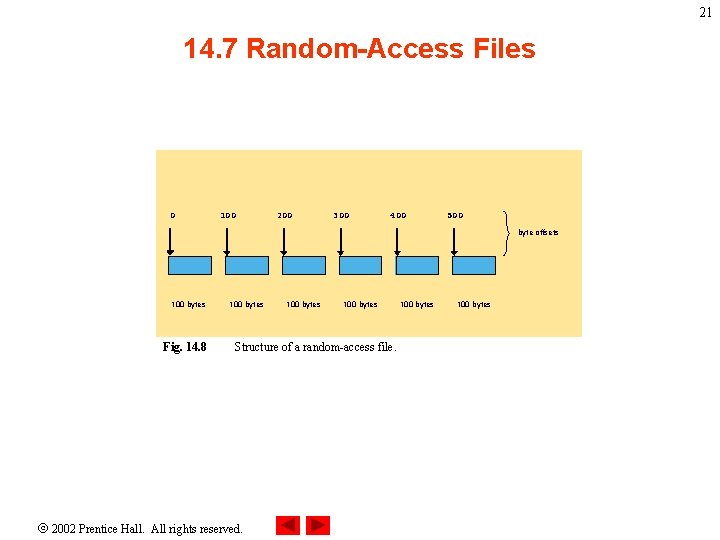
20 14. 7 Random-Access Files • Make instant-access files possible because individual records can be accessed directly and quickly 2002 Prentice Hall. All rights reserved.
21 14. 7 Random-Access Files 0 100 200 300 400 500 byte offsets 100 bytes Fig. 14. 8 100 bytes Structure of a random-access file. 2002 Prentice Hall. All rights reserved. 100 bytes
14. 8 Simulating a Random-Access File: The shelve Module • Python provides shelve module to simulate behavior of random-access files • shelve files has dictionary interface to a file 2002 Prentice Hall. All rights reserved. 22
23 14. 9 Writing Data to a shelve File • Resembles writing to a regular file • Records stored by key value 2002 Prentice Hall. All rights reserved.
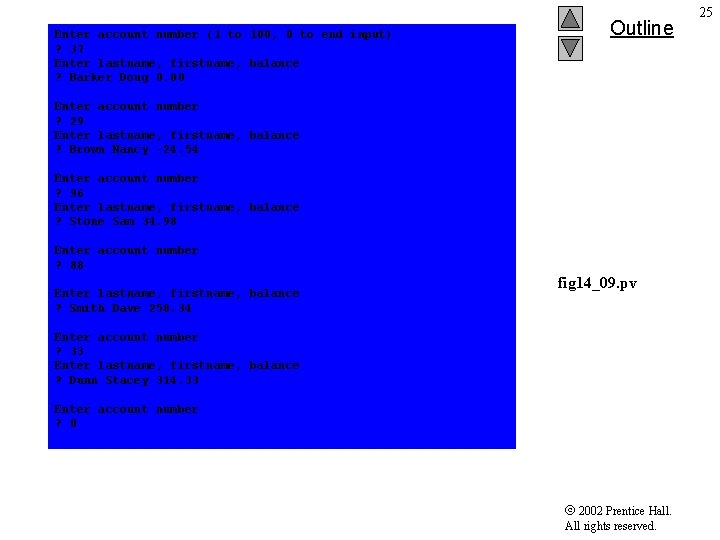
1 2 3 4 5 6 7 8 9 10 11 12 13 14 15 16 17 18 19 20 21 22 23 24 25 26 27 28 29 30 31 32 33 Outline # Fig. 14. 9: fig 14_09. py # Writing to shelve file functions import sys import shelve # open shelve file Resembles open function for try: out. Credit = shelve. open( "credit. dat" ) except IOError: print >> sys. stderr, "File could not be opened" sys. exit( 1 ) regular files print "Enter account number (1 to 100, 0 to end input)" # get account information while 1: # get account information account. Number = int( raw_input( "n. Enter account numbern? " ) ) fig 14_09. py if 0 < account. Number <= 100: print "Enter lastname, firstname, balance" Dictionary interface Stringfor record file information keys current. Data = raw_input( "? " ) out. Credit[ str( account. Number ) ] = current. Data. split() elif account. Number 0: Close==shelve break out. Credit. close() file # close shelve file 2002 Prentice Hall. All rights reserved. 24
Enter account number (1 to 100, 0 to end input) ? 37 Enter lastname, firstname, balance ? Barker Doug 0. 00 Outline Enter account number ? 29 Enter lastname, firstname, balance ? Brown Nancy -24. 54 Enter account number ? 96 Enter lastname, firstname, balance ? Stone Sam 34. 98 Enter account number ? 88 Enter lastname, firstname, balance ? Smith Dave 258. 34 fig 14_09. pv Enter account number ? 33 Enter lastname, firstname, balance ? Dunn Stacey 314. 33 Enter account number ? 0 2002 Prentice Hall. All rights reserved. 25
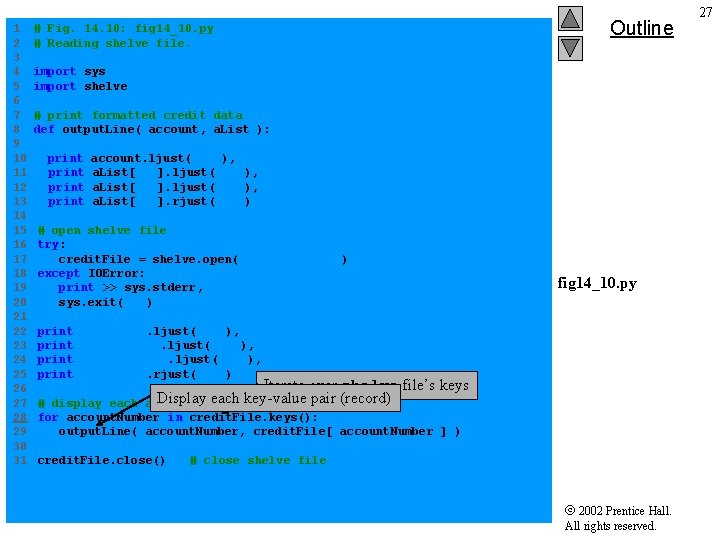
26 14. 10 Retrieving Data from a shelve File • Retrieve records from shelve file using dictionary interface 2002 Prentice Hall. All rights reserved.
1 2 3 4 5 6 7 8 9 10 11 12 13 14 15 16 17 18 19 20 21 22 23 24 25 26 27 28 29 30 31 Outline # Fig. 14. 10: fig 14_10. py # Reading shelve file. import sys import shelve # print formatted credit data def output. Line( account, a. List ): print account. ljust( 10 a. List[ 0 ]. ljust( a. List[ 1 ]. ljust( a. List[ 2 ]. rjust( ), 10 ) # open shelve file try: credit. File = shelve. open( "credit. dat" ) except IOError: print >> sys. stderr, "File could not be opened" sys. exit( 1 ) print fig 14_10. py "Account". ljust( 10 ), "Last Name". ljust( 10 ), "First Name". ljust( 10 ), "Balance". rjust( 10 ) Iterate over shelve file’s keys Display each key-value pair (record) account # display each for account. Number in credit. File. keys(): output. Line( account. Number, credit. File[ account. Number ] ) credit. File. close() # close shelve file 2002 Prentice Hall. All rights reserved. 27
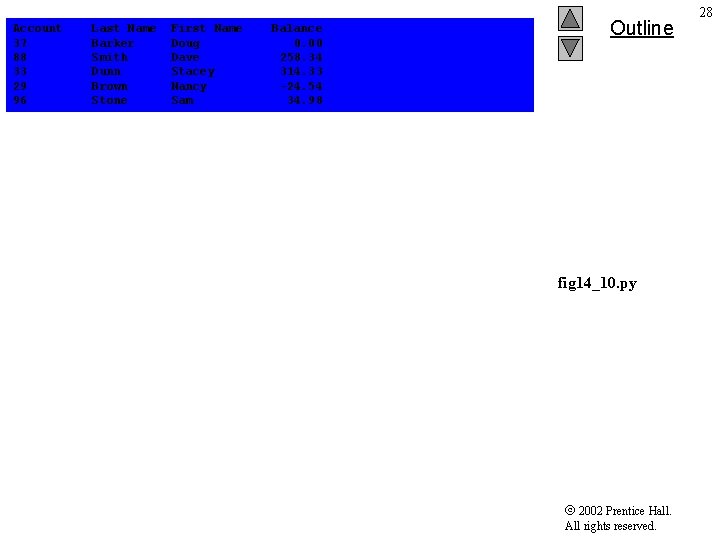
Account 37 88 33 29 96 Last Name Barker Smith Dunn Brown Stone First Name Doug Dave Stacey Nancy Sam Balance 0. 00 258. 34 314. 33 -24. 54 34. 98 Outline fig 14_10. py 2002 Prentice Hall. All rights reserved. 28
14. 11 Example: A Transaction-Processing Program • Example substantial transaction-processing program uses shelve file to achieve “instantaccess” processing 2002 Prentice Hall. All rights reserved. 29
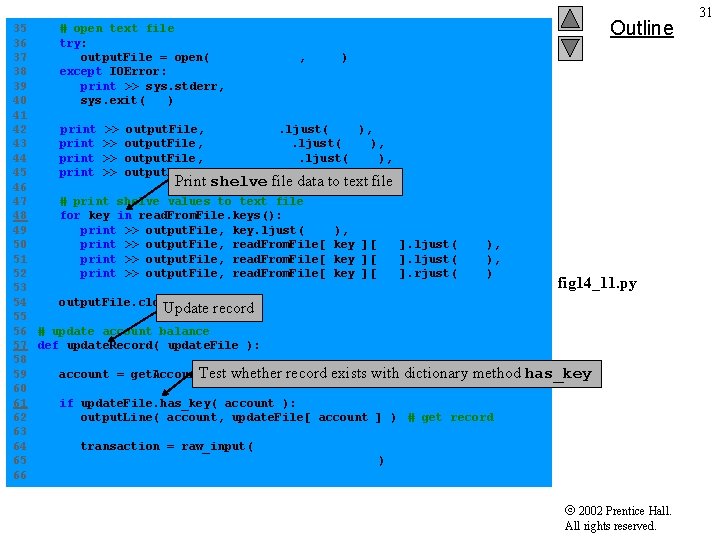
1 2 3 4 5 6 7 8 9 10 11 12 13 14 15 16 17 18 19 20 21 22 23 24 25 26 27 28 29 30 31 32 33 34 # # # Fig. 14. 11: fig 14_11. py Reads shelve file, updates data already written to file, creates data to be placed in file and deletes data already in file. Outline import sys import shelve # prompt for input menu choice def enter. Choice(): print print "n. Enter your choice" "1 - store a formatted text file of accounts" " called "print. txt" for printing" "2 - update an account" "3 - add a new account" "4 - delete an account" "5 - end program" fig 14_11. py while 1: menu. Choice = int( raw_input( "? " ) ) if not 1 <= menu. Choice <= 5: print >> sys. stderr, "Incorrect choice" else: break return menu. Choice Create formatted text file of records suitable for printing # create formatted text file for printing def text. File( read. From. File ): 2002 Prentice Hall. All rights reserved. 30
35 # open text file 36 try: 37 output. File = open( "print. txt", "w" ) 38 except IOError: 39 print >> sys. stderr, "File could not be opened. " 40 sys. exit( 1 ) 41 42 print >> output. File, "Account". ljust( 10 ), 43 print >> output. File, "Last Name". ljust( 10 ), 44 print >> output. File, "First Name". ljust( 10 ), 45 print >> output. File, "Balance". rjust( 10 ) Print shelve file data to text file 46 47 # print shelve values to text file 48 for key in read. From. File. keys(): 49 print >> output. File, key. ljust( 10 ), 50 print >> output. File, read. From. File[ key ][ 0 ]. ljust( 10 ), 51 print >> output. File, read. From. File[ key ][ 1 ]. ljust( 10 ), 52 print >> output. File, read. From. File[ key ][ 2 ]. rjust( 10 ) 53 54 output. File. close() Update record 55 56 # update account balance 57 def update. Record( update. File ): 58 Test"Enter whether recordto exists with dictionary method 59 account = get. Account( account update" ) 60 61 if update. File. has_key( account ): 62 output. Line( account, update. File[ account ] ) # get record 63 64 transaction = raw_input( 65 "n. Enter charge (+) or payment (-): " ) 66 Outline fig 14_11. py has_key 2002 Prentice Hall. All rights reserved. 31
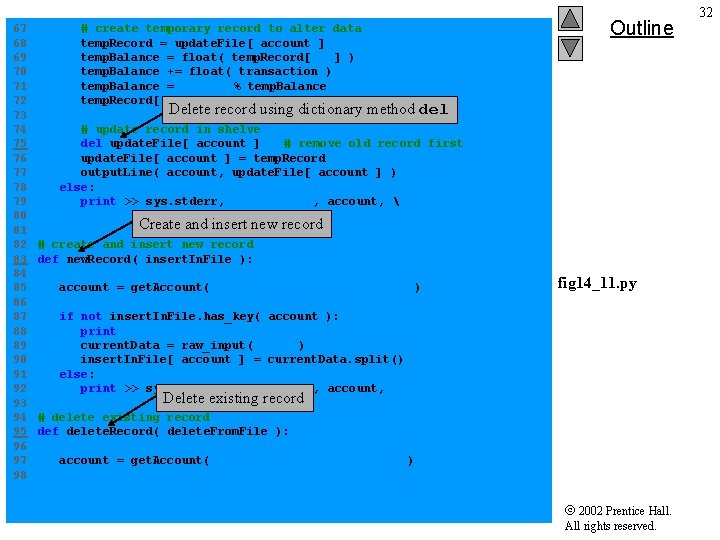
67 68 69 70 71 72 73 74 75 76 77 78 79 80 81 82 83 84 85 86 87 88 89 90 91 92 93 94 95 96 97 98 # create temporary record to alter data temp. Record = update. File[ account ] temp. Balance = float( temp. Record[ 2 ] ) temp. Balance += float( transaction ) temp. Balance = "%. 2 f" % temp. Balance temp. Record[ 2 ] = temp. Balance Outline Delete record using dictionary method del # update record in shelve del update. File[ account ] # remove old record first update. File[ account ] = temp. Record output. Line( account, update. File[ account ] ) else: print >> sys. stderr, "Account #", account, "does not exist. " Create and insert new record # create and insert new record def new. Record( insert. In. File ): account = get. Account( "Enter new account number" ) fig 14_11. py if not insert. In. File. has_key( account ): print "Enter lastname, firstname, balance" current. Data = raw_input( "? " ) insert. In. File[ account ] = current. Data. split() else: print >> sys. stderr, "Account #", account, "exists. " Delete existing record # delete existing record def delete. Record( delete. From. File ): account = get. Account( "Enter account to delete" ) 2002 Prentice Hall. All rights reserved. 32
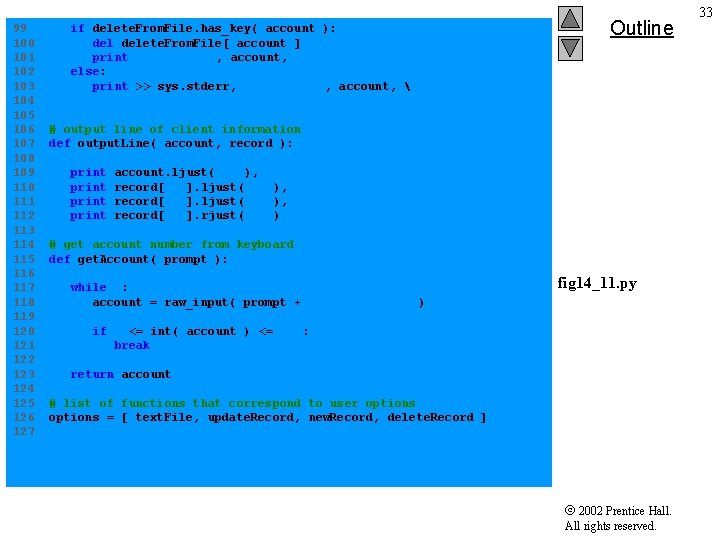
99 100 101 102 103 104 105 106 107 108 109 110 111 112 113 114 115 116 117 118 119 120 121 122 123 124 125 126 127 if delete. From. File. has_key( account ): delete. From. File[ account ] print "Account #", account, "deleted. " else: print >> sys. stderr, "Account #", account, "does not exist. " Outline # output line of client information def output. Line( account, record ): print account. ljust( 10 ), record[ 0 ]. ljust( 10 ), record[ 1 ]. ljust( 10 ), record[ 2 ]. rjust( 10 ) # get account number from keyboard def get. Account( prompt ): while 1: account = raw_input( prompt + " (1 - 100): " ) fig 14_11. py if 1 <= int( account ) <= 100: break return account # list of functions that correspond to user options = [ text. File, update. Record, new. Record, delete. Record ] 2002 Prentice Hall. All rights reserved. 33
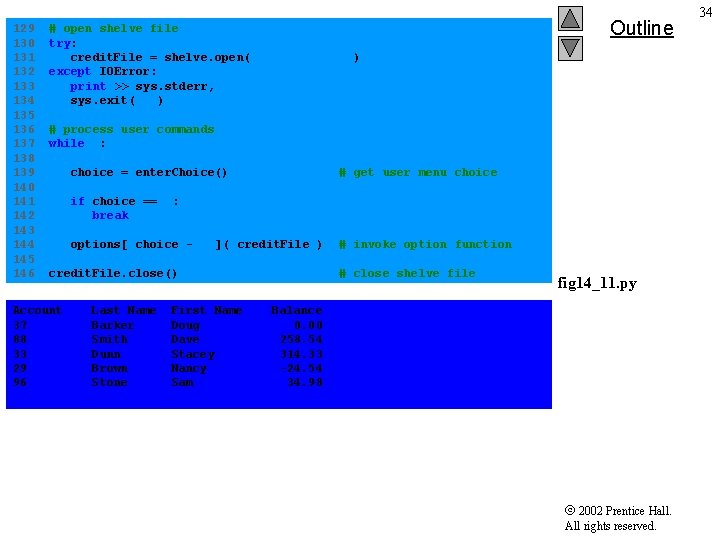
129 130 131 132 133 134 135 136 137 138 139 140 141 142 143 144 145 146 # open shelve file try: credit. File = shelve. open( "credit. dat" ) except IOError: print >> sys. stderr, "File could not be opened. " sys. exit( 1 ) Outline # process user commands while 1: choice = enter. Choice() # get user menu choice if choice == 5: break options[ choice - 1 ]( credit. File ) credit. File. close() Account 37 88 33 29 96 Last Name Barker Smith Dunn Brown Stone First Name Doug Dave Stacey Nancy Sam # invoke option function # close shelve file fig 14_11. py Balance 0. 00 258. 54 314. 33 -24. 54 34. 98 2002 Prentice Hall. All rights reserved. 34
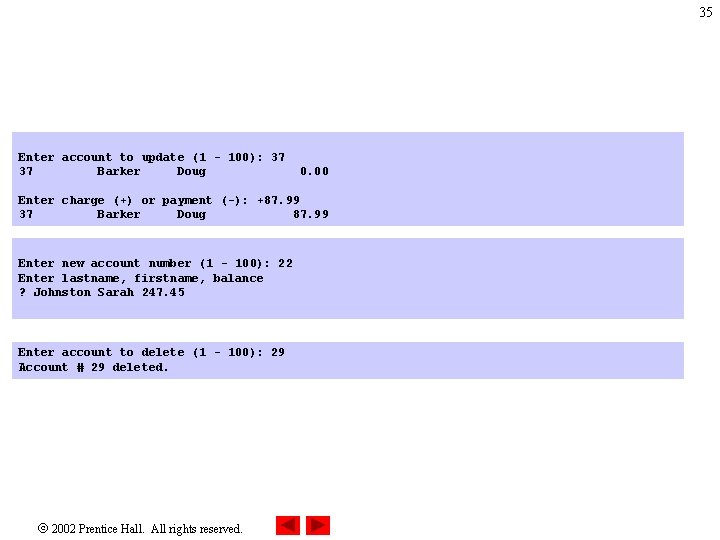
35 Enter account to update (1 - 100): 37 37 Barker Doug 0. 00 Enter charge (+) or payment (-): +87. 99 37 Barker Doug 87. 99 Enter new account number (1 - 100): 22 Enter lastname, firstname, balance ? Johnston Sarah 247. 45 Enter account to delete (1 - 100): 29 Account # 29 deleted. 2002 Prentice Hall. All rights reserved.
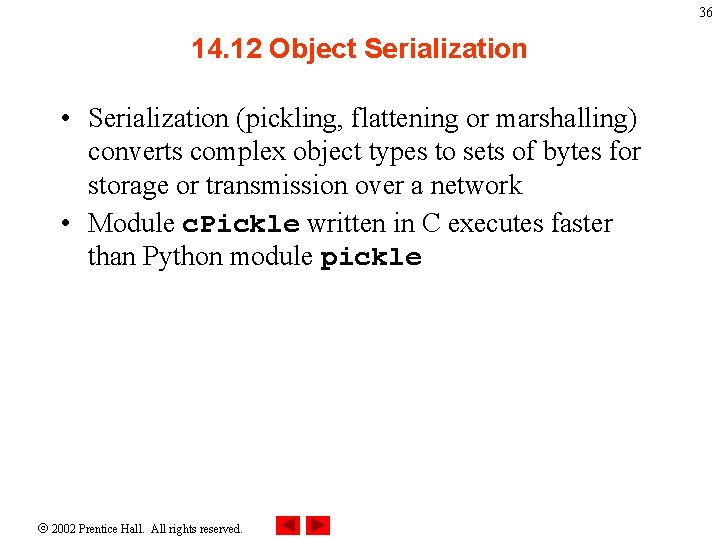
36 14. 12 Object Serialization • Serialization (pickling, flattening or marshalling) converts complex object types to sets of bytes for storage or transmission over a network • Module c. Pickle written in C executes faster than Python module pickle 2002 Prentice Hall. All rights reserved.
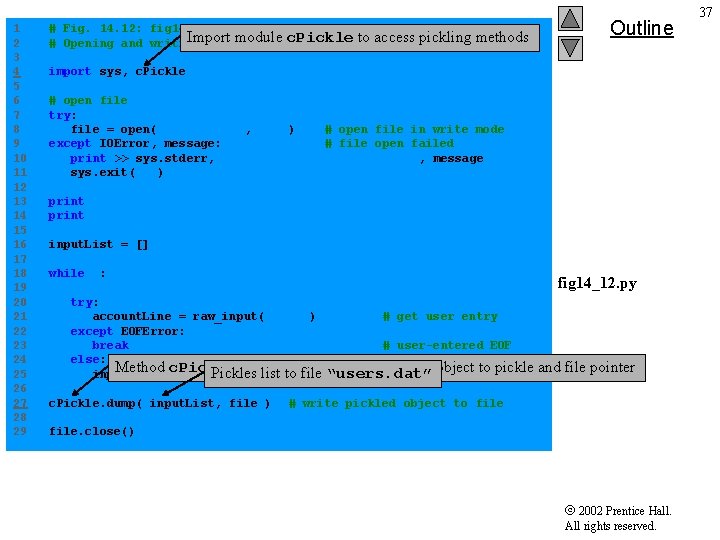
1 2 3 4 5 6 7 8 9 10 11 12 13 14 15 16 17 18 19 20 21 22 23 24 25 26 27 28 29 # Fig. 14. 12: fig 14_12. py Import module c. Pickle to access # Opening and writing pickled object to file. pickling methods Outline import sys, c. Pickle # open file try: file = open( "users. dat", "w" ) # open file in write mode except IOError, message: # file open failed print >> sys. stderr, "File could not be opened: " , message sys. exit( 1 ) print "Enter the user name, name and date of birth. " print "Enter end-of-file to end input. " input. List = [] while 1: fig 14_12. py try: account. Line = raw_input( "? " ) # get user entry except EOFError: break # user-entered EOF else: Method c. Pickle. dump takes arguments – object to pickle list to file two “users. dat” input. List. append(Pickles account. Line. split() ) # append entry c. Pickle. dump( input. List, file ) and file pointer # write pickled object to file. close() 2002 Prentice Hall. All rights reserved. 37
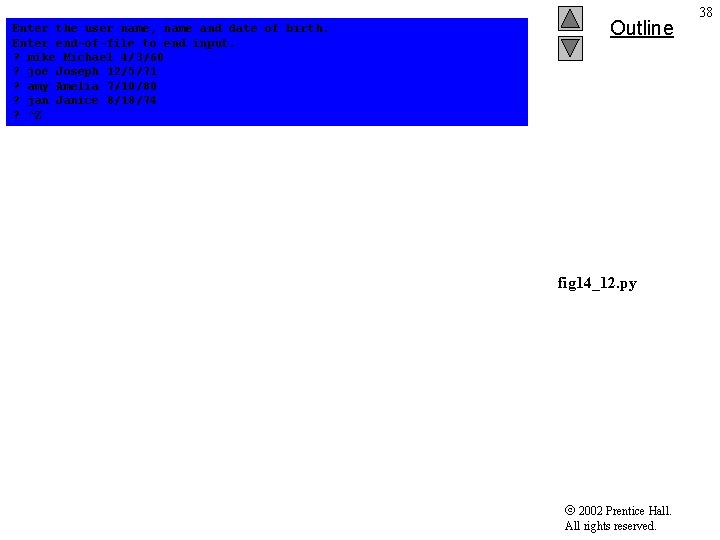
Enter the user name, name and date of birth. Enter end-of-file to end input. ? mike Michael 4/3/60 ? joe Joseph 12/5/71 ? amy Amelia 7/10/80 ? jan Janice 8/18/74 ? ^Z Outline fig 14_12. py 2002 Prentice Hall. All rights reserved. 38
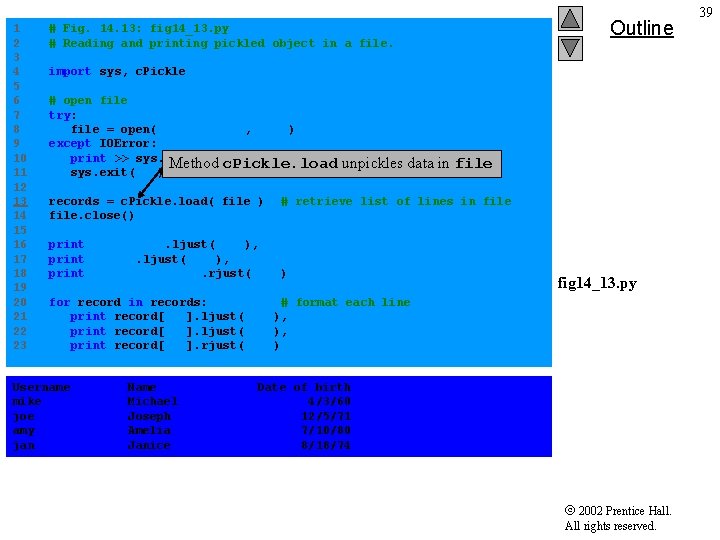
1 2 3 4 5 6 7 8 9 10 11 12 13 14 15 16 17 18 19 20 21 22 23 Outline # Fig. 14. 13: fig 14_13. py # Reading and printing pickled object in a file. import sys, c. Pickle # open file try: file = open( "users. dat", "r" ) except IOError: print >> sys. stderr, "File could not be opened"data Method c. Pickle. load unpickles sys. exit( 1 ) records = c. Pickle. load( file ) file. close() in file # retrieve list of lines in file print "Username". ljust( 15 ), print "Name". ljust( 10 ), print "Date of birth". rjust( 20 ) fig 14_13. py for record in records: # format each line print record[ 0 ]. ljust( 15 ), print record[ 1 ]. ljust( 10 ), print record[ 2 ]. rjust( 20 ) Username mike joe amy jan Name Michael Joseph Amelia Janice Date of birth 4/3/60 12/5/71 7/10/80 8/18/74 2002 Prentice Hall. All rights reserved. 39