
Chapter 14 Ecommerce Databases and Data Science Learning
Chapter 14 Ecommerce, Databases, and Data Science
Learning Objectives (1 of 2) • • Explain the issues, pros, and cons of whether to create an ecommerce website. List the components of online transactions, and explain what is involved in each step. List one other ecommerce model besides the online retailer selling to the general public and explain how it works. List one other electronic payment system besides traditional credit cards and explain how it works.
Learning Objectives (2 of 2) • • • Describe the relational database model Frame simple queries in SQL to retrieve information from one or more tables in a relational database Define data mining List three sources data brokers use to collect data on individuals Give an example of data science used "for the greater good"
Introduction • The World Wide Web enables businesses to communicate with customers through: – – – Advertising Follow-up support Sales to consumers Sales to other businesses Non-sales transactions (statements and bill pay)
Ecommerce (1 of 16) • • • Ecommerce: business conducted with the Internet and via the web including sales, advertising, and bill pay options Setting up an organization for ecommerce can be as intensive as setting up a physical store front. What business problem are you solving? – – Broadening the customer base Recapturing customers lost to online competitors Serving existing customers better Integrating departments of existing business
Ecommerce (2 of 16) • Risks of moving online – – • Same customers moving from in-store to online Facing new competition online Existing customers don’t need/want online store Employee concerns Costs of moving online – Computer equipment and infrastructure – Hiring personnel to manage the website – Legal expertise required to protect your intellectual property, regulations online, and customer privacy
Ecommerce (3 of 16) • Ecommerce decisions: – Design website in-house or hire an ASP (Application Service Provider) – Buy or lease equipment – Use existing software or have custom software written

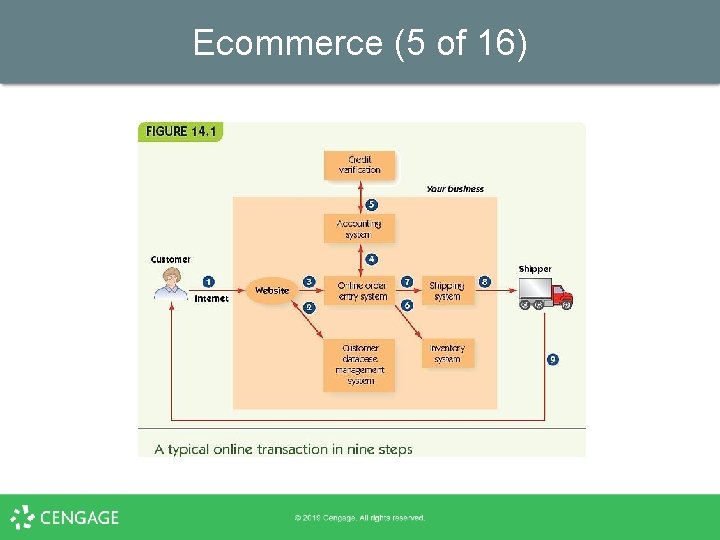
Ecommerce (4 of 16) • Customer transaction overview – – – • Customer learns of your site and goes there Identify return customers and personalize the site Provide a secure environment for making purchase Process the payment Communicate with accounting and credit company Order fulfillment – Update inventory – Contact shipping system and shipping company – Arrange pick up and delivery to customer
Ecommerce (5 of 16)
Ecommerce (6 of 16) • How do customers learn about your site? – Conventional print advertising with URL – An obvious domain name (home page URL) § ICANN (Internet Corporation for Assigned Names and Numbers) registers domain names – Search engine results (sponsored link) – Presence on a portal (website about a topic) with links to retail, wholesale, and informational websites
Ecommerce (7 of 16) • Identify return customers and personalize the site – Require the user to register and log in § Connects to the database with the user’s past history on the site – Leave a cookie on the user’s computer § § § Small text file containing information about the user Allows continuity between one page of a site and another (Relatively) harmless
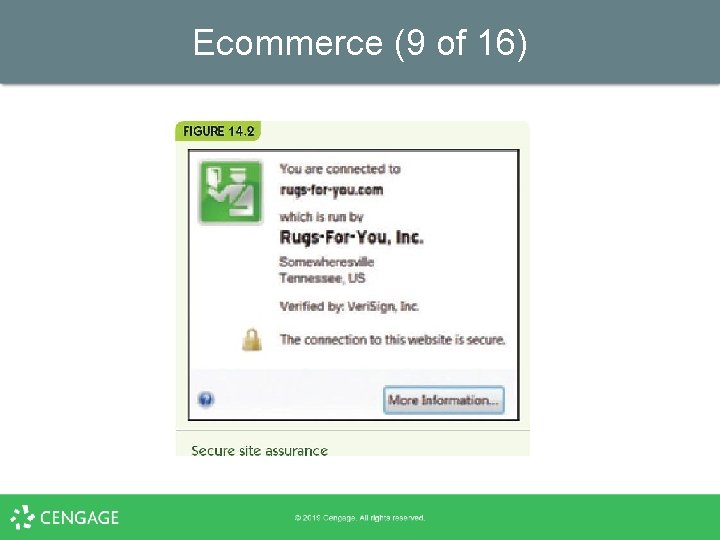
Ecommerce (8 of 16) • Provide a secure environment for making a purchase – Encryption: ensure sensitive information is encrypted for transmission – Authentication: verify that your website is legitimate
Ecommerce (9 of 16)
Ecommerce (10 of 16) • Process payment – Option 1: while the customer waits § § Online form communicates with accounting software Accounting system verifies customer credit Customer can correct bad information No need to keep credit card numbers – Option 2 § § § Record the order and payment information Verify and complete the transaction offline Send email confirmation to the customer
Ecommerce (11 of 16) • Fulfill the order – Communicate with online inventory § Reduce item counts for purchased items – Arrange for shipping § § Online shipping system External shipping company – Arrange pick-up at the warehouse and delivery to the customer
Ecommerce (12 of 16) • Website design: overall – – Attractive with new products displayed Good design principles Organize for natural shopping habits Make it easy to navigate § § Provide site map or navigation bar No more than four clicks from one page to another – Encourage browsing and targeted searching – Ensure the site works on different platforms and browsers
Ecommerce (13 of 16) • Website design: purchase – Provide electronic “shopping carts” – Checkout steps that: § § § Always show details of order Clearly indicate what the next button click does Allow the customer to go back and change things Give the customer shipping options Provide email with order information and shipping confirmation
Ecommerce (14 of 16) • Website design: other information – – FAQ page and link to customer service Entries allowed for customer reviews or forums News and press releases Links to your social media sites
Ecommerce (15 of 16) – Multiple software systems must communicate § § § Website, accounting, inventory, and shipping Suppliers, orders, and billing Personnel – Legacy code: existing old software still in use – Middleware: software to enable separate systems to communicate – Disaster recovery strategy: response to natural disasters, equipment failures, or being hacked
Ecommerce (16 of 16) • Other ecommerce models – e. Bay: peer-to-peer auction-style sales – Craigslist: peer-to-peer classified ads – Groupon: group coupons § § Businesses post coupons for one day only Minimum number required – Pay. Pal: online payment service – Apple Pay and similar system: mobile payment systems – Bitcoin: virtual currency
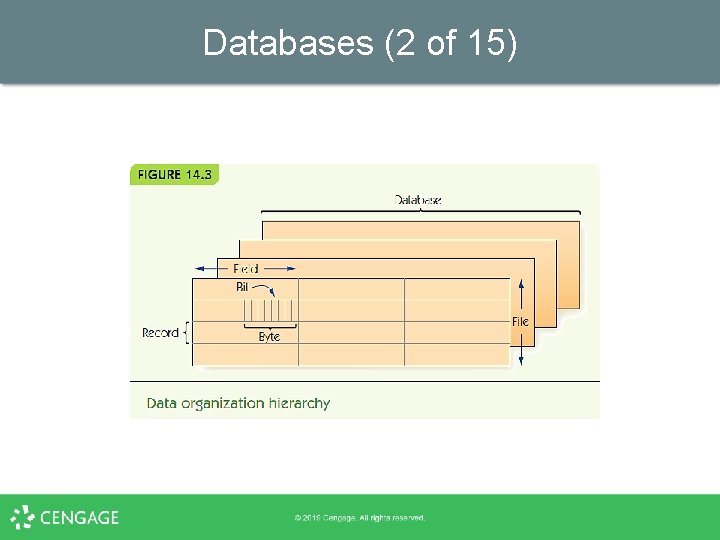
Databases (1 of 15) • • Databases store large amounts of data Businesses require databases for: – Inventory, personnel, customers, suppliers, and financials • Data organization – – – Bits and bytes: basic pieces of computer data Field: one meaningful piece of information Record: a set of related fields Data file: a set of related records Database: a set of related data files
Databases (2 of 15)

Databases (3 of 15) • Data files are represented as tables – Records are rows; fields are columns
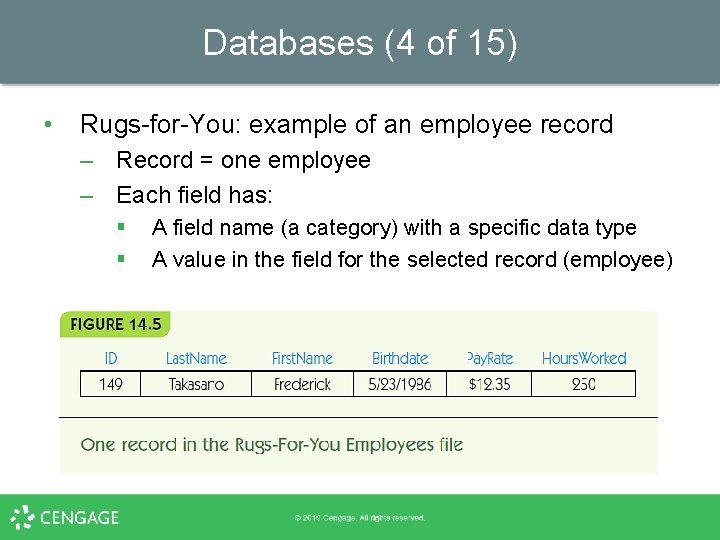
Databases (4 of 15) • Rugs-for-You: example of an employee record – Record = one employee – Each field has: § § A field name (a category) with a specific data type A value in the field for the selected record (employee)
Databases (5 of 15) • Database management system (DBMS) – Manages files in a database • Relational database model: files are 2 -d tables – Entity: a distinguishable component of system § Example: an employee, a customer, or a rug for sale – Tuple: a row of a relational table – Attribute: category of a field – Primary key: attribute(s) that uniquely identify a tuple

Databases (6 of 15)

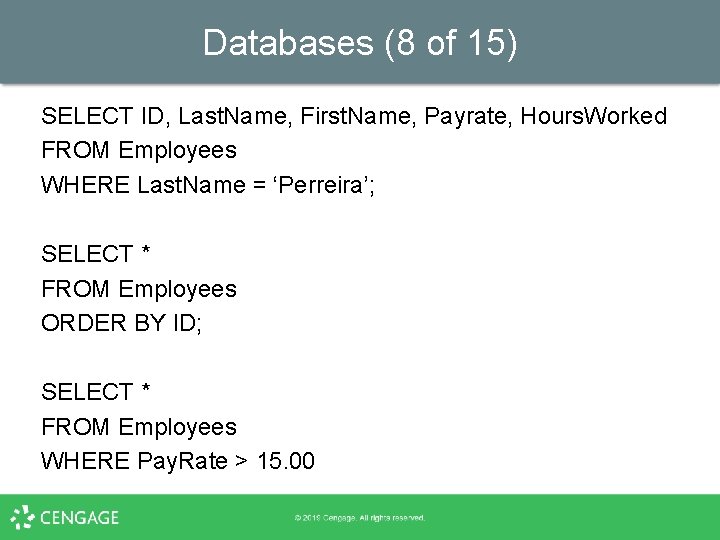
Databases (7 of 15) • SQL (Structured Query Language) – Standard query language for DBMS – Use SQL queries to retrieve data according to some criteria – Example 1: retrieve employee name, pay rate, and hours worked for employees named Perreira
Databases (8 of 15) SELECT ID, Last. Name, First. Name, Payrate, Hours. Worked FROM Employees WHERE Last. Name = ‘Perreira’; SELECT * FROM Employees ORDER BY ID; SELECT * FROM Employees WHERE Pay. Rate > 15. 00

Databases (9 of 15) – Example 2: retrieve all employee records, sorted by ID number SELECT * FROM Employees ORDER BY ID; – Example 3: retrieve records of employees who are paid more than $15. 00 per hour SELECT * FROM Employees WHERE Pay. Rate > 15. 00
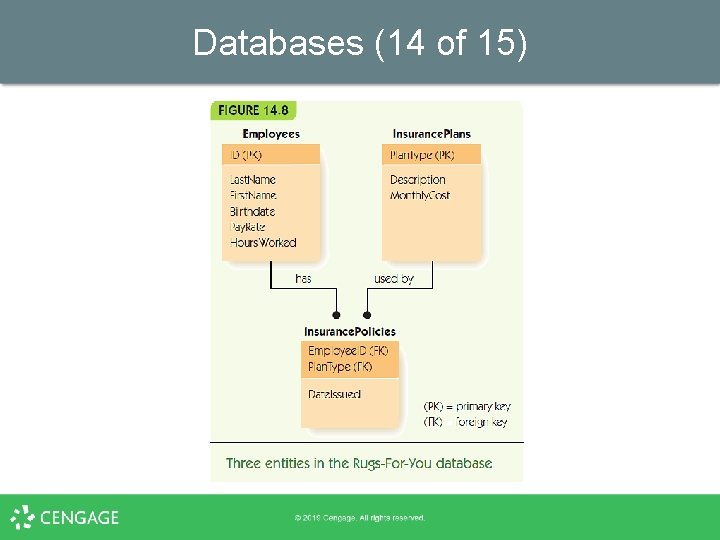
Databases (10 of 15) • • Multiple tables may contain related data – Example: insurance policies for Rugs-for-You Foreign key: an attribute in one table that is the key in another – Connects data in one table with another – Example: Employee. ID
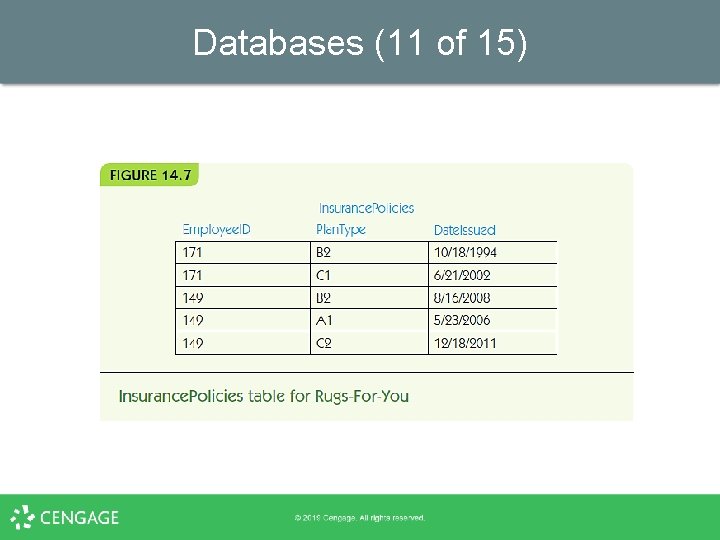
Databases (11 of 15)
Databases (12 of 15) • Multi-table example SELECT Last. Name, First. Name, Plan. Type FROM Employees, Insurance Policies Where Last. Name = ‘Takasano’ AND First. Name = ‘Frederick’ AND ID = Employee. ID;
Databases (13 of 15) • Relational database operations – Project: pick some attributes from a set of tuples SELECT Last. Name, First. Name, Plan. Type FROM Employees, Insurance Policies – Restrict: pick tuples that meet criteria WHERE Last. Name = ‘Takasano’ AND First. Name = ‘Frederick’ – Join: combine tuples from different tables FROM Employees, Insurance Policies … AND ID = Employee. ID;
Databases (14 of 15)
Databases (15 of 15) • Database integrity: verification as data is added/removed – – – • Efficiency: – – • Entity integrity: no primary key can be missing Data integrity: values must match category constraints (e. g. , be a valid pay rate) Referential integrity: foreign keys must match a primary key value in the related table Disk access is slow File management systems can organize disk files for faster access Distributed database: data stored across a computer network
Data Science (1 of 5) • • Big data: Huge amounts of available data Data analysis: Process of finding the right data sets, putting data in the right format, and writing queries to extract information Data science: Incorporates data analysis tasks, but requires knowledge of the enterprise for useful queries and the use of statistics and visualization techniques to interpret the results and predict future strategies to achieve a predetermined goal Data warehouse: A collection of databases that contain current and archived data for research and analysis
Data Science (2 of 5) • Data mining: Process of analyzing data to extract and interpret previously hidden patterns through several steps: – – 1. Determine the problem to be solved 2. Review the condition of the data: Does all data have the same structure? Are any tuples missing information? 3. Determine a model that will help bring out the patterns: Patterns classify the data to determine the strongest predictors of a given outcome – this is the data mining part: creation of a model 4. Evaluate your model: Are the results predicted borne out by further data? Would a different model give better results?
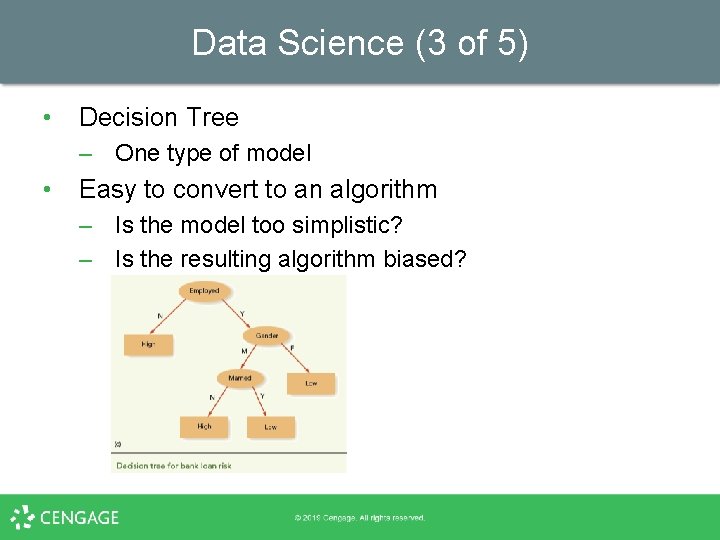
Data Science (3 of 5) • Decision Tree – One type of model • Easy to convert to an algorithm – Is the model too simplistic? – Is the resulting algorithm biased?
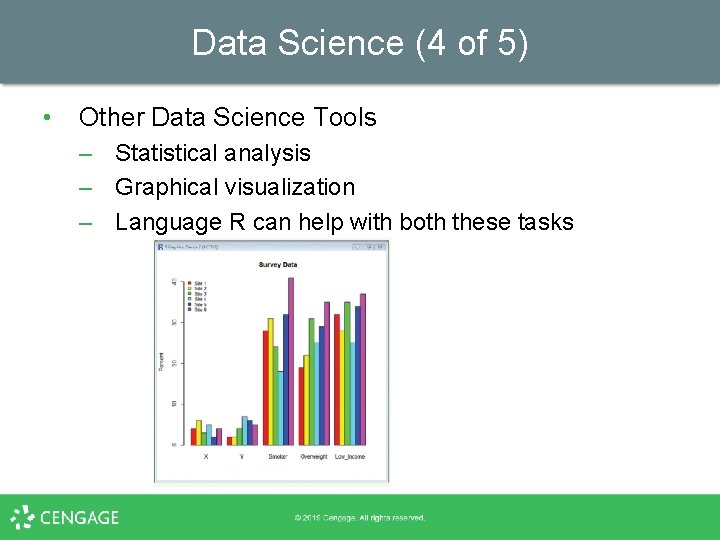
Data Science (4 of 5) • Other Data Science Tools – Statistical analysis – Graphical visualization – Language R can help with both these tasks
Data Science (5 of 5) • Privacy issues associated with data mining – Automatically analyzing large amounts of data to uncover hidden patterns • • Data brokers: companies that collect and sell data such as: – Birth certificates, marriage certificates, publically available information, and nonpublic data purchased or acquired from other companies or data brokers. Nontheless, data science can make contributions to – Medicine, science, ecology, and many more fields

Summary (1 of 2) • • • Ecommerce is a central part of our economy Businesses deciding to enter the online world must plan carefully Ecommerce web design is complicated Ecommerce requires integrating multiple computer systems: inventory, accounting, suppliers, etc. Databases are systems to store large amounts of data Data is organized into fields, records, data files, and databases
Summary (2 of 2) • • • DBMS manages files of databases The relational database model is the most common: records represent entities; all data is viewed as sets of 2 -d tables SQL is the most common query language for retrieving data from a DBMS Databases must ensure integrity, efficiency, and (sometimes) distributed access to data Data mining discovers hidden patterns in a big data set Privacy issues arise due to data mining techniques
- Slides: 42