
CHAPTER 13 Information Search Designing the User Interface
- Slides: 47
CHAPTER 13: Information Search Designing the User Interface: Strategies for Effective Human. Computer Interaction Fifth Edition Ben Shneiderman & Catherine Plaisant in collaboration with Addison Wesley is an imprint of Maxine S. Cohen and Steven M. Jacobs © 2010 Pearson Addison-Wesley. All rights reserved.
Information Search • Introduction • Searching in Textual Documents and Database Querying • Multimedia Document Searches • Advanced Filtering and Search Interfaces 1 -2 © 2010 Pearson Addison-Wesley. All rights reserved. 13 -2
Information Search (cont. ) • Information exploration used to be overwhelming, causing anxiety • New generation of digital libraries and databases will enable convenient exploration of growing information spaces • UI designers are inventing more powerful search methods, while offering smoother integration of technology with tasks • "Information retrieval" and "database management" are being replaced by information gathering, seeking, filtering, sensemaking, and visual analytics 1 -3 © 2010 Pearson Addison-Wesley. All rights reserved. 13 -3
• Exploration collections of information become more difficult as volume and diversity of the collection grows – A page of information is easy to explore, but what about when the source of information is the size of a book or larger? – Difficult to locate known items or browse • Computers are a powerful search tools, but older UIs were challenging for novice and some expert users 1 -4 © 2010 Pearson Addison-Wesley. All rights reserved. 13 -4
Search terminology • Task objects (such as movies for rent) are stored in structured relational databases, textual document libraries, or multimedia document libraries • A structured relational database consists of relations and a schema to describe the relations • Relations have items (usually called tuples or records), and each item has multiple attributes (often called fields), which each have attribute values 1 -5 © 2010 Pearson Addison-Wesley. All rights reserved. 13 -5
• A textual document library consists of a set of collections (typically up to a few hundred collections per library) plus some descriptive attributes or metadata about the library (for example, name, location, owner) • Task actions are decomposed into browsing or searching • Here are some examples of task actions: - Specific fact finding (known-item search) • Find the e-mail address of the President of the United States. - Extended fact finding • What other books are by the author of “Jurassic Park”? 1 -6 © 2010 Pearson Addison-Wesley. All rights reserved. 13 -6
Search terminology (cont. ) - Exploration of availability • Is there new work on voice recognition in the ACM digital library? - Open-ended browsing and problem analysis • Is there promising new research on fibromyalgia that might help my patient? • Once users have clarified their information needs, the first step towards satisfying those needs is deciding where to search • Supplemental finding aids can help users to clarify and pursue their information needs, e. g. table of contents or indexes • Additional preview and overview surrogates for items and collections can be created to facilitate browsing 1 -7 © 2010 Pearson Addison-Wesley. All rights reserved. 13 -7
Searching in Textual Documents and Database Querying • World Wide Web search engines have greatly improved their performance by making use of statistical rankings and the information latent in the Web's hyperlink structure – Google implements a link-based ranking measure (Page. Rank) to compute queryindependent score for each document – https: //www. youtube. com/watch? v=BNHR 6 IQJ 1 -8 GZs © 2010 Pearson Addison-Wesley. All rights reserved. 13 -8
Searching in Textual Documents and Database Querying (cont. ) • Due to redundancy of information on the Web, results almost always return some relevant documents, and they allow users to find answers through hyperlinks 1 -9 © 2010 Pearson Addison-Wesley. All rights reserved. 13 -9
Database Querying • Database searches have become widespread as the general public turns to the Web to reserve travel packages, shop for groceries, search digital libraries, and more • The Structured Query Language (SQL) remains a widespread standard for searching relational database systems 1 -10 © 2010 Pearson Addison-Wesley. All rights reserved. 13 -10
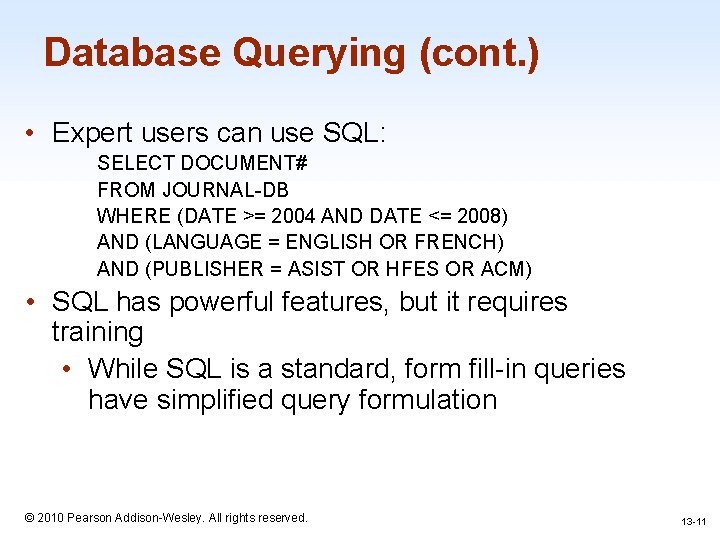
Database Querying (cont. ) • Expert users can use SQL: SELECT DOCUMENT# FROM JOURNAL-DB WHERE (DATE >= 2004 AND DATE <= 2008) AND (LANGUAGE = ENGLISH OR FRENCH) AND (PUBLISHER = ASIST OR HFES OR ACM) • SQL has powerful features, but it requires training • While SQL is a standard, form fill-in queries have simplified query formulation 1 -11 © 2010 Pearson Addison-Wesley. All rights reserved. 13 -11
Database Querying (cont. ) • Other methods include: - Natural language queries - Form fill-in - Query by example (QBE) • Providing powerful search capabilities without overwhelming novice users remains a challenge, addressed by providing simple and advanced search interfaces 1 -12 © 2010 Pearson Addison-Wesley. All rights reserved. 13 -12
Database Querying (cont. ) • Natural-language queries are meant to be appealing to users – “Please list the documents that deal with…” • However, the computer’s capacity for processing is often limited to eliminating frequent terms or commands and searching for the remaining words – Leads to frustration 1 -13 © 2010 Pearson Addison-Wesley. All rights reserved. 13 -13
Database Querying (cont. ) • Form fill-in queries have substantially simplified query formulation while still allowing some Boolean combinations to be made available – Conjunction of disjunctions (ORs) within attributes, and ANDs between attributes 1 -14 © 2010 Pearson Addison-Wesley. All rights reserved. 13 -14
Database Querying (cont. ) • Query by example (QBE) is a more powerful approach – Users enter attribute values and some keywords in a relational table template – This approach has influenced modern systems, but is no longer a major interface 1 -15 © 2010 Pearson Addison-Wesley. All rights reserved. 13 -15
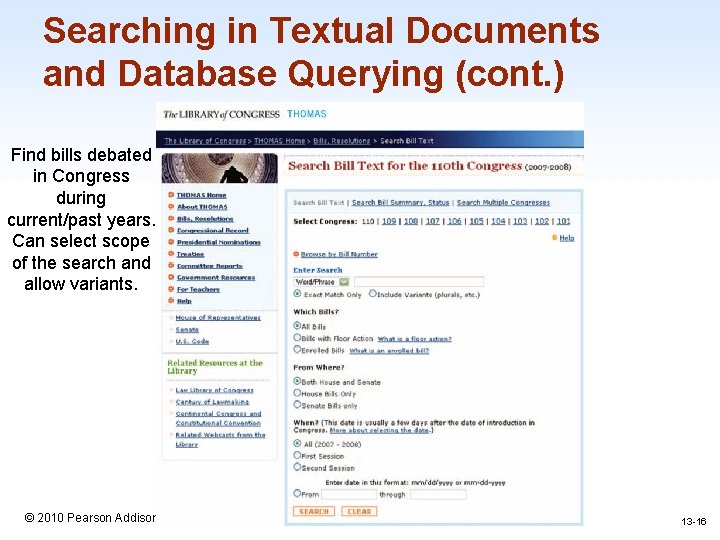
Searching in Textual Documents and Database Querying (cont. ) Find bills debated in Congress during current/past years. Can select scope of the search and allow variants. 1 -16 © 2010 Pearson Addison-Wesley. All rights reserved. 13 -16
Search Interface Design • Standard design is to create a simple search interface with a link to the advanced search interface • Simple interfaces allow users to specify phrases that are searched in all the fields – Single field to enter terms and a button to start search 1 -17 © 2010 Pearson Addison-Wesley. All rights reserved. 13 -17
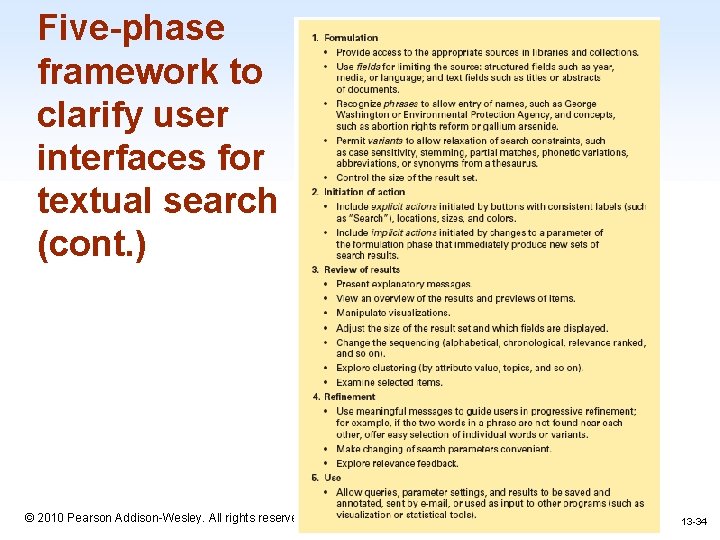
• Advanced interface allows users to specify more precise terms or restrict the search to specific fields – 5 -stage framework • Interfaces often either hide important aspects of the search or make advanced query specification too difficult • Evidence shows that users perform better and have higher satisfaction when they can view and control the search 1 -18 © 2010 Pearson Addison-Wesley. All rights reserved. 13 -18
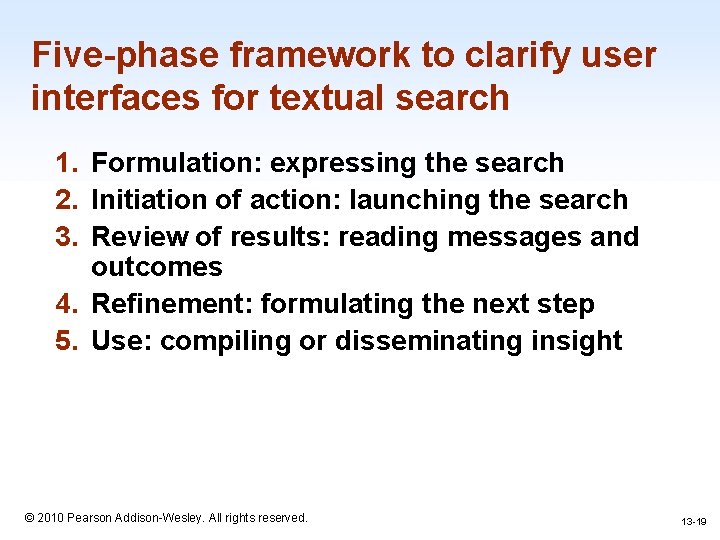
Five-phase framework to clarify user interfaces for textual search 1. Formulation: expressing the search 2. Initiation of action: launching the search 3. Review of results: reading messages and outcomes 4. Refinement: formulating the next step 5. Use: compiling or disseminating insight 1 -19 © 2010 Pearson Addison-Wesley. All rights reserved. 13 -19
Stage 1: Formulation • Identify the source of the information, the fields for limiting the source, the phrases, and the variants • Searching all libraries or all collections in a library is not the best approach • Users often prefer to limit the sources to a specific library/collection 1 -20 © 2010 Pearson Addison-Wesley. All rights reserved. 13 -20
Stage 1: Formulation (cont. ) • Users may also limit searches to specific fields • In textual databases, users typical seek items that contain meaningful phrases, and multiple-entry fields can be provided to allow for multiple phrases • Searches on phrases have proven to be more accurate than individual words 1 -21 © 2010 Pearson Addison-Wesley. All rights reserved. 13 -21
Stage 1: Formulation (cont. ) • When users are unsure of exact value of the field (terms to be searched for or spelling/capitalization of the name), they may need to relax the search constraints • Allow variants (capitalization, stemmed versions, partial matches, phonetic variants) to relax search constraints 1 -22 © 2010 Pearson Addison-Wesley. All rights reserved. 13 -22
Stage 1: Formulation (cont. ) • Examples: – Capitalization: Case sensitivity – Stemmed versions: the keyword ‘teach’ retrieves variant suffixes such as ‘teacher’, ‘teaching’, or ‘teaches’ – Partial matches: keyword ‘biology’ retrieves ‘sociobiology’ and ‘astrobiology’ – Phonetic variants: the keyword ‘Johnson’ retrieves ‘Jonson’, ‘Jansen’, and ‘Johnsson’ 1 -23 © 2010 Pearson Addison-Wesley. All rights reserved. 13 -23
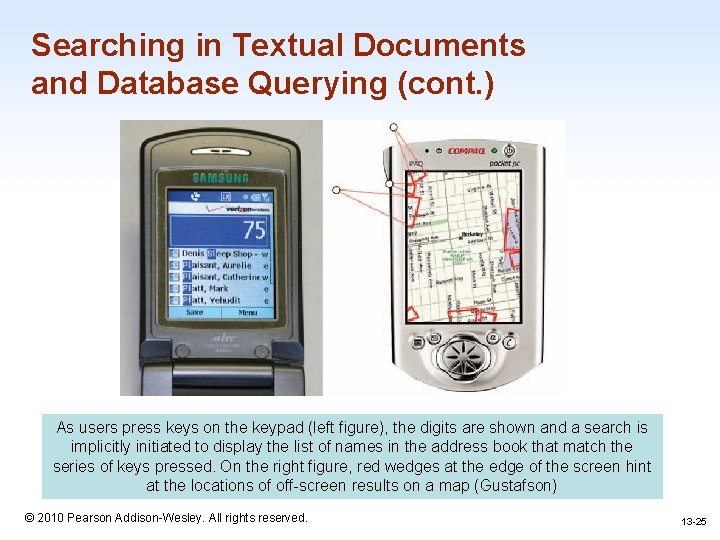
Stage 2: Initiation of action • Explicit: Most current systems have a search button – Label, size, and color should be consistent across versions • Implicit: Changes to a component of Stage 1 immediately produce new sets of search results (see next slide) 1 -24 © 2010 Pearson Addison-Wesley. All rights reserved. 13 -24
Searching in Textual Documents and Database Querying (cont. ) As users press keys on the keypad (left figure), the digits are shown and a search is implicitly initiated to display the list of names in the address book that match the series of keys pressed. On the right figure, red wedges at the edge of the screen hint at the locations of off-screen results on a map (Gustafson) © 2010 Pearson Addison-Wesley. All rights reserved. 1 -25 13 -25
Stage 3: Review of results • Users read messages, view textual lists, or manipulate visualizations • Previews consisting of samples (e. g. , Google search results), human-generated abstracts, or automatically generated summaries help users select a subset of the results for use and can help them define more productive queries 1 -26 © 2010 Pearson Addison-Wesley. All rights reserved. 13 -26
Stage 3: Review of results (cont. ) • Translations may also be proposed • If users have control over the result set size and which fields are displayed, they can better accommodate their informationseeking needs • Common to return only 10 or 20 results • Allowing users to control how results are sequenced also contributes to more effective outcomes © 2010 Pearson Addison-Wesley. All rights reserved. 1 -27 13 -27
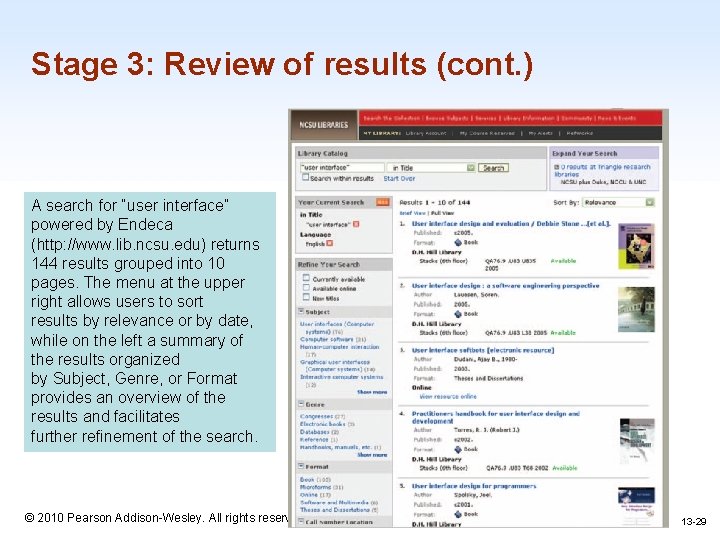
Stage 3: Review of results (cont. ) • One strategy used by Endeca is to provide an overview of the results using attribute values – Example: providing the number of books, journal articles, or news articles (see next slide) • Another strategy used by Vivisimo and Grokker involves automatic clustering and naming of the clusters – Problematic – Clustering according to more established and meaningful hierarchies might be more effective © 2010 Pearson Addison-Wesley. All rights reserved. 1 -28 13 -28
Stage 3: Review of results (cont. ) A search for “user interface” powered by Endeca (http: //www. lib. ncsu. edu) returns 144 results grouped into 10 pages. The menu at the upper right allows users to sort results by relevance or by date, while on the left a summary of the results organized by Subject, Genre, or Format provides an overview of the results and facilitates further refinement of the search. 1 -29 © 2010 Pearson Addison-Wesley. All rights reserved. 13 -29
Stage 3: Review of results (cont. ) • To help users identify items of interest, highlight keywords or key phrases used in the search • For large documents, automatically scrolling to the first occurrence of the keyword is helpful 1 -30 © 2010 Pearson Addison-Wesley. All rights reserved. 13 -30
Stage 4: Refinement • Provide meaningful messages to explain search outcomes and to support progressive refinement – Keep track of search history • Review and reuse of earlier searches – Feedback should be given about occurrence of words if not found • Misspelling 1 -31 © 2010 Pearson Addison-Wesley. All rights reserved. 13 -31
Final stage: Use • Results can be merged and saved, sent by email, or used as input to other programs (e. g. , visualization or statistical tools) • Users may also want to activate an RSS feed to be notified when new results are available 1 -32 © 2010 Pearson Addison-Wesley. All rights reserved. 13 -32
• Designers can apply the 5 -stage framework to make the search process more visible, comprehensible, and controllable by users • This approach is in harmony with the general move towards direct manipulation, in which the system is made visible and is placed under user control 1 -33 © 2010 Pearson Addison-Wesley. All rights reserved. 13 -33
Five-phase framework to clarify user interfaces for textual search (cont. ) 1 -34 © 2010 Pearson Addison-Wesley. All rights reserved. 13 -34
Multimedia Document Searches • Search interfaces in multimedia-document libraries are a greater challenge • Locating items such as images, videos, sound files, or animations depend on text searches in descriptive documents or searches on keywords, tags, and metadata • E. g. , searches in photo libraries can be done easily, but more difficult to find photo of particular ribbon-cutting ceremony or horse race. 1 -35 © 2010 Pearson Addison-Wesley. All rights reserved. 13 -35
Multimedia Document Searches (cont. ) • Collaborative tagging of multimedia documents is drastically changing how users search for photos, videos, maps, and web pages, but many important collections remain untagged • Even if completely automatic recognition is not possible, it is useful to have computers perform some filtering 1 -36 © 2010 Pearson Addison-Wesley. All rights reserved. 13 -36
Multimedia Document Searches (cont. ) • Multimedia-document search interfaces have to – integrate powerful annotation and indexing tools – Use search algorithms to filter the collections – use media-specific browsing techniques for viewing the results 1 -37 © 2010 Pearson Addison-Wesley. All rights reserved. 13 -37
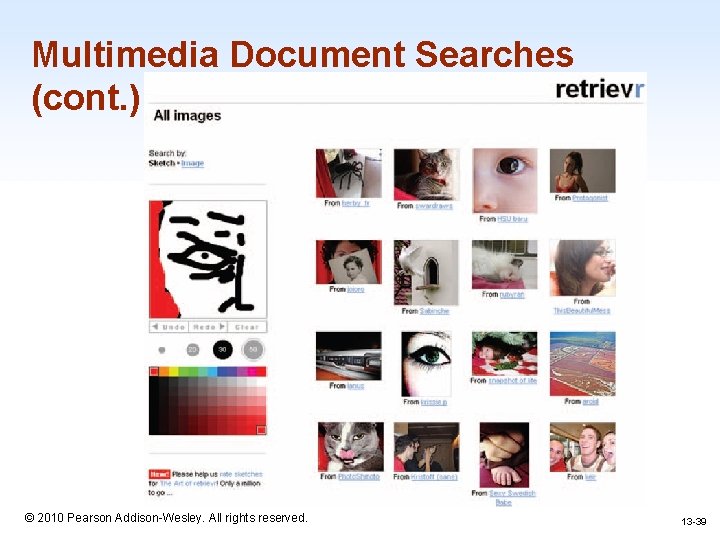
Multimedia document searches (cont. ) • Image Search: – Finding photos with images such as the Statue of Liberty is a challenge • Query-by-Image-Content (QBIC) is difficult • Search by profile (shape of lady), distinctive features (torch), colors (green copper) • https: //www. youtube. com/watch? v=Vn. X_Fq. Mlk. Zo – Use simple drawing tools to build templates or profiles to search with • https: //www. youtube. com/watch? v=5 Om 48 Yz 3 X 8 k – More success is attainable by searching restricted collections – For small collections of personal photos effective browsing and lightweight annotation are important 1 -38 © 2010 Pearson Addison-Wesley. All rights reserved. 13 -38
Multimedia Document Searches (cont. ) 1 -39 © 2010 Pearson Addison-Wesley. All rights reserved. 13 -39
Multimedia document searches (cont. ) • Map Search – On-line maps are plentiful – Search by latitude/longitude is the structureddatabase solution – Today's maps allow utilizing structured aspects and multiple layers • City, state, and site searches • Flight information searches • Mapquest, Google Maps, etc. – Mobile devices can allow “here” as a point of reference © 2010 Pearson Addison-Wesley. All rights reserved. 1 -40 13 -40
Multimedia document searches (cont. ) • Design/Diagram Searches – Some computer-assisted design packages support search of designs – Allows searches of diagrams, blueprints, newspapers, etc. , e. g. search for a red circle in a blue square or a piston in an engine – Document-structure recognition for searching newspapers • Sound Search – MIR supports audio input – https: //www. youtube. com/watch? v=z. Glsn. En. KFo. I – Search for phone conversations may be possible in future on speaker independent basis 1 -41 © 2010 Pearson Addison-Wesley. All rights reserved. 13 -41
Multimedia document searches (cont. ) • Video Search – Provide an overview – Segmentation into scenes and frames – Support multiple search methods • Animation Search – Prevalence increased with the popularity of Flash – Possible to search for specific animations like a spinning globe 1 -42 © 2010 Pearson Addison-Wesley. All rights reserved. 13 -42
Advanced Filtering and Search Interfaces • Users have highly varied needs for advanced filtering features. • For advanced uses there alternatives to form fill-in query interfaces: • Filtering with complex Boolean queries • Problem with informal English, e. g. use of ‘and’ and ‘or’ 1 -43 © 2010 Pearson Addison-Wesley. All rights reserved. 13 -43
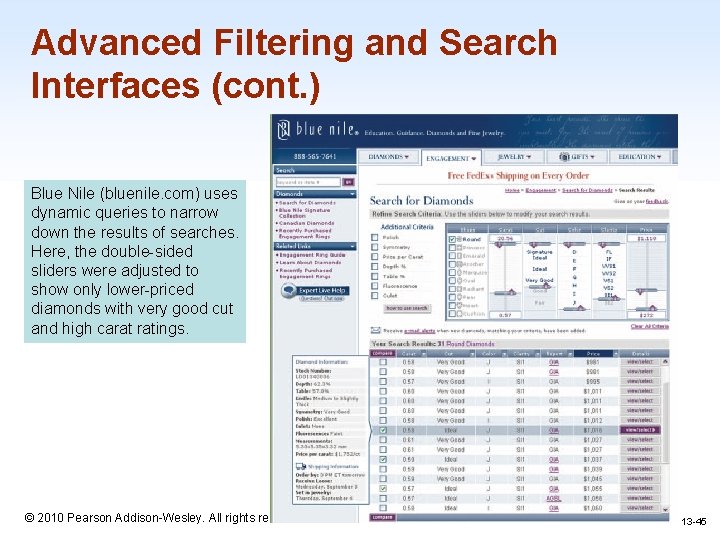
Advanced filtering and search interfaces (cont. ) • Automatic filtering - Apply user-constructed set of key phrases to dynamically generated information • Dynamic Queries - Adjusting sliders, buttons, etc and getting immediate feedback – “Direct manipulation” queries – Use sliders and other related controls to adjust the query – Get immediate (less than 100 msec) feedback with data 1 -44 © 2010 Pearson Addison-Wesley. All rights reserved. 13 -44
Advanced Filtering and Search Interfaces (cont. ) Blue Nile (bluenile. com) uses dynamic queries to narrow down the results of searches. Here, the double-sided sliders were adjusted to show only lower-priced diamonds with very good cut and high carat ratings. 1 -45 © 2010 Pearson Addison-Wesley. All rights reserved. 13 -45
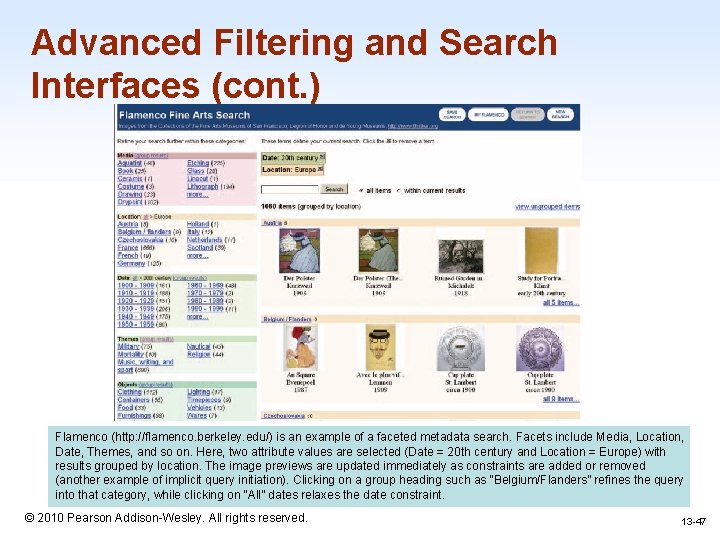
Advanced filtering and search interfaces (cont. ) • Implicit Search – Use similarity or context information to present items of potential interest • Collaborative Filtering – Groups of users combine evaluations to help in finding items in a large database – User "votes" and his info is used for rating the item of interest • Visual searches – Specialized visual representations of the possible values, e. g. dates on a calendar or seats on a plane – On a map the location may be more important than the name • Faceted metadata search – Integrates category browsing with keyword searching © 2010 Pearson Addison-Wesley. All rights reserved. 1 -46 13 -46
Advanced Filtering and Search Interfaces (cont. ) Flamenco (http: //flamenco. berkeley. edu/) is an example of a faceted metadata search. Facets include Media, Location, Date, Themes, and so on. Here, two attribute values are selected (Date = 20 th century and Location = Europe) with results grouped by location. The image previews are updated immediately as constraints are added or removed (another example of implicit query initiation). Clicking on a group heading such as “Belgium/Flanders” refines the query 1 -47 into that category, while clicking on “All” dates relaxes the date constraint. © 2010 Pearson Addison-Wesley. All rights reserved. 13 -47