
Chapter 12 Verbal and Visual Supporting Materials Communicating

Chapter 12 Verbal and Visual Supporting Materials Communicating for Results, 10 th edition
Chapter 12 Objectives • Identify with do’s and don’ts the following supporting materials used in quality presentations: explanations, comparisons, illustrations, examples, statistics, and expert opinion • Discuss the benefits of using visual aids in a presentation • Identify important guidelines for selecting visual aids • List and discuss suggestions for designing visuals • Pinpoint major guidelines for effective use of Power. Point Communicating for Results, 10 th edition
Verbal Supporting Materials • Supporting materials have three purposes: – To clarify – To prove – To add interest Communicating for Results, 10 th edition
Explanations • The speaker describes the relationship between certain items, defines a term or word, or gives instructions on how to do something or how to get somewhere – Beginning speakers tend to overuse explanations – Replace or reinforce the explanation you planned to use with some other type of support Communicating for Results, 10 th edition
Comparisons • Speakers use comparisons to show similarities or differences between something listeners know and something they do not know – Literal comparisons • Shows similarities or differences between two or more items from the same class or category – Can offer solid evidence for your point – Figurative comparison • Shows similarities or differences between two or more items from different classes or categories – Never used for proof, but add interest and clarify ideas Communicating for Results, 10 th edition
Illustrations • Narrative or story told in detail to paint picture for listener – Factual illustration • Detailed narrative about someone, something, or event that actually happened – Seldom enough to prove point completely » Follow illustration with examples – Hypothetical illustration • Detailed narrative about someone who could exist or some event that could or probably will happen – To be effective, must be possible or likely Communicating for Results, 10 th edition
Examples • Brief, factual references to specific items or events that are used for both proof and clarification – Examples presented in groups of two or more usually clarify and prove more effectively than single example Communicating for Results, 10 th edition
Statistics • Numbers used to show relationships between items – Can clarify and add proof to your ideas – Used incorrectly, they can confuse and bore listeners – Can work if you follow these rules: • Relate statistics to your listener’s frames of reference • Eliminate statistics that are not necessary • Round off statistics to an easy number to remember • Demonstrate the credibility of your statistics • Present statistics in graphic form when possible Communicating for Results, 10 th edition
Expert Opinions • Refers to ideas of an expert in the field, either paraphrased or quoted directly by speaker – Best when kept brief – Excellent way to add clarification and proof – Be sure to: • State name of expert • Describe his or her qualifications • Briefly cite where and when the expert reported this information Communicating for Results, 10 th edition
Expert Opinions • When paraphrasing , make sure you don’t misrepresent expert’s ideas • When using direct quotes, not only should content be interesting, but as you read quote, make sure your delivery is lively and convincing • Make sure your audience understands what expert is saying and your reason for using his or her idea Communicating for Results, 10 th edition
Expert Opinions • The six types of verbal supporting material overlap – The effective speaker uses variety of supports to keep listeners interested • Don’t forget some supports are used only to clarify, others are used both for clarification and for proof Communicating for Results, 10 th edition
Citing Sources of Supporting Materials • When supports are used to add proof, be sure to cite your sources during your presentation, not at the end of it – Credible sources add to your credibility Communicating for Results, 10 th edition

Citing Sources of Supporting Materials • When should you cite sources? – Statistics always need a citation – Quotations and paraphrases of quoted material always need a citation – Important facts or ideas usually need a citation • Even if you put a short version of each source at the bottom of your Power. Point slides, you still need to cite them orally Communicating for Results, 10 th edition
Visual Supporting Material • Visual aid is anything presented in a form that listeners can see to supplement information they hear Communicating for Results, 10 th edition
Benefits of Using Visuals • Interesting visual aids accompany written or oral messages – Improve listener memory, speed comprehension, add interest, add to speaker credibility Communicating for Results, 10 th edition
Visual Aids Improve Memory • Days after a presentation, listeners will only remember 10 -25% of presentation – Multimedia principle • People learn significantly better when pictures are added to text – Contiguity principle • People learn better when pictures are placed next to words they illustrate • In educational situations, learning is doubled when pictures and graphics are used with text Communicating for Results, 10 th edition
Visual Aids Speed Comprehension • Visual aids help us understand complex, technical information more quickly – If you include no visuals or only statistic-heavy tables, you are asking left side of brain to do all the work • Run risk of audience mistakes in reasons, information overload, and boredom Communicating for Results, 10 th edition
Visual Aids Speed Comprehension • Right brain can understand complex ideas presented in picture or graphic form – Picture memory may be more ingrained because pictures and vivid words are coded in both hemispheres of brain • Dual channel especially important when information is complicated and/or is online – Comprehension will be more complete and faster if you present data in visual form » Picture can serve as anchor to help audience recall main points and concepts in your presentations Communicating for Results, 10 th edition
Visual Aids Speed Comprehension • Since visual aids speed comprehension, speakers can present information in less time – Audiences can absorb only so much information before reaching point of overload Communicating for Results, 10 th edition
Visual Aids Add to Speaker Credibility • If you are in situation in which you have fairly low credibility, visuals can be especially important – Can overcome audience’s initial doubts and elicit same level of audience retention as highcredibility speakers Communicating for Results, 10 th edition
Video and Audio Aids • If used with care, can add interest to presentation – If you decide to add video or sound to presentation, follow these tips: • Make sure you include copy of actual audio or video file in folder with your Power. Point presentation • Keep audio or video clip short • For instructions on how to embed, see Using Microsoft Power. Point in course text Communicating for Results, 10 th edition
Electronic and Multimedia Aids • When using computer-generated visuals, follow these tips: – Remember main point of using visuals is to aid listener comprehension – When using graphics, give oral explanation without using written text – Use sounds sparingly, if at all – Select images carefully and choose best format for them – Make sure audience can see you when lights are turned off Communicating for Results, 10 th edition
Electronic and Multimedia Aids • When using computer-generated visuals, follow these tips: – Try using cordless mouse or remote – Look at your computer screen and audience – Speak in conversational manner and don’t read from visuals – Before clicking to next slide, give oral transition to next idea – For specific techniques, go to Using Microsoft Power. Point in your course text – Come prepared with backup plan in case of equipment failure Communicating for Results, 10 th edition
Whiteboards and Markerboards • Usually preferred to chalkboards because glossy white of board is more attractive and there is no messy chalk residue – Have several drawbacks: • Make speakers look less prepared and less professional • Requires speaker’s back to be toward audience while writing on board Communicating for Results, 10 th edition
Whiteboards and Markerboards • When using, follow these tips: – Practice is vital – Learning to speak and draw at same time requires work – Make sure your letters are large enough to be read easily Communicating for Results, 10 th edition
Objects, Models, and Handouts • Objects can be effective as long as they are large enough to be seen yet small enough to display easily – Wait until your presentation is completed before passing objects around audience for closer view – Take picture of object and insert into Power. Point • Might use model instead • Handouts can be a help and distraction – Better to give handouts at conclusion of your speech Communicating for Results, 10 th edition
Avoid Major Mistakes • People who view Power. Point identified major things that annoy them the most: – Speakers who read off slides – Complete sentences used instead of phrases – Text too small to read – Text color choices too difficult to read – Charts too complex to decipher Communicating for Results, 10 th edition
Choose Text or Graphic Visuals • Text visuals – Text or printed words with one or two pieces of clip art • Especially helpful during introduction of your speech as you list your main points, during conclusion of speech as you summarize main points, and at any time when lists of information are needed • Graphic visuals – Organizational charts and flowcharts, diagrams and schematic drawings, maps, and graphs Communicating for Results, 10 th edition
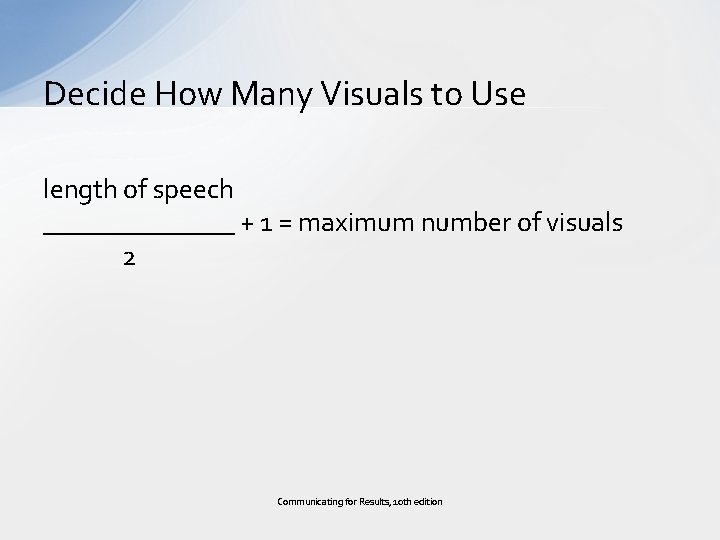
Decide How Many Visuals to Use length of speech _______ + 1 = maximum number of visuals 2 Communicating for Results, 10 th edition
Using Appropriate Type Size and Typeface • Common mistake is using text that is too small for easy audience viewing – Whiteboards and markerboards • Be sure titles are 3 inches high and basic text is 1 -1/2 inches high – Computer visuals • Titles = 30 -36 points • Subtitles = 24 points • Text = 18 points (if not subtitle, use 24 points) – Go larger if possible Communicating for Results, 10 th edition
Using Appropriate Type Size and Typeface • Typefaces – Sans serif • Recommended for titles or emphasis – Serif • Good for text and small labels on charts – Typefaces can affect readability of visuals • Use no more than two different typefaces per visual – Use same typefaces for all visuals in presentation Communicating for Results, 10 th edition
Tips for Designing Text Visuals • Keep the following tips in mind when designing text visuals: – Use no more than six lines of text or six words per line – Use single words or phrases rather than sentences – Use upper- and lowercase type – Use a simple typeface – Allow the same space at top of each visual – Use images, larger type, boldface, and color for emphasis Communicating for Results, 10 th edition
Bullets: Use with Care • Using bullets can be good, but if you use them, follow these guidelines: – Keep your use of bullets to minimum – Follow the Rule of Six – Make sure you cover only one idea per slide – Never read off your slides – Use picture that captures main idea being presented Communicating for Results, 10 th edition
Types of Graphic Visuals • • • Organization charts Flow charts Diagrams Schematic drawings Maps and images Graphs Communicating for Results, 10 th edition
Tips for Designing Graphic Visuals • Simplify and minimize data using only what is absolutely necessary • Combine and round off data when possible • Make bars wider than the spaces between them • Always use titles Communicating for Results, 10 th edition
General Design Principles • Contrast – If elements are not same, make them very different • Repetition – Repeat visual elements of design throughout piece • Alignment – Every element should have some visual connection with another element on page • Proximity – Items relating to each other should be grouped closer together Communicating for Results, 10 th edition
Tips for Using Color • When color is poorly used, it can be a great distraction • Color visuals are more persuasive and produce better recall than black and white visuals Communicating for Results, 10 th edition
Tips for Using Color • Quality color visuals follow specific color principles: – To show organization, use different hues for unrelated items; use fully saturated hues to highlight most important information – For figures, use full saturation for all hues – For backgrounds and texts, select hues low in saturation – Use color to indicate distance Communicating for Results, 10 th edition
Tips for Using Color • Quality color visuals follow specific color principles: – Use well-defined boundaries around figures and letters – Use high contrast between figure and background – Avoid colors that tend to look same at distance – Avoid placing opposites on the color wheel immediately next to each other – Limit your use of colors Communicating for Results, 10 th edition
Using Microsoft Power. Point • The following pointers should prove helpful: – Start with one of the design templates that comes with Power. Point – Use a rough-draft or more detailed outline to follow as you sketch out slides for each main points – Activate Rule and Guides – Turn off “snap objects to grid” Communicating for Results, 10 th edition
Using Microsoft Power. Point • The following pointers should prove helpful: – Build your own custom bullets – Control what audience sees with simple touch of key on your keyboard – Embed “trimmed” audio and video clips into your Power. Point slides – Conduct a technological rehearsal Communicating for Results, 10 th edition
- Slides: 41