
Chapter 12 SecondaryStorage Structure n 12 1 Overview
- Slides: 27
Chapter 12: Secondary-Storage Structure
n 12. 1 Overview of Mass Storage Structure n 12. 2 Disk Structure n 12. 3 Disk Attachment n 12. 4 Disk Scheduling n 12. 5 Disk Management n 12. 6 Swap-Space Management n 12. 7 RAID Structure l Disk Attachment n 12. 8 Stable-Storage Implementation n 12. 9 Tertiary Storage Devices l Operating System Issues l Performance Issues Operating System Principles 12. 2 Silberschatz, Galvin and Gagne © 2005
Objectives n Describe the physical structure of secondary and tertiary storage devices and the resulting effects on the uses of the devices n Explain the performance characteristics of mass- storage devices n Discuss operating-system services provided for mass storage, including RAID and HSM (hierarchical storage management) Operating System Principles 12. 3 Silberschatz, Galvin and Gagne © 2005
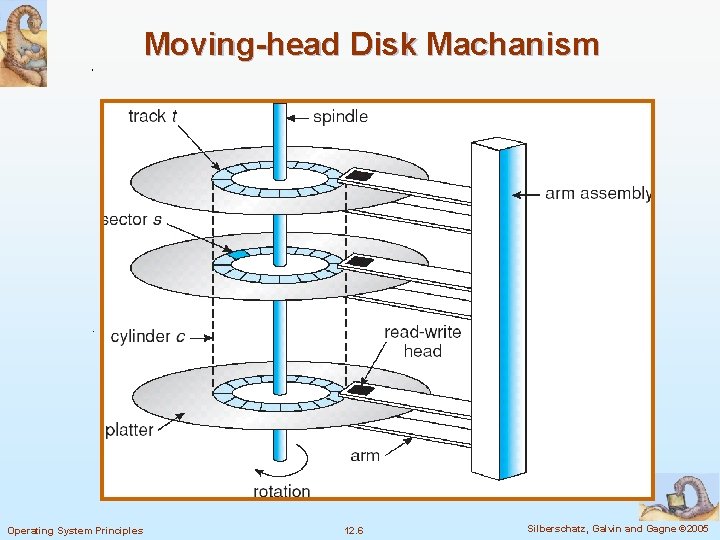
12. 1 Overview of Mass Storage Structure n Magnetic disks provide bulk of secondary storage of modern computers l Drives rotate at 60 to 200 times per second (3600 to 12000 rpm) l Transfer rate is rate at which data flow between drive and computer (400 Mb-6 Gb/sec) l Positioning time (random-access time) is time to move disk arm to desired cylinder (seek time, 4 micro seconds) and time for desired sector to rotate under the disk head (rotational latency, 3 micro seconds) l Example: Hitachi Ultrastar C 10 K 300 (http: //www. zdnet. com. tw/news/hardware/0, 2000085676, 201370 89, 00. htm) l Head crash results from disk head making contact with the disk surface 4 Normally Operating System Principles cannot be repaired 12. 4 Silberschatz, Galvin and Gagne © 2005
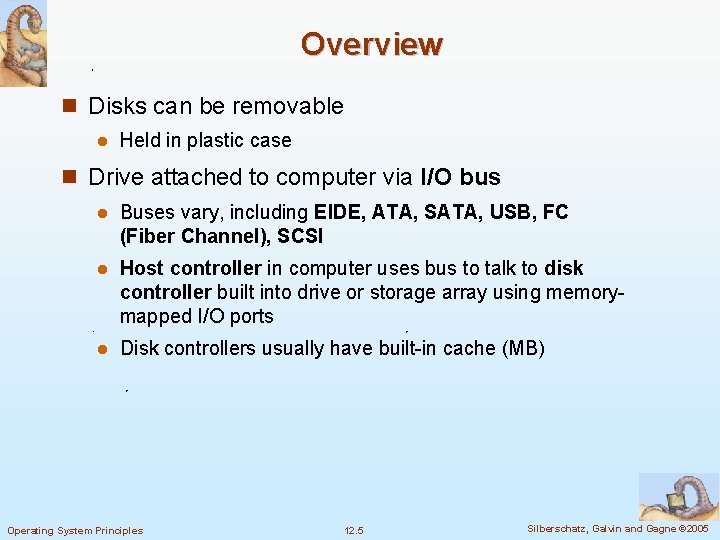
Overview n Disks can be removable l Held in plastic case n Drive attached to computer via I/O bus l Buses vary, including EIDE, ATA, SATA, USB, FC (Fiber Channel), SCSI l Host controller in computer uses bus to talk to disk controller built into drive or storage array using memorymapped I/O ports l Disk controllers usually have built-in cache (MB) Operating System Principles 12. 5 Silberschatz, Galvin and Gagne © 2005
Moving-head Disk Machanism Operating System Principles 12. 6 Silberschatz, Galvin and Gagne © 2005
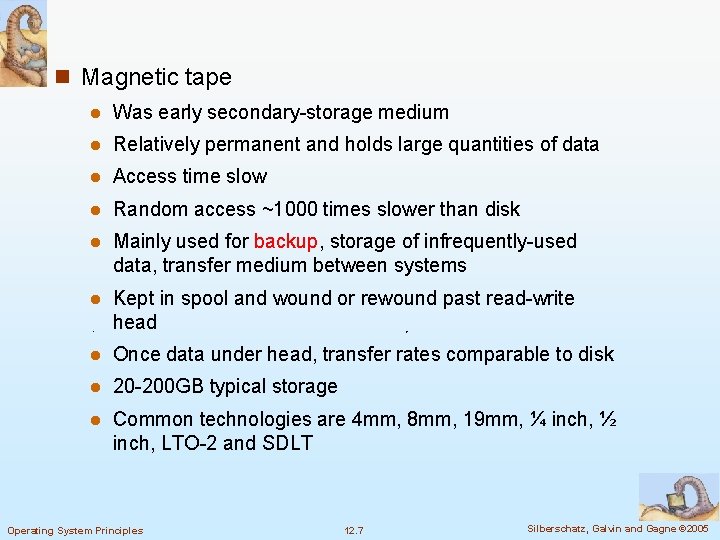
n Magnetic tape l Was early secondary-storage medium l Relatively permanent and holds large quantities of data l Access time slow l Random access ~1000 times slower than disk l Mainly used for backup, storage of infrequently-used data, transfer medium between systems l Kept in spool and wound or rewound past read-write head l Once data under head, transfer rates comparable to disk l 20 -200 GB typical storage l Common technologies are 4 mm, 8 mm, 19 mm, ¼ inch, ½ inch, LTO-2 and SDLT Operating System Principles 12. 7 Silberschatz, Galvin and Gagne © 2005
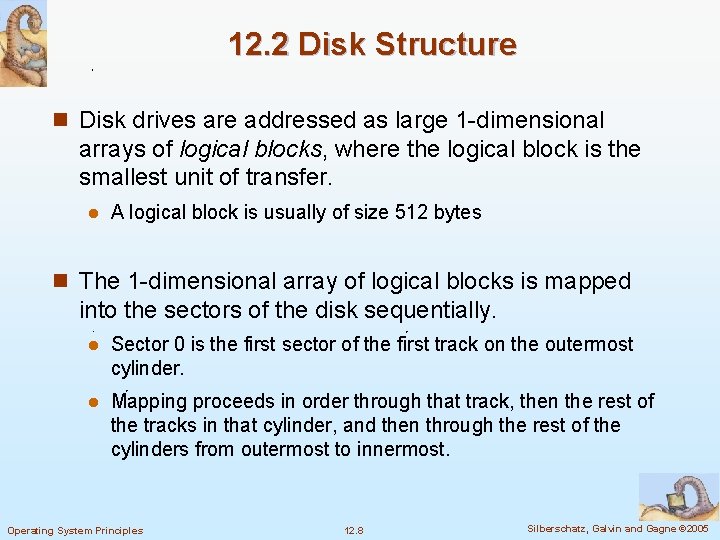
12. 2 Disk Structure n Disk drives are addressed as large 1 -dimensional arrays of logical blocks, where the logical block is the smallest unit of transfer. l A logical block is usually of size 512 bytes n The 1 -dimensional array of logical blocks is mapped into the sectors of the disk sequentially. l Sector 0 is the first sector of the first track on the outermost cylinder. l Mapping proceeds in order through that track, then the rest of the tracks in that cylinder, and then through the rest of the cylinders from outermost to innermost. Operating System Principles 12. 8 Silberschatz, Galvin and Gagne © 2005
n In practice, it is difficult to convert a logical block number into cylinder, track, sector : defective sectors and the number of sectors per track is not a constant l CD-ROM and DVD-ROM increase their rotation speed as the head moves from the outer to inner tracks to keep the same data rate (the density of bits per track is constant, constant linear velocity, CLV) l In some disks, the rotation speed is constant, and the density of bits decreases from inner tracks to outer tracks to keep the data rate constant (constant angular velocity, CAV) Operating System Principles 12. 9 Silberschatz, Galvin and Gagne © 2005
12. 3 Disk Attachment n Host-attached storage accessed through I/O ports talking to I/O busses l IDE, ATA, SCSI, FC n SCSI itself is a bus, up to 16 devices on one cable, SCSI initiator requests operation and SCSI targets perform tasks l Each target can have up to 8 logical units (disks attached to device controller n FC is high-speed serial architecture l Can be switched fabric with 24 -bit address space – the basis of storage area networks (SANs) in which many hosts attach to many storage units l Can be arbitrated loop (FC-AL) of 126 devices Operating System Principles 12. 10 Silberschatz, Galvin and Gagne © 2005
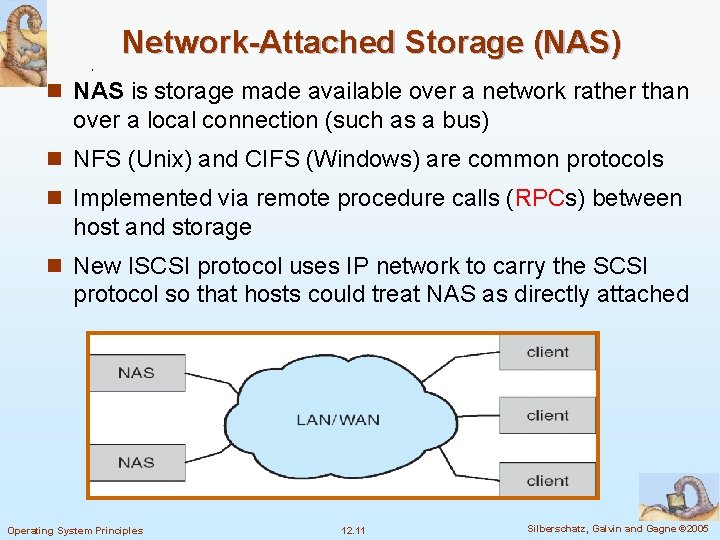
Network-Attached Storage (NAS) n NAS is storage made available over a network rather than over a local connection (such as a bus) n NFS (Unix) and CIFS (Windows) are common protocols n Implemented via remote procedure calls (RPCs) between host and storage n New ISCSI protocol uses IP network to carry the SCSI protocol so that hosts could treat NAS as directly attached Operating System Principles 12. 11 Silberschatz, Galvin and Gagne © 2005
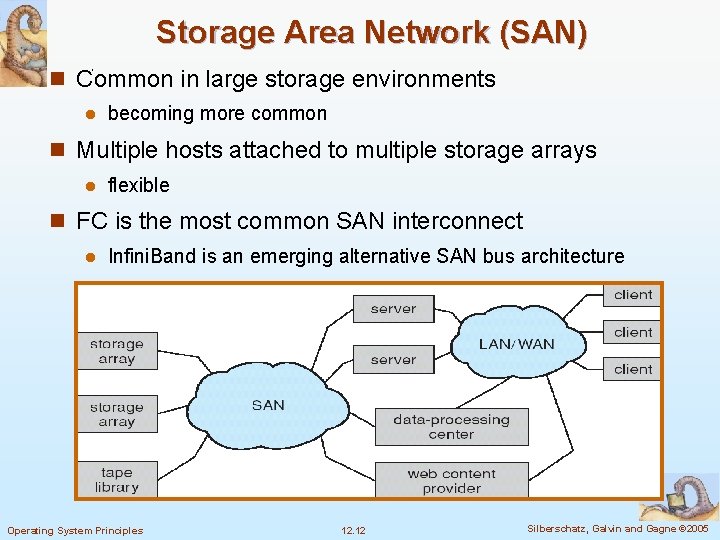
Storage Area Network (SAN) n Common in large storage environments l becoming more common n Multiple hosts attached to multiple storage arrays l flexible n FC is the most common SAN interconnect l Infini. Band is an emerging alternative SAN bus architecture Operating System Principles 12. 12 Silberschatz, Galvin and Gagne © 2005
12. 4 Disk Scheduling n The operating system is responsible for using hardware efficiently — for the disk drives, this means having a fast access time and disk bandwidth n Access time has two major components l Seek time is the time for the disk are to move the heads to the cylinder containing the desired sector. l Rotational latency is the additional time waiting for the disk to rotate the desired sector to the disk head. n Minimize seek time l Seek time seek distance n Disk bandwidth is the total number of bytes transferred, divided by the total time between the first request for service and the completion of the last transfer Operating System Principles 12. 13 Silberschatz, Galvin and Gagne © 2005
Disk I/O System Call n The system call for disk I/O specifies l This operation is input or output l The disk address for the transfer l Memory address for the transfer l The number of sectors to be transferred n For a multiprogramming system, normally, the disk request queue has several pending requests Operating System Principles 12. 14 Silberschatz, Galvin and Gagne © 2005
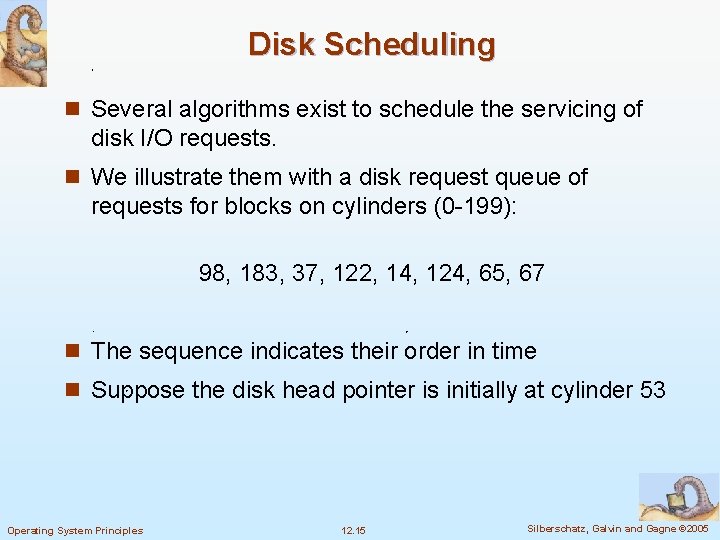
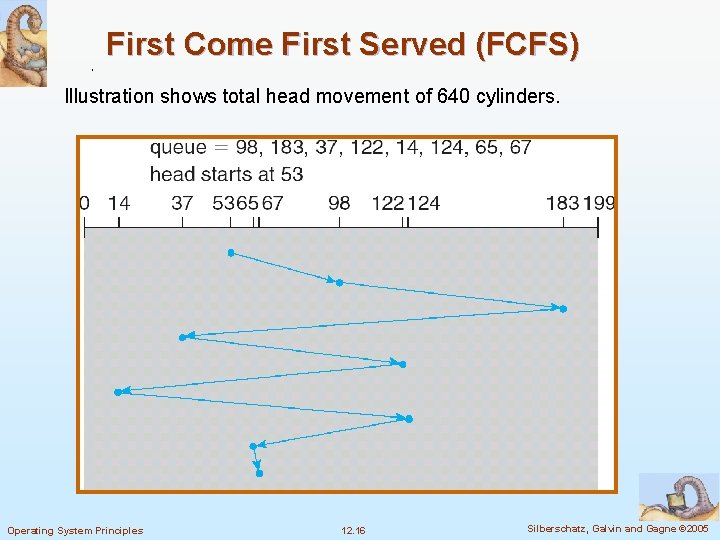
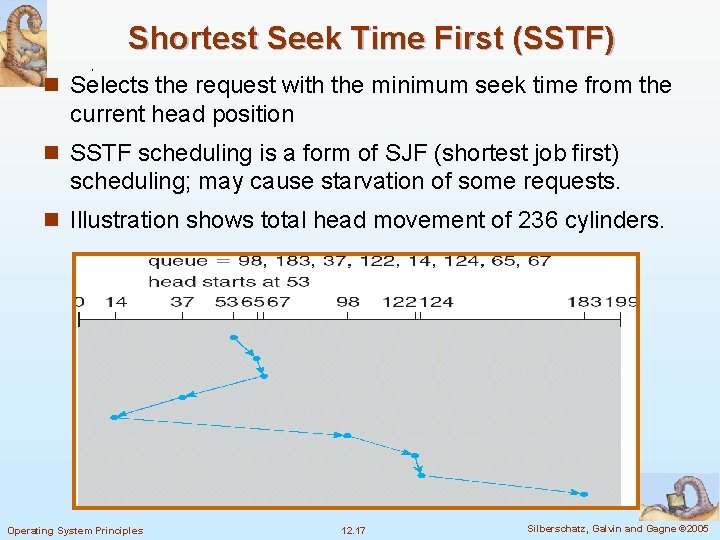
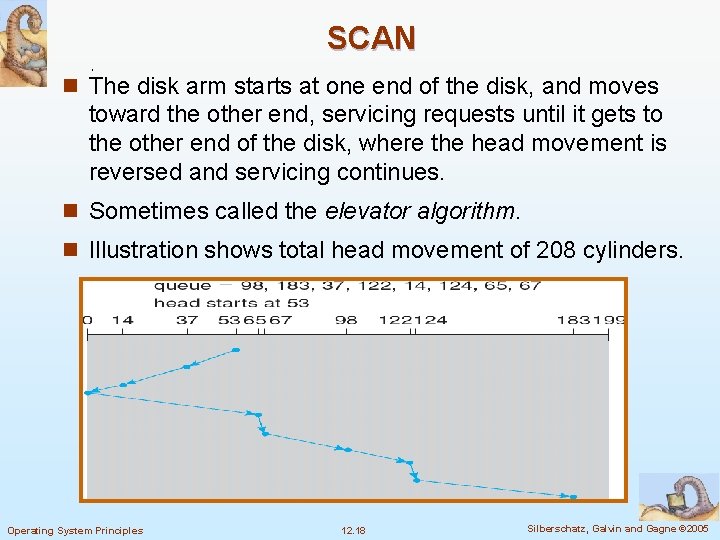
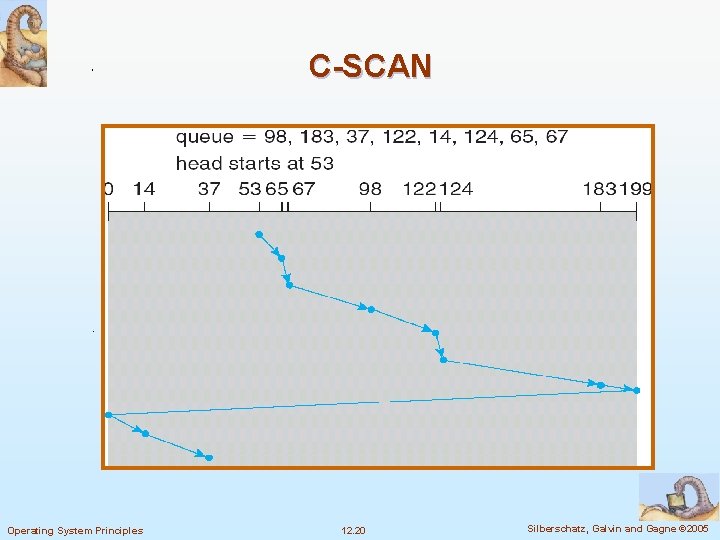
Disk Scheduling n Several algorithms exist to schedule the servicing of disk I/O requests. n We illustrate them with a disk request queue of requests for blocks on cylinders (0 -199): 98, 183, 37, 122, 14, 124, 65, 67 n The sequence indicates their order in time n Suppose the disk head pointer is initially at cylinder 53 Operating System Principles 12. 15 Silberschatz, Galvin and Gagne © 2005
First Come First Served (FCFS) Illustration shows total head movement of 640 cylinders. Operating System Principles 12. 16 Silberschatz, Galvin and Gagne © 2005
Shortest Seek Time First (SSTF) n Selects the request with the minimum seek time from the current head position n SSTF scheduling is a form of SJF (shortest job first) scheduling; may cause starvation of some requests. n Illustration shows total head movement of 236 cylinders. Operating System Principles 12. 17 Silberschatz, Galvin and Gagne © 2005
SCAN n The disk arm starts at one end of the disk, and moves toward the other end, servicing requests until it gets to the other end of the disk, where the head movement is reversed and servicing continues. n Sometimes called the elevator algorithm. n Illustration shows total head movement of 208 cylinders. Operating System Principles 12. 18 Silberschatz, Galvin and Gagne © 2005
Circular SCAN (C-SCAN) n Provides a more uniform wait time than SCAN. n The head moves from one end of the disk to the other. servicing requests as it goes. When it reaches the other end, however, it immediately returns to the beginning of the disk, without servicing any requests on the return trip. n Treats the cylinders as a circular list that wraps around from the last cylinder to the first one. Operating System Principles 12. 19 Silberschatz, Galvin and Gagne © 2005
C-SCAN Operating System Principles 12. 20 Silberschatz, Galvin and Gagne © 2005
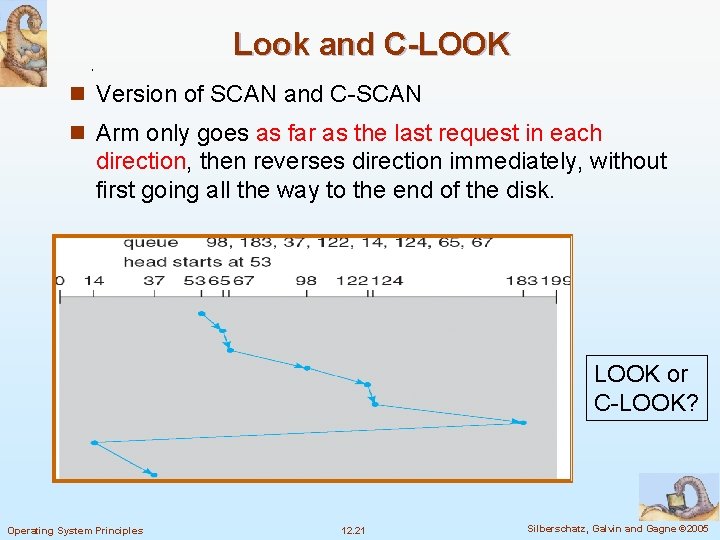
Look and C-LOOK n Version of SCAN and C-SCAN n Arm only goes as far as the last request in each direction, then reverses direction immediately, without first going all the way to the end of the disk. LOOK or C-LOOK? Operating System Principles 12. 21 Silberschatz, Galvin and Gagne © 2005
Selecting a Disk-Scheduling Algorithm n SSTF is common and has a natural appeal n SCAN and C-SCAN perform better for systems that place a heavy load on the disk. n Performance depends on the number and types of requests. n Requests for disk service can be influenced by the file- allocation method. n The disk-scheduling algorithm should be written as a separate module of the operating system, allowing it to be replaced with a different algorithm if necessary. n Either SSTF or LOOK is a reasonable choice for the default algorithm. Operating System Principles 12. 22 Silberschatz, Galvin and Gagne © 2005
Selecting a Disk-Scheduling Algorithm n Difficult to schedule for improved rotational latency n Disk manufacturers have implemented disk scheduling algorithms in the controller hardware n In practice, OS has other constraints l Demand paging may take priority over application I/O l Writes are more urgent than reads if cache is running out of free pages l Sometimes the order of writes must be kept to make the file system robust in case of system crashes Operating System Principles 12. 23 Silberschatz, Galvin and Gagne © 2005
12. 5 Disk Management n Low-level formatting, or physical formatting — Dividing a disk into sectors that the disk controller can read and write. l Header and trailer of sector contain information used by the disk controller, such as a sector number and an error-correcting code (ECC) n Most hard disks are low-level formatted at the factory n To use a disk to hold files, the operating system still needs to record its own data structures on the disk l Partition the disk into one or more groups of cylinders 4 Each l partition is treated as a separate disk Logical formatting or “creation of a file system” 4 Maps Operating System Principles of free and allocated space and an empty directory 12. 24 Silberschatz, Galvin and Gagne © 2005
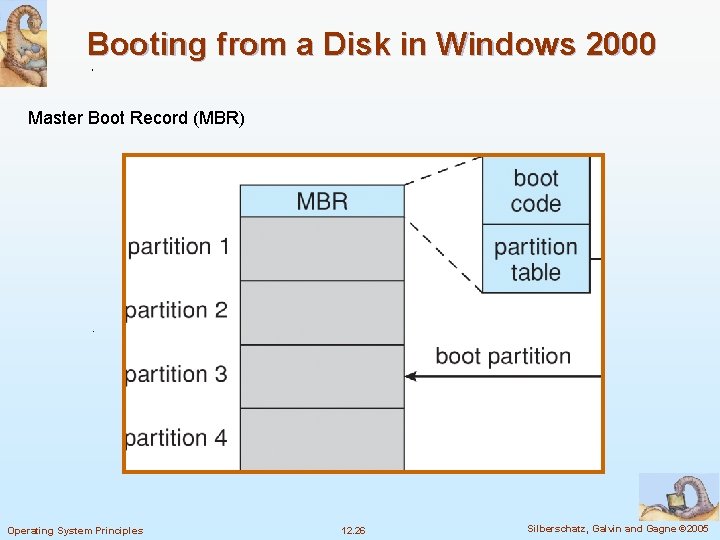
n To increase efficiency, most file system group blocks together into clusters l Disk I/O is via blocks, but file I/O is via clusters n Some OS’s allow raw-disk l Example: DBMS n Boot block initializes system l The bootstrap is stored in ROM. l Only Bootstrap loader program is stored l A disk with a boot partition is called a boot disk or system disk Operating System Principles 12. 25 Silberschatz, Galvin and Gagne © 2005
Booting from a Disk in Windows 2000 Master Boot Record (MBR) Operating System Principles 12. 26 Silberschatz, Galvin and Gagne © 2005
Bad Blocks n Bad blocks are handled manually on simple disks, such as disks with IDE controllers l Example: chkdsk in MS-DOS n Sophisticated disk controller, like SCSI, maintains a list of bad blocks l sector sparing: the controller could replace each bad sector logically with a spare sector 4 May invalidate optimization of disk-scheduling 4 Solution: provide spare sectors in each cylinder and a spare cylinder as well l sector slipping: remaps all sectors from the defective one to the next available sector by moving them all down one spot Operating System Principles 12. 27 Silberschatz, Galvin and Gagne © 2005