
Chapter 11 Introduction To Control Net Networks Popularity
- Slides: 67
Chapter 11 Introduction To Control. Net
Networks Popularity • Stand-alone PLCs fading fast • Older networks being upgraded – Faster more efficient networks – New networks offer deterministic and repeatable data transfer
Network Advantages for Maintenance Individuals • PLCs connected on network – Access any PLC from a single computer anywhere on the network – Upload, download, on-line editing across network to any device on network from a central location
Control. Net • Open network managed by Control. Net International • Use for real-time data transfer of time-critical and non-time-critical data between processors or I/O on same link • Data transferred at a fixed rate of 5 million bits per second • Control. Net basically a combination of Allen. Bradley’s Data Highway Plus and Remote I/O
Control. Net Nodes • Up to 99 nodes • No node 0 • Actual number of nodes determined by how efficiently the network bandwidth is set up • Network set up using RSNet. Worx for Control. Net software
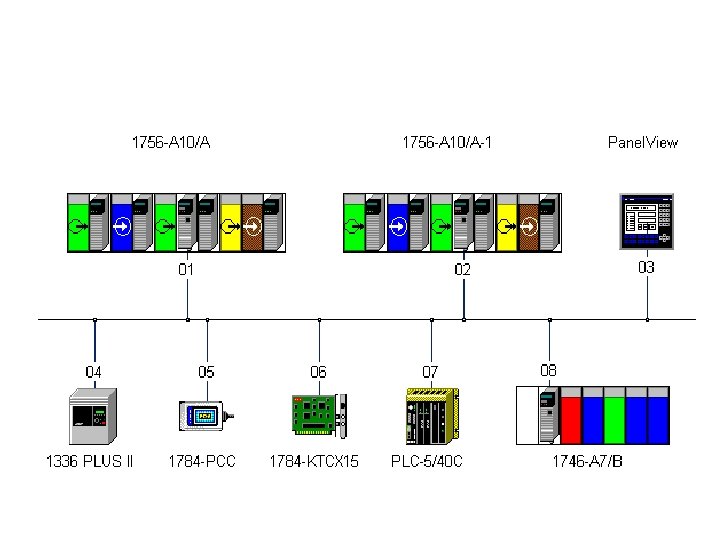
Nodes on Control. Net • • SLC 500, Control. Logix, PLC 5 processors Third-party field devices Operator interface Variable frequency drives
Control. Net Applications • Control. Logix processor, SLC 500, or PLC 5 processor scheduled data exchange • Local PLC connection to remote chassis for high-speed remote I/O connectivity
Interlocking or Synchronization of Multiple Nodes • Synchronized starting of variable frequency drives on Control. Net • Interlocking multiple processors
Network Bridging • Connect two Data Highway Plus networks • Connect multiple Device. Net networks
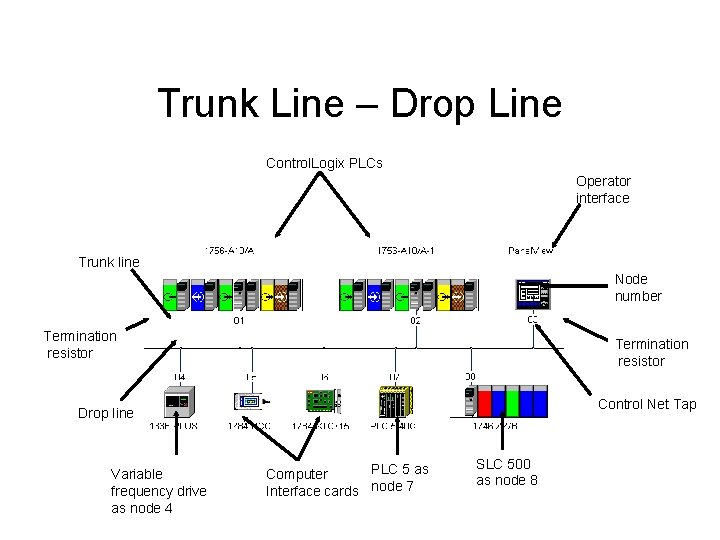
Trunk Line – Drop Line Control. Logix PLCs Operator interface Trunk line Node number Termination resistor Control Net Tap Drop line Variable frequency drive as node 4 PLC 5 as Computer Interface cards node 7 SLC 500 as node 8
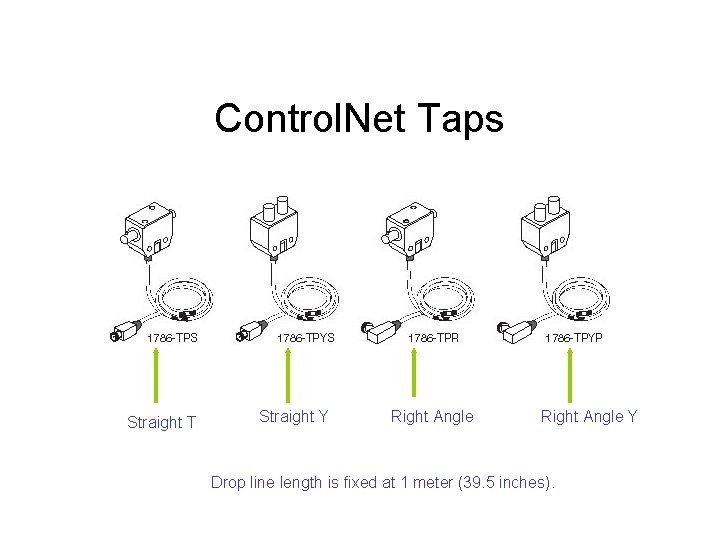
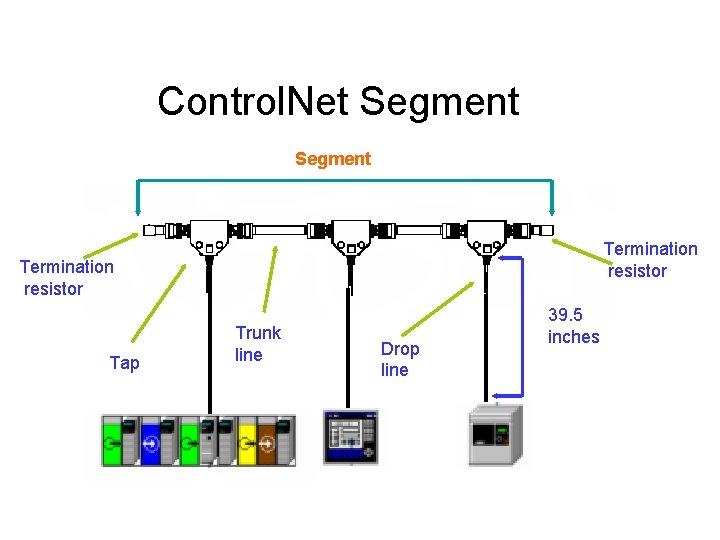
Control. Net Taps Straight T Straight Y Right Angle Y Drop line length is fixed at 1 meter (39. 5 inches).
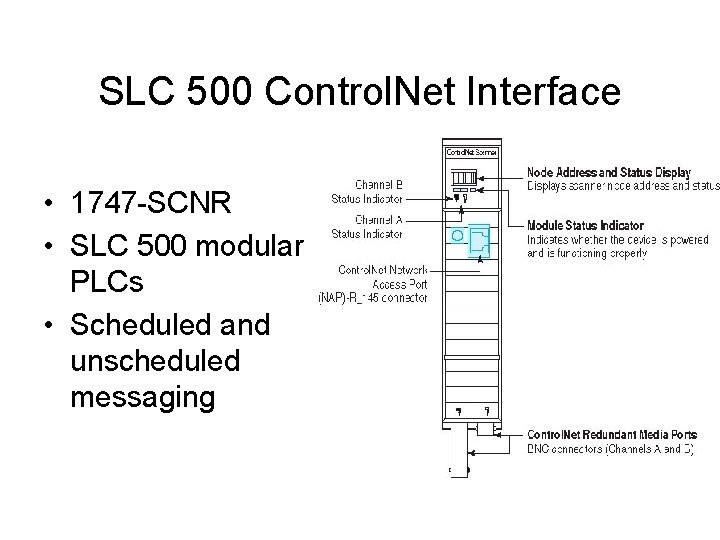
SLC 500 Control. Net Interface • 1747 -SCNR • SLC 500 modular PLCs • Scheduled and unscheduled messaging
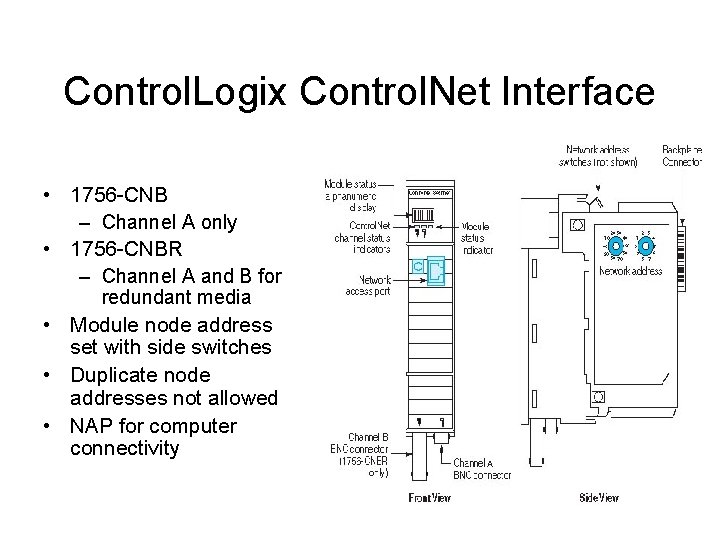
Control. Logix Control. Net Interface • 1756 -CNB – Channel A only • 1756 -CNBR – Channel A and B for redundant media • Module node address set with side switches • Duplicate node addresses not allowed • NAP for computer connectivity
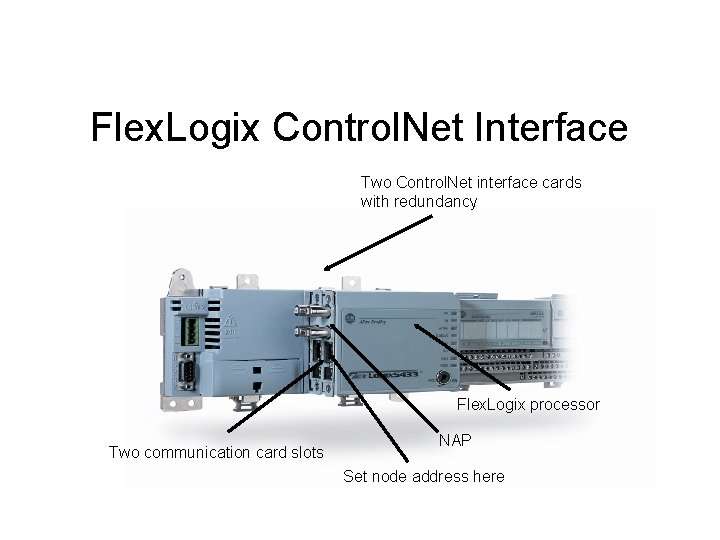
Flex. Logix Control. Net Interface Two Control. Net interface cards with redundancy Flex. Logix processor Two communication card slots NAP Set node address here
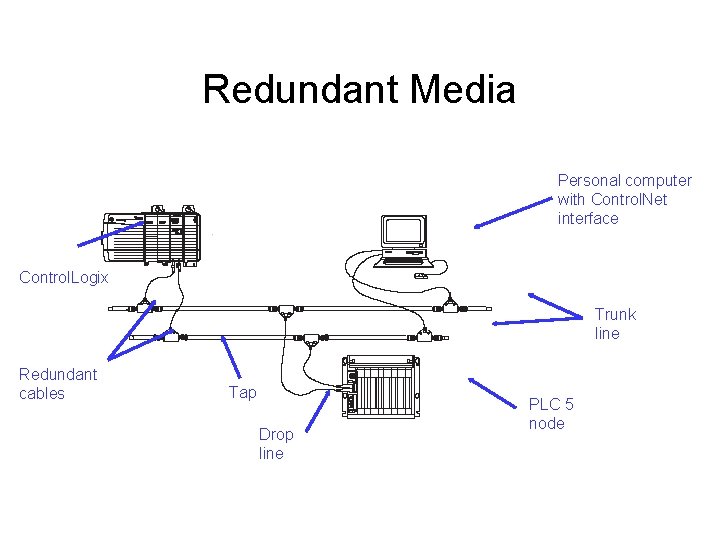
Redundant Media Personal computer with Control. Net interface Control. Logix Trunk line Redundant cables Tap Drop line PLC 5 node
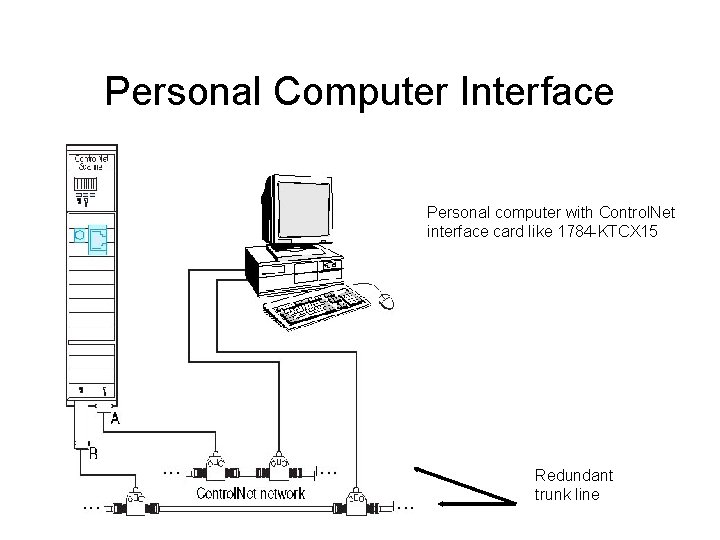
Personal Computer Interface Personal computer with Control. Net interface card like 1784 -KTCX 15 Redundant trunk line
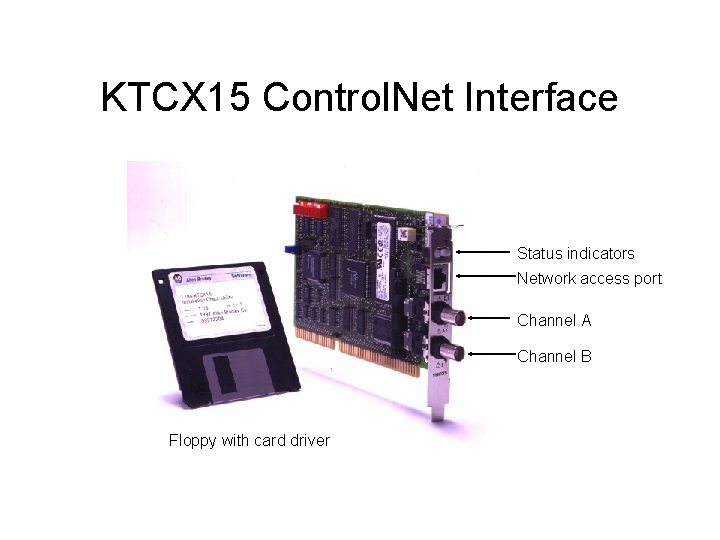
KTCX 15 Control. Net Interface Status indicators Network access port Channel A Channel B Floppy with card driver
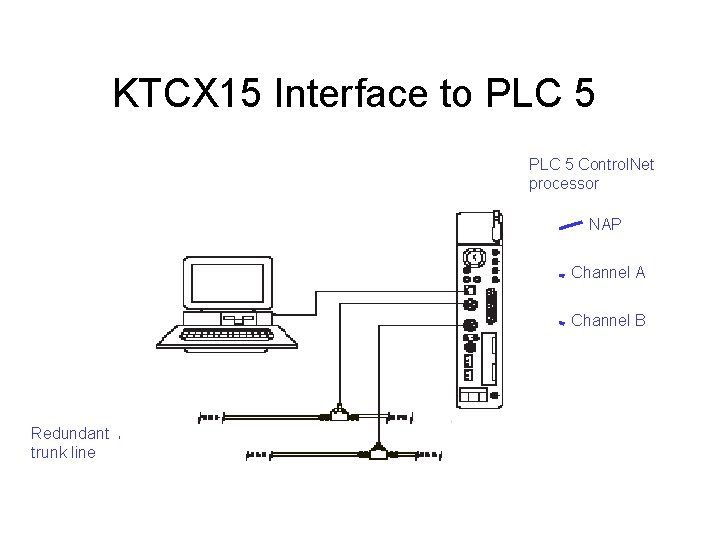
KTCX 15 Interface to PLC 5 Control. Net processor NAP Channel A Channel B Redundant trunk line
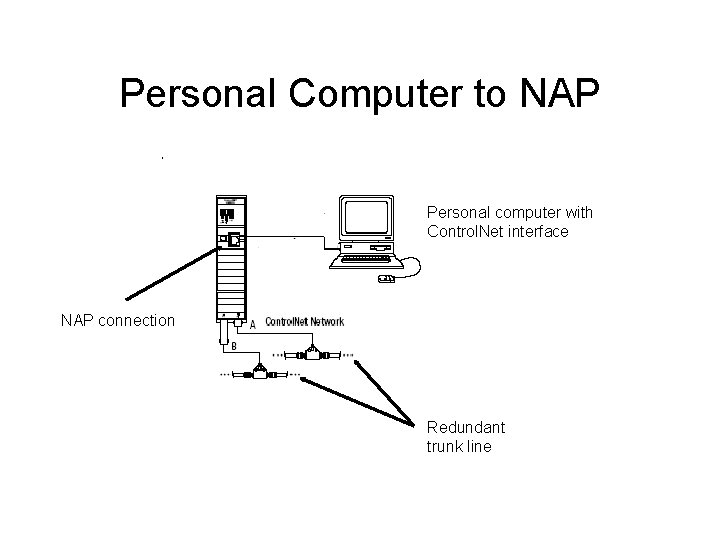
Personal Computer to NAP Personal computer with Control. Net interface NAP connection Redundant trunk line
Control. Net Cabling Control. Net Segment
Cabling Terms • • Segment Trunk line cable section Termination resistor Link
Segment • Comprised of a number of sections of trunk cable separated by taps • Maximum segment length 1, 000 meters or 3, 280 feet • Maximum 48 nodes per segment • Segment length determined by number of nodes
Taps • Taps are required. • There is no minimum cable length between taps. • Taps can be directly connected together.
Trunk Line Cable Section • Trunk line cable section connects one tap to another. • Taps are required. • Standard light industrial quad shielded RG-6. • Special use cables are available. • Fiber optic cables are available.
Termination Resistor • One termination resistor is required on the end of every segment.
Control. Net Segment Termination resistor Tap Trunk line Drop line 39. 5 inches
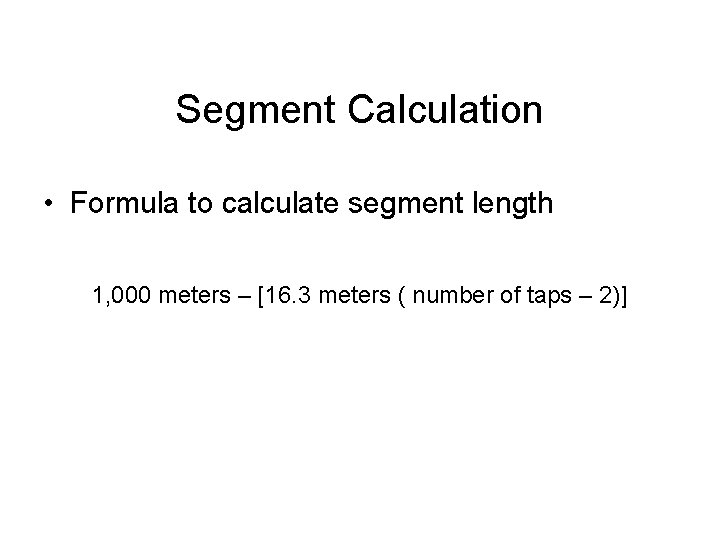
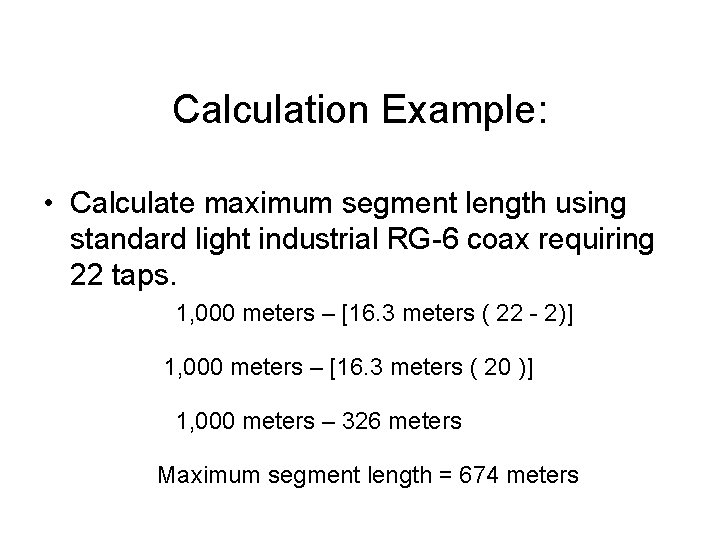
Segment Calculation • Formula to calculate segment length 1, 000 meters – [16. 3 meters ( number of taps – 2)]
Calculation Example: • Calculate maximum segment length using standard light industrial RG-6 coax requiring 22 taps. 1, 000 meters – [16. 3 meters ( 22 - 2)] 1, 000 meters – [16. 3 meters ( 20 )] 1, 000 meters – 326 meters Maximum segment length = 674 meters
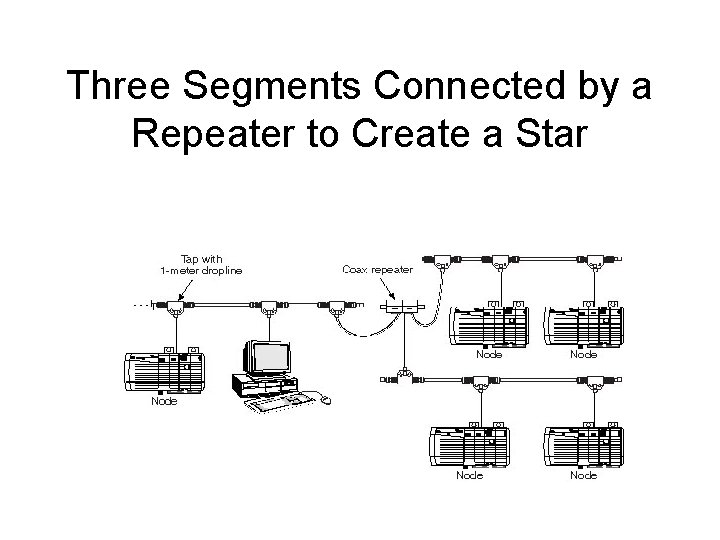
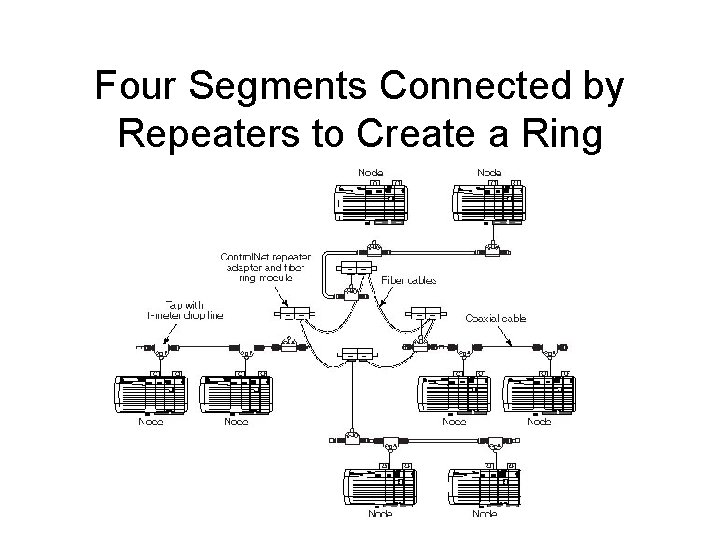
Control. Net Link • If more than 48 nodes are required, an additional segment is required. • Repeater connects segments. • Two segments connected by a repeater is a link.
Three Segments Connected by a Repeater to Create a Star
Four Segments Connected by Repeaters to Create a Ring
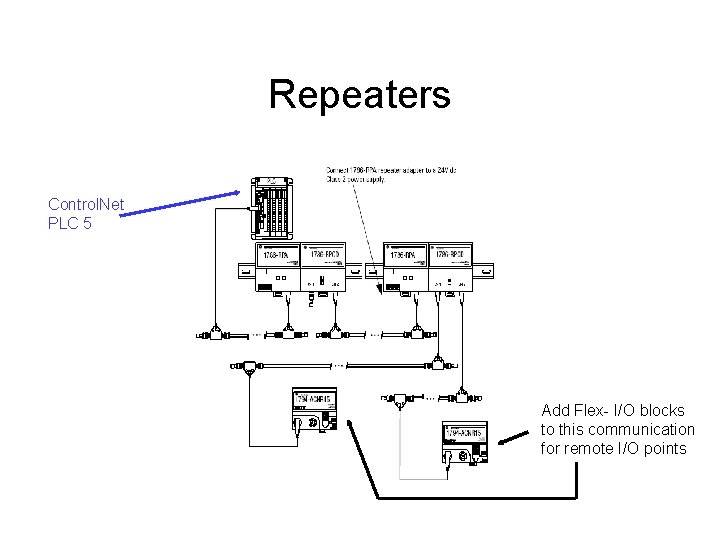
Control. Net Repeaters • Required if additional nodes are required after either maximum number of nodes or cable length reached • Two modules required to build a repeater • Many copper and fiber repeaters to select from depending on application
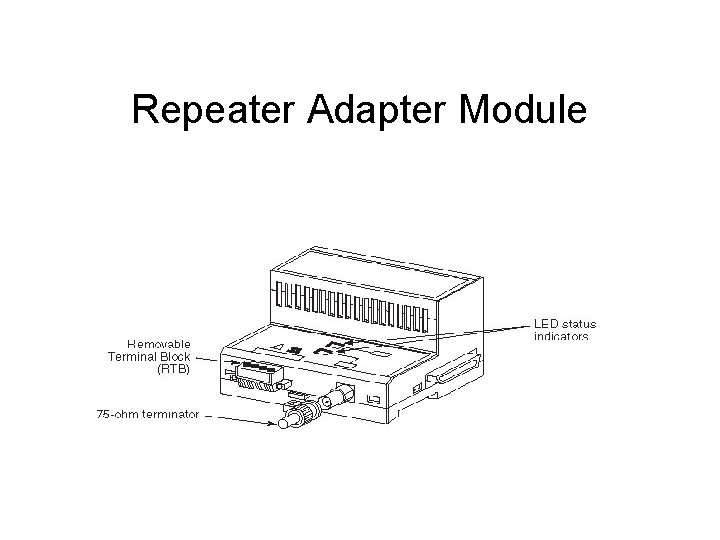
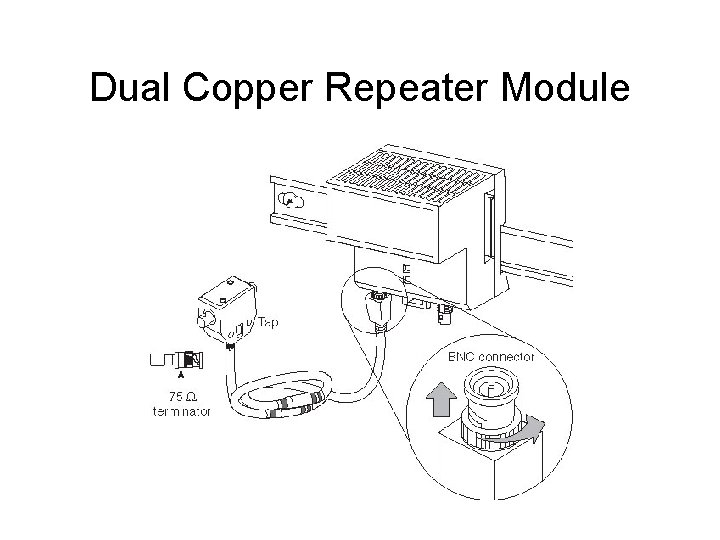
Building a Repeater Example • The two repeater modules can be DIN railmounted as a pair to build a repeater. – 1 - 1786 -RPA (repeater adaptor module) – 1 - 1786 -RPCD (dual copper repeater)
Repeater Adapter Module
Dual Copper Repeater Module
Repeaters Control. Net PLC 5 Add Flex- I/O blocks to this communication for remote I/O points
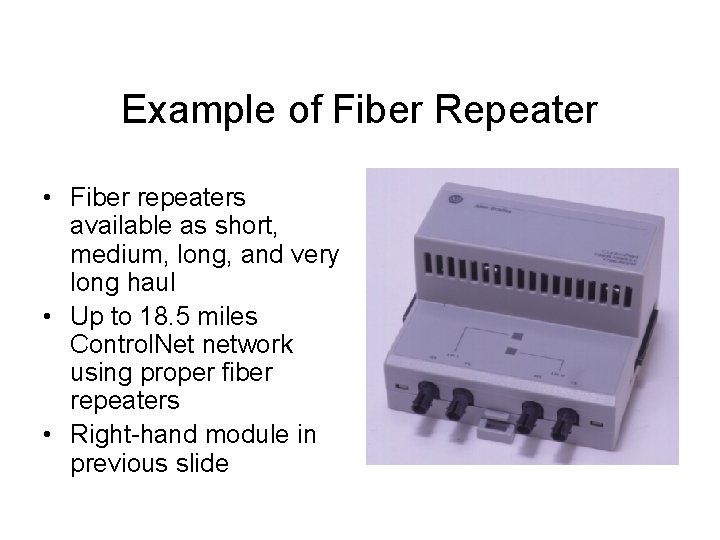
Example of Fiber Repeater • Fiber repeaters available as short, medium, long, and very long haul • Up to 18. 5 miles Control. Net network using proper fiber repeaters • Right-hand module in previous slide
RSNet. Worx Software
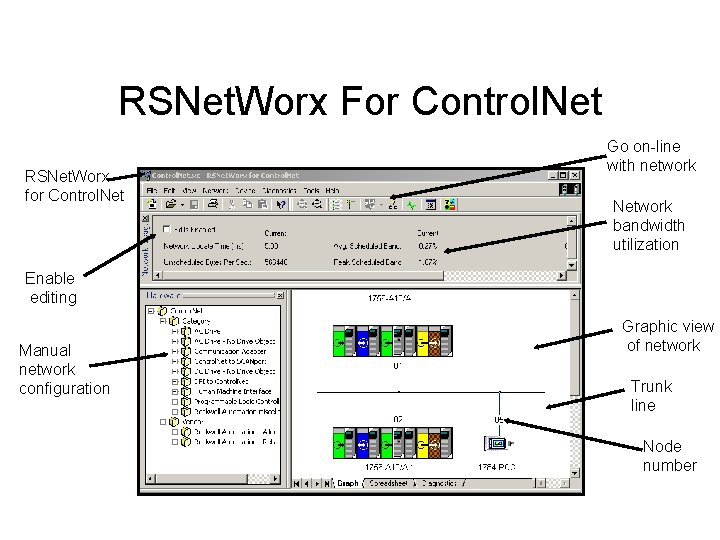
RSNet. Worx • From Rockwell Software • Required to configure and schedule a Control. Net network
RSNet. Worx For Control. Net RSNet. Worx for Control. Net Go on-line with network Network bandwidth utilization Enable editing Manual network configuration Graphic view of network Trunk line Node number
How Critical is this Data? • Separate data into two categories. – Is this information time critical? – Can this information be transferred on a nontime critical basis?
What is Real-Time for This Application? • How soon do you really need the information? • Networks do not have unlimited bandwidth. – Cannot have everything instantly
Realistic Data Flow (1 of 2) • Assume you had a tank that takes four hours to fill. – Why would you need a tank level every 10 milliseconds? – What is realistic? – Would every few seconds be acceptable?
Realistic Data Flow (2 of 2) • Assume you had a tank of water that takes two hours to heat. – Why would you need a tank temperature every 10 milliseconds? – What is realistic? – Would every few seconds be acceptable?
Scheduled / Unscheduled • Time critical data is scheduled data. – Requested packet interval (RPI) set up in RSNet. Worx • Non-time critical data is unscheduled data. – Message instruction programmed on PLC ladder rung • Trigger to transfer only when needed
RPI • Requested packet interval • Scheduled network service – The requested interval time-critical data will flow – Control. Net will meet or beat the RPI if network installed and configured properly
Inefficient Network • Improper installation – Follow installation manual • Improper network modification – Follow installation manual • Poor design – Follow installation manual • Overdriving network – Unrealistic data flow expectations
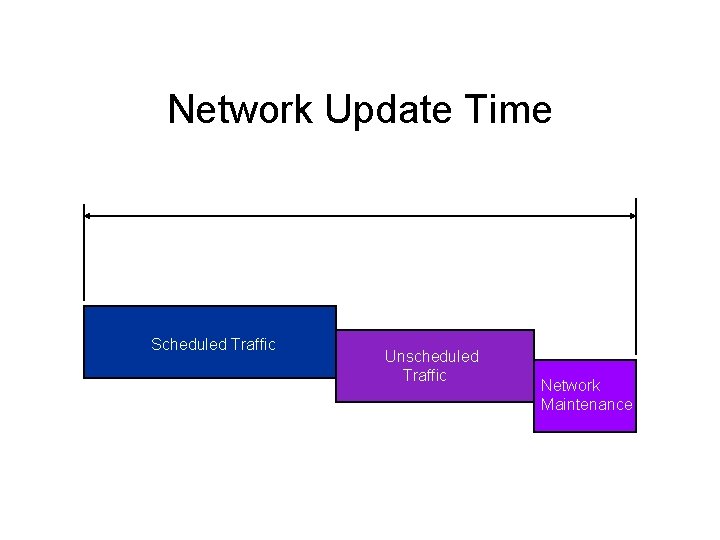
Control. Net Bandwidth • Three pieces to bandwidth – Scheduled traffic – Unscheduled traffic – Maintenance or guard band
Network Update Time Scheduled Traffic Unscheduled Traffic Network Maintenance
Network Update • One cycle of the network • Called NUT time – Set up on RSNet. Worx • Data cannot transfer faster than the NUT
Scheduled Maximum Node • SMAX • This is the highest node number that will be allowed to send scheduled data. • Any node address above SMAX that has scheduled data to transfer will not be allowed to transmit.
Unscheduled Maximum Node • UMAX • This is the highest node number that will be allowed to send unscheduled data. • Any node address above UMAX that has scheduled data to transfer will not be allowed to transmit.
Node Can Send Both • A node can send scheduled as well as unscheduled data/ • The node number must be within SMAX.
Slot Time • Slot time is time the network spends waiting for a node to respond when the node address is either not used or the node is not responding. • Unused node addresses should be kept to a minimum for network efficiency.
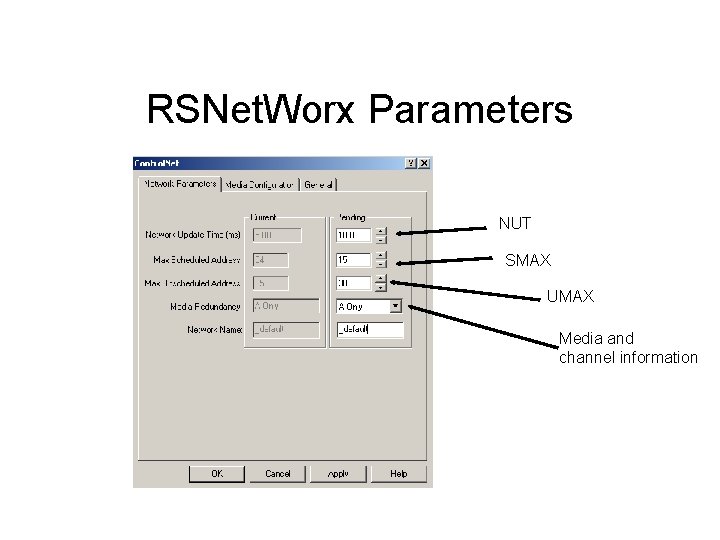
RSNet. Worx Parameters NUT SMAX UMAX Media and channel information
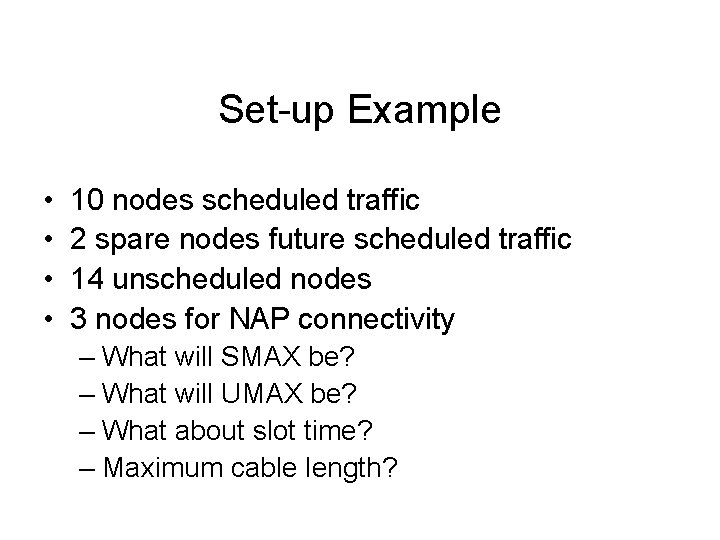
Set-up Example • • 10 nodes scheduled traffic 2 spare nodes future scheduled traffic 14 unscheduled nodes 3 nodes for NAP connectivity – What will SMAX be? – What will UMAX be? – What about slot time? – Maximum cable length?
Maximum Segment Length • Assume RG-6 coax – How many taps?
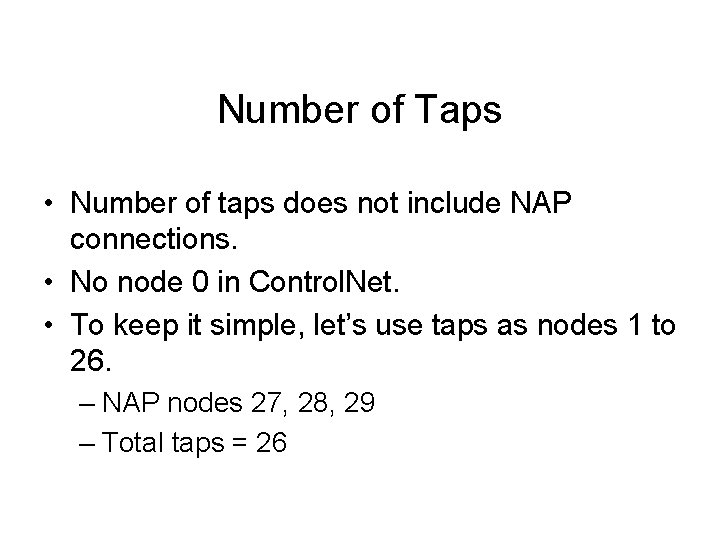
Number of Taps • Number of taps does not include NAP connections. • No node 0 in Control. Net. • To keep it simple, let’s use taps as nodes 1 to 26. – NAP nodes 27, 28, 29 – Total taps = 26
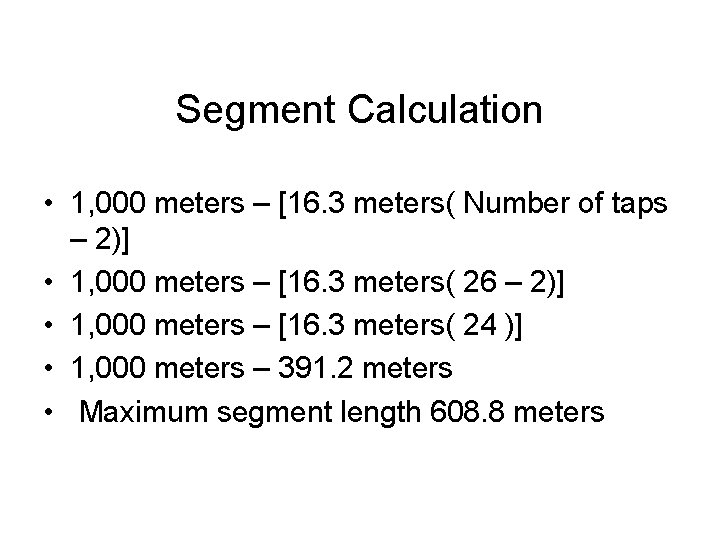
Segment Calculation • 1, 000 meters – [16. 3 meters( Number of taps – 2)] • 1, 000 meters – [16. 3 meters( 26 – 2)] • 1, 000 meters – [16. 3 meters( 24 )] • 1, 000 meters – 391. 2 meters • Maximum segment length 608. 8 meters
SMAX • Scheduled traffic nodes 1 - 12 • Nodes 1 -10 currently used • Nodes 11 and 12 future scheduled – Unused nodes = slot time • SMAX set at 12
Determine UMAX • Nodes 13 - 26 unscheduled traffic • Nodes 27, 28, 29 for NAP – RSLinx drivers for personal computer node addresses MUST be set at 27, 28, or 29. – RSLinx default for 1784 -PCC personal computer interface default = node 99. • UMAX must be set at a minimum of 29.
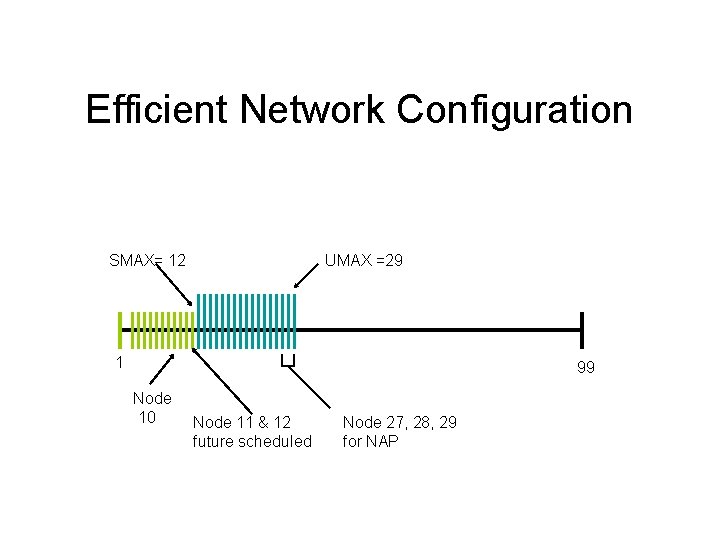
Efficient Network Configuration SMAX= 12 UMAX =29 1 99 Node 10 Node 11 & 12 future scheduled Node 27, 28, 29 for NAP
Future Network Expansion • • Recalculate segment length? Reconfigure SMAX? Reconfigure UMAX? Reschedule network using RSNet. Worx if any scheduled node is added or modified.
Reschedule Network • It must be done whenever a scheduled node is modified or added to the network. • Network configuration is scheduled in RSNet. Worx for Control. Net. – Part of saving new network configuration – ALL processors on network in program mode – Referred to as optimizing and rewriting network configuration
Rescheduling and the Keeper • The Control. Net communication module at the lowest node number is called the keeper. – Should be node 1 – For Control. Logix 1756 -CNB(R) – Keeper like a traffic cop • Directs traffic on network and synchronizes nodes – Newer CNBs have multi-keeper capability
Multi-keeper • Older CNBs are single-keeper networks. – Newer CNBs support multi-keeper. – If there was a newer CNB at node 1 and also at node 2, node 1 would be the keeper and node 2 would be a “back-up” keeper. – If node 1 fails, node 2 would take over network traffic control. – In single-keeper systems, if the keeper fails, all network communications are lost.