
Chapter 10 OSPF Tuning and Troubleshooting CCNA Routing
Chapter 10: OSPF Tuning and Troubleshooting CCNA Routing and Switching Scaling Networks v 6. 0
Chapter 10 - Sections & Objectives § 10. 1 Advanced Single-Area OSPF Configurations • Configure the OSPF interface priority to influence the DR/BDR election. • Configure OSPF to propagate a default route. • Configure OSPF interface settings to improve network performance. § 10. 2 Troubleshooting Single-Area OSPF Implementations • Explain the process and tools used to troubleshoot a single-area OSPF network. • Troubleshoot missing route entries in the single-area OSPFv 2 routing table. • Troubleshoot missing route entries in a single-area OSPFv 3 routing table. • Troubleshoot missing route entries in multiarea OSPFv 2 and OSPFv 3 routing tables. © 2016 Cisco and/or its affiliates. All rights reserved. Cisco Confidential 2
10. 1 Advanced Single-Area OSPF Configurations © 2016 Cisco and/or its affiliates. All rights reserved. Cisco Confidential 3
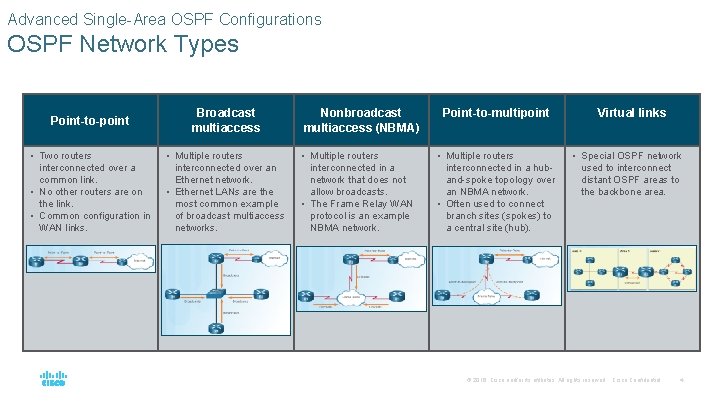
Advanced Single-Area OSPF Configurations OSPF Network Types Point-to-point Broadcast multiaccess Nonbroadcast multiaccess (NBMA) Point-to-multipoint • Two routers interconnected over a common link. • No other routers are on the link. • Common configuration in WAN links. • Multiple routers interconnected over an Ethernet network. • Ethernet LANs are the most common example of broadcast multiaccess networks. • Multiple routers interconnected in a network that does not allow broadcasts. • The Frame Relay WAN protocol is an example NBMA network. • Multiple routers interconnected in a huband-spoke topology over an NBMA network. • Often used to connect branch sites (spokes) to a central site (hub). Virtual links • Special OSPF network used to interconnect distant OSPF areas to the backbone area. © 2016 Cisco and/or its affiliates. All rights reserved. Cisco Confidential 4
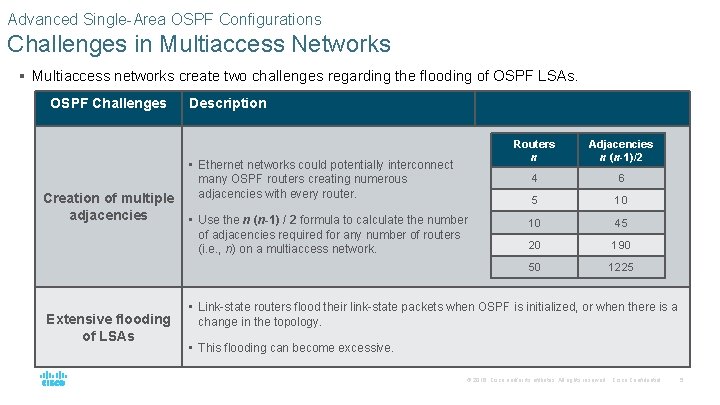
Advanced Single-Area OSPF Configurations Challenges in Multiaccess Networks § Multiaccess networks create two challenges regarding the flooding of OSPF LSAs. OSPF Challenges Description • Ethernet networks could potentially interconnect many OSPF routers creating numerous Creation of multiple adjacencies with every router. adjacencies Extensive flooding of LSAs • Use the n (n-1) / 2 formula to calculate the number of adjacencies required for any number of routers (i. e. , n) on a multiaccess network. Routers n Adjacencies n (n-1)/2 4 6 5 10 10 45 20 190 50 1225 • Link-state routers flood their link-state packets when OSPF is initialized, or when there is a change in the topology. • This flooding can become excessive. © 2016 Cisco and/or its affiliates. All rights reserved. Cisco Confidential 5
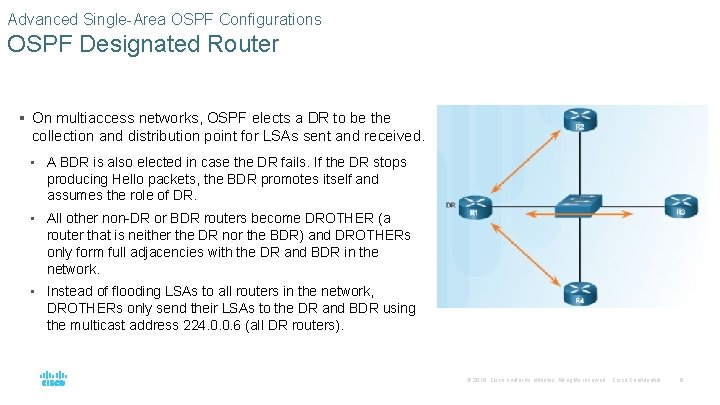
Advanced Single-Area OSPF Configurations OSPF Designated Router § On multiaccess networks, OSPF elects a DR to be the collection and distribution point for LSAs sent and received. • A BDR is also elected in case the DR fails. If the DR stops producing Hello packets, the BDR promotes itself and assumes the role of DR. • All other non-DR or BDR routers become DROTHER (a router that is neither the DR nor the BDR) and DROTHERs only form full adjacencies with the DR and BDR in the network. • Instead of flooding LSAs to all routers in the network, DROTHERs only send their LSAs to the DR and BDR using the multicast address 224. 0. 0. 6 (all DR routers). © 2016 Cisco and/or its affiliates. All rights reserved. Cisco Confidential 6
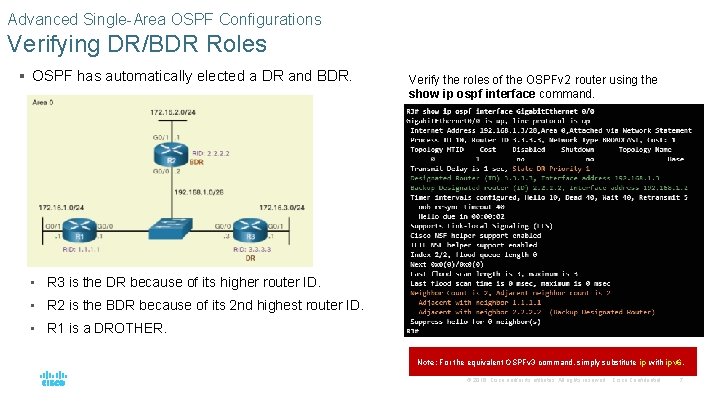
Advanced Single-Area OSPF Configurations Verifying DR/BDR Roles § OSPF has automatically elected a DR and BDR. Verify the roles of the OSPFv 2 router using the show ip ospf interface command. • R 3 is the DR because of its higher router ID. • R 2 is the BDR because of its 2 nd highest router ID. • R 1 is a DROTHER. Note: For the equivalent OSPFv 3 command, simply substitute ip with ipv 6. © 2016 Cisco and/or its affiliates. All rights reserved. Cisco Confidential 7
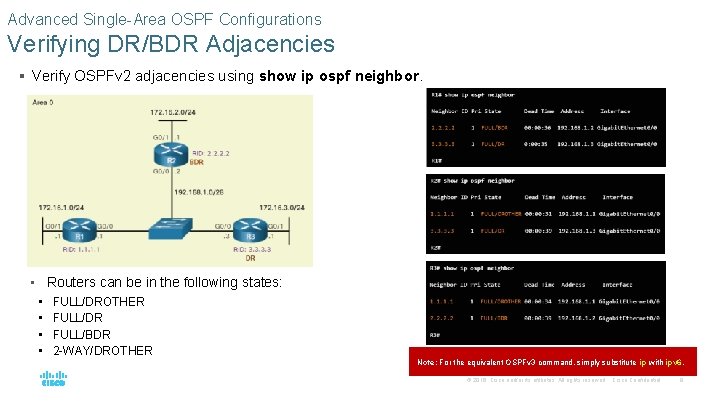
Advanced Single-Area OSPF Configurations Verifying DR/BDR Adjacencies § Verify OSPFv 2 adjacencies using show ip ospf neighbor. • Routers can be in the following states: • • FULL/DROTHER FULL/DR FULL/BDR 2 -WAY/DROTHER Note: For the equivalent OSPFv 3 command, simply substitute ip with ipv 6. © 2016 Cisco and/or its affiliates. All rights reserved. Cisco Confidential 8
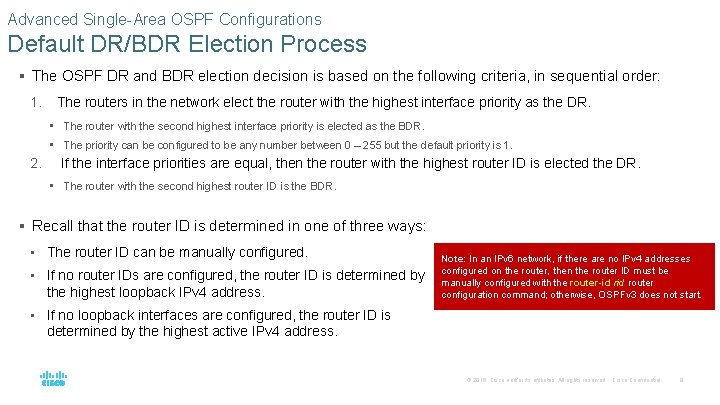
Advanced Single-Area OSPF Configurations Default DR/BDR Election Process § The OSPF DR and BDR election decision is based on the following criteria, in sequential order: 1. The routers in the network elect the router with the highest interface priority as the DR. • The router with the second highest interface priority is elected as the BDR. • The priority can be configured to be any number between 0 – 255 but the default priority is 1. 2. If the interface priorities are equal, then the router with the highest router ID is elected the DR. • The router with the second highest router ID is the BDR. § Recall that the router ID is determined in one of three ways: • The router ID can be manually configured. • If no router IDs are configured, the router ID is determined by the highest loopback IPv 4 address. Note: In an IPv 6 network, if there are no IPv 4 addresses configured on the router, then the router ID must be manually configured with the router-id router configuration command; otherwise, OSPFv 3 does not start. • If no loopback interfaces are configured, the router ID is determined by the highest active IPv 4 address. © 2016 Cisco and/or its affiliates. All rights reserved. Cisco Confidential 9
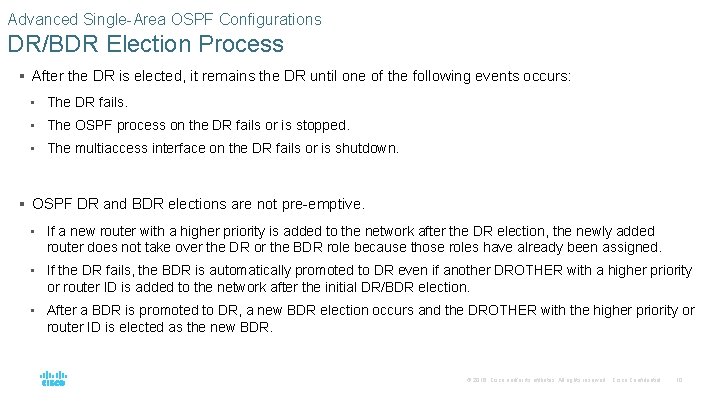
Advanced Single-Area OSPF Configurations DR/BDR Election Process § After the DR is elected, it remains the DR until one of the following events occurs: • The DR fails. • The OSPF process on the DR fails or is stopped. • The multiaccess interface on the DR fails or is shutdown. § OSPF DR and BDR elections are not pre-emptive. • If a new router with a higher priority is added to the network after the DR election, the newly added router does not take over the DR or the BDR role because those roles have already been assigned. • If the DR fails, the BDR is automatically promoted to DR even if another DROTHER with a higher priority or router ID is added to the network after the initial DR/BDR election. • After a BDR is promoted to DR, a new BDR election occurs and the DROTHER with the higher priority or router ID is elected as the new BDR. © 2016 Cisco and/or its affiliates. All rights reserved. Cisco Confidential 10
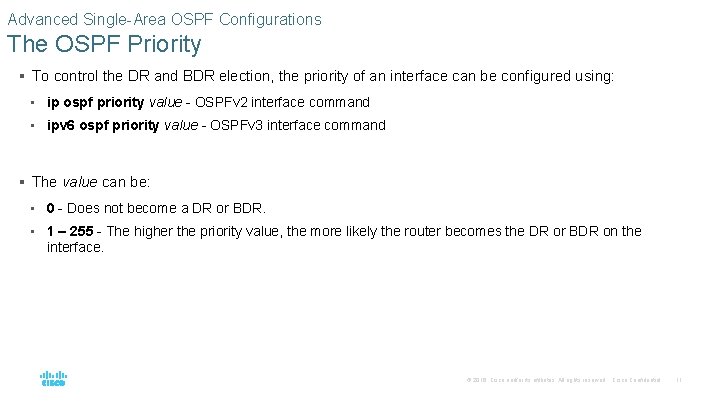
Advanced Single-Area OSPF Configurations The OSPF Priority § To control the DR and BDR election, the priority of an interface can be configured using: • ip ospf priority value - OSPFv 2 interface command • ipv 6 ospf priority value - OSPFv 3 interface command § The value can be: • 0 - Does not become a DR or BDR. • 1 – 255 - The higher the priority value, the more likely the router becomes the DR or BDR on the interface. © 2016 Cisco and/or its affiliates. All rights reserved. Cisco Confidential 11
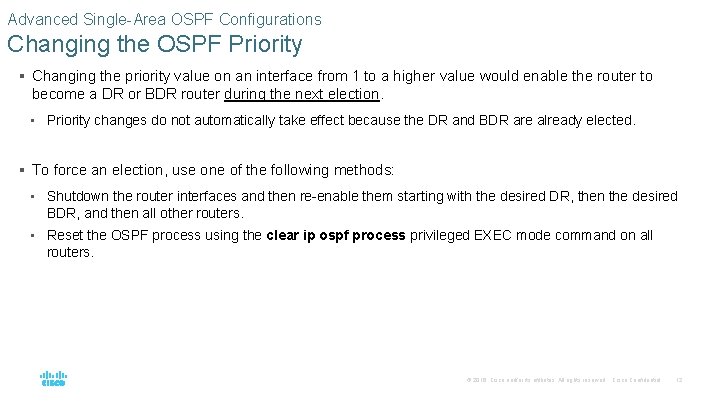
Advanced Single-Area OSPF Configurations Changing the OSPF Priority § Changing the priority value on an interface from 1 to a higher value would enable the router to become a DR or BDR router during the next election. • Priority changes do not automatically take effect because the DR and BDR are already elected. § To force an election, use one of the following methods: • Shutdown the router interfaces and then re-enable them starting with the desired DR, then the desired BDR, and then all other routers. • Reset the OSPF process using the clear ip ospf process privileged EXEC mode command on all routers. © 2016 Cisco and/or its affiliates. All rights reserved. Cisco Confidential 12
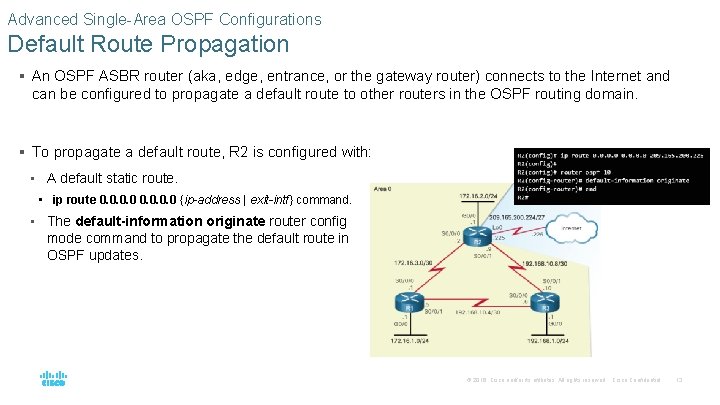
Advanced Single-Area OSPF Configurations Default Route Propagation § An OSPF ASBR router (aka, edge, entrance, or the gateway router) connects to the Internet and can be configured to propagate a default route to other routers in the OSPF routing domain. § To propagate a default route, R 2 is configured with: • A default static route. • ip route 0. 0 {ip-address | exit-intf} command. • The default-information originate router config mode command to propagate the default route in OSPF updates. © 2016 Cisco and/or its affiliates. All rights reserved. Cisco Confidential 13
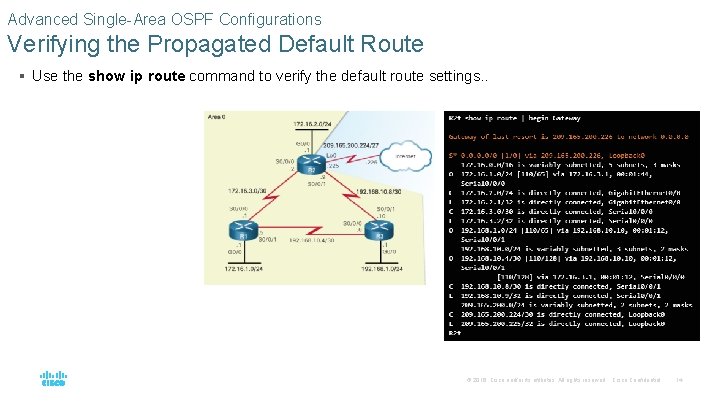
Advanced Single-Area OSPF Configurations Verifying the Propagated Default Route § Use the show ip route command to verify the default route settings. . © 2016 Cisco and/or its affiliates. All rights reserved. Cisco Confidential 14
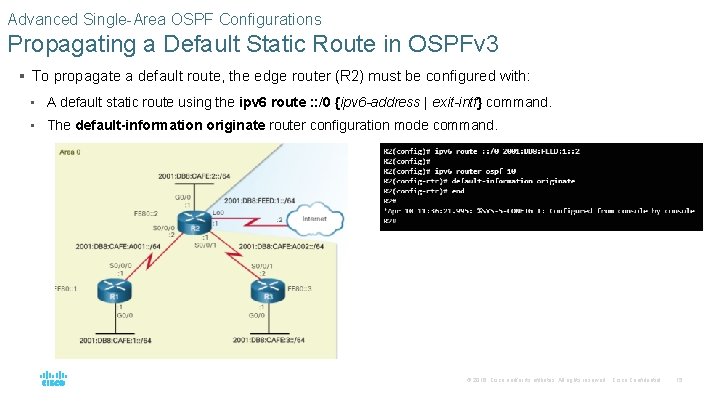
Advanced Single-Area OSPF Configurations Propagating a Default Static Route in OSPFv 3 § To propagate a default route, the edge router (R 2) must be configured with: • A default static route using the ipv 6 route : : /0 {ipv 6 -address | exit-intf} command. • The default-information originate router configuration mode command. © 2016 Cisco and/or its affiliates. All rights reserved. Cisco Confidential 15
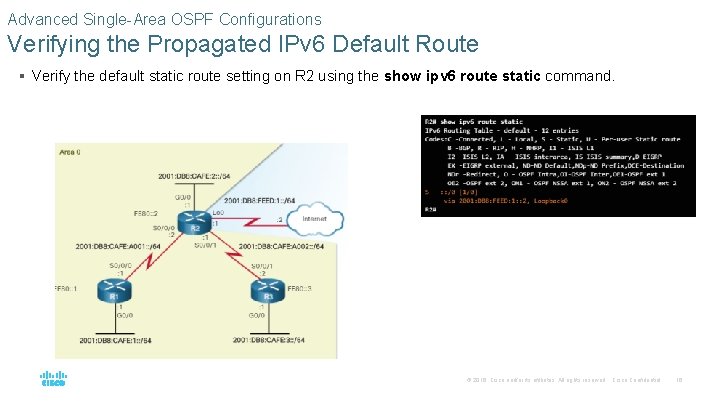
Advanced Single-Area OSPF Configurations Verifying the Propagated IPv 6 Default Route § Verify the default static route setting on R 2 using the show ipv 6 route static command. © 2016 Cisco and/or its affiliates. All rights reserved. Cisco Confidential 16
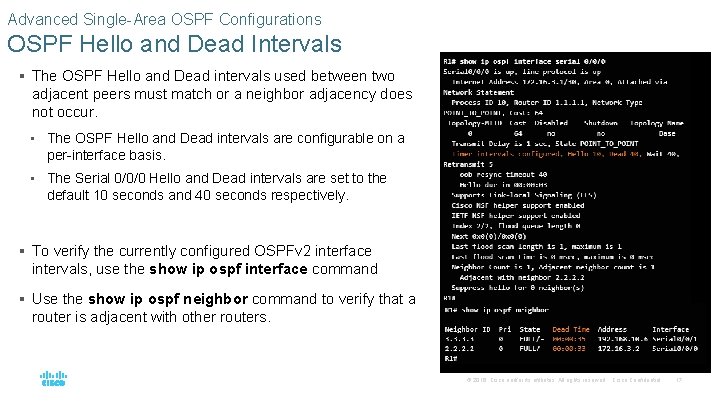
Advanced Single-Area OSPF Configurations OSPF Hello and Dead Intervals § The OSPF Hello and Dead intervals used between two adjacent peers must match or a neighbor adjacency does not occur. • The OSPF Hello and Dead intervals are configurable on a per-interface basis. • The Serial 0/0/0 Hello and Dead intervals are set to the default 10 seconds and 40 seconds respectively. § To verify the currently configured OSPFv 2 interface intervals, use the show ip ospf interface command § Use the show ip ospf neighbor command to verify that a router is adjacent with other routers. © 2016 Cisco and/or its affiliates. All rights reserved. Cisco Confidential 17
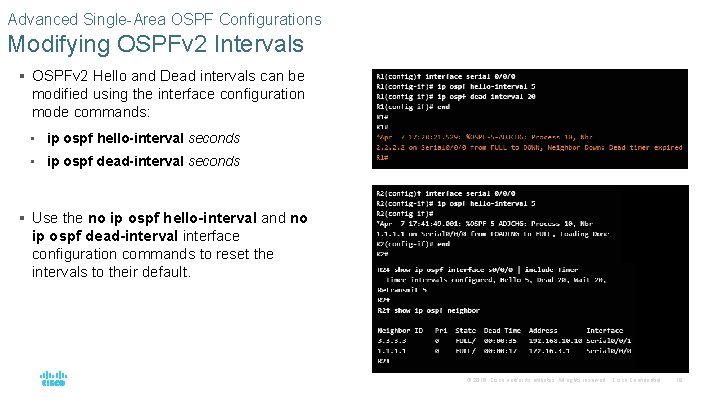
Advanced Single-Area OSPF Configurations Modifying OSPFv 2 Intervals § OSPFv 2 Hello and Dead intervals can be modified using the interface configuration mode commands: • ip ospf hello-interval seconds • ip ospf dead-interval seconds § Use the no ip ospf hello-interval and no ip ospf dead-interval interface configuration commands to reset the intervals to their default. © 2016 Cisco and/or its affiliates. All rights reserved. Cisco Confidential 18
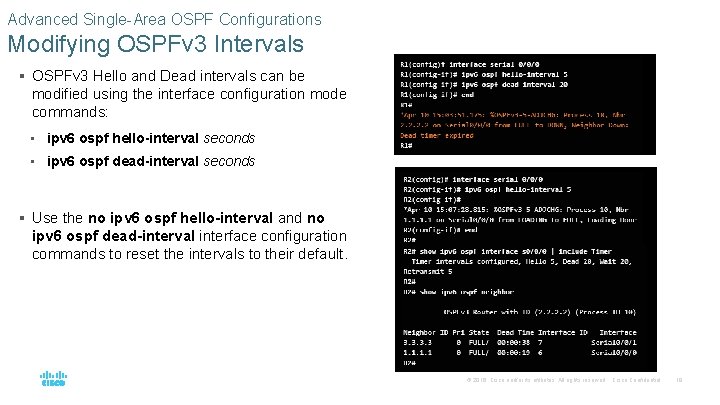
Advanced Single-Area OSPF Configurations Modifying OSPFv 3 Intervals § OSPFv 3 Hello and Dead intervals can be modified using the interface configuration mode commands: • ipv 6 ospf hello-interval seconds • ipv 6 ospf dead-interval seconds § Use the no ipv 6 ospf hello-interval and no ipv 6 ospf dead-interval interface configuration commands to reset the intervals to their default. © 2016 Cisco and/or its affiliates. All rights reserved. Cisco Confidential 19
10. 2 Troubleshooting Single. Area OSPF Implementations © 2016 Cisco and/or its affiliates. All rights reserved. Cisco Confidential 20
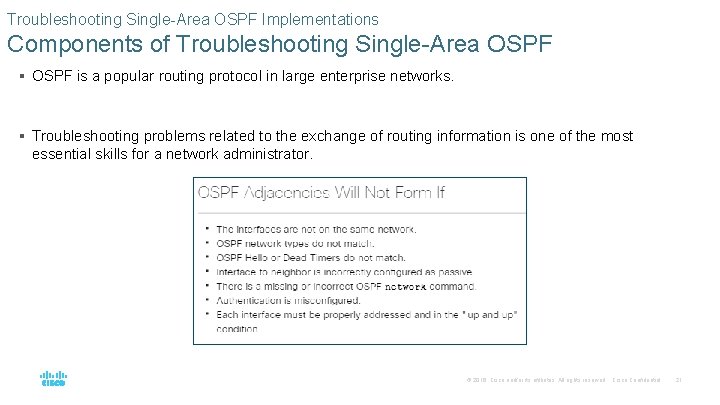
Troubleshooting Single-Area OSPF Implementations Components of Troubleshooting Single-Area OSPF § OSPF is a popular routing protocol in large enterprise networks. § Troubleshooting problems related to the exchange of routing information is one of the most essential skills for a network administrator. © 2016 Cisco and/or its affiliates. All rights reserved. Cisco Confidential 21
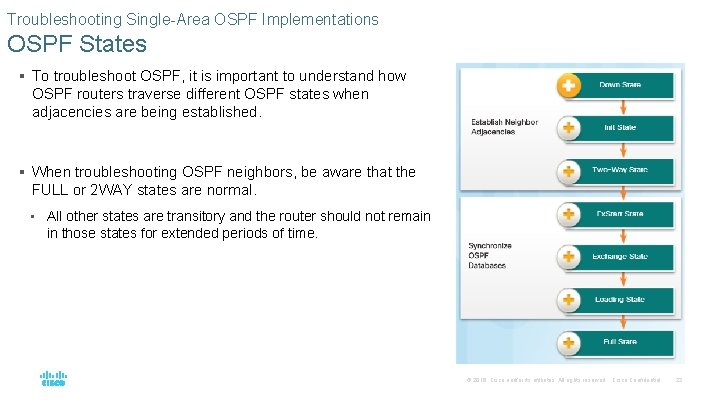
Troubleshooting Single-Area OSPF Implementations OSPF States § To troubleshoot OSPF, it is important to understand how OSPF routers traverse different OSPF states when adjacencies are being established. § When troubleshooting OSPF neighbors, be aware that the FULL or 2 WAY states are normal. • All other states are transitory and the router should not remain in those states for extended periods of time. © 2016 Cisco and/or its affiliates. All rights reserved. Cisco Confidential 22
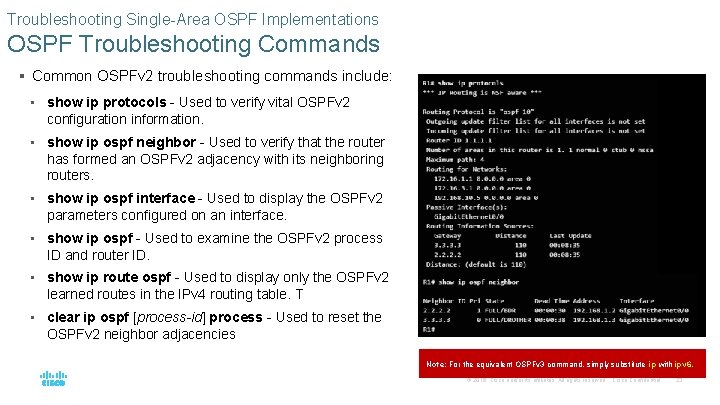
Troubleshooting Single-Area OSPF Implementations OSPF Troubleshooting Commands § Common OSPFv 2 troubleshooting commands include: • show ip protocols - Used to verify vital OSPFv 2 configuration information. • show ip ospf neighbor - Used to verify that the router has formed an OSPFv 2 adjacency with its neighboring routers. • show ip ospf interface - Used to display the OSPFv 2 parameters configured on an interface. • show ip ospf - Used to examine the OSPFv 2 process ID and router ID. • show ip route ospf - Used to display only the OSPFv 2 learned routes in the IPv 4 routing table. T • clear ip ospf [process-id] process - Used to reset the OSPFv 2 neighbor adjacencies Note: For the equivalent OSPFv 3 command, simply substitute ip with ipv 6. © 2016 Cisco and/or its affiliates. All rights reserved. Cisco Confidential 23
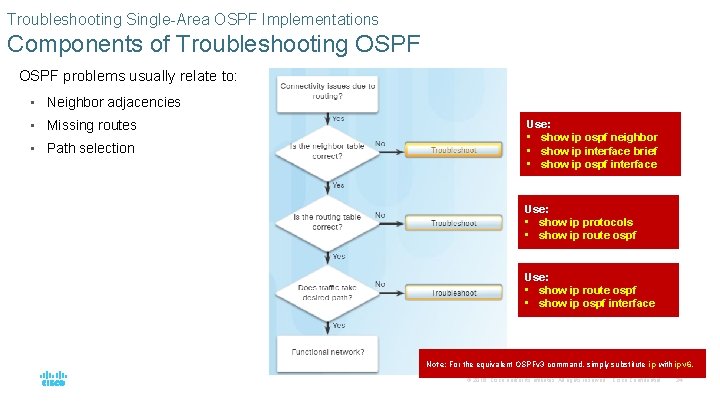
Troubleshooting Single-Area OSPF Implementations Components of Troubleshooting OSPF problems usually relate to: • Neighbor adjacencies • Missing routes • Path selection Use: • show ip ospf neighbor • show ip interface brief • show ip ospf interface Use: • show ip protocols • show ip route ospf Use: • show ip route ospf • show ip ospf interface Note: For the equivalent OSPFv 3 command, simply substitute ip with ipv 6. © 2016 Cisco and/or its affiliates. All rights reserved. Cisco Confidential 24
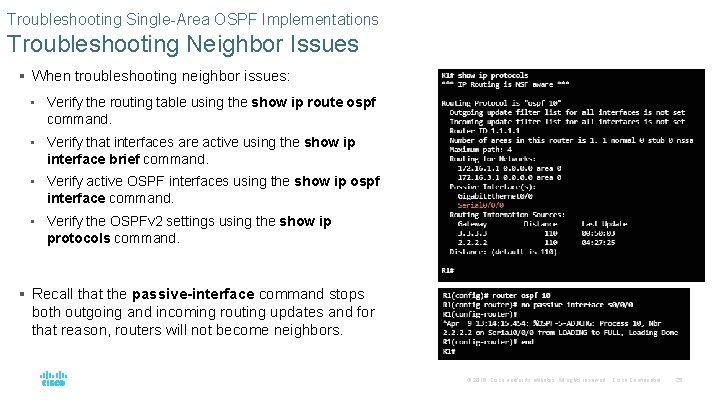
Troubleshooting Single-Area OSPF Implementations Troubleshooting Neighbor Issues § When troubleshooting neighbor issues: • Verify the routing table using the show ip route ospf command. • Verify that interfaces are active using the show ip interface brief command. • Verify active OSPF interfaces using the show ip ospf interface command. • Verify the OSPFv 2 settings using the show ip protocols command. § Recall that the passive-interface command stops both outgoing and incoming routing updates and for that reason, routers will not become neighbors. © 2016 Cisco and/or its affiliates. All rights reserved. Cisco Confidential 25
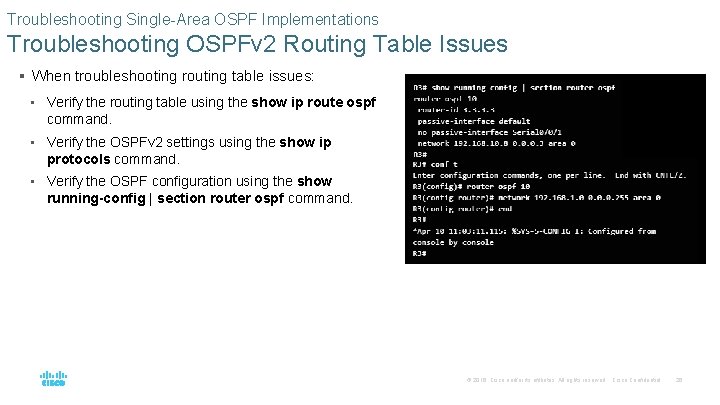
Troubleshooting Single-Area OSPF Implementations Troubleshooting OSPFv 2 Routing Table Issues § When troubleshooting routing table issues: • Verify the routing table using the show ip route ospf command. • Verify the OSPFv 2 settings using the show ip protocols command. • Verify the OSPF configuration using the show running-config | section router ospf command. © 2016 Cisco and/or its affiliates. All rights reserved. Cisco Confidential 26
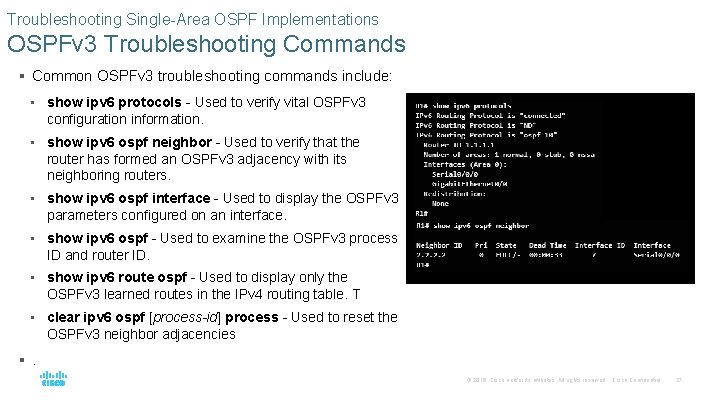
Troubleshooting Single-Area OSPF Implementations OSPFv 3 Troubleshooting Commands § Common OSPFv 3 troubleshooting commands include: • show ipv 6 protocols - Used to verify vital OSPFv 3 configuration information. • show ipv 6 ospf neighbor - Used to verify that the router has formed an OSPFv 3 adjacency with its neighboring routers. • show ipv 6 ospf interface - Used to display the OSPFv 3 parameters configured on an interface. • show ipv 6 ospf - Used to examine the OSPFv 3 process ID and router ID. • show ipv 6 route ospf - Used to display only the OSPFv 3 learned routes in the IPv 4 routing table. T • clear ipv 6 ospf [process-id] process - Used to reset the OSPFv 3 neighbor adjacencies §. © 2016 Cisco and/or its affiliates. All rights reserved. Cisco Confidential 27
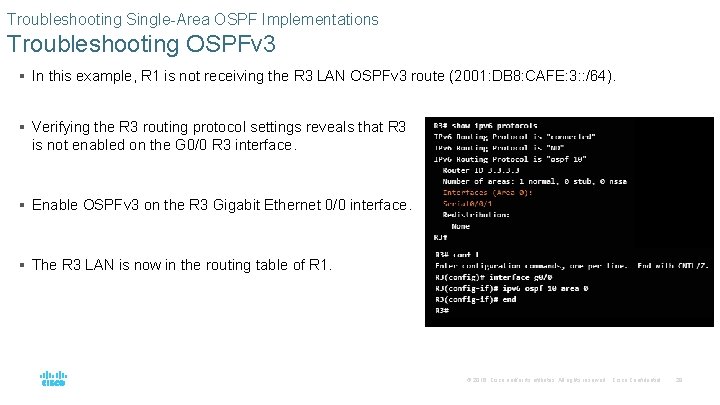
Troubleshooting Single-Area OSPF Implementations Troubleshooting OSPFv 3 § In this example, R 1 is not receiving the R 3 LAN OSPFv 3 route (2001: DB 8: CAFE: 3: : /64). § Verifying the R 3 routing protocol settings reveals that R 3 is not enabled on the G 0/0 R 3 interface. § Enable OSPFv 3 on the R 3 Gigabit Ethernet 0/0 interface. § The R 3 LAN is now in the routing table of R 1. © 2016 Cisco and/or its affiliates. All rights reserved. Cisco Confidential 28
Troubleshooting Single-Area OSPF Implementations Multiarea OSPF Troubleshooting Skills § Before you can begin to diagnose and resolve problems related to a multiarea OSPF implementation, you must be able to do the following: • Understand the processes OSPF uses to distribute, store, and select routing information. • Understand how OSPF information flows within and between areas. • Use Cisco IOS commands to gather and interpret the information necessary to troubleshoot OSPF operation. © 2016 Cisco and/or its affiliates. All rights reserved. Cisco Confidential 29
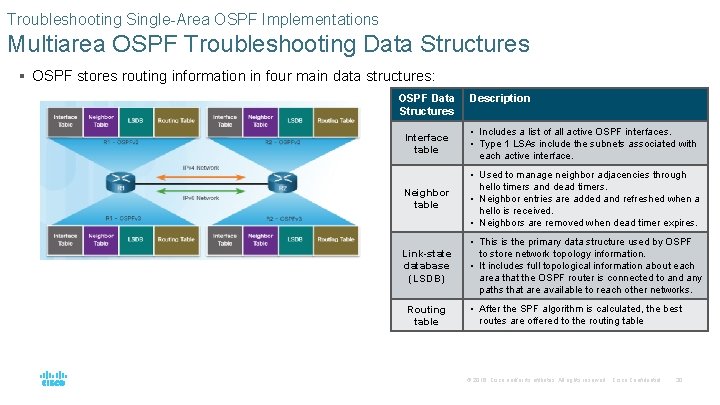
Troubleshooting Single-Area OSPF Implementations Multiarea OSPF Troubleshooting Data Structures § OSPF stores routing information in four main data structures: OSPF Data Structures Description Interface table • Includes a list of all active OSPF interfaces. • Type 1 LSAs include the subnets associated with each active interface. Neighbor table • Used to manage neighbor adjacencies through hello timers and dead timers. • Neighbor entries are added and refreshed when a hello is received. • Neighbors are removed when dead timer expires. Link-state database (LSDB) • This is the primary data structure used by OSPF to store network topology information. • It includes full topological information about each area that the OSPF router is connected to and any paths that are available to reach other networks. Routing table • After the SPF algorithm is calculated, the best routes are offered to the routing table © 2016 Cisco and/or its affiliates. All rights reserved. Cisco Confidential 30
10. 3 Chapter Summary © 2016 Cisco and/or its affiliates. All rights reserved. Cisco Confidential 31
Conclusion Chapter 10: OSPF Tuning and Troubleshooting § OSPF defines five network types: point-to-point, broadcast multiaccess, nonbroadcast multiaccess, point-to-multipoint, and virtual links. § Multiaccess networks can create two challenges for OSPF regarding the flooding of LSAs: creation of multiple adjacencies and extensive flooding of LSAs. The solution to managing the number of adjacencies and the flooding of LSAs on a multiaccess network is the DR and BDR. If the DR stops producing Hellos, the BDR promotes itself and assumes the role of DR. § The routers in the network elect the router with the highest interface priority as DR. The router with the second highest interface priority is elected the BDR. The higher the priority, the likelier the router will be selected as the DR. If set to 0, the router is not capable of becoming the DR. The default priority of multiaccess broadcast interfaces is 1. Therefore, unless otherwise configured, all routers have an equal priority value and must rely on another tie breaking method during the DR/BDR election. If the interface priorities are equal, then the router with the highest router ID is elected the DR. The router with the second highest router ID is the BDR. The addition of a new router does not initiate a new election process. © 2016 Cisco and/or its affiliates. All rights reserved. Cisco Confidential 32
Conclusion Chapter 10: OSPF Tuning and Troubleshooting (Cont. ) § To propagate a default route in OSPF, the router must be configured with a default static route and the default-information originate command must be added to the configuration. Verify routes with the show ip route or show ipv 6 route command. § To assist OSPF in making the correct path determination, the reference bandwidth must be changed to a higher value to accommodate networks with links faster than 100 Mbps. To adjust the reference bandwidth, use the auto-cost reference-bandwidth Mbps router configuration mode command. To adjust the interface bandwidth, use the bandwidth kilobits interface configuration mode command. The cost can be manually configured on an interface using the ip ospf cost value interface configuration mode command. § The OSPF Hello and Dead intervals must match or a neighbor adjacency does not occur. To modify these intervals, use the following interface commands: • ip ospf hello-interval seconds • ip ospf dead-interval seconds • ipv 6 ospf hello-interval seconds • ipv 6 ospf dead-interval seconds © 2016 Cisco and/or its affiliates. All rights reserved. Cisco Confidential 33
Conclusion Chapter 10: OSPF Tuning and Troubleshooting (Cont. ) § When troubleshooting OSPF neighbors, be aware that the FULL or 2 WAY states are normal. The following commands summarize OSPFv 2 troubleshooting: • show ip protocols • show ip ospf neighbor • show ip ospf interface • show ip ospf • show ip route ospf • clear ip ospf [process-id] process § Troubleshooting OSPFv 3 is similar to OSPFv 2. The following commands are the equivalent commands used with OSPFv 3: show ipv 6 protocols, show ipv 6 ospf neighbor, show ipv 6 ospf interface, show ipv 6 ospf, show ipv 6 route ospf, and clear ipv 6 ospf [process-id] process. © 2016 Cisco and/or its affiliates. All rights reserved. Cisco Confidential 34

- Slides: 35