
Chapter 10 Object States and The Statechart Diagram
Chapter 10 Object States and The Statechart Diagram 1 / 73

Chapter 10: Object States and the Statechart Diagram 10. 1 10. 2. 10. 3. 10. 4. 10. 5. 10. 6. Lifetimes and Lifecycles. Events and States. Transitions and Actions. The Statechart Diagram. Object Lifecycles on the Statechart Diagram. The State Transition Table (STT). 2 / 73

Chapter 10: Object States and the Statechart Diagram 10. 1 Lifetimes and Lifecycles. 10. 2. 10. 3. 10. 4. 10. 5. 10. 6. Events and States. Transitions and Actions. The Statechart Diagram. Object Lifecycles on the Statechart Diagram. The State Transition Table (STT). 3 / 73

Chapter 10: Object States and the Statechart Diagram 10. 1 Lifetimes and Lifecycles. In the real world (See Chapter 5): A Purchase Order begins life as a request document, gets authorized at various levels, goes out to a vendor, is fulfilled by receiving the goods, and finally is archived for future reference. 4 / 73

Chapter 10: Object States and the Statechart Diagram 10. 1 Lifetimes and Lifecycles. States in the real world: l Many objects in the real world go through a predictable cycle l From their creation, l Through their useful life, l From stage to stage l Until they die or are somehow disposed of (Archived or deleted or whatever. ) 5 / 73

Chapter 10: Object States and the Statechart Diagram 10. 1 Lifetimes and Lifecycles. Business Events cause State Changes which cause Object Behaviors to be executed. 6 / 73
Chapter 10: Object States and the Statechart Diagram 10. 1 Lifetimes and Lifecycles. We define a State Transition As the act or experience of changing from one state to another. 7 / 73
Chapter 10: Object States and the Statechart Diagram 10. 1 Lifetimes and Lifecycles. l As we follow an object from state to state, it traces what we can call its Lifecycle. 8 / 73
Chapter 10: Object States and the Statechart Diagram 10. 1 Lifetimes and Lifecycles. So our goal in studying Object Lifecycles is to discover Operations (i. e. , Behaviors) for the classes we found in the earlier steps. 9 / 73
Chapter 10: Object States and the Statechart Diagram 10. 1 Lifetimes and Lifecycles. Here’s an example using a library book. . . 10 / 73
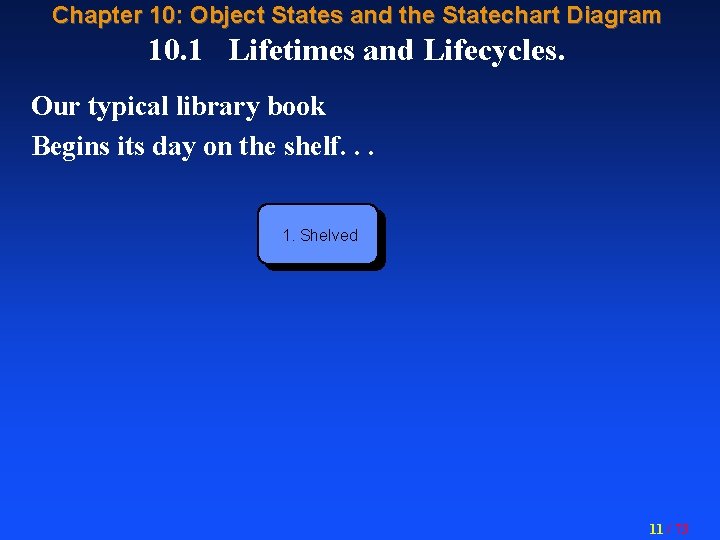
Chapter 10: Object States and the Statechart Diagram 10. 1 Lifetimes and Lifecycles. Our typical library book Begins its day on the shelf. . . 1. Shelved 11 / 73

Chapter 10: Object States and the Statechart Diagram 10. 1 Lifetimes and Lifecycles. 1. Shelved And when a Subscriber comes along and borrows the Book This is a Business Event. . . 12 / 73

Chapter 10: Object States and the Statechart Diagram 10. 1 Lifetimes and Lifecycles. The state of the Book changes to “Signed Out. ” 1. Shelved 2. Signed Out 13 / 73
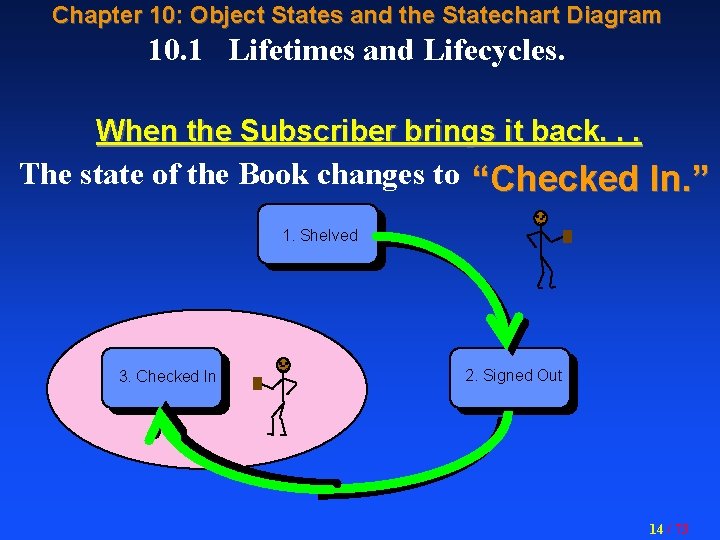
Chapter 10: Object States and the Statechart Diagram 10. 1 Lifetimes and Lifecycles. When the Subscriber brings it back. . . The state of the Book changes to “Checked In. ” 1. Shelved 3. Checked In 2. Signed Out 14 / 73
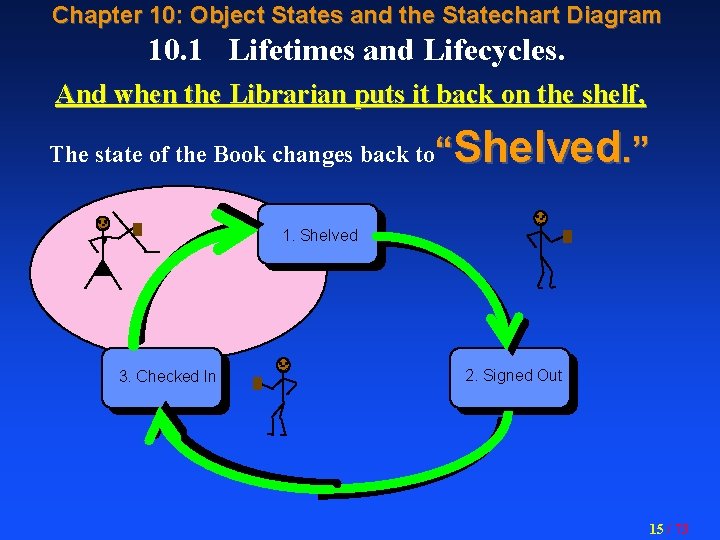
Chapter 10: Object States and the Statechart Diagram 10. 1 Lifetimes and Lifecycles. And when the Librarian puts it back on the shelf, Shelved. ” The state of the Book changes back to“ 1. Shelved 3. Checked In 2. Signed Out 15 / 73
Chapter 10: Object States and the Statechart Diagram 10. 1 Lifetimes and Lifecycles. l. A loop like this is an Operational Lifecycle, concerned with the regular operation of the users’ business. l Many objects have a life that does not repeat, l But goes stage to stage from “birth” to “death” (i. e. , delete, archive, or whatever. ) l That kind is called a Lifetime 16 / 73
Chapter 10: Object States and the Statechart Diagram 10. 1 Lifetimes and Lifecycles. Definition: State: At any moment, an object exists in a certain condition or manner of being, and this we say is its State. 17 / 73
Chapter 10: Object States and the Statechart Diagram 10. 1 Lifetimes and Lifecycles. 10. 2. Events and States. 10. 3. 10. 4. 10. 5. 10. 6. Transitions and Actions. The Statechart Diagram. Object Lifecycles on the Statechart Diagram. The State Transition Table (STT). 18 / 73
Chapter 10: Object States and the Statechart Diagram 10. 2. Events and States. Event: A noteworthy happening. (Webster) We say that: l An Event is received by an object, l Which really means the event happens to that object. 19 / 73
Chapter 10: Object States and the Statechart Diagram 10. 2. Events and States. And once the event has happened to it, The object is in a new state. 20 / 73
Chapter 10: Object States and the Statechart Diagram 10. 2. Events and States. l Generally, l To record a business event, we must change the value of at least one attribute. l Since the attribute values can be said to represent the object’s state, this causes a State Transition. 21 / 73
Chapter 10: Object States and the Statechart Diagram 10. 2. Events and States. In fact, many classes have a “Status” attribute, and the domain of its permissible values Gives the set of possible states for that class. 22 / 73
Chapter 10: Object States and the Statechart Diagram 10. 1 Lifetimes and Lifecycles. 10. 2. Events and States. 10. 3. Transitions and Actions. 10. 4. The Statechart Diagram. 10. 5. Object Lifecycles on the Statechart Diagram. 10. 6. The State Transition Table (STT). 23 / 73
Chapter 10: Object States and the Statechart Diagram 10. 3. Transitions and Actions. Definition: State Transition: The act or experience of changing from one state to another. 24 / 73
Chapter 10: Object States and the Statechart Diagram 10. 3. Transitions and Actions. We define an Object Lifecycle l As consisting of the various states that an object may transition through, l The set of permissible transitions, l And the sequencing of those states and transitions, as it progresses from its initial creation to its eventual disposal. 25 / 73
Chapter 10: Object States and the Statechart Diagram 10. 3. Transitions and Actions. Action: l An Action is a behavior associated with a state or transition, l Executed each time the object enters or leaves that state (or executes that transition) 26 / 73
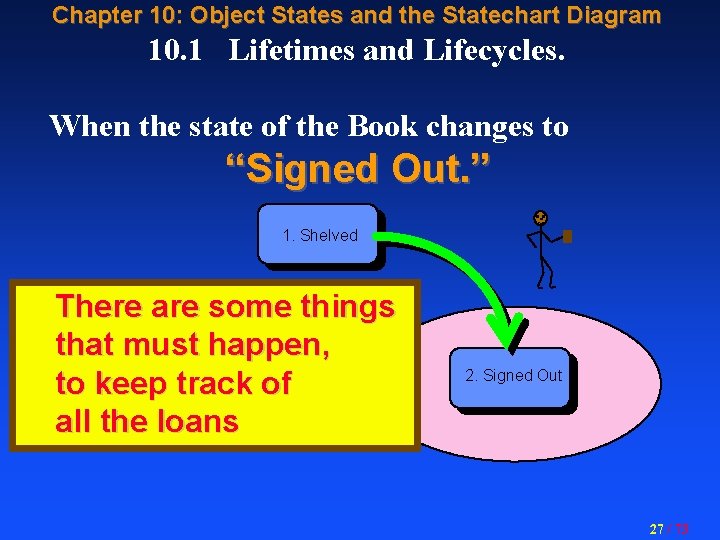
Chapter 10: Object States and the Statechart Diagram 10. 1 Lifetimes and Lifecycles. When the state of the Book changes to “Signed Out. ” 1. Shelved There are some things that must happen, to keep track of all the loans 2. Signed Out 27 / 73
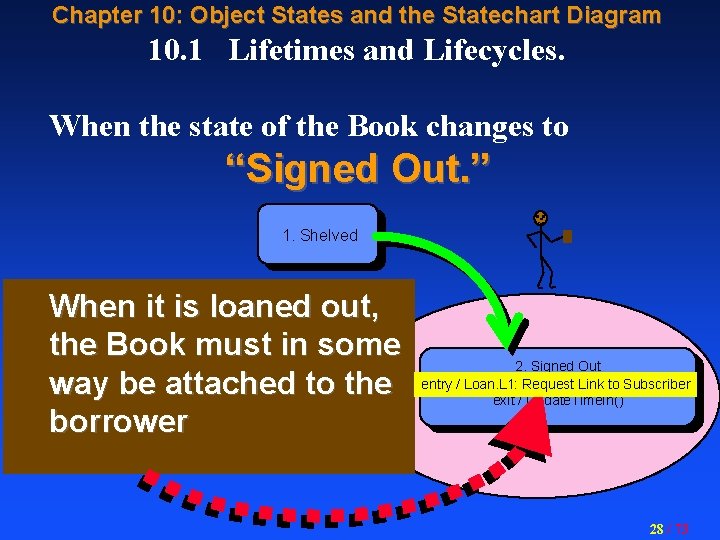
Chapter 10: Object States and the Statechart Diagram 10. 1 Lifetimes and Lifecycles. When the state of the Book changes to “Signed Out. ” 1. Shelved When it is loaned out, the Book must in some way be attached to the borrower 2. Signed Out entry / Loan. L 1: Request Link to Subscriber exit / Update. Time. In() 2. Signed Out entry / Loan. L 1: Request Link to Subscriber 28 / 73
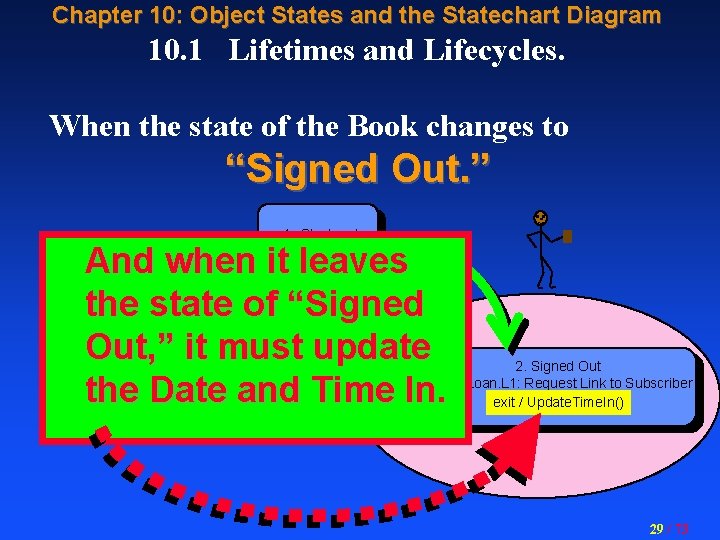
Chapter 10: Object States and the Statechart Diagram 10. 1 Lifetimes and Lifecycles. When the state of the Book changes to “Signed Out. ” 1. Shelved And when it leaves the state of “Signed Out, ” it must update the Date and Time In. 2. Signed Out entry / Loan. L 1: Request Link to Subscriber exit / Update. Time. In() 29 / 73
Chapter 10: Object States and the Statechart Diagram 10. 3. Transitions and Actions. Action: l Each Action is attached to either the entry into the state, or the exit from the state. l Sometimes an Action is attached to a transition and executes during the transition. l Sometimes an Action is attached to an event, and executes while the object stays within this state. We’ll look at these ones later. . . 30 / 73
Chapter 10: Object States and the Statechart Diagram 10. 3. Transitions and Actions. l On the Statechart Diagram, Actions may be spelled out within the box for the class (Or documented separately if too many) l At Analysis time, we just want to find Names for the actions, to be expanded and spelled out in the Design phase. 31 / 73
Chapter 10: Object States and the Statechart Diagram 10. 3. Transitions and Actions can do anything: Update attributes, n Create instances, n Send messages to other classes, i. e. , generate an event to be received by another class and cause a transition in that other class (or even create an instance there. ) n 32 / 73
Chapter 10: Object States and the Statechart Diagram 10. 1 Lifetimes and Lifecycles. Remember: Business Events cause State Changes which cause Object Behaviors (i. e. , Actions) to be executed. 33 / 73
Chapter 10: Object States and the Statechart Diagram 10. 3. Transitions and Actions. l. The goal of the Statechart Diagram l Is to find the Actions l So from them we may identify l And later spec out in detail, the Object Behaviors and Methods. 34 / 73
Chapter 10: Object States and the Statechart Diagram 10. 3. Transitions and Actions. And the tool for studying and documenting object lifecycles is the Statechart Diagram. . . 35 / 73
Chapter 10: Object States and the Statechart Diagram 10. 1 Lifetimes and Lifecycles. 10. 2. Events and States. 10. 3. Transitions and Actions. 10. 4. The Statechart Diagram. 10. 5. Object Lifecycles on the Statechart Diagram. 10. 6. The State Transition Table (STT). 36 / 73
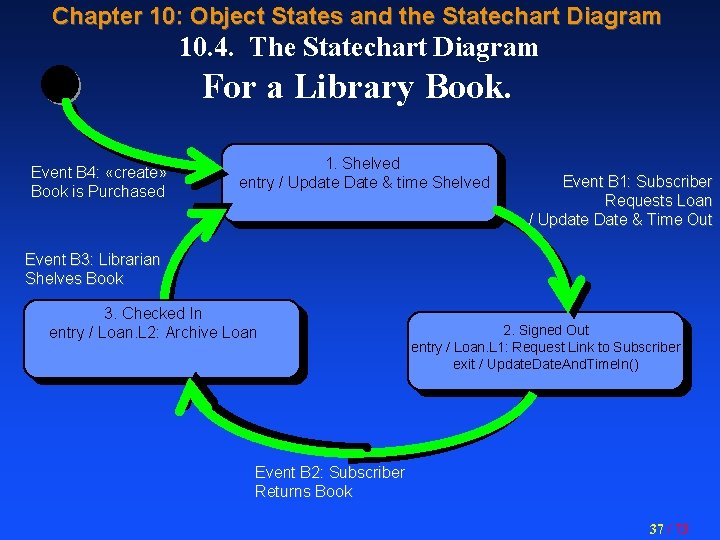
Chapter 10: Object States and the Statechart Diagram 10. 4. The Statechart Diagram For a Library Book. Event B 4: «create» Book is Purchased 1. Shelved entry / Update Date & time Shelved Event B 1: Subscriber Requests Loan / Update Date & Time Out Event B 3: Librarian Shelves Book 3. Checked In entry / Loan. L 2: Archive Loan 2. Signed Out entry / Loan. L 1: Request Link to Subscriber exit / Update. Date. And. Time. In() Event B 2: Subscriber Returns Book 37 / 73
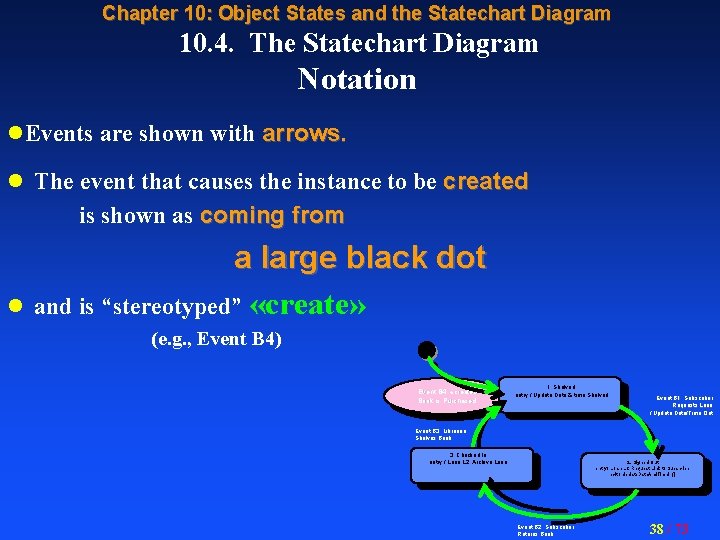
Chapter 10: Object States and the Statechart Diagram 10. 4. The Statechart Diagram Notation l. Events are shown with arrows. l The event that causes the instance to be created is shown as coming from l a large black dot and is “stereotyped” «create» (e. g. , Event B 4) Event B 4: «create» Book is Purchased 1. Shelved entry / Update Date & time Shelved Event B 1: Subscriber Requests Loan / Update Date/Time Out Event B 3: Librarian Shelves Book 3. Checked In entry / Loan. L 2: Archive Loan 2. Signed Out entry / Loan. L 1: Request Link to Subscriber exit / Update. Date. And. Time. In() Event B 2: Subscriber Returns Book 38 / 73
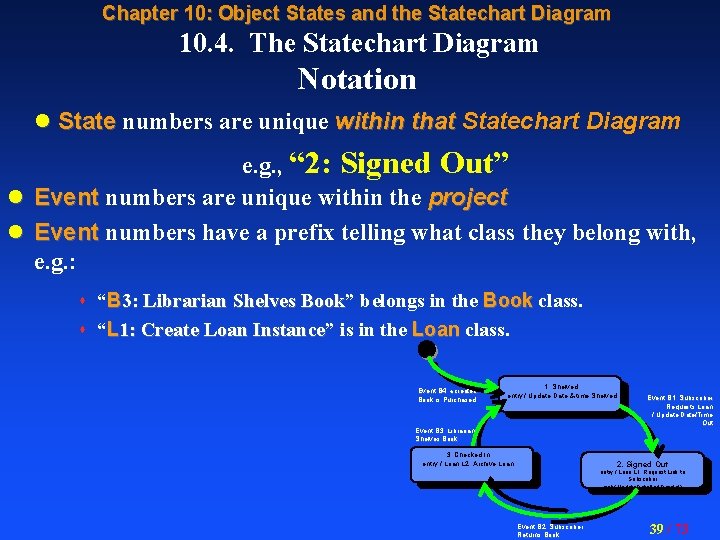
Chapter 10: Object States and the Statechart Diagram 10. 4. The Statechart Diagram Notation l State numbers are unique within that Statechart Diagram e. g. , “ 2: Signed Out” l Event numbers are unique within the project l Event numbers have a prefix telling what class they belong with, e. g. : “B 3: Librarian Shelves Book” Book belongs in the Book class. s “L 1: Create Loan Instance” Instance is in the Loan class. s Event B 4: «create» Book is Purchased 1. Shelved entry / Update Date & time Shelved Event B 3: Librarian Shelves Book 3. Checked In entry / Loan. L 2: Archive Loan Event B 1: Subscriber Requests Loan / Update Date/Time Out 2. Signed Out entry / Loan. L 1: Request Link to Subscriber exit / Update. Date. And. Time. In() Event B 2: Subscriber Returns Book 39 / 73
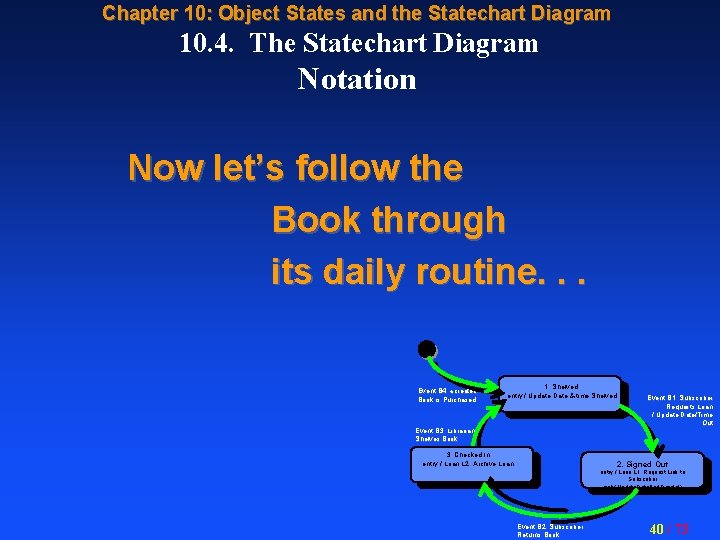
Chapter 10: Object States and the Statechart Diagram 10. 4. The Statechart Diagram Notation Now let’s follow the Book through its daily routine. . . Event B 4: «create» Book is Purchased 1. Shelved entry / Update Date & time Shelved Event B 3: Librarian Shelves Book 3. Checked In entry / Loan. L 2: Archive Loan Event B 1: Subscriber Requests Loan / Update Date/Time Out 2. Signed Out entry / Loan. L 1: Request Link to Subscriber exit / Update. Date. And. Time. In() Event B 2: Subscriber Returns Book 40 / 73
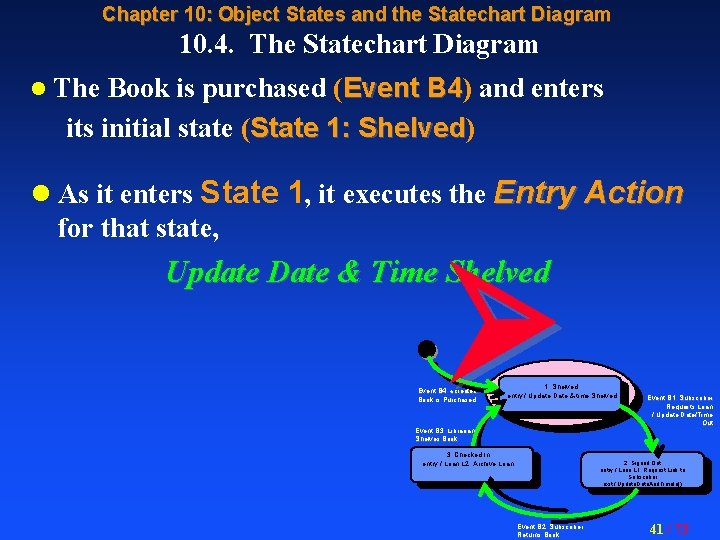
Chapter 10: Object States and the Statechart Diagram 10. 4. The Statechart Diagram Book is purchased (Event B 4) B 4 and enters its initial state (State 1: Shelved) Shelved l The l As it enters State 1, it executes the Entry Action for that state, Update Date & Time Shelved Event B 4: «create» Book is Purchased 1. Shelved entry / Update Date & time Shelved Event B 3: Librarian Shelves Book 3. Checked In entry / Loan. L 2: Archive Loan Event B 1: Subscriber Requests Loan / Update Date/Time Out 2. Signed Out entry / Loan. L 1: Request Link to Subscriber exit / Update. Date. And. Time. In() Event B 2: Subscriber Returns Book 41 / 73
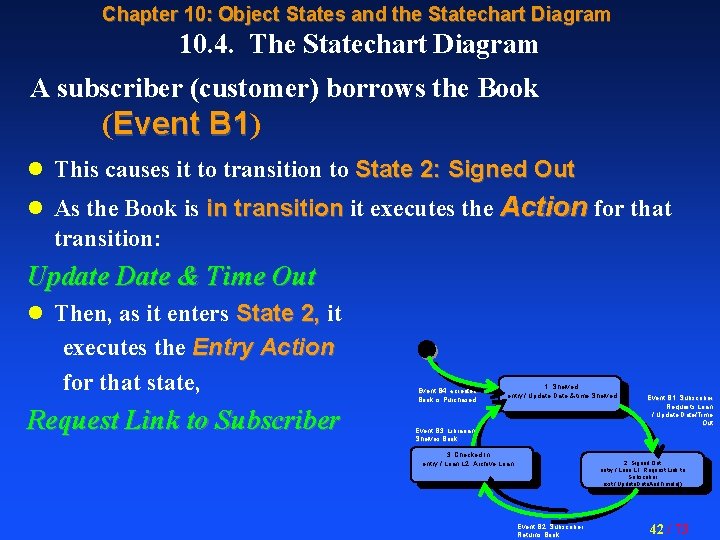
Chapter 10: Object States and the Statechart Diagram 10. 4. The Statechart Diagram A subscriber (customer) borrows the Book (Event B 1) B 1 l This causes it to transition to State 2: Signed Out l As the Book is in transition it executes the Action for that transition: Update Date & Time Out l Then, as it enters State 2, it executes the Entry Action for that state, Request Link to Subscriber Event B 4: «create» Book is Purchased 1. Shelved entry / Update Date & time Shelved Event B 3: Librarian Shelves Book 3. Checked In entry / Loan. L 2: Archive Loan Event B 1: Subscriber Requests Loan / Update Date/Time Out 2. Signed Out entry / Loan. L 1: Request Link to Subscriber exit / Update. Date. And. Time. In() Event B 2: Subscriber Returns Book 42 / 73
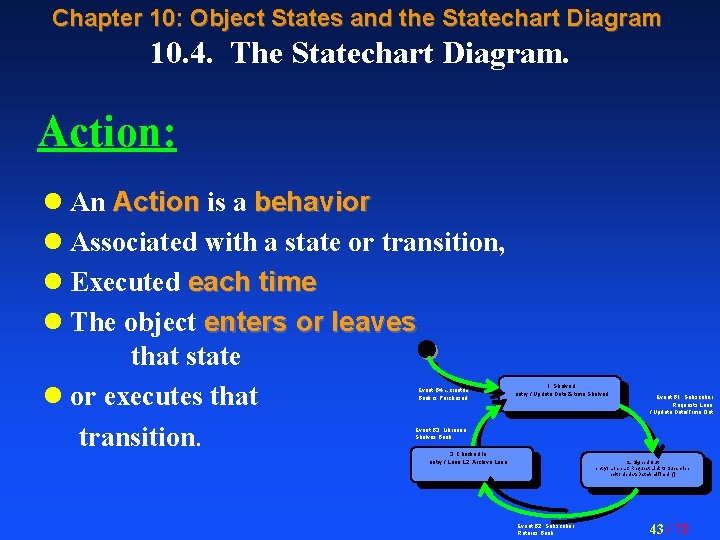
Chapter 10: Object States and the Statechart Diagram 10. 4. The Statechart Diagram. Action: l An Action is a behavior l Associated with a state or transition, l Executed each time l The object enters or leaves that state l or executes that transition. Event B 4: «create» Book is Purchased 1. Shelved entry / Update Date & time Shelved Event B 1: Subscriber Requests Loan / Update Date/Time Out Event B 3: Librarian Shelves Book 3. Checked In entry / Loan. L 2: Archive Loan 2. Signed Out entry / Loan. L 1: Request Link to Subscriber exit / Update. Date. And. Time. In() Event B 2: Subscriber Returns Book 43 / 73
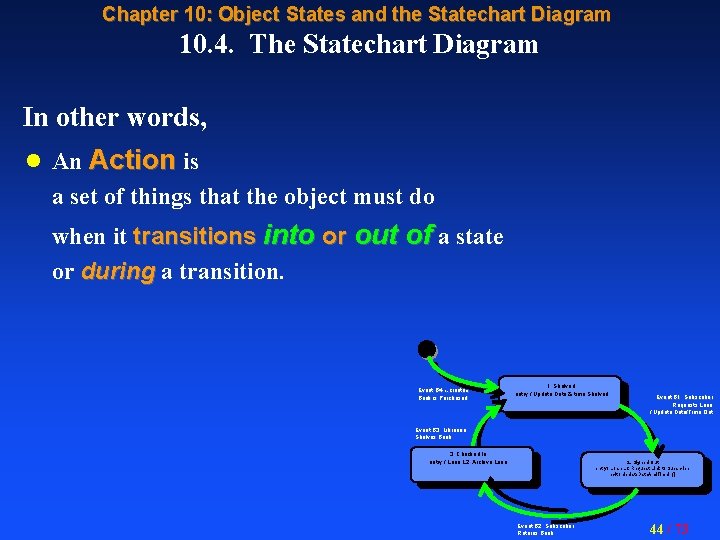
Chapter 10: Object States and the Statechart Diagram 10. 4. The Statechart Diagram In other words, l An Action is a set of things that the object must do when it transitions into or out of a state or during a transition. Event B 4: «create» Book is Purchased 1. Shelved entry / Update Date & time Shelved Event B 1: Subscriber Requests Loan / Update Date/Time Out Event B 3: Librarian Shelves Book 3. Checked In entry / Loan. L 2: Archive Loan 2. Signed Out entry / Loan. L 1: Request Link to Subscriber exit / Update. Date. And. Time. In() Event B 2: Subscriber Returns Book 44 / 73
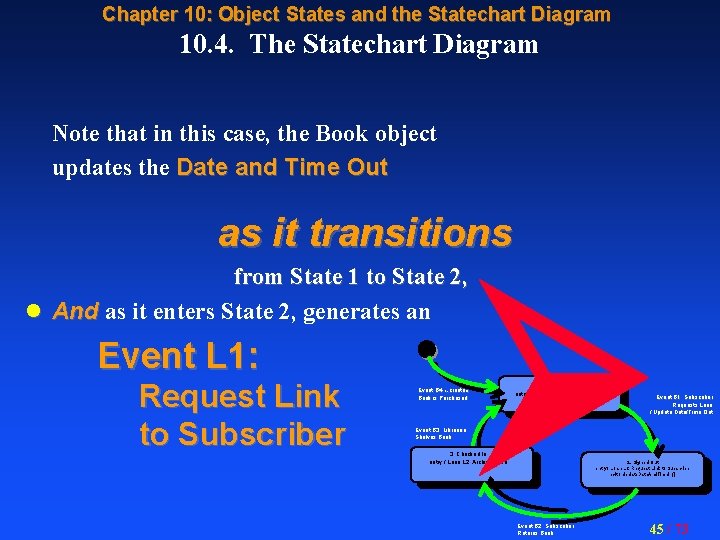
Chapter 10: Object States and the Statechart Diagram 10. 4. The Statechart Diagram Note that in this case, the Book object updates the Date and Time Out as it transitions from State 1 to State 2, l And as it enters State 2, generates an Event L 1: Request Link to Subscriber Event B 4: «create» Book is Purchased Event B 3: Librarian Shelves Book 1. Shelved entry / Update Date & time Shelved 3. Checked In entry / Loan. L 2: Archive Loan Event B 1: Subscriber Requests Loan / Update Date/Time Out 2. Signed Out entry / Loan. L 1: Request Link to Subscriber exit / Update. Date. And. Time. In() Event B 2: Subscriber Returns Book 45 / 73
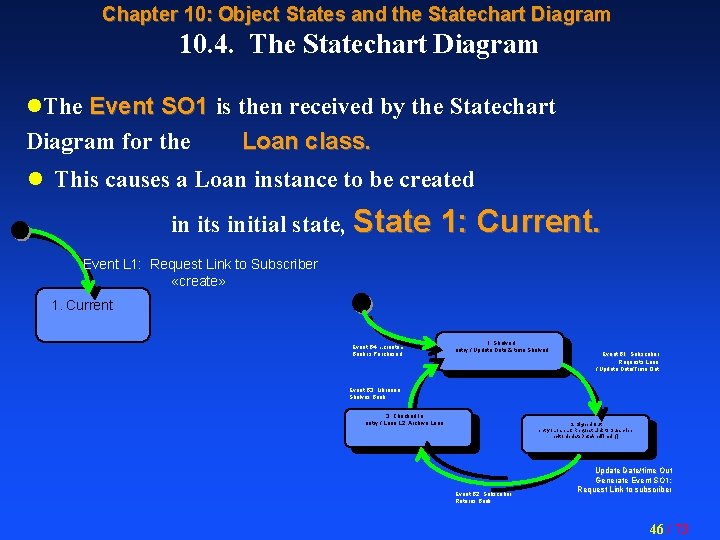
Chapter 10: Object States and the Statechart Diagram 10. 4. The Statechart Diagram l. The Event SO 1 is then received by the Statechart Diagram for the Loan class. l This causes a Loan instance to be created in its initial state, State 1: Current. Event L 1: Request Link to Subscriber «create» 1. Current Event B 4: «create» Book is Purchased 1. Shelved entry / Update Date & time Shelved Event B 1: Subscriber Requests Loan / Update Date/Time Out Event B 3: Librarian Shelves Book 3. Checked In entry / Loan. L 2: Archive Loan 2. Signed Out entry / Loan. L 1: Request Link to Subscriber exit / Update. Date. And. Time. In() Event B 2: Subscriber Returns Book Update Date/time Out Generate Event SO 1: Request Link to subscriber 46 / 73
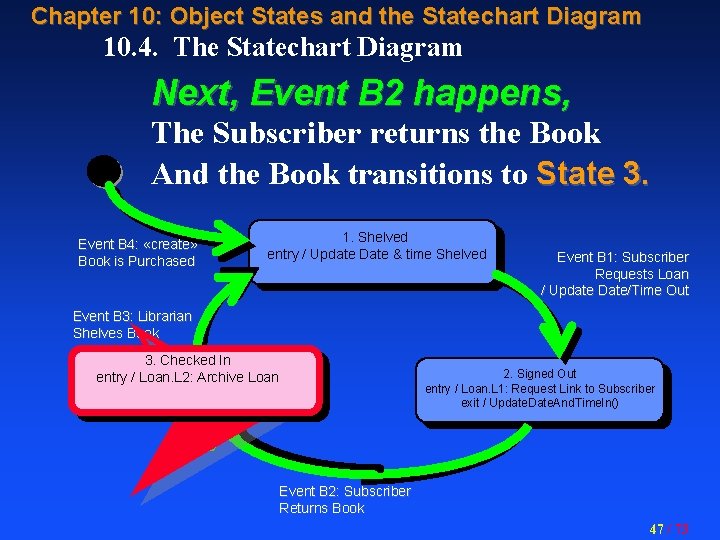
Chapter 10: Object States and the Statechart Diagram 10. 4. The Statechart Diagram Next, Event B 2 happens, The Subscriber returns the Book And the Book transitions to State 3. Event B 4: «create» Book is Purchased 1. Shelved entry / Update Date & time Shelved Event B 1: Subscriber Requests Loan / Update Date/Time Out Event B 3: Librarian Shelves Book 3. Checked In entry / Loan. L 2: Archive Loan 2. Signed Out entry / Loan. L 1: Request Link to Subscriber exit / Update. Date. And. Time. In() Event B 2: Subscriber Returns Book 47 / 73
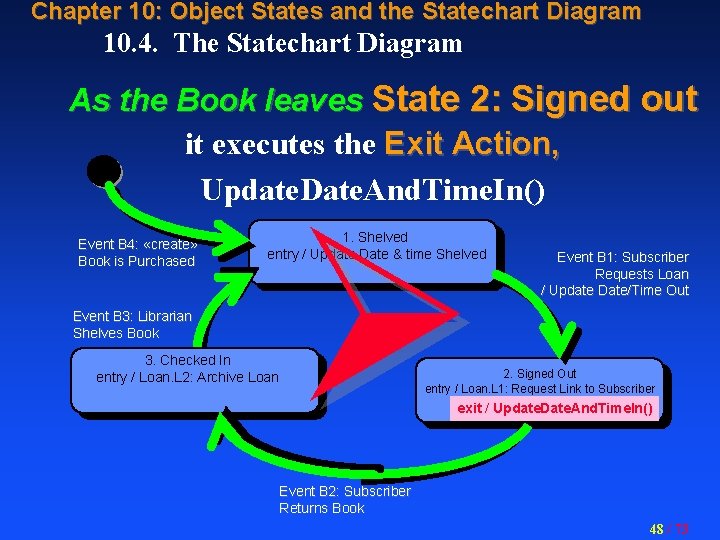
Chapter 10: Object States and the Statechart Diagram 10. 4. The Statechart Diagram As the Book leaves State 2: Signed out it executes the Exit Action, Update. Date. And. Time. In() Event B 4: «create» Book is Purchased 1. Shelved entry / Update Date & time Shelved Event B 3: Librarian Shelves Book 3. Checked In entry / Loan. L 2: Archive Loan Event B 1: Subscriber Requests Loan / Update Date/Time Out 2. Signed Out entry / Loan. L 1: Request Link to Subscriber exit / Update. Date. And. Time. In() Event B 2: Subscriber Returns Book 48 / 73
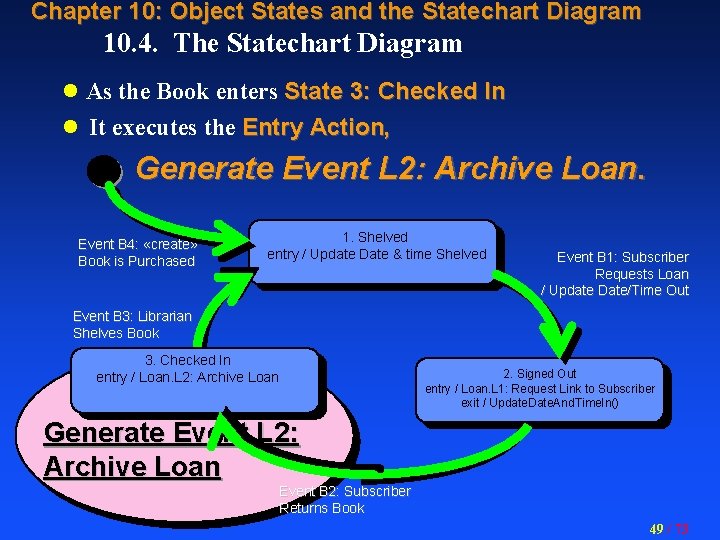
Chapter 10: Object States and the Statechart Diagram 10. 4. The Statechart Diagram l As the Book enters State 3: Checked In l It executes the Entry Action, Generate Event L 2: Archive Loan. Event B 4: «create» Book is Purchased 1. Shelved entry / Update Date & time Shelved Event B 1: Subscriber Requests Loan / Update Date/Time Out Event B 3: Librarian Shelves Book 3. Checked In entry / Loan. L 2: Archive Loan 2. Signed Out entry / Loan. L 1: Request Link to Subscriber exit / Update. Date. And. Time. In() Generate Event L 2: Archive Loan Event B 2: Subscriber Returns Book 49 / 73
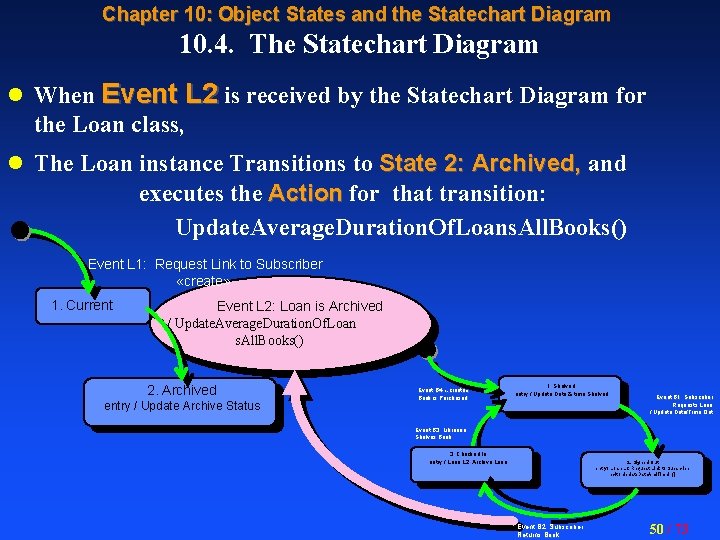
Chapter 10: Object States and the Statechart Diagram 10. 4. The Statechart Diagram l When Event L 2 is received by the Statechart Diagram for the Loan class, l The Loan instance Transitions to State 2: Archived, and executes the Action for that transition: Update. Average. Duration. Of. Loans. All. Books() Event L 1: Request Link to Subscriber «create» 1. Current Event L 2: Loan is Archived / Update. Average. Duration. Of. Loan s. All. Books() 2. Archived entry / Update Archive Status Event B 4: «create» Book is Purchased 1. Shelved entry / Update Date & time Shelved Event B 1: Subscriber Requests Loan / Update Date/Time Out Event B 3: Librarian Shelves Book 3. Checked In entry / Loan. L 2: Archive Loan 2. Signed Out entry / Loan. L 1: Request Link to Subscriber exit / Update. Date. And. Time. In() Event B 2: Subscriber Returns Book 50 / 73
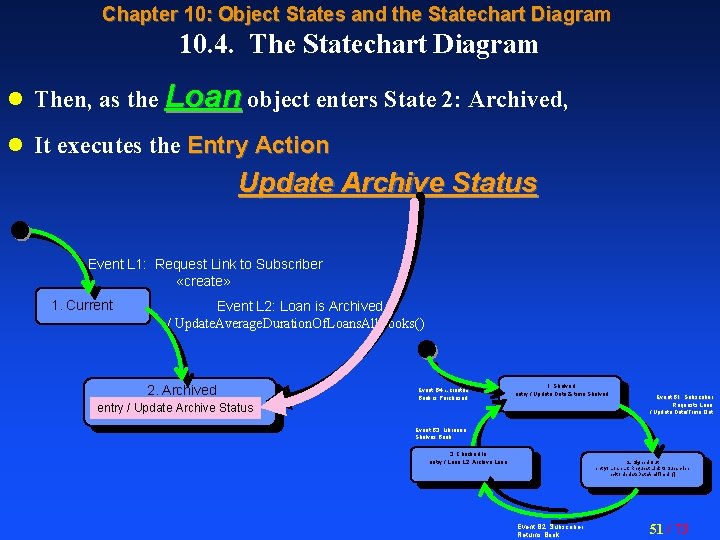
Chapter 10: Object States and the Statechart Diagram 10. 4. The Statechart Diagram l Then, as the Loan object enters State 2: Archived, l It executes the Entry Action Update Archive Status Event L 1: Request Link to Subscriber «create» 1. Current Event L 2: Loan is Archived / Update. Average. Duration. Of. Loans. All. Books() 2. Archived Event B 4: «create» Book is Purchased 1. Shelved entry / Update Date & time Shelved entry / Update Archive Status Event B 1: Subscriber Requests Loan / Update Date/Time Out Event B 3: Librarian Shelves Book 3. Checked In entry / Loan. L 2: Archive Loan 2. Signed Out entry / Loan. L 1: Request Link to Subscriber exit / Update. Date. And. Time. In() Event B 2: Subscriber Returns Book 51 / 73
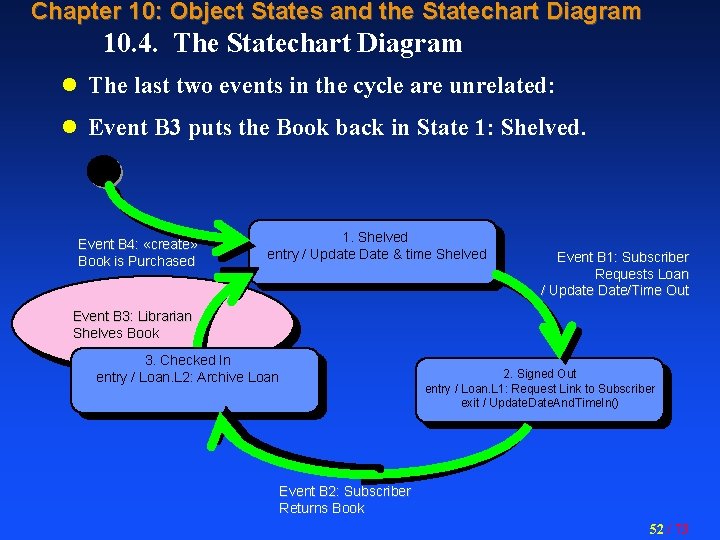
Chapter 10: Object States and the Statechart Diagram 10. 4. The Statechart Diagram l The last two events in the cycle are unrelated: l Event B 3 puts the Book back in State 1: Shelved. Event B 4: «create» Book is Purchased 1. Shelved entry / Update Date & time Shelved Event B 1: Subscriber Requests Loan / Update Date/Time Out Event B 3: Librarian Shelves Book 3. Checked In entry / Loan. L 2: Archive Loan 2. Signed Out entry / Loan. L 1: Request Link to Subscriber exit / Update. Date. And. Time. In() Event B 2: Subscriber Returns Book 52 / 73
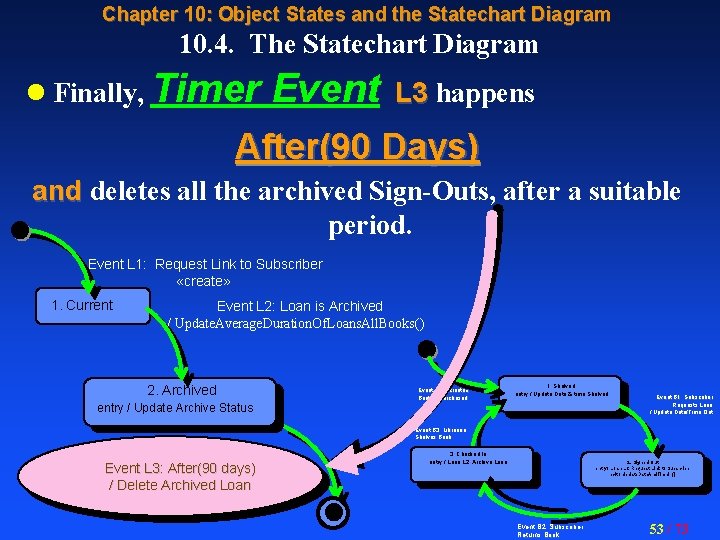
Chapter 10: Object States and the Statechart Diagram 10. 4. The Statechart Diagram l Finally, Timer Event L 3 happens After(90 Days) and deletes all the archived Sign-Outs, after a suitable period. Event L 1: Request Link to Subscriber «create» 1. Current Event L 2: Loan is Archived / Update. Average. Duration. Of. Loans. All. Books() 2. Archived Event B 4: «create» Book is Purchased 1. Shelved entry / Update Date & time Shelved entry / Update Archive Status Event B 1: Subscriber Requests Loan / Update Date/Time Out Event B 3: Librarian Shelves Book Event L 3: After(90 days) / Delete Archived Loan 3. Checked In entry / Loan. L 2: Archive Loan 2. Signed Out entry / Loan. L 1: Request Link to Subscriber exit / Update. Date. And. Time. In() Event B 2: Subscriber Returns Book 53 / 73
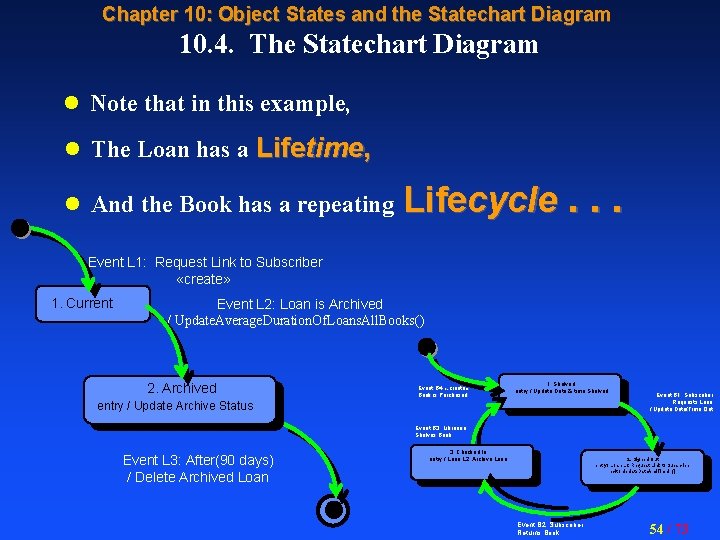
Chapter 10: Object States and the Statechart Diagram 10. 4. The Statechart Diagram l Note that in this example, l The Loan has a Lifetime, l And the Book has a repeating Lifecycle. . . Event L 1: Request Link to Subscriber «create» 1. Current Event L 2: Loan is Archived / Update. Average. Duration. Of. Loans. All. Books() 2. Archived Event B 4: «create» Book is Purchased 1. Shelved entry / Update Date & time Shelved entry / Update Archive Status Event B 1: Subscriber Requests Loan / Update Date/Time Out Event B 3: Librarian Shelves Book Event L 3: After(90 days) / Delete Archived Loan 3. Checked In entry / Loan. L 2: Archive Loan 2. Signed Out entry / Loan. L 1: Request Link to Subscriber exit / Update. Date. And. Time. In() Event B 2: Subscriber Returns Book 54 / 73
Chapter 10: Object States and the Statechart Diagram 10. 1 10. 2. 10. 3. 10. 4. Lifetimes and Lifecycles. Events and States. Transitions and Actions. The Statechart Diagram. 10. 5. Object Lifecycles on the Statechart Diagram. 10. 6. The State Transition Table (STT). 55 / 73
10. 5. Object Lifecycles on the Statechart Definition: Diagram. An Object Lifecycle consists of the various states that an object may transition through, The set of permissible transitions, and the sequencing of those states and transitions. 56 / 73
10. 5. Object Lifecycles on the Statechart Diagram. The Lifecycle also includes Actions for each state, event and transition, Actions that are executed each time the object enters or leaves that state or executes the transition 57 / 73
Chapter 10: Object States and the Statechart Diagram 10. 5. Object Lifecycles on the Statechart Diagram But which classes need a Statechart Diagram? Pick the classes we figure will have an “Interesting Lifecycle, ” Also include those with a lifetime linked with the “interesting” ones. 58 / 73
Chapter 10: Object States and the Statechart Diagram 10. 5. Object Lifecycles on the Statechart Diagram By “Interesting” it means those with: l A repeating operational lifecycle (e. g. , Library Book), l A complex lifetime with branches and backtracks (e. g. , Purchase Order), l A long lifetime with many states, l Anything we judge may be a fruitful source of Actions and operations. 59 / 73
Chapter 10: Object States and the Statechart Diagram 10. 5. Object Lifecycles on the Statechart Diagram l Since all instances in a class have the same lifecycle, l It follows that they all have the same Statechart Diagram. l However, for executing its Statechart Diagram, l Each separate instance proceeds at its own pace, l As events arrive to step it through its lifecycle. We have a name for this. . . 60 / 73
Chapter 10: Object States and the Statechart Diagram 10. 5. Object Lifecycles on the Statechart Diagram Definition: A State Machine is the set of actual historical events that took place during the execution of a Statechart Diagram by a particular specified object instance. 61 / 73
Chapter 10: Object States and the Statechart Diagram 10. 5. Object Lifecycles on the Statechart Diagram Definition: State Machine It may also include the future events that will make up the rest of the path that this instance will take through the Statechart Diagram. 62 / 73
Chapter 10: Object States and the Statechart Diagram 10. 5. Object Lifecycles on the Statechart Diagram Definition: State Machine This is different from the Statechart Diagram itself which may be viewed as an abstraction of the State Machines of all the instances. 63 / 73
Chapter 10: Object States and the Statechart Diagram 10. 5. Object Lifecycles on the Statechart Diagram And now a Completeness Check That we must use on every Statechart Diagram. . . 64 / 73
Chapter 10: Object States and the Statechart Diagram 10. 1 10. 2. 10. 3. 10. 4. 10. 5. Lifetimes and Lifecycles. Events and States. Transitions and Actions. The Statechart Diagram. Object Lifecycles on the Statechart Diagram. 10. 6. The State Transition Table (STT). 65 / 73
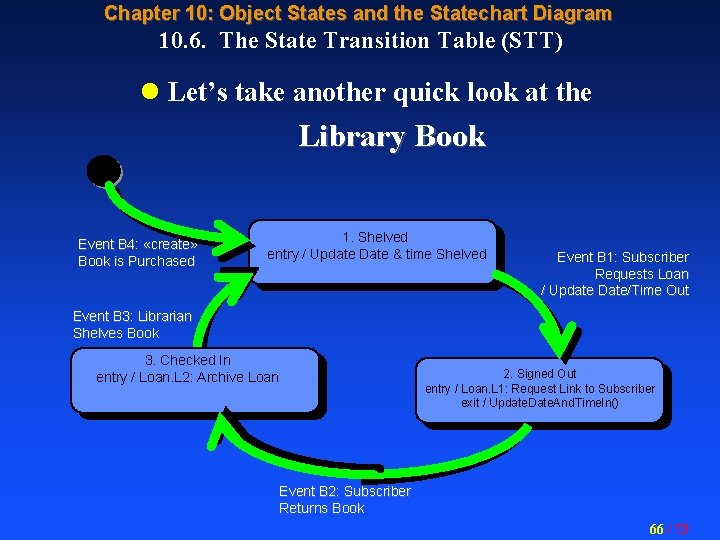
Chapter 10: Object States and the Statechart Diagram 10. 6. The State Transition Table (STT) l Let’s take another quick look at the Library Book Event B 4: «create» Book is Purchased 1. Shelved entry / Update Date & time Shelved Event B 1: Subscriber Requests Loan / Update Date/Time Out Event B 3: Librarian Shelves Book 3. Checked In entry / Loan. L 2: Archive Loan 2. Signed Out entry / Loan. L 1: Request Link to Subscriber exit / Update. Date. And. Time. In() Event B 2: Subscriber Returns Book 66 / 73
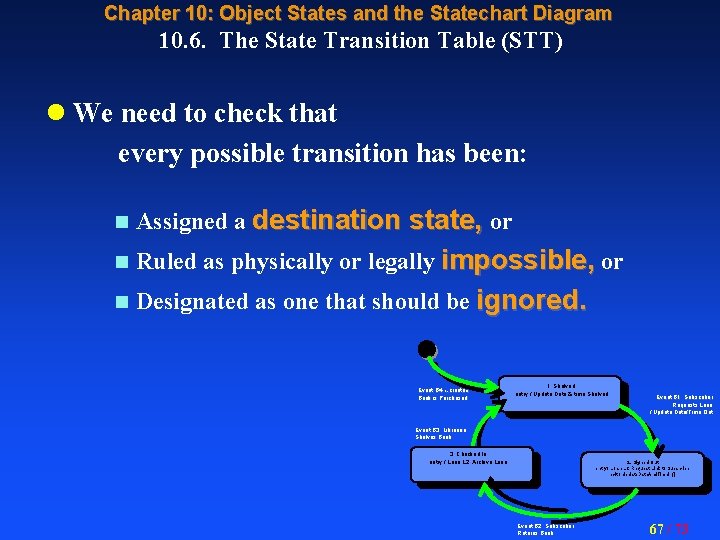
Chapter 10: Object States and the Statechart Diagram 10. 6. The State Transition Table (STT) l We need to check that every possible transition has been: n Assigned a destination state, or n Ruled as physically or legally impossible, or n Designated as one that should be ignored. Event B 4: «create» Book is Purchased 1. Shelved entry / Update Date & time Shelved Event B 1: Subscriber Requests Loan / Update Date/Time Out Event B 3: Librarian Shelves Book 3. Checked In entry / Loan. L 2: Archive Loan 2. Signed Out entry / Loan. L 1: Request Link to Subscriber exit / Update. Date. And. Time. In() Event B 2: Subscriber Returns Book 67 / 73
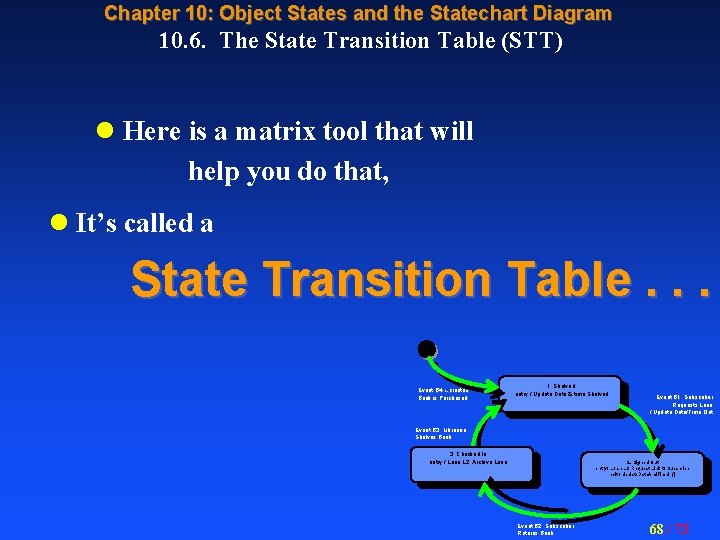
Chapter 10: Object States and the Statechart Diagram 10. 6. The State Transition Table (STT) l Here is a matrix tool that will help you do that, l It’s called a State Transition Table. . . Event B 4: «create» Book is Purchased 1. Shelved entry / Update Date & time Shelved Event B 1: Subscriber Requests Loan / Update Date/Time Out Event B 3: Librarian Shelves Book 3. Checked In entry / Loan. L 2: Archive Loan 2. Signed Out entry / Loan. L 1: Request Link to Subscriber exit / Update. Date. And. Time. In() Event B 2: Subscriber Returns Book 68 / 73
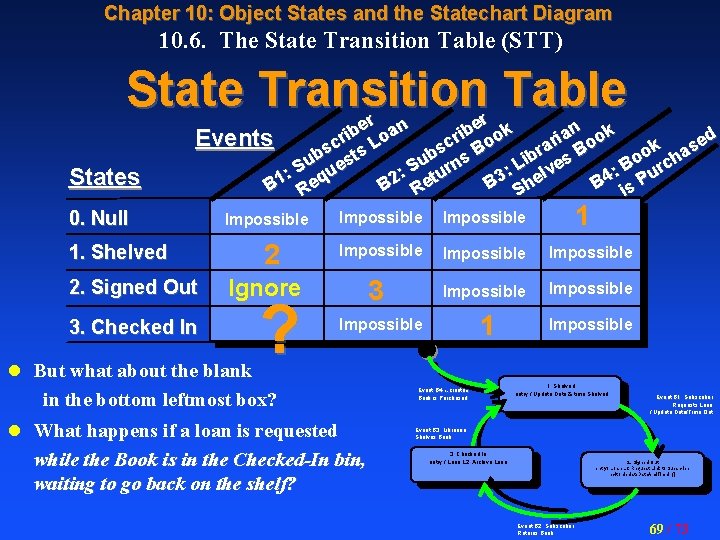
Chapter 10: Object States and the Statechart Diagram 10. 6. The State Transition Table (STT) State Transition Table States r n er k e n ok b b a i i a d o i r o r Events r e c Bo c s. L o k a s s s o ha b st br es B o i u u n L B S ur S ue rc v : : : l : u 3 4 t B She B is P B 2 Re B 1 Req 0. Null 1. Shelved 2. Signed Out 3. Checked In Impossible 2 Impossible Impossible 1 Impossible Ignore ? 1 Impossible 3 Impossible l But what about the blank in the bottom leftmost box? l What happens if a loan is requested while the Book is in the Checked-In bin, waiting to go back on the shelf? Event B 4: «create» Book is Purchased 1. Shelved entry / Update Date & time Shelved Event B 1: Subscriber Requests Loan / Update Date/Time Out Event B 3: Librarian Shelves Book 3. Checked In entry / Loan. L 2: Archive Loan 2. Signed Out entry / Loan. L 1: Request Link to Subscriber exit / Update. Date. And. Time. In() Event B 2: Subscriber Returns Book 69 / 73
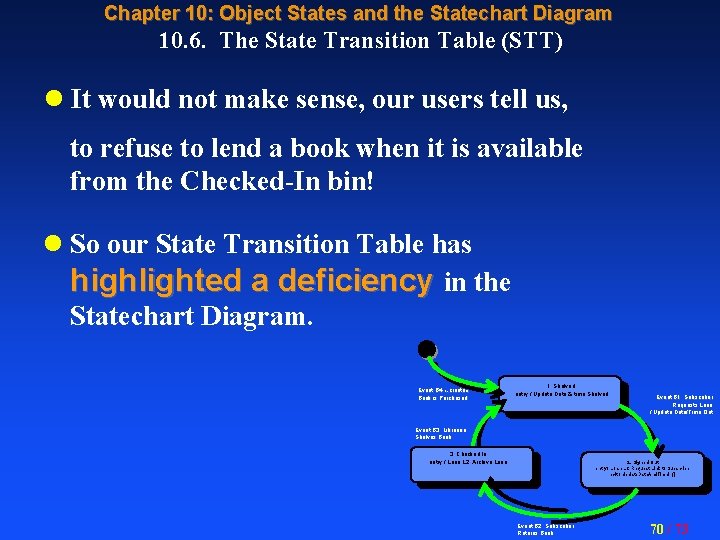
Chapter 10: Object States and the Statechart Diagram 10. 6. The State Transition Table (STT) l It would not make sense, our users tell us, to refuse to lend a book when it is available from the Checked-In bin! l So our State Transition Table has highlighted a deficiency in the Statechart Diagram. Event B 4: «create» Book is Purchased 1. Shelved entry / Update Date & time Shelved Event B 1: Subscriber Requests Loan / Update Date/Time Out Event B 3: Librarian Shelves Book 3. Checked In entry / Loan. L 2: Archive Loan 2. Signed Out entry / Loan. L 1: Request Link to Subscriber exit / Update. Date. And. Time. In() Event B 2: Subscriber Returns Book 70 / 73
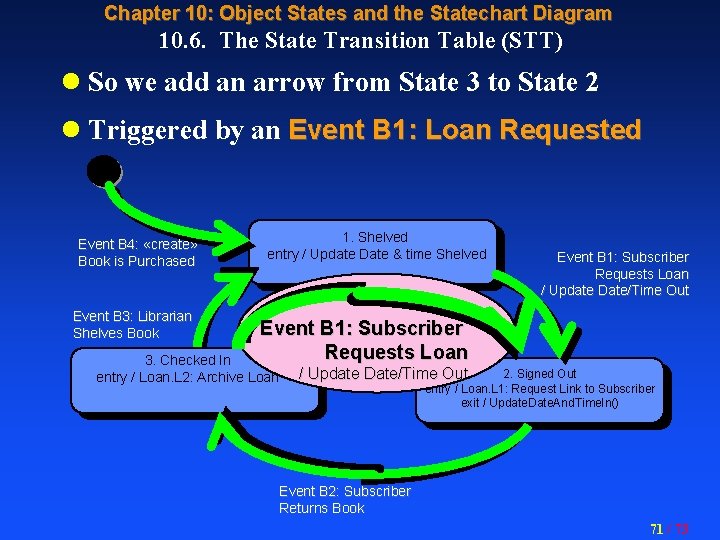
Chapter 10: Object States and the Statechart Diagram 10. 6. The State Transition Table (STT) l So we add an arrow from State 3 to State 2 l Triggered by an Event B 1: Loan Requested Event B 4: «create» Book is Purchased Event B 3: Librarian Shelves Book 1. Shelved entry / Update Date & time Shelved Event B 1: Subscriber Requests Loan / Update Date/Time Out Event B 1: Subscriber Requests Loan 3. Checked In entry / Loan. L 2: Archive Loan / Update Date/Time Out 2. Signed Out entry / Loan. L 1: Request Link to Subscriber exit / Update. Date. And. Time. In() Event B 2: Subscriber Returns Book 71 / 73
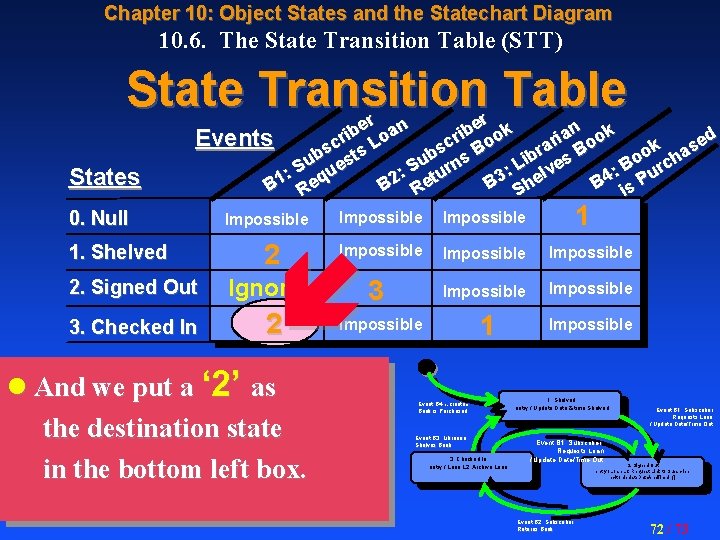
Chapter 10: Object States and the Statechart Diagram 10. 6. The State Transition Table (STT) State Transition Table States r n er k e n ok b b a i i a d o i r o r Events r e c Bo c s. L o k a s s s o ha b st br es B o i u u n L B S ur S ue rc v : : : l : u 3 4 t B She B is P B 2 Re B 1 Req 0. Null 1. Shelved 2. Signed Out 3. Checked In Impossible 2 Ignore 2 l And we put a ‘ 2’ as the destination state in the bottom left box. Impossible 3 1 Impossible Impossible 1 Impossible Event B 4: «create» Book is Purchased Event B 3: Librarian Shelves Book 3. Checked In entry / Loan. L 2: Archive Loan 1. Shelved entry / Update Date & time Shelved Event B 1: Subscriber Requests Loan / Update Date/Time Out 2. Signed Out entry / Loan. L 1: Request Link to Subscriber exit / Update. Date. And. Time. In() Event B 2: Subscriber Returns Book 72 / 73
End of Chapter 10 73 / 73
- Slides: 73