
Chapter 10 lexical analyzer lex Speaker LungSheng Chien

![Grammar of input file of Flex [1] Lex copy data enclosed by %{ and](https://slidetodoc.com/presentation_image/3cdca287db5458e88d89dad145a20108/image-12.jpg "Grammar of input file of Flex [1] Lex copy data enclosed by %{ and")
![Grammar of input file of Flex lex. yy. c default main [2]](https://slidetodoc.com/presentation_image/3cdca287db5458e88d89dad145a20108/image-13.jpg "Grammar of input file of Flex lex. yy. c default main [2]")
![Q 1: can we compile lex. yy. c without –lfl ? [1] We want](https://slidetodoc.com/presentation_image/3cdca287db5458e88d89dad145a20108/image-14.jpg "Q 1: can we compile lex. yy. c without –lfl ? [1] We want")
![Q 1: can we compile lex. yy. c without –lfl ? [2] count_line. txt](https://slidetodoc.com/presentation_image/3cdca287db5458e88d89dad145a20108/image-15.jpg "Q 1: can we compile lex. yy. c without –lfl ? [2] count_line. txt")
![Q 4: can we compile lex. yy. c in VC 6. 0? [1] Download](https://slidetodoc.com/presentation_image/3cdca287db5458e88d89dad145a20108/image-19.jpg "Q 4: can we compile lex. yy. c in VC 6. 0? [1] Download")
![Q 4: can we compile lex. yy. c in VC 6. 0? [3] disable](https://slidetodoc.com/presentation_image/3cdca287db5458e88d89dad145a20108/image-21.jpg "Q 4: can we compile lex. yy. c in VC 6. 0? [3] disable")
![Syntax of regular expression [1] metasequence description . matches any single character except newline](https://slidetodoc.com/presentation_image/3cdca287db5458e88d89dad145a20108/image-25.jpg "Syntax of regular expression [1] metasequence description . matches any single character except newline")
![Syntax of regular expression [2] metasequence description * matches the preceding element zero or](https://slidetodoc.com/presentation_image/3cdca287db5458e88d89dad145a20108/image-26.jpg "Syntax of regular expression [2] metasequence description * matches the preceding element zero or")
![Example: based-10 integer one digit of regular expression [0 -9] positive integer is composed](https://slidetodoc.com/presentation_image/3cdca287db5458e88d89dad145a20108/image-27.jpg "Example: based-10 integer one digit of regular expression [0 -9] positive integer is composed")
![Finite state machine (FSM) integer -? [0 -9]+ minus [0 -9] S 0 [0](https://slidetodoc.com/presentation_image/3cdca287db5458e88d89dad145a20108/image-29.jpg "Finite state machine (FSM) integer -? [0 -9]+ minus [0 -9] S 0 [0")
![Exercise: extract real number -? [0 -9]*. [0 -9]+(([Ee][-+]? [0 -9]+)? ) • why](https://slidetodoc.com/presentation_image/3cdca287db5458e88d89dad145a20108/image-33.jpg "Exercise: extract real number -? [0 -9]*. [0 -9]+(([Ee][-+]? [0 -9]+)? ) • why")
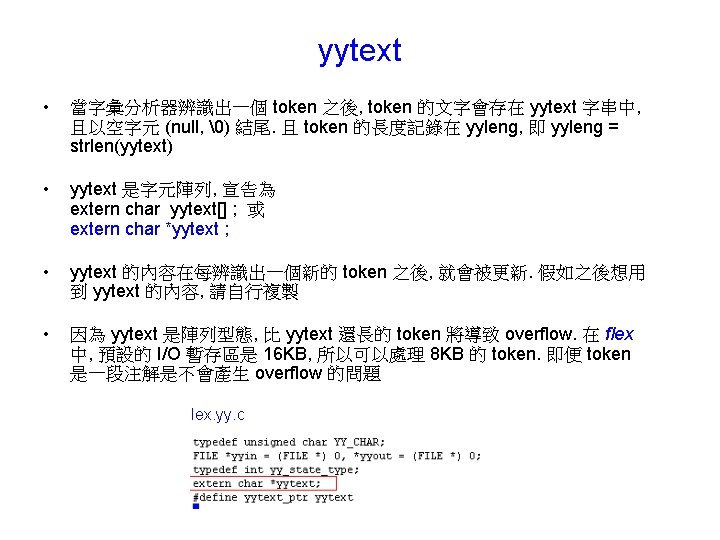
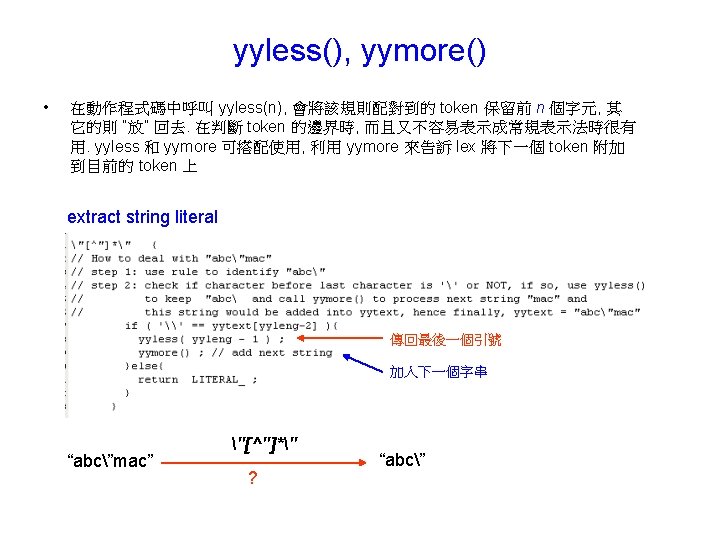
![Analyzing process input buffer [1] regular expression yytext “abc”mac” "[^"]*" “ a b c](https://slidetodoc.com/presentation_image/3cdca287db5458e88d89dad145a20108/image-42.jpg "Analyzing process input buffer [1] regular expression yytext “abc”mac” \"[^\"]*\" “ a b c")
![Analyzing process input buffer [2] regular expression yytext “abc”mac” "[^"]*" “ a b c](https://slidetodoc.com/presentation_image/3cdca287db5458e88d89dad145a20108/image-43.jpg "Analyzing process input buffer [2] regular expression yytext “abc”mac” \"[^\"]*\" “ a b c")
![Analyzing process input buffer [3] regular expression yytext “abc”mac” "[^"]*" “ a b c](https://slidetodoc.com/presentation_image/3cdca287db5458e88d89dad145a20108/image-44.jpg "Analyzing process input buffer [3] regular expression yytext “abc”mac” \"[^\"]*\" “ a b c")
![y. tab. h main. cpp driver: show all tokens [1]](https://slidetodoc.com/presentation_image/3cdca287db5458e88d89dad145a20108/image-52.jpg "y. tab. h main. cpp driver: show all tokens [1]")
![driver: show all tokens [2] configure. txt 1. Space character is removed automatically 2.](https://slidetodoc.com/presentation_image/3cdca287db5458e88d89dad145a20108/image-53.jpg "driver: show all tokens [2] configure. txt 1. Space character is removed automatically 2.")
- Slides: 56
Chapter 10 lexical analyzer (lex) Speaker: Lung-Sheng Chien Reference book: John R. Levine, lex & yacc 中譯本, 林偉豪譯 Reference ppt: Lecture 2: Lexical Analysis, CS 440/540, George Mason university Reference URL: http: //dinosaur. compilertools. net/ Online manual: http: //dinosaur. compilertools. net/flex/index. html
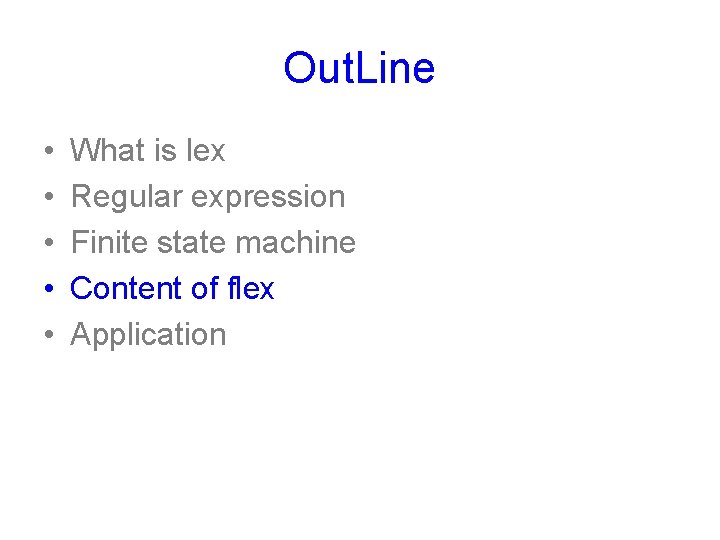
Out. Line • • • What is lex Regular expression Finite state machine Content of flex Application
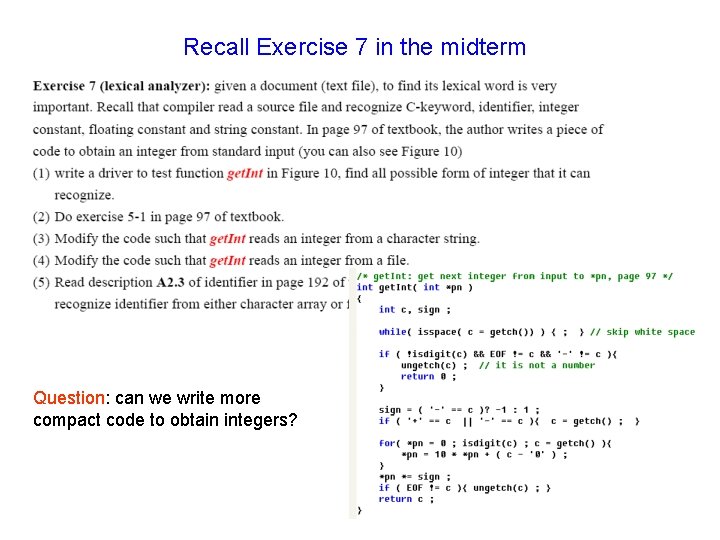
Recall Exercise 7 in the midterm Question: can we write more compact code to obtain integers?
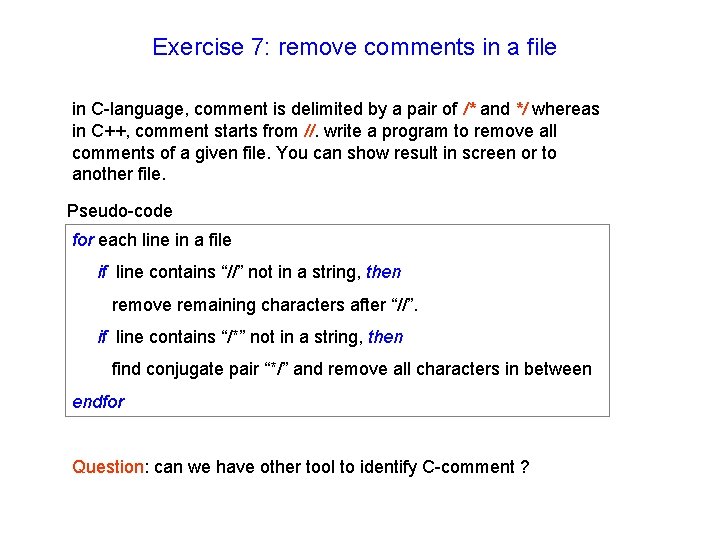
Exercise 7: remove comments in a file in C-language, comment is delimited by a pair of /* and */ whereas in C++, comment starts from //. write a program to remove all comments of a given file. You can show result in screen or to another file. Pseudo-code for each line in a file if line contains “//” not in a string, then remove remaining characters after “//”. if line contains “/*” not in a string, then find conjugate pair “*/” and remove all characters in between endfor Question: can we have other tool to identify C-comment ?
What is lex From http: //dinosaur. compilertools. net/lex/ • Lex is a program generator designed for lexical (語彙的) processing of character input streams. It accepts a high-level, problem oriented specification for character string matching, and produces a program in a general purpose language which recognizes regular expressions (正規表示法). • The regular expressions are specified by the user in the source specifications given to Lex. • Lex generates a deterministic finite automaton (DFA, 有限自動機) from the regular expressions in the source. • The Lex written code recognizes these expressions in an input stream and partitions the input stream into strings matching the expressions.
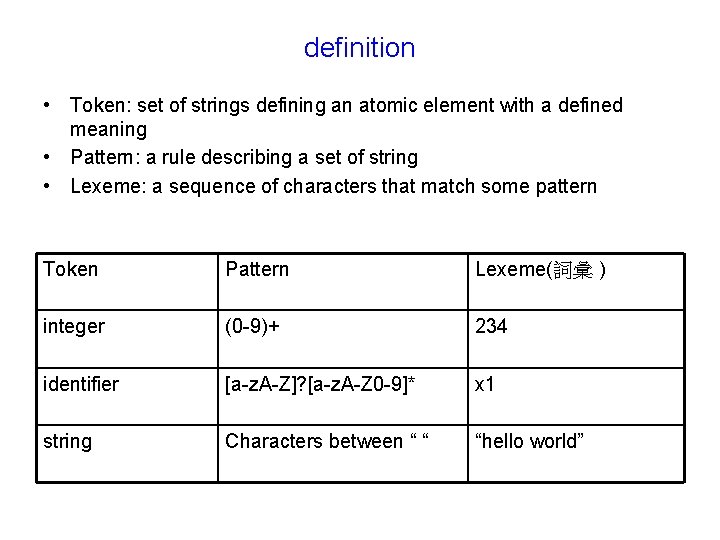
definition • Token: set of strings defining an atomic element with a defined meaning • Pattern: a rule describing a set of string • Lexeme: a sequence of characters that match some pattern Token Pattern Lexeme(詞彙 ) integer (0 -9)+ 234 identifier [a-z. A-Z]? [a-z. A-Z 0 -9]* x 1 string Characters between “ “ “hello world”
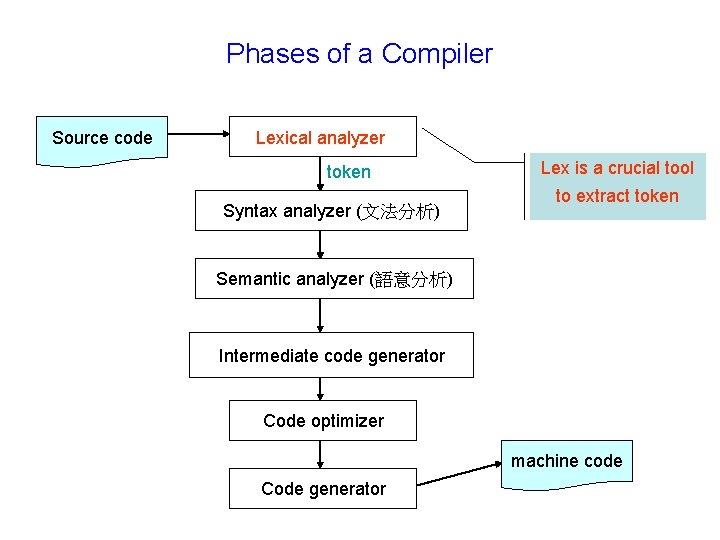
Phases of a Compiler Source code Lexical analyzer token Syntax analyzer (文法分析) Lex is a crucial tool to extract token Semantic analyzer (語意分析) Intermediate code generator Code optimizer machine code Code generator
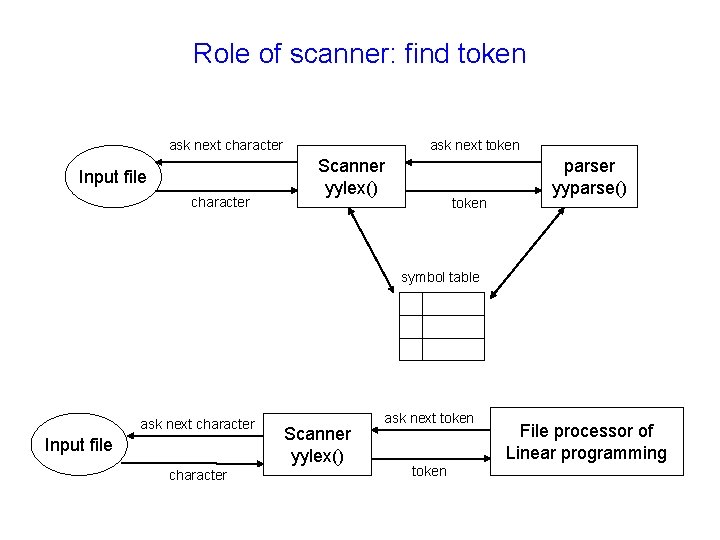
Role of scanner: find token ask next character Input file character ask next token Scanner yylex() token parser yyparse() symbol table ask next character Input file character Scanner yylex() ask next token File processor of Linear programming
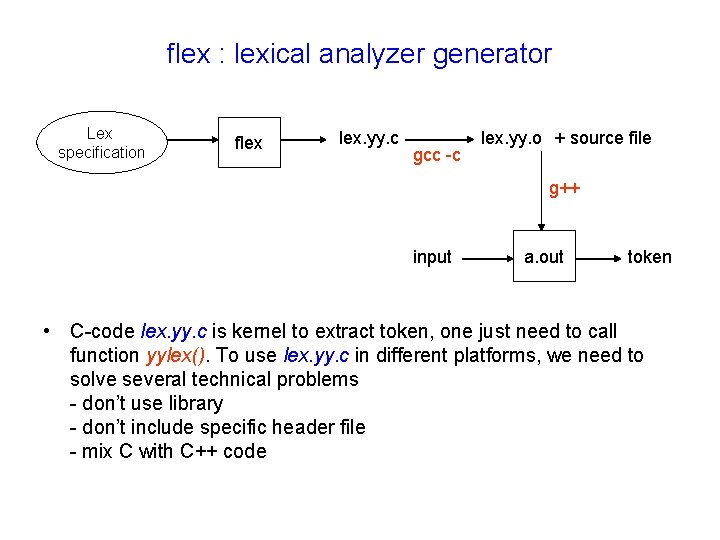
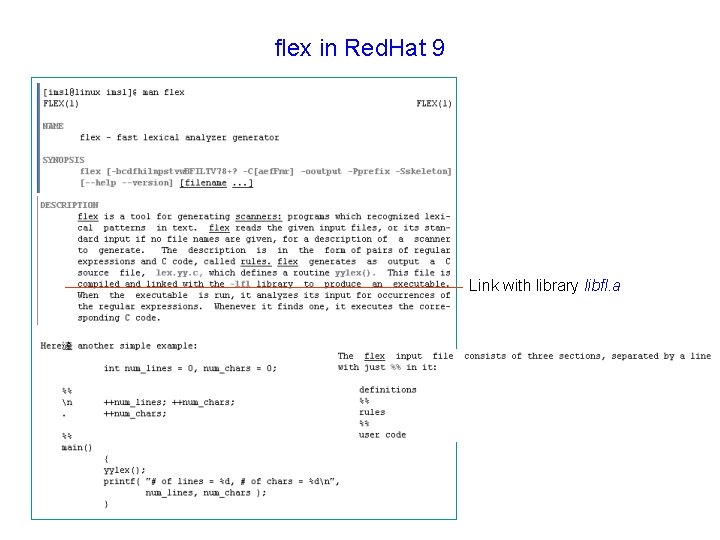
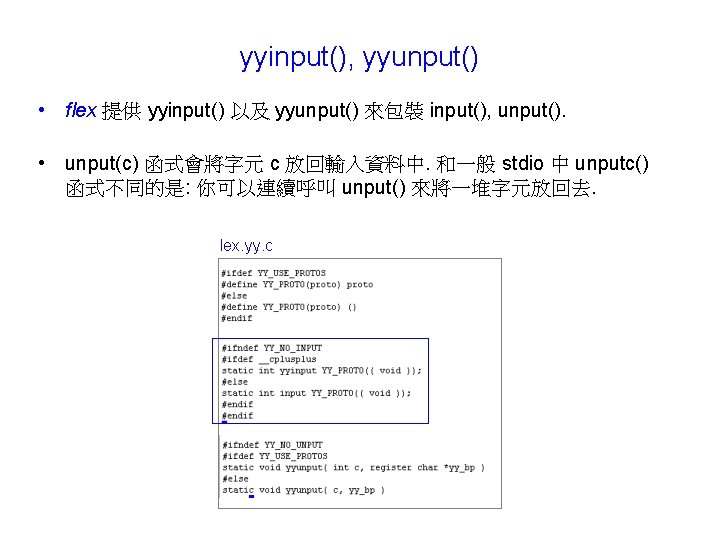
flex : lexical analyzer generator Lex specification flex lex. yy. c gcc -c lex. yy. o + source file g++ input a. out token • C-code lex. yy. c is kernel to extract token, one just need to call function yylex(). To use lex. yy. c in different platforms, we need to solve several technical problems - don’t use library - don’t include specific header file - mix C with C++ code
flex in Red. Hat 9 Link with library libfl. a
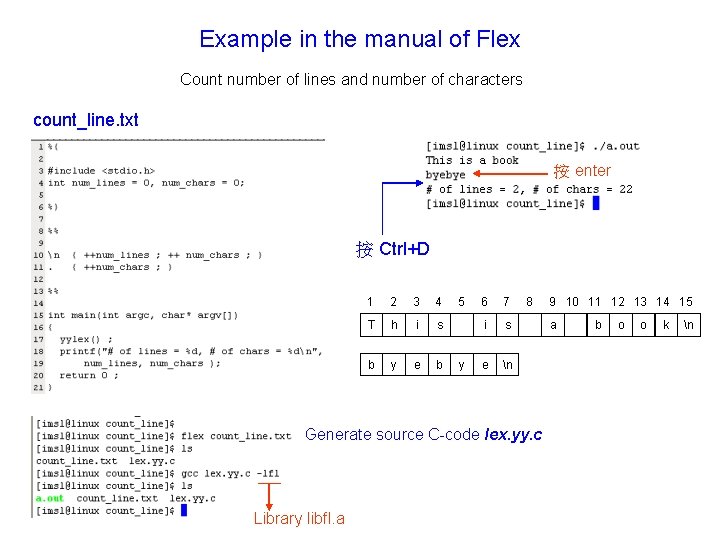
Example in the manual of Flex Count number of lines and number of characters count_line. txt 按 enter 按 Ctrl+D 1 2 3 4 T h i s b y e b 5 y 6 7 i s e n 8 Generate source C-code lex. yy. c Library libfl. a 9 10 11 12 13 14 15 a b o o k n
Grammar of input file of Flex [1] Lex copy data enclosed by %{ and %} into C source file pattern action n { ++num_lines ; ++ num_chars ; } . { ++ num_chars ; } wild card character, represent any character expect line feed n User code grammar of input file definition section %% rule section %% user code pattern action When pattern is matched, then execute action
Grammar of input file of Flex lex. yy. c default main [2]
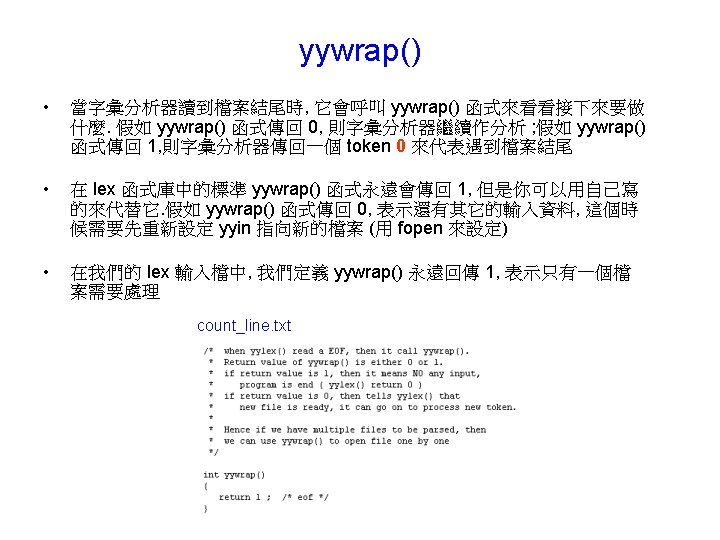
Q 1: can we compile lex. yy. c without –lfl ? [1] We want to use lex. yy. c on different platforms (Linux and windows), to avoid specific library is lesson one. Library libfl. a contains function yywrap() -lfl means “include library libfl. a”, this library locates in /usr/lib contains function yywrap()
Q 1: can we compile lex. yy. c without –lfl ? [2] count_line. txt Implement function yywrap explicitly
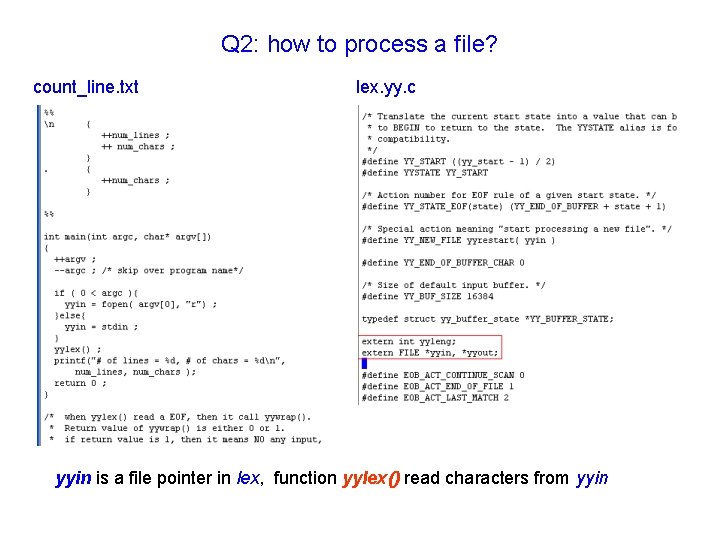
Q 2: how to process a file? count_line. txt lex. yy. c yyin is a file pointer in lex, function yylex() read characters from yyin
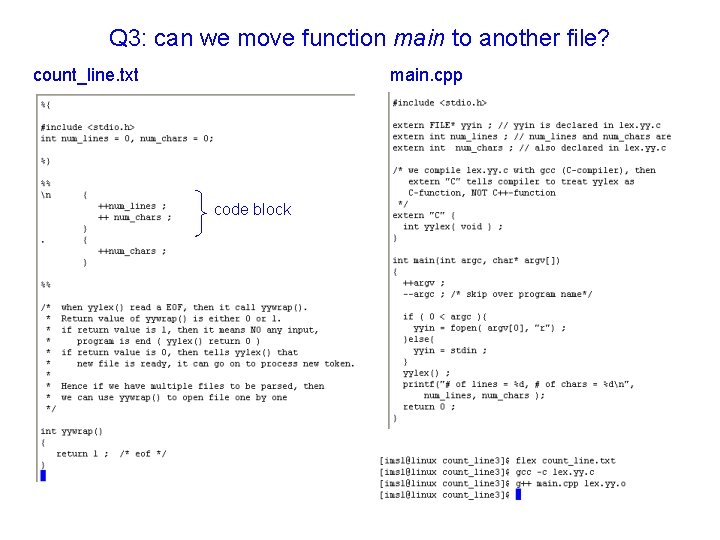
Q 3: can we move function main to another file? count_line. txt main. cpp code block
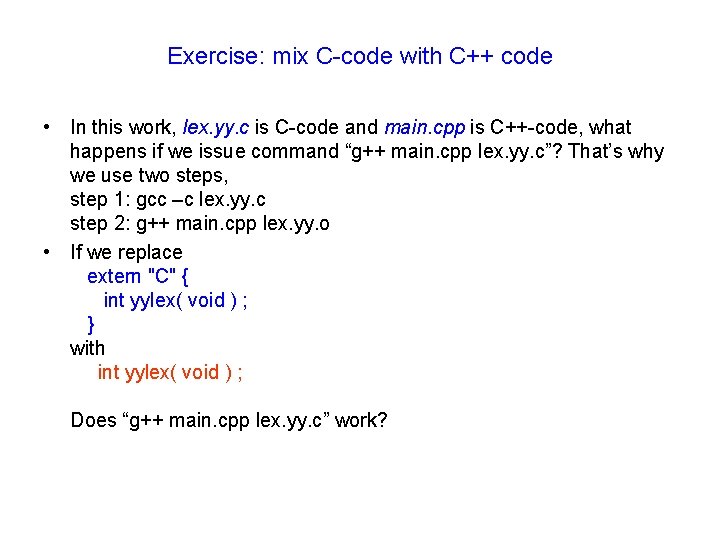
Exercise: mix C-code with C++ code • In this work, lex. yy. c is C-code and main. cpp is C++-code, what happens if we issue command “g++ main. cpp lex. yy. c”? That’s why we use two steps, step 1: gcc –c lex. yy. c step 2: g++ main. cpp lex. yy. o • If we replace extern "C" { int yylex( void ) ; } with int yylex( void ) ; Does “g++ main. cpp lex. yy. c” work?
Q 4: can we compile lex. yy. c in VC 6. 0? [1] Download lex. yy. c and main. cpp in Q 3 into local machine Error occurs when compiling lex. yy. c VC does not have this header file
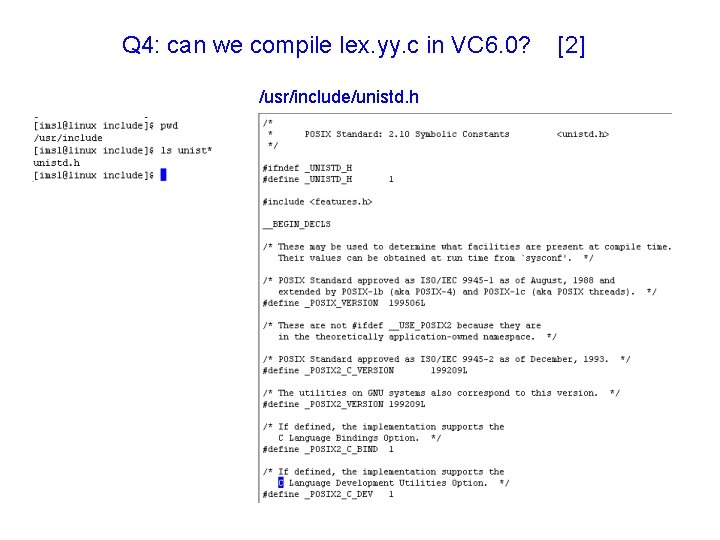
Q 4: can we compile lex. yy. c in VC 6. 0? /usr/include/unistd. h [2]
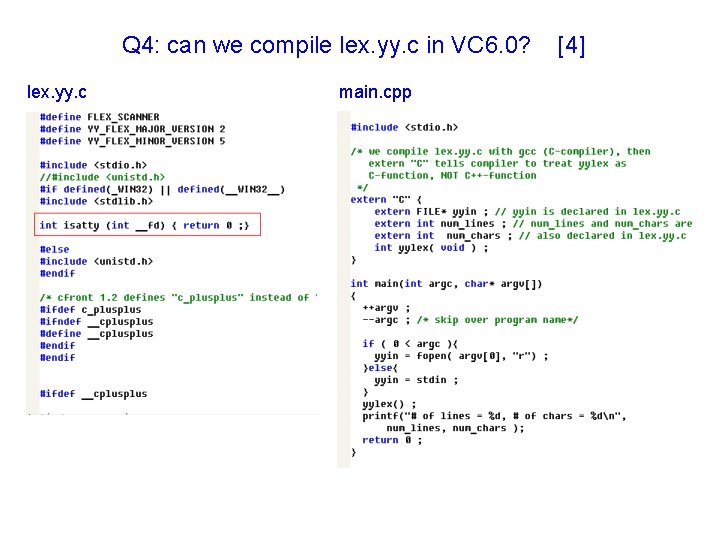
Q 4: can we compile lex. yy. c in VC 6. 0? [3] disable “unistd. h” in VC 6. 0 /usr/include/unistd. h Error occurs since prototype of function isatty is declared in unistd. h
Q 4: can we compile lex. yy. c in VC 6. 0? lex. yy. c main. cpp [4]
Out. Line • • • What is lex Regular expression Finite state machine Content of flex Application
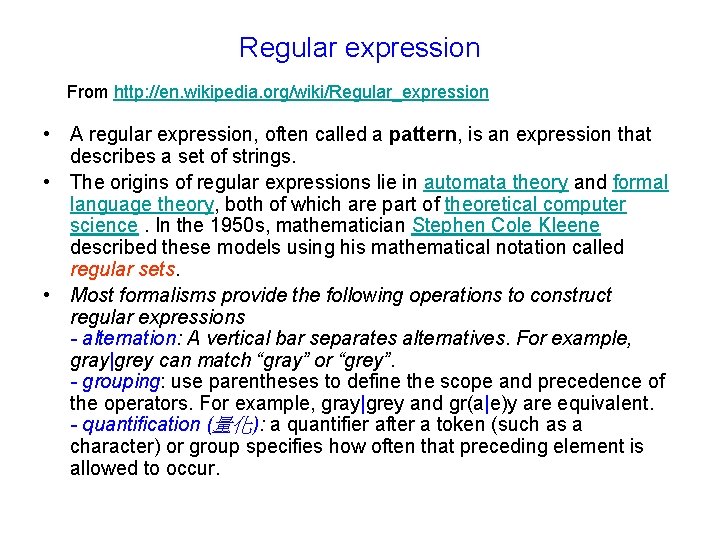
Regular expression From http: //en. wikipedia. org/wiki/Regular_expression • A regular expression, often called a pattern, is an expression that describes a set of strings. • The origins of regular expressions lie in automata theory and formal language theory, both of which are part of theoretical computer science. In the 1950 s, mathematician Stephen Cole Kleene described these models using his mathematical notation called regular sets. • Most formalisms provide the following operations to construct regular expressions - alternation: A vertical bar separates alternatives. For example, gray|grey can match “gray” or “grey”. - grouping: use parentheses to define the scope and precedence of the operators. For example, gray|grey and gr(a|e)y are equivalent. - quantification (量化): a quantifier after a token (such as a character) or group specifies how often that preceding element is allowed to occur.
Syntax of regular expression [1] metasequence description . matches any single character except newline [] matches a single character that is contained within the brackets. [abc] = { a, b, c } [0 -9] = {0, 1, 2, 3, 4, 5, 6, 7, 8, 9} [^ ] matches a single character that is not contained within the brackets. [^abc] = { x is a character : x is not a or b or c } ^ matches the starting position within the string $ matches the ending position of the string or the position just before a string-ending newline {m, n} matches the preceding element at least m and not more than n times. a{3, 5} matches only “aaa”, “aaaa” and “aaaaa”, NOT “aa” <> 在方括號中如果放的是名稱, 且放在樣式開頭的話, 代表這個樣式只用在 某個開始狀態
Syntax of regular expression [2] metasequence description * matches the preceding element zero or more times ab*c matches “ac”, “abbc” + matches the preceding element one or more times [0 -9]+ matches “ 1”, “ 14”, “ 983” ? matches the preceding element zero or one time [0 -9]? matches “ ”, “ 9” | the choice (aka alternation or set union) operator matches either the expression before or the expression after the operator. abc|def matches “abc” or “def” () group to be a new expression (01) denotes string “ 01” escape character * means wild card, * means ASCII code of * “…” 代表引號中的全部字元, 所有引號中的後設字元都失去它們特別的意義, 除 之外 “/*” 代表兩個字元 / 和 *
Example: based-10 integer one digit of regular expression [0 -9] positive integer is composed of many digits [0 -9]+ we need a sign to represent all integers -? [0 -9]+ [0 -9]* is not adequate, since [0 -9]* can accept empty string Accepted string: “-5”, “ 1234”, “ 0000”, “-000”, “ 9276000” Question: How to represent based-16 integer under regular expression?
Out. Line • • • What is lex Regular expression Finite state machine Content of flex Application
Finite state machine (FSM) integer -? [0 -9]+ minus [0 -9] S 0 [0 -9] digit [0 -9] state transition diagram ^[09] ^- trap ^[09] Current state Input token (transition function) Next state description S 0 - minus S 0 is initial state [0 -9] digit minus state recognize string “-” digit [0 -9] digit state recognize string “-[0 -9]+” or “[0 -9]+” trap terminate
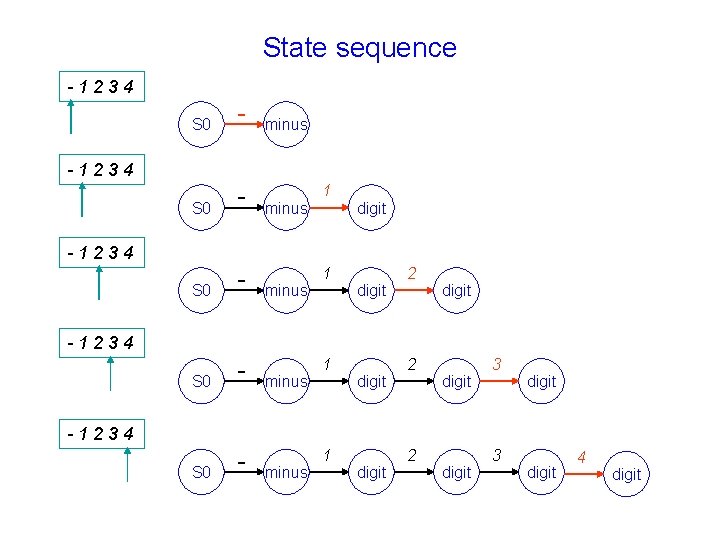
State sequence -1234 S 0 - S 0 - minus -1234 minus 1 digit 2 digit 3 digit 4 digit
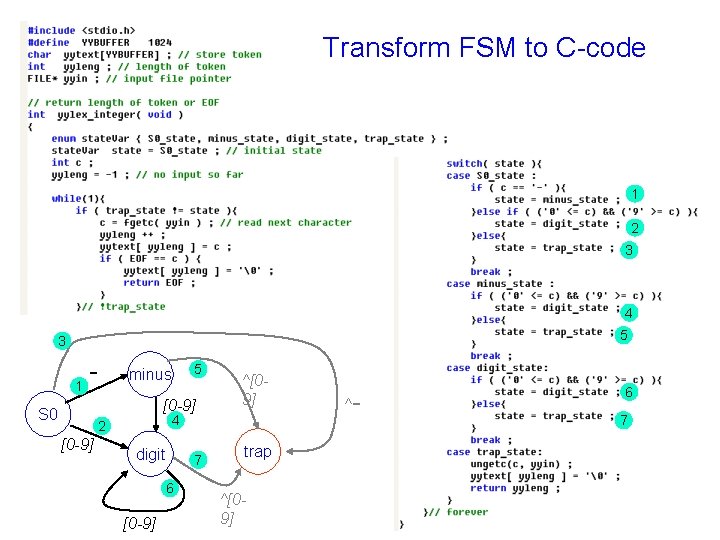
Transform FSM to C-code 1 2 3 4 5 3 1 - 5 minus [0 -9] S 0 4 2 [0 -9] ^[09] digit 7 6 [0 -9] trap ^[09] ^- 6 7
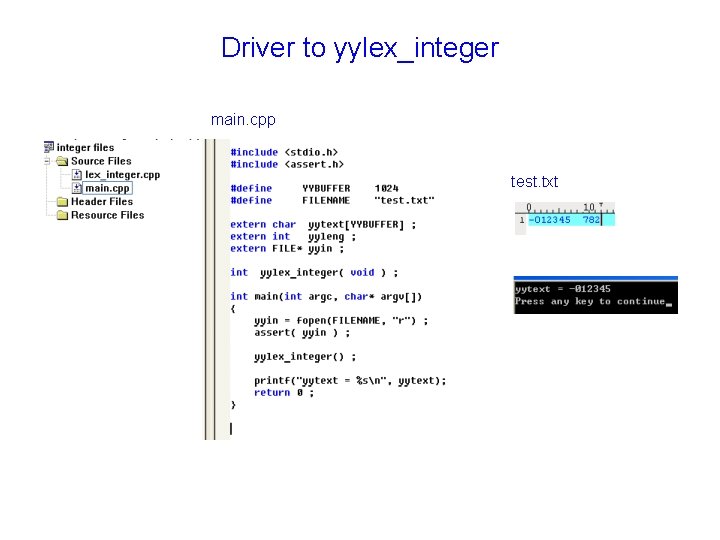
Driver to yylex_integer main. cpp test. txt
Exercise: extract real number -? [0 -9]*. [0 -9]+(([Ee][-+]? [0 -9]+)? ) • why do we need a escape character for dot, “. ” ? • Can this regular expression identify all real numbers? • depict state transition diagram of finite state machine for this regular expression. • Implement this state transition diagram and write a driver to test it • Use flex to identify (1) integer (2) real number, note that you need to neglect space character [tn ]
Out. Line • • • What is lex Regular expression Finite state machine Content of flex Application
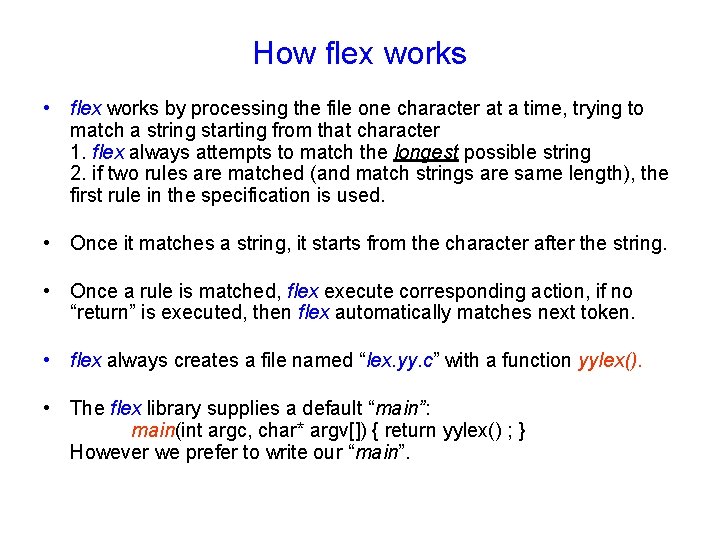
How flex works • flex works by processing the file one character at a time, trying to match a string starting from that character 1. flex always attempts to match the longest possible string 2. if two rules are matched (and match strings are same length), the first rule in the specification is used. • Once it matches a string, it starts from the character after the string. • Once a rule is matched, flex execute corresponding action, if no “return” is executed, then flex automatically matches next token. • flex always creates a file named “lex. yy. c” with a function yylex(). • The flex library supplies a default “main”: main(int argc, char* argv[]) { return yylex() ; } However we prefer to write our “main”.
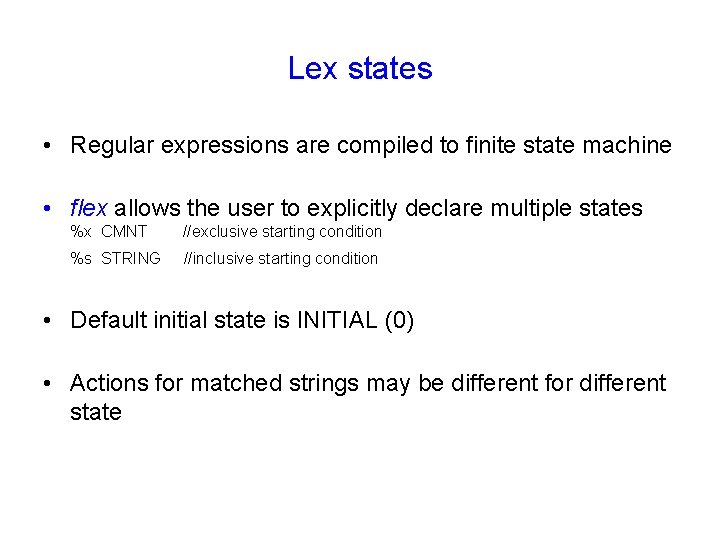
Lex states • Regular expressions are compiled to finite state machine • flex allows the user to explicitly declare multiple states %x CMNT //exclusive starting condition %s STRING //inclusive starting condition • Default initial state is INITIAL (0) • Actions for matched strings may be different for different state
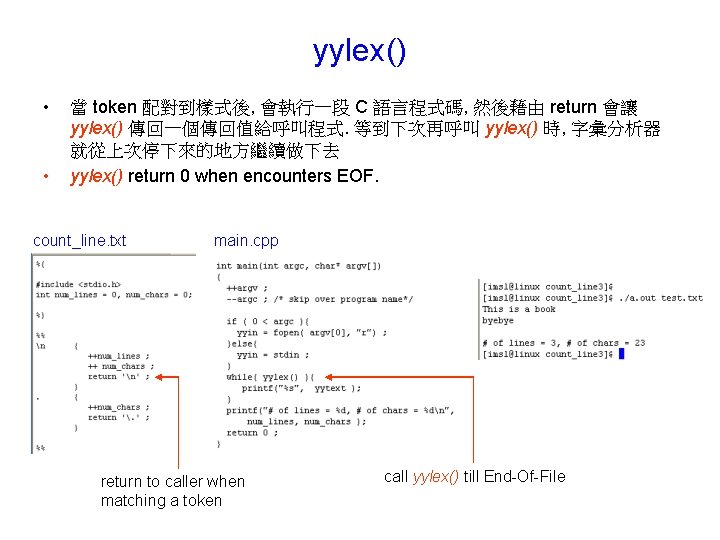
yylex() • • 當 token 配對到樣式後, 會執行一段 C 語言程式碼, 然後藉由 return 會讓 yylex() 傳回一個傳回值給呼叫程式. 等到下次再呼叫 yylex() 時, 字彙分析器 就從上次停下來的地方繼續做下去 yylex() return 0 when encounters EOF. count_line. txt main. cpp return to caller when matching a token call yylex() till End-Of-File
Analyzing process input buffer [1] regular expression yytext “abc”mac” "[^"]*" “ a b c "[^"]*" “ a b c “abc”mac”
Analyzing process input buffer [2] regular expression yytext “abc”mac” "[^"]*" “ a b c “ yyleng = 6 “abc”mac” “ a b c "[^"]*" “ a b c “ m unput character ” “abc”mac” "[^"]*" “ a b c “ m a
Analyzing process input buffer [3] regular expression yytext “abc”mac” "[^"]*" “ a b c “ m a c “abc”mac” fails yytext “ yyleng = 10 a b c “ m a c “ “
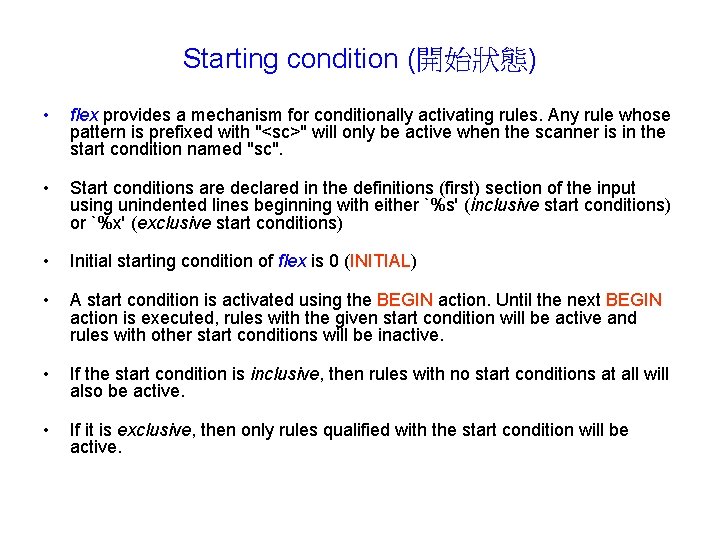
Starting condition (開始狀態) • flex provides a mechanism for conditionally activating rules. Any rule whose pattern is prefixed with "<sc>" will only be active when the scanner is in the start condition named "sc". • Start conditions are declared in the definitions (first) section of the input using unindented lines beginning with either `%s' (inclusive start conditions) or `%x' (exclusive start conditions) • Initial starting condition of flex is 0 (INITIAL) • A start condition is activated using the BEGIN action. Until the next BEGIN action is executed, rules with the given start condition will be active and rules with other start conditions will be inactive. • If the start condition is inclusive, then rules with no start conditions at all will also be active. • If it is exclusive, then only rules qualified with the start condition will be active.
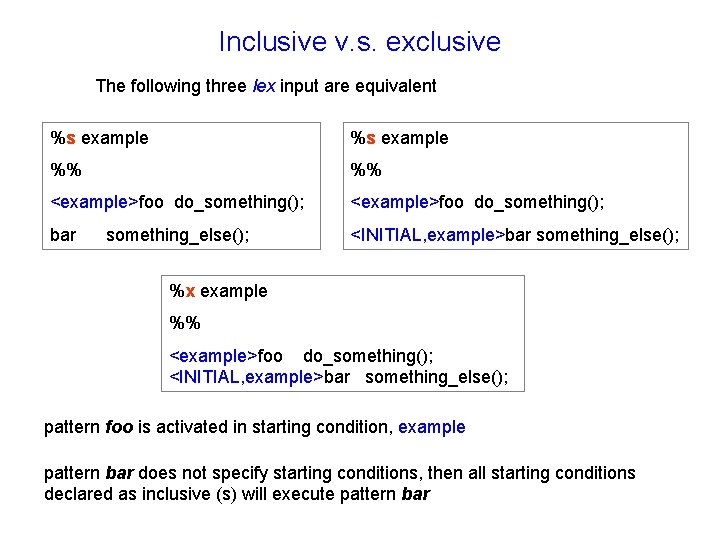
Inclusive v. s. exclusive The following three lex input are equivalent %s example %% %% <example>foo do_something(); bar <INITIAL, example>bar something_else(); %x example %% <example>foo do_something(); <INITIAL, example>bar something_else(); pattern foo is activated in starting condition, example pattern bar does not specify starting conditions, then all starting conditions declared as inclusive (s) will execute pattern bar
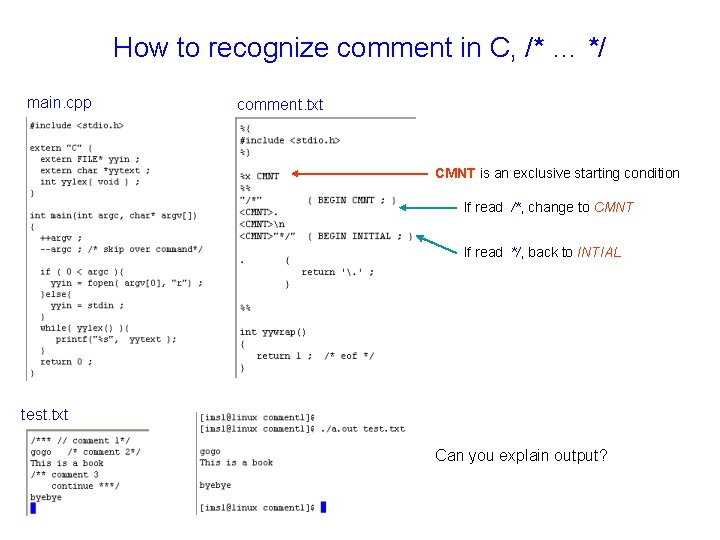
How to recognize comment in C, /* … */ main. cpp comment. txt CMNT is an exclusive starting condition If read /*, change to CMNT If read */, back to INTIAL test. txt Can you explain output?
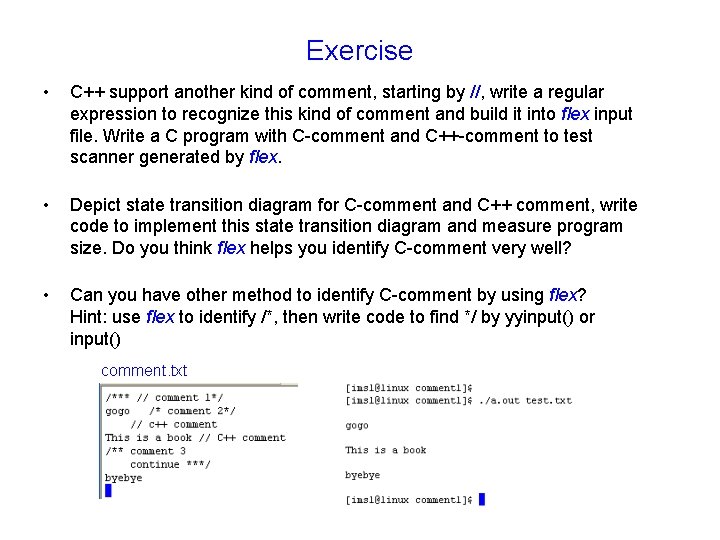
Exercise • C++ support another kind of comment, starting by //, write a regular expression to recognize this kind of comment and build it into flex input file. Write a C program with C-comment and C++-comment to test scanner generated by flex. • Depict state transition diagram for C-comment and C++ comment, write code to implement this state transition diagram and measure program size. Do you think flex helps you identify C-comment very well? • Can you have other method to identify C-comment by using flex? Hint: use flex to identify /*, then write code to find */ by yyinput() or input() comment. txt
Out. Line • • • What is lex Regular expression Finite state machine Content of flex Application - scan configuration file of linear programming - C-program analyzer
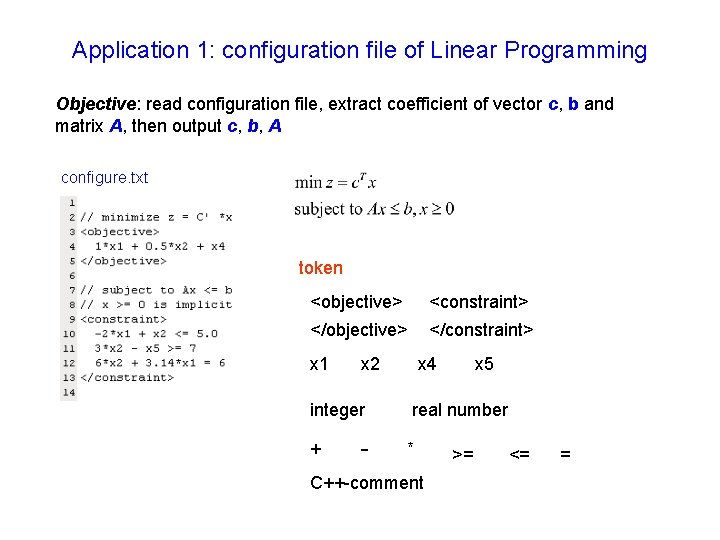
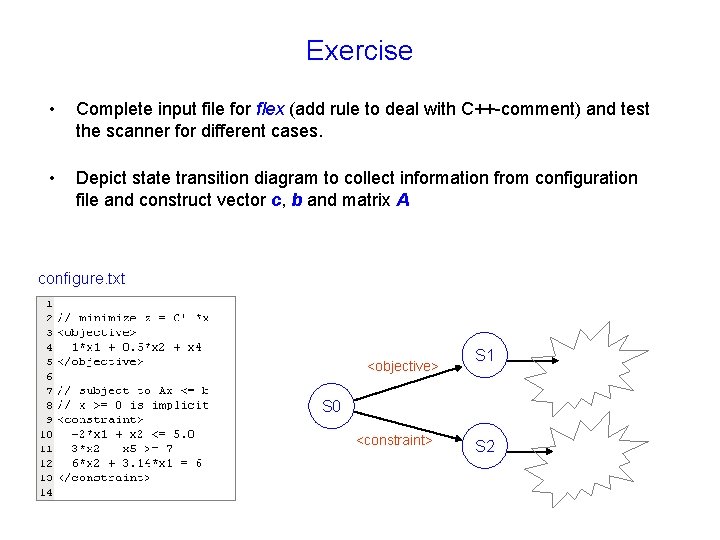
Application 1: configuration file of Linear Programming Objective: read configuration file, extract coefficient of vector c, b and matrix A, then output c, b, A configure. txt token <objective> <constraint> </objective> </constraint> x 1 x 2 integer + - x 4 x 5 real number * C++-comment >= <= =
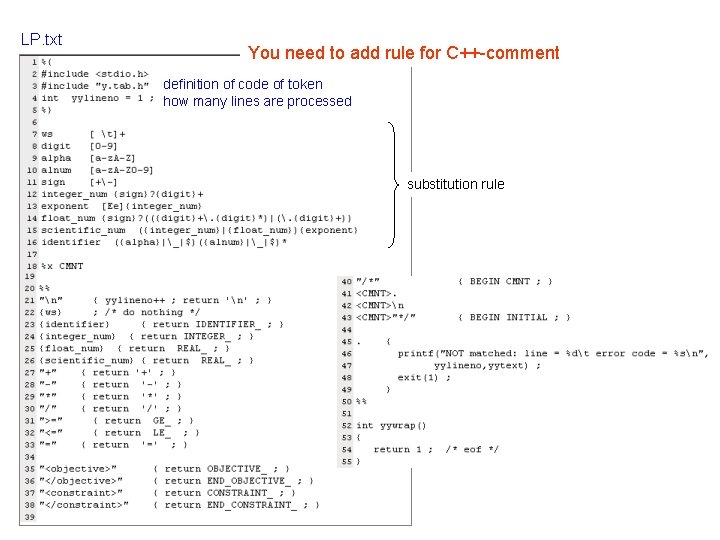
LP. txt You need to add rule for C++-comment definition of code of token how many lines are processed substitution rule
y. tab. h main. cpp driver: show all tokens [1]
driver: show all tokens [2] configure. txt 1. Space character is removed automatically 2. It is not necessary to keep space character between two tokens since flex would identify them very well
Exercise • Complete input file for flex (add rule to deal with C++-comment) and test the scanner for different cases. • Depict state transition diagram to collect information from configuration file and construct vector c, b and matrix A configure. txt <objective> S 1 S 0 <constraint> S 2
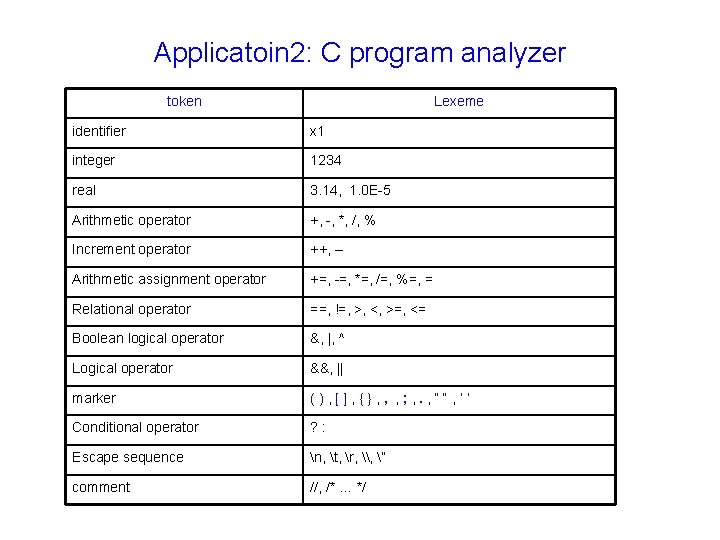
Applicatoin 2: C program analyzer token Lexeme identifier x 1 integer 1234 real 3. 14, 1. 0 E-5 Arithmetic operator +, -, *, /, % Increment operator ++, -- Arithmetic assignment operator +=, -=, *=, /=, %=, = Relational operator ==, !=, >, <, >=, <= Boolean logical operator &, |, ^ Logical operator &&, || marker (), [], {}, , , ; , . , ““, ‘‘ Conditional operator ? : Escape sequence n, t, r, \, ” comment //, /* … */
Exercise • Write a scanner for C-program, we have shown how to write regular expression for identifier, integer, real and comment, you need to add regular expression for - arithmetic operator - logical operator - relational operator - marker - string and character - distinguish keyword (reserved word) from identifier note that you need to define integer-value token for above operator in y. tab. h