
Chapter 10 InputOutput Organization Connections between a CPU
Chapter 10 Input/Output Organization
Connections between a CPU and an I/O device • Types of bus (Figure 10. 1) – Address bus – Data bus – Control bus
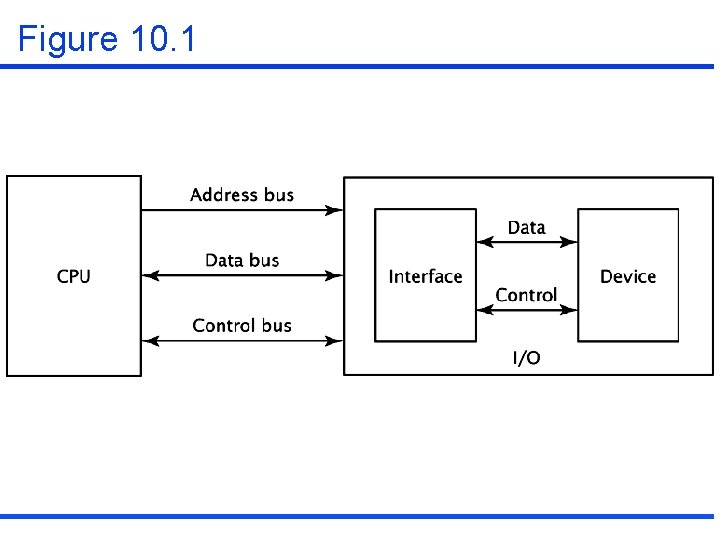
Figure 10. 1
10. 1 Asynchronous data transfer • Synchronous data transfer – It usually occur when peripherals are located within the same computers as the CPU. – It shares a common clock. – Data does not have to travel very far physically. • Asynchronous data transfer – It is used when synchronous transfers are not viable. – It uses control signals and their associated hardware to coordinate the movement of data. – A common clock is not needed.

10. 1 Asynchronous data transfer (continued) • Types of asynchronous data transfer – Source-initiated data transfer – Destination-initiated data transfer – Handshaking – Destination-initiated data transfer with handshaking
Source-initiated data transfer • The source outputs its data, then strobes a control signal for a set amount of time. • The destination device reads in the data during this time. • Example: Figure 10. 2
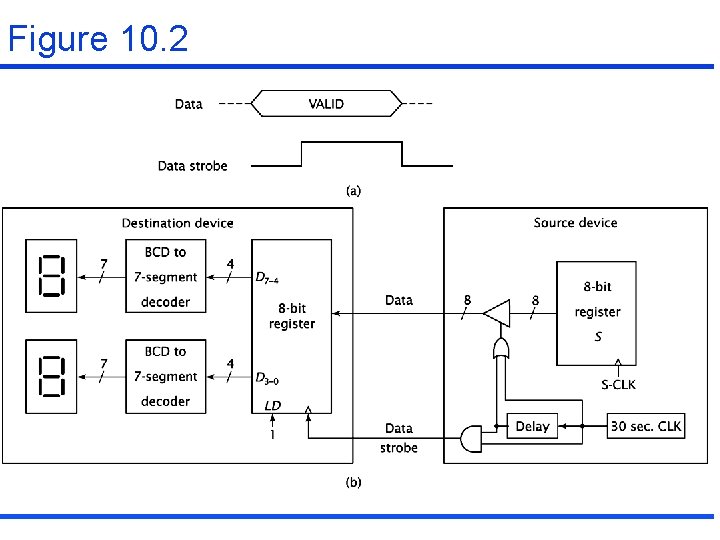
Figure 10. 2
Destination-initiated data transfer • The destination device initiates data transfer • The destination device transmits a data strobe signal to the source device and after a set delay, the destination device reads in this data and desserts the data strobe. • Example: Figure 10. 3
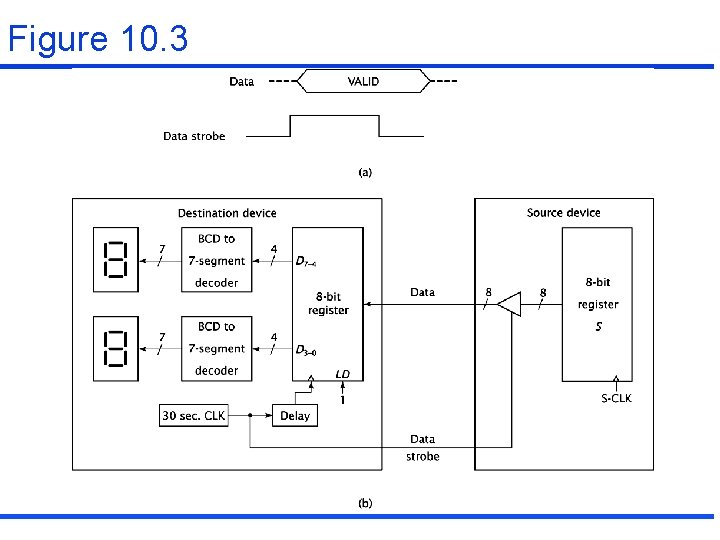
Figure 10. 3
Source-initiated data transfer with handshaking • It is useful when the time of data transfer between the destination device and the source device. • It uses an additional control signal, data acknowledge signal. • Figure 10. 4
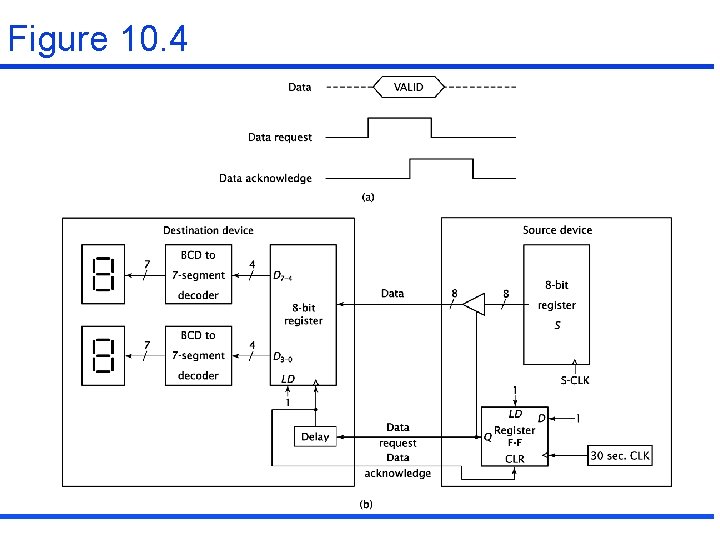
Figure 10. 4
Destination-initiated data transfer with handshaking • It is useful when the time of data transfer between the destination device and the source device. • It uses an additional control signal, dataready signal. • Figure 10. 5
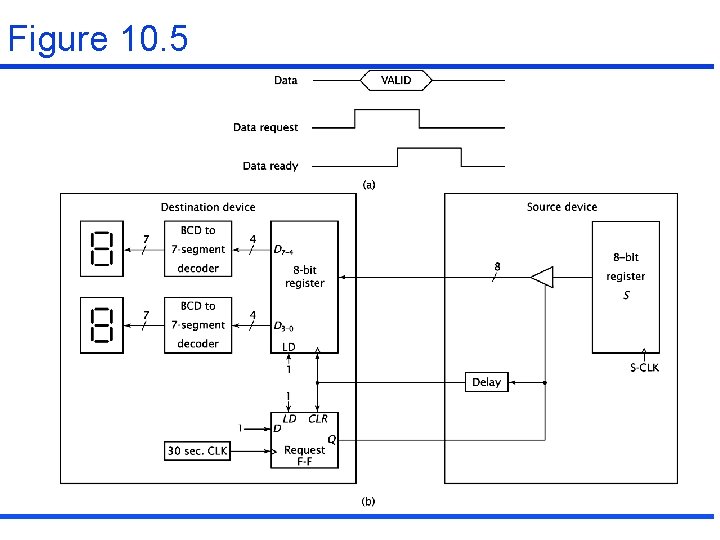
Figure 10. 5
10. 2 Programmed I/O • Programmed I/O – A program instruction causes CPU to input or output data. • Input port – It makes data available to the CPU when the CPU would read the data from the data bus.
10. 2 Programmed I/O(continued) • Thermostat control example – Read temperature(T) from external sensor. – If (T thermostat setting+2 ) turn on air conditioner – If (T thermostat setting and air conditioner is on) turn off air conditioner – If (T thermostat setting-2 ) turn on heater – If (T thermostat setting and air heater is on) turn off heater. – Go to start of sequence
10. 2 Programmed I/O(continued) • Thermostat controller (program in Figure 10. 7) – Memory mapped I/O • 0 FFFFH: input port (Figure 10. 6) • 0 FFFEH: thermostat setting • 0 FFFDH: output port 01 = turn on air conditioning 02 = turn off air conditioning 03 = turn on heat 04=turn off heat • 1000 H: current status 00 = heat and air conditioning are both off FF = heat on FE=air conditioning off
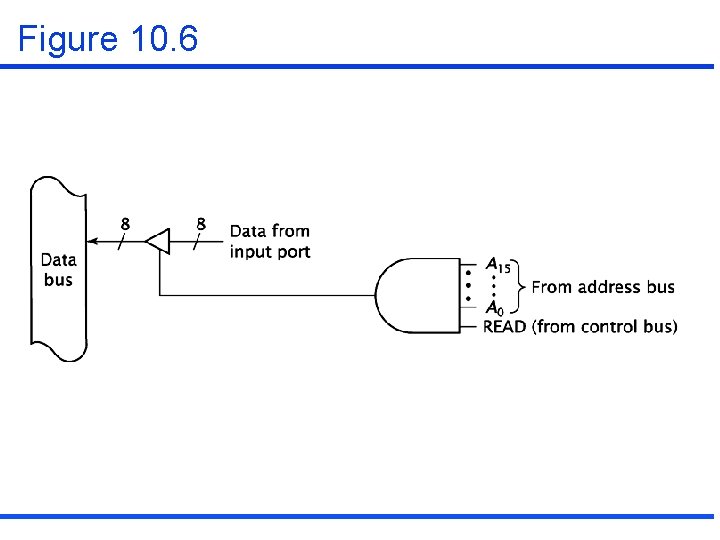
Figure 10. 6
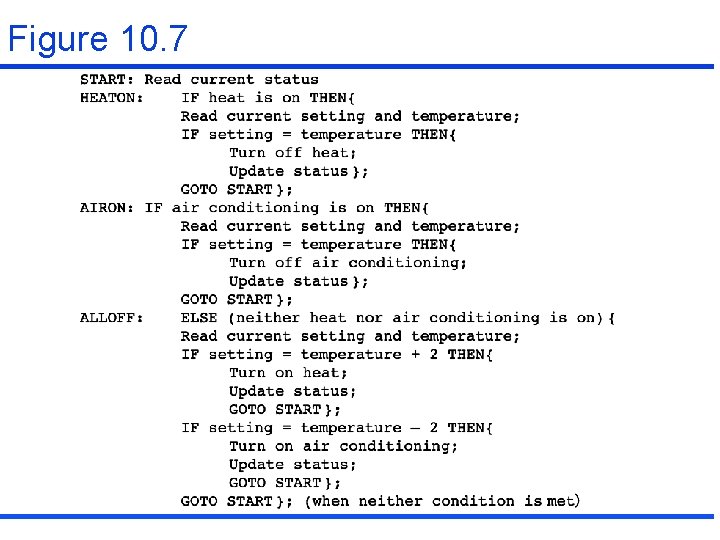
Figure 10. 7
10. 2 Programmed I/O(continued) • Isolated I/O instructions (Table 10. 1) – INPT – OTPT • Control Signal – IO/M’
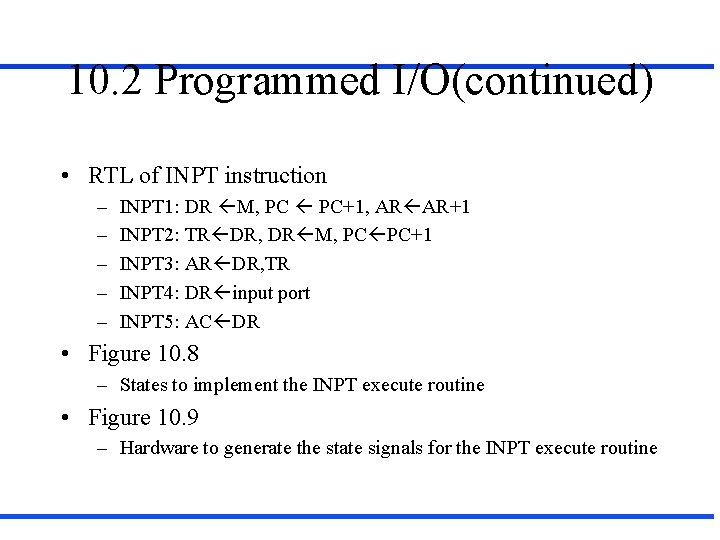
10. 2 Programmed I/O(continued) • RTL of INPT instruction – – – INPT 1: DR M, PC PC+1, AR AR+1 INPT 2: TR DR, DR M, PC PC+1 INPT 3: AR DR, TR INPT 4: DR input port INPT 5: AC DR • Figure 10. 8 – States to implement the INPT execute routine • Figure 10. 9 – Hardware to generate the state signals for the INPT execute routine
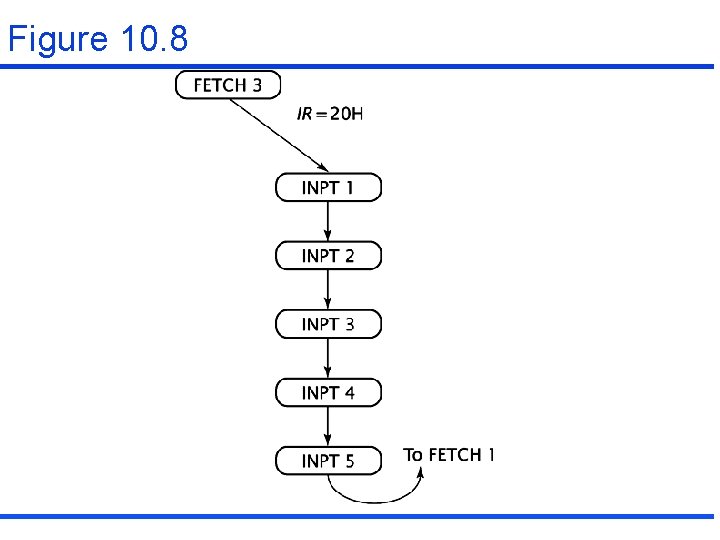
Figure 10. 8
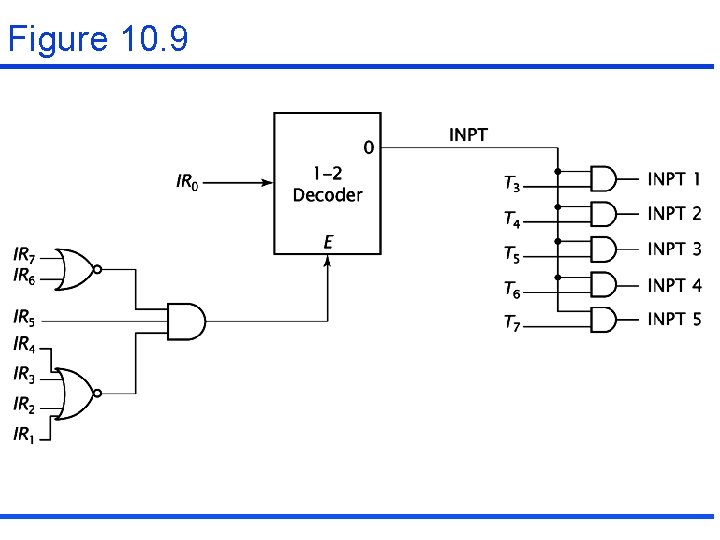
Figure 10. 9
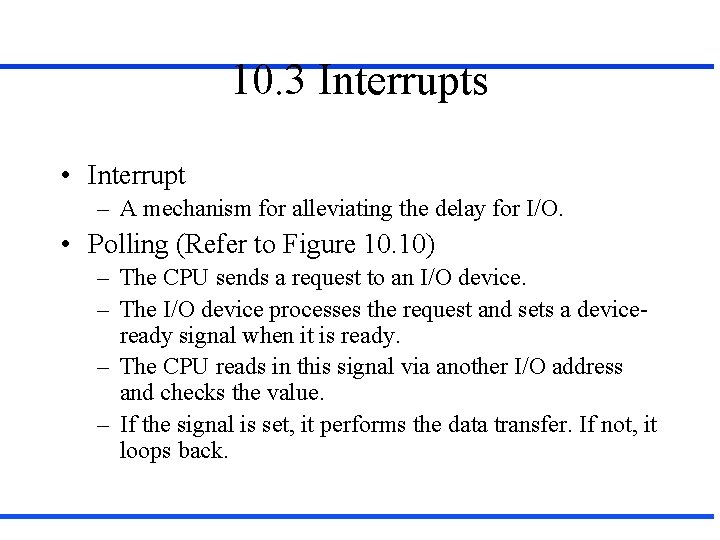
10. 3 Interrupts • Interrupt – A mechanism for alleviating the delay for I/O. • Polling (Refer to Figure 10. 10) – The CPU sends a request to an I/O device. – The I/O device processes the request and sets a deviceready signal when it is ready. – The CPU reads in this signal via another I/O address and checks the value. – If the signal is set, it performs the data transfer. If not, it loops back.
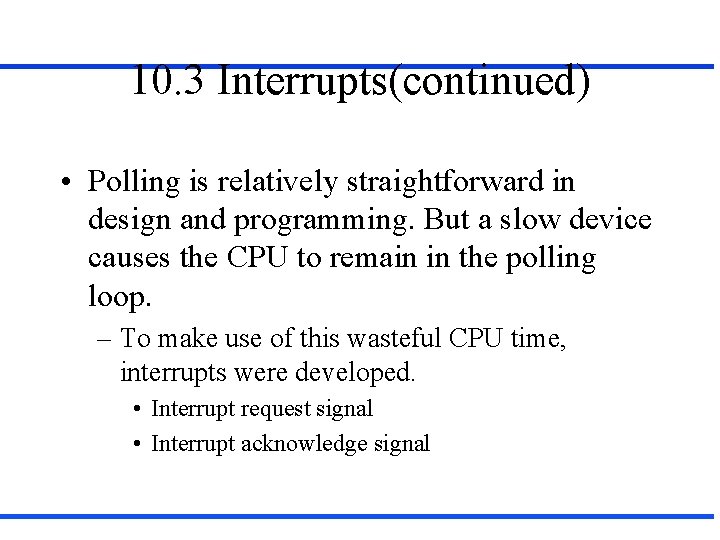
10. 3 Interrupts(continued) • Polling is relatively straightforward in design and programming. But a slow device causes the CPU to remain in the polling loop. – To make use of this wasteful CPU time, interrupts were developed. • Interrupt request signal • Interrupt acknowledge signal
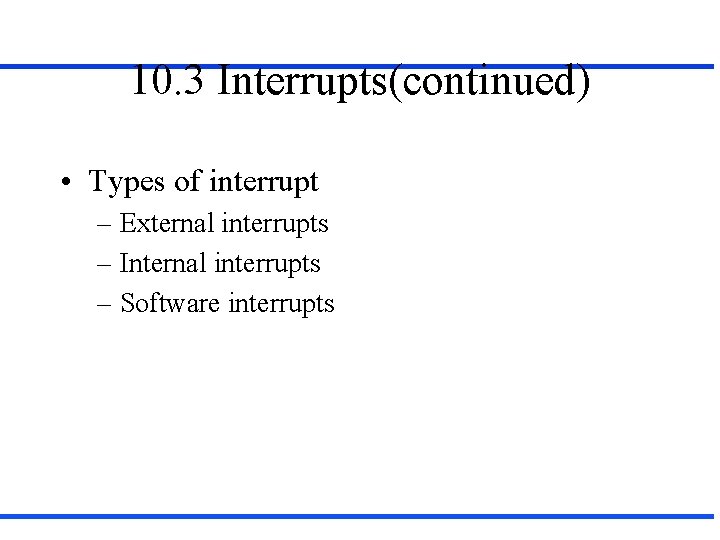
10. 3 Interrupts(continued) • Types of interrupt – External interrupts – Internal interrupts – Software interrupts
10. 3 Interrupts(continued) • Processing interrupt: by interrupt handler – Do nothing until the current instruction has been executed – Get the address of the handler routine(vector interrupts) – Invoke the handler routine
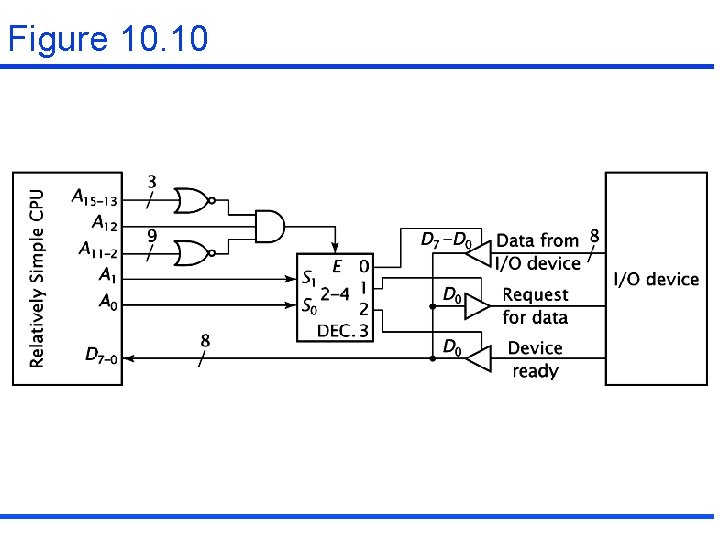
Figure 10. 10
10. 3 Interrupts(continued) Interrupt hardware and priority A non-vectored interrupt for a single device : Figure 10. 11 A vectored interrupt for a single device : Figure 10. 12
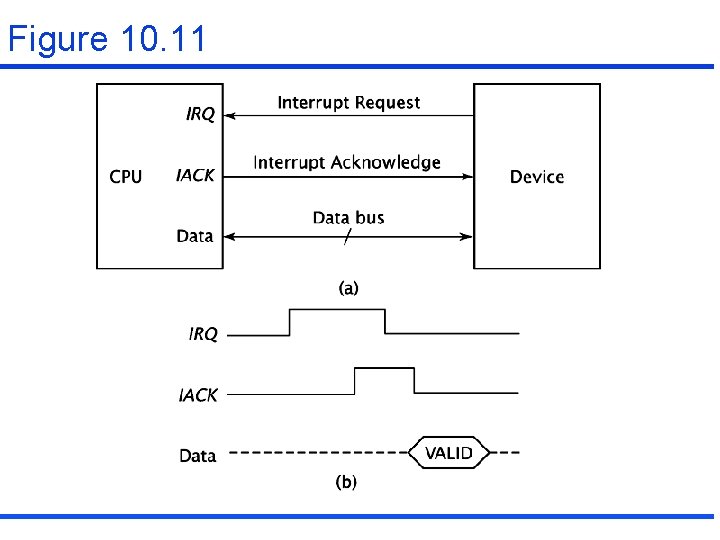
Figure 10. 11
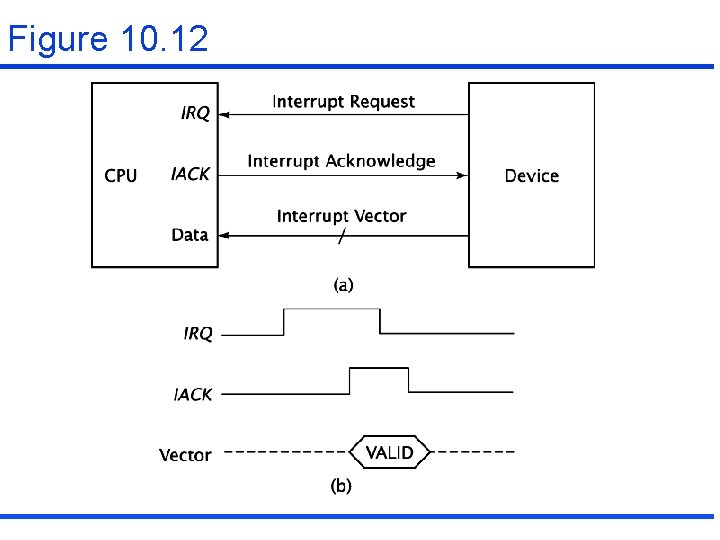
Figure 10. 12
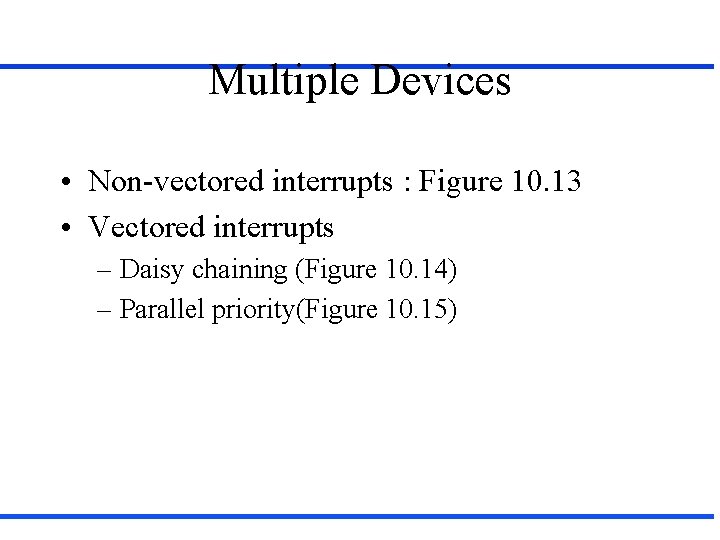
Multiple Devices • Non-vectored interrupts : Figure 10. 13 • Vectored interrupts – Daisy chaining (Figure 10. 14) – Parallel priority(Figure 10. 15)
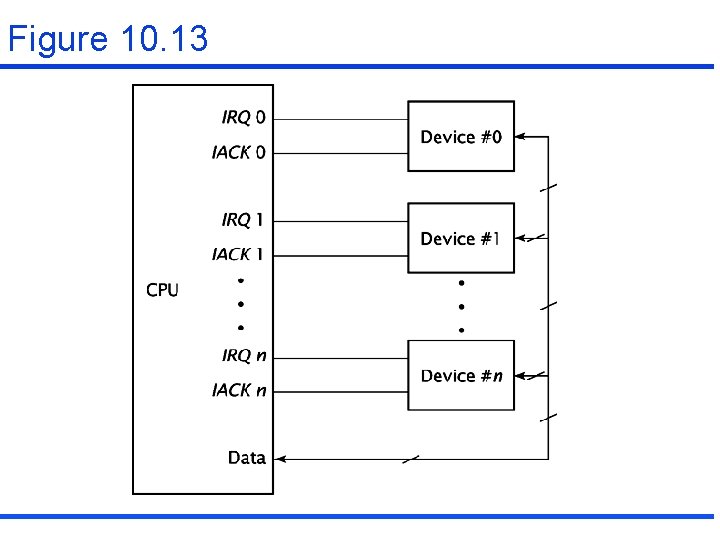
Figure 10. 13
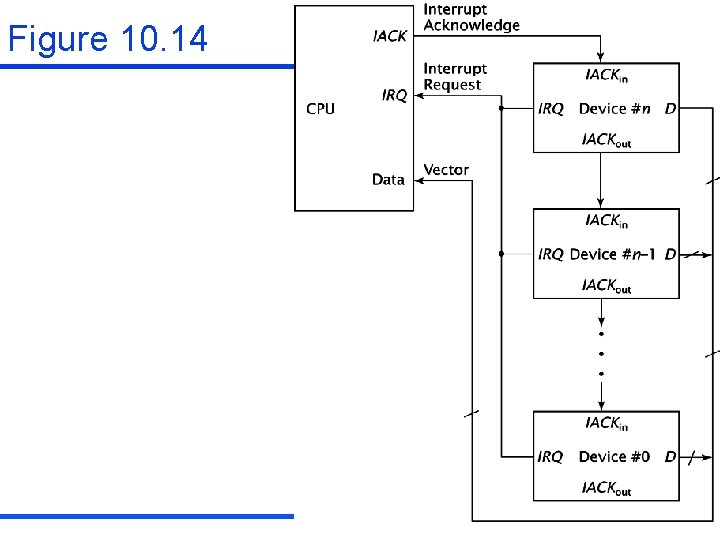
Figure 10. 14
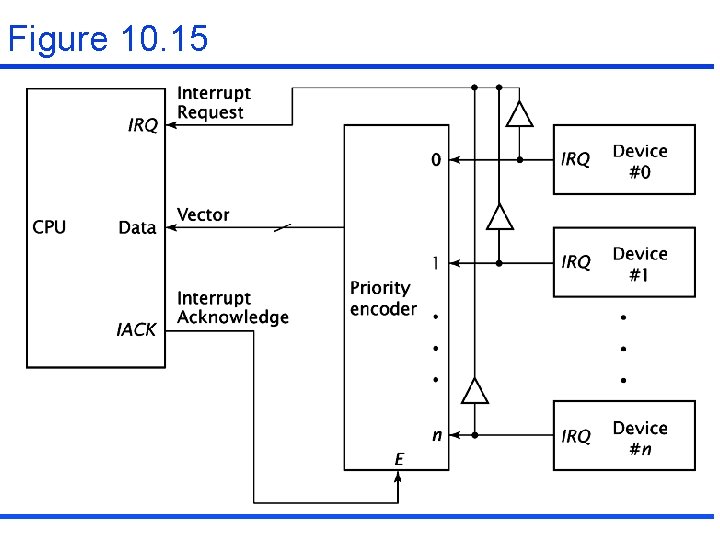
Figure 10. 15
10. 4 DMA(Direct Memory Access) • DMA controller (Figure 10. 17) – Bus request – Bus grant • Internal configuration of DMA controller (Figure 10. 18) – – – DMA address register DMA data register DMA counter DMA control register DMA status register
10. 4 DMA(continued) • DMA transfer mode – Block transfer mode(burst mode) – Cycle stealing – Transparent mode
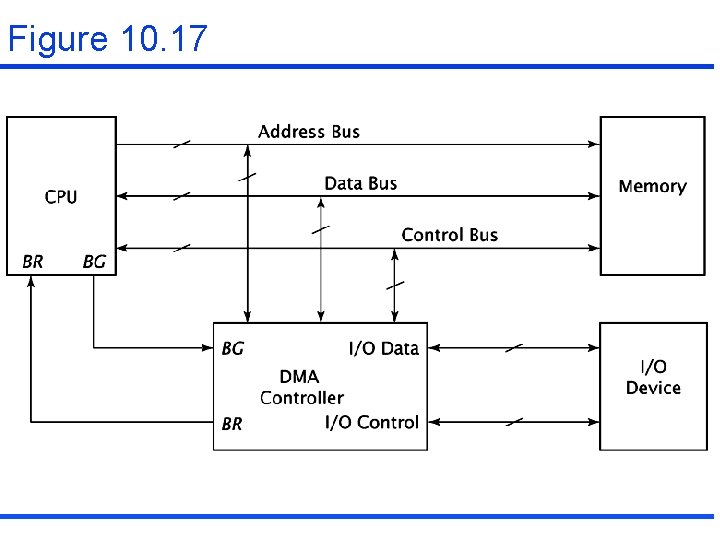
Figure 10. 17
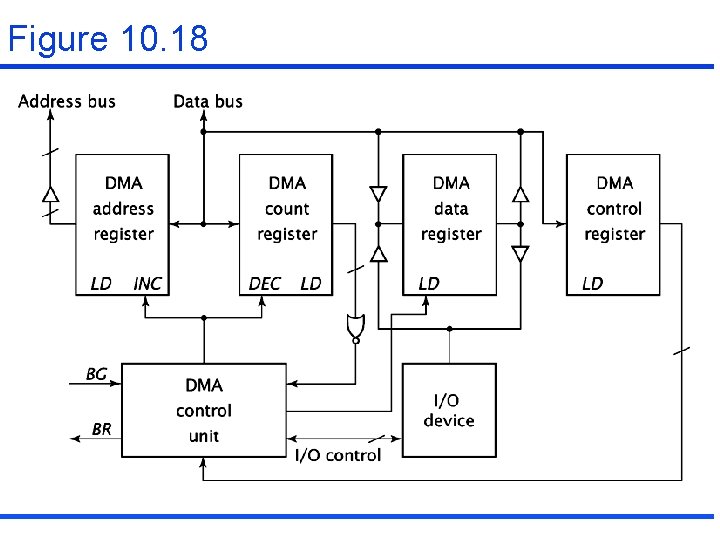
Figure 10. 18
I/O Processors • I/O processor (Figure 10. 21) – I/O processors are sometimes called as I/O controllers, channel controllers, or peripheral processing units(PPUs) – I/O commands • Block transfer commands • Control commands • Arithmetic, logic, and branch operations
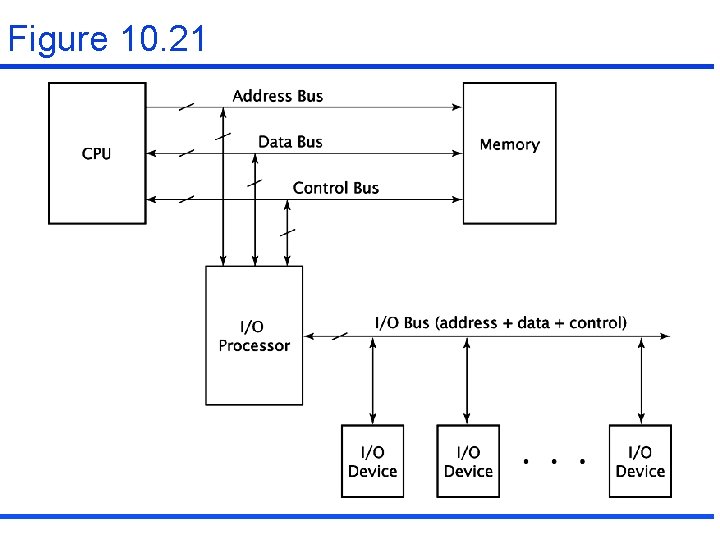
Figure 10. 21
10. 6 Serial Communication • Serial communication basic – bps or baud rate – A sample transmission (Figure 10. 22) – A synchronous transmission (HDLC): Figure 10. 23
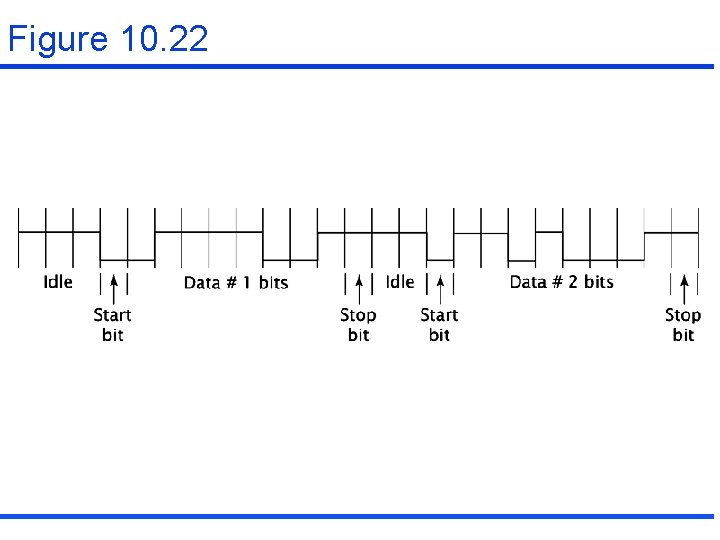
Figure 10. 22
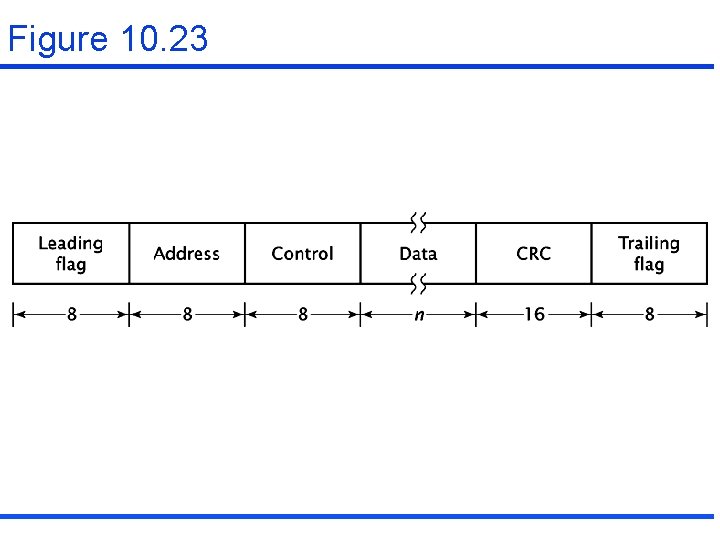
Figure 10. 23
UART • A computer system incorporatinf with a UART: Figure 10. 24 • Internal configuration : Figure 10. 25
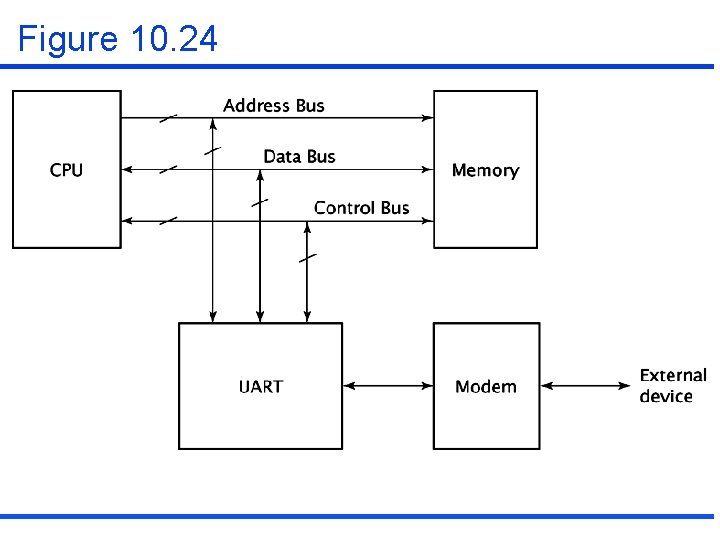
Figure 10. 24
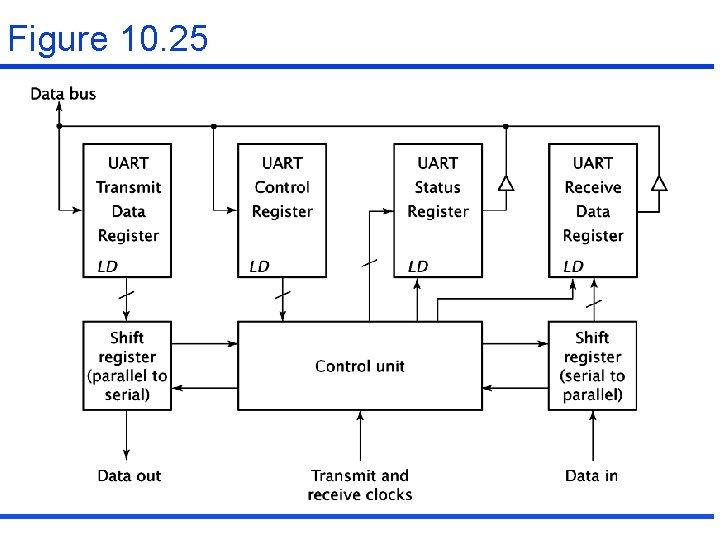
Figure 10. 25
10. 7 Real World Example • RS-232 -C standard • USB standard – USB packet formats (Figure 10. 26)
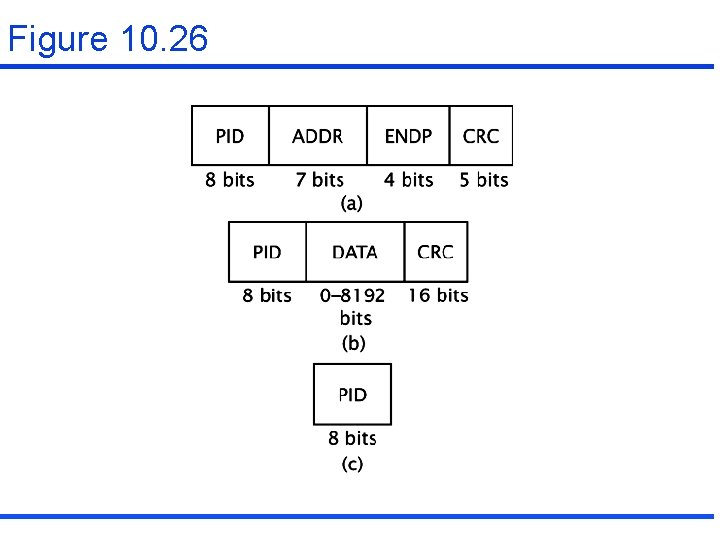
Figure 10. 26
- Slides: 48