
Chapter 10 Information Security Management But How Do
Chapter 10 Information Security Management
“But How Do You Implement That Security? ” • Video conference with potential PRIDE promoter and advertiser, San Diego Sports • PRIDE originally designed to store medical data. • SDS wants to know if PRIDE systems provide acceptable level of security. • Doesn’t want to be affiliated with company with major security problem. • Criminals now focus attacks on inter-organizational systems. Copyright © 2016 Pearson Education, Inc. 10 -2
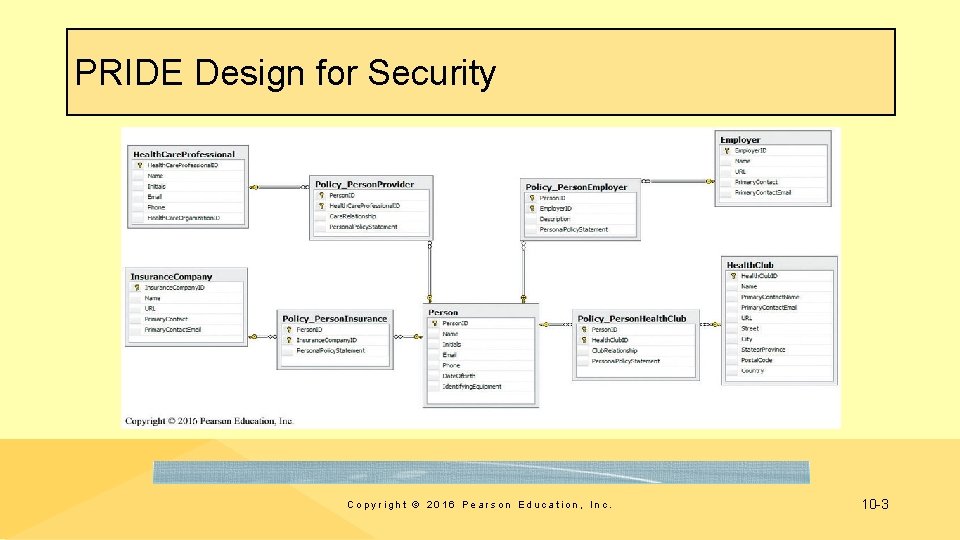
PRIDE Design for Security Copyright © 2016 Pearson Education, Inc. 10 -3
Study Questions Q 1: What is the goal of information systems security? Q 2: How big is the computer security problem? Q 3: How should you respond to security threats? Q 4: How should organizations respond to security threats? Q 5: How can technical safeguards protect against security threats? Q 6: How can data safeguards protect against security threats? Q 7: How can human safeguards protect against security threats? Q 8: How should organizations respond to security incidents? Q 9: 2025? Copyright © 2016 Pearson Education, Inc. 10 -4
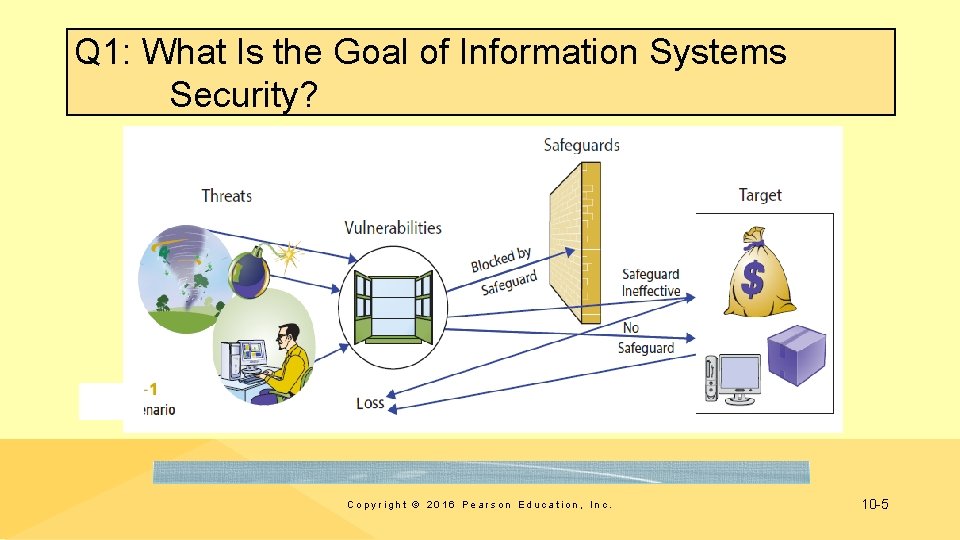
Q 1: What Is the Goal of Information Systems Security? Copyright © 2016 Pearson Education, Inc. 10 -5
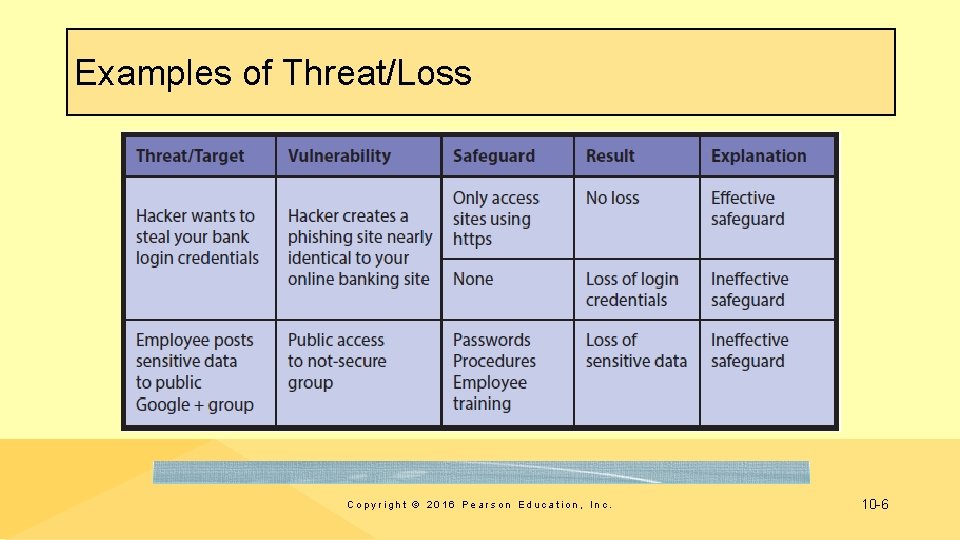
Examples of Threat/Loss Copyright © 2016 Pearson Education, Inc. 10 -6
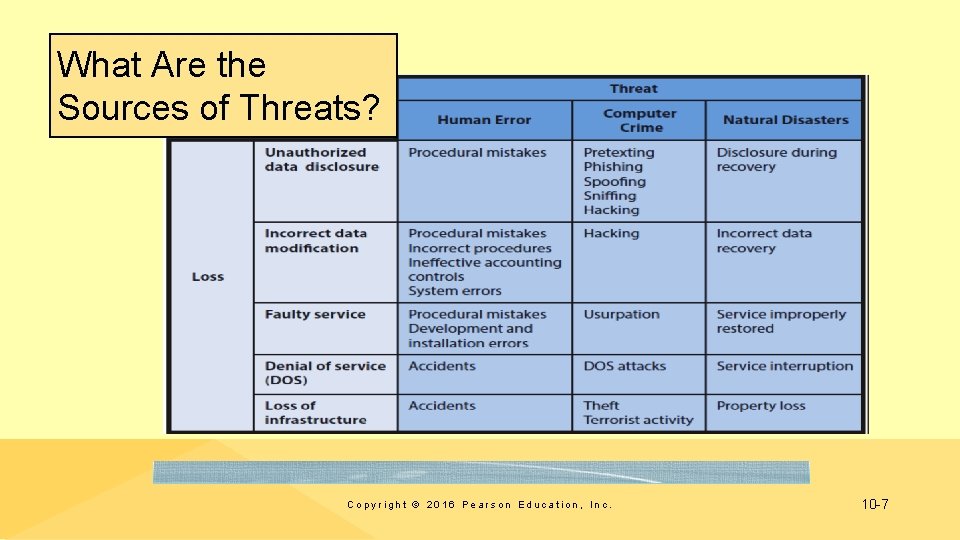
What Are the Sources of Threats? Copyright © 2016 Pearson Education, Inc. 10 -7

What Types of Security Loss Exists? • Unauthorized Data Disclosure • Pretexting • Phishing • Spoofing – IP spoofing – Email spoofing • Drive-by sniffers – Wardrivers • Hacking • Natural disasters Copyright © 2016 Pearson Education, Inc. 10 -8

Incorrect Data Modification • Procedures incorrectly designed or not followed • Increasing a customer’s discount or incorrectly modifying employee’s salary • Placing incorrect data on company Web site • Improper internal controls on systems • System errors • Faulty recovery actions after a disaster Copyright © 2016 Pearson Education, Inc. 10 -9

Faulty Service • Incorrect data modification • Systems working incorrectly • Procedural mistakes • Programming errors • IT installation errors • Usurpation • Denial of service (unintentional) • Denial-of-service attacks (intentional) Copyright © 2016 Pearson Education, Inc. 10 -10
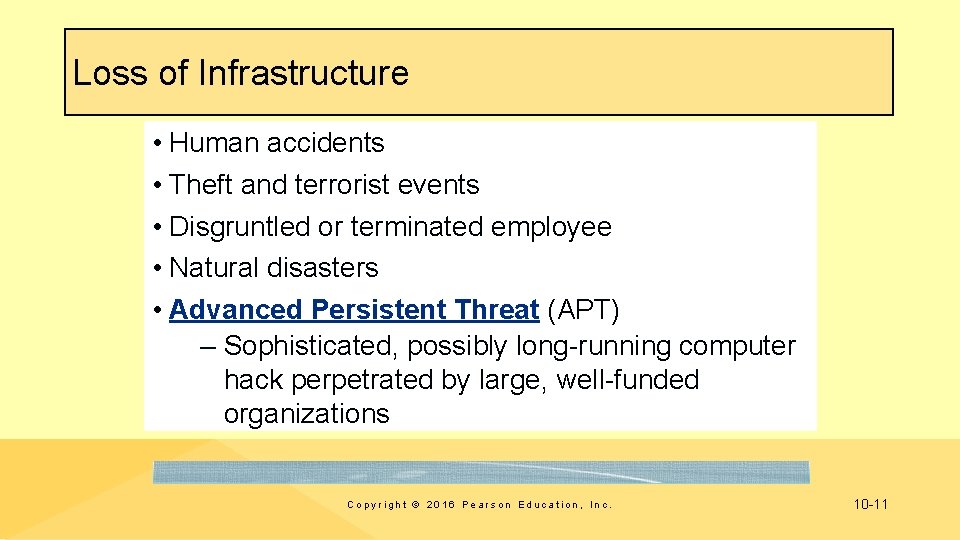
Loss of Infrastructure • Human accidents • Theft and terrorist events • Disgruntled or terminated employee • Natural disasters • Advanced Persistent Threat (APT) – Sophisticated, possibly long-running computer hack perpetrated by large, well-funded organizations Copyright © 2016 Pearson Education, Inc. 10 -11
Goal of Information Systems Security • Find appropriate trade-off between risk of loss and cost of implementing safeguards • Use antivirus software • Deleting browser cookies? • Get in front of security problem by making appropriate trade-offs for your life and your business Copyright © 2016 Pearson Education, Inc. 10 -12
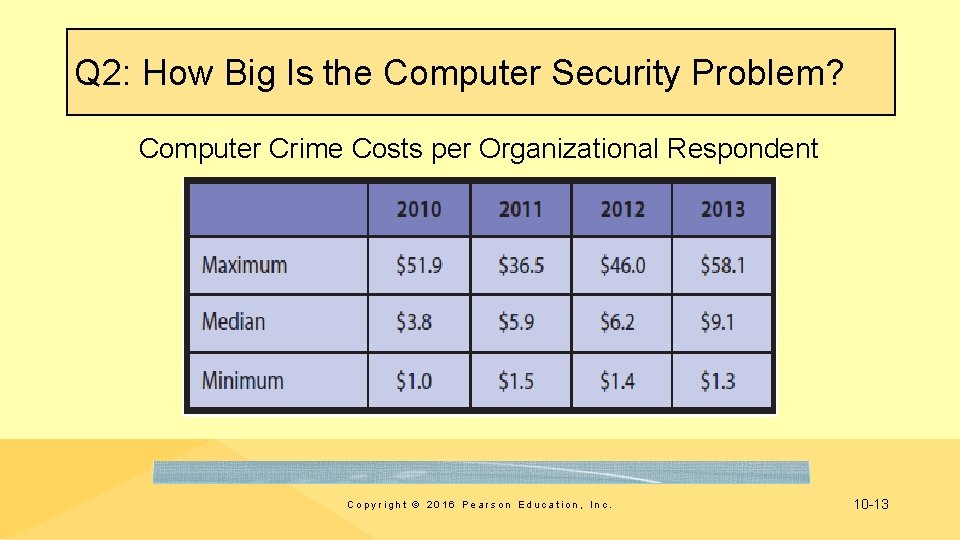
Q 2: How Big Is the Computer Security Problem? Computer Crime Costs per Organizational Respondent Copyright © 2016 Pearson Education, Inc. 10 -13
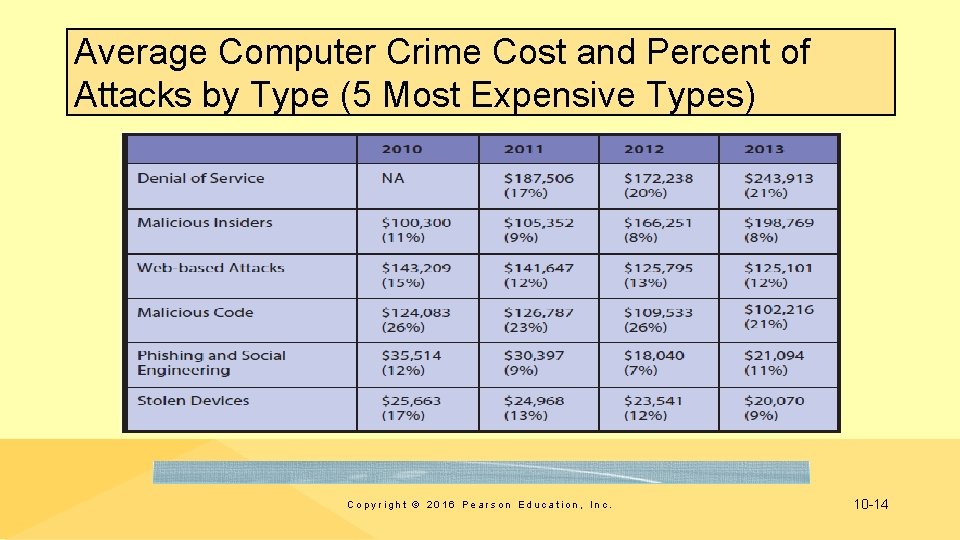
Average Computer Crime Cost and Percent of Attacks by Type (5 Most Expensive Types) Copyright © 2016 Pearson Education, Inc. 10 -14
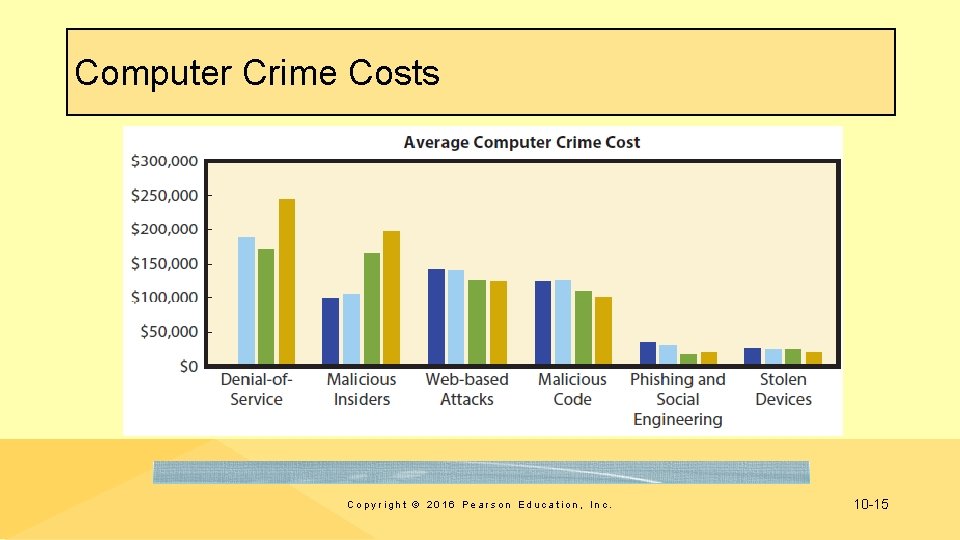
Computer Crime Costs Copyright © 2016 Pearson Education, Inc. 10 -15
Ponemon Study Findings (2013) • No one knows exact cost of computer crime • Cost of computer crime based on surveys • Data loss single most expensive consequence of computer crime, accounting for 44% of costs in 2013 • 80% of respondents believe data on mobile devices poses significant risks. Copyright © 2016 Pearson Education, Inc. 10 -16
Ponemon 2013 Studies Summary • Median cost of computer crime increasing • Malicious insiders increasingly serious security threat • Data loss is principal cost of computer crime • Survey respondents believe mobile device data a significant security threat • Security safeguards work • Ponemon Study 2014 Copyright © 2016 Pearson Education, Inc. 10 -17
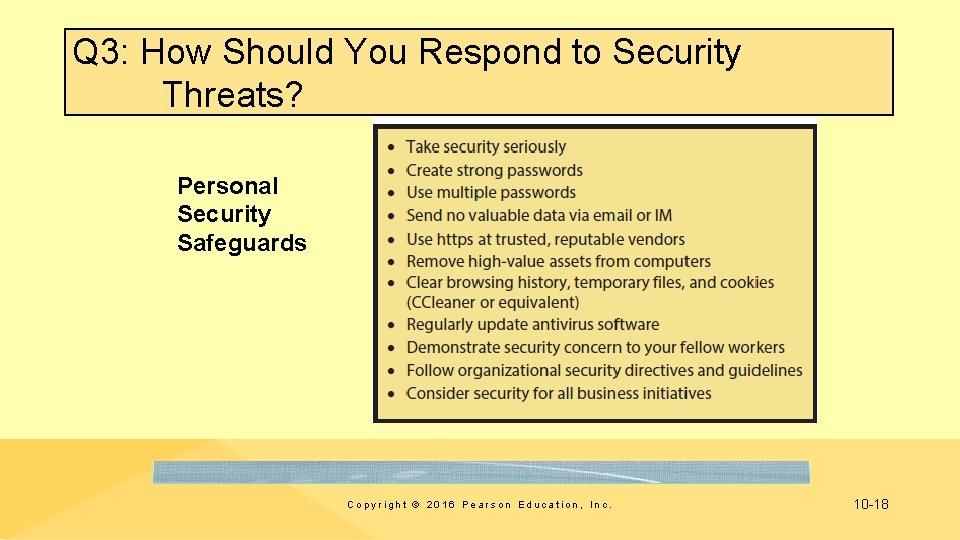
Q 3: How Should You Respond to Security Threats? Personal Security Safeguards Copyright © 2016 Pearson Education, Inc. 10 -18
So What? The Latest from Black Hat • Annual security conference caters to hackers, security professionals, corporations, and government entities • Briefings on how things can be hacked • Show to exploit weaknesses in hardware, software, protocols, or systems from smartphones to ATMs • Encourage companies to fix product vulnerabilities and serve as educational forum for hackers, developers, manufacturers, and government agencies Copyright © 2016 Pearson Education, Inc. 10 -19
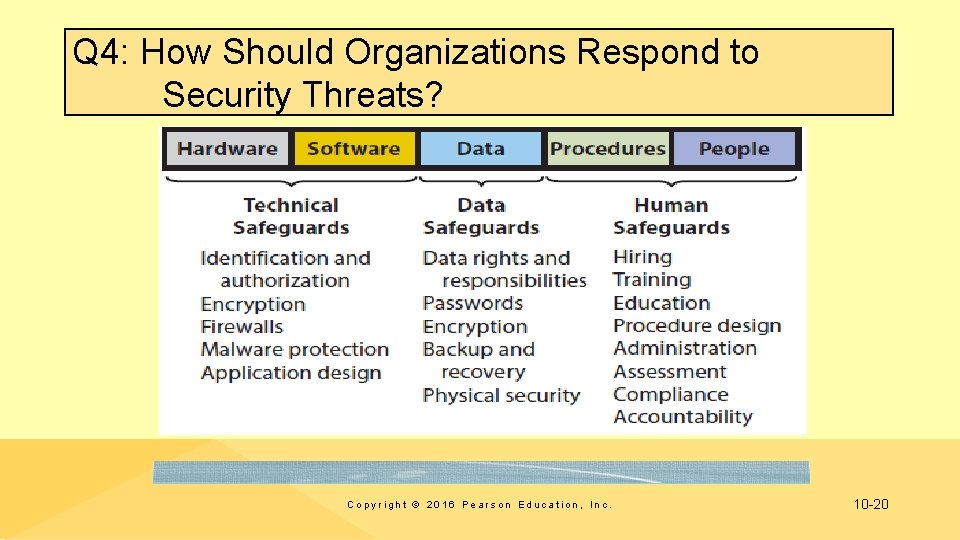
Q 4: How Should Organizations Respond to Security Threats? Copyright © 2016 Pearson Education, Inc. 10 -20
Security Policy Should Stipulate • • What sensitive data the organization will store How it will process that data Whether data will be shared with other organizations How employees and others can obtain copies of data stored about them • How employees and others can request changes to inaccurate data • What employees can do with their own mobile devices at work Ø As a new hire, seek out your employer’s security policy Copyright © 2016 Pearson Education, Inc. 10 -21
Ethics Guide: Securing Privacy “The best way to solve a problem is not to have it. ” – Resist providing sensitive data – Don’t collect data you don’t need • Gramm-Leach-Bliley (GLB) Act, 1999 • Privacy Act of 1974 • Health Insurance Portability and Accountability Act (HIPAA), 1996 • Australian Privacy Act of 1988 – Government, healthcare data, records maintained by businesses with revenues in excess of AU$3 million. Copyright © 2016 Pearson Education, Inc. 10 -22
Ethics Guide: Securing Privacy: Wrap Up • Business professionals have responsibility to consider legality, ethics, and wisdom when you request, store, or disseminate data • Think carefully about email you open over public, wireless networks • Use long, strong passwords Copyright © 2016 Pearson Education, Inc. 10 -23
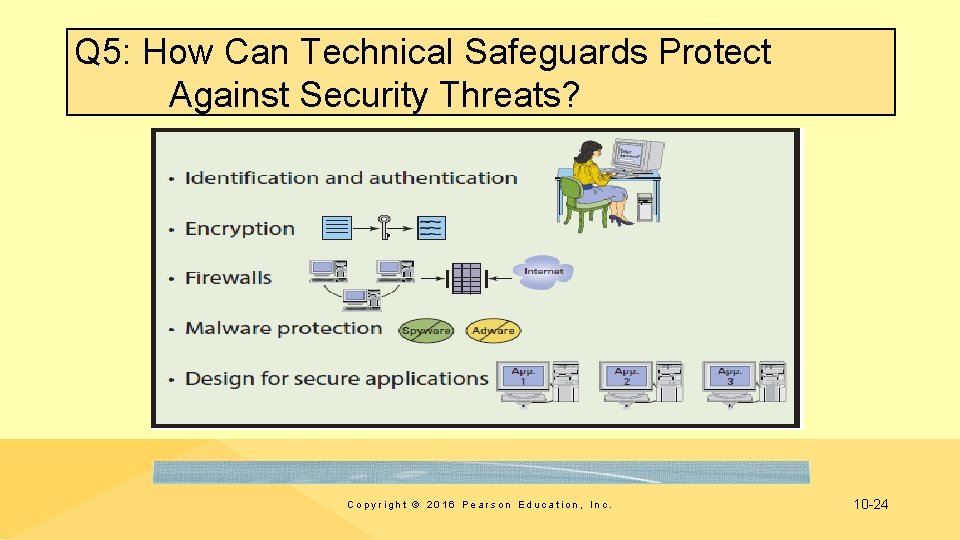
Q 5: How Can Technical Safeguards Protect Against Security Threats? Copyright © 2016 Pearson Education, Inc. 10 -24
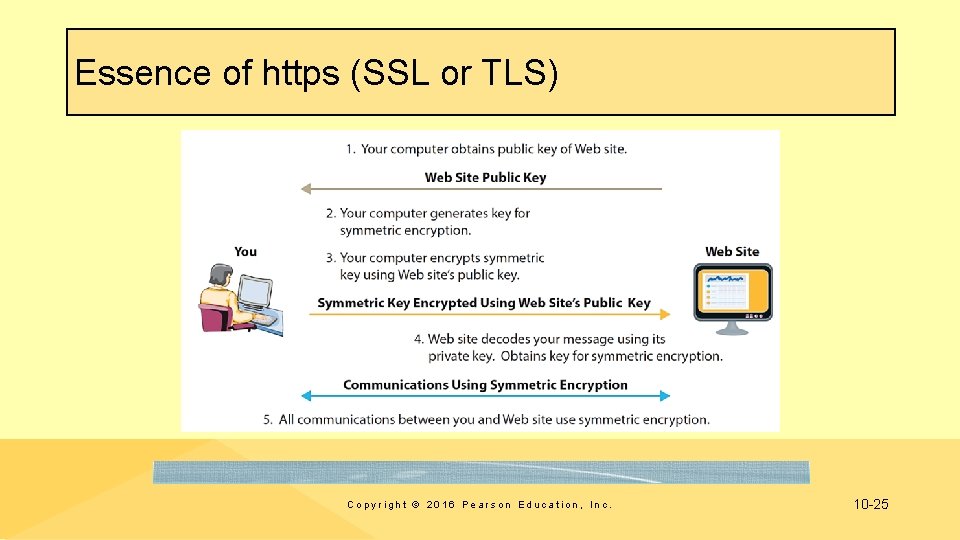
Essence of https (SSL or TLS) Copyright © 2016 Pearson Education, Inc. 10 -25
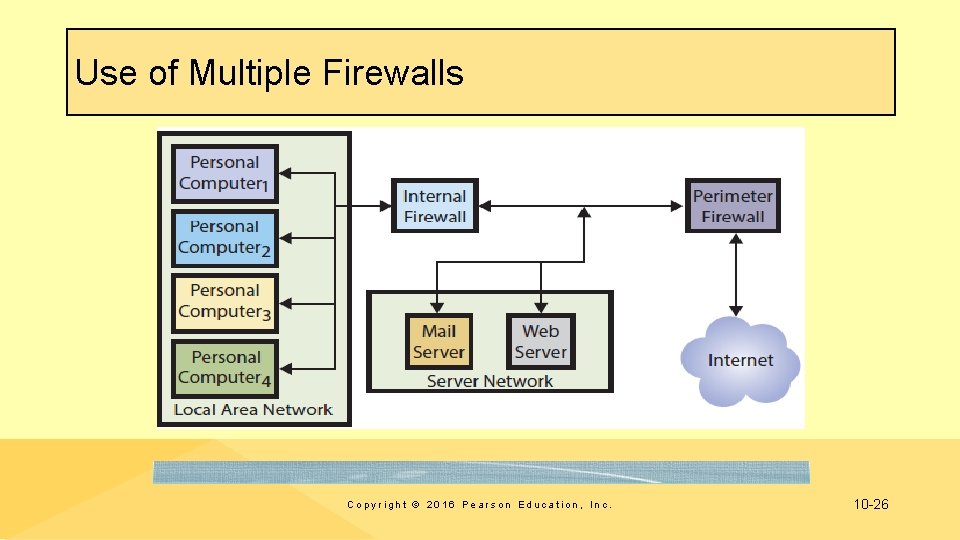
Use of Multiple Firewalls Copyright © 2016 Pearson Education, Inc. 10 -26
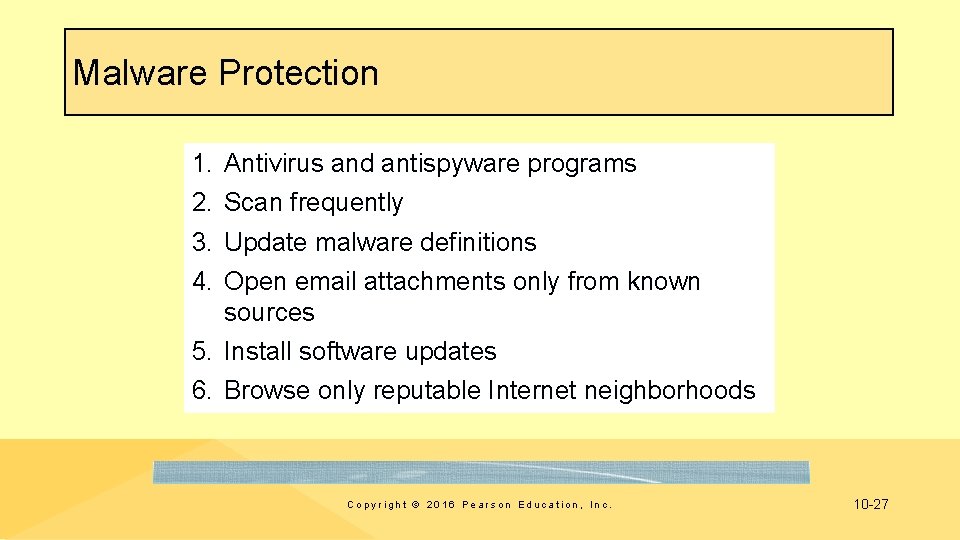
Malware Protection 1. 2. 3. 4. Antivirus and antispyware programs Scan frequently Update malware definitions Open email attachments only from known sources 5. Install software updates 6. Browse only reputable Internet neighborhoods Copyright © 2016 Pearson Education, Inc. 10 -27
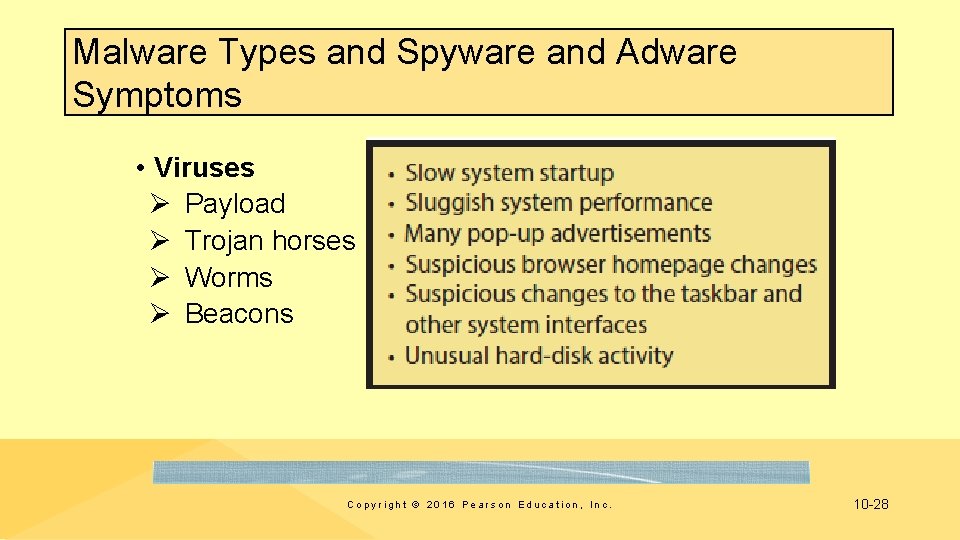
Malware Types and Spyware and Adware Symptoms • Viruses Ø Payload Ø Trojan horses Ø Worms Ø Beacons Copyright © 2016 Pearson Education, Inc. 10 -28
Design for Secure Applications • SQL injection attack – User enters SQL statement into a form instead of a name or other data – Accepted code becomes part of database commands issued – Improper data disclosure, data damage and loss possible – Well designed applications make injections ineffective Copyright © 2016 Pearson Education, Inc. 10 -29
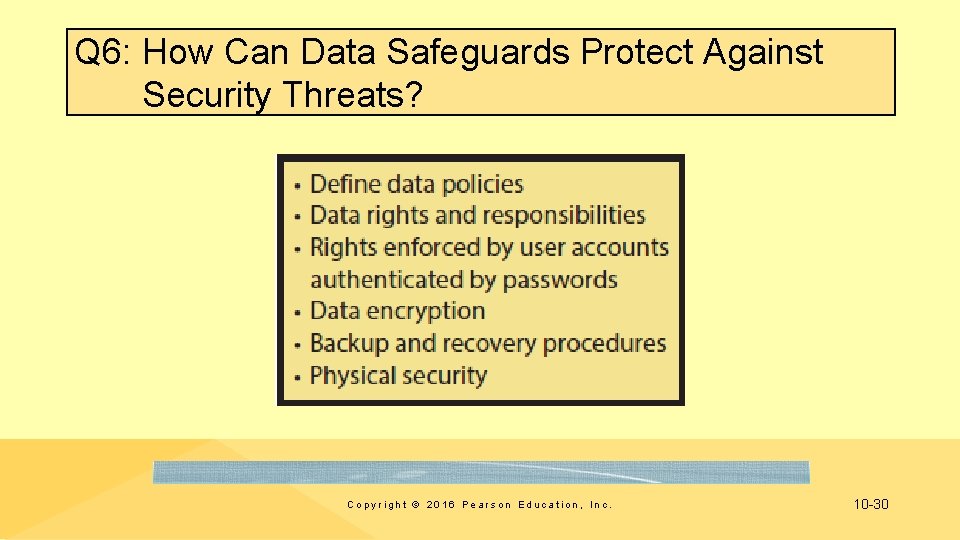
Q 6: How Can Data Safeguards Protect Against Security Threats? Copyright © 2016 Pearson Education, Inc. 10 -30
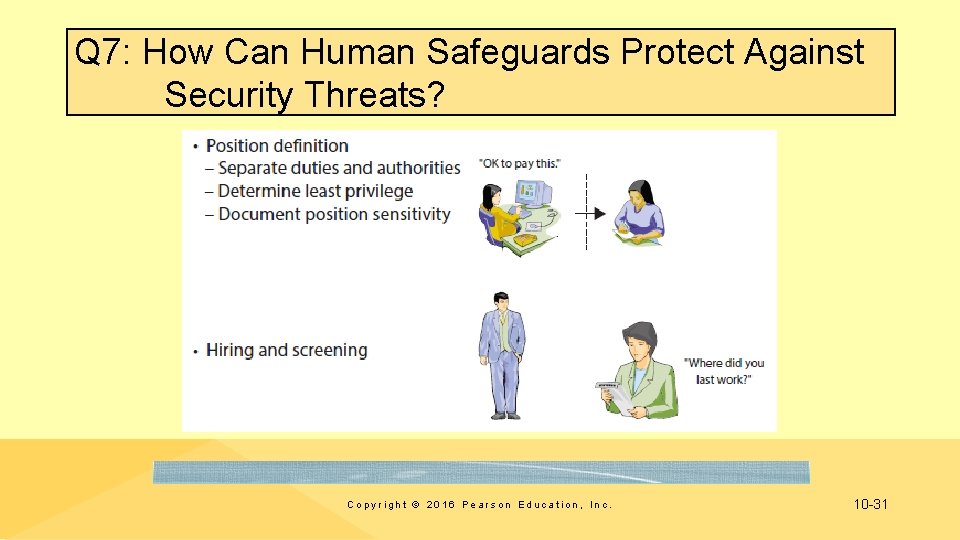
Q 7: How Can Human Safeguards Protect Against Security Threats? Copyright © 2016 Pearson Education, Inc. 10 -31

Q 7: How Can Human Safeguards Protect Against Security Threats? (cont' d) Copyright © 2016 Pearson Education, Inc. 10 -32

Account Administration • Account Management – Standards for new user accounts, modification of account permissions, removal of unneeded accounts • Password Management – Users should change passwords frequently • Help Desk Policies Copyright © 2016 Pearson Education, Inc. 10 -33
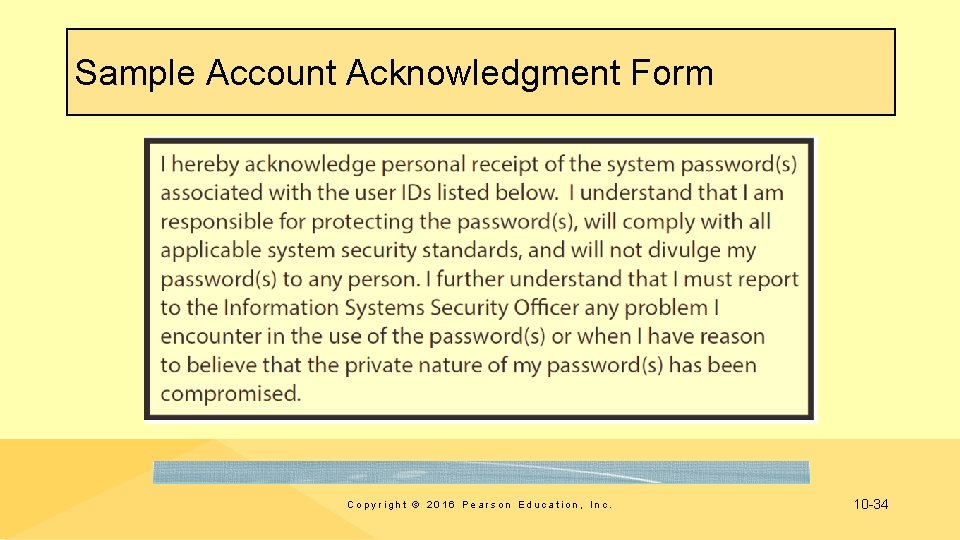
Sample Account Acknowledgment Form Copyright © 2016 Pearson Education, Inc. 10 -34
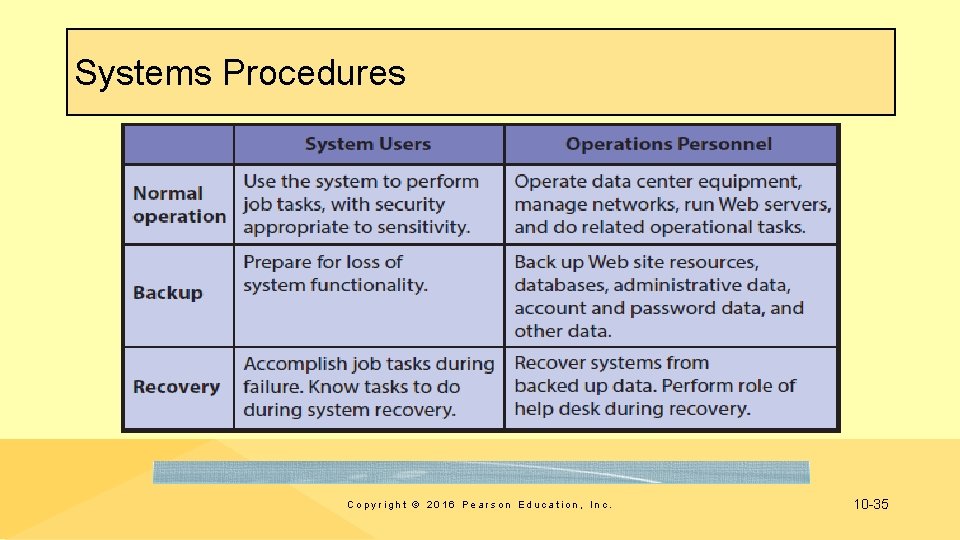
Systems Procedures Copyright © 2016 Pearson Education, Inc. 10 -35
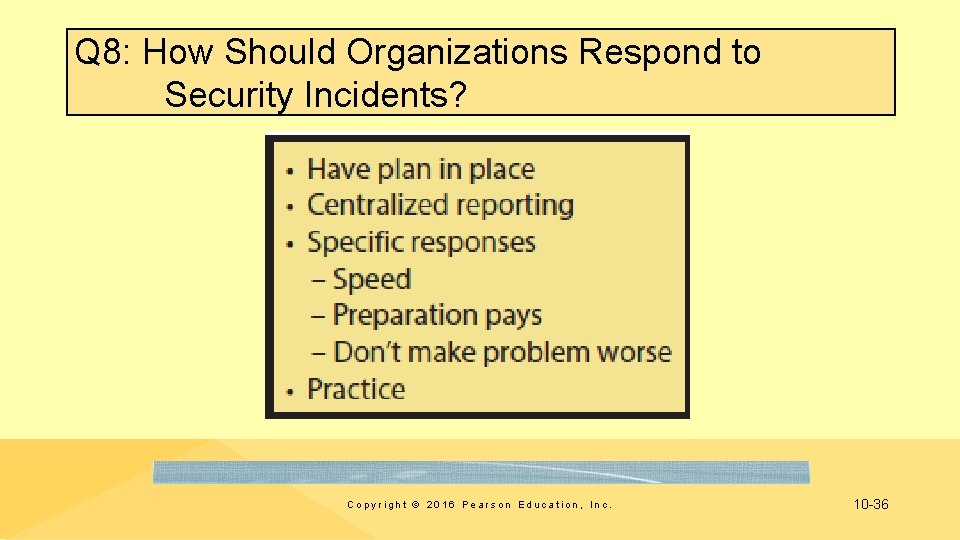
Q 8: How Should Organizations Respond to Security Incidents? Copyright © 2016 Pearson Education, Inc. 10 -36
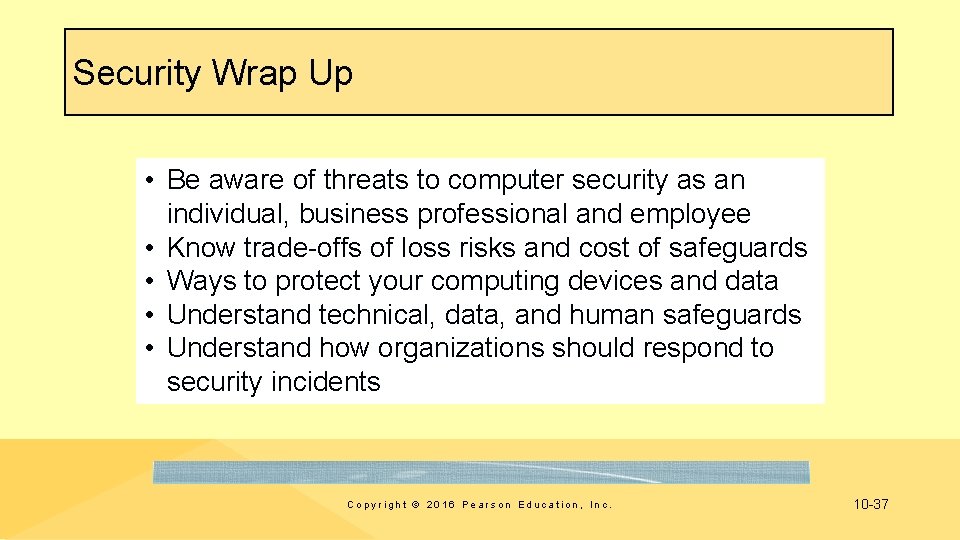
Security Wrap Up • Be aware of threats to computer security as an individual, business professional and employee • Know trade-offs of loss risks and cost of safeguards • Ways to protect your computing devices and data • Understand technical, data, and human safeguards • Understand how organizations should respond to security incidents Copyright © 2016 Pearson Education, Inc. 10 -37
Q 9: 2025 • APTs more common, inflicting serious damage • Continued concern about balance of national security and data privacy • Computer crimes targeting mobile devices leads to improved operating systems security • Improved security procedures and employee training • Criminals focus on less protected mid-sized and smaller organizations, and individuals • Electronic lawlessness by organized gangs • Strong local “electronic” sheriffs electronic border and enforce existing laws? Copyright © 2016 Pearson Education, Inc. 10 -38
Guide: A Look through NSA’s PRISM • Nine of the largest Internet services (Google, Microsoft, Yahoo!, Facebook, Pal. Talk, You. Tube, Skype, AOL, and Apple) participate in PRISM program • Dates when PRISM began collecting data from each of these services • Types of data collected include email, videos, photos, video and voice chat, file transfers, Vo. IP, stored data, videoconferencing, login activity, social networking activity, and something called “special requests” • How information flows from around the world could be collected • How data flowed from service provider to NSA, CIA, or FBI • http: //www. wired. com/2013/06/snowden-powerpoint/#slideid-522485 Copyright © 2016 Pearson Education, Inc. 10 -39
Trade Offs • Social trade off – “I prefer dangerous freedom over peaceful slavery. ” – "Freedom is Slavery" (G. Orwell, 1984) • Organizations struggle with security – Users frustrated with stringent password policies – Firewalls block users from remotely accessing certain resources – Managers can’t access certain data without special permission Copyright © 2016 Pearson Education, Inc. 10 -40

Wrap Up 1. Understand inherent trade-off between security and freedom 2. Understand reach of government surveillance systems 3. Understand ethical considerations surrounding spying and monitoring Copyright © 2016 Pearson Education, Inc. 10 -41
Guide: Phishing for Credit Cards, Identifying Numbers, Bank Accounts • Phishing scams commonplace • Target Corporation lost about 98 million user accounts to hackers in late 2013 – Attackers gained access to Target via a thirdparty vendor's credentials • Examples of phishing scams at Phish. Tank. com and Consumer. Fraud. Reporting. org Copyright © 2016 Pearson Education, Inc. 10 -42
Wrap Up 1. Phishing scams are popular and becoming more targeted. 2. You need to be able to identify and avoid phishing scams. Copyright © 2016 Pearson Education, Inc. 10 -43
Active Review Q 1: What is the goal of information systems security? Q 2: How big is the computer security problem? Q 3: How should you respond to security threats? Q 4: How should organizations respond to security threats? Q 5: How can technical safeguards protect against security threats? Q 6: How can data safeguards protect against security threats? Q 7: How can human safeguards protect against security threats? Q 8: How should organizations respond to security incidents? Q 9: 2025? Copyright © 2016 Pearson Education, Inc. 10 -44
Case 10: Hitting the Target • Lost 40 million credit and debit card numbers to attackers • Less than a month later Target announced an additional 70 million customer accounts stolen that included names, emails, addresses, phone numbers, and so on • About 98 million customers were affected – 31% of 318 million people in US • Stolen from point-of-sale (POS) systems at Target retail stores during the holiday shopping season Copyright © 2016 Pearson Education, Inc. 10 -45
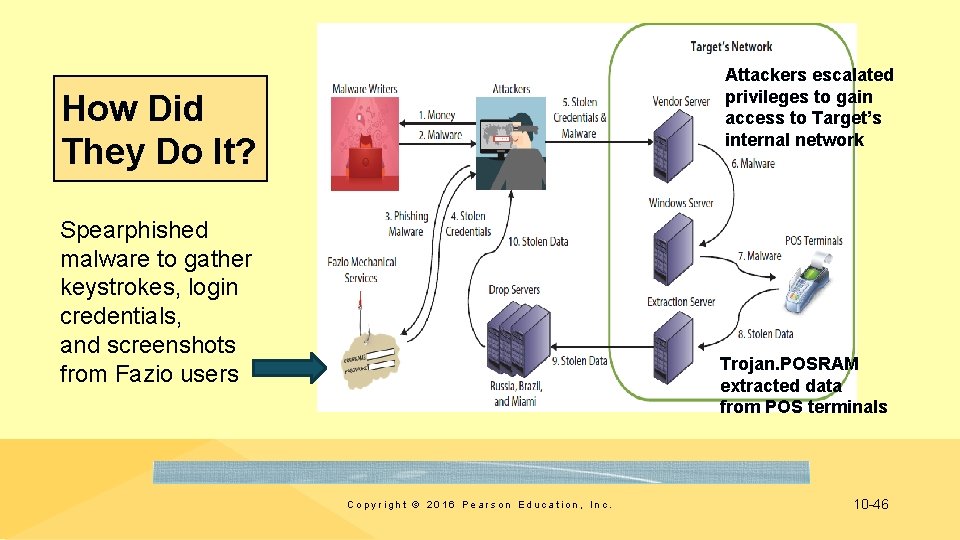
Attackers escalated privileges to gain access to Target’s internal network How Did They Do It? Spearphished malware to gather keystrokes, login credentials, and screenshots from Fazio users Trojan. POSRAM extracted data from POS terminals Copyright © 2016 Pearson Education, Inc. 10 -46
Damage • Attackers sold about 2 million credit cards for about $26. 85 each for a total profit of $53. 7 million • Target forced to take a loss on merchandise purchased using stolen credit cards • Upgraded payment terminals to support chip-and-PIN enabled cards, increased insurance premiums, paid legal fees, settled with credit card processors, paid consumer credit monitoring, and paid regulatory fines Copyright © 2016 Pearson Education, Inc. 10 -47

Damage (cont'd) • Target loss of customer confidence and drop in revenues (46% loss for quarter). • Analysts put direct loss to Target as high at $450 million • CIO resigned, CEO paid $16 million to leave • Cost credit unions and banks more than $200 million to issue new cards • Insurers demand higher premiums, stricter controls, and more system auditing • Consumers must watch their credit card statements, and fill out paperwork if fraudulent charges appear Copyright © 2016 Pearson Education, Inc. 10 -48
Copyright © 2016 Pearson Education, Inc. 10 -49
- Slides: 49