
Chapter 10 File IO Slides prepared by Rose
Chapter 10 File I/O Slides prepared by Rose Williams, Binghamton University Kenrick Mock, University of Alaska Anchorage
Streams • A stream is an object that enables the flow of data between a program and some I/O device or file – If the data flows into a program, then the stream is called an input stream – If the data flows out of a program, then the stream is called an output stream Copyright © 2012 Pearson Addison-Wesley. All rights reserved. 10 -2
Streams • Input streams can flow from the keyboard or from a file – System. in is an input stream that connects to the keyboard Scanner keyboard = new Scanner(System. in); • Output streams can flow to a screen or to a file – System. out is an output stream that connects to the screen System. out. println("Output stream"); Copyright © 2012 Pearson Addison-Wesley. All rights reserved. 10 -3
Text Files and Binary Files • Files that are designed to be read by human beings, and that can be read or written with an editor are called text files – Text files can also be called ASCII files because the data they contain uses an ASCII encoding scheme – An advantage of text files is that the are usually the same on all computers, so that they can move from one computer to another Copyright © 2012 Pearson Addison-Wesley. All rights reserved. 10 -4
Text Files and Binary Files • Files that are designed to be read by programs and that consist of a sequence of binary digits are called binary files – Binary files are designed to be read on the same type of computer and with the same programming language as the computer that created the file – An advantage of binary files is that they are more efficient to process than text files – Unlike most binary files, Java binary files have the advantage of being platform independent also Copyright © 2012 Pearson Addison-Wesley. All rights reserved. 10 -5
Writing to a Text File • The class Print. Writer is a stream class that can be used to write to a text file – An object of the class Print. Writer has the methods print and println – These are similar to the System. out methods of the same names, but are used for text file output, not screen output Copyright © 2012 Pearson Addison-Wesley. All rights reserved. 10 -6
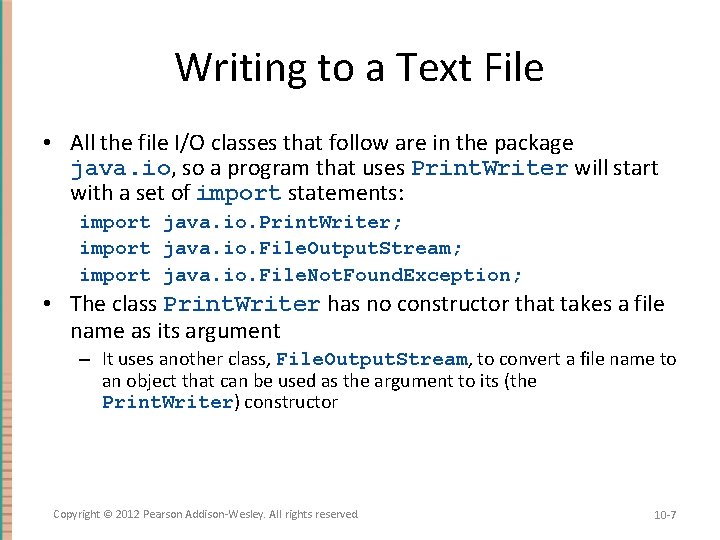
Writing to a Text File • All the file I/O classes that follow are in the package java. io, so a program that uses Print. Writer will start with a set of import statements: import java. io. Print. Writer; import java. io. File. Output. Stream; import java. io. File. Not. Found. Exception; • The class Print. Writer has no constructor that takes a file name as its argument – It uses another class, File. Output. Stream, to convert a file name to an object that can be used as the argument to its (the Print. Writer) constructor Copyright © 2012 Pearson Addison-Wesley. All rights reserved. 10 -7
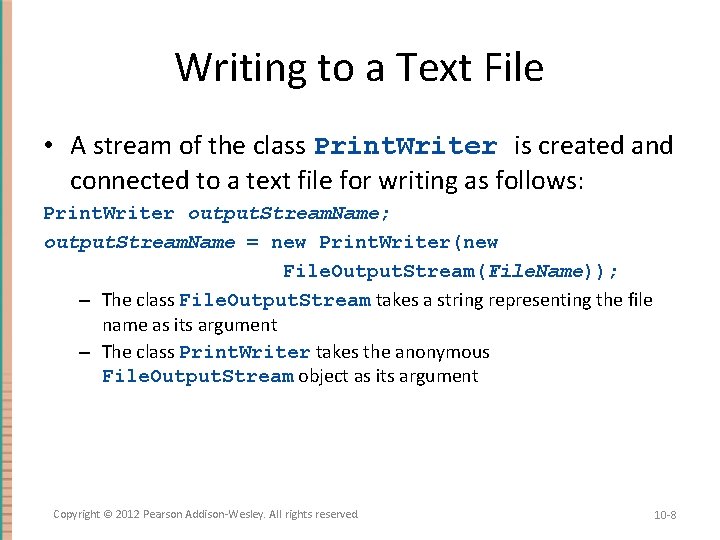
Writing to a Text File • A stream of the class Print. Writer is created and connected to a text file for writing as follows: Print. Writer output. Stream. Name; output. Stream. Name = new Print. Writer(new File. Output. Stream(File. Name)); – The class File. Output. Stream takes a string representing the file name as its argument – The class Print. Writer takes the anonymous File. Output. Stream object as its argument Copyright © 2012 Pearson Addison-Wesley. All rights reserved. 10 -8
Writing to a Text File • This produces an object of the class Print. Writer that is connected to the file File. Name – The process of connecting a stream to a file is called opening the file – If the file already exists, then doing this causes the old contents to be lost – If the file does not exist, then a new, empty file named File. Name is created • After doing this, the methods print and println can be used to write to the file Copyright © 2012 Pearson Addison-Wesley. All rights reserved. 10 -9
Writing to a Text File • When a text file is opened in this way, a File. Not. Found. Exception can be thrown – In this context it actually means that the file could not be created – This type of exception can also be thrown when a program attempts to open a file for reading and there is no such file • It is therefore necessary to enclose this code in exception handling blocks – The file should be opened inside a try block – A catch block should catch and handle the possible exception – The variable that refers to the Print. Writer object should be declared outside the block (and initialized to null) so that it is not local to the block Copyright © 2012 Pearson Addison-Wesley. All rights reserved. 10 -10
Writing to a Text File • When a program is finished writing to a file, it should always close the stream connected to that file output. Stream. Name. close(); – This allows the system to release any resources used to connect the stream to the file – If the program does not close the file before the program ends, Java will close it automatically, but it is safest to close it explicitly Copyright © 2012 Pearson Addison-Wesley. All rights reserved. 10 -11
Writing to a Text File • Output streams connected to files are usually buffered – Rather than physically writing to the file as soon as possible, the data is saved in a temporary location (buffer) – When enough data accumulates, or when the method flush is invoked, the buffered data is written to the file all at once – This is more efficient, since physical writes to a file can be slow Copyright © 2012 Pearson Addison-Wesley. All rights reserved. 10 -12
Writing to a Text File • The method close invokes the method flush, thus insuring that all the data is written to the file – If a program relies on Java to close the file, and the program terminates abnormally, then any output that was buffered may not get written to the file – Also, if a program writes to a file and later reopens it to read from the same file, it will have to be closed first anyway – The sooner a file is closed after writing to it, the less likely it is that there will be a problem Copyright © 2012 Pearson Addison-Wesley. All rights reserved. 10 -13
File Names • The rules for how file names should be formed depend on a given operating system, not Java – When a file name is given to a java constructor for a stream, it is just a string, not a Java identifier (e. g. , "file. Name. txt") – Any suffix used, such as. txt has no special meaning to a Java program Copyright © 2012 Pearson Addison-Wesley. All rights reserved. 10 -14
A File Has Two Names • Every input file and every output file used by a program has two names: 1. The real file name used by the operating system 2. The name of the stream that is connected to the file • • The actual file name is used to connect to the stream The stream name serves as a temporary name for the file, and is the name that is primarily used within the program Copyright © 2012 Pearson Addison-Wesley. All rights reserved. 10 -15
IOException • When performing file I/O there are many situations in which an exception, such as File. Not. Found. Exception, may be thrown • Many of these exception classes are subclasses of the class IOException – The class IOException is the root class for a variety of exception classes having to do with input and/or output • These exception classes are all checked exceptions – Therefore, they must be caught or declared in a throws clause Copyright © 2012 Pearson Addison-Wesley. All rights reserved. 10 -16
Unchecked Exceptions • In contrast, the exception classes No. Such. Element. Exception, Input. Mismatch. Exception, and Illegal. State. Exception are all unchecked exceptions – Unchecked exceptions are not required to be caught or declared in a throws clause Copyright © 2012 Pearson Addison-Wesley. All rights reserved. 10 -17
Pitfall: a try Block is a Block • Since opening a file can result in an exception, it should be placed inside a try block • If the variable for a Print. Writer object needs to be used outside that block, then the variable must be declared outside the block – Otherwise it would be local to the block, and could not be used elsewhere – If it were declared in the block and referenced elsewhere, the compiler will generate a message indicating that it is an undefined identifier Copyright © 2012 Pearson Addison-Wesley. All rights reserved. 10 -18
Appending to a Text File • To create a Print. Writer object and connect it to a text file for appending, a second argument, set to true, must be used in the constructor for the File. Output. Stream object output. Stream. Name = new Print. Writer(new File. Output. Stream(File. Name, true)); – After this statement, the methods print, println and/or printf can be used to write to the file – The new text will be written after the old text in the file Copyright © 2012 Pearson Addison-Wesley. All rights reserved. 10 -19
to. String Helps with Text File Output • If a class has a suitable to. String() method, and an. Object is an object of that class, then an. Object can be used as an argument to System. out. println, and it will produce sensible output • The same thing applies to the methods print and println of the class Print. Writer output. Stream. Name. println(an. Object); Copyright © 2012 Pearson Addison-Wesley. All rights reserved. 10 -20
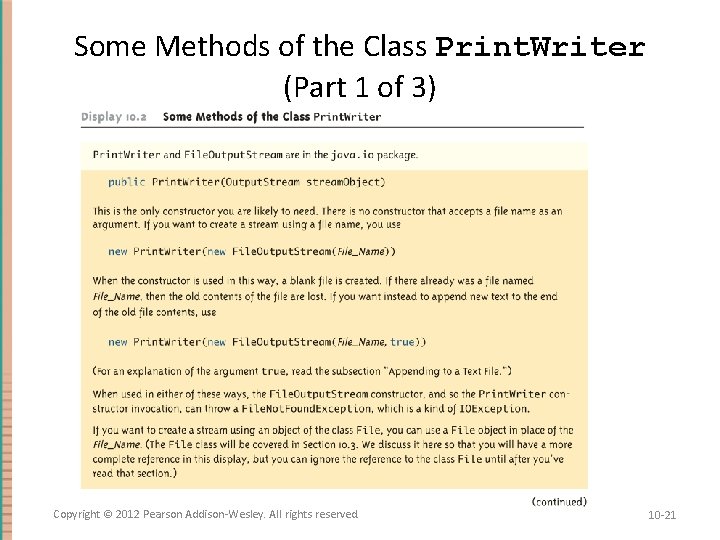
Some Methods of the Class Print. Writer (Part 1 of 3) Copyright © 2012 Pearson Addison-Wesley. All rights reserved. 10 -21
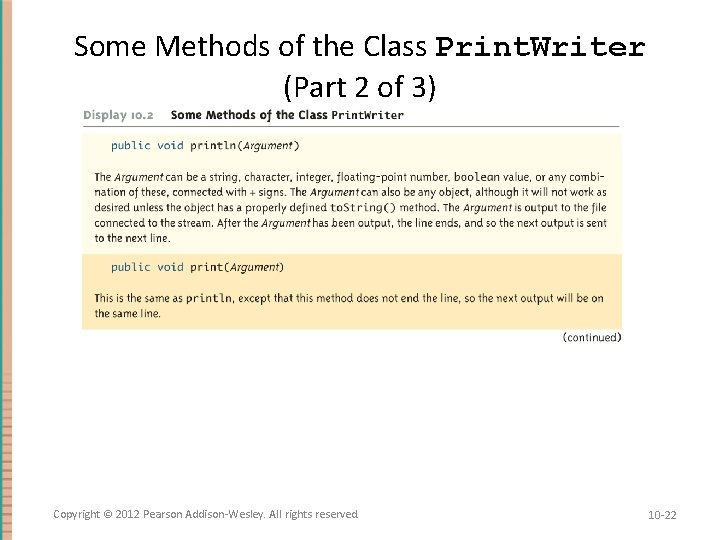
Some Methods of the Class Print. Writer (Part 2 of 3) Copyright © 2012 Pearson Addison-Wesley. All rights reserved. 10 -22
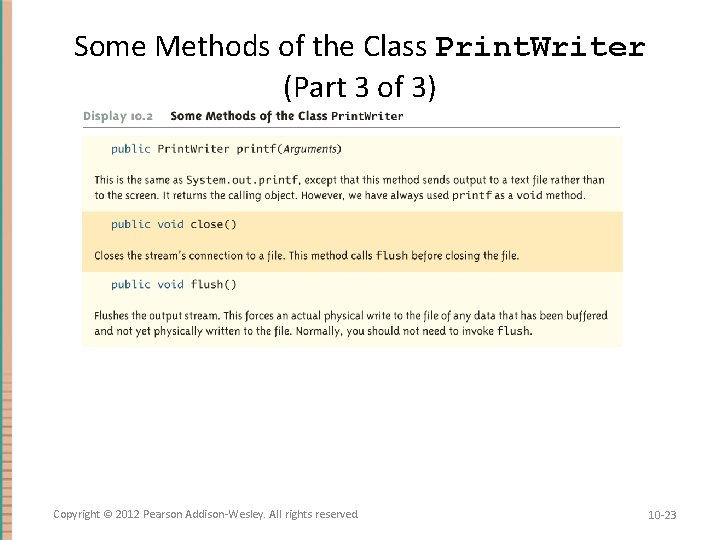
Some Methods of the Class Print. Writer (Part 3 of 3) Copyright © 2012 Pearson Addison-Wesley. All rights reserved. 10 -23
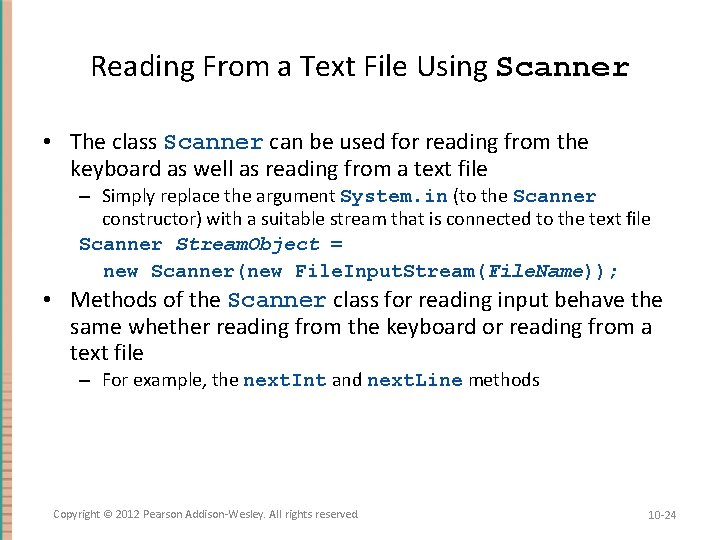
Reading From a Text File Using Scanner • The class Scanner can be used for reading from the keyboard as well as reading from a text file – Simply replace the argument System. in (to the Scanner constructor) with a suitable stream that is connected to the text file Scanner Stream. Object = new Scanner(new File. Input. Stream(File. Name)); • Methods of the Scanner class for reading input behave the same whether reading from the keyboard or reading from a text file – For example, the next. Int and next. Line methods Copyright © 2012 Pearson Addison-Wesley. All rights reserved. 10 -24
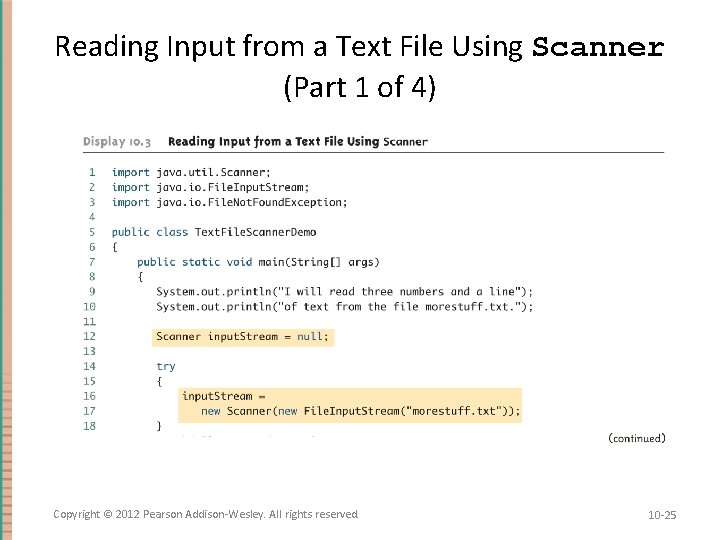
Reading Input from a Text File Using Scanner (Part 1 of 4) Copyright © 2012 Pearson Addison-Wesley. All rights reserved. 10 -25
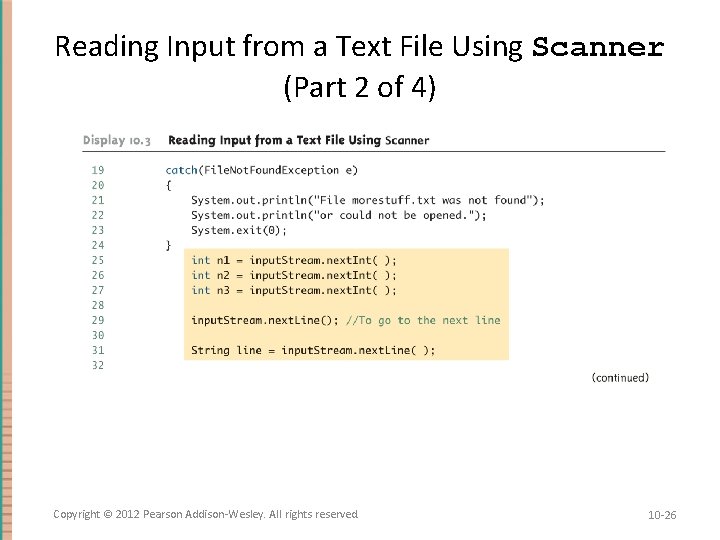
Reading Input from a Text File Using Scanner (Part 2 of 4) Copyright © 2012 Pearson Addison-Wesley. All rights reserved. 10 -26
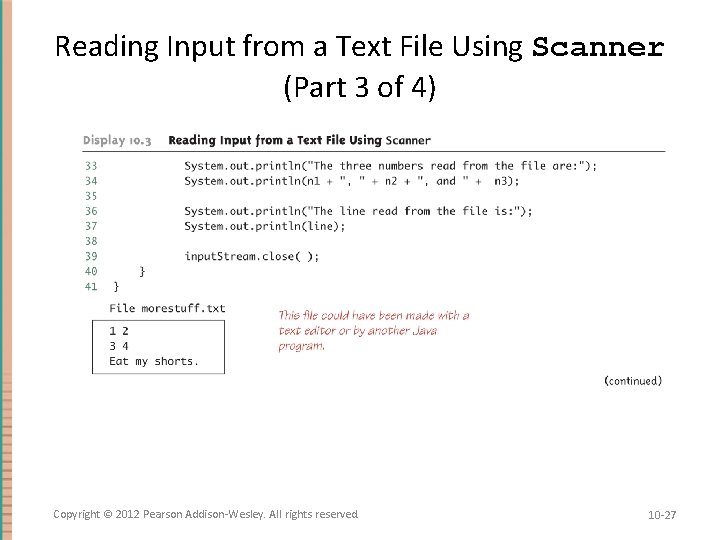
Reading Input from a Text File Using Scanner (Part 3 of 4) Copyright © 2012 Pearson Addison-Wesley. All rights reserved. 10 -27
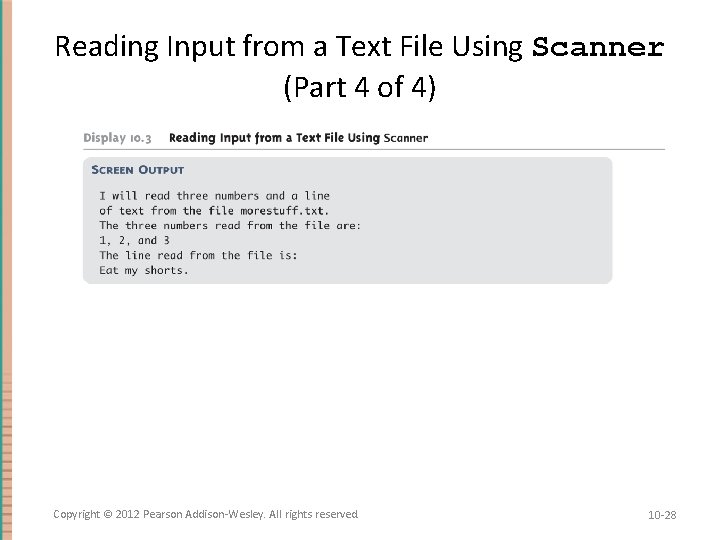
Reading Input from a Text File Using Scanner (Part 4 of 4) Copyright © 2012 Pearson Addison-Wesley. All rights reserved. 10 -28
Testing for the End of a Text File with Scanner • A program that tries to read beyond the end of a file using methods of the Scanner class will cause an exception to be thrown • However, instead of having to rely on an exception to signal the end of a file, the Scanner class provides methods such as has. Next. Int and has. Next. Line – These methods can also be used to check that the next token to be input is a suitable element of the appropriate type Copyright © 2012 Pearson Addison-Wesley. All rights reserved. 10 -29
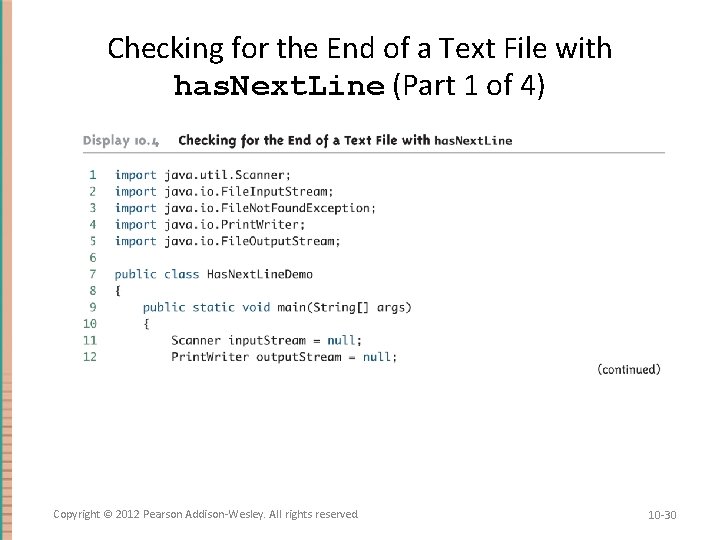
Checking for the End of a Text File with has. Next. Line (Part 1 of 4) Copyright © 2012 Pearson Addison-Wesley. All rights reserved. 10 -30
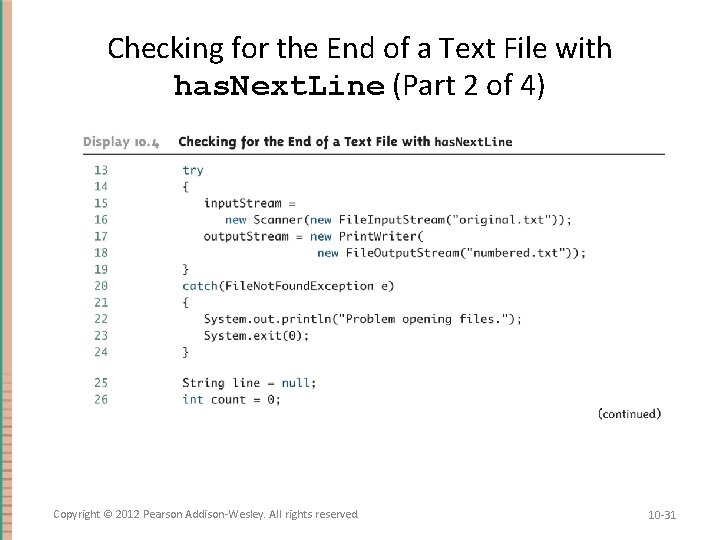
Checking for the End of a Text File with has. Next. Line (Part 2 of 4) Copyright © 2012 Pearson Addison-Wesley. All rights reserved. 10 -31
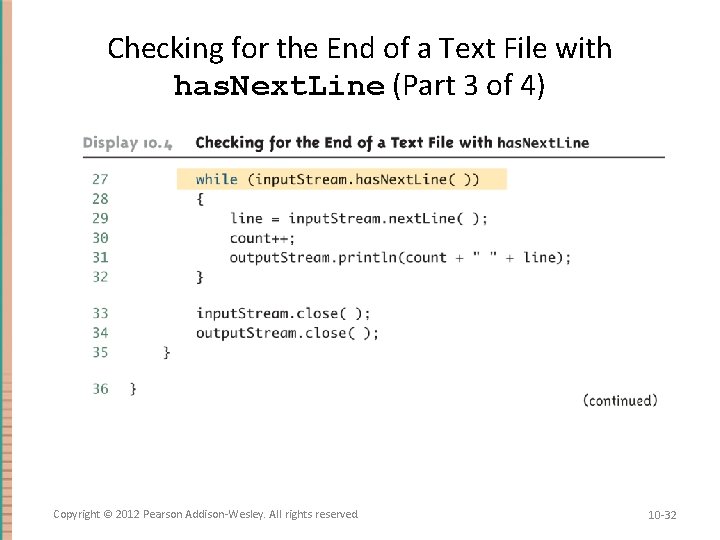
Checking for the End of a Text File with has. Next. Line (Part 3 of 4) Copyright © 2012 Pearson Addison-Wesley. All rights reserved. 10 -32
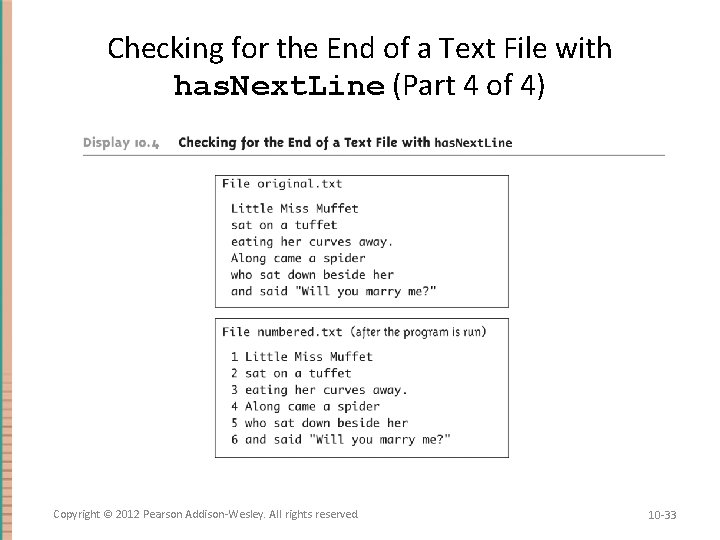
Checking for the End of a Text File with has. Next. Line (Part 4 of 4) Copyright © 2012 Pearson Addison-Wesley. All rights reserved. 10 -33
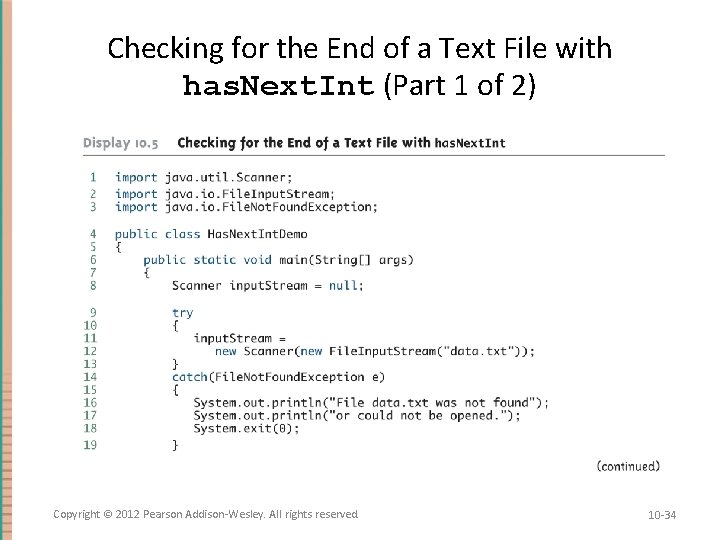
Checking for the End of a Text File with has. Next. Int (Part 1 of 2) Copyright © 2012 Pearson Addison-Wesley. All rights reserved. 10 -34
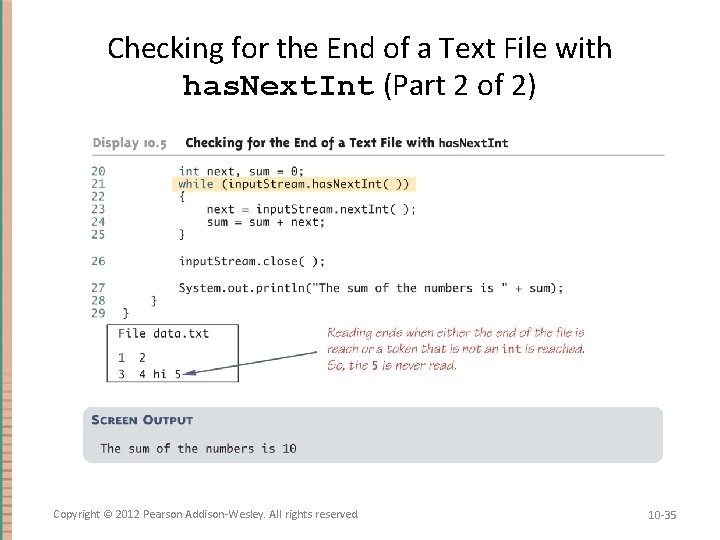
Checking for the End of a Text File with has. Next. Int (Part 2 of 2) Copyright © 2012 Pearson Addison-Wesley. All rights reserved. 10 -35
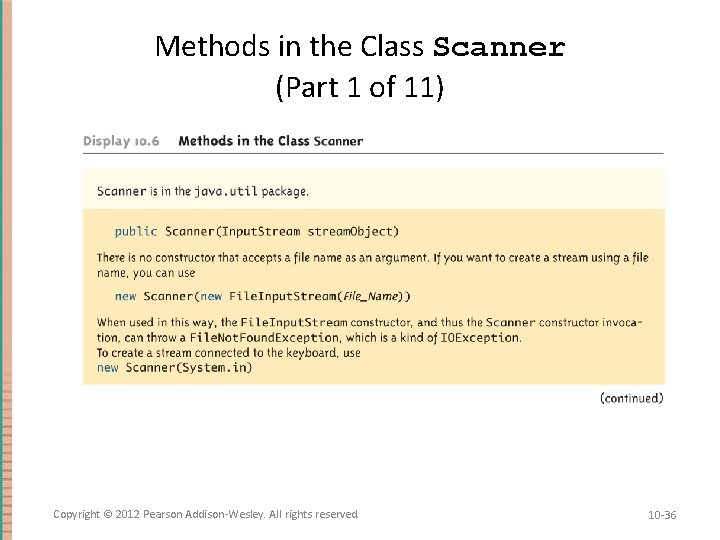
Methods in the Class Scanner (Part 1 of 11) Copyright © 2012 Pearson Addison-Wesley. All rights reserved. 10 -36
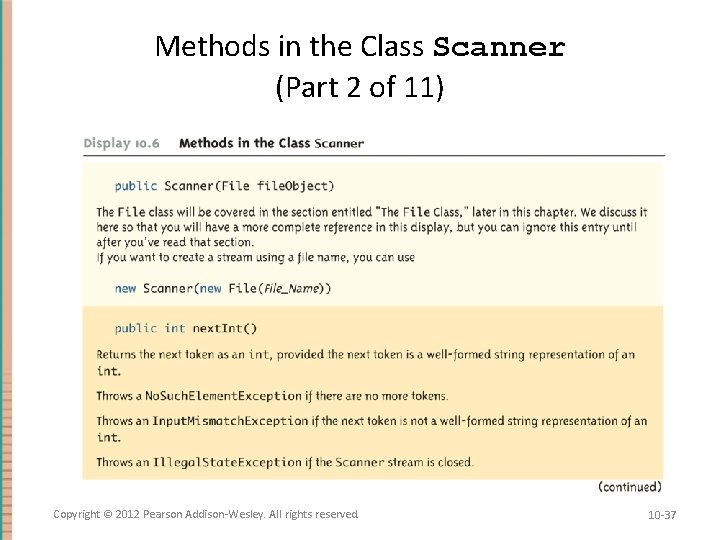
Methods in the Class Scanner (Part 2 of 11) Copyright © 2012 Pearson Addison-Wesley. All rights reserved. 10 -37
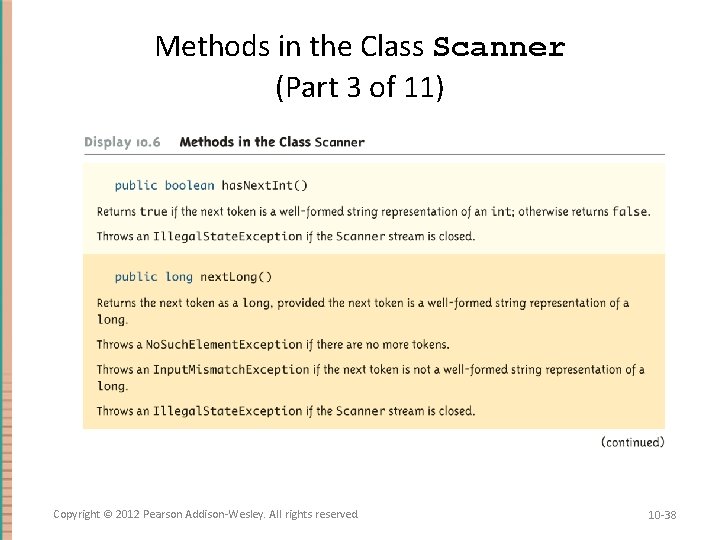
Methods in the Class Scanner (Part 3 of 11) Copyright © 2012 Pearson Addison-Wesley. All rights reserved. 10 -38
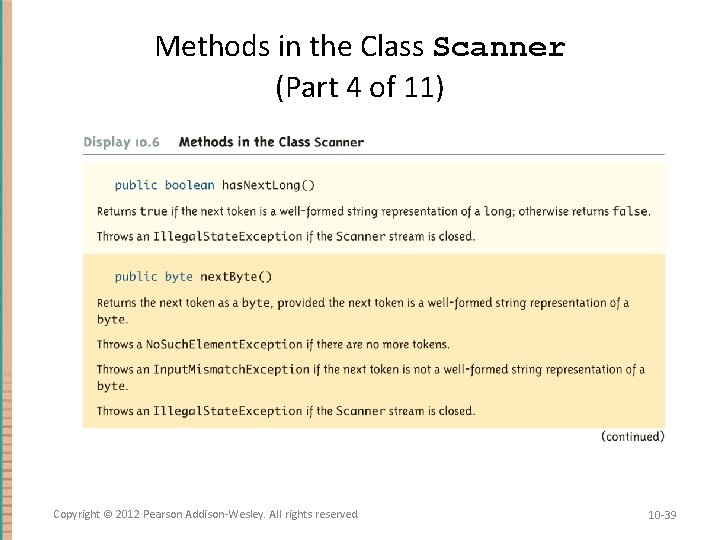
Methods in the Class Scanner (Part 4 of 11) Copyright © 2012 Pearson Addison-Wesley. All rights reserved. 10 -39
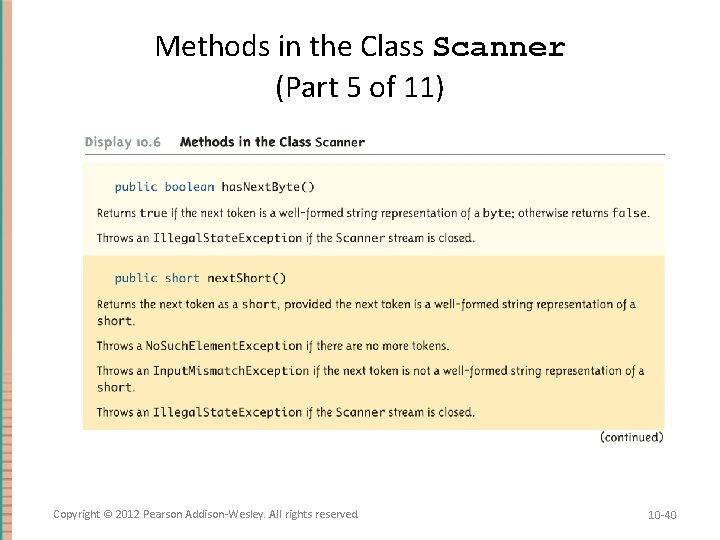
Methods in the Class Scanner (Part 5 of 11) Copyright © 2012 Pearson Addison-Wesley. All rights reserved. 10 -40
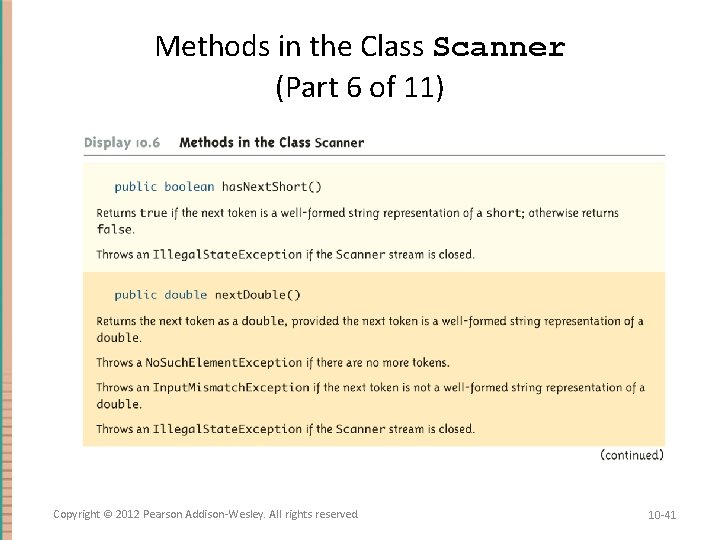
Methods in the Class Scanner (Part 6 of 11) Copyright © 2012 Pearson Addison-Wesley. All rights reserved. 10 -41
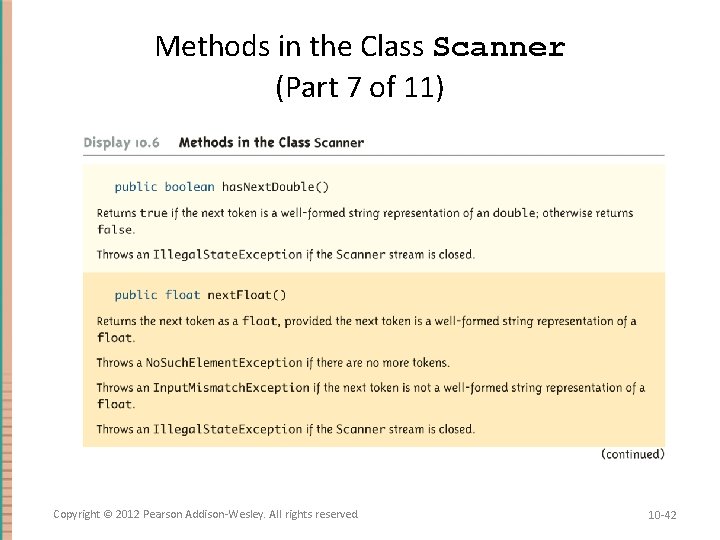
Methods in the Class Scanner (Part 7 of 11) Copyright © 2012 Pearson Addison-Wesley. All rights reserved. 10 -42
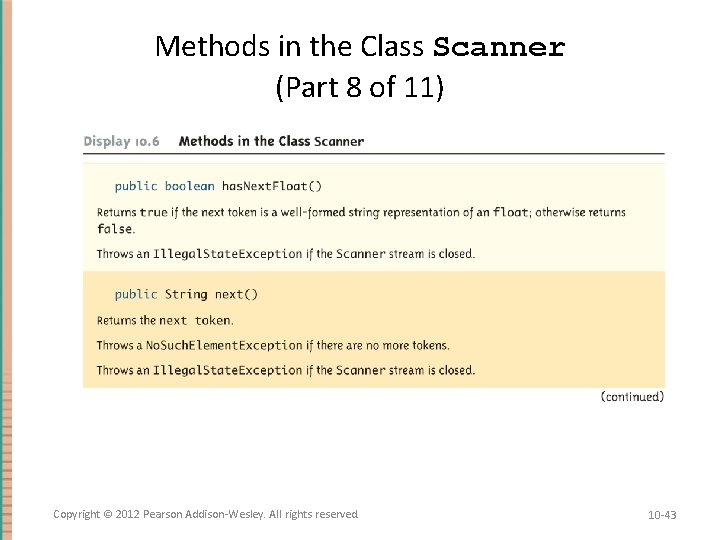
Methods in the Class Scanner (Part 8 of 11) Copyright © 2012 Pearson Addison-Wesley. All rights reserved. 10 -43
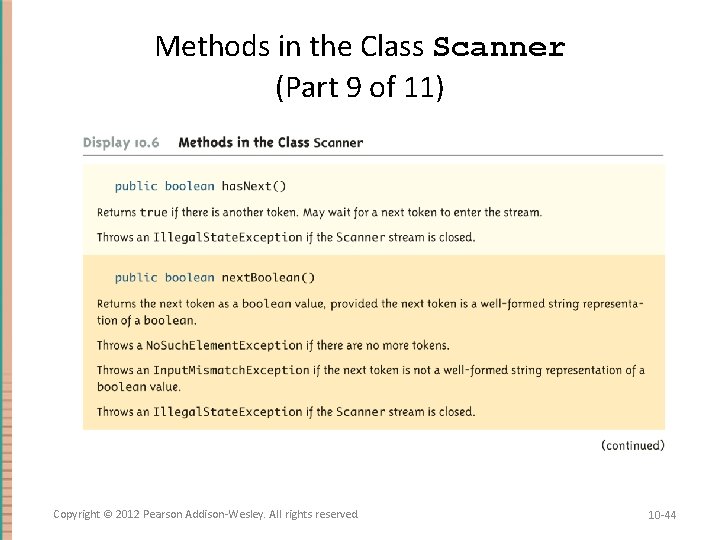
Methods in the Class Scanner (Part 9 of 11) Copyright © 2012 Pearson Addison-Wesley. All rights reserved. 10 -44
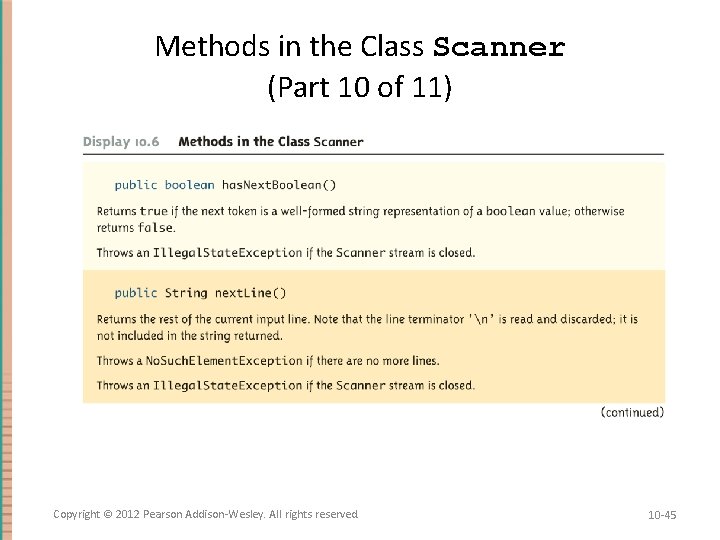
Methods in the Class Scanner (Part 10 of 11) Copyright © 2012 Pearson Addison-Wesley. All rights reserved. 10 -45
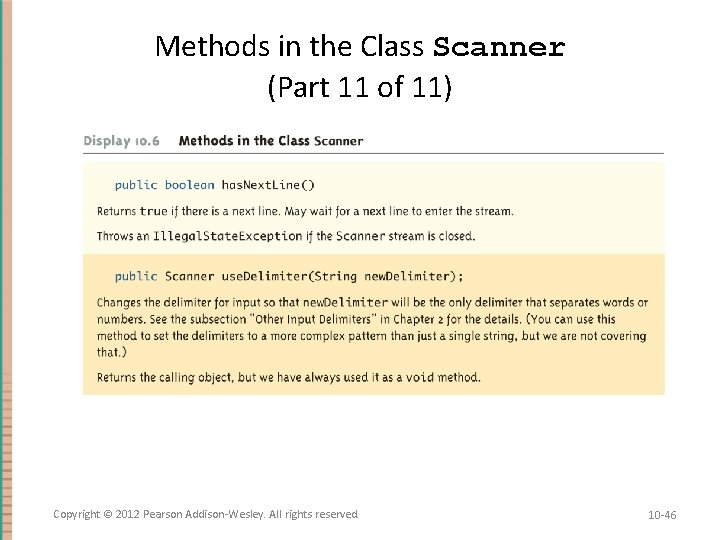
Methods in the Class Scanner (Part 11 of 11) Copyright © 2012 Pearson Addison-Wesley. All rights reserved. 10 -46
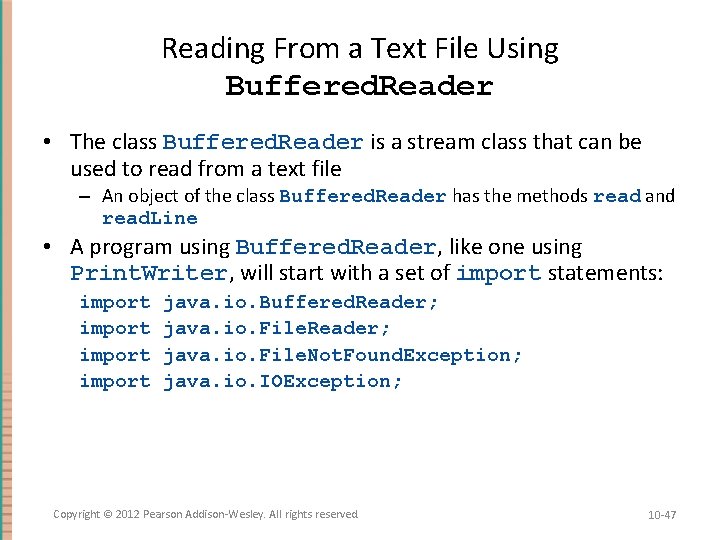
Reading From a Text File Using Buffered. Reader • The class Buffered. Reader is a stream class that can be used to read from a text file – An object of the class Buffered. Reader has the methods read and read. Line • A program using Buffered. Reader, like one using Print. Writer, will start with a set of import statements: import java. io. Buffered. Reader; java. io. File. Not. Found. Exception; java. io. IOException; Copyright © 2012 Pearson Addison-Wesley. All rights reserved. 10 -47
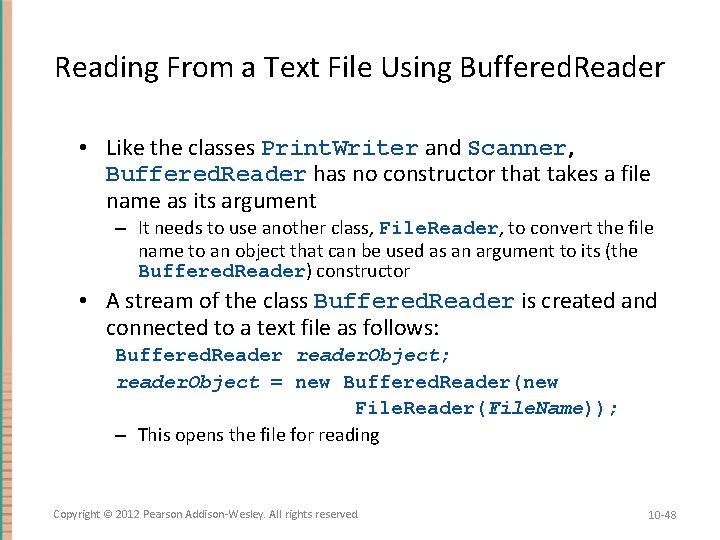
Reading From a Text File Using Buffered. Reader • Like the classes Print. Writer and Scanner, Buffered. Reader has no constructor that takes a file name as its argument – It needs to use another class, File. Reader, to convert the file name to an object that can be used as an argument to its (the Buffered. Reader) constructor • A stream of the class Buffered. Reader is created and connected to a text file as follows: Buffered. Reader reader. Object; reader. Object = new Buffered. Reader(new File. Reader(File. Name)); – This opens the file for reading Copyright © 2012 Pearson Addison-Wesley. All rights reserved. 10 -48
Reading From a Text File • After these statements, the methods read and read. LIne can be used to read from the file – The read. Line method is the same method used to read from the keyboard, but in this case it would read from a file – The read method reads a single character, and returns a value (of type int) that corresponds to the character read – Since the read method does not return the character itself, a type cast must be used: char next = (char)(reader. Object. read()); Copyright © 2012 Pearson Addison-Wesley. All rights reserved. 10 -49
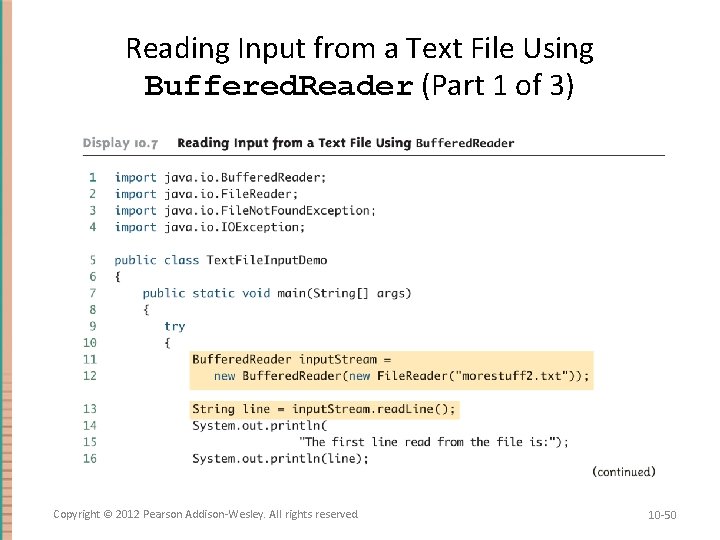
Reading Input from a Text File Using Buffered. Reader (Part 1 of 3) Copyright © 2012 Pearson Addison-Wesley. All rights reserved. 10 -50
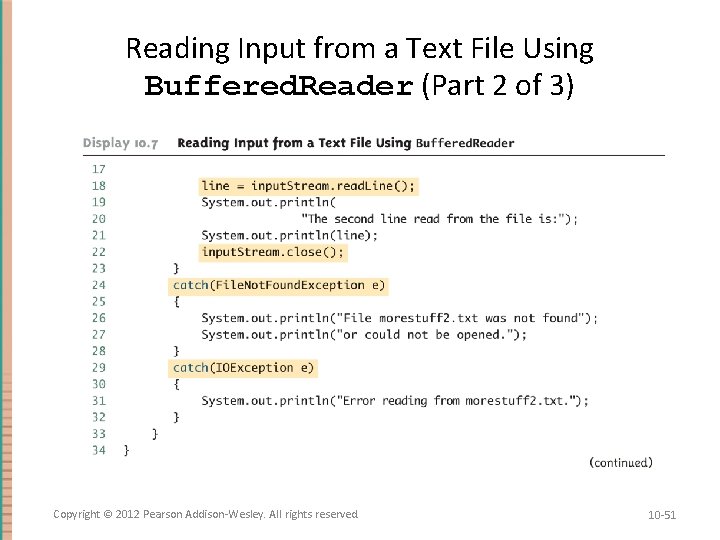
Reading Input from a Text File Using Buffered. Reader (Part 2 of 3) Copyright © 2012 Pearson Addison-Wesley. All rights reserved. 10 -51
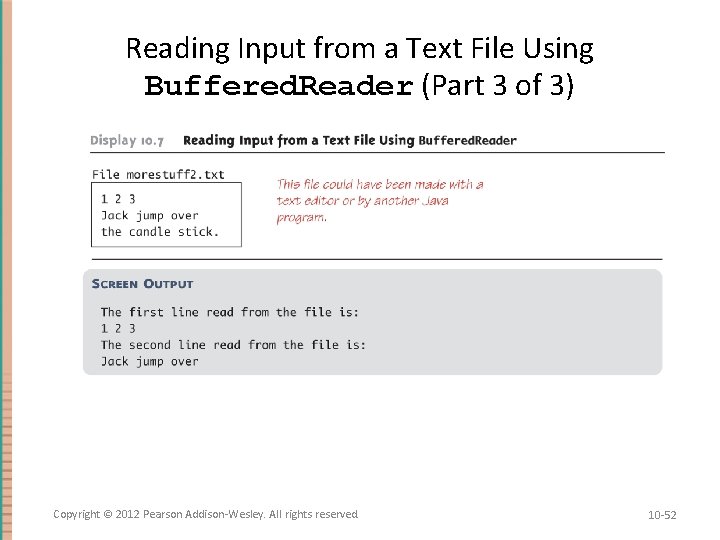
Reading Input from a Text File Using Buffered. Reader (Part 3 of 3) Copyright © 2012 Pearson Addison-Wesley. All rights reserved. 10 -52
Reading From a Text File • A program using a Buffered. Reader object in this way may throw two kinds of exceptions – An attempt to open the file may throw a File. Not. Found. Exception (which in this case has the expected meaning) – An invocation of read. Line may throw an IOException – Both of these exceptions should be handled Copyright © 2012 Pearson Addison-Wesley. All rights reserved. 10 -53
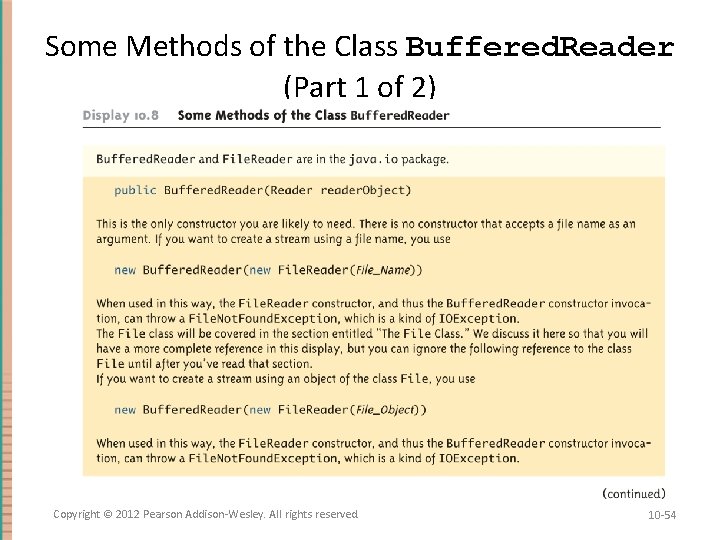
Some Methods of the Class Buffered. Reader (Part 1 of 2) Copyright © 2012 Pearson Addison-Wesley. All rights reserved. 10 -54
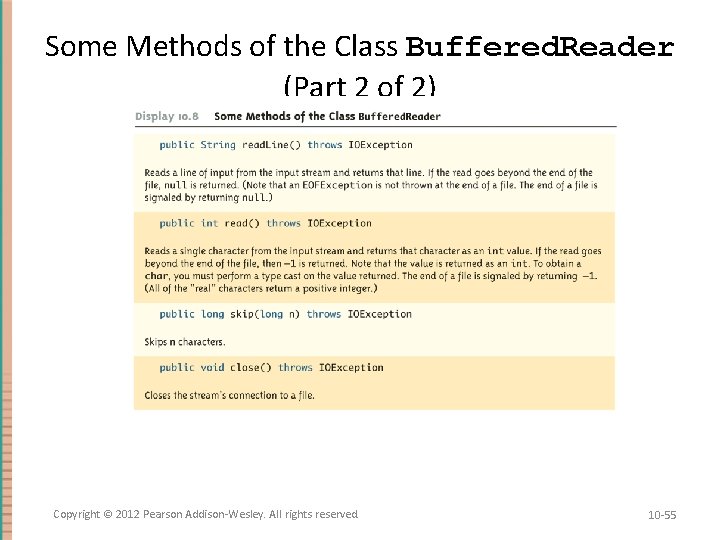
Some Methods of the Class Buffered. Reader (Part 2 of 2) Copyright © 2012 Pearson Addison-Wesley. All rights reserved. 10 -55
Reading Numbers • Unlike the Scanner class, the class Buffered. Reader has no methods to read a number from a text file – Instead, a number must be read in as a string, and then converted to a value of the appropriate numeric type using one of the wrapper classes – To read in a single number on a line by itself, first use the method read. Line, and then use Integer. parse. Int, Double. parse. Double, etc. to convert the string into a number – If there are multiple numbers on a line, String. Tokenizer can be used to decompose the string into tokens, and then the tokens can be converted as described above Copyright © 2012 Pearson Addison-Wesley. All rights reserved. 10 -56
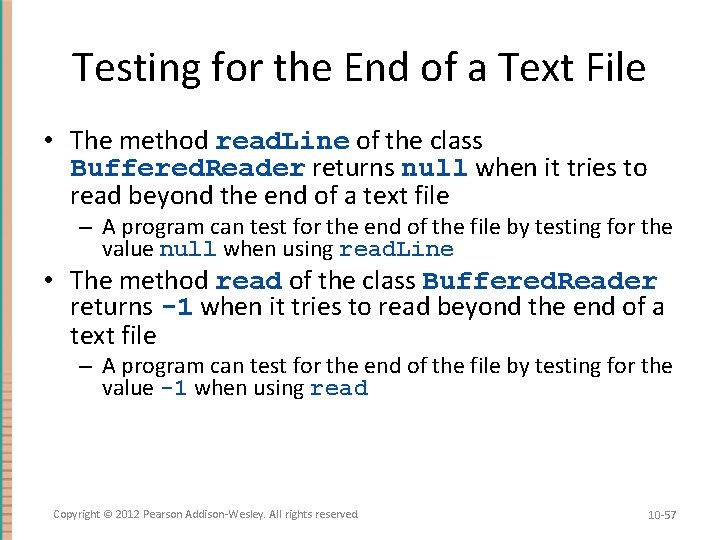
Testing for the End of a Text File • The method read. Line of the class Buffered. Reader returns null when it tries to read beyond the end of a text file – A program can test for the end of the file by testing for the value null when using read. Line • The method read of the class Buffered. Reader returns -1 when it tries to read beyond the end of a text file – A program can test for the end of the file by testing for the value -1 when using read Copyright © 2012 Pearson Addison-Wesley. All rights reserved. 10 -57
Path Names • When a file name is used as an argument to a constructor for opening a file, it is assumed that the file is in the same directory or folder as the one in which the program is run • If it is not in the same directory, the full or relative path name must be given Copyright © 2012 Pearson Addison-Wesley. All rights reserved. 10 -58
Path Names • A path name not only gives the name of the file, but also the directory or folder in which the file exists • A full path name gives a complete path name, starting from the root directory • A relative path name gives the path to the file, starting with the directory in which the program is located Copyright © 2012 Pearson Addison-Wesley. All rights reserved. 10 -59
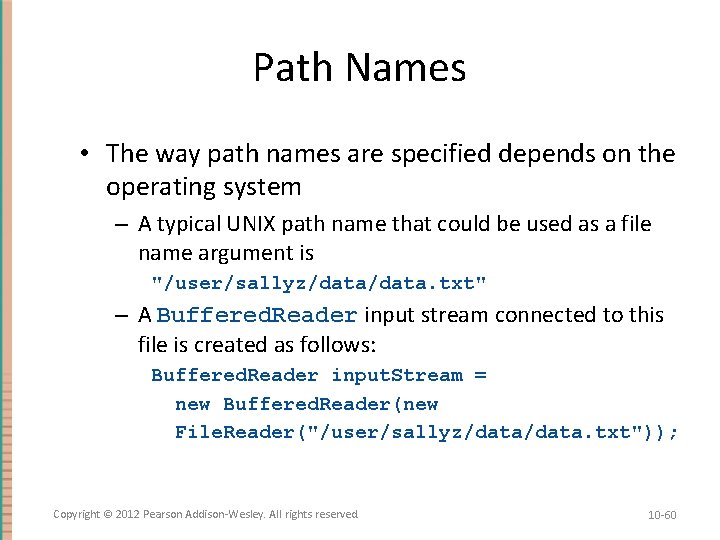
Path Names • The way path names are specified depends on the operating system – A typical UNIX path name that could be used as a file name argument is "/user/sallyz/data. txt" – A Buffered. Reader input stream connected to this file is created as follows: Buffered. Reader input. Stream = new Buffered. Reader(new File. Reader("/user/sallyz/data. txt")); Copyright © 2012 Pearson Addison-Wesley. All rights reserved. 10 -60
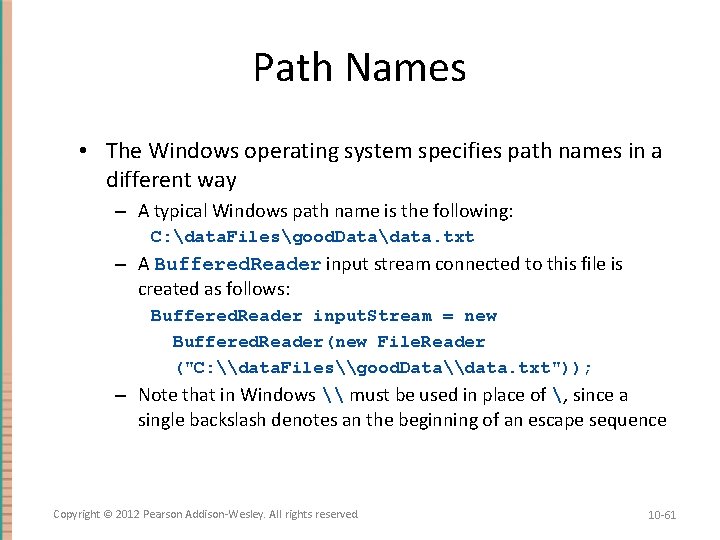
Path Names • The Windows operating system specifies path names in a different way – A typical Windows path name is the following: C: data. Filesgood. Datadata. txt – A Buffered. Reader input stream connected to this file is created as follows: Buffered. Reader input. Stream = new Buffered. Reader(new File. Reader ("C: \data. Files\good. Data\data. txt")); – Note that in Windows \ must be used in place of , since a single backslash denotes an the beginning of an escape sequence Copyright © 2012 Pearson Addison-Wesley. All rights reserved. 10 -61
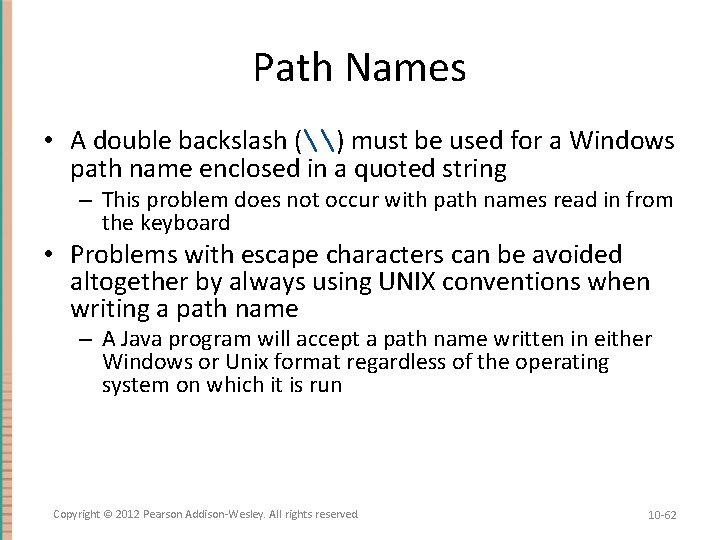
Path Names • A double backslash (\) must be used for a Windows path name enclosed in a quoted string – This problem does not occur with path names read in from the keyboard • Problems with escape characters can be avoided altogether by always using UNIX conventions when writing a path name – A Java program will accept a path name written in either Windows or Unix format regardless of the operating system on which it is run Copyright © 2012 Pearson Addison-Wesley. All rights reserved. 10 -62
Nested Constructor Invocations • Each of the Java I/O library classes serves only one function, or a small number of functions – Normally two or more class constructors are combined to obtain full functionality • Therefore, expressions with two constructors are common when dealing with Java I/O classes Copyright © 2012 Pearson Addison-Wesley. All rights reserved. 10 -63
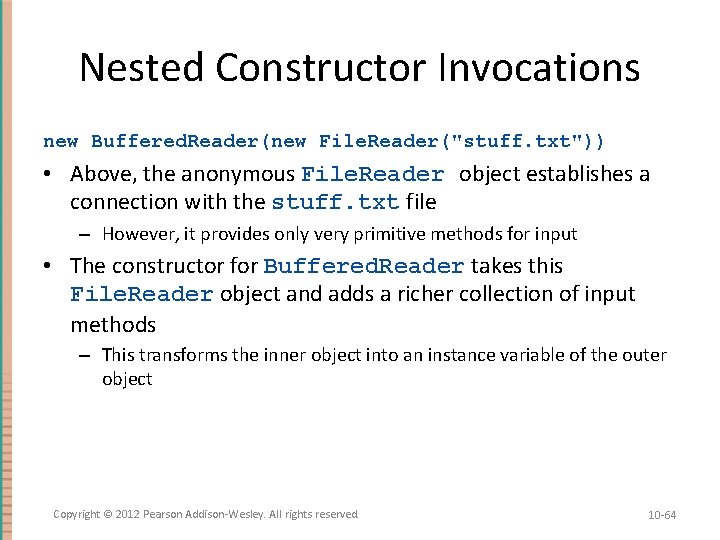
Nested Constructor Invocations new Buffered. Reader(new File. Reader("stuff. txt")) • Above, the anonymous File. Reader object establishes a connection with the stuff. txt file – However, it provides only very primitive methods for input • The constructor for Buffered. Reader takes this File. Reader object and adds a richer collection of input methods – This transforms the inner object into an instance variable of the outer object Copyright © 2012 Pearson Addison-Wesley. All rights reserved. 10 -64
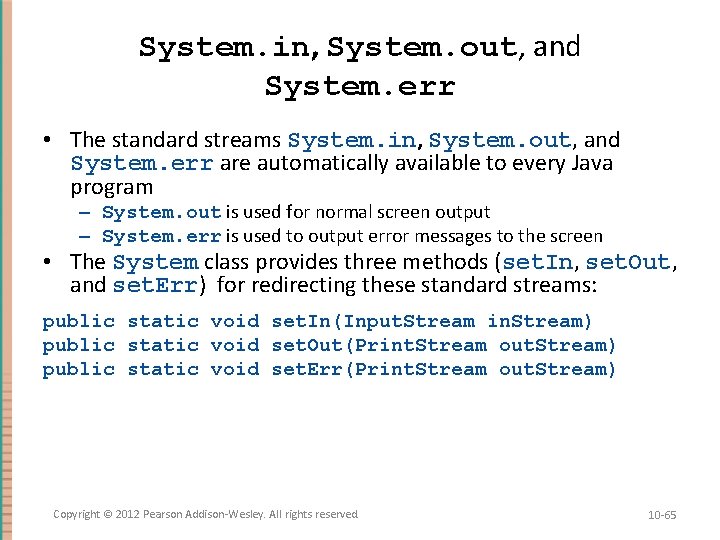
System. in, System. out, and System. err • The standard streams System. in, System. out, and System. err are automatically available to every Java program – System. out is used for normal screen output – System. err is used to output error messages to the screen • The System class provides three methods (set. In, set. Out, and set. Err) for redirecting these standard streams: public static void set. In(Input. Stream in. Stream) public static void set. Out(Print. Stream out. Stream) public static void set. Err(Print. Stream out. Stream) Copyright © 2012 Pearson Addison-Wesley. All rights reserved. 10 -65
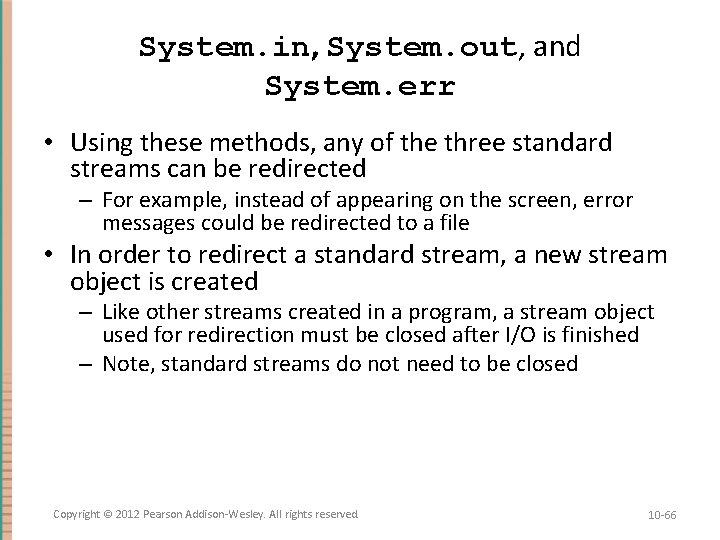
System. in, System. out, and System. err • Using these methods, any of the three standard streams can be redirected – For example, instead of appearing on the screen, error messages could be redirected to a file • In order to redirect a standard stream, a new stream object is created – Like other streams created in a program, a stream object used for redirection must be closed after I/O is finished – Note, standard streams do not need to be closed Copyright © 2012 Pearson Addison-Wesley. All rights reserved. 10 -66
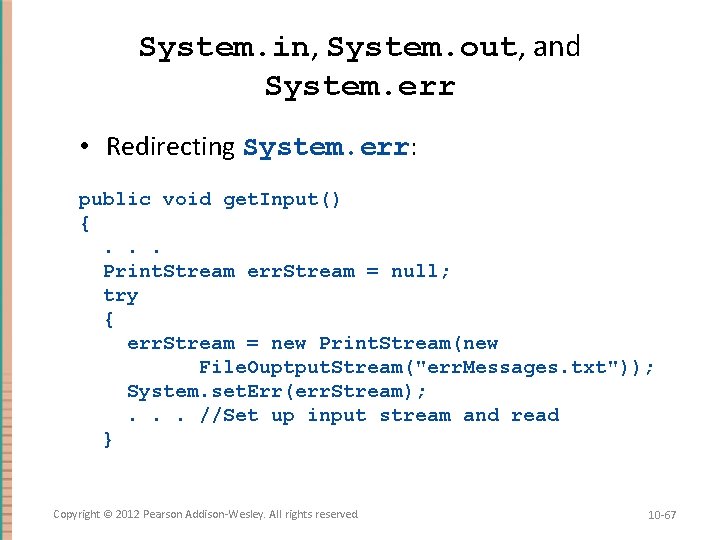
System. in, System. out, and System. err • Redirecting System. err: public void get. Input() {. . . Print. Stream err. Stream = null; try { err. Stream = new Print. Stream(new File. Ouptput. Stream("err. Messages. txt")); System. set. Err(err. Stream); . . . //Set up input stream and read } Copyright © 2012 Pearson Addison-Wesley. All rights reserved. 10 -67
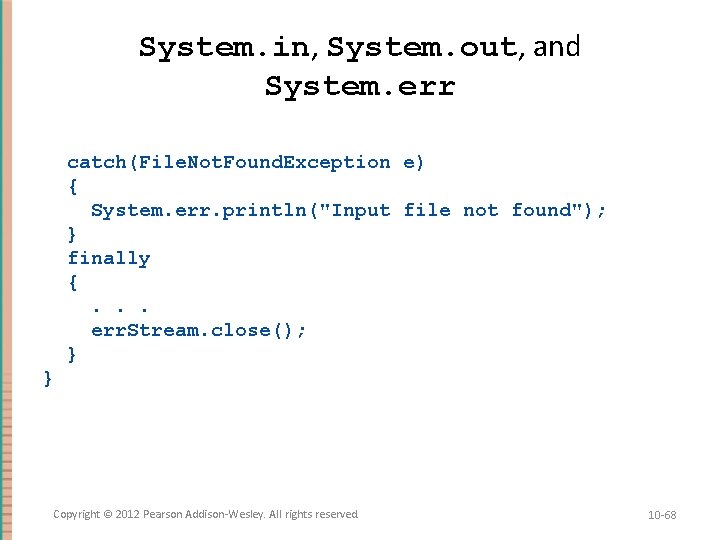
System. in, System. out, and System. err catch(File. Not. Found. Exception e) { System. err. println("Input file not found"); } finally {. . . err. Stream. close(); } } Copyright © 2012 Pearson Addison-Wesley. All rights reserved. 10 -68
The File Class • The File class is like a wrapper class for file names – The constructor for the class File takes a name, (known as the abstract name) as a string argument, and produces an object that represents the file with that name – The File object and methods of the class File can be used to determine information about the file and its properties Copyright © 2012 Pearson Addison-Wesley. All rights reserved. 10 -69
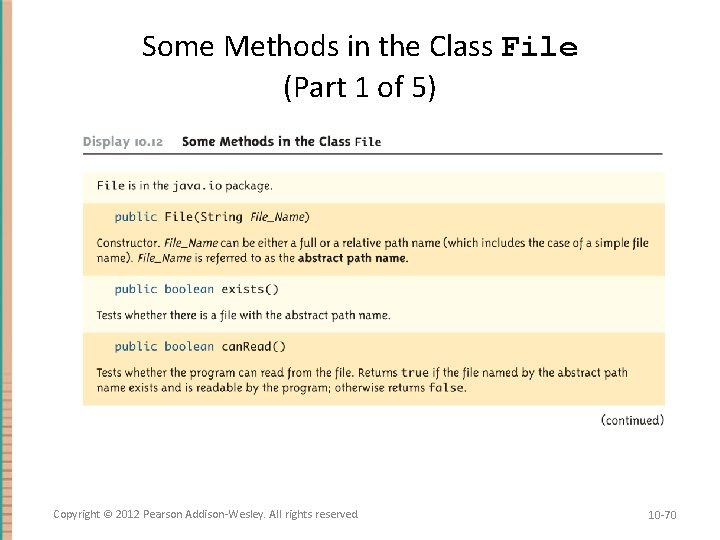
Some Methods in the Class File (Part 1 of 5) Copyright © 2012 Pearson Addison-Wesley. All rights reserved. 10 -70
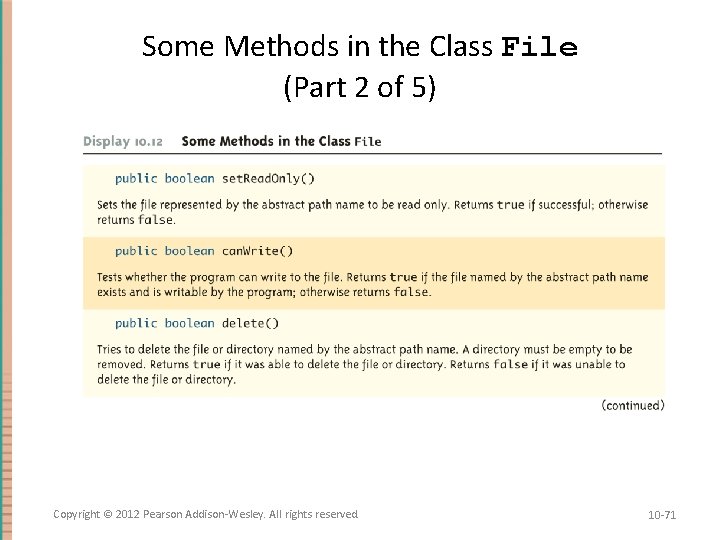
Some Methods in the Class File (Part 2 of 5) Copyright © 2012 Pearson Addison-Wesley. All rights reserved. 10 -71
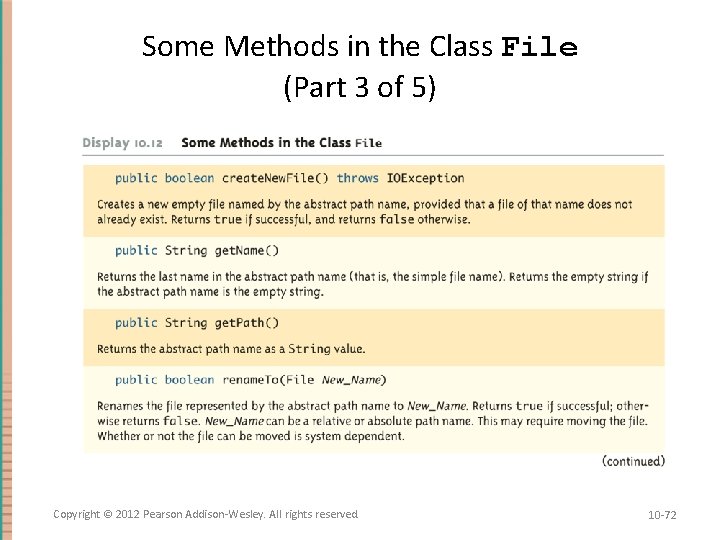
Some Methods in the Class File (Part 3 of 5) Copyright © 2012 Pearson Addison-Wesley. All rights reserved. 10 -72
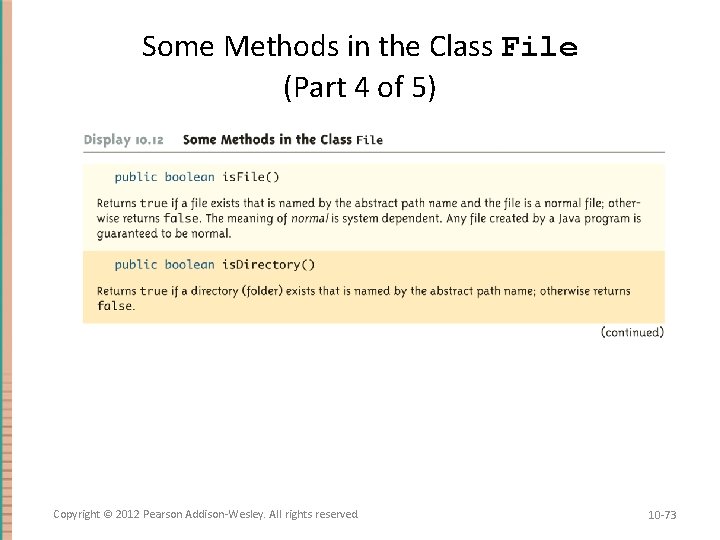
Some Methods in the Class File (Part 4 of 5) Copyright © 2012 Pearson Addison-Wesley. All rights reserved. 10 -73
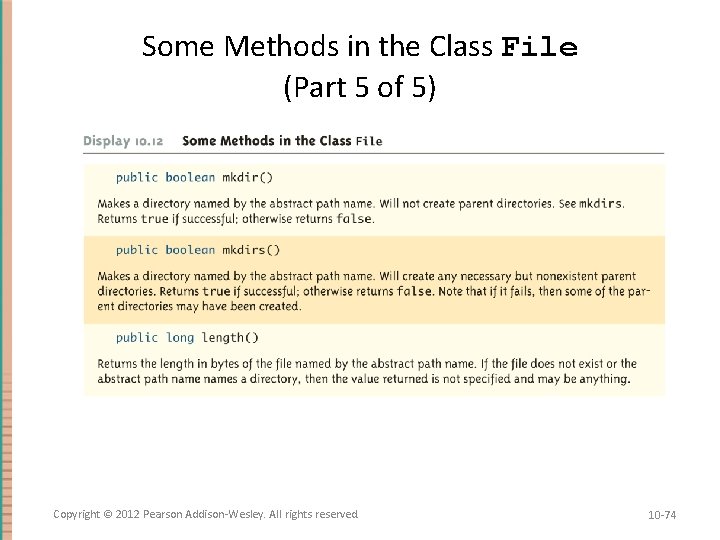
Some Methods in the Class File (Part 5 of 5) Copyright © 2012 Pearson Addison-Wesley. All rights reserved. 10 -74
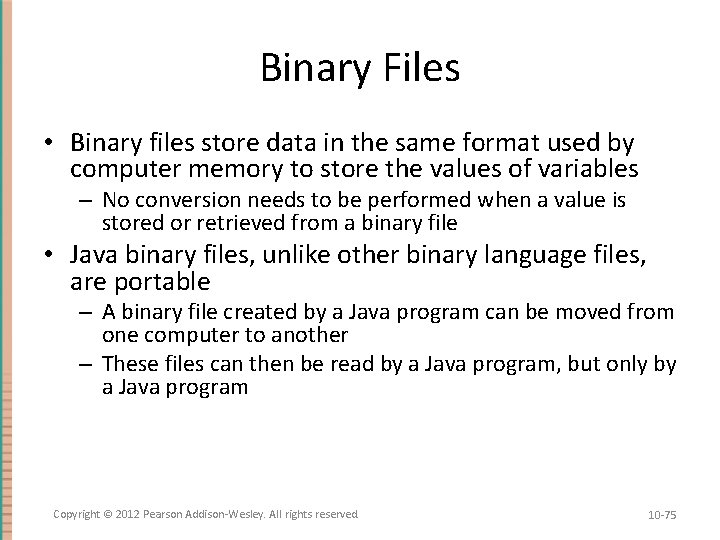
Binary Files • Binary files store data in the same format used by computer memory to store the values of variables – No conversion needs to be performed when a value is stored or retrieved from a binary file • Java binary files, unlike other binary language files, are portable – A binary file created by a Java program can be moved from one computer to another – These files can then be read by a Java program, but only by a Java program Copyright © 2012 Pearson Addison-Wesley. All rights reserved. 10 -75
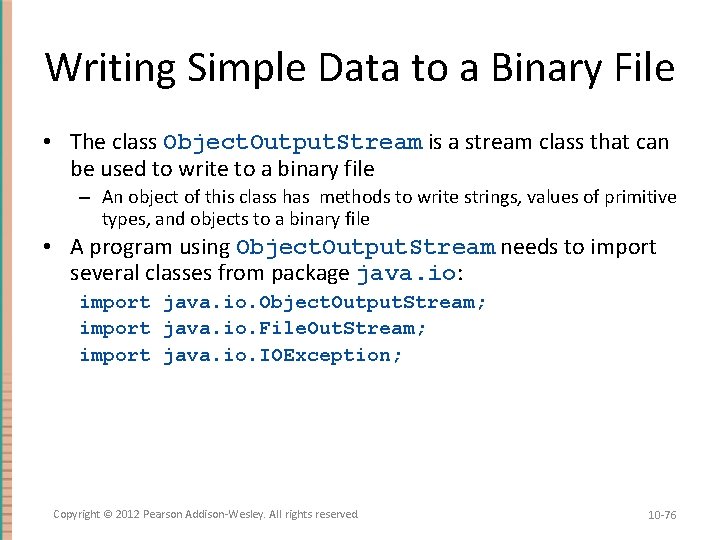
Writing Simple Data to a Binary File • The class Object. Output. Stream is a stream class that can be used to write to a binary file – An object of this class has methods to write strings, values of primitive types, and objects to a binary file • A program using Object. Output. Stream needs to import several classes from package java. io: import java. io. Object. Output. Stream; import java. io. File. Out. Stream; import java. io. IOException; Copyright © 2012 Pearson Addison-Wesley. All rights reserved. 10 -76
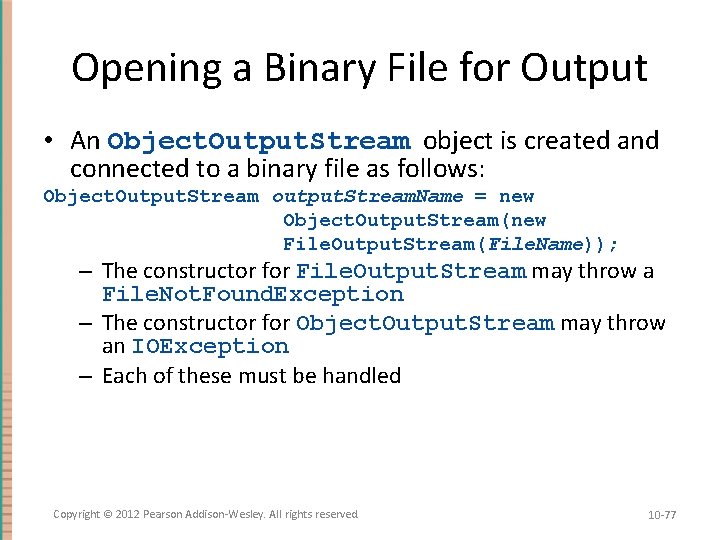
Opening a Binary File for Output • An Object. Output. Stream object is created and connected to a binary file as follows: Object. Output. Stream output. Stream. Name = new Object. Output. Stream(new File. Output. Stream(File. Name)); – The constructor for File. Output. Stream may throw a File. Not. Found. Exception – The constructor for Object. Output. Stream may throw an IOException – Each of these must be handled Copyright © 2012 Pearson Addison-Wesley. All rights reserved. 10 -77
Opening a Binary File for Output • After opening the file, Object. Output. Stream methods can be used to write to the file – Methods used to output primitive values include write. Int, write. Double, write. Char, and write. Boolean • UTF is an encoding scheme used to encode Unicode characters that favors the ASCII character set – The method write. UTF can be used to output values of type String • The stream should always be closed after writing Copyright © 2012 Pearson Addison-Wesley. All rights reserved. 10 -78
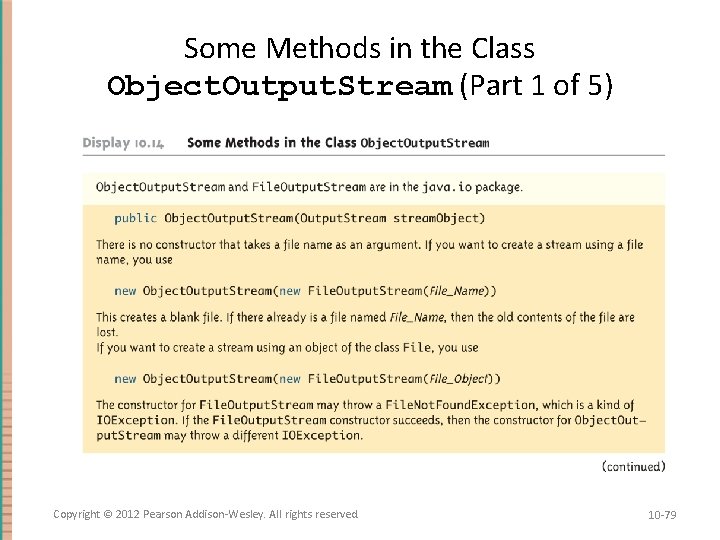
Some Methods in the Class Object. Output. Stream (Part 1 of 5) Copyright © 2012 Pearson Addison-Wesley. All rights reserved. 10 -79
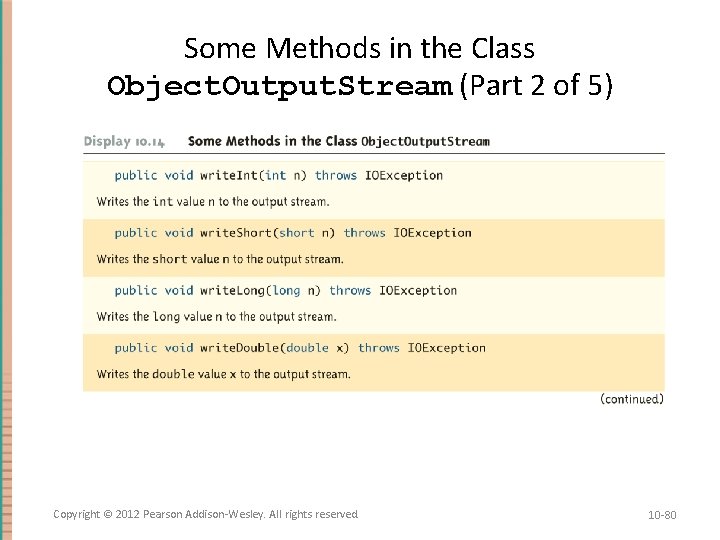
Some Methods in the Class Object. Output. Stream (Part 2 of 5) Copyright © 2012 Pearson Addison-Wesley. All rights reserved. 10 -80
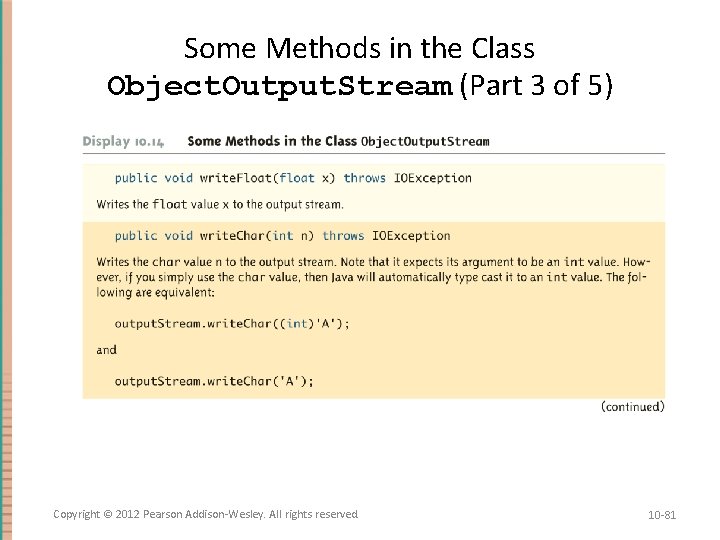
Some Methods in the Class Object. Output. Stream (Part 3 of 5) Copyright © 2012 Pearson Addison-Wesley. All rights reserved. 10 -81
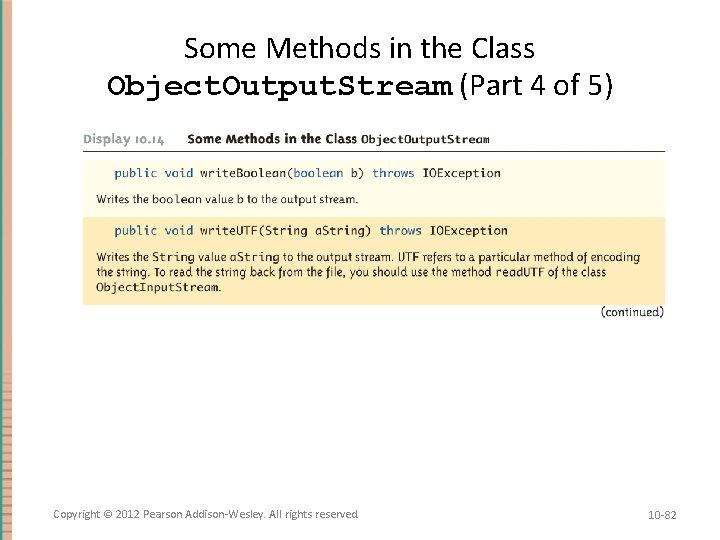
Some Methods in the Class Object. Output. Stream (Part 4 of 5) Copyright © 2012 Pearson Addison-Wesley. All rights reserved. 10 -82
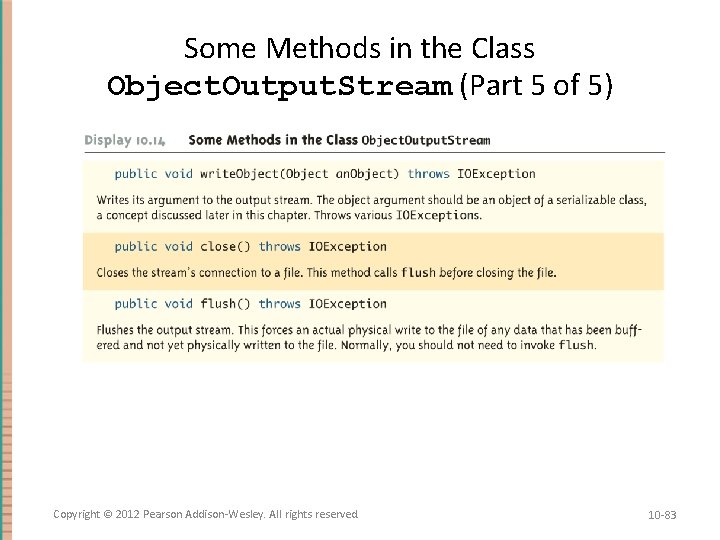
Some Methods in the Class Object. Output. Stream (Part 5 of 5) Copyright © 2012 Pearson Addison-Wesley. All rights reserved. 10 -83
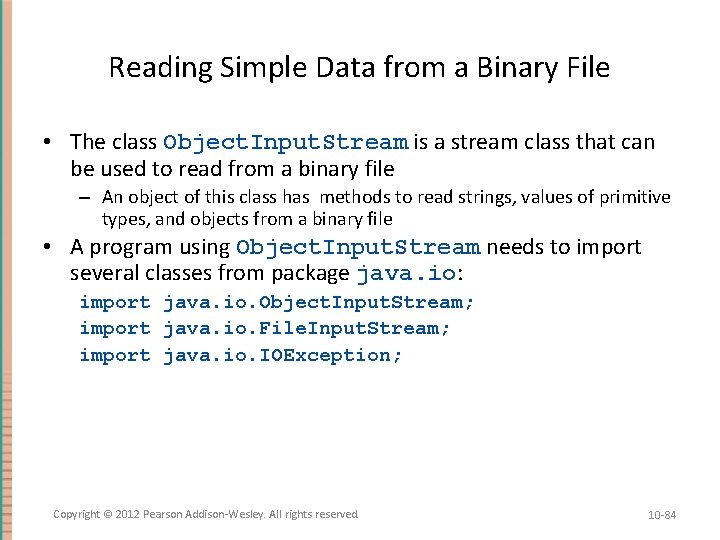
Reading Simple Data from a Binary File • The class Object. Input. Stream is a stream class that can be used to read from a binary file – An object of this class has methods to read strings, values of primitive types, and objects from a binary file • A program using Object. Input. Stream needs to import several classes from package java. io: import java. io. Object. Input. Stream; import java. io. File. Input. Stream; import java. io. IOException; Copyright © 2012 Pearson Addison-Wesley. All rights reserved. 10 -84
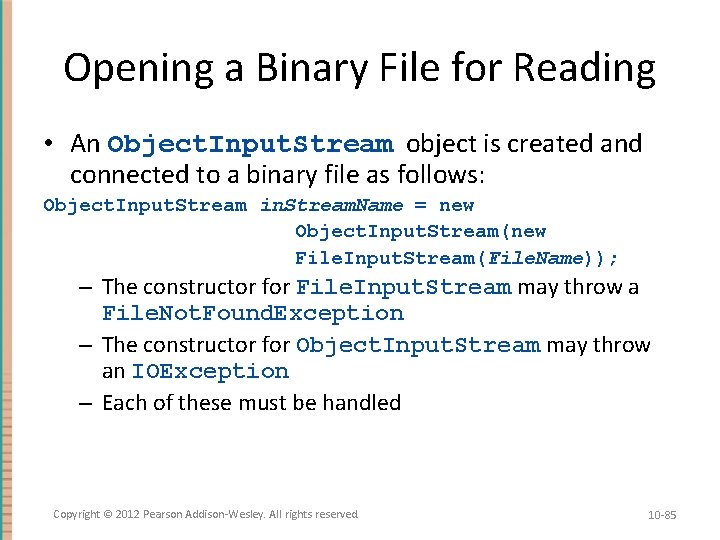
Opening a Binary File for Reading • An Object. Input. Stream object is created and connected to a binary file as follows: Object. Input. Stream in. Stream. Name = new Object. Input. Stream(new File. Input. Stream(File. Name)); – The constructor for File. Input. Stream may throw a File. Not. Found. Exception – The constructor for Object. Input. Stream may throw an IOException – Each of these must be handled Copyright © 2012 Pearson Addison-Wesley. All rights reserved. 10 -85
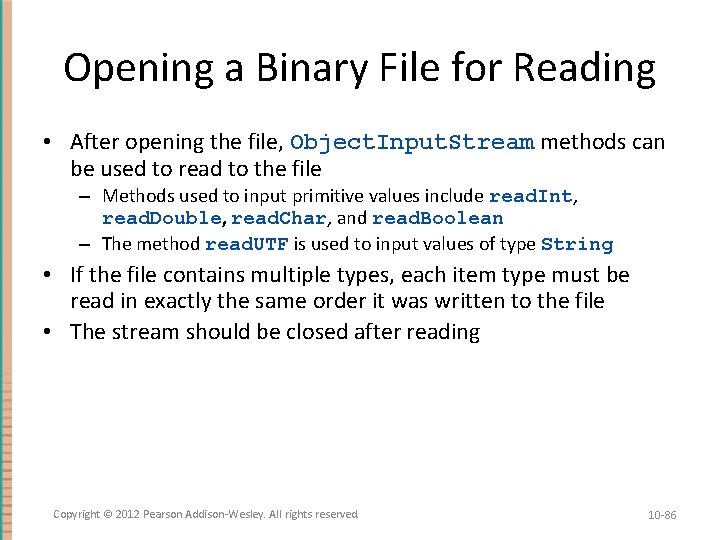
Opening a Binary File for Reading • After opening the file, Object. Input. Stream methods can be used to read to the file – Methods used to input primitive values include read. Int, read. Double, read. Char, and read. Boolean – The method read. UTF is used to input values of type String • If the file contains multiple types, each item type must be read in exactly the same order it was written to the file • The stream should be closed after reading Copyright © 2012 Pearson Addison-Wesley. All rights reserved. 10 -86
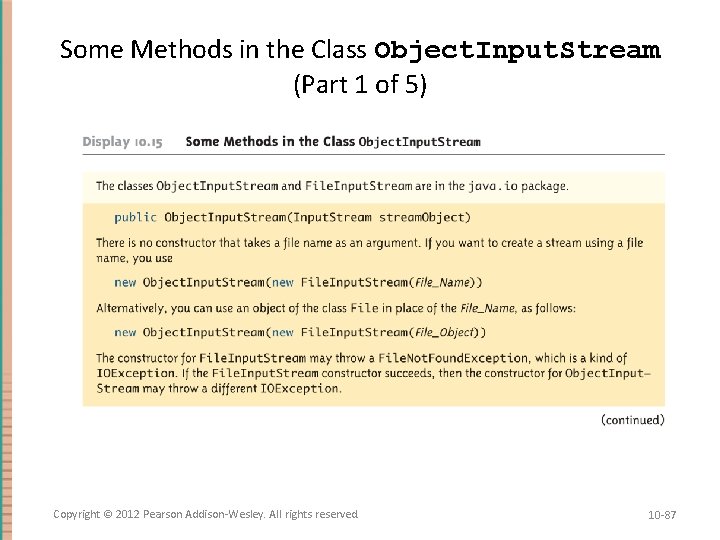
Some Methods in the Class Object. Input. Stream (Part 1 of 5) Copyright © 2012 Pearson Addison-Wesley. All rights reserved. 10 -87
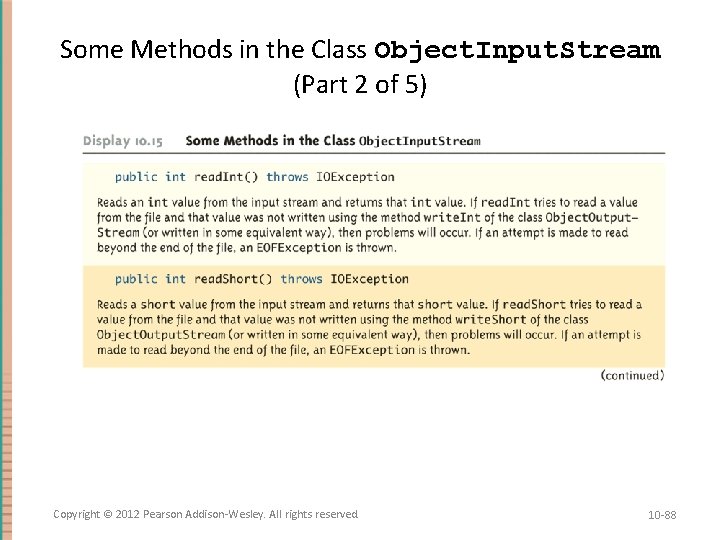
Some Methods in the Class Object. Input. Stream (Part 2 of 5) Copyright © 2012 Pearson Addison-Wesley. All rights reserved. 10 -88
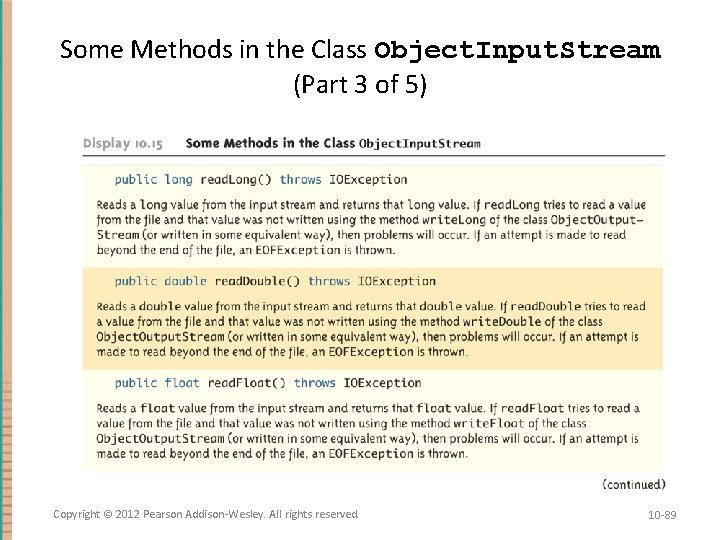
Some Methods in the Class Object. Input. Stream (Part 3 of 5) Copyright © 2012 Pearson Addison-Wesley. All rights reserved. 10 -89
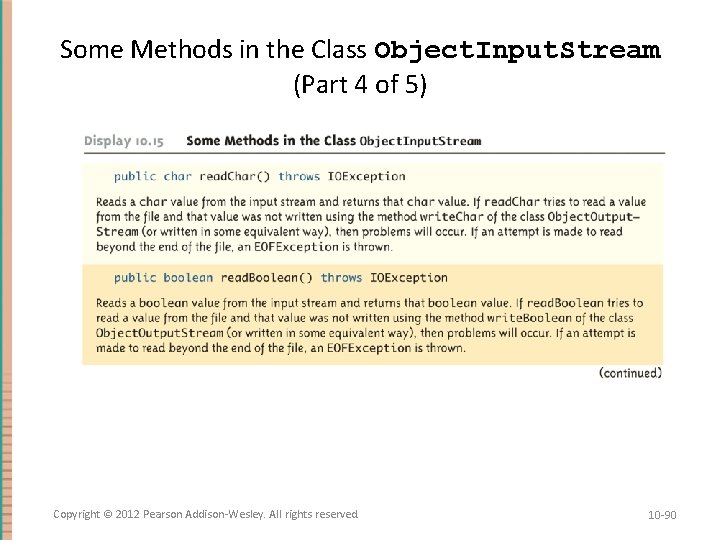
Some Methods in the Class Object. Input. Stream (Part 4 of 5) Copyright © 2012 Pearson Addison-Wesley. All rights reserved. 10 -90
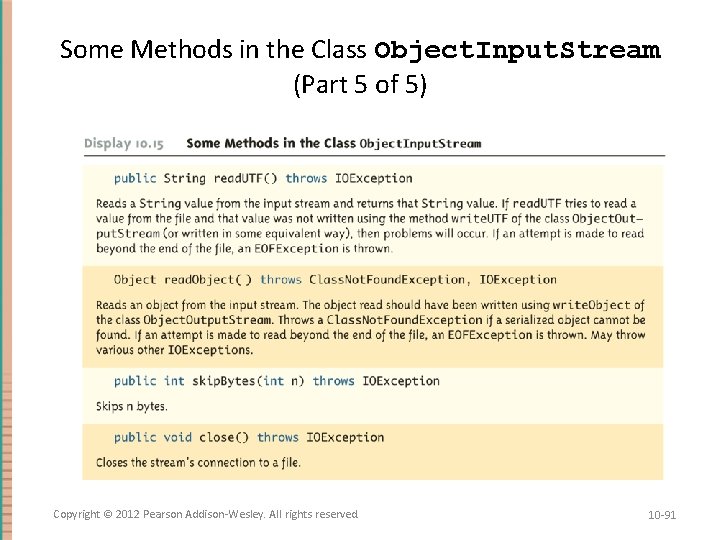
Some Methods in the Class Object. Input. Stream (Part 5 of 5) Copyright © 2012 Pearson Addison-Wesley. All rights reserved. 10 -91
Checking for the End of a Binary File the Correct Way • All of the Object. Input. Stream methods that read from a binary file throw an EOFException when trying to read beyond the end of a file – This can be used to end a loop that reads all the data in a file • Note that different file-reading methods check for the end of a file in different ways – Testing for the end of a file in the wrong way can cause a program to go into an infinite loop or terminate abnormally Copyright © 2012 Pearson Addison-Wesley. All rights reserved. 10 -92
Binary I/O of Objects • Objects can also be input and output from a binary file – Use the write. Object method of the class Object. Output. Stream to write an object to a binary file – Use the read. Object method of the class Object. Input. Stream to read an object from a binary file – In order to use the value returned by read. Object as an object of a class, it must be type cast first: Some. Class some. Object = (Some. Class)object. Input. Stream. read. Object(); Copyright © 2012 Pearson Addison-Wesley. All rights reserved. 10 -93
Binary I/O of Objects • It is best to store the data of only one class type in any one file – Storing objects of multiple class types or objects of one class type mixed with primitives can lead to loss of data • In addition, the class of the object being read or written must implement the Serializable interface – The Serializable interface is easy to use and requires no knowledge of interfaces – A class that implements the Serializable interface is said to be a serializable class Copyright © 2012 Pearson Addison-Wesley. All rights reserved. 10 -94
The Serializable Interface • In order to make a class serializable, simply add implements Serializable to the heading of the class definition public class Some. Class implements Serializable • When a serializable class has instance variables of a class type, then all those classes must be serializable also – A class is not serializable unless the classes for all instance variables are also serializable for all levels of instance variables within classes Copyright © 2012 Pearson Addison-Wesley. All rights reserved. 10 -95
Array Objects in Binary Files • Since an array is an object, arrays can also be read and written to binary files using read. Object and write. Object – If the base type is a class, then it must also be serializable, just like any other class type – Since read. Object returns its value as type Object (like any other object), it must be type cast to the correct array type: Some. Class[] some. Object = (Some. Class[])object. Input. Stream. read. Object(); Copyright © 2012 Pearson Addison-Wesley. All rights reserved. 10 -96
Random Access to Binary Files • The streams for sequential access to files are the ones most commonly used for file access in Java • However, some applications require very rapid access to records in very large databases – These applications need to have random access to particular parts of a file Copyright © 2012 Pearson Addison-Wesley. All rights reserved. 10 -97
Reading and Writing to the Same File • The stream class Random. Access. File, which is in the java. io package, provides both read and write random access to a file in Java • A random access file consists of a sequence of numbered bytes – There is a kind of marker called the file pointer that is always positioned at one of the bytes – All reads and writes take place starting at the file pointer location – The file pointer can be moved to a new location with the method seek Copyright © 2012 Pearson Addison-Wesley. All rights reserved. 10 -98
Reading and Writing to the Same File • Although a random access file is byte oriented, there are methods that allow for reading or writing values of the primitive types as well as string values to/from a random access file – These include read. Int, read. Double, and read. UTF for input, and write. Int, write. Double, and write. UTF for output – It does no have write. Object or read. Object methods, however Copyright © 2012 Pearson Addison-Wesley. All rights reserved. 10 -99
Opening a File • The constructor for Random. Access. File takes either a string file name or an object of the class File as its first argument • The second argument must be one of four strings: – "rw", meaning the code can both read and write to the file after it is open – "r", meaning the code can read form the file, but not write to it – "rws" or "rwd" (See Table of methods from Random. Access. File) Copyright © 2012 Pearson Addison-Wesley. All rights reserved. 10 -100
Pitfall: A Random Access File Need Not Start Empty • If the file already exists, then when it is opened, the length is not reset to 0, and the file pointer will be positioned at the start of the file – This ensures that old data is not lost, and that the file pointer is set for the most likely position for reading (not writing) • The length of the file can be changed with the set. Length method – In particular, the set. Length method can be used to empty the file Copyright © 2012 Pearson Addison-Wesley. All rights reserved. 10 -101
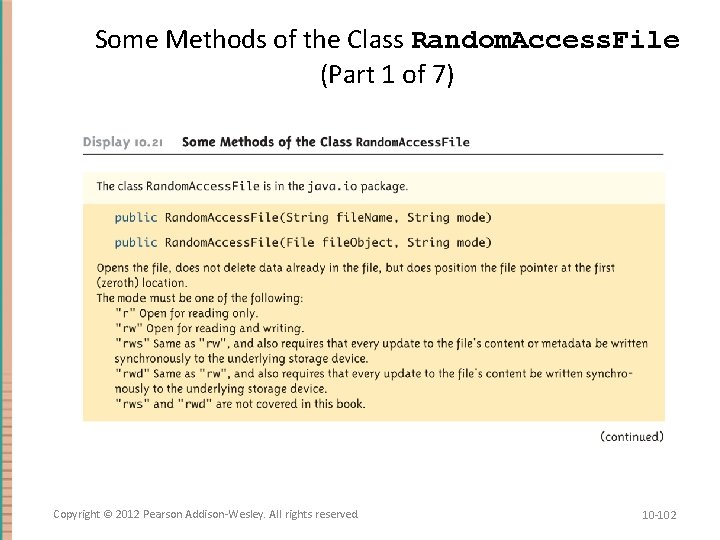
Some Methods of the Class Random. Access. File (Part 1 of 7) Copyright © 2012 Pearson Addison-Wesley. All rights reserved. 10 -102
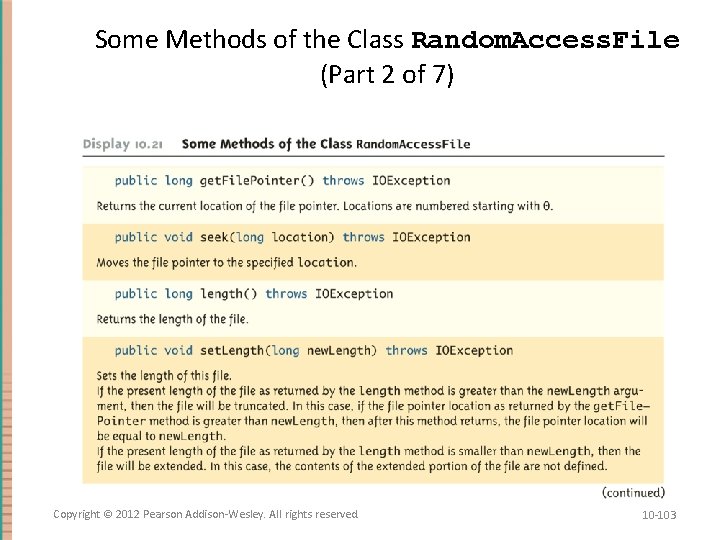
Some Methods of the Class Random. Access. File (Part 2 of 7) Copyright © 2012 Pearson Addison-Wesley. All rights reserved. 10 -103
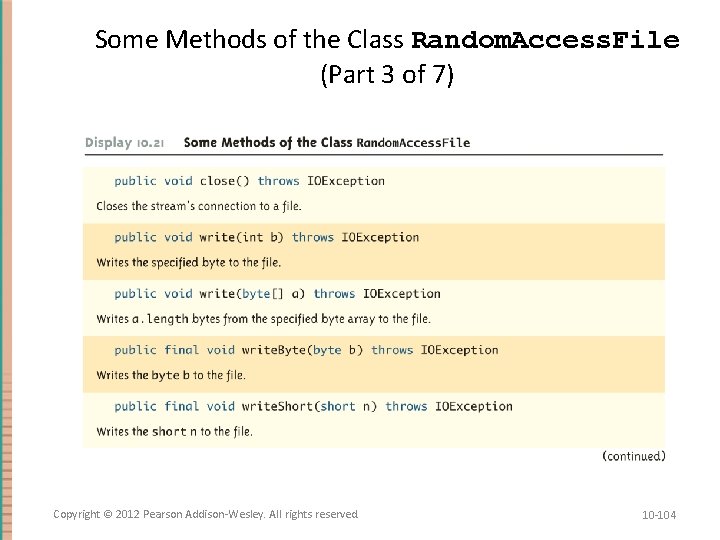
Some Methods of the Class Random. Access. File (Part 3 of 7) Copyright © 2012 Pearson Addison-Wesley. All rights reserved. 10 -104
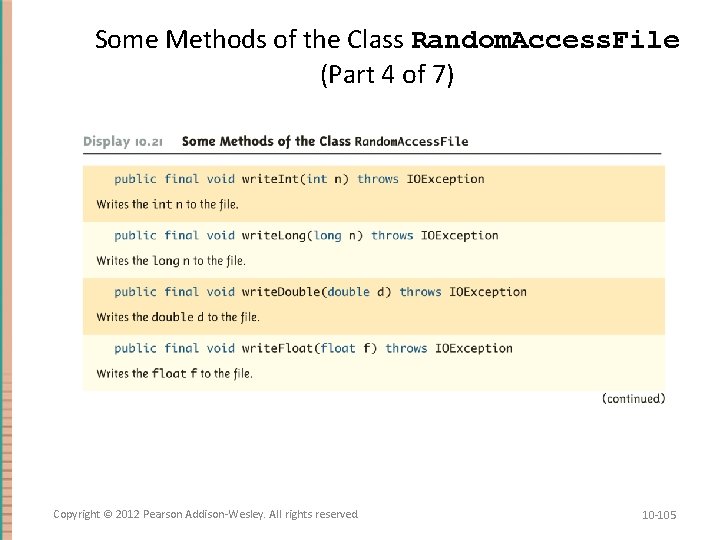
Some Methods of the Class Random. Access. File (Part 4 of 7) Copyright © 2012 Pearson Addison-Wesley. All rights reserved. 10 -105
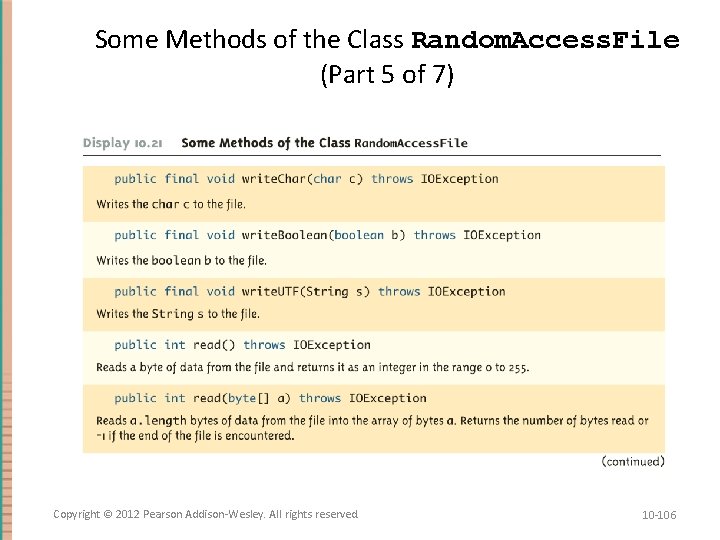
Some Methods of the Class Random. Access. File (Part 5 of 7) Copyright © 2012 Pearson Addison-Wesley. All rights reserved. 10 -106
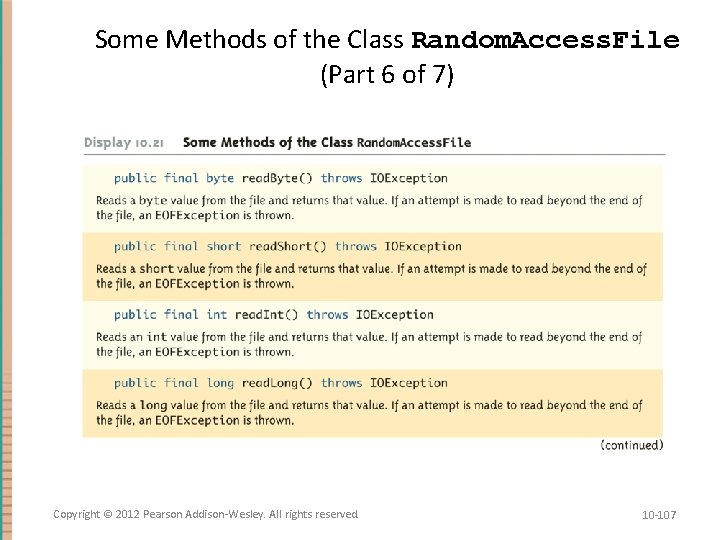
Some Methods of the Class Random. Access. File (Part 6 of 7) Copyright © 2012 Pearson Addison-Wesley. All rights reserved. 10 -107
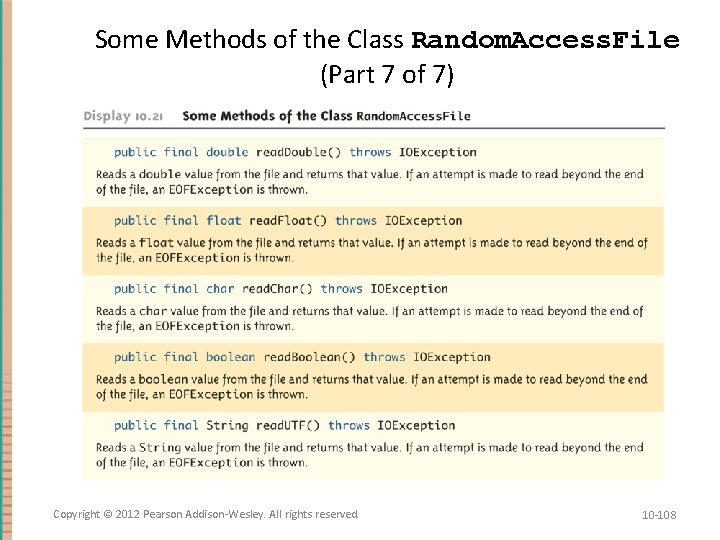
Some Methods of the Class Random. Access. File (Part 7 of 7) Copyright © 2012 Pearson Addison-Wesley. All rights reserved. 10 -108
- Slides: 108