
Chapter 1 The Database Environment Modern Database Management
Chapter 1: The Database Environment Modern Database Management 9 th Edition Jeffrey A. Hoffer, Mary B. Prescott, Heikki Topi © 2009 Pearson Education, Inc. Publishing as Prentice Hall 1
Objectives n n n n Definition of terms Explain growth and importance of databases Name limitations of conventional file processing Identify five categories of databases Explain advantages of databases Identify costs and risks of databases List components of database environment Describe evolution of database systems Chapter 1 © 2009 Pearson Education, Inc. Publishing as Prentice Hall 2
Definitions n n Database: organized collection of logically related data Data: stored representations of meaningful objects and events n n Structured: numbers, text, dates Unstructured: images, video, documents Information: data processed to increase knowledge in the person using the data Metadata: data that describes the properties and context of user data 3
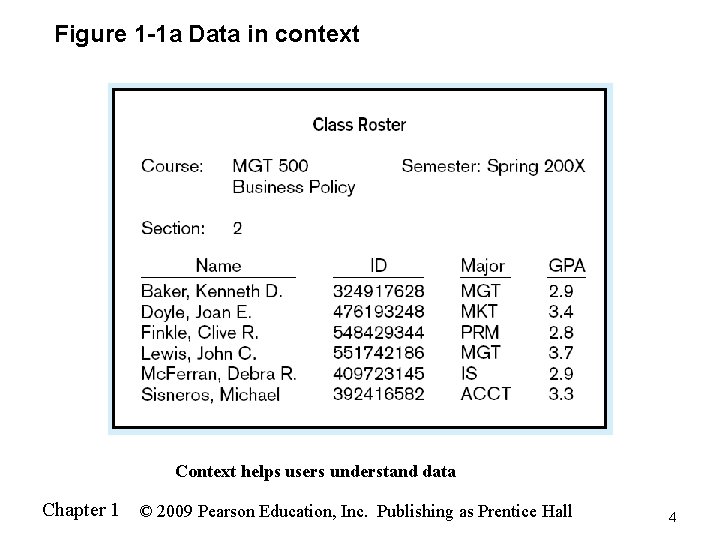
Figure 1 -1 a Data in context Context helps users understand data Chapter 1 © 2009 Pearson Education, Inc. Publishing as Prentice Hall 4
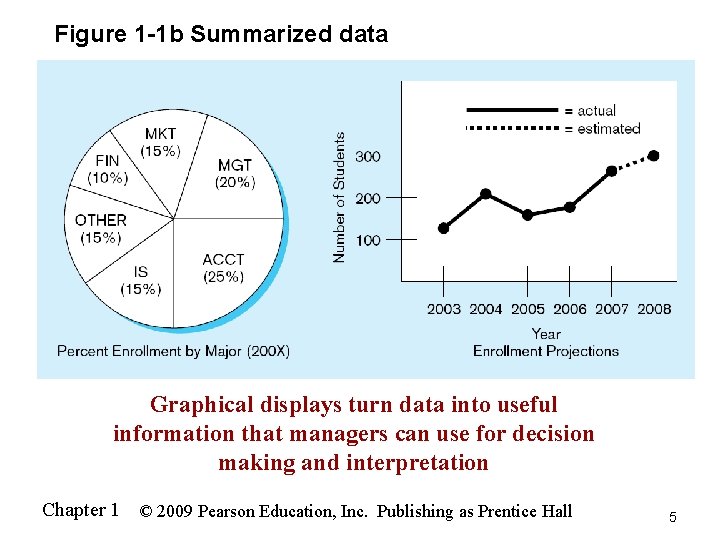
Figure 1 -1 b Summarized data Graphical displays turn data into useful information that managers can use for decision making and interpretation Chapter 1 © 2009 Pearson Education, Inc. Publishing as Prentice Hall 5
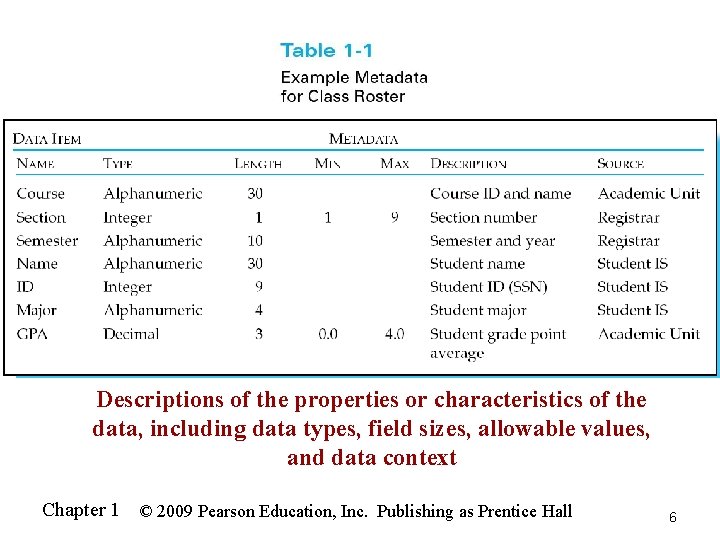
Descriptions of the properties or characteristics of the data, including data types, field sizes, allowable values, and data context Chapter 1 © 2009 Pearson Education, Inc. Publishing as Prentice Hall 6
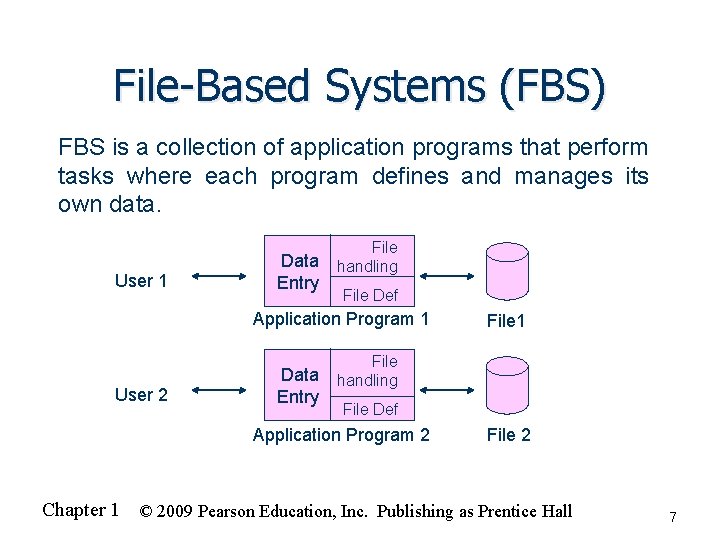
File-Based Systems (FBS) FBS is a collection of application programs that perform tasks where each program defines and manages its own data. File User 1 Data handling Entry File Def Application Program 1 User 2 Data Entry File 1 File handling File Def Application Program 2 File 2 Chapter 1 © 2009 Pearson Education, Inc. Publishing as Prentice Hall 7
Disadvantages of File-Based Systems (FBS) n Program-Data Dependence n n Duplication of Data n n No centralized control of data Lengthy Development Times n n Different systems/programs have separate copies of the same data Limited Data Sharing n n All programs maintain metadata for each file they use Programmers must design their own file formats Excessive Program Maintenance n 80% of information systems budget Chapter 1 © 2009 Pearson Education, Inc. Publishing as Prentice Hall 8
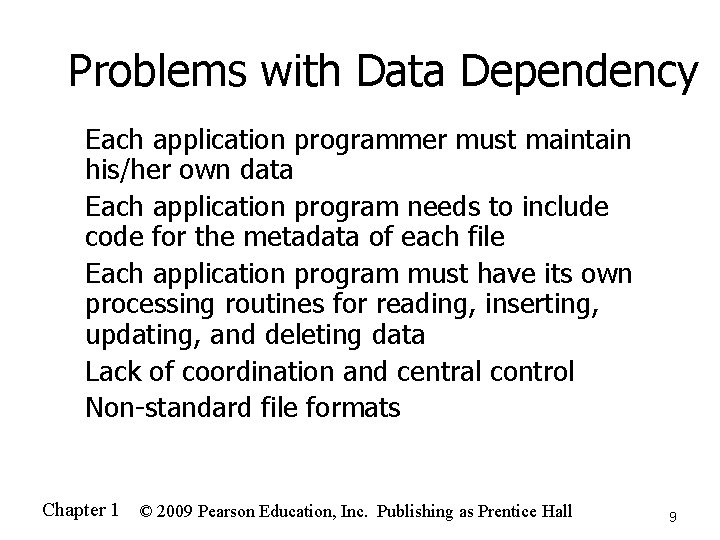
Problems with Data Dependency n n n Each application programmer must maintain his/her own data Each application program needs to include code for the metadata of each file Each application program must have its own processing routines for reading, inserting, updating, and deleting data Lack of coordination and central control Non-standard file formats Chapter 1 © 2009 Pearson Education, Inc. Publishing as Prentice Hall 9
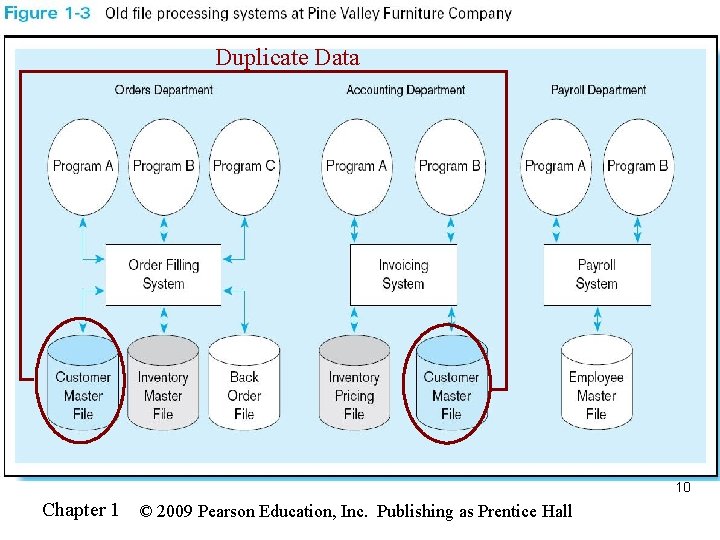
Duplicate Data 10 Chapter 1 © 2009 Pearson Education, Inc. Publishing as Prentice Hall
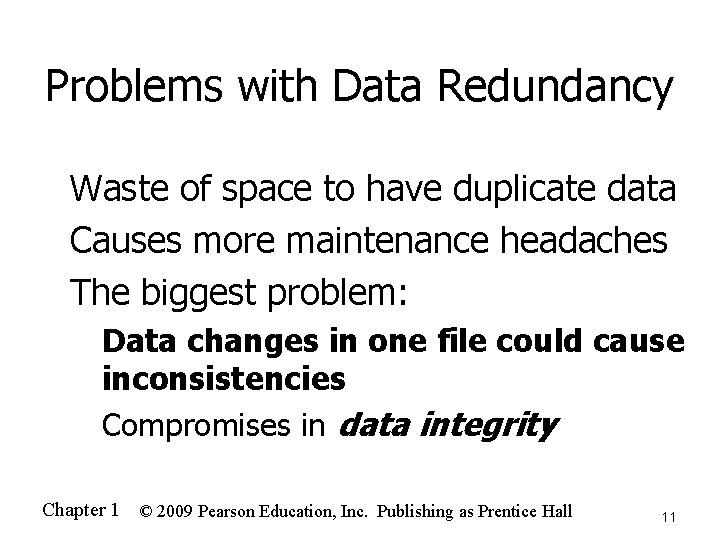
Problems with Data Redundancy Waste of space to have duplicate data n Causes more maintenance headaches n The biggest problem: n n Data changes in one file could cause inconsistencies n Compromises in data integrity Chapter 1 © 2009 Pearson Education, Inc. Publishing as Prentice Hall 11
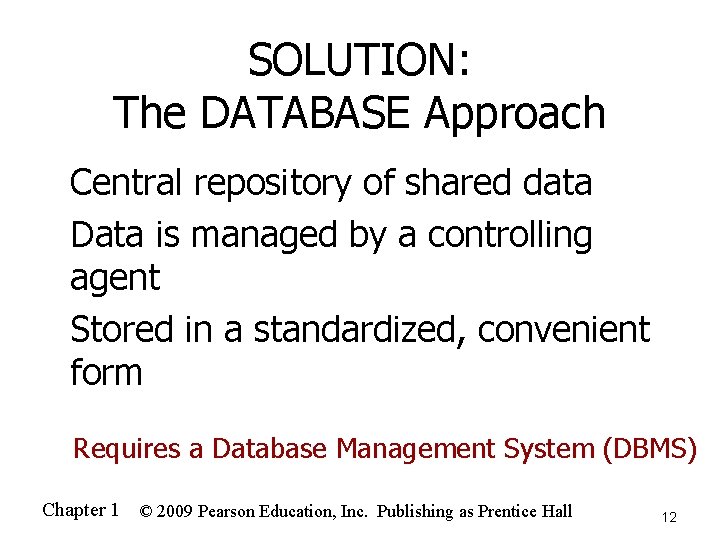
SOLUTION: The DATABASE Approach Central repository of shared data n Data is managed by a controlling agent n Stored in a standardized, convenient form n Requires a Database Management System (DBMS) Chapter 1 © 2009 Pearson Education, Inc. Publishing as Prentice Hall 12
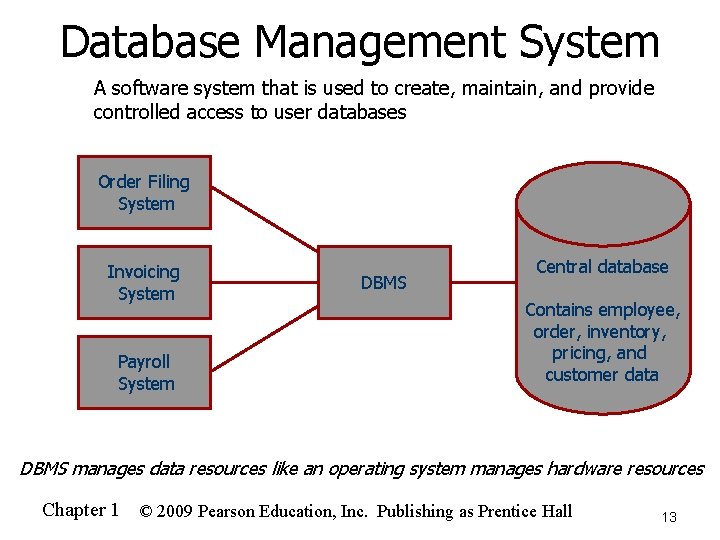
Database Management System n A software system that is used to create, maintain, and provide controlled access to user databases Order Filing System Invoicing System Payroll System DBMS Central database Contains employee, order, inventory, pricing, and customer data DBMS manages data resources like an operating system manages hardware resources Chapter 1 © 2009 Pearson Education, Inc. Publishing as Prentice Hall 13
Advantages of the Database Approach n n n n n Program-data independence Planned data redundancy Improved data consistency Improved data sharing Increased application development productivity Enforcement of standards Improved data quality Improved data accessibility and responsiveness Reduced program maintenance Improved decision support Chapter 1 © 2009 Pearson Education, Inc. Publishing as Prentice Hall 14
Costs and Risks of the Database Approach n n n New, specialized personnel Installation and management cost and complexity Conversion costs Need for explicit backup and recovery Organizational conflict Chapter 1 © 2009 Pearson Education, Inc. Publishing as Prentice Hall 15
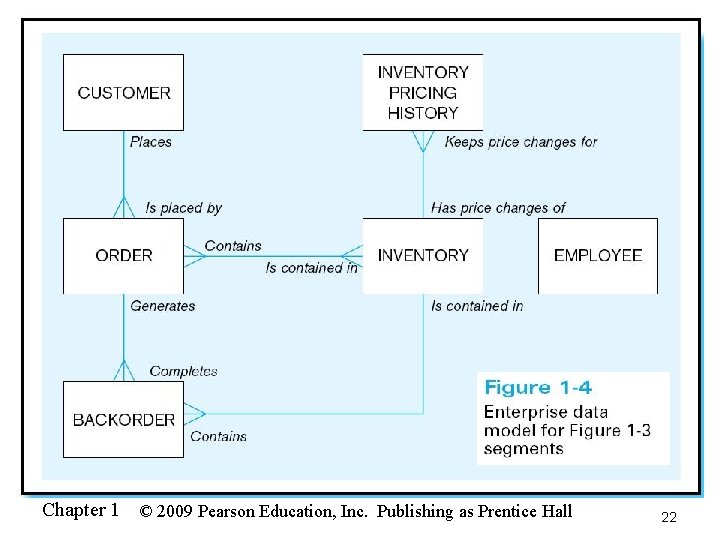
Elements of the Database Approach n Data models n n Relational Databases n n Database technology involving tables (relations) representing entities and primary/foreign keys representing relationships Use of Internet Technology n n Graphical system capturing nature and relationship of data Enterprise Data Model–high-level entities and relationships for the organization Project Data Model–more detailed view, matching data structure in database or data warehouse Networks and telecommunications, distributed databases, clientserver, and 3 -tier architectures Database Applications n Application programs used to perform database activities (create, read, update, and delete) for database users Chapter 1 © 2009 Pearson Education, Inc. Publishing as Prentice Hall 16
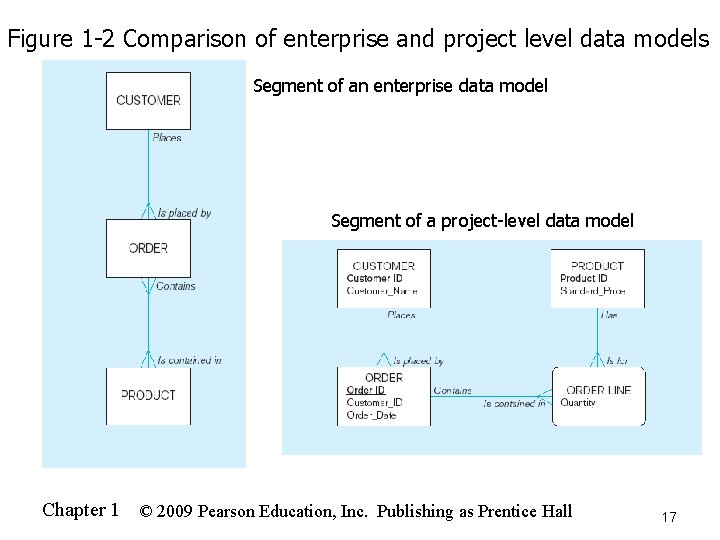
Figure 1 -2 Comparison of enterprise and project level data models Segment of an enterprise data model Segment of a project-level data model Chapter 1 © 2009 Pearson Education, Inc. Publishing as Prentice Hall 17
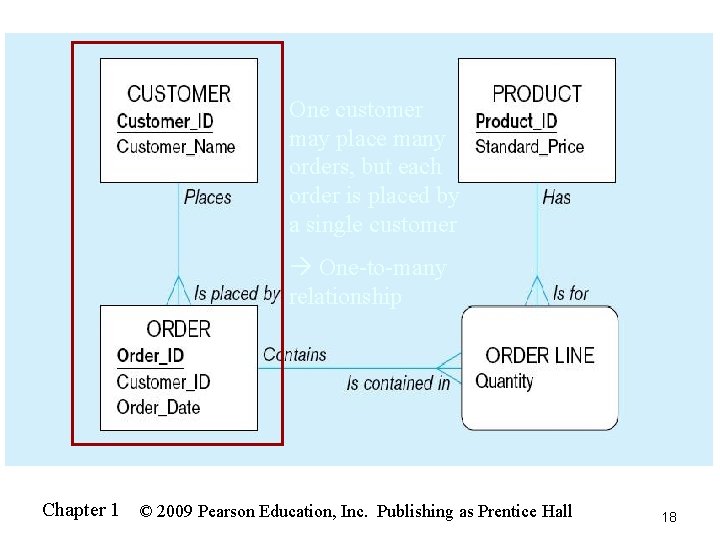
One customer may place many orders, but each order is placed by a single customer One-to-many relationship Chapter 1 © 2009 Pearson Education, Inc. Publishing as Prentice Hall 18
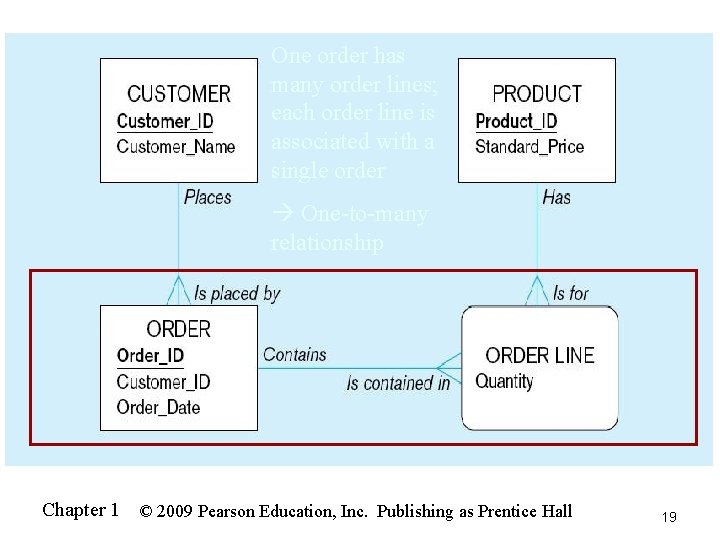
One order has many order lines; each order line is associated with a single order One-to-many relationship Chapter 1 © 2009 Pearson Education, Inc. Publishing as Prentice Hall 19
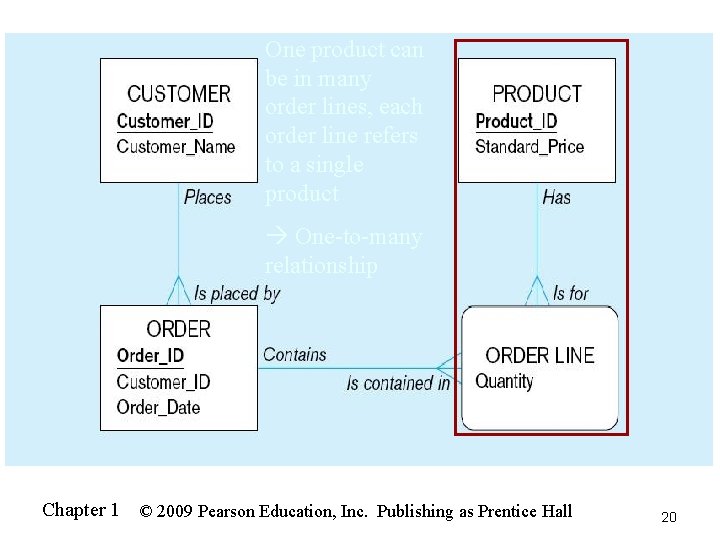
One product can be in many order lines, each order line refers to a single product One-to-many relationship Chapter 1 © 2009 Pearson Education, Inc. Publishing as Prentice Hall 20
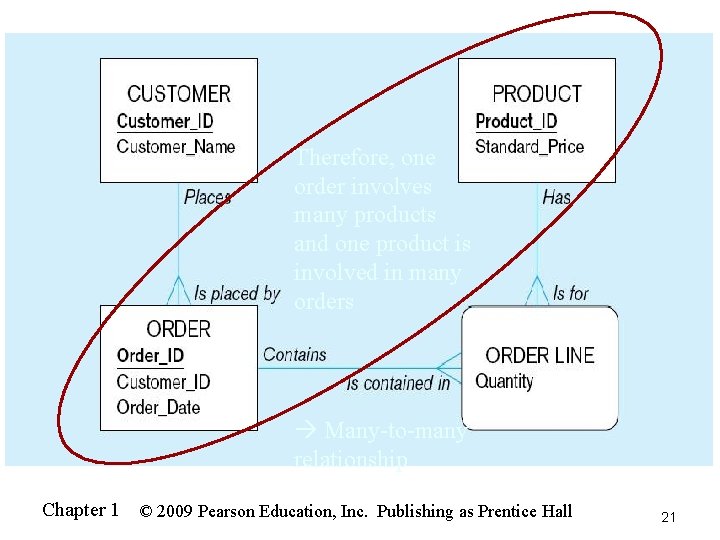
Therefore, one order involves many products and one product is involved in many orders Many-to-many relationship Chapter 1 © 2009 Pearson Education, Inc. Publishing as Prentice Hall 21
Chapter 1 © 2009 Pearson Education, Inc. Publishing as Prentice Hall 22
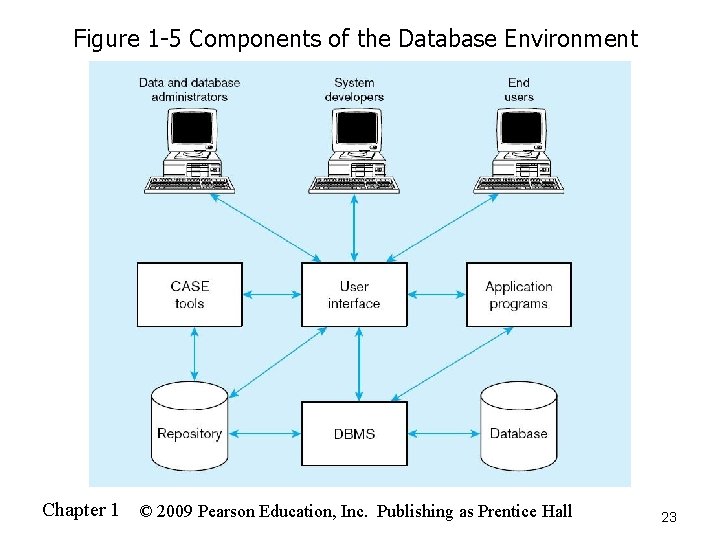
Figure 1 -5 Components of the Database Environment Chapter 1 © 2009 Pearson Education, Inc. Publishing as Prentice Hall 23
Components of the Database Environment n n n n n CASE Tools–computer-aided software engineering Repository–centralized storehouse of metadata Database Management System (DBMS) –software for managing the database Database–storehouse of the data Application Programs–software using the data User Interface–text and graphical displays to users Data/Database Administrators–personnel responsible for maintaining the database System Developers–personnel responsible for designing databases and software End Users–people who use the applications and databases Chapter 1 © 2009 Pearson Education, Inc. Publishing as Prentice Hall 24
The Range of Database Applications n n Personal databases Workgroup databases Departmental/divisional databases Enterprise database Enterprise resource planning (ERP) systems n Data warehousing implementations n Chapter 1 © 2009 Pearson Education, Inc. Publishing as Prentice Hall 25
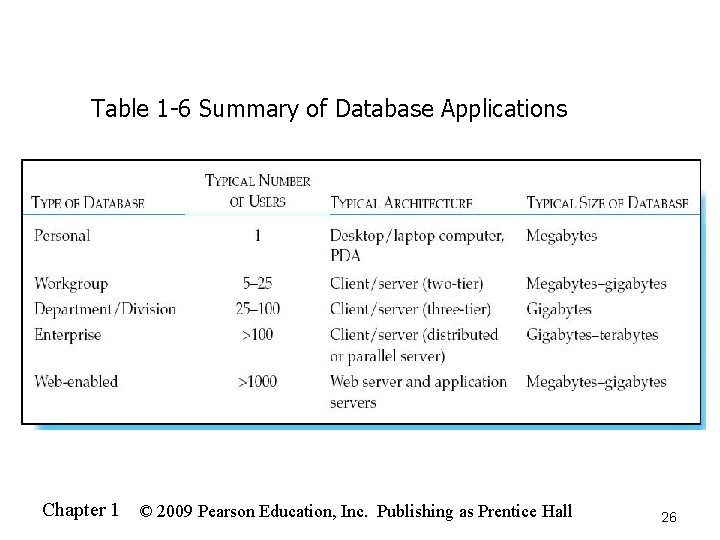
Table 1 -6 Summary of Database Applications Chapter 1 © 2009 Pearson Education, Inc. Publishing as Prentice Hall 26
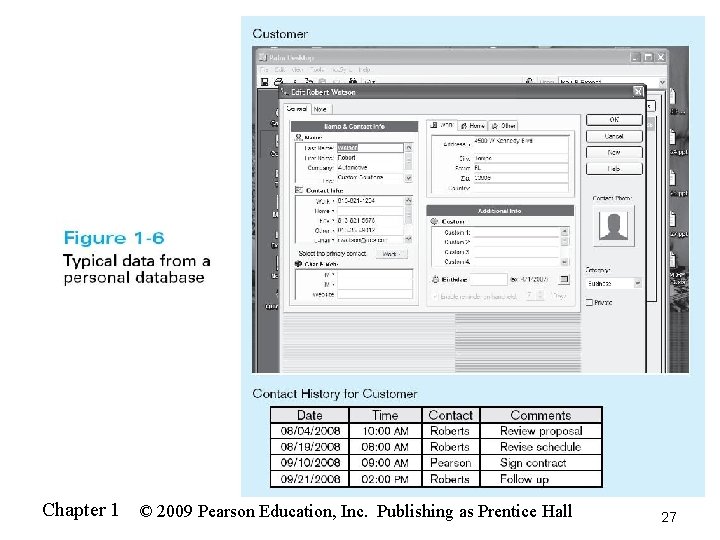
Chapter 1 © 2009 Pearson Education, Inc. Publishing as Prentice Hall 27
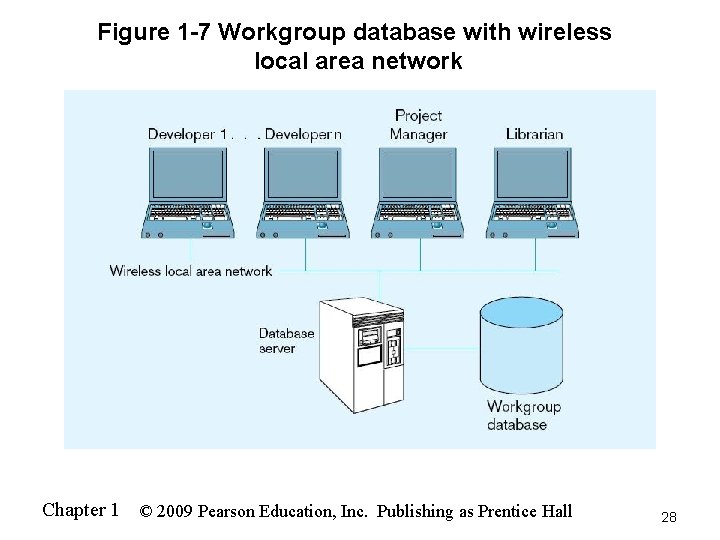
Figure 1 -7 Workgroup database with wireless local area network Chapter 1 © 2009 Pearson Education, Inc. Publishing as Prentice Hall 28
Enterprise Database Applications n Enterprise Resource Planning (ERP) n n Integrate all enterprise functions (manufacturing, finance, sales, marketing, inventory, accounting, human resources) Data Warehouse n Integrated decision support system derived from various operational databases Chapter 1 © 2009 Pearson Education, Inc. Publishing as Prentice Hall 29
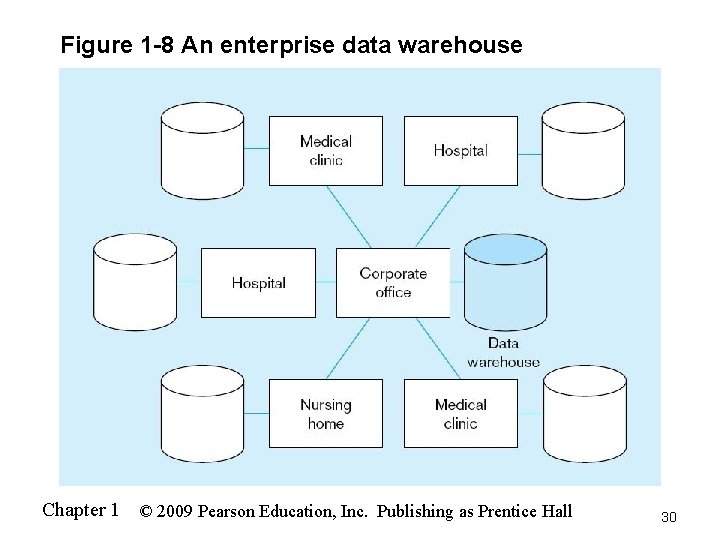
Figure 1 -8 An enterprise data warehouse Chapter 1 © 2009 Pearson Education, Inc. Publishing as Prentice Hall 30
Web-Enabled Databases n Web applications requiring databases Customer relationship management (CRM) n Business-to-consumer (B 2 C) n Electronic data interchange (EDI) n Private intranets n XML-defined Web services n Chapter 1 © 2009 Pearson Education, Inc. Publishing as Prentice Hall 31
Web-Enabled Databases (cont. ) n Issues to consider Which technologies to use? n Security/privacy protection n Managing huge volumes of data from Internet transactions n Maintaining data quality n Chapter 1 © 2009 Pearson Education, Inc. Publishing as Prentice Hall 32
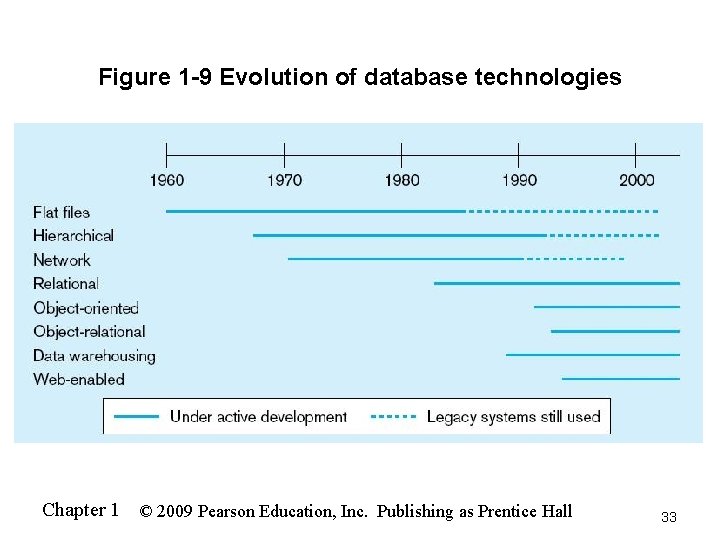
Figure 1 -9 Evolution of database technologies Chapter 1 © 2009 Pearson Education, Inc. Publishing as Prentice Hall 33
All rights reserved. No part of this publication may be reproduced, stored in a retrieval system, or transmitted, in any form or by any means, electronic, mechanical, photocopying, recording, or otherwise, without the prior written permission of the publisher. Printed in the United States of America. Copyright © 2009 Pearson Education, Inc. Publishing as Prentice Hall Chapter 1 © 2009 Pearson Education, Inc. Publishing as Prentice Hall 34
- Slides: 34