
Chapter 1 The Big Picture The Layers of
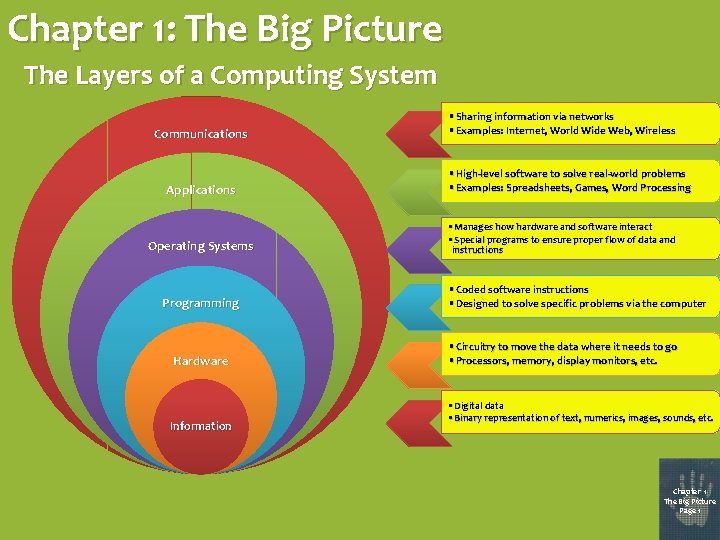
Chapter 1: The Big Picture The Layers of a Computing System Communications Applications Operating Systems Programming Hardware Information • Sharing information via networks • Examples: Internet, World Wide Web, Wireless • High-level software to solve real-world problems • Examples: Spreadsheets, Games, Word Processing • Manages how hardware and software interact • Special programs to ensure proper flow of data and instructions • Coded software instructions • Designed to solve specific problems via the computer • Circuitry to move the data where it needs to go • Processors, memory, display monitors, etc. • Digital data • Binary representation of text, numerics, images, sounds, etc. Chapter 1 The Big Picture Page 1
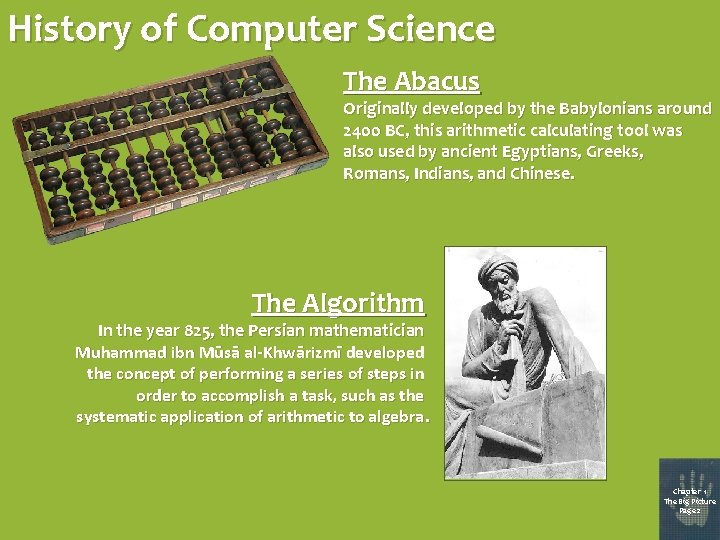
History of Computer Science The Abacus Originally developed by the Babylonians around 2400 BC, this arithmetic calculating tool was also used by ancient Egyptians, Greeks, Romans, Indians, and Chinese. The Algorithm In the year 825, the Persian mathematician Muhammad ibn Mūsā al-Khwārizmī developed the concept of performing a series of steps in order to accomplish a task, such as the systematic application of arithmetic to algebra. Chapter 1 The Big Picture Page 2
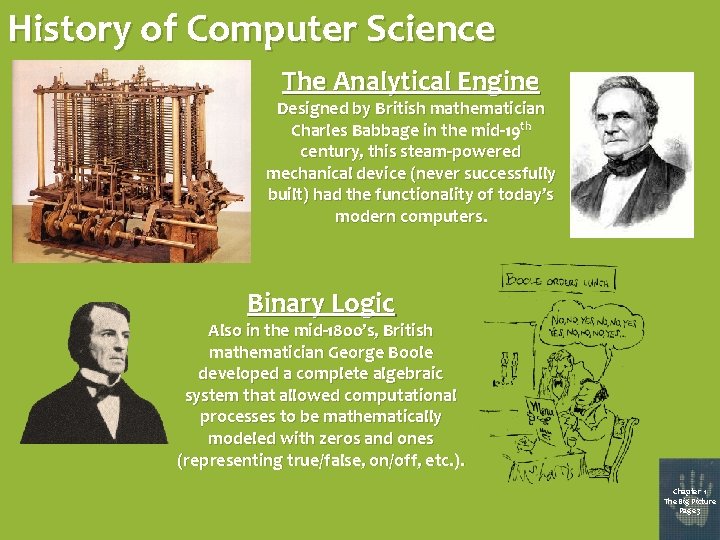
History of Computer Science The Analytical Engine Designed by British mathematician Charles Babbage in the mid-19 th century, this steam-powered mechanical device (never successfully built) had the functionality of today’s modern computers. Binary Logic Also in the mid-1800’s, British mathematician George Boole developed a complete algebraic system that allowed computational processes to be mathematically modeled with zeros and ones (representing true/false, on/off, etc. ). Chapter 1 The Big Picture Page 3
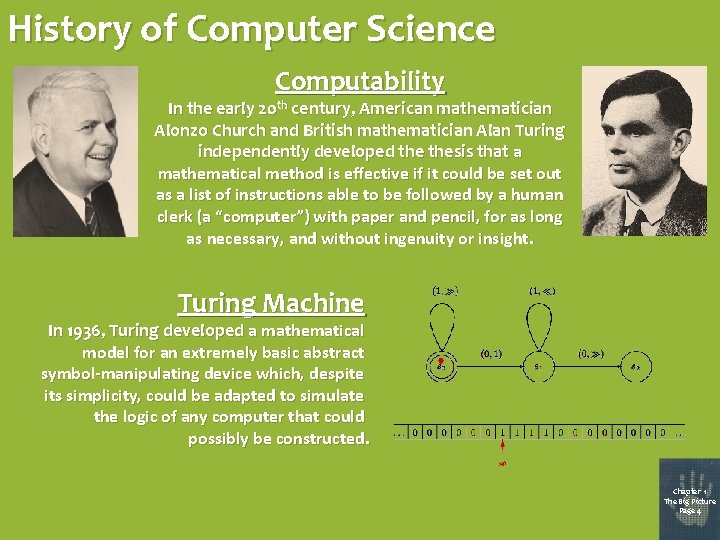
History of Computer Science Computability In the early 20 th century, American mathematician Alonzo Church and British mathematician Alan Turing independently developed thesis that a mathematical method is effective if it could be set out as a list of instructions able to be followed by a human clerk (a “computer”) with paper and pencil, for as long as necessary, and without ingenuity or insight. Turing Machine In 1936, Turing developed a mathematical model for an extremely basic abstract symbol-manipulating device which, despite its simplicity, could be adapted to simulate the logic of any computer that could possibly be constructed. Chapter 1 The Big Picture Page 4
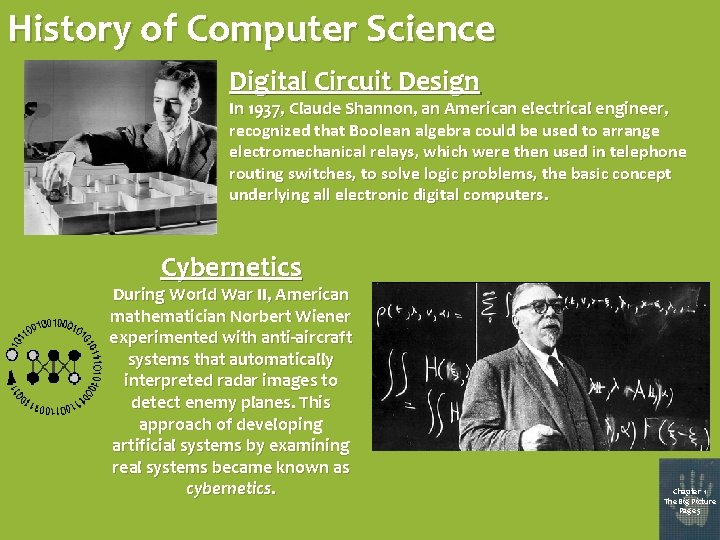
History of Computer Science Digital Circuit Design In 1937, Claude Shannon, an American electrical engineer, recognized that Boolean algebra could be used to arrange electromechanical relays, which were then used in telephone routing switches, to solve logic problems, the basic concept underlying all electronic digital computers. Cybernetics During World War II, American mathematician Norbert Wiener experimented with anti-aircraft systems that automatically interpreted radar images to detect enemy planes. This approach of developing artificial systems by examining real systems became known as cybernetics. Chapter 1 The Big Picture Page 5
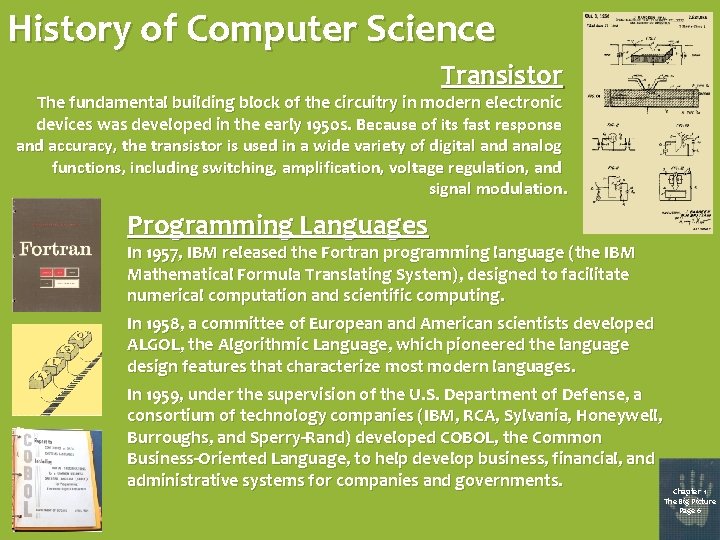
History of Computer Science Transistor The fundamental building block of the circuitry in modern electronic devices was developed in the early 1950 s. Because of its fast response and accuracy, the transistor is used in a wide variety of digital and analog functions, including switching, amplification, voltage regulation, and signal modulation. Programming Languages In 1957, IBM released the Fortran programming language (the IBM Mathematical Formula Translating System), designed to facilitate numerical computation and scientific computing. In 1958, a committee of European and American scientists developed ALGOL, the Algorithmic Language, which pioneered the language design features that characterize most modern languages. In 1959, under the supervision of the U. S. Department of Defense, a consortium of technology companies (IBM, RCA, Sylvania, Honeywell, Burroughs, and Sperry-Rand) developed COBOL, the Common Business-Oriented Language, to help develop business, financial, and administrative systems for companies and governments. Chapter 1 The Big Picture Page 6

History of Computer Science Operating Systems In 1964, IBM’s System 360 mainframe computers utilized a single operating system (rather than using separate ad hoc systems for each machine) to schedule and manage the execution of different jobs on the computer. Mouse In 1967, Stanford’s Douglas Engelbart employed a wooden case and two metal wheels to invent his “X-Y Position Indicator for a Display System”. Chapter 1 The Big Picture Page 7
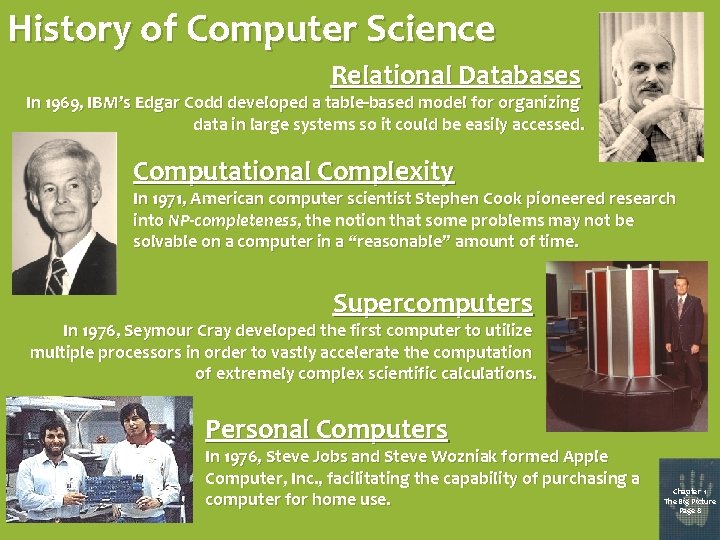
History of Computer Science Relational Databases In 1969, IBM’s Edgar Codd developed a table-based model for organizing data in large systems so it could be easily accessed. Computational Complexity In 1971, American computer scientist Stephen Cook pioneered research into NP-completeness, the notion that some problems may not be solvable on a computer in a “reasonable” amount of time. Supercomputers In 1976, Seymour Cray developed the first computer to utilize multiple processors in order to vastly accelerate the computation of extremely complex scientific calculations. Personal Computers In 1976, Steve Jobs and Steve Wozniak formed Apple Computer, Inc. , facilitating the capability of purchasing a computer for home use. Chapter 1 The Big Picture Page 8
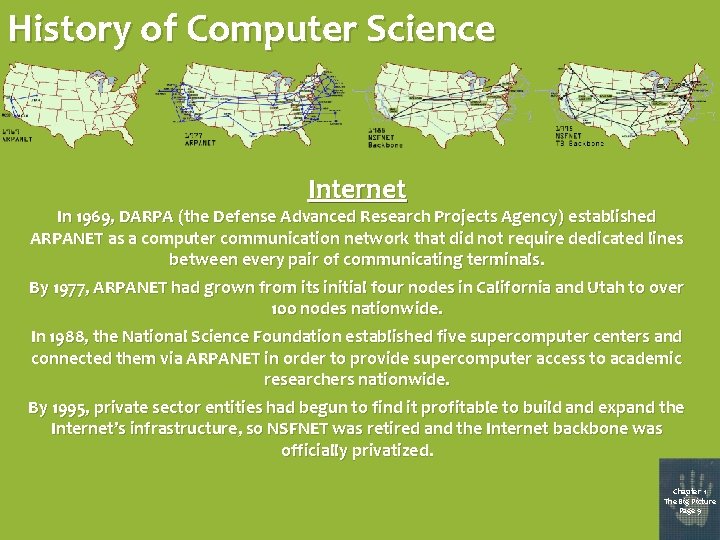
History of Computer Science Internet In 1969, DARPA (the Defense Advanced Research Projects Agency) established ARPANET as a computer communication network that did not require dedicated lines between every pair of communicating terminals. By 1977, ARPANET had grown from its initial four nodes in California and Utah to over 100 nodes nationwide. In 1988, the National Science Foundation established five supercomputer centers and connected them via ARPANET in order to provide supercomputer access to academic researchers nationwide. By 1995, private sector entities had begun to find it profitable to build and expand the Internet’s infrastructure, so NSFNET was retired and the Internet backbone was officially privatized. Chapter 1 The Big Picture Page 9
History of Computer Science Microsoft In 1975, Bill Gates and Paul Allen founded the software company that would ultimately achieve numerous milestones in the history of computer science: • 1981: Contracted with IBM to produce DOS (Disk Operating System) for use in IBM’s new line of personal computers. • 1985: Introduced Microsoft Windows, providing PC users with a graphical user interface, which promoted ease of use in PCs. (Resulted in “look-and-feel” lawsuit from Apple. ) • 1989: Released Microsoft Office, a suite of office productivity applications, including Microsoft Word and Microsoft Excel. (Accused of unfairly exploiting its knowledge of underlying operating systems by office suite competitors. ) • 1995: Entered Web browser market with Internet Explorer. (Criticized for security flaws and lack of compliance with many Web standards. ) Chapter 1 The Big Picture Page 10
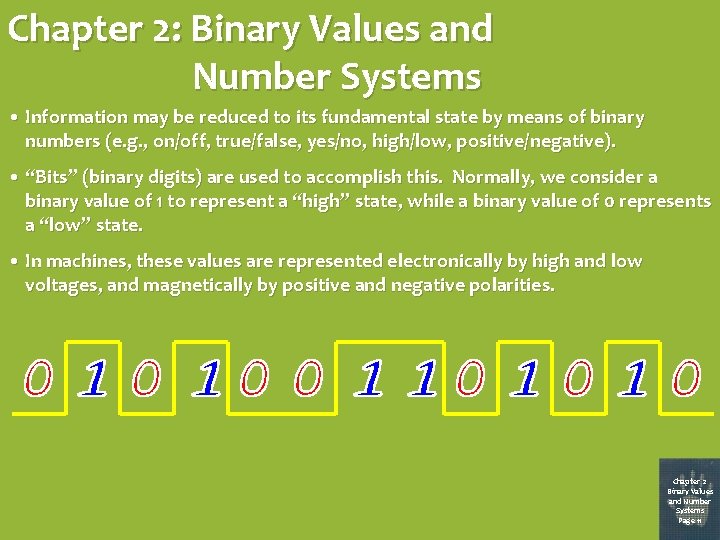
Chapter 2: Binary Values and Number Systems • Information may be reduced to its fundamental state by means of binary numbers (e. g. , on/off, true/false, yes/no, high/low, positive/negative). • “Bits” (binary digits) are used to accomplish this. Normally, we consider a binary value of 1 to represent a “high” state, while a binary value of 0 represents a “low” state. • In machines, these values are represented electronically by high and low voltages, and magnetically by positive and negative polarities. Chapter 2 Binary Values and Number Systems Page 11
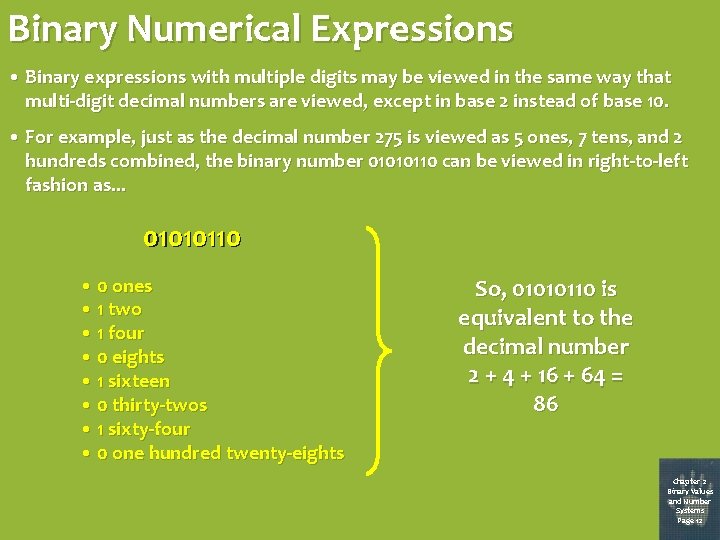
Binary Numerical Expressions • Binary expressions with multiple digits may be viewed in the same way that multi-digit decimal numbers are viewed, except in base 2 instead of base 10. • For example, just as the decimal number 275 is viewed as 5 ones, 7 tens, and 2 hundreds combined, the binary number 01010110 can be viewed in right-to-left fashion as. . . 01010110 0101011 010101 010 01 1010110 0110 10 • 0 ones • 1 two • 1 four • 0 eights • 1 sixteen • 0 thirty-twos • 1 sixty-four • 0 one hundred twenty-eights So, 01010110 is equivalent to the decimal number 2 + 4 + 16 + 64 = 86 Chapter 2 Binary Values and Number Systems Page 12
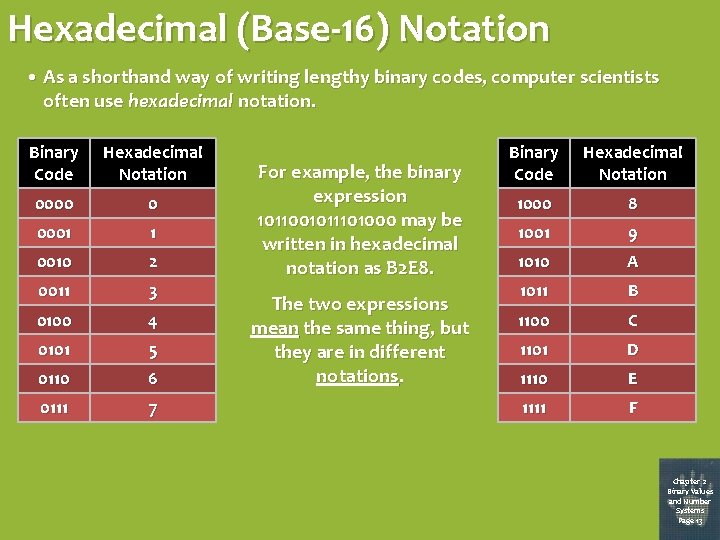
Hexadecimal (Base-16) Notation • As a shorthand way of writing lengthy binary codes, computer scientists often use hexadecimal notation. Binary Code Hexadecimal Notation 0000 0 0001 1 0010 2 0011 3 0100 4 0101 5 0110 6 0111 7 For example, the binary expression 1011001011101000 may be written in hexadecimal notation as B 2 E 8. The two expressions mean the same thing, but they are in different notations. Binary Code Hexadecimal Notation 1000 8 1001 9 1010 A 1011 B 1100 C 1101 D 1110 E 1111 F Chapter 2 Binary Values and Number Systems Page 13
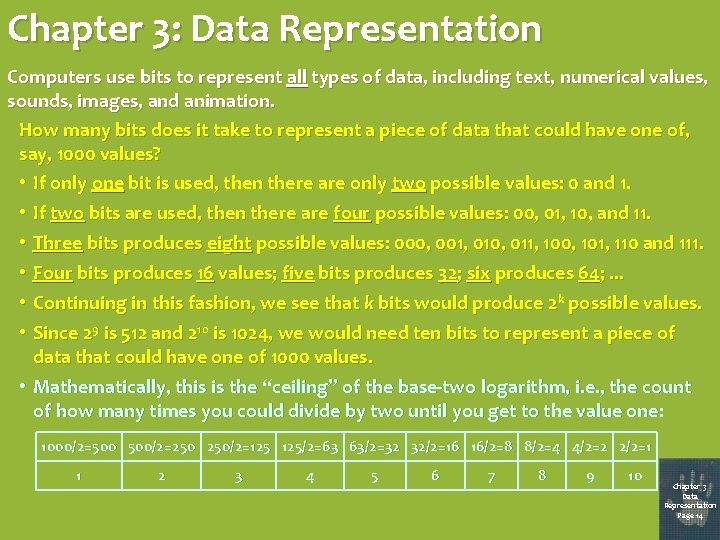
Chapter 3: Data Representation Computers use bits to represent all types of data, including text, numerical values, sounds, images, and animation. How many bits does it take to represent a piece of data that could have one of, say, 1000 values? • If only one bit is used, then there are only two possible values: 0 and 1. • If two bits are used, then there are four possible values: 00, 01, 10, and 11. • Three bits produces eight possible values: 000, 001, 010, 011, 100, 101, 110 and 111. • Four bits produces 16 values; five bits produces 32; six produces 64; . . . • Continuing in this fashion, we see that k bits would produce 2 k possible values. • Since 29 is 512 and 210 is 1024, we would need ten bits to represent a piece of data that could have one of 1000 values. • Mathematically, this is the “ceiling” of the base-two logarithm, i. e. , the count of how many times you could divide by two until you get to the value one: 1000/2=500 500/2=250 250/2=125 125/2=63 63/2=32 32/2=16 16/2=8 8/2=4 4/2=2 2/2=1 1 2 3 4 5 6 7 8 9 10 Chapter 3 Data Representation Page 14
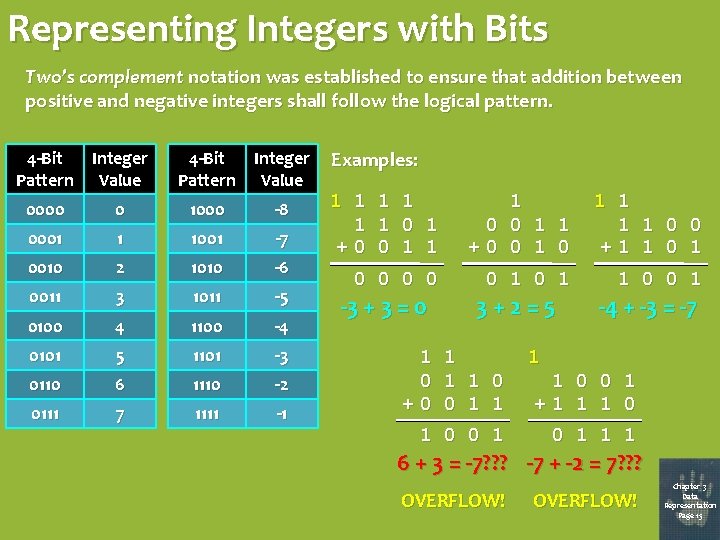
Representing Integers with Bits Two’s complement notation was established to ensure that addition between positive and negative integers shall follow the logical pattern. 4 -Bit Integer Pattern Value 0000 0 1000 -8 0001 1 1001 -7 0010 2 1010 -6 0011 3 1011 -5 0100 4 1100 -4 0101 5 1101 -3 0110 6 1110 -2 0111 7 1111 -1 Examples: 1 1 1 0 1 +0 0 1 1 1 0 0 1 1 +0 0 1 1 1 1 0 0 +1 1 0 0 0 1 0 1 1 0 0 1 -3 + 3 = 0 1 0 +0 3+2=5 1 1 1 0 0 1 -4 + -3 = -7 1 1 0 0 1 +1 1 1 0 0 1 1 1 6 + 3 = -7? ? ? -7 + -2 = 7? ? ? OVERFLOW! Chapter 3 Data Representation Page 15
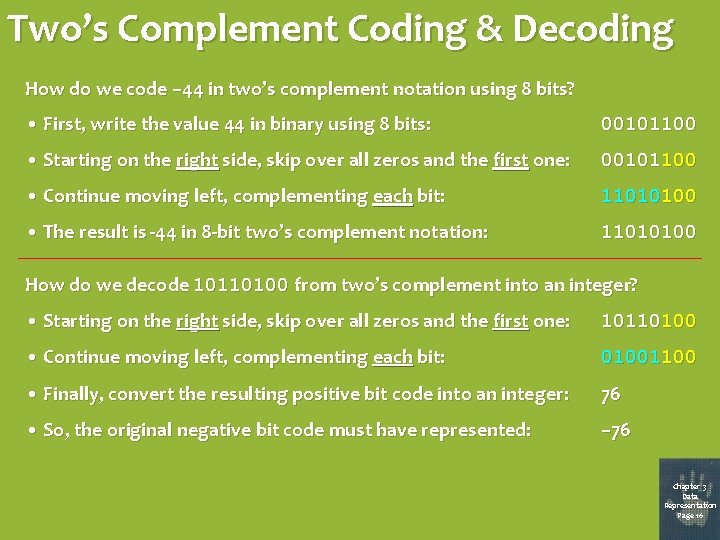
Two’s Complement Coding & Decoding How do we code – 44 in two’s complement notation using 8 bits? • First, write the value 44 in binary using 8 bits: 00101100 • Starting on the right side, skip over all zeros and the first one: 00101100 • Continue moving left, complementing each bit: 11010100 • The result is -44 in 8 -bit two’s complement notation: 11010100 How do we decode 10110100 from two’s complement into an integer? • Starting on the right side, skip over all zeros and the first one: 10110100 • Continue moving left, complementing each bit: 01001100 • Finally, convert the resulting positive bit code into an integer: 76 • So, the original negative bit code must have represented: – 76 Chapter 3 Data Representation Page 16
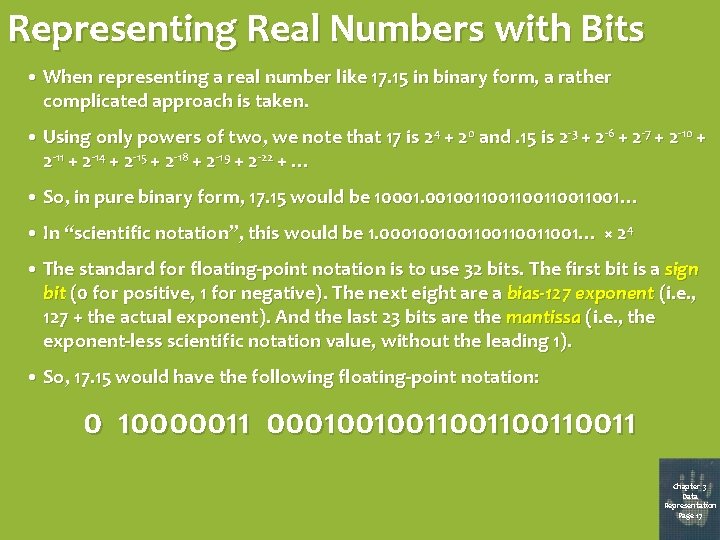
Representing Real Numbers with Bits • When representing a real number like 17. 15 in binary form, a rather complicated approach is taken. • Using only powers of two, we note that 17 is 24 + 20 and. 15 is 2 -3 + 2 -6 + 2 -7 + 2 -10 + 2 -11 + 2 -14 + 2 -15 + 2 -18 + 2 -19 + 2 -22 + … • So, in pure binary form, 17. 15 would be 10001. 00100110011001… • In “scientific notation”, this would be 1. 00010010011001… × 2 4 • The standard for floating-point notation is to use 32 bits. The first bit is a sign bit (0 for positive, 1 for negative). The next eight are a bias-127 exponent (i. e. , 127 + the actual exponent). And the last 23 bits are the mantissa (i. e. , the exponent-less scientific notation value, without the leading 1). • So, 17. 15 would have the following floating-point notation: 0 10000011 000100100110011 Chapter 3 Data Representation Page 17
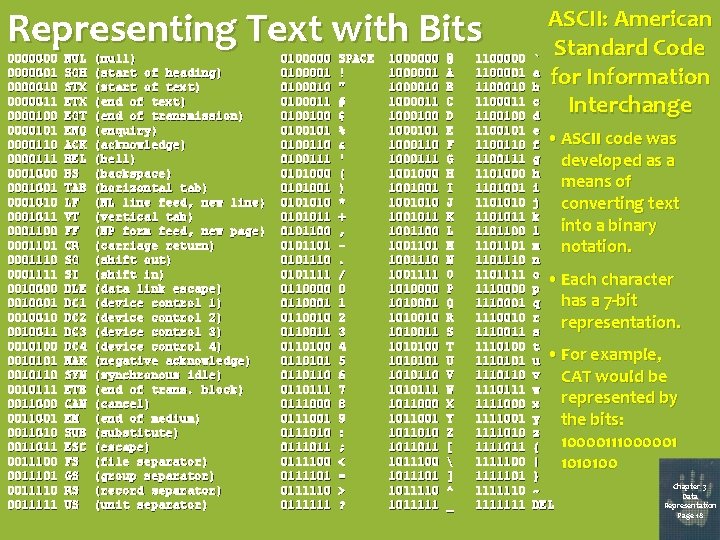
Representing Text with Bits 00000001 0000010 0000011 0000100 0000101 0000110 0000111 0001000 0001001 0001010 0001011 0001100 0001101 0001110 0001111 0010000 0010001 0010010011 0010100 0010101 0010110 0010111 0011000 0011001 0011010 0011011 0011100 0011101 0011110 0011111 NUL SOH STX EOT ENQ ACK BEL BS TAB LF VT FF CR SO SI DLE DC 1 DC 2 DC 3 DC 4 NAK SYN ETB CAN EM SUB ESC FS GS RS US (null) (start of heading) (start of text) (end of transmission) (enquiry) (acknowledge) (bell) (backspace) (horizontal tab) (NL line feed, new line) (vertical tab) (NP form feed, new page) (carriage return) (shift out) (shift in) (data link escape) (device control 1) (device control 2) (device control 3) (device control 4) (negative acknowledge) (synchronous idle) (end of trans. block) (cancel) (end of medium) (substitute) (escape) (file separator) (group separator) (record separator) (unit separator) 0100000 0100001 0100010 0100011 0100100101 0100110 0100111 0101000 0101001 010101011 0101100 0101101 0101110 0101111 0110000 0110001 0110010 0110011 0110100 0110101 0110110111 0111000 0111001 0111010 0111011 0111100 0111101 0111110 0111111 SPACE ! " # $ % & ' ( ) * + , . / 0 1 2 3 4 5 6 7 8 9 : ; < = > ? 1000000 1000001 1000010 1000011 1000100 1000101 1000110 1000111 1001000 1001001010 1001011 1001100 1001101 1001110 1001111 1010000 1010001 1010010 1010011 1010100 101010110 1010111 1011000 1011001 1011010 1011011100 1011101 1011110 1011111 @ A B C D E F G H I J K L M N O P Q R S T U V W X Y Z [ ] ^ _ 1100000 1100001 1100010 1100011 1100100 1100101 1100110 1100111 1101000 1101001 1101010 1101011 1101100 1101101110 1101111 1110000 1110001 1110010 1110011 1110100 1110101 1110110 1110111 1111000 1111001 1111010 1111011 1111100 1111101 1111110 1111111 ASCII: American Standard Code for Information Interchange ` a b c d e f • ASCII code was g developed as a h means of i j converting text k into a binary l m notation. n o • Each character p has a 7 -bit q r representation. s t u • For example, v CAT would be w represented by x y the bits: z 10000111000001 { | 1010100 } Chapter 3 ~ Data Representation DEL Page 18
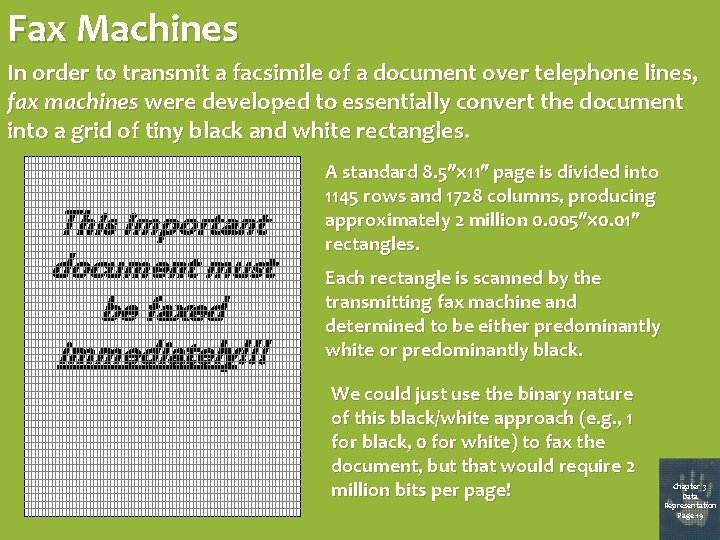
Fax Machines In order to transmit a facsimile of a document over telephone lines, fax machines were developed to essentially convert the document into a grid of tiny black and white rectangles. This important document must be faxed immediately!!! A standard 8. 5 11 page is divided into 1145 rows and 1728 columns, producing approximately 2 million 0. 005 0. 01 rectangles. Each rectangle is scanned by the transmitting fax machine and determined to be either predominantly white or predominantly black. We could just use the binary nature of this black/white approach (e. g. , 1 for black, 0 for white) to fax the document, but that would require 2 million bits per page! Chapter 3 Data Representation Page 19
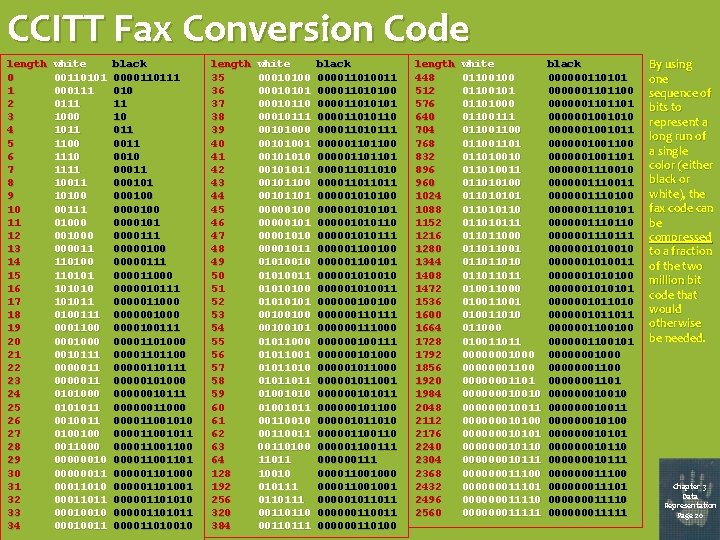
CCITT Fax Conversion Code length 0 1 2 3 4 5 6 7 8 9 10 11 12 13 14 15 16 17 18 19 20 21 22 23 24 25 26 27 28 29 30 31 32 33 34 white 00110101 000111 1000 1011 1100 1111 10011 10100 00111 01000 000011 110100 1101010 101011 0100111 0001100 0001000 0010111 0000011 0101000 0101011 0010011 0100100 0011000 00000011010 00011011 00010010 00010011 black 0000110111 010 11 10 011 0010 00011 000100 0000101 0000111 00000100 00000111 000011000 0000010111 0000011000 0000001000 0000100111 00001101000 00001101100 00000110111 00000101000 00000010111 00000011000 000011001011 00001100 00001101 000001101000 000001101001 000001101010 000001101011 000011010010 length 35 36 37 38 39 40 41 42 43 44 45 46 47 48 49 50 51 52 53 54 55 56 57 58 59 60 61 62 63 64 128 192 256 320 384 white 00010100 00010101 00010110 00010111 00101000 00101001 00101010 00101011 00101100 00101101 00000100 000001010 00001011 01010010 01010011 01010100 0101 00100100101 01011000 01011001 01011010 01011011 01001010 01001011 00110010 00110100 11011 10010 010111 0110111 00110110 00110111 black 000011010011 000011010100 000011010101 000011010110 000011010111 000001101100 0000011011010 000011011011 000001010100 000001010110 000001010111 000001100100 000001100101 000001010010 000001010011 000000100100 000000110111 000000111000 000000100111 000000101000 000001011001 000000101011 000000101100 000001011010 000001100111 000000111 000011001000 000011001001 000001011011 000000110100 length 448 512 576 640 704 768 832 896 960 1024 1088 1152 1216 1280 1344 1408 1472 1536 1600 1664 1728 1792 1856 1920 1984 2048 2112 2176 2240 2304 2368 2432 2496 2560 white 01100100 01100101 01101000 01100111 01100 011010010 011010011 011010100 011010101 01101011010111 011011000 011011001 011011010 011011011 010011000 010011010 011000 010011011 00000001000 00000001101 000000010010 000000010011 000000010100 000000010101 000000010110 000000010111 000000011100 000000011101 000000011110 000000011111 black 000000110101 0000001101100 0000001101101 0000001001010 0000001001011 0000001001100 0000001001101 0000001110010 0000001110011 0000001110100 0000001110101 0000001110110 000000111 0000001010010 0000001010011 0000001010100 0000001011010 0000001011011 0000001100100 0000001100101 00000001000 00000001101 000000010010 000000010011 000000010100 000000010101 000000010110 000000010111 000000011100 000000011101 000000011110 000000011111 By using one sequence of bits to represent a long run of a single color (either black or white), the fax code can be compressed to a fraction of the two million bit code that would otherwise be needed. Chapter 3 Data Representation Page 20
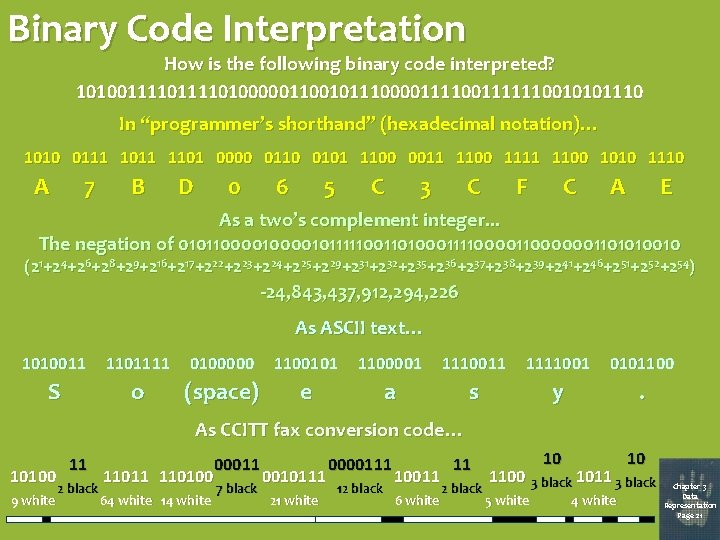
Binary Code Interpretation How is the following binary code interpreted? 101001111010000011001011100001111110010101110 In “programmer’s shorthand” (hexadecimal notation)… 1010 0111 1011 1101 0000 0110 0101 1100 0011 1100 1111 1100 1010 1110 A 7 B D 0 6 5 C 3 F C C A E As a two’s complement integer. . . The negation of 010110000101111100110100011110000001101010010 (21+24+26+28+29+216+217+222+223+224+225+229+231+232+235+236+237+238+239+241+246+251+252+254) -24, 843, 437, 912, 294, 226 As ASCII text… 1010011 1101111 0100000 1100101 1100001 1110011 1111001 0101100 S o (space) e a s y . 10 10 As CCITT fax conversion code… 10100 9 white 11 2 black 11011 110100 64 white 14 white 00011 7 black 0010111 21 white 0000111 12 black 10011 6 white 11 2 black 1100 3 black 1011 3 black 5 white 4 white Chapter 3 Data Representation Page 21
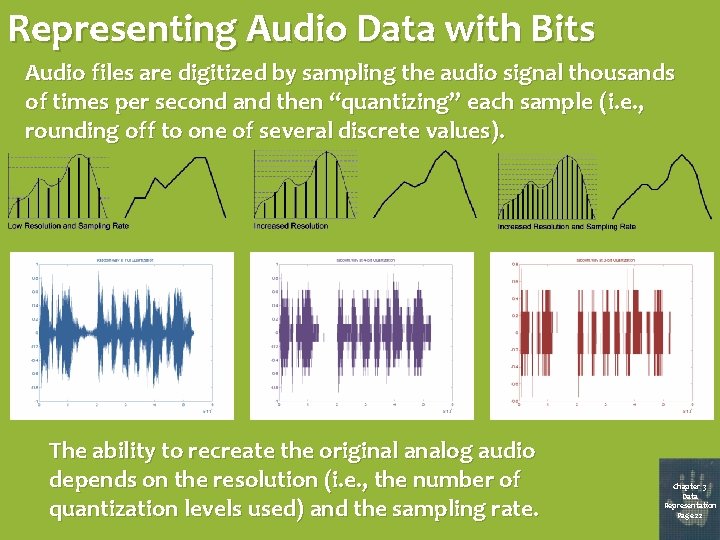
Representing Audio Data with Bits Audio files are digitized by sampling the audio signal thousands of times per second and then “quantizing” each sample (i. e. , rounding off to one of several discrete values). The ability to recreate the original analog audio depends on the resolution (i. e. , the number of quantization levels used) and the sampling rate. Chapter 3 Data Representation Page 22
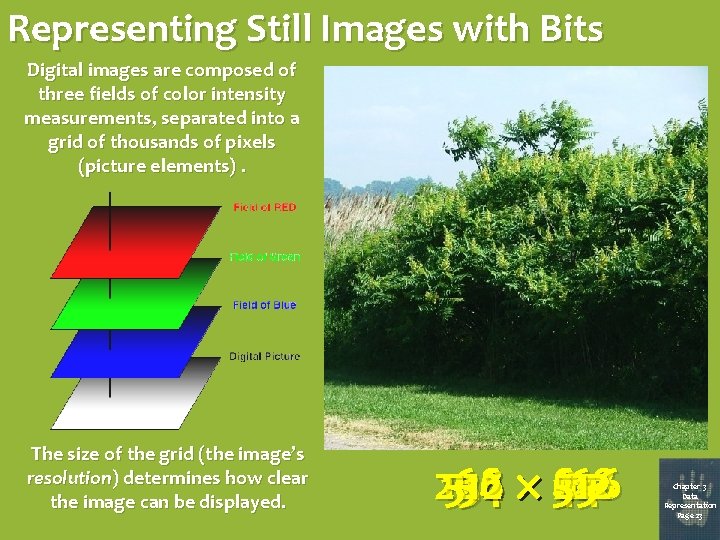
Representing Still Images with Bits Digital images are composed of three fields of color intensity measurements, separated into a grid of thousands of pixels (picture elements). The size of the grid (the image’s resolution) determines how clear the image can be displayed. 256 128 512 64 32 16 4 82 2512 4 8 16 32 64 128 256 Chapter 3 Data Representation Page 23
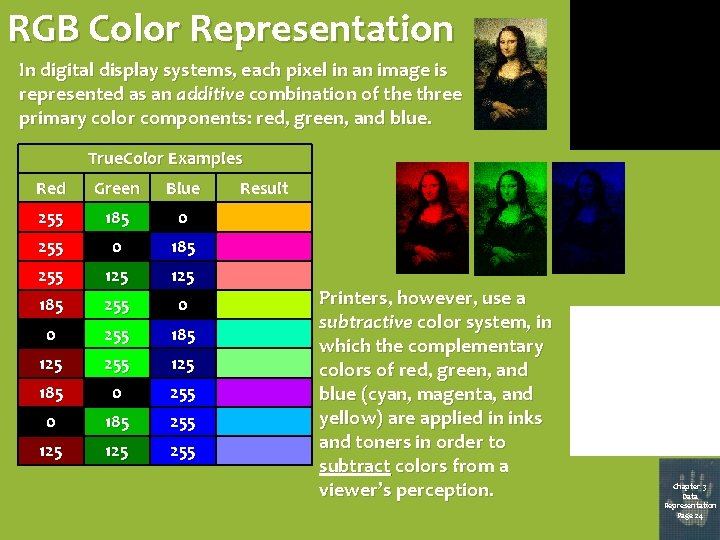
RGB Color Representation In digital display systems, each pixel in an image is represented as an additive combination of the three primary color components: red, green, and blue. True. Color Examples Red Green Blue 255 185 0 255 0 185 255 125 185 255 0 0 255 185 125 255 125 185 0 255 0 185 255 125 255 Result Printers, however, use a subtractive color system, in which the complementary colors of red, green, and blue (cyan, magenta, and yellow) are applied in inks and toners in order to subtract colors from a viewer’s perception. Chapter 3 Data Representation Page 24
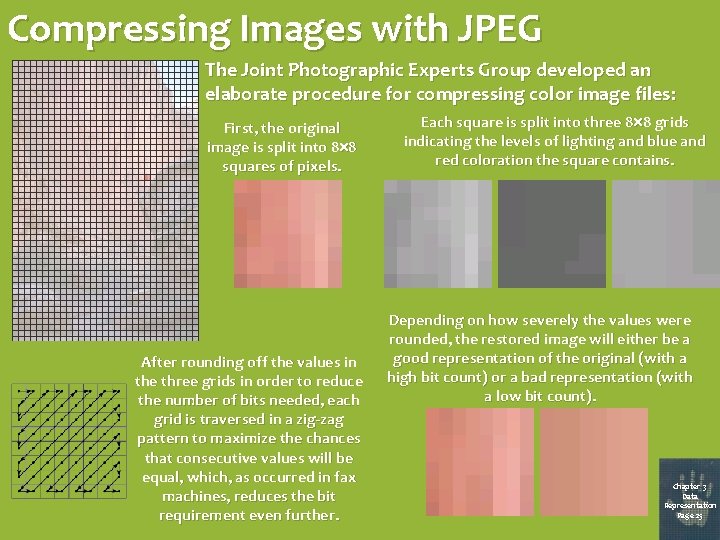
Compressing Images with JPEG The Joint Photographic Experts Group developed an elaborate procedure for compressing color image files: First, the original image is split into 8 8 squares of pixels. After rounding off the values in the three grids in order to reduce the number of bits needed, each grid is traversed in a zig-zag pattern to maximize the chances that consecutive values will be equal, which, as occurred in fax machines, reduces the bit requirement even further. Each square is split into three 8 8 grids indicating the levels of lighting and blue and red coloration the square contains. Depending on how severely the values were rounded, the restored image will either be a good representation of the original (with a high bit count) or a bad representation (with a low bit count). Chapter 3 Data Representation Page 25
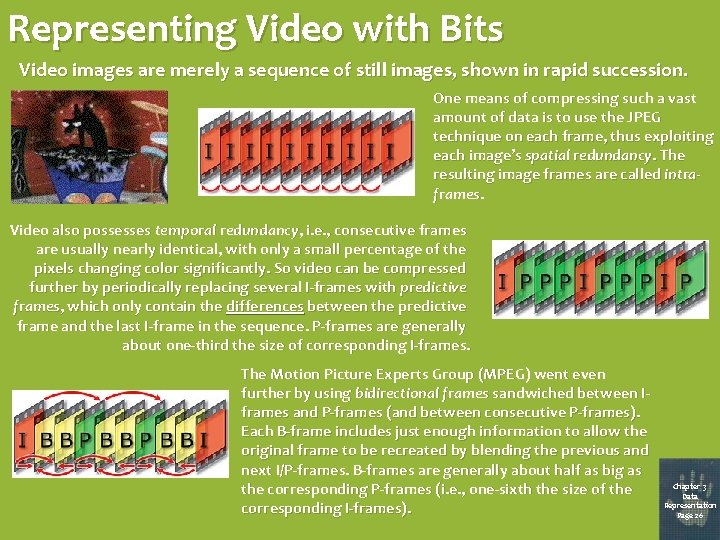
Representing Video with Bits Video images are merely a sequence of still images, shown in rapid succession. One means of compressing such a vast amount of data is to use the JPEG technique on each frame, thus exploiting each image’s spatial redundancy. The resulting image frames are called intraframes. Video also possesses temporal redundancy, i. e. , consecutive frames are usually nearly identical, with only a small percentage of the pixels changing color significantly. So video can be compressed further by periodically replacing several I-frames with predictive frames, which only contain the differences between the predictive frame and the last I-frame in the sequence. P-frames are generally about one-third the size of corresponding I-frames. The Motion Picture Experts Group (MPEG) went even further by using bidirectional frames sandwiched between Iframes and P-frames (and between consecutive P-frames). Each B-frame includes just enough information to allow the original frame to be recreated by blending the previous and next I/P-frames. B-frames are generally about half as big as the corresponding P-frames (i. e. , one-sixth the size of the corresponding I-frames). Chapter 3 Data Representation Page 26
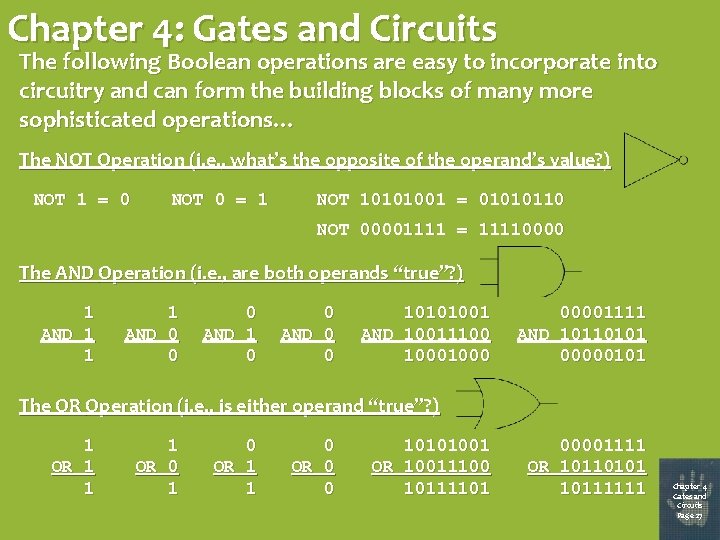
Chapter 4: Gates and Circuits The following Boolean operations are easy to incorporate into circuitry and can form the building blocks of many more sophisticated operations… The NOT Operation (i. e. , what’s the opposite of the operand’s value? ) NOT 1 = 0 NOT 0 = 1 NOT 10101001 = 01010110 NOT 00001111 = 11110000 The AND Operation (i. e. , are both operands “true”? ) 1 AND 1 1 1 AND 0 0 0 AND 1 0 0 AND 0 0 10101001 AND 10011100 1000 00001111 AND 10110101 00000101 The OR Operation (i. e. , is either operand “true”? ) 1 OR 1 1 1 OR 0 1 0 OR 1 1 0 OR 0 0 10101001 OR 10011100 10111101 00001111 OR 10110101 10111111 Chapter 4 Gates and Circuits Page 27
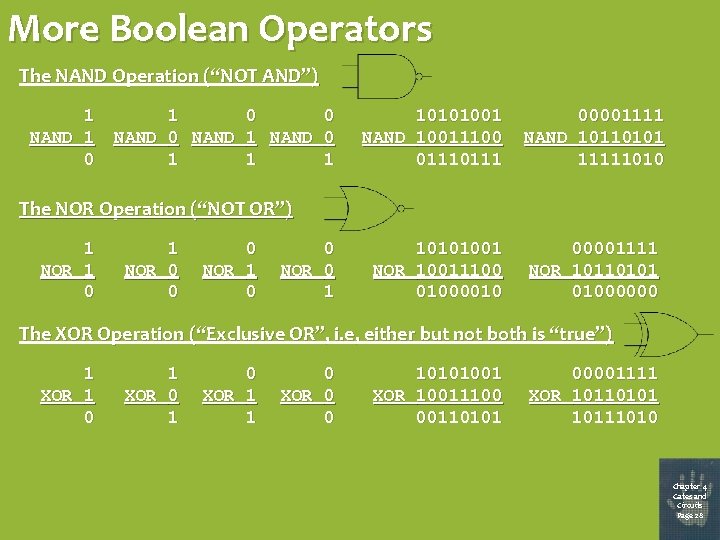
More Boolean Operators The NAND Operation (“NOT AND”) 1 NAND 1 0 0 NAND 1 NAND 0 1 10101001 NAND 10011100 0111 00001111 NAND 10110101 11111010 The NOR Operation (“NOT OR”) 1 NOR 1 0 1 NOR 0 0 0 NOR 1 0 0 NOR 0 1 10101001 NOR 10011100 01000010 00001111 NOR 10110101 01000000 The XOR Operation (“Exclusive OR”, i. e, either but not both is “true”) 1 XOR 1 0 1 XOR 0 1 0 XOR 1 1 0 XOR 0 0 10101001 XOR 10011100 00110101 00001111 XOR 10110101 10111010 Chapter 4 Gates and Circuits Page 28
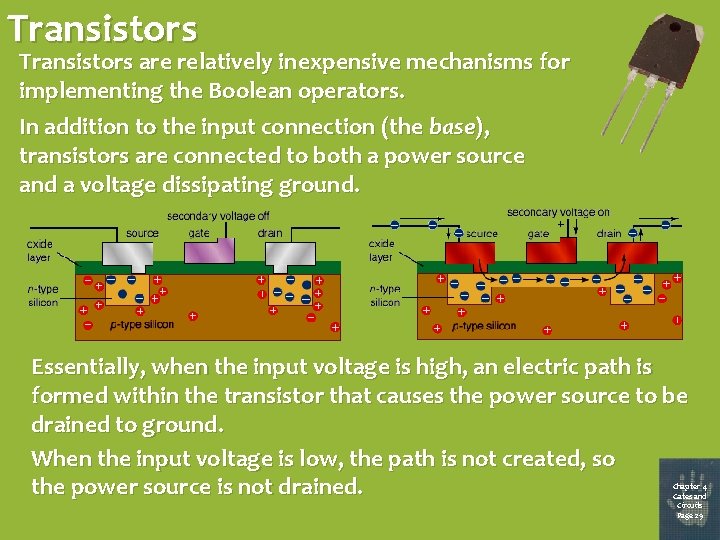
Transistors are relatively inexpensive mechanisms for implementing the Boolean operators. In addition to the input connection (the base), transistors are connected to both a power source and a voltage dissipating ground. Essentially, when the input voltage is high, an electric path is formed within the transistor that causes the power source to be drained to ground. When the input voltage is low, the path is not created, so the power source is not drained. Chapter 4 Gates and Circuits Page 29
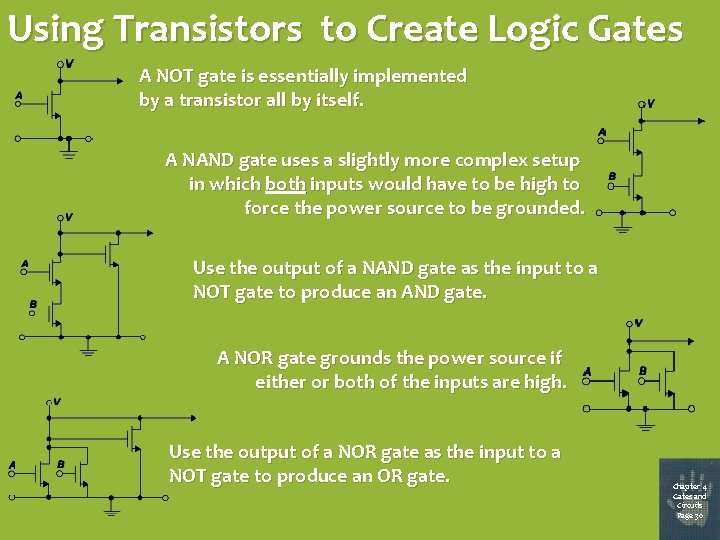
Using Transistors to Create Logic Gates A NOT gate is essentially implemented by a transistor all by itself. A NAND gate uses a slightly more complex setup in which both inputs would have to be high to force the power source to be grounded. Use the output of a NAND gate as the input to a NOT gate to produce an AND gate. A NOR gate grounds the power source if either or both of the inputs are high. Use the output of a NOR gate as the input to a NOT gate to produce an OR gate. Chapter 4 Gates and Circuits Page 30
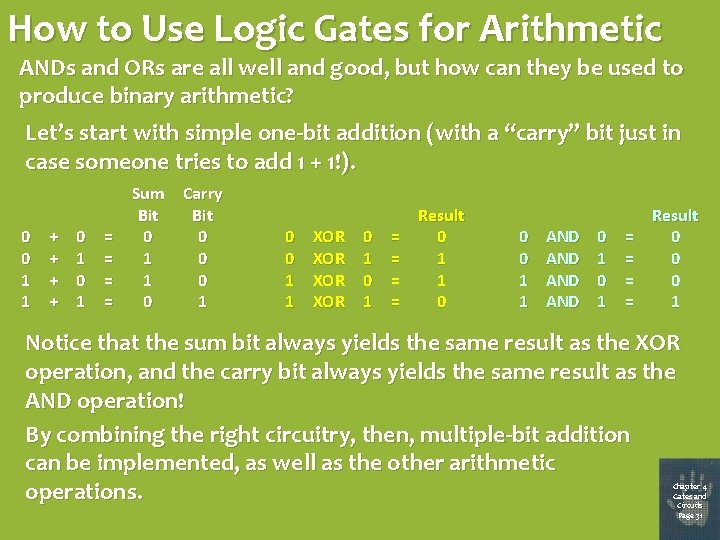
How to Use Logic Gates for Arithmetic ANDs and ORs are all well and good, but how can they be used to produce binary arithmetic? Let’s start with simple one-bit addition (with a “carry” bit just in case someone tries to add 1 + 1!). 0 0 1 1 + + 0 1 = = Sum Carry Bit 0 0 1 1 XOR XOR 0 1 = = Result 0 1 1 0 0 0 1 1 AND AND 0 1 = = Result 0 0 0 1 Notice that the sum bit always yields the same result as the XOR operation, and the carry bit always yields the same result as the AND operation! By combining the right circuitry, then, multiple-bit addition can be implemented, as well as the other arithmetic operations. Chapter 4 Gates and Circuits Page 31
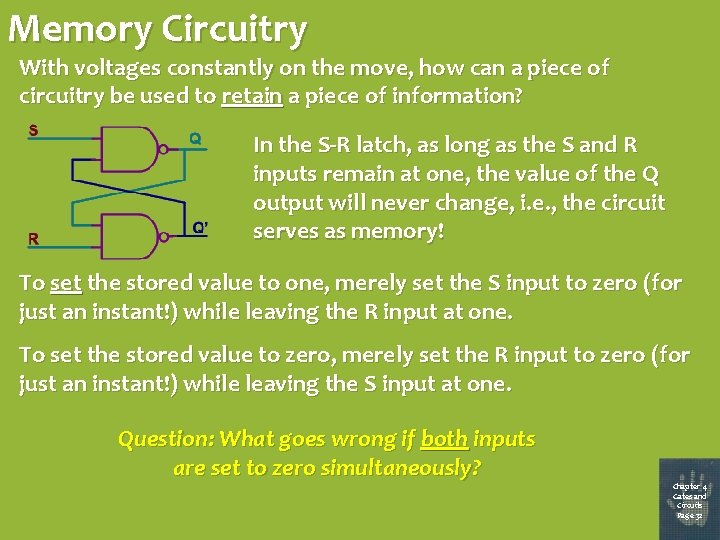
Memory Circuitry With voltages constantly on the move, how can a piece of circuitry be used to retain a piece of information? In the S-R latch, as long as the S and R inputs remain at one, the value of the Q output will never change, i. e. , the circuit serves as memory! To set the stored value to one, merely set the S input to zero (for just an instant!) while leaving the R input at one. To set the stored value to zero, merely set the R input to zero (for just an instant!) while leaving the S input at one. Question: What goes wrong if both inputs are set to zero simultaneously? Chapter 4 Gates and Circuits Page 32
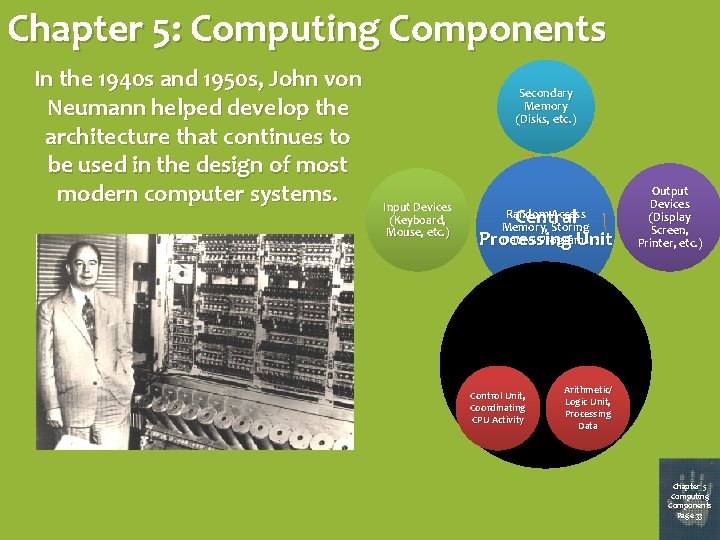
Chapter 5: Computing Components In the 1940 s and 1950 s, John von Neumann helped develop the architecture that continues to be used in the design of most modern computer systems. Secondary Memory (Disks, etc. ) Input Devices (Keyboard, Mouse, etc. ) Central Processing Unit Random Access Memory, Storing Data & Programs Control Unit, Coordinating CPU Activity Output Devices (Display Screen, Printer, etc. ) Arithmetic/ Logic Unit, Processing Data Chapter 5 Computing Components Page 33
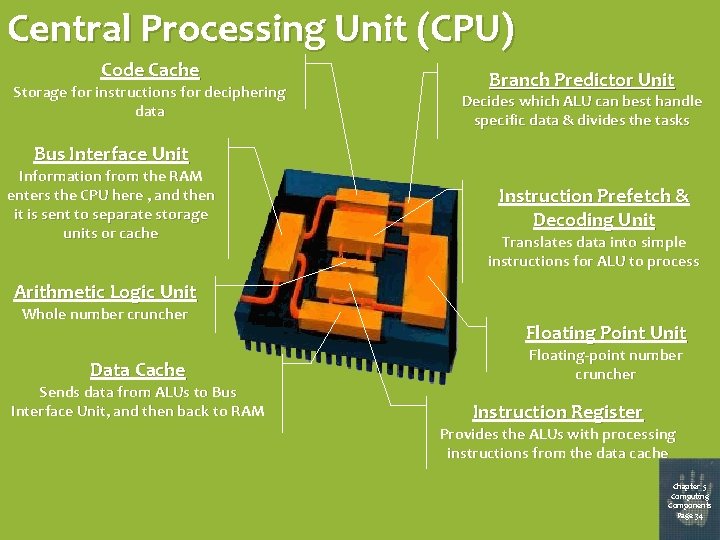
Central Processing Unit (CPU) Code Cache Storage for instructions for deciphering data Branch Predictor Unit Decides which ALU can best handle specific data & divides the tasks Bus Interface Unit Information from the RAM enters the CPU here , and then it is sent to separate storage units or cache Instruction Prefetch & Decoding Unit Translates data into simple instructions for ALU to process Arithmetic Logic Unit Whole number cruncher Data Cache Sends data from ALUs to Bus Interface Unit, and then back to RAM Floating Point Unit Floating-point number cruncher Instruction Register Provides the ALUs with processing instructions from the data cache Chapter 5 Computing Components Page 34
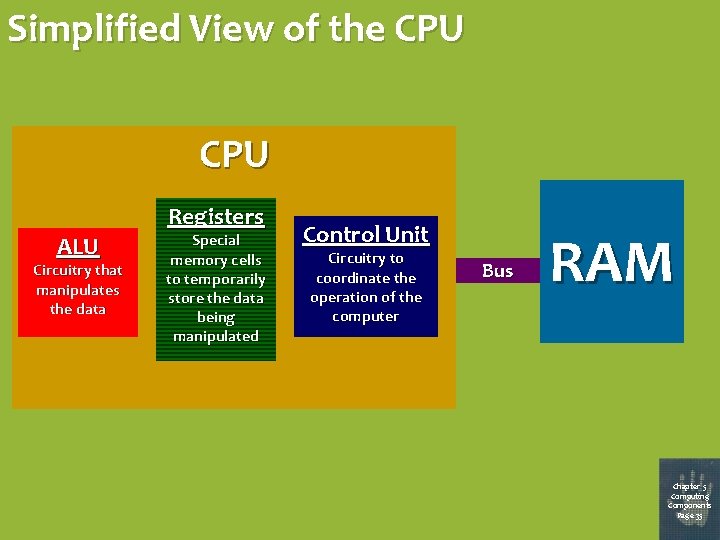
Simplified View of the CPU ALU Circuitry that manipulates the data Registers Special memory cells to temporarily store the data being manipulated Control Unit Circuitry to coordinate the operation of the computer Bus RAM Chapter 5 Computing Components Page 35
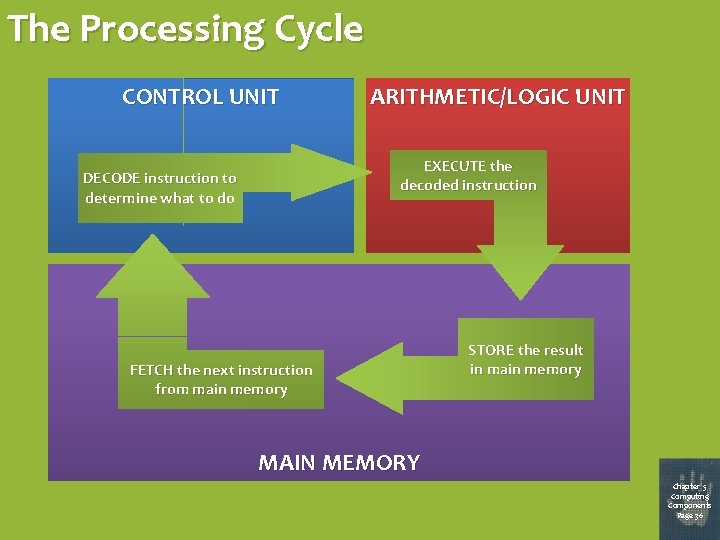
The Processing Cycle CONTROL UNIT ARITHMETIC/LOGIC UNIT EXECUTE the decoded instruction DE C O DE in s t r u c t io n t o d e t e r m in e w h a t t o d o FETCH the next instruction from main memory S T O R E t h e res u l t in m a in m e m o r y MAIN MEMORY Chapter 5 Computing Components Page 36
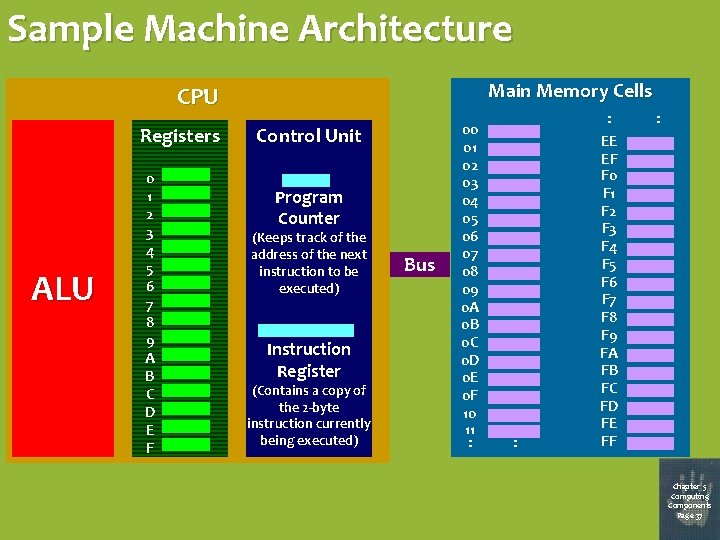
Sample Machine Architecture Main Memory Cells CPU Registers ALU 0 1 2 3 4 5 6 7 8 9 A B C D E F Control Unit Program Counter (Keeps track of the address of the next instruction to be executed) Instruction Register (Contains a copy of the 2 -byte instruction currently being executed) Bus 00 01 02 03 04 05 06 07 08 09 0 A 0 B 0 C 0 D 0 E 0 F 10 11 : : : EE EF F 0 F 1 F 2 F 3 F 4 F 5 F 6 F 7 F 8 F 9 FA FB FC FD FE FF : Chapter 5 Computing Components Page 37
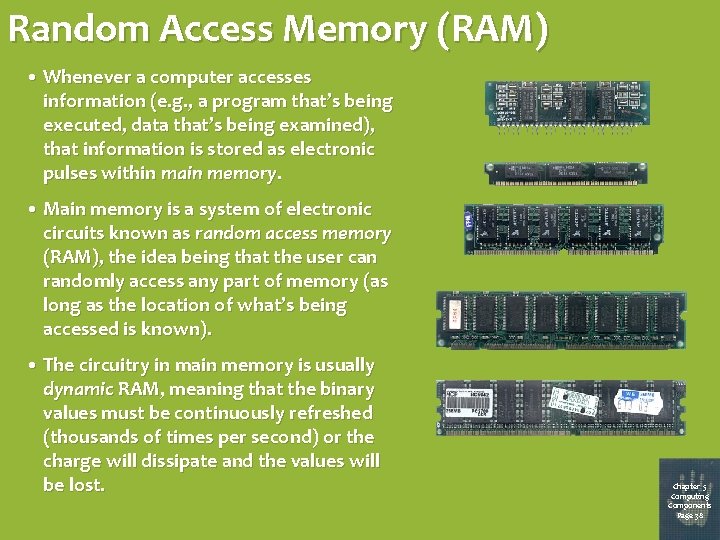
Random Access Memory (RAM) • Whenever a computer accesses information (e. g. , a program that’s being executed, data that’s being examined), that information is stored as electronic pulses within main memory. • Main memory is a system of electronic circuits known as random access memory (RAM), the idea being that the user can randomly access any part of memory (as long as the location of what’s being accessed is known). • The circuitry in main memory is usually dynamic RAM, meaning that the binary values must be continuously refreshed (thousands of times per second) or the charge will dissipate and the values will be lost. Chapter 5 Computing Components Page 38
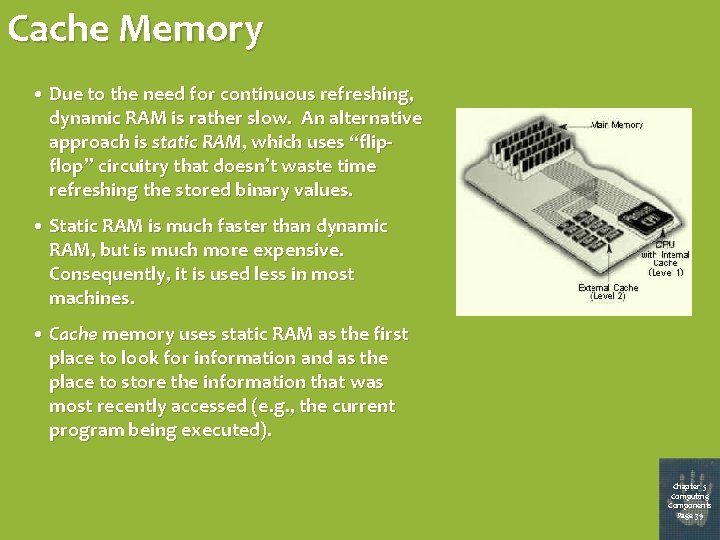
Cache Memory • Due to the need for continuous refreshing, dynamic RAM is rather slow. An alternative approach is static RAM, which uses “flipflop” circuitry that doesn’t waste time refreshing the stored binary values. • Static RAM is much faster than dynamic RAM, but is much more expensive. Consequently, it is used less in most machines. • Cache memory uses static RAM as the first place to look for information and as the place to store the information that was most recently accessed (e. g. , the current program being executed). Chapter 5 Computing Components Page 39
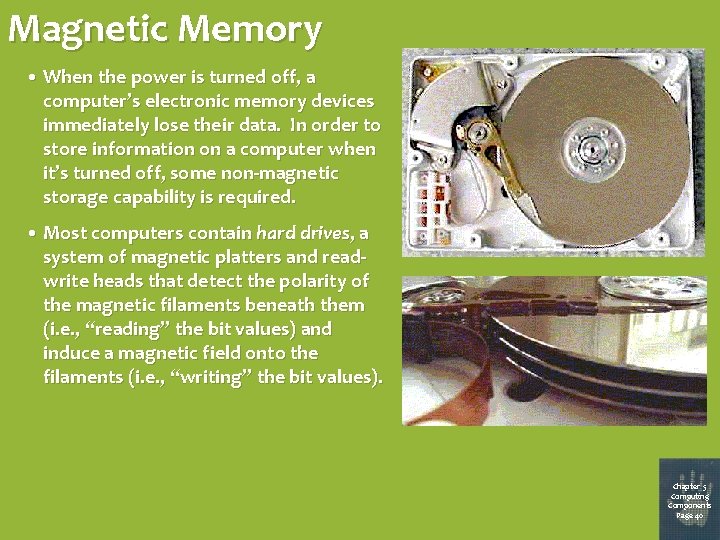
Magnetic Memory • When the power is turned off, a computer’s electronic memory devices immediately lose their data. In order to store information on a computer when it’s turned off, some non-magnetic storage capability is required. • Most computers contain hard drives, a system of magnetic platters and readwrite heads that detect the polarity of the magnetic filaments beneath them (i. e. , “reading” the bit values) and induce a magnetic field onto the filaments (i. e. , “writing” the bit values). Chapter 5 Computing Components Page 40
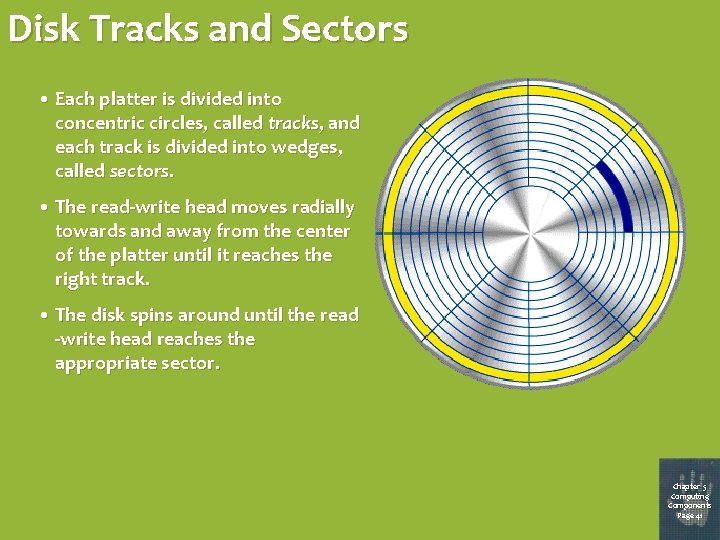
Disk Tracks and Sectors • Each platter is divided into concentric circles, called tracks, and each track is divided into wedges, called sectors. • The read-write head moves radially towards and away from the center of the platter until it reaches the right track. • The disk spins around until the read -write head reaches the appropriate sector. Chapter 5 Computing Components Page 41
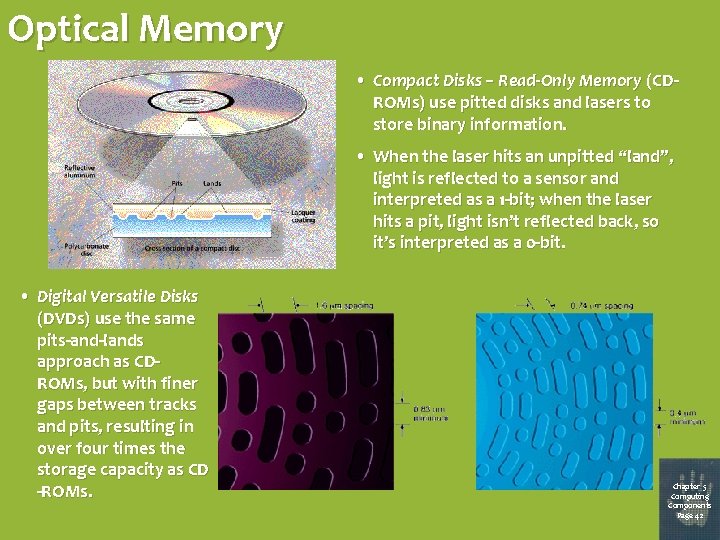
Optical Memory • Compact Disks – Read-Only Memory (CDROMs) use pitted disks and lasers to store binary information. • When the laser hits an unpitted “land”, light is reflected to a sensor and interpreted as a 1 -bit; when the laser hits a pit, light isn’t reflected back, so it’s interpreted as a 0 -bit. • Digital Versatile Disks (DVDs) use the same pits-and-lands approach as CDROMs, but with finer gaps between tracks and pits, resulting in over four times the storage capacity as CD -ROMs. Chapter 5 Computing Components Page 42
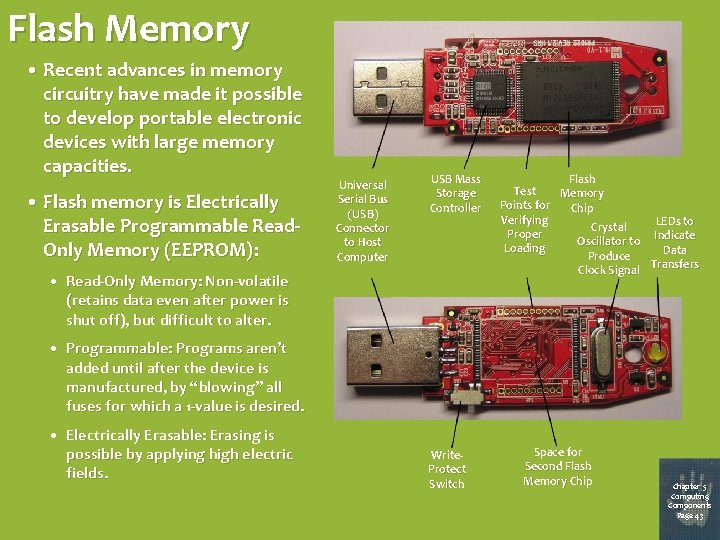
Flash Memory • Recent advances in memory circuitry have made it possible to develop portable electronic devices with large memory capacities. • Flash memory is Electrically Erasable Programmable Read. Only Memory (EEPROM): Universal Serial Bus (USB) Connector to Host Computer USB Mass Storage Controller • Read-Only Memory: Non-volatile (retains data even after power is shut off), but difficult to alter. Flash Test Memory Points for Chip Verifying LEDs to Crystal Proper Indicate Oscillator to Loading Data Produce Clock Signal Transfers • Programmable: Programs aren’t added until after the device is manufactured, by “blowing” all fuses for which a 1 -value is desired. • Electrically Erasable: Erasing is possible by applying high electric fields. Write. Protect Switch Space for Second Flash Memory Chip Chapter 5 Computing Components Page 43
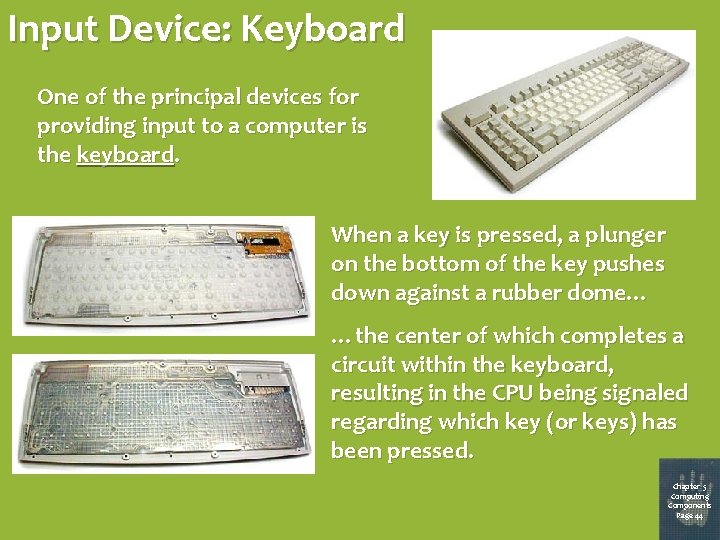
Input Device: Keyboard One of the principal devices for providing input to a computer is the keyboard. When a key is pressed, a plunger on the bottom of the key pushes down against a rubber dome… …the center of which completes a circuit within the keyboard, resulting in the CPU being signaled regarding which key (or keys) has been pressed. Chapter 5 Computing Components Page 44
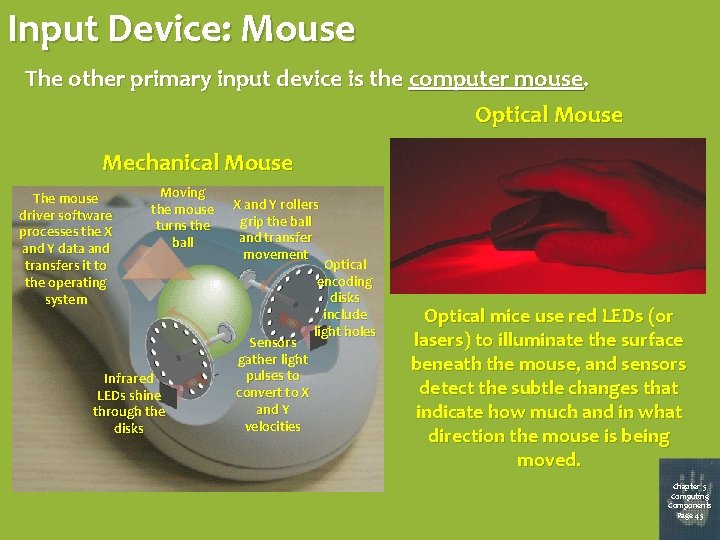
Input Device: Mouse The other primary input device is the computer mouse. Optical Mouse Mechanical Mouse The mouse driver software processes the X and Y data and transfers it to the operating system Moving the mouse turns the ball Infrared LEDs shine through the disks X and Y rollers grip the ball and transfer movement Sensors gather light pulses to convert to X and Y velocities Optical encoding disks include light holes Optical mice use red LEDs (or lasers) to illuminate the surface beneath the mouse, and sensors detect the subtle changes that indicate how much and in what direction the mouse is being moved. Chapter 5 Computing Components Page 45
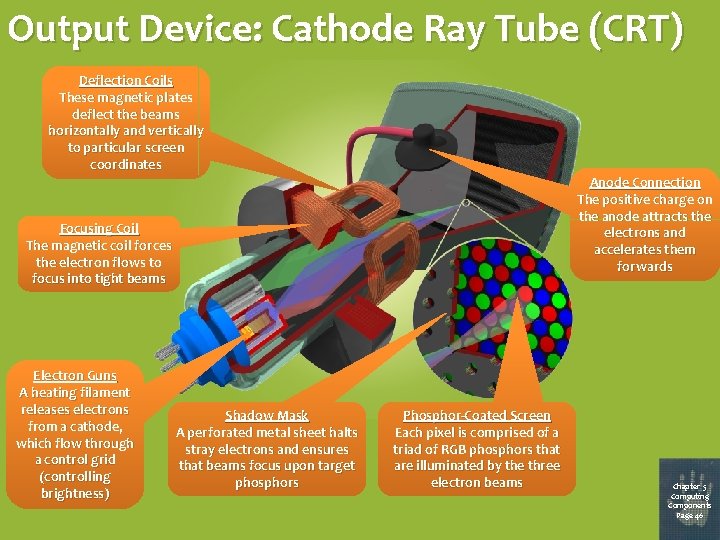
Output Device: Cathode Ray Tube (CRT) Deflection Coils These magnetic plates deflect the beams horizontally and vertically to particular screen coordinates Anode Connection The positive charge on the anode attracts the electrons and accelerates them forwards Focusing Coil The magnetic coil forces the electron flows to focus into tight beams Electron Guns A heating filament releases electrons from a cathode, which flow through a control grid (controlling brightness) Shadow Mask A perforated metal sheet halts stray electrons and ensures that beams focus upon target phosphors Phosphor-Coated Screen Each pixel is comprised of a triad of RGB phosphors that are illuminated by the three electron beams Chapter 5 Computing Components Page 46
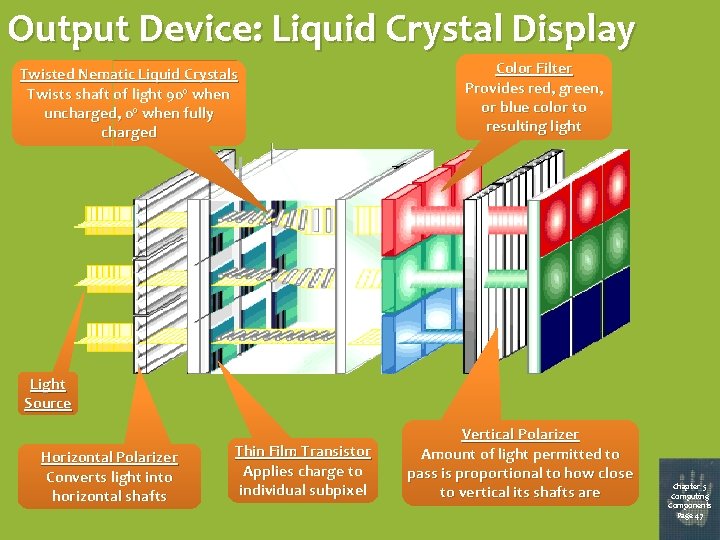
Output Device: Liquid Crystal Display Twisted Nematic Liquid Crystals Twists shaft of light 90º when uncharged, 0º when fully charged Color Filter Provides red, green, or blue color to resulting light Light Source Horizontal Polarizer Converts light into horizontal shafts Thin Film Transistor Applies charge to individual subpixel Vertical Polarizer Amount of light permitted to pass is proportional to how close to vertical its shafts are Chapter 5 Computing Components Page 47
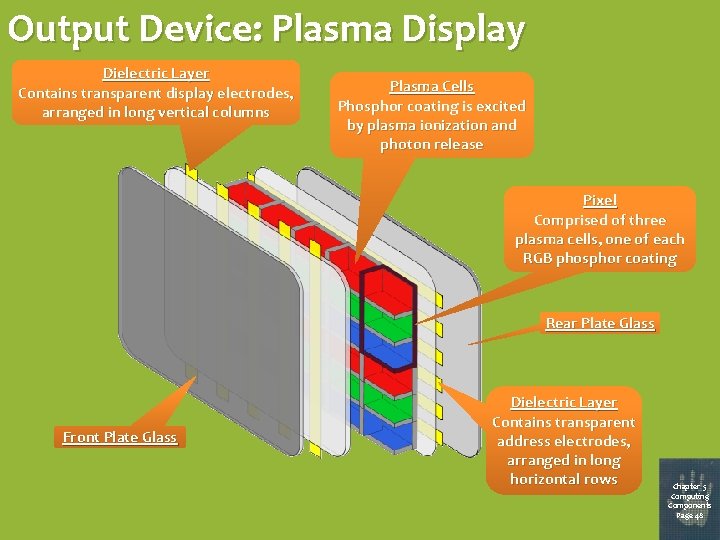
Output Device: Plasma Display Dielectric Layer Contains transparent display electrodes, arranged in long vertical columns Plasma Cells Phosphor coating is excited by plasma ionization and photon release Pixel Comprised of three plasma cells, one of each RGB phosphor coating Rear Plate Glass Front Plate Glass Dielectric Layer Contains transparent address electrodes, arranged in long horizontal rows Chapter 5 Computing Components Page 48
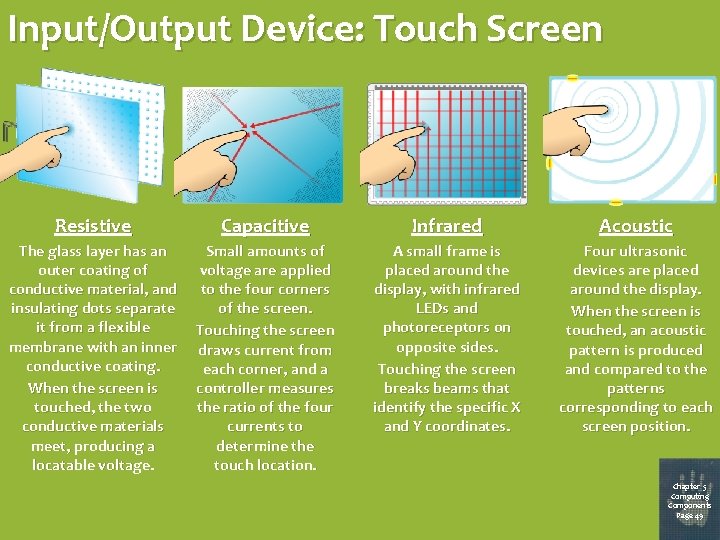
Input/Output Device: Touch Screen Resistive Capacitive Infrared Acoustic The glass layer has an outer coating of conductive material, and insulating dots separate it from a flexible membrane with an inner conductive coating. When the screen is touched, the two conductive materials meet, producing a locatable voltage. Small amounts of voltage are applied to the four corners of the screen. Touching the screen draws current from each corner, and a controller measures the ratio of the four currents to determine the touch location. A small frame is placed around the display, with infrared LEDs and photoreceptors on opposite sides. Touching the screen breaks beams that identify the specific X and Y coordinates. Four ultrasonic devices are placed around the display. When the screen is touched, an acoustic pattern is produced and compared to the patterns corresponding to each screen position. Chapter 5 Computing Components Page 49
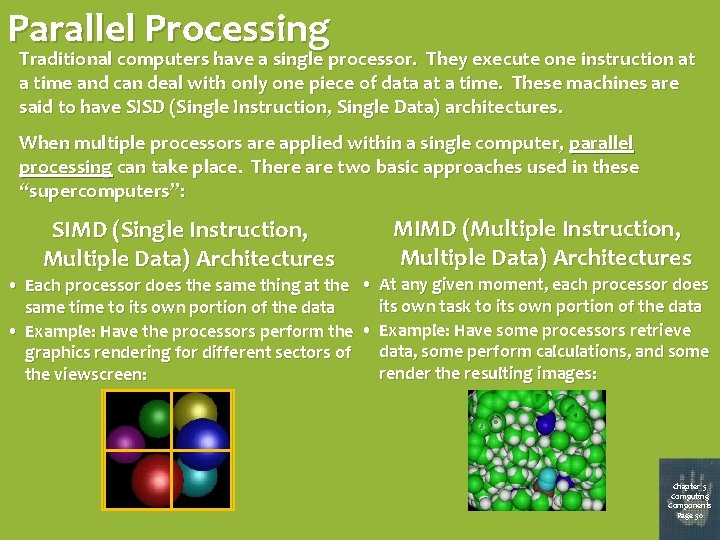
Parallel Processing Traditional computers have a single processor. They execute one instruction at a time and can deal with only one piece of data at a time. These machines are said to have SISD (Single Instruction, Single Data) architectures. When multiple processors are applied within a single computer, parallel processing can take place. There are two basic approaches used in these “supercomputers”: SIMD (Single Instruction, Multiple Data) Architectures MIMD (Multiple Instruction, Multiple Data) Architectures • Each processor does the same thing at the • At any given moment, each processor does its own task to its own portion of the data same time to its own portion of the data • Example: Have the processors perform the • Example: Have some processors retrieve data, some perform calculations, and some graphics rendering for different sectors of render the resulting images: the viewscreen: Chapter 5 Computing Components Page 50
- Slides: 50