
Chapter 1 Introduction to the World of Computers
- Slides: 74
Chapter 1: Introduction to the World of Computers
Learning Objectives 1. Explain why it is essential to learn about computers today and discuss several ways computers are integrated into our business and personal lives. 2. Define a computer and describe its primary operations. 3. List some important milestones in computer evolution. 4. Identify the major parts of a personal computer, including input, processing, output, storage, and communications hardware. 5. Define software and understand how it is used to instruct the computer what to do. Understanding Computers in a Changing Society, 5 th Edition 22
Learning Objectives 6. List the six basic types of computers, giving at least one example of each type of computer and stating what that computer might be used for. 7. Explain what a network, the Internet, and the World Wide Web are, as well as how computers, people, and Web pages are identified on the Internet. 8. Describe how to access a Web page and navigate through a Web site. 9. Discuss the societal impact of computers, including some benefits and risks related to their prominence in our society. Understanding Computers in a Changing Society, 5 th Edition 3
Overview • This chapter covers: – What computers are, how they work, and how they are used – Computer terminology – An overview of the history of computers – The basic types of computers in use today – An overview of networks and the Internet – Societal impacts of computers Understanding Computers in a Changing Society, 5 th Edition 4 4
Computers in Your Life • Why learn about computers? – Pervasive computing • Also known as ubiquitous computing • Computers have become an integral part of our lives – Basic computer literacy • Knowing about and understanding computers and their uses is an essential skill today for everyone Understanding Computers in a Changing Society, 5 th Edition 5
Computers in Your Life • Before 1980 – Computers were large, expensive – Very few people had access to them – Computers were mostly used for high-volume processing tasks • Microcomputers in the early 80 s – Inexpensive personal computers – Computer use increased dramatically Understanding Computers in a Changing Society, 5 th Edition 6
Computers in Your Life • Today – In 2016, the American Community Survey (ACS) found that 89 percent of households had a computer, making it a common feature of everyday life. - Electronic devices are converging into single units with multiple capabilities • Computer is no longer an isolated productivity tool • Check e-mail on living room television • View internet content on mobile phone or other mobile device – Computer literacy • Knowing about and understanding computers and their uses is an essential skill for everyone Understanding Computers in a Changing Society, 5 th Edition 7
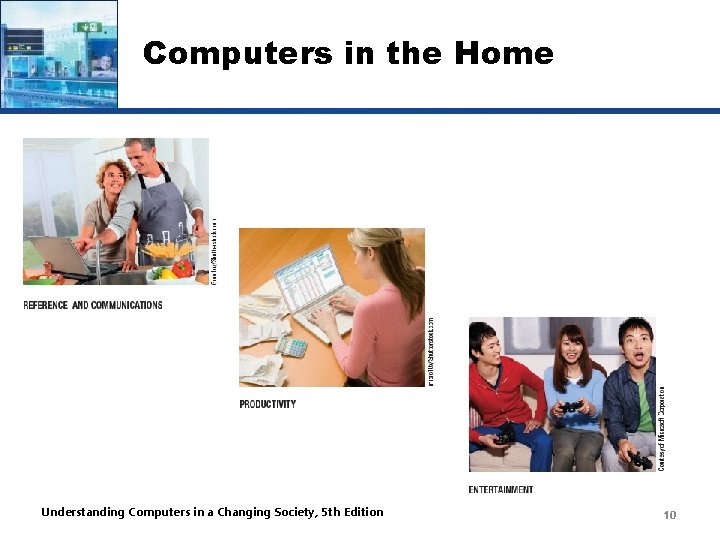
Computers in the Home • Computers used for a variety of tasks: – Looking up information and news – Exchanging e-mail – Shopping and paying bills – Watching TV and videos – Downloading music and movies – Organizing digital photographs – Playing games – Making vacation plans Understanding Computers in a Changing Society, 5 th Edition 8
Computers in the Home • Wireless networking – Computers can be used in nearly any location • Smart appliances – Traditional appliances with built-in computer or communication technology • Smart homes – Household tasks are monitored and controlled by a main computer in the house Understanding Computers in a Changing Society, 5 th Edition 9
Computers in the Home Understanding Computers in a Changing Society, 5 th Edition 10
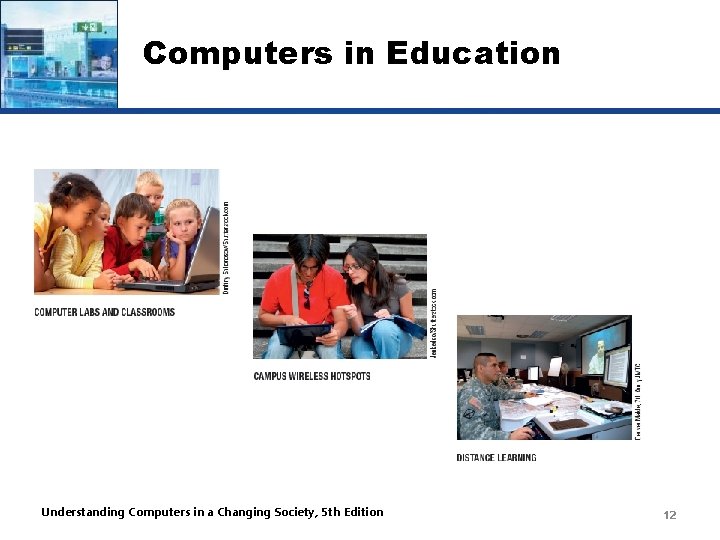
Computers in Education • Youth today can be called the computing generation • Most students today have access to computers at school – Some schools integrate e-books into the curriculum • Colleges and universities are even more integrated – Wireless hotspots allow usage of personal laptops to connect to the college network – Some colleges require a computer for enrollment • Distance learning – Students participate from locations other than the traditional classroom setting using computers and Internet access Understanding Computers in a Changing Society, 5 th Edition 11
Computers in Education Understanding Computers in a Changing Society, 5 th Edition 12
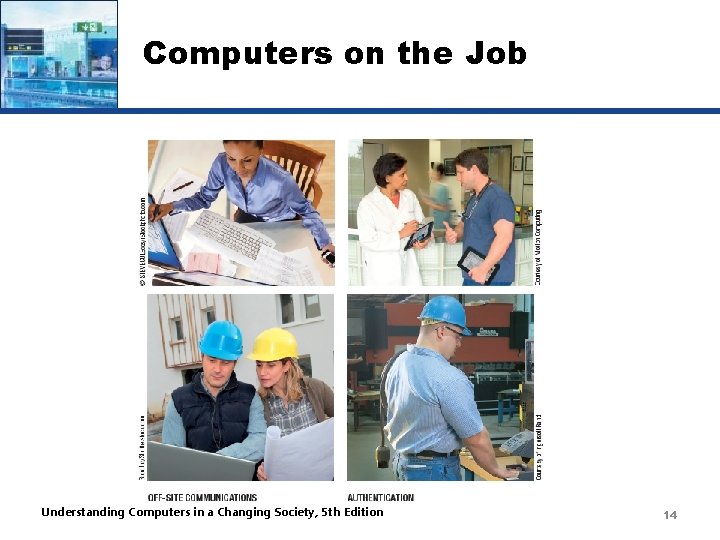
Computers on the Job • Computers have become a universal on-the-job tool for decision-making, productivity, and communication – Used by all types of employees – Used for access control and other security measures – Use by service professionals is growing – Used extensively by the military – Employees in all lines of work need to continually refresh their computer skills Understanding Computers in a Changing Society, 5 th Edition 13
Computers on the Job Understanding Computers in a Changing Society, 5 th Edition 14
Computers on the Go • Computers are encountered in nearly every aspect of daily life – Consumer kiosks – ATM transactions – POS systems at retail stores – Self-checkout systems – Consumer authentication systems – Portable computers or mobile devices – GPS systems Understanding Computers in a Changing Society, 5 th Edition 15
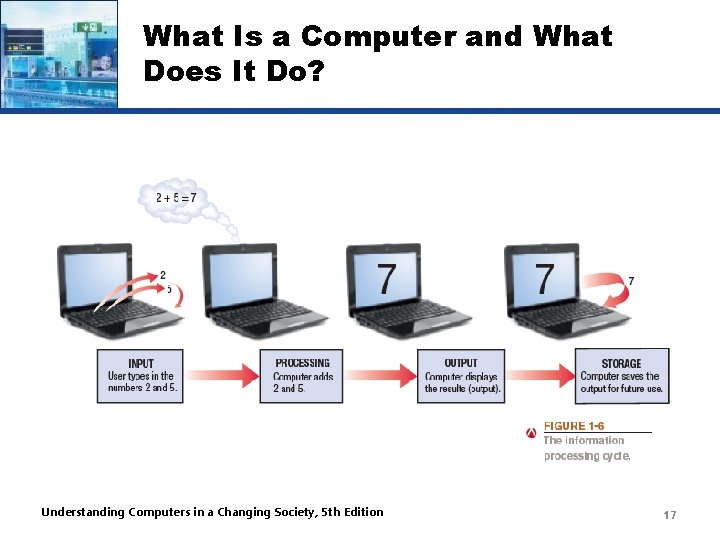
What Is a Computer and What Does It Do? • Computer – A programmable, electronic device that accepts data, performs operations on that data, and stores the data or results as needed – Computers follow instructions, called programs, which determine the tasks the computer will perform • Basic operations – Input: Entering data into the computer – Processing: Performing operations on the data – Output: Presenting the results – Storage: Saving data, programs, or output for future use – Communications: Sending or receiving data Understanding Computers in a Changing Society, 5 th Edition 16
What Is a Computer and What Does It Do? Understanding Computers in a Changing Society, 5 th Edition 17
Data vs. Information • Data – Raw, unorganized facts – Can be in the form of text, graphics, audio, or video • Information – Data that has been processed into a meaningful form • Information processing – Converting data into information Understanding Computers in a Changing Society, 5 th Edition 18
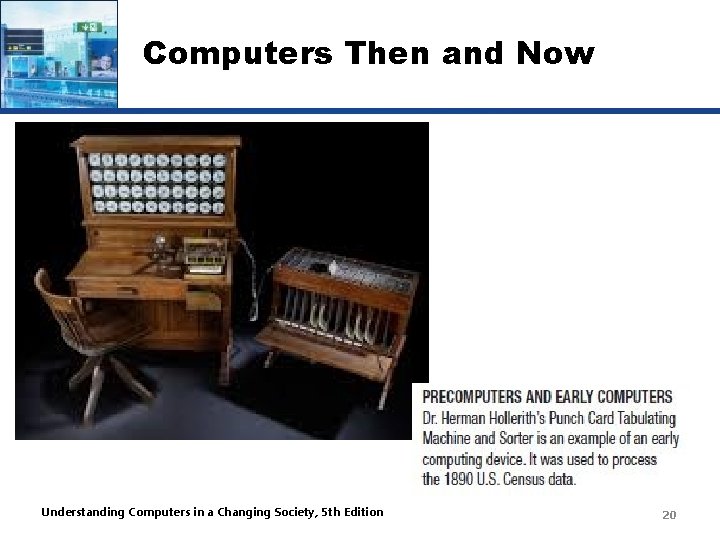
Computers Then and Now • The computer as we know it is a fairly recent invention • The history of computers is often referred to in terms of generations • Each new generation is characterized by a major technological development • Precomputers and early computers (before 1946) – Abacus, slide rule, mechanical calculator – Punch Card Tabulating Machine and Sorter Understanding Computers in a Changing Society, 5 th Edition 19
Computers Then and Now Understanding Computers in a Changing Society, 5 th Edition 20
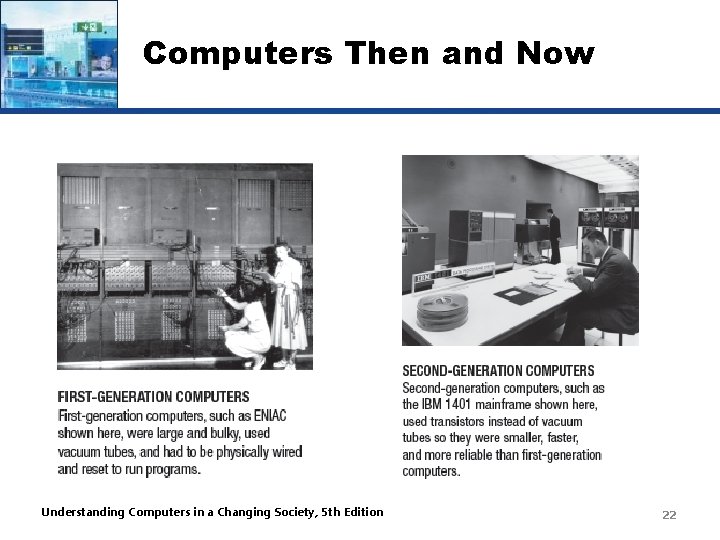
Computers Then and Now • First-generation computers (1946 -1957) – Enormous and powered by vacuum tubes – Used a great deal of electricity and generated a lot of heat – ENIAC and UNIVAC • Second-generation computers (1958 -1963) – Used transistors – Computers were smaller, more powerful, cheaper, more energy-efficient, and more reliable – Punch cards and magnetic tape were used to input and store data Understanding Computers in a Changing Society, 5 th Edition 21
Computers Then and Now Understanding Computers in a Changing Society, 5 th Edition 22
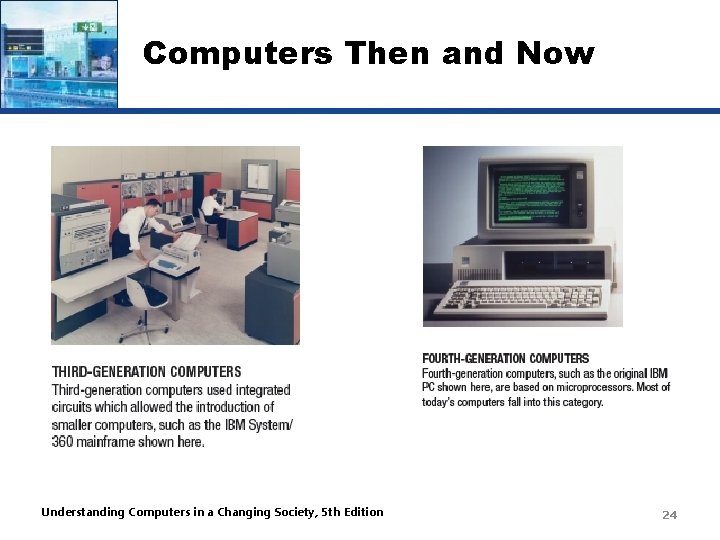
Computers Then and Now • Third-generation computers (1964 -1970) – Used integrated circuits (ICs) – Keyboards and monitors introduced • Fourth-generation computers (1971 -present) – Use microprocessors – IBM PC, Apple Macintosh – Use keyboards, mice, monitors, and printers – Use magnetic disks, flash memory, and optical disks for storage – Computer networks, wireless technologies, Internet introduced Understanding Computers in a Changing Society, 5 th Edition 23
Computers Then and Now Understanding Computers in a Changing Society, 5 th Edition 24
Computers Then and Now • Fifth-generation (now and the future) – Infancy stage – No precise classification – May be based on artificial intelligence (AI) – Will likely use voice and touch input – May be based on optical computers and utilize nanotechnology Understanding Computers in a Changing Society, 5 th Edition 25
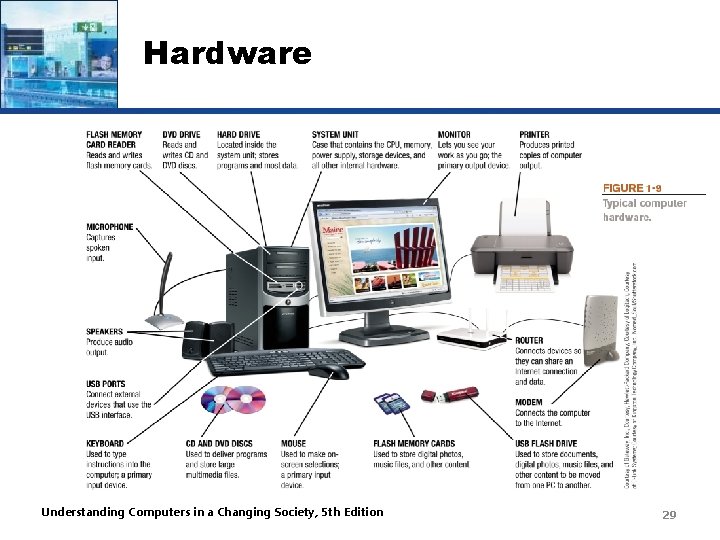
Hardware • Hardware: The physical parts of a computer – Internal hardware • Located inside the main box (system unit) of the computer – External hardware • Located outside the system unit • Connect to the computer via a wired or wireless connection – Hardware devices are associated with all five computer operations Understanding Computers in a Changing Society, 5 th Edition 26
Hardware • Input devices – Used to input data into the computer – Keyboards, mice, scanners, cameras, microphones, joysticks, touch pads, touch screens, fingerprint readers, etc. • Processing devices – Perform calculations and control computer’s operation – Central processing unit (CPU) and memory • Output devices – Present results to the user – Monitors, printers, speakers, projectors, etc. Understanding Computers in a Changing Society, 5 th Edition 27
Hardware • Storage devices – Used to store data on or access data from storage media – Hard drives, CD/DVD discs and drives, USB flash drives, etc. • Communications devices – Allow users to communicate with others and to electronically access remote information – Modems, network adapters, etc. Understanding Computers in a Changing Society, 5 th Edition 28
Hardware Understanding Computers in a Changing Society, 5 th Edition 29
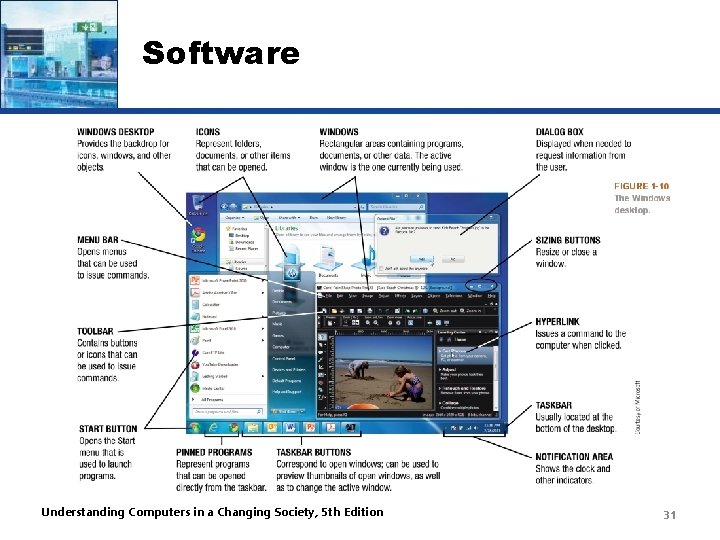
Software • Software – The programs or instructions used to tell the computer hardware what to do • System software – Operating system starts up the computer and controls its operation – Without OS, computer cannot function – Boots the computer and launches programs at the user’s direction – Most use a GUI to interact with the user via windows, icons, menus, buttons, etc. – Windows, Mac OS, Linux, etc. Understanding Computers in a Changing Society, 5 th Edition 30
Software Understanding Computers in a Changing Society, 5 th Edition 31
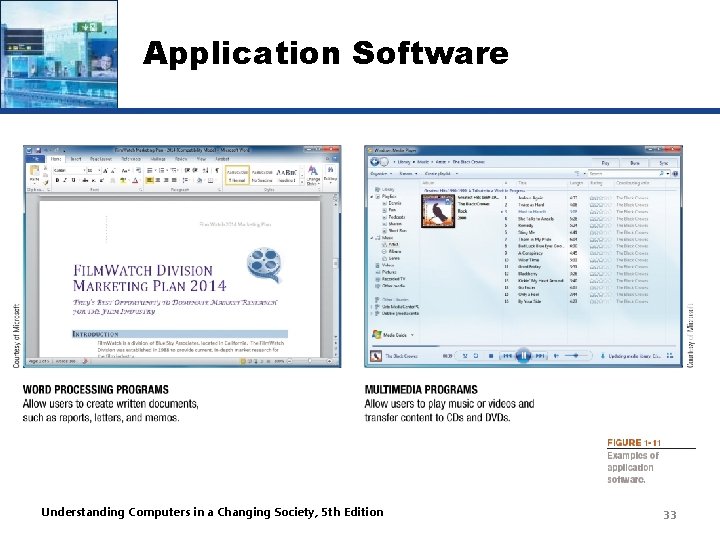
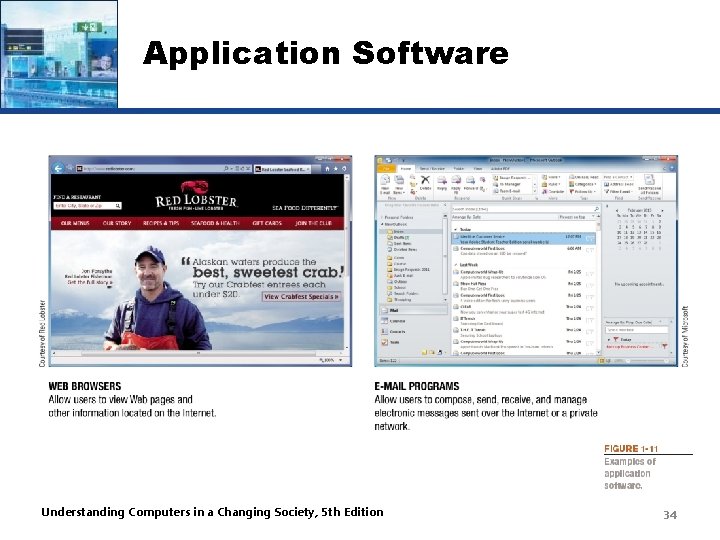
Application Software • Application software – Performs specific tasks or applications • Creating letters, budgets, etc. • Managing inventory and customer databases • Editing photographs • Scheduling appointments • Viewing Web pages • Sending and receiving e-mail • Recording/playing CDs and DVDs • Designing homes • Playing games Understanding Computers in a Changing Society, 5 th Edition 32
Application Software Understanding Computers in a Changing Society, 5 th Edition 33
Application Software Understanding Computers in a Changing Society, 5 th Edition 34
Computer Users and Professionals • Computer users (end users) – People who use a computer to obtain information • Computer professionals include: – Programmers • Write programs computers use – Systems analysts • Design computer systems – Computer operations personnel • Manage day-to-day computer operations – Security specialists • Secure computers and networks against hackers Understanding Computers in a Changing Society, 5 th Edition 35
Quick Quiz 1. Which of the following was not a first generation computer? a. IBM PC b. UNIVAC c. ENIAC 2. True or False: A window displayed when the computer needs more information from the user is called a dialog box. 3. Speakers are an example of a(n) _______ device. Answers: 1) a; 2) True; 3) output Understanding Computers in a Changing Society, 5 th Edition 36
Computers To Fit Every Need • Six basic categories of computers: – Embedded computers – Mobile devices – Personal computers – Midrange servers – Mainframe computers – Supercomputers Understanding Computers in a Changing Society, 5 th Edition 37
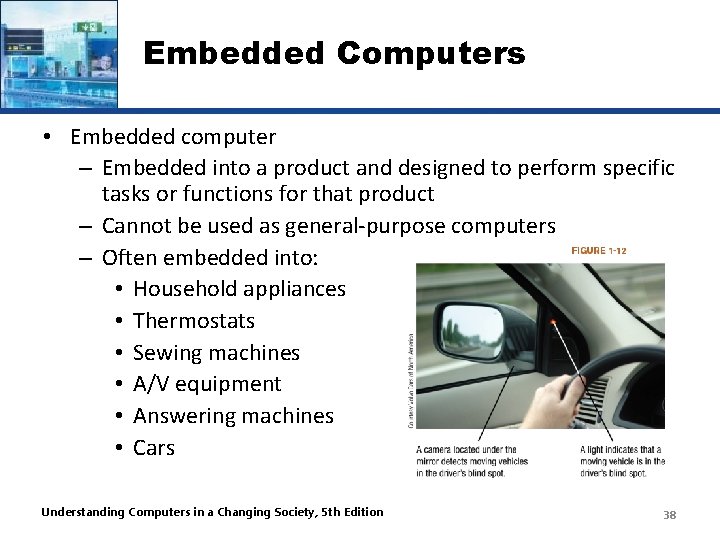
Embedded Computers • Embedded computer – Embedded into a product and designed to perform specific tasks or functions for that product – Cannot be used as general-purpose computers – Often embedded into: • Household appliances • Thermostats • Sewing machines • A/V equipment • Answering machines • Cars Understanding Computers in a Changing Society, 5 th Edition 38
Mobile Devices • Mobile device – A very small device with some type of built-in computing or Internet capability – Often based on a mobile phone – Typically have small screens and keyboards – Examples: • Smartphones • Handheld gaming devices • Portable digital media players • Mobile tablets Understanding Computers in a Changing Society, 5 th Edition 39
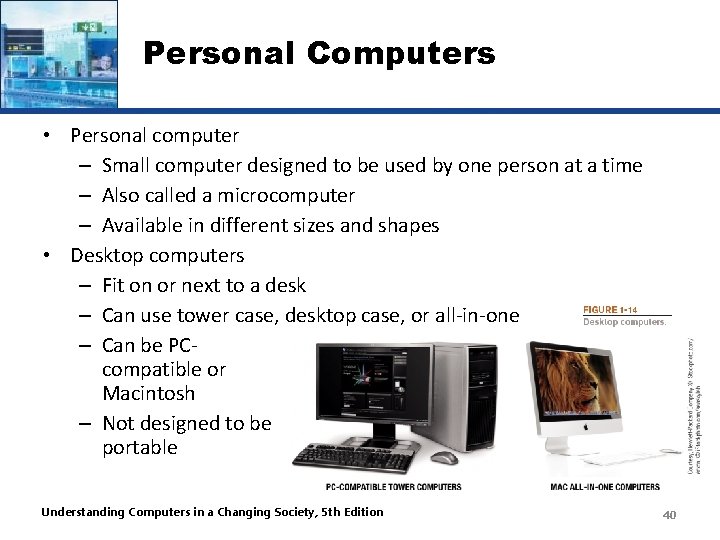
Personal Computers • Personal computer – Small computer designed to be used by one person at a time – Also called a microcomputer – Available in different sizes and shapes • Desktop computers – Fit on or next to a desk – Can use tower case, desktop case, or all-in-one – Can be PCcompatible or Macintosh – Not designed to be portable Understanding Computers in a Changing Society, 5 th Edition 40
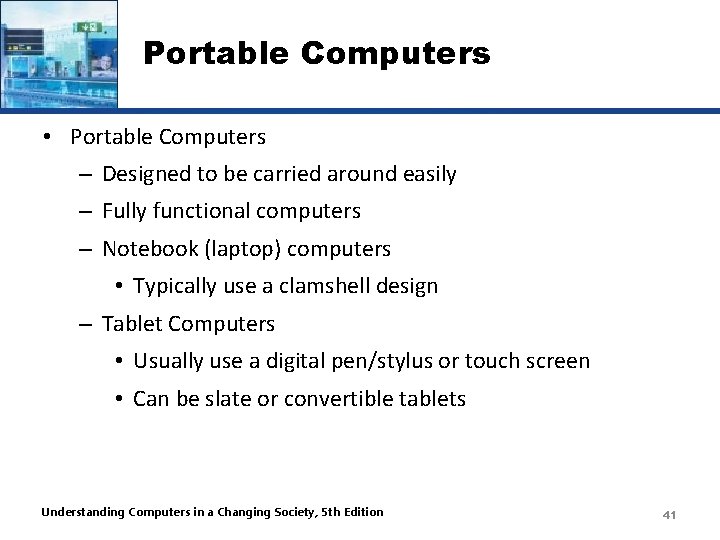
Portable Computers • Portable Computers – Designed to be carried around easily – Fully functional computers – Notebook (laptop) computers • Typically use a clamshell design – Tablet Computers • Usually use a digital pen/stylus or touch screen • Can be slate or convertible tablets Understanding Computers in a Changing Society, 5 th Edition 41
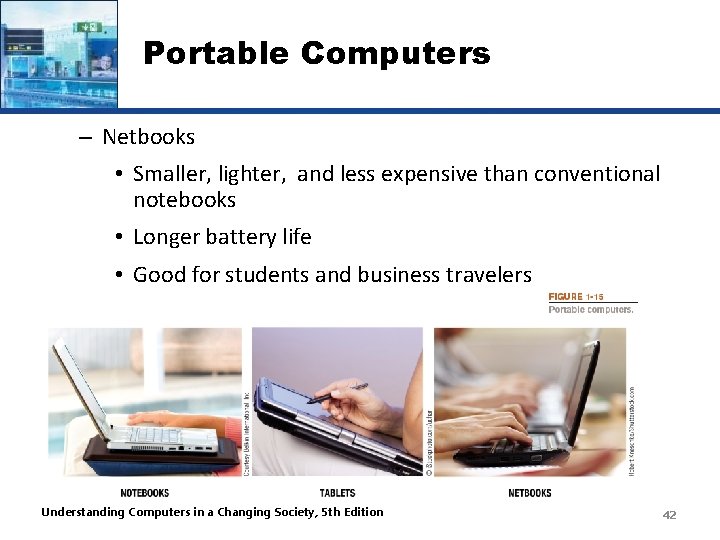
Portable Computers – Netbooks • Smaller, lighter, and less expensive than conventional notebooks • Longer battery life • Good for students and business travelers Understanding Computers in a Changing Society, 5 th Edition 42
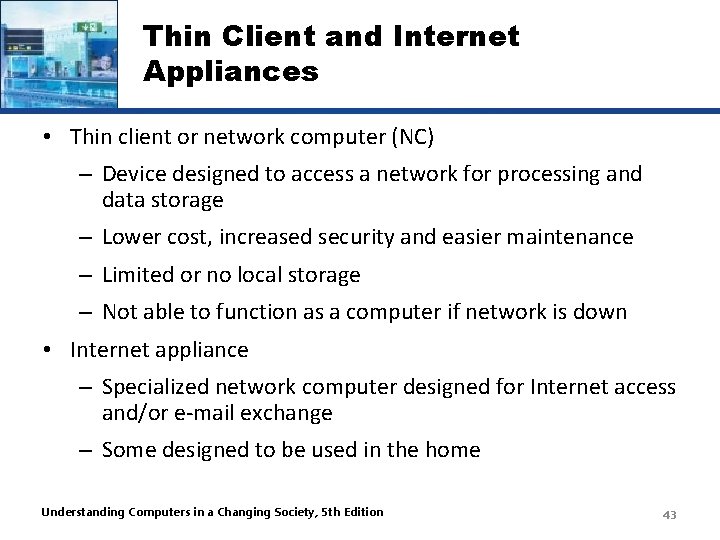
Thin Client and Internet Appliances • Thin client or network computer (NC) – Device designed to access a network for processing and data storage – Lower cost, increased security and easier maintenance – Limited or no local storage – Not able to function as a computer if network is down • Internet appliance – Specialized network computer designed for Internet access and/or e-mail exchange – Some designed to be used in the home Understanding Computers in a Changing Society, 5 th Edition 43
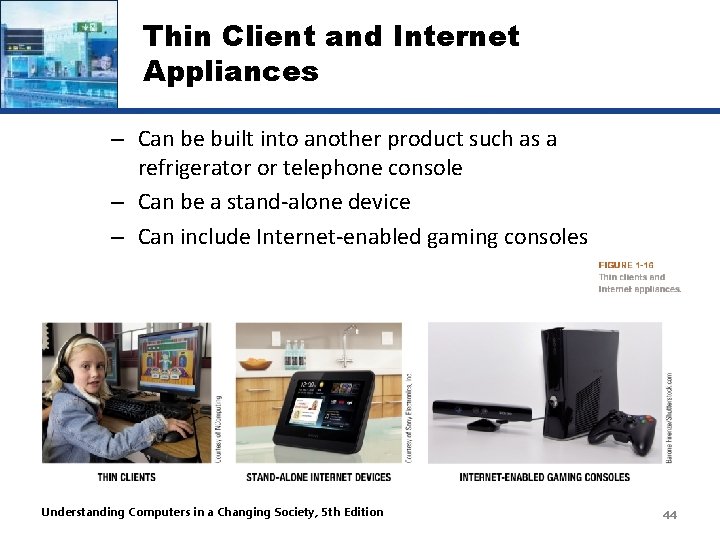
Thin Client and Internet Appliances – Can be built into another product such as a refrigerator or telephone console – Can be a stand-alone device – Can include Internet-enabled gaming consoles Understanding Computers in a Changing Society, 5 th Edition 44
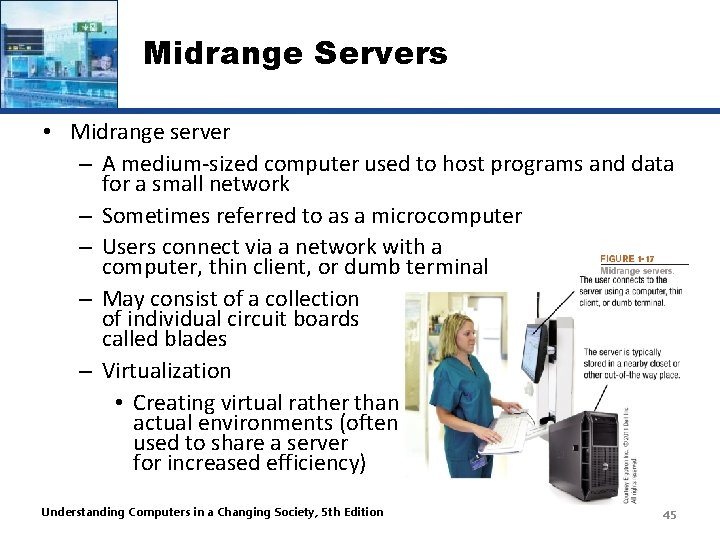
Midrange Servers • Midrange server – A medium-sized computer used to host programs and data for a small network – Sometimes referred to as a microcomputer – Users connect via a network with a computer, thin client, or dumb terminal – May consist of a collection of individual circuit boards called blades – Virtualization • Creating virtual rather than actual environments (often used to share a server for increased efficiency) Understanding Computers in a Changing Society, 5 th Edition 45
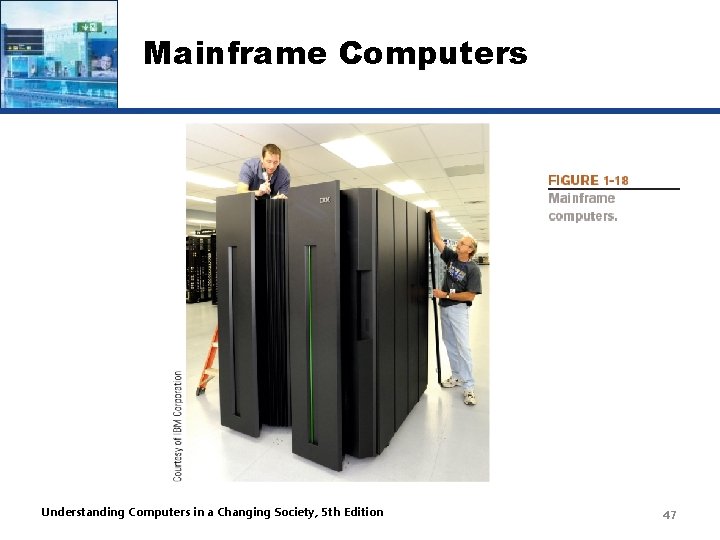
Mainframe Computers • Mainframe computer – Powerful computer used by many large organizations to manage large amounts of centralized data – Standard choice for hospitals, universities, large businesses, banks, government offices – Located in climate-controlled data centers and connected to the rest of the company computers via a network – Larger, more expensive, and more powerful than midrange servers – Usually operate 24 hours a day – Also called high-end servers or enterprise-class servers Understanding Computers in a Changing Society, 5 th Edition 46
Mainframe Computers Understanding Computers in a Changing Society, 5 th Edition 47
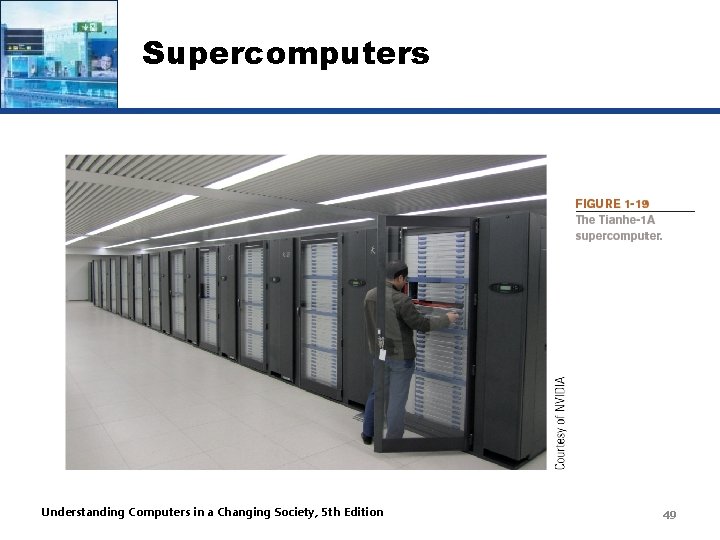
Supercomputers • Supercomputer – Fastest, most expensive, most powerful type of computer – Generally run one program at a time, as fast as possible – Commonly built by connecting hundreds of smaller computers, supercomputing cluster – Used for space exploration, missile guidance, satellites, weather forecast, oil exploration, scientific research, complex Web sites, decision support systems, 3 D applications, etc. Understanding Computers in a Changing Society, 5 th Edition 48
Supercomputers Understanding Computers in a Changing Society, 5 th Edition 49
Quick Quiz 1. A tablet PC is an example of a(n) _______. a. Desktop computer b. Portable PC c. Internet appliance 2. True or False: The terms mainframe computer and supercomputer are interchangeable; both refer to the largest, most powerful computers. 3. A smartphone is an example of a(n) _______. Answers: 1) b; 2) False; 3) mobile device Understanding Computers in a Changing Society, 5 th Edition 50
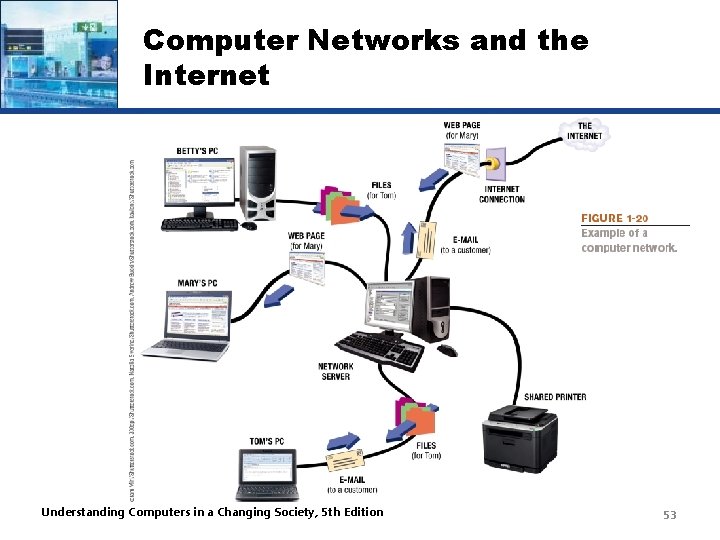
Computer Networks and the Internet • Computer network – A collection of hardware and other devices that are connected together – Users can share hardware, software, and data – Users can communicate with each other • Network servers – Manage resources on a network Understanding Computers in a Changing Society, 5 th Edition 51
Computer Networks and the Internet • Computer networks exist in many sizes and types – Home networks – School and small business networks – Large corporate – Public wireless networks – The Internet Understanding Computers in a Changing Society, 5 th Edition 52
Computer Networks and the Internet Understanding Computers in a Changing Society, 5 th Edition 53
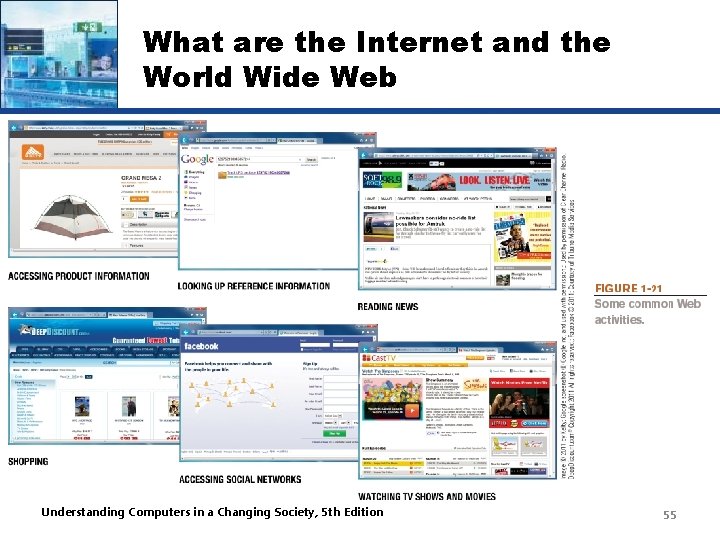
What are the Internet and the World Wide Web? • Internet – The largest and most well-known computer network in the world – Individuals connect to the Internet using an Internet service provider (ISP) • World Wide Web – One resource (a vast collection of Web pages) available through the Internet – Web sites contain Web pages stored on Web servers – Web pages viewed using a Web browser (Internet Explorer, Chrome, Safari, Firefox, Opera, etc. ) – A wide variety of information is available through the Web Understanding Computers in a Changing Society, 5 th Edition 54
What are the Internet and the World Wide Web Understanding Computers in a Changing Society, 5 th Edition 55
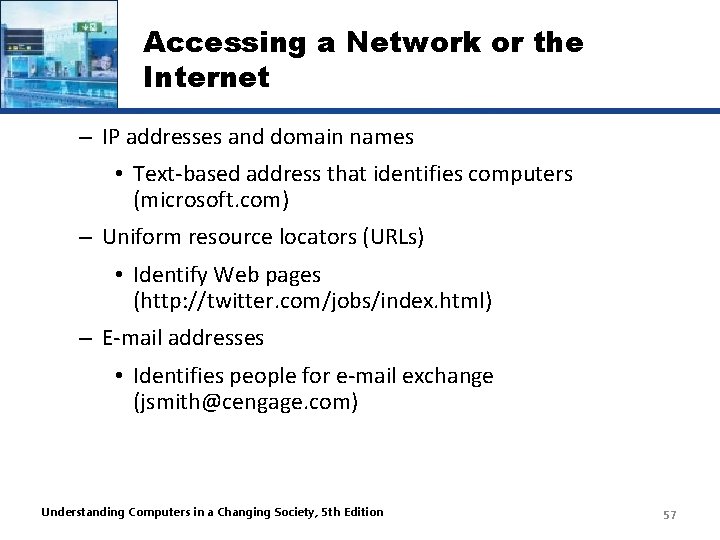
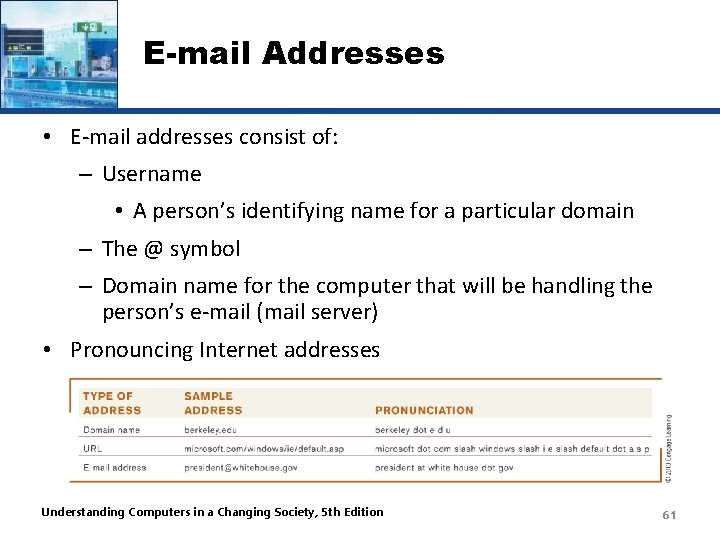
Accessing a Network or the Internet • Need a modem or network adapter to connect • Some networks require a username and password • Internet connections can be: – Direct (always-on) connections – Dial-up connections • Internet addresses are used to access resources on the Internet – IP (Internet Protocol) address • Numeric address that identifies computers (207. 46. 197. 32) Understanding Computers in a Changing Society, 5 th Edition 56
Accessing a Network or the Internet – IP addresses and domain names • Text-based address that identifies computers (microsoft. com) – Uniform resource locators (URLs) • Identify Web pages (http: //twitter. com/jobs/index. html) – E-mail addresses • Identifies people for e-mail exchange (jsmith@cengage. com) Understanding Computers in a Changing Society, 5 th Edition 57
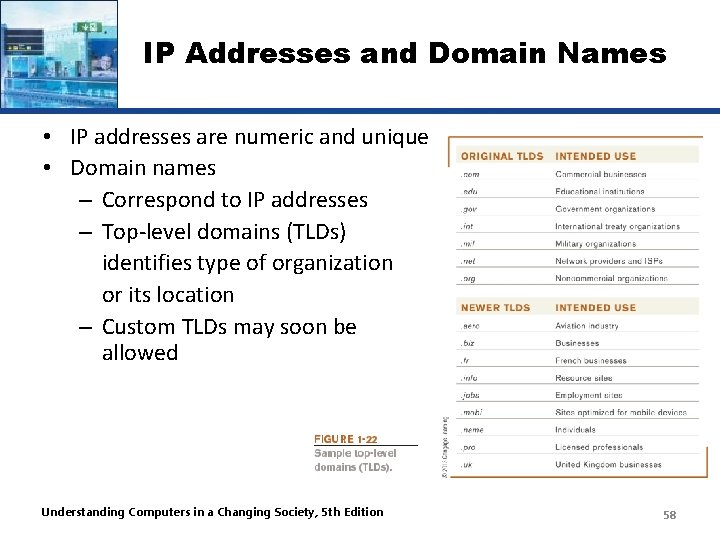
IP Addresses and Domain Names • IP addresses are numeric and unique • Domain names – Correspond to IP addresses – Top-level domains (TLDs) identifies type of organization or its location – Custom TLDs may soon be allowed Understanding Computers in a Changing Society, 5 th Edition 58
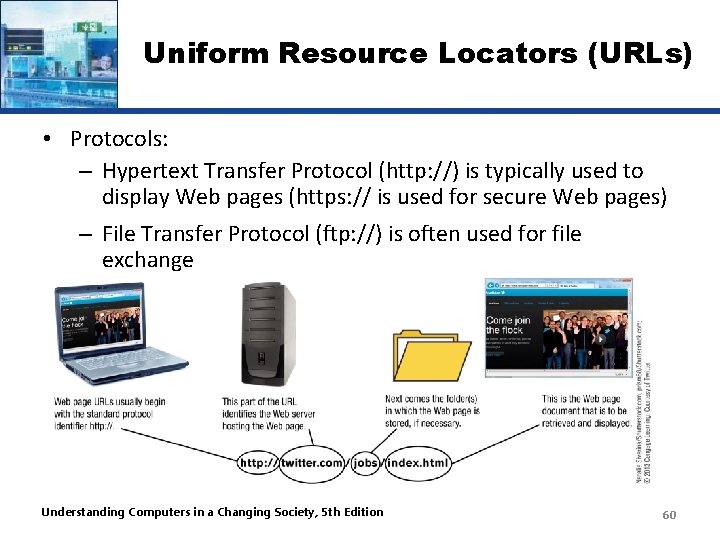
Uniform Resource Locators (URLs) • Uniform Resource Locators (URLs) – Uniquely identifies a Web page • Protocol or standard being used • Identification of the Web server • Names of folders in which the Web page file is stored • Web page’s filename Understanding Computers in a Changing Society, 5 th Edition 59
Uniform Resource Locators (URLs) • Protocols: – Hypertext Transfer Protocol (http: //) is typically used to display Web pages (https: // is used for secure Web pages) – File Transfer Protocol (ftp: //) is often used for file exchange Understanding Computers in a Changing Society, 5 th Edition 60
E-mail Addresses • E-mail addresses consist of: – Username • A person’s identifying name for a particular domain – The @ symbol – Domain name for the computer that will be handling the person’s e-mail (mail server) • Pronouncing Internet addresses Understanding Computers in a Changing Society, 5 th Edition 61
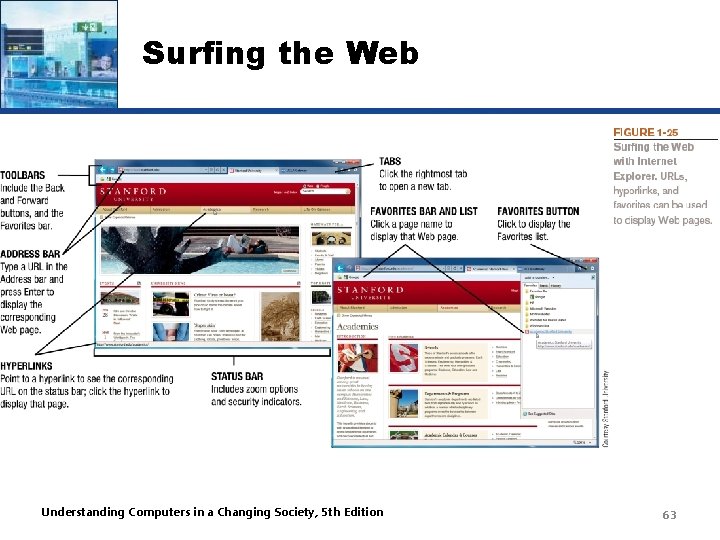
Surfing the Web • Web browser – Used to display Web pages • Browser starting page or home page – The first page displayed when the browser is opened • To navigate to a Web page, you can: – Type a URL in the Address bar – Click a hyperlink –graphics or text linked to other Web pages – Select a Favorite/Bookmark or page from the History list Understanding Computers in a Changing Society, 5 th Edition 62
Surfing the Web Understanding Computers in a Changing Society, 5 th Edition 63
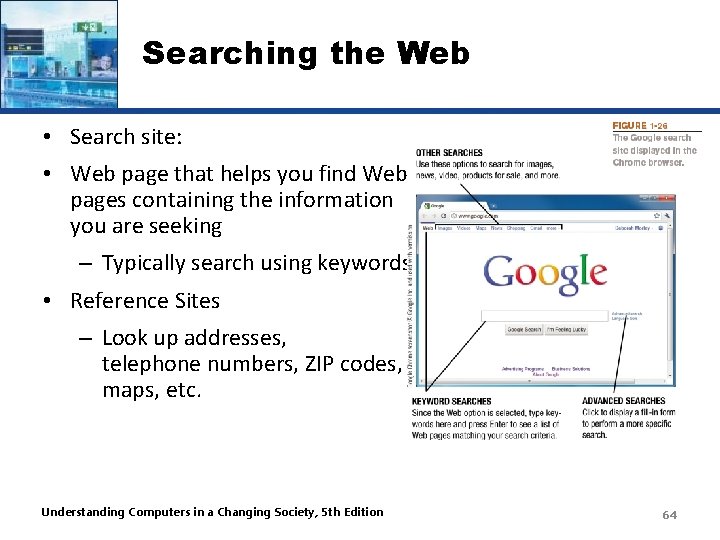
Searching the Web • Search site: • Web page that helps you find Web pages containing the information you are seeking – Typically search using keywords • Reference Sites – Look up addresses, telephone numbers, ZIP codes, maps, etc. Understanding Computers in a Changing Society, 5 th Edition 64
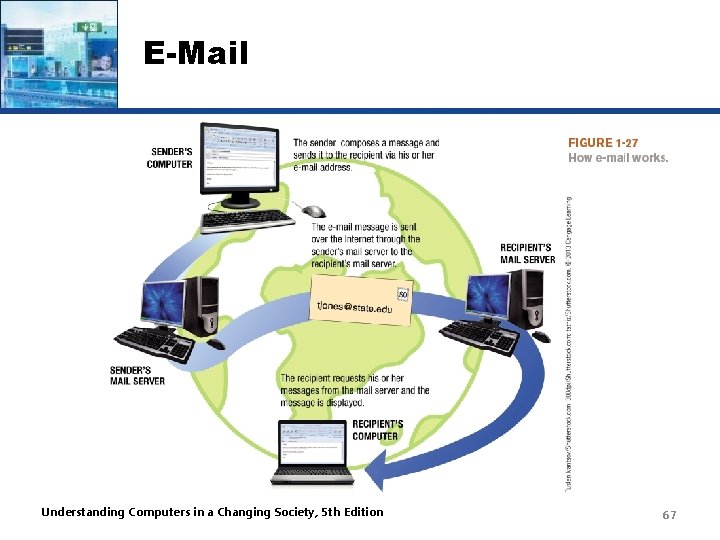
E-Mail • Electronic mail (e-mail) – Electronic messages exchanged between computers on a network – One of the most widely used Internet applications – Can be conventional e-mail program, Web-based, or mobile-based Conventional Web-based Microsoft Outlook Gmail Microsoft Mail Windows Live Mail Understanding Computers in a Changing Society, 5 th Edition 65
E-Mail – Can contain photos, attached files, etc. – Mobile e-mail may require a fee – Other types of mobile communications • Short Message Service (SMS) • Multimedia Message Service (MMS) Understanding Computers in a Changing Society, 5 th Edition 66
E-Mail Understanding Computers in a Changing Society, 5 th Edition 67
Computers and Society • The vast improvements in technology over the past decade have had a distinct impact on daily life, both at home and at work • Many benefits of a computer-oriented society – Ability to design products before construction leads to safer products – Earlier medical diagnoses and more effective treatment – Devices that allow physically and/or visually challenged individuals to perform job tasks – Documents e-mailed or faxed in moments – Download information, music, programs, movies, and more on demand Understanding Computers in a Changing Society, 5 th Edition 68
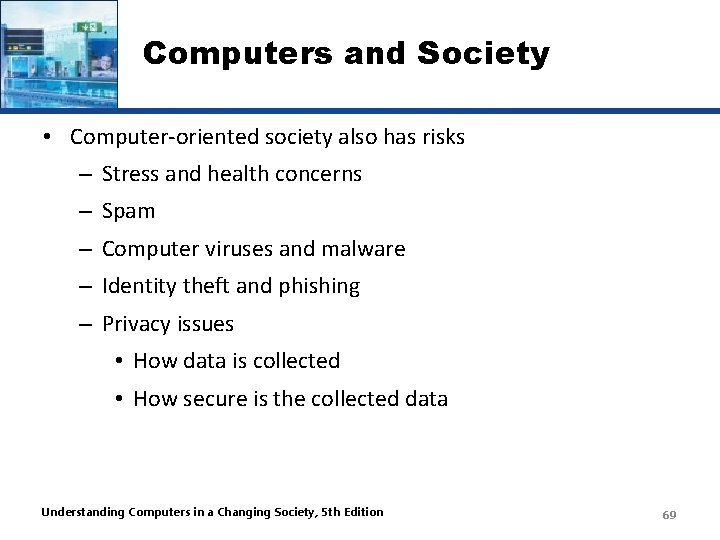
Computers and Society • Computer-oriented society also has risks – Stress and health concerns – Spam – Computer viruses and malware – Identity theft and phishing – Privacy issues • How data is collected • How secure is the collected data Understanding Computers in a Changing Society, 5 th Edition 69
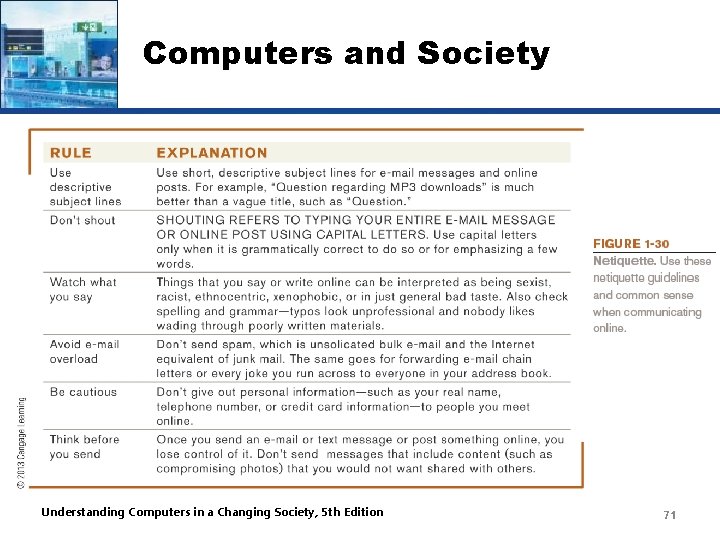
Computers and Society • Differences in online communications – Less formal than traditional – Netiquette • Be polite and considerate of others • Refrain from offensive remarks – Abbreviations (acronyms) and emoticons • Acronyms such as BTW (by the way) • Illustrations of faces-- Understanding Computers in a Changing Society, 5 th Edition 70
Computers and Society Understanding Computers in a Changing Society, 5 th Edition 71
Computers and Society • The Anonymity Factor – Gives many individuals a sense of freedom – Can also be abused • Information Integrity – Use common sense when evaluating online content – Check your source--not all information on the Internet is accurate Understanding Computers in a Changing Society, 5 th Edition 72
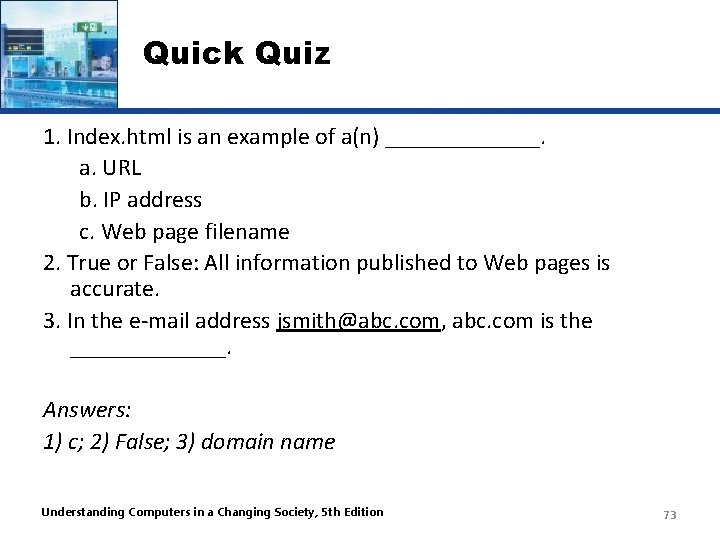
Quick Quiz 1. Index. html is an example of a(n) _______. a. URL b. IP address c. Web page filename 2. True or False: All information published to Web pages is accurate. 3. In the e-mail address jsmith@abc. com, abc. com is the _______. Answers: 1) c; 2) False; 3) domain name Understanding Computers in a Changing Society, 5 th Edition 73
Summary • • • Computers in Your Life What is a Computer and What Does It Do? Computers to Fit Every Need Computer Networks and the Internet Computers and Society Understanding Computers in a Changing Society, 5 th Edition 74